ignition FORD FIESTA 2015 Repair Manual
[x] Cancel search | Manufacturer: FORD, Model Year: 2015, Model line: FIESTA, Model: FORD FIESTA 2015Pages: 423, PDF Size: 5.5 MB
Page 280 of 423
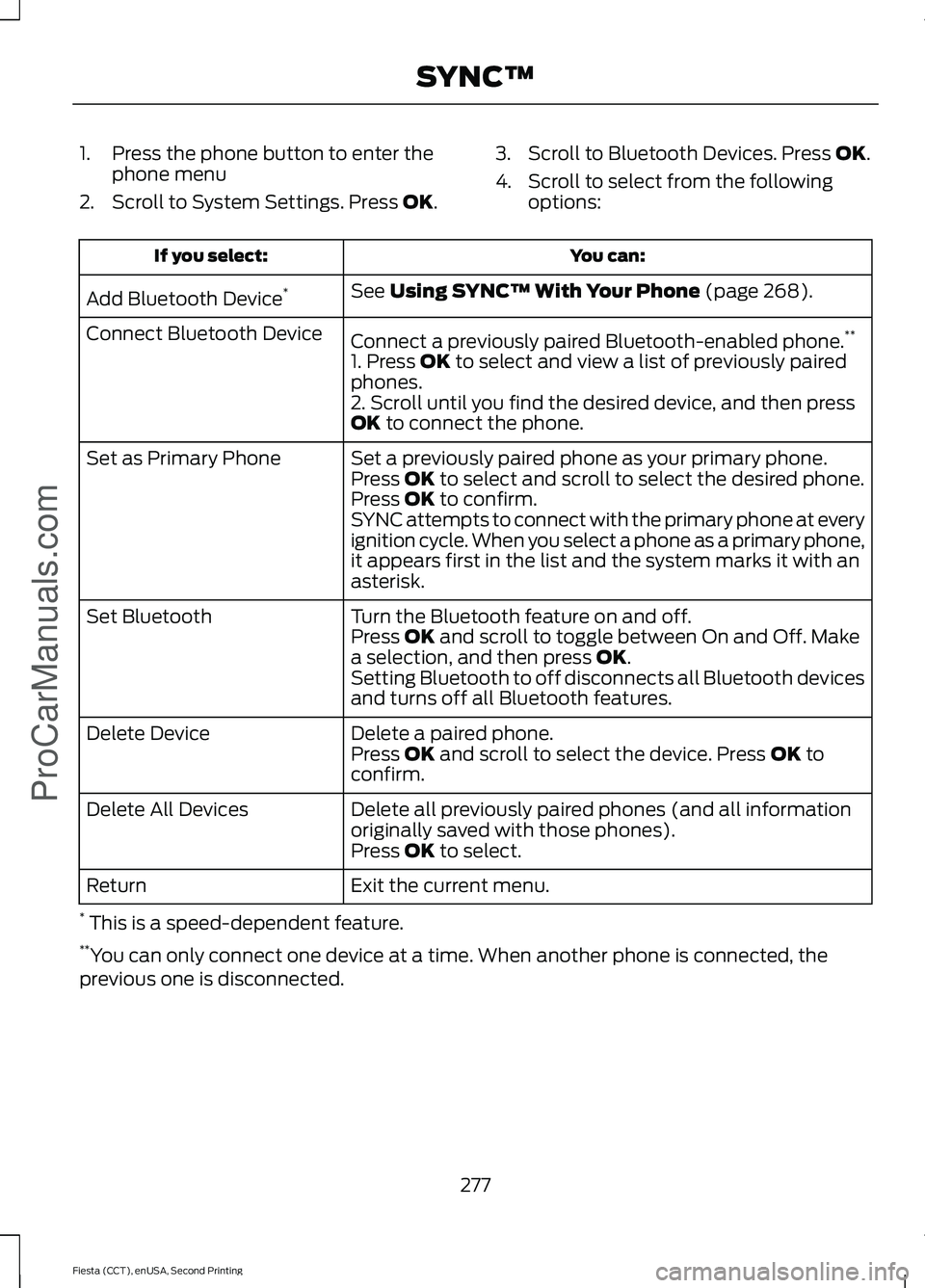
1. Press the phone button to enter the
phone menu
2. Scroll to System Settings. Press OK. 3. Scroll to Bluetooth Devices. Press
OK.
4. Scroll to select from the following options: You can:
If you select:
See
Using SYNC™ With Your Phone (page 268).
Add Bluetooth Device *
Connect a previously paired Bluetooth-enabled phone. **
Connect Bluetooth Device
1. Press
OK to select and view a list of previously paired
phones.
2. Scroll until you find the desired device, and then press
OK
to connect the phone.
Set a previously paired phone as your primary phone.
Set as Primary Phone
Press
OK to select and scroll to select the desired phone.
Press OK to confirm.
SYNC attempts to connect with the primary phone at every
ignition cycle. When you select a phone as a primary phone,
it appears first in the list and the system marks it with an
asterisk.
Turn the Bluetooth feature on and off.
Set Bluetooth
Press
OK and scroll to toggle between On and Off. Make
a selection, and then press OK.
Setting Bluetooth to off disconnects all Bluetooth devices
and turns off all Bluetooth features.
Delete a paired phone.
Delete Device
Press
OK and scroll to select the device. Press OK to
confirm.
Delete all previously paired phones (and all information
originally saved with those phones).
Delete All Devices
Press
OK to select.
Exit the current menu.
Return
* This is a speed-dependent feature.
** You can only connect one device at a time. When another phone is connected, the
previous one is disconnected.
277
Fiesta (CCT), enUSA, Second Printing SYNC™
ProCarManuals.com
Page 306 of 423
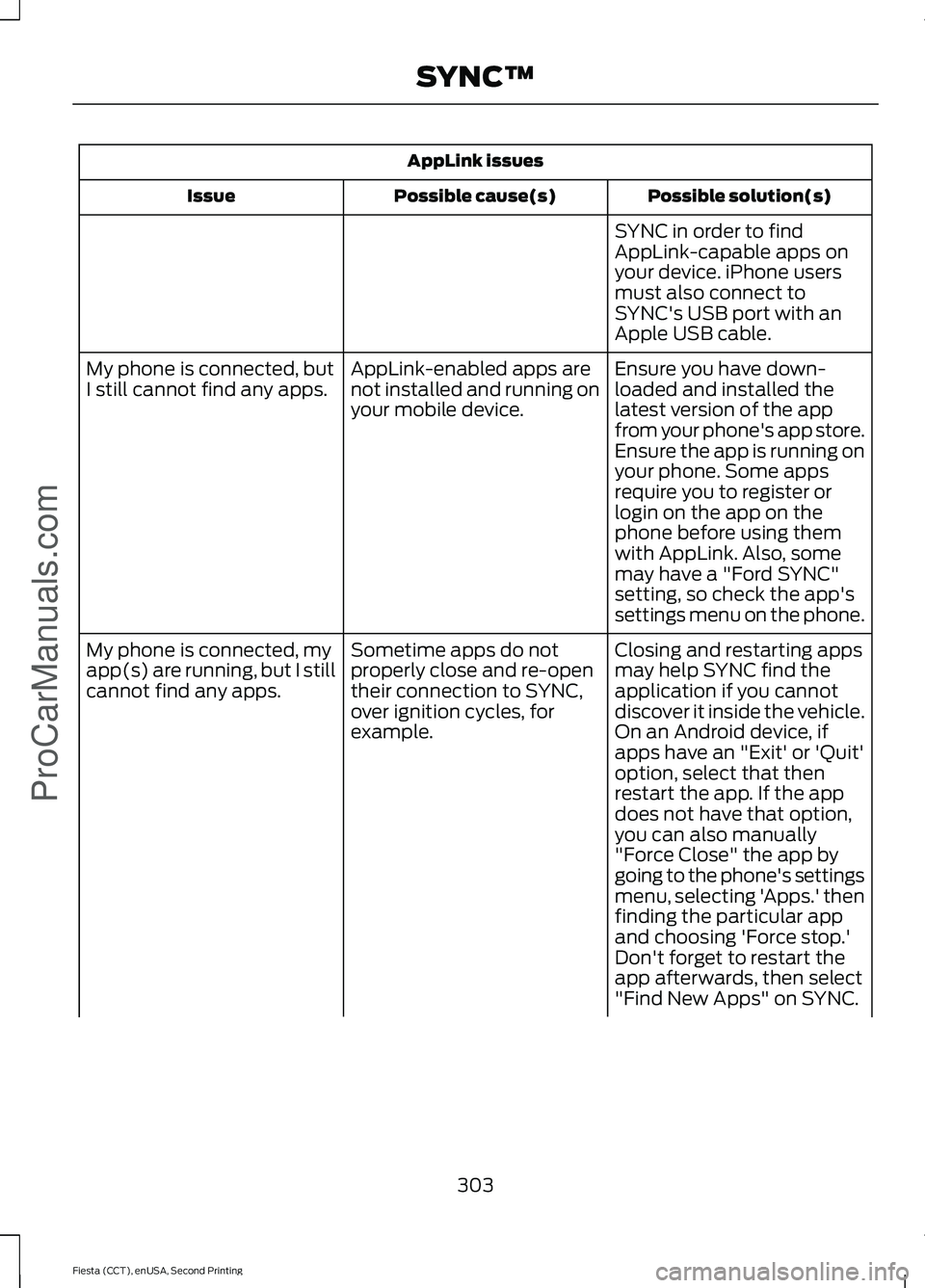
AppLink issues
Possible solution(s)
Possible cause(s)
Issue
SYNC in order to find
AppLink-capable apps on
your device. iPhone users
must also connect to
SYNC's USB port with an
Apple USB cable.
Ensure you have down-
loaded and installed the
latest version of the app
from your phone's app store.
Ensure the app is running on
your phone. Some apps
AppLink-enabled apps are
not installed and running on
your mobile device.
My phone is connected, but
I still cannot find any apps.
require you to register or
login on the app on the
phone before using them
with AppLink. Also, some
may have a "Ford SYNC"
setting, so check the app's
settings menu on the phone.
Closing and restarting apps
may help SYNC find the
application if you cannot
discover it inside the vehicle.
On an Android device, if
apps have an "Exit' or 'Quit'
Sometime apps do not
properly close and re-open
their connection to SYNC,
over ignition cycles, for
example.
My phone is connected, my
app(s) are running, but I still
cannot find any apps.
option, select that then
restart the app. If the app
does not have that option,
you can also manually
"Force Close" the app by
going to the phone's settings
menu, selecting 'Apps.' then
finding the particular app
and choosing 'Force stop.'
Don't forget to restart the
app afterwards, then select
"Find New Apps" on SYNC.
303
Fiesta (CCT), enUSA, Second Printing SYNC™ProCarManuals.com
Page 309 of 423
GENERAL INFORMATION WARNING
Driving while distracted can result in
loss of vehicle control, crash and
injury. We strongly recommend that
you use extreme caution when using any
device that may take your focus off the
road. Your primary responsibility is the safe
operation of your vehicle. We recommend
against the use of any hand-held device
while driving and encourage the use of
voice-operated systems when possible.
Make sure you are aware of all applicable
local laws that may affect the use of
electronic devices while driving. Message
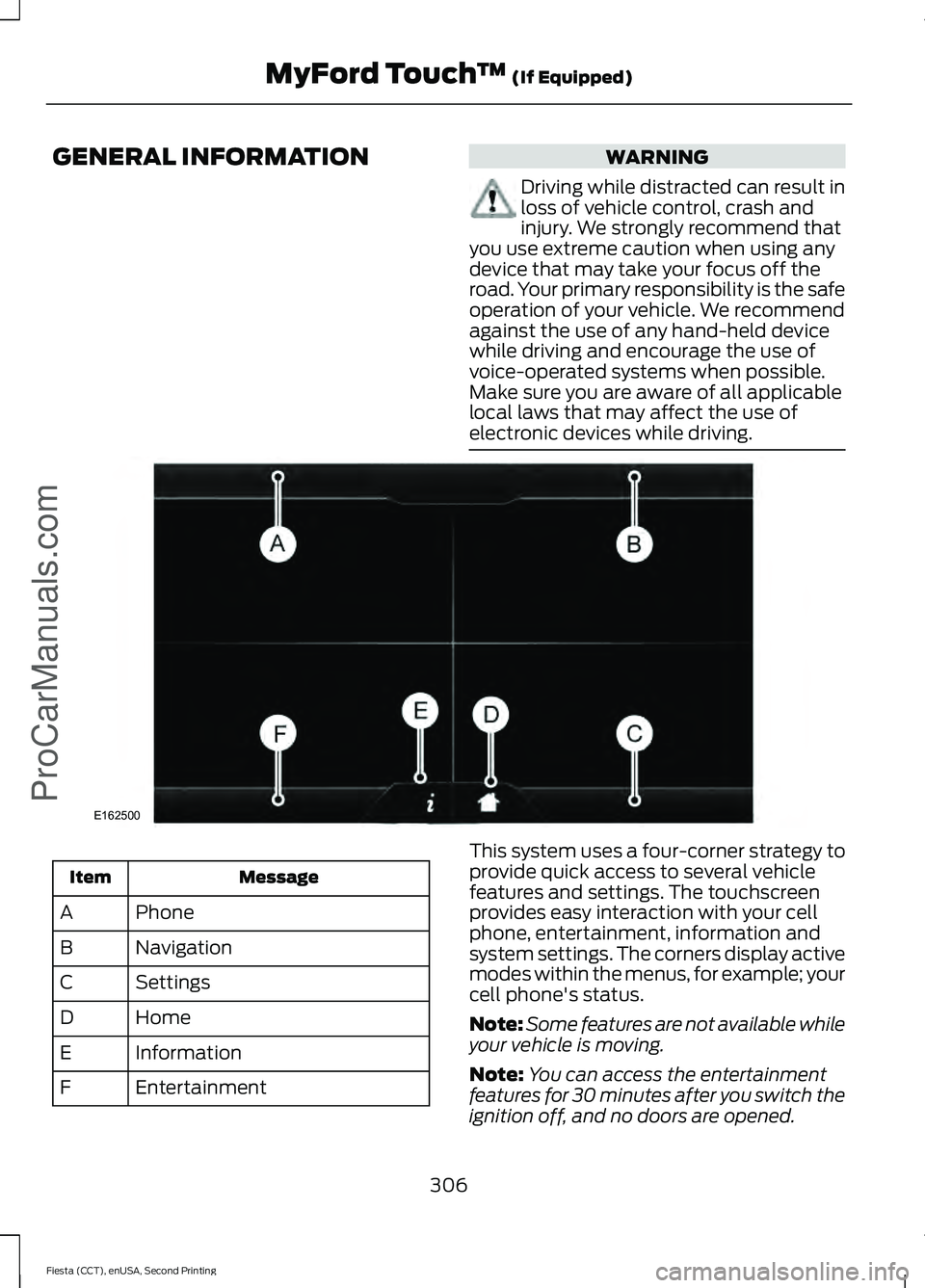
Item
Phone
A
Navigation
B
Settings
C
Home
D
Information
E
Entertainment
F This system uses a four-corner strategy to
provide quick access to several vehicle
features and settings. The touchscreen
provides easy interaction with your cell
phone, entertainment, information and
system settings. The corners display active
modes within the menus, for example; your
cell phone's status.
Note:
Some features are not available while
your vehicle is moving.
Note: You can access the entertainment
features for 30 minutes after you switch the
ignition off, and no doors are opened.
306
Fiesta (CCT), enUSA, Second Printing MyFord Touch
™ (If Equipped)
ProCarManuals.comE162500
Page 323 of 423
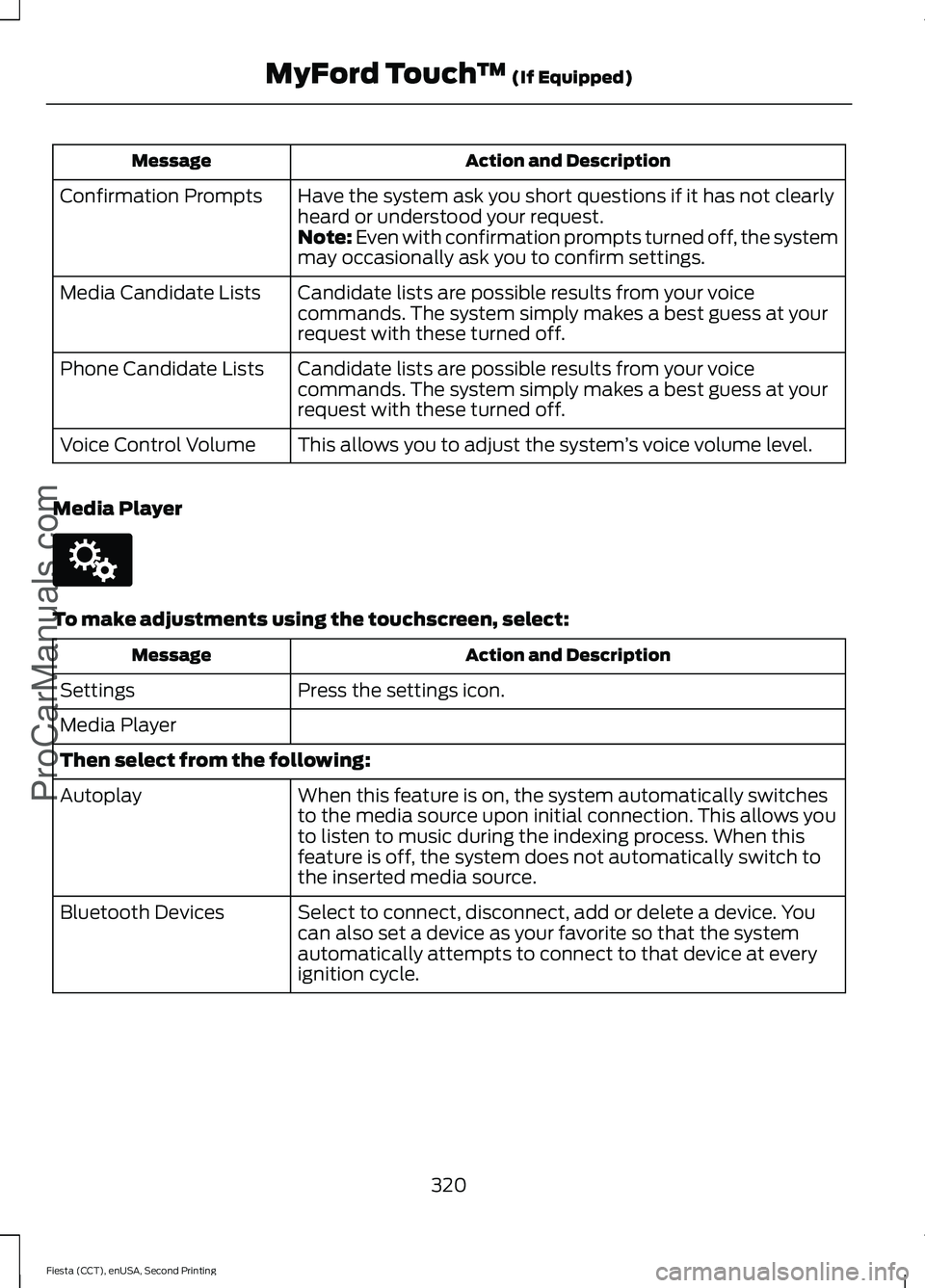
Action and Description
Message
Have the system ask you short questions if it has not clearly
heard or understood your request.
Confirmation Prompts
Note: Even with confirmation prompts turned off, the system
may occasionally ask you to confirm settings.
Candidate lists are possible results from your voice
commands. The system simply makes a best guess at your
request with these turned off.
Media Candidate Lists
Candidate lists are possible results from your voice
commands. The system simply makes a best guess at your
request with these turned off.
Phone Candidate Lists
This allows you to adjust the system ’s voice volume level.
Voice Control Volume
Media Player To make adjustments using the touchscreen, select:
Action and Description
Message
Press the settings icon.
Settings
Media Player
Then select from the following:
When this feature is on, the system automatically switches
to the media source upon initial connection. This allows you
to listen to music during the indexing process. When this
feature is off, the system does not automatically switch to
the inserted media source.
Autoplay
Select to connect, disconnect, add or delete a device. You
can also set a device as your favorite so that the system
automatically attempts to connect to that device at every
ignition cycle.
Bluetooth Devices
320
Fiesta (CCT), enUSA, Second Printing MyFord Touch
™ (If Equipped)
ProCarManuals.comE142607
Page 339 of 423
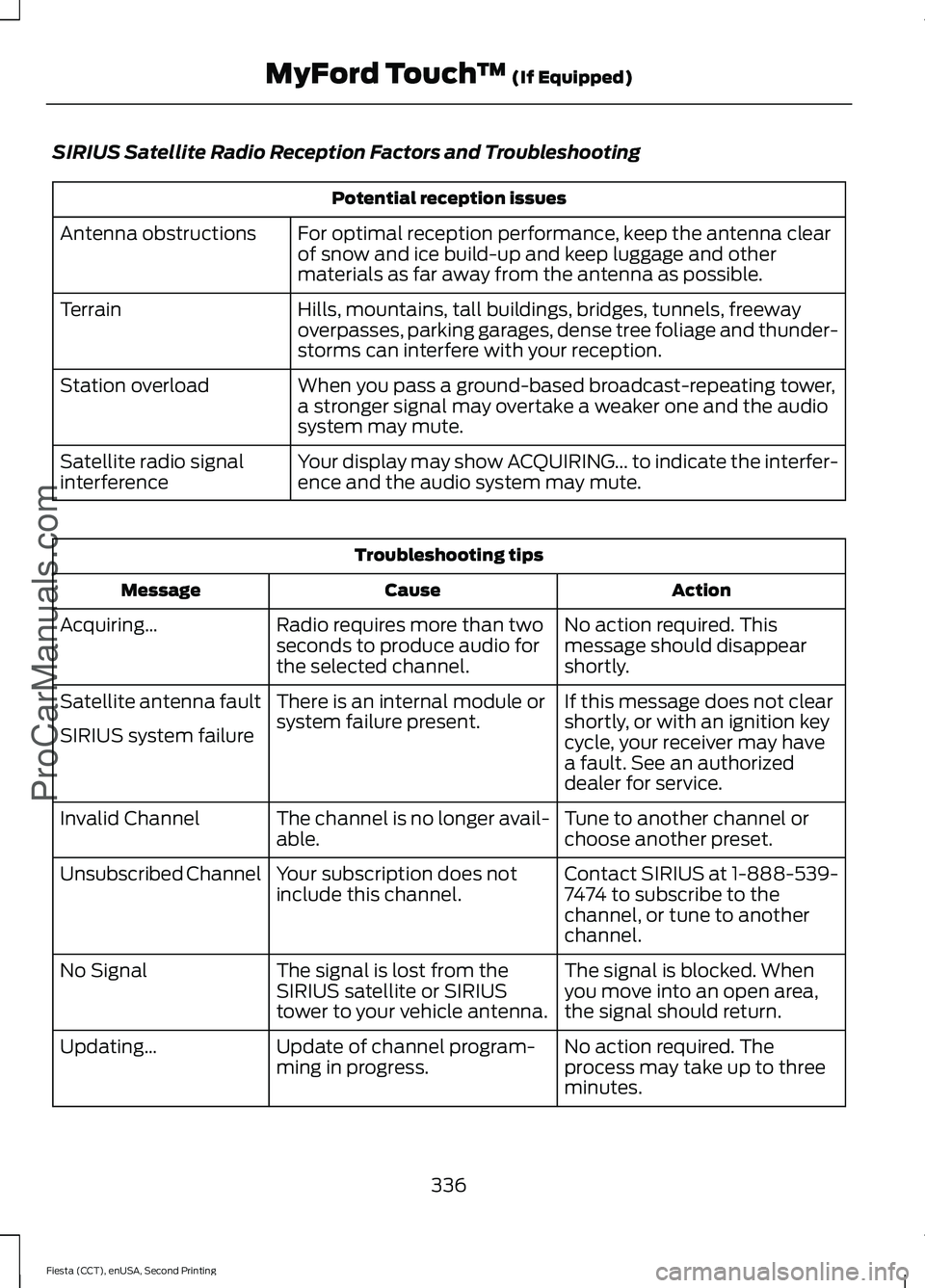
SIRIUS Satellite Radio Reception Factors and Troubleshooting
Potential reception issues
For optimal reception performance, keep the antenna clear
of snow and ice build-up and keep luggage and other
materials as far away from the antenna as possible.
Antenna obstructions
Hills, mountains, tall buildings, bridges, tunnels, freeway
overpasses, parking garages, dense tree foliage and thunder-
storms can interfere with your reception.
Terrain
When you pass a ground-based broadcast-repeating tower,
a stronger signal may overtake a weaker one and the audio
system may mute.
Station overload
Your display may show ACQUIRING... to indicate the interfer-
ence and the audio system may mute.
Satellite radio signal
interference Troubleshooting tips
Action
Cause
Message
No action required. This
message should disappear
shortly.
Radio requires more than two
seconds to produce audio for
the selected channel.
Acquiring…
If this message does not clear
shortly, or with an ignition key
cycle, your receiver may have
a fault. See an authorized
dealer for service.
There is an internal module or
system failure present.
Satellite antenna fault
SIRIUS system failure
Tune to another channel or
choose another preset.
The channel is no longer avail-
able.
Invalid Channel
Contact SIRIUS at 1-888-539-
7474 to subscribe to the
channel, or tune to another
channel.
Your subscription does not
include this channel.
Unsubscribed Channel
The signal is blocked. When
you move into an open area,
the signal should return.
The signal is lost from the
SIRIUS satellite or SIRIUS
tower to your vehicle antenna.
No Signal
No action required. The
process may take up to three
minutes.
Update of channel program-
ming in progress.
Updating…
336
Fiesta (CCT), enUSA, Second Printing MyFord Touch
™ (If Equipped)
ProCarManuals.com
Page 344 of 423
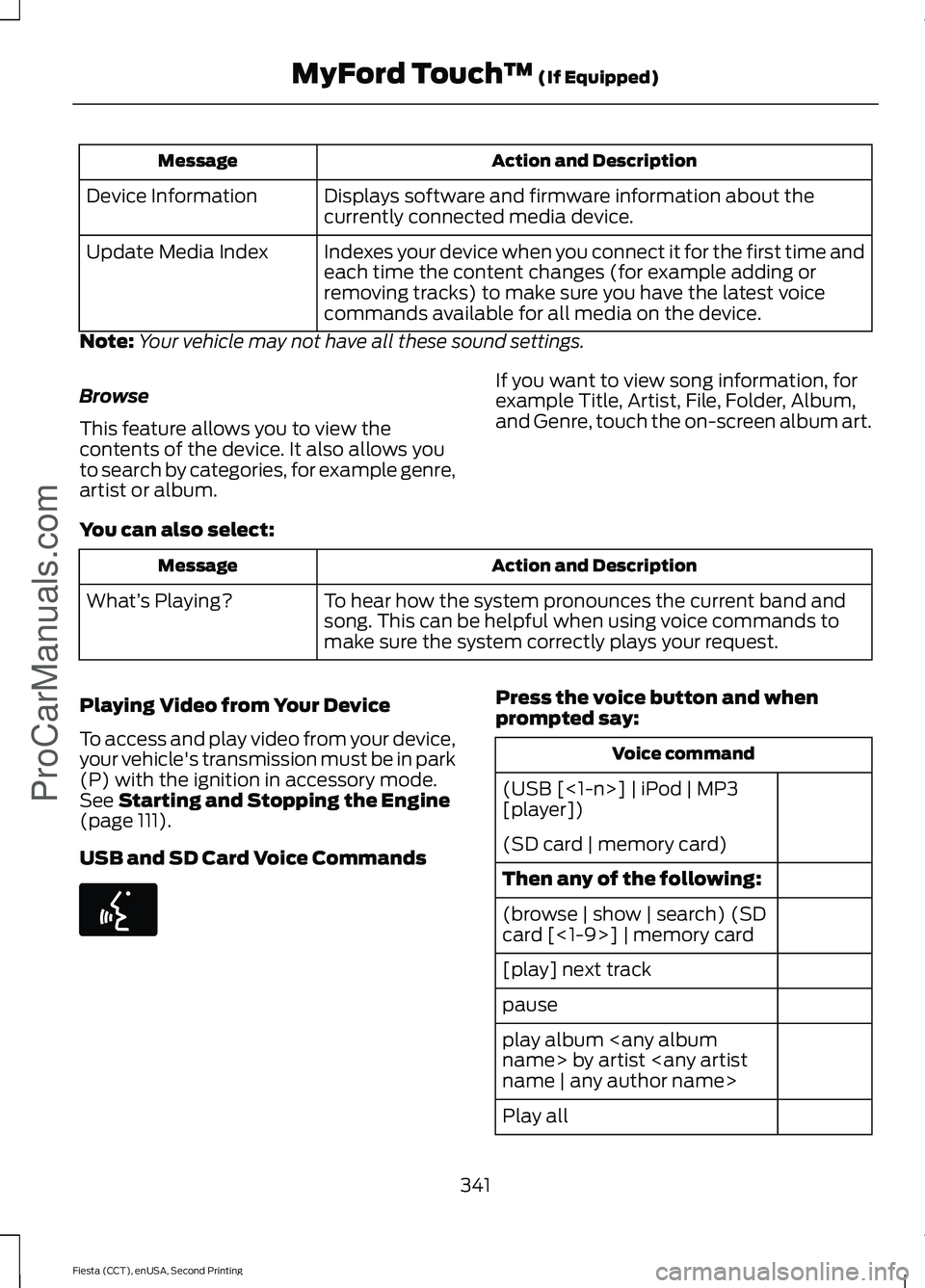
Action and Description
Message
Displays software and firmware information about the
currently connected media device.
Device Information
Indexes your device when you connect it for the first time and
each time the content changes (for example adding or
removing tracks) to make sure you have the latest voice
commands available for all media on the device.
Update Media Index
Note: Your vehicle may not have all these sound settings.
Browse
This feature allows you to view the
contents of the device. It also allows you
to search by categories, for example genre,
artist or album. If you want to view song information, for
example Title, Artist, File, Folder, Album,
and Genre, touch the on-screen album art.
You can also select: Action and Description
Message
To hear how the system pronounces the current band and
song. This can be helpful when using voice commands to
make sure the system correctly plays your request.
What’
s Playing?
Playing Video from Your Device
To access and play video from your device,
your vehicle's transmission must be in park
(P) with the ignition in accessory mode.
See Starting and Stopping the Engine
(page 111).
USB and SD Card Voice Commands Press the voice button and when
prompted say:
Voice command
(USB [<1-n>] | iPod | MP3
[player])
(SD card | memory card)
Then any of the following:
(browse | show | search) (SD
card [<1-9>] | memory card
[play] next track
pause
play album
Play all
341
Fiesta (CCT), enUSA, Second Printing MyFord Touch
™
(If Equipped)
ProCarManuals.comE142599
Page 349 of 423
Pairing Your Cell Phone for the
First Time
WARNING
Driving while distracted can result in
loss of vehicle control, crash and
injury. We strongly recommend that
you use extreme caution when using any
device that may take your focus off the
road. Your primary responsibility is the safe
operation of your vehicle. We recommend
against the use of any handheld device
while driving and encourage the use of
voice-operated systems when possible.
Make sure you are aware of all applicable
local laws that may affect the use of
electronic devices while driving. The first thing you must do to use the
phone features of SYNC is to pair your
Bluetooth-enabled cell phone with SYNC.
This allows you to use your cell phone in a
hands-free manner.
Note:
Put the transmission in position P.
Turn on your vehicle ignition and the radio.
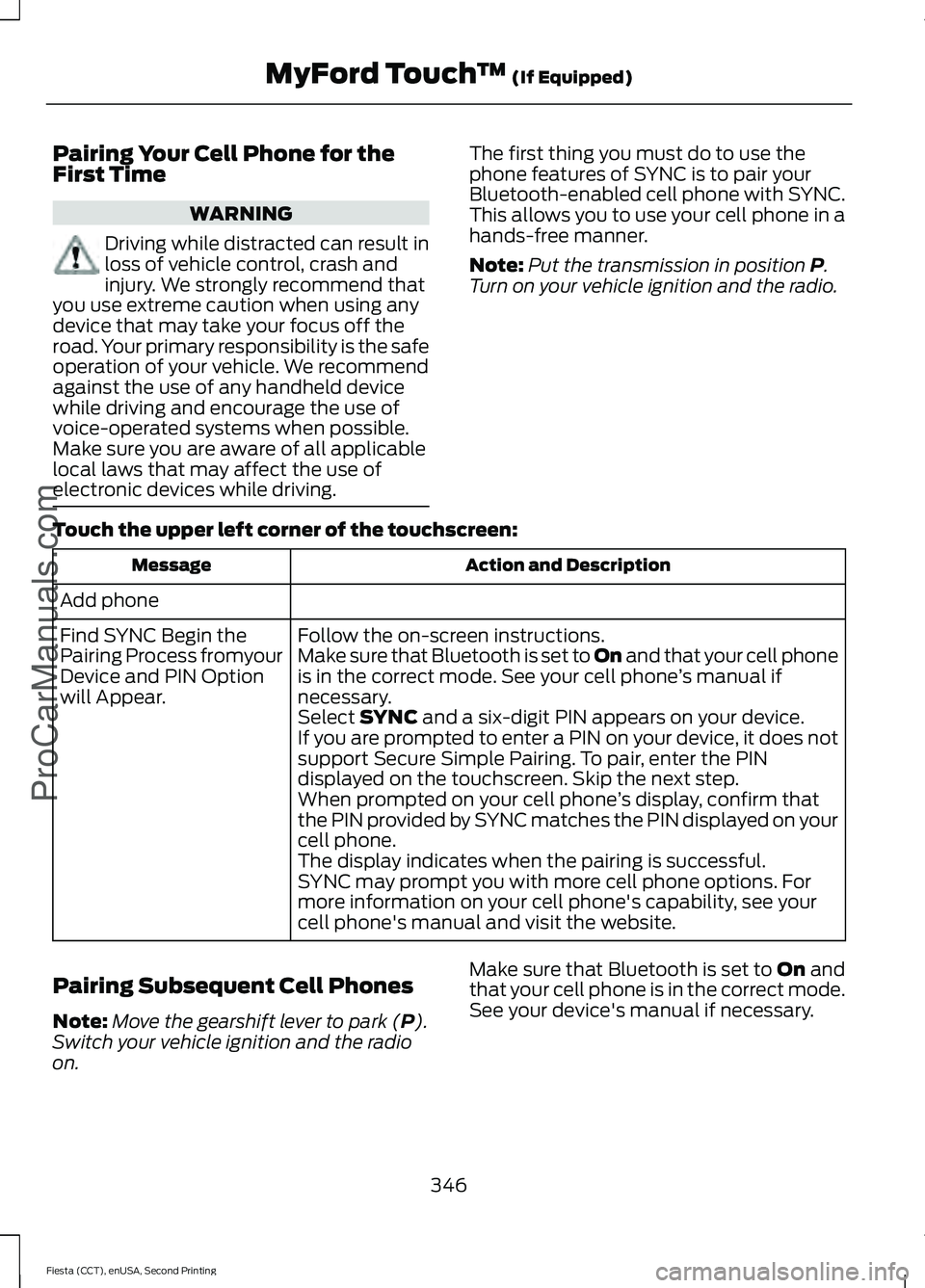
Touch the upper left corner of the touchscreen: Action and Description
Message
Add phone Follow the on-screen instructions.
Find SYNC Begin the
Pairing Process fromyour
Device and PIN Option
will Appear. Make sure that Bluetooth is set to On
and that your cell phone
is in the correct mode. See your cell phone ’s manual if
necessary.
Select
SYNC and a six-digit PIN appears on your device.
If you are prompted to enter a PIN on your device, it does not
support Secure Simple Pairing. To pair, enter the PIN
displayed on the touchscreen. Skip the next step.
When prompted on your cell phone ’s display, confirm that
the PIN provided by SYNC matches the PIN displayed on your
cell phone.
The display indicates when the pairing is successful.
SYNC may prompt you with more cell phone options. For
more information on your cell phone's capability, see your
cell phone's manual and visit the website.
Pairing Subsequent Cell Phones
Note: Move the gearshift lever to park (
P).
Switch your vehicle ignition and the radio
on. Make sure that Bluetooth is set to
On and
that your cell phone is in the correct mode.
See your device's manual if necessary.
346
Fiesta (CCT), enUSA, Second Printing MyFord Touch
™
(If Equipped)
ProCarManuals.com
Page 414 of 423
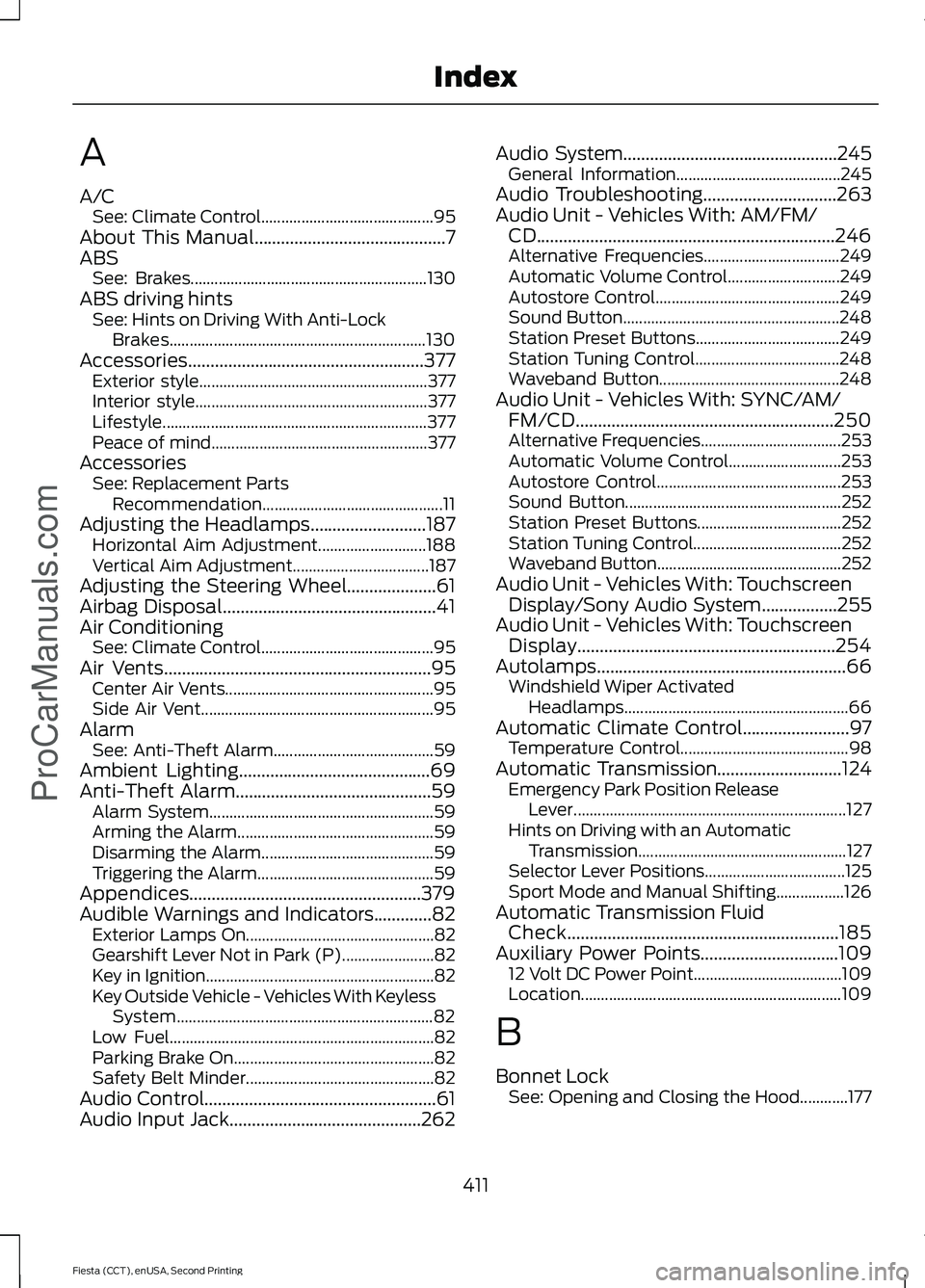
A
A/C
See: Climate Control........................................... 95
About This Manual...........................................7
ABS See: Brakes........................................................... 130
ABS driving hints See: Hints on Driving With Anti-Lock
Brakes................................................................ 130
Accessories.....................................................377 Exterior style......................................................... 377
Interior style.......................................................... 377
Lifestyle.................................................................. 377
Peace of mind...................................................... 377
Accessories See: Replacement Parts
Recommendation............................................. 11
Adjusting the Headlamps..........................187 Horizontal Aim Adjustment........................... 188
Vertical Aim Adjustment.................................. 187
Adjusting the Steering Wheel....................61
Airbag Disposal................................................41
Air Conditioning See: Climate Control........................................... 95
Air Vents............................................................95 Center Air Vents.................................................... 95
Side Air Vent.......................................................... 95
Alarm See: Anti-Theft Alarm........................................ 59
Ambient Lighting...........................................69
Anti-Theft Alarm............................................59 Alarm System........................................................ 59
Arming the Alarm................................................. 59
Disarming the Alarm........................................... 59
Triggering the Alarm............................................ 59
Appendices....................................................379
Audible Warnings and Indicators.............82 Exterior Lamps On............................................... 82
Gearshift Lever Not in Park (P)....................... 82
Key in Ignition......................................................... 82
Key Outside Vehicle - Vehicles With Keyless System................................................................ 82
Low Fuel.................................................................. 82
Parking Brake On.................................................. 82
Safety Belt Minder............................................... 82
Audio Control....................................................61
Audio Input Jack...........................................262 Audio System................................................245
General Information......................................... 245
Audio Troubleshooting
..............................263
Audio Unit - Vehicles With: AM/FM/ CD...................................................................246
Alternative Frequencies.................................. 249
Automatic Volume Control............................ 249
Autostore Control.............................................. 249
Sound Button...................................................... 248
Station Preset Buttons.................................... 249
Station Tuning Control.................................... 248
Waveband Button............................................. 248
Audio Unit - Vehicles With: SYNC/AM/ FM/CD..........................................................250
Alternative Frequencies................................... 253
Automatic Volume Control............................ 253
Autostore Control.............................................. 253
Sound Button...................................................... 252
Station Preset Buttons.................................... 252
Station Tuning Control..................................... 252
Waveband Button.............................................. 252
Audio Unit - Vehicles With: Touchscreen Display/Sony Audio System
.................255
Audio Unit - Vehicles With: Touchscreen Display
..........................................................254
Autolamps........................................................66 Windshield Wiper Activated
Headlamps........................................................ 66
Automatic Climate Control........................97 Temperature Control.......................................... 98
Automatic Transmission
............................124
Emergency Park Position Release
Lever.................................................................... 127
Hints on Driving with an Automatic Transmission.................................................... 127
Selector Lever Positions................................... 125
Sport Mode and Manual Shifting.................126
Automatic Transmission Fluid Check.............................................................185
Auxiliary Power Points
...............................109
12 Volt DC Power Point..................................... 109
Location................................................................. 109
B
Bonnet Lock See: Opening and Closing the Hood............177
411
Fiesta (CCT), enUSA, Second Printing Index
ProCarManuals.com
Page 417 of 423
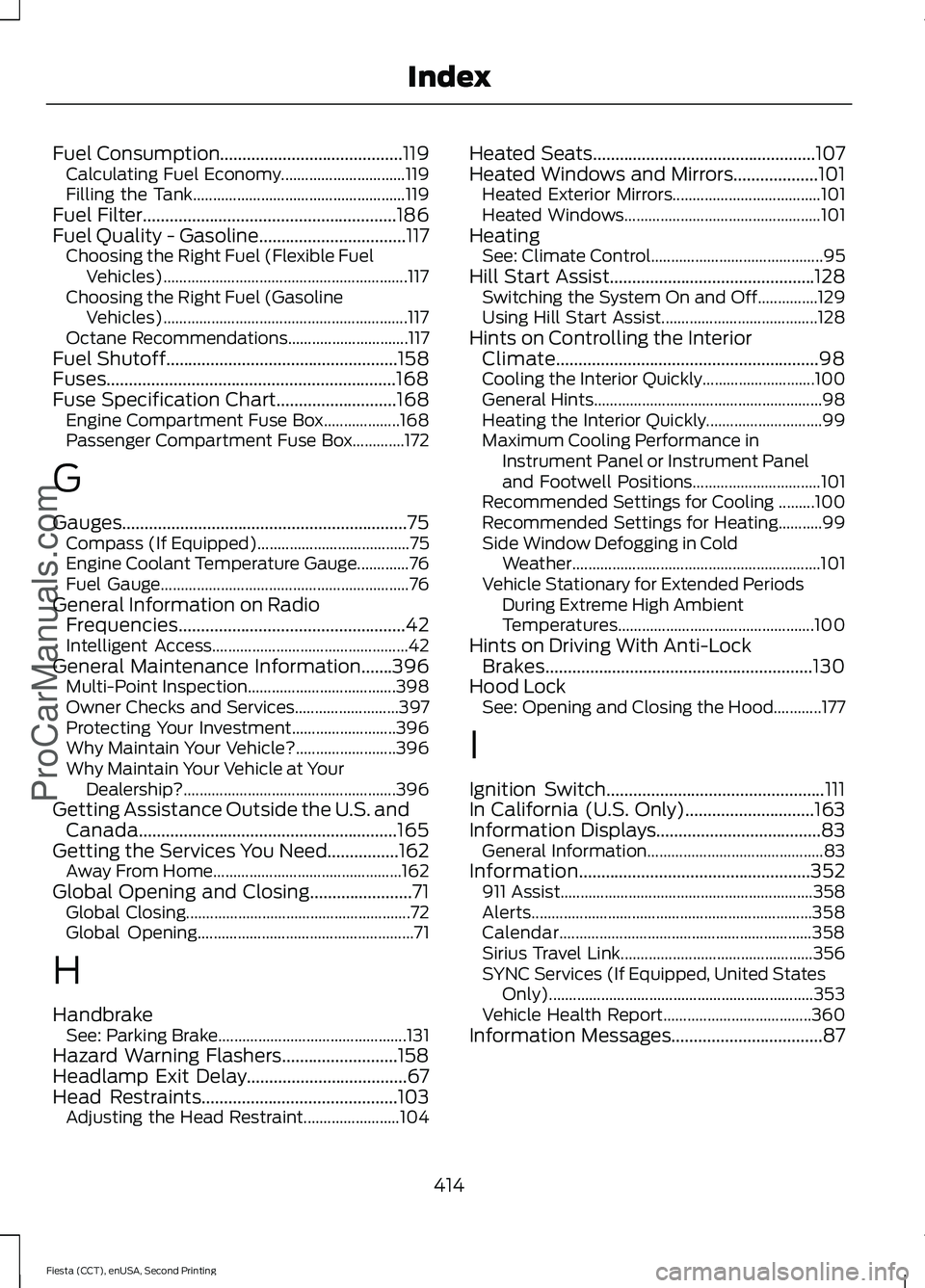
Fuel Consumption.........................................119
Calculating Fuel Economy............................... 119
Filling the Tank..................................................... 119
Fuel Filter.........................................................186
Fuel Quality - Gasoline.................................117
Choosing the Right Fuel (Flexible Fuel
Vehicles)............................................................. 117
Choosing the Right Fuel (Gasoline Vehicles)............................................................. 117
Octane Recommendations.............................. 117
Fuel Shutoff
....................................................158
Fuses.................................................................168
Fuse Specification Chart
...........................168
Engine Compartment Fuse Box................... 168
Passenger Compartment Fuse Box.............172
G
Gauges................................................................75 Compass (If Equipped)...................................... 75
Engine Coolant Temperature Gauge.............76
Fuel Gauge.............................................................. 76
General Information on Radio Frequencies...................................................42
Intelligent Access................................................. 42
General Maintenance Information.......396 Multi-Point Inspection..................................... 398
Owner Checks and Services.......................... 397
Protecting Your Investment.......................... 396
Why Maintain Your Vehicle?......................... 396
Why Maintain Your Vehicle at Your Dealership?..................................................... 396
Getting Assistance Outside the U.S. and Canada..........................................................165
Getting the Services You Need................162 Away From Home............................................... 162
Global Opening and Closing.......................71 Global Closing........................................................ 72
Global Opening...................................................... 71
H
Handbrake See: Parking Brake............................................... 131
Hazard Warning Flashers..........................158
Headlamp Exit Delay....................................67
Head Restraints............................................103 Adjusting the Head Restraint........................ 104Heated Seats..................................................107
Heated Windows and Mirrors...................101
Heated Exterior Mirrors..................................... 101
Heated Windows................................................. 101
Heating See: Climate Control........................................... 95
Hill Start Assist..............................................128 Switching the System On and Off...............129
Using Hill Start Assist....................................... 128
Hints on Controlling the Interior Climate
...........................................................98
Cooling the Interior Quickly............................ 100
General Hints......................................................... 98
Heating the Interior Quickly............................. 99
Maximum Cooling Performance in Instrument Panel or Instrument Panel
and Footwell Positions................................ 101
Recommended Settings for Cooling .........100
Recommended Settings for Heating...........99
Side Window Defogging in Cold Weather.............................................................. 101
Vehicle Stationary for Extended Periods During Extreme High Ambient
Temperatures................................................. 100
Hints on Driving With Anti-Lock Brakes............................................................130
Hood Lock See: Opening and Closing the Hood............177
I
Ignition Switch
.................................................111
In California (U.S. Only).............................163
Information Displays.....................................83 General Information............................................ 83
Information....................................................352 911 Assist............................................................... 358
Alerts...................................................................... 358
Calendar............................................................... 358
Sirius Travel Link................................................ 356
SYNC Services (If Equipped, United States Only).................................................................. 353
Vehicle Health Report..................................... 360
Information Messages
..................................87
414
Fiesta (CCT), enUSA, Second Printing Index
ProCarManuals.com
Page 418 of 423
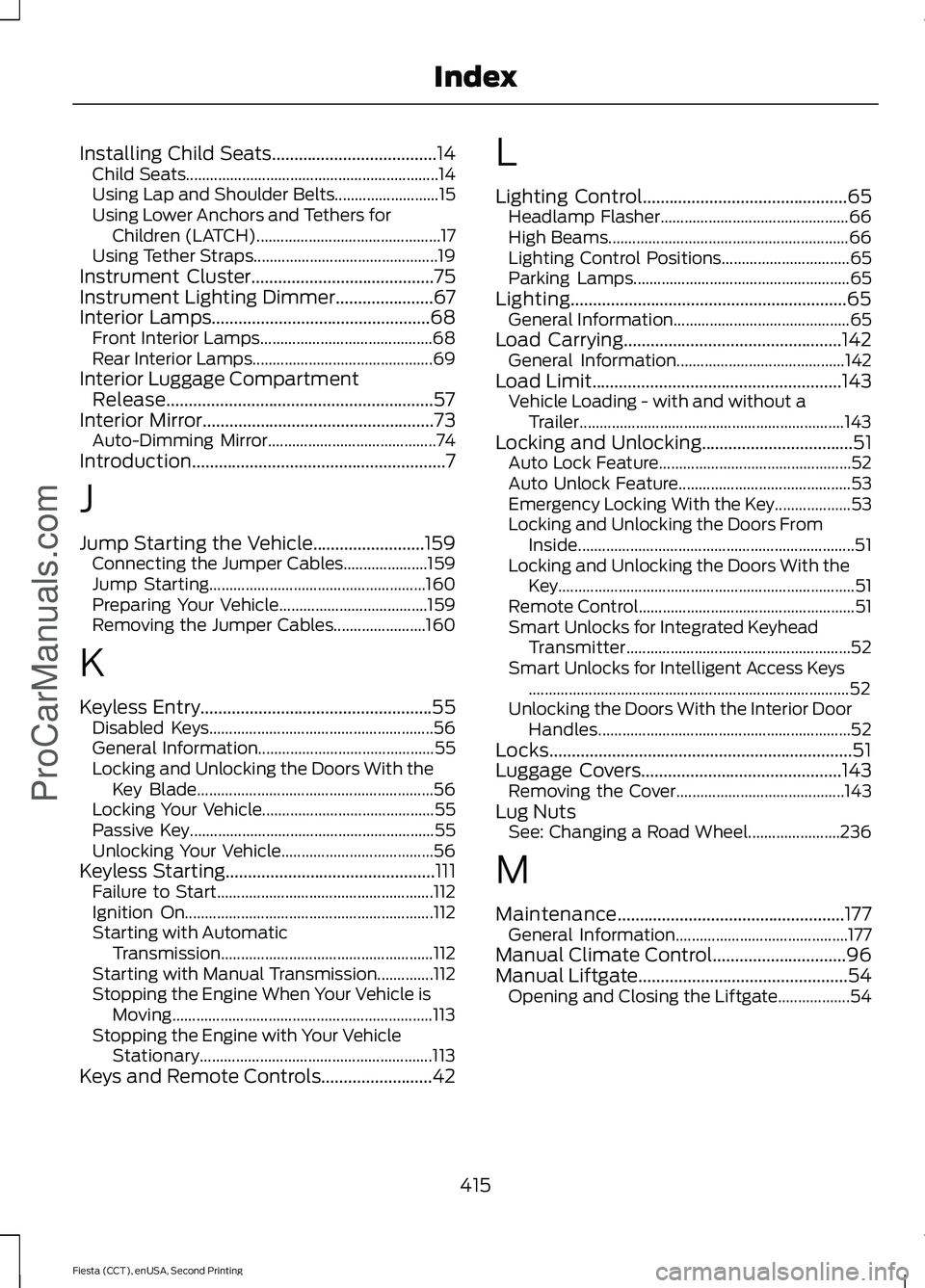
Installing Child Seats.....................................14
Child Seats............................................................... 14
Using Lap and Shoulder Belts.......................... 15
Using Lower Anchors and Tethers for Children (LATCH).............................................. 17
Using Tether Straps.............................................. 19
Instrument Cluster.........................................75
Instrument Lighting Dimmer......................67
Interior Lamps.................................................68 Front Interior Lamps........................................... 68
Rear Interior Lamps............................................. 69
Interior Luggage Compartment Release............................................................57
Interior Mirror....................................................73
Auto-Dimming Mirror.......................................... 74
Introduction.........................................................7
J
Jump Starting the Vehicle.........................159 Connecting the Jumper Cables..................... 159
Jump Starting...................................................... 160
Preparing Your Vehicle..................................... 159
Removing the Jumper Cables....................... 160
K
Keyless Entry....................................................55 Disabled Keys........................................................ 56
General Information............................................ 55
Locking and Unlocking the Doors With the Key Blade........................................................... 56
Locking Your Vehicle........................................... 55
Passive Key............................................................. 55
Unlocking Your Vehicle...................................... 56
Keyless Starting
...............................................111
Failure to Start...................................................... 112
Ignition On.............................................................. 112
Starting with Automatic Transmission..................................................... 112
Starting with Manual Transmission..............112
Stopping the Engine When Your Vehicle is Moving................................................................. 113
Stopping the Engine with Your Vehicle Stationary.......................................................... 113
Keys and Remote Controls
.........................42 L
Lighting Control..............................................65
Headlamp Flasher............................................... 66
High Beams............................................................ 66
Lighting Control Positions................................ 65
Parking Lamps...................................................... 65
Lighting..............................................................65 General Information............................................ 65
Load Carrying.................................................142 General Information.......................................... 142
Load Limit
........................................................143
Vehicle Loading - with and without a
Trailer.................................................................. 143
Locking and Unlocking
..................................51
Auto Lock Feature................................................ 52
Auto Unlock Feature........................................... 53
Emergency Locking With the Key................... 53
Locking and Unlocking the Doors From Inside..................................................................... 51
Locking and Unlocking the Doors With the Key........................................................................\
.. 51
Remote Control...................................................... 51
Smart Unlocks for Integrated Keyhead Transmitter........................................................ 52
Smart Unlocks for Intelligent Access Keys ........................................................................\
........ 52
Unlocking the Doors With the Interior Door Handles............................................................... 52
Locks....................................................................51
Luggage Covers
.............................................143
Removing the Cover.......................................... 143
Lug Nuts See: Changing a Road Wheel....................... 236
M
Maintenance
...................................................177
General Information........................................... 177
Manual Climate Control..............................96
Manual Liftgate
...............................................54
Opening and Closing the Liftgate.................. 54
415
Fiesta (CCT), enUSA, Second Printing Index
ProCarManuals.com