display FORD FIESTA 2016 6.G Owner's Manual
[x] Cancel search | Manufacturer: FORD, Model Year: 2016, Model line: FIESTA, Model: FORD FIESTA 2016 6.GPages: 363, PDF Size: 5.38 MB
Page 96 of 363
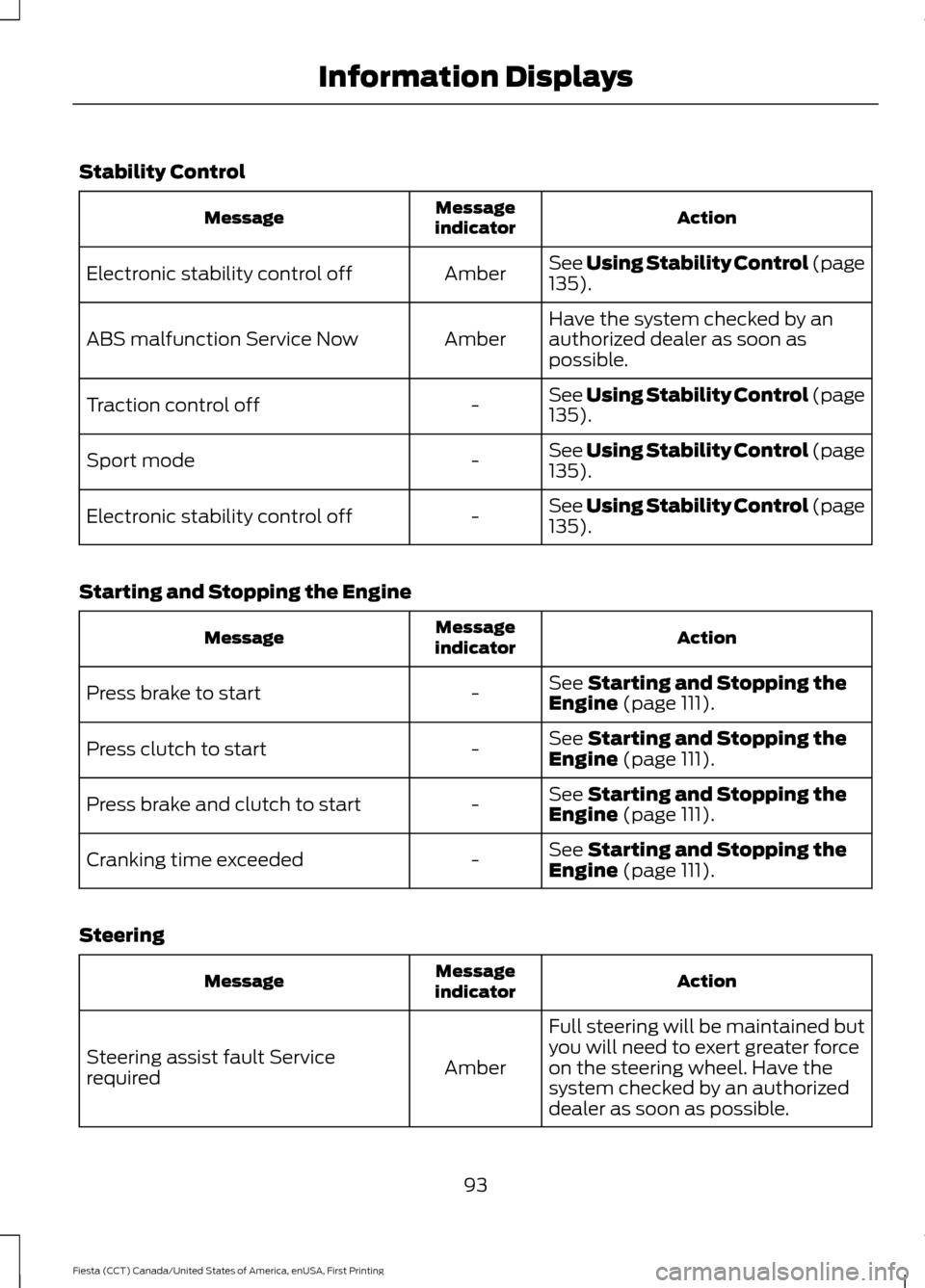
Stability Control
Action
Message
indicator
Message
See Using Stability Control (page
135).
Amber
Electronic stability control off
Have the system checked by an
authorized dealer as soon as
possible.
Amber
ABS malfunction Service Now
See Using Stability Control (page
135
).
-
Traction control off
See Using Stability Control (page
135
).
-
Sport mode
See Using Stability Control (page
135
).
-
Electronic stability control off
Starting and Stopping the Engine Action
Message
indicator
Message
See
Starting and Stopping the
Engine (page 111).
-
Press brake to start
See
Starting and Stopping the
Engine (page 111).
-
Press clutch to start
See
Starting and Stopping the
Engine (page 111).
-
Press brake and clutch to start
See
Starting and Stopping the
Engine (page 111).
-
Cranking time exceeded
Steering Action
Message
indicator
Message
Full steering will be maintained but
you will need to exert greater force
on the steering wheel. Have the
system checked by an authorized
dealer as soon as possible.
Amber
Steering assist fault Service
required
93
Fiesta (CCT) Canada/United States of America, enUSA, First Printing Information Displays
Page 97 of 363
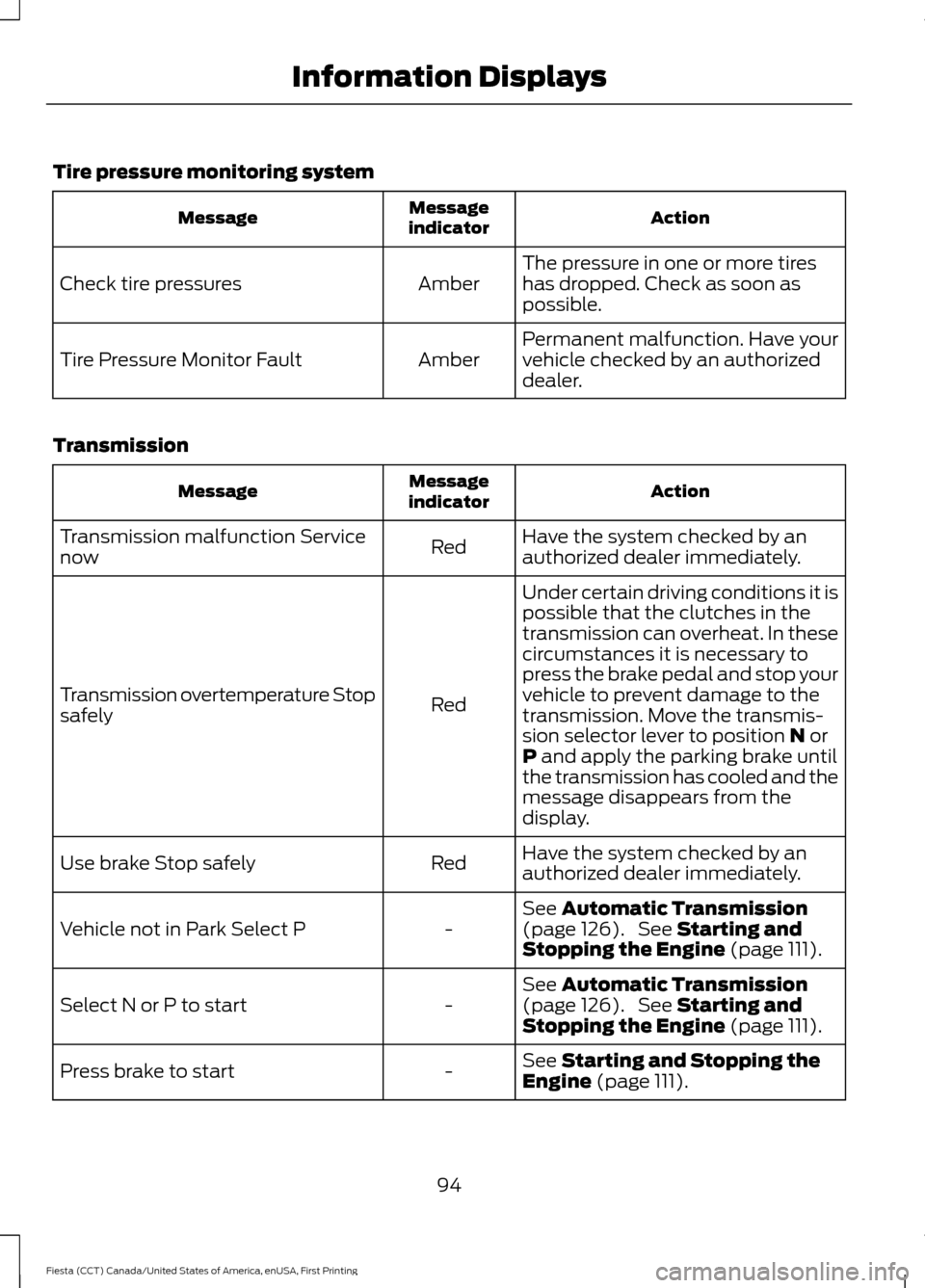
Tire pressure monitoring system
Action
Message
indicator
Message
The pressure in one or more tires
has dropped. Check as soon as
possible.
Amber
Check tire pressures
Permanent malfunction. Have your
vehicle checked by an authorized
dealer.
Amber
Tire Pressure Monitor Fault
Transmission Action
Message
indicator
Message
Have the system checked by an
authorized dealer immediately.
Red
Transmission malfunction Service
now
Under certain driving conditions it is
possible that the clutches in the
transmission can overheat. In these
circumstances it is necessary to
press the brake pedal and stop your
vehicle to prevent damage to the
Red
Transmission overtemperature Stop
safely
transmission. Move the transmis-
sion selector lever to position N or
P and apply the parking brake until
the transmission has cooled and the
message disappears from the
display.
Have the system checked by an
authorized dealer immediately.
Red
Use brake Stop safely
See
Automatic Transmission
(page 126). See Starting and
Stopping the Engine (page 111).
-
Vehicle not in Park Select P
See
Automatic Transmission
(page 126). See Starting and
Stopping the Engine (page 111).
-
Select N or P to start
See
Starting and Stopping the
Engine (page 111).
-
Press brake to start
94
Fiesta (CCT) Canada/United States of America, enUSA, First Printing Information Displays
Page 98 of 363
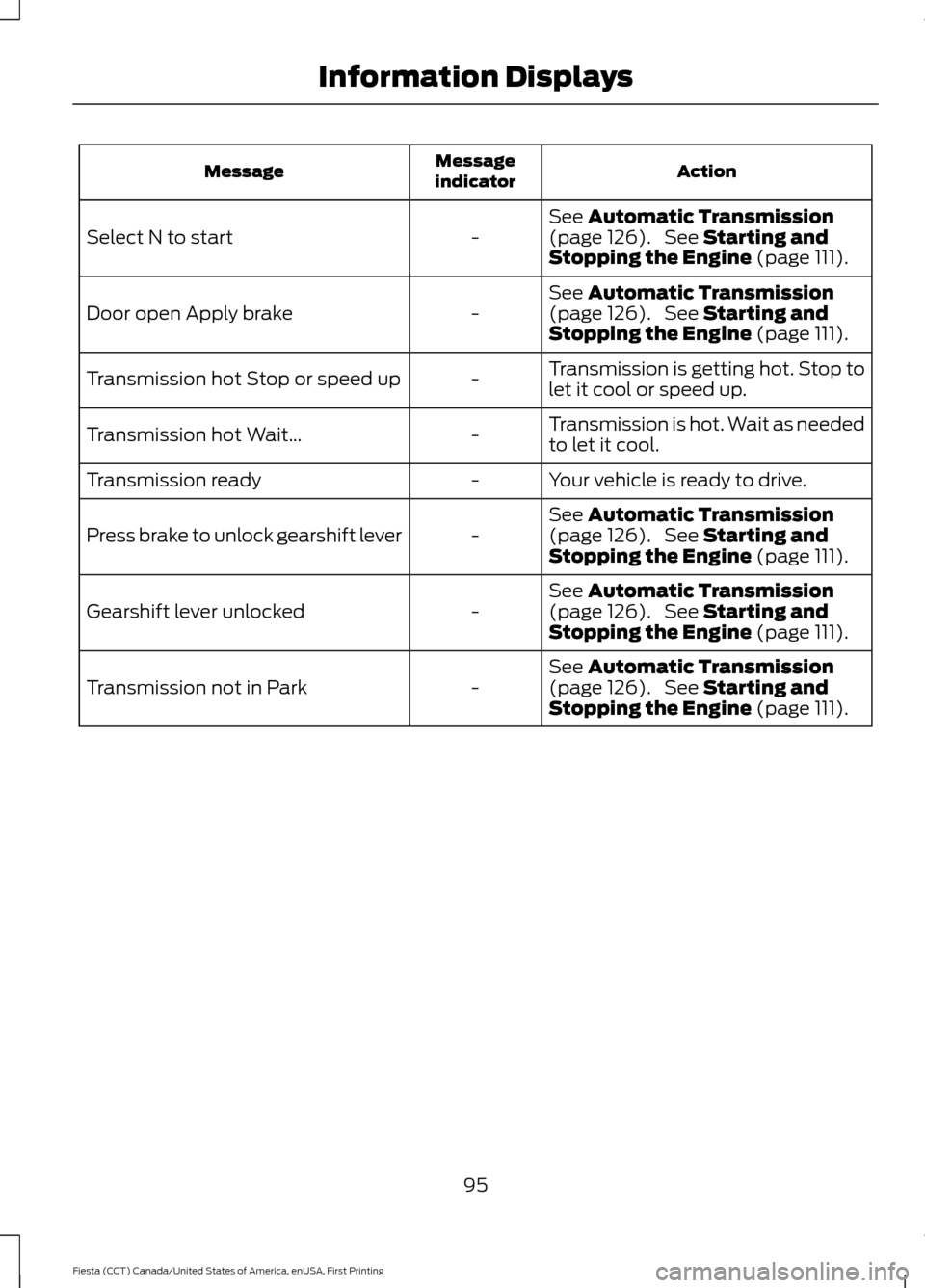
Action
Message
indicator
Message
See Automatic Transmission
(page 126). See Starting and
Stopping the Engine (page 111).
-
Select N to start
See
Automatic Transmission
(page 126). See Starting and
Stopping the Engine (page 111).
-
Door open Apply brake
Transmission is getting hot. Stop to
let it cool or speed up.
-
Transmission hot Stop or speed up
Transmission is hot. Wait as needed
to let it cool.
-
Transmission hot Wait...
Your vehicle is ready to drive.
-
Transmission ready
See
Automatic Transmission
(page 126). See Starting and
Stopping the Engine (page 111).
-
Press brake to unlock gearshift lever
See
Automatic Transmission
(page 126). See Starting and
Stopping the Engine (page 111).
-
Gearshift lever unlocked
See
Automatic Transmission
(page 126). See Starting and
Stopping the Engine (page 111).
-
Transmission not in Park
95
Fiesta (CCT) Canada/United States of America, enUSA, First Printing Information Displays
Page 115 of 363
Note:
The ignition will automatically switch
off when you leave your vehicle unattended.
This is to prevent your vehicle battery
running out of charge.
Note: A valid key must be located inside
your vehicle to switch the ignition on and
start the engine.
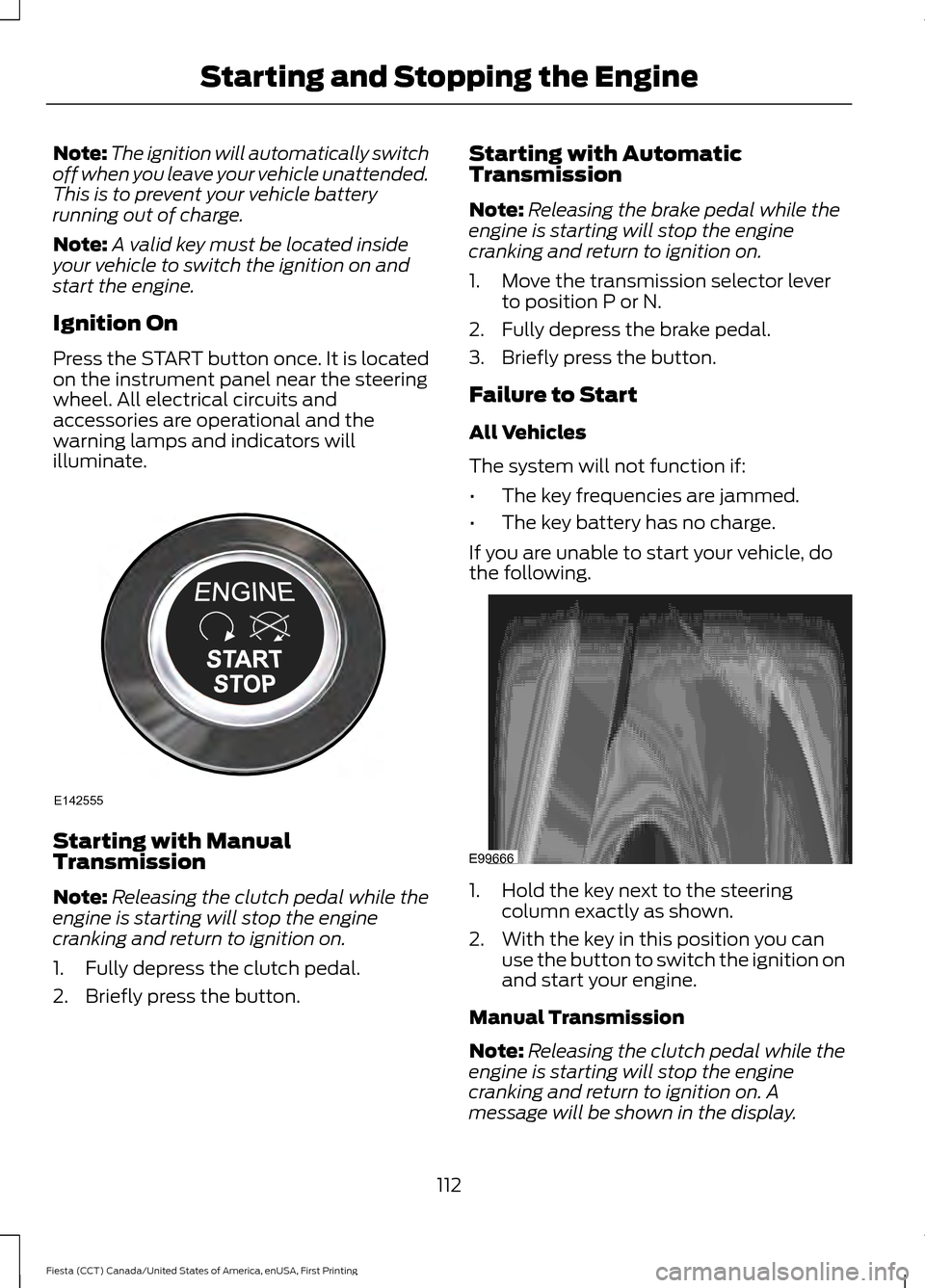
Ignition On
Press the START button once. It is located
on the instrument panel near the steering
wheel. All electrical circuits and
accessories are operational and the
warning lamps and indicators will
illuminate. Starting with Manual
Transmission
Note:
Releasing the clutch pedal while the
engine is starting will stop the engine
cranking and return to ignition on.
1. Fully depress the clutch pedal.
2. Briefly press the button. Starting with Automatic
Transmission
Note:
Releasing the brake pedal while the
engine is starting will stop the engine
cranking and return to ignition on.
1. Move the transmission selector lever to position P or N.
2. Fully depress the brake pedal.
3. Briefly press the button.
Failure to Start
All Vehicles
The system will not function if:
• The key frequencies are jammed.
• The key battery has no charge.
If you are unable to start your vehicle, do
the following. 1. Hold the key next to the steering
column exactly as shown.
2. With the key in this position you can use the button to switch the ignition on
and start your engine.
Manual Transmission
Note: Releasing the clutch pedal while the
engine is starting will stop the engine
cranking and return to ignition on. A
message will be shown in the display.
112
Fiesta (CCT) Canada/United States of America, enUSA, First Printing Starting and Stopping the EngineE142555 E99666
Page 129 of 363
AUTOMATIC TRANSMISSION
WARNINGS
Always set the parking brake fully
and make sure the gearshift is
latched in P (Park). Turn the ignition
to the off position and remove the key
whenever you leave your vehicle. Do not apply the brake and
accelerator pedals simultaneously
for more than three seconds as this
limits engine rpm and labors the
transmission. This may result in difficulty
maintaining speed in traffic and could lead
to serious injury. Note:
When you switch the ignition off, the
transmission will carry out a series of checks.
You may hear slight clicking sounds. This is
normal.
We have designed your vehicle to improve
fuel economy by reducing fuel usage
compared to a traditional torque converter
automatic transmission. When you take
your foot off the accelerator pedal and
your vehicle begins to slow down, this can
feel like a light to medium braking
sensation.
Selector Lever Positions WARNING
You must press the brake pedal to
apply the brakes before moving the
transmission selector lever. Failure
to keep the brakes applied until you are
ready to move off may lead to an accident
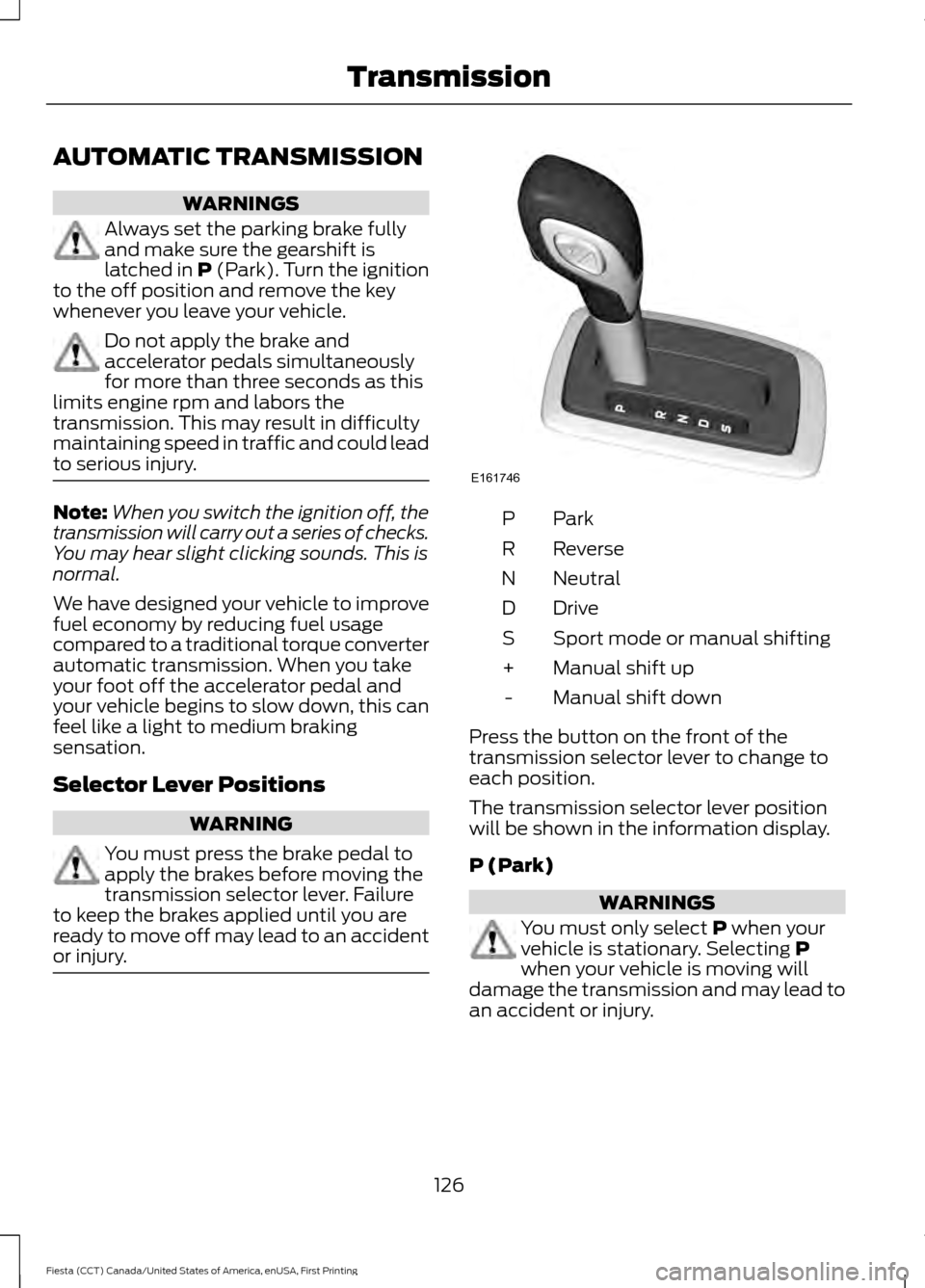
or injury. ParkP
Reverse
R
Neutral
N
Drive
D
Sport mode or manual shifting
S
Manual shift up
+
Manual shift down
-
Press the button on the front of the
transmission selector lever to change to
each position.
The transmission selector lever position
will be shown in the information display.
P (Park) WARNINGS
You must only select
P when your
vehicle is stationary. Selecting P
when your vehicle is moving will
damage the transmission and may lead to
an accident or injury.
126
Fiesta (CCT) Canada/United States of America, enUSA, First Printing TransmissionE161746
Page 136 of 363
PRINCIPLE OF OPERATION
The traction control system helps avoid
drive wheel spin and loss of traction.
If your vehicle begins to slide, the system
applies the brakes to individual wheels
and, when needed, reduces engine power
at the same time. If the wheels spin when
accelerating on slippery or loose surfaces,
the system reduces engine power in order
to increase traction.
USING TRACTION CONTROL
WARNING
The stability and traction control
light illuminates steadily if the
system detects a failure. Make sure
you did not manually disable the traction
control system using the information
display controls or the switch. If the
stability control and traction control light
is still illuminating steadily, have the
system serviced by an authorized dealer
immediately. Operating your vehicle with
the traction control disabled could lead to
an increased risk of loss of vehicle control,
vehicle rollover, personal injury and death. The system automatically turns on each
time you switch the ignition on.
If your vehicle is stuck in mud or snow,
switching traction control off may be
beneficial as this allows the wheels to spin.
Note:
When you switch traction control off,
stability control remains fully active.
Switching the System Off
When you switch the system off or on, a
message appears in the information
display showing system status.
You can switch the system off by either
using the information display controls or
the switch. Using the Information Display
Controls
You can switch this feature off or on in the
information display. See General
Information (page 84).
Using a Switch
(If Equipped)
Use the traction control switch on the
instrument panel to switch the system off
or on.
The switch illuminates when traction
control is off.
System Indicator Lights and
Messages The stability and traction control
light:
• Temporarily illuminates on engine
start-up.
• Flashes when a driving condition
activates either of the systems.
• Illuminates if a problem occurs in either
of the systems. The stability and traction control
off light temporarily illuminates
on engine start-up and stays on
when you switch the traction control
system off.
133
Fiesta (CCT) Canada/United States of America, enUSA, First Printing Traction ControlE138639
Page 138 of 363
USING STABILITY CONTROL -
1.0L ECOBOOST™/1.6L
DURATEC-16V TI-VCT (SIGMA)
Note:
The system automatically turns on
each time you switch the ignition on.
You can switch the traction control system
off and on . See Using Traction Control
(page 133).
USING STABILITY CONTROL -
1.6L ECOBOOST™ Note:
The system will switch on
automatically every time you switch the
ignition on.
Note: You can also switch the system off
and on using the information display. See
Information Displays
(page 84).
Switching Sport Mode On
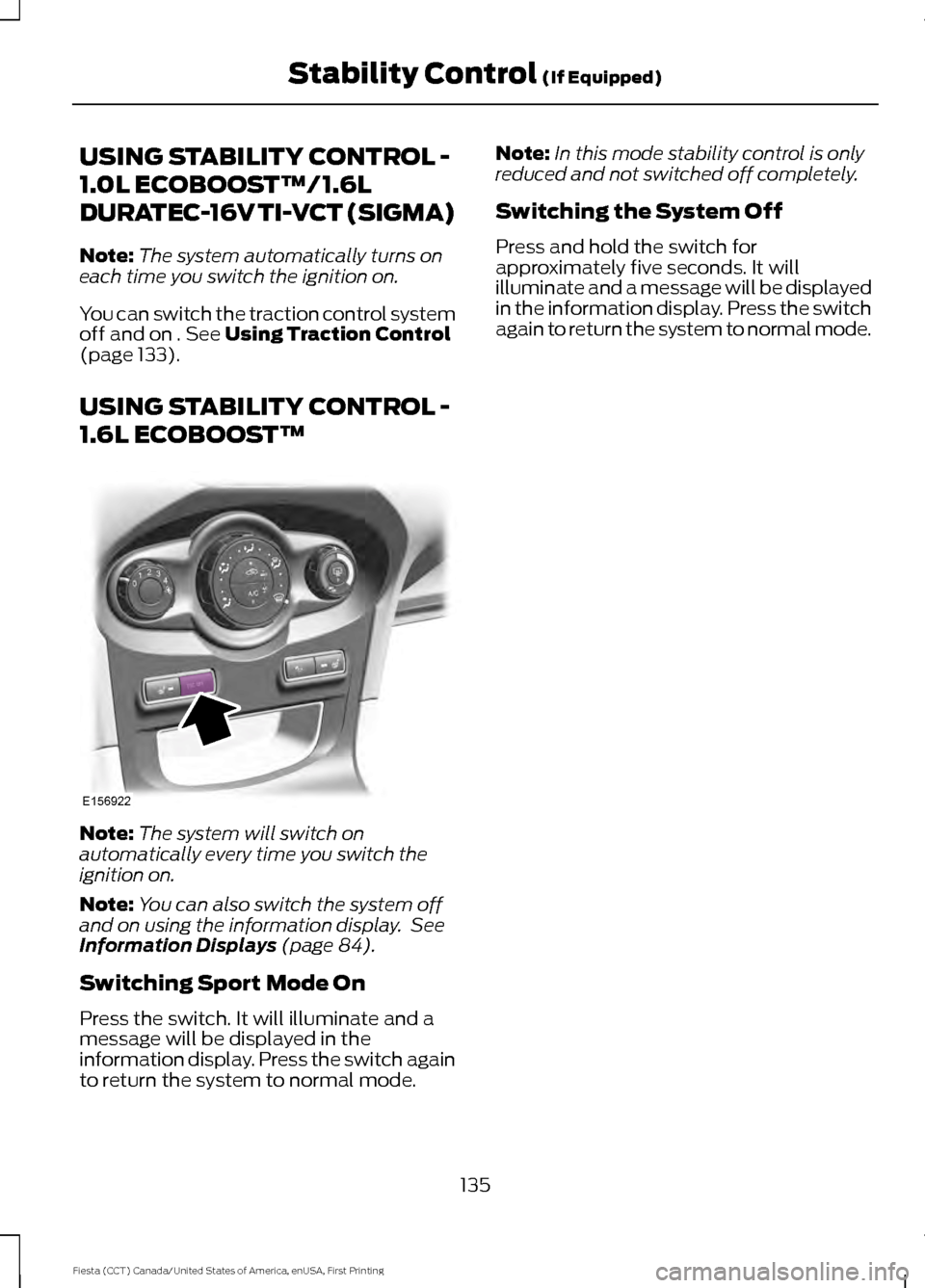
Press the switch. It will illuminate and a
message will be displayed in the
information display. Press the switch again
to return the system to normal mode. Note:
In this mode stability control is only
reduced and not switched off completely.
Switching the System Off
Press and hold the switch for
approximately five seconds. It will
illuminate and a message will be displayed
in the information display. Press the switch
again to return the system to normal mode.
135
Fiesta (CCT) Canada/United States of America, enUSA, First Printing Stability Control
(If Equipped)E156922
Page 140 of 363
Note:
If your vehicle sustains damage to
the bumper or fascia, leaving it misaligned
or bent, the sensing zone may be altered
causing inaccurate measurement of
obstacles or false alarms.
The system warns you of obstacles within
a certain range of the bumper area.
When receiving a detection warning, the
radio volume is reduced to a
predetermined level. After the warning
goes away, the radio volume returns to the
previous level.
Rear Sensing System
The rear sensors are only active when you
move the transmission selector lever to
position R (reverse). As your vehicle moves
closer to the obstacle, the rate of the
audible warning increases. When the
obstacle is fewer than 12 inches (30
centimeters) away, the audible warning
sounds continuously. If a stationary or
receding object is detected farther than 12
inches (30 centimeters) from the side of
your vehicle, the audible warning sounds
for only three seconds. Once the system
detects an object approaching, the audible
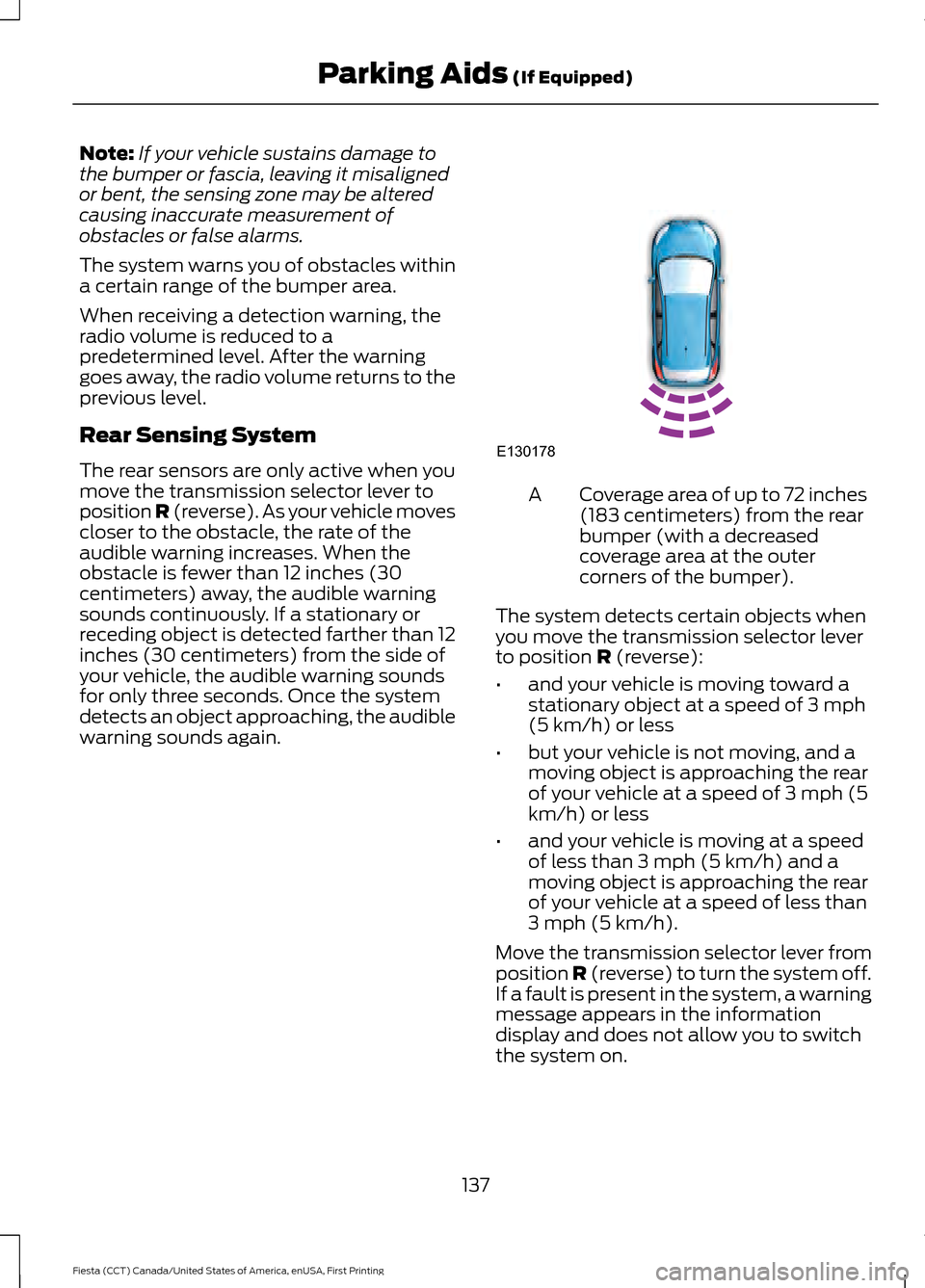
warning sounds again. Coverage area of up to 72 inches
(183 centimeters) from the rear
bumper (with a decreased
coverage area at the outer
corners of the bumper).
A
The system detects certain objects when
you move the transmission selector lever
to position R (reverse):
• and your vehicle is moving toward a
stationary object at a speed of 3 mph
(5 km/h) or less
• but your vehicle is not moving, and a
moving object is approaching the rear
of your vehicle at a speed of 3 mph (5
km/h) or less
• and your vehicle is moving at a speed
of less than 3 mph (5 km/h) and a
moving object is approaching the rear
of your vehicle at a speed of less than
3 mph (5 km/h).
Move the transmission selector lever from
position
R (reverse) to turn the system off.
If a fault is present in the system, a warning
message appears in the information
display and does not allow you to switch
the system on.
137
Fiesta (CCT) Canada/United States of America, enUSA, First Printing Parking Aids
(If Equipped)E130178
Page 141 of 363
REAR VIEW CAMERA (If Equipped)
WARNINGS
The operation of the camera may
vary depending on the ambient
temperature, vehicle and road
conditions. Objects in the display are closer than
they appear.
Do not place objects in front of the
camera.
The rear view camera system is a
reverse aid supplement device that
still requires the driver to use it in
conjunction with the interior and exterior
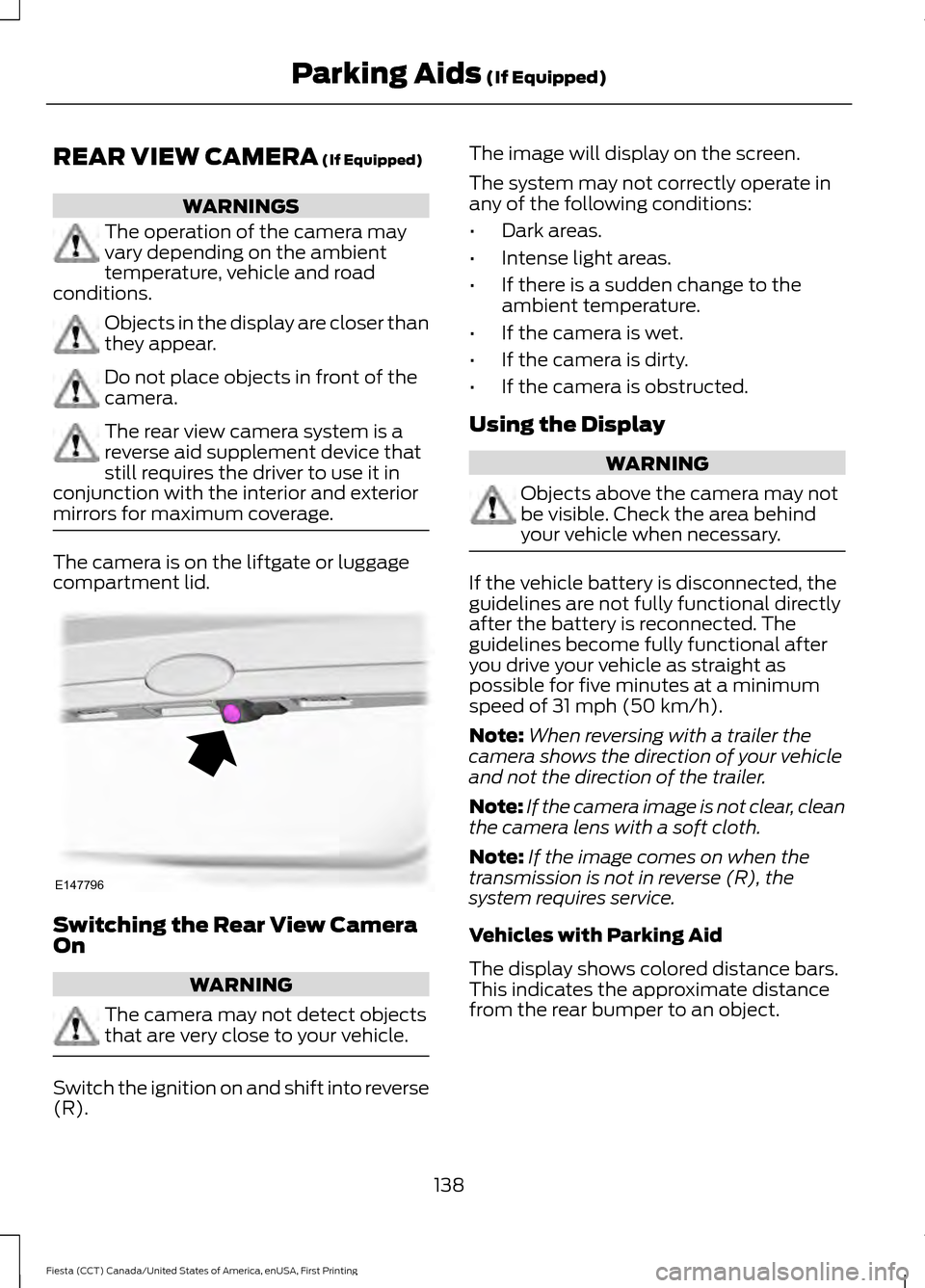
mirrors for maximum coverage. The camera is on the liftgate or luggage
compartment lid.
Switching the Rear View Camera
On
WARNING
The camera may not detect objects
that are very close to your vehicle.
Switch the ignition on and shift into reverse
(R). The image will display on the screen.
The system may not correctly operate in
any of the following conditions:
•
Dark areas.
• Intense light areas.
• If there is a sudden change to the
ambient temperature.
• If the camera is wet.
• If the camera is dirty.
• If the camera is obstructed.
Using the Display WARNING
Objects above the camera may not
be visible. Check the area behind
your vehicle when necessary.
If the vehicle battery is disconnected, the
guidelines are not fully functional directly
after the battery is reconnected. The
guidelines become fully functional after
you drive your vehicle as straight as
possible for five minutes at a minimum
speed of
31 mph (50 km/h).
Note: When reversing with a trailer the
camera shows the direction of your vehicle
and not the direction of the trailer.
Note: If the camera image is not clear, clean
the camera lens with a soft cloth.
Note: If the image comes on when the
transmission is not in reverse (R), the
system requires service.
Vehicles with Parking Aid
The display shows colored distance bars.
This indicates the approximate distance
from the rear bumper to an object.
138
Fiesta (CCT) Canada/United States of America, enUSA, First Printing Parking Aids
(If Equipped)E147796
Page 143 of 363
PRINCIPLE OF OPERATION
WARNING
The system does not relieve you of
your responsibility to drive with due
care and attention.
Cruise control allows you to control your
speed using the switches on the steering
wheel. You can use cruise control when
you exceed approximately 20 mph (30
km/h).
USING CRUISE CONTROL
WARNINGS
Do not use cruise control on winding
roads, in heavy traffic or when the
road surface is slippery. This could
result in loss of vehicle control, serious
injury or death. When you are going downhill, your
speed may increase above the set
speed. The system will not apply the
brakes. Change down a gear to assist the
system in maintaining the set speed.
Failure to do so could result in loss of
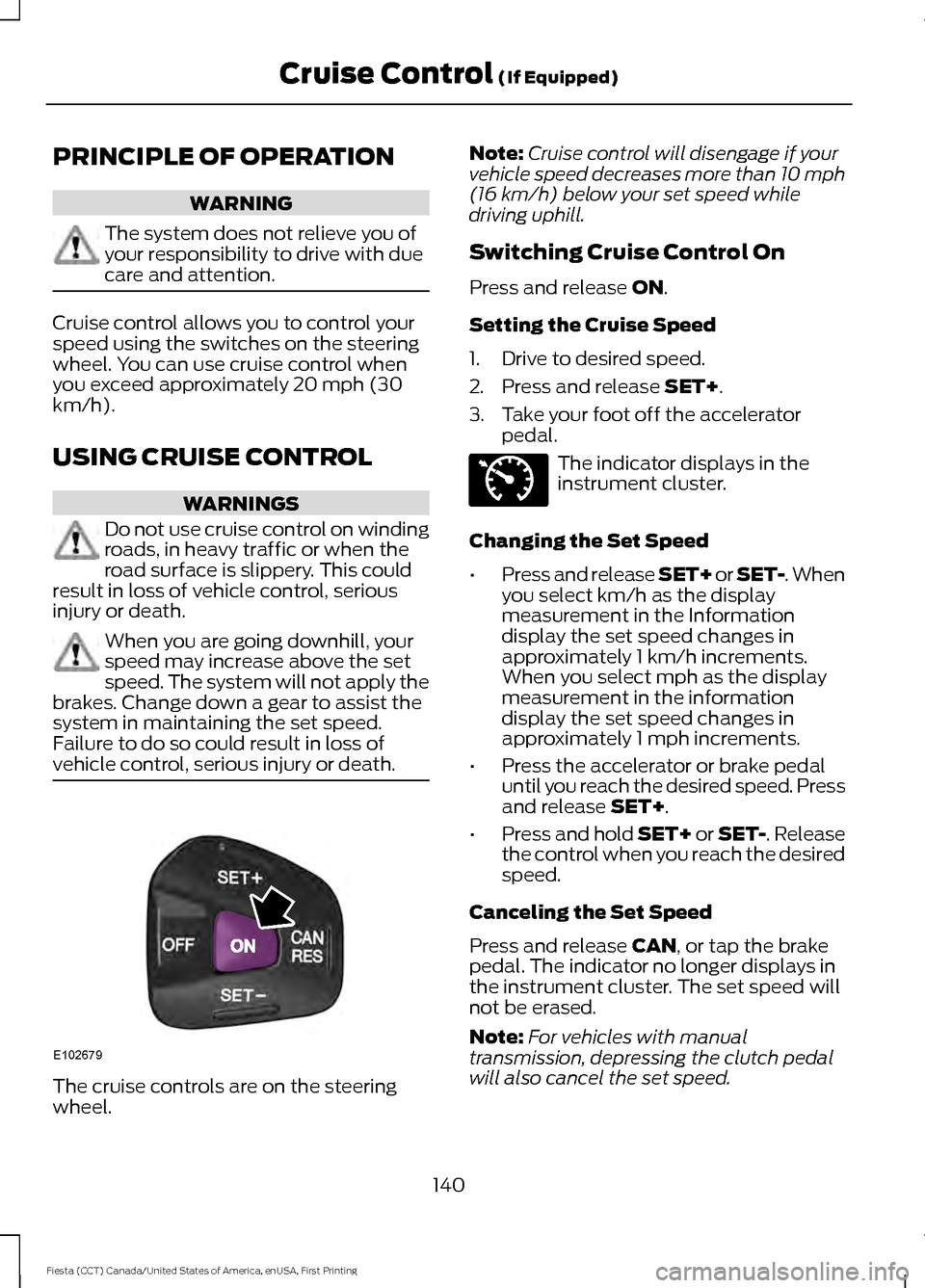
vehicle control, serious injury or death. The cruise controls are on the steering
wheel. Note:
Cruise control will disengage if your
vehicle speed decreases more than 10 mph
(16 km/h) below your set speed while
driving uphill.
Switching Cruise Control On
Press and release
ON.
Setting the Cruise Speed
1. Drive to desired speed.
2. Press and release
SET+.
3. Take your foot off the accelerator pedal. The indicator displays in the
instrument cluster.
Changing the Set Speed
• Press and release SET+ or SET-. When
you select km/h as the display
measurement in the Information
display the set speed changes in
approximately 1 km/h increments.
When you select mph as the display
measurement in the information
display the set speed changes in
approximately 1 mph increments.
• Press the accelerator or brake pedal
until you reach the desired speed. Press
and release
SET+.
• Press and hold SET+ or SET-. Release
the control when you reach the desired
speed.
Canceling the Set Speed
Press and release
CAN, or tap the brake
pedal. The indicator no longer displays in
the instrument cluster. The set speed will
not be erased.
Note: For vehicles with manual
transmission, depressing the clutch pedal
will also cancel the set speed.
140
Fiesta (CCT) Canada/United States of America, enUSA, First Printing Cruise Control
(If Equipped)E102679 E71340