climate settings FORD FLEX 2014 1.G User Guide
[x] Cancel search | Manufacturer: FORD, Model Year: 2014, Model line: FLEX, Model: FORD FLEX 2014 1.GPages: 554, PDF Size: 8.04 MB
Page 488 of 554
Rear View Camera
This menu allows you to access settings for your rear view camera.
Press the Settings icon >Vehicle>Rear View Camera,then select
from the following settings:
•Rear Camera Delay
•Visual Park Aid Alert
•Guidelines.
Enable Valet Mode
Note:If the system locks, and you need to reset the PIN, enter 3681 and
the system unlocks.
Valet mode allows you to lock the system. No information is accessible
until the system is unlocked with the correct PIN.
1. Press the Settings icon >Vehicle>Enable Valet Mode.
2. When prompted, enter a four-digit PIN.
After you press Continue, the system locks until you enter the PIN again.
Settings
Access and adjust system settings, voice features, as well as phone,
navigation and wireless settings.
System
Press the Settings icon >Settings>System,then select from
the following:
System
LanguageSelect to have the touchscreen display in
English, Spanish or French.
DistanceSelect to display units in kilometers or miles.
TemperatureSelect to display units in Celsius or
Fahrenheit.
System Prompt
VolumeAdjust the volume of voice prompts from the
system.
Touch Screen Button
BeepSelect to have the system beep to confirm
choices made through the touchscreen.
Touch Panel Button
BeepSelect to have the system beep to confirm
button choices made through the climate or
audio system.
MyFord Touch® (If Equipped)487
2014 Flex(471)
Owners Guide gf, 1st Printing, April 2013
USA(fus)
Page 496 of 554
To access Help using the voice commands, press the voice button, then,
after the tone, say “Help”. The system provides allowable voice
commands for the current mode.
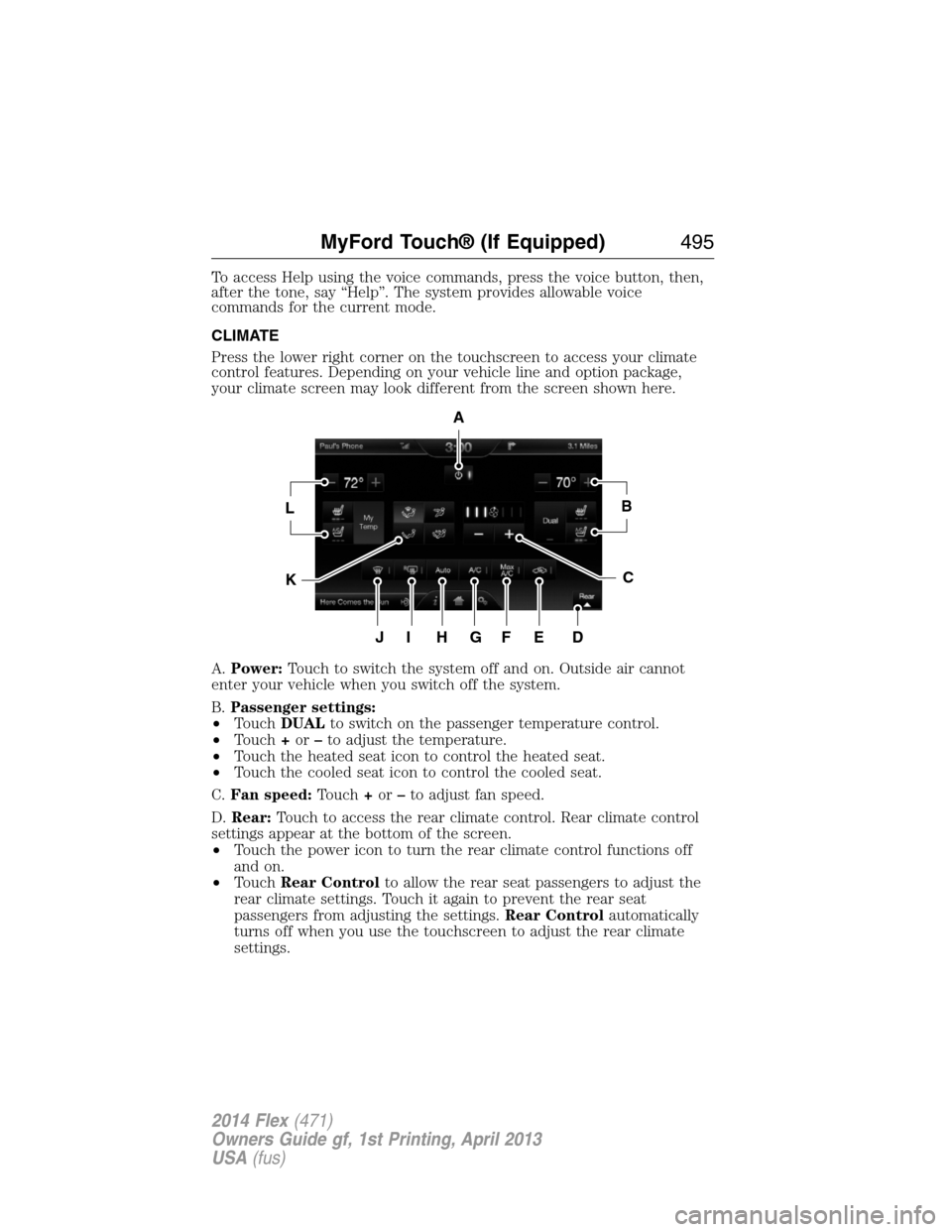
CLIMATE
Press the lower right corner on the touchscreen to access your climate
control features. Depending on your vehicle line and option package,
your climate screen may look different from the screen shown here.
A.Power:Touch to switch the system off and on. Outside air cannot
enter your vehicle when you switch off the system.
B.Passenger settings:
•TouchDUALto switch on the passenger temperature control.
•Touch+or–to adjust the temperature.
•Touch the heated seat icon to control the heated seat.
•Touch the cooled seat icon to control the cooled seat.
C.Fan speed:Touch+or–to adjust fan speed.
D.Rear:Touch to access the rear climate control. Rear climate control
settings appear at the bottom of the screen.
•Touch the power icon to turn the rear climate control functions off
and on.
•TouchRear Controlto allow the rear seat passengers to adjust the
rear climate settings. Touch it again to prevent the rear seat
passengers from adjusting the settings.Rear Controlautomatically
turns off when you use the touchscreen to adjust the rear climate
settings.
A
LB
KC
JIHGFED
MyFord Touch® (If Equipped)495
2014 Flex(471)
Owners Guide gf, 1st Printing, April 2013
USA(fus)
Page 497 of 554
•Touch+or–to adjust the temperature.
•To adjust fan speed, touch+or–next to the fan icon.
•TouchRearagain to close the rear controls. Closing the rear climate
control functions does not affect their current settings.
E.Recirculated air:Touch to turn the recirculated air on or off which:
•May reduce the amount of time needed to cool down the interior.
•May help reduce odors from reaching the interior.
•Engages automatically when MAX A/C is selected.
•May be engaged manually in any airflow mode except defrost.
•May turn off in all airflow modes except MAX A/C to reduce fog
potential.
F.MAX A/C:Touch to cool your vehicle with recirculated air. Touch
again for normal A/C operation. MAX A/C:
•Distributes air through instrument panel vents.
•Is more economical and efficient than normal A/C mode.
•May help reduce odors from entering your vehicle.
G.A/C:Touch to turn the air conditioning on or off.
•Use with recirculated air to improve cooling performance and
efficiency.
•Engages automatically in MAX A/C, defrost and floor/defrost.
H.AUTO:Touch to engage automatic operation, then set the
temperature using the temperature control. The system automatically
controls:
•Fan speed
•Airflow distribution
•A/Conoroff
•Outside or recirculated air.
I.Rear defroster:Touch to turn the rear window defroster and heated
mirrors on.
J.Defrost:Touch to clear the windshield of fog and thin ice. Touch
again to return to the previous airflow selection. When on, defrost:
•Provides outside air to reduce window fogging.
•Distributes air through the windshield defroster vents and demister
vents.
K.Manual controls:Select any of the following airflow distribution
modes:
•Floor and Defrost:Distributes air through the windshield defroster
vents, demister vents, floor vents and rear seat floor vents, and
provides outside air to reduce window fogging.
•Panel:Distributes air through the instrument panel vents.
496MyFord Touch® (If Equipped)
2014 Flex(471)
Owners Guide gf, 1st Printing, April 2013
USA(fus)
Page 498 of 554
•Panel and Floor:Distributes air through the instrument panel vents,
demister vents, floor vents and rear seat floor vents.
•Floor:Distributes air through the demister vents, floor vents and
rear seat floor vents.
L.Driver settings:Depending on your vehicle and option package, you
may have the following features:
•Touch+or–to adjust the temperature.
•If your vehicle is equipped with heated seats, touch the heated seat
icon to control the heated seat. See theSeatschapter.
•If your vehicle is equipped with cooled seats, touch the cooled seat
icon to control the cooled seat. See theSeatschapter.
•Touch and holdMyTempto select a temperature you would like your
vehicle to remember and maintain for you.
Climate Control Voice Commands
The following voice commands are available at the main menu
level of a voice session. For example, press the voice button
and after the prompt, “Say a command”; say any of the
following commands:
Climate control voice commands
“Climate automatic”
“Climate my temperature”
“Climate off”
“Climate on”
“Climate temperature <15.5–29.5> degrees”
“Climate temperature <60–85> degrees”
“Help”
There are additional climate control commands but in order to access
them, you have to say “Climate” first, then when the system is ready to
listen, you may say any of the following commands:
Additional climate control voice commands
“Automatic” “Panel on”
“A/C off” “Rear defrost off”
“A/C on” “Rear defrost on”
“Defrost off” “Recirc off”
“Defrost on” “Recirc on”
“Dual off” “Temperature”
*
MyFord Touch® (If Equipped)497
2014 Flex(471)
Owners Guide gf, 1st Printing, April 2013
USA(fus)
Page 553 of 554
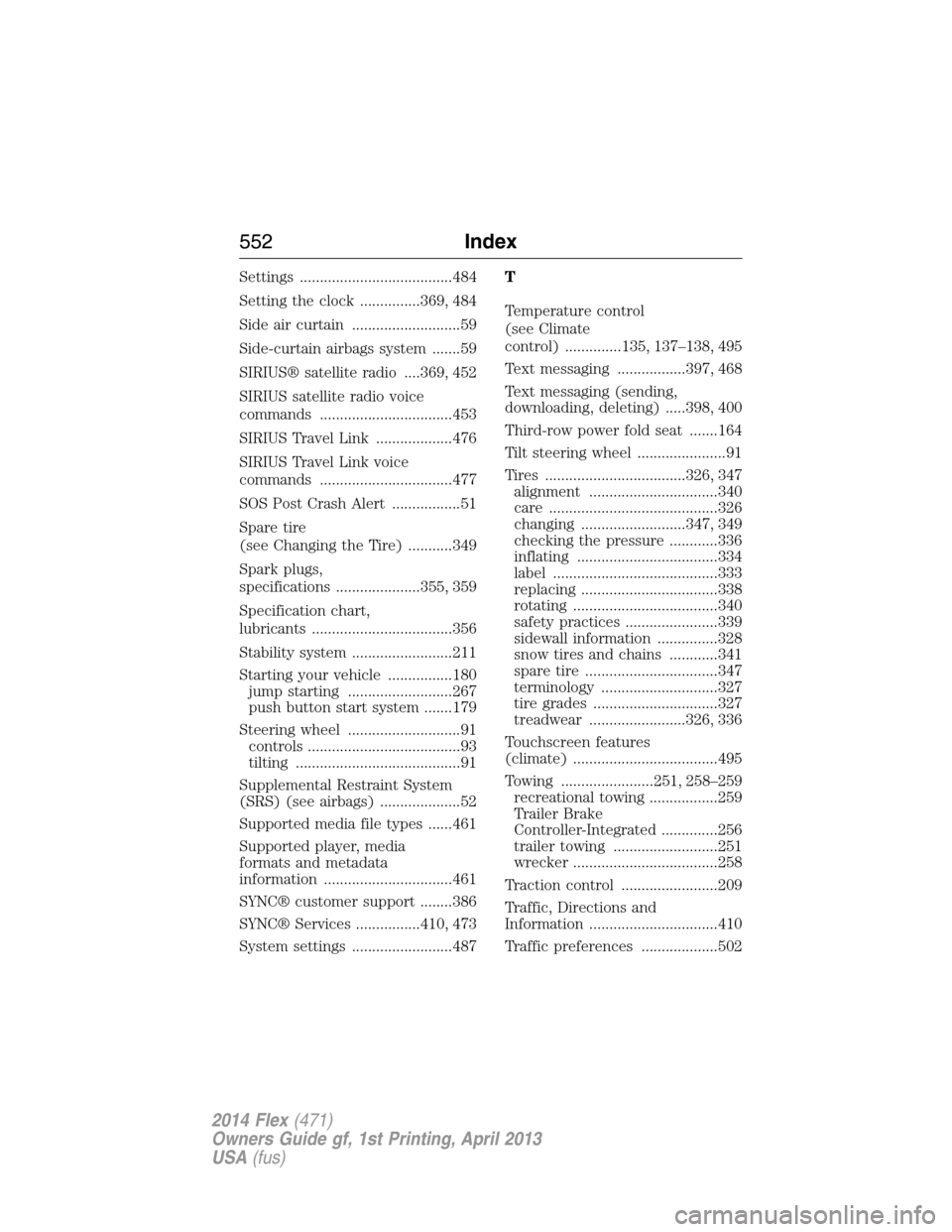
Settings ......................................484
Setting the clock ...............369, 484
Side air curtain ...........................59
Side-curtain airbags system .......59
SIRIUS® satellite radio ....369, 452
SIRIUS satellite radio voice
commands .................................453
SIRIUS Travel Link ...................476
SIRIUS Travel Link voice
commands .................................477
SOS Post Crash Alert .................51
Spare tire
(see Changing the Tire) ...........349
Spark plugs,
specifications .....................355, 359
Specification chart,
lubricants ...................................356
Stability system .........................211
Starting your vehicle ................180
jump starting ..........................267
push button start system .......179
Steering wheel ............................91
controls ......................................93
tilting .........................................91
Supplemental Restraint System
(SRS) (see airbags) ....................52
Supported media file types ......461
Supported player, media
formats and metadata
information ................................461
SYNC® customer support ........386
SYNC® Services ................410, 473
System settings .........................487T
Temperature control
(see Climate
control) ..............135, 137–138, 495
Text messaging .................397, 468
Text messaging (sending,
downloading, deleting) .....398, 400
Third-row power fold seat .......164
Tilt steering wheel ......................91
Tires ...................................326, 347
alignment ................................340
care ..........................................326
changing ..........................347, 349
checking the pressure ............336
inflating ...................................334
label .........................................333
replacing ..................................338
rotating ....................................340
safety practices .......................339
sidewall information ...............328
snow tires and chains ............341
spare tire .................................347
terminology .............................327
tire grades ...............................327
treadwear ........................326, 336
Touchscreen features
(climate) ....................................495
Towing .......................251, 258–259
recreational towing .................259
Trailer Brake
Controller-Integrated ..............256
trailer towing ..........................251
wrecker ....................................258
Traction control ........................209
Traffic, Directions and
Information ................................410
Traffic preferences ...................502
552Index
2014 Flex(471)
Owners Guide gf, 1st Printing, April 2013
USA(fus)