steering wheel FORD FLEX 2014 1.G Owner's Manual
[x] Cancel search | Manufacturer: FORD, Model Year: 2014, Model line: FLEX, Model: FORD FLEX 2014 1.GPages: 554, PDF Size: 8.04 MB
Page 211 of 554
PRINCIPLES OF OPERATION
WARNING:Vehicle modifications involving braking system,
aftermarket roof racks, suspension, steering system, tire
construction and wheel or tire size may change the handling
characteristics of the vehicle and may adversely affect the performance
of the AdvanceTrac® system. In addition, installing any stereo
loudspeakers may interfere with and adversely affect the AdvanceTrac®
system. Install any aftermarket stereo loudspeaker as far as possible
from the front center console, the tunnel, and the front seats in order
to minimize the risk of interfering with the AdvanceTrac® sensors.
Reducing the effectiveness of the AdvanceTrac® system could lead to
an increased risk of loss of vehicle control, vehicle rollover, personal
injury and death.
WARNING:Remember that even advanced technology cannot
defy the laws of physics. It is always possible to lose control of a
vehicle due to inappropriate driver input for the conditions. Aggressive
driving on any road condition can cause you to lose control of your
vehicle increasing the risk of personal injury or property damage.
Activation of the AdvanceTrac® system is an indication that at least
some of the tires have exceeded their ability to grip the road; this could
reduce the operator’s ability to control the vehicle potentially resulting
in a loss of vehicle control, vehicle rollover, personal injury and death.
If your AdvanceTrac® system activates, SLOW DOWN.
The AdvanceTrac® system helps you keep control of your vehicle when
on a slippery surface. The electronic stability control portion of the
system helps avoid skids and lateral slides and the traction control
system helps avoid drive wheel spin and loss of traction. See the
Traction Controlchapter for details on traction control system
operation.
210Stability Control
2014 Flex(471)
Owners Guide gf, 1st Printing, April 2013
USA(fus)
Page 217 of 554
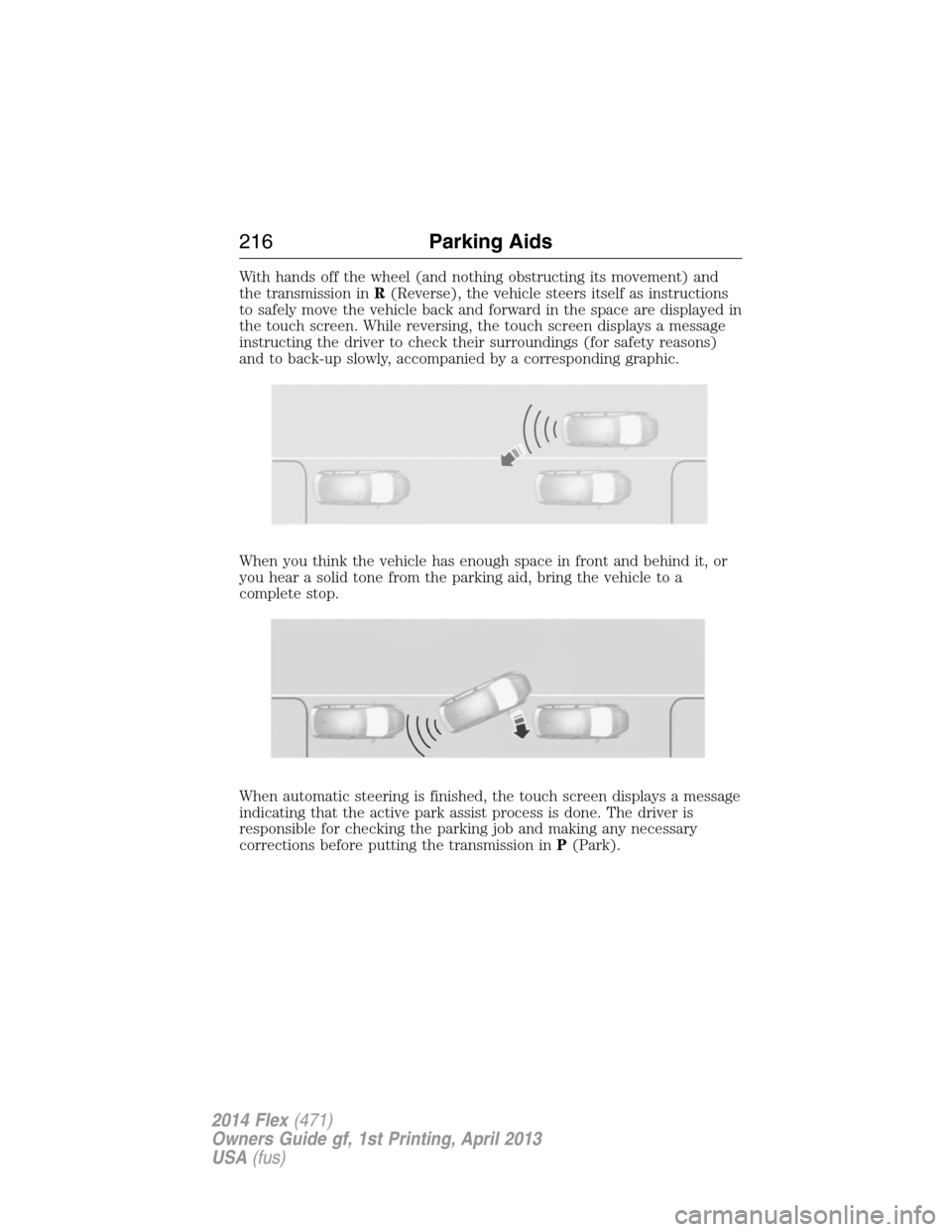
With hands off the wheel (and nothing obstructing its movement) and
the transmission inR(Reverse), the vehicle steers itself as instructions
to safely move the vehicle back and forward in the space are displayed in
the touch screen. While reversing, the touch screen displays a message
instructing the driver to check their surroundings (for safety reasons)
and to back-up slowly, accompanied by a corresponding graphic.
When you think the vehicle has enough space in front and behind it, or
you hear a solid tone from the parking aid, bring the vehicle to a
complete stop.
When automatic steering is finished, the touch screen displays a message
indicating that the active park assist process is done. The driver is
responsible for checking the parking job and making any necessary
corrections before putting the transmission inP(Park).
216Parking Aids
2014 Flex(471)
Owners Guide gf, 1st Printing, April 2013
USA(fus)
Page 218 of 554
Deactivating the Park Assist Feature
The system can be deactivated manually by:
•pressing the active park assist button
•grabbing the steering wheel
•driving above approximately 20 mph (35 km/h) for 30 seconds during
an active park search
•driving above 6 mph (10 km/h) during automatic steering
•turning off the traction control system.
Certain vehicle conditions can also deactivate the system:
•Traction control has activated on a slippery or loose surface.
•Anti-lock brake system activation or failure.
•Any door (except the driver’s) opens.
•Something touches the steering wheel.
If a problem occurs with the system, a warning message is displayed,
followed by a chime. Occasional active park assist messages may occur in
normal operation. For recurring or frequent active park assist faults,
contact an authorized dealer to have your vehicle serviced.
Troubleshooting the System
The system does not look for a space
The traction control system may be off
Any door (except the driver’s) may not be completely closed
The system does not offer a particular space
Something may be contacting the front bumper or side sensors
There is not enough room on both sides of the vehicle in order to park
There is not enough space for the parking maneuver on the opposite
side of the parking space
The vehicle is farther than 5 ft (1.5 m) from the parking space
The vehicle is closer than 16 in. (40 cm) from neighboring parked
vehicles
The transmission is in R (Reverse); the vehicle must be moving
forward to detect a parking space
Parking Aids217
2014 Flex(471)
Owners Guide gf, 1st Printing, April 2013
USA(fus)
Page 222 of 554
If your vehicle is equipped with active guidelines they are only shown
with fixed guidelines. To use active guidelines, turn the steering wheel to
point the guidelines toward an intended path. If the steering wheel
position is changed while reversing, the vehicle might deviate from the
original intended path.
The fixed and active guidelines fade in and out depending on the
steering wheel position. When the steering wheel position is straight, the
active guidelines are not shown.
Always use caution while reversing. Objects in the red zone are closest
to your vehicle and objects in the green zone are further away. Objects
are getting closer to your vehicle as they move from the green zone to
the yellow or red zones. Use the side view mirrors and rear view mirror
to get better coverage on both sides and rear of the vehicle.
Selectable settings for this feature are ACTIVE + FIXED, FIXED and
OFF.
Visual Park Aid Alert
Note:Visual park alert is only available when the transmission is in R
(Reverse).
Note:The reverse sensing system is not effective at speeds above 3 mph
(5 km/h) and may not detect certain angular or moving objects.
The visual park aid alert allows the driver to view the area that is being
detected by the reverse sensing system. The system uses red, yellow and
green highlights which appear on top of the video image when an object
is detected by the reverse sensing system. The alert highlights the
closest object detected. The reverse sensing alert can be disabled and if
visual park aid alert is enabled, highlighted areas are still displayed.
Selectable settings for this feature are ON and OFF.
Parking Aids221
2014 Flex(471)
Owners Guide gf, 1st Printing, April 2013
USA(fus)
Page 224 of 554
PRINCIPLES OF OPERATION
Cruise control lets you maintain a set speed without keeping your foot
on the accelerator pedal.
USING CRUISE CONTROL
WARNING:Do not use cruise control in heavy traffic or on
roads that are winding, slippery or unpaved.
Note:Vehicle speed may vary momentarily when driving up or down a
steep hill. Apply the brakes if your vehicle speed increases above the set
speed while driving downhill.
Note:Cruise control will disengage if your vehicle speed decreases more
than 10 mph (16 km/h) below your set speed while driving uphill.
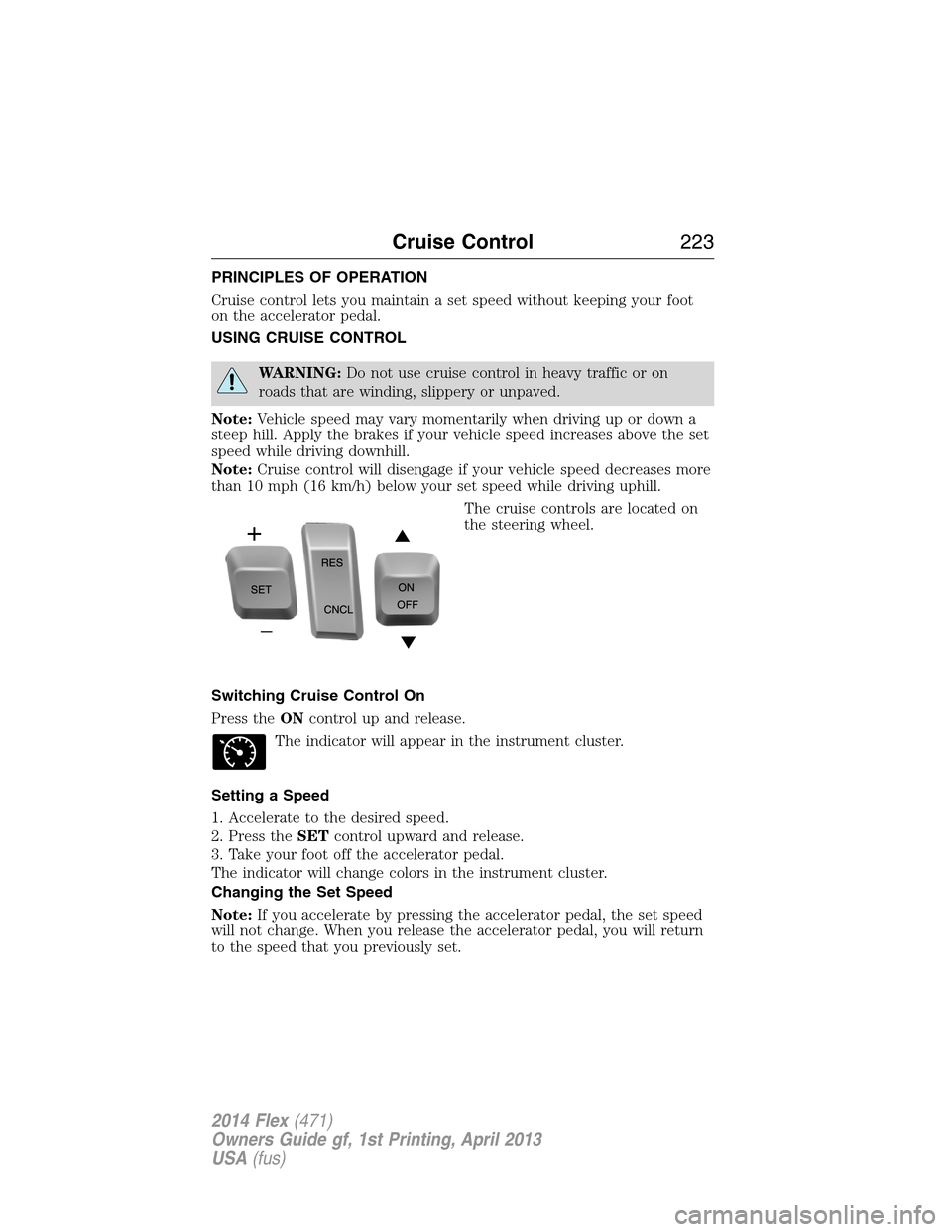
The cruise controls are located on
the steering wheel.
Switching Cruise Control On
Press theONcontrol up and release.
The indicator will appear in the instrument cluster.
Setting a Speed
1. Accelerate to the desired speed.
2. Press theSETcontrol upward and release.
3. Take your foot off the accelerator pedal.
The indicator will change colors in the instrument cluster.
Changing the Set Speed
Note:If you accelerate by pressing the accelerator pedal, the set speed
will not change. When you release the accelerator pedal, you will return
to the speed that you previously set.
Cruise Control223
2014 Flex(471)
Owners Guide gf, 1st Printing, April 2013
USA(fus)
Page 226 of 554
Note:It is your responsibility to stay alert, drive safely and be in control
of the vehicle at all times.
The system adjusts your speed to maintain a proper distance between
you and the vehicle in front of you in the same lane. You can select from
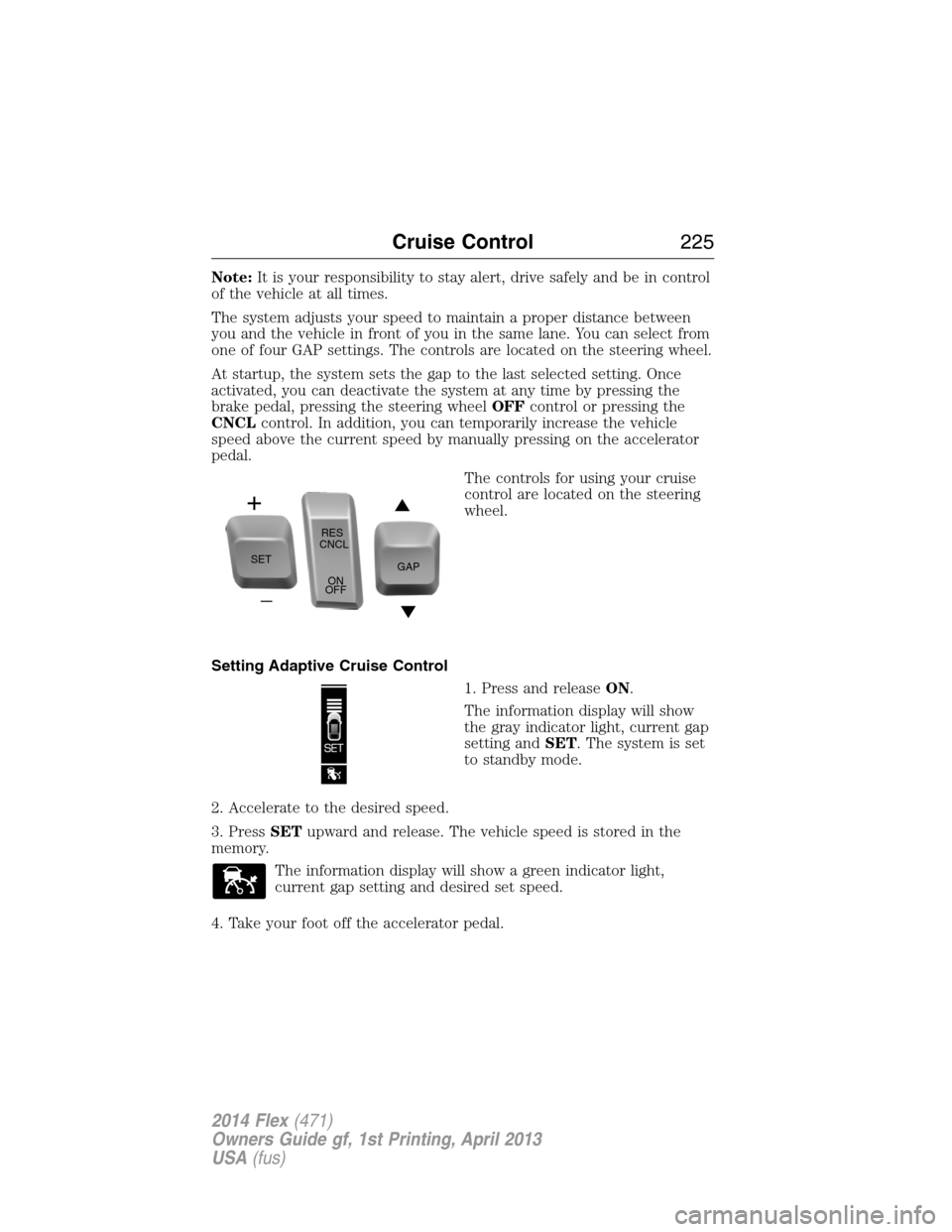
one of four GAP settings. The controls are located on the steering wheel.
At startup, the system sets the gap to the last selected setting. Once
activated, you can deactivate the system at any time by pressing the
brake pedal, pressing the steering wheelOFFcontrol or pressing the
CNCLcontrol. In addition, you can temporarily increase the vehicle
speed above the current speed by manually pressing on the accelerator
pedal.
The controls for using your cruise
control are located on the steering
wheel.
Setting Adaptive Cruise Control
1. Press and releaseON.
The information display will show
the gray indicator light, current gap
setting andSET. The system is set
to standby mode.
2. Accelerate to the desired speed.
3. PressSETupward and release. The vehicle speed is stored in the
memory.
The information display will show a green indicator light,
current gap setting and desired set speed.
4. Take your foot off the accelerator pedal.
SETRES
CNCL
ON
OFFGAP
Cruise Control225
2014 Flex(471)
Owners Guide gf, 1st Printing, April 2013
USA(fus)
Page 241 of 554
System Limitations
WARNING:The collision warning system’s brake support can
only help reduce the speed at which a collision occurs if the
driver applies the vehicle’s brakes. The brake pedal must be pressed
just like any typical braking situation.
Due to the nature of radar technology, there may be certain instances
where vehicles do not provide a collision warning. These include:
•Stationary vehicles or vehicles moving below 6 mph (10 km/h).
•Pedestrians or objects in the roadway.
•Oncoming vehicles in the same lane.
•Severe weather conditions (see blocked sensor section).
•Debris build-up on the grille near the headlamps (see blocked sensor
section).
•Small distance to vehicle ahead.
•Steering wheel and pedal movements are large (very active driving
style).
•High interior temperatures, which may deactivate the illumination or
the warning lamps until the interior temperature reduces (audible
warning still sounds).
Certain conditions may reduce the visibility of the warning lamp;
therefore, it is recommended to keep the audible warning on.
If the front end of the vehicle is hit or damaged, the radar sensing zone
may be altered causing missed or false collision warnings. See your
authorized dealer to have your collision warning radar checked for
proper coverage and operation.
STEERING
Electric Power Steering
WARNING:The electric power steering system has diagnostic
checks that continuously monitor the system to ensure proper
operation. When a system error is detected a steering message will
appear in the information display.
240Driving Aids
2014 Flex(471)
Owners Guide gf, 1st Printing, April 2013
USA(fus)
Page 258 of 554
•Do not make full-throttle starts.
•Check your hitch, electrical connections and trailer wheel lug nuts
thoroughly after you have traveled 50 miles (80 kilometers).
•When stopped in congested or heavy traffic during hot weather, place
the gearshift in positionPto aid engine and transmission cooling and
to help A/C performance.
•Turn off the speed control with heavy loads or in hilly terrain. The
speed control may turn off automatically when you are towing on
long, steep grades.
•Shift to a lower gear when driving down a long or steep hill. Do not
apply the brakes continuously, as they may overheat and become less
effective.
•If your transmission is equipped with a Grade Assist or Tow/Haul
feature, use this feature when towing. This provides engine braking
and helps eliminate excessive transmission shifting for optimum fuel
economy and transmission cooling.
•Allow more distance for stopping with a trailer attached. Anticipate
stops and brake gradually.
•Avoid parking on a grade. However, if you must park on a grade:
1. Turn the steering wheel to point your vehicle tires away from
traffic flow.
2. Set your vehicle parking brake.
3. Place the automatic transmission in positionP.
4. Place wheel chocks in front and back of the trailer wheels.
(Chocks not included with vehicle.)
Launching or Retrieving a Boat or Personal Watercraft (PWC)
Note:Disconnect the wiring to the trailerbeforebacking the trailer into
the water.
Note:Reconnect the wiring to the trailerafterremoving the trailer from
the water.
When backing down a ramp during boat launching or retrieval:
•Do not allow the static water level to rise above the bottom edge of
the rear bumper.
•Do not allow waves to break higher than 6 inches (15 centimeters)
above the bottom edge of the rear bumper.
Exceeding these limits may allow water to enter vehicle components:
•Causing internal damage to the components.
•Affecting driveability, emissions, and reliability.
Replace the rear axle lubricant anytime the rear axle submerges in
water. Water may have contaminated the rear axle lubricant, which does
not normally require checking or changing unless it is leaking or other
axle repair is required.
Towing257
2014 Flex(471)
Owners Guide gf, 1st Printing, April 2013
USA(fus)
Page 285 of 554
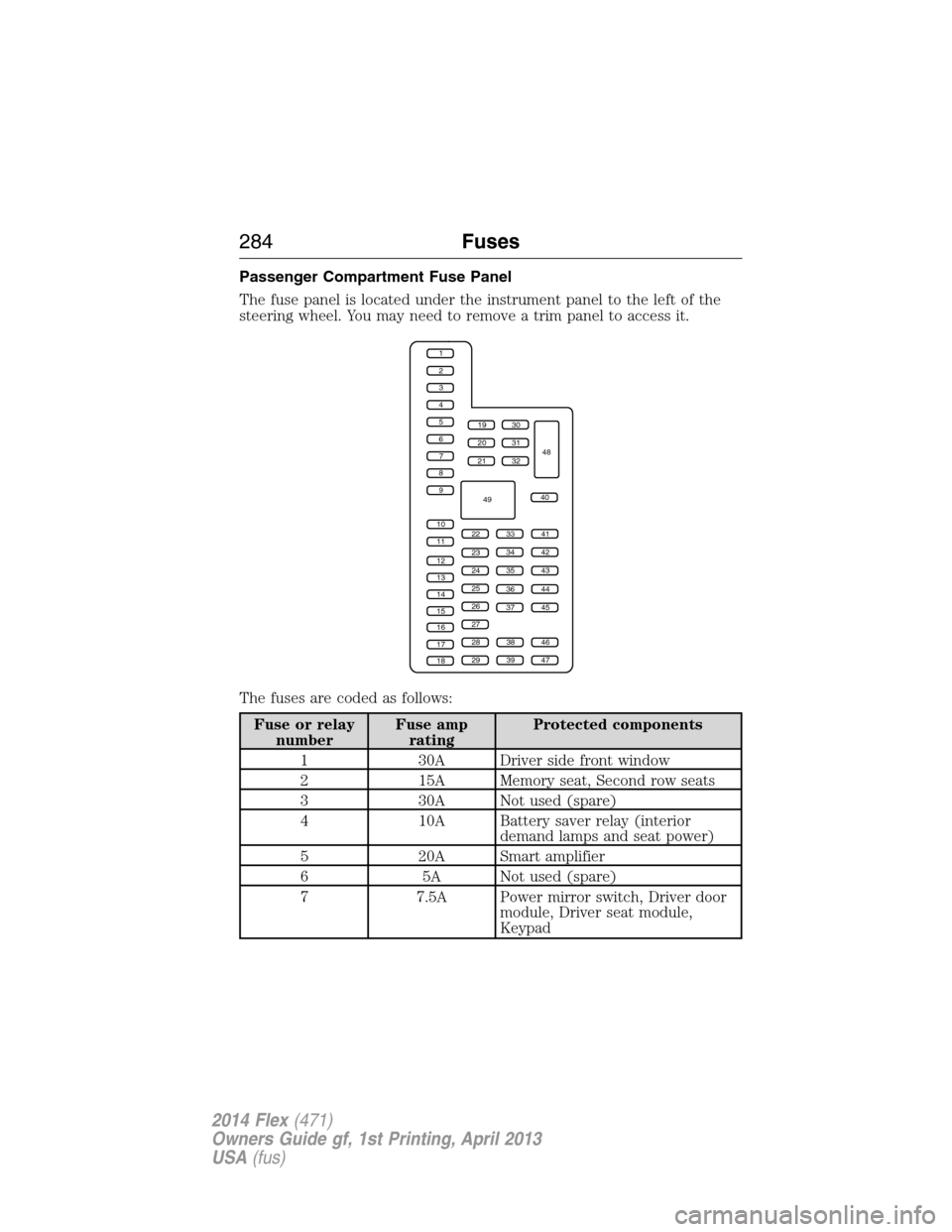
Passenger Compartment Fuse Panel
The fuse panel is located under the instrument panel to the left of the
steering wheel. You may need to remove a trim panel to access it.
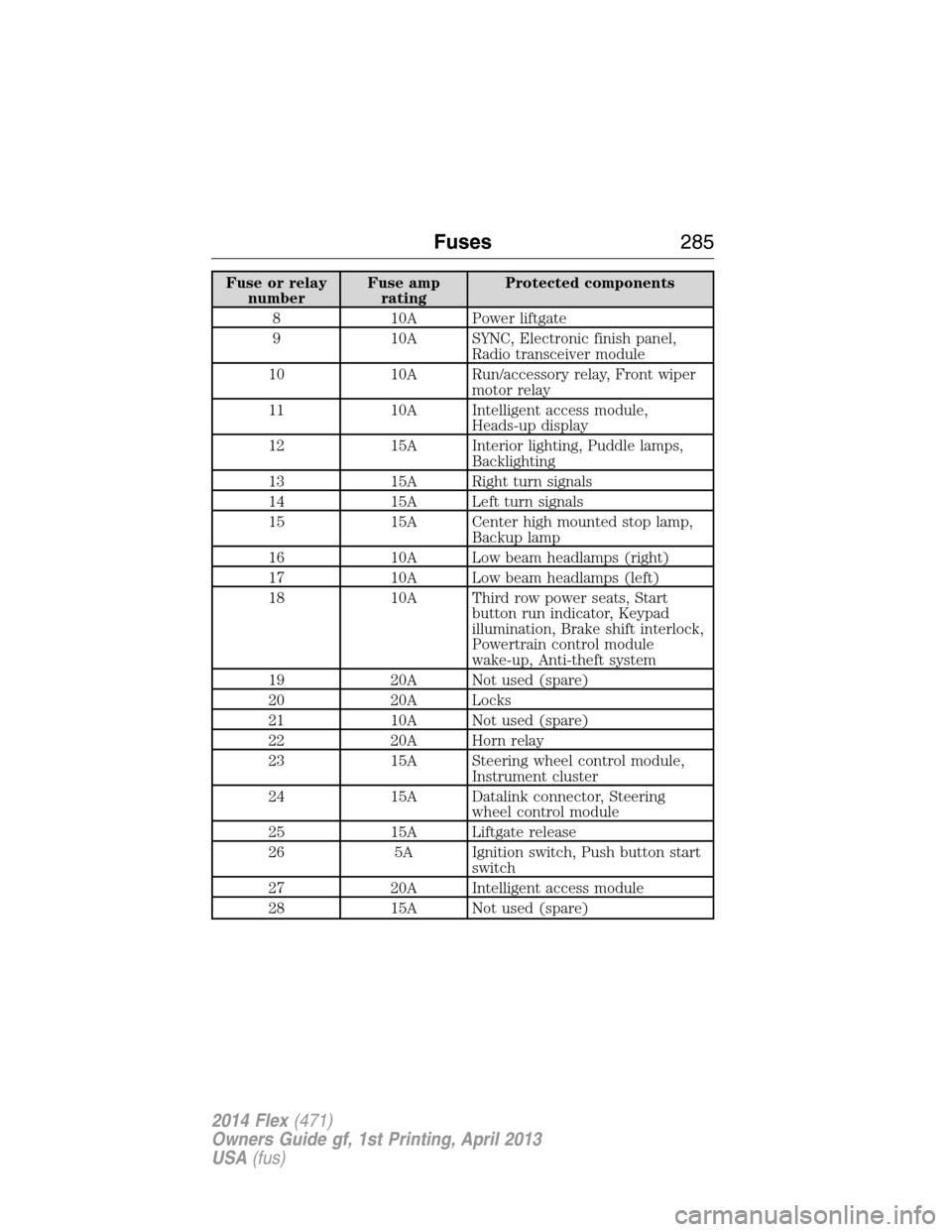
The fuses are coded as follows:
Fuse or relay
numberFuse amp
ratingProtected components
1 30A Driver side front window
2 15A Memory seat, Second row seats
3 30A Not used (spare)
4 10A Battery saver relay (interior
demand lamps and seat power)
5 20A Smart amplifier
6 5A Not used (spare)
7 7.5A Power mirror switch, Driver door
module, Driver seat module,
Keypad
1
2
3
4
5
6
7
8
9
10
11
12
13
14
15
16
17
18
19
20
21
223341
42
43
44
45
34
35
36
37
23
24
25
26
27
283846
394729
32
40
31
30
48
49
284Fuses
2014 Flex(471)
Owners Guide gf, 1st Printing, April 2013
USA(fus)
Page 286 of 554
Fuse or relay
numberFuse amp
ratingProtected components
8 10A Power liftgate
9 10A SYNC, Electronic finish panel,
Radio transceiver module
10 10A Run/accessory relay, Front wiper
motor relay
11 10A Intelligent access module,
Heads-up display
12 15A Interior lighting, Puddle lamps,
Backlighting
13 15A Right turn signals
14 15A Left turn signals
15 15A Center high mounted stop lamp,
Backup lamp
16 10A Low beam headlamps (right)
17 10A Low beam headlamps (left)
18 10A Third row power seats, Start
button run indicator, Keypad
illumination, Brake shift interlock,
Powertrain control module
wake-up, Anti-theft system
19 20A Not used (spare)
20 20A Locks
21 10A Not used (spare)
22 20A Horn relay
23 15A Steering wheel control module,
Instrument cluster
24 15A Datalink connector, Steering
wheel control module
25 15A Liftgate release
26 5A Ignition switch, Push button start
switch
27 20A Intelligent access module
28 15A Not used (spare)
Fuses285
2014 Flex(471)
Owners Guide gf, 1st Printing, April 2013
USA(fus)