phone FORD FLEX 2015 1.G Owners Manual
[x] Cancel search | Manufacturer: FORD, Model Year: 2015, Model line: FLEX, Model: FORD FLEX 2015 1.GPages: 571, PDF Size: 5.52 MB
Page 505 of 571
Wireless & Internet
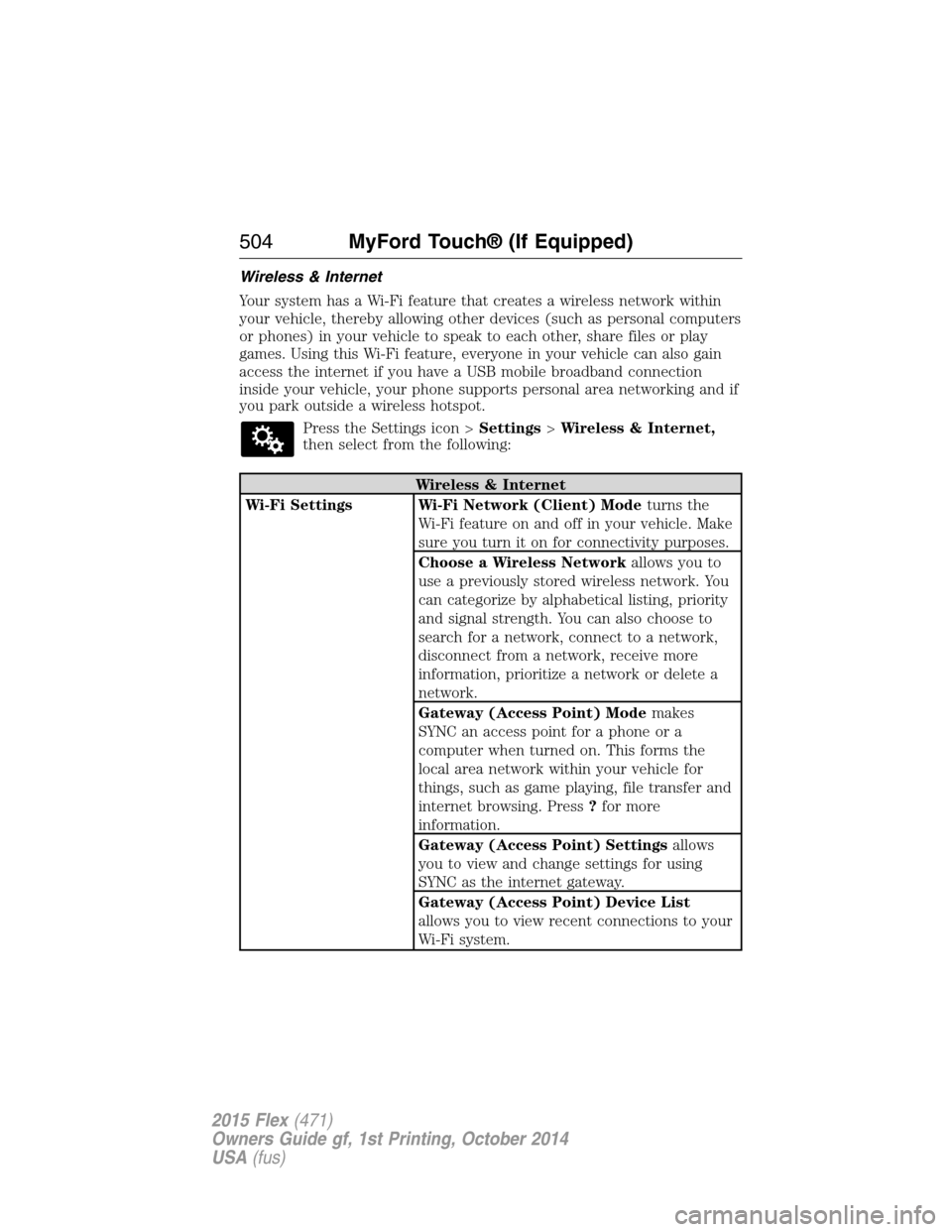
Your system has a Wi-Fi feature that creates a wireless network within
your vehicle, thereby allowing other devices (such as personal computers
or phones) in your vehicle to speak to each other, share files or play
games. Using this Wi-Fi feature, everyone in your vehicle can also gain
access the internet if you have a USB mobile broadband connection
inside your vehicle, your phone supports personal area networking and if
you park outside a wireless hotspot.
Press the Settings icon >Settings>Wireless & Internet,
then select from the following:
Wireless & Internet
Wi-Fi Settings Wi-Fi Network (Client) Modeturns the
Wi-Fi feature on and off in your vehicle. Make
sure you turn it on for connectivity purposes.
Choose a Wireless Networkallows you to
use a previously stored wireless network. You
can categorize by alphabetical listing, priority
and signal strength. You can also choose to
search for a network, connect to a network,
disconnect from a network, receive more
information, prioritize a network or delete a
network.
Gateway (Access Point) Modemakes
SYNC an access point for a phone or a
computer when turned on. This forms the
local area network within your vehicle for
things, such as game playing, file transfer and
internet browsing. Press?for more
information.
Gateway (Access Point) Settingsallows
you to view and change settings for using
SYNC as the internet gateway.
Gateway (Access Point) Device List
allows you to view recent connections to your
Wi-Fi system.
504MyFord Touch® (If Equipped)
2015 Flex(471)
Owners Guide gf, 1st Printing, October 2014
USA(fus)
Page 506 of 571
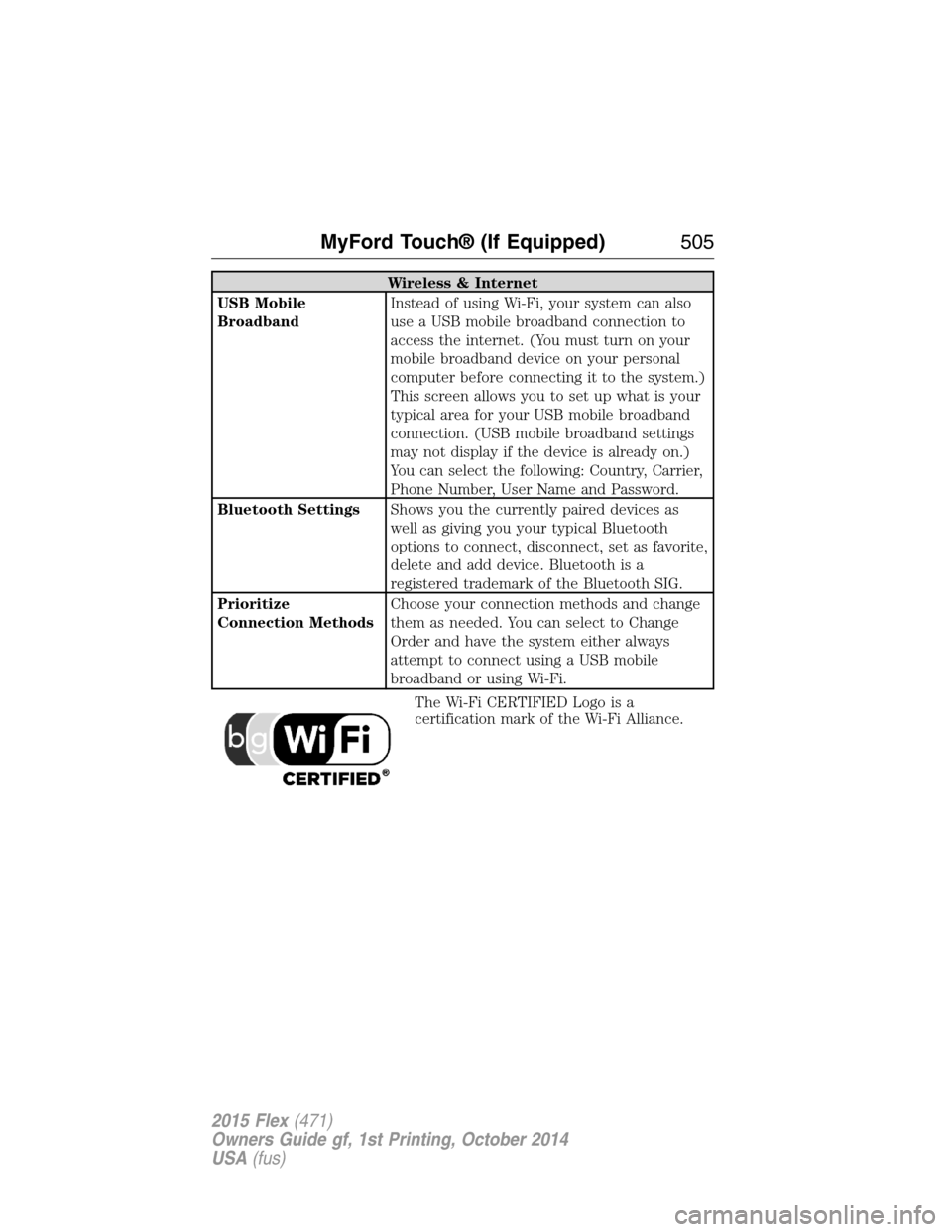
Wireless & Internet
USB Mobile
BroadbandInstead of using Wi-Fi, your system can also
use a USB mobile broadband connection to
access the internet. (You must turn on your
mobile broadband device on your personal
computer before connecting it to the system.)
This screen allows you to set up what is your
typical area for your USB mobile broadband
connection. (USB mobile broadband settings
may not display if the device is already on.)
You can select the following: Country, Carrier,
Phone Number, User Name and Password.
Bluetooth SettingsShows you the currently paired devices as
well as giving you your typical Bluetooth
options to connect, disconnect, set as favorite,
delete and add device. Bluetooth is a
registered trademark of the Bluetooth SIG.
Prioritize
Connection MethodsChoose your connection methods and change
them as needed. You can select to Change
Order and have the system either always
attempt to connect using a USB mobile
broadband or using Wi-Fi.
The Wi-Fi CERTIFIED Logo is a
certification mark of the Wi-Fi Alliance.
MyFord Touch® (If Equipped)505
2015 Flex(471)
Owners Guide gf, 1st Printing, October 2014
USA(fus)
Page 507 of 571
Help
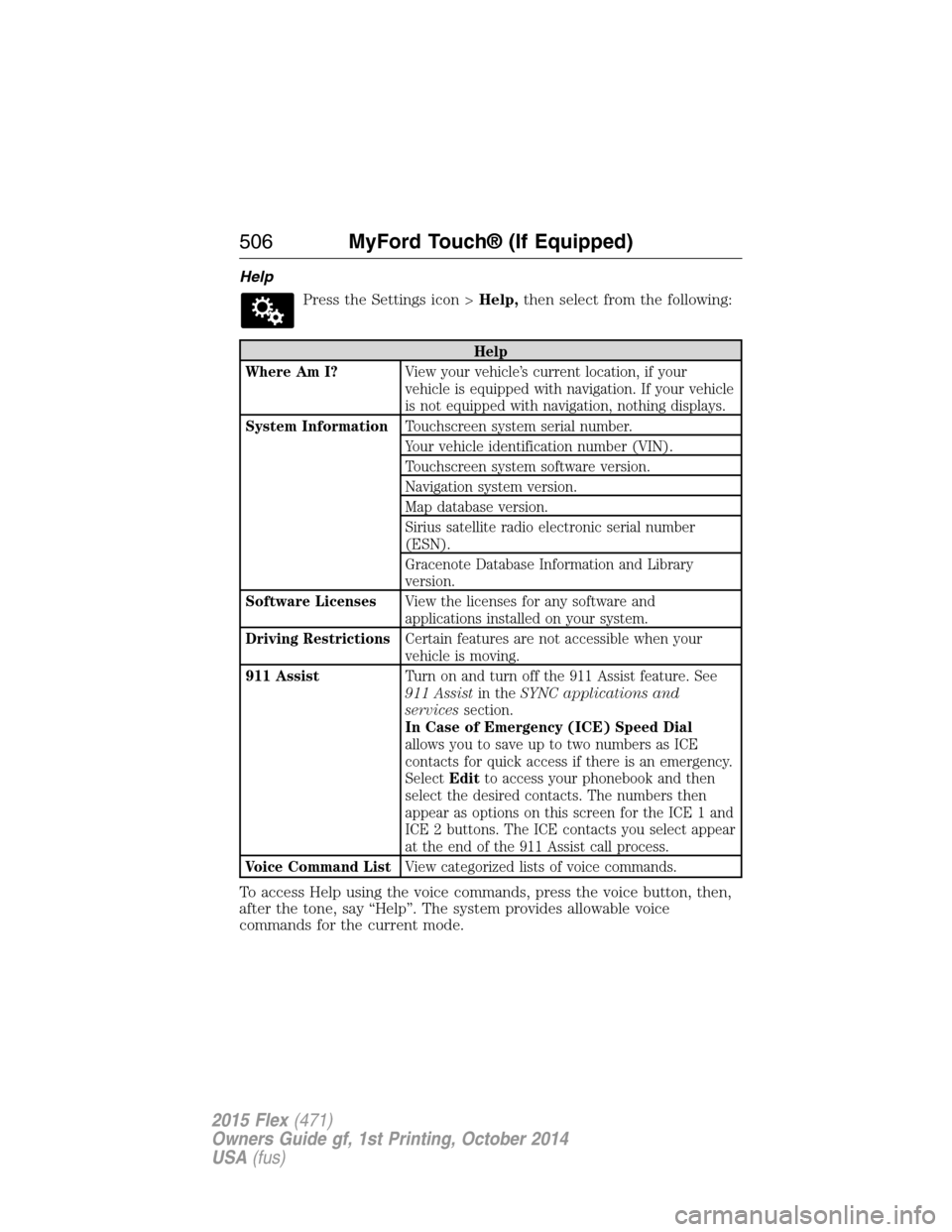
Press the Settings icon >Help,then select from the following:
Help
Where Am I?View your vehicle’s current location, if your
vehicle is equipped with navigation. If your vehicle
is not equipped with navigation, nothing displays.
System InformationTouchscreen system serial number.
Your vehicle identification number (VIN).
Touchscreen system software version.
Navigation system version.
Map database version.
Sirius satellite radio electronic serial number
(ESN).
Gracenote Database Information and Library
version.
Software LicensesView the licenses for any software and
applications installed on your system.
Driving RestrictionsCertain features are not accessible when your
vehicle is moving.
911 AssistTurn on and turn off the 911 Assist feature. See
911 Assistin theSYNC applications and
servicessection.
In Case of Emergency (ICE) Speed Dial
allows you to save up to two numbers as ICE
contacts for quick access if there is an emergency.
SelectEditto access your phonebook and then
select the desired contacts. The numbers then
appear as options on this screen for the ICE 1 and
ICE 2 buttons. The ICE contacts you select appear
at the end of the 911 Assist call process.
Voice Command ListView categorized lists of voice commands.
To access Help using the voice commands, press the voice button, then,
after the tone, say “Help”. The system provides allowable voice
commands for the current mode.
506MyFord Touch® (If Equipped)
2015 Flex(471)
Owners Guide gf, 1st Printing, October 2014
USA(fus)
Page 514 of 571
cityseekr (If Available)
Note:cityseekr point of interest information is limited to approximately
912 cities (881 in the United States, 20 in Canada and 11 in Mexico).
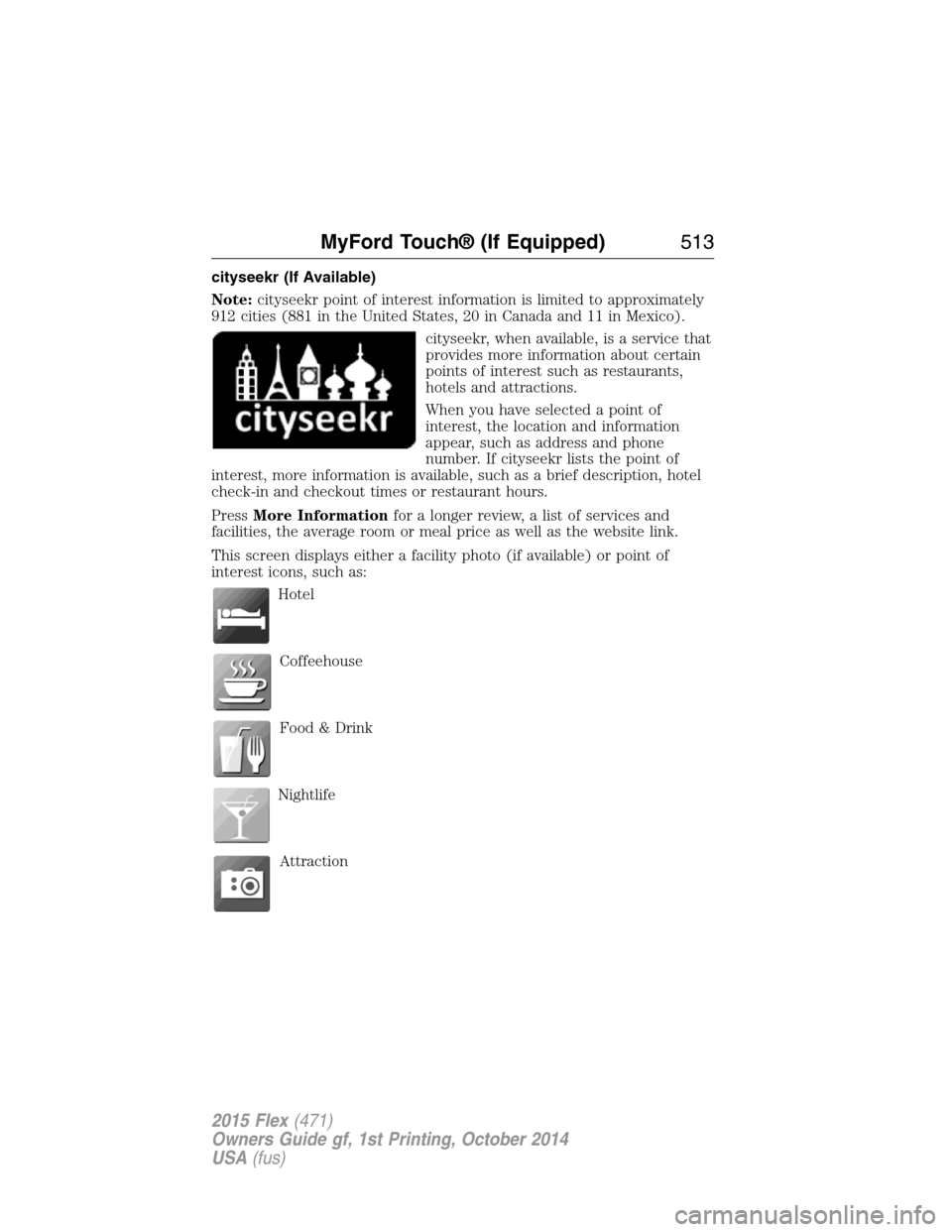
cityseekr, when available, is a service that
provides more information about certain
points of interest such as restaurants,
hotels and attractions.
When you have selected a point of
interest, the location and information
appear, such as address and phone
number. If cityseekr lists the point of
interest, more information is available, such as a brief description, hotel
check-in and checkout times or restaurant hours.
PressMore Informationfor a longer review, a list of services and
facilities, the average room or meal price as well as the website link.
This screen displays either a facility photo (if available) or point of
interest icons, such as:
Hotel
Coffeehouse
Food & Drink
Nightlife
Attraction
MyFord Touch® (If Equipped)513
2015 Flex(471)
Owners Guide gf, 1st Printing, October 2014
USA(fus)
Page 523 of 571
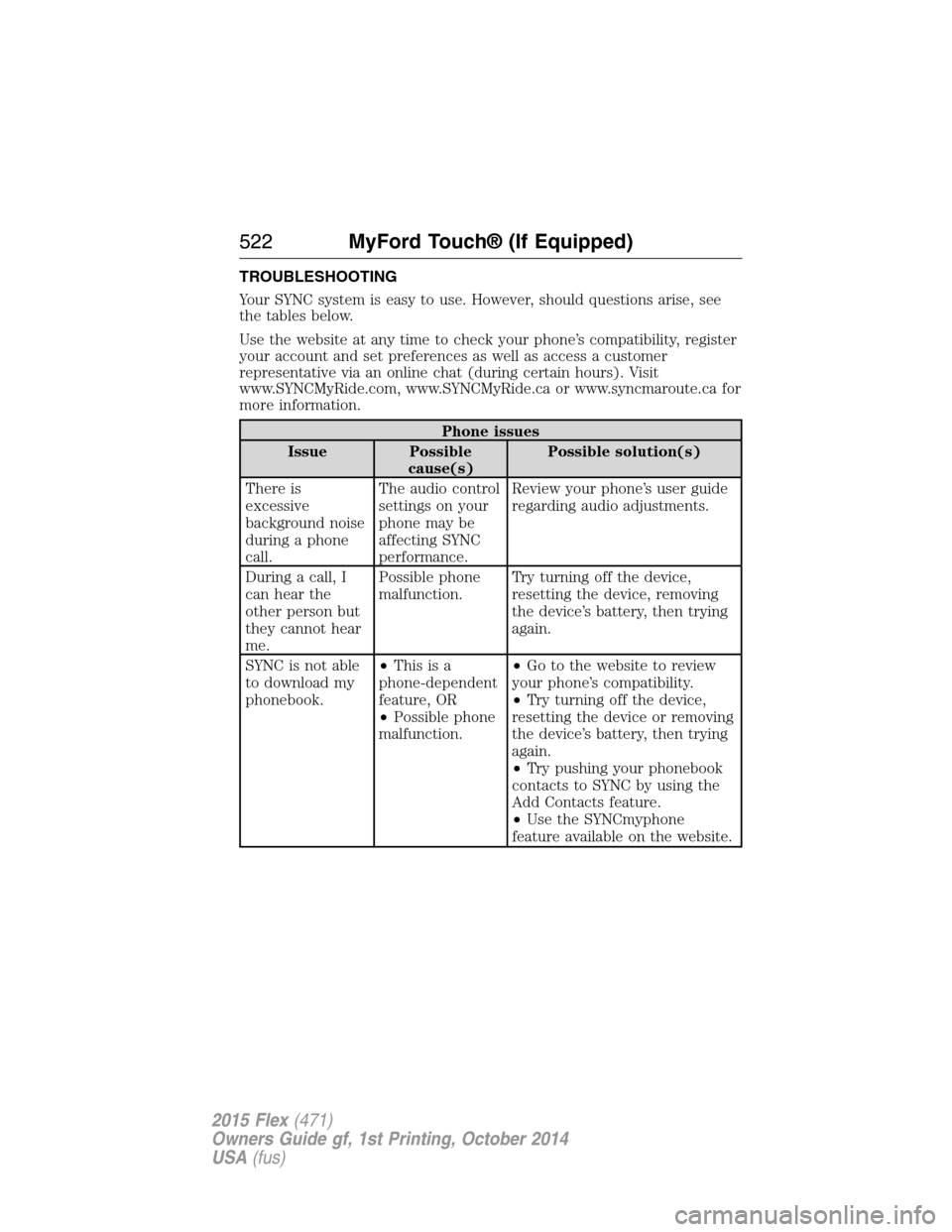
TROUBLESHOOTING
Your SYNC system is easy to use. However, should questions arise, see
the tables below.
Use the website at any time to check your phone’s compatibility, register
your account and set preferences as well as access a customer
representative via an online chat (during certain hours). Visit
www.SYNCMyRide.com, www.SYNCMyRide.ca or www.syncmaroute.ca for
more information.
Phone issues
Issue Possible
cause(s)Possible solution(s)
There is
excessive
background noise
during a phone
call.The audio control
settings on your
phone may be
affecting SYNC
performance.Review your phone’s user guide
regarding audio adjustments.
During a call, I
can hear the
other person but
they cannot hear
me.Possible phone
malfunction.Try turning off the device,
resetting the device, removing
the device’s battery, then trying
again.
SYNC is not able
to download my
phonebook.•Thisisa
phone-dependent
feature, OR
•Possible phone
malfunction.•Go to the website to review
your phone’s compatibility.
•Try turning off the device,
resetting the device or removing
the device’s battery, then trying
again.
•Try pushing your phonebook
contacts to SYNC by using the
Add Contacts feature.
•Use the SYNCmyphone
feature available on the website.
522MyFord Touch® (If Equipped)
2015 Flex(471)
Owners Guide gf, 1st Printing, October 2014
USA(fus)
Page 524 of 571
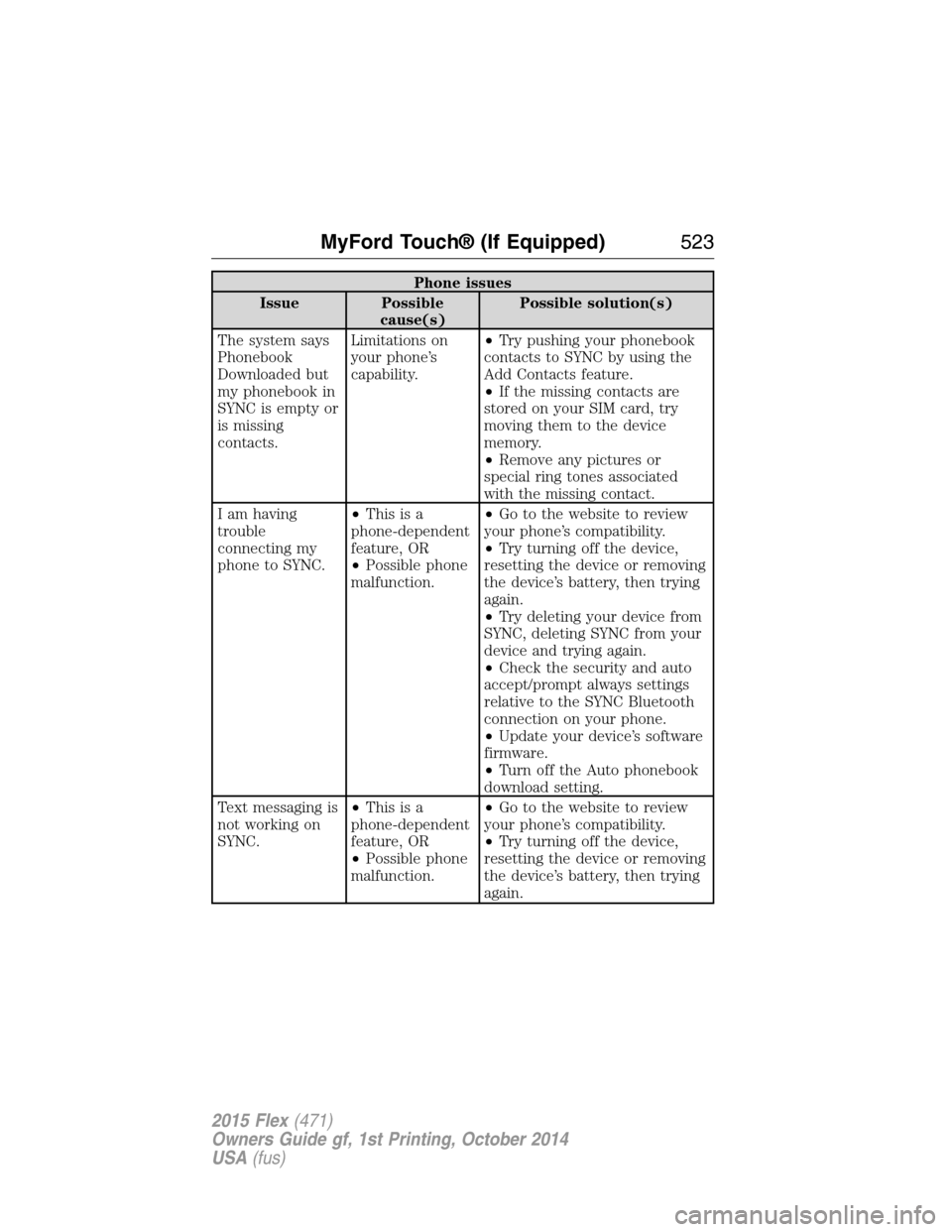
Phone issues
Issue Possible
cause(s)Possible solution(s)
The system says
Phonebook
Downloaded but
my phonebook in
SYNC is empty or
is missing
contacts.Limitations on
your phone’s
capability.•Try pushing your phonebook
contacts to SYNC by using the
Add Contacts feature.
•If the missing contacts are
stored on your SIM card, try
moving them to the device
memory.
•Remove any pictures or
special ring tones associated
with the missing contact.
I am having
trouble
connecting my
phone to SYNC.•Thisisa
phone-dependent
feature, OR
•Possible phone
malfunction.•Go to the website to review
your phone’s compatibility.
•Try turning off the device,
resetting the device or removing
the device’s battery, then trying
again.
•Try deleting your device from
SYNC, deleting SYNC from your
device and trying again.
•Check the security and auto
accept/prompt always settings
relative to the SYNC Bluetooth
connection on your phone.
•Update your device’s software
firmware.
•Turn off the Auto phonebook
download setting.
Text messaging is
not working on
SYNC.•Thisisa
phone-dependent
feature, OR
•Possible phone
malfunction.•Go to the website to review
your phone’s compatibility.
•Try turning off the device,
resetting the device or removing
the device’s battery, then trying
again.
MyFord Touch® (If Equipped)523
2015 Flex(471)
Owners Guide gf, 1st Printing, October 2014
USA(fus)
Page 525 of 571
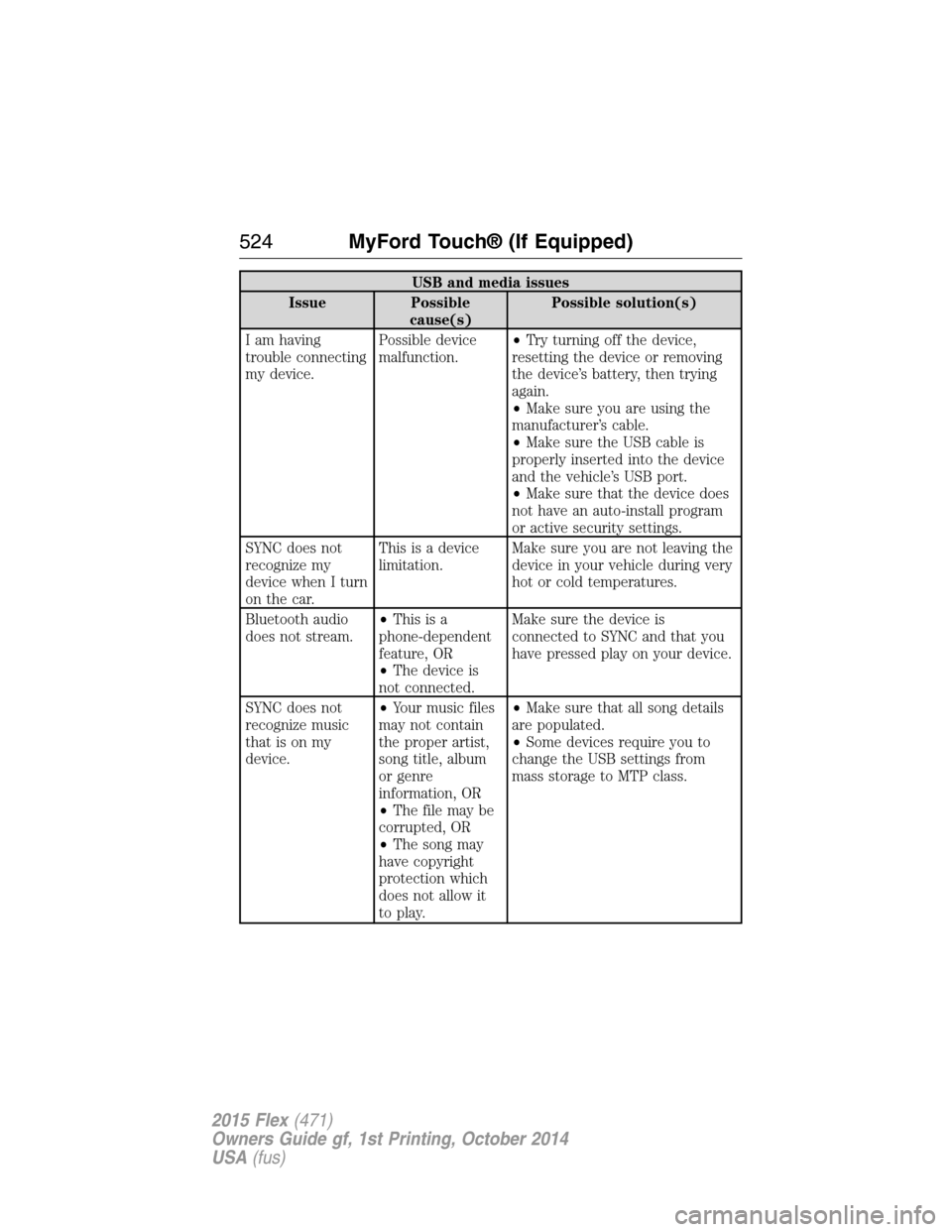
USB and media issues
Issue Possible
cause(s)Possible solution(s)
I am having
trouble connecting
my device.Possible device
malfunction.•Try turning off the device,
resetting the device or removing
the device’s battery, then trying
again.
•Make sure you are using the
manufacturer’s cable.
•Make sure the USB cable is
properly inserted into the device
and the vehicle’s USB port.
•Make sure that the device does
not have an auto-install program
or active security settings.
SYNC does not
recognize my
device when I turn
on the car.This is a device
limitation.Make sure you are not leaving the
device in your vehicle during very
hot or cold temperatures.
Bluetooth audio
does not stream.•Thisisa
phone-dependent
feature, OR
•The device is
not connected.Make sure the device is
connected to SYNC and that you
have pressed play on your device.
SYNC does not
recognize music
that is on my
device.•Your music files
may not contain
the proper artist,
song title, album
or genre
information, OR
•The file may be
corrupted, OR
•The song may
have copyright
protection which
does not allow it
to play.•Make sure that all song details
are populated.
•Some devices require you to
change the USB settings from
mass storage to MTP class.
524MyFord Touch® (If Equipped)
2015 Flex(471)
Owners Guide gf, 1st Printing, October 2014
USA(fus)
Page 526 of 571
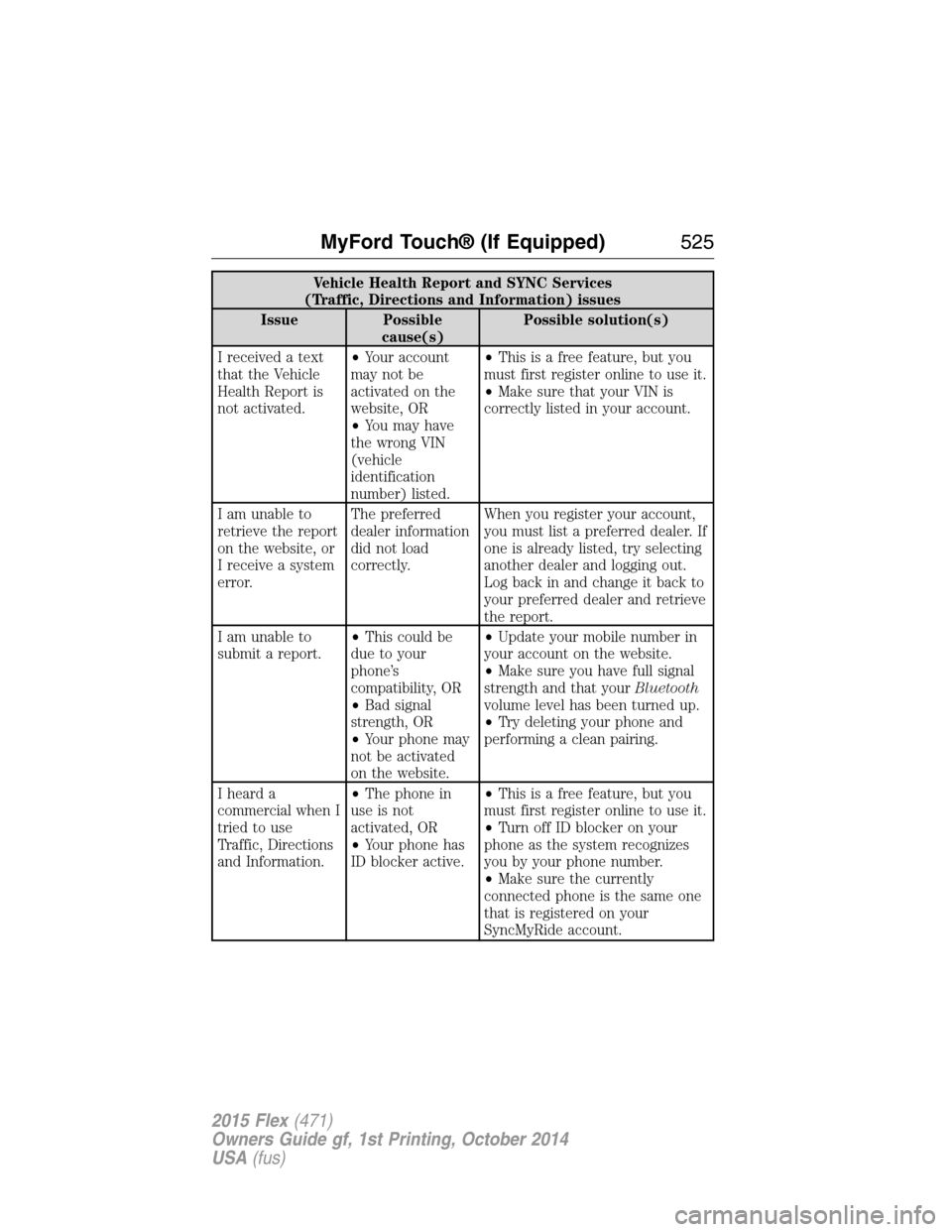
Vehicle Health Report and SYNC Services
(Traffic, Directions and Information) issues
Issue Possible
cause(s)Possible solution(s)
I received a text
that the Vehicle
Health Report is
not activated.•Your account
may not be
activated on the
website, OR
•You may have
the wrong VIN
(vehicle
identification
number) listed.•This is a free feature, but you
must first register online to use it.
•Make sure that your VIN is
correctly listed in your account.
I am unable to
retrieve the report
on the website, or
I receive a system
error.The preferred
dealer information
did not load
correctly.When you register your account,
you must list a preferred dealer. If
one is already listed, try selecting
another dealer and logging out.
Log back in and change it back to
your preferred dealer and retrieve
the report.
I am unable to
submit a report.•This could be
due to your
phone’s
compatibility, OR
•Bad signal
strength, OR
•Your phone may
not be activated
on the website.•Update your mobile number in
your account on the website.
•Make sure you have full signal
strength and that yourBluetooth
volume level has been turned up.
•Try deleting your phone and
performing a clean pairing.
I heard a
commercial when I
tried to use
Traffic, Directions
and Information.•The phone in
use is not
activated, OR
•Your phone has
ID blocker active.•This is a free feature, but you
must first register online to use it.
•Turn off ID blocker on your
phone as the system recognizes
you by your phone number.
•Make sure the currently
connected phone is the same one
that is registered on your
SyncMyRide account.
MyFord Touch® (If Equipped)525
2015 Flex(471)
Owners Guide gf, 1st Printing, October 2014
USA(fus)
Page 527 of 571
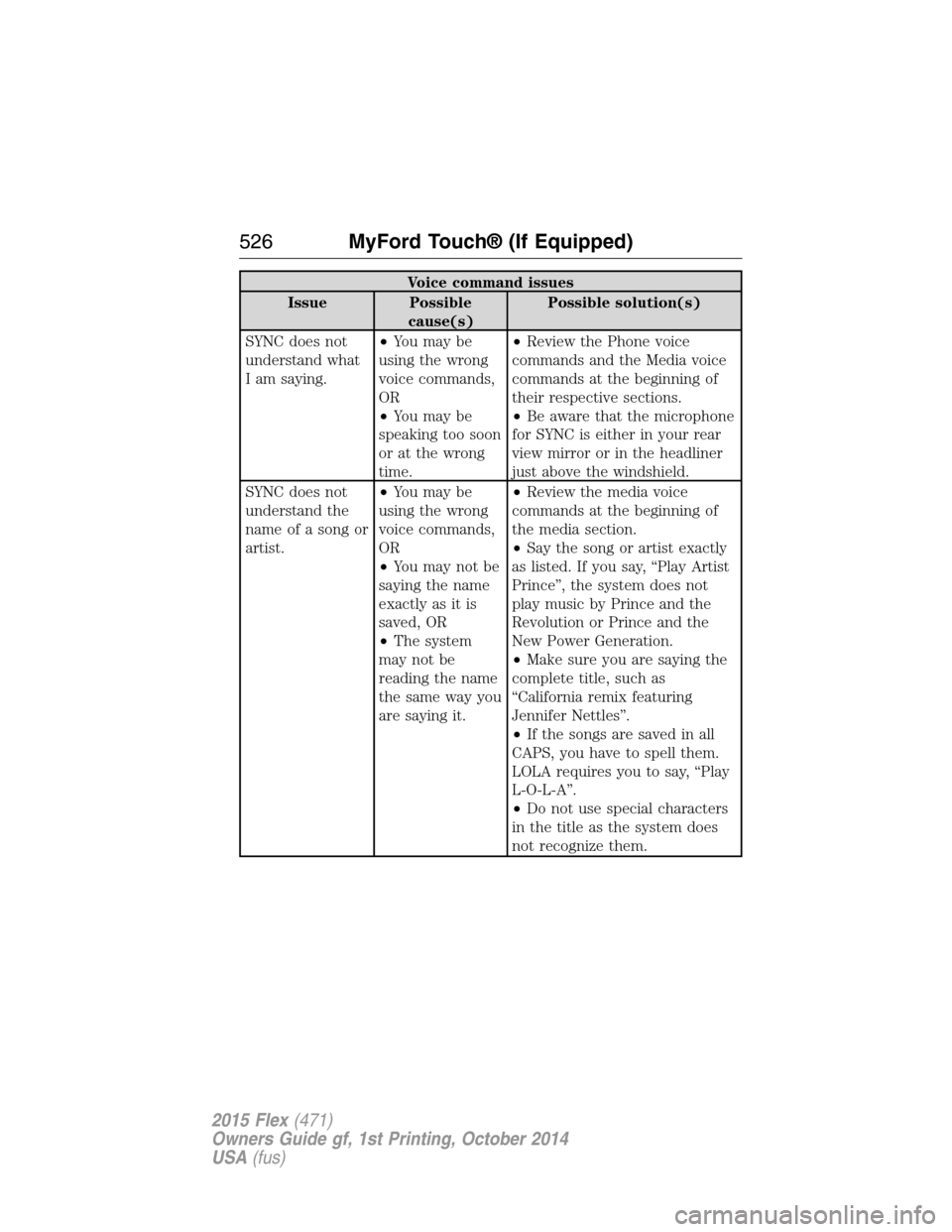
Voice command issues
Issue Possible
cause(s)Possible solution(s)
SYNC does not
understand what
I am saying.•You may be
using the wrong
voice commands,
OR
•You may be
speaking too soon
or at the wrong
time.•Review the Phone voice
commands and the Media voice
commands at the beginning of
their respective sections.
•Be aware that the microphone
for SYNC is either in your rear
view mirror or in the headliner
just above the windshield.
SYNC does not
understand the
name of a song or
artist.•You may be
using the wrong
voice commands,
OR
•You may not be
saying the name
exactly as it is
saved, OR
•The system
may not be
reading the name
the same way you
are saying it.•Review the media voice
commands at the beginning of
the media section.
•Say the song or artist exactly
as listed. If you say, “Play Artist
Prince”, the system does not
play music by Prince and the
Revolution or Prince and the
New Power Generation.
•Make sure you are saying the
complete title, such as
“California remix featuring
Jennifer Nettles”.
•If the songs are saved in all
CAPS, you have to spell them.
LOLA requires you to say, “Play
L-O-L-A”.
•Do not use special characters
in the title as the system does
not recognize them.
526MyFord Touch® (If Equipped)
2015 Flex(471)
Owners Guide gf, 1st Printing, October 2014
USA(fus)
Page 528 of 571
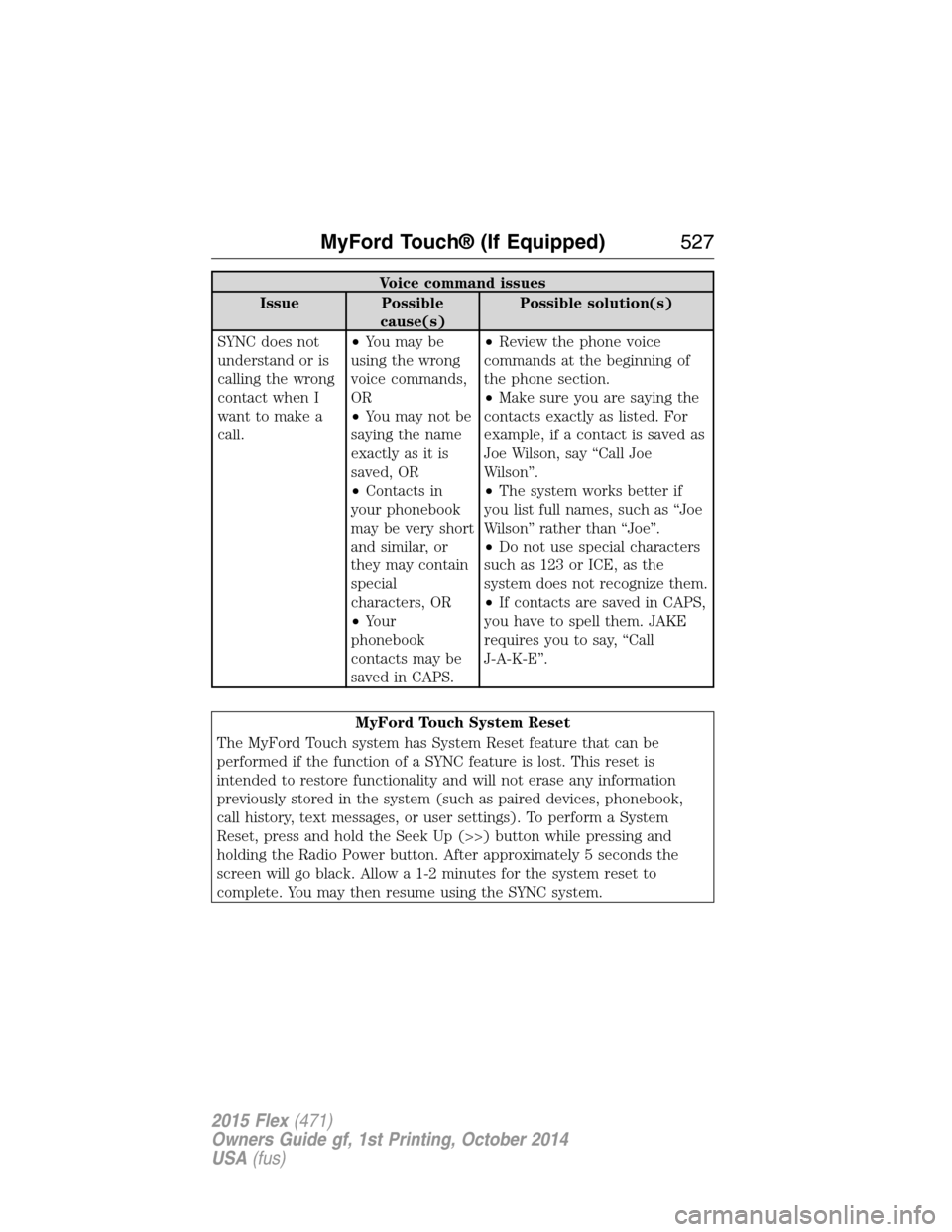
Voice command issues
Issue Possible
cause(s)Possible solution(s)
SYNC does not
understand or is
calling the wrong
contact when I
want to make a
call.•You may be
using the wrong
voice commands,
OR
•You may not be
saying the name
exactly as it is
saved, OR
•Contacts in
your phonebook
may be very short
and similar, or
they may contain
special
characters, OR
•Your
phonebook
contacts may be
saved in CAPS.•Review the phone voice
commands at the beginning of
the phone section.
•Make sure you are saying the
contacts exactly as listed. For
example, if a contact is saved as
Joe Wilson, say “Call Joe
Wilson”.
•The system works better if
you list full names, such as “Joe
Wilson” rather than “Joe”.
•Do not use special characters
such as 123 or ICE, as the
system does not recognize them.
•If contacts are saved in CAPS,
you have to spell them. JAKE
requires you to say, “Call
J-A-K-E”.
MyFord Touch System Reset
The MyFord Touch system has System Reset feature that can be
performed if the function of a SYNC feature is lost. This reset is
intended to restore functionality and will not erase any information
previously stored in the system (such as paired devices, phonebook,
call history, text messages, or user settings). To perform a System
Reset, press and hold the Seek Up (>>) button while pressing and
holding the Radio Power button. After approximately 5 seconds the
screen will go black. Allow a 1-2 minutes for the system reset to
complete. You may then resume using the SYNC system.
MyFord Touch® (If Equipped)527
2015 Flex(471)
Owners Guide gf, 1st Printing, October 2014
USA(fus)