power steering FORD FLEX 2015 1.G Owners Manual
[x] Cancel search | Manufacturer: FORD, Model Year: 2015, Model line: FLEX, Model: FORD FLEX 2015 1.GPages: 571, PDF Size: 5.52 MB
Page 13 of 571
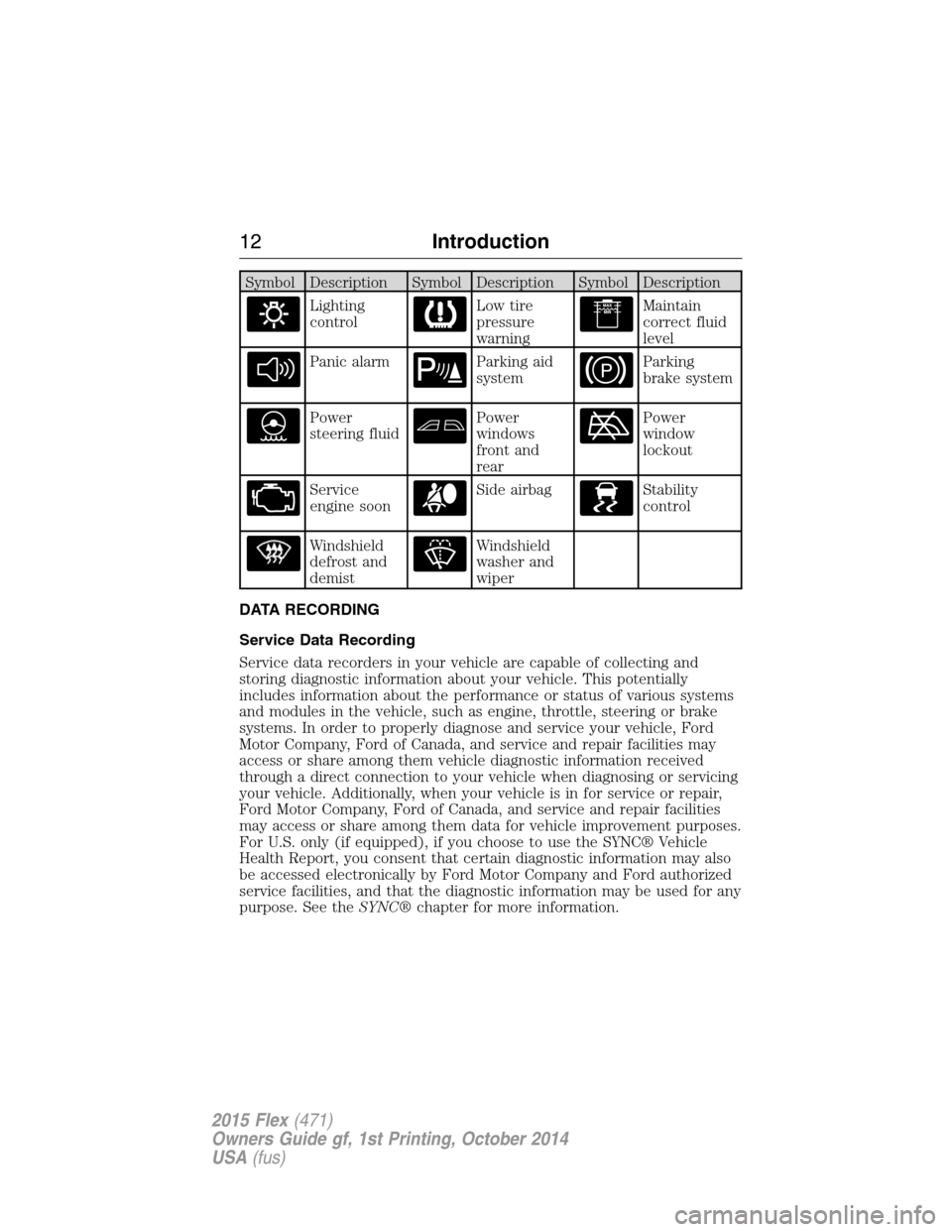
Symbol Description Symbol Description Symbol Description
Lighting
controlLow tire
pressure
warningMaintain
correct fluid
level
Panic alarmParking aid
systemParking
brake system
Power
steering fluidPower
windows
front and
rearPower
window
lockout
Service
engine soonSide airbagStability
control
Windshield
defrost and
demistWindshield
washer and
wiper
DATA RECORDING
Service Data Recording
Service data recorders in your vehicle are capable of collecting and
storing diagnostic information about your vehicle. This potentially
includes information about the performance or status of various systems
and modules in the vehicle, such as engine, throttle, steering or brake
systems. In order to properly diagnose and service your vehicle, Ford
Motor Company, Ford of Canada, and service and repair facilities may
access or share among them vehicle diagnostic information received
through a direct connection to your vehicle when diagnosing or servicing
your vehicle. Additionally, when your vehicle is in for service or repair,
Ford Motor Company, Ford of Canada, and service and repair facilities
may access or share among them data for vehicle improvement purposes.
For U.S. only (if equipped), if you choose to use the SYNC® Vehicle
Health Report, you consent that certain diagnostic information may also
be accessed electronically by Ford Motor Company and Ford authorized
service facilities, and that the diagnostic information may be used for any
purpose. See theSYNC®chapter for more information.
12Introduction
2015 Flex(471)
Owners Guide gf, 1st Printing, October 2014
USA(fus)
Page 67 of 571
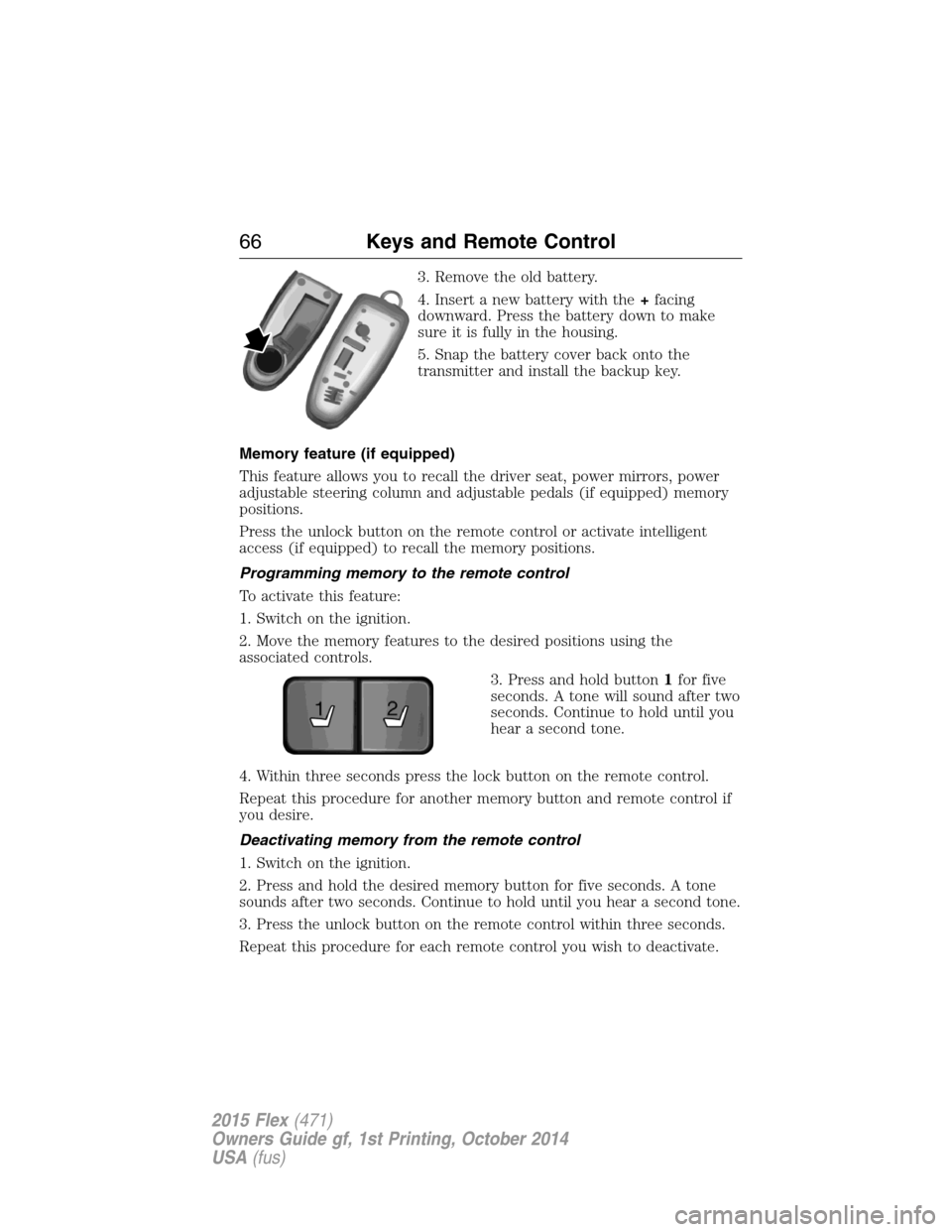
3. Remove the old battery.
4. Insert a new battery with the+facing
downward. Press the battery down to make
sure it is fully in the housing.
5. Snap the battery cover back onto the
transmitter and install the backup key.
Memory feature (if equipped)
This feature allows you to recall the driver seat, power mirrors, power
adjustable steering column and adjustable pedals (if equipped) memory
positions.
Press the unlock button on the remote control or activate intelligent
access (if equipped) to recall the memory positions.
Programming memory to the remote control
To activate this feature:
1. Switch on the ignition.
2. Move the memory features to the desired positions using the
associated controls.
3. Press and hold button1for five
seconds. A tone will sound after two
seconds. Continue to hold until you
hear a second tone.
4. Within three seconds press the lock button on the remote control.
Repeat this procedure for another memory button and remote control if
you desire.
Deactivating memory from the remote control
1. Switch on the ignition.
2. Press and hold the desired memory button for five seconds. A tone
sounds after two seconds. Continue to hold until you hear a second tone.
3. Press the unlock button on the remote control within three seconds.
Repeat this procedure for each remote control you wish to deactivate.
21
66Keys and Remote Control
2015 Flex(471)
Owners Guide gf, 1st Printing, October 2014
USA(fus)
Page 92 of 571
Power Tilt and Telescope Steering Column (If Equipped)
WARNING:Do not adjust the steering wheel when your vehicle
is moving.
Note:Make sure that you are sitting in the correct position. Refer to
Sitting in the Correct Positionin theSeatschapter.
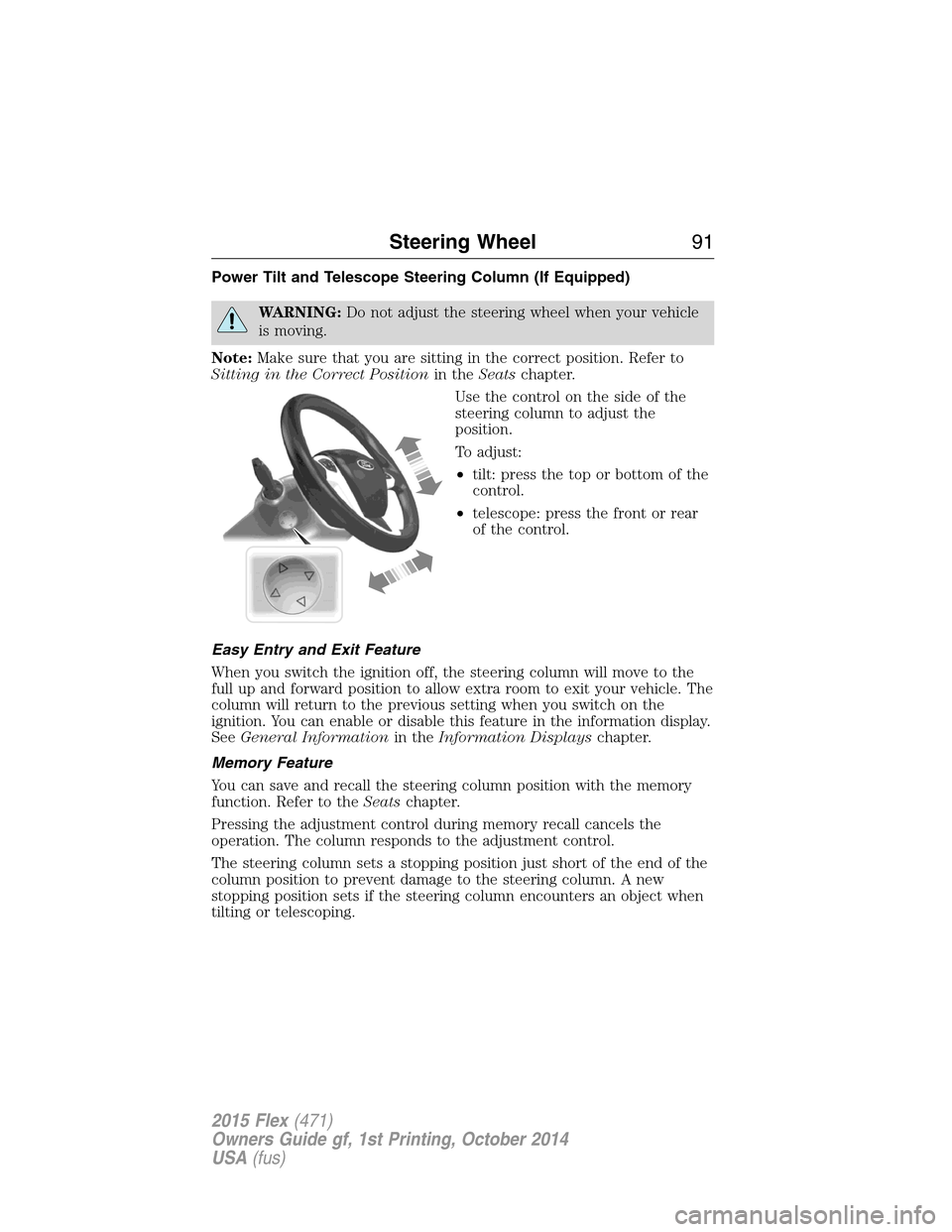
Use the control on the side of the
steering column to adjust the
position.
To adjust:
•tilt: press the top or bottom of the
control.
•telescope: press the front or rear
of the control.
Easy Entry and Exit Feature
When you switch the ignition off, the steering column will move to the
full up and forward position to allow extra room to exit your vehicle. The
column will return to the previous setting when you switch on the
ignition. You can enable or disable this feature in the information display.
SeeGeneral Informationin theInformation Displayschapter.
Memory Feature
You can save and recall the steering column position with the memory
function. Refer to theSeatschapter.
Pressing the adjustment control during memory recall cancels the
operation. The column responds to the adjustment control.
The steering column sets a stopping position just short of the end of the
column position to prevent damage to the steering column. A new
stopping position sets if the steering column encounters an object when
tilting or telescoping.
Steering Wheel91
2015 Flex(471)
Owners Guide gf, 1st Printing, October 2014
USA(fus)
Page 136 of 571
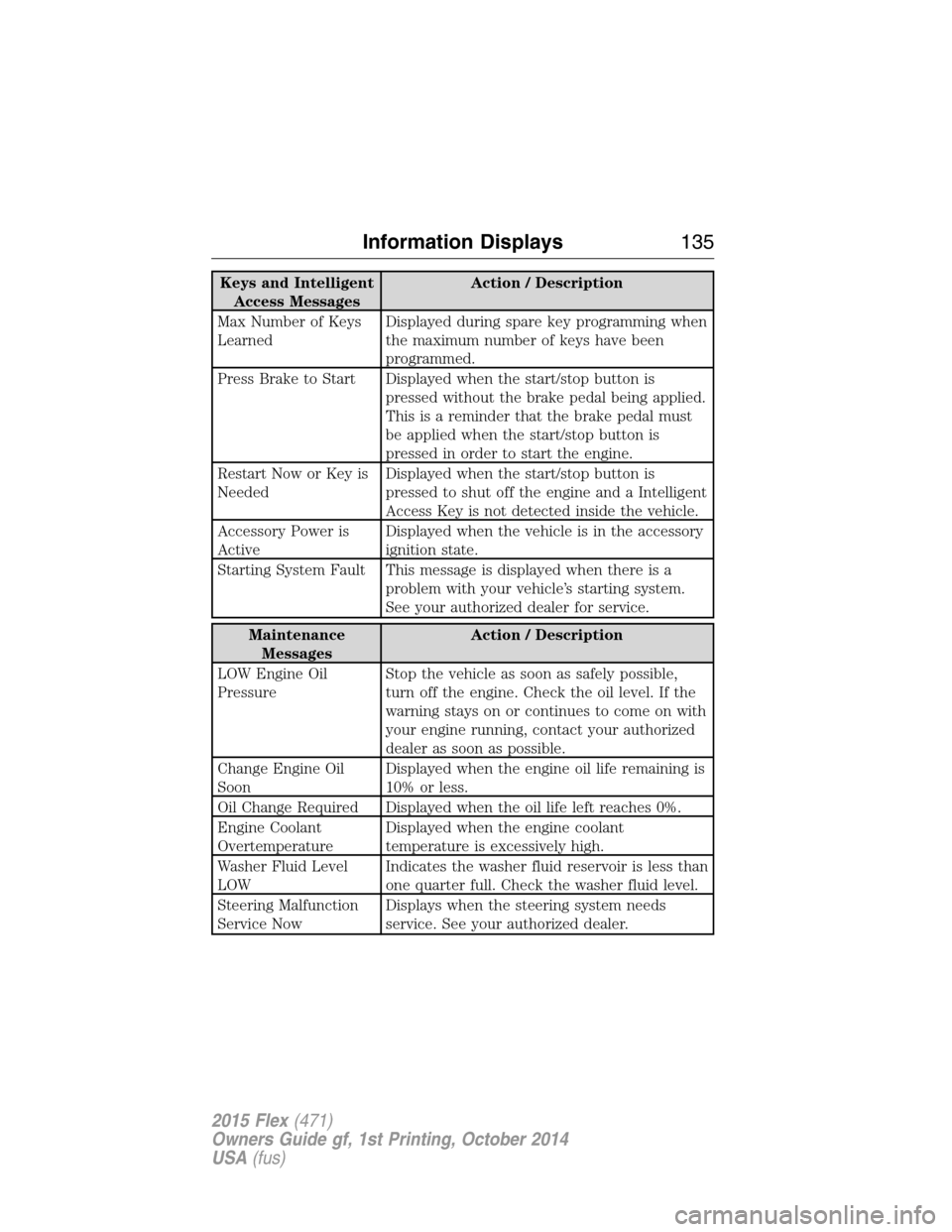
Keys and Intelligent
Access MessagesAction / Description
Max Number of Keys
LearnedDisplayed during spare key programming when
the maximum number of keys have been
programmed.
Press Brake to Start Displayed when the start/stop button is
pressed without the brake pedal being applied.
This is a reminder that the brake pedal must
be applied when the start/stop button is
pressed in order to start the engine.
Restart Now or Key is
NeededDisplayed when the start/stop button is
pressed to shut off the engine and a Intelligent
Access Key is not detected inside the vehicle.
Accessory Power is
ActiveDisplayed when the vehicle is in the accessory
ignition state.
Starting System Fault This message is displayed when there is a
problem with your vehicle’s starting system.
See your authorized dealer for service.
Maintenance
MessagesAction / Description
LOW Engine Oil
PressureStop the vehicle as soon as safely possible,
turn off the engine. Check the oil level. If the
warning stays on or continues to come on with
your engine running, contact your authorized
dealer as soon as possible.
Change Engine Oil
SoonDisplayed when the engine oil life remaining is
10% or less.
Oil Change Required Displayed when the oil life left reaches 0%.
Engine Coolant
OvertemperatureDisplayed when the engine coolant
temperature is excessively high.
Washer Fluid Level
LOWIndicates the washer fluid reservoir is less than
one quarter full. Check the washer fluid level.
Steering Malfunction
Service NowDisplays when the steering system needs
service. See your authorized dealer.
Information Displays135
2015 Flex(471)
Owners Guide gf, 1st Printing, October 2014
USA(fus)
Page 137 of 571
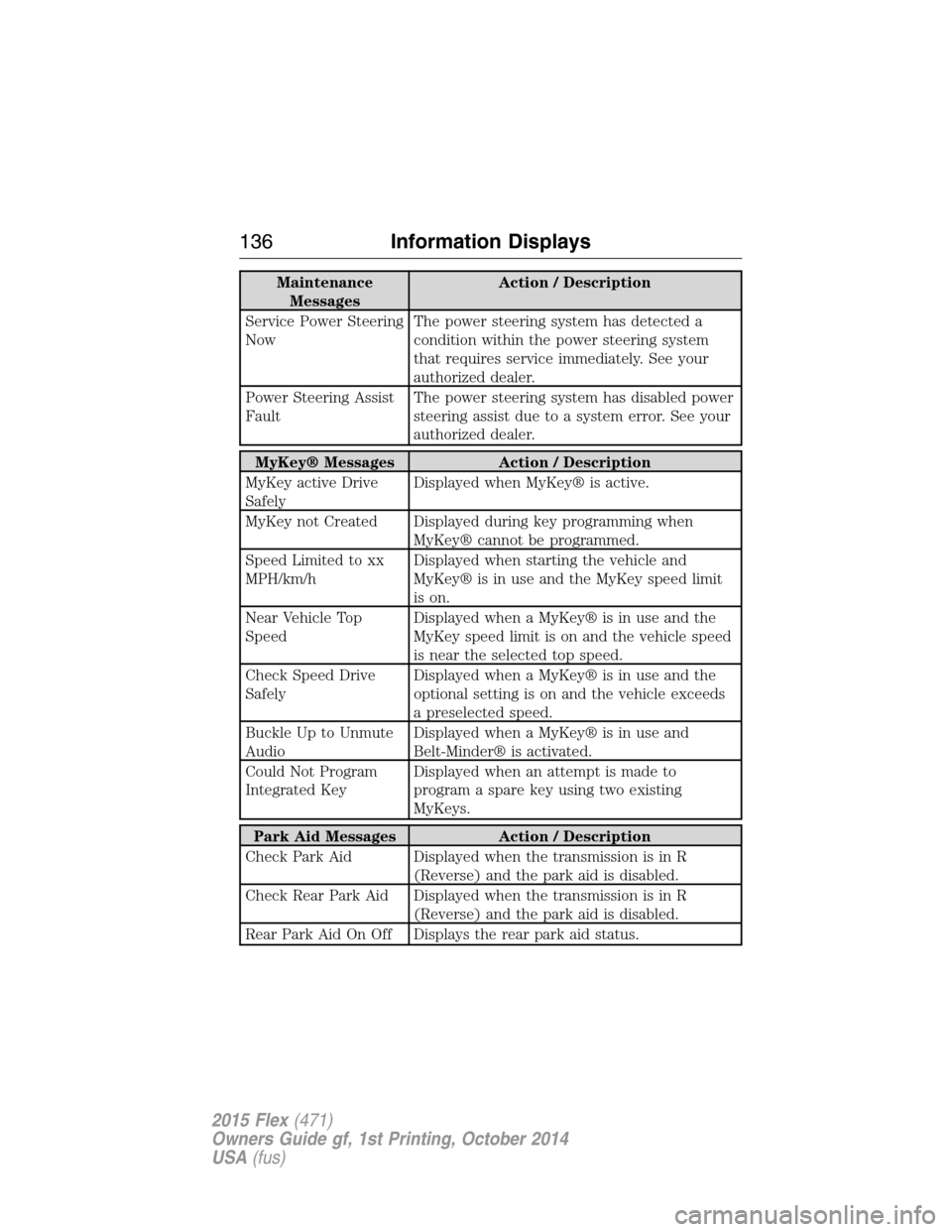
Maintenance
MessagesAction / Description
Service Power Steering
NowThe power steering system has detected a
condition within the power steering system
that requires service immediately. See your
authorized dealer.
Power Steering Assist
FaultThe power steering system has disabled power
steering assist due to a system error. See your
authorized dealer.
MyKey® Messages Action / Description
MyKey active Drive
SafelyDisplayed when MyKey® is active.
MyKey not Created Displayed during key programming when
MyKey® cannot be programmed.
Speed Limited to xx
MPH/km/hDisplayed when starting the vehicle and
MyKey® is in use and the MyKey speed limit
is on.
Near Vehicle Top
SpeedDisplayed when a MyKey® is in use and the
MyKey speed limit is on and the vehicle speed
is near the selected top speed.
Check Speed Drive
SafelyDisplayed when a MyKey® is in use and the
optional setting is on and the vehicle exceeds
a preselected speed.
Buckle Up to Unmute
AudioDisplayed when a MyKey® is in use and
Belt-Minder® is activated.
Could Not Program
Integrated KeyDisplayed when an attempt is made to
program a spare key using two existing
MyKeys.
Park Aid Messages Action / Description
Check Park Aid Displayed when the transmission is in R
(Reverse) and the park aid is disabled.
Check Rear Park Aid Displayed when the transmission is in R
(Reverse) and the park aid is disabled.
Rear Park Aid On Off Displays the rear park aid status.
136Information Displays
2015 Flex(471)
Owners Guide gf, 1st Printing, October 2014
USA(fus)
Page 157 of 571
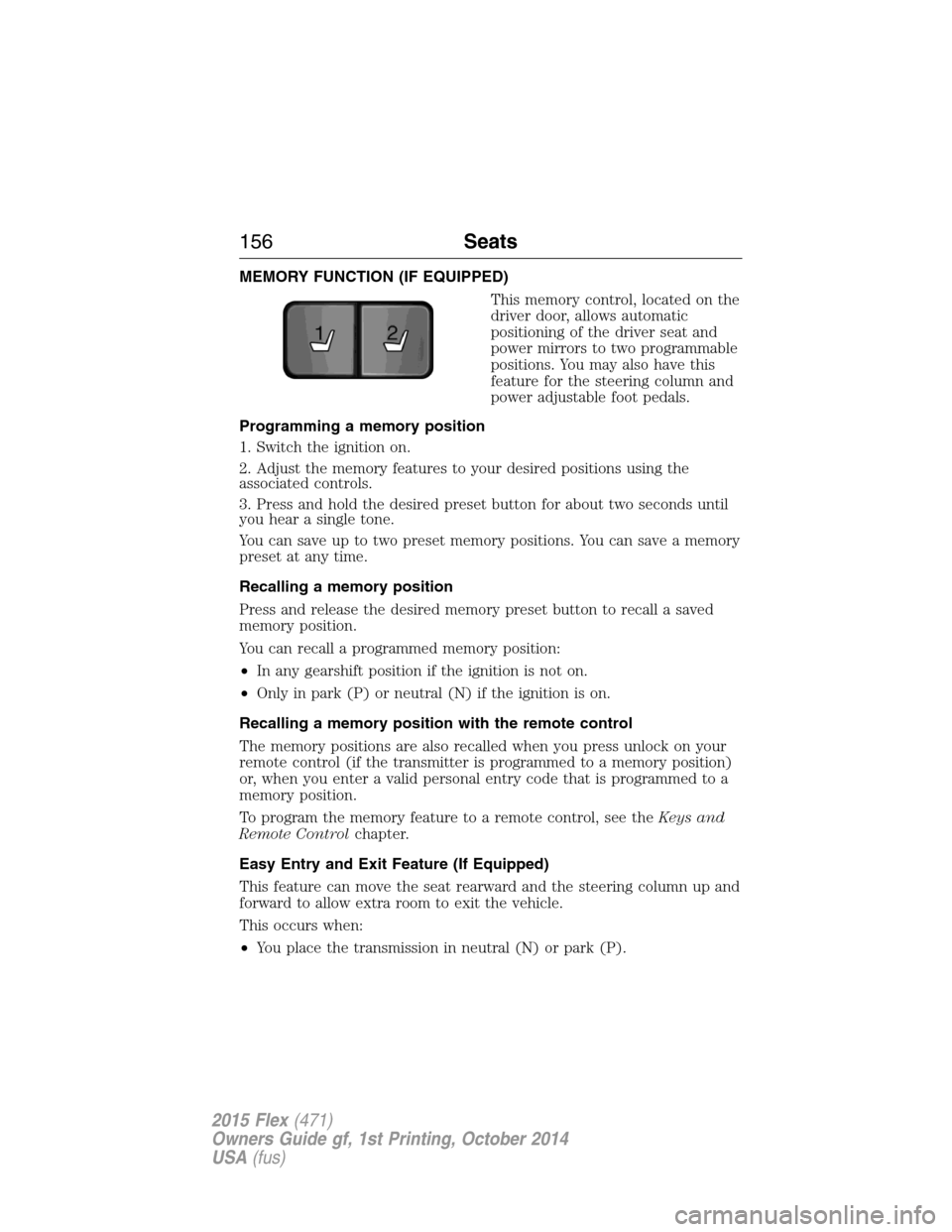
MEMORY FUNCTION (IF EQUIPPED)
This memory control, located on the
driver door, allows automatic
positioning of the driver seat and
power mirrors to two programmable
positions. You may also have this
feature for the steering column and
power adjustable foot pedals.
Programming a memory position
1. Switch the ignition on.
2. Adjust the memory features to your desired positions using the
associated controls.
3. Press and hold the desired preset button for about two seconds until
you hear a single tone.
You can save up to two preset memory positions. You can save a memory
preset at any time.
Recalling a memory position
Press and release the desired memory preset button to recall a saved
memory position.
You can recall a programmed memory position:
•In any gearshift position if the ignition is not on.
•Only in park (P) or neutral (N) if the ignition is on.
Recalling a memory position with the remote control
The memory positions are also recalled when you press unlock on your
remote control (if the transmitter is programmed to a memory position)
or, when you enter a valid personal entry code that is programmed to a
memory position.
To program the memory feature to a remote control, see theKeys and
Remote Controlchapter.
Easy Entry and Exit Feature (If Equipped)
This feature can move the seat rearward and the steering column up and
forward to allow extra room to exit the vehicle.
This occurs when:
•You place the transmission in neutral (N) or park (P).
21
156Seats
2015 Flex(471)
Owners Guide gf, 1st Printing, October 2014
USA(fus)
Page 210 of 571
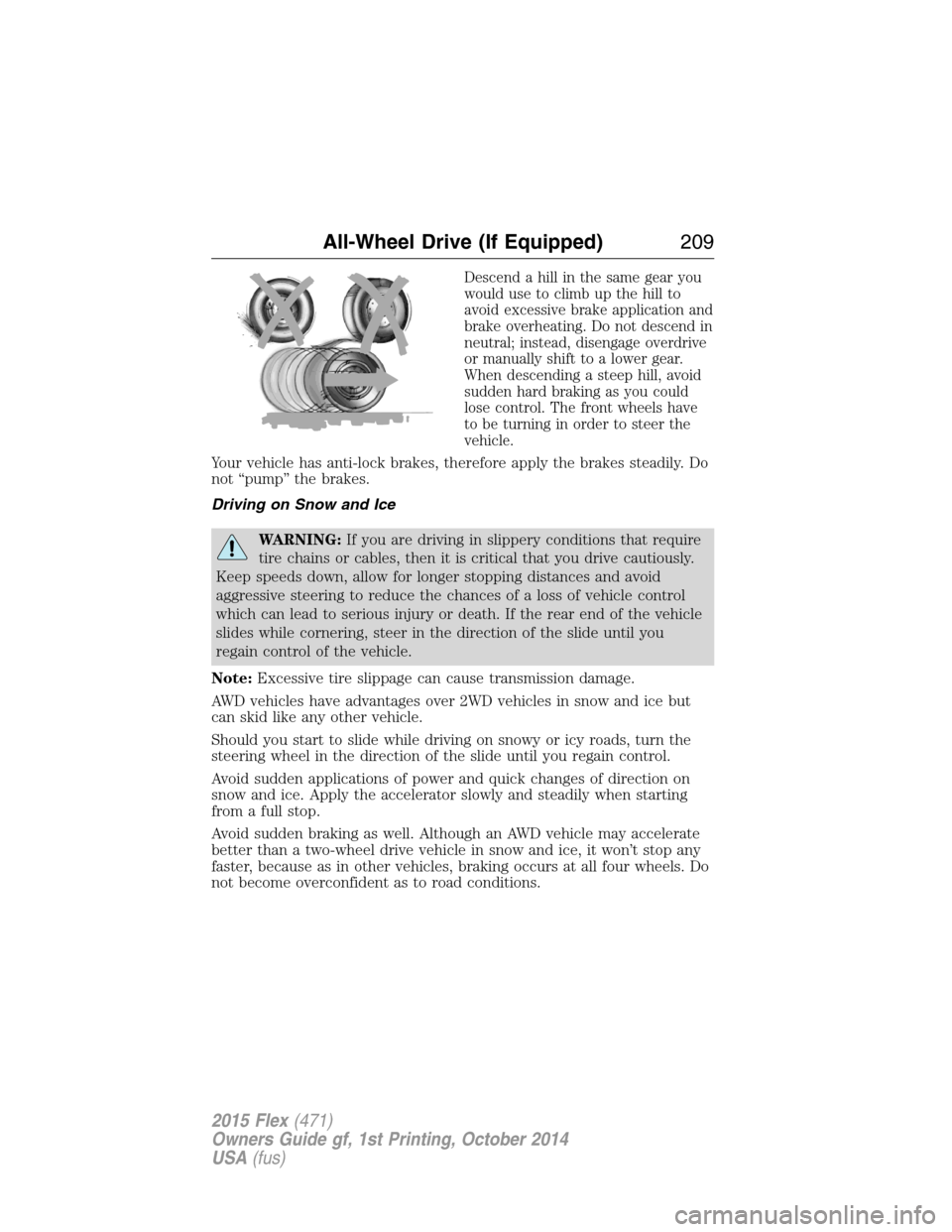
Descend a hill in the same gear you
would use to climb up the hill to
avoid excessive brake application and
brake overheating. Do not descend in
neutral; instead, disengage overdrive
or manually shift to a lower gear.
When descending a steep hill, avoid
sudden hard braking as you could
lose control. The front wheels have
to be turning in order to steer the
vehicle.
Your vehicle has anti-lock brakes, therefore apply the brakes steadily. Do
not “pump” the brakes.
Driving on Snow and Ice
WARNING:If you are driving in slippery conditions that require
tire chains or cables, then it is critical that you drive cautiously.
Keep speeds down, allow for longer stopping distances and avoid
aggressive steering to reduce the chances of a loss of vehicle control
which can lead to serious injury or death. If the rear end of the vehicle
slides while cornering, steer in the direction of the slide until you
regain control of the vehicle.
Note:Excessive tire slippage can cause transmission damage.
AWD vehicles have advantages over 2WD vehicles in snow and ice but
can skid like any other vehicle.
Should you start to slide while driving on snowy or icy roads, turn the
steering wheel in the direction of the slide until you regain control.
Avoid sudden applications of power and quick changes of direction on
snow and ice. Apply the accelerator slowly and steadily when starting
from a full stop.
Avoid sudden braking as well. Although an AWD vehicle may accelerate
better than a two-wheel drive vehicle in snow and ice, it won’t stop any
faster, because as in other vehicles, braking occurs at all four wheels. Do
not become overconfident as to road conditions.
All-Wheel Drive (If Equipped)209
2015 Flex(471)
Owners Guide gf, 1st Printing, October 2014
USA(fus)
Page 212 of 571
GENERAL INFORMATION
Note:Occasional brake noise is normal. If a metal-to-metal, continuous
grinding or continuous squeal sound is present, the brake linings may be
worn out. Have them inspected by an authorized dealer. If your vehicle
has continuous vibration or shudder in the steering wheel while braking,
have your vehicle inspected by an authorized dealer.
Note:Brake dust may accumulate on the wheels, even under normal
driving conditions. Some dust is inevitable as the brakes wear and does
not contribute to brake noise. See theVehicle Carechapter for wheel
cleaning instructions.
See theInstrument Clusterchapter for information on the
brake system warning light.
Wet brakes result in reduced braking efficiency. Gently press the brake
pedal a few times when driving from a car wash or standing water to dry
the brakes.
Brake Over Accelerator
In the event the accelerator pedal becomes stuck or entrapped, apply
steady and firm pressure to the brake pedal to slow your vehicle and
reduce engine power. If you experience this condition, apply the brakes
and bring your vehicle to a safe stop. Turn the engine off, shift to park
(P) and apply the parking brake. Inspect the accelerator pedal and the
area around it for any items or debris that may be obstructing its
movement. If none are found and the condition persists, have your
vehicle towed to the nearest authorized dealer.
Brake Assist
Brake assist detects when you brake heavily by measuring the rate at
which you press the brake pedal. It provides maximum braking efficiency
as long as you press the pedal. Brake assist can reduce stopping
distances in critical situations.
Brakes211
2015 Flex(471)
Owners Guide gf, 1st Printing, October 2014
USA(fus)
Page 246 of 571
STEERING
Electric Power Steering
WARNING:The electric power steering system has diagnostic
checks that continuously monitor the system to ensure proper
operation. When a system error is detected a steering message will
appear in the information display.
WARNING:The electric power steering system has diagnostic
checks that continuously monitor the system to ensure proper
operation of the electronic system. When an electronic error is
detected, a message will be displayed in the information display. If this
happens, stop the vehicle in a safe place, and turn off the engine. After
at least 10 seconds, reset the system by restarting the engine, and
watch the information display for a steering message. If a steering
message returns, or returns while driving, take the vehicle to your
dealer to have it checked.
WARNING:Obtain immediate service if a system error is
detected. You may not notice any difference in the feel of your
steering, but a serious condition may exist. Failure to do so may result
in loss of steering control.
Your vehicle is equipped with an electric power-assisted steering system.
There is no fluid reservoir to check or fill.
If your vehicle loses electrical power while you are driving (or if the
ignition is turned off), you can steer the vehicle manually, but it takes
more effort. Extreme continuous steering may increase the effort it takes
for you to steer. This occurs to prevent internal overheating and
permanent damage to your steering system. If this should occur, you will
neither lose the ability to steer the vehicle manually nor will it cause
permanent damage. Typical steering and driving maneuvers will allow the
system to cool and steering assist will return to normal.
When a steering system error is detected, steering messages may appear
in the information display.
Driving Aids245
2015 Flex(471)
Owners Guide gf, 1st Printing, October 2014
USA(fus)
Page 269 of 571
•Add particular accessories to your vehicle (e.g.; bug deflectors,
rollbars or light bars, running boards, ski racks).
•Drive with the wheels out of alignment.
DRIVING THROUGH WATER
WARNING:Do not drive through flowing or deep water as you
may lose control of your vehicle.
Note:Driving through standing water can cause vehicle damage.
Note:Engine damage can occur if water enters the air filter.
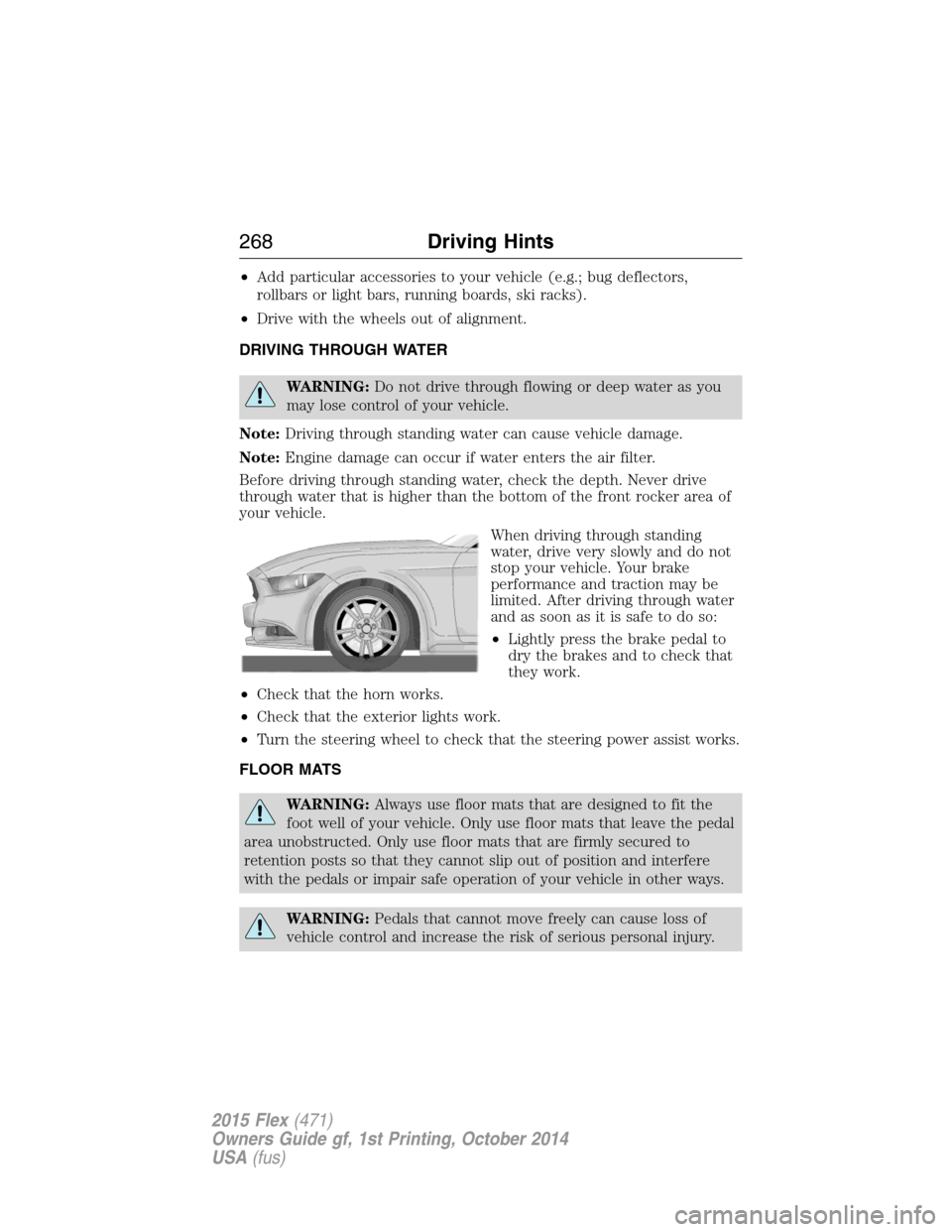
Before driving through standing water, check the depth. Never drive
through water that is higher than the bottom of the front rocker area of
your vehicle.
When driving through standing
water, drive very slowly and do not
stop your vehicle. Your brake
performance and traction may be
limited. After driving through water
and as soon as it is safe to do so:
•Lightly press the brake pedal to
dry the brakes and to check that
they work.
•Check that the horn works.
•Check that the exterior lights work.
•Turn the steering wheel to check that the steering power assist works.
FLOOR MATS
WARNING:Always use floor mats that are designed to fit the
foot well of your vehicle. Only use floor mats that leave the pedal
area unobstructed. Only use floor mats that are firmly secured to
retention posts so that they cannot slip out of position and interfere
with the pedals or impair safe operation of your vehicle in other ways.
WARNING:Pedals that cannot move freely can cause loss of
vehicle control and increase the risk of serious personal injury.
268Driving Hints
2015 Flex(471)
Owners Guide gf, 1st Printing, October 2014
USA(fus)