trailer FORD FLEX 2015 1.G Owners Manual
[x] Cancel search | Manufacturer: FORD, Model Year: 2015, Model line: FLEX, Model: FORD FLEX 2015 1.GPages: 571, PDF Size: 5.52 MB
Page 7 of 571
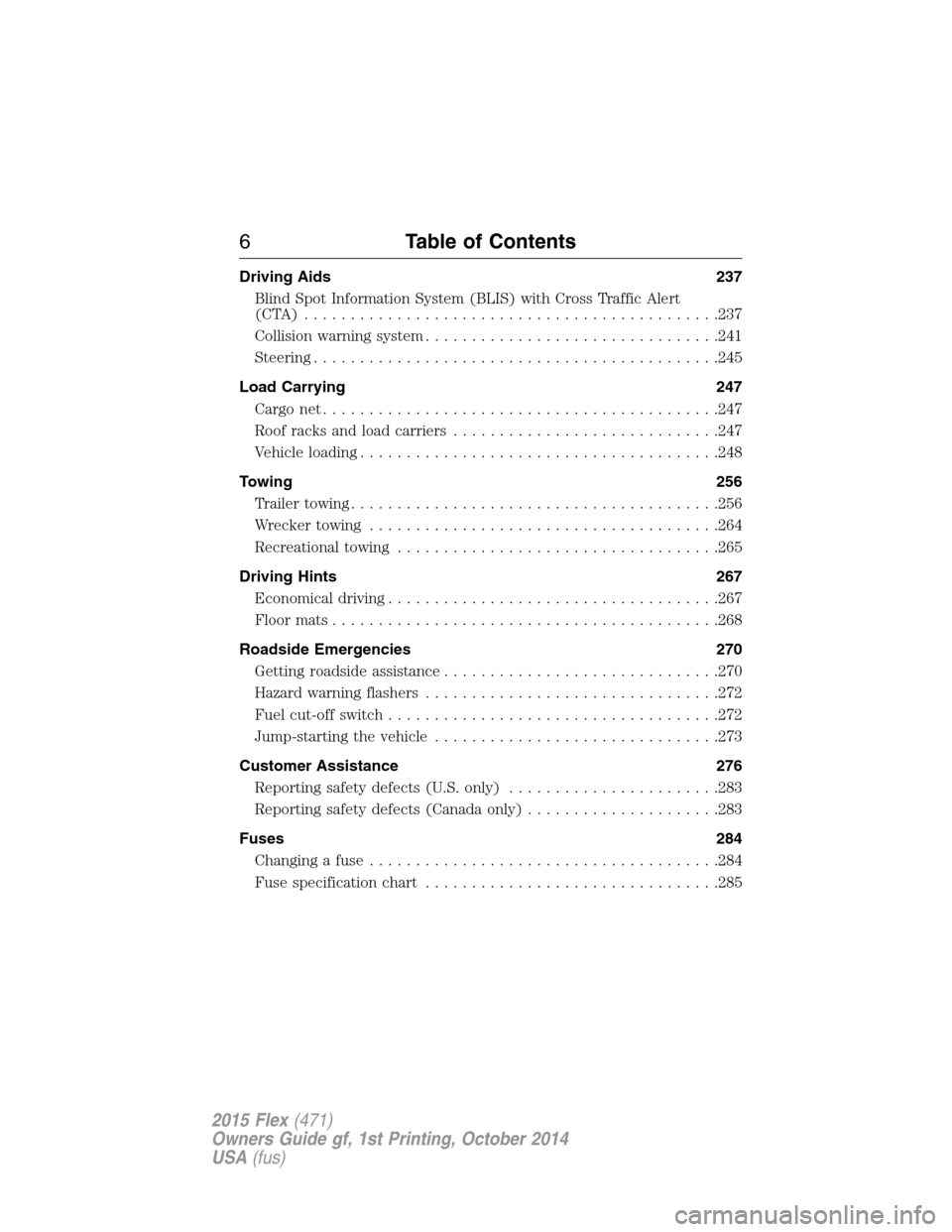
Driving Aids 237
Blind Spot Information System (BLIS) with Cross Traffic Alert
(CTA) .............................................237
Collision warning system................................241
Steering............................................245
Load Carrying 247
Cargonet...........................................247
Roof racks and load carriers.............................247
Vehicle loading.......................................248
Towing 256
Trailertowing........................................256
Wrecker towing......................................264
Recreational towing...................................265
Driving Hints 267
Economical driving....................................267
Floormats..........................................268
Roadside Emergencies 270
Getting roadside assistance..............................270
Hazard warning flashers................................272
Fuel cut-off switch....................................272
Jump-starting the vehicle...............................273
Customer Assistance 276
Reporting safety defects (U.S. only).......................283
Reporting safety defects (Canada only).....................283
Fuses 284
Changing a fuse......................................284
Fuse specification chart................................285
6Table of Contents
2015 Flex(471)
Owners Guide gf, 1st Printing, October 2014
USA(fus)
Page 114 of 571
•The fuel amount dispensed into the tank is a little less or more than
the gauge indicated. This is normal and depends upon the slope of
pavement at the gas station.
•If the gas station nozzle shuts off before the tank is full, try a different
gas pump nozzle.
Low Fuel Reminder
A low fuel reminder triggers when the fuel gauge needle is at 1/16th.
Driving type (fuel
economy conditions)Fuel gauge position Distance-to-empty
Highway driving 1/16th 35 miles to 80 miles
(56 km to 129 km)
Severe duty driving
(trailer towing,
extended idle)1/16th 35 miles (56km)
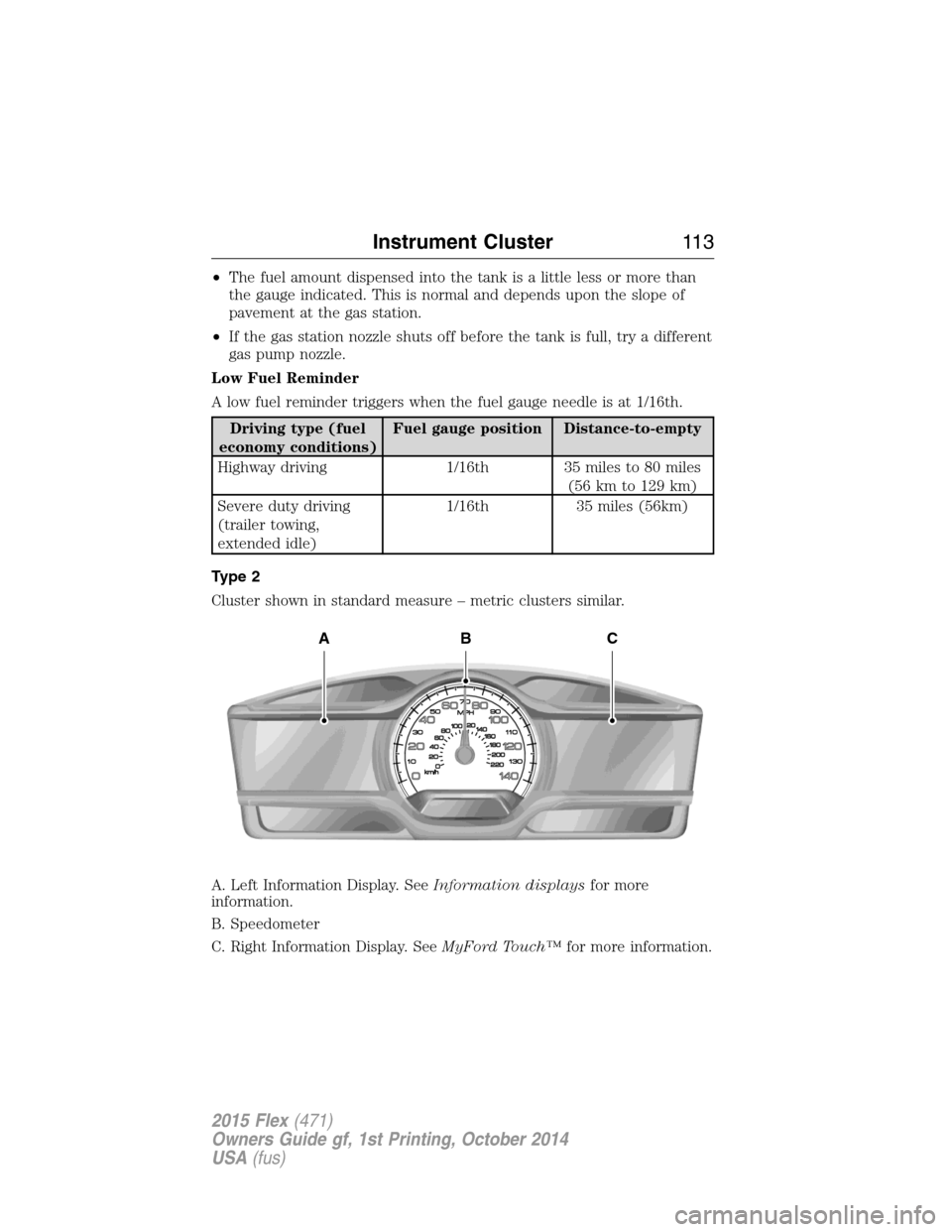
Type 2
Cluster shown in standard measure – metric clusters similar.
A. Left Information Display. SeeInformation displaysfor more
information.
B. Speedometer
C. Right Information Display. SeeMyFord Touch™for more information.
ABC
Instrument Cluster11 3
2015 Flex(471)
Owners Guide gf, 1st Printing, October 2014
USA(fus)
Page 122 of 571
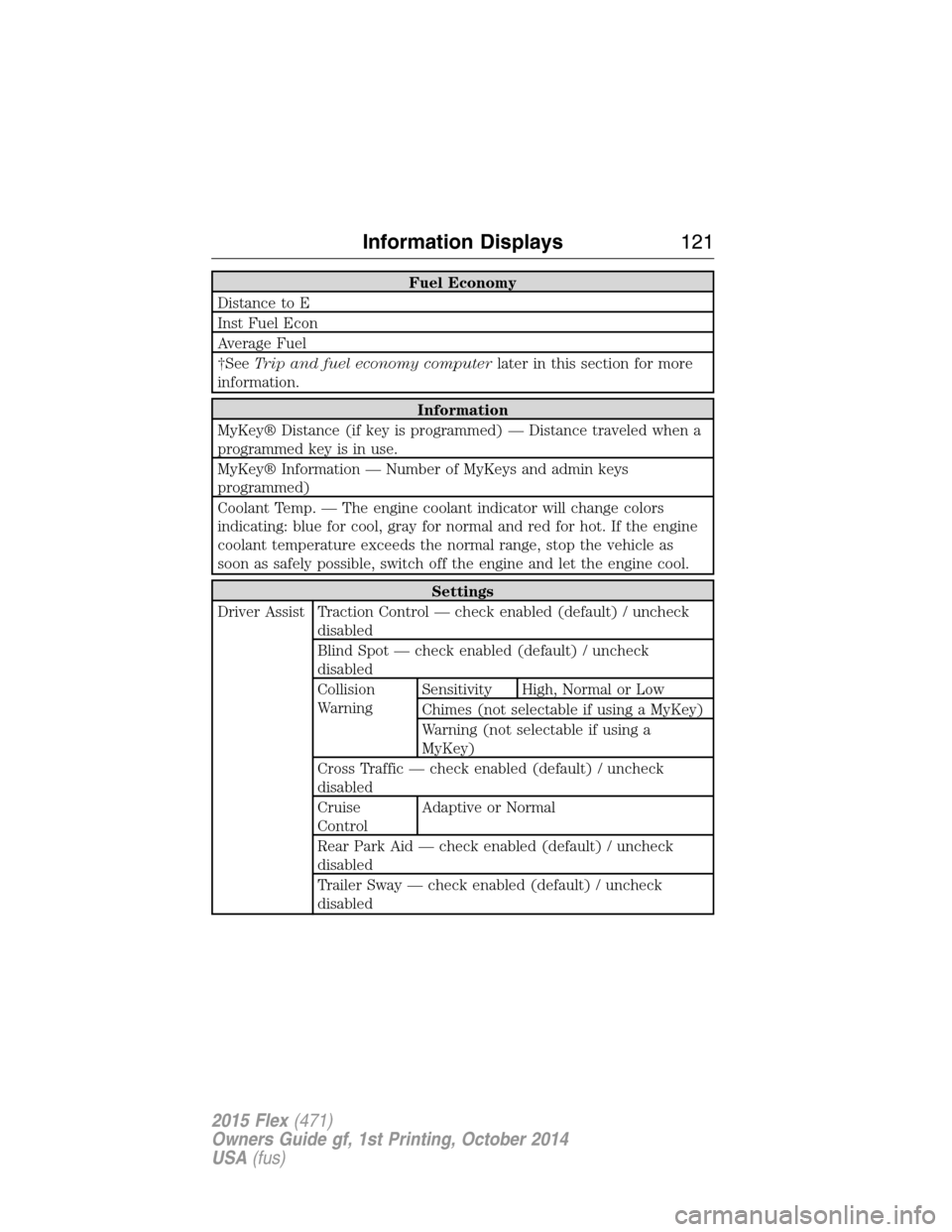
Fuel Economy
Distance to E
Inst Fuel Econ
Average Fuel
†SeeTrip and fuel economy computerlater in this section for more
information.
Information
MyKey® Distance (if key is programmed) — Distance traveled when a
programmed key is in use.
MyKey® Information — Number of MyKeys and admin keys
programmed)
Coolant Temp. — The engine coolant indicator will change colors
indicating: blue for cool, gray for normal and red for hot. If the engine
coolant temperature exceeds the normal range, stop the vehicle as
soon as safely possible, switch off the engine and let the engine cool.
Settings
Driver Assist Traction Control — check enabled (default) / uncheck
disabled
Blind Spot — check enabled (default) / uncheck
disabled
Collision
WarningSensitivity High, Normal or Low
Chimes (not selectable if using a MyKey)
Warning (not selectable if using a
MyKey)
Cross Traffic — check enabled (default) / uncheck
disabled
Cruise
ControlAdaptive or Normal
Rear Park Aid — check enabled (default) / uncheck
disabled
Trailer Sway — check enabled (default) / uncheck
disabled
Information Displays121
2015 Flex(471)
Owners Guide gf, 1st Printing, October 2014
USA(fus)
Page 128 of 571
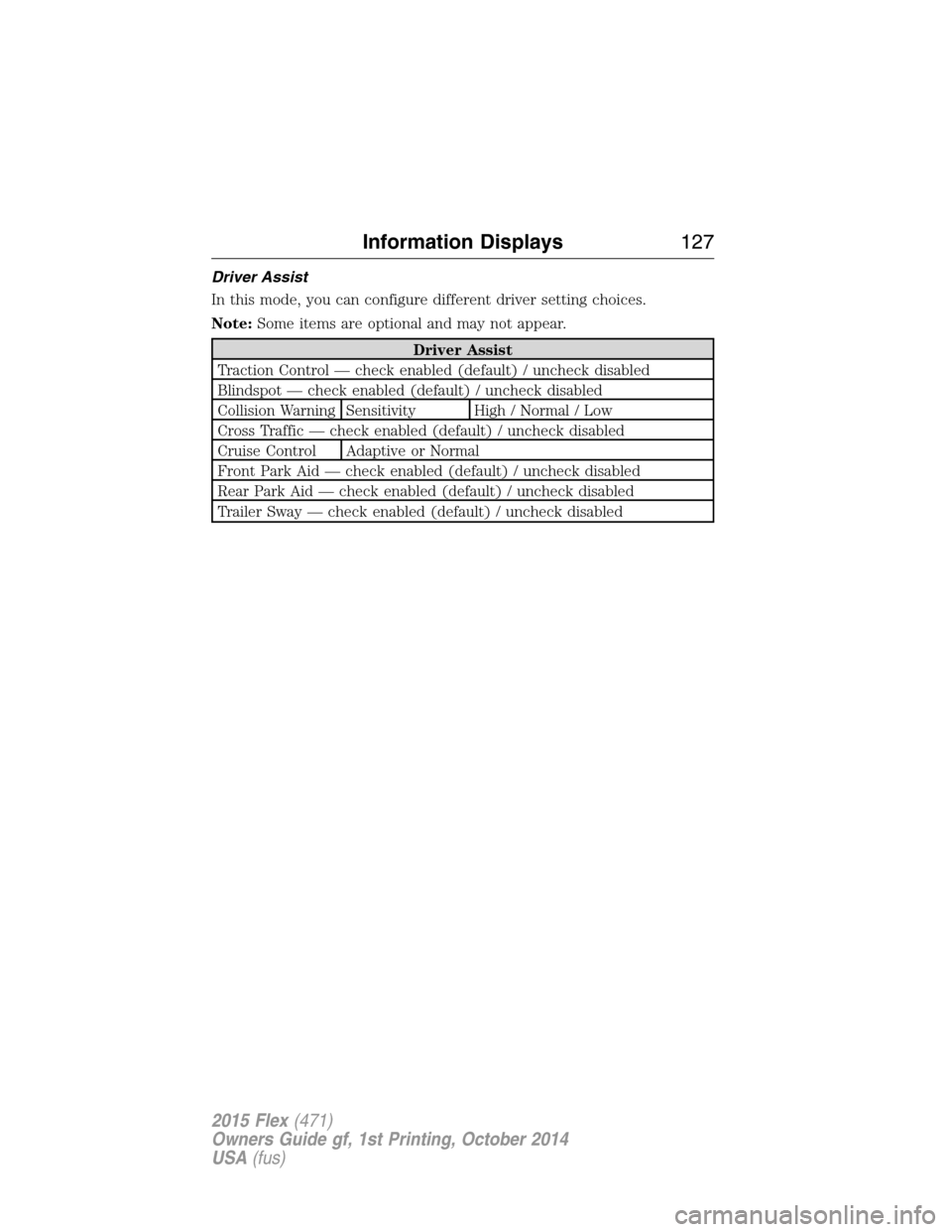
Driver Assist
In this mode, you can configure different driver setting choices.
Note:Some items are optional and may not appear.
Driver Assist
Traction Control — check enabled (default) / uncheck disabled
Blindspot — check enabled (default) / uncheck disabled
Collision Warning Sensitivity High / Normal / Low
Cross Traffic — check enabled (default) / uncheck disabled
Cruise Control Adaptive or Normal
Front Park Aid — check enabled (default) / uncheck disabled
Rear Park Aid — check enabled (default) / uncheck disabled
Trailer Sway — check enabled (default) / uncheck disabled
Information Displays127
2015 Flex(471)
Owners Guide gf, 1st Printing, October 2014
USA(fus)
Page 131 of 571
INFORMATION MESSAGES
Note:Depending on the vehicle options equipped with your vehicle, not
all of the messages will display or be available. Certain messages may be
abbreviated or shortened depending upon which cluster type you have.
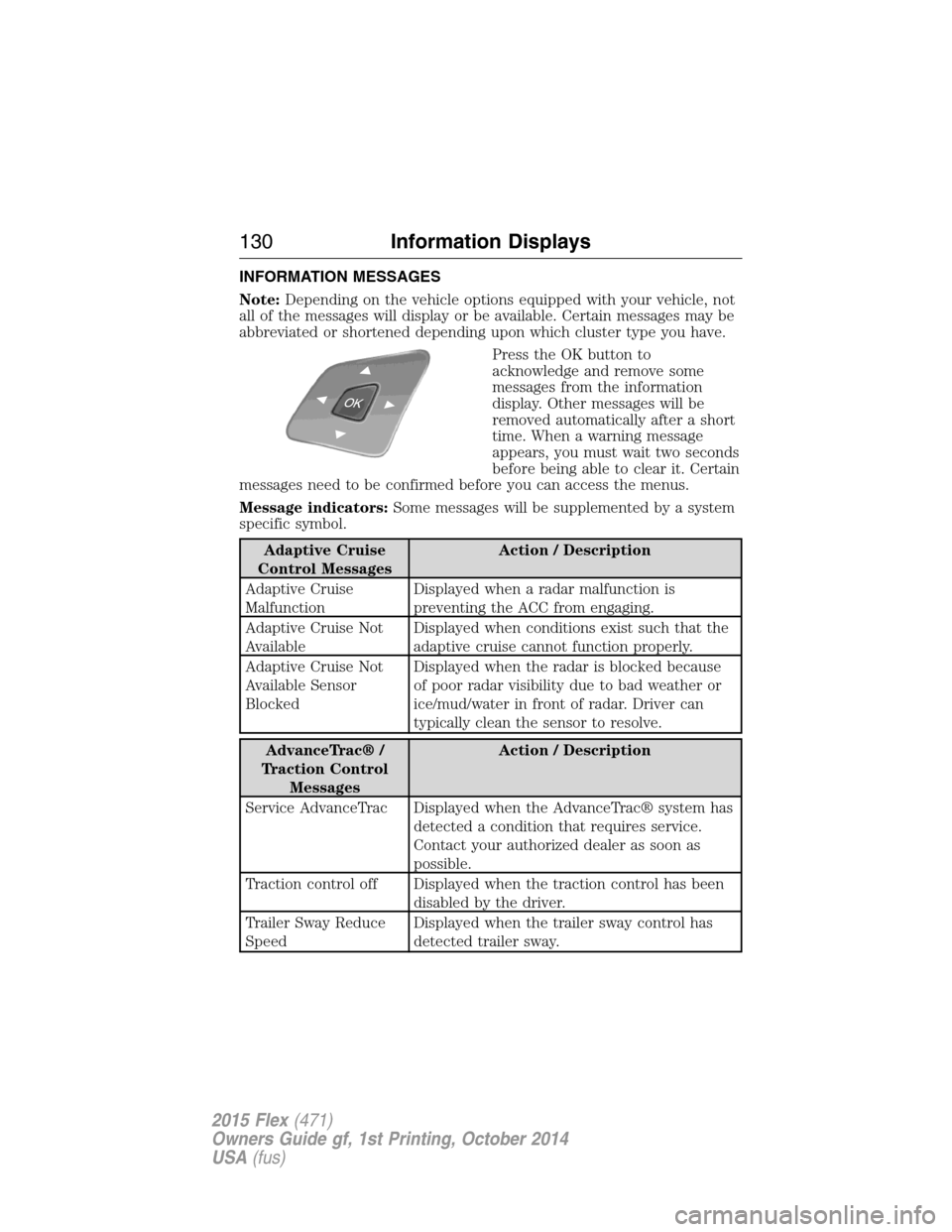
Press the OK button to
acknowledge and remove some
messages from the information
display. Other messages will be
removed automatically after a short
time. When a warning message
appears, you must wait two seconds
before being able to clear it. Certain
messages need to be confirmed before you can access the menus.
Message indicators:Some messages will be supplemented by a system
specific symbol.
Adaptive Cruise
Control MessagesAction / Description
Adaptive Cruise
MalfunctionDisplayed when a radar malfunction is
preventing the ACC from engaging.
Adaptive Cruise Not
AvailableDisplayed when conditions exist such that the
adaptive cruise cannot function properly.
Adaptive Cruise Not
Available Sensor
BlockedDisplayed when the radar is blocked because
of poor radar visibility due to bad weather or
ice/mud/water in front of radar. Driver can
typically clean the sensor to resolve.
AdvanceTrac® /
Traction Control
MessagesAction / Description
Service AdvanceTrac Displayed when the AdvanceTrac® system has
detected a condition that requires service.
Contact your authorized dealer as soon as
possible.
Traction control off Displayed when the traction control has been
disabled by the driver.
Trailer Sway Reduce
SpeedDisplayed when the trailer sway control has
detected trailer sway.
130Information Displays
2015 Flex(471)
Owners Guide gf, 1st Printing, October 2014
USA(fus)
Page 192 of 571
•Leaded-fuel (The use of leaded fuel is prohibited by law).
Note:Use of any fuel other than recommended fuel can cause
powertrain damage, impair the emission control system or cause loss of
vehicle performance. Any damage to vehicle that is caused by use of fuel
not recommended will not be covered under warranty.
Octane Recommendations
3.5L V6 TiVCT Engines
We recommend regular unleaded gasoline with a pump (R+M)/2 octane
rating of 87. Some stations offer fuels posted as regular with an octane
rating below 87, particularly in high altitude areas. We do not
recommend fuels with octane levels below 87.
3.5L V6 EcoBoost Engines
We recommend regular unleaded gasoline with a pump (R+M)/2 octane
rating of 87. Some stations offer fuels posted as regular with an octane
rating below 87, particularly in high altitude areas. We do not
recommend fuels with octane levels below 87. To provide improved
performance, we recommend premium fuel for severe duty usage such as
trailer tow.
Do not be concerned if your engine sometimes knocks lightly. However, if
it knocks heavily while you are using fuel with the recommended octane
rating, contact an authorized dealer to prevent any engine damage.
RUNNING OUT OF FUEL
Avoid running out of fuel because this situation may have an adverse
effect on powertrain components.
If you have run out of fuel:
•You may need to cycle the ignition from off to on several times after
refueling to allow the fuel system to pump the fuel from the tank to
the engine. On restarting, crank time will be a few seconds longer
than normal. With keyless ignition, just start the engine. Crank time
will be longer than usual.
•Normally, adding 1 gallon (3.8 liters) of fuel is enough to restart the
engine. If the vehicle is out of fuel and on a steep grade, more than
1 gallon (3.8 liters) may be required.
•The service engine soon indicator may come on. For more information
on the service engine soon indicator, seeWarning Lamps and
Indicatorsin theInstrument Clusterchapter.
Fuel and Refueling191
2015 Flex(471)
Owners Guide gf, 1st Printing, October 2014
USA(fus)
Page 217 of 571
SENSING SYSTEM (IF EQUIPPED)
WARNING:To help avoid personal injury, please read and
understand the limitations of the system as contained in this
section. Sensing is only an aid for some (generally large and fixed)
objects when moving in reverse on a flat surface at parking speeds.
Traffic control systems, inclement weather, air brakes, and external
motors and fans may also affect the function of the sensing system; this
may include reduced performance or a false activation.
WARNING:To help avoid personal injury, always use caution
when in R (Reverse) and when using the sensing system.
WARNING:This system is not designed to prevent contact with
small or moving objects. The system is designed to provide a
warning to assist the driver in detecting large stationary objects to
avoid damaging the vehicle. The system may not detect smaller objects,
particularly those close to the ground.
WARNING:Certain add-on devices such as large trailer hitches,
bike or surfboard racks and any device that may block the normal
detection zone of the system, may create false beeps.
Note:Keep the sensors (located on the bumper/fascia) free from snow,
ice and large accumulations of dirt. If the sensors are covered, the
system’s accuracy can be affected. Do not clean the sensors with sharp
objects.
Note:If your vehicle sustains damage to the bumper/fascia, leaving it
misaligned or bent, the sensing zone may be altered causing inaccurate
measurement of obstacles or false alarms.
The sensing system warns the driver of obstacles within a certain range
of the bumper area. The system turns on automatically whenever the
ignition is switched on.
When receiving a detection warning, the radio volume is reduced to a
predetermined level. After the warning goes away, the radio volume
returns to the previous level.
216Parking Aids
2015 Flex(471)
Owners Guide gf, 1st Printing, October 2014
USA(fus)
Page 219 of 571
ACTIVE PARK ASSIST (IF EQUIPPED)
WARNING:This system is designed to be a supplementary park
aid. It may not work in all conditions and is not intended to
replace the driver’s attention and judgment. The driver is responsible
for avoiding hazards and maintaining a safe distance and speed, even
when the system is in use.
Note:The driver is always responsible for controlling the vehicle,
supervising the system and intervening if required.
The system detects an available parallel parking space and automatically
steers the vehicle into the space (hands-free) while you control the
accelerator, gearshift and brakes. The system visually and/or audibly
instructs the driver to park the vehicle.
The system may not function correctly if something passes between the
front bumper and the parking space (i.e. a pedestrian or cyclist) or if the
edge of the neighboring parked vehicle is high from the ground (i.e. a
bus, tow truck or flatbed truck).
Note:The sensors may not detect objects in heavy rain or other
conditions that cause disruptive reflections.
Note:The sensors may not detect objects with surfaces that absorb
ultrasonic waves.
Note:After a tire change the system will go through a relearning
procedure. During this time the system performance may deteriorate.
The system should not be used if:
•a foreign object (i.e. bike rack or trailer) is attached to the front or
rear of the vehicle or at another location close to the sensors.
•an overhanging object (i.e. surfboard) is attached to the roof.
•the front bumper or side sensors are damaged (i.e. in a collision) or
obstructed by a foreign object (i.e. front bumper cover).
•a mini-spare tire is in use.
218Parking Aids
2015 Flex(471)
Owners Guide gf, 1st Printing, October 2014
USA(fus)
Page 225 of 571
Note:When towing, the camera only sees what is being towed behind
the vehicle. This might not provide adequate coverage as it usually
provides in normal operation and some objects might not be seen. In
some vehicles, the guidelines may disappear once the trailer tow
connector is engaged.
Note:The camera may not operate correctly under the following
conditions:
•Nighttime or dark areas if one or both reverse lamps are not
operating.
•The camera’s view is obstructed by mud, water or debris. Clean the
lens with a soft, lint-free cloth and non-abrasive cleaner.
•The rear of the vehicle is hit or damaged, causing the camera to
become misaligned.
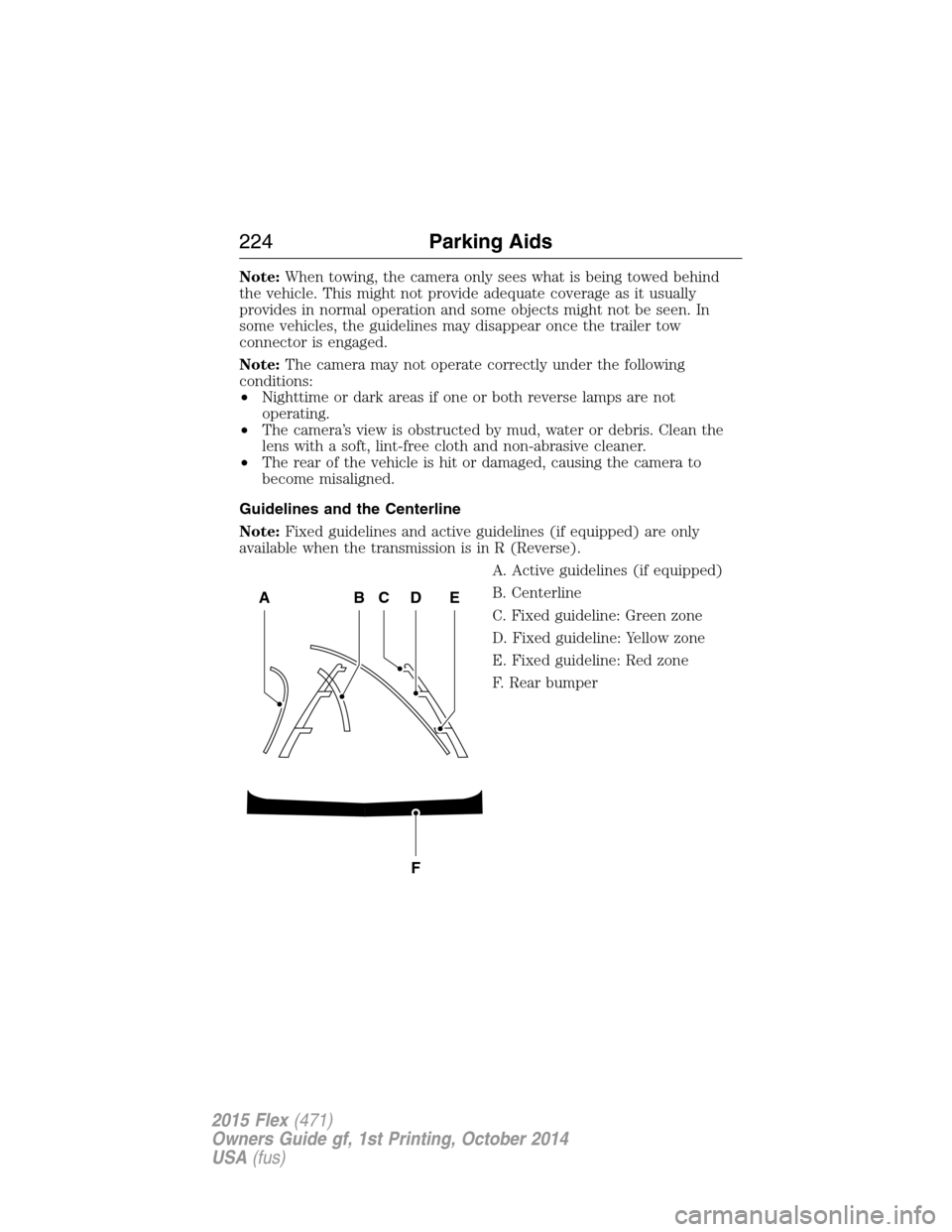
Guidelines and the Centerline
Note:Fixed guidelines and active guidelines (if equipped) are only
available when the transmission is in R (Reverse).
A. Active guidelines (if equipped)
B. Centerline
C. Fixed guideline: Green zone
D. Fixed guideline: Yellow zone
E. Fixed guideline: Red zone
F. Rear bumper
ABCD
F
E
224Parking Aids
2015 Flex(471)
Owners Guide gf, 1st Printing, October 2014
USA(fus)
Page 236 of 571
Blocked Sensor
WARNING:Do not use ACC when towing a trailer with brake
controls. Aftermarket trailer brakes will not function properly
when ACC is activated because the brakes are electronically controlled.
Failing to do so may result in loss of vehicle control, which could result
in serious injury.
WARNING:Do not use tires sizes other than those
recommended because this can affect the normal operation of
ACC. Failing to do so may result in a loss of vehicle control, which
could result in serious injury.
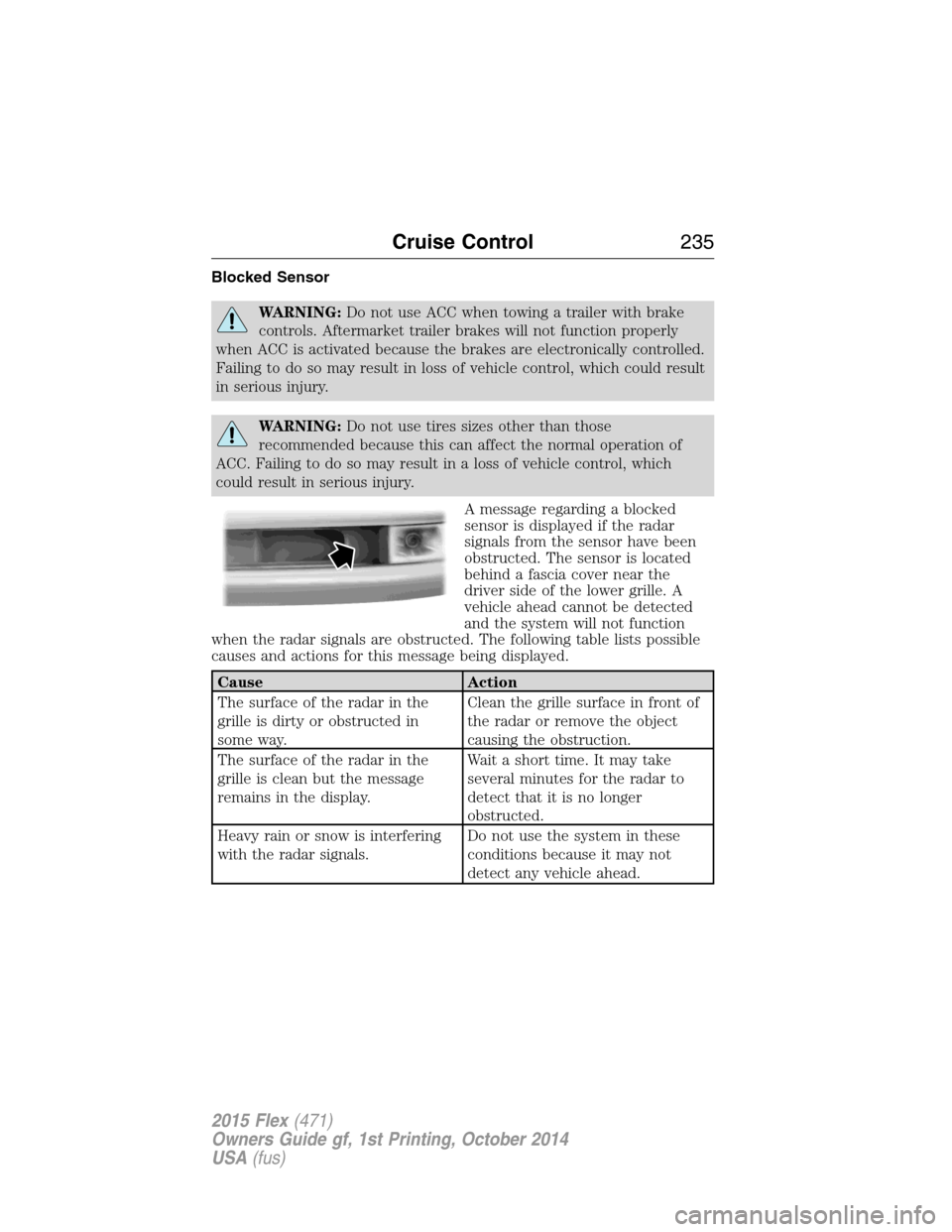
A message regarding a blocked
sensor is displayed if the radar
signals from the sensor have been
obstructed. The sensor is located
behind a fascia cover near the
driver side of the lower grille. A
vehicle ahead cannot be detected
and the system will not function
when the radar signals are obstructed. The following table lists possible
causes and actions for this message being displayed.
Cause Action
The surface of the radar in the
grille is dirty or obstructed in
some way.Clean the grille surface in front of
the radar or remove the object
causing the obstruction.
The surface of the radar in the
grille is clean but the message
remains in the display.Wait a short time. It may take
several minutes for the radar to
detect that it is no longer
obstructed.
Heavy rain or snow is interfering
with the radar signals.Do not use the system in these
conditions because it may not
detect any vehicle ahead.
Cruise Control235
2015 Flex(471)
Owners Guide gf, 1st Printing, October 2014
USA(fus)