climate settings FORD FLEX 2015 1.G Owners Manual
[x] Cancel search | Manufacturer: FORD, Model Year: 2015, Model line: FLEX, Model: FORD FLEX 2015 1.GPages: 571, PDF Size: 5.52 MB
Page 10 of 571
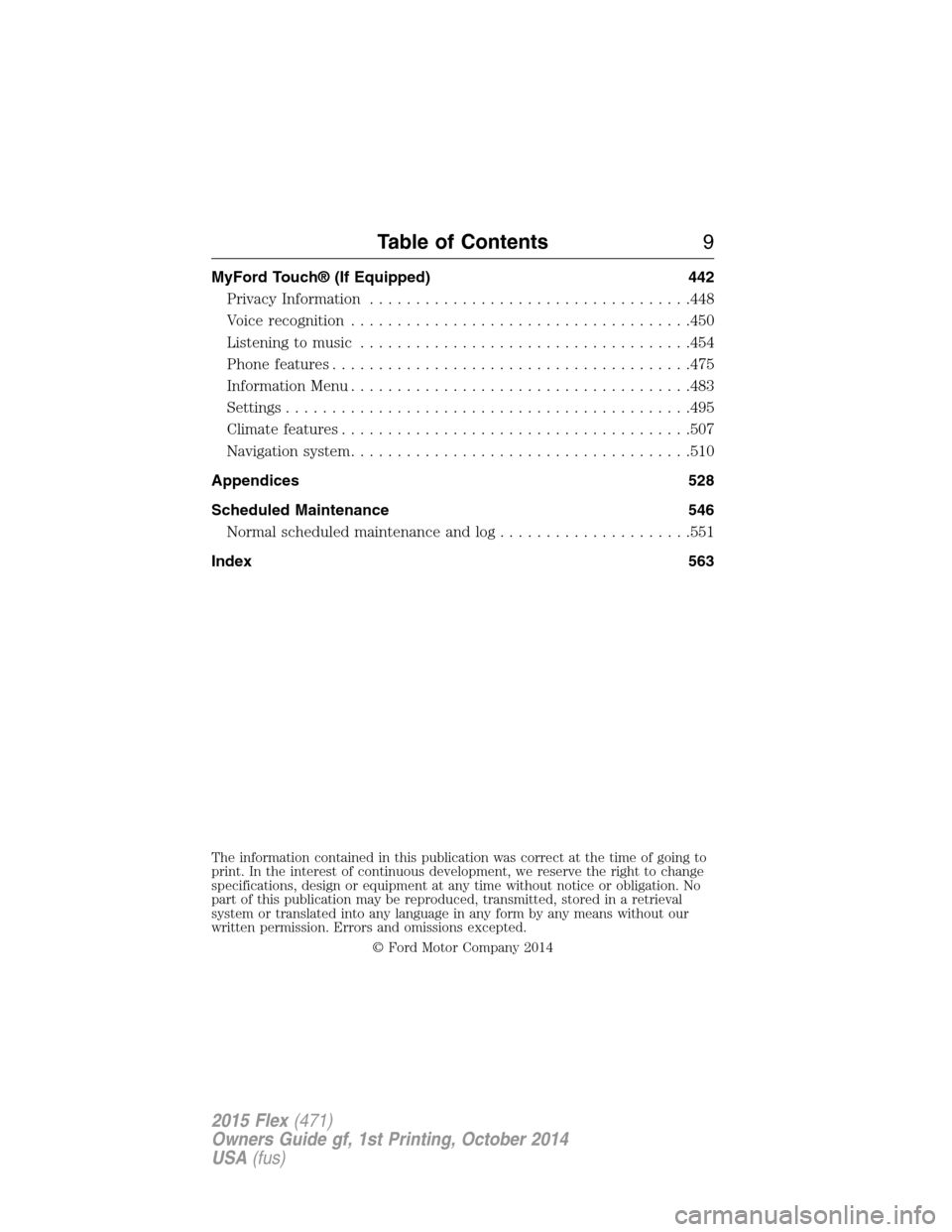
MyFord Touch® (If Equipped) 442
Privacy Information...................................448
Voice recognition.....................................450
Listening to music....................................454
Phone features.......................................475
Information Menu.....................................483
Settings............................................495
Climatefeatures......................................507
Navigation system.....................................510
Appendices 528
Scheduled Maintenance 546
Normal scheduled maintenance and log.....................551
Index 563
The information contained in this publication was correct at the time of going to
print. In the interest of continuous development, we reserve the right to change
specifications, design or equipment at any time without notice or obligation. No
part of this publication may be reproduced, transmitted, stored in a retrieval
system or translated into any language in any form by any means without our
written permission. Errors and omissions excepted.
© Ford Motor Company 2014
Table of Contents9
2015 Flex(471)
Owners Guide gf, 1st Printing, October 2014
USA(fus)
Page 123 of 571
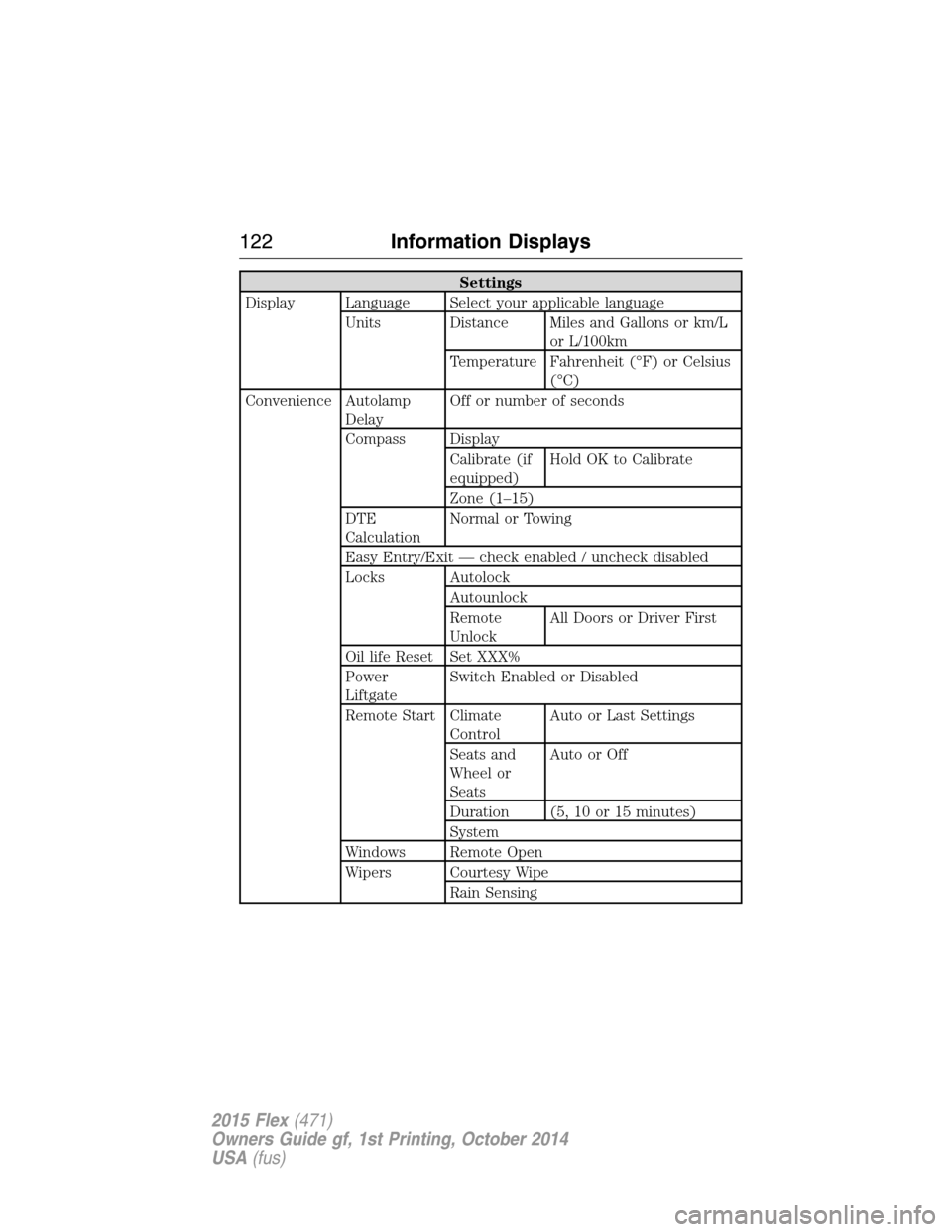
Settings
Display Language Select your applicable language
Units Distance Miles and Gallons or km/L
or L/100km
Temperature Fahrenheit (°F) or Celsius
(°C)
Convenience Autolamp
DelayOff or number of seconds
Compass Display
Calibrate (if
equipped)Hold OK to Calibrate
Zone (1–15)
DTE
CalculationNormal or Towing
Easy Entry/Exit — check enabled / uncheck disabled
Locks Autolock
Autounlock
Remote
UnlockAll Doors or Driver First
Oil life Reset Set XXX%
Power
LiftgateSwitch Enabled or Disabled
Remote Start Climate
ControlAuto or Last Settings
Seats and
Wheel or
SeatsAutoorOff
Duration (5, 10 or 15 minutes)
System
Windows Remote Open
Wipers Courtesy Wipe
Rain Sensing
122Information Displays
2015 Flex(471)
Owners Guide gf, 1st Printing, October 2014
USA(fus)
Page 129 of 571
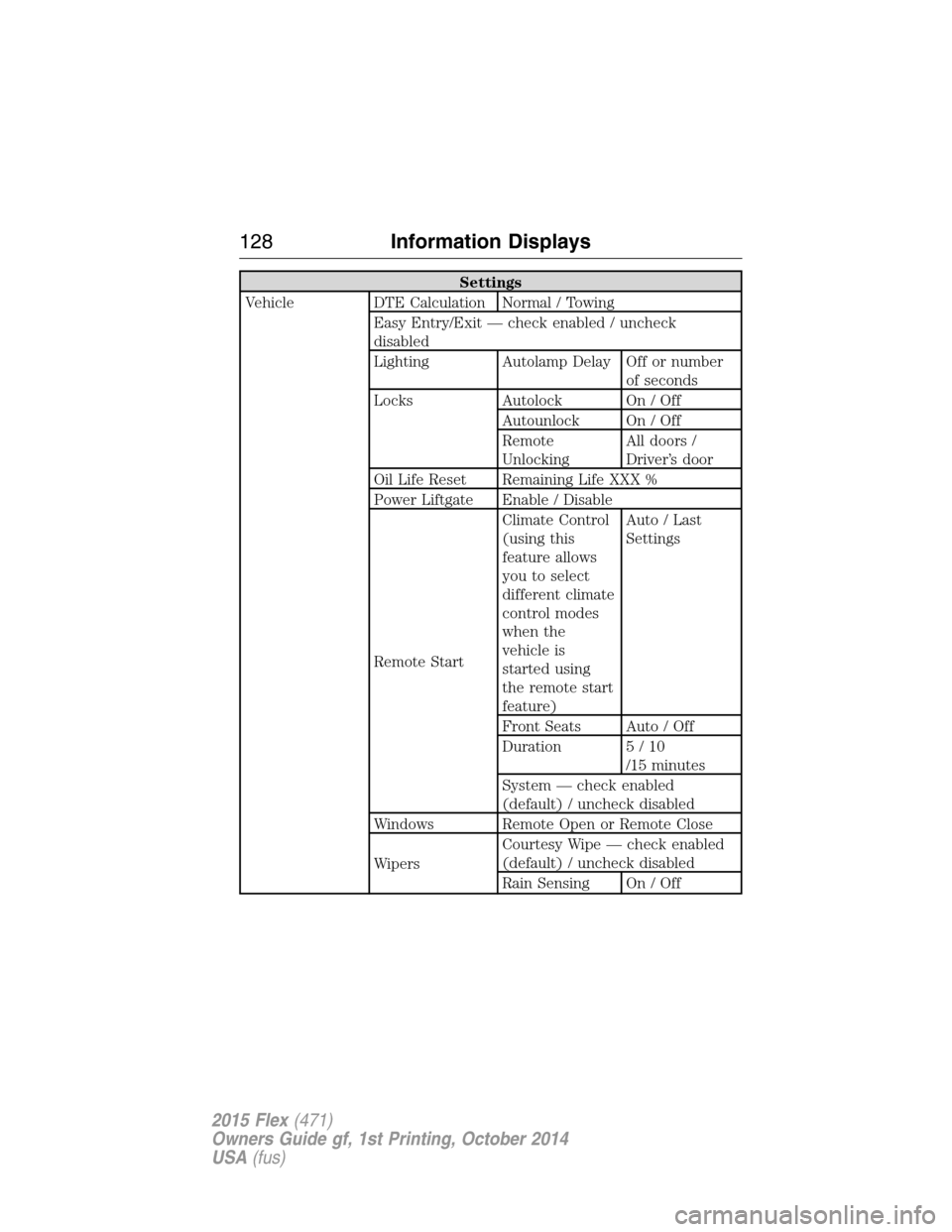
Settings
Vehicle DTE Calculation Normal / Towing
Easy Entry/Exit — check enabled / uncheck
disabled
Lighting Autolamp Delay Off or number
of seconds
Locks Autolock On / Off
Autounlock On / Off
Remote
UnlockingAll doors /
Driver’s door
Oil Life Reset Remaining Life XXX %
Power Liftgate Enable / Disable
Remote StartClimate Control
(using this
feature allows
you to select
different climate
control modes
when the
vehicle is
started using
the remote start
feature)Auto / Last
Settings
Front Seats Auto / Off
Duration 5 / 10
/15 minutes
System — check enabled
(default) / uncheck disabled
Windows Remote Open or Remote Close
WipersCourtesy Wipe — check enabled
(default) / uncheck disabled
Rain Sensing On / Off
128Information Displays
2015 Flex(471)
Owners Guide gf, 1st Printing, October 2014
USA(fus)
Page 141 of 571
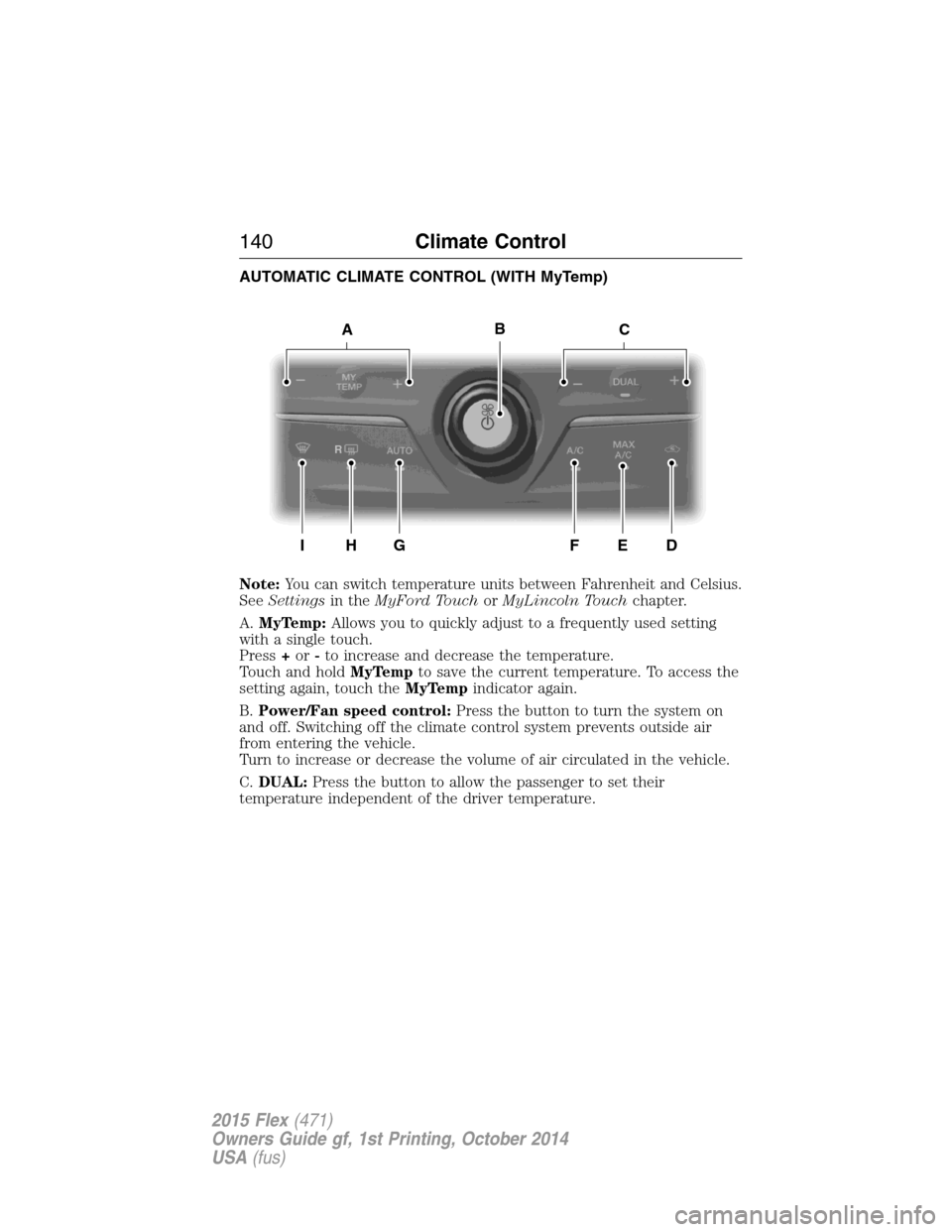
AUTOMATIC CLIMATE CONTROL (WITH MyTemp)
Note:You can switch temperature units between Fahrenheit and Celsius.
SeeSettingsin theMyFord TouchorMyLincoln Touchchapter.
A.MyTemp:Allows you to quickly adjust to a frequently used setting
with a single touch.
Press+or-to increase and decrease the temperature.
Touch and holdMyTempto save the current temperature. To access the
setting again, touch theMyTempindicator again.
B.Power/Fan speed control:Press the button to turn the system on
and off. Switching off the climate control system prevents outside air
from entering the vehicle.
Turn to increase or decrease the volume of air circulated in the vehicle.
C.DUAL:Press the button to allow the passenger to set their
temperature independent of the driver temperature.
ACB
IH
R
GFED
140Climate Control
2015 Flex(471)
Owners Guide gf, 1st Printing, October 2014
USA(fus)
Page 145 of 571
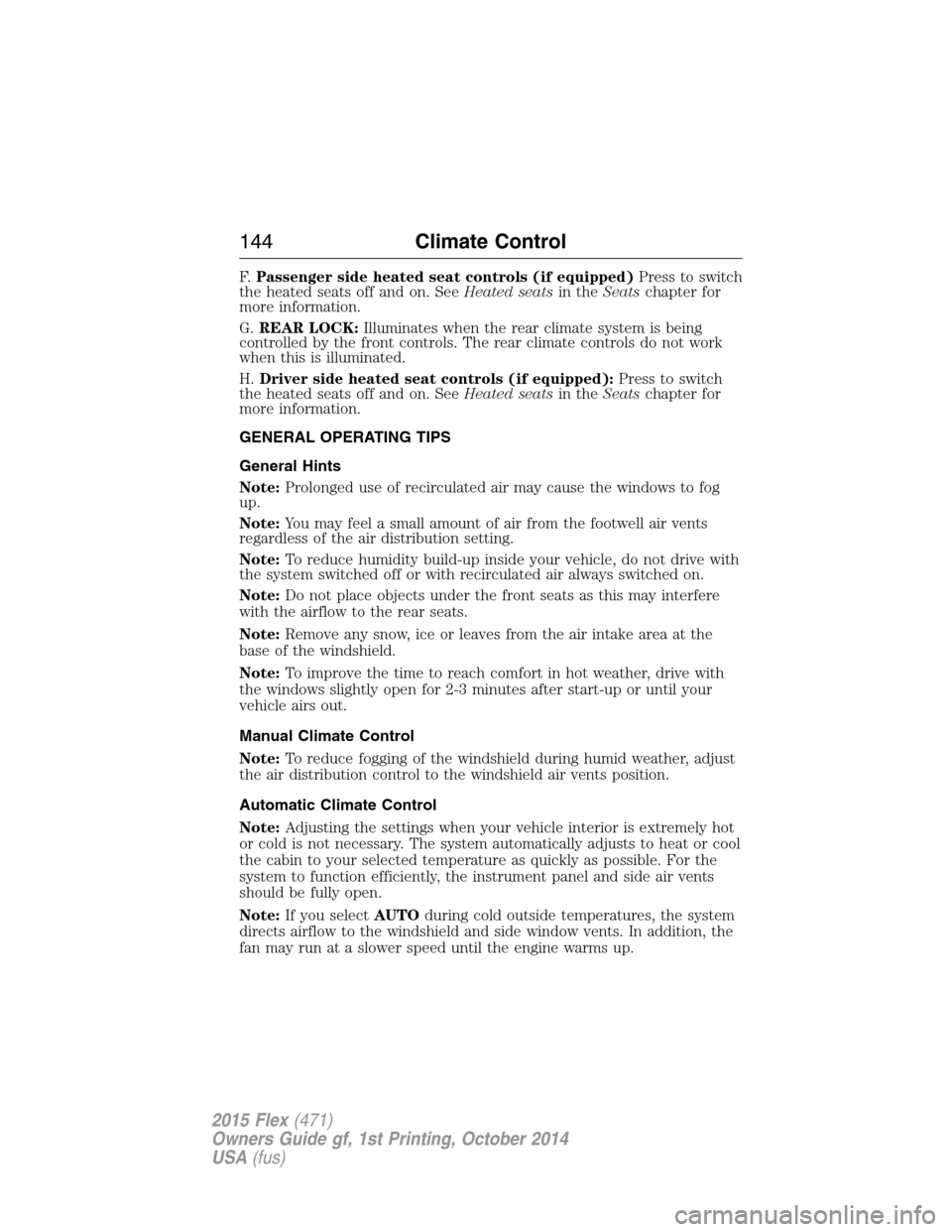
F.Passenger side heated seat controls (if equipped)Press to switch
the heated seats off and on. SeeHeated seatsin theSeatschapter for
more information.
G.REAR LOCK:Illuminates when the rear climate system is being
controlled by the front controls. The rear climate controls do not work
when this is illuminated.
H.Driver side heated seat controls (if equipped):Press to switch
the heated seats off and on. SeeHeated seatsin theSeatschapter for
more information.
GENERAL OPERATING TIPS
General Hints
Note:Prolonged use of recirculated air may cause the windows to fog
up.
Note:You may feel a small amount of air from the footwell air vents
regardless of the air distribution setting.
Note:To reduce humidity build-up inside your vehicle, do not drive with
the system switched off or with recirculated air always switched on.
Note:Do not place objects under the front seats as this may interfere
with the airflow to the rear seats.
Note:Remove any snow, ice or leaves from the air intake area at the
base of the windshield.
Note:To improve the time to reach comfort in hot weather, drive with
the windows slightly open for 2-3 minutes after start-up or until your
vehicle airs out.
Manual Climate Control
Note:To reduce fogging of the windshield during humid weather, adjust
the air distribution control to the windshield air vents position.
Automatic Climate Control
Note:Adjusting the settings when your vehicle interior is extremely hot
or cold is not necessary. The system automatically adjusts to heat or cool
the cabin to your selected temperature as quickly as possible. For the
system to function efficiently, the instrument panel and side air vents
should be fully open.
Note:If you selectAUTOduring cold outside temperatures, the system
directs airflow to the windshield and side window vents. In addition, the
fan may run at a slower speed until the engine warms up.
144Climate Control
2015 Flex(471)
Owners Guide gf, 1st Printing, October 2014
USA(fus)
Page 146 of 571
Note:If you selectAUTOduring hot outside temperatures, or when the
inside of the vehicle is hot, the system automatically uses recirculated air
to maximize interior cooling. When the interior reaches the selected
temperature, the system automatically switches to using outside air.
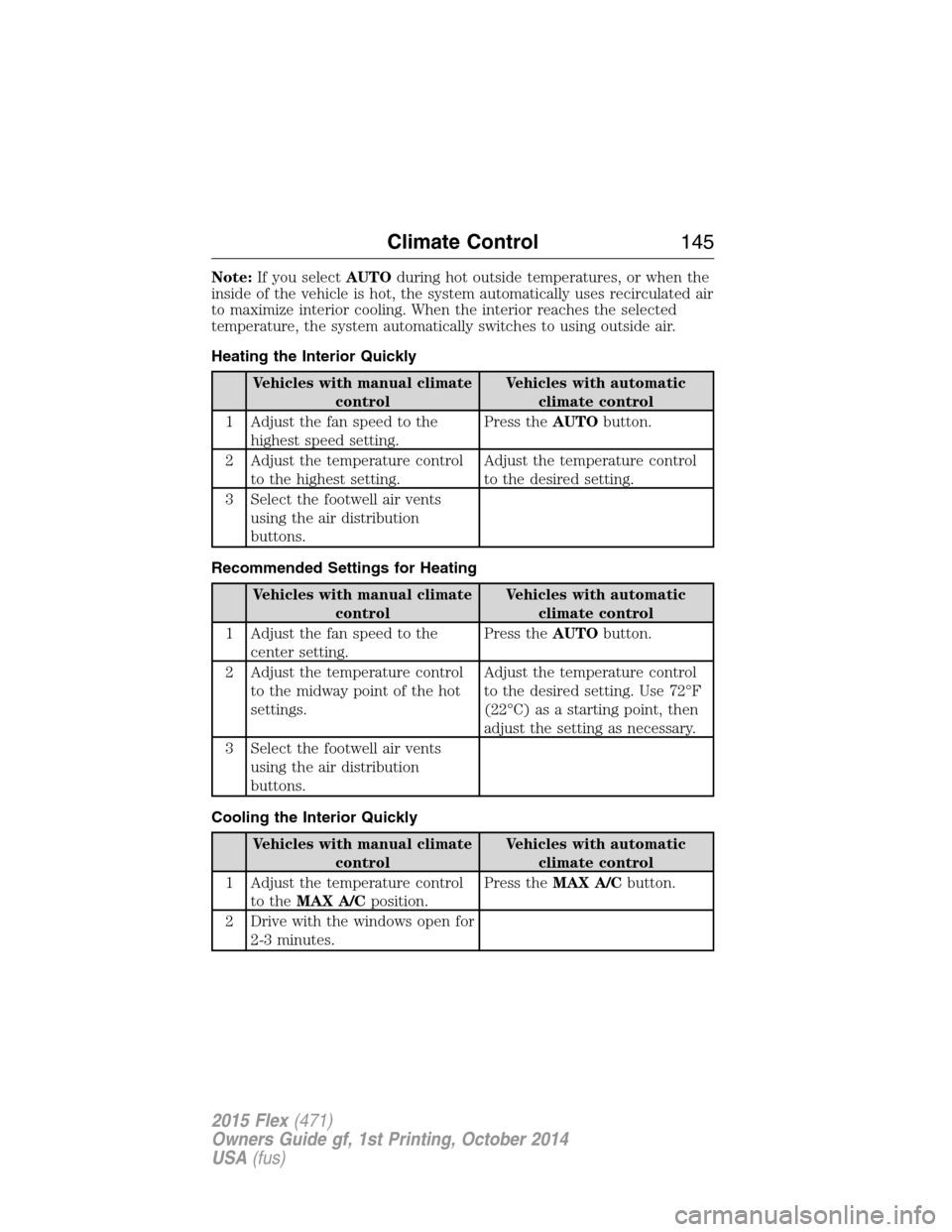
Heating the Interior Quickly
Vehicles with manual climate
controlVehicles with automatic
climate control
1 Adjust the fan speed to the
highest speed setting.Press theAUTObutton.
2 Adjust the temperature control
to the highest setting.Adjust the temperature control
to the desired setting.
3 Select the footwell air vents
using the air distribution
buttons.
Recommended Settings for Heating
Vehicles with manual climate
controlVehicles with automatic
climate control
1 Adjust the fan speed to the
center setting.Press theAUTObutton.
2 Adjust the temperature control
to the midway point of the hot
settings.Adjust the temperature control
to the desired setting. Use 72°F
(22°C) as a starting point, then
adjust the setting as necessary.
3 Select the footwell air vents
using the air distribution
buttons.
Cooling the Interior Quickly
Vehicles with manual climate
controlVehicles with automatic
climate control
1 Adjust the temperature control
to theMAX A/Cposition.Press theMAX A/Cbutton.
2 Drive with the windows open for
2-3 minutes.
Climate Control145
2015 Flex(471)
Owners Guide gf, 1st Printing, October 2014
USA(fus)
Page 147 of 571
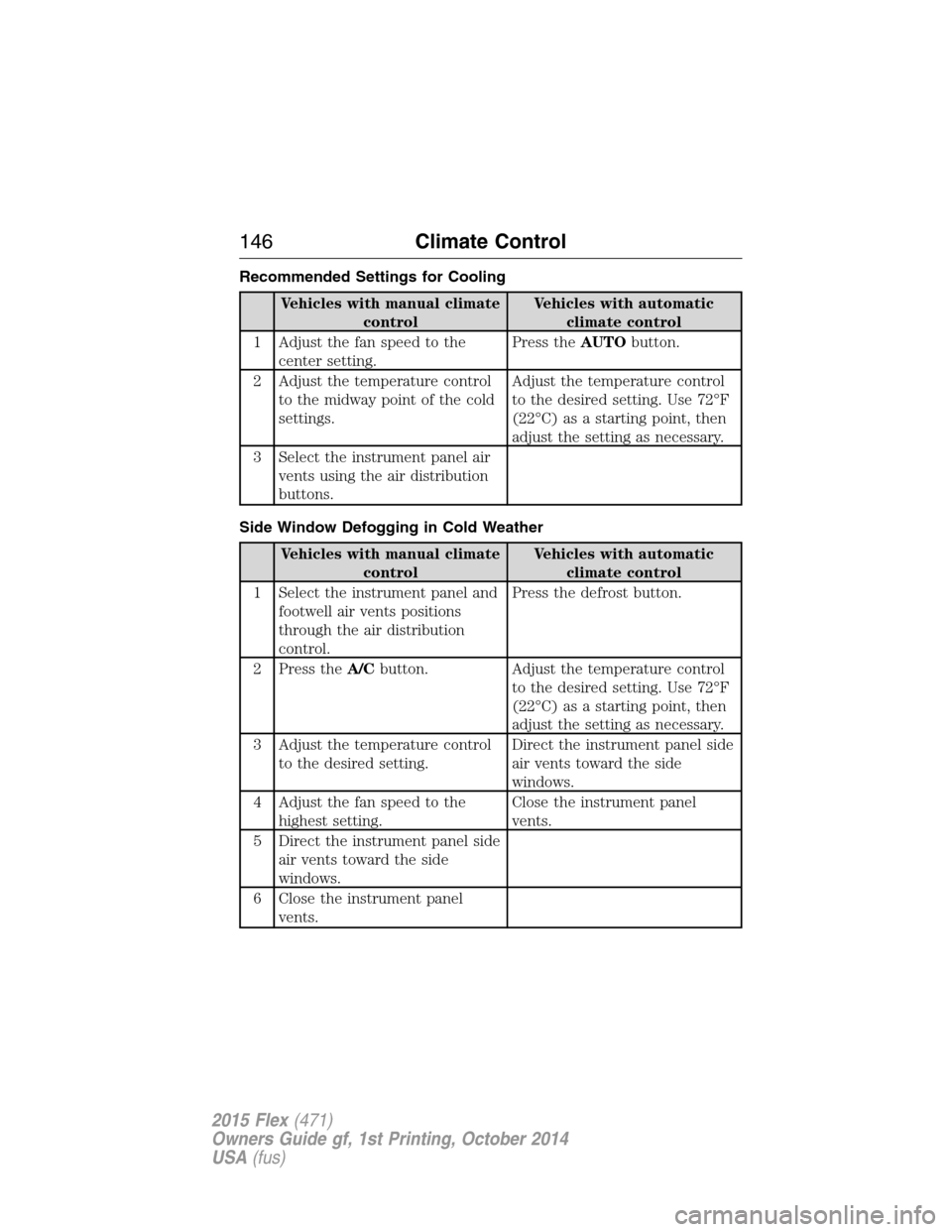
Recommended Settings for Cooling
Vehicles with manual climate
controlVehicles with automatic
climate control
1 Adjust the fan speed to the
center setting.Press theAUTObutton.
2 Adjust the temperature control
to the midway point of the cold
settings.Adjust the temperature control
to the desired setting. Use 72°F
(22°C) as a starting point, then
adjust the setting as necessary.
3 Select the instrument panel air
vents using the air distribution
buttons.
Side Window Defogging in Cold Weather
Vehicles with manual climate
controlVehicles with automatic
climate control
1 Select the instrument panel and
footwell air vents positions
through the air distribution
control.Press the defrost button.
2 Press theA/Cbutton. Adjust the temperature control
to the desired setting. Use 72°F
(22°C) as a starting point, then
adjust the setting as necessary.
3 Adjust the temperature control
to the desired setting.Direct the instrument panel side
air vents toward the side
windows.
4 Adjust the fan speed to the
highest setting.Close the instrument panel
vents.
5 Direct the instrument panel side
air vents toward the side
windows.
6 Close the instrument panel
vents.
146Climate Control
2015 Flex(471)
Owners Guide gf, 1st Printing, October 2014
USA(fus)
Page 149 of 571
For more information regarding the interval at which you should replace
the cabin air filter, see theScheduled Maintenancechapter.
For additional cabin air filter information, or to replace the filter, see an
authorized dealer.
REMOTE START (IF EQUIPPED)
The remote start feature allows you to pre-condition the interior of your
vehicle. The climate control system works to achieve comfort according
to your previous settings.
Note:You cannot adjust the system during remote start operation.
Turn the ignition on to return the system to its previous settings. You
can now make adjustments normally, but you need to turn certain
vehicle-dependent features back on, such as:
•Heated seats.
•Cooled seats.
•Heated steering wheel.
•Heated mirrors.
•Heated rear window.
You can adjust the default remote start settings using the information
display controls. See theInformation Displayschapter.
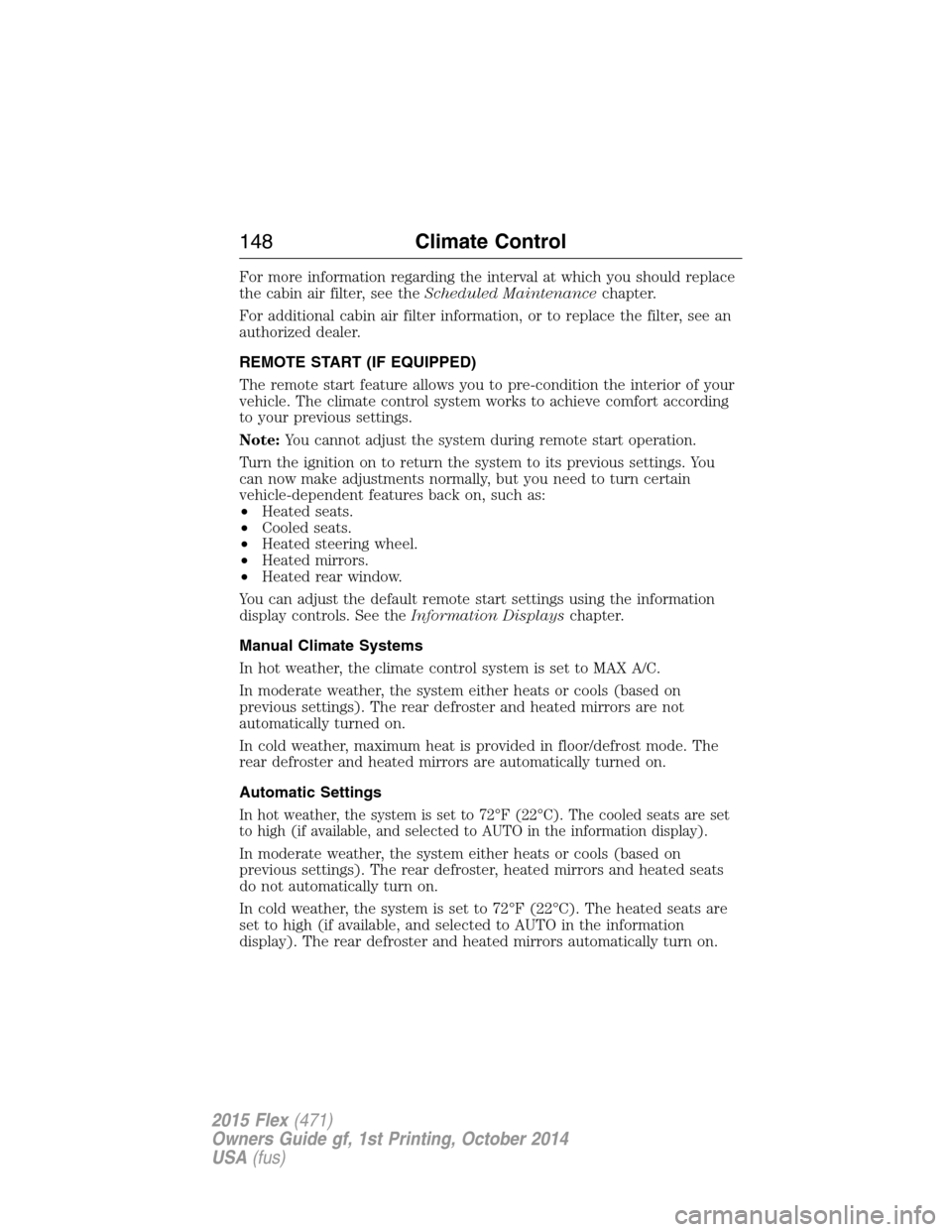
Manual Climate Systems
In hot weather, the climate control system is set to MAX A/C.
In moderate weather, the system either heats or cools (based on
previous settings). The rear defroster and heated mirrors are not
automatically turned on.
In cold weather, maximum heat is provided in floor/defrost mode. The
rear defroster and heated mirrors are automatically turned on.
Automatic Settings
In hot weather, the system is set to 72°F (22°C). The cooled seats are set
to high (if available, and selected to AUTO in the information display).
In moderate weather, the system either heats or cools (based on
previous settings). The rear defroster, heated mirrors and heated seats
do not automatically turn on.
In cold weather, the system is set to 72°F (22°C). The heated seats are
set to high (if available, and selected to AUTO in the information
display). The rear defroster and heated mirrors automatically turn on.
148Climate Control
2015 Flex(471)
Owners Guide gf, 1st Printing, October 2014
USA(fus)
Page 160 of 571
CLIMATE CONTROLLED SEATS (IF EQUIPPED)
Heated Seats
WARNING:Persons who are unable to feel pain to the skin
because of advanced age, chronic illness, diabetes, spinal cord
injury, medication, alcohol use, exhaustion, or other physical conditions,
must exercise care when using the seat heater. The seat heater may
cause burns even at low temperatures, especially if used for long
periods of time. Do not place anything on the seat that insulates against
heat, such as a blanket or cushion, because this may cause the seat
heater to overheat. Do not puncture the seat with pins, needles, or
other pointed objects because this may damage the heating element
which may cause the seat heater to overheat. An overheated seat may
cause serious personal injury.
The heated seats will only function when the engine is running.
Note:Do not do the following:
•Place heavy objects on the seat
•Operate the seat heater if water or any other liquid is spilled on the
seat. Allow the seat to dry thoroughly.
To operate the heated seats:
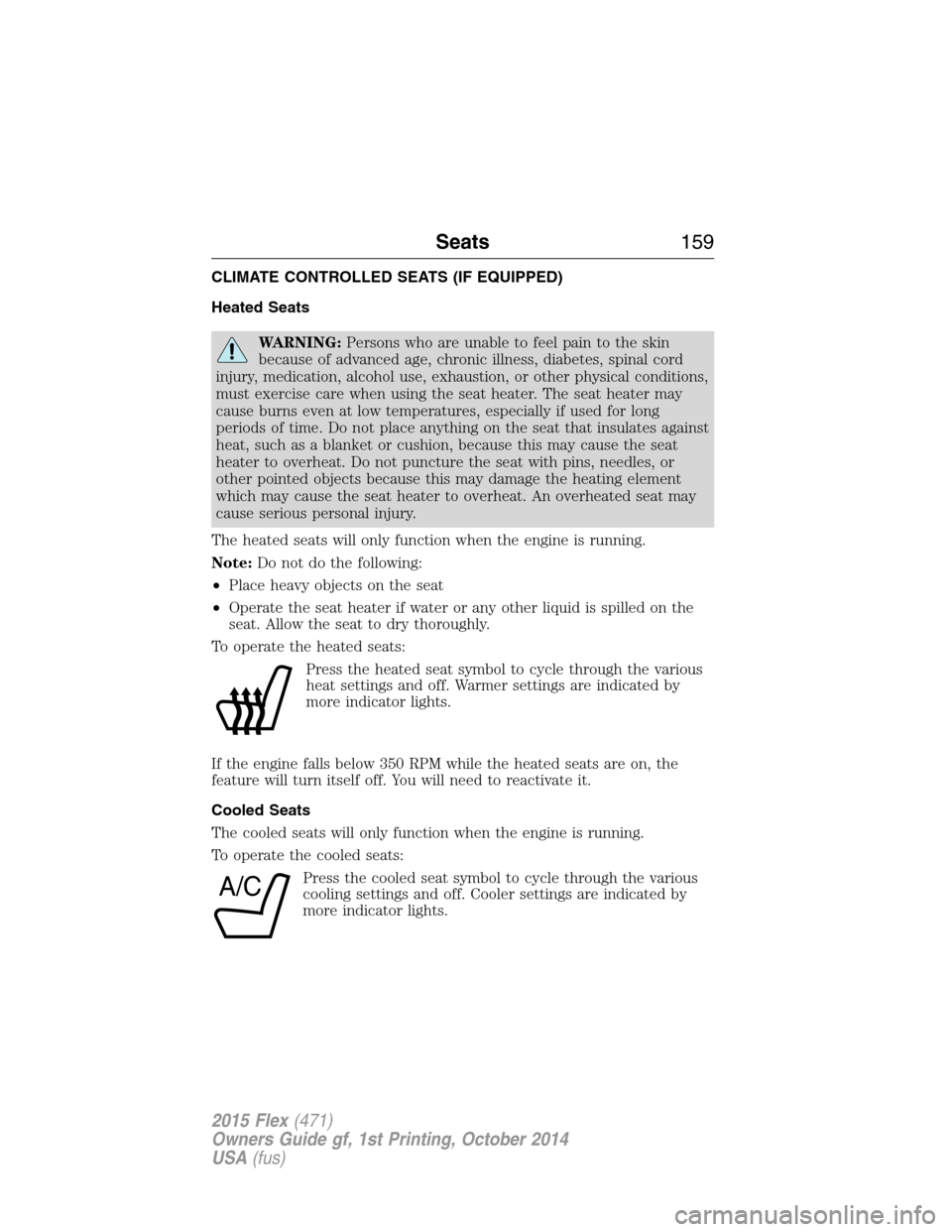
Press the heated seat symbol to cycle through the various
heat settings and off. Warmer settings are indicated by
more indicator lights.
If the engine falls below 350 RPM while the heated seats are on, the
feature will turn itself off. You will need to reactivate it.
Cooled Seats
The cooled seats will only function when the engine is running.
To operate the cooled seats:
Press the cooled seat symbol to cycle through the various
cooling settings and off. Cooler settings are indicated by
more indicator lights.
A/C
Seats159
2015 Flex(471)
Owners Guide gf, 1st Printing, October 2014
USA(fus)
Page 443 of 571
GENERAL INFORMATION
WARNING:Driving while distracted can result in loss of vehicle
control, crash and injury. We strongly recommend that you use
extreme caution when using any device that may take your focus off
the road. Your primary responsibility is the safe operation of your
vehicle. We recommend against the use of any hand-held device while
driving and encourage the use of voice-operated systems when possible.
Make sure you are aware of all applicable local laws that may affect the
use of electronic devices while driving.
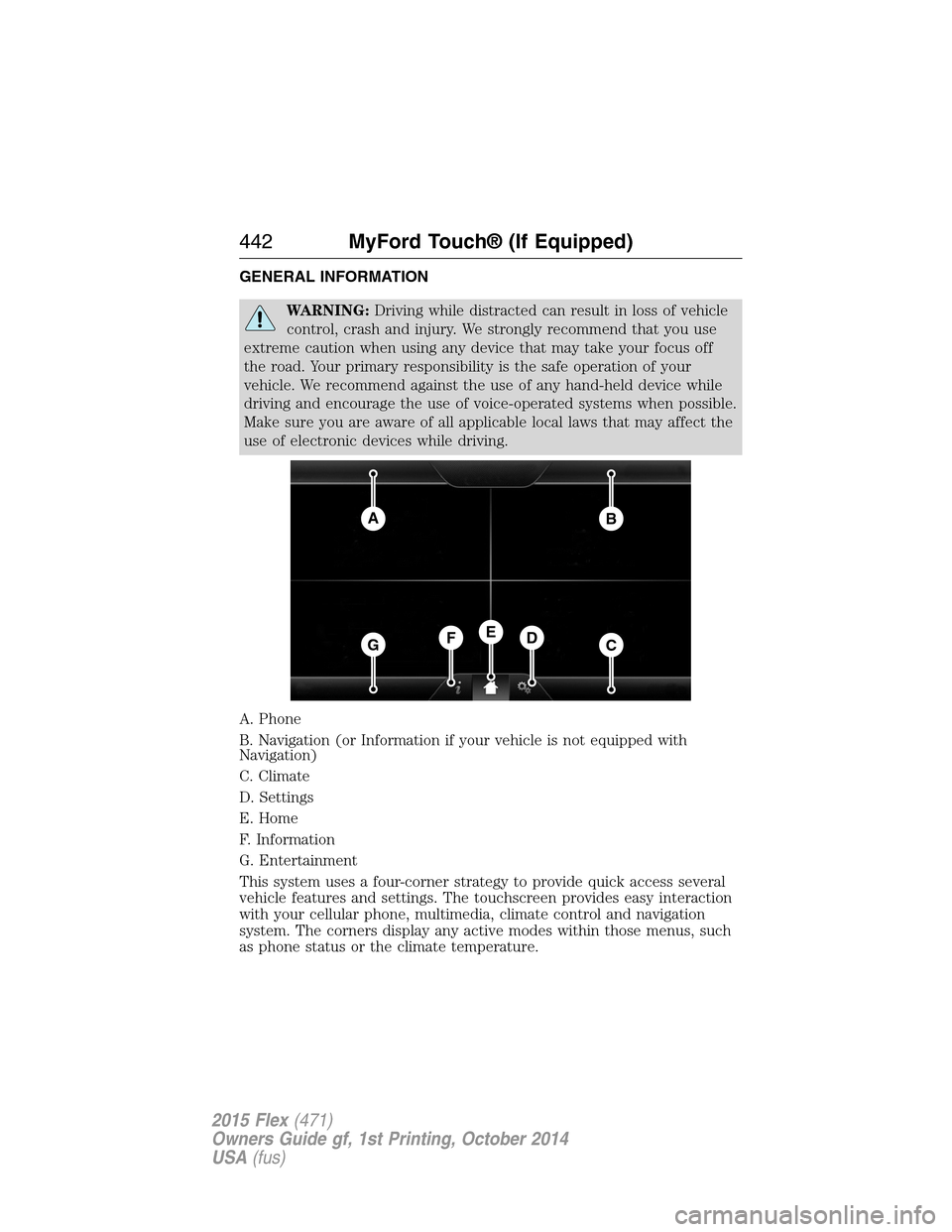
A. Phone
B. Navigation (or Information if your vehicle is not equipped with
Navigation)
C. Climate
D. Settings
E. Home
F. Information
G. Entertainment
This system uses a four-corner strategy to provide quick access several
vehicle features and settings. The touchscreen provides easy interaction
with your cellular phone, multimedia, climate control and navigation
system. The corners display any active modes within those menus, such
as phone status or the climate temperature.
AB
GCDFE
442MyFord Touch® (If Equipped)
2015 Flex(471)
Owners Guide gf, 1st Printing, October 2014
USA(fus)