brake light FORD FLEX 2017 1.G Owner's Manual
[x] Cancel search | Manufacturer: FORD, Model Year: 2017, Model line: FLEX, Model: FORD FLEX 2017 1.GPages: 496, PDF Size: 5.92 MB
Page 258 of 496
Correct Fluid Level
If the fluid level is within the hash mark
area (between points A and B) do not add
any fluid.
High Fluid Level
If the fluid level is above the maximum
range (above point B) fluid may need to
be removed. High fluid levels may be
caused by a overheating condition. If you
have operated your vehicle at high speeds,
towing a trailer or in city traffic during hot
weather, allow your vehicle to cool for a
minimum of 30 minutes before rechecking
the level.
Note:
An overfill condition can damage the
transmission.
Adding Transmission Fluid *
1. Rotate the automatic transmission fluid cap in a counterclockwise
direction.
2. Remove the cap and dipstick and wipe
it with a clean, lint-free cloth.
3. Add fluid that meets the Ford specifications. See Capacities and
Specifications (page 304). Pour the
fluid directly into the automatic
transmission fluid cap and dipstick
hole.
4. Replace the cap and dipstick and remove it again to check the fluid level.
5. Make sure that the fluid level is between the MIN and the MAX marks.
6. Replace the automatic transmission fluid cap and dipstick. Turn it clockwise
until you feel a strong resistance.
* Vehicles With EcoBoost Engine WARNING
Do not run the engine with the air
filter disconnected. 1. Loosen the clamp holding the air filter
assembly to the rubber hose.
2. Remove the air filter assembly securing
bolts.
3. Lift the air filter assembly to disengage
the locating pins.
4. Rotate the air filter assembly slightly in a counterclockwise direction.
5. Check the transmission fluid level.
6. Install the air filter assembly in reverse
order. Tighten the air filter assembly
securing bolts until you feel a strong
resistance.
BRAKE FLUID CHECK WARNINGS
Do not use any fluid other than the
recommended brake fluid as this will
reduce brake efficiency. Use of
incorrect fluid could result in the loss of
vehicle control, serious personal injury or
death. Only use brake fluid from a sealed
container. Contamination with dirt,
water, petroleum products or other
materials may result in brake system
damage or failure. Failure to adhere to this
warning could result in the loss of vehicle
control, serious personal injury or death. Do not allow the fluid to touch your
skin or eyes. If this happens, rinse the
affected areas immediately with
plenty of water and contact your physician. A fluid level between the
MAX and
MIN lines is within the normal
operating range and there is no need
to add fluid. A fluid level not in the normal
operating range could compromise the
performance of the system. Have your
vehicle checked immediately. 255
Flex (), enUSA, First Printing Maintenance
Page 261 of 496
7. While the engine is running, press the
brake pedal and shift into neutral (N).
8. Allow the engine to run for at least one
minute by pressing on the accelerator
pedal.
9. Drive the vehicle at least 12 mi (20 km)
to completely relearn the idle and fuel
trim strategy.
Note: If you do not allow the engine to
relearn the idle and fuel trim strategy, the
idle quality of your vehicle may be adversely
affected until the engine computer
eventually relearns the idle trim and fuel
trim strategy.
Make sure that you dispose of old batteries
in an environmentally friendly way. Seek
advice from your local authority about
recycling old batteries.
CHECKING THE WIPER
BLADES Run the tip of your fingers over the edge of
the blade to check for roughness.
Clean the wiper blades with washer fluid
or water applied with a soft sponge or
cloth.
CHANGING THE WIPER
BLADES
You can improve poor wiper quality by
cleaning the wiper blades and the
windshield. Replace the wiper blades at least annually
for optimum performance.
Front Wiper Blades
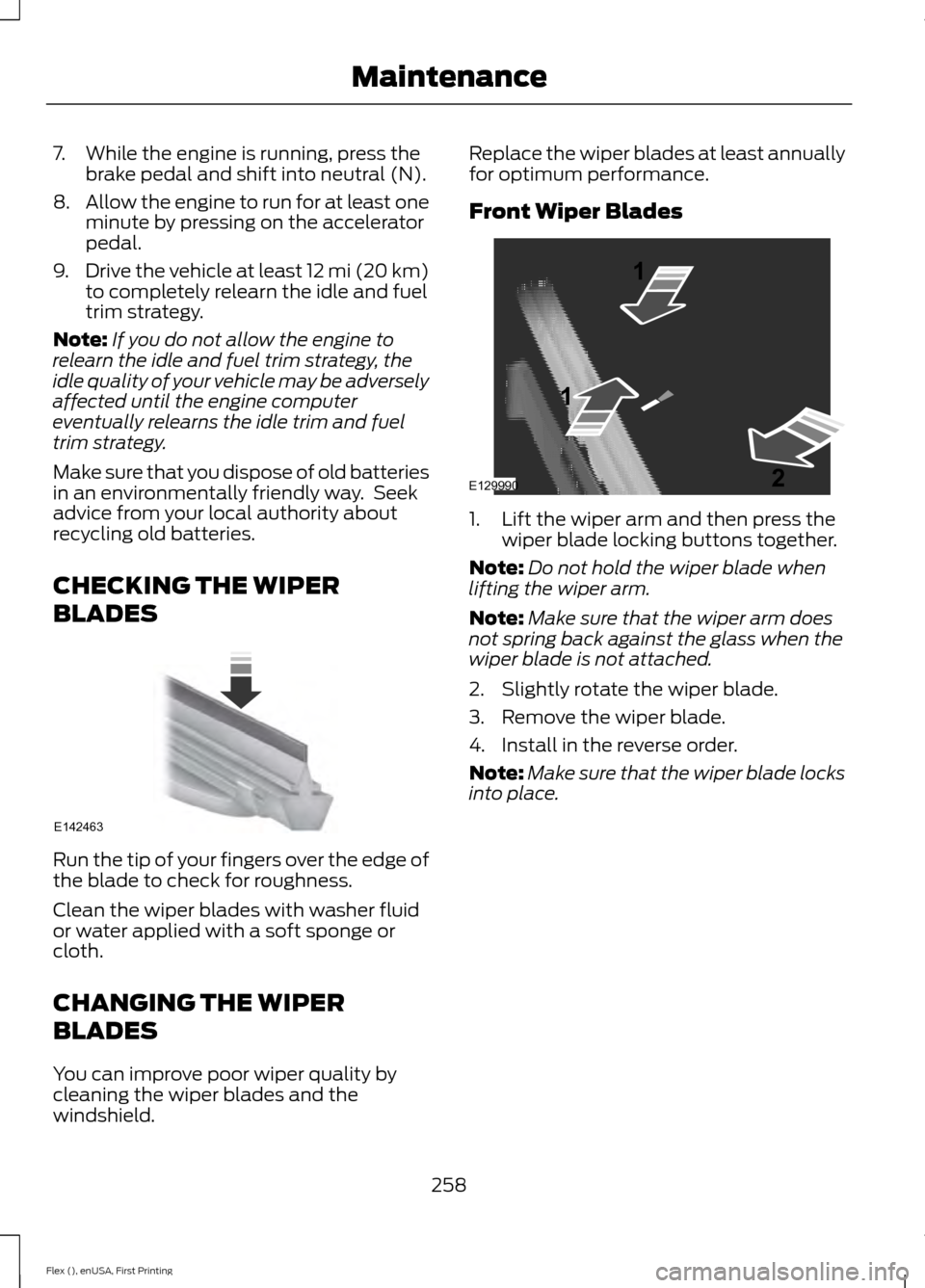
1. Lift the wiper arm and then press the
wiper blade locking buttons together.
Note: Do not hold the wiper blade when
lifting the wiper arm.
Note: Make sure that the wiper arm does
not spring back against the glass when the
wiper blade is not attached.
2. Slightly rotate the wiper blade.
3. Remove the wiper blade.
4. Install in the reverse order.
Note: Make sure that the wiper blade locks
into place.
258
Flex (), enUSA, First Printing MaintenanceE142463 E129990
1
1 2
Page 266 of 496
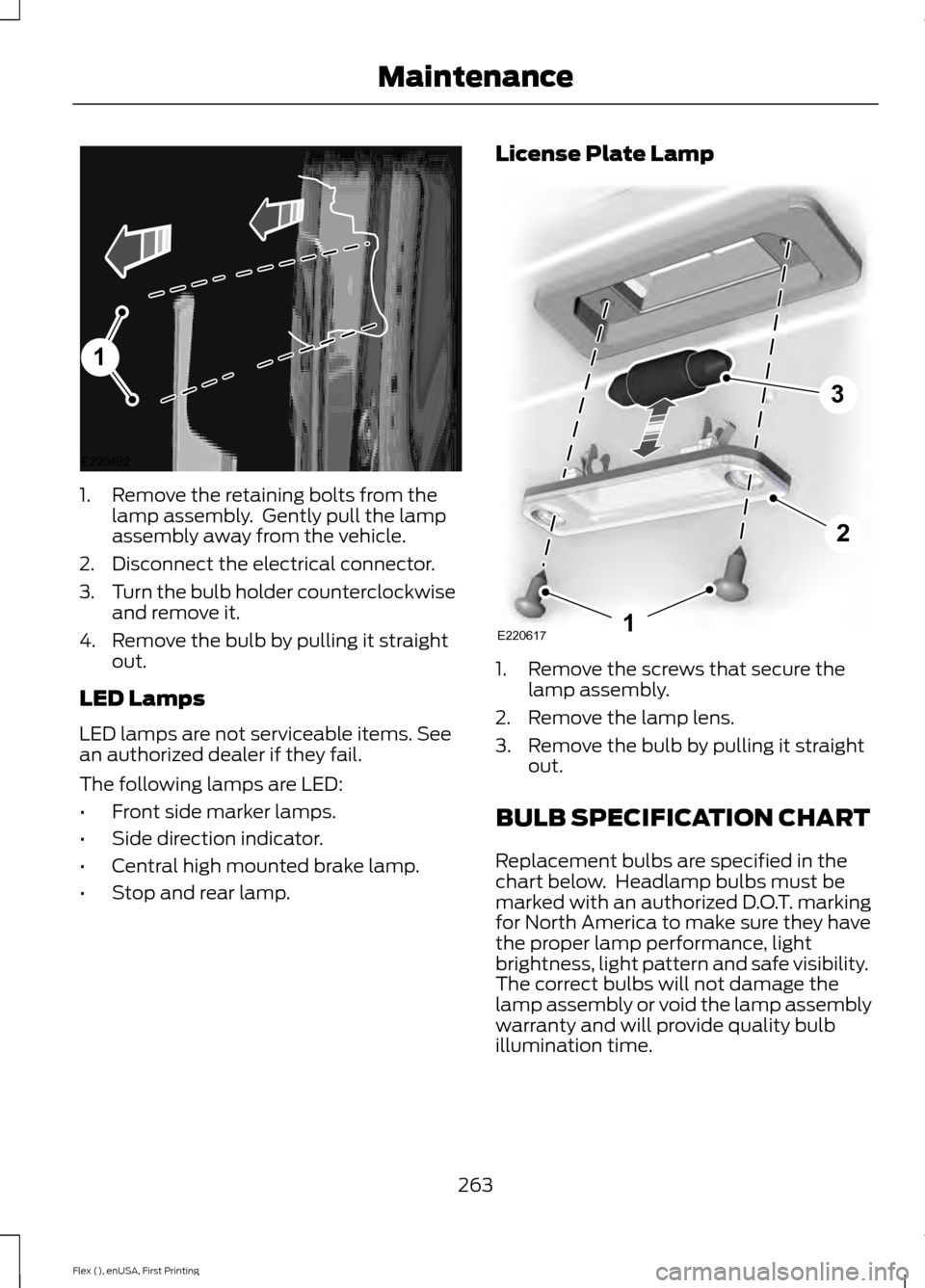
1. Remove the retaining bolts from the
lamp assembly. Gently pull the lamp
assembly away from the vehicle.
2. Disconnect the electrical connector.
3. Turn the bulb holder counterclockwise
and remove it.
4. Remove the bulb by pulling it straight out.
LED Lamps
LED lamps are not serviceable items. See
an authorized dealer if they fail.
The following lamps are LED:
• Front side marker lamps.
• Side direction indicator.
• Central high mounted brake lamp.
• Stop and rear lamp. License Plate Lamp
1. Remove the screws that secure the
lamp assembly.
2. Remove the lamp lens.
3. Remove the bulb by pulling it straight out.
BULB SPECIFICATION CHART
Replacement bulbs are specified in the
chart below. Headlamp bulbs must be
marked with an authorized D.O.T. marking
for North America to make sure they have
the proper lamp performance, light
brightness, light pattern and safe visibility.
The correct bulbs will not damage the
lamp assembly or void the lamp assembly
warranty and will provide quality bulb
illumination time.
263
Flex (), enUSA, First Printing Maintenance1
E220462 E2206171
2
3
Page 274 of 496
Note:
Industrial-strength or heavy-duty
cleaners in combination with brush agitation
to remove brake dust and dirt, could wear
away the clear coat finish over a period time.
Note: Do not use hydrofluoric acid-based
or high caustic-based wheel cleaners, steel
wool, fuels or strong household detergents.
Note: If you intend parking your vehicle for
an extended period after cleaning the
wheels with a wheel cleaner, drive your
vehicle for a few minutes before doing so.
This will reduce the risk of increased
corrosion of the brake discs.
Alloy wheels and wheel covers are coated
with a clear coat paint finish. To maintain
their condition we recommend that you:
• Clean the wheels weekly using
Motorcraft Wheel and Tire Cleaner.
Apply using manufacturer's
instructions.
• Use a sponge to remove heavy
deposits of dirt and brake dust
accumulation.
• Rinse thoroughly with a strong stream
of water when you have completed the
cleaning process.
• To remove tar and grease, use
Motorcraft Bug and Tar Remover.
VEHICLE STORAGE
If you plan on storing your vehicle for 30
days or more, read the following
maintenance recommendations to make
sure your vehicle stays in good operating
condition.
We engineer and test all motor vehicles
and their components for reliable, regular
driving. Under various conditions,
long-term storage may lead to degraded
engine performance or failure unless you
use specific precautions to preserve engine
components. General
•
Store all vehicles in a dry, ventilated
place.
• Protect from sunlight, if possible.
• If vehicles are stored outside, they
require regular maintenance to protect
against rust and damage.
Body
• Wash your vehicle thoroughly to
remove dirt, grease, oil, tar or mud from
exterior surfaces, rear-wheel housing
and the underside of front fenders.
• Periodically wash your vehicle if it is
stored in exposed locations.
• Touch-up exposed or primed metal to
prevent rust.
• Cover chrome and stainless steel parts
with a thick coat of auto wax to prevent
discoloration. Re-wax as necessary
when you wash your vehicle.
• Lubricate all hood, door and luggage
compartment hinges and latches with
a light grade oil.
• Cover interior trim to prevent fading.
• Keep all rubber parts free from oil and
solvents.
Engine
• Change the engine oil and filter prior to
storage because used engine oil
contains contaminates which may
cause engine damage.
• Start the engine every 15 days for a
minimum of 15 minutes. Run at fast idle
with the climate controls set to defrost
until the engine reaches normal
operating temperature.
271
Flex (), enUSA, First Printing Vehicle Care
Page 296 of 496
How Temperature Affects Your Tire
Pressure
The tire pressure monitoring system
monitors tire pressure in each pneumatic
tire. While driving in a normal manner, a
typical passenger tire inflation pressure
may increase about 2
–4 psi (14– 28 kPa)
from a cold start situation. If the vehicle is
stationary overnight with the outside
temperature significantly lower than the
daytime temperature, the tire pressure may
decrease about 3 psi (21 kPa) for a drop of
30°F (17°C) in ambient temperature. This
lower pressure value may be detected by
the tire pressure monitoring system as
being significantly lower than the
recommended inflation pressure and
activate the system warning light for low
tire pressure. If the low tire pressure
warning light is on, visually check each tire
to verify that no tire is flat. If one or more
tires are flat, repair as necessary. Check
the air pressure in the road tires. If any tire
is under-inflated, carefully drive the vehicle
to the nearest location where air can be
added to the tires. Inflate all the tires to
the recommended inflation pressure.
CHANGING A ROAD WHEEL WARNINGS
The use of tire sealant may damage
your tire pressure monitoring system
and should only be used in roadside
emergencies. If you must use a sealant, the
Ford Tire Mobility Kit sealant should be
used. The tire pressure monitoring system
sensor and valve stem on the wheel must
be replaced by an authorized dealer after
use of the sealant. See
Tire Pressure Monitoring
System (page 290). If the tire
pressure monitor sensor becomes
damaged, it will no longer function. Note:
The tire pressure monitoring system
indicator light will illuminate when the spare
tire is in use. To restore the full function of
the monitoring system, all road wheels
equipped with tire pressure monitoring
sensors must be mounted on the vehicle.
If you get a flat tire while driving, do not
apply the brake heavily. Instead, gradually
decrease your speed. Hold the steering
wheel firmly and slowly move to a safe
place on the side of the road.
Have a flat serviced by an authorized
dealer in order to prevent damage to the
tire pressure monitoring system sensors.
See
Tire Pressure Monitoring System
(page 290). Replace the spare tire with a
road tire as soon as possible. During
repairing or replacing of the flat tire, have
the authorized dealer inspect the tire
pressure monitoring system sensor for
damage.
Dissimilar Spare Wheel and Tire
Assembly Information WARNING
Failure to follow these guidelines
could result in an increased risk of
loss of vehicle control, injury or death.
If you have a dissimilar spare wheel and
tire, then it is intended for temporary use
only. This means that if you need to use it,
you should replace it as soon as possible
with a road wheel and tire assembly that
is the same size and type as the road tires
and wheels that were originally provided
by Ford. If the dissimilar spare tire or wheel
is damaged, it should be replaced rather
than repaired.
A dissimilar spare wheel and tire assembly
is defined as a spare wheel and tire
assembly that is different in brand, size or
appearance from the road tires and wheels
and can be one of three types:
293
Flex (), enUSA, First Printing Wheels and Tires
Page 444 of 496
Check every month
Engine oil level.
Function of all interior and exterior lights.
Tires (including spare) for wear and proper pressure. Windshield washer fluid level. Check every six months
Battery connections. Clean if necessary.
Body and door drain holes for obstructions. Clean if necessary. Cooling system fluid level and coolant strength.
Door weatherstrips for wear. Lubricate if necessary.
Hinges, latches and outside locks for proper operation. Lubricate if necessary. Parking brake for proper operation.
Safety belts and seat latches for wear and function.
Safety warning lamps (brake, ABS, airbag and safety belt) for operation.
Washer spray and wiper operation. Clean or replace blades as necessary.
Multi-Point Inspection
In order to keep your vehicle running right,
it is important to have the systems on your
vehicle checked regularly. This can help
identify potential issues and prevent major
problems. We recommend having the
following multi-point inspection performed
at every scheduled maintenance interval
to help make sure your vehicle keeps
running great.
441
Flex (), enUSA, First Printing Scheduled Maintenance
Page 486 of 496
A
A/C
See: Climate Control.......................................... 116
About This Manual...........................................7
ABS See: Brakes............................................................ 175
ABS driving hints See: Hints on Driving With Anti-Lock
Brakes................................................................. 175
Accessories....................................................435 Exterior Style....................................................... 435
Interior Style........................................................ 435
Lifestyle................................................................. 435
Peace of Mind..................................................... 435
Accessories See: Replacement Parts
Recommendation............................................ 12
ACC See: Using Adaptive Cruise Control............189
Active Park Assist..........................................181 Automatic Steering into Parking
Space................................................................. 183
Deactivating the Park Assist Feature..........183
Troubleshooting the System.......................... 184
Using Active Park Assist................................... 182
Adaptive Headlamps
...................................85
Adjusting the Headlamps........................259
Horizontal Aim Adjustment.......................... 260
Vertical Aim......................................................... 259
Adjusting the Pedals
.....................................78
Adjusting the Steering Wheel - Vehicles With: Manual Adjustable Steering
Column............................................................75
Adjusting the Steering Wheel - Vehicles With: Power Adjustable Steering
Column............................................................75
Easy Entry and Exit Feature.............................. 76
End of Travel Position......................................... 76
Memory Feature.................................................... 76
AFS See: Adaptive Headlamps................................ 85
Airbag Disposal................................................51
Air Conditioning See: Climate Control.......................................... 116
Air Filter See: Changing the Engine Air Filter.............265 Alarm
See: Anti-Theft Alarm......................................... 74
All-Wheel Drive.............................................168
Ambient Lighting
............................................87
Anti-Theft Alarm............................................74
Arming the Alarm................................................. 74
Disarming the Alarm........................................... 74
Appendices....................................................457
Apps
.................................................................407
........................................................................\
.......... 407
SiriusXM Traffic and Travel Link.................. 409
At a Glance........................................................16
Audible Warnings and Indicators.............97 Headlamps On Warning Chime..................... 98
Key in Ignition Warning Chime......................... 97
Keyless Warning Alert........................................ 98
Parking Brake On Warning Chime.................98
Audio Control
...................................................76
MEDIA....................................................................... 76
Seek, Next or Previous........................................ 76
Audio System.................................................313 General Information.......................................... 313
Audio Unit - Vehicles With: AM/FM/CD/ SYNC/Satellite Radio
..............................314
Menu Structure.................................................... 316
Audio Unit - Vehicles With: Premium AM/FM/CD...................................................318
Audio Unit - Vehicles With: Sony AM/ FM/CD............................................................319
Autolamps
........................................................83
Windshield Wiper Activated
Headlamps........................................................ 83
Automatic Climate Control........................117
Automatic Climate Control - Vehicles With: Premium AM/FM/CD....................119
Automatic Transmission
...........................164
Automatic Transmission Adaptive
Learning............................................................. 167
Brake-Shift Interlock......................................... 166
If Your Vehicle Gets Stuck In Mud or Snow................................................................... 167
SelectShift Automatic ™
Transmission................................................... 164
Understanding the Positions of Your Automatic Transmission............................ 164
Automatic Transmission Fluid Check
............................................................254
Adding Transmission Fluid ............................ 255
483
Flex (), enUSA, First Printing Index
Page 490 of 496
Second Row Heated Seats.............................
138
Heated Steering Wheel................................77
Heated Windows and Mirrors...................123
Heated Exterior Mirror....................................... 124
Heated Rear Window........................................ 123
Heating See: Climate Control.......................................... 116
Hints on Controlling the Interior Climate..........................................................120
Cooling the Interior Quickly.............................. 121
General Hints....................................................... 120
Heating the Interior Quickly............................. 121
Recommended Settings for Cooling...........122
Recommended Settings for Heating............121
Side Window Defogging in Cold Weather............................................................. 122
Hints on Driving With Anti-Lock Brakes.............................................................175
Home Screen.................................................373
Hood Lock See: Opening and Closing the Hood..........244
I
Ignition Switch
...............................................149
In California (U.S. Only).............................227
Information Display Control........................77
Information Displays....................................99 General Information........................................... 99
Information Messages................................107 Adaptive Cruise Control.................................. 108
AdvanceTrac ™.................................................... 108
Alarm...................................................................... 108
Automatic Engine Shutdown........................ 109
AWD........................................................................\
109
Battery and Charging System......................... 110
Blind Spot Information and Cross Traffic Alert System..................................................... 110
Brake System......................................................... 111
Collision Warning System.................................. 111
Doors and Locks.................................................... 111
Fuel........................................................................\
.... 112
Keys and Intelligent Access............................. 112
Maintenance.......................................................... 112
MyKey....................................................................... 113
Park Aid................................................................... 114
Power Steering..................................................... 114
Seats........................................................................\
. 114Tire Pressure Monitoring System...................
115
Towing...................................................................... 115
Traction Control................................................... 115
Transmission......................................................... 115
Installing Child Restraints............................19 Child Seats............................................................... 19
Using Lap and Shoulder Belts......................... 20
Using Lower Anchors and Tethers for CHildren (LATCH)............................................ 25
Using Tether Straps............................................. 26
Instrument Cluster
.........................................93
Instrument Lighting Dimmer.....................84
Instrument Panel Overview........................16
Interior Lamps.................................................86 Front Row Map Lamps...................................... 86
Second Row Map Lamps.................................. 87
Interior Mirror
....................................................91
Auto-Dimming Mirror........................................... 91
Introduction.........................................................7
J
Jump Starting the Vehicle
.........................222
Connecting the Jumper Cables..................... 222
Jump Starting...................................................... 223
Preparing Your Vehicle..................................... 222
Removing the Jumper Cables....................... 223
K
Keyless Entry
....................................................70
SECURICODE™ Keyless Entry
Keypad................................................................. 70
Keyless Starting
............................................149
Ignition Modes..................................................... 150
Keys and Remote Controls.........................52
L
Lighting Control..............................................82 Headlamp Flasher............................................... 83
High Beams............................................................ 82
Lighting
..............................................................82
General Information............................................ 82
Load Carriers See: Roof Racks and Load Carriers............203
Load Carrying
................................................203
487
Flex (), enUSA, First Printing Index
Page 495 of 496
Making a Call.......................................................
329
Pairing a Cell Phone for the First Time................................................................... 326
Pairing Subsequent Cell Phones.................. 327
Phone Options during an Active Call.........329
Phone Voice Commands................................. 327
Receiving Calls.................................................... 329
System Settings................................................. 336
Text Messaging................................................... 332
Using Traction Control.................................177 Switching the System Off................................ 177
System Indicator Lights and Messages........................................................... 177
Using a Switch...................................................... 177
Using the Information Display Controls.............................................................. 177
Using Voice Recognition............................323 Audio Voice Commands.................................. 375
Climate Voice Commands.............................. 376
Initiating a Voice Session................................ 323
Mobile App Voice Commands...................... 379
Navigation Voice Commands....................... 378
Phone Voice Commands................................ 376
SiriusXM Traffic and Travel Link Voice Commands...................................................... 379
System Interaction and Feedback..............324
Voice Settings Commands............................ 380
Utilizing the Mediation/Arbitration Program (Canada Only)........................229
V
Vehicle Care...................................................266 General Information......................................... 266
Vehicle Certification Label.......................303
Vehicle Identification Number................302
Vehicle Storage..............................................271 Battery.................................................................... 272
Body........................................................................\
. 271
Brakes..................................................................... 272
Cooling system.................................................... 272
Engine...................................................................... 271
Fuel system.......................................................... 272
General.................................................................... 271
Miscellaneous...................................................... 272
Removing Vehicle From Storage.................. 272
Tires........................................................................\
. 272Ventilation
See: Climate Control.......................................... 116
VIN See: Vehicle Identification Number............302
Voice Control
....................................................77
W
Warning Lamps and Indicators................94 Adaptive Cruise Control.................................... 94
Airbag Readiness................................................. 95
Anti-Lock Braking System................................ 95
Battery...................................................................... 95
Brake System......................................................... 95
Charging System.................................................. 95
Cruise Control........................................................ 95
Directional Indicator............................................ 97
Door Ajar.................................................................. 95
Engine Coolant Temperature.......................... 95
Engine Oil................................................................ 96
Fasten Seatbelt.................................................... 96
Front Airbag........................................................... 96
Front Fog Lamps.................................................. 96
Head Up Display................................................... 96
High Beam.............................................................. 96
Liftgate Ajar............................................................ 96
Low Fuel Level...................................................... 96
Low Tire Pressure Warning.............................. 96
Low Washer Fluid................................................ 96
Parking Lamps...................................................... 96
Powertrain Malfunction/Reduced Power................................................................... 97
Service Engine Soon............................................ 97
Stability Control.................................................... 97
Stability Control Off............................................ 97
Washer Fluid Check....................................256
Washers See: Cleaning the Exterior.............................. 266
See: Wipers and Washers................................. 79
Waxing.............................................................267
Wheel Nuts See: Changing a Road Wheel....................... 293
Wheels and Tires..........................................273 General Information.......................................... 273
Technical Specifications................................. 298
Windows and Mirrors...................................88
Windshield Washers
.....................................80
492
Flex (), enUSA, First Printing Index