fuel pressure FORD FLEX 2018 User Guide
[x] Cancel search | Manufacturer: FORD, Model Year: 2018, Model line: FLEX, Model: FORD FLEX 2018Pages: 508, PDF Size: 6.31 MB
Page 279 of 508
GENERAL INFORMATION
Use only approved wheel and tire sizes,
using other sizes could damage your
vehicle. If you change the diameter of the
tires from that fitted at the factory, the
speedometer may not display the correct
speed. Take your vehicle to an authorized
Ford dealer to have the system
reprogrammed. If you intend to change the
size of the wheels from that fitted by the
manufacturer, you can check the suitability
with an authorized dealer.
Additional information related to the
functionality and maintenance of your tires
can be found later in this chapter. See Tire
Care (page 278).
The Ford recommended tire inflation
pressures can be found on the Tire Label,
which is located on the B-pillar or the edge
of the driver's door. This information can
also be found on the Safety Compliance
Certification Label, affixed to either the
door hinge pillar, door-latch post, or the
door edge that meets the door latch post;
next to the driver ’s seating position.
Ford strongly recommends maintaining
these tire pressures at all times. Failure to
follow the tire pressure recommendations
can cause uneven treadwear patterns,
reduced fuel economy, and adversely
affect the way your vehicle handles.
Note: Check and set the tire pressure at the
ambient temperature in which you are
intending to drive your vehicle and when the
tires are cold.
Note: Check your tire pressures at least
once per month.
Set the pressure for your spare tire to the
highest value given for your vehicle and tire
size combination, if equipped. Notice to utility vehicle and truck
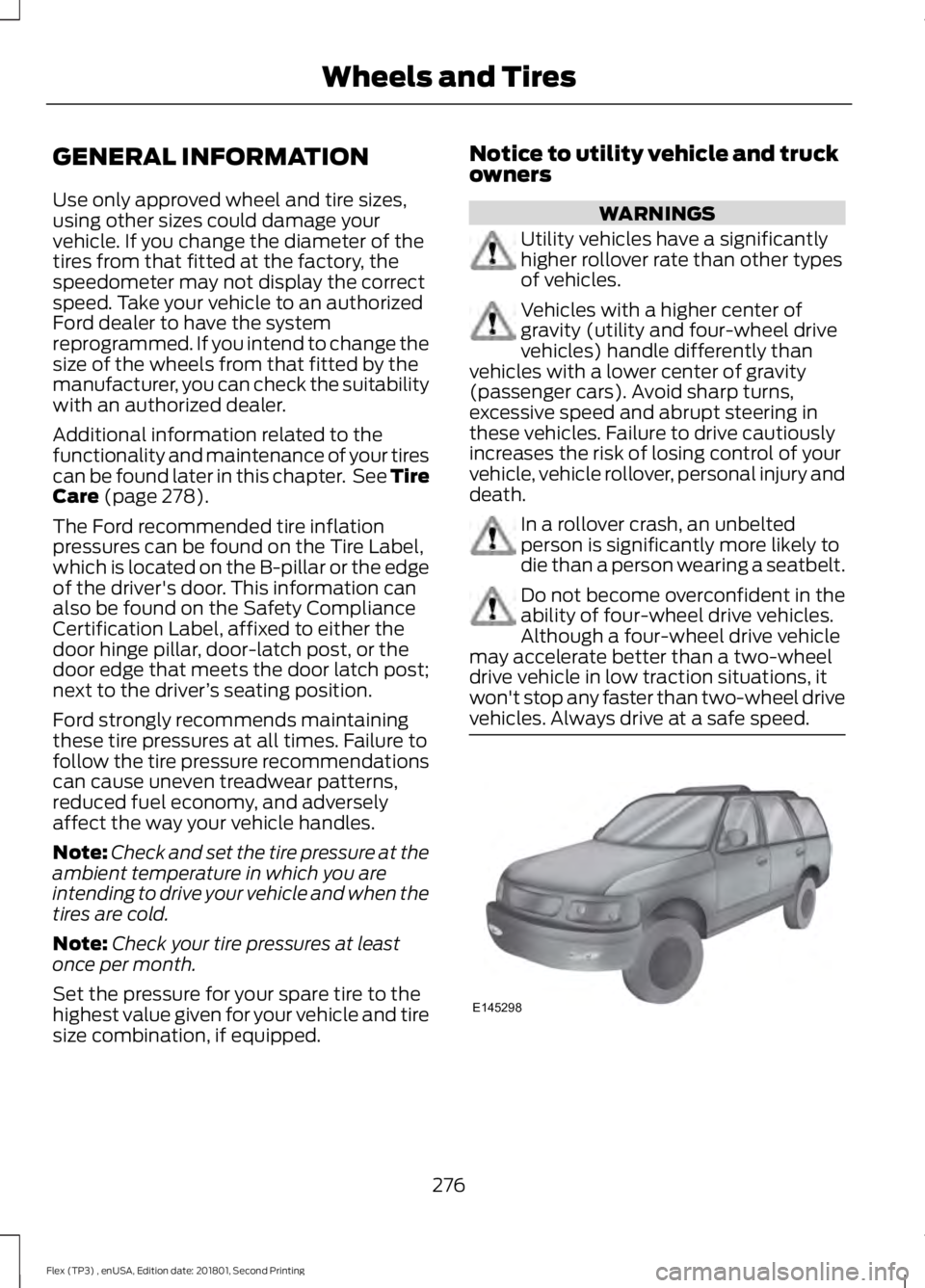
owners WARNINGS
Utility vehicles have a significantly
higher rollover rate than other types
of vehicles.
Vehicles with a higher center of
gravity (utility and four-wheel drive
vehicles) handle differently than
vehicles with a lower center of gravity
(passenger cars). Avoid sharp turns,
excessive speed and abrupt steering in
these vehicles. Failure to drive cautiously
increases the risk of losing control of your
vehicle, vehicle rollover, personal injury and
death. In a rollover crash, an unbelted
person is significantly more likely to
die than a person wearing a seatbelt.
Do not become overconfident in the
ability of four-wheel drive vehicles.
Although a four-wheel drive vehicle
may accelerate better than a two-wheel
drive vehicle in low traction situations, it
won't stop any faster than two-wheel drive
vehicles. Always drive at a safe speed. 276
Flex (TP3) , enUSA, Edition date: 201801, Second Printing Wheels and TiresE145298
Page 295 of 508
USING SNOW CHAINS
WARNING
Snow tires must be the same size,
load index, and speed rating as those
originally provided by Ford. Use of
any tire or wheel not recommended by
Ford can affect the safety and
performance of your vehicle, which could
result in an increased risk of loss of vehicle
control, vehicle rollover, personal injury,
and death. Additionally, the use of
non-recommended tires and wheels could
cause steering, suspension, axle, transfer
case, or power transfer unit failure. It is also
strongly advised to follow the Ford
recommended tire inflation pressure found
on the Safety Compliance Certification
Label (affixed to either the door hinge
pillar, door-latch post, or the door edge
that meets the door-latch post, next to the
driver ’s seating position), or Tire Label
which is located on the B-Pillar or the edge
of the driver door. Failure to follow the tire
pressure recommendations can cause
uneven treadwear patterns and adversely
affect the way your vehicle handles. Note:
The suspension insulation and
bumpers will help prevent vehicle damage.
Do not remove these components from your
vehicle when using snow tires and chains.
The tires on your vehicle have all-weather
treads to provide traction in rain and snow.
However, in some climates, you may need
to use snow tires and cables. If you need
to use cables, it is recommended that steel
wheels (of the same size and
specifications) be used, as cables may chip
aluminum wheels. Follow these guidelines when using snow
tires and chains:
•
If possible, avoid fully loading your
vehicle.
• Use only SAE Class S snow chains,
snow cables or equivalent on the front
axle for P235/60R17, P235/60R18, and
P235/55R19 equipped vehicles. The
use of snow chains, snow cables or
other traction assist devices that are
larger than SAE Class S may cause
damage to your vehicle ’s wheel house,
suspension and/or body.
• Do not install tire chains, cables, or
optional traction devices on the rear
tires. This could cause damage to the
vehicle ’s wheel house or body.
• Do not use tire chains, cables, or
optional traction devices with
255/45R20 tires.
• Install cable chains securely, verifying
that the cables do not touch any wiring,
brake lines or fuel lines.
• Do not exceed 30 mph (48 km/h) with
tire cables on your vehicle.
• Drive cautiously. If you hear the cables
rub or bang against your vehicle, stop
and retighten the cables. If this does
not work, remove the cables to prevent
damage to your vehicle.
• Remove the tire cables when they are
no longer needed. Do not use tire
cables on dry roads.
292
Flex (TP3) , enUSA, Edition date: 201801, Second Printing Wheels and Tires
Page 296 of 508
TIRE PRESSURE MONITORING
SYSTEM
WARNING
The tire pressure monitoring system
is not a substitute for manually
checking tire pressures. You should
periodically check tire pressures using a
pressure gauge. Failure to correctly
maintain tire pressures could increase the
risk of tire failure, loss of control, vehicle
rollover and personal injury. Note:
You should only use tire sealants in
roadside emergencies as they may cause
damage to the tire pressure monitoring
system sensor.
Note: If the tire pressure monitoring system
sensor becomes damaged, it may not
function. Each tire, including the spare (if
provided), should be checked
monthly when cold and inflated
to the inflation pressure recommended by
the vehicle manufacturer on the vehicle
placard or tire inflation pressure label. (If
your vehicle has tires of a different size
than the size indicated on the vehicle
placard or tire inflation pressure label, you
should determine the proper tire inflation
pressure for those tires).
As an added safety feature, your vehicle
has been equipped with a Tire Pressure
Monitoring System (TPMS) that
illuminates a low tire pressure telltale
when one or more of your tires is
significantly under-inflated. Accordingly,
when the low tire pressure telltale
illuminates, you should stop and check
your tires as soon as possible, and inflate them to the proper pressure. Driving on a
significantly under-inflated tire causes the
tire to overheat and can lead to tire failure.
Under-inflation also reduces fuel efficiency
and tire tread life, and may affect the
vehicle
’s handling and stopping ability.
Please note that the TPMS is not a
substitute for proper tire maintenance, and
it is the driver ’s responsibility to maintain
correct tire pressure, even if under-inflation
has not reached the level to trigger
illumination of the TPMS low tire pressure
telltale.
Your vehicle has also been equipped with
a TPMS malfunction indicator to indicate
when the system is not operating properly.
The TPMS malfunction indicator is
combined with the low tire pressure
telltale. When the system detects a
malfunction, the telltale will flash for
approximately one minute and then remain
continuously illuminated. This sequence
will continue upon subsequent vehicle
start-ups as long as the malfunction exists.
When the malfunction indicator is
illuminated, the system may not be able
to detect or signal low tire pressure as
intended. TPMS malfunctions may occur
for a variety of reasons, including the
installation of replacement or alternate
tires or wheels on the vehicle that prevent
the TPMS from functioning properly.
Always check the TPMS malfunction
telltale after replacing one or more tires or
wheels on your vehicle to ensure that the
replacement or alternate tires and wheels
allow the TPMS to continue to function
properly.
This device complies with Part 15 of the
FCC Rules and with License exempt RSS
Standards of Industry Canada. Operation
is subject to the following two conditions:
1. This device may not cause harmful interference, and
293
Flex (TP3) , enUSA, Edition date: 201801, Second Printing Wheels and Tires
Page 311 of 508
CAPACITIES AND SPECIFICATIONS - 3.5L DURATEC
Capacities
WARNING
The air conditioning refrigerant system contains refrigerant under high pressure.
Only qualified personnel should service the air conditioning refrigerant system.
Opening the air conditioning refrigerant system can cause personal injury.
Capacity
Item
6.0 qt (5.7 L)
Engine oil
13.2 qt (12.5 L)
Engine coolant
Between MIN/MAX on brake fluid reservoir
Brake fluid
10.9 qt (10.3 L)1
Automatic transmission fluid
2.43 pt (1.15 L)
Rear axle fluid (All Wheel Drive)
17.9 fl oz (0.53 L)
Power Transfer Unit (PTU) fluid (All Wheel
Drive)
Fill as required
Windshield washer fluid
18.6 gal (70.4 L)
Fuel tank
2.31 lb (1.05 kg)
A/C refrigerant
8.96 fl oz (265 ml)
A/C refrigerant compressor oil
1 Approximate dry fill capacity. Actual amount may vary during fluid changes.
308
Flex (TP3) , enUSA, Edition date: 201801, Second Printing Capacities and Specifications
Page 315 of 508
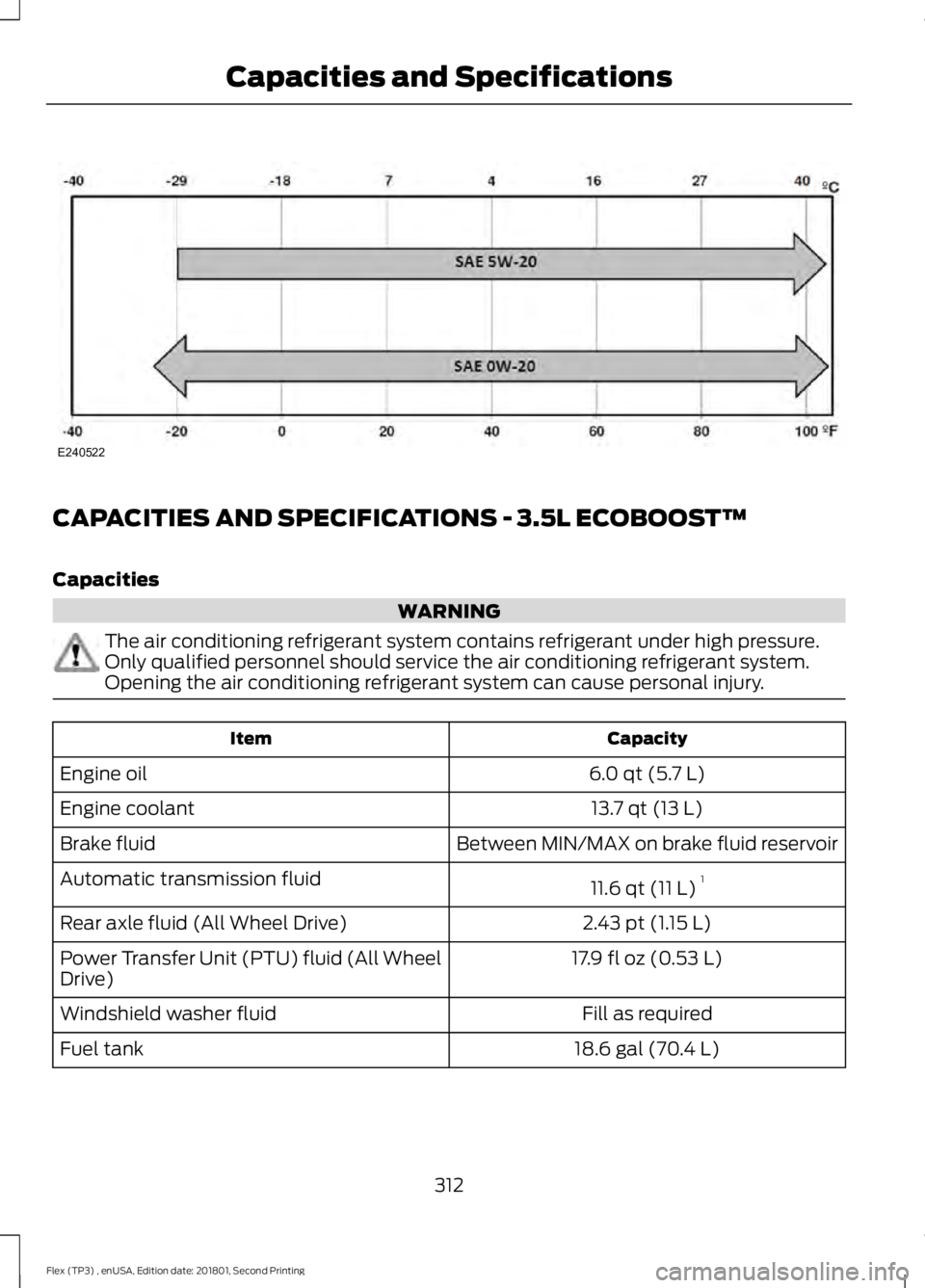
CAPACITIES AND SPECIFICATIONS - 3.5L ECOBOOST™
Capacities
WARNING
The air conditioning refrigerant system contains refrigerant under high pressure.
Only qualified personnel should service the air conditioning refrigerant system.
Opening the air conditioning refrigerant system can cause personal injury.
Capacity
Item
6.0 qt (5.7 L)
Engine oil
13.7 qt (13 L)
Engine coolant
Between MIN/MAX on brake fluid reservoir
Brake fluid
11.6 qt (11 L)1
Automatic transmission fluid
2.43 pt (1.15 L)
Rear axle fluid (All Wheel Drive)
17.9 fl oz (0.53 L)
Power Transfer Unit (PTU) fluid (All Wheel
Drive)
Fill as required
Windshield washer fluid
18.6 gal (70.4 L)
Fuel tank
312
Flex (TP3) , enUSA, Edition date: 201801, Second Printing Capacities and SpecificationsE240522
Page 452 of 508
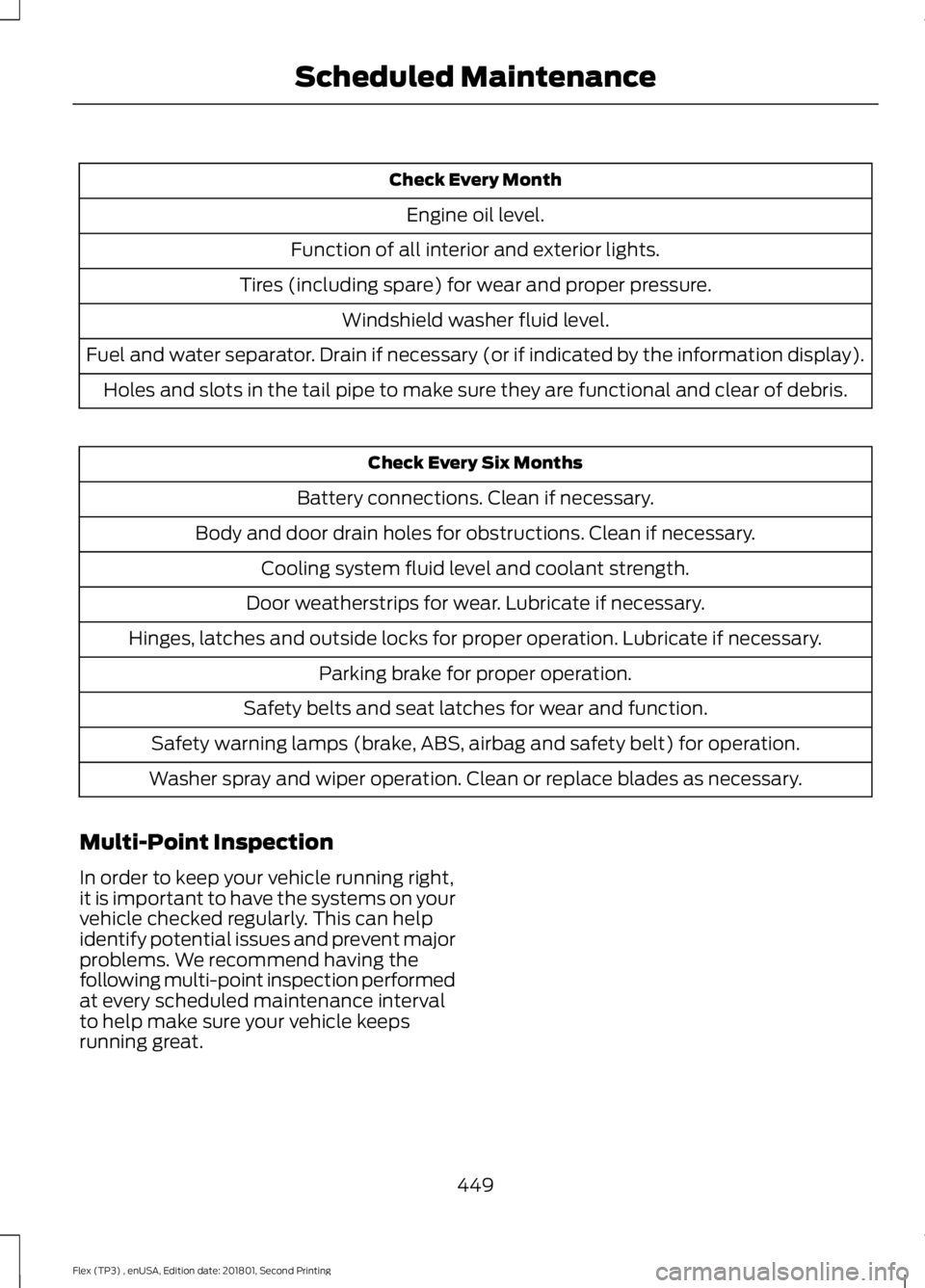
Check Every Month
Engine oil level.
Function of all interior and exterior lights.
Tires (including spare) for wear and proper pressure. Windshield washer fluid level.
Fuel and water separator. Drain if necessary (or if indicated by the information display). Holes and slots in the tail pipe to make sure they are functional and clear of debris. Check Every Six Months
Battery connections. Clean if necessary.
Body and door drain holes for obstructions. Clean if necessary. Cooling system fluid level and coolant strength.
Door weatherstrips for wear. Lubricate if necessary.
Hinges, latches and outside locks for proper operation. Lubricate if necessary. Parking brake for proper operation.
Safety belts and seat latches for wear and function.
Safety warning lamps (brake, ABS, airbag and safety belt) for operation.
Washer spray and wiper operation. Clean or replace blades as necessary.
Multi-Point Inspection
In order to keep your vehicle running right,
it is important to have the systems on your
vehicle checked regularly. This can help
identify potential issues and prevent major
problems. We recommend having the
following multi-point inspection performed
at every scheduled maintenance interval
to help make sure your vehicle keeps
running great.
449
Flex (TP3) , enUSA, Edition date: 201801, Second Printing Scheduled Maintenance
Page 502 of 508
Headlamp Adjusting
See: Adjusting the Headlamps.................... 260
Headlamp Exit Delay....................................84
Headlamp Removal See: Removing a Headlamp........................... 261
Headrest See: Head Restraints......................................... 123
Head Restraints.............................................123
Adjusting the Head Restraint......................... 124
Tilting Head Restraints .................................... 125
Heated Seats.................................................136 Front Seats............................................................ 136
Second Row Heated Seats............................. 136
Heated Steering Wheel
................................77
Heated Windows and Mirrors....................121
Heated Exterior Mirrors...................................... 121
Heated Rear Window......................................... 121
Heating See: Climate Control.......................................... 114
Hints on Controlling the Interior Climate...........................................................118
Defogging the Side Windows in Cold Weather............................................................. 120
General Hints........................................................ 118
Quickly Cooling the Interior............................. 119
Quickly Heating the Interior............................. 119
Recommended Settings for Cooling...........120
Recommended Settings for Heating...........119
Hints on Driving With Anti-Lock Brakes.............................................................176
Home Screen
.................................................377
Hood Lock See: Opening and Closing the Hood..........245
I
Ignition Switch...............................................147
In California (U.S. Only).............................228
Information Display Control........................77
Information Displays.....................................97 General Information............................................ 97
Information Messages
................................105
Adaptive Cruise Control.................................. 106
AdvanceTrac ™.................................................... 106
Alarm...................................................................... 106
Automatic Engine Shutdown........................ 106
AWD........................................................................\
. 107
Battery and Charging System........................ 107Blind Spot Information and Cross Traffic
Alert System................................................... 108
Brake System....................................................... 108
Collision Warning System............................... 109
Doors and Locks................................................. 109
Fuel........................................................................\
.. 109
Keys and Intelligent Access............................. 110
Maintenance......................................................... 110
MyKey........................................................................\
111
Park Aid..................................................................... 111
Power Steering...................................................... 112
Seats........................................................................\
. 112
Tire Pressure Monitoring System................... 112
Towing...................................................................... 113
Traction Control.................................................... 113
Transmission......................................................... 113
Installing Child Restraints............................19 Child Seats............................................................... 19
Using Lap and Shoulder Belts......................... 20
Using Lower Anchors and Tethers for CHildren (LATCH)............................................ 25
Using Tether Straps............................................. 27
Instrument Cluster
.........................................92
Instrument Lighting Dimmer.....................84
Instrument Panel Overview........................16
Interior Lamps
.................................................85
Second Row Reading Lamps.......................... 85
Third Row Dome Lamps................................... 86
Interior Mirror...................................................90 Auto-Dimming Mirror......................................... 90
Introduction.........................................................7
J
Jump Starting the Vehicle.........................223 Connecting the Jumper Cables.................... 223
Jump Starting...................................................... 224
Preparing Your Vehicle..................................... 223
Removing the Jumper Cables....................... 224
K
Keyless Entry...................................................66 SECURICODE™ Keyless Entry
Keypad................................................................ 66
Keyless Starting
.............................................147
Ignition Modes..................................................... 148
Keys and Remote Controls.........................52
499
Flex (TP3) , enUSA, Edition date: 201801, Second Printing Index
Page 507 of 508
System Settings.................................................
354
What's Playing?................................................. 349
Using SYNC™ With Your Phone.............331 Accessing Features Through the Phone
Menu.................................................................. 335
Accessing Your Phone Settings................... 339
Making a Call....................................................... 334
Pairing a Cell Phone for the First Time.................................................................... 331
Pairing Subsequent Cell Phones.................332
Phone Options during an Active Call.........334
Phone Voice Commands................................ 332
Receiving Calls.................................................... 334
System Settings.................................................. 341
Text Messaging................................................... 337
Using Traction Control.................................177 Switching the System Off................................ 177
System Indicator Lights and Messages........................................................... 177
Using a Switch...................................................... 177
Using the Information Display Controls.............................................................. 177
Using Voice Recognition...........................328 Audio Voice Commands................................. 380
Climate Voice Commands.............................. 381
Initiating a Voice Session................................ 328
Mobile App Voice Commands...................... 384
Navigation Voice Commands....................... 383
Phone Voice Commands................................. 381
SiriusXM Traffic and Travel Link Voice Commands..................................................... 384
System Interaction and Feedback..............329
Voice Settings Commands............................ 385
Utilizing the Mediation/Arbitration Program (Canada Only)........................230
V
Vehicle Care...................................................268 General Information......................................... 268
Vehicle Certification Label.......................307
Vehicle Identification Number
...............306
Vehicle Storage.............................................273
Battery.................................................................... 274
Body........................................................................\
273
Brakes..................................................................... 274
Cooling system.................................................... 274
Engine..................................................................... 274Fuel system..........................................................
274
General................................................................... 273
Miscellaneous...................................................... 274
Removing Vehicle From Storage.................. 274
Tires........................................................................\
. 274
Ventilation See: Climate Control.......................................... 114
VIN See: Vehicle Identification Number...........306
Voice Control
....................................................77
W
Warning Lamps and Indicators.................93 Adaptive Cruise Control..................................... 93
Airbag Readiness................................................. 94
Anti-Lock Braking System................................ 94
Battery ...................................................................... 94
Brake System......................................................... 94
Charging System.................................................. 94
Cruise Control........................................................ 94
Directional Indicator........................................... 94
Door Ajar................................................................. 94
Engine Coolant Temperature.......................... 94
Engine Oil................................................................ 95
Fasten Seatbelt Warning Lamp..................... 95
Front Airbag........................................................... 95
Front Fog Lamps.................................................. 95
Head Up Display................................................... 95
High Beam.............................................................. 95
Liftgate Ajar............................................................ 95
Low Fuel Level....................................................... 95
Low Tire Pressure Warning............................... 95
Low Washer Fluid................................................. 95
Parking Lamps...................................................... 95
Powertrain Malfunction/Reduced Power.................................................................. 96
Service Engine Soon........................................... 96
Stability Control................................................... 96
Stability Control Off............................................ 96
Washer Fluid Check.....................................257
Washers See: Cleaning the Exterior.............................. 268
See: Wipers and Washers................................. 80
Waxing.............................................................270
Wheel Nuts See: Changing a Road Wheel....................... 296
504
Flex (TP3) , enUSA, Edition date: 201801, Second Printing Index