Ford focus II FORD FOCUS 2014 3.G User Guide
[x] Cancel search | Manufacturer: FORD, Model Year: 2014, Model line: FOCUS, Model: FORD FOCUS 2014 3.GPages: 492, PDF Size: 7.2 MB
Page 28 of 492
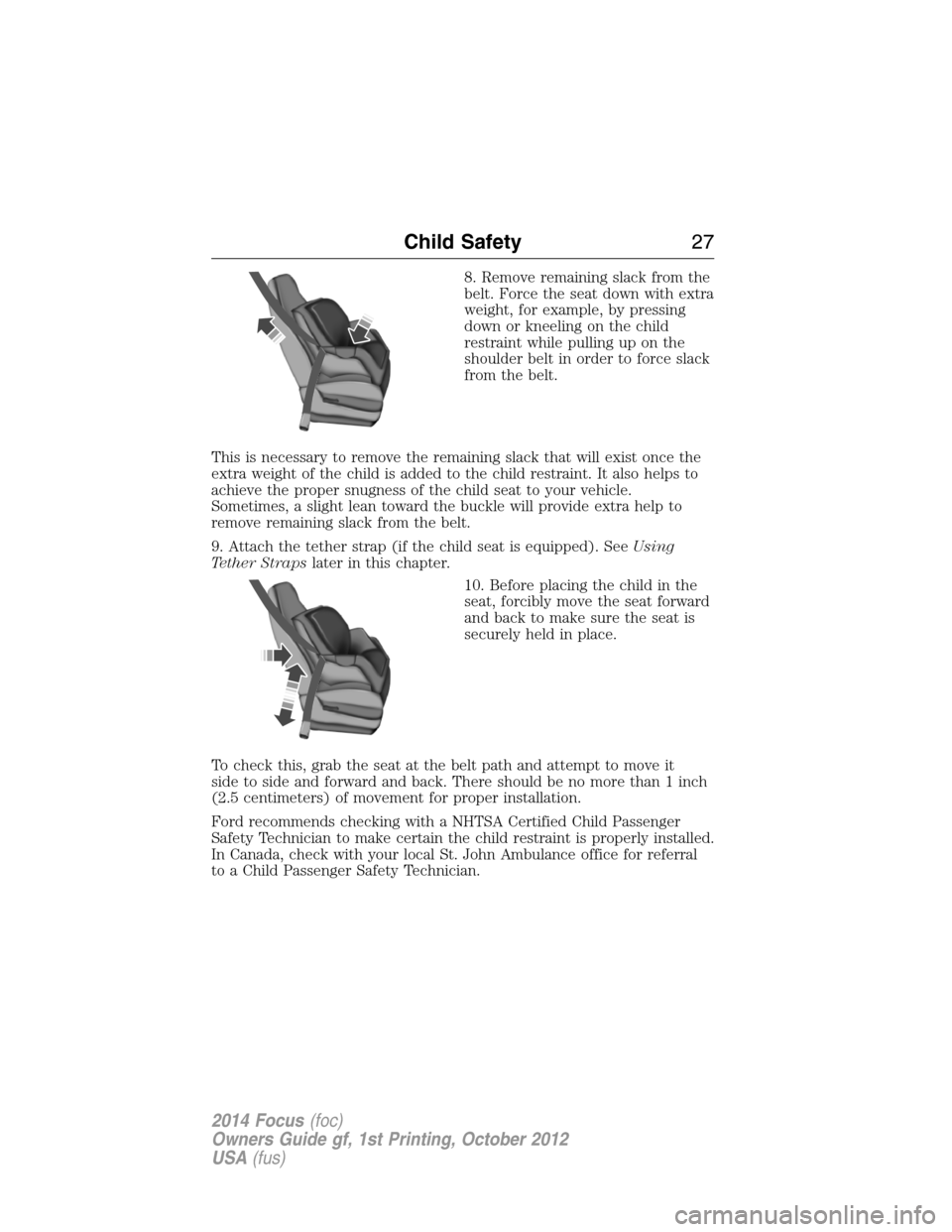
8. Remove remaining slack from the
belt. Force the seat down with extra
weight, for example, by pressing
down or kneeling on the child
restraint while pulling up on the
shoulder belt in order to force slack
from the belt.
This is necessary to remove the remaining slack that will exist once the
extra weight of the child is added to the child restraint. It also helps to
achieve the proper snugness of the child seat to your vehicle.
Sometimes, a slight lean toward the buckle will provide extra help to
remove remaining slack from the belt.
9. Attach the tether strap (if the child seat is equipped). SeeUsing
Tether Strapslater in this chapter.
10. Before placing the child in the
seat, forcibly move the seat forward
and back to make sure the seat is
securely held in place.
To check this, grab the seat at the belt path and attempt to move it
side to side and forward and back. There should be no more than 1 inch
(2.5 centimeters) of movement for proper installation.
Ford recommends checking with a NHTSA Certified Child Passenger
Safety Technician to make certain the child restraint is properly installed.
In Canada, check with your local St. John Ambulance office for referral
to a Child Passenger Safety Technician.
Child Safety27
2014 Focus(foc)
Owners Guide gf, 1st Printing, October 2012
USA(fus)
Page 32 of 492
Four door
1. Route the child safety seat tether strap over the back of the seat.
For outboard seating positions, route the tether strap under the head
restraint and between the head restraint posts. For the center seating
positions, route the tether strap over the top of the head restraint.
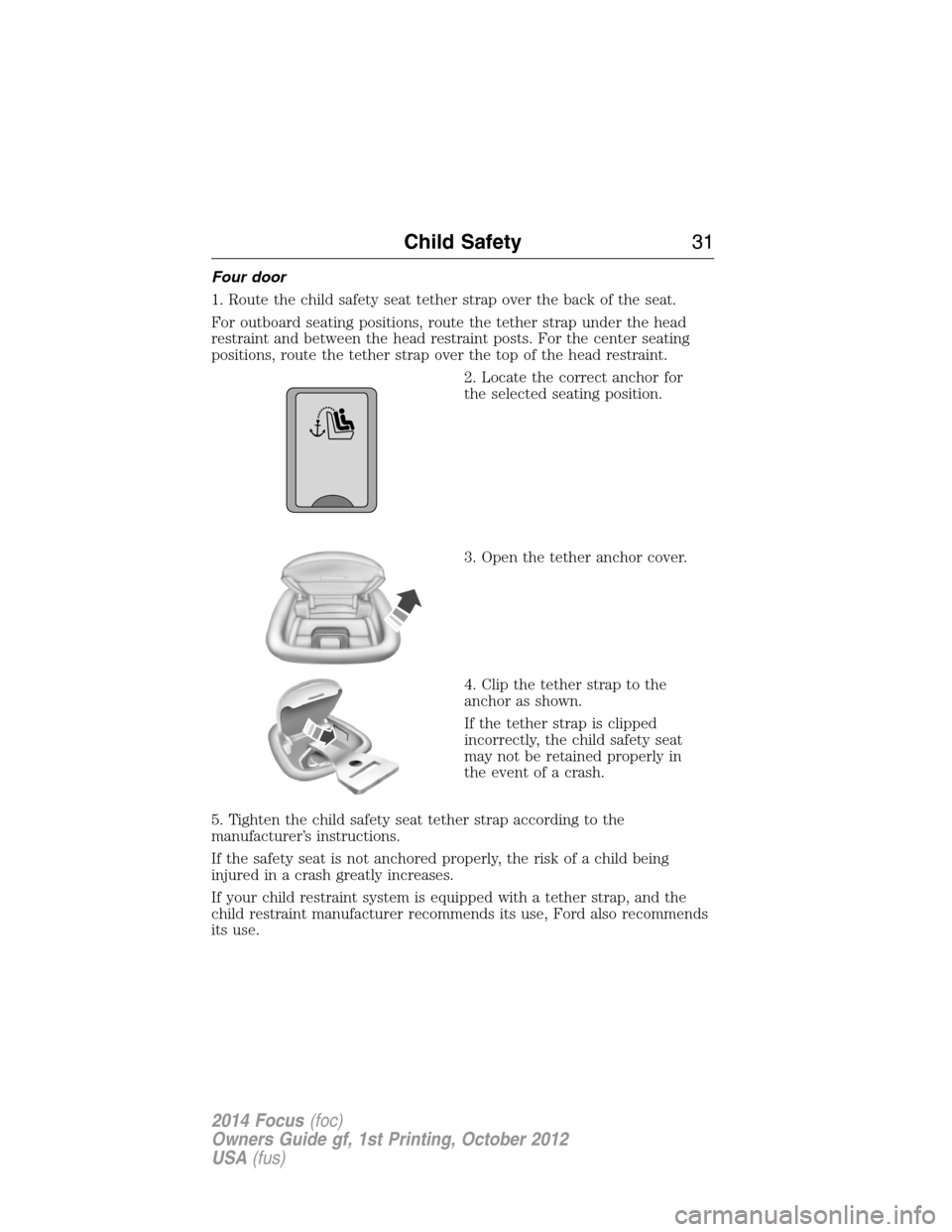
2. Locate the correct anchor for
the selected seating position.
3. Open the tether anchor cover.
4. Clip the tether strap to the
anchor as shown.
If the tether strap is clipped
incorrectly, the child safety seat
may not be retained properly in
the event of a crash.
5. Tighten the child safety seat tether strap according to the
manufacturer’s instructions.
If the safety seat is not anchored properly, the risk of a child being
injured in a crash greatly increases.
If your child restraint system is equipped with a tether strap, and the
child restraint manufacturer recommends its use, Ford also recommends
its use.
Child Safety31
2014 Focus(foc)
Owners Guide gf, 1st Printing, October 2012
USA(fus)
Page 33 of 492
Five door
1. Route the child safety seat tether strap over the back of the seat.
For outboard seating positions, route the tether strap under the head
restraint and between the head restraint posts. For the center seating
position, route the tether strap over the top of the head restraint.
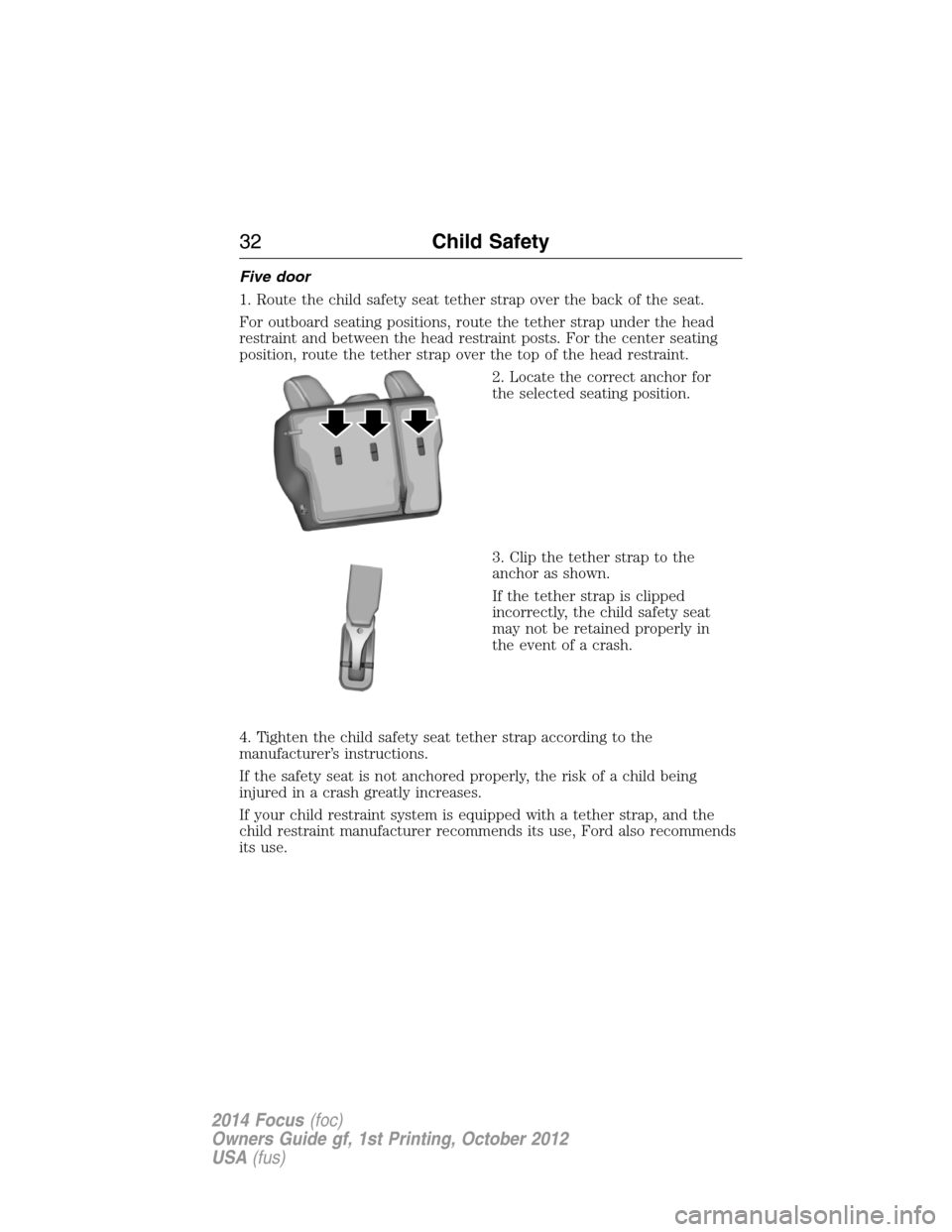
2. Locate the correct anchor for
the selected seating position.
3. Clip the tether strap to the
anchor as shown.
If the tether strap is clipped
incorrectly, the child safety seat
may not be retained properly in
the event of a crash.
4. Tighten the child safety seat tether strap according to the
manufacturer’s instructions.
If the safety seat is not anchored properly, the risk of a child being
injured in a crash greatly increases.
If your child restraint system is equipped with a tether strap, and the
child restraint manufacturer recommends its use, Ford also recommends
its use.
32Child Safety
2014 Focus(foc)
Owners Guide gf, 1st Printing, October 2012
USA(fus)
Page 43 of 492
CHILD RESTRAINT AND SAFETY BELT MAINTENANCE
Inspect the vehicle safety belts and child safety seat systems periodically
to make sure they work properly and are not damaged. Inspect the
vehicle and child seat safety belts to make sure there are no nicks,
tears or cuts. Replace if necessary. All vehicle safety belt assemblies,
including retractors, buckles, front safety belt buckle assemblies, buckle
support assemblies (slide bar-if equipped), shoulder belt height adjusters
(if equipped), shoulder belt guide on seat back (if equipped), child
safety seat LATCH and tether anchors, and attaching hardware, should
be inspected after a crash. Read the child restraint manufacturer’s
instructions for additional inspection and maintenance information
specific to the child restraint.
Ford Motor Company recommends that all safety belt assemblies in use
in vehicles involved in a crash be replaced. However, if the crash was
minor and an authorized dealer finds that the belts do not show damage
and continue to operate properly, they do not need to be replaced.
Safety belt assemblies not in use during a crash should also be inspected
and replaced if either damage or improper operation is noted.
For proper care of soiled safety belts, seeCleaning the Interiorin the
Vehicle Carechapter.
42Safety Belts
2014 Focus(foc)
Owners Guide gf, 1st Printing, October 2012
USA(fus)
Page 52 of 492
If the airbag readiness lamp is lit, do the following:
The driver or adult passengers should check for any objects that may be
lodged underneath the front passenger seat or cargo interfering with the
seat.
If objects are lodged or cargo is interfering with the seat; please take the
following steps to remove the obstruction:
•Pull the vehicle over.
•Turn the vehicle off.
•Driver or adult passengers should check for any objects lodged
underneath the front passenger seat or cargo interfering with the seat.
•Remove the obstruction(s) (if found).
•Restart the vehicle.
•Wait at least two minutes and verify that the airbag readiness lamp is
no longer illuminated
•If the airbag readiness lamp remains illuminated, this may or may not
be a problem due to the front passenger sensing system.
Do not attempt to repair or service the system. Take your vehicle
immediately to an authorized dealer.
If it is necessary to modify an advanced front airbag system to
accommodate a person with disabilities, contact the Ford Customer
Relationship Center at the phone number shown in theCustomer
Assistancesection of thisOwner’s Manual.
KNEE AIRBAG
A driver’s knee airbag is located under or within the instrument panel.
During a crash, the restraints control module may activate the driver’s
knee airbag based on crash severity and occupant conditions. Under
certain crash and occupant conditions, the driver’s knee airbag may
deploy but the driver’s front airbag may not activate. As with front and
side airbags, it is important to be properly seated and restrained to
reduce the risk of death or serious injury.
To know if the knee airbag is operating properly, seeCrash
Sensors and Airbag Indicatorin this chapter.
Supplementary Restraints System51
2014 Focus(foc)
Owners Guide gf, 1st Printing, October 2012
USA(fus)
Page 69 of 492
CLEARING ALL MYKEYS
You can clear all MyKeys within the same key cycle as you created the
MyKey. If you switch your ignition off, however, you will need to use an
admin key to clear your MyKeys.
Note:When you clear your MyKeys, you remove all restrictions and
return all MyKeys to their original admin key status at once.
To clear all MyKeys of all MyKey settings, use the information display to
do the following:
1. Access the main menu and selectSettings, thenMyKey.
2. Scroll toClear Alland press theOKbutton.
3. Hold theOKbutton untilALL MYKEYS CLEAREDdisplays .
CHECKING MYKEY SYSTEM STATUS
You can find information about your programmed MyKeys by using the
information display.
MYKEY DISTANCE
Tracks the distance when drivers use a MyKey. The only way to delete
the accumulated distance is by using an admin key to clear your MyKey.
If the distance does not accumulate as expected, then the intended user
is not using the MyKey, or an admin key user recently cleared and then
recreated a MyKey.
NUMBER OF MYKEY(S)
Indicates the number of MyKeys programmed to your vehicle. Use this
feature to detect how many MyKeys you have for your vehicle and
determine when a MyKey has been deleted.
NUMBER OF ADMIN KEY(S)
Indicates how many admin keys are programmed to your vehicle. Use
this feature to determine how many unrestricted keys you have for your
vehicle, and detect if an additional MyKey has been programmed.
USING MYKEY WITH REMOTE START SYSTEMS
MyKey is not compatible with non-Ford-approved aftermarket remote
start systems. If you choose to install a remote start system, please see
your Ford authorized dealer for a Ford-approved remote start system.
68MyKey
2014 Focus(foc)
Owners Guide gf, 1st Printing, October 2012
USA(fus)
Page 70 of 492
Vehicles With Ford-approved Aftermarket Remote Start Systems
When using a Ford-approved aftermarket remote start system, the
vehicle recognizes the remote start system as an additional admin key.
It is the vehicle’s default setting. You can also program the remote start
as a MyKey. As a result, the MyKey system status menu display includes
the remote start system as an additional key in the total count of
MYKEY(S) PROGRAMMEDorADMIN KEYS PROGRAMMED.
SeeChecking MyKey System Status.
When you start your vehicle with a Ford-approved aftermarket remote
start system, the system stalls the vehicle after you open the door or
shift the vehicle into gear. This is intentional. When you restart your
vehicle, it reads your real key (traditional key or intelligent key fob)
status instead of the remote start system’s status.
As an added precaution, owners of vehicles equipped with traditional
keys may want to program the remote start system as a MyKey, if the
MyKey driver uses the remote start fob. That way, when the MyKey
driver starts the vehicle with the remote start system, the MyKey
restrictions remain active.
With a Ford-approved aftermarket remote start system, it is possible to
program all real keys as MyKeys unintentionally. If this happens, then the
remote start fob is the admin key. If you want to have only one real key
as a MyKey, or do not want to have any MyKeys, then you need to use
your remote start to clear all MyKeys. In that case, follow these steps:
•Enter the vehicle and close all doors.
•Remote start the vehicle using your remote start fob.
•SeeClearing All MyKeys. Follow Steps 1-3.
After clearing your MyKeys, you can create a new MyKey. SeeCreating
a MyKey.
Note:For vehicles with intelligent access keys (push-button start), you
cannot program the remote start system as a MyKey. Always treat the
remote start fob as you would any other admin key.
Vehicles With Non-Ford-approved Aftermarket Remote Start Systems
MyKey is not compatible with non-Ford-approved aftermarket remote
start systems. If you choose to install a remote start system, please see a
Ford authorized dealer for a Ford-approved system.
MyKey69
2014 Focus(foc)
Owners Guide gf, 1st Printing, October 2012
USA(fus)
Page 71 of 492
The following informationmayhelp customers who choose to install a
non-Ford-approved remote start system. The actions provided below
do not make MyKey compatible with non-Ford-approved remote start
systems, but may help you retain some MyKey functions.
When using a non-Ford-approved remote start system, the vehicle may
recognize the remote start system as an additional admin key with its
associated privileges. If you restart the vehicle by inserting a key into the
ignition cylinder and recycling the ignition completely, then you may
retain some MyKey functions. This action forces your vehicle to read the
traditional key instead of the remote start fob and then uses the key’s
associated privileges.
Note:The MyKey system status menu display may include the remote
start system as an additional key in the total count ofMYKEY(S)
PROGRAMMEDorADMIN KEYS PROGRAMMED. SeeChecking
MyKey System Status.
As an added precaution, owners of vehicles equipped with traditional
keys may want to program the remote start system as a MyKey, if the
MyKey driver uses the remote start fob. That way, when the MyKey
driver starts the vehicle with the remote start system, the MyKey
restrictions will be remain active.
With a non-Ford-approved aftermarket remote start system, it is possible
to program all real keys as MyKeys unintentionally. If this happens, then
the remote start fob is the admin key. If you want to have only one real
key as a MyKey, or do not want to have any MyKeys, then you need to use
your remote start to clear all MyKeys. In that case, follow these steps:
•Enter the vehicle and close all doors.
•Remote start the vehicle using your remote start fob.
•SeeClearing All MyKeys. Follow Steps 1-3.
After clearing your MyKeys, you can create a new MyKey. SeeCreating
a MyKey.
Note:For vehicles with intelligent access keys (push-button start), you
cannot program the remote start system as a MyKey. Always treat the
remote start fob as you would any other admin key.
70MyKey
2014 Focus(foc)
Owners Guide gf, 1st Printing, October 2012
USA(fus)
Page 82 of 492
SECURILOCK® PASSIVE ANTI-THEFT SYSTEM
Note:The system is not compatible with non-Ford aftermarket remote
start systems. Use of these systems may result in vehicle starting
problems and a loss of security protection.
Note:Metallic objects, electronic devices or a second coded key on the
same key chain may cause vehicle starting issues if they are too close to
the key when starting your vehicle. Prevent these objects from touching
the coded key while starting the engine. Switch the ignition off, move all
objects on the key chain away from the coded key and restart your
vehicle if a problem occurs.
Note:Do not leave a duplicate coded key in your vehicle. Always take
your keys and lock all doors when leaving your vehicle.
The system helps prevent the engine from starting unless you use a coded
key programmed to your vehicle. Using the wrong key may prevent your
vehicle from starting. A message may appear in the information display.
If you are unable to start your vehicle with a correctly coded key, a
malfunction has occurred. A message may appear in the information
display.
Automatic Arming
Your vehicle arms immediately after you switch the ignition off.
Automatic Disarming
Your vehicle disarms when you switch the ignition on with a coded key.
Replacement Keys
Note:Your vehicle comes with two integrated keyhead transmitters or
two intelligent access keys.
The integrated keyhead transmitter functions as a programmed ignition
key that operates all the locks and starts the vehicle, as well as a remote
control.
The intelligent access key functions as a programmed key that operates
the driver door lock and activates the intelligent access with push button
start systems, as well as a remote control.
If your programmed transmitters or standard SecuriLock coded keys
(integrated keyhead transmitters only) are lost or stolen and you do not
have an extra coded key, you will need to have your vehicle towed to an
authorized dealer. The key codes need to be erased from your vehicle
and new coded keys will need to be programmed.
Security81
2014 Focus(foc)
Owners Guide gf, 1st Printing, October 2012
USA(fus)
Page 87 of 492
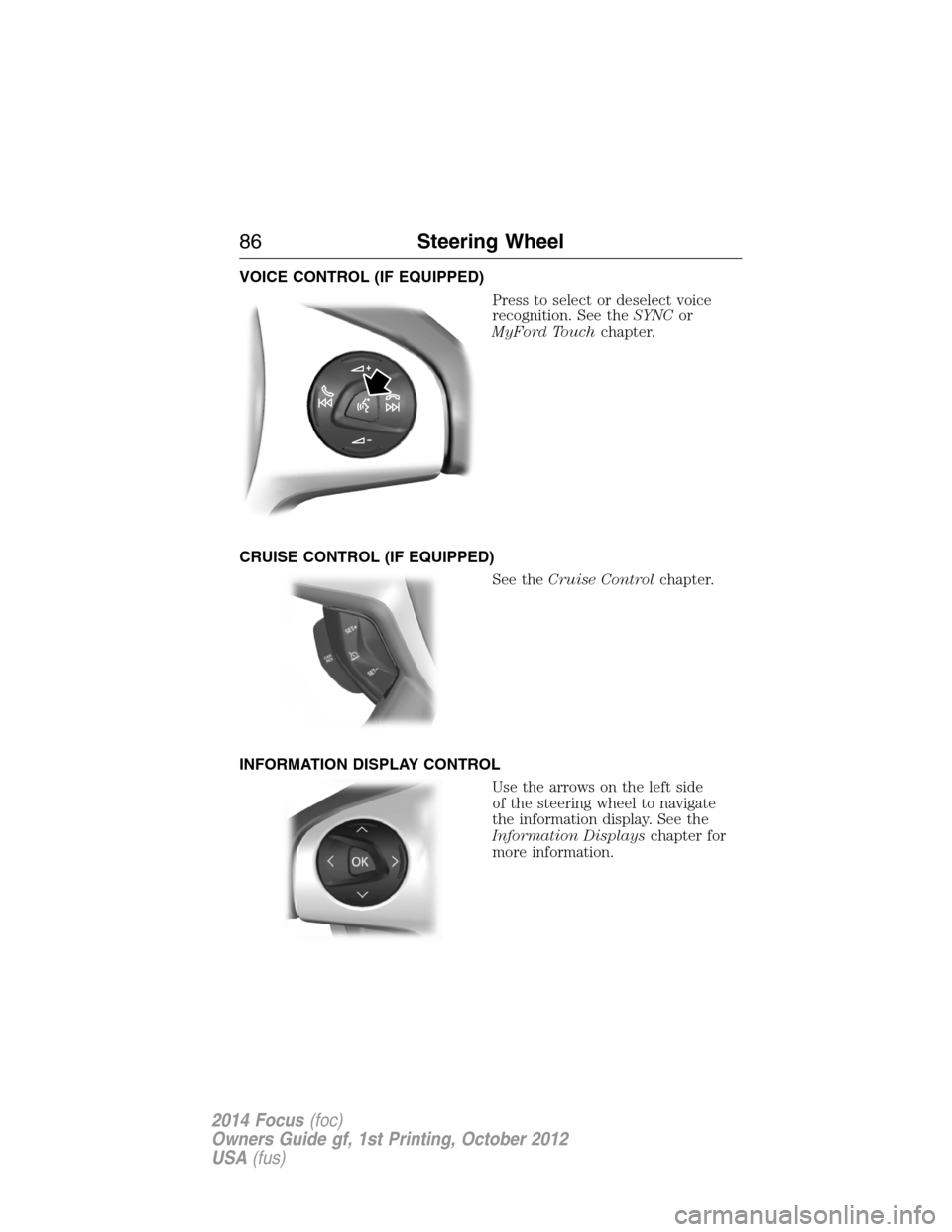
VOICE CONTROL (IF EQUIPPED)
Press to select or deselect voice
recognition. See theSYNCor
MyFord Touchchapter.
CRUISE CONTROL (IF EQUIPPED)
See theCruise Controlchapter.
INFORMATION DISPLAY CONTROL
Use the arrows on the left side
of the steering wheel to navigate
the information display. See the
Information Displayschapter for
more information.
86Steering Wheel
2014 Focus(foc)
Owners Guide gf, 1st Printing, October 2012
USA(fus)