USB port FORD FOCUS 2014 3.G Owner's Manual
[x] Cancel search | Manufacturer: FORD, Model Year: 2014, Model line: FOCUS, Model: FORD FOCUS 2014 3.GPages: 492, PDF Size: 7.2 MB
Page 377 of 492
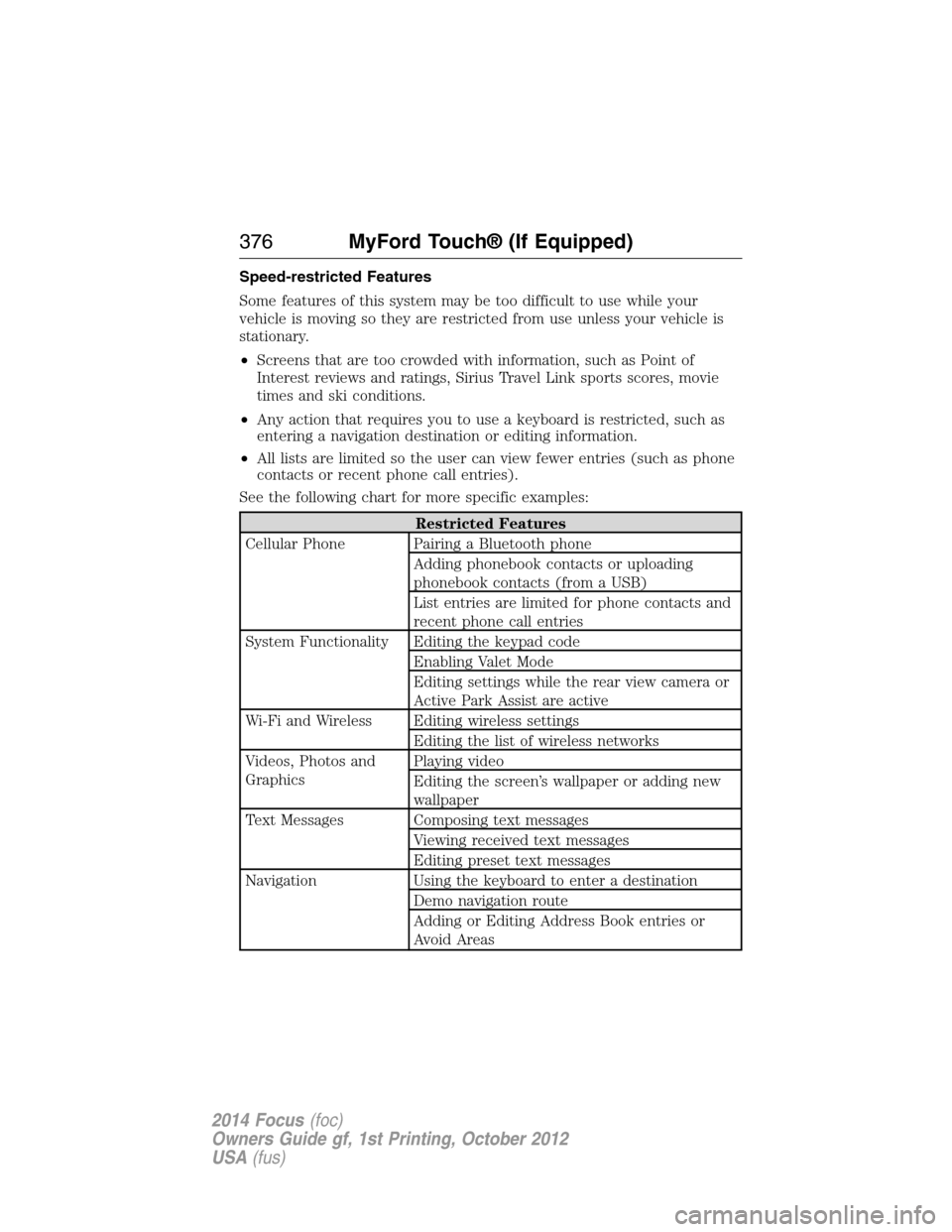
Speed-restricted Features
Some features of this system may be too difficult to use while your
vehicle is moving so they are restricted from use unless your vehicle is
stationary.
•Screens that are too crowded with information, such as Point of
Interest reviews and ratings, Sirius Travel Link sports scores, movie
times and ski conditions.
•Any action that requires you to use a keyboard is restricted, such as
entering a navigation destination or editing information.
•All lists are limited so the user can view fewer entries (such as phone
contacts or recent phone call entries).
See the following chart for more specific examples:
Restricted Features
Cellular Phone Pairing a Bluetooth phone
Adding phonebook contacts or uploading
phonebook contacts (from a USB)
List entries are limited for phone contacts and
recent phone call entries
System Functionality Editing the keypad code
Enabling Valet Mode
Editing settings while the rear view camera or
Active Park Assist are active
Wi-Fi and Wireless Editing wireless settings
Editing the list of wireless networks
Videos, Photos and
GraphicsPlaying video
Editing the screen’s wallpaper or adding new
wallpaper
Text Messages Composing text messages
Viewing received text messages
Editing preset text messages
Navigation Using the keyboard to enter a destination
Demo navigation route
Adding or Editing Address Book entries or
Avoid Areas
376MyFord Touch® (If Equipped)
2014 Focus(foc)
Owners Guide gf, 1st Printing, October 2012
USA(fus)
Page 383 of 492
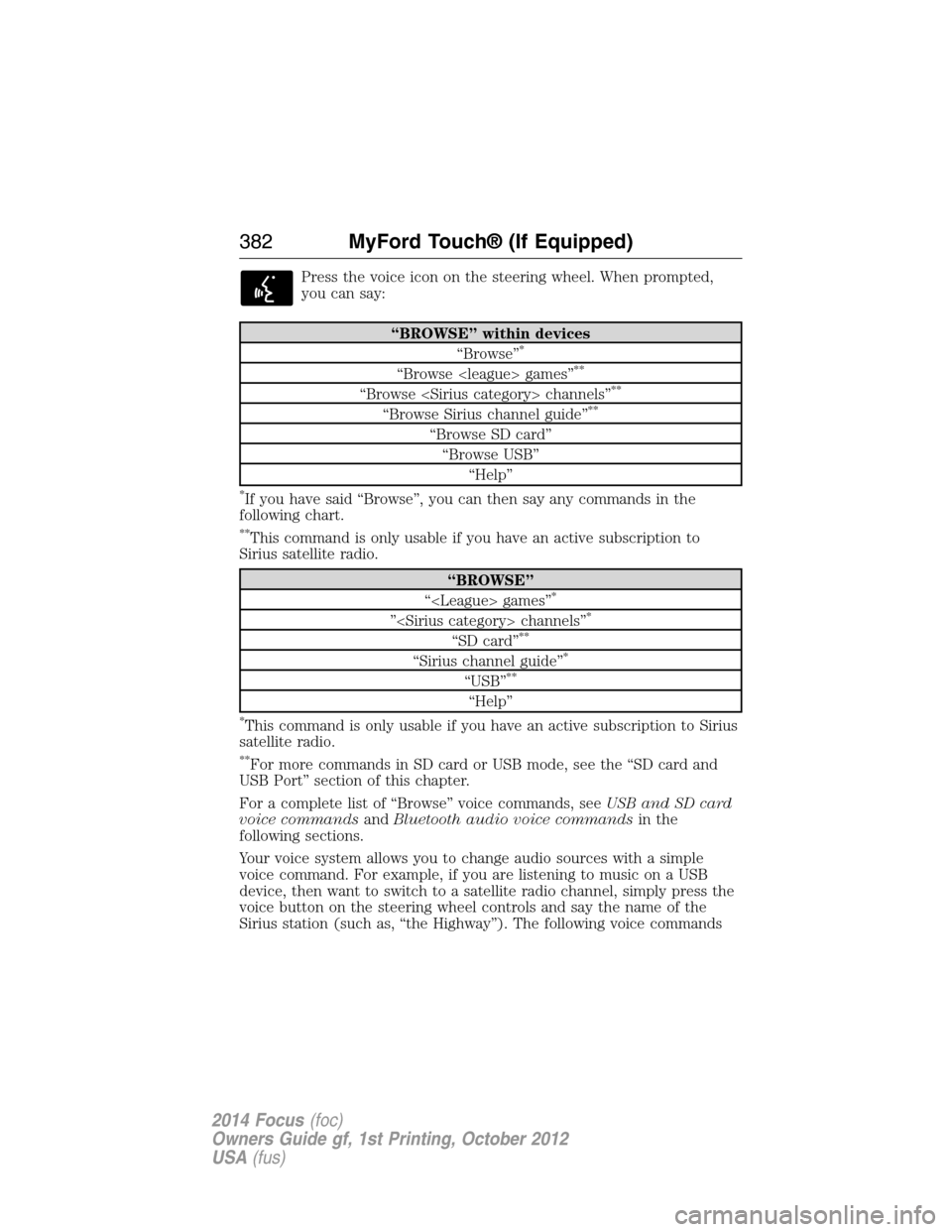
Press the voice icon on the steering wheel. When prompted,
you can say:
“BROWSE” within devices
“Browse”*
“Browse
“Browse
“Browse Sirius channel guide”**
“Browse SD card”
“Browse USB”
“Help”
*If you have said “Browse”, you can then say any commands in the
following chart.
**This command is only usable if you have an active subscription to
Sirius satellite radio.
“BROWSE”
“
”
“SD card”**
“Sirius channel guide”*
“USB”**
“Help”
*This command is only usable if you have an active subscription to Sirius
satellite radio.
**For more commands in SD card or USB mode, see the “SD card and
USB Port” section of this chapter.
For a complete list of “Browse” voice commands, seeUSB and SD card
voice commandsandBluetooth audio voice commandsin the
following sections.
Your voice system allows you to change audio sources with a simple
voice command. For example, if you are listening to music on a USB
device, then want to switch to a satellite radio channel, simply press the
voice button on the steering wheel controls and say the name of the
Sirius station (such as, “the Highway”). The following voice commands
382MyFord Touch® (If Equipped)
2014 Focus(foc)
Owners Guide gf, 1st Printing, October 2012
USA(fus)
Page 384 of 492
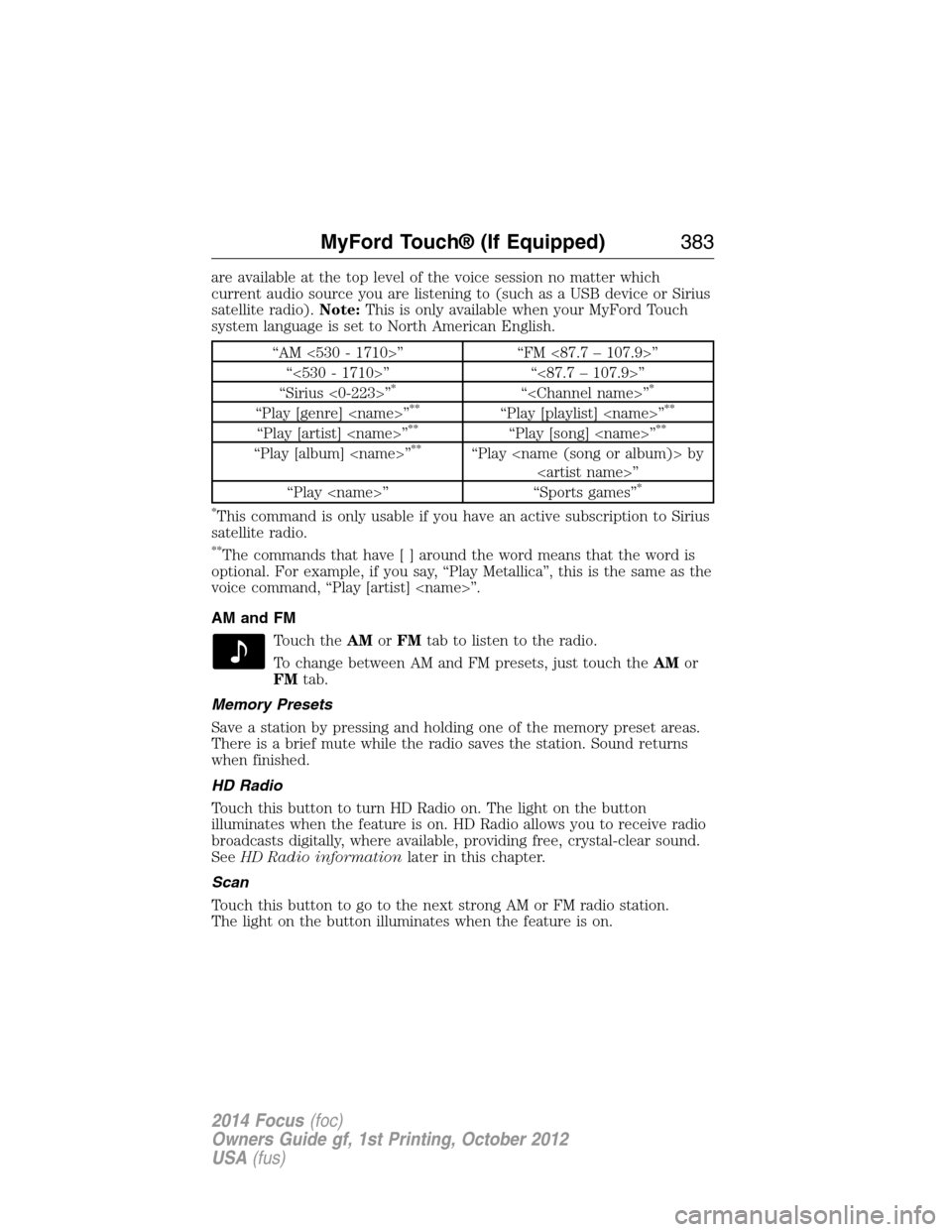
are available at the top level of the voice session no matter which
current audio source you are listening to (such as a USB device or Sirius
satellite radio).Note:This is only available when your MyFord Touch
system language is set to North American English.
“AM <530 - 1710>” “FM <87.7 – 107.9>”
“<530 - 1710>” “<87.7 – 107.9>”
“Sirius <0-223>”
*“
“Play [genre]
“Play [artist]
“Play [album]
“Play
*
*
This command is only usable if you have an active subscription to Sirius
satellite radio.
**The commands that have[]around the word means that the word is
optional. For example, if you say, “Play Metallica”, this is the same as the
voice command, “Play [artist]
AM and FM
Touch theAMorFMtab to listen to the radio.
To change between AM and FM presets, just touch theAMor
FMtab.
Memory Presets
Save a station by pressing and holding one of the memory preset areas.
There is a brief mute while the radio saves the station. Sound returns
when finished.
HD Radio
Touch this button to turn HD Radio on. The light on the button
illuminates when the feature is on. HD Radio allows you to receive radio
broadcasts digitally, where available, providing free, crystal-clear sound.
SeeHD Radio informationlater in this chapter.
Scan
Touch this button to go to the next strong AM or FM radio station.
The light on the button illuminates when the feature is on.
MyFord Touch® (If Equipped)383
2014 Focus(foc)
Owners Guide gf, 1st Printing, October 2012
USA(fus)
Page 397 of 492
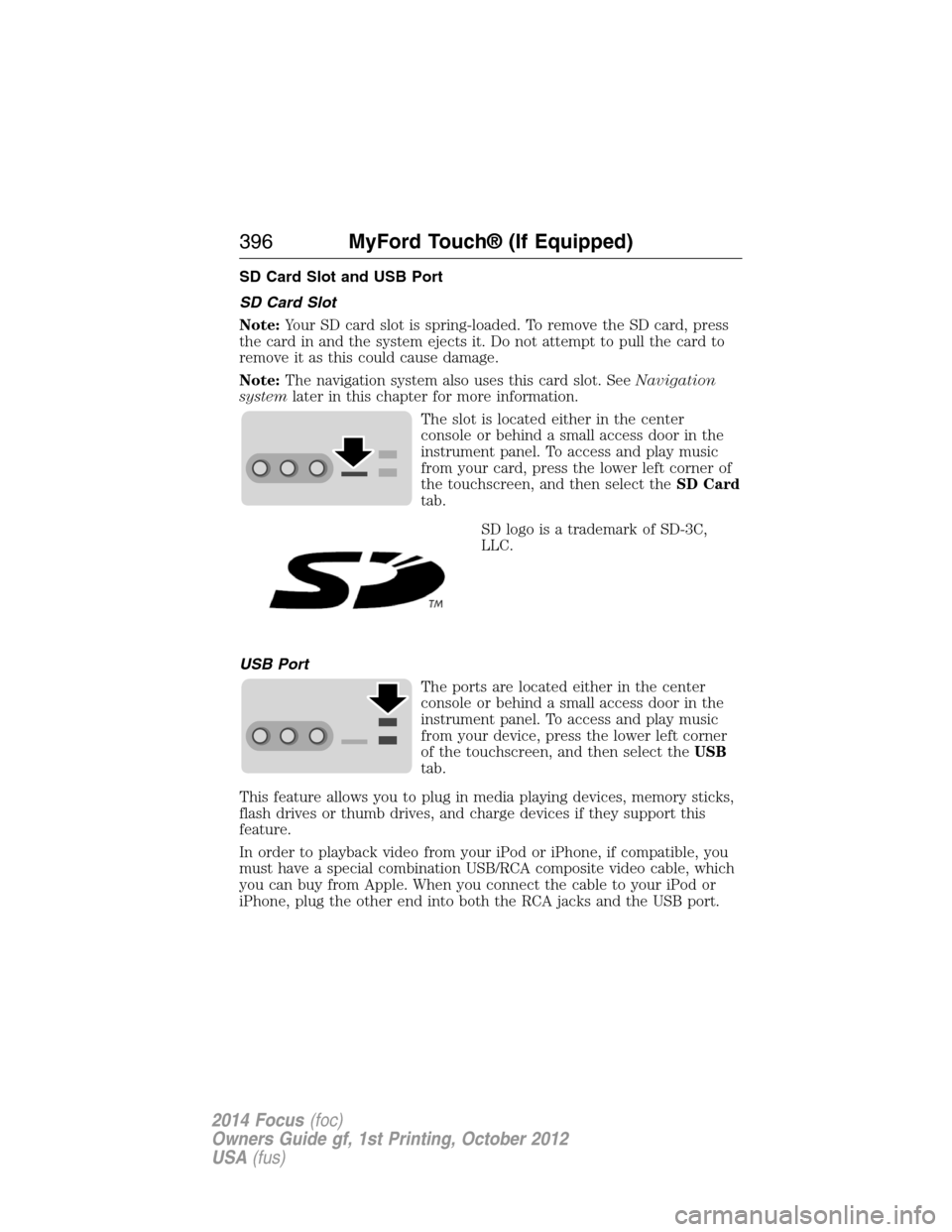
SD Card Slot and USB Port
SD Card Slot
Note:Your SD card slot is spring-loaded. To remove the SD card, press
the card in and the system ejects it. Do not attempt to pull the card to
remove it as this could cause damage.
Note:The navigation system also uses this card slot. SeeNavigation
systemlater in this chapter for more information.
The slot is located either in the center
console or behind a small access door in the
instrument panel. To access and play music
from your card, press the lower left corner of
the touchscreen, and then select theSD Card
tab.
SD logo is a trademark of SD-3C,
LLC.
USB Port
The ports are located either in the center
console or behind a small access door in the
instrument panel. To access and play music
from your device, press the lower left corner
of the touchscreen, and then select theUSB
tab.
This feature allows you to plug in media playing devices, memory sticks,
flash drives or thumb drives, and charge devices if they support this
feature.
In order to playback video from your iPod or iPhone, if compatible, you
must have a special combination USB/RCA composite video cable, which
you can buy from Apple. When you connect the cable to your iPod or
iPhone, plug the other end into both the RCA jacks and the USB port.
396MyFord Touch® (If Equipped)
2014 Focus(foc)
Owners Guide gf, 1st Printing, October 2012
USA(fus)
Page 400 of 492
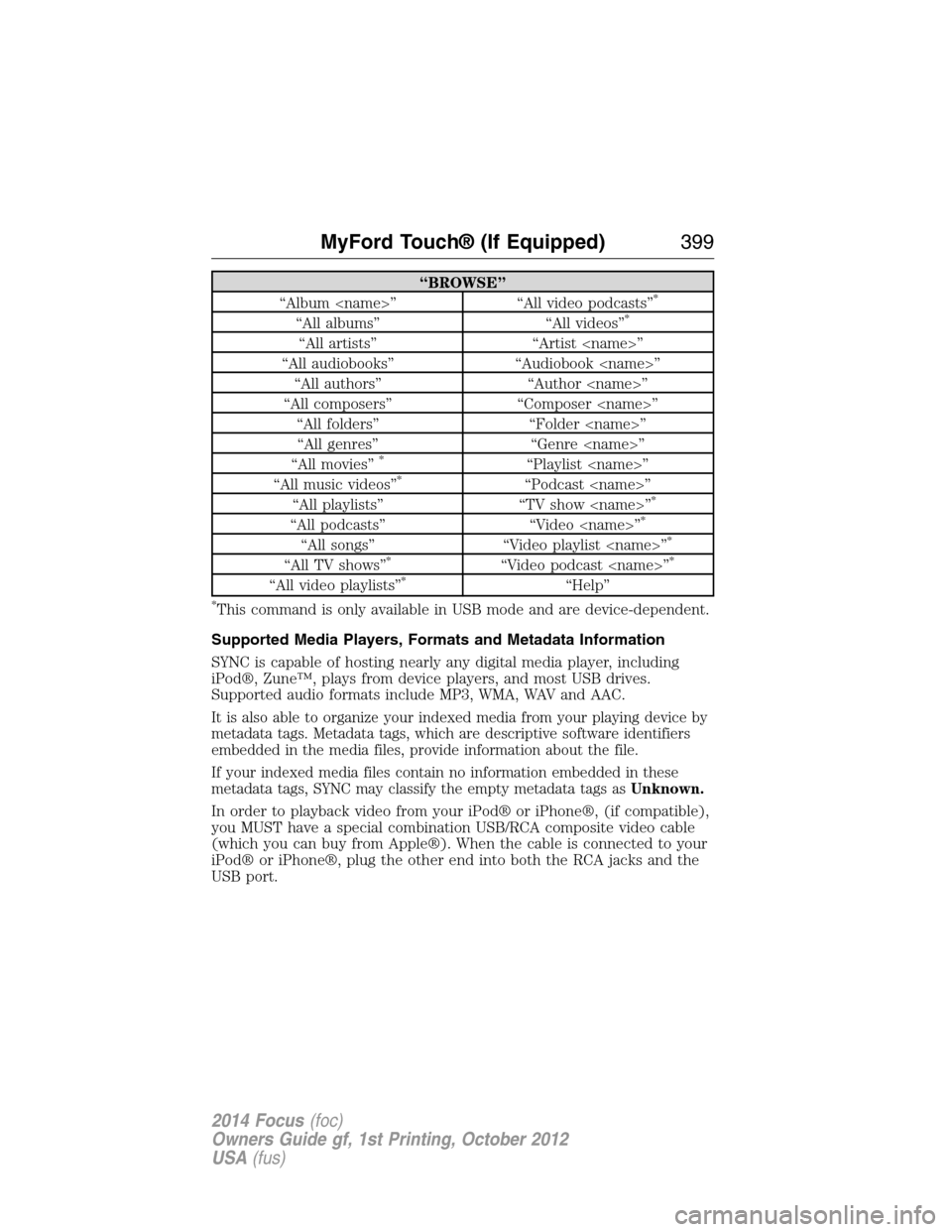
“BROWSE”
“Album
“All albums” “All videos”*
“All artists” “Artist
“All audiobooks” “Audiobook
“All authors” “Author
“All composers” “Composer
“All folders” “Folder
“All genres” “Genre
“All movies”
*“Playlist
“All music videos”*“Podcast
“All playlists” “TV show
“All podcasts” “Video
“All songs” “Video playlist
“All TV shows”*“Video podcast
“All video playlists”*“Help”
*This command is only available in USB mode and are device-dependent.
Supported Media Players, Formats and Metadata Information
SYNC is capable of hosting nearly any digital media player, including
iPod®, Zune™, plays from device players, and most USB drives.
Supported audio formats include MP3, WMA, WAV and AAC.
It is also able to organize your indexed media from your playing device by
metadata tags. Metadata tags, which are descriptive software identifiers
embedded in the media files, provide information about the file.
If your indexed media files contain no information embedded in these
metadata tags, SYNC may classify the empty metadata tags asUnknown.
In order to playback video from your iPod® or iPhone®, (if compatible),
you MUST have a special combination USB/RCA composite video cable
(which you can buy from Apple®). When the cable is connected to your
iPod® or iPhone®, plug the other end into both the RCA jacks and the
USB port.
MyFord Touch® (If Equipped)399
2014 Focus(foc)
Owners Guide gf, 1st Printing, October 2012
USA(fus)
Page 402 of 492
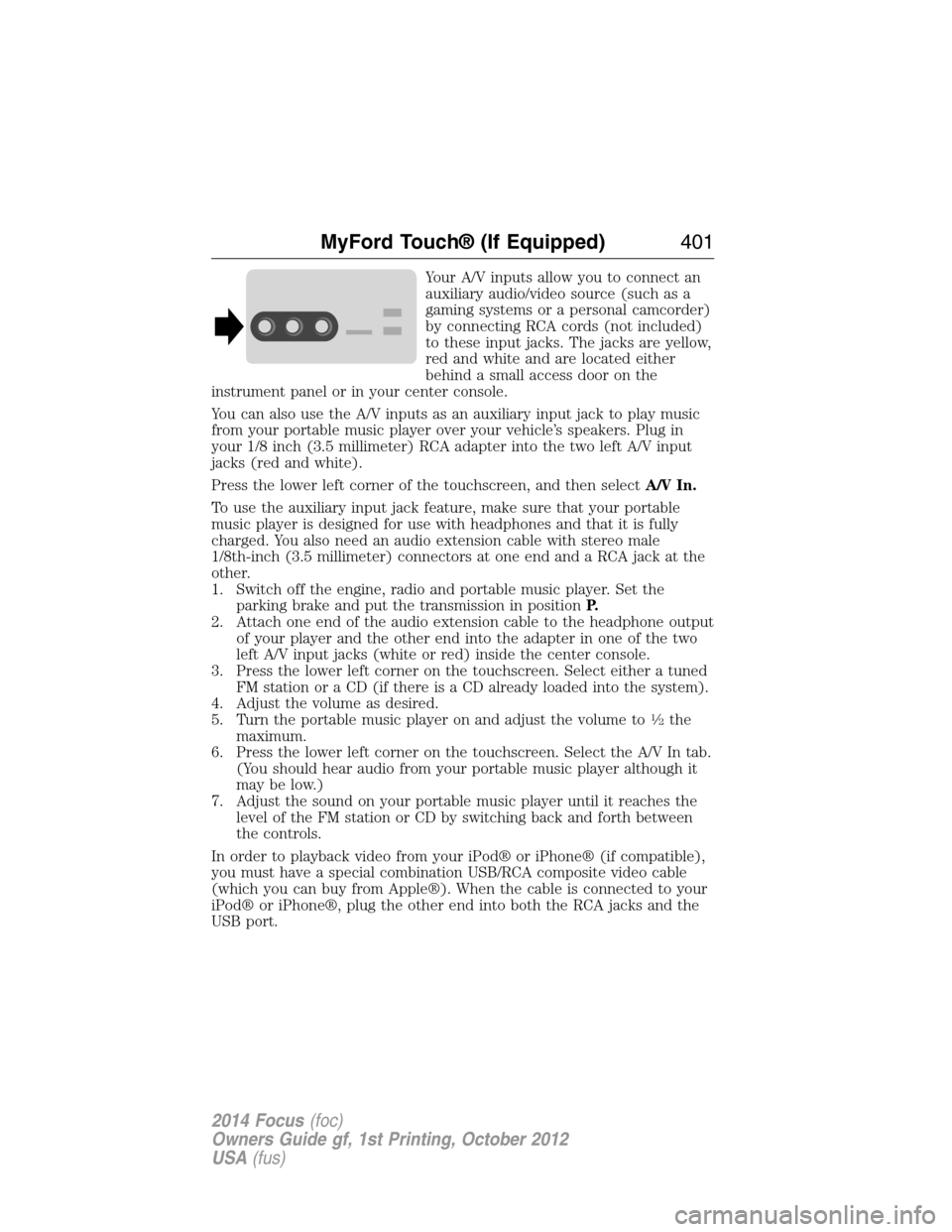
Your A/V inputs allow you to connect an
auxiliary audio/video source (such as a
gaming systems or a personal camcorder)
by connecting RCA cords (not included)
to these input jacks. The jacks are yellow,
red and white and are located either
behind a small access door on the
instrument panel or in your center console.
You can also use the A/V inputs as an auxiliary input jack to play music
from your portable music player over your vehicle’s speakers. Plug in
your 1/8 inch (3.5 millimeter) RCA adapter into the two left A/V input
jacks (red and white).
Press the lower left corner of the touchscreen, and then selectA/V In.
To use the auxiliary input jack feature, make sure that your portable
music player is designed for use with headphones and that it is fully
charged. You also need an audio extension cable with stereo male
1/8th-inch (3.5 millimeter) connectors at one end and a RCA jack at the
other.
1. Switch off the engine, radio and portable music player. Set the
parking brake and put the transmission in positionP.
2. Attach one end of the audio extension cable to the headphone output
of your player and the other end into the adapter in one of the two
left A/V input jacks (white or red) inside the center console.
3. Press the lower left corner on the touchscreen. Select either a tuned
FM station or a CD (if there is a CD already loaded into the system).
4. Adjust the volume as desired.
5. Turn the portable music player on and adjust the volume to
12the
maximum.
6. Press the lower left corner on the touchscreen. Select the A/V In tab.
(You should hear audio from your portable music player although it
may be low.)
7. Adjust the sound on your portable music player until it reaches the
level of the FM station or CD by switching back and forth between
the controls.
In order to playback video from your iPod® or iPhone® (if compatible),
you must have a special combination USB/RCA composite video cable
(which you can buy from Apple®). When the cable is connected to your
iPod® or iPhone®, plug the other end into both the RCA jacks and the
USB port.
MyFord Touch® (If Equipped)401
2014 Focus(foc)
Owners Guide gf, 1st Printing, October 2012
USA(fus)
Page 408 of 492
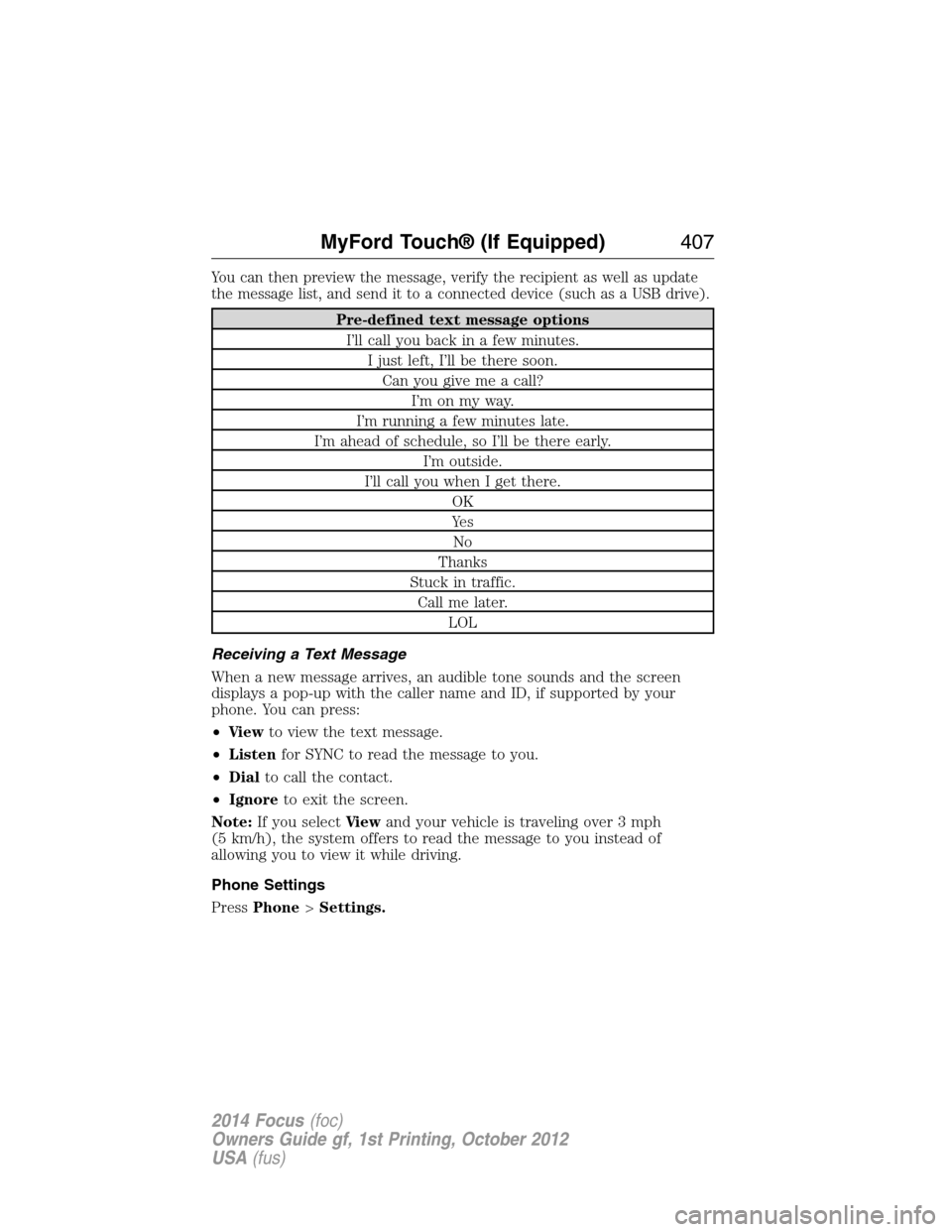
You can then preview the message, verify the recipient as well as update
the message list, and send it to a connected device (such as a USB drive).
Pre-defined text message options
I’ll call you back in a few minutes.
I just left, I’ll be there soon.
Can you give me a call?
I’m on my way.
I’m running a few minutes late.
I’m ahead of schedule, so I’ll be there early.
I’m outside.
I’ll call you when I get there.
OK
Ye s
No
Thanks
Stuck in traffic.
Call me later.
LOL
Receiving a Text Message
When a new message arrives, an audible tone sounds and the screen
displays a pop-up with the caller name and ID, if supported by your
phone. You can press:
•Vi e wto view the text message.
•Listenfor SYNC to read the message to you.
•Dialto call the contact.
•Ignoreto exit the screen.
Note:If you selectVi e wand your vehicle is traveling over 3 mph
(5 km/h), the system offers to read the message to you instead of
allowing you to view it while driving.
Phone Settings
PressPhone>Settings.
MyFord Touch® (If Equipped)407
2014 Focus(foc)
Owners Guide gf, 1st Printing, October 2012
USA(fus)
Page 430 of 492
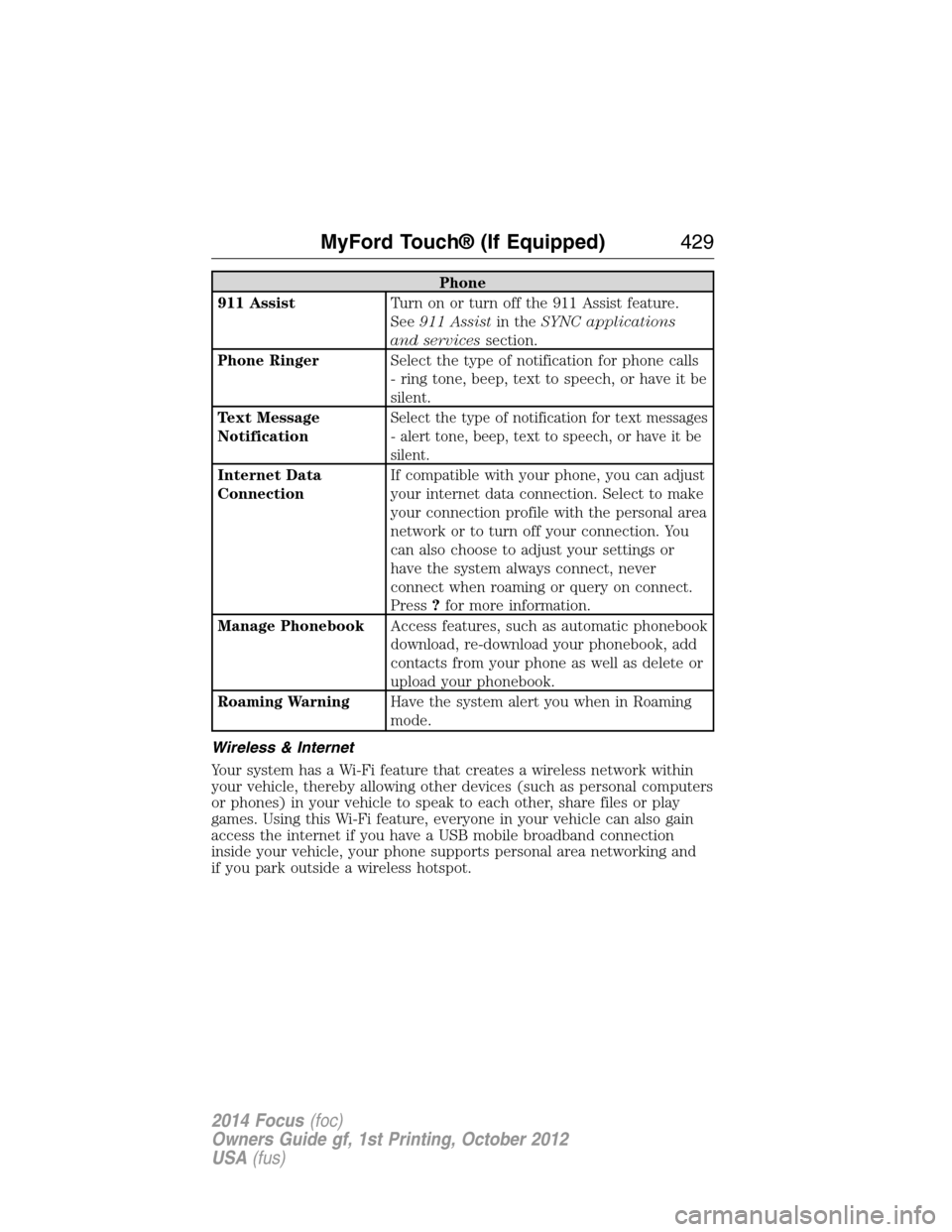
Phone
911 AssistTurn on or turn off the 911 Assist feature.
See911 Assistin theSYNC applications
and servicessection.
Phone RingerSelect the type of notification for phone calls
- ring tone, beep, text to speech, or have it be
silent.
Text Message
Notification
Select the type of notification for text messages
- alert tone, beep, text to speech, or have it be
silent.
Internet Data
ConnectionIf compatible with your phone, you can adjust
your internet data connection. Select to make
your connection profile with the personal area
network or to turn off your connection. You
can also choose to adjust your settings or
have the system always connect, never
connect when roaming or query on connect.
Press?for more information.
Manage PhonebookAccess features, such as automatic phonebook
download, re-download your phonebook, add
contacts from your phone as well as delete or
upload your phonebook.
Roaming WarningHave the system alert you when in Roaming
mode.
Wireless & Internet
Your system has a Wi-Fi feature that creates a wireless network within
your vehicle, thereby allowing other devices (such as personal computers
or phones) in your vehicle to speak to each other, share files or play
games. Using this Wi-Fi feature, everyone in your vehicle can also gain
access the internet if you have a USB mobile broadband connection
inside your vehicle, your phone supports personal area networking and
if you park outside a wireless hotspot.
MyFord Touch® (If Equipped)429
2014 Focus(foc)
Owners Guide gf, 1st Printing, October 2012
USA(fus)
Page 485 of 492
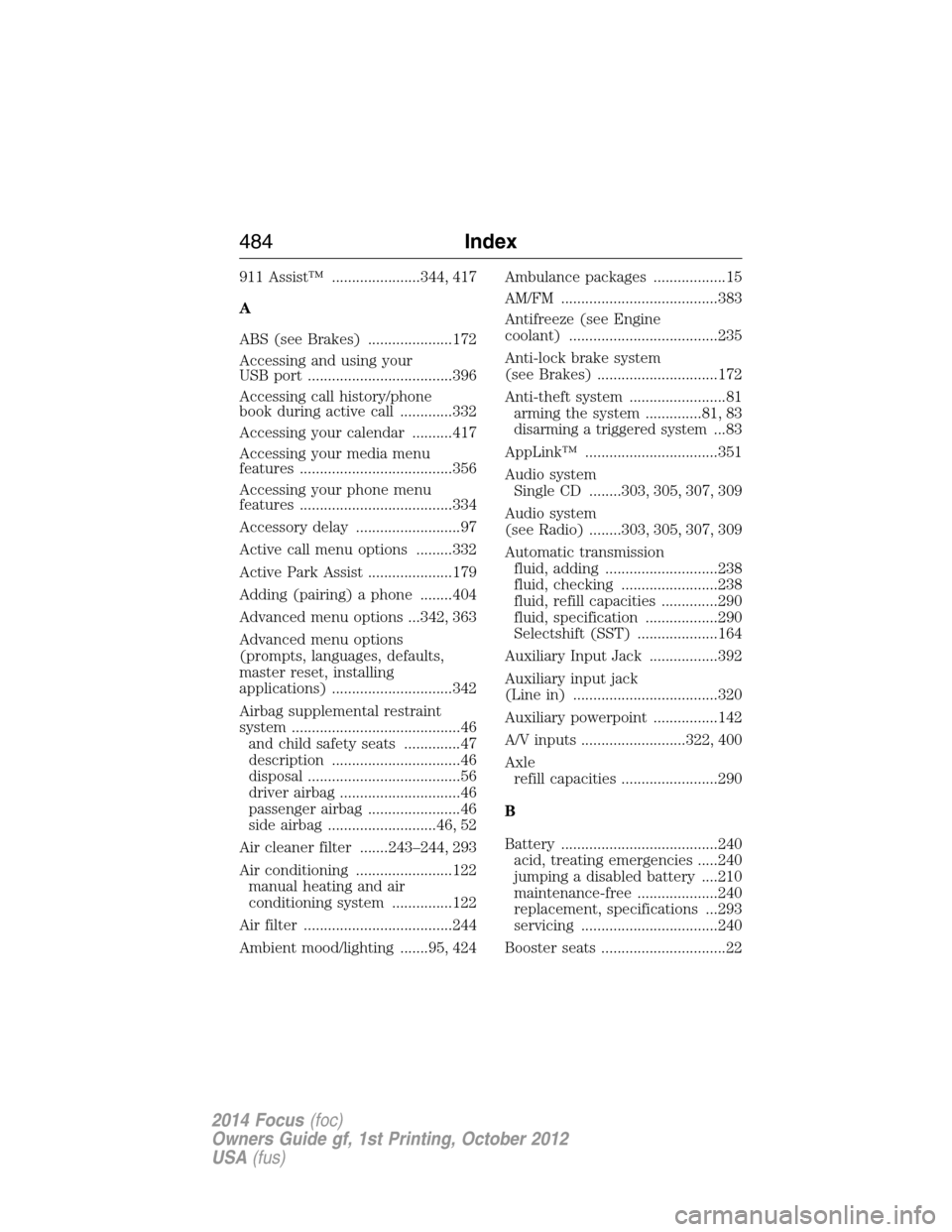
911 Assist™ ......................344, 417
A
ABS (see Brakes) .....................172
Accessing and using your
USB port ....................................396
Accessing call history/phone
book during active call .............332
Accessing your calendar ..........417
Accessing your media menu
features ......................................356
Accessing your phone menu
features ......................................334
Accessory delay ..........................97
Active call menu options .........332
Active Park Assist .....................179
Adding (pairing) a phone ........404
Advanced menu options ...342, 363
Advanced menu options
(prompts, languages, defaults,
master reset, installing
applications) ..............................342
Airbag supplemental restraint
system ..........................................46
and child safety seats ..............47
description ................................46
disposal ......................................56
driver airbag ..............................46
passenger airbag .......................46
side airbag ...........................46, 52
Air cleaner filter .......243–244, 293
Air conditioning ........................122
manual heating and air
conditioning system ...............122
Air filter .....................................244
Ambient mood/lighting .......95, 424Ambulance packages ..................15
AM/FM .......................................383
Antifreeze (see Engine
coolant) .....................................235
Anti-lock brake system
(see Brakes) ..............................172
Anti-theft system ........................81
arming the system ..............81, 83
disarming a triggered system...83
AppLink™ .................................351
Audio system
Single CD ........303, 305, 307, 309
Audio system
(see Radio) ........303, 305, 307, 309
Automatic transmission
fluid, adding ............................238
fluid, checking ........................238
fluid, refill capacities ..............290
fluid, specification ..................290
Selectshift (SST) ....................164
Auxiliary Input Jack .................392
Auxiliary input jack
(Line in) ....................................320
Auxiliary powerpoint ................142
A/V inputs ..........................322, 400
Axle
refill capacities ........................290
B
Battery .......................................240
acid, treating emergencies .....240
jumping a disabled battery ....210
maintenance-free ....................240
replacement, specifications ...293
servicing ..................................240
Booster seats ...............................22
484Index
2014 Focus(foc)
Owners Guide gf, 1st Printing, October 2012
USA(fus)
Page 490 of 492
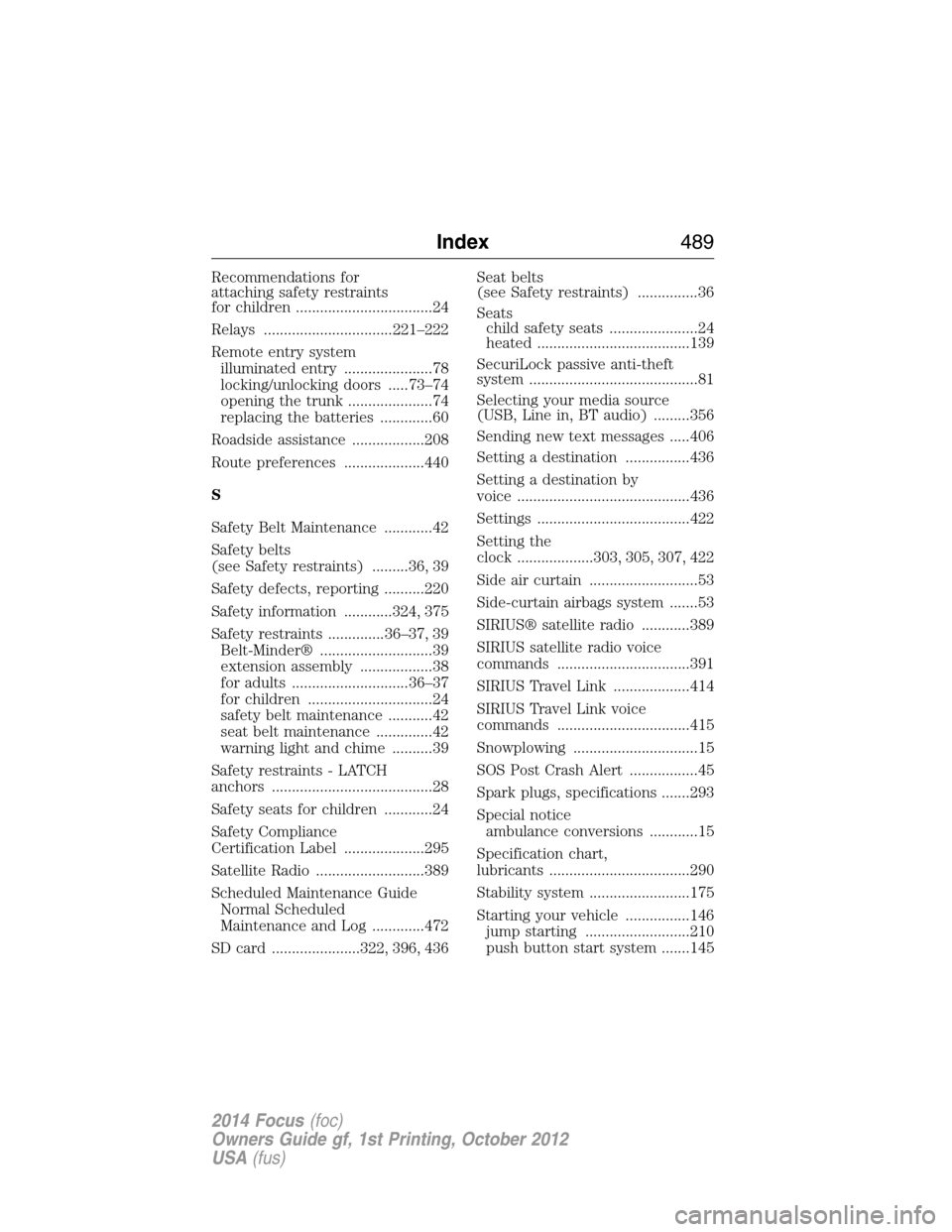
Recommendations for
attaching safety restraints
for children ..................................24
Relays ................................221–222
Remote entry system
illuminated entry ......................78
locking/unlocking doors .....73–74
opening the trunk .....................74
replacing the batteries .............60
Roadside assistance ..................208
Route preferences ....................440
S
Safety Belt Maintenance ............42
Safety belts
(see Safety restraints) .........36, 39
Safety defects, reporting ..........220
Safety information ............324, 375
Safety restraints ..............36–37, 39
Belt-Minder® ............................39
extension assembly ..................38
for adults .............................36–37
for children ...............................24
safety belt maintenance ...........42
seat belt maintenance ..............42
warning light and chime ..........39
Safety restraints - LATCH
anchors ........................................28
Safety seats for children ............24
Safety Compliance
Certification Label ....................295
Satellite Radio ...........................389
Scheduled Maintenance Guide
Normal Scheduled
Maintenance and Log .............472
SD card ......................322, 396, 436Seat belts
(see Safety restraints) ...............36
Seats
child safety seats ......................24
heated ......................................139
SecuriLock passive anti-theft
system ..........................................81
Selecting your media source
(USB, Line in, BT audio) .........356
Sending new text messages .....406
Setting a destination ................436
Setting a destination by
voice ...........................................436
Settings ......................................422
Setting the
clock ...................303, 305, 307, 422
Side air curtain ...........................53
Side-curtain airbags system .......53
SIRIUS® satellite radio ............389
SIRIUS satellite radio voice
commands .................................391
SIRIUS Travel Link ...................414
SIRIUS Travel Link voice
commands .................................415
Snowplowing ...............................15
SOS Post Crash Alert .................45
Spark plugs, specifications .......293
Special notice
ambulance conversions ............15
Specification chart,
lubricants ...................................290
Stability system .........................175
Starting your vehicle ................146
jump starting ..........................210
push button start system .......145
Index489
2014 Focus(foc)
Owners Guide gf, 1st Printing, October 2012
USA(fus)