climate control FORD FOCUS 2014 3.G Owner's Manual
[x] Cancel search | Manufacturer: FORD, Model Year: 2014, Model line: FOCUS, Model: FORD FOCUS 2014 3.GPages: 492, PDF Size: 7.2 MB
Page 372 of 492
INTRODUCTION
WARNING:Driving while distracted can result in loss of vehicle
control, crash and injury. We strongly recommend that you use
extreme caution when using any device that may take your focus off
the road. Your primary responsibility is the safe operation of your
vehicle. We recommend against the use of any hand-held device while
driving and encourage the use of voice-operated systems when possible.
Make sure you are aware of all applicable local laws that may affect the
use of electronic devices while driving.
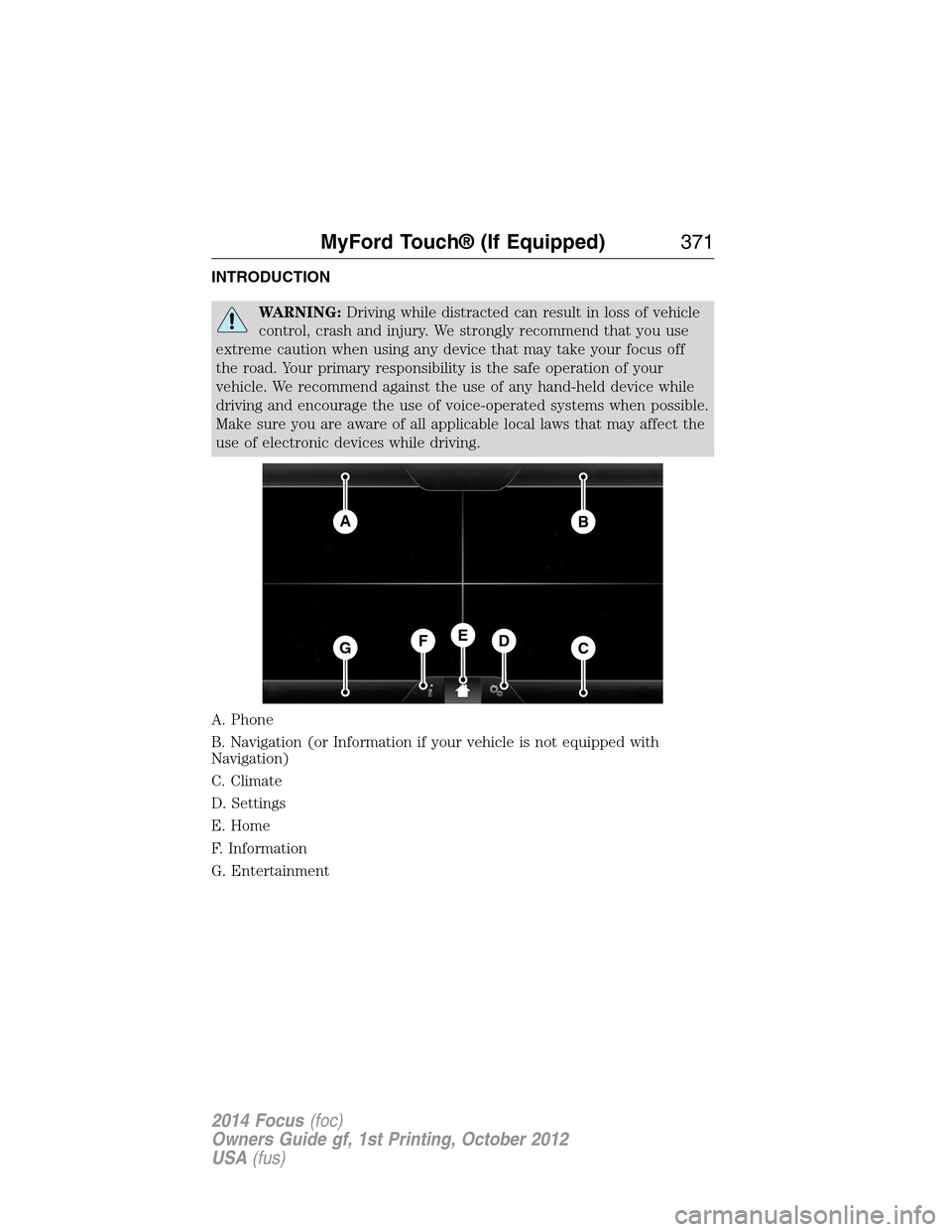
A. Phone
B. Navigation (or Information if your vehicle is not equipped with
Navigation)
C. Climate
D. Settings
E. Home
F. Information
G. Entertainment
AB
GCDFE
MyFord Touch® (If Equipped)371
2014 Focus(foc)
Owners Guide gf, 1st Printing, October 2012
USA(fus)
Page 373 of 492
This system uses a four-corner strategy to provide quick access several
vehicle features and settings. The touchscreen provides easy interaction
with your cellular phone, multimedia, climate control and navigation
system. The corners display any active modes within those menus, such
as phone status or the climate temperature.
Note:Some features are not available while your vehicle is moving.
Note:You can also directly access the Home screen and Information
screen by pressing the Home (“house” icon) and Information (“i” icon)
buttons on your steering wheel controls
Note:Your system is equipped with a feature that allows you to access
and control audio features for 30 minutes after you switch the ignition
off (and no doors open).
PHONE
Press to select any of the following:
•Making and Receiving Calls
•Quick Dial
•Phonebook
•Call History
•Text Messaging
•Settings
NAVIGATION
Press to select any of the following:
•My Home
•Favorites
•Previous Destinations
•Point of Interest
•Emergency
•Street Address
•Intersection
•City Center
•Map
•Edit Route Cancel Route
CLIMATE
Press to select any of the following:
•Driver Settings
•Recirculated Air
•Auto
•Dual
372MyFord Touch® (If Equipped)
2014 Focus(foc)
Owners Guide gf, 1st Printing, October 2012
USA(fus)
Page 375 of 492
Using the Touch-sensitive Controls on Your System
To turn a feature on and off, just touch the graphic with your finger.
To get the best performance from the touch-sensitive controls:
•Do not press hard on the controls. They are sensitive to light touch.
•Use your bare finger to touch the center of a touch-control graphic.
Touching off-center of the graphic may affect operation of a nearby
control.
•Make sure your hands are clean and dry.
•Keep metal and other conductive material away from the surface
of the touchscreen as this may cause electronic interference
(for example, inadvertently turning on a feature other than the one
you meant to turn on).
Depending on your vehicle and option package, you may also have these
controls on your bezel:
•Power: Switch the media or climate features off and on.
•VOL:Control the volume of playing media.
•Fan: Control the speed of the climate system fan.
•Seek and Tune buttons: Use as you normally would in media modes.
•Eject: Eject a CD from the entertainment system.
•SOURCE:Touch the word repeatedly to see all available media
modes. The screen does not change, but you see the media change
in the lower left status bar.
•SOUND:Touch the word to access the Sound menu where you can
adjust settings such as: Bass, Treble, Midrange, Balance and Fade,
THX Deep Note Demo, DSP (Digital Signal Processing), Occupancy
Mode and Speed Compensated Volume. (Your vehicle may not have
all of these sound options.)
•Hazard flasher: Switch the hazard flashers off and on.
Cleaning the Touchscreen Display
Use a clean, soft cloth such as one used for cleaning glasses. If dirt or
fingerprints are still visible, apply a small amount of alcohol to the cloth.
Do not pour or spray alcohol onto the display. Do not use detergent or
any type of solvent to clean the display.
374MyFord Touch® (If Equipped)
2014 Focus(foc)
Owners Guide gf, 1st Printing, October 2012
USA(fus)
Page 380 of 492
Accessing a List of Available Commands
•If you use the touchscreen, press the Settings icon >Help>Voice
Command List.
•If you use the steering wheel control, press the voice icon. After the
tone, speak your command clearly.
Voice command list
“Audio list of commands”
“Bluetooth audio list of commands”
“Browse list of commands”
“CD list of commands”
“Climate control list of commands”
“List of commands”
“Navigation list of commands”
*
“Phone list of commands”
“Radio list of commands”
“SD card list of commands”
“Sirius satellite list of commands”
**
“Travel link list of commands”*
“USB list of commands”
“Voice instructions list of commands”
“Voice settings list of commands”
“Help”
*This command is only available when your vehicle is equipped with the
navigation system, and the navigation system SD card is in the card slot.
**This command is only available when you have an active Sirius satellite
radio subscription.
Voice Settings
Voice settings allow you to customize the level of system interaction,
help and feedback. The system defaults to standard interaction that uses
candidate lists and confirmation prompts as these provide the highest
level of guidance and feedback.
Interaction Mode:Novice mode provides detailed interaction and
guidance while the advanced mode has less audible interaction and more
tone prompts.
MyFord Touch® (If Equipped)379
2014 Focus(foc)
Owners Guide gf, 1st Printing, October 2012
USA(fus)
Page 434 of 492
To access Help using the voice commands, press the voice button, then,
after the tone, say “Help”. The system provides allowable voice
commands for the current mode.
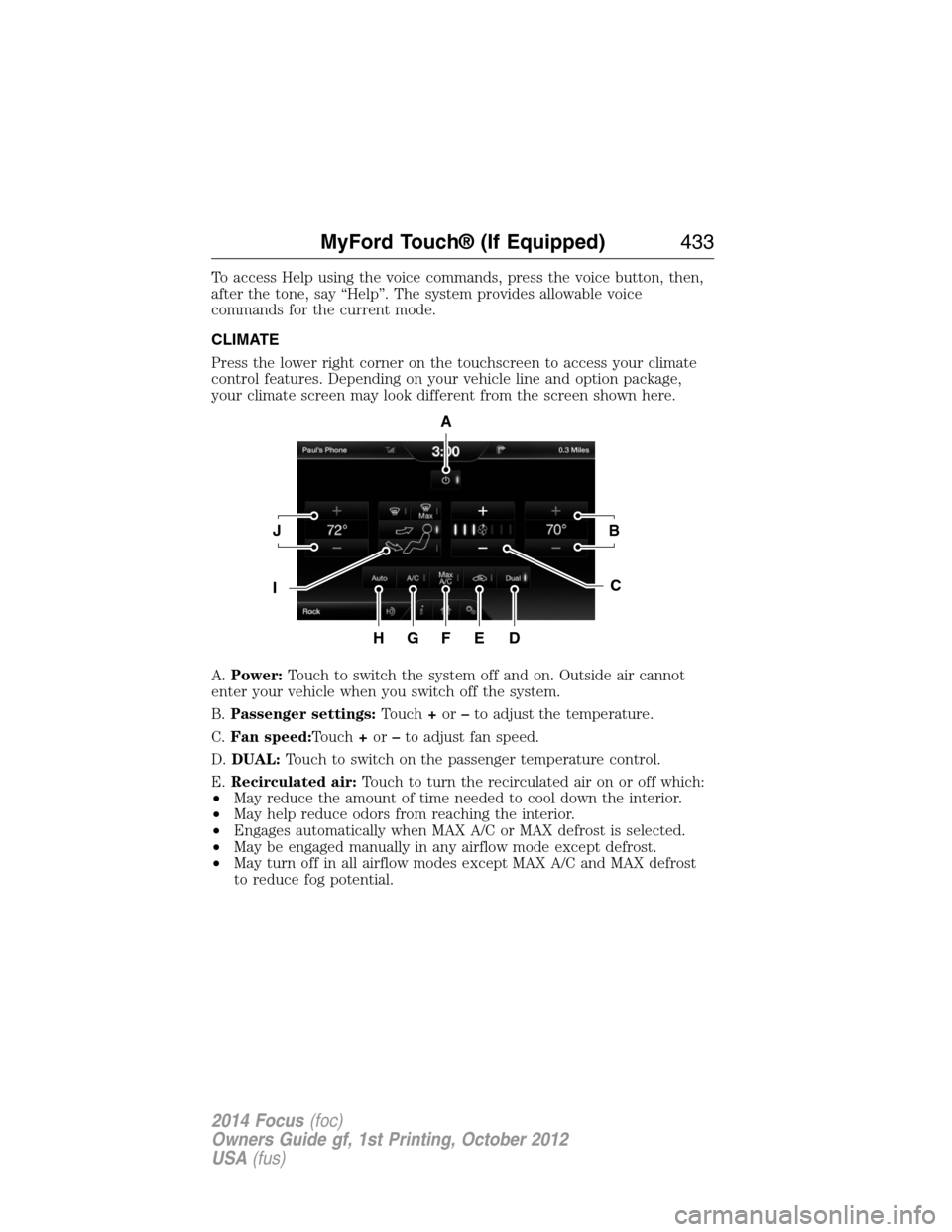
CLIMATE
Press the lower right corner on the touchscreen to access your climate
control features. Depending on your vehicle line and option package,
your climate screen may look different from the screen shown here.
A.Power:Touch to switch the system off and on. Outside air cannot
enter your vehicle when you switch off the system.
B.Passenger settings:Touch+or–to adjust the temperature.
C.Fan speed:Touch+or–to adjust fan speed.
D.DUAL:Touch to switch on the passenger temperature control.
E.Recirculated air:Touch to turn the recirculated air on or off which:
•May reduce the amount of time needed to cool down the interior.
•May help reduce odors from reaching the interior.
•Engages automatically when MAX A/C or MAX defrost is selected.
•May be engaged manually in any airflow mode except defrost.
•May turn off in all airflow modes except MAX A/C and MAX defrost
to reduce fog potential.
A
JB
IC
HGFED
MyFord Touch® (If Equipped)433
2014 Focus(foc)
Owners Guide gf, 1st Printing, October 2012
USA(fus)
Page 436 of 492
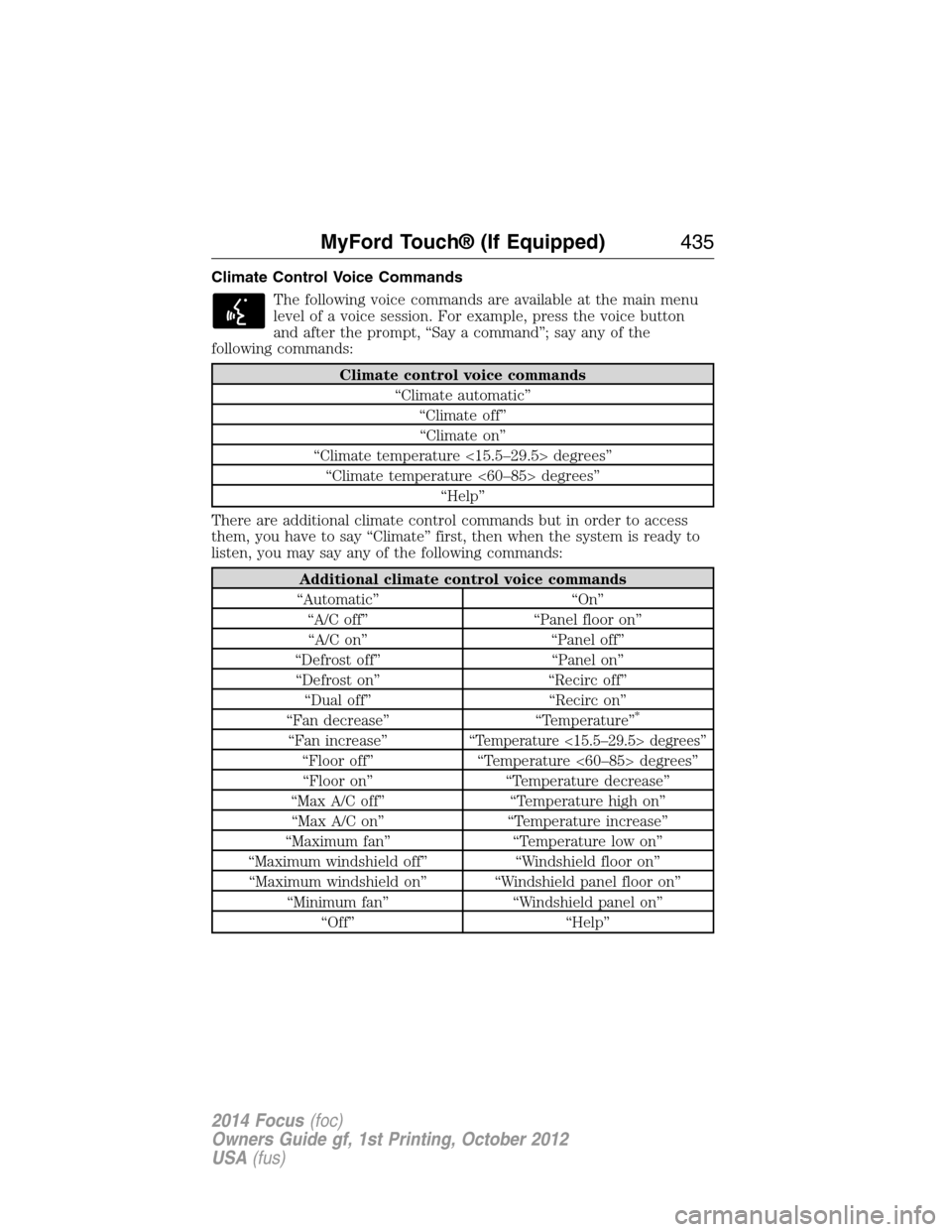
Climate Control Voice Commands
The following voice commands are available at the main menu
level of a voice session. For example, press the voice button
and after the prompt, “Say a command”; say any of the
following commands:
Climate control voice commands
“Climate automatic”
“Climate off”
“Climate on”
“Climate temperature <15.5–29.5> degrees”
“Climate temperature <60–85> degrees”
“Help”
There are additional climate control commands but in order to access
them, you have to say “Climate” first, then when the system is ready to
listen, you may say any of the following commands:
Additional climate control voice commands
“Automatic” “On”
“A/C off” “Panel floor on”
“A/C on” “Panel off”
“Defrost off” “Panel on”
“Defrost on” “Recirc off”
“Dual off” “Recirc on”
“Fan decrease” “Temperature”
*
“Fan increase”“Temperature <15.5–29.5> degrees”
“Floor off” “Temperature <60–85> degrees”
“Floor on” “Temperature decrease”
“Max A/C off” “Temperature high on”
“Max A/C on” “Temperature increase”
“Maximum fan” “Temperature low on”
“Maximum windshield off” “Windshield floor on”
“Maximum windshield on” “Windshield panel floor on”
“Minimum fan” “Windshield panel on”
“Off” “Help”
MyFord Touch® (If Equipped)435
2014 Focus(foc)
Owners Guide gf, 1st Printing, October 2012
USA(fus)
Page 486 of 492
Brakes ........................................171
anti-lock ...................................172
anti-lock brake system (ABS)
warning light ...........................172
brake warning light ................172
fluid, checking and adding ....239
fluid, refill capacities ..............290
fluid, specifications .................290
lubricant specifications ..........290
parking ....................................172
shift interlock ..........................165
C
Capacities for refilling fluids ....290
Cargo area shade ......................193
CD ......................303, 305, 307, 309
CD player ..........................301, 394
CD voice commands .................395
Cell phone use ............................16
Changing a tire .........................283
Changing the air filter ..............244
Child safety restraints ................28
Child safety seats
attaching with tether straps ....30
automatic locking mode
(retractor) .................................37
LATCH .......................................28
Child safety seats - booster
seats .............................................22
Cleaning the touchscreen ........374
Cleaning your vehicle ...............253
engine compartment ..............256
instrument panel ....................258
interior .....................................257
plastic parts ............................255
washing ....................................253
waxing .....................................255wheels ......................................259
wiper blades ............................256
Climate control (see Air
conditioning or Heating) ..........122
Climate voice commands .........435
Clock ..................303, 305, 307, 422
Clutch
operation while driving ..........167
recommended shift speeds ....168
Console ......................................143
overhead ..................................143
Coolant ......................................235
checking and adding ..............235
refill capacities ........................290
specifications ..........................290
Customer Assistance ................208
Ford Extended Service
Plan ..........................................298
Getting roadside assistance ...208
Getting the service you
need .........................................213
Ordering additional owner’s
literature .................................219
Utilizing the
Mediation/Arbitration
Program ...................................217
D
Defrost ...............................122, 124
rear window ............................129
Dipstick
automatic transmission
fluid ..........................................238
engine oil .................................234
Display settings .........................423
Driving under special
conditions ..................................167
through water .........................205
Dual automatic temperature
control (DATC) .........................124
Index485
2014 Focus(foc)
Owners Guide gf, 1st Printing, October 2012
USA(fus)
Page 491 of 492
Steering wheel ............................84
controls ......................................85
tilting .........................................84
Supplemental Restraint System
(SRS) (see airbags) ....................46
Supported media file types.......399
Supported player, media formats
and metadata information
.........399
SYNC® AppLink™ ...................351
SYNC® customer
support ..............................324, 375
SYNC® Services ................348, 410
System settings .........................425
T
Temperature control (see
Climate control) ........122, 124, 433
Text messaging .................336, 406
Text messaging (sending,
downloading, deleting) .....336, 338
Tilt steering wheel ......................84
Tires ...........................263–264, 283
alignment ................................277
care ..........................................263
changing ..........................283, 285
checking the pressure ............273
inflating ...................................271
label .........................................270
replacing ..................................275
rotating ....................................277
safety practices .......................276
sidewall information ...............266
snow tires and chains ............278
spare tire .................................283
terminology .............................265
tire grades ...............................264
treadwear ........................264, 273Touchscreen features
(climate) ....................................433
Towing .......................................200
recreational towing .................201
trailer towing ..........................200
wrecker ....................................200
Traction control ........................173
Traffic, Directions and
Information ................................348
Traffic preferences ...................440
Transmission
brake-shift interlock (BSI) ....165
fluid, checking and adding
(automatic) .............................238
fluid, checking and adding
(manual) .................................238
fluid, refill capacities ..............290
lubricant specifications ..........290
Trunk .....................................79–80
remote release ..........................74
Turn signal ..................................93
U
USB port ....................321–322, 396
Using privacy mode ..................332
V
Vehicle health report ........346, 420
Vehicle Identification
Number (VIN) ...........................294
Vehicle loading ..........................194
Ventilating your vehicle ...........149
Voice commands in media
mode ..........................................354
490Index
2014 Focus(foc)
Owners Guide gf, 1st Printing, October 2012
USA(fus)