remote control FORD FOCUS 2014 3.G Owner's Manual
[x] Cancel search | Manufacturer: FORD, Model Year: 2014, Model line: FOCUS, Model: FORD FOCUS 2014 3.GPages: 492, PDF Size: 7.2 MB
Page 112 of 492
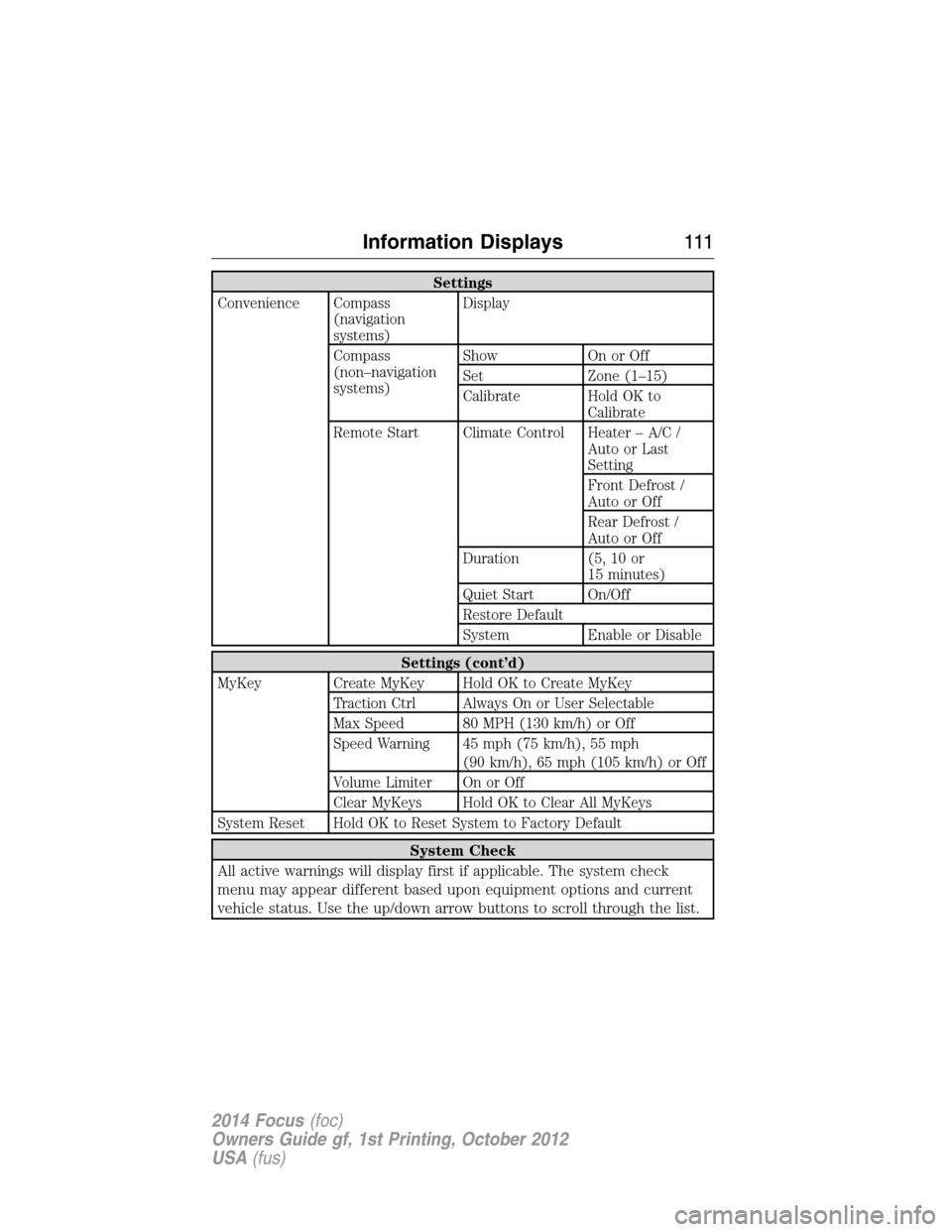
Settings
Convenience Compass
(navigation
systems)Display
Compass
(non–navigation
systems)Show On or Off
Set Zone (1–15)
Calibrate Hold OK to
Calibrate
Remote Start Climate Control Heater – A/C /
Auto or Last
Setting
Front Defrost /
Auto or Off
Rear Defrost /
Auto or Off
Duration (5, 10 or
15 minutes)
Quiet Start On/Off
Restore Default
System Enable or Disable
Settings (cont’d)
MyKey Create MyKey Hold OK to Create MyKey
Traction Ctrl Always On or User Selectable
Max Speed 80 MPH (130 km/h) or Off
Speed Warning 45 mph (75 km/h), 55 mph
(90 km/h), 65 mph (105 km/h) or Off
Volume Limiter On or Off
Clear MyKeys Hold OK to Clear All MyKeys
System Reset Hold OK to Reset System to Factory Default
System Check
All active warnings will display first if applicable. The system check
menu may appear different based upon equipment options and current
vehicle status. Use the up/down arrow buttons to scroll through the list.
Information Displays111
2014 Focus(foc)
Owners Guide gf, 1st Printing, October 2012
USA(fus)
Page 131 of 492
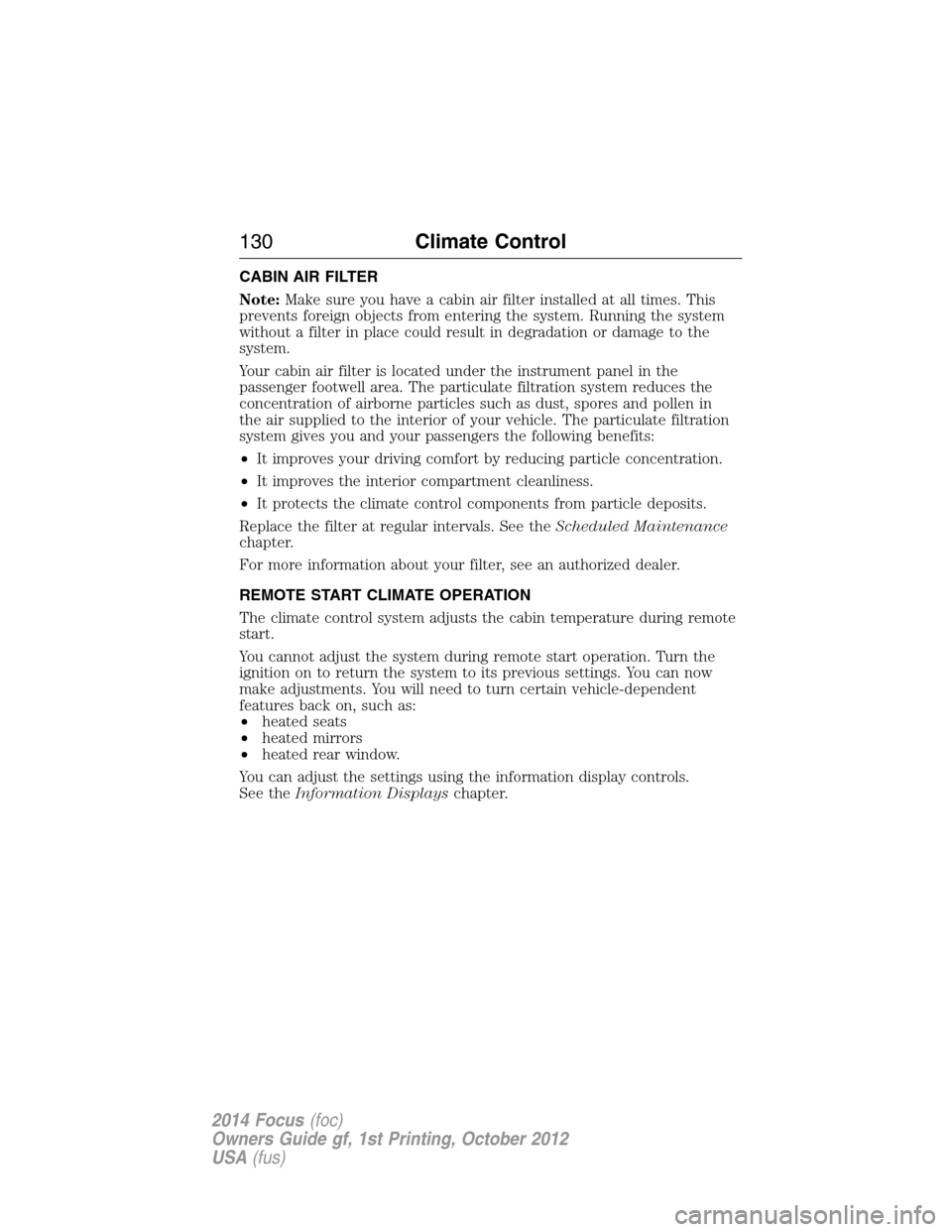
CABIN AIR FILTER
Note:Make sure you have a cabin air filter installed at all times. This
prevents foreign objects from entering the system. Running the system
without a filter in place could result in degradation or damage to the
system.
Your cabin air filter is located under the instrument panel in the
passenger footwell area. The particulate filtration system reduces the
concentration of airborne particles such as dust, spores and pollen in
the air supplied to the interior of your vehicle. The particulate filtration
system gives you and your passengers the following benefits:
•It improves your driving comfort by reducing particle concentration.
•It improves the interior compartment cleanliness.
•It protects the climate control components from particle deposits.
Replace the filter at regular intervals. See theScheduled Maintenance
chapter.
For more information about your filter, see an authorized dealer.
REMOTE START CLIMATE OPERATION
The climate control system adjusts the cabin temperature during remote
start.
You cannot adjust the system during remote start operation. Turn the
ignition on to return the system to its previous settings. You can now
make adjustments. You will need to turn certain vehicle-dependent
features back on, such as:
•heated seats
•heated mirrors
•heated rear window.
You can adjust the settings using the information display controls.
See theInformation Displayschapter.
130Climate Control
2014 Focus(foc)
Owners Guide gf, 1st Printing, October 2012
USA(fus)
Page 132 of 492
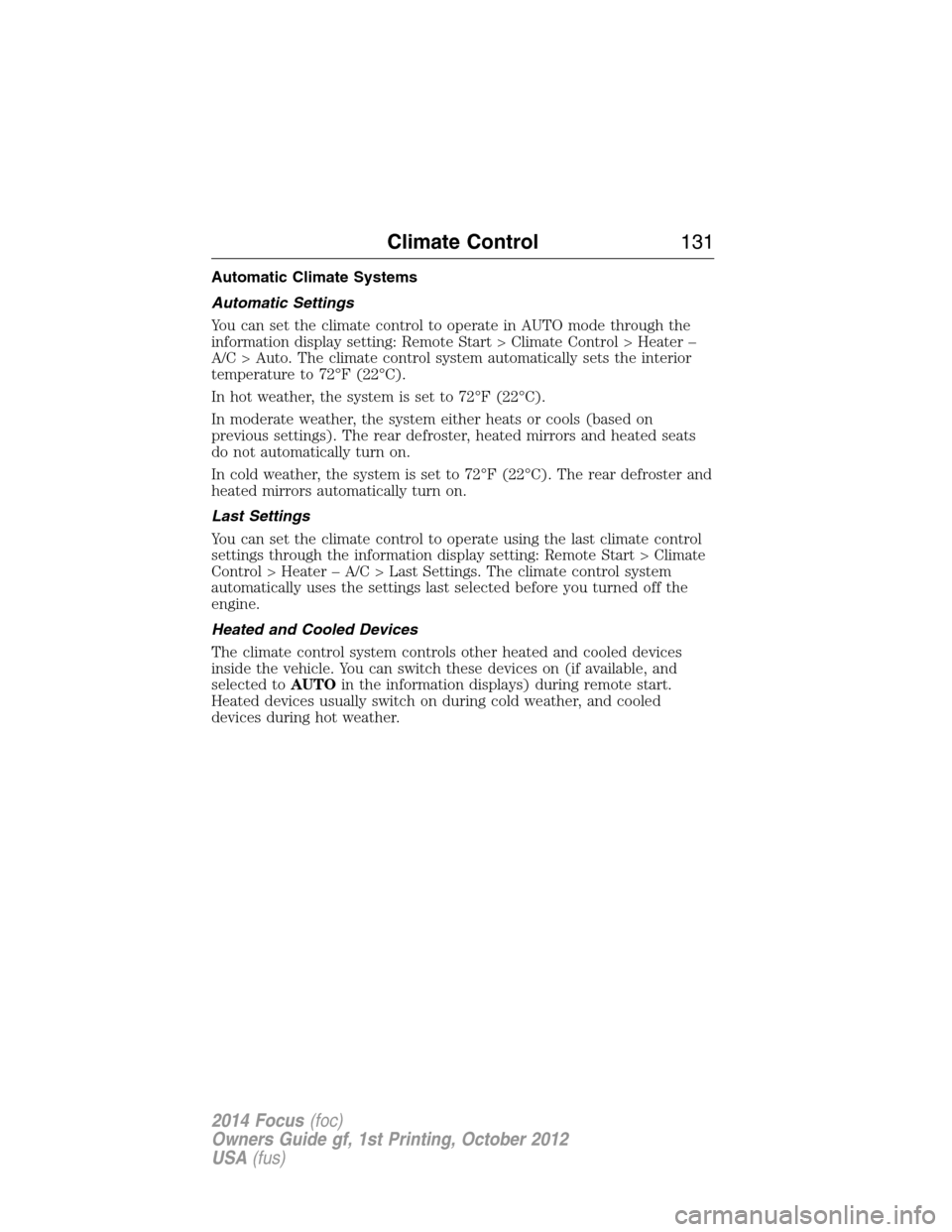
Automatic Climate Systems
Automatic Settings
You can set the climate control to operate in AUTO mode through the
information display setting: Remote Start > Climate Control > Heater –
A/C > Auto. The climate control system automatically sets the interior
temperature to 72°F (22°C).
In hot weather, the system is set to 72°F (22°C).
In moderate weather, the system either heats or cools (based on
previous settings). The rear defroster, heated mirrors and heated seats
do not automatically turn on.
In cold weather, the system is set to 72°F (22°C). The rear defroster and
heated mirrors automatically turn on.
Last Settings
You can set the climate control to operate using the last climate control
settings through the information display setting: Remote Start > Climate
Control > Heater – A/C > Last Settings. The climate control system
automatically uses the settings last selected before you turned off the
engine.
Heated and Cooled Devices
The climate control system controls other heated and cooled devices
inside the vehicle. You can switch these devices on (if available, and
selected toAUTOin the information displays) during remote start.
Heated devices usually switch on during cold weather, and cooled
devices during hot weather.
Climate Control131
2014 Focus(foc)
Owners Guide gf, 1st Printing, October 2012
USA(fus)
Page 146 of 492
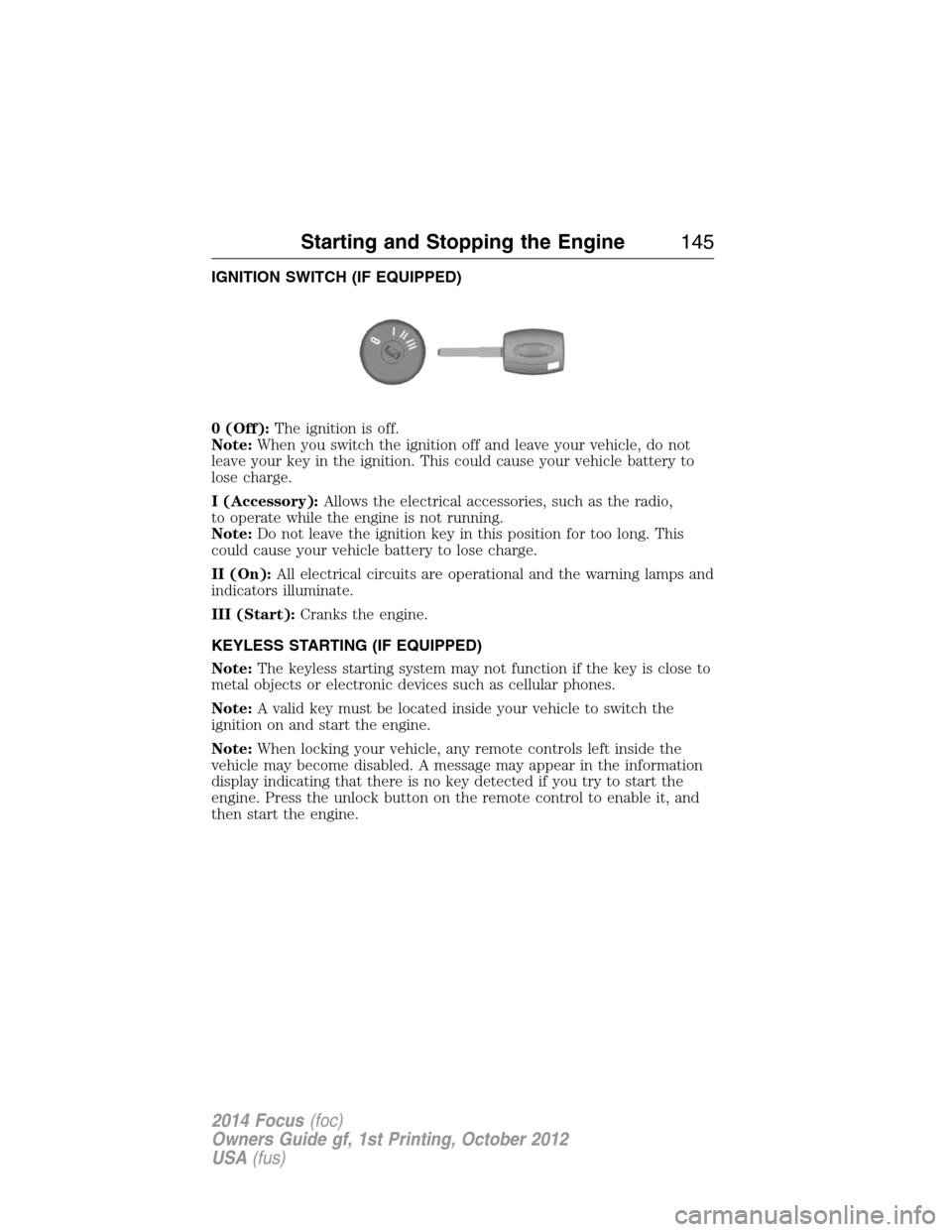
IGNITION SWITCH (IF EQUIPPED)
0 (Off):The ignition is off.
Note:When you switch the ignition off and leave your vehicle, do not
leave your key in the ignition. This could cause your vehicle battery to
lose charge.
I (Accessory):Allows the electrical accessories, such as the radio,
to operate while the engine is not running.
Note:Do not leave the ignition key in this position for too long. This
could cause your vehicle battery to lose charge.
II (On):All electrical circuits are operational and the warning lamps and
indicators illuminate.
III (Start):Cranks the engine.
KEYLESS STARTING (IF EQUIPPED)
Note:The keyless starting system may not function if the key is close to
metal objects or electronic devices such as cellular phones.
Note:A valid key must be located inside your vehicle to switch the
ignition on and start the engine.
Note:When locking your vehicle, any remote controls left inside the
vehicle may become disabled. A message may appear in the information
display indicating that there is no key detected if you try to start the
engine. Press the unlock button on the remote control to enable it, and
then start the engine.
Starting and Stopping the Engine145
2014 Focus(foc)
Owners Guide gf, 1st Printing, October 2012
USA(fus)
Page 276 of 492
Tire Replacement Requirements
WARNING:Only use replacement tires and wheels that are the
same size, load index, speed rating and type (such as P-metric
versus LT-metric or all-season versus all-terrain) as those originally
provided by Ford. The recommended tire and wheel size may be found on
either the Safety Compliance Certification Label (affixed to either the door
hinge pillar, door-latch post, or the door edge that meets the door-latch
post, next to the driver’s seating position), or the Tire Label which is
located on the B-Pillar or edge of the driver’s door. If this information is
not found on these labels, then you should contact your authorized dealer
as soon as possible. Use of any tire or wheel not recommended by Ford
can affect the safety and performance of your vehicle, which could result
in an increased risk of loss of vehicle control, vehicle rollover, personal
injury and death. Additionally the use of non-recommended tires and
wheels could cause steering, suspension, axle, transfer case or power
transfer unit failure. If you have questions regarding tire replacement,
contact your authorized dealer as soon as possible.
WARNING:To reduce the risk of serious injury, when mounting
replacement tires and wheels, you should not exceed the maximum
pressure indicated on the sidewall of the tire to set the beads without
additional precautions listed below. If the beads do not seat at the
maximum pressure indicated, re-lubricate and try again.
When inflating the tire for mounting pressures up to 20 psi (1.38 bar)
greater than the maximum pressure on the tire sidewall, the following
precautions must be taken to protect the person mounting the tire:
1. Make sure that you have the correct tire and wheel size.
2. Lubricate the tire bead and wheel bead seat area again.
3. Stand at a minimum of 12 feet (3.66 meters) away from the tire
wheel assembly.
4. Use both eye and ear protection.
For a mounting pressure more than 20 psi (1.38 bar) greater than the
maximum pressure, a Ford dealer or other tire service professional
should do the mounting.
Always inflate steel carcass tires with a remote air fill with the person
inflating standing at a minimum of 12 feet (3.66 meters) away from the
tire wheel assembly.
Your vehicle is equipped with tires designed to provide a safe ride and
handling capability.
Wheels and Tires275
2014 Focus(foc)
Owners Guide gf, 1st Printing, October 2012
USA(fus)
Page 491 of 492
Steering wheel ............................84
controls ......................................85
tilting .........................................84
Supplemental Restraint System
(SRS) (see airbags) ....................46
Supported media file types.......399
Supported player, media formats
and metadata information
.........399
SYNC® AppLink™ ...................351
SYNC® customer
support ..............................324, 375
SYNC® Services ................348, 410
System settings .........................425
T
Temperature control (see
Climate control) ........122, 124, 433
Text messaging .................336, 406
Text messaging (sending,
downloading, deleting) .....336, 338
Tilt steering wheel ......................84
Tires ...........................263–264, 283
alignment ................................277
care ..........................................263
changing ..........................283, 285
checking the pressure ............273
inflating ...................................271
label .........................................270
replacing ..................................275
rotating ....................................277
safety practices .......................276
sidewall information ...............266
snow tires and chains ............278
spare tire .................................283
terminology .............................265
tire grades ...............................264
treadwear ........................264, 273Touchscreen features
(climate) ....................................433
Towing .......................................200
recreational towing .................201
trailer towing ..........................200
wrecker ....................................200
Traction control ........................173
Traffic, Directions and
Information ................................348
Traffic preferences ...................440
Transmission
brake-shift interlock (BSI) ....165
fluid, checking and adding
(automatic) .............................238
fluid, checking and adding
(manual) .................................238
fluid, refill capacities ..............290
lubricant specifications ..........290
Trunk .....................................79–80
remote release ..........................74
Turn signal ..................................93
U
USB port ....................321–322, 396
Using privacy mode ..................332
V
Vehicle health report ........346, 420
Vehicle Identification
Number (VIN) ...........................294
Vehicle loading ..........................194
Ventilating your vehicle ...........149
Voice commands in media
mode ..........................................354
490Index
2014 Focus(foc)
Owners Guide gf, 1st Printing, October 2012
USA(fus)