AUX FORD FOCUS 2015 3.G User Guide
[x] Cancel search | Manufacturer: FORD, Model Year: 2015, Model line: FOCUS, Model: FORD FOCUS 2015 3.GPages: 453, PDF Size: 5.32 MB
Page 366 of 453
WARNINGS
Store the portable music player in a
secure location, such as the center
console or the glove box, when your
vehicle is moving. Hard objects may
become projectiles in a crash or sudden
stop, which may increase the risk of serious
injury. The audio extension cable must be
long enough to allow the portable music
player to be safely stored while your
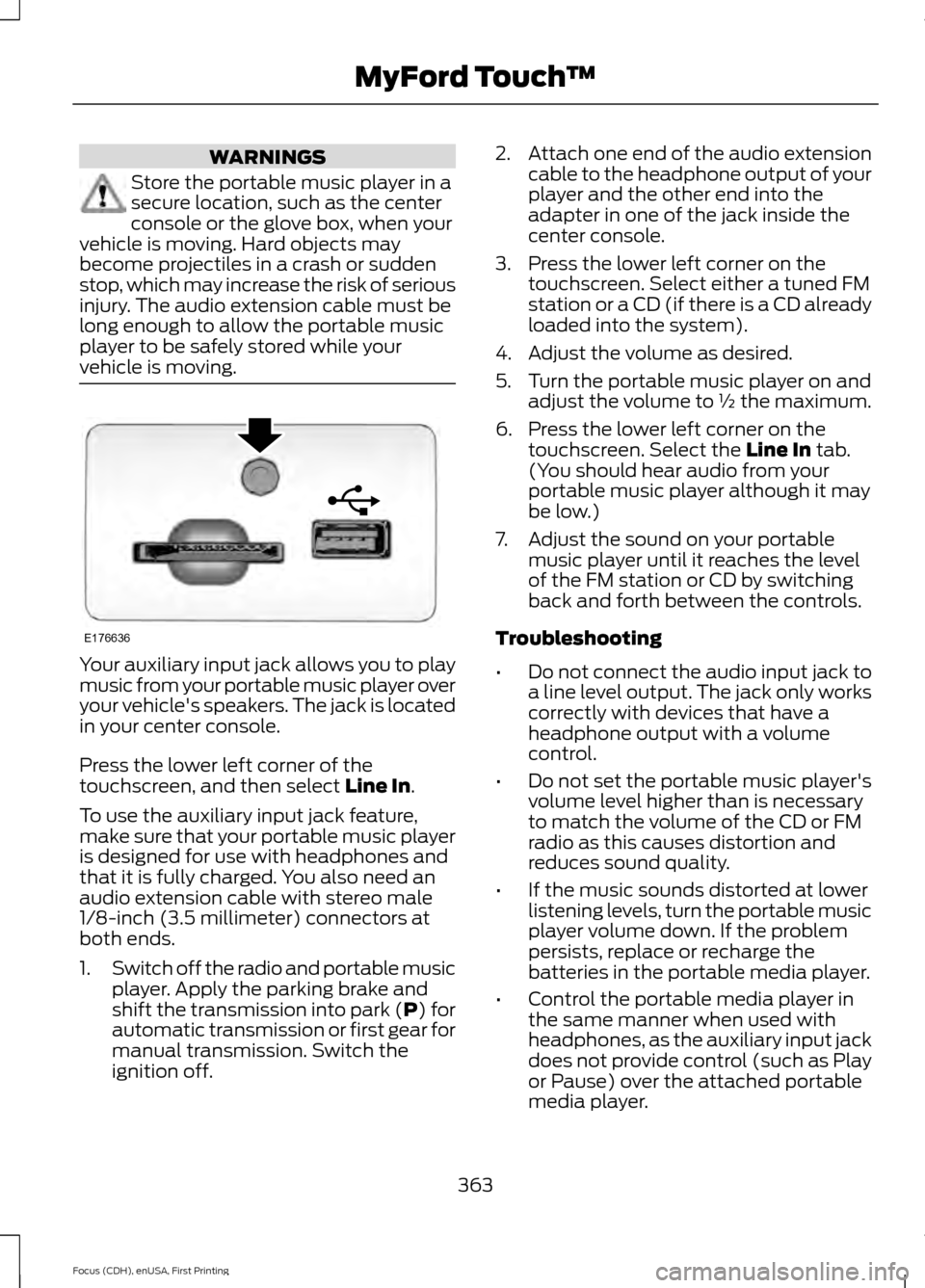
vehicle is moving. Your auxiliary input jack allows you to play
music from your portable music player over
your vehicle's speakers. The jack is located
in your center console.
Press the lower left corner of the
touchscreen, and then select Line In.
To use the auxiliary input jack feature,
make sure that your portable music player
is designed for use with headphones and
that it is fully charged. You also need an
audio extension cable with stereo male
1/8-inch (3.5 millimeter) connectors at
both ends.
1. Switch off the radio and portable music
player. Apply the parking brake and
shift the transmission into park (P) for
automatic transmission or first gear for
manual transmission. Switch the
ignition off. 2.
Attach one end of the audio extension
cable to the headphone output of your
player and the other end into the
adapter in one of the jack inside the
center console.
3. Press the lower left corner on the touchscreen. Select either a tuned FM
station or a CD (if there is a CD already
loaded into the system).
4. Adjust the volume as desired.
5. Turn the portable music player on and adjust the volume to ½ the maximum.
6. Press the lower left corner on the touchscreen. Select the
Line In tab.
(You should hear audio from your
portable music player although it may
be low.)
7. Adjust the sound on your portable music player until it reaches the level
of the FM station or CD by switching
back and forth between the controls.
Troubleshooting
• Do not connect the audio input jack to
a line level output. The jack only works
correctly with devices that have a
headphone output with a volume
control.
• Do not set the portable music player's
volume level higher than is necessary
to match the volume of the CD or FM
radio as this causes distortion and
reduces sound quality.
• If the music sounds distorted at lower
listening levels, turn the portable music
player volume down. If the problem
persists, replace or recharge the
batteries in the portable media player.
• Control the portable media player in
the same manner when used with
headphones, as the auxiliary input jack
does not provide control (such as Play
or Pause) over the attached portable
media player.
363
Focus (CDH), enUSA, First Printing MyFord Touch
™E176636
Page 444 of 453
A
A/C
See: Climate Control......................................... 107
About This Manual...........................................7
ABS See: Brakes........................................................... 148
ABS driving hints See: Hints on Driving With Anti-Lock
Brakes................................................................ 148
Accessories....................................................399 Exterior style........................................................ 399
Interior style......................................................... 399
Lifestyle................................................................. 399
Peace of mind..................................................... 399
Accessories See: Replacement Parts
Recommendation............................................. 11
Active Park Assist.........................................155 Automatic Steering into Parking
Space................................................................. 156
Deactivating the Park Assist Feature..........157
Troubleshooting the System.......................... 158
Using Active Park Assist................................... 156
Adjusting the Headlamps........................220 Horizontal Aim Adjustment............................ 221
Vertical Aim Adjustment................................ 220
Adjusting the Steering Wheel....................74
Airbag Disposal
...............................................49
Air Conditioning See: Climate Control......................................... 107
Alarm See: Anti-Theft Alarm......................................... 73
Ambient Lighting...........................................84
Anti-Theft Alarm............................................73 Arming the Alarm................................................. 73
Disarming the Alarm........................................... 73
Appendices....................................................401
At a Glance........................................................15
Audible Warnings and Indicators
.............94
Headlamps On Warning Chime...................... 95
Key in Ignition Warning Chime........................ 94
Keyless Warning Alert........................................ 95
Parking Brake On Warning Chime.................95
Audio Control
...................................................74
Type One.................................................................. 74
Type Two.................................................................. 75
Audio Input Jack..........................................288 Audio System
................................................273
General Information.......................................... 273
Audio Unit - Vehicles With: Satellite Radio..............................................................277
Audio Unit - Vehicles With: Sony Audio System.........................................................280
Menu Structure.................................................... 281
Audio Unit - Vehicles With: SYNC..........275
Autolamps........................................................79 Windshield Wiper Activated
Headlamps........................................................80
Automatic Climate Control......................108 Dual Zone Temperature Control.................... 110
Single Zone Temperature Control...............109
Temperature Control........................................ 109
Automatic High Beam Control..................81 Activating the System........................................ 82
Manually Overriding the System.................... 82
Automatic Transmission............................143 Automatic Transmission Adaptive
Learning............................................................. 147
Brake-Shift Interlock......................................... 145
If Your Vehicle Gets Stuck In Mud or Snow................................................................... 147
SelectShift Automatic ™
Transmission................................................... 144
Understanding the Positions of Your Automatic Transmission............................. 144
Automatic Transmission Fluid Check.............................................................216
Auto-Start-Stop...........................................130 Limitations of Use.............................................. 130
Switching the System On and Off.................131
Using Auto Start-Stop With a Manual Transmission................................................... 130
Using Auto Start-Stop With an Automatic Transmission................................................... 130
Auxiliary Power Points................................120 12 Volt DC Power Point..................................... 120
Location................................................................. 120
B
Blind Spot Information System...............167 Blind Spot Information System (BLIS ™)
with Cross Traffic Alert................................. 167
Bonnet Lock See: Opening and Closing the Hood...........210
441
Focus (CDH), enUSA, First Printing Index