AUX FORD FOCUS 2015 3.G Owners Manual
[x] Cancel search | Manufacturer: FORD, Model Year: 2015, Model line: FOCUS, Model: FORD FOCUS 2015 3.GPages: 453, PDF Size: 5.32 MB
Page 5 of 453
Security
Passive Anti-Theft System..........................71
Anti-Theft Alarm............................................73
Steering Wheel
Adjusting the Steering Wheel....................74
Audio Control...................................................74
Voice Control
....................................................75
Cruise Control
..................................................75
Information Display Control
.......................76
Heated Steering Wheel................................76
Wipers and Washers
Windshield Wipers
.........................................77
Windshield Washers
......................................77
Rear Window Wiper and Washers...........78
Lighting
Lighting Control
..............................................79
Autolamps........................................................79
Instrument Lighting Dimmer.....................80
Headlamp Exit Delay
...................................80
Daytime Running Lamps..............................81
Automatic High Beam Control..................81
Front Fog Lamps............................................83
Direction Indicators.......................................83
Interior Lamps
.................................................83
Ambient Lighting...........................................84
Windows and Mirrors
Power Windows.............................................85
Exterior Mirrors................................................86
Interior Mirror
....................................................87
Sun Visors.........................................................88
Moonroof..........................................................88
Instrument Cluster
Gauges...............................................................90
Warning Lamps and Indicators.................92 Audible Warnings and Indicators.............94
Information Displays
General Information.....................................96
Trip Computer
.................................................98
Information Messages
.................................99
Climate Control
Manual Climate Control.............................107
Automatic Climate Control......................108
Hints on Controlling the Interior Climate..........................................................110
Heated Windows and Mirrors
....................112
Cabin Air Filter
.................................................112
Remote Start
...................................................113
Seats
Sitting in the Correct Position...................114
Head Restraints..............................................114
Manual Seats..................................................116
Power Seats
....................................................116
Rear Seats
.........................................................117
Heated Seats
..................................................119
Auxiliary Power Points
Auxiliary Power Points................................120
Storage Compartments
Center Console
...............................................121
Overhead Console.........................................121
Starting and Stopping the Engine
General Information.....................................122
Ignition Switch...............................................122
Keyless Starting
.............................................122
Starting a Gasoline Engine
........................125
Engine Block Heater
....................................128
2
Focus (CDH), enUSA, First Printing Table of Contents
Page 21 of 453
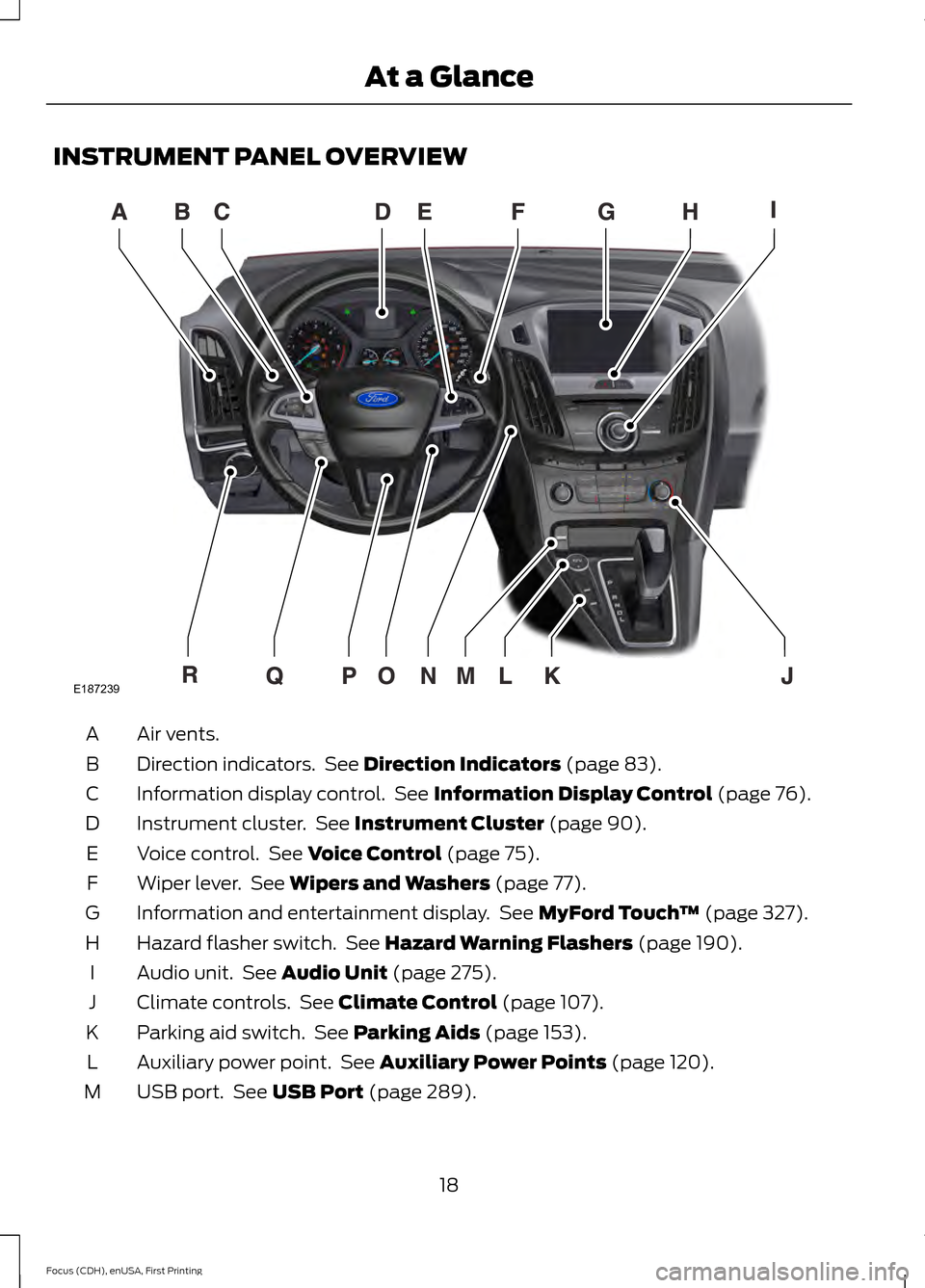
INSTRUMENT PANEL OVERVIEW
Air vents.
A
Direction indicators. See Direction Indicators (page 83).
B
Information display control. See
Information Display Control (page 76).
C
Instrument cluster. See
Instrument Cluster (page 90).
D
Voice control. See
Voice Control (page 75).
E
Wiper lever. See
Wipers and Washers (page 77).
F
Information and entertainment display. See
MyFord Touch ™ (page 327).
G
Hazard flasher switch. See
Hazard Warning Flashers (page 190).
H
Audio unit. See
Audio Unit (page 275).
I
Climate controls. See
Climate Control (page 107).
J
Parking aid switch. See
Parking Aids (page 153).
K
Auxiliary power point. See
Auxiliary Power Points (page 120).
L
USB port. See
USB Port (page 289).
M
18
Focus (CDH), enUSA, First Printing At a GlanceE187239
Page 123 of 453
12 Volt DC Power Point
WARNING
Do not plug optional electrical
accessories into the cigar lighter
socket. Incorrect use of the lighter
can cause damage not covered by your
warranty, and can result in fire or serious
injury. Note:
After starting your vehicle, you can
use the socket to power 12-volt appliances
with a maximum current rating of 20 amps.
After you switch your vehicle off, the power
supply works only for a maximum of 30
minutes.
Note: Do not insert objects other than an
accessory plug into the power point. This
damages the outlet and can blow the fuse.
Note: Do not hang any type of accessory or
accessory bracket from the plug.
Note: Do not use the power point over the
vehicle capacity of 12 volt DC 180 watt or a
fuse may blow.
Note: Do not use the power point for
operating a cigar lighter element.
Note: Incorrect use of the power point can
cause damage not covered by your
warranty.
Note: Always keep the power point caps
closed when not in use.
Run the vehicle for full capacity use of the
power point.
To prevent the battery from running out of
charge:
• Do not use the power point longer than
necessary after switching the vehicle
off.
• Do not leave devices plugged in
overnight or when your vehicle is in park
(P) for extended periods. Location
You may find power points in the following
locations:
•
On the center console
• In the center console.
120
Focus (CDH), enUSA, First Printing Auxiliary Power Points
Page 124 of 453
CENTER CONSOLE
Stow items in the cupholder carefully as
items may become loose during hard
braking, acceleration or crashes, including
hot drinks which may spill.
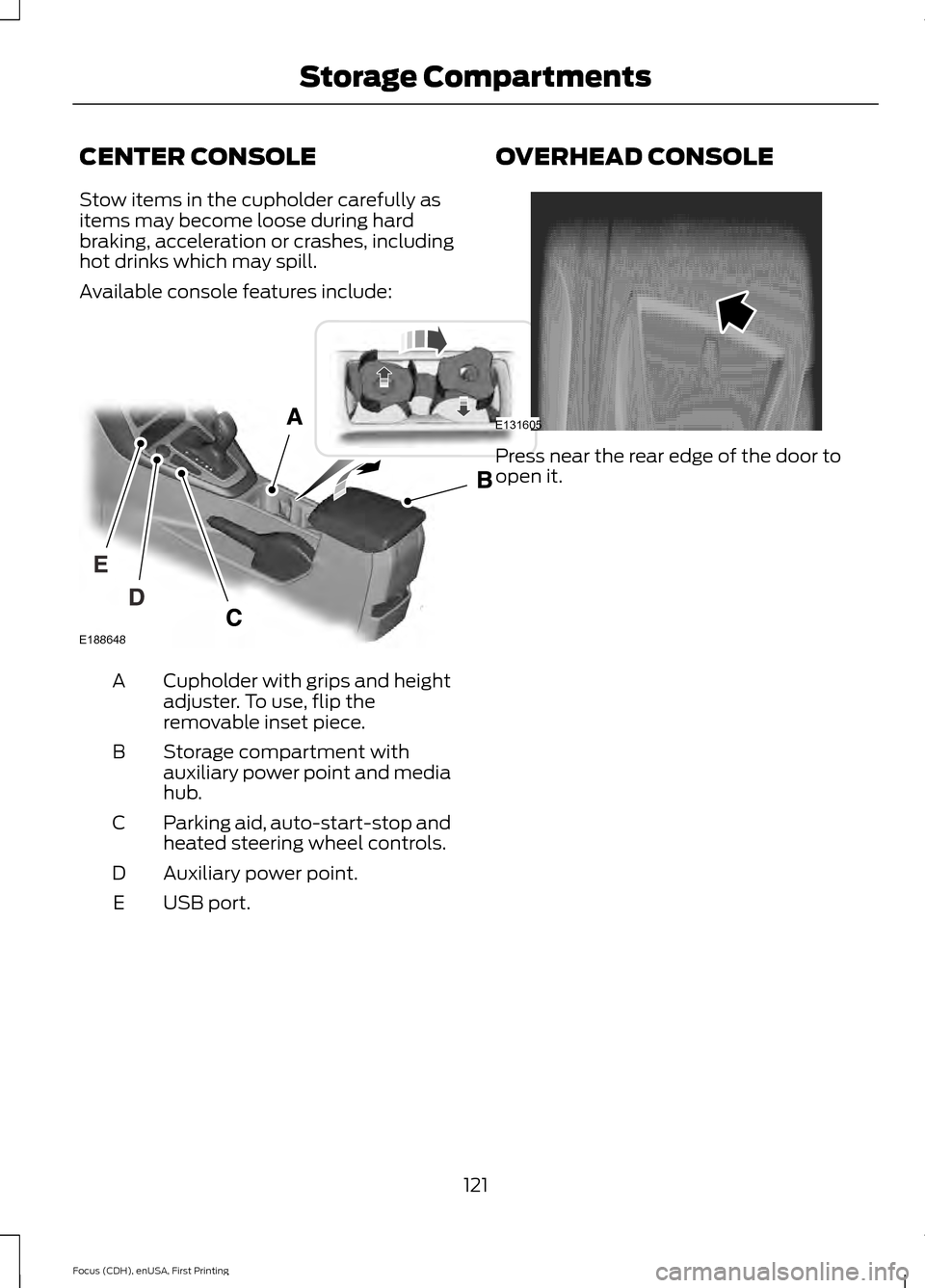
Available console features include:
Cupholder with grips and height
adjuster. To use, flip the
removable inset piece.
A
Storage compartment with
auxiliary power point and media
hub.
B
Parking aid, auto-start-stop and
heated steering wheel controls.
C
Auxiliary power point.
D
USB port.
E OVERHEAD CONSOLE Press near the rear edge of the door to
open it.
121
Focus (CDH), enUSA, First Printing Storage CompartmentsE188648 E131605
Page 209 of 453
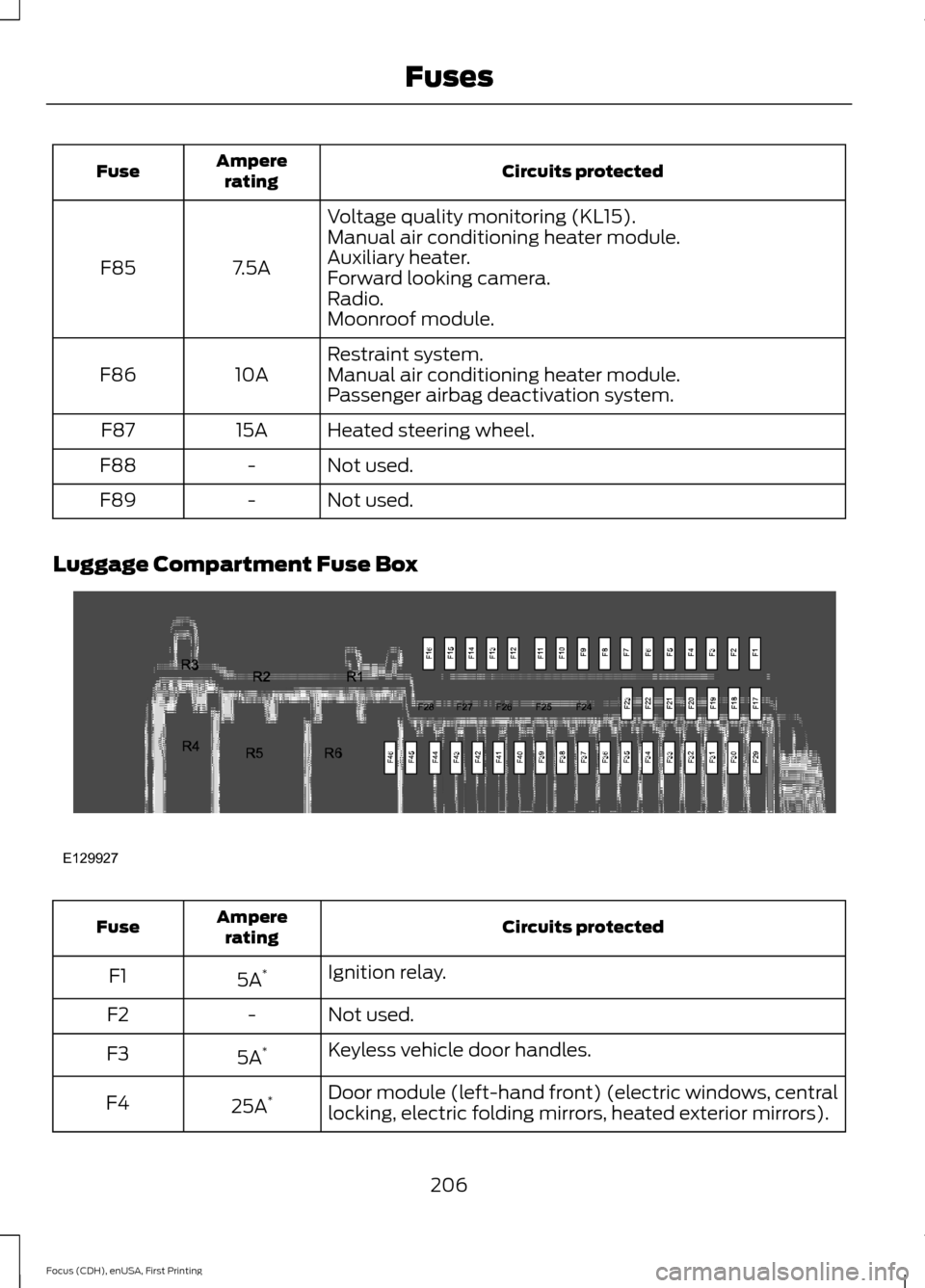
Circuits protected
Ampere
rating
Fuse
Voltage quality monitoring (KL15).
7.5A
F85 Manual air conditioning heater module.
Auxiliary heater.
Forward looking camera.
Radio.
Moonroof module.
Restraint system.
10A
F86 Manual air conditioning heater module.
Passenger airbag deactivation system.
Heated steering wheel.
15A
F87
Not used.
-
F88
Not used.
-
F89
Luggage Compartment Fuse Box Circuits protected
Ampere
rating
Fuse
Ignition relay.
5A *
F1
Not used.
-
F2
Keyless vehicle door handles.
5A *
F3
Door module (left-hand front) (electric windows, central
locking, electric folding mirrors, heated exterior mirrors).
25A *
F4
206
Focus (CDH), enUSA, First Printing FusesE129927
Page 265 of 453
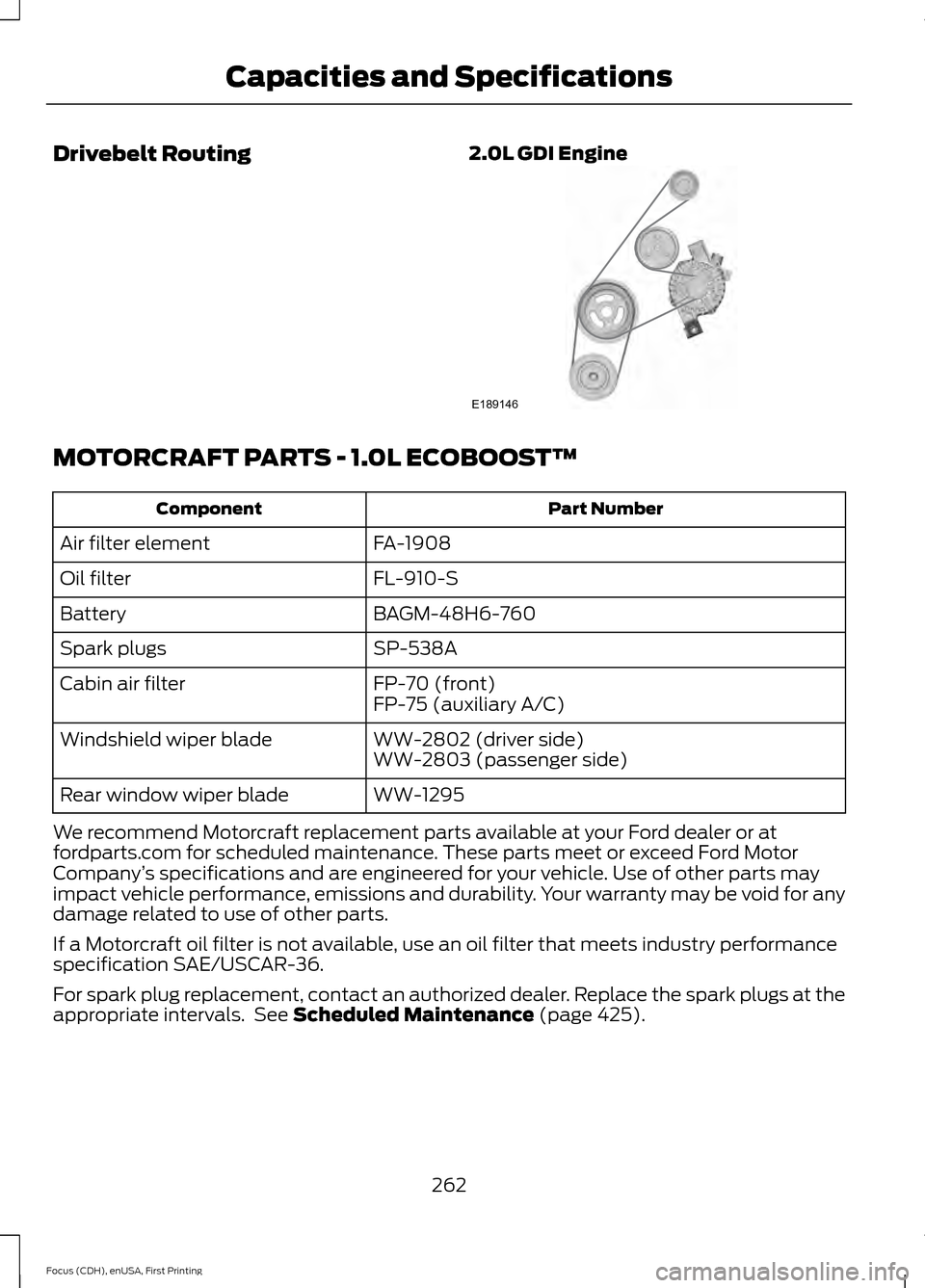
Drivebelt Routing
2.0L GDI EngineMOTORCRAFT PARTS - 1.0L ECOBOOST™
Part Number
Component
FA-1908
Air filter element
FL-910-S
Oil filter
BAGM-48H6-760
Battery
SP-538A
Spark plugs
FP-70 (front)
Cabin air filter
FP-75 (auxiliary A/C)
WW-2802 (driver side)
Windshield wiper blade
WW-2803 (passenger side)
WW-1295
Rear window wiper blade
We recommend Motorcraft replacement parts available at your Ford dealer or at
fordparts.com for scheduled maintenance. These parts meet or exceed Ford Motor
Company ’s specifications and are engineered for your vehicle. Use of other parts may
impact vehicle performance, emissions and durability. Your warranty may be void for any
damage related to use of other parts.
If a Motorcraft oil filter is not available, use an oil filter that meets industry performance
specification SAE/USCAR-36.
For spark plug replacement, contact an authorized dealer. Replace the spark plugs at the
appropriate intervals. See Scheduled Maintenance (page 425).
262
Focus (CDH), enUSA, First Printing Capacities and SpecificationsE189146
Page 292 of 453
5. Switch your portable music player on
and adjust its volume to half its
maximum level.
6. Press AUX or MEDIA until LINE or
LINE IN appears in the display. You
should hear music from your device
even if it is low.
7. Adjust the volume on your portable music player until it reaches the volume
level of the FM station or CD. Do this
by switching back and forth between
the AUX and FM or CD controls.
USB PORT The USB port is located in the center
console.
The USB port allows you to plug in media
playing devices, memory sticks and charge
devices (if supported). See SYNC™
(page
290).
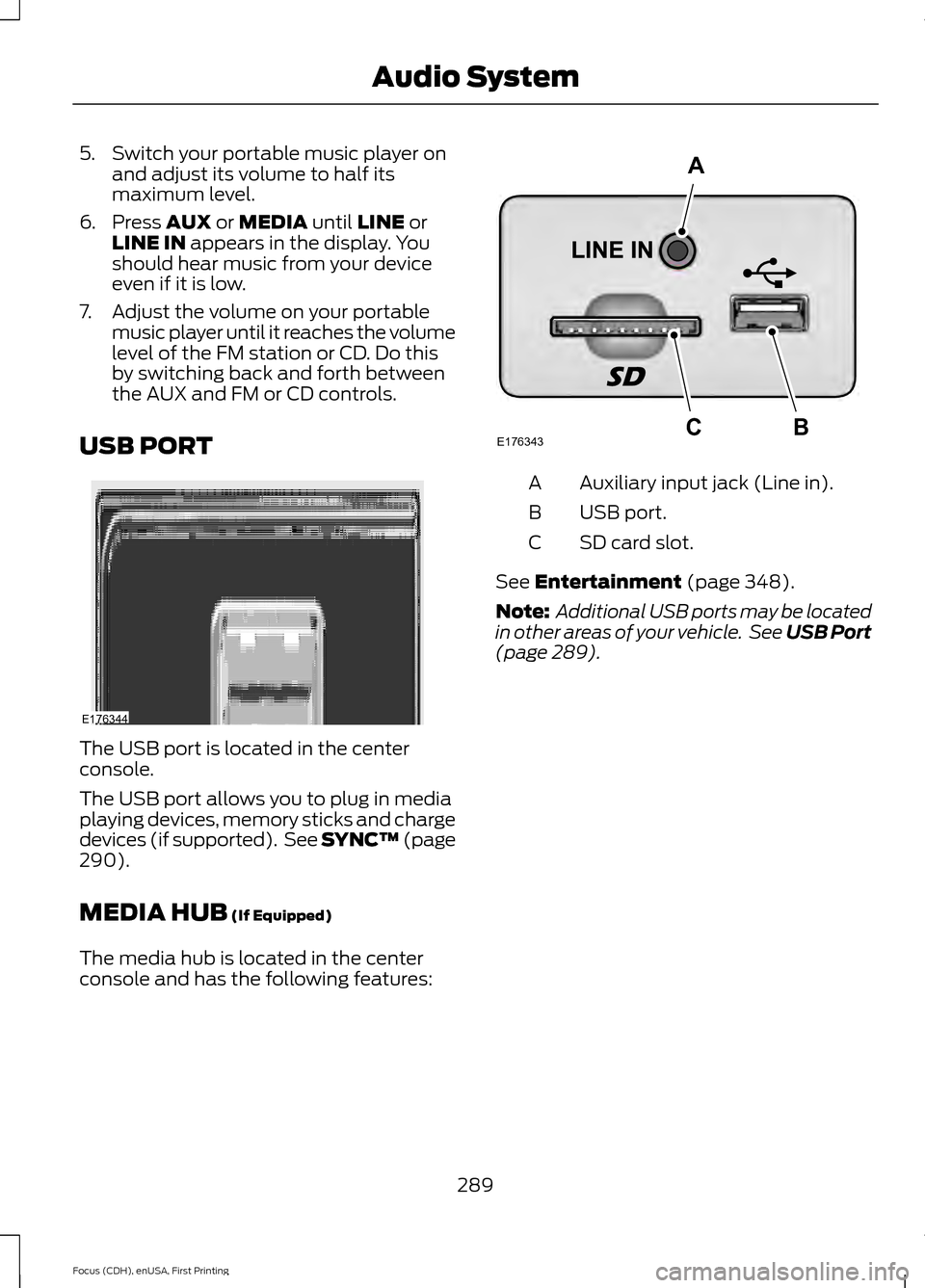
MEDIA HUB
(If Equipped)
The media hub is located in the center
console and has the following features: Auxiliary input jack (Line in).
A
USB port.
B
SD card slot.
C
See
Entertainment (page 348).
Note: Additional USB ports may be located
in other areas of your vehicle. See
USB Port
(page 289).
289
Focus (CDH), enUSA, First Printing Audio SystemE176344 E176343
A
BC
Page 314 of 453
To Connect Using Voice Commands
Plug the device into your vehicle's USB
port.
Press the voice button and when
prompted, say:
Action and Descrip-
tion
Voice Command
You can now play
music by saying any
of the appropriate
voice commands.
See the media
voice commands.
(USB [stick] | iPod
| MP3 [player])
Words in brackets [ ] are optional and do
not have to be spoken for the system to
understand the command. For example,
for where (USB [stick] | iPOD | MP3
[player]) appears, you can say USB or USB
stick. To Connect Using the System Menu
1.
Plug the device into your vehicle's USB
port.
2. Press the AUX button until an
"initializing" message appears in the
display. Depending on how many
media files are on your connected
device, an indexing message may
appear in the display. When indexing
is complete, the screen returns to the
playback menu.
To view USB content select: Description and Action
Message
Depending on how many media files are on your connected
device, an indexing message may appear in the display. When
indexing is complete, the screen returns to the playback menu.
Browse USB
You can browse the files on the USB
device in categories. Choose from the
following: Message
Play all
Playlists
Songs
Artists
Albums Message
Genres
Browse USB
Reset USB
Exit
Media Voice Commands Press the voice button and when
prompted say:
311
Focus (CDH), enUSA, First Printing SYNC™E142599
Page 317 of 453
![FORD FOCUS 2015 3.G Owners Manual Voice Command
pause
play
[play] next track
[play] previous track
Media Menu Features
The media menu allows you to select how
to play your music (such as by artist, genre,
shuffle or repeat), find simi](/img/11/5150/w960_5150-316.png "FORD FOCUS 2015 3.G Owners Manual Voice Command
pause
play
[play] next track
[play] previous track
Media Menu Features
The media menu allows you to select how
to play your music (such as by artist, genre,
shuffle or repeat), find simi")
Voice Command
pause
play
[play] next track
[play] previous track
Media Menu Features
The media menu allows you to select how
to play your music (such as by artist, genre,
shuffle or repeat), find similar music or
reset the index of your USB devices. Press AUX to select USB playback. Description and Action
Message
This will enter the media menu.
Options
Then any of the following: Description and Action
Message
Choose to shuffle or repeat your music. Once you make your
choice, it remains on until you switch it off.
Shuffle
Choose to shuffle or repeat your music. Once you make your
choice, it remains on until you switch it off.
Repeat track
You can play similar types of music to the current playlist
from the USB port. The system uses the metadata informa-
tion of each track to compile a playlist. The system then
creates a new list of similar tracks and then begins playing.
Each track must have the metadata tags populated for this
feature. With certain playing devices, if your metadata tags
Similar music
are not populated, the tracks will not be available in voice
recognition, the play menu or this option. However, if you
place these tracks onto your playing device in mass storage
device mode they are available in voice recognition, the play
menu or this option. The system places unknowns into any
unpopulated metadata tag.
Resets the USB index. After the new indexing is complete
you can choose what to play from the USB song library.
Reset SYNC USB
314
Focus (CDH), enUSA, First Printing SYNC™
Page 320 of 453
Line In Audio
To access the Line In audio source,
start a voice session and say:
Voice Command
((line | AV | audio video) in | AUX | audio
video)
Bluetooth Devices and System
Settings
You can access these menus using the
audio display. See Using SYNC™ With
Your Phone (page 294).
Voice Commands for Audio
Sources
Your voice system allows you to change
audio sources with a simple voice
command. Press the voice button and when
prompted say:
Voice Command
Audio
Below are a few examples of voice
commands you can use.
[tune [to]] AM
[tune [to]] AM1
AM autoset
AM2
Bluetooth (audio | stereo)
(disc | CD [player]) play
[tune [to]] FM
[tune [to]] FM1 Voice Command
FM autoset
FM2
((line | AV | audio video) in | AUX | audio
video)
Radio *
SAT <1-3>
*
Sirius
(USB [stick] | iPod | MP3 [player])
((who's | who is) this | who plays this |
(what's | what is) playing [now] | (what
| which) (song | track | artist) is this |
(who's | who is) playing | (what's | what
is) this)
help
* If equipped.
Radio Voice Commands If you are listening to the radio,
press the voice button, and then
say any of the commands in the
following table.
If you are not listening to the radio,
press the voice button and, after the
tone, say: Voice Command
Radio
You can then say any of the following
commands.
[tune [to]] AM
[tune [to]] AM1
AM autoset
317
Focus (CDH), enUSA, First Printing SYNC™E142599 E142599