key battery FORD FOCUS 2015 3.G User Guide
[x] Cancel search | Manufacturer: FORD, Model Year: 2015, Model line: FOCUS, Model: FORD FOCUS 2015 3.GPages: 453, PDF Size: 5.32 MB
Page 126 of 453
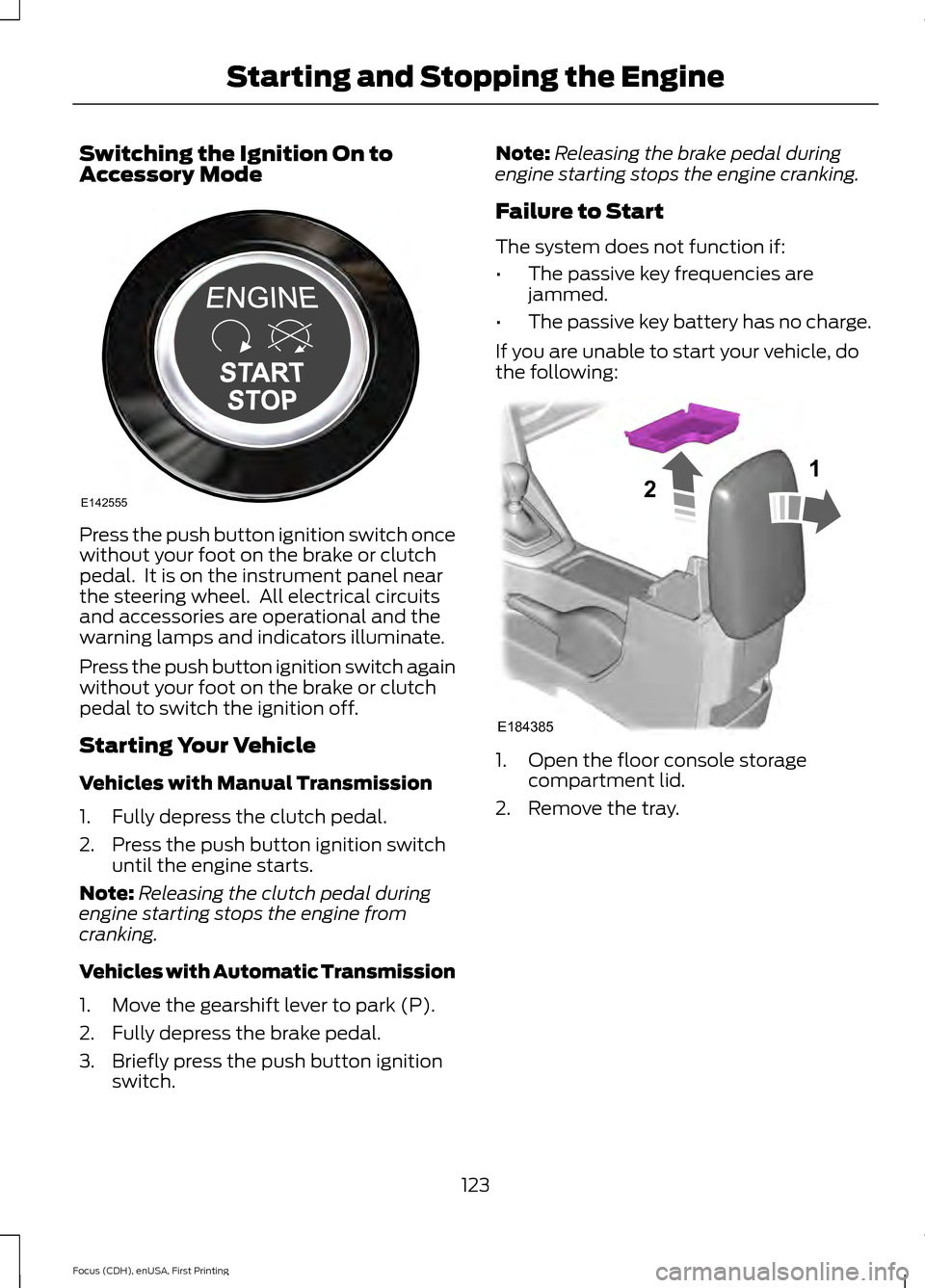
Switching the Ignition On to
Accessory Mode
Press the push button ignition switch once
without your foot on the brake or clutch
pedal. It is on the instrument panel near
the steering wheel. All electrical circuits
and accessories are operational and the
warning lamps and indicators illuminate.
Press the push button ignition switch again
without your foot on the brake or clutch
pedal to switch the ignition off.
Starting Your Vehicle
Vehicles with Manual Transmission
1. Fully depress the clutch pedal.
2. Press the push button ignition switch
until the engine starts.
Note: Releasing the clutch pedal during
engine starting stops the engine from
cranking.
Vehicles with Automatic Transmission
1. Move the gearshift lever to park (P).
2. Fully depress the brake pedal.
3. Briefly press the push button ignition switch. Note:
Releasing the brake pedal during
engine starting stops the engine cranking.
Failure to Start
The system does not function if:
• The passive key frequencies are
jammed.
• The passive key battery has no charge.
If you are unable to start your vehicle, do
the following: 1. Open the floor console storage
compartment lid.
2. Remove the tray.
123
Focus (CDH), enUSA, First Printing Starting and Stopping the EngineE142555 E184385
21
Page 128 of 453
Once your vehicle starts, it remains running
until you press the push button ignition
switch, even if your vehicle does not detect
a valid passive key. If you open and close
a door while your vehicle is running, the
system searches for a valid passive key.
You cannot start your vehicle if you open
the driver door and the system does not
detect a valid passive key.
STARTING A GASOLINE
ENGINE
When you start the engine, the idle speed
increases. This helps to warm up the
engine. If the engine idle speed does not
slow down automatically, have your
vehicle checked by an authorized dealer.
Note:
You can crank the engine for a total
of 60 seconds without the engine starting
before the starting system temporarily
disables. The 60 seconds does not have to
be all at once. For example, if you crank the
engine three times for 20 seconds each
time, without the engine starting, you
reached the 60-second time limit. A
message appears in the information display
alerting you that you exceeded the cranking
time. You cannot attempt to start the engine
for at least 15 minutes. After 15 minutes, you
are limited to a 15-second engine cranking
time. You need to wait 60 minutes before
you can crank the engine for 60 seconds
again.
Before starting your vehicle, check the
following:
• Make sure all occupants have fastened
their safety belts.
• Make sure the headlamps and
electrical accessories are off.
• Make sure the parking brake is on. •
Make sure the transmission is in park
(P).
• Switch the ignition key to position II. If
your vehicle is equipped with a keyless
ignition, see the following instructions.
Vehicles with an Ignition Key
Note: Do not touch the accelerator pedal.
1. Fully press the brake pedal. If your vehicle is equipped with a manual
transmission, fully press the clutch
pedal.
2. Turn the key to position
III to start the
engine.
Note: The engine may continue cranking
for up to 15 seconds or until it starts.
Note: If you cannot start the engine on the
first try, wait for a short period and try again.
Vehicles with Keyless Start
Note: Do not touch the accelerator pedal.
Note: You must have your intelligent access
key in your vehicle in order to shift the
transmission out of park (P).
1. Fully depress the brake pedal.
2. Press the push button ignition switch.
The system does not function if:
• The passive key frequencies are
jammed.
• The key battery has no charge.
If you are unable to start your vehicle, do
the following:
125
Focus (CDH), enUSA, First Printing Starting and Stopping the Engine
Page 129 of 453
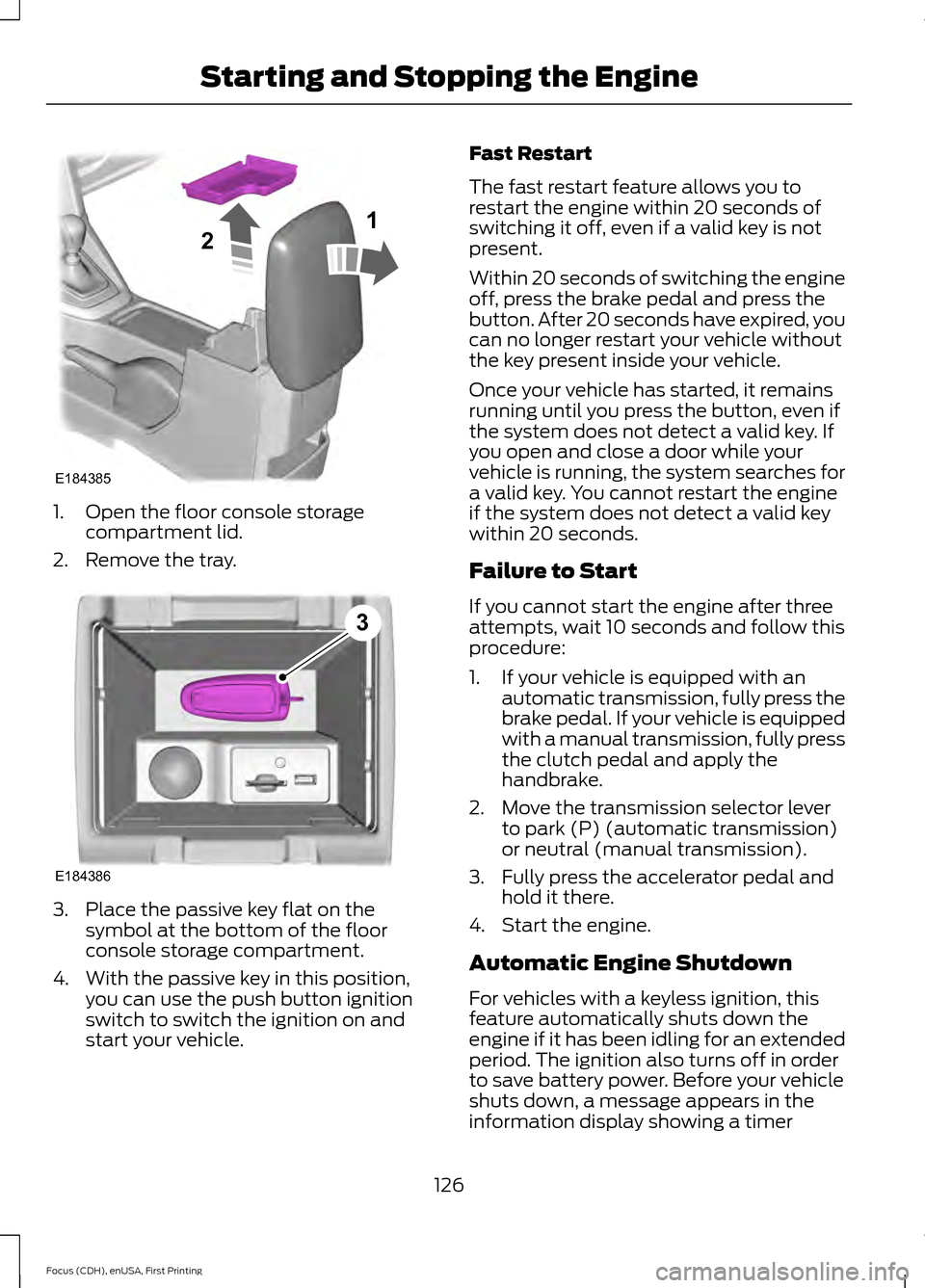
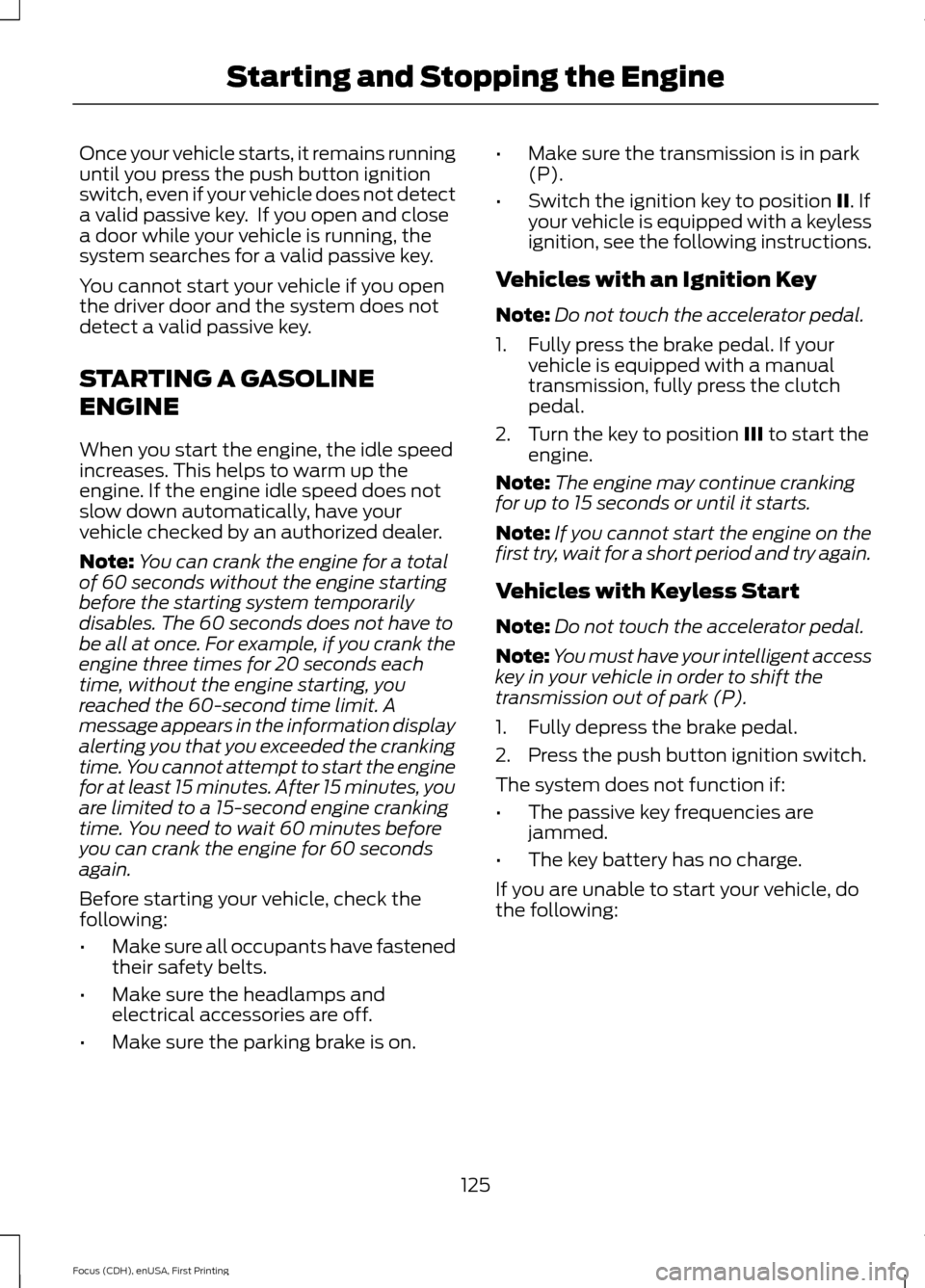
1. Open the floor console storage
compartment lid.
2. Remove the tray. 3. Place the passive key flat on the
symbol at the bottom of the floor
console storage compartment.
4. With the passive key in this position, you can use the push button ignition
switch to switch the ignition on and
start your vehicle. Fast Restart
The fast restart feature allows you to
restart the engine within 20 seconds of
switching it off, even if a valid key is not
present.
Within 20 seconds of switching the engine
off, press the brake pedal and press the
button. After 20 seconds have expired, you
can no longer restart your vehicle without
the key present inside your vehicle.
Once your vehicle has started, it remains
running until you press the button, even if
the system does not detect a valid key. If
you open and close a door while your
vehicle is running, the system searches for
a valid key. You cannot restart the engine
if the system does not detect a valid key
within 20 seconds.
Failure to Start
If you cannot start the engine after three
attempts, wait 10 seconds and follow this
procedure:
1. If your vehicle is equipped with an
automatic transmission, fully press the
brake pedal. If your vehicle is equipped
with a manual transmission, fully press
the clutch pedal and apply the
handbrake.
2. Move the transmission selector lever to park (P) (automatic transmission)
or neutral (manual transmission).
3. Fully press the accelerator pedal and hold it there.
4. Start the engine.
Automatic Engine Shutdown
For vehicles with a keyless ignition, this
feature automatically shuts down the
engine if it has been idling for an extended
period. The ignition also turns off in order
to save battery power. Before your vehicle
shuts down, a message appears in the
information display showing a timer
126
Focus (CDH), enUSA, First Printing Starting and Stopping the EngineE184385
21 E184386
3
Page 143 of 453
If the vehicle
’s engine or transmission has
just been serviced, or the battery has
recently run down or been replaced, the
OBD-II system may indicate that the
vehicle is not ready for I/M testing. To
determine if the vehicle is ready for I/M
testing, turn the ignition key to the on
position for 15 seconds without cranking
the engine. If the service engine soon
indicator blinks eight times, it means that
the vehicle is not ready for I/M testing; if
the service engine soon indicator stays on
solid, it means that the vehicle is ready for
I/M testing.
The OBD-II system monitors the emission
control system during normal driving. A
complete check may take several days. If
the vehicle is not ready for I/M testing, you
may need to perform the following driving
cycle consisting of mixed city and highway
driving:
Drive on an expressway or highway for a
steady 15 minutes, followed by 20 minutes
of stop-and-go driving with at least four
30-second idle periods.
Allow the vehicle to sit for at least eight
hours without starting the engine. Then,
start the engine and complete the above
driving cycle. The engine must warm up to
its normal operating temperature. Once
started, do not turn off the engine until the
above driving cycle is complete. If the
vehicle is still not ready for I/M testing, you
will have to repeat the above driving cycle.
140
Focus (CDH), enUSA, First Printing Fuel and Refueling
Page 187 of 453
1. Tow only with your vehicle in the
forward direction. Release the parking
brake.
2. Place the transmission in neutral.
Note: The maximum towing speed is
70 mph (112 km/h).
TOWING THE VEHICLE ON
FOUR WHEELS - AUTOMATIC
TRANSMISSION
Emergency Towing WARNING
If your vehicle has a steering wheel
lock make sure the ignition is in the
accessory or on position when being
towed. You can flat-tow (all wheels on the
ground, regardless of the powertrain and
transmission configuration) your disabled
vehicle (without access to wheel dollies,
car-hauling trailer, or flatbed transport
vehicle) under the following conditions:
•
Your vehicle is facing forward so you
tow it in a forward direction.
• You place the transmission in neutral
(N). If you cannot place the
transmission in neutral (N), you may
need to override it. See Transmission
(page
141).
• Maximum speed is 35 mph (56 km/h).
• Maximum distance is
50 mi (80 km).
Recreational Towing
Vehicles with an Ignition Key
Note: Put your climate control system in
recirculated air mode to prevent exhaust
fumes from entering the vehicle. See
Climate Control
(page 107). Note:
There must be battery power to move
the transmission's internal components to
neutral (N) properly in Step 3. In addition,
moving the gearshift to the neutral (N)
position without first switching the ignition
to the on position limits the towing
capability to
35 mph (56 km/h) and 50 mi
(80 km).
1. Release the parking brake.
2. Switch the ignition to the on position.
3. Press the brake pedal, and then move the gearshift to the neutral (N)
position.
4. Wait for a message in the information and entertainment display indicating
that the transmission is ready, and then
switch off the ignition and release the
brake pedal.
5. Disconnect the negative (black) cable from the battery. See
Changing the
12V Battery (page 217).
Note: The anti-theft system does not work
until you reconnect the battery cable.
Note: The maximum towing speed is
70 mph (112 km/h)
.
Note: There is no limit on towing distance.
After towing, start the engine within 15
minutes of reconnecting the battery cable.
See Changing the 12V Battery (page
217).
Vehicles with Keyless Start
Note: Put your climate control system in
recirculated air mode to prevent exhaust
fumes from entering the vehicle. See
Climate Control
(page 107).
Note: There must be battery power to move
the transmission's internal components to
neutral (N) properly in Step 3. In addition,
moving the gearshift to the neutral (N)
position without first switching the ignition
to the on position limits the towing
capability to
35 mph (56 km/h) and 50 mi
(80 km).
184
Focus (CDH), enUSA, First Printing Towing
Page 188 of 453
1. Release the parking brake.
2. Switch on the ignition by pressing the
keyless start button, but do not apply
the brake pedal.
3. Press the brake pedal, and then move the gearshift to the neutral (N)
position. Release the brake pedal.
4. Wait for a message indicating that the transmission is ready in the information
and entertainment display, and then
switch off the ignition by pressing the
keyless start button.
5. Disconnect the negative (black) cable from the battery. You need the door
key to lock and unlock doors when the
battery cable is disconnected. See
Changing the 12V Battery (page 217).
Note: The anti-theft system does not work
until you reconnect the battery cable.
Note: The maximum towing speed is
70 mph (112 km/h).
Note: There is no limit on towing distance.
After towing, start the engine within 15
minutes of reconnecting the battery cable.
See Changing the 12V Battery (page
217).
185
Focus (CDH), enUSA, First Printing Towing
Page 192 of 453
ROADSIDE ASSISTANCE
Vehicles Sold in the United States:
Getting Roadside Assistance
To fully assist you should you have a
vehicle concern, Ford Motor Company
offers a complimentary roadside
assistance program. This program is
separate from the New Vehicle Limited
Warranty. The service is available:
•
24 hours a day, seven days a week.
• For the coverage period listed on the
Roadside Assistance Card included in
your Owner's Manual portfolio.
Roadside Assistance covers:
• A flat tire change with a good spare, if
provided with the vehicle (except
vehicles supplied with a tire inflation
kit).
• Battery jump start.
• Lock-out assistance (key replacement
cost is the customer's responsibility).
• Fuel delivery — independent service
contractors, if not prohibited by state,
local or municipal law, shall deliver up
to 2 gal (7.6 L) of gasoline or 5 gal
(18.9 L) of diesel fuel to a disabled
vehicle. Roadside Assistance limits fuel
delivery service to two no-charge
occurrences within a 12-month period.
• Winch out — available within
100 ft
(30.5 m) of a paved or county
maintained road, no recoveries.
• Towing — independent service
contractors, if not prohibited by state,
local or municipal law, shall tow Ford
eligible vehicles to an authorized dealer
within
35 mi (56 km) of the
disablement location or to the nearest authorized dealer. If a member
requests a tow to an authorized dealer
that is more than
35 mi (56 km) from
the disablement location, the member
shall be responsible for any mileage
costs in excess of
35 mi (56 km).
Roadside Assistance includes up to $200
for a towed trailer if the disabled eligible
vehicle requires service at the nearest
authorized dealer. If the towing vehicle is
operational but the trailer is not, then the
trailer does not qualify for any roadside
services.
Vehicles Sold in the United States:
Using Roadside Assistance
Complete the roadside assistance
identification card and place it in your
wallet for quick reference. This card is in
the owner's information portfolio in the
glove compartment.
United States Ford vehicle customers who
require Roadside Assistance, call
1-800-241-3673.
If you need to arrange roadside assistance
for yourself, Ford Motor Company
reimburses a reasonable amount for
towing to the nearest dealership within
35 mi (56 km)
. To obtain reimbursement
information, United States Ford vehicle
customers call 1-800-241-3673.
Customers need to submit their original
receipts.
Vehicles Sold in Canada: Getting
Roadside Assistance
Canadian customers who require roadside
assistance, call 1-800-665-2006.
Vehicles Sold in Canada: Using
Roadside Assistance
For your convenience, you may complete
the roadside assistance identification card
found in the centerfold of your warranty
guide and retain for future reference.
189
Focus (CDH), enUSA, First Printing Roadside Emergencies
Page 193 of 453
Canadian roadside coverage and benefits
may differ from the U.S. coverage. If you
require more information, please refer to
the coverage section of your warranty
guide, call us in Canada at
1-800-665-2006, or visit our website at
www.ford.ca.
Sykes Assistance Services Corporation
administers the Roadside Assistance
program. You must receive covered
services in Canada or the continental
United States. Coverage extends to
vehicles that use public, non-seasonal,
annually traveled roadways. Roadside
Assistance coverage does not extend to
vehicles involved in cross-country driving,
logging, autocross and any other form of
off-road use. Well maintained roads and
surfaces help ensure safe travel for the
supplier, and allow their representatives
to perform service as per the standard
operating procedures.
In Remote Locations
If our supplier cannot take your vehicle by
road to the nearest authorized dealership,
transportation by rail or water may be
necessary. The program covers a tow to
the dock or rail terminal and also to the
dealership at the end of the trip.
For rail or water transportation, however,
contact your authorized dealer to confirm
if you are eligible for additional coverage
before you authorize or pay for the service.
Call the Ford Roadside Assistance at
1-800-665-2006 for additional
information.
HAZARD WARNING FLASHERS
Note:
If used when the vehicle is not
running, the battery will lose charge. There
may be insufficient power to restart your
vehicle. The hazard warning button is
located on the instrument panel.
Use it when your vehicle is
creating a safety hazard for other
motorists.
• Press the button to turn on the hazard
warning function, and the front and
rear direction indicators will flash.
• Press the button again to turn them
off.
FUEL SHUTOFF WARNING
Failure to inspect and, if necessary,
repair fuel leaks after a collision may
increase the risk of fire and serious
injury. Ford Motor Company recommends
that the fuel system be inspected by an
authorized dealer after any collision. In the event of a moderate to severe
collision, this vehicle includes a fuel pump
shutoff feature that stops the flow of fuel
to the engine. Not every impact will cause
a shutoff.
Should your vehicle shut off after a
collision, you may restart your vehicle. For
vehicles equipped with a key system:
1. Switch off the ignition.
2. Switch on the ignition.
3. Repeat Steps 1 and 2 to re-enable the
fuel pump.
For vehicles equipped with a push button
start system:
1. Press the START/STOP button to
switch off the ignition.
2. Press the brake pedal and press the START/STOP
button to start the
vehicle.
190
Focus (CDH), enUSA, First Printing Roadside Emergencies
Page 445 of 453
Booster Seats..................................................28
Types of Booster Seats...................................... 28
Brake Fluid Check.........................................216
Brakes...............................................................148 General Information.......................................... 148
Breaking-In.....................................................186
Bulb Specification Chart...........................227
C
Cabin Air Filter.................................................112
California Proposition 65..............................11
Capacities and Specifications - 1.0L EcoBoost™.................................................266
Specifications...................................................... 267
Capacities and Specifications - 2.0L Duratec-HE (MI4)
....................................269
Specifications..................................................... 270
Capacities and Specifications.................261
Car Wash See: Cleaning the Exterior.............................. 230
Center Console
...............................................121
Changing a Bulb...........................................222 Replacing Fog Lamp Bulbs............................ 224
Replacing Headlamp Bulbs........................... 222
Replacing HID Headlamp Bulbs................... 222
Replacing LED Rear Lamps........................... 226
Replacing Licence Plate and High Mounted Brake Lamp Bulbs......................................... 227
Replacing Rear Lamps - 4 Door................... 224
Replacing Rear Lamps - 5 Door.................... 225
Changing a Fuse..........................................209 Fuses...................................................................... 209
Changing a Road Wheel...........................256 Dissimilar Spare Wheel and Tire Assembly
Information..................................................... 256
Tire Change Procedure..................................... 257
Changing the 12V Battery...........................217
Changing the Engine Air Filter.................229
Changing the Wiper Blades
......................219
Checking MyKey System Status................61
Checking the Wiper Blades.......................219
Child Restraint and Safety Belt Maintenance.................................................39
Child Safety......................................................20 General Information............................................ 20Child Safety Locks...........................................31
Left-Hand Side...................................................... 32
Right-Hand Side................................................... 32
Child Seat Positioning
..................................30
Cleaning Leather Seats.............................233
Cleaning Products.......................................230
Cleaning the Alloy Wheels.......................234
Cleaning the Engine.....................................231
Cleaning the Exterior..................................230 Body Paintwork Preservation......................... 231
Cleaning the Chrome Trim............................. 230
Cleaning the Headlamps................................ 230
Cleaning the Rear Window............................ 230
Cleaning the Instrument Panel and Instrument Cluster Lens.........................232
Cleaning the Interior....................................232 Instrument Cluster Screens, LCD Screens
and Radio Screens........................................ 232
Rear Windows..................................................... 232
Safety Belts.......................................................... 232
Cleaning the Windows and Wiper Blades............................................................232
Clearing All MyKeys......................................60
Climate.............................................................381 Climate Control Voice Commands.............383
Climate Control
.............................................107
Clutch Fluid Check - Manual Transmission................................................217
Cold Weather Precautions
........................186
Coolant Check See: Engine Coolant Check............................. 214
Crash Sensors and Airbag Indicator.......48
Creating a MyKey...........................................59 Programming/Changing Configurable
Settings............................................................... 59
Cruise Control
..................................................75
Principle of Operation....................................... 162
Cruise control See: Using Cruise Control................................ 162
Customer Assistance
..................................194
D
Data Recording
..................................................9
Event Data Recording........................................... 9
Service Data Recording........................................ 9
442
Focus (CDH), enUSA, First Printing Index
Page 448 of 453
Information Messages.................................99
Airbag....................................................................... 99
Alarm...................................................................... 100
Battery and Charging System....................... 100
Blind Spot Information and Cross Traffic Alert System................................................... 100
Doors........................................................................\
101
Engine...................................................................... 101
Hill Start Assist.................................................... 102
Keyless Vehicle.................................................... 102
Lane Keeping Aid................................................ 102
Lighting................................................................... 103
Maintenance........................................................ 103
Message Indicator............................................... 99
MyKey......................................................................103
Occupant Protection........................................ 104
Park Aid.................................................................. 104
Park Brake............................................................. 104
Power Steering.................................................... 105
Starting System ................................................. 105
Start-Stop............................................................. 105
Tire Pressure Monitoring System.................106
Traction Control.................................................. 106
Transmission ........................................................ 106
Installing Child Seats
.....................................21
Child Seats............................................................... 21
Using Lap and Shoulder Belts......................... 22
Using Lower Anchors and Tethers for Children (LATCH)............................................ 24
Using Tether Straps............................................. 26
Instrument Cluster
........................................90
Instrument Lighting Dimmer.....................80
Instrument Panel Overview
........................18
Interior Lamps.................................................83
Front Interior Lamps (If Equipped)...............83
Interior Luggage Compartment Release - 4-Door
..........................................................69
Interior Mirror....................................................87
Introduction.........................................................7
J
Jump Starting the Vehicle..........................191 Connecting the Jumper Cables...................... 191
Jump Starting....................................................... 192
Preparing Your Vehicle....................................... 191
Removing the Jumper Cables........................ 192K
Keyless Entry
...................................................68
SECURICODE™ KEYLESS ENTRY
KEYPAD.............................................................. 68
Keyless Starting
.............................................122
Failure to Start..................................................... 123
Fast Restart........................................................... 124
Starting Your Vehicle......................................... 123
Stopping the Engine When Your Vehicle is Moving................................................................ 124
Stopping the Engine When Your Vehicle is Stationary......................................................... 124
Switching the Ignition On to Accessory Mode................................................................... 123
Keys and Remote Controls........................50
L
Lane Keeping System.................................163 Switching the System On and Off...............163
Lighting Control
..............................................79
Headlamp Flasher................................................ 79
High Beams............................................................ 79
Lighting
...............................................................79
Load Carrying..................................................174
Load Limit........................................................174
Vehicle Loading - with and without a
Trailer.................................................................. 174
Locking and Unlocking.................................63 Activating Intelligent Access........................... 64
Autolock Feature.................................................. 66
Autounlock Feature............................................ 66
Battery Saver.......................................................... 67
Disabled Intelligent Access Keys.................... 65
Enabling or Disabling Autolock and Autounlock........................................................ 66
Illuminated Entry.................................................. 66
Illuminated Exit..................................................... 67
Opening the Liftgate or Luggage Compartment................................................... 67
Power Door Locks................................................ 63
Remote Control.................................................... 63
Smart Unlocks for Integrated Keyhead Transmitter........................................................ 65
Smart Unlocks for Intelligent Access Keys...................................................................... 65
Locks...................................................................63
445
Focus (CDH), enUSA, First Printing Index