traction control FORD FOCUS 2015 3.G Owners Manual
[x] Cancel search | Manufacturer: FORD, Model Year: 2015, Model line: FOCUS, Model: FORD FOCUS 2015 3.GPages: 453, PDF Size: 5.32 MB
Page 6 of 453
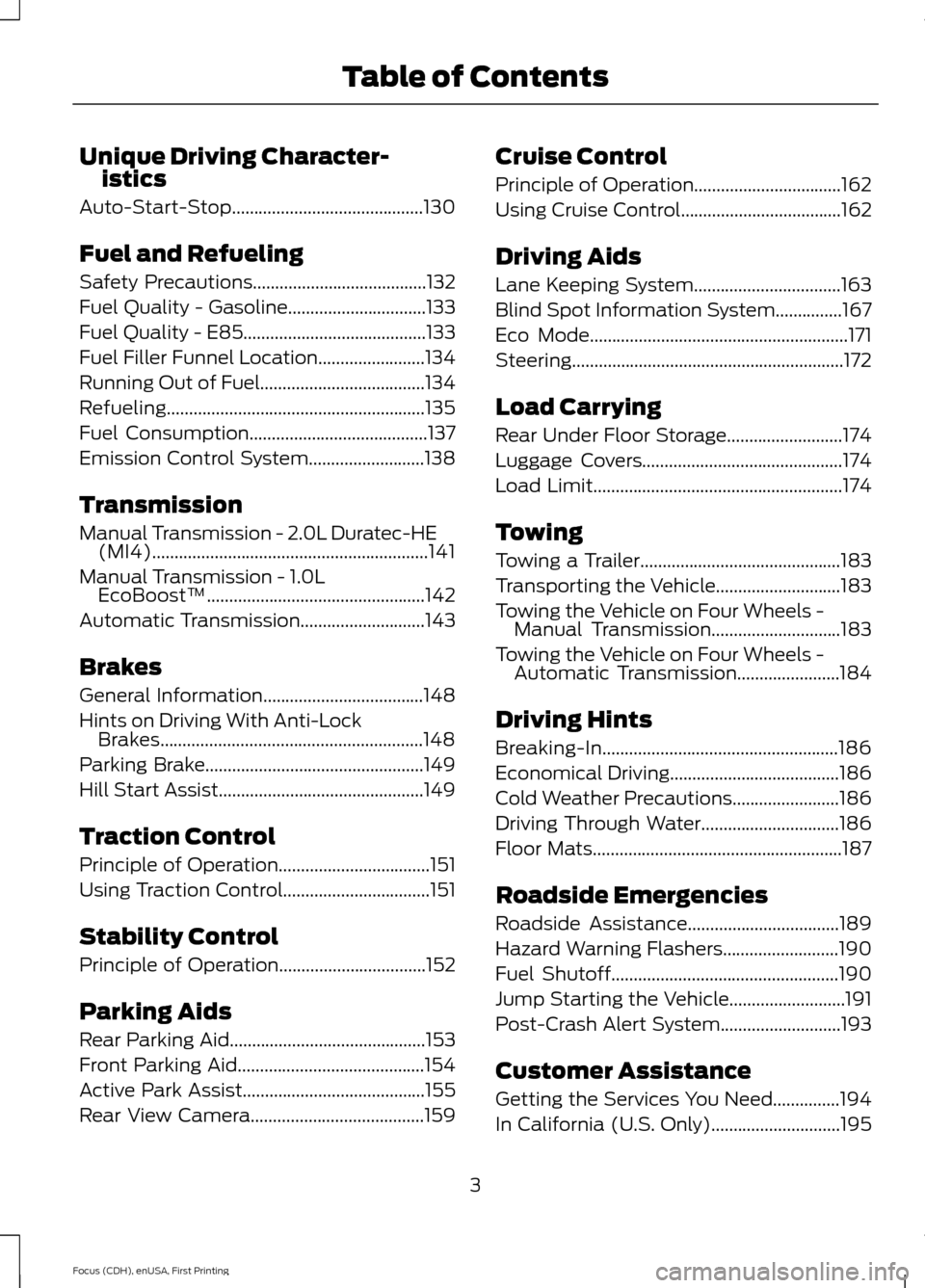
Unique Driving Character-
istics
Auto-Start-Stop...........................................130
Fuel and Refueling
Safety Precautions.......................................132
Fuel Quality - Gasoline...............................133
Fuel Quality - E85.........................................133
Fuel Filler Funnel Location........................134
Running Out of Fuel.....................................134
Refueling..........................................................135
Fuel Consumption........................................137
Emission Control System..........................138
Transmission
Manual Transmission - 2.0L Duratec-HE (MI4)..............................................................141
Manual Transmission - 1.0L
EcoBoost™.................................................142
Automatic Transmission
............................143
Brakes
General Information....................................148
Hints on Driving With Anti-Lock Brakes...........................................................148
Parking Brake.................................................149
Hill Start Assist..............................................149
Traction Control
Principle of Operation
..................................151
Using Traction Control.................................151
Stability Control
Principle of Operation.................................152
Parking Aids
Rear Parking Aid............................................153
Front Parking Aid..........................................154
Active Park Assist.........................................155
Rear View Camera
.......................................159 Cruise Control
Principle of Operation.................................162
Using Cruise Control
....................................162
Driving Aids
Lane Keeping System.................................163
Blind Spot Information System
...............167
Eco Mode
..........................................................171
Steering.............................................................172
Load Carrying
Rear Under Floor Storage..........................174
Luggage Covers.............................................174
Load Limit
........................................................174
Towing
Towing a Trailer.............................................183
Transporting the Vehicle............................183
Towing the Vehicle on Four Wheels - Manual Transmission
.............................183
Towing the Vehicle on Four Wheels - Automatic Transmission.......................184
Driving Hints
Breaking-In.....................................................186
Economical Driving
......................................186
Cold Weather Precautions
........................186
Driving Through Water...............................186
Floor Mats........................................................187
Roadside Emergencies
Roadside Assistance..................................189
Hazard Warning Flashers
..........................190
Fuel Shutoff
...................................................190
Jump Starting the Vehicle..........................191
Post-Crash Alert System...........................193
Customer Assistance
Getting the Services You Need...............194
In California (U.S. Only).............................195
3
Focus (CDH), enUSA, First Printing Table of Contents
Page 62 of 453
•
Various vehicle speed minders can be
set. Once you select a speed, it will be
shown in the display, followed by an
audible tone when the preselected
vehicle speed is exceeded.
• Audio system maximum volume of
45%. A message will be shown in the
display when you attempt to exceed
the limited volume. Also, the
speed-sensitive or compensated
automatic volume control will be
disabled.
• Always on setting. When this is
selected, you will not be able to turn
off AdvanceTrac or traction control,
E911 or Emergency Assist, or the Do Not
Disturb feature (if your vehicle is
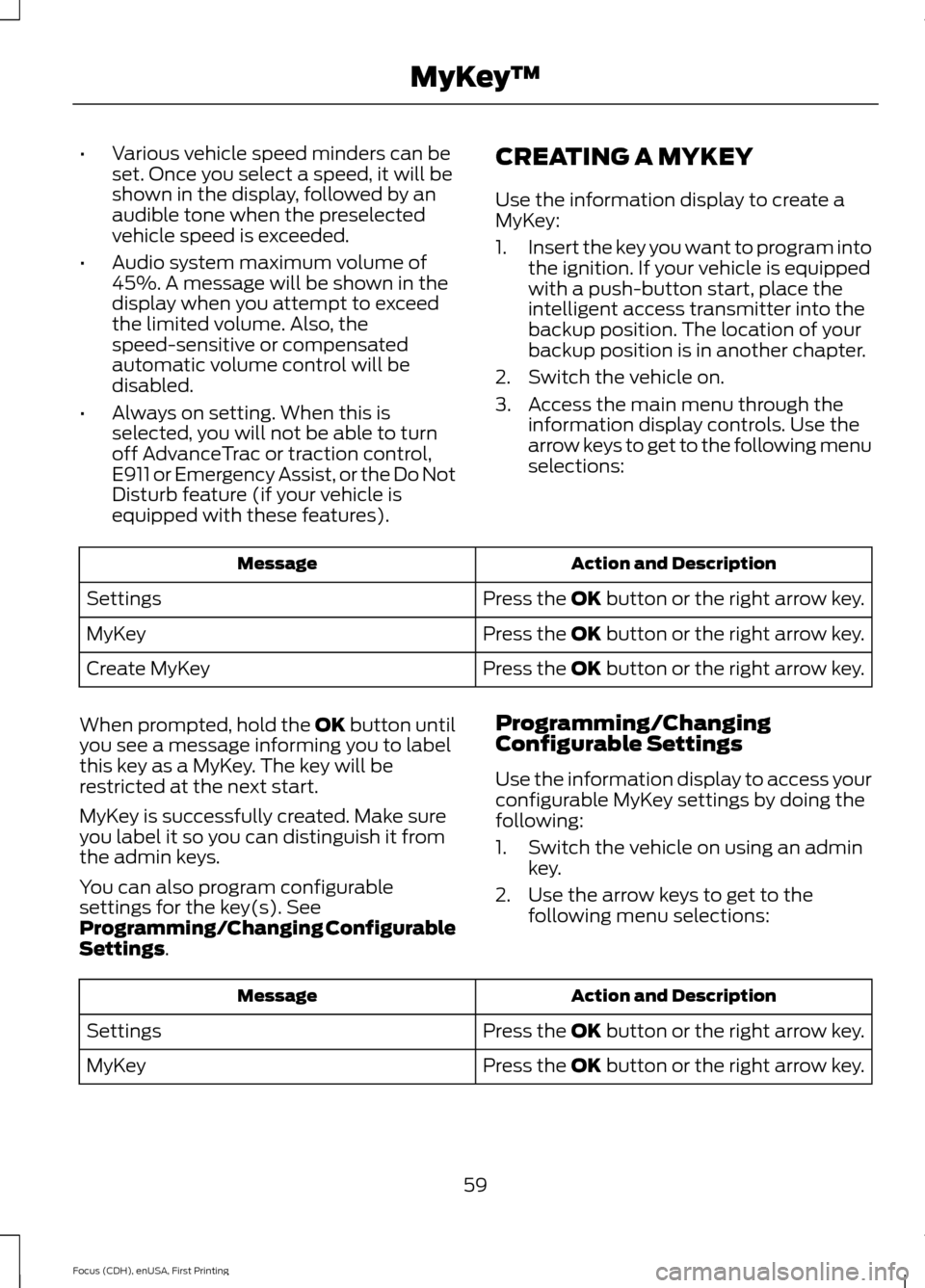
equipped with these features). CREATING A MYKEY
Use the information display to create a
MyKey:
1.
Insert the key you want to program into
the ignition. If your vehicle is equipped
with a push-button start, place the
intelligent access transmitter into the
backup position. The location of your
backup position is in another chapter.
2. Switch the vehicle on.
3. Access the main menu through the information display controls. Use the
arrow keys to get to the following menu
selections: Action and Description
Message
Press the OK button or the right arrow key.
Settings
Press the OK button or the right arrow key.
MyKey
Press the OK button or the right arrow key.
Create MyKey
When prompted, hold the OK button until
you see a message informing you to label
this key as a MyKey. The key will be
restricted at the next start.
MyKey is successfully created. Make sure
you label it so you can distinguish it from
the admin keys.
You can also program configurable
settings for the key(s). See
Programming/Changing Configurable
Settings. Programming/Changing
Configurable Settings
Use the information display to access your
configurable MyKey settings by doing the
following:
1. Switch the vehicle on using an admin
key.
2. Use the arrow keys to get to the following menu selections: Action and Description
Message
Press the OK button or the right arrow key.
Settings
Press the OK button or the right arrow key.
MyKey
59
Focus (CDH), enUSA, First Printing MyKey
™
Page 100 of 453
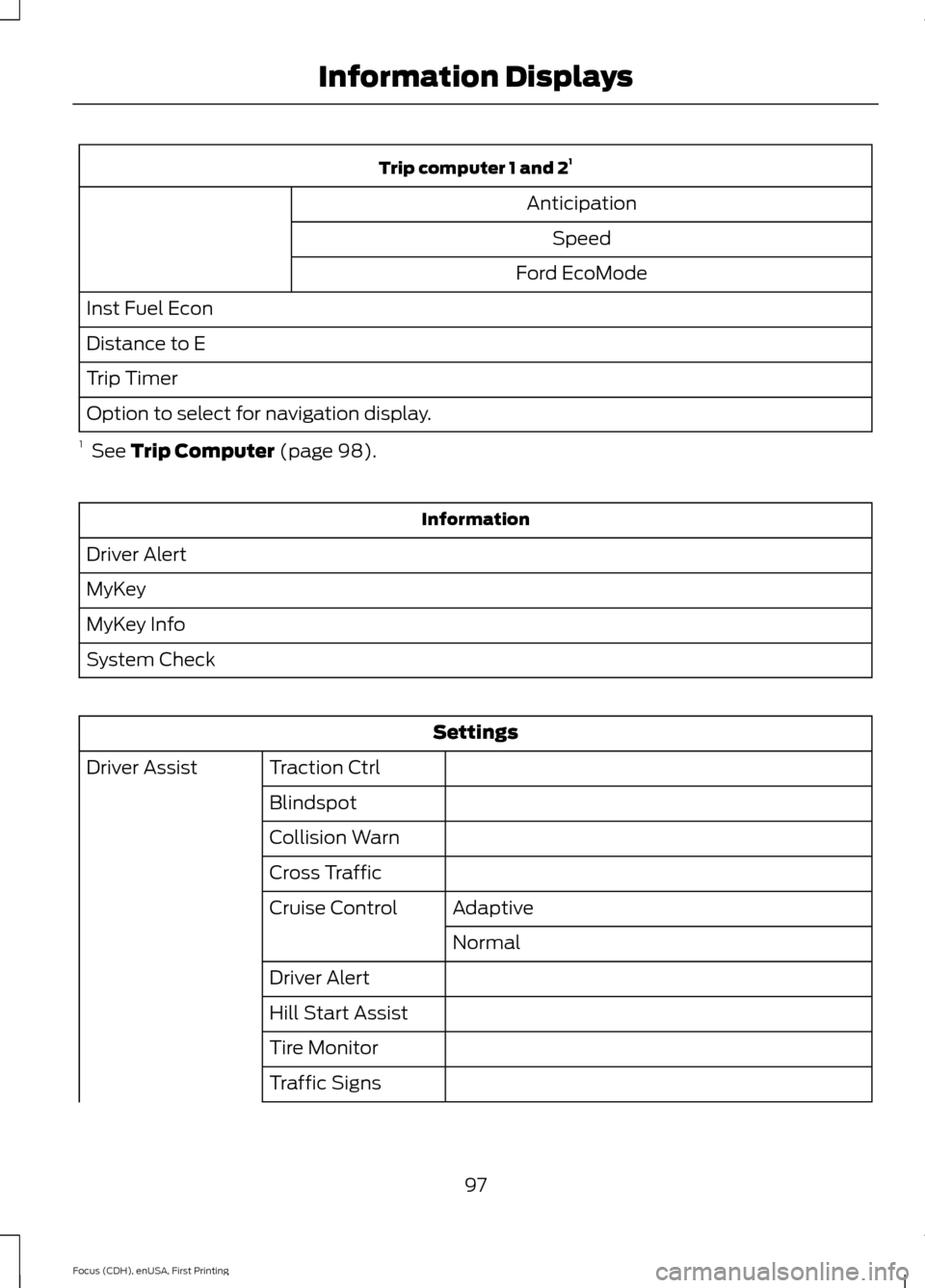
Trip computer 1 and 2
1
Anticipation Speed
Ford EcoMode
Inst Fuel Econ
Distance to E
Trip Timer
Option to select for navigation display.
1 See Trip Computer (page 98). Information
Driver Alert
MyKey
MyKey Info
System Check Settings
Traction Ctrl
Driver Assist
Blindspot
Collision Warn
Cross TrafficAdaptive
Cruise Control
Normal
Driver Alert
Hill Start Assist
Tire Monitor
Traffic Signs
97
Focus (CDH), enUSA, First Printing Information Displays
Page 109 of 453
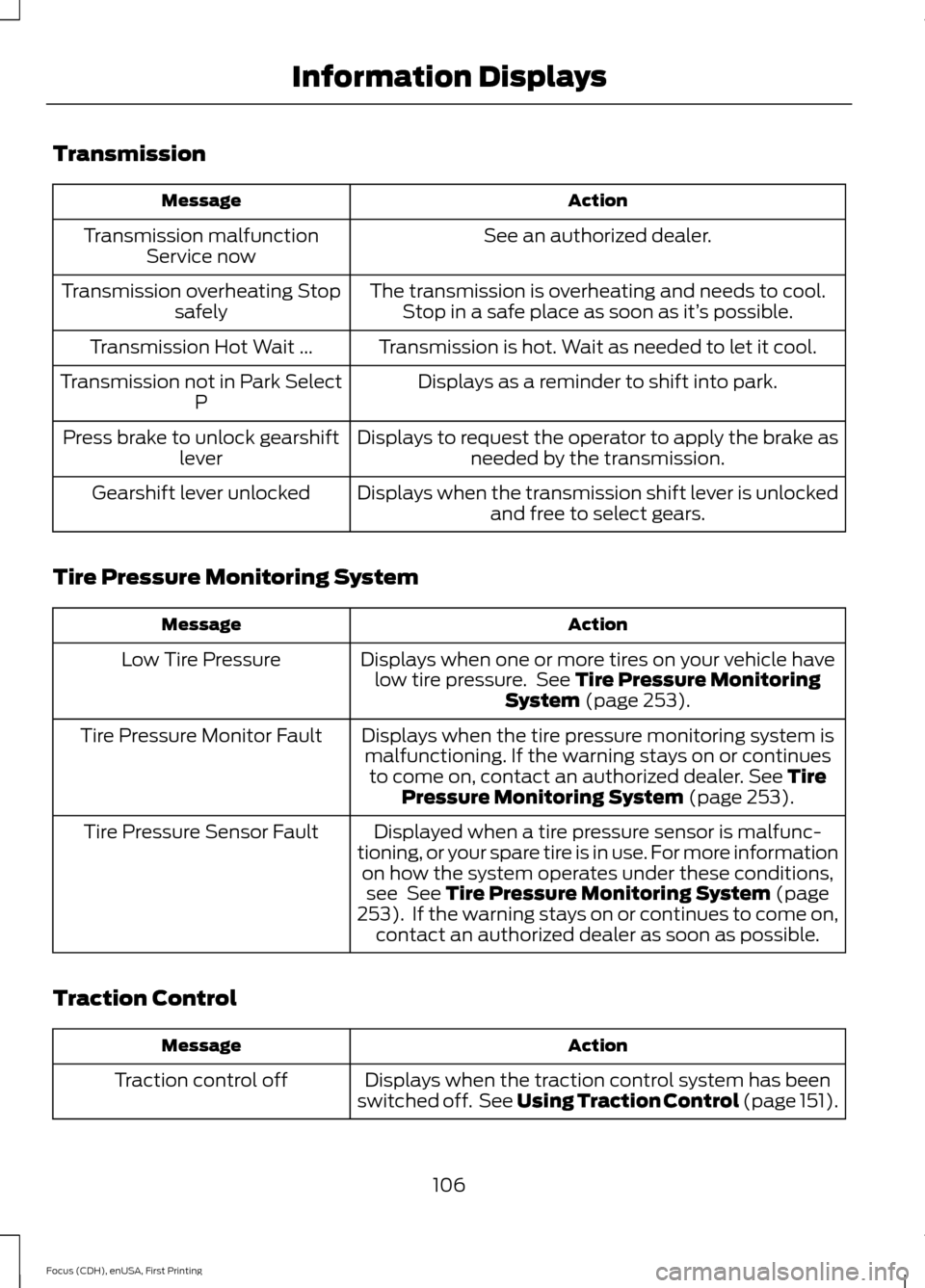
Transmission
Action
Message
See an authorized dealer.
Transmission malfunction
Service now
The transmission is overheating and needs to cool.Stop in a safe place as soon as it’ s possible.
Transmission overheating Stop
safely
Transmission is hot. Wait as needed to let it cool.
Transmission Hot Wait ...
Displays as a reminder to shift into park.
Transmission not in Park Select
P
Displays to request the operator to apply the brake asneeded by the transmission.
Press brake to unlock gearshift
lever
Displays when the transmission shift lever is unlockedand free to select gears.
Gearshift lever unlocked
Tire Pressure Monitoring System Action
Message
Displays when one or more tires on your vehicle havelow tire pressure. See Tire Pressure Monitoring
System (page 253).
Low Tire Pressure
Displays when the tire pressure monitoring system ismalfunctioning. If the warning stays on or continues to come on, contact an authorized dealer.
See Tire
Pressure Monitoring System (page 253).
Tire Pressure Monitor Fault
Displayed when a tire pressure sensor is malfunc-
tioning, or your spare tire is in use. For more information on how the system operates under these conditions,see
See Tire Pressure Monitoring System (page
253). If the warning stays on or continues to come on,
contact an authorized dealer as soon as possible.
Tire Pressure Sensor Fault
Traction Control Action
Message
Displays when the traction control system has been
switched off. See
Using Traction Control (page 151).
Traction control off
106
Focus (CDH), enUSA, First Printing Information Displays
Page 154 of 453
PRINCIPLE OF OPERATION
The traction control system helps avoid
drive wheel spin and loss of traction.
If your vehicle begins to slide, the system
applies the brakes to individual wheels
and, when needed, reduces engine power
at the same time. If the wheels spin when
accelerating on slippery or loose surfaces,
the system reduces engine power in order
to increase traction.
USING TRACTION CONTROL
In certain situations for example, stuck in
snow or mud, turning the traction control
off may be beneficial as this allows the
wheels to spin with full engine power.
Depending on the type of system you have
on your vehicle, you can either turn the
system off using the information display
or by pressing the button.
Switching the System Off Using
the Information Display Controls
(If Equipped)
Your vehicle comes with this feature
already enabled. If required, you can switch
this feature off using the information
display controls. See (page 96).
Switching the System Off Using a
Switch
(If Equipped)
The button is located in the instrument
panel.
Press the button. You will see a message
in conjunction with an illuminated icon in
the display. Press the button again to
return the system to normal mode.
When you switch the traction control
system off, stability control remains fully
active. System Indicator Lights and
Messages WARNING
If a failure has been detected within
the AdvanceTrac system, the
stability control light will illuminate
steadily. Verify that the AdvanceTrac
system was not manually disabled through
the information display. If the stability
control light still illuminates steadily, have
the system serviced by an authorized
dealer immediately. Operating your vehicle
with AdvanceTrac disabled could lead to
an increased risk of loss of vehicle control,
vehicle rollover, personal injury and death. The stability control light
temporarily illuminates on
engine start-up and flashes
when a driving condition activates the
stability system. The stability control off light
temporarily illuminates on
engine start-up and stays on
when you turn the traction control system
off.
When you turn the traction control system
off or on, a message appears in the
information display showing system status.
151
Focus (CDH), enUSA, First Printing Traction ControlE138639
Page 155 of 453
PRINCIPLE OF OPERATION
WARNINGS
Vehicle modifications involving
braking system, aftermarket roof
racks, suspension, steering system,
tire construction and wheel and tire size
may change the handling characteristics
of the vehicle and may adversely affect
the performance of the AdvanceTrac
system. In addition, installing any stereo
loudspeakers may interfere with and
adversely affect the AdvanceTrac system.
Install any aftermarket stereo loudspeaker
as far as possible from the front center
console, the tunnel, and the front seats in
order to minimize the risk of interfering with
the AdvanceTrac sensors. Reducing the
effectiveness of the AdvanceTrac system
could lead to an increased risk of loss of
vehicle control, vehicle rollover, personal
injury and death. Remember that even advanced
technology cannot defy the laws of
physics. It’
s always possible to lose
control of a vehicle due to inappropriate
driver input for the conditions. Aggressive
driving on any road condition can cause
you to lose control of your vehicle
increasing the risk of personal injury or
property damage. Activation of the
AdvanceTrac system is an indication that
at least some of the tires have exceeded
their ability to grip the road; this could
reduce the operator ’s ability to control the
vehicle potentially resulting in a loss of
vehicle control, vehicle rollover, personal
injury and death. If your AdvanceTrac
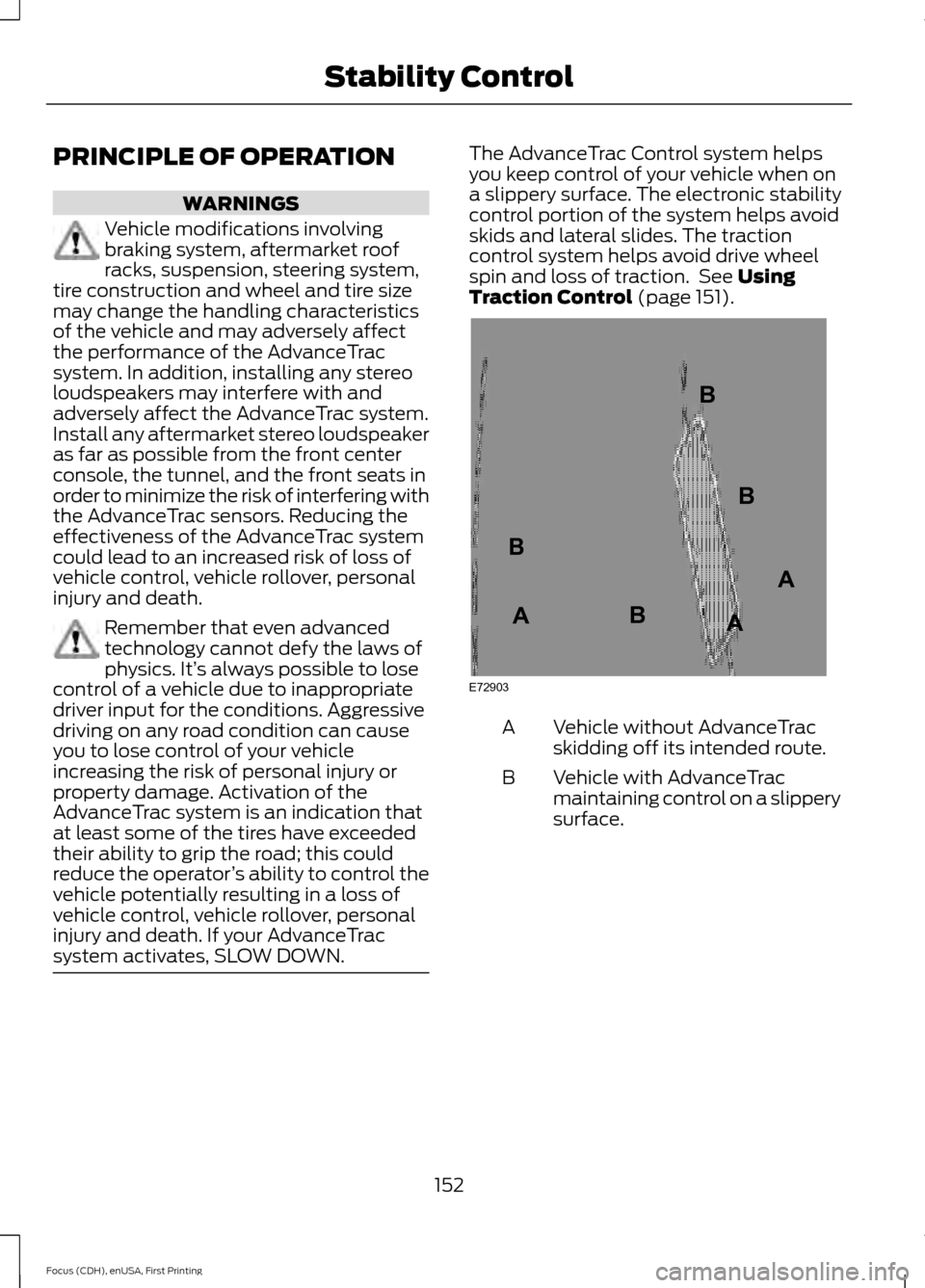
system activates, SLOW DOWN. The AdvanceTrac Control system helps
you keep control of your vehicle when on
a slippery surface. The electronic stability
control portion of the system helps avoid
skids and lateral slides. The traction
control system helps avoid drive wheel
spin and loss of traction. See Using
Traction Control (page 151). Vehicle without AdvanceTrac
skidding off its intended route.
A
Vehicle with AdvanceTrac
maintaining control on a slippery
surface.
B
152
Focus (CDH), enUSA, First Printing Stability ControlE72903A
AA
B
BB
B
Page 160 of 453
Note:
If a maneuver is interrupted before
completion, the system switches off. The
steering wheel position will not indicate the
actual position of the steering and you have
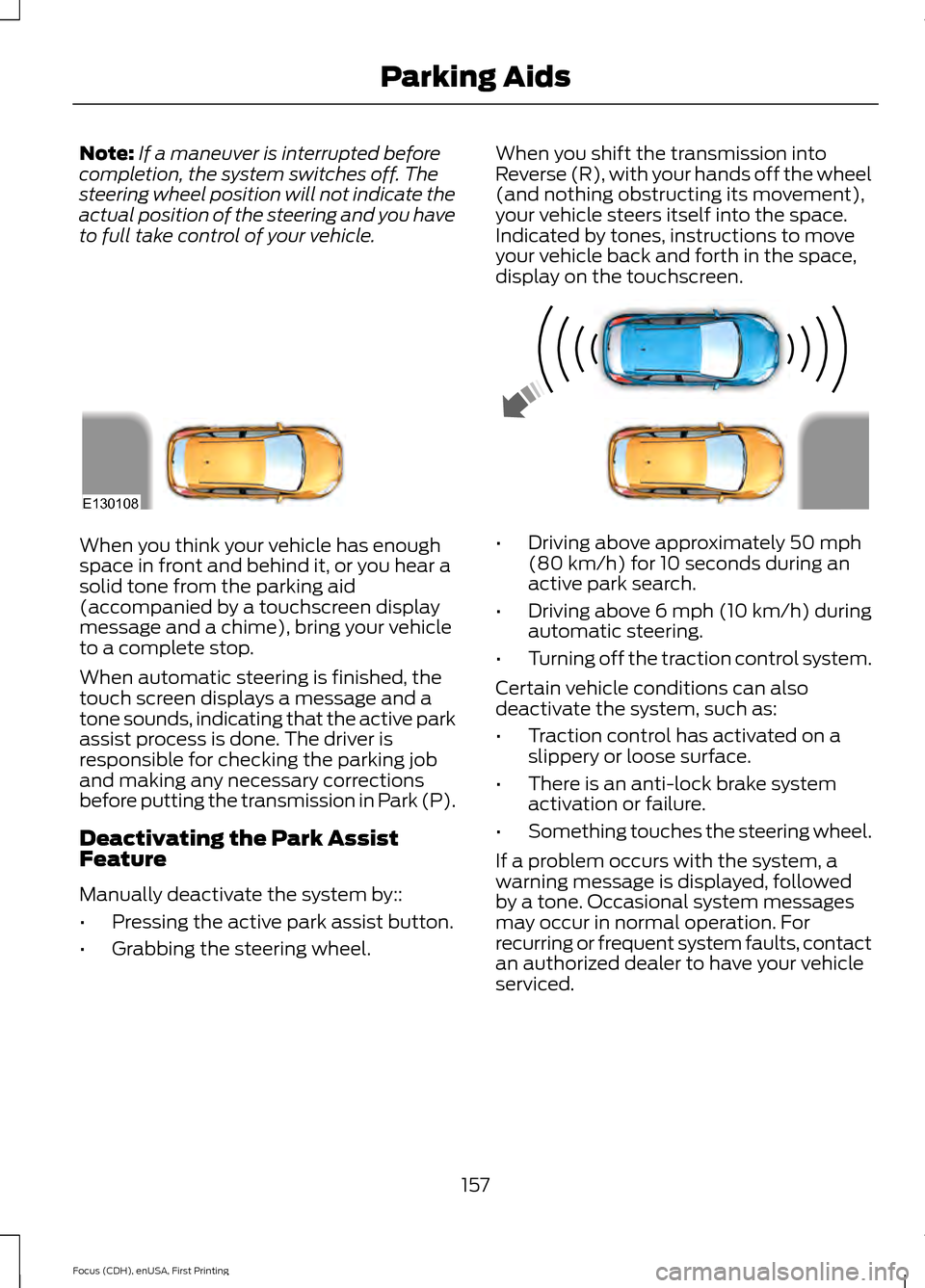
to full take control of your vehicle. When you shift the transmission into
Reverse (R), with your hands off the wheel
(and nothing obstructing its movement),
your vehicle steers itself into the space.
Indicated by tones, instructions to move
your vehicle back and forth in the space,
display on the touchscreen.When you think your vehicle has enough
space in front and behind it, or you hear a
solid tone from the parking aid
(accompanied by a touchscreen display
message and a chime), bring your vehicle
to a complete stop.
When automatic steering is finished, the
touch screen displays a message and a
tone sounds, indicating that the active park
assist process is done. The driver is
responsible for checking the parking job
and making any necessary corrections
before putting the transmission in Park (P).
Deactivating the Park Assist
Feature
Manually deactivate the system by::
•
Pressing the active park assist button.
• Grabbing the steering wheel. •
Driving above approximately 50 mph
(80 km/h) for 10 seconds during an
active park search.
• Driving above 6 mph (10 km/h) during
automatic steering.
• Turning off the traction control system.
Certain vehicle conditions can also
deactivate the system, such as:
• Traction control has activated on a
slippery or loose surface.
• There is an anti-lock brake system
activation or failure.
• Something touches the steering wheel.
If a problem occurs with the system, a
warning message is displayed, followed
by a tone. Occasional system messages
may occur in normal operation. For
recurring or frequent system faults, contact
an authorized dealer to have your vehicle
serviced.
157
Focus (CDH), enUSA, First Printing Parking AidsE130108
Page 161 of 453
Troubleshooting the System
The system does not look for a space
The traction control system may be off
The transmission is in Reverse (R); your vehicle must be moving forward to detect a
parking space The system does not offer a particular space
Something may be contacting the front bumper or side sensors
There is not enough room on both sides of your vehicle in order to park
There is not enough space for the parking maneuver on the opposite side of the parking
space
Your vehicle is farther than 5 ft (1.5 m) from the parking space
Your vehicle is closer than 16 in. (40 cm) from neighboring parked vehicles
The transmission is in Reverse (R); your vehicle must be moving forward to detect a
parking space
Your vehicle is going faster than 20 mph (35 km/h) The system does not position the vehicle where I want in the space
Your vehicle is rolling in the opposite direction of the transmission (rolling forward when
Reverse [R] is selected)
An irregular curb along the parking space prevents the system from aligning your vehicle
properly
Vehicles or objects bordering the space may not be positioned correctly
You pulled your vehicle too far past the parking space. The system performs best when
you drive the same distance past the parking space
The tires may not be installed or maintained correctly (not inflated correctly, improper
size, or of different sizes)
A repair or alteration has changed detection capabilities
158
Focus (CDH), enUSA, First Printing Parking Aids
Page 190 of 453
Note:
Driving through standing water can
cause vehicle damage.
Note: Engine damage can occur if water
enters the air filter.
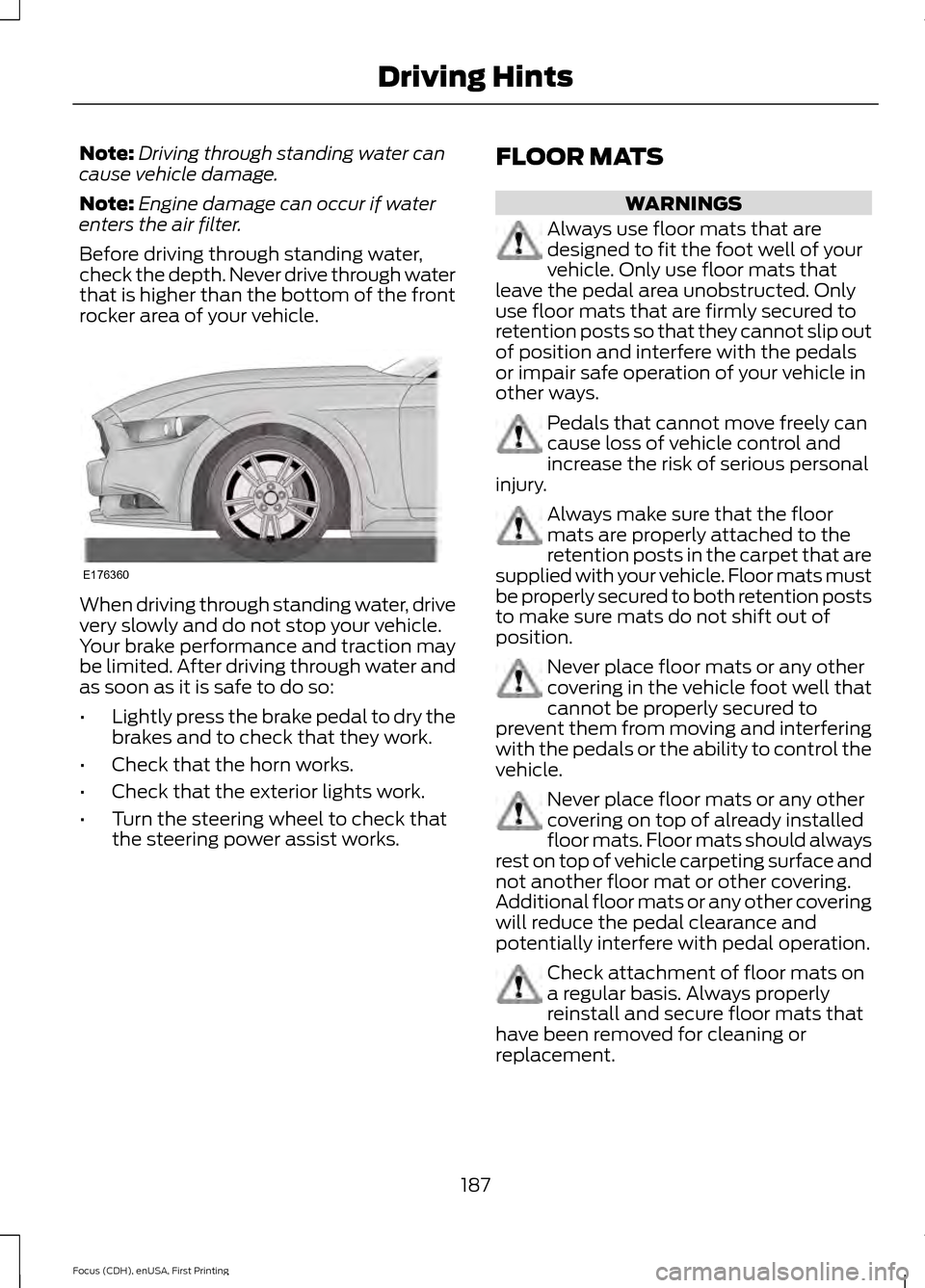
Before driving through standing water,
check the depth. Never drive through water
that is higher than the bottom of the front
rocker area of your vehicle. When driving through standing water, drive
very slowly and do not stop your vehicle.
Your brake performance and traction may
be limited. After driving through water and
as soon as it is safe to do so:
•
Lightly press the brake pedal to dry the
brakes and to check that they work.
• Check that the horn works.
• Check that the exterior lights work.
• Turn the steering wheel to check that
the steering power assist works. FLOOR MATS WARNINGS
Always use floor mats that are
designed to fit the foot well of your
vehicle. Only use floor mats that
leave the pedal area unobstructed. Only
use floor mats that are firmly secured to
retention posts so that they cannot slip out
of position and interfere with the pedals
or impair safe operation of your vehicle in
other ways. Pedals that cannot move freely can
cause loss of vehicle control and
increase the risk of serious personal
injury. Always make sure that the floor
mats are properly attached to the
retention posts in the carpet that are
supplied with your vehicle. Floor mats must
be properly secured to both retention posts
to make sure mats do not shift out of
position. Never place floor mats or any other
covering in the vehicle foot well that
cannot be properly secured to
prevent them from moving and interfering
with the pedals or the ability to control the
vehicle. Never place floor mats or any other
covering on top of already installed
floor mats. Floor mats should always
rest on top of vehicle carpeting surface and
not another floor mat or other covering.
Additional floor mats or any other covering
will reduce the pedal clearance and
potentially interfere with pedal operation. Check attachment of floor mats on
a regular basis. Always properly
reinstall and secure floor mats that
have been removed for cleaning or
replacement.
187
Focus (CDH), enUSA, First Printing Driving HintsE176360
Page 241 of 453
U.S. Department of
Transportation-Tire quality
grades: The U.S. Department of
Transportation requires Ford
Motor Company to give you the
following information about tire
grades exactly as the government
has written it.
Treadwear
The treadwear grade is a
comparative rating based on the
wear rate of the tire when tested
under controlled conditions on a
specified government test course.
For example, a tire graded 150
would wear 1½ times as well on
the government course as a tire
graded 100. The relative
performance of tires depends
upon the actual conditions of their
use, however, and may depart
significantly from the norm due to
variations in driving habits, service
practices, and differences in road
characteristics and climate.
Traction AA A B C WARNING
The traction grade assigned
to this tire is based on
straight-ahead braking traction
tests, and does not include
acceleration, cornering,
hydroplaning or peak traction
characteristics. The traction grades, from highest
to lowest are AA, A, B, and C. The
grades represent the tire
’s ability
to stop on wet pavement as
measured under controlled
conditions on specified
government test surfaces of
asphalt and concrete. A tire
marked C may have poor traction
performance.
Temperature A B C WARNING
The temperature grade for
this tire is established for a
tire that is properly inflated and
not overloaded. Excessive speed,
under-inflation, or excessive
loading, either separately or in
combination, can cause heat
buildup and possible tire failure. The temperature grades are A
(the highest), B and C,
representing the tire
’s resistance
to the generation of heat and its
ability to dissipate heat when
tested under controlled conditions
on a specified indoor laboratory
test wheel. Sustained high
temperature can cause the
material of the tire to degenerate
and reduce tire life, and excessive
temperature can lead to sudden
tire failure. The grade C
corresponds to a level of
performance which all passenger
car tires must meet under the
238
Focus (CDH), enUSA, First Printing Wheels and Tires