display FORD FOCUS 2017 3.G Owner's Manual
[x] Cancel search | Manufacturer: FORD, Model Year: 2017, Model line: FOCUS, Model: FORD FOCUS 2017 3.GPages: 467, PDF Size: 5.34 MB
Page 98 of 467
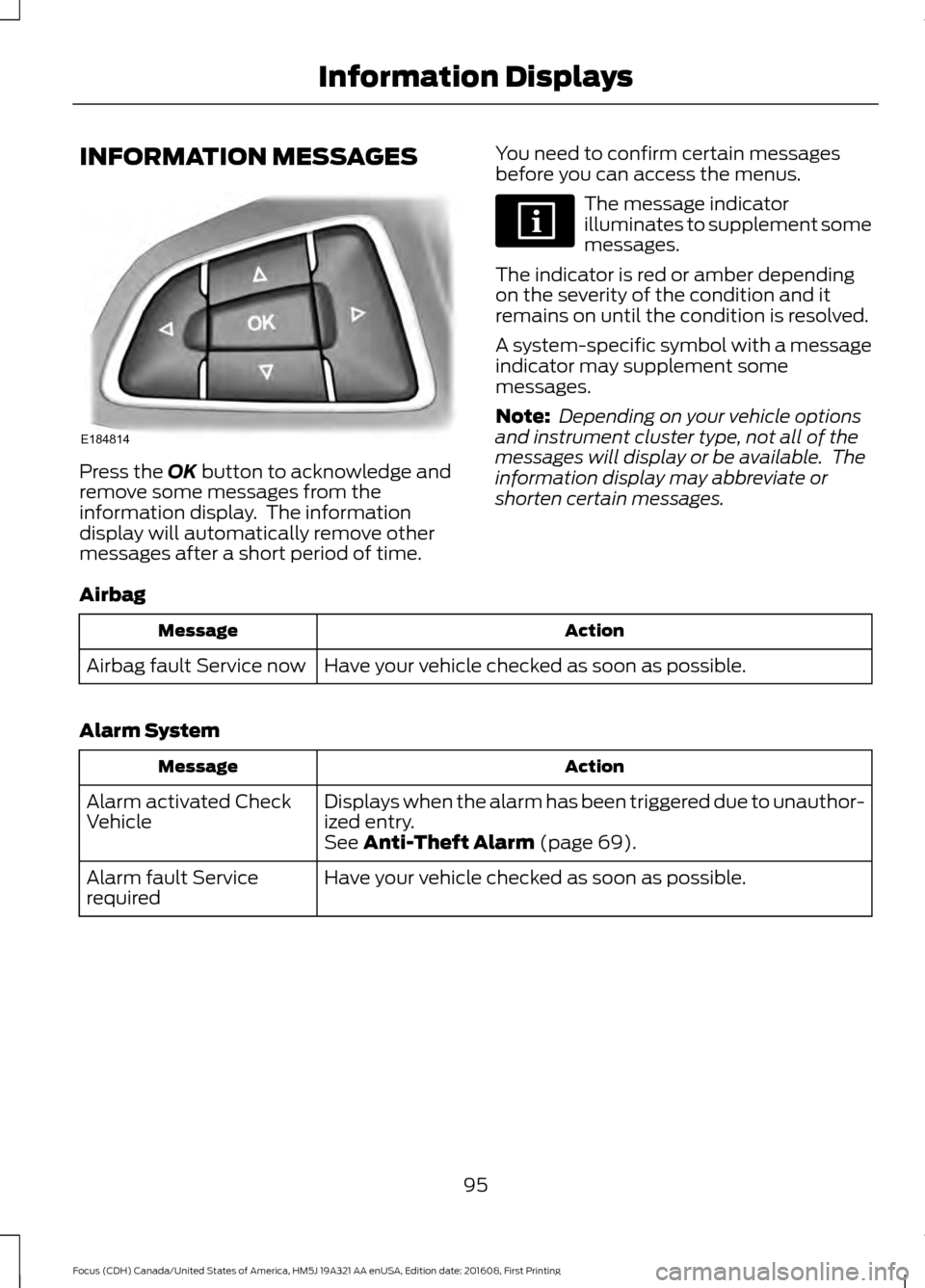
INFORMATION MESSAGES
Press the OK button to acknowledge and
remove some messages from the
information display. The information
display will automatically remove other
messages after a short period of time. You need to confirm certain messages
before you can access the menus. The message indicator
illuminates to supplement some
messages.
The indicator is red or amber depending
on the severity of the condition and it
remains on until the condition is resolved.
A system-specific symbol with a message
indicator may supplement some
messages.
Note: Depending on your vehicle options
and instrument cluster type, not all of the
messages will display or be available. The
information display may abbreviate or
shorten certain messages.
Airbag Action
Message
Have your vehicle checked as soon as possible.
Airbag fault Service now
Alarm System Action
Message
Displays when the alarm has been triggered due to unauthor-
ized entry.
Alarm activated Check
Vehicle
See
Anti-Theft Alarm (page 69).
Have your vehicle checked as soon as possible.
Alarm fault Service
required
95
Focus (CDH) Canada/United States of America, HM5J 19A321 AA enUSA, Edition date: 201608, First Printing Information DisplaysE184814
Page 99 of 467
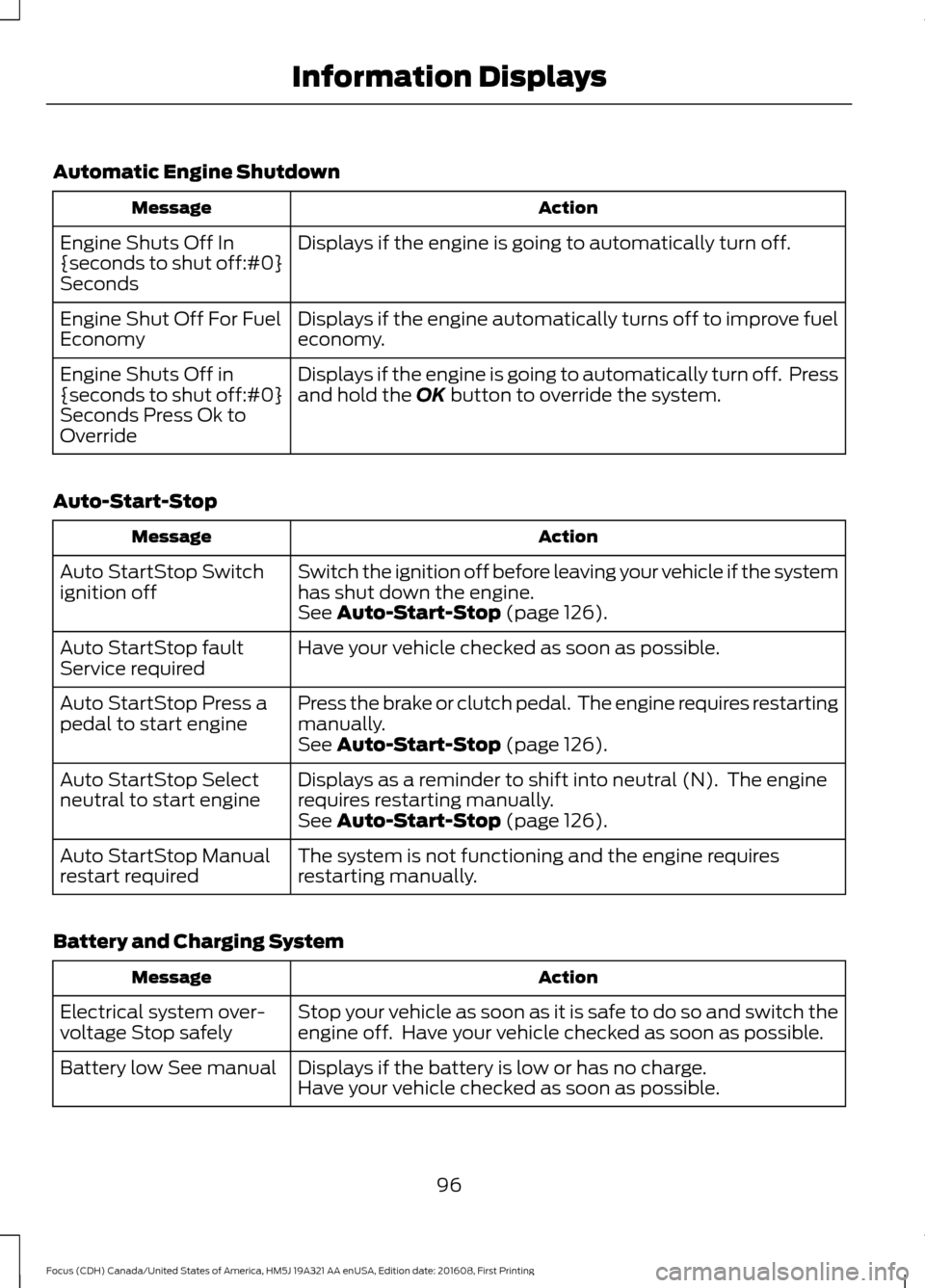
Automatic Engine Shutdown
Action
Message
Displays if the engine is going to automatically turn off.
Engine Shuts Off In
{seconds to shut off:#0}
Seconds
Displays if the engine automatically turns off to improve fuel
economy.
Engine Shut Off For Fuel
Economy
Displays if the engine is going to automatically turn off. Press
and hold the OK button to override the system.
Engine Shuts Off in
{seconds to shut off:#0}
Seconds Press Ok to
Override
Auto-Start-Stop Action
Message
Switch the ignition off before leaving your vehicle if the system
has shut down the engine.
Auto StartStop Switch
ignition off
See
Auto-Start-Stop (page 126).
Have your vehicle checked as soon as possible.
Auto StartStop fault
Service required
Press the brake or clutch pedal. The engine requires restarting
manually.
Auto StartStop Press a
pedal to start engine
See
Auto-Start-Stop (page 126).
Displays as a reminder to shift into neutral (N). The engine
requires restarting manually.
Auto StartStop Select
neutral to start engine
See
Auto-Start-Stop (page 126).
The system is not functioning and the engine requires
restarting manually.
Auto StartStop Manual
restart required
Battery and Charging System Action
Message
Stop your vehicle as soon as it is safe to do so and switch the
engine off. Have your vehicle checked as soon as possible.
Electrical system over-
voltage Stop safely
Displays if the battery is low or has no charge.
Battery low See manual
Have your vehicle checked as soon as possible.
96
Focus (CDH) Canada/United States of America, HM5J 19A321 AA enUSA, Edition date: 201608, First Printing Information Displays
Page 100 of 467
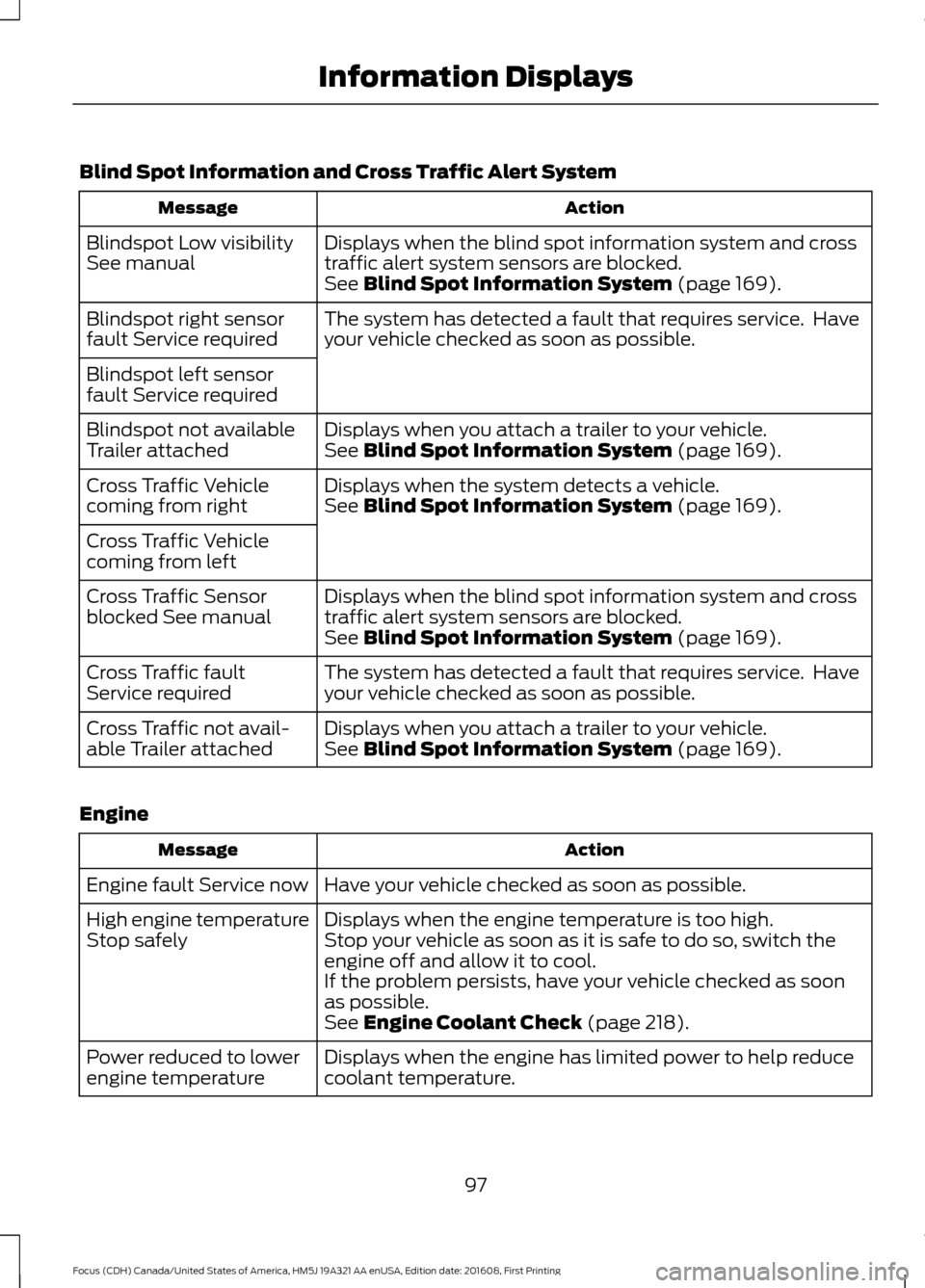
Blind Spot Information and Cross Traffic Alert System
Action
Message
Displays when the blind spot information system and cross
traffic alert system sensors are blocked.
Blindspot Low visibility
See manual
See Blind Spot Information System (page 169).
The system has detected a fault that requires service. Have
your vehicle checked as soon as possible.
Blindspot right sensor
fault Service required
Blindspot left sensor
fault Service required
Displays when you attach a trailer to your vehicle.
Blindspot not available
Trailer attached See
Blind Spot Information System (page 169).
Displays when the system detects a vehicle.
Cross Traffic Vehicle
coming from right See
Blind Spot Information System (page 169).
Cross Traffic Vehicle
coming from left Displays when the blind spot information system and cross
traffic alert system sensors are blocked.
Cross Traffic Sensor
blocked See manual
See
Blind Spot Information System (page 169).
The system has detected a fault that requires service. Have
your vehicle checked as soon as possible.
Cross Traffic fault
Service required
Displays when you attach a trailer to your vehicle.
Cross Traffic not avail-
able Trailer attached See
Blind Spot Information System (page 169).
Engine Action
Message
Have your vehicle checked as soon as possible.
Engine fault Service now
Displays when the engine temperature is too high.
High engine temperature
Stop safely Stop your vehicle as soon as it is safe to do so, switch the
engine off and allow it to cool.
If the problem persists, have your vehicle checked as soon
as possible.
See
Engine Coolant Check (page 218).
Displays when the engine has limited power to help reduce
coolant temperature.
Power reduced to lower
engine temperature
97
Focus (CDH) Canada/United States of America, HM5J 19A321 AA enUSA, Edition date: 201608, First Printing Information Displays
Page 101 of 467
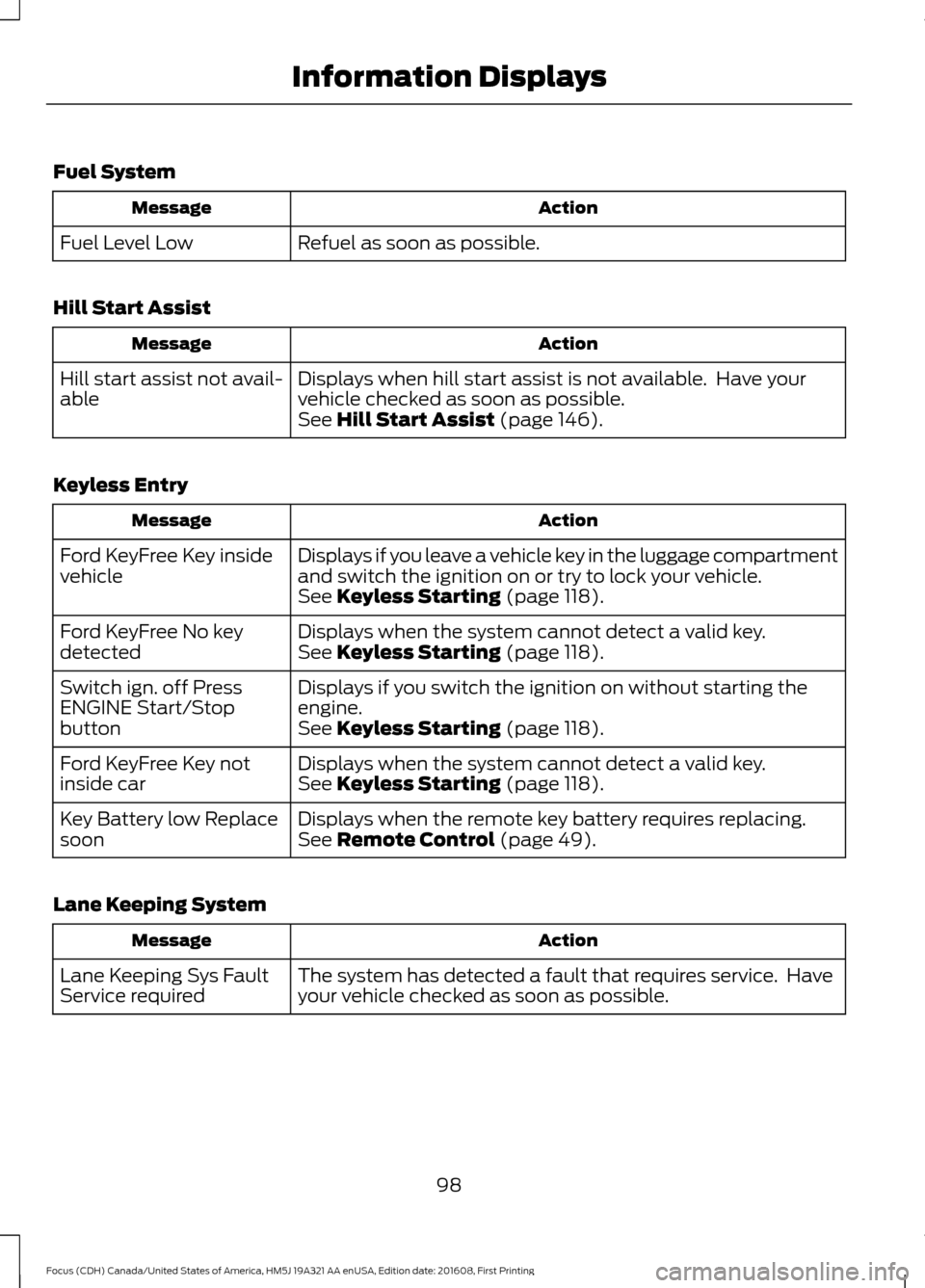
Fuel System
Action
Message
Refuel as soon as possible.
Fuel Level Low
Hill Start Assist Action
Message
Displays when hill start assist is not available. Have your
vehicle checked as soon as possible.
Hill start assist not avail-
able
See Hill Start Assist (page 146).
Keyless Entry Action
Message
Displays if you leave a vehicle key in the luggage compartment
and switch the ignition on or try to lock your vehicle.
Ford KeyFree Key inside
vehicle
See
Keyless Starting (page 118).
Displays when the system cannot detect a valid key.
Ford KeyFree No key
detected See
Keyless Starting (page 118).
Displays if you switch the ignition on without starting the
engine.
Switch ign. off Press
ENGINE Start/Stop
button
See
Keyless Starting (page 118).
Displays when the system cannot detect a valid key.
Ford KeyFree Key not
inside car See
Keyless Starting (page 118).
Displays when the remote key battery requires replacing.
Key Battery low Replace
soon See
Remote Control (page 49).
Lane Keeping System Action
Message
The system has detected a fault that requires service. Have
your vehicle checked as soon as possible.
Lane Keeping Sys Fault
Service required
98
Focus (CDH) Canada/United States of America, HM5J 19A321 AA enUSA, Edition date: 201608, First Printing Information Displays
Page 102 of 467
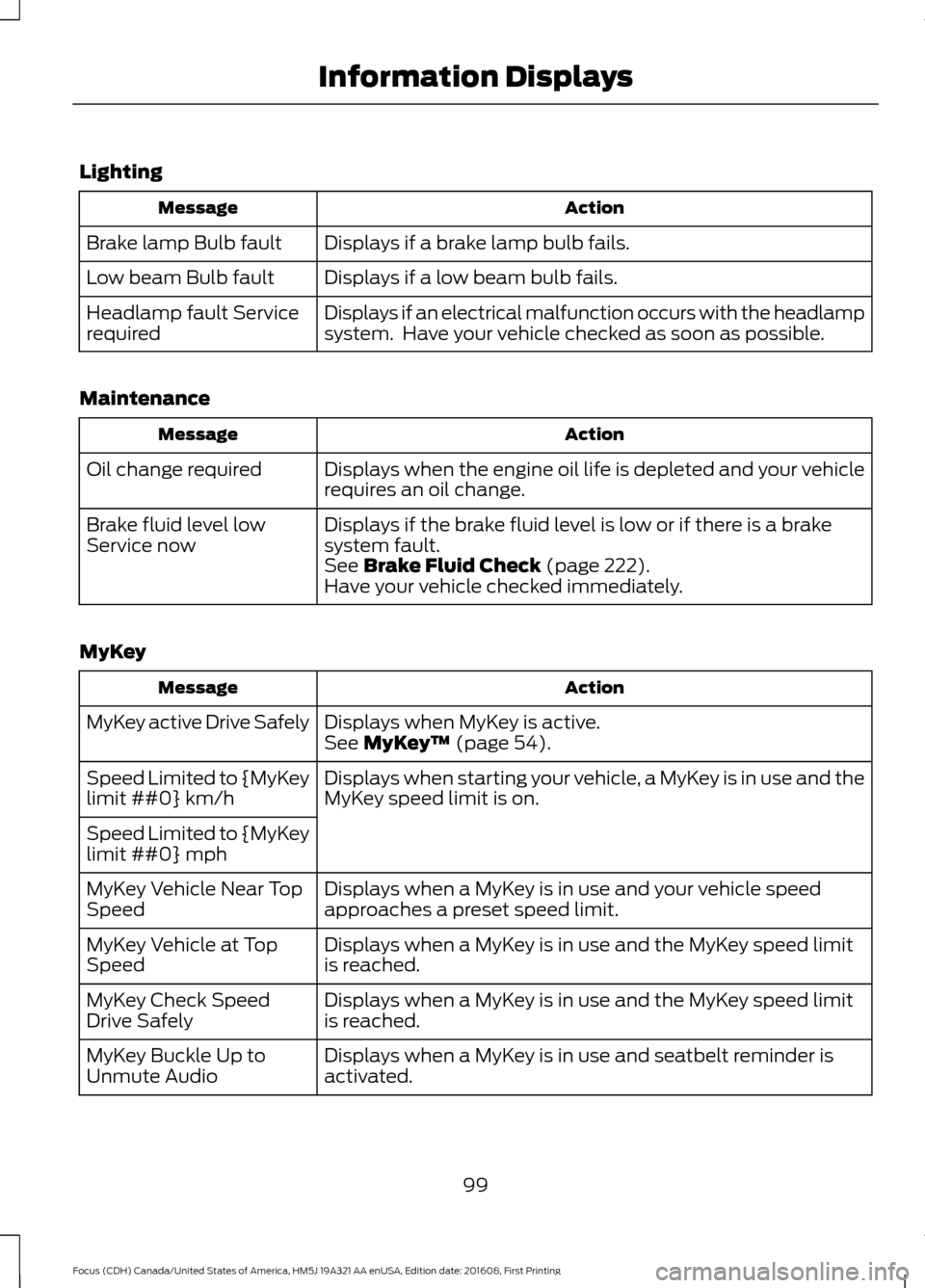
Lighting
Action
Message
Displays if a brake lamp bulb fails.
Brake lamp Bulb fault
Displays if a low beam bulb fails.
Low beam Bulb fault
Displays if an electrical malfunction occurs with the headlamp
system. Have your vehicle checked as soon as possible.
Headlamp fault Service
required
Maintenance Action
Message
Displays when the engine oil life is depleted and your vehicle
requires an oil change.
Oil change required
Displays if the brake fluid level is low or if there is a brake
system fault.
Brake fluid level low
Service now
See Brake Fluid Check (page 222).
Have your vehicle checked immediately.
MyKey Action
Message
Displays when MyKey is active.
MyKey active Drive Safely
See
MyKey™ (page 54).
Displays when starting your vehicle, a MyKey is in use and the
MyKey speed limit is on.
Speed Limited to {MyKey
limit ##0} km/h
Speed Limited to {MyKey
limit ##0} mph
Displays when a MyKey is in use and your vehicle speed
approaches a preset speed limit.
MyKey Vehicle Near Top
Speed
Displays when a MyKey is in use and the MyKey speed limit
is reached.
MyKey Vehicle at Top
Speed
Displays when a MyKey is in use and the MyKey speed limit
is reached.
MyKey Check Speed
Drive Safely
Displays when a MyKey is in use and seatbelt reminder is
activated.
MyKey Buckle Up to
Unmute Audio
99
Focus (CDH) Canada/United States of America, HM5J 19A321 AA enUSA, Edition date: 201608, First Printing Information Displays
Page 103 of 467
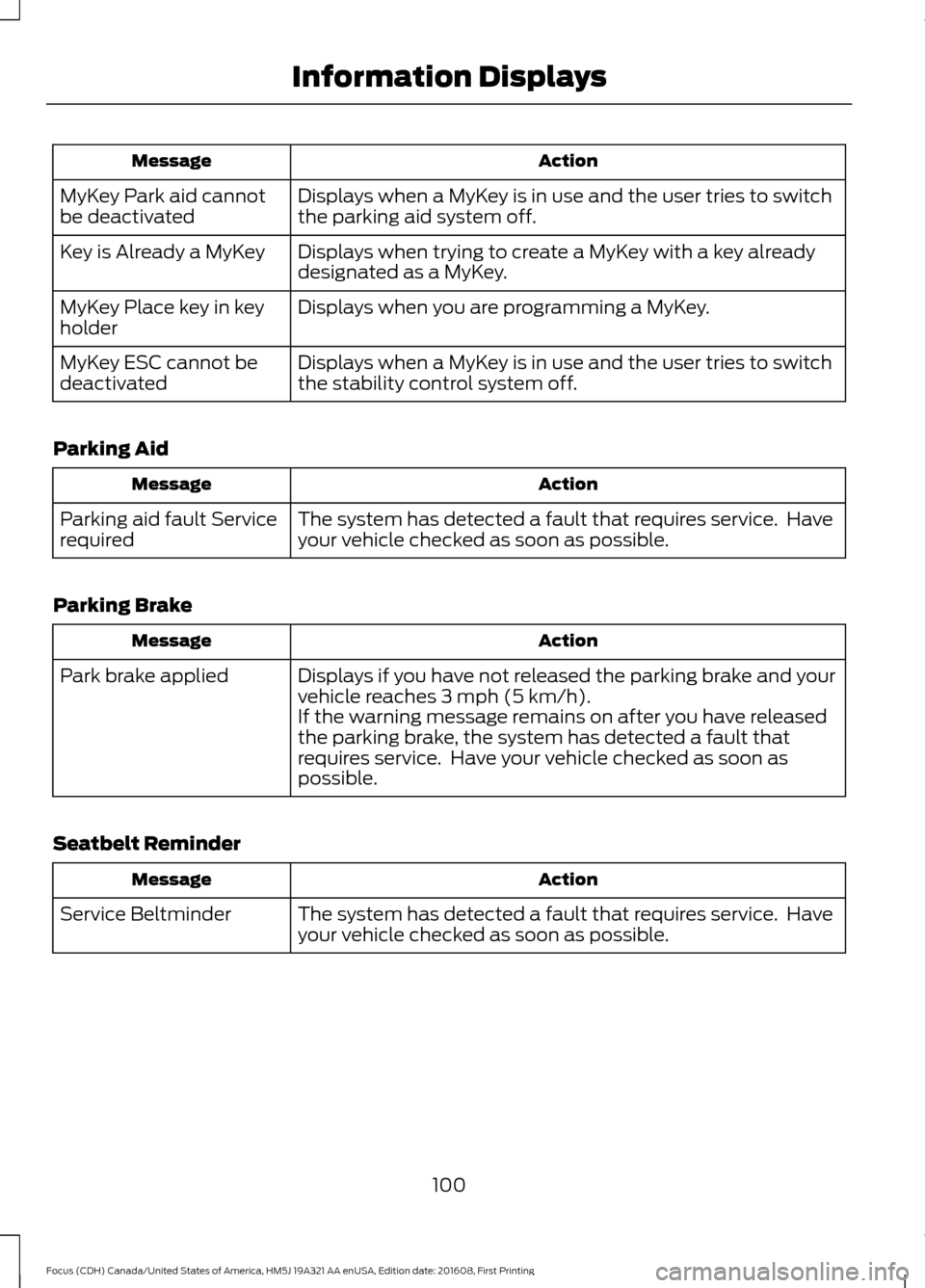
Action
Message
Displays when a MyKey is in use and the user tries to switch
the parking aid system off.
MyKey Park aid cannot
be deactivated
Displays when trying to create a MyKey with a key already
designated as a MyKey.
Key is Already a MyKey
Displays when you are programming a MyKey.
MyKey Place key in key
holder
Displays when a MyKey is in use and the user tries to switch
the stability control system off.
MyKey ESC cannot be
deactivated
Parking Aid Action
Message
The system has detected a fault that requires service. Have
your vehicle checked as soon as possible.
Parking aid fault Service
required
Parking Brake Action
Message
Displays if you have not released the parking brake and your
vehicle reaches 3 mph (5 km/h).
Park brake applied
If the warning message remains on after you have released
the parking brake, the system has detected a fault that
requires service. Have your vehicle checked as soon as
possible.
Seatbelt Reminder Action
Message
The system has detected a fault that requires service. Have
your vehicle checked as soon as possible.
Service Beltminder
100
Focus (CDH) Canada/United States of America, HM5J 19A321 AA enUSA, Edition date: 201608, First Printing Information Displays
Page 104 of 467
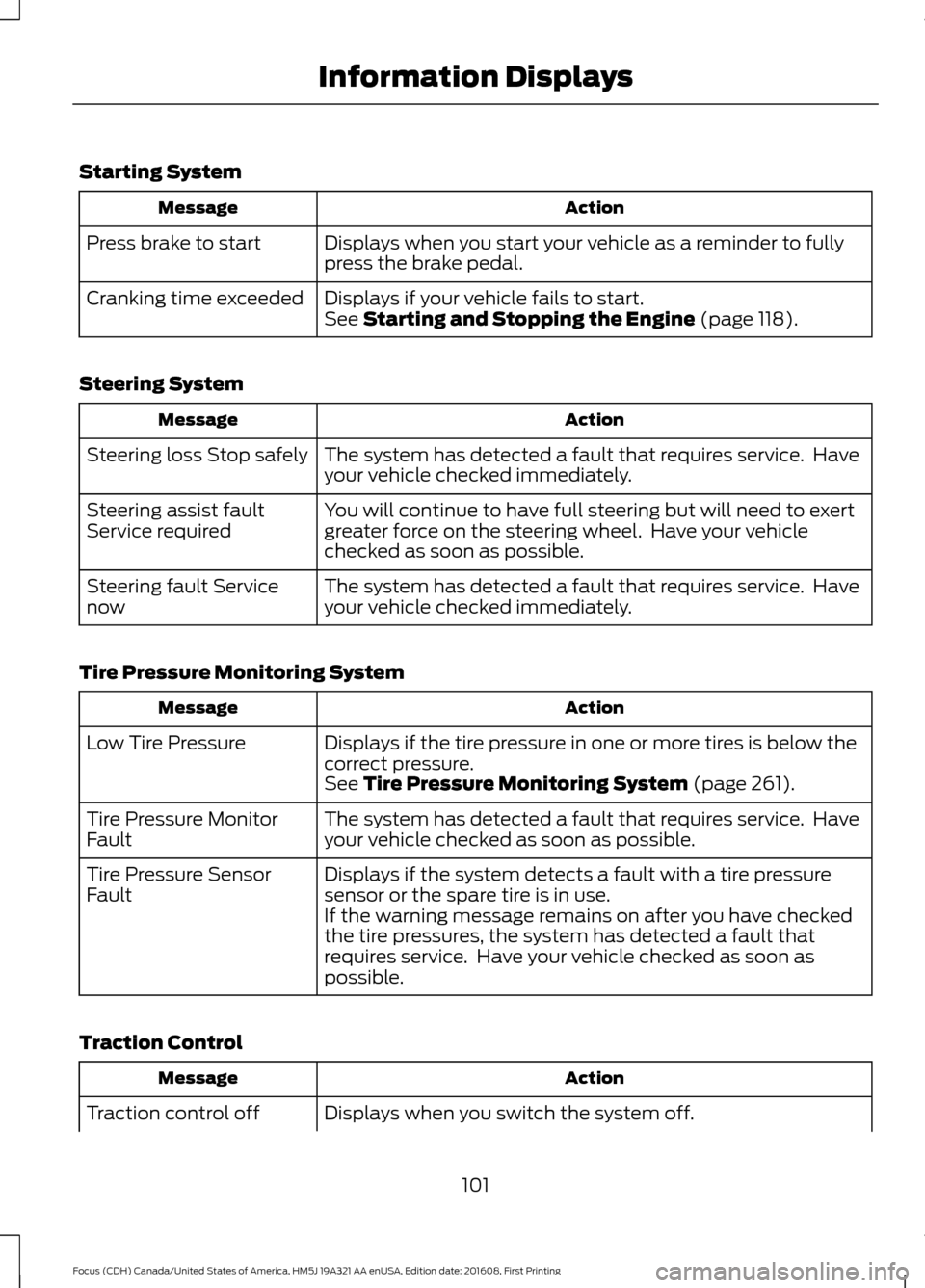
Starting System
Action
Message
Displays when you start your vehicle as a reminder to fully
press the brake pedal.
Press brake to start
Displays if your vehicle fails to start.
Cranking time exceeded
See Starting and Stopping the Engine (page 118).
Steering System Action
Message
The system has detected a fault that requires service. Have
your vehicle checked immediately.
Steering loss Stop safely
You will continue to have full steering but will need to exert
greater force on the steering wheel. Have your vehicle
checked as soon as possible.
Steering assist fault
Service required
The system has detected a fault that requires service. Have
your vehicle checked immediately.
Steering fault Service
now
Tire Pressure Monitoring System Action
Message
Displays if the tire pressure in one or more tires is below the
correct pressure.
Low Tire Pressure
See
Tire Pressure Monitoring System (page 261).
The system has detected a fault that requires service. Have
your vehicle checked as soon as possible.
Tire Pressure Monitor
Fault
Displays if the system detects a fault with a tire pressure
sensor or the spare tire is in use.
Tire Pressure Sensor
Fault
If the warning message remains on after you have checked
the tire pressures, the system has detected a fault that
requires service. Have your vehicle checked as soon as
possible.
Traction Control Action
Message
Displays when you switch the system off.
Traction control off
101
Focus (CDH) Canada/United States of America, HM5J 19A321 AA enUSA, Edition date: 201608, First Printing Information Displays
Page 105 of 467
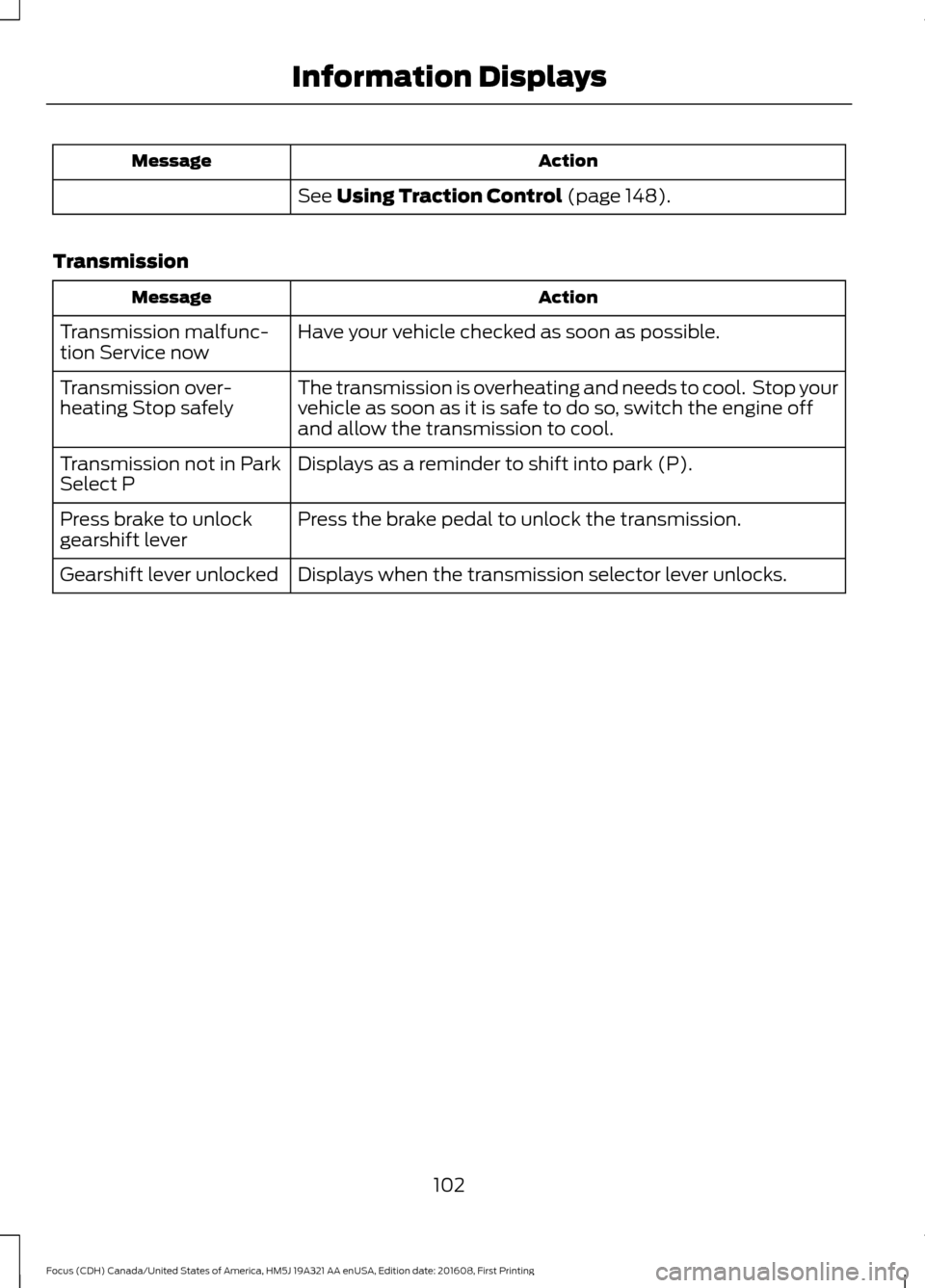
Action
Message
See Using Traction Control (page 148).
Transmission Action
Message
Have your vehicle checked as soon as possible.
Transmission malfunc-
tion Service now
The transmission is overheating and needs to cool. Stop your
vehicle as soon as it is safe to do so, switch the engine off
and allow the transmission to cool.
Transmission over-
heating Stop safely
Displays as a reminder to shift into park (P).
Transmission not in Park
Select P
Press the brake pedal to unlock the transmission.
Press brake to unlock
gearshift lever
Displays when the transmission selector lever unlocks.
Gearshift lever unlocked
102
Focus (CDH) Canada/United States of America, HM5J 19A321 AA enUSA, Edition date: 201608, First Printing Information Displays
Page 107 of 467
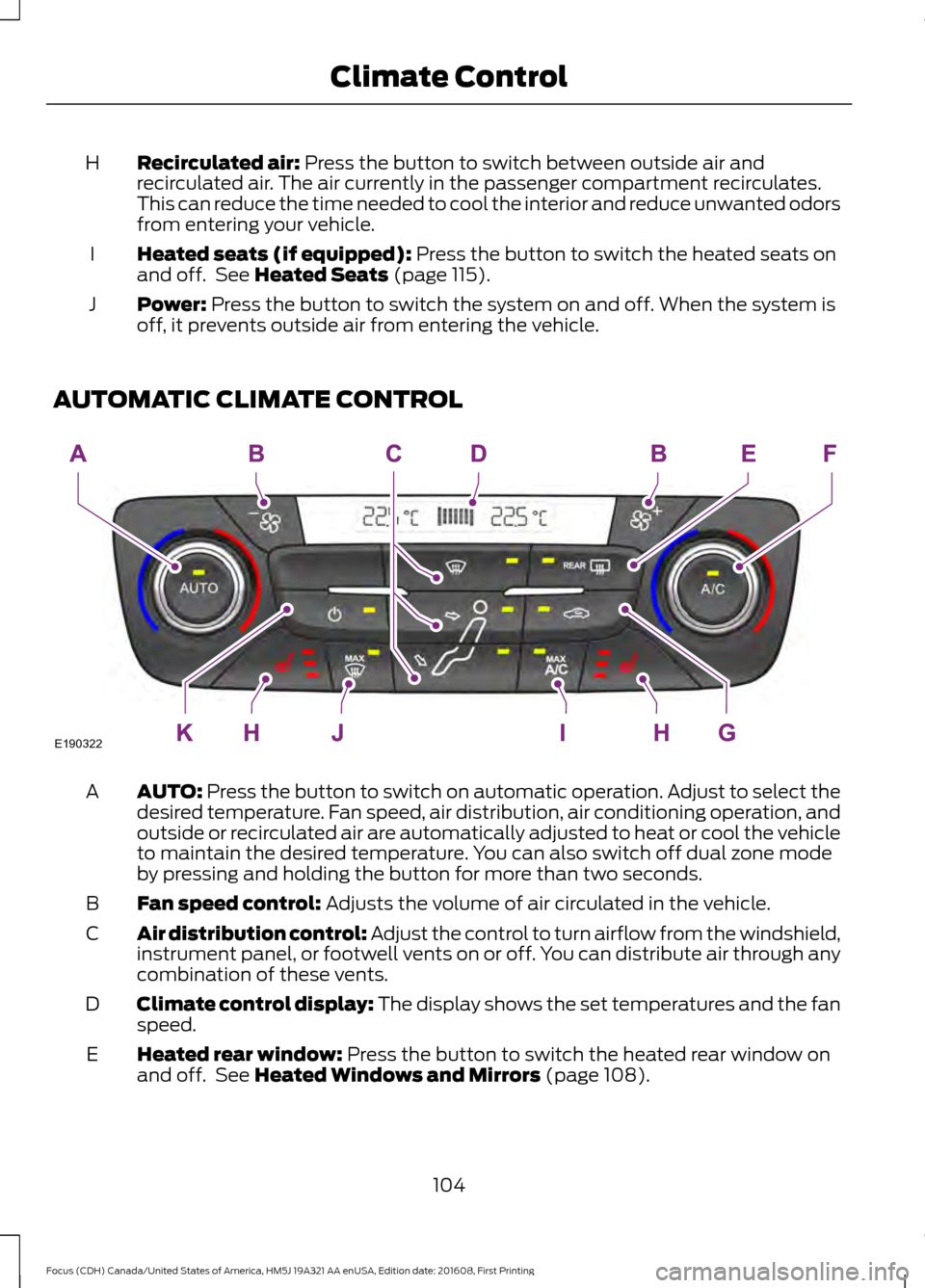
Recirculated air: Press the button to switch between outside air and
recirculated air. The air currently in the passenger compartment recirculates.
This can reduce the time needed to cool the interior and reduce unwanted odors
from entering your vehicle.
H
Heated seats (if equipped):
Press the button to switch the heated seats on
and off. See Heated Seats (page 115).
I
Power:
Press the button to switch the system on and off. When the system is
off, it prevents outside air from entering the vehicle.
J
AUTOMATIC CLIMATE CONTROL AUTO:
Press the button to switch on automatic operation. Adjust to select the
desired temperature. Fan speed, air distribution, air conditioning operation, and
outside or recirculated air are automatically adjusted to heat or cool the vehicle
to maintain the desired temperature. You can also switch off dual zone mode
by pressing and holding the button for more than two seconds.
A
Fan speed control:
Adjusts the volume of air circulated in the vehicle.
B
Air distribution control: Adjust the control to turn airflow from the windshield,
instrument panel, or footwell vents on or off. You can distribute air through any
combination of these vents.
C
Climate control display: The display shows the set temperatures and the fan
speed.
D
Heated rear window:
Press the button to switch the heated rear window on
and off. See Heated Windows and Mirrors (page 108).
E
104
Focus (CDH) Canada/United States of America, HM5J 19A321 AA enUSA, Edition date: 201608, First Printing Climate ControlE190322
Page 109 of 467
Dual Zone Temperature Control
Select a temperature for the passenger
’s
side using the rotary control on the
passenger ’s side. Single zone temperature
control automatically switches off. The
temperature on the driver ’s side remains
unchanged. You can now adjust the driver ’s
side and passenger ’s side temperatures
independently. The display shows the
temperature settings for each side.
HINTS ON CONTROLLING THE
INTERIOR CLIMATE
General Hints
Note: Prolonged use of recirculated air may
cause the windows to fog up.
Note: To reduce humidity build-up inside
your vehicle, do not drive with the system
switched off or with recirculated air always
switched on.
Note: Do not place objects under the front
seats as this may interfere with the airflow
to the rear seats.
Note: Remove any snow, ice or leaves from
the air intake area at the base of the
windshield. Note:
To improve the time to reach comfort
in hot weather, drive with the windows fully
open until you feel cold air through the air
vents.
Manual Climate Control
Note: To reduce fogging of the windshield
during humid weather, adjust the air
distribution control to the windshield air
vents position.
Automatic Climate Control
Note: Adjusting the settings when your
vehicle interior is extremely hot or cold is
not necessary. The system automatically
adjusts to heat or cool the cabin to your
selected temperature as quickly as possible.
For the system to function efficiently, the
instrument panel and side air vents should
be fully open.
Note: If you select AUTO during cold
outside temperatures, the system directs
airflow to the windshield and side window
vents. In addition, the fan may run at a
slower speed until the engine warms up.
Note: If you select AUTO during hot outside
temperatures, or when the inside of the
vehicle is hot, the system automatically uses
recirculated air to maximize interior cooling.
When the interior reaches the selected
temperature, the system automatically
switches to using outside air.
Heating the Interior Quickly Vehicle with automatic climate control
Vehicle with manual climate control
Press the
AUTO button.
Adjust the temperature control to the
highest setting.
1
Adjust the temperature control to the
desired setting.
Adjust the fan speed to a high speed
setting as soon as you feel warm air.
2
Select the footwell air vents using the
air distribution buttons.
3
106
Focus (CDH) Canada/United States of America, HM5J 19A321 AA enUSA, Edition date: 201608, First Printing Climate Control