buttons FORD FOCUS 2018 User Guide
[x] Cancel search | Manufacturer: FORD, Model Year: 2018, Model line: FOCUS, Model: FORD FOCUS 2018Pages: 473, PDF Size: 39.91 MB
Page 110 of 473
Dual Zone Temperature Control
Select a temperature for the passenger’sside using the rotary control on thepassenger’s side. Single zone temperaturecontrol automatically switches off. Thetemperature on the driver’s side remainsunchanged. You can now adjust the driver’sside and passenger’s side temperaturesindependently. The display shows thetemperature settings for each side.
HINTS ON CONTROLLING THE
INTERIOR CLIMATE
General Hints
Note:Prolonged use of recirculated air maycause the windows to fog up.
Note:To reduce humidity build-up insideyour vehicle, do not drive with the systemswitched off or with recirculated air alwaysswitched on.
Note:Do not place objects under the frontseats as this may interfere with the airflowto the rear seats.
Note:Remove any snow, ice or leaves fromthe air intake area at the base of thewindshield.
Note:To improve the time to reach comfortin hot weather, drive with the windows fullyopen until you feel cold air through the airvents.
Manual Climate Control
Note:To reduce fogging of the windshieldduring humid weather, adjust the airdistribution control to the windshield airvents position.
Automatic Climate Control
Note:Adjusting the settings when yourvehicle interior is extremely hot or cold isnot necessary. The system automaticallyadjusts to heat or cool the cabin to yourselected temperature as quickly as possible.For the system to function efficiently, theinstrument panel and side air vents shouldbe fully open.
Note:If you select AUTO during coldoutside temperatures, the system directsairflow to the windshield and side windowvents. In addition, the fan may run at aslower speed until the engine warms up.
Note:If you select AUTO during hot outsidetemperatures, or when the inside of thevehicle is hot, the system automatically usesrecirculated air to maximize interior cooling.When the interior reaches the selectedtemperature, the system automaticallyswitches to using outside air.
Heating the Interior Quickly
Vehicle with automatic climate controlVehicle with manual climate control
Press the AUTO button.Adjust the temperature control to thehighest setting.1
Adjust the temperature control to thedesired setting.Adjust the fan speed to a high speedsetting as soon as you feel warm air.2
Select the footwell air vents using theair distribution buttons.3
1072018 Focus (CDH) Canada/United States of America, JM5J 19A321 AA enUSA, Edition date: 201706, Second PrintingClimate Control
Page 111 of 473
Recommended Settings for Heating
Vehicle with automatic climate controlVehicle with manual climate control
Press the AUTO button.Adjust the fan speed to the centersetting.1
Adjust the temperature control to thedesired setting. Use 72°F (22°C) as astarting point, then adjust the setting asnecessary.
Adjust the temperature control to themidway point of the hot settings.2
Select the footwell air vents using theair distribution buttons.3
Cooling the Interior Quickly
Vehicle with automatic climate controlVehicle with manual climate control
Press the MAX A/C button.Adjust the temperature control to theMAX A/C position.1
Drive with the windows fully open untilyou feel cold air through the air vents.Adjust the fan speed to the highestsetting.2
Recommended Settings for Cooling
Vehicle with automatic climate controlVehicle with manual climate control
Press the AUTO button.Adjust the fan speed to the centersetting.1
Adjust the temperature control to thedesired setting. Use 72°F (22°C) as astarting point, then adjust the setting asnecessary.
Adjust the temperature control to themidway point of the cold settings.2
Select the instrument panel air ventsusing the air distribution buttons.3
1082018 Focus (CDH) Canada/United States of America, JM5J 19A321 AA enUSA, Edition date: 201706, Second PrintingClimate Control
Page 112 of 473
Side Window Defogging in Cold Weather
Vehicle with automatic climate controlVehicle with manual climate control
Press the defrost button.Select the windshield air vents using theair distribution buttons.1
Adjust the temperature control to thedesired setting. Use 72°F (22°C) as astarting point, then adjust the setting asnecessary.
Press the A/C button.2
Adjust the temperature control to thedesired setting.3
Adjust the fan speed to the highestsetting.4
HEATED WINDOWS AND
MIRRORS
Heated Rear Window
Note:Make sure the vehicle is runningbefore operating the heated windows.
Press the button to clear theheated rear window of thin iceand fog. The heated rearwindow will automatically turn off after ashort period of time.
Note: Do not use razor blades or othersharp objects to clean or remove decalsfrom the inside of the heated rear window.The vehicle warranty does not coverdamage caused to the heated rear windowgrid lines.
Heated Exterior Mirrors (If Equipped)
When you switch the heated rearwindow on, the heated exteriormirrors will automatically turnon.
Note:Do not remove ice from the mirrorswith a scraper or adjust the mirror glasswhen it is frozen in place.
Note:Do not clean the mirror housing orglass with harsh abrasives, fuel or otherpetroleum-based cleaning products.
CABIN AIR FILTER
Your vehicle is equipped with a cabin airfilter. It is located behind the centerconsole.
The particulate filtration system reducesthe concentration of airborne particlessuch as dust, spores and pollen in the airsupplied to the interior of your vehicle.
Note:Make sure you have a cabin air filterinstalled at all times. This prevents foreignobjects from entering the system. Runningthe system without a filter in place couldresult in degradation or damage to thesystem.
The particulate filtration system gives youand your passengers the followingbenefits:
•It improves your driving comfort byreducing particle concentration.
•It improves the interior compartmentcleanliness.
•It protects the climate controlcomponents from particle deposits.
1092018 Focus (CDH) Canada/United States of America, JM5J 19A321 AA enUSA, Edition date: 201706, Second PrintingClimate ControlE72507 E72507
Page 115 of 473
Note:Adjust the seatback to an uprightdriving position before adjusting the headrestraint. Adjust the head restraint so thatthe top of it is level with the top of your headand as far forward as possible. Make surethat you remain comfortable. If you areextremely tall, adjust the head restraint toits highest position.
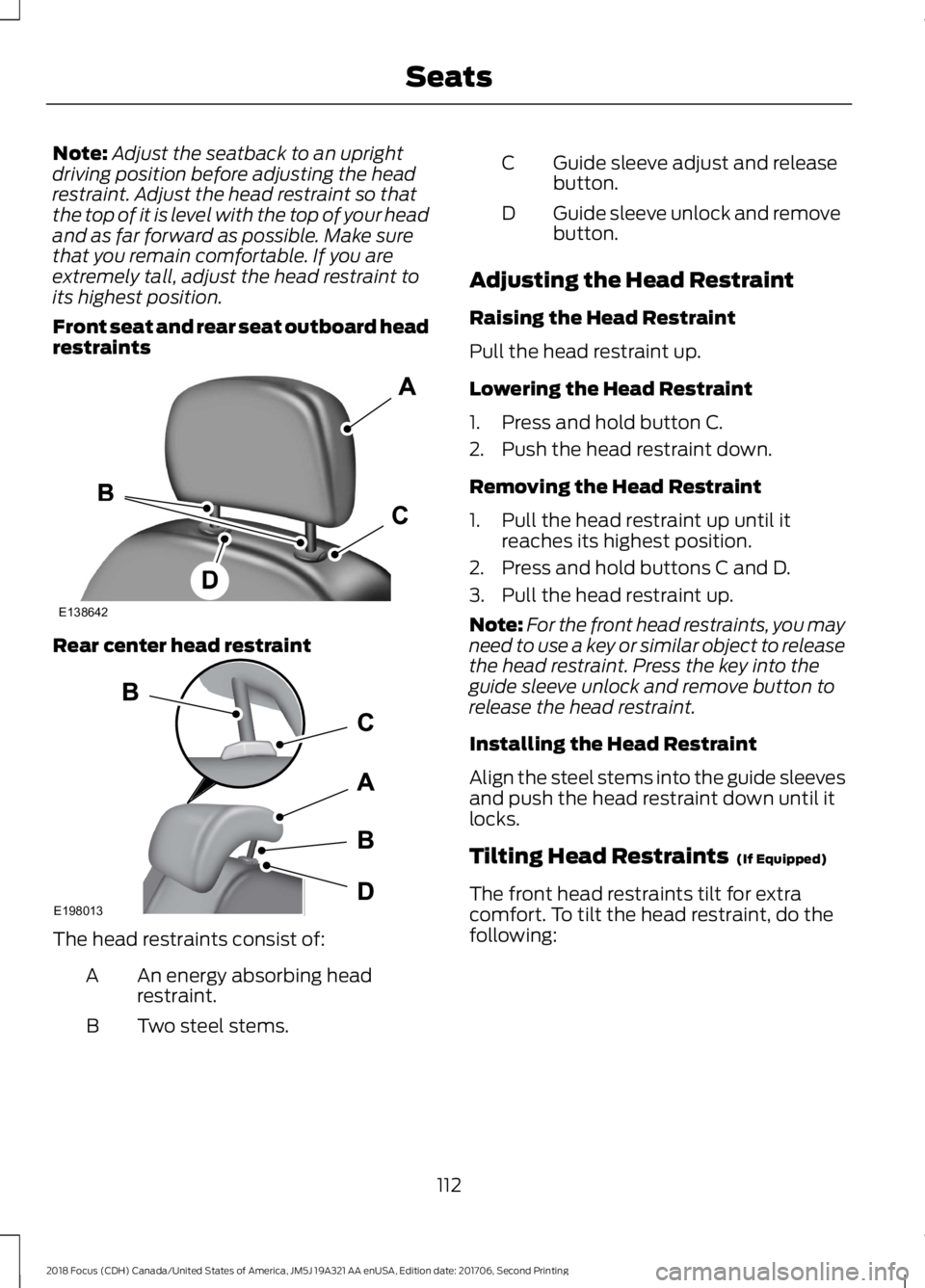
Front seat and rear seat outboard headrestraints
Rear center head restraint
The head restraints consist of:
An energy absorbing headrestraint.A
Two steel stems.B
Guide sleeve adjust and releasebutton.C
Guide sleeve unlock and removebutton.D
Adjusting the Head Restraint
Raising the Head Restraint
Pull the head restraint up.
Lowering the Head Restraint
1.Press and hold button C.
2.Push the head restraint down.
Removing the Head Restraint
1.Pull the head restraint up until itreaches its highest position.
2.Press and hold buttons C and D.
3.Pull the head restraint up.
Note:For the front head restraints, you mayneed to use a key or similar object to releasethe head restraint. Press the key into theguide sleeve unlock and remove button torelease the head restraint.
Installing the Head Restraint
Align the steel stems into the guide sleevesand push the head restraint down until itlocks.
Tilting Head Restraints (If Equipped)
The front head restraints tilt for extracomfort. To tilt the head restraint, do thefollowing:
1122018 Focus (CDH) Canada/United States of America, JM5J 19A321 AA enUSA, Edition date: 201706, Second PrintingSeatsE138642 E198013
Page 117 of 473
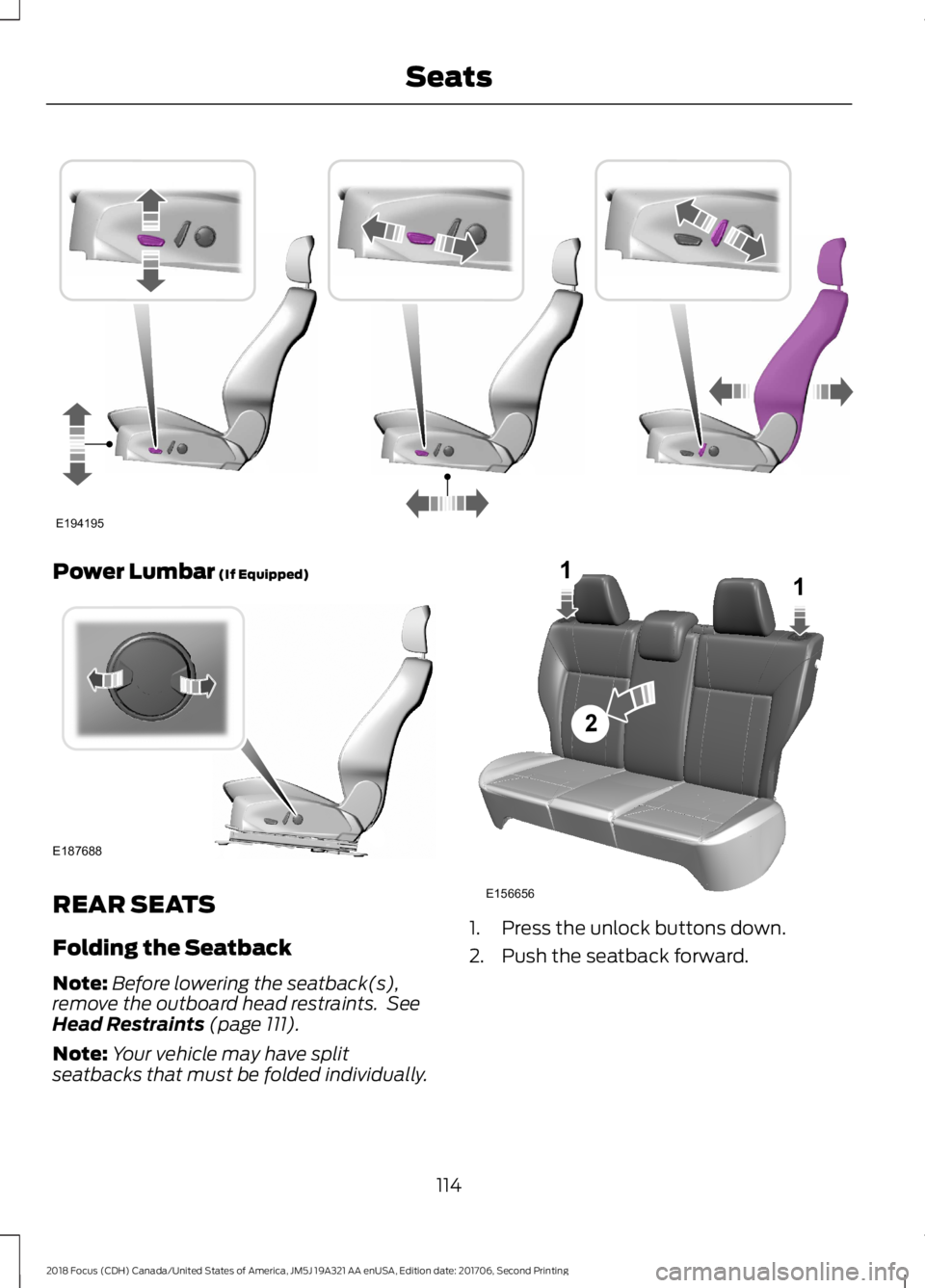
Power Lumbar (If Equipped)
REAR SEATS
Folding the Seatback
Note:Before lowering the seatback(s),remove the outboard head restraints. SeeHead Restraints (page 111).
Note:Your vehicle may have splitseatbacks that must be folded individually.
1.Press the unlock buttons down.
2.Push the seatback forward.
1142018 Focus (CDH) Canada/United States of America, JM5J 19A321 AA enUSA, Edition date: 201706, Second PrintingSeatsE194195 E187688 E156656211
Page 192 of 473
Vehicles Sold in Canada: GettingRoadside Assistance
To fully assist you should you have avehicle concern, Ford Motor Company ofCanada, Limited offers a complimentaryroadside assistance program. Thisprogram is eligible within Canada or thecontinental United States.
This program is separate from the NewVehicle Limited Warranty, but the coverageis concurrent with the powertrain coverageperiod of your vehicle.
Canadian customers who require roadsideassistance, call 1-800-665-2006.
Vehicles Sold in Canada: UsingRoadside Assistance
Complete the roadside assistanceidentification card and place it in yourwallet for quick reference.
In Canada, this card is found in theWarranty Guide in the glove compartmentof your vehicle.
Vehicles Sold in Canada: RoadsideAssistance Program Coverage
The service is available 24 hours a day,seven days a week.
Canadian roadside coverage and benefitsmay differ from the U.S. coverage.
If you require more information, pleaserefer to the coverage section of yourwarranty guide, call us in Canada at1-800-665-2006, or visit our website atwww.ford.ca.
HAZARD FLASHERS
Note:If used when the vehicle is notrunning, the battery will lose charge. Theremay be insufficient power to restart yourvehicle.
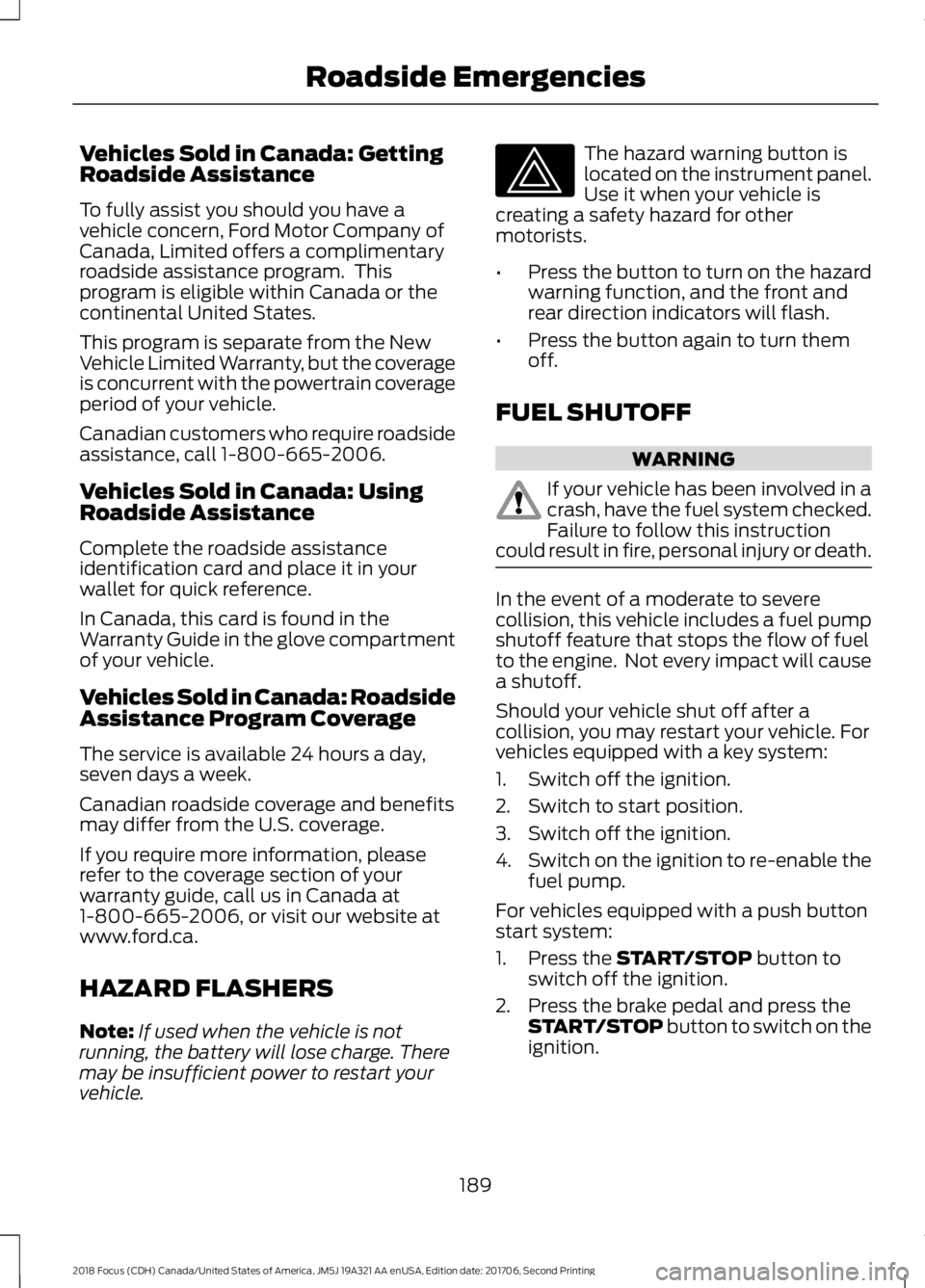
The hazard warning button islocated on the instrument panel.Use it when your vehicle iscreating a safety hazard for othermotorists.
•Press the button to turn on the hazardwarning function, and the front andrear direction indicators will flash.
•Press the button again to turn themoff.
FUEL SHUTOFF
WARNING
If your vehicle has been involved in acrash, have the fuel system checked.Failure to follow this instructioncould result in fire, personal injury or death.
In the event of a moderate to severecollision, this vehicle includes a fuel pumpshutoff feature that stops the flow of fuelto the engine. Not every impact will causea shutoff.
Should your vehicle shut off after acollision, you may restart your vehicle. Forvehicles equipped with a key system:
1.Switch off the ignition.
2.Switch to start position.
3.Switch off the ignition.
4.Switch on the ignition to re-enable thefuel pump.
For vehicles equipped with a push buttonstart system:
1.Press the START/STOP button toswitch off the ignition.
2.Press the brake pedal and press theSTART/STOP button to switch on theignition.
1892018 Focus (CDH) Canada/United States of America, JM5J 19A321 AA enUSA, Edition date: 201706, Second PrintingRoadside Emergencies
Page 227 of 473
Service Position
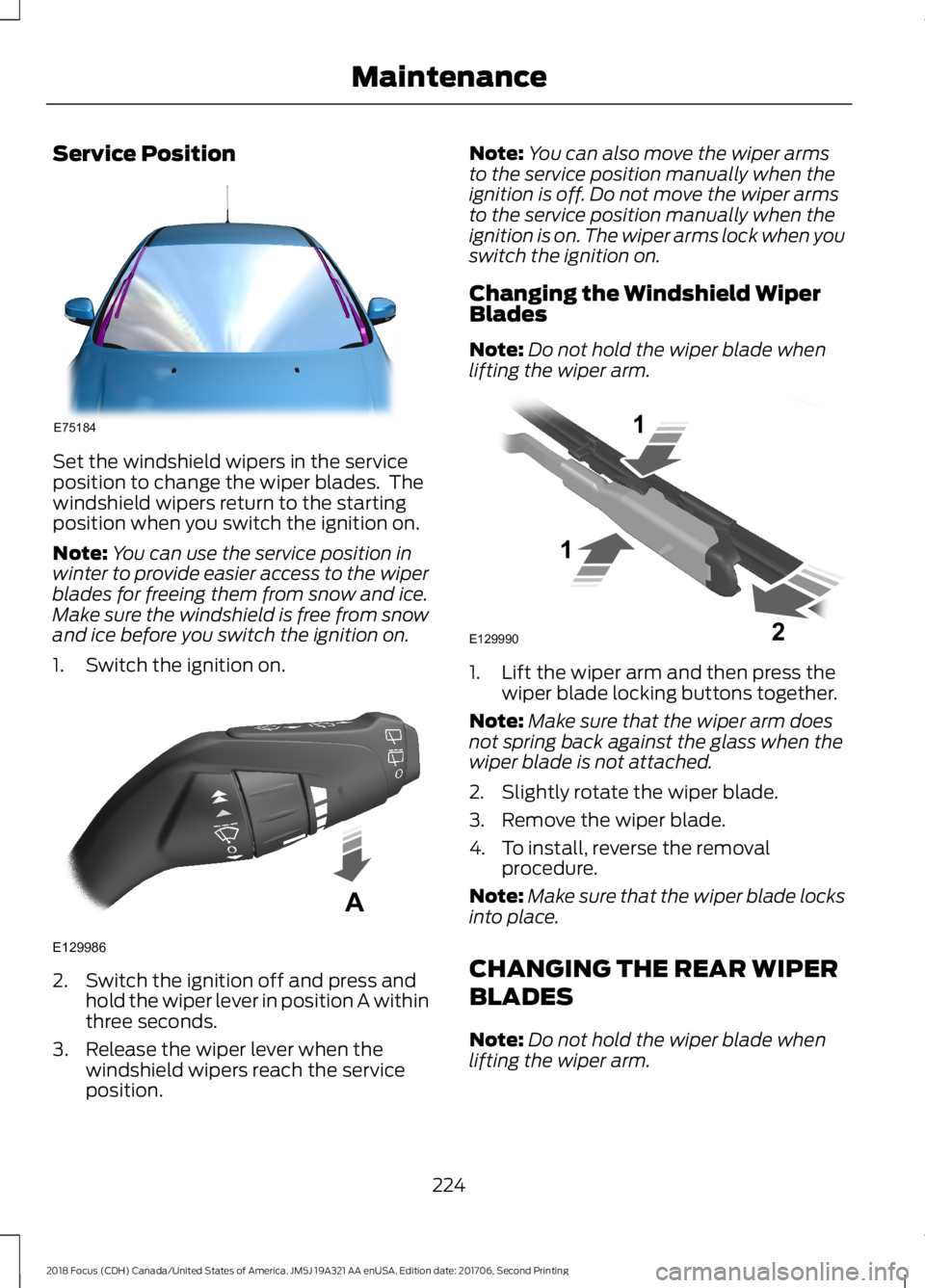
Set the windshield wipers in the serviceposition to change the wiper blades. Thewindshield wipers return to the startingposition when you switch the ignition on.
Note:You can use the service position inwinter to provide easier access to the wiperblades for freeing them from snow and ice.Make sure the windshield is free from snowand ice before you switch the ignition on.
1.Switch the ignition on.
2.Switch the ignition off and press andhold the wiper lever in position A withinthree seconds.
3.Release the wiper lever when thewindshield wipers reach the serviceposition.
Note:You can also move the wiper armsto the service position manually when theignition is off. Do not move the wiper armsto the service position manually when theignition is on. The wiper arms lock when youswitch the ignition on.
Changing the Windshield WiperBlades
Note:Do not hold the wiper blade whenlifting the wiper arm.
1.Lift the wiper arm and then press thewiper blade locking buttons together.
Note:Make sure that the wiper arm doesnot spring back against the glass when thewiper blade is not attached.
2.Slightly rotate the wiper blade.
3.Remove the wiper blade.
4.To install, reverse the removalprocedure.
Note:Make sure that the wiper blade locksinto place.
CHANGING THE REAR WIPER
BLADES
Note:Do not hold the wiper blade whenlifting the wiper arm.
2242018 Focus (CDH) Canada/United States of America, JM5J 19A321 AA enUSA, Edition date: 201706, Second PrintingMaintenanceE75184 E129986A E129990112
Page 286 of 473
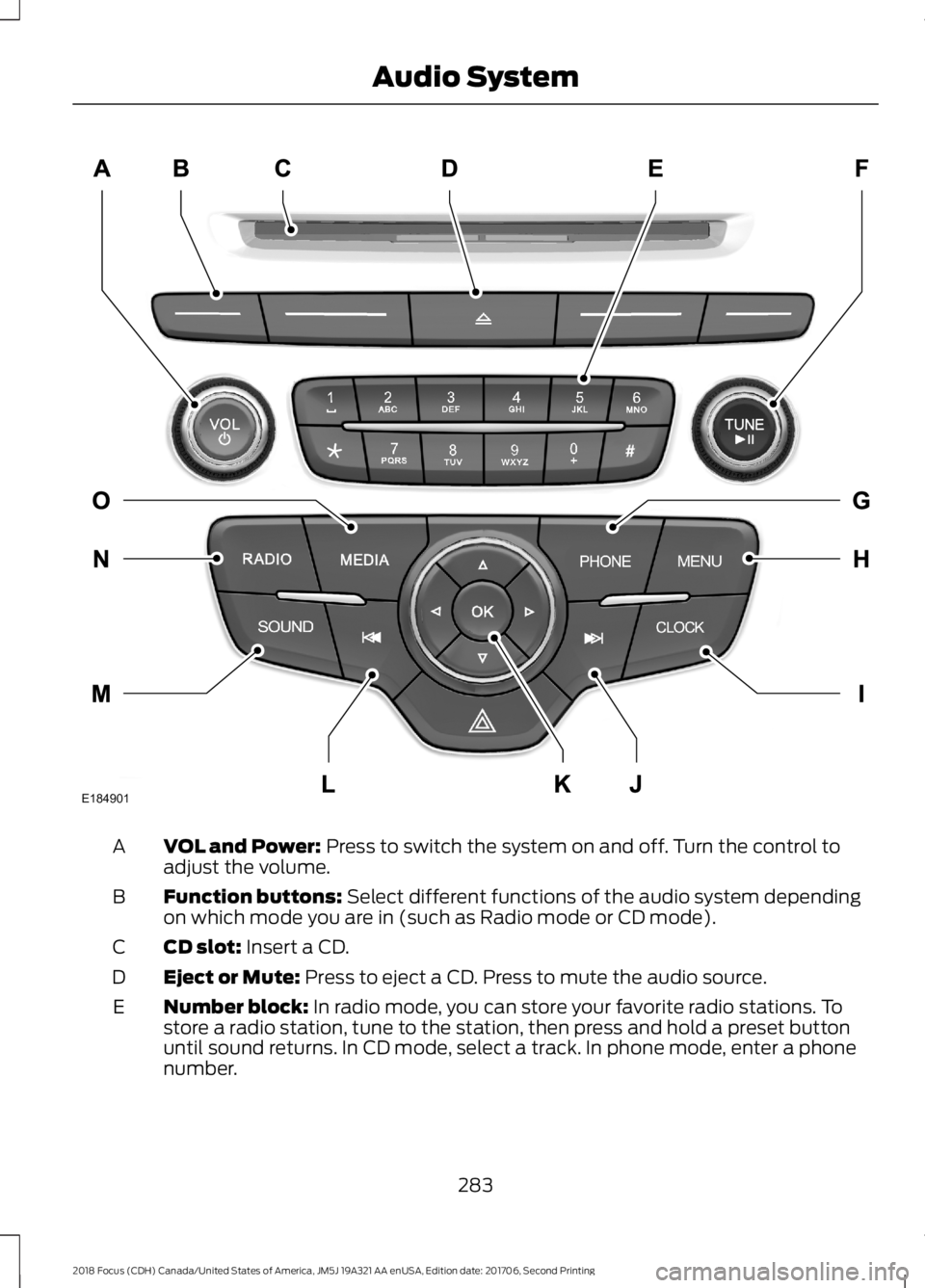
VOL and Power: Press to switch the system on and off. Turn the control toadjust the volume.A
Function buttons: Select different functions of the audio system dependingon which mode you are in (such as Radio mode or CD mode).B
CD slot: Insert a CD.C
Eject or Mute: Press to eject a CD. Press to mute the audio source.D
Number block: In radio mode, you can store your favorite radio stations. Tostore a radio station, tune to the station, then press and hold a preset buttonuntil sound returns. In CD mode, select a track. In phone mode, enter a phonenumber.
E
2832018 Focus (CDH) Canada/United States of America, JM5J 19A321 AA enUSA, Edition date: 201706, Second PrintingAudio SystemE184901
Page 287 of 473
TUNE and Play or Pause: In radio mode, turn to search the frequency bandin individual increments. Press to mute the station. In media mode, turn to selecta new track. Press to either play or pause a track. This button also mutes theradio sources.
F
PHONE: Press to access the phone features of the SYNC system. See yourSYNC information.G
MENU: Press to access different audio system features. See Menu Structurelater in this chapter.H
CLOCK: If not in phone mode, press to display the clock.I
Seek and Fast Forward: In radio mode, select a frequency band and pressthis button. The system stops at the first station up the band. Press and holdthe button to move quickly, then release to stop at the next available station.In CD mode, press to select the next track. Press and hold the button to movequickly forward through the current track.
J
OK and Arrow buttons: Press OK to confirm menu selections. Press to scrollthrough the menu choices.K
Seek and Reverse: In radio mode, select a frequency band and press thisbutton. The system stops at the first station down the band. Press and holdthe button to move quickly, then release to stop at the previous available station.In CD mode, press to select the previous track. Press and hold the button tomove quickly backward through the current track.
L
SOUND: Press to access settings for Treble, Midrange, Bass, Fade or Balance.Use the up and down arrow buttons to select the various settings. When youmake your selection, press the left and right arrow buttons to change thesettings. Press OK to set or press MENU to exit. Sound settings can be set foreach audio source independently.
M
RADIO: Press this multiple times to select a radio band. Press and hold toselect the autostore function. Press to return to the main screen of the activeradio band.
N
MEDIA: Press to open the media source menu. You can press this multipletimes to change to CD or to a SYNC-Media device or scroll through the mediasources using the arrow buttons. Press OK to select a source.
O
2842018 Focus (CDH) Canada/United States of America, JM5J 19A321 AA enUSA, Edition date: 201706, Second PrintingAudio System
Page 289 of 473
TUNE: In radio mode, press to manually search through the radio frequencyband. In SIRIUS mode, press to find the previous or next available satellite radiostation.
C
Eject: Press to eject a CD.D
SOUND: Press to access settings for Treble, Midrange, Bass, Fade or Balance.E
Volume: Turn to adjust the volume.F
SOURCE: Press to access different audio modes, for example AM, FM and CD.G
Seek, Fast Forward and Reverse: In radio mode, select a frequency bandand press this button. The system stops at the first station it finds in thatdirection. In SIRIUS mode, press to select the next or previous satellite radiostation. If a specific category is selected (such as jazz, rock or news), press tofind the next or previous in the selected category. In CD mode, press to selectthe previous or next track. Press and hold to move quickly forward through thecurrent track.
H
Menu Structure
Note:Depending on your system, someoptions may appear slightly different.
Press MENU.
Press the up and down arrow buttons toscroll through the options.
Press the right arrow to enter a menu.Press the left arrow to exit a menu.
Press OK to confirm a selection.
Radio
Use the left and right arrows to go up or down thefrequency band.Manual tune
Select for a brief sampling of all available channels.Scan
Select to store the six strongest local stations on the AM-AST and FM-AST frequency bands.AST
Select to have the system search by certain musiccategories (such as Rock, Pop or Country).Set PTY Category
Select to view additional broadcast data (radio text), ifavailable. This feature defaults to off. RBDS must be onfor you to set a category, or display radio text and stationnames.
RBDS/RDS
2862018 Focus (CDH) Canada/United States of America, JM5J 19A321 AA enUSA, Edition date: 201706, Second PrintingAudio System