ECO mode FORD FOCUS 2018 Owner's Manual
[x] Cancel search | Manufacturer: FORD, Model Year: 2018, Model line: FOCUS, Model: FORD FOCUS 2018Pages: 473, PDF Size: 39.91 MB
Page 108 of 473
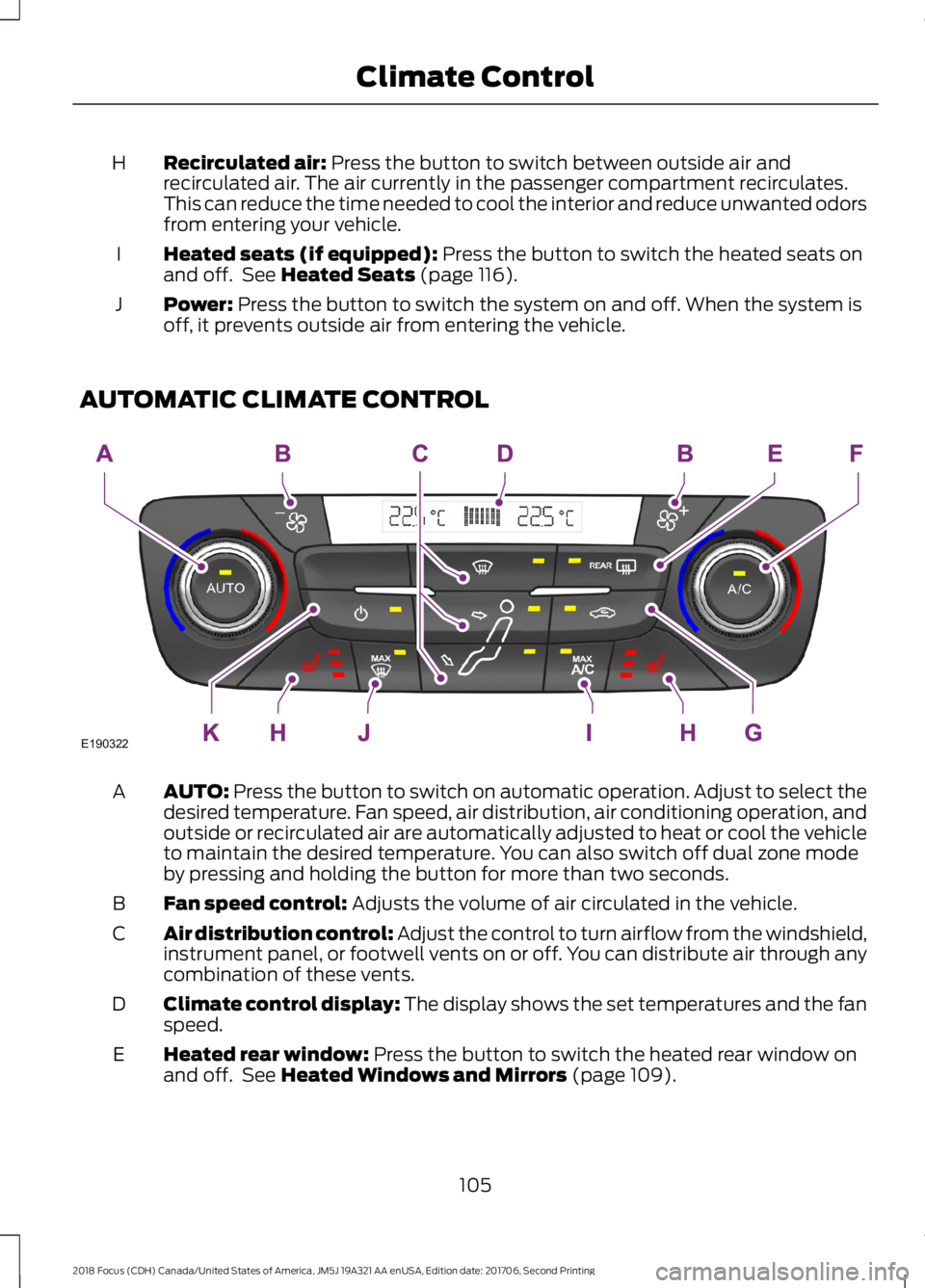
Recirculated air: Press the button to switch between outside air andrecirculated air. The air currently in the passenger compartment recirculates.This can reduce the time needed to cool the interior and reduce unwanted odorsfrom entering your vehicle.
H
Heated seats (if equipped): Press the button to switch the heated seats onand off. See Heated Seats (page 116).I
Power: Press the button to switch the system on and off. When the system isoff, it prevents outside air from entering the vehicle.J
AUTOMATIC CLIMATE CONTROL
AUTO: Press the button to switch on automatic operation. Adjust to select thedesired temperature. Fan speed, air distribution, air conditioning operation, andoutside or recirculated air are automatically adjusted to heat or cool the vehicleto maintain the desired temperature. You can also switch off dual zone modeby pressing and holding the button for more than two seconds.
A
Fan speed control: Adjusts the volume of air circulated in the vehicle.B
Air distribution control: Adjust the control to turn airflow from the windshield,instrument panel, or footwell vents on or off. You can distribute air through anycombination of these vents.
C
Climate control display: The display shows the set temperatures and the fanspeed.D
Heated rear window: Press the button to switch the heated rear window onand off. See Heated Windows and Mirrors (page 109).E
1052018 Focus (CDH) Canada/United States of America, JM5J 19A321 AA enUSA, Edition date: 201706, Second PrintingClimate ControlE190322
Page 109 of 473
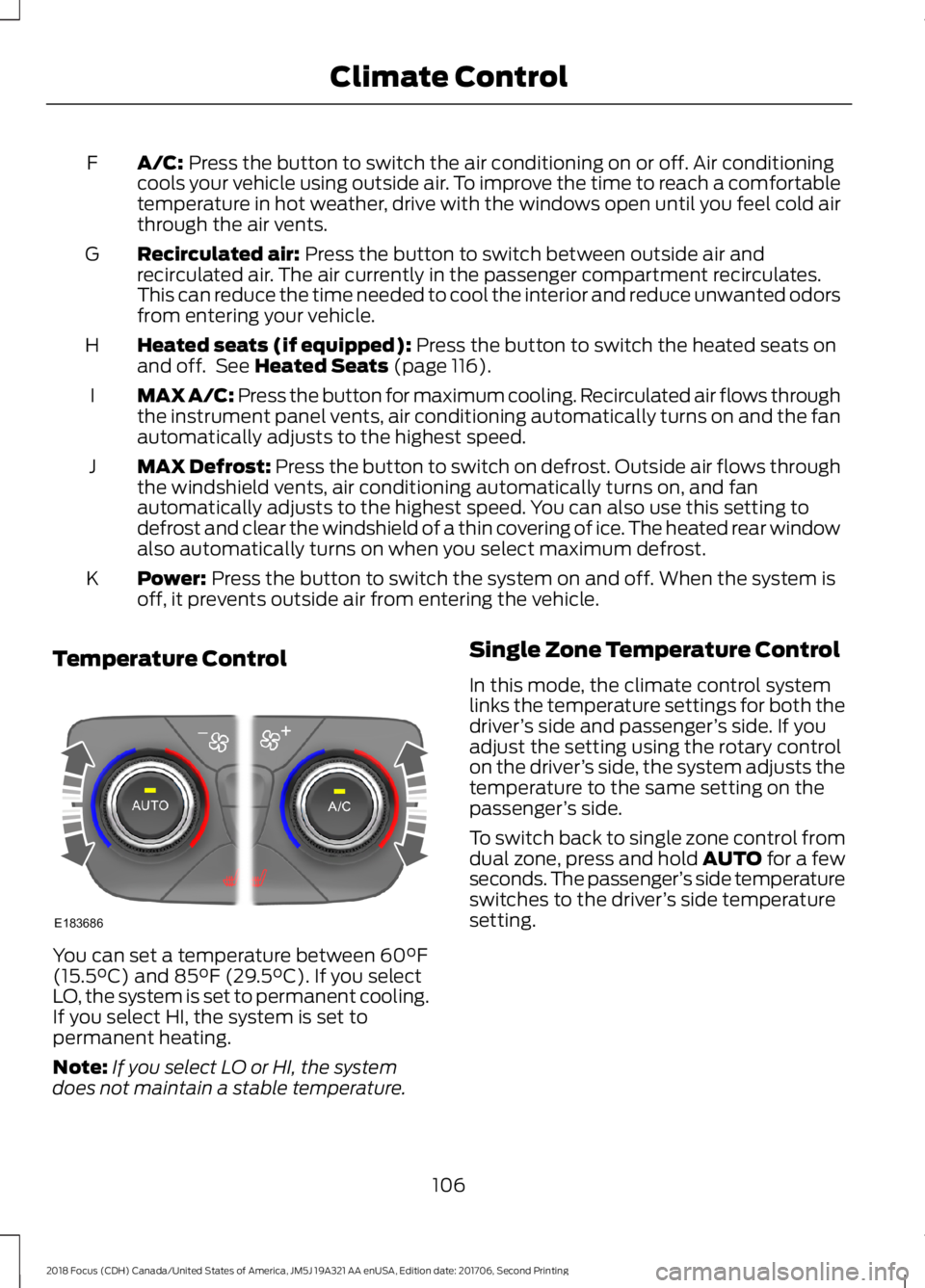
A/C: Press the button to switch the air conditioning on or off. Air conditioningcools your vehicle using outside air. To improve the time to reach a comfortabletemperature in hot weather, drive with the windows open until you feel cold airthrough the air vents.
F
Recirculated air: Press the button to switch between outside air andrecirculated air. The air currently in the passenger compartment recirculates.This can reduce the time needed to cool the interior and reduce unwanted odorsfrom entering your vehicle.
G
Heated seats (if equipped): Press the button to switch the heated seats onand off. See Heated Seats (page 116).H
MAX A/C: Press the button for maximum cooling. Recirculated air flows throughthe instrument panel vents, air conditioning automatically turns on and the fanautomatically adjusts to the highest speed.
I
MAX Defrost: Press the button to switch on defrost. Outside air flows throughthe windshield vents, air conditioning automatically turns on, and fanautomatically adjusts to the highest speed. You can also use this setting todefrost and clear the windshield of a thin covering of ice. The heated rear windowalso automatically turns on when you select maximum defrost.
J
Power: Press the button to switch the system on and off. When the system isoff, it prevents outside air from entering the vehicle.K
Temperature Control
You can set a temperature between 60°F(15.5°C) and 85°F (29.5°C). If you selectLO, the system is set to permanent cooling.If you select HI, the system is set topermanent heating.
Note:If you select LO or HI, the systemdoes not maintain a stable temperature.
Single Zone Temperature Control
In this mode, the climate control systemlinks the temperature settings for both thedriver’s side and passenger’s side. If youadjust the setting using the rotary controlon the driver’s side, the system adjusts thetemperature to the same setting on thepassenger’s side.
To switch back to single zone control fromdual zone, press and hold AUTO for a fewseconds. The passenger’s side temperatureswitches to the driver’s side temperaturesetting.
1062018 Focus (CDH) Canada/United States of America, JM5J 19A321 AA enUSA, Edition date: 201706, Second PrintingClimate ControlE183686
Page 113 of 473
Replace the filter at regular intervals.
For additional cabin air filter information,or to replace the filter, see an authorizeddealer.
REMOTE START
The climate control system adjusts thecabin temperature during remote start.
You cannot adjust the system duringremote start operation. Switch on theignition to return the system to its previoussettings. You can now make adjustments.You need to switch on certainvehicle-dependent features, such as:
•Heated seats.
•Heated mirrors.
•Heated rear window.
•Heated steering wheel.
You can adjust the settings using theinformation display controls. SeeInformation Displays (page 92).
Automatic Settings
You can set the climate control to operatein AUTO mode through the informationdisplay setting: Remote Start > ClimateControl > Heater-A/C > Auto. The climatecontrol system automatically sets theinterior temperature to 72°F (22°C).
In hot weather, the system is set to 72°F(22°C). Cooled seats are set to high (ifavailable, and selected to AUTO in theinformation display).
In cold weather, the system is set to 72°F(22°C). The rear defroster and heatedmirrors automatically turn on.
Last Settings
You can set the climate control to operateusing the last climate control settingsthrough the information display setting:Remote Start > Climate Control >Heater–A/C > Last Settings. The climatecontrol system automatically uses thesettings last selected before you turnedoff the vehicle.
Heated and Cooled Devices
Heated devices typically switch on duringcold weather, and cooled devices duringhot weather.
1102018 Focus (CDH) Canada/United States of America, JM5J 19A321 AA enUSA, Edition date: 201706, Second PrintingClimate Control
Page 123 of 473
Switching the Ignition On toAccessory Mode
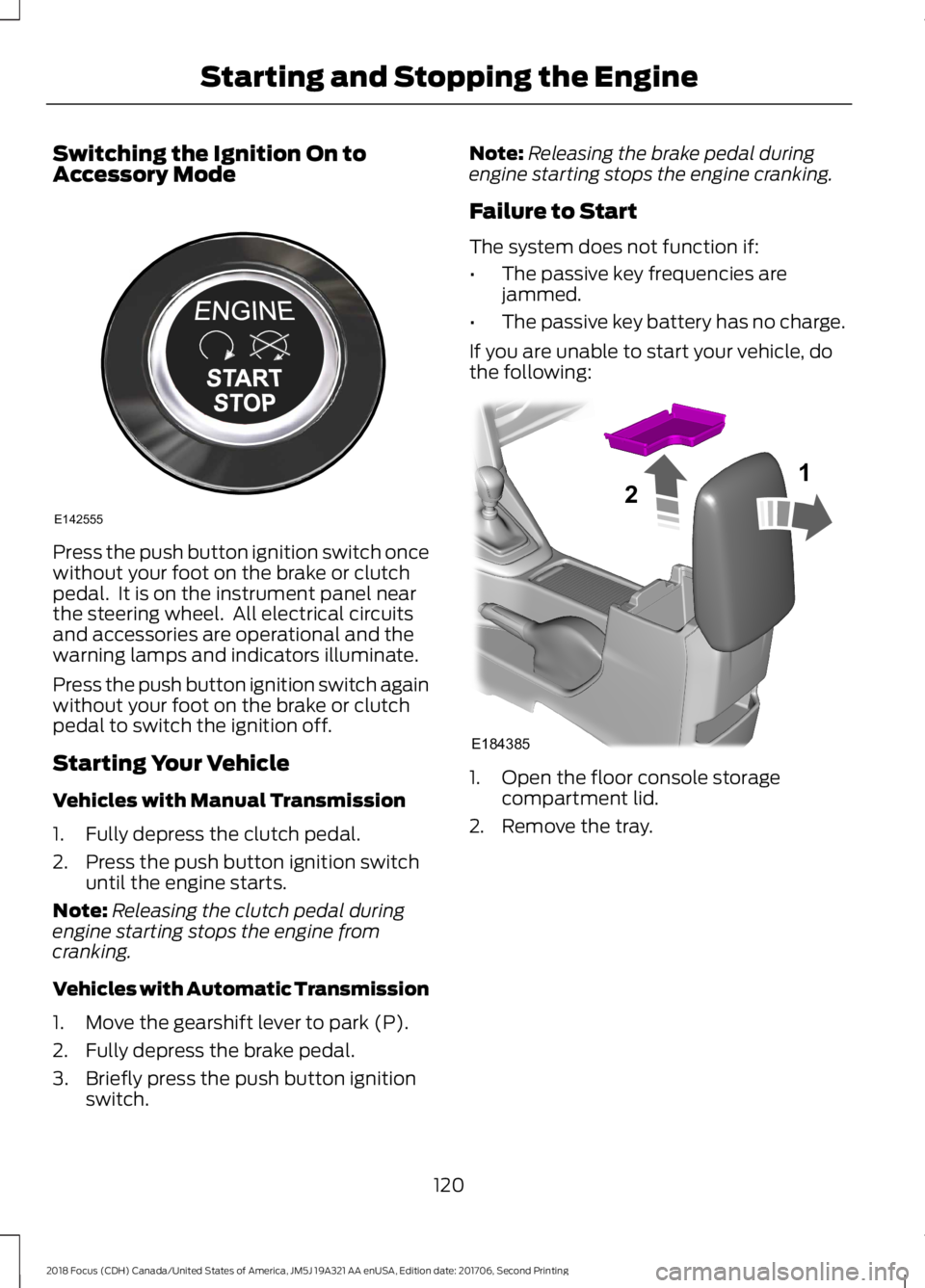
Press the push button ignition switch oncewithout your foot on the brake or clutchpedal. It is on the instrument panel nearthe steering wheel. All electrical circuitsand accessories are operational and thewarning lamps and indicators illuminate.
Press the push button ignition switch againwithout your foot on the brake or clutchpedal to switch the ignition off.
Starting Your Vehicle
Vehicles with Manual Transmission
1.Fully depress the clutch pedal.
2.Press the push button ignition switchuntil the engine starts.
Note:Releasing the clutch pedal duringengine starting stops the engine fromcranking.
Vehicles with Automatic Transmission
1.Move the gearshift lever to park (P).
2.Fully depress the brake pedal.
3.Briefly press the push button ignitionswitch.
Note:Releasing the brake pedal duringengine starting stops the engine cranking.
Failure to Start
The system does not function if:
•The passive key frequencies arejammed.
•The passive key battery has no charge.
If you are unable to start your vehicle, dothe following:
1.Open the floor console storagecompartment lid.
2.Remove the tray.
1202018 Focus (CDH) Canada/United States of America, JM5J 19A321 AA enUSA, Edition date: 201706, Second PrintingStarting and Stopping the EngineE142555 E18438521
Page 131 of 473
To Re-Start the Engine
Release the brake pedal or press theaccelerator pedal.
Limitations of Use
The system may not shut down the engineunder certain conditions, for example:
•Low engine operating temperature.
•To maintain the interior climate.
•The battery charge level is low.
•The outside temperature is too low ortoo high.
•The driver door is opened.
•The driver safety belt is not fastened.
•The transmission is in Sport or Manualmodes (automatic transmission only).
The system may automatically restart theengine under certain conditions, forexample:
•To maintain the interior climate, forexample air conditioning.
•The battery charge level is low.
•Your vehicle starts to roll downhill inneutral.
•The driver safety belt is not fastened(automatic transmission only).
•The driver door is opened (automatictransmission only).
•The transmission is shifted into drive(automatic transmission only).
Switching the System On and Off
When you switch the ignition on,the system automatically turnson.
To switch the system off, press the switchand the word OFF illuminates. Press againto switch the system back on. The systemonly switches off for the current ignitioncycle.
Note:The system may not function if youleave electrical equipment connected withthe ignition off.
Note:For vehicles with Auto-Start-Stop,the battery requirement is different. Replaceit with one of exactly the same specificationas the original.
1282018 Focus (CDH) Canada/United States of America, JM5J 19A321 AA enUSA, Edition date: 201706, Second PrintingUnique Driving Characteristics
Page 166 of 473
Press and release OFF when the system isin stand by mode or switch the ignition off.
1632018 Focus (CDH) Canada/United States of America, JM5J 19A321 AA enUSA, Edition date: 201706, Second PrintingCruise Control
Page 169 of 473
WARNINGS
If damage occurs in the immediatearea surrounding the sensor, haveyour vehicle checked as soon aspossible.
The sensor is located near the rear viewmirror.
Note:The system works above 40 mph(64 km/h).
Note:The system works as long as thecamera can detect one lane marking.
Note:The system may not function if thecamera is blocked or there is damage to thewindshield.
Note:When Aid mode is on and the systemdetects no steering activity for a shortperiod, the system will alert you to put yourhands on the steering wheel. The systemmay detect a light grip or touch on thesteering wheel as hands off driving.
The system notifies you to stay in your lanethrough the steering system and theinstrument cluster display when the frontcamera detects an unintentional drift outof your lane is likely to occur. The systemautomatically detects and tracks the roadlane markings using a camera mountedbehind the interior rear view mirror.
Switching the System On and Off
Note:The system on or off setting is storeduntil it is manually changed, unless a MyKeyis detected. If the system detects a MyKeyit defaults to on and the mode is set to Alert.
Note:If a MyKey is detected, pressing thebutton will not affect the on or off status ofthe system.
Press the button on the steeringwheel stalk to switch the systemon or off.
System Settings
The system has optional setting menusavailable. The system stores thelast-known selection for each of thesesettings. You do not need to readjust yoursettings each time you turn on the system.
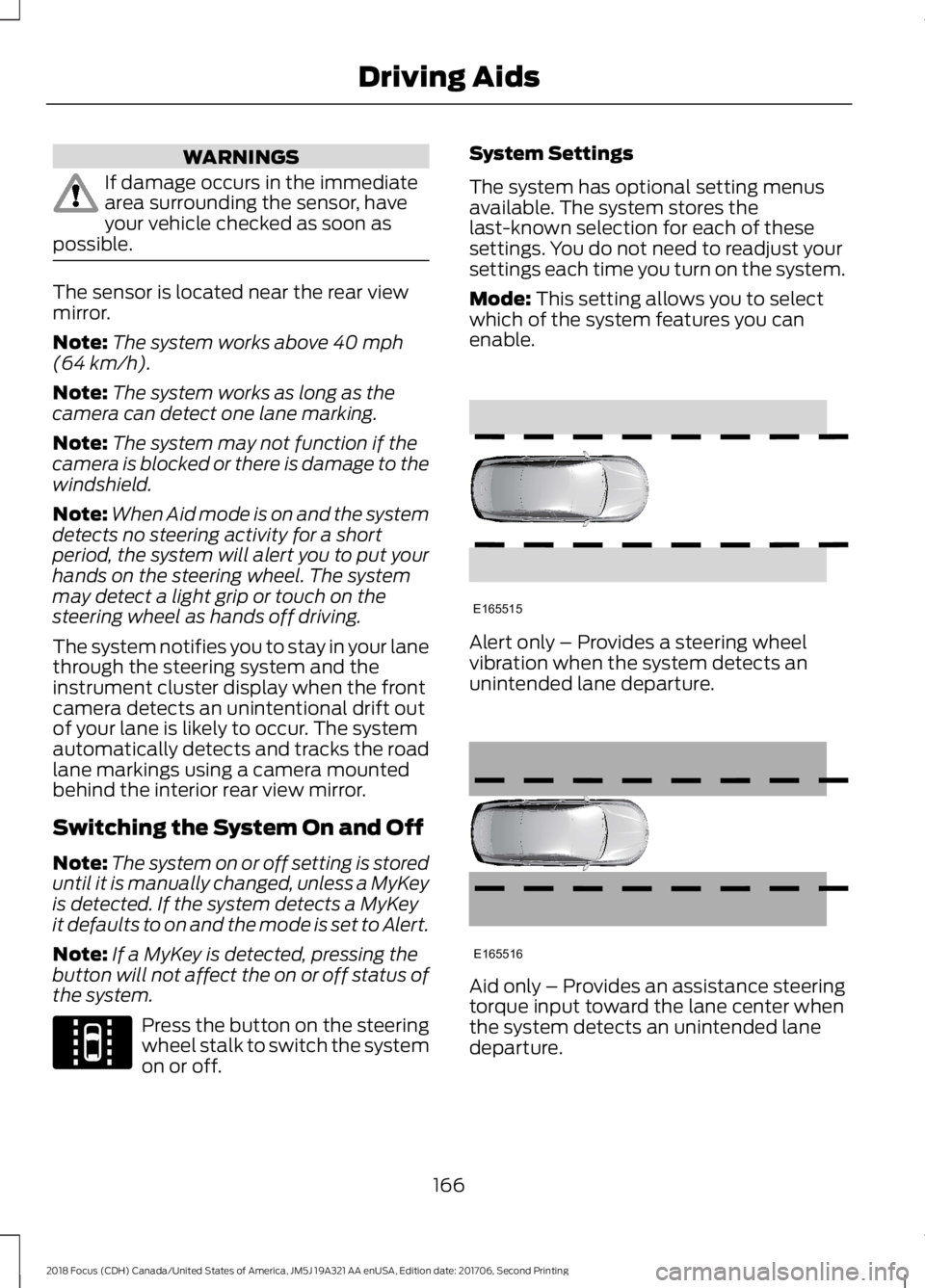
Mode: This setting allows you to selectwhich of the system features you canenable.
Alert only – Provides a steering wheelvibration when the system detects anunintended lane departure.
Aid only – Provides an assistance steeringtorque input toward the lane center whenthe system detects an unintended lanedeparture.
1662018 Focus (CDH) Canada/United States of America, JM5J 19A321 AA enUSA, Edition date: 201706, Second PrintingDriving AidsE144813 E165515 E165516
Page 170 of 473
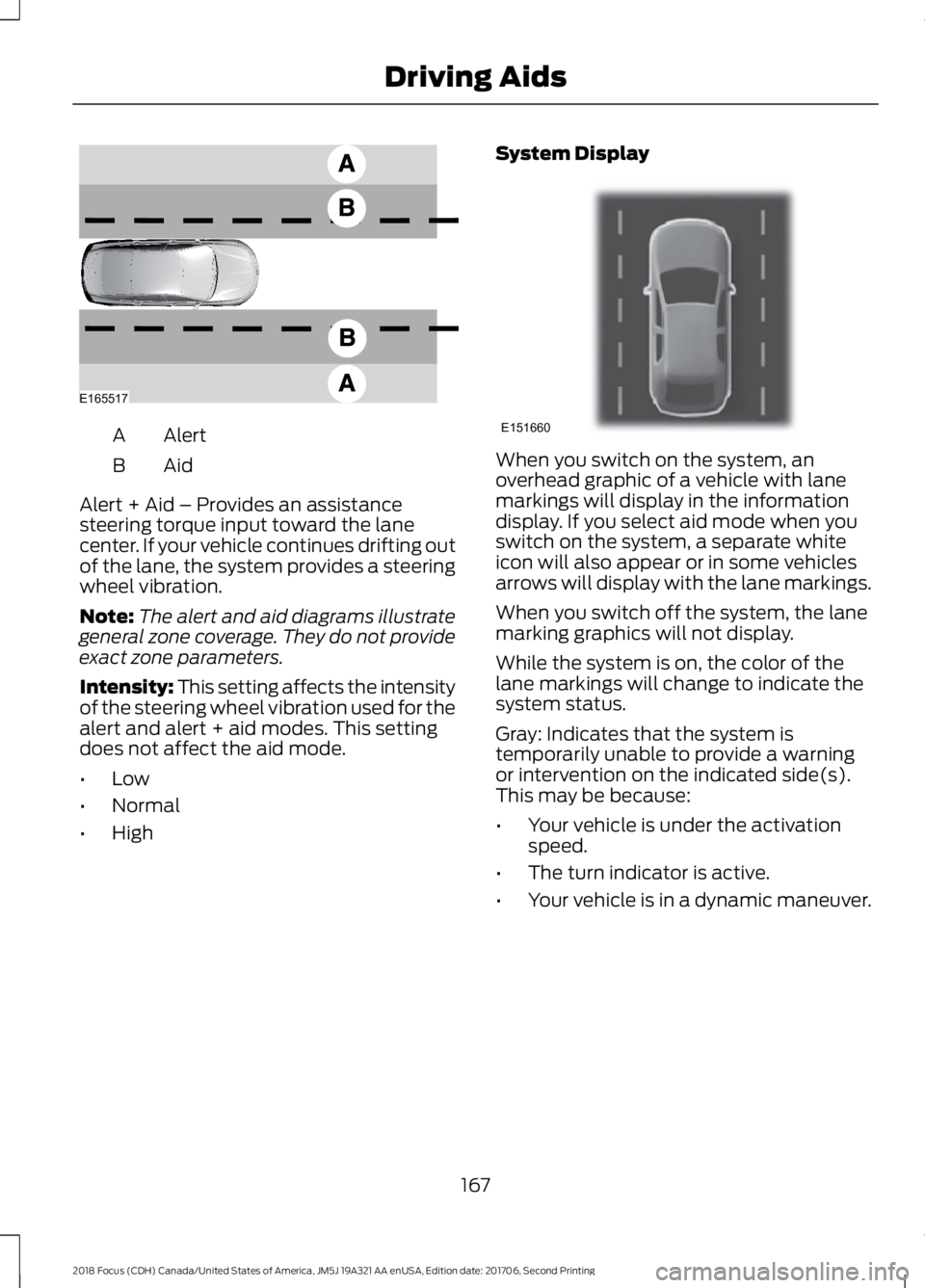
AlertA
AidB
Alert + Aid – Provides an assistancesteering torque input toward the lanecenter. If your vehicle continues drifting outof the lane, the system provides a steeringwheel vibration.
Note:The alert and aid diagrams illustrategeneral zone coverage. They do not provideexact zone parameters.
Intensity: This setting affects the intensityof the steering wheel vibration used for thealert and alert + aid modes. This settingdoes not affect the aid mode.
•Low
•Normal
•High
System Display
When you switch on the system, anoverhead graphic of a vehicle with lanemarkings will display in the informationdisplay. If you select aid mode when youswitch on the system, a separate whiteicon will also appear or in some vehiclesarrows will display with the lane markings.
When you switch off the system, the lanemarking graphics will not display.
While the system is on, the color of thelane markings will change to indicate thesystem status.
Gray: Indicates that the system istemporarily unable to provide a warningor intervention on the indicated side(s).This may be because:
•Your vehicle is under the activationspeed.
•The turn indicator is active.
•Your vehicle is in a dynamic maneuver.
1672018 Focus (CDH) Canada/United States of America, JM5J 19A321 AA enUSA, Edition date: 201706, Second PrintingDriving AidsE165517 E151660
Page 172 of 473
Why is the feature not available (line markings are gray) when I can see the lane markingson the road?
Lane width too narrow or too wide
Camera not calibrated after a windshield replacement
Driving on tight roads or on uneven roads
Why does the vehicle not come back toward the middle of the lane, as expected, in theAid or Aid + Alert mode?
High cross winds
Large road crown
Rough roads, grooves, shoulder drop-offs
Heavy uneven loading of the vehicle or improper tire inflation pressure
If the tires have been exchanged (including snow tires), or the suspension has beenmodified
BLIND SPOT INFORMATION
SYSTEM
WARNINGS
Do not use the blind spot informationsystem as a replacement for usingthe interior and exterior mirrors orlooking over your shoulder before changinglanes. The blind spot information systemis not a replacement for careful driving.
The system may not operateproperly during severe weatherconditions, for example snow, ice,heavy rain and spray. Always drive withdue care and attention. Failure to take caremay result in a crash.
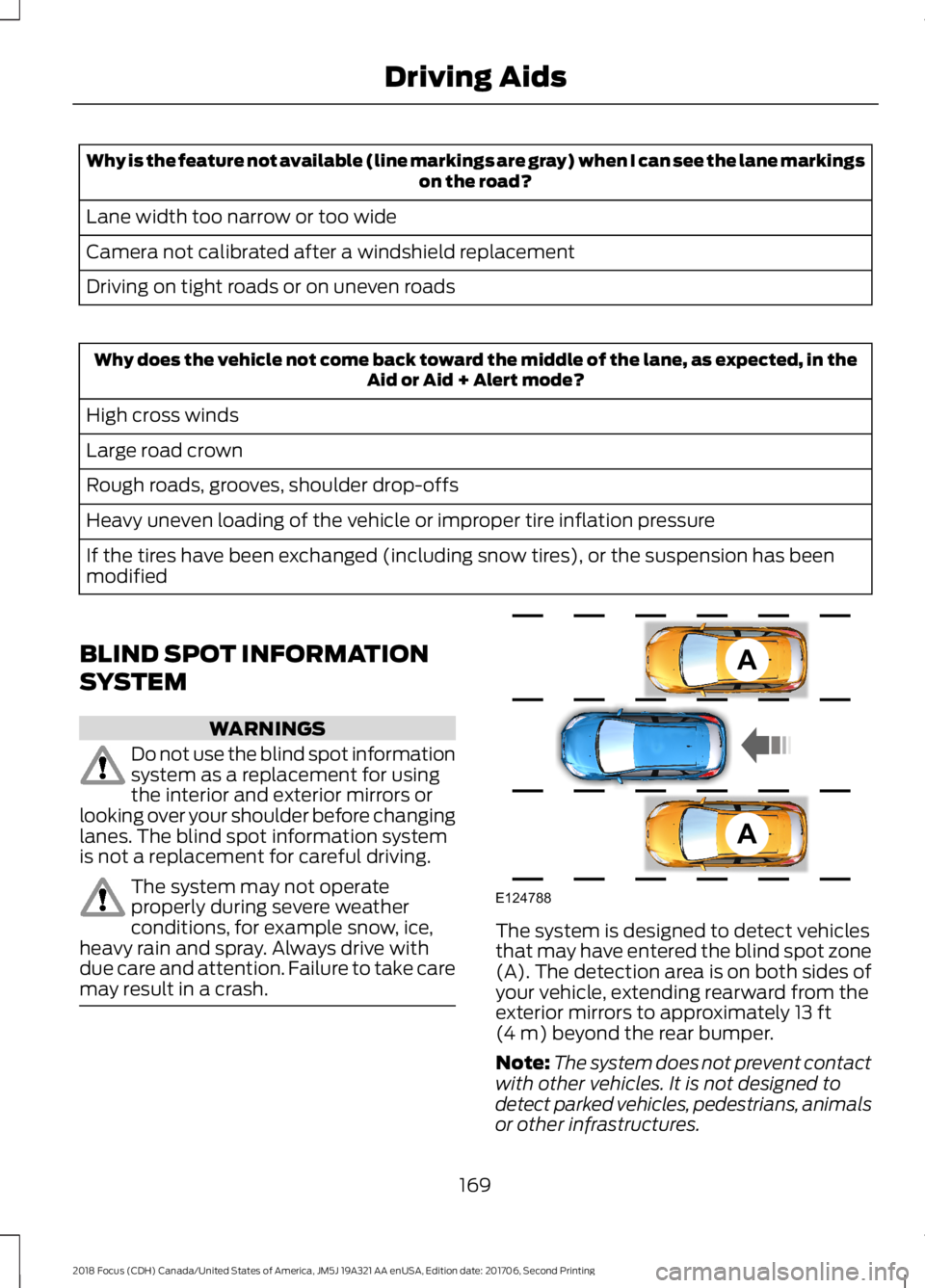
The system is designed to detect vehiclesthat may have entered the blind spot zone(A). The detection area is on both sides ofyour vehicle, extending rearward from theexterior mirrors to approximately 13 ft(4 m) beyond the rear bumper.
Note:The system does not prevent contactwith other vehicles. It is not designed todetect parked vehicles, pedestrians, animalsor other infrastructures.
1692018 Focus (CDH) Canada/United States of America, JM5J 19A321 AA enUSA, Edition date: 201706, Second PrintingDriving AidsAAE124788
Page 176 of 473
Note:Keep the sensors free from snow, iceand large accumulations of dirt.
Note:Do not cover the sensors with bumperstickers, repair compound or other objects.
Note:Blocked sensors could affect systemperformance.
If the sensors are blocked, a message mayappear in the information display whenyou shift into reverse (R). SeeInformation Messages (page 96).
System Limitations
The system may not correctly operatewhen any of the following occur:
•The sensors are blocked.
•Adjacently parked vehicles or objectsare obstructing the sensors.
•Vehicles approach at speeds greaterthan 37 mph (60 km/h).
•The vehicle speed is greater than 7 mph(12 km/h).
•You reverse out of an angled parkingspace.
System Errors
If the system detects a fault a messagedisplays. See Information Messages(page 96).
Switching the System Off and On
You can temporarily switch the system offusing the information display. SeeInformation Messages (page 96). Whenyou switch system off, a message displays.See Information Messages (page 96).
Note:The system turns on each time youswitch the ignition on and you shift intoreverse (R). If you temporarily switch thesystem off, it turns on the next time youswitch the ignition on.
Note:The system may not correctly operatewhen towing a trailer. For vehicles with atrailer tow module and tow bar approvedby us, the system turns off when you attacha trailer. For vehicles with an aftermarkettrailer tow module or tow bar, werecommend that you switch the system offwhen you attach a trailer.
To permanently switch the system off,contact an authorized dealer.
ECO MODE
This system assists you in driving moreefficiently by constantly monitoringcharacteristics of gear changing,anticipation of traffic conditions andspeeds while driving.
The value of these characteristics isrepresented by petals shown in the display,with five petals being the most efficient.The more efficiently you drive, the betterthe rating, and the better your vehicle'soverall fuel economy.
Note:These efficiency values do not resultin a defined fuel consumption figure. It mightvary as it is not only related to these drivinghabits, but also influenced by many otherfactors such as short trips and cold starts.
Note:Frequent short trips, where the enginedoes not fully warm up, will also increasefuel consumption
The system is accessed using theinformation display control. See GeneralInformation (page 92).
1732018 Focus (CDH) Canada/United States of America, JM5J 19A321 AA enUSA, Edition date: 201706, Second PrintingDriving Aids