airbag FORD FOCUS ELECTRIC 2014 3.G Owner's Guide
[x] Cancel search | Manufacturer: FORD, Model Year: 2014, Model line: FOCUS ELECTRIC, Model: FORD FOCUS ELECTRIC 2014 3.GPages: 403, PDF Size: 6.42 MB
Page 339 of 403
Setting 911 Assist On
If your vehicle is equipped with Navigation, touch the i
(Information) button to access these features. If your vehicle
is not equipped with Navigation, touch the corner of the
touchscreen with the green tab.
PressApps>911 Assist,>On.
You can also access 911 Assist by:
•Pressing the Settings icon >Settings>Phone>911
Assist,or
•Pressing the Settings icon >Help>911 Assist.
To Make Sure that 911 Assist Works Properly
•SYNC must be powered and working properly at the time of the
incident and throughout feature activation and use.
•The 911 Assist feature must be set on before the incident.
•You must pair and connect a Bluetooth-enabled and compatible phone
to SYNC.
•A connected Bluetooth-enabled phone must have the ability to make
and maintain an outgoing call at the time of the incident.
•A connected Bluetooth-enabled phone must have adequate network
coverage, battery power and signal strength.
•The vehicle must have battery power and be located in the United
States, Canada or in a territory in which 911 is the emergency
number.
In the Event of a Crash
Not all crashes deploy an airbag or activate the fuel pump shut-off
(which would trigger 911 Assist); however, SYNC tries to contact
emergency services if 911 Assist triggers. If a connected phone sustains
damage or loses connection to SYNC, SYNC searches for, and tries to
connect to, any available previously paired phone and tries to make the
call to 911.
Before making the call:
•SYNC provides a short window of time (about 10 seconds) to cancel
the call. If you fail to cancel the call, SYNC attempts to dial 911.
•SYNC says the following, or a similar message: “SYNC will attempt to
call 911, to cancel the call, press Cancel on your screen or press and
hold the phone button on your steering wheel.”
338MyFord Touch®
2014 Focus Electric Vehicle(fob)
Owners Guide gf, 1st Printing, May 2013
USA(fus)
Page 340 of 403
If you do not cancel the call, and SYNC makes a successful call, a
pre-recorded message plays for the 911 operator, and then the occupant(s)
in your vehicle is able to talk with the operator. Be prepared to provide
your name, phone number and location immediately, because not all 911
systems are capable of receiving this information electronically.
911 Assist May Not Work If
•Your cellular phone or 911 Assist hardware sustains damage in a
crash.
•The vehicle’s battery or SYNC system has no power.
•The phone(s) thrown from your vehicle are the ones paired and
connected to the system.
911 Assist Privacy Notice
When you turn on 911 Assist, it may disclose to emergency services that
your vehicle has been in a crash involving the deployment of an airbag or
activation of the fuel pump shut-off. Certain versions or updates to 911
Assist may also be capable of electronically or verbally disclosing to 911
operators your vehicle location or other details about your vehicle or
crash to assist 911 operators to provide the most appropriate emergency
services. If you do not want to disclose this information, do not turn the
feature on.
Vehicle Health Report (If Equipped, United States Only)
WARNING:Always follow scheduled maintenance instructions,
regularly inspect your vehicle, and seek repair for any damage or
problem you suspect. Vehicle Health Report supplements, but cannot
replace, normal maintenance and vehicle inspection. Vehicle Health
Report only monitors certain systems electronically monitored by your
vehicle and will not monitor or report the status of any other system,
(such as brake lining wear). Failure to perform scheduled maintenance
and regularly inspect your vehicle may result in vehicle damage and
serious injury.
Note:Your Vehicle Health Report feature requires activation prior to
use. Visit www.SYNCMyRide.com to register. There is no fee or
subscription associated with Vehicle Health Report, but you must register
to use this feature.
Note:This feature may not function properly if you have enabled caller
ID blocking on your mobile phone. Before running a report, review the
Vehicle Health Report Privacy Notice.
MyFord Touch®339
2014 Focus Electric Vehicle(fob)
Owners Guide gf, 1st Printing, May 2013
USA(fus)
Page 377 of 403
TeleNav Software End User License Agreement
Please read these terms and conditions carefully before you use the
TeleNav Software. Your use of the TeleNav Software indicates that
you accept these terms and conditions. If you do not accept these
terms and conditions, do not break the seal of the package, launch,
or otherwise use the TeleNav Software.
TeleNav may revise this Agreement and the privacy policy at any time,
with or without notice to you. You agree to visit http://www.telenav.com
from time to time to review the then current version of this Agreement
and of the privacy policy.
1.Safe and Lawful Use
You acknowledge that devoting attention to the TeleNav Software may pose
a risk of injury or death to you and others in situations that otherwise
require your undivided attention, and you therefore agree to comply with
the following when using the TeleNav Software: (a) observe all traffic laws
and otherwise drive safely; (b) use your own personal judgment while
driving. If you feel that a route suggested by the TeleNav Software
instructs you to perform an unsafe or illegal maneuver, places you in an
unsafe situation, or directs you into an area that you consider to be unsafe,
do not follow such instructions; (c) do not input destinations, or otherwise
manipulate the TeleNav Software, unless your vehicle is stationary and
parked; (d) do not use the TeleNav Software for any illegal, unauthorized,
unintended, unsafe, hazardous, or unlawful purposes, or in any manner
inconsistent with this Agreement; (e) arrange all GPS and wireless devices
and cables necessary for use of the TeleNav Software in a secure manner
in your vehicle so that they will not interfere with your driving and
will not prevent the operation of any safety device (such as an airbag).
You agree to indemnify and hold TeleNav harmless against all claims
resulting from any dangerous or otherwise inappropriate use of the
TeleNav Software in any moving vehicle, including as a result of your
failure to comply with the directions above.
2.Account Information
You agree: (a) when registering the TeleNav Software, to provide
TeleNav with true, accurate, current, and complete information about
yourself, and (b) to inform TeleNav promptly of any changes to such
information, and to keep it true, accurate, current and complete.
376Appendices
2014 Focus Electric Vehicle(fob)
Owners Guide gf, 1st Printing, May 2013
USA(fus)
Page 390 of 403
Make sure to change your vehicle’s oils and fluids at the specified
intervals or in conjunction with a repair. Flushing is a viable way to
change fluid for many vehicle sub-systems during scheduled
maintenance. It is critical that systems are flushed only with new fluid
that is the same as that required to fill and operate the system or using a
Ford-approved flushing chemical.
Owner Checks and Services
Certain basic maintenance checks and inspections should be performed
every month or at six-month intervals.
Check every month
Function of all interior and exterior lights.
Tires (including spare) for wear and proper pressure.
Windshield washer fluid level.
Check every six months
Battery connections. Clean if necessary.
Body and door drain holes for obstructions. Clean if necessary.
Cooling system fluid level and coolant strength.
Door weatherstrips for wear. Lubricate if necessary.
Hinges, latches and outside locks for proper operation. Lubricate if
necessary.
Parking brake for proper operation.
Safety belts and seat latches for wear and function.
Safety warning lamps (brake, ABS, airbag, safety belt) for operation.
Washer spray and wiper operation. Clean or replace blades as
necessary.
Multi-Point Inspection
In order to keep your vehicle running right, it is important to have the
systems on your vehicle checked regularly. This can help identify
potential issues and prevent major problems. Ford Motor Company
recommends the following multi-point inspection be performed at every
scheduled maintenance interval to help make sure your vehicle keeps
running great.
Scheduled Maintenance389
2014 Focus Electric Vehicle(fob)
Owners Guide gf, 1st Printing, May 2013
USA(fus)
Page 398 of 403
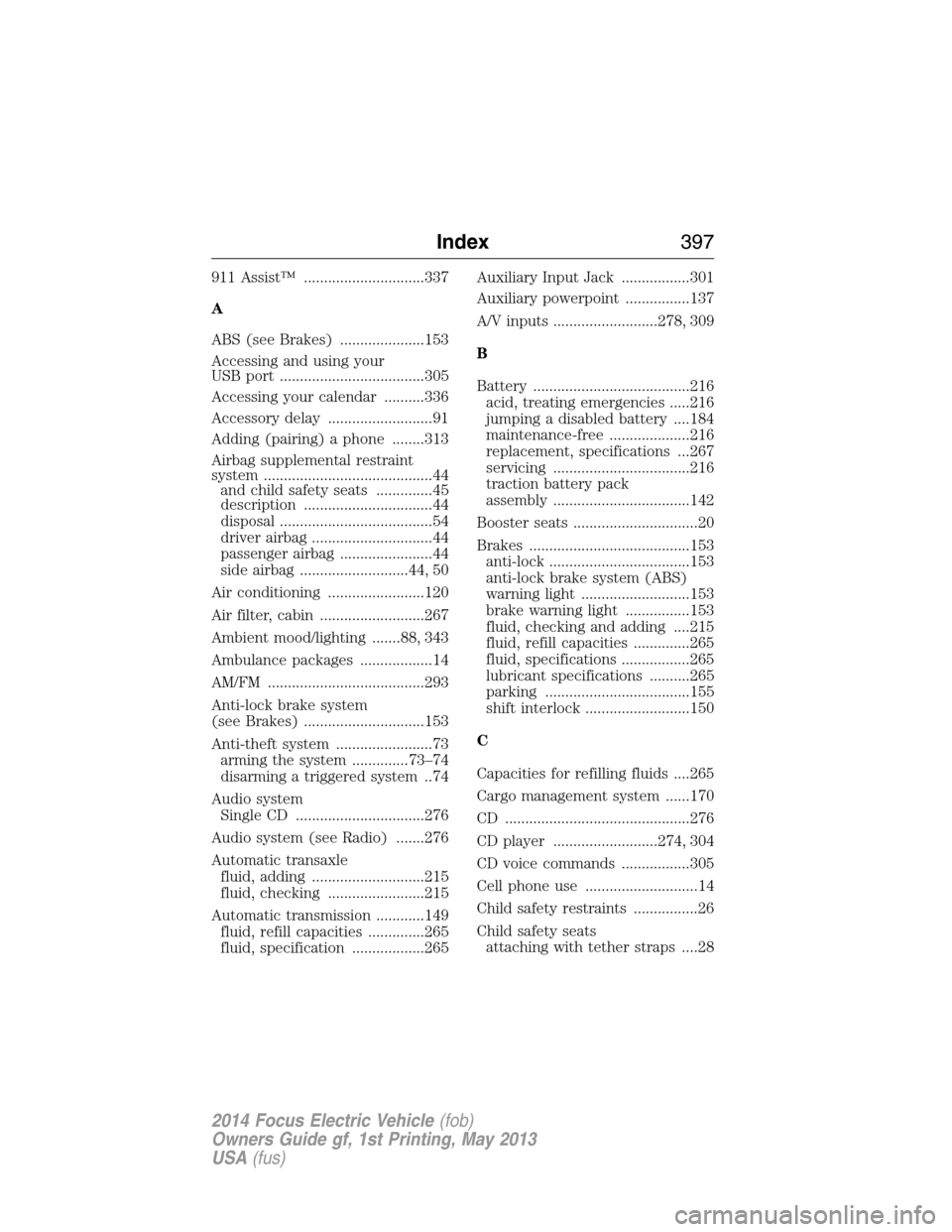
911 Assist™ ..............................337
A
ABS (see Brakes) .....................153
Accessing and using your
USB port ....................................305
Accessing your calendar ..........336
Accessory delay ..........................91
Adding (pairing) a phone ........313
Airbag supplemental restraint
system ..........................................44
and child safety seats ..............45
description ................................44
disposal ......................................54
driver airbag ..............................44
passenger airbag .......................44
side airbag ...........................44, 50
Air conditioning ........................120
Air filter, cabin ..........................267
Ambient mood/lighting .......88, 343
Ambulance packages ..................14
AM/FM .......................................293
Anti-lock brake system
(see Brakes) ..............................153
Anti-theft system ........................73
arming the system ..............73–74
disarming a triggered system ..74
Audio system
Single CD ................................276
Audio system (see Radio) .......276
Automatic transaxle
fluid, adding ............................215
fluid, checking ........................215
Automatic transmission ............149
fluid, refill capacities ..............265
fluid, specification ..................265Auxiliary Input Jack .................301
Auxiliary powerpoint ................137
A/V inputs ..........................278, 309
B
Battery .......................................216
acid, treating emergencies .....216
jumping a disabled battery ....184
maintenance-free ....................216
replacement, specifications ...267
servicing ..................................216
traction battery pack
assembly ..................................142
Booster seats ...............................20
Brakes ........................................153
anti-lock ...................................153
anti-lock brake system (ABS)
warning light ...........................153
brake warning light ................153
fluid, checking and adding ....215
fluid, refill capacities ..............265
fluid, specifications .................265
lubricant specifications ..........265
parking ....................................155
shift interlock ..........................150
C
Capacities for refilling fluids ....265
Cargo management system ......170
CD ..............................................276
CD player ..........................274, 304
CD voice commands .................305
Cell phone use ............................14
Child safety restraints ................26
Child safety seats
attaching with tether straps ....28
Index397
2014 Focus Electric Vehicle(fob)
Owners Guide gf, 1st Printing, May 2013
USA(fus)
Page 402 of 403
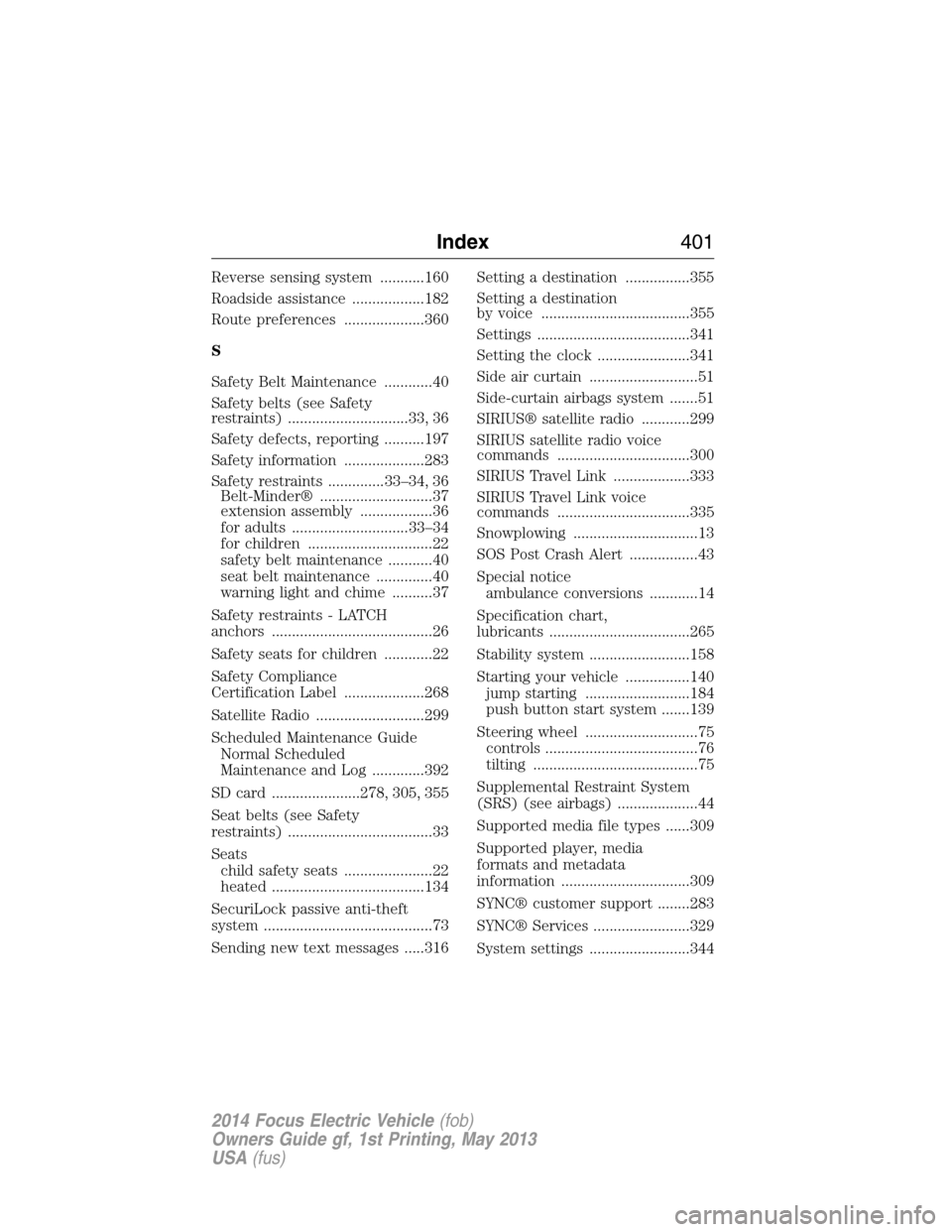
Reverse sensing system ...........160
Roadside assistance ..................182
Route preferences ....................360
S
Safety Belt Maintenance ............40
Safety belts (see Safety
restraints) ..............................33, 36
Safety defects, reporting ..........197
Safety information ....................283
Safety restraints ..............33–34, 36
Belt-Minder® ............................37
extension assembly ..................36
for adults .............................33–34
for children ...............................22
safety belt maintenance ...........40
seat belt maintenance ..............40
warning light and chime ..........37
Safety restraints - LATCH
anchors ........................................26
Safety seats for children ............22
Safety Compliance
Certification Label ....................268
Satellite Radio ...........................299
Scheduled Maintenance Guide
Normal Scheduled
Maintenance and Log .............392
SD card ......................278, 305, 355
Seat belts (see Safety
restraints) ....................................33
Seats
child safety seats ......................22
heated ......................................134
SecuriLock passive anti-theft
system ..........................................73
Sending new text messages .....316Setting a destination ................355
Setting a destination
by voice .....................................355
Settings ......................................341
Setting the clock .......................341
Side air curtain ...........................51
Side-curtain airbags system .......51
SIRIUS® satellite radio ............299
SIRIUS satellite radio voice
commands .................................300
SIRIUS Travel Link ...................333
SIRIUS Travel Link voice
commands .................................335
Snowplowing ...............................13
SOS Post Crash Alert .................43
Special notice
ambulance conversions ............14
Specification chart,
lubricants ...................................265
Stability system .........................158
Starting your vehicle ................140
jump starting ..........................184
push button start system .......139
Steering wheel ............................75
controls ......................................76
tilting .........................................75
Supplemental Restraint System
(SRS) (see airbags) ....................44
Supported media file types ......309
Supported player, media
formats and metadata
information ................................309
SYNC® customer support ........283
SYNC® Services ........................329
System settings .........................344
Index401
2014 Focus Electric Vehicle(fob)
Owners Guide gf, 1st Printing, May 2013
USA(fus)