phone FORD FOCUS ELECTRIC 2014 3.G Owner's Guide
[x] Cancel search | Manufacturer: FORD, Model Year: 2014, Model line: FOCUS ELECTRIC, Model: FORD FOCUS ELECTRIC 2014 3.GPages: 403, PDF Size: 6.42 MB
Page 317 of 403
1. Touch the top left corner of the display to access thePhonemenu.
2. SelectMessaging.
3. Choose from the following:
•Listen(speaker icon)
•Dial
•Send Text
•Vi e w
•Delete.
Composing a Text Message
Note:This is a speed-dependent feature. It is unavailable when your
vehicle is traveling at speeds over 3 mph (5 km/h).
Note:Downloading and sending text messages using Bluetooth are
phone-dependent features.
1. Touch the top left corner of the display to access thePhonemenu.
2. TouchMessaging>Send Text.
3. Enter a phone number or choose from your phone book.
4. You can select from the following options:
•Sendwhich sends the message as it is.
•Edit Textallows you to customize the pre-defined message or
create a message on your own.
You can then preview the message, verify the recipient as well as update
the message list, and send it to a connected device (such as a USB drive).
Pre-defined text message options
I’ll call you back in a few minutes.
I just left, I’ll be there soon.
Can you give me a call?
I’m on my way.
I’m running a few minutes late.
I’m ahead of schedule, so I’ll be there early.
I’m outside.
I’ll call you when I get there.
OK
Ye s
No
Thanks
Stuck in traffic.
Call me later.
LOL
316MyFord Touch®
2014 Focus Electric Vehicle(fob)
Owners Guide gf, 1st Printing, May 2013
USA(fus)
Page 318 of 403
Receiving a Text Message
When a new message arrives, an audible tone sounds and the screen
displays a pop-up with the caller name and ID, if supported by your
phone. You can press:
•Vi e wto view the text message.
•Listenfor SYNC to read the message to you.
•Dialto call the contact.
•Ignoreto exit the screen.
Note:If you selectVi e wand your vehicle is traveling over 3 mph
(5 km/h), the system offers to read the message to you instead of
allowing you to view it while driving.
Phone Settings
PressPhone>Settings.
Bluetooth Devices
Touch this tab to connect, disconnect, add or delete a device, as well as
save it as a favorite.
Bluetooth
Touch this tab to turn Bluetooth off or on.
Do Not Disturb
Touch this tab if you want all calls to go directly to your voice mail
and not ring in the vehicle. When this feature is on, text message
notifications do not ring inside the cabin either.
911 Assist
Turn on or turn off the 911 Assist feature. See911 Assistin theSYNC
Services and Applicationssection.
Phone Ringer
Select the ring tone you want to hear when you receive a call. Choose
from possible system ring tones, your currently paired phone’s ring tone,
a beep, text-to-speech or a silent notification.
Text Message Notification
Select a text message notification, if supported by your phone. Choose
from possible system alert tones, text-to-speech or silent.
MyFord Touch®317
2014 Focus Electric Vehicle(fob)
Owners Guide gf, 1st Printing, May 2013
USA(fus)
Page 319 of 403
Internet Data Connection
If your phone is compatible, use this screen to adjust your internet data
connection. Select to make your connection profile with the personal
area network or to turn off your connection. You can also choose to
adjust your settings or have the system always connect, never connect
when roaming or query on connect. Press?for more information.
Manage Phonebook
Touch this button to access features such as automatic phonebook
download, re-download your phonebook, add contacts from your phone
as well as delete or upload your phonebook.
Roaming Warning
Touch this button to have the system alert you when your phone is in
roaming mode.
Phone Voice Commands
Press the voice button on the steering wheel control. After the
tone, say any of the following commands:
“PHONE”
“Call” “Join calls”*
“Call
“Call
“Call
**
“Call
“Call
“Call voicemail” “Privacy on”*
“Dial” “Read text message”
“Do not disturb off” “Reply to text messages”
“Do not disturb on” “Turn ringer off”
“Forward text messages” “Turn ringer on”
“Go to hands free”
*“Unmute call”*
“Hold call off”*“Help”
“Hold on”*
*
This command is only available during an active call.
**If you have said “Messages”, see the following “Messages” chart.
318MyFord Touch®
2014 Focus Electric Vehicle(fob)
Owners Guide gf, 1st Printing, May 2013
USA(fus)
Page 320 of 403
“MESSAGES”
“Call”
“Forward text messages”
“Listen to text message <#>”
“Listen to text messages”
“Reply to text messages”
“Help”
ELECTRIC VEHICLE INFORMATION
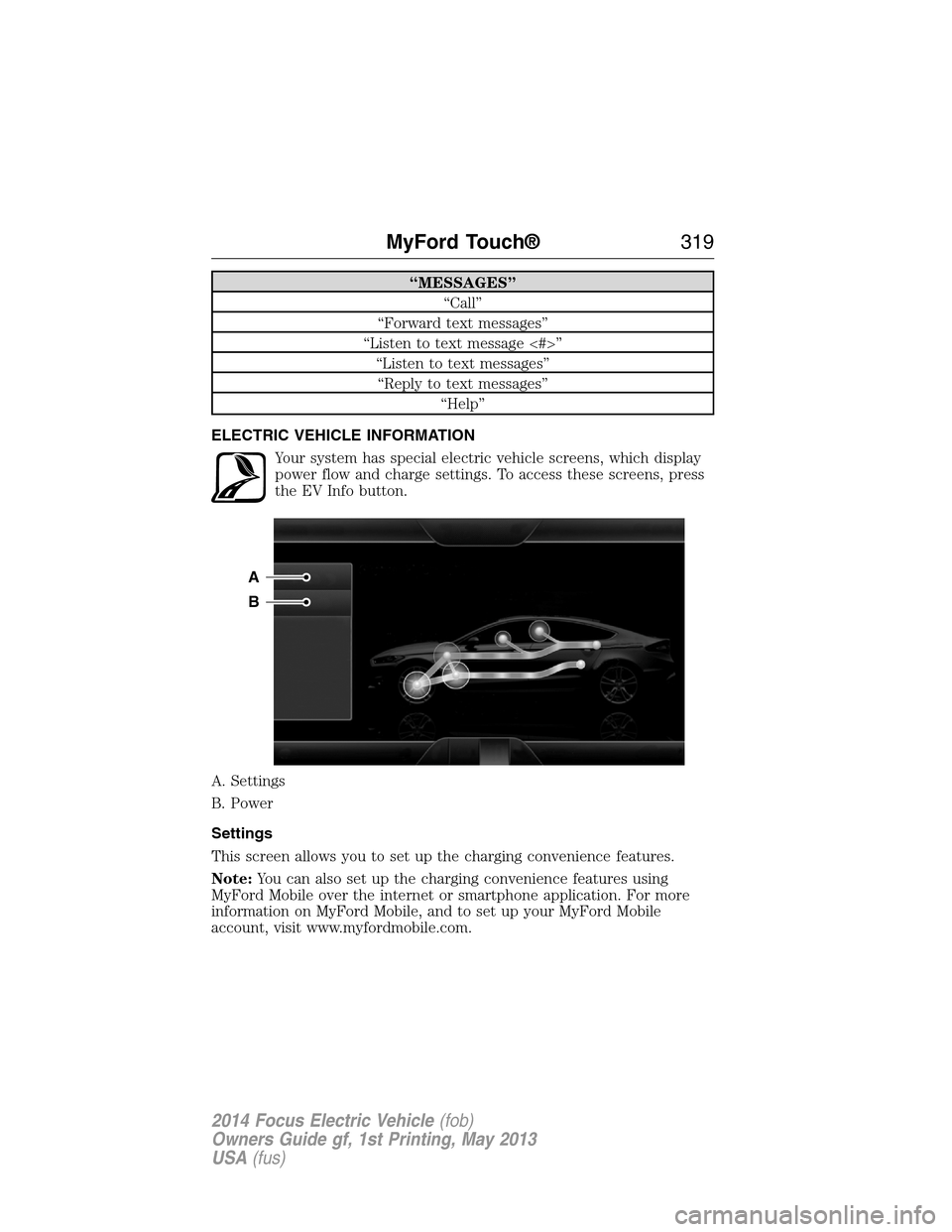
Your system has special electric vehicle screens, which display
power flow and charge settings. To access these screens, press
the EV Info button.
A. Settings
B. Power
Settings
This screen allows you to set up the charging convenience features.
Note:You can also set up the charging convenience features using
MyFord Mobile over the internet or smartphone application. For more
information on MyFord Mobile, and to set up your MyFord Mobile
account, visit www.myfordmobile.com.
A
B
MyFord Touch®319
2014 Focus Electric Vehicle(fob)
Owners Guide gf, 1st Printing, May 2013
USA(fus)
Page 326 of 403
Note:Your vehicle may not always reach the set cabin temperature
due to charging and ambient temperature conditions. This is normal
operation.
Clearerases the GO Time and cabin conditioning temperature.
Savestores the GO Time and temperature settings.
•Note:If you select a GO Time, but chooseOfffor the temperature
setting, the vehicle schedules charging to be complete by your GO
Time and does not condition the cabin.
•Note:Make sure you save your settings before returning to the
previous screen. If you do not touchSave,your settings are not
stored in the system.
Value Charge Profiles
Press theEditbutton next to the present charge profile on the Settings
screen to go the Value Charge Profiles screen.
Defaultdisplays the charging mode and off-peak times for your Default
Value Charge profile. The system displays off-peak times for weekdays;
the remaining hours of the day are considered peak time. The system
displays similar off-peak times for weekend days.
•Charge Nowif you want your vehicle to immediately charge when
you plug it in at this profile location.
•Value Chargeif you want to take advantage of off-peak electricity
rates. The vehicle optimizes the charge schedule to be complete by
the next GO Time.
•Editto access yourDefault ValueCharge Profile settings screen
(seeDefault Value Charge Profilelater in this section).
Customer Defined Value Charge Profilesdisplays the Value Charge
profile names and current Charge Mode for specific locations once you
create profile names. You can set up and edit these profiles using the
MyFord Mobile internet or smartphone application. You can program up
to nine unique charge profiles.
Default Value Charge Profile
WeekdayandWeekenddisplay the off-peak charge times when you
touch either button. Set the Weekday times and Weekend time, then
touchSave.
Note:The system does not store your settings until you make selections
for both Weekday and Weekend. If you touch the back arrow button to
return to the previous screen without saving your settings, the system
does not store them and you need to enter them again.
MyFord Touch®325
2014 Focus Electric Vehicle(fob)
Owners Guide gf, 1st Printing, May 2013
USA(fus)
Page 330 of 403
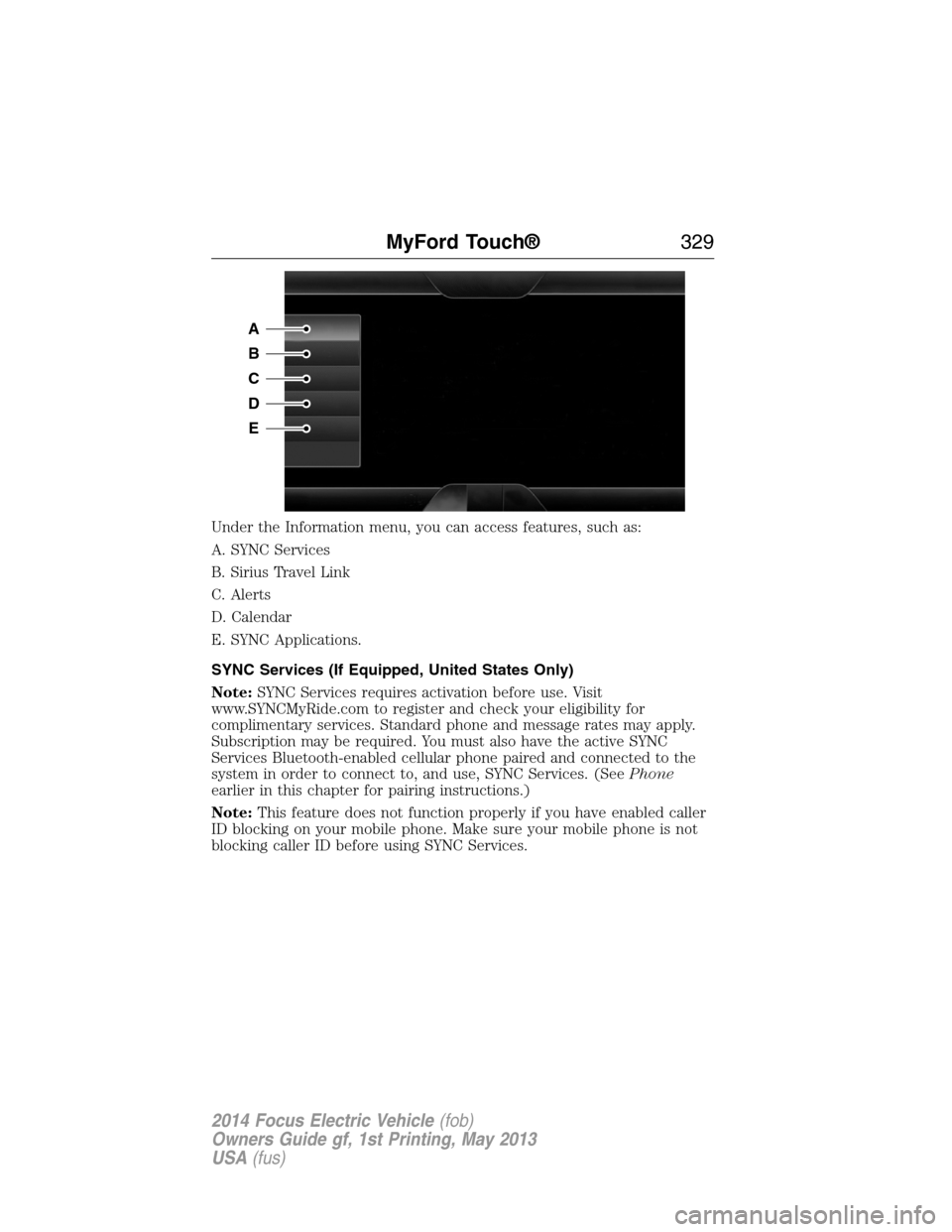
Under the Information menu, you can access features, such as:
A. SYNC Services
B. Sirius Travel Link
C. Alerts
D. Calendar
E. SYNC Applications.
SYNC Services (If Equipped, United States Only)
Note:SYNC Services requires activation before use. Visit
www.SYNCMyRide.com to register and check your eligibility for
complimentary services. Standard phone and message rates may apply.
Subscription may be required. You must also have the active SYNC
Services Bluetooth-enabled cellular phone paired and connected to the
system in order to connect to, and use, SYNC Services. (SeePhone
earlier in this chapter for pairing instructions.)
Note:This feature does not function properly if you have enabled caller
ID blocking on your mobile phone. Make sure your mobile phone is not
blocking caller ID before using SYNC Services.
A
B
C
D
E
MyFord Touch®329
2014 Focus Electric Vehicle(fob)
Owners Guide gf, 1st Printing, May 2013
USA(fus)
Page 331 of 403
Note:The driver is ultimately responsible for the safe operation of the
vehicle, and therefore, must evaluate whether it is safe to follow the
suggested directions. Any navigation features are provided only as an aid.
Make your driving decisions based on your observations of local conditions
and existing traffic regulations. Do not follow the route suggestions if doing
so would result in an unsafe or illegal maneuver, if you would be placed
in an unsafe situation, or if you would be directed into an area that you
consider unsafe. Maps used by this system may be inaccurate because of
errors, changes in roads, traffic conditions or driving conditions.
Note:When you connect, the service uses GPS technology and advanced
vehicle sensors to collect your vehicle’s current location, travel direction
and speed to help provide you with the directions, traffic reports, or
business searches you request. Further, to provide the services you
request, for continuous improvement, the service may collect and record
call details and voice communications. For more information, see SYNC
Services Terms and Conditions at www.SYNCMyRide.com. If you do not
want Ford or its service providers to collect your vehicle travel
information or other information identified in the Terms and Conditions,
do not subscribe or use the service.
SYNC Services uses advanced vehicle sensors, integrated GPS technology
and comprehensive map and traffic data, to give you personalized traffic
reports, precise turn-by-turn directions, business search, news, sports,
weather and more. For a complete list of services, or to learn more,
please visit www.SYNCMyRide.com.
Connecting to SYNC Services Using Voice Commands
Press the voice button on the steering wheel controls.
1. When prompted, say “Services”. This initiates an outgoing
call to SYNC Services using your paired and connected
Bluetooth-enabled cellular phone.
2. Once you connect to the service, follow the voice prompts to request
the desired service, such as “Traffic” or “Directions”. You can also
say, “What are my choices?” to receive a list of available services
from which to choose.
3. Say, “Services” to return to the Services main menu or for help, say,
“Help”.
330MyFord Touch®
2014 Focus Electric Vehicle(fob)
Owners Guide gf, 1st Printing, May 2013
USA(fus)
Page 332 of 403
Connecting to SYNC Services Using the Touchscreen
If your vehicle is equipped with Navigation, touch the i
(Information) button to access these features. If your vehicle is
not equipped with Navigation, touch the corner of the
touchscreen with the green tab.
PressServices.
1. SelectConnect to Servicesto initiate an outgoing call to SYNC
Services using your paired and connected Bluetooth-enabled cellular
phone.
2. Once you connect to the service, follow the voice prompts to request
the desired service, such as “Traffic” or “Directions”. You can also
say, “What are my choices?” to receive a list of available services
from which to choose.
3. Say, “Services” to return to the Services main menu or for help, say,
“Help”.
Receiving Turn-by-Turn Directions
1. When connected to SYNC Services, say “Directions” or “Business
Search”. To find the closest business or type of business to your
current location, just say “Business Search” and then “Search Near
Me”. If you need further assistance in finding a location, you can say
“Operator” at any time within a Directions or Business search to
speak with a live operator. The system may prompt you to speak with
an operator when it has difficulty matching your voice request. The
live operator can assist you by searching for businesses by name or
by category, residential addresses by street address or by name or
specific street intersections. Operator Assist is a feature of your
SYNC Services subscription. For more information on Operator
Assist, visit www.SYNCMyRide.com/support.
2. Follow the voice prompts to select your Destination. After the route
download is finished, the phone call automatically ends.
If your vehicle is not equipped with Navigation:
•Turn-by-turn directions appear in the information display, in the
status bar of your touchscreen system and on the SYNC Services
screen. You also receive driving instructions from audible prompts.
•When on an active route, you can selectRoute SummaryorRoute
Statususing the touchscreen controls or voice commands to view
theRoute Summary Turn Listor theRoute Status ETA.You can
also turn voice guidance on or off, cancel the route or update the
route.
MyFord Touch®331
2014 Focus Electric Vehicle(fob)
Owners Guide gf, 1st Printing, May 2013
USA(fus)
Page 333 of 403
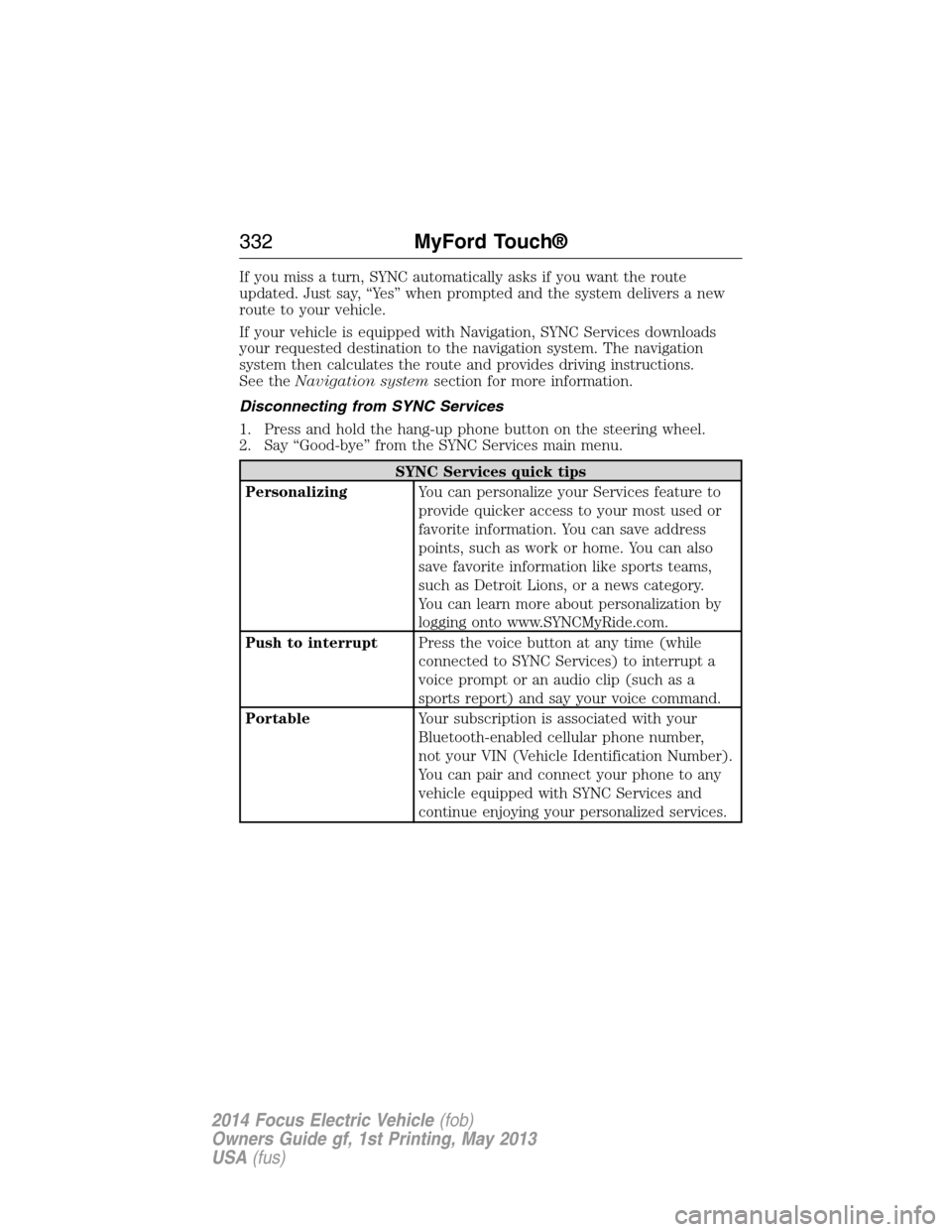
If you miss a turn, SYNC automatically asks if you want the route
updated. Just say, “Yes” when prompted and the system delivers a new
route to your vehicle.
If your vehicle is equipped with Navigation, SYNC Services downloads
your requested destination to the navigation system. The navigation
system then calculates the route and provides driving instructions.
See theNavigation systemsection for more information.
Disconnecting from SYNC Services
1. Press and hold the hang-up phone button on the steering wheel.
2. Say “Good-bye” from the SYNC Services main menu.
SYNC Services quick tips
PersonalizingYou can personalize your Services feature to
provide quicker access to your most used or
favorite information. You can save address
points, such as work or home. You can also
save favorite information like sports teams,
such as Detroit Lions, or a news category.
You can learn more about personalization by
logging onto www.SYNCMyRide.com.
Push to interruptPress the voice button at any time (while
connected to SYNC Services) to interrupt a
voice prompt or an audio clip (such as a
sports report) and say your voice command.
PortableYour subscription is associated with your
Bluetooth-enabled cellular phone number,
not your VIN (Vehicle Identification Number).
You can pair and connect your phone to any
vehicle equipped with SYNC Services and
continue enjoying your personalized services.
332MyFord Touch®
2014 Focus Electric Vehicle(fob)
Owners Guide gf, 1st Printing, May 2013
USA(fus)
Page 338 of 403
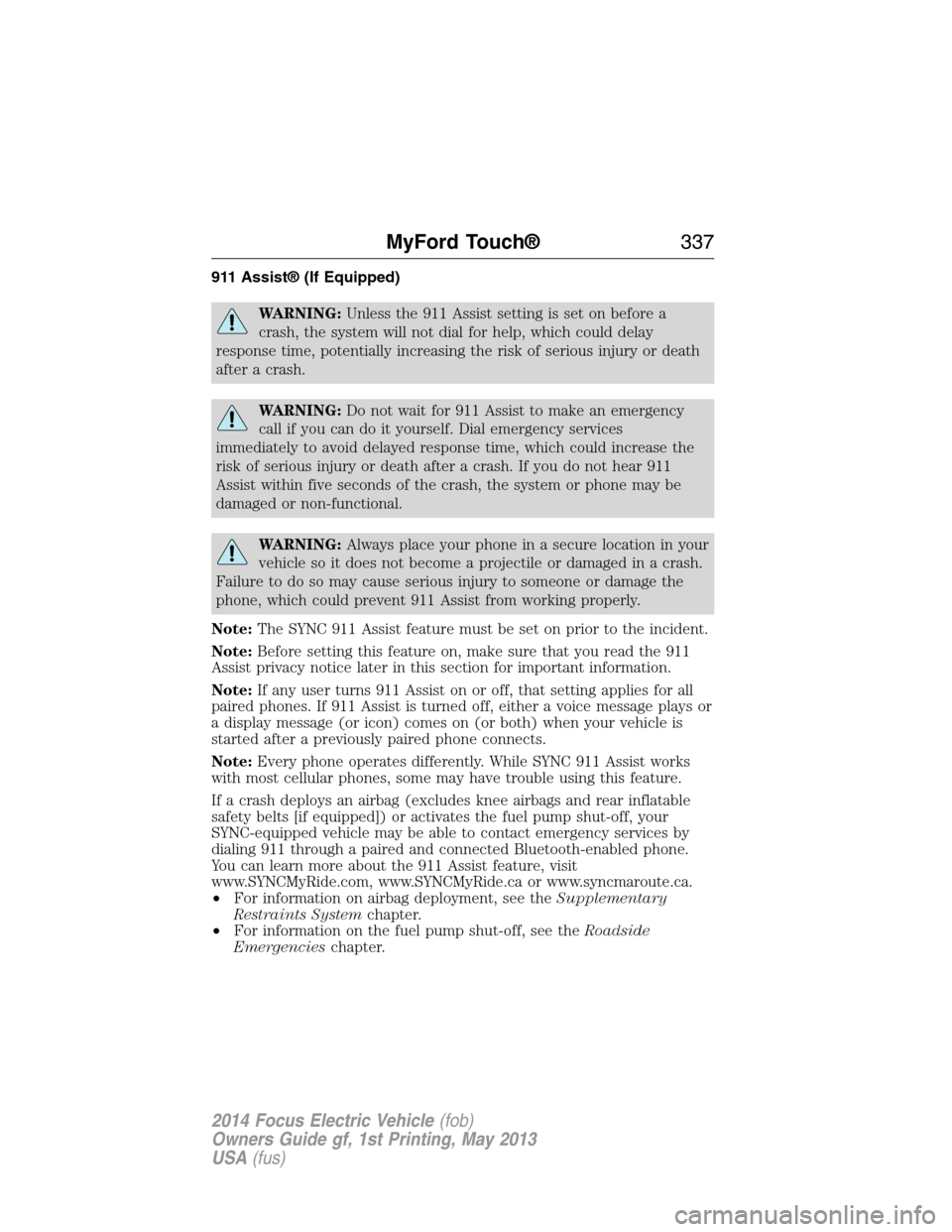
911 Assist® (If Equipped)
WARNING:Unless the 911 Assist setting is set on before a
crash, the system will not dial for help, which could delay
response time, potentially increasing the risk of serious injury or death
after a crash.
WARNING:Do not wait for 911 Assist to make an emergency
call if you can do it yourself. Dial emergency services
immediately to avoid delayed response time, which could increase the
risk of serious injury or death after a crash. If you do not hear 911
Assist within five seconds of the crash, the system or phone may be
damaged or non-functional.
WARNING:Always place your phone in a secure location in your
vehicle so it does not become a projectile or damaged in a crash.
Failure to do so may cause serious injury to someone or damage the
phone, which could prevent 911 Assist from working properly.
Note:The SYNC 911 Assist feature must be set on prior to the incident.
Note:Before setting this feature on, make sure that you read the 911
Assist privacy notice later in this section for important information.
Note:If any user turns 911 Assist on or off, that setting applies for all
paired phones. If 911 Assist is turned off, either a voice message plays or
a display message (or icon) comes on (or both) when your vehicle is
started after a previously paired phone connects.
Note:Every phone operates differently. While SYNC 911 Assist works
with most cellular phones, some may have trouble using this feature.
If a crash deploys an airbag (excludes knee airbags and rear inflatable
safety belts [if equipped]) or activates the fuel pump shut-off, your
SYNC-equipped vehicle may be able to contact emergency services by
dialing 911 through a paired and connected Bluetooth-enabled phone.
You can learn more about the 911 Assist feature, visit
www.SYNCMyRide.com, www.SYNCMyRide.ca or www.syncmaroute.ca.
•For information on airbag deployment, see theSupplementary
Restraints Systemchapter.
•For information on the fuel pump shut-off, see theRoadside
Emergencieschapter.
MyFord Touch®337
2014 Focus Electric Vehicle(fob)
Owners Guide gf, 1st Printing, May 2013
USA(fus)