navigation FORD FOCUS ELECTRIC 2015 3.G User Guide
[x] Cancel search | Manufacturer: FORD, Model Year: 2015, Model line: FOCUS ELECTRIC, Model: FORD FOCUS ELECTRIC 2015 3.GPages: 369, PDF Size: 4.53 MB
Page 240 of 369
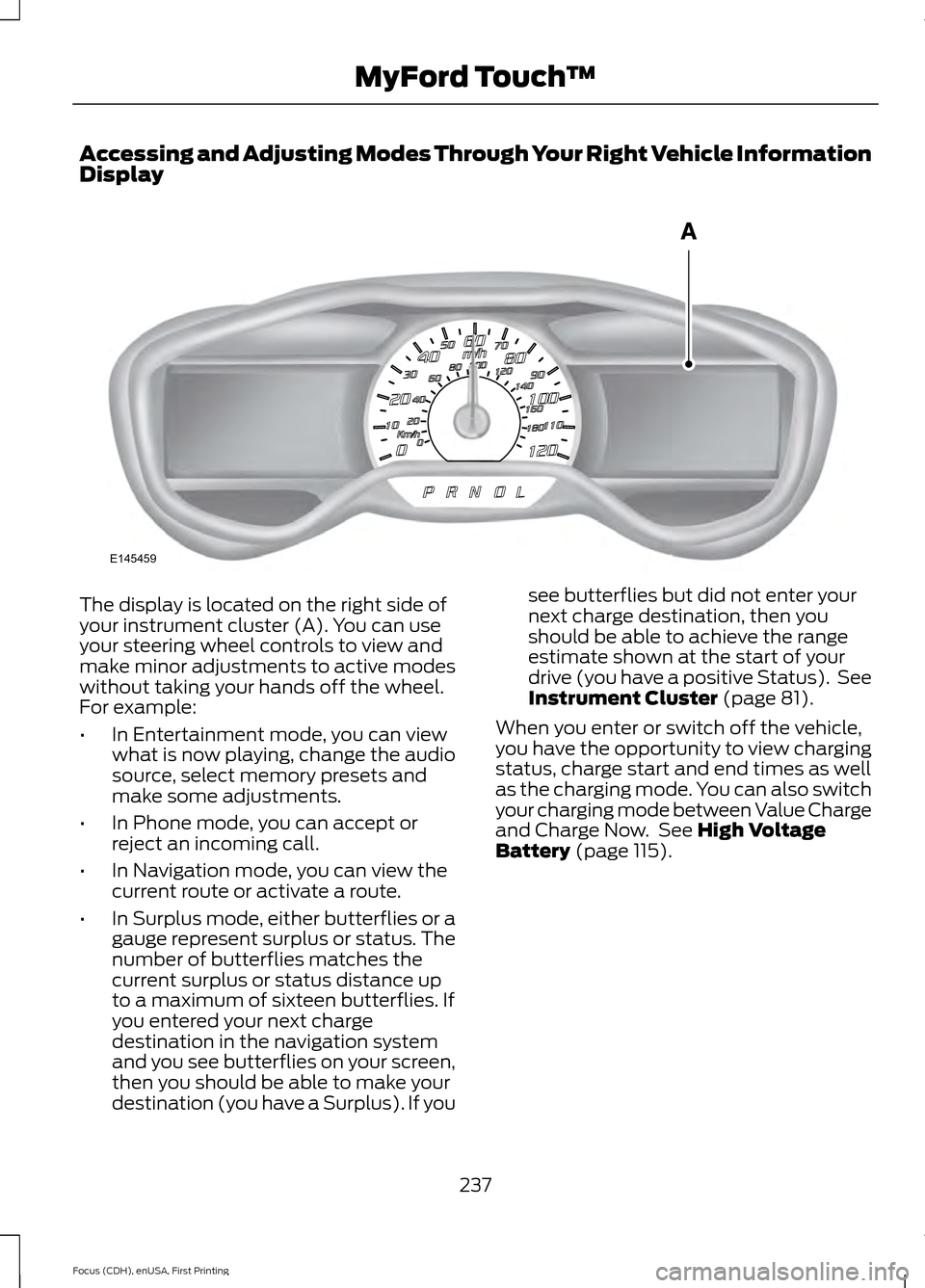
Accessing and Adjusting Modes Through Your Right Vehicle Information
Display
The display is located on the right side of
your instrument cluster (A). You can use
your steering wheel controls to view and
make minor adjustments to active modes
without taking your hands off the wheel.
For example:
•
In Entertainment mode, you can view
what is now playing, change the audio
source, select memory presets and
make some adjustments.
• In Phone mode, you can accept or
reject an incoming call.
• In Navigation mode, you can view the
current route or activate a route.
• In Surplus mode, either butterflies or a
gauge represent surplus or status. The
number of butterflies matches the
current surplus or status distance up
to a maximum of sixteen butterflies. If
you entered your next charge
destination in the navigation system
and you see butterflies on your screen,
then you should be able to make your
destination (you have a Surplus). If you see butterflies but did not enter your
next charge destination, then you
should be able to achieve the range
estimate shown at the start of your
drive (you have a positive Status). See
Instrument Cluster (page 81).
When you enter or switch off the vehicle,
you have the opportunity to view charging
status, charge start and end times as well
as the charging mode. You can also switch
your charging mode between Value Charge
and Charge Now. See
High Voltage
Battery (page 115).
237
Focus (CDH), enUSA, First Printing MyFord Touch
™E145459
Page 249 of 369
To make adjustments using the touchscreen, select:
Action and Description
Menu Item
Settings
Vehicle
Charge Port Light Ring
You can then select: Illuminates when plugging in, opening doors, pressing the
unlock button on your remote and while charging.
On
Does not illuminate.
Off
Illuminates only when plugging in, opening doors, or
pressing the unlock button on your remote.
Limited
Note: Details on the charge port light ring
functions are in another chapter. See High
Voltage Battery (page 115).
Settings
Access and adjust system settings, voice
features, as well as phone, navigation and
wireless settings. SystemTo make adjustments using the touchscreen, select:
Action and Description
Message
Press the settings icon.
Settings
System
Then select from the following:
Select to have the touchscreen display in English, Spanish or
French.
Language
Select to display units in kilometers or miles.
Distance
Select to display units in Celsius or Fahrenheit.
Temperature
Adjust the volume of voice prompts from the system.
System Prompt Volume
Select to have the system beep to confirm choices made
through the touchscreen.
Touch Screen Button
Beep
246
Focus (CDH), enUSA, First Printing MyFord Touch
™E142607
Page 251 of 369
Media Player
To make adjustments using the touchscreen, select:
Action and Description
Message
Press the settings icon.
Settings
Media Player
Then select from the following:
When this feature is on, the system automatically switches
to the media source upon initial connection. This allows you
to listen to music during the indexing process. When this
feature is off, the system does not automatically switch to
the inserted media source.
Autoplay
Select to connect, disconnect, add or delete a device. You
can also set a device as your favorite so that the system
automatically attempts to connect to that device at every
ignition cycle.
Bluetooth Devices
When this feature is on, the system automatically indexes
media on your connected Bluetooth device.
Index Bluetooth Audio
Devices
This allows you to view the version level of the Gracenote
Database.
Gracenote® Database
Info
With this feature on, the Gracenote Database supplies
metadata information for your music files. This overrides
information from your device. This feature defaults to off.
Gracenote® Manage-
ment
With this feature on, the Gracenote Database supplied cover
art for your music files. This overrides any art from your device.
This feature defaults to Media Player.
Cover Art Priority
Navigation 248
Focus (CDH), enUSA, First Printing MyFord Touch
™E142607 E142607
Page 252 of 369
To make adjustments using the touchscreen, select:
Action and Description
Message
Press the settings icon.
Settings
Navigation
Then select from the following:
Turn breadcrumbs on and off.
Map Prefer-
ences
Have the system display your turn list top to bottom or bottom to top.
Turn the Parking POI notification on and off.
Turn estimated driving range rings on and off.
Shortest Route
Select which type of route you want
the system to display first. You can
select from the following options:
Route Prefer-
ences
Fastest Route
Eco Route
If set to yes, the system will
only calculate a single route.
This speeds up your destina-
tion entry process.
Always use preferred route
allows you to select the level
of cost for the calculated Eco
Route. The higher the setting,
the longer the time allotment
is for the route.This may incur
a time penalty.
Eco Time Penalty
Have the system avoid freeways.
Have the system avoid toll roads.
Have the system avoid ferries or car trains.
Have the system use HOV (high-occupancy vehicle) lanes.
Have the system use guidance prompts.
Navigation
Preferences
Have the system automatically fill-in State/Province information.
Have the system avoid traffic problems automatically.
Traffic Prefer-
ences
Turn traffic alert notifications on or off.
Have the system display accident icons.
249
Focus (CDH), enUSA, First Printing MyFord Touch
™
Page 253 of 369
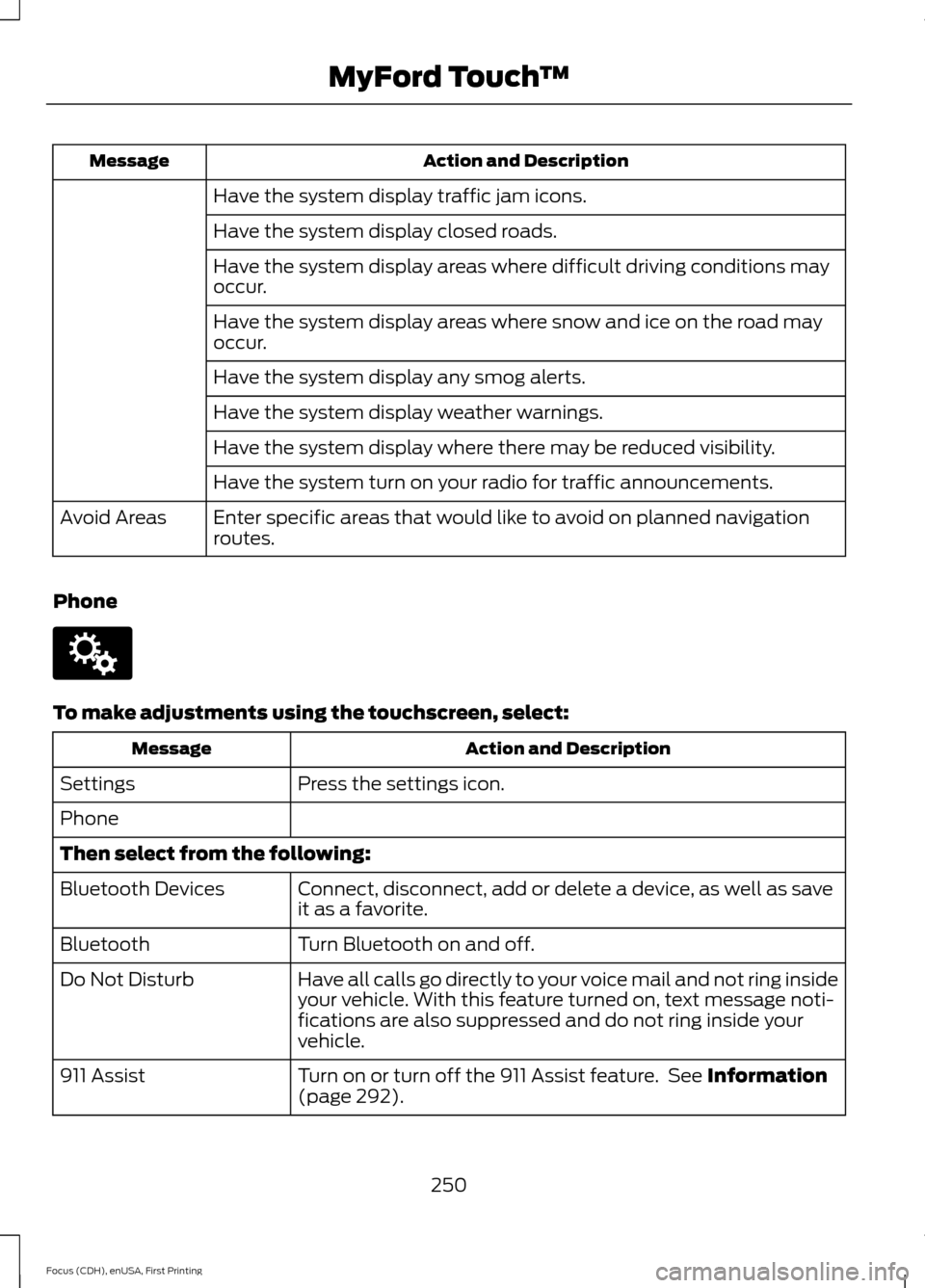
Action and Description
Message
Have the system display traffic jam icons.
Have the system display closed roads.
Have the system display areas where difficult driving conditions may
occur.
Have the system display areas where snow and ice on the road may
occur.
Have the system display any smog alerts.
Have the system display weather warnings.
Have the system display where there may be reduced visibility.
Have the system turn on your radio for traffic announcements.
Enter specific areas that would like to avoid on planned navigation
routes.
Avoid Areas
Phone To make adjustments using the touchscreen, select:
Action and Description
Message
Press the settings icon.
Settings
Phone
Then select from the following:
Connect, disconnect, add or delete a device, as well as save
it as a favorite.
Bluetooth Devices
Turn Bluetooth on and off.
Bluetooth
Have all calls go directly to your voice mail and not ring inside
your vehicle. With this feature turned on, text message noti-
fications are also suppressed and do not ring inside your
vehicle.
Do Not Disturb
Turn on or turn off the 911 Assist feature. See Information
(page 292).
911 Assist
250
Focus (CDH), enUSA, First Printing MyFord Touch
™E142607
Page 256 of 369
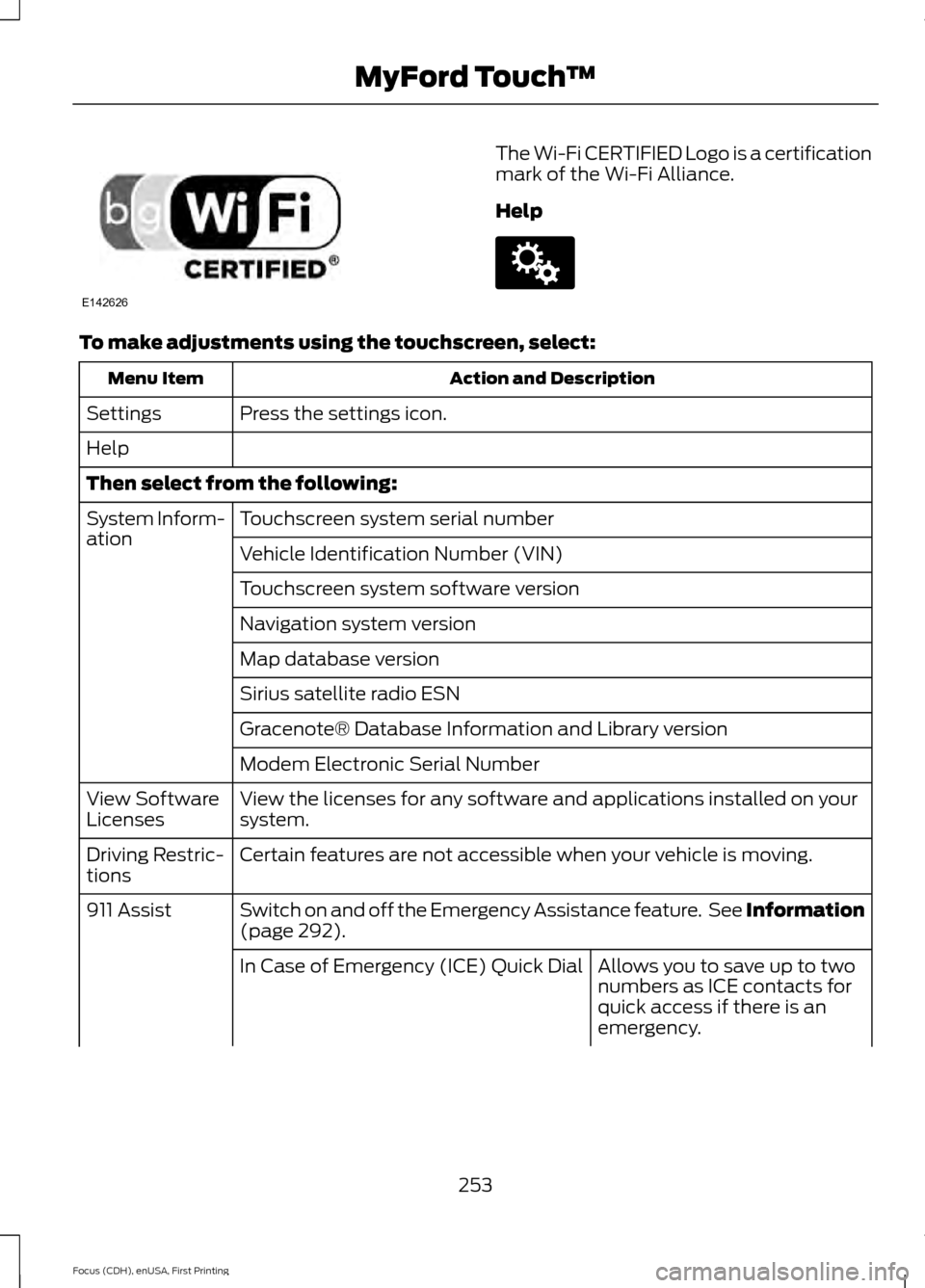
The Wi-Fi CERTIFIED Logo is a certification
mark of the Wi-Fi Alliance.
Help
To make adjustments using the touchscreen, select:
Action and Description
Menu Item
Press the settings icon.
Settings
Help
Then select from the following:
Touchscreen system serial number
System Inform-
ation
Vehicle Identification Number (VIN)
Touchscreen system software version
Navigation system version
Map database version
Sirius satellite radio ESN
Gracenote® Database Information and Library version
Modem Electronic Serial Number
View the licenses for any software and applications installed on your
system.
View Software
Licenses
Certain features are not accessible when your vehicle is moving.
Driving Restric-
tions
Switch on and off the Emergency Assistance feature. See Information
(page 292).
911 Assist
Allows you to save up to two
numbers as ICE contacts for
quick access if there is an
emergency.
In Case of Emergency (ICE) Quick Dial
253
Focus (CDH), enUSA, First Printing MyFord Touch
™E142626 E142607
Page 269 of 369
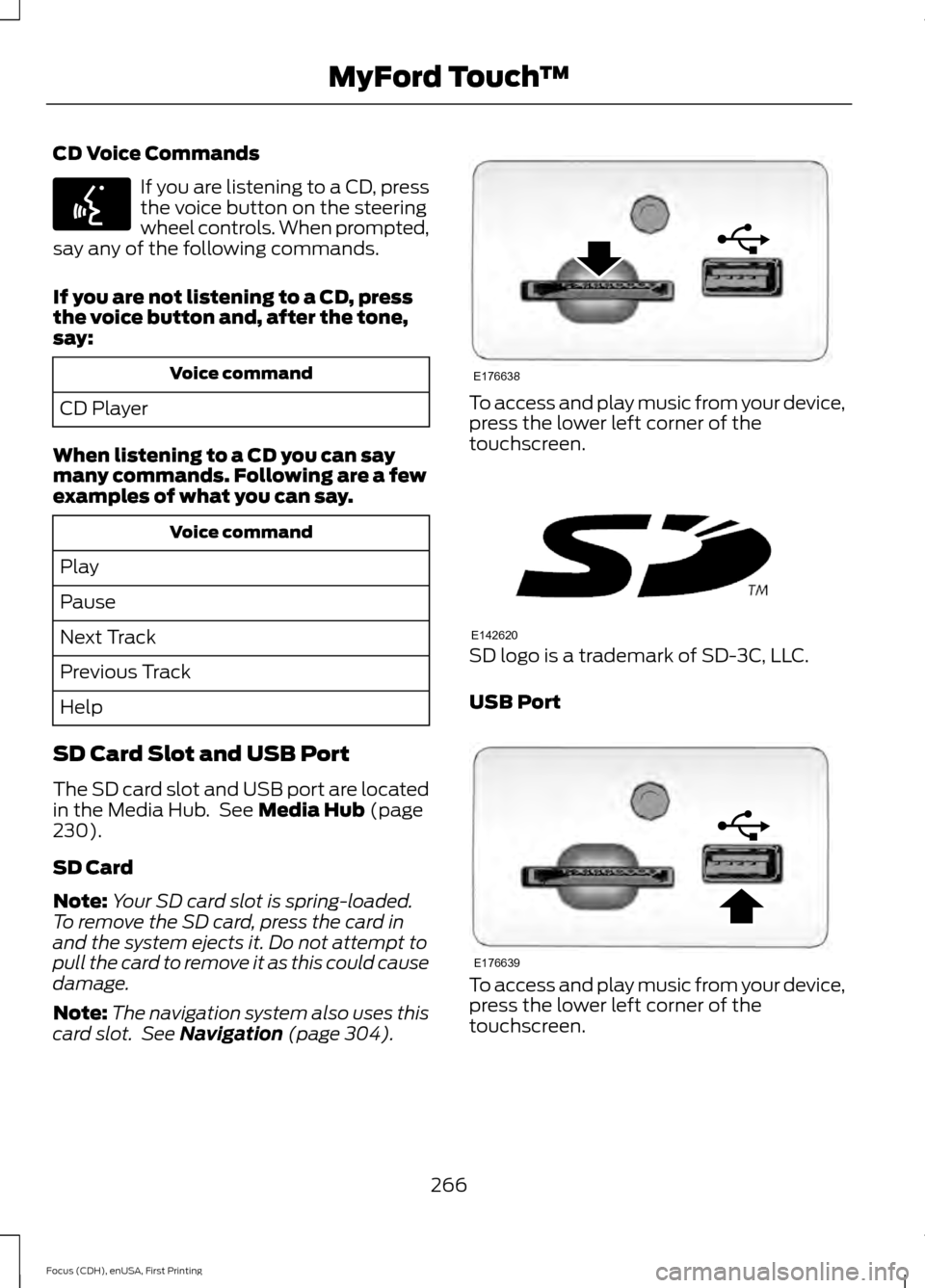
CD Voice Commands
If you are listening to a CD, press
the voice button on the steering
wheel controls. When prompted,
say any of the following commands.
If you are not listening to a CD, press
the voice button and, after the tone,
say: Voice command
CD Player
When listening to a CD you can say
many commands. Following are a few
examples of what you can say. Voice command
Play
Pause
Next Track
Previous Track
Help
SD Card Slot and USB Port
The SD card slot and USB port are located
in the Media Hub. See Media Hub (page
230).
SD Card
Note: Your SD card slot is spring-loaded.
To remove the SD card, press the card in
and the system ejects it. Do not attempt to
pull the card to remove it as this could cause
damage.
Note: The navigation system also uses this
card slot. See
Navigation (page 304). To access and play music from your device,
press the lower left corner of the
touchscreen.
SD logo is a trademark of SD-3C, LLC.
USB Port
To access and play music from your device,
press the lower left corner of the
touchscreen.
266
Focus (CDH), enUSA, First Printing MyFord Touch
™E142599 E176638 E142620 E176639
Page 295 of 369
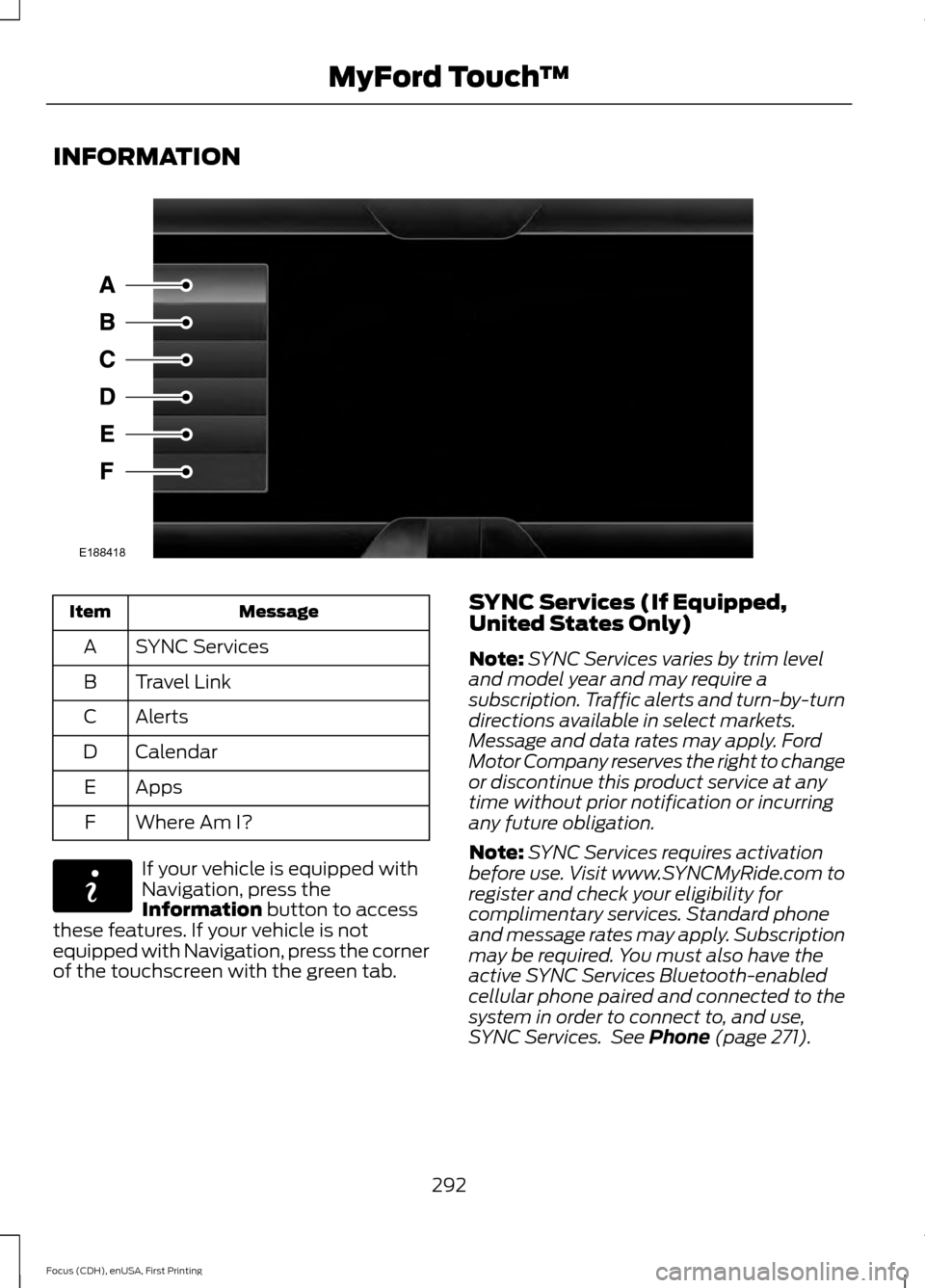
INFORMATION
Message
Item
SYNC Services
A
Travel Link
B
Alerts
C
Calendar
D
Apps
E
Where Am I?
F If your vehicle is equipped with
Navigation, press the
Information button to access
these features. If your vehicle is not
equipped with Navigation, press the corner
of the touchscreen with the green tab. SYNC Services (If Equipped,
United States Only)
Note:
SYNC Services varies by trim level
and model year and may require a
subscription. Traffic alerts and turn-by-turn
directions available in select markets.
Message and data rates may apply. Ford
Motor Company reserves the right to change
or discontinue this product service at any
time without prior notification or incurring
any future obligation.
Note: SYNC Services requires activation
before use. Visit www.SYNCMyRide.com to
register and check your eligibility for
complimentary services. Standard phone
and message rates may apply. Subscription
may be required. You must also have the
active SYNC Services Bluetooth-enabled
cellular phone paired and connected to the
system in order to connect to, and use,
SYNC Services. See
Phone (page 271).
292
Focus (CDH), enUSA, First Printing MyFord Touch
™E188418 E142608
Page 296 of 369
Note:
This feature does not function
properly if you have enabled caller ID
blocking on your cellular phone. Make sure
your cellular phone is not blocking caller ID
before using SYNC Services.
Note: The driver is ultimately responsible
for the safe operation of the vehicle, and
therefore, must evaluate whether it is safe
to follow the suggested directions. Any
navigation features provided are only an aid.
Make your driving decisions based on your
observations of local conditions and existing
traffic regulations. Do not follow the route
suggestions if doing so would result in an
unsafe or illegal maneuver, if you would be
placed in an unsafe situation, or if you would
be directed into an area that you consider
unsafe. Maps used by this system may be
inaccurate because of errors, changes in
roads, traffic conditions or driving
conditions. Note:
When you connect, the service uses
GPS technology and advanced vehicle
sensors to collect your vehicle's current
location, travel direction and speed to help
provide you with the directions, traffic
reports, or business searches you request.
Further, to provide the services you request,
for continuous improvement, the service
may collect and record call details and voice
communications. For more information, see
SYNC Services Terms and Conditions at
www.SYNCMyRide.com. If you do not want
Ford or its service providers to collect your
vehicle travel information or other
information identified in the Terms and
Conditions, do not subscribe or use the
service.
SYNC Services uses advanced vehicle
sensors, integrated GPS technology and
comprehensive map and traffic data, to
give you personalized traffic reports,
precise turn-by-turn directions, business
search, news, sports, weather and more.
For a complete list of services, or to learn
more, please visit www.SYNCMyRide.com.
Connecting to SYNC Services
You can connect to SYNC Services using
voice commands or by selecting a menu
item on the touchscreen.
To use voice commands, press the voice button and say: Action and Description
Voice Command
This initiates an outgoing call to SYNC Services using your
paired and connected Bluetooth-enabled cellular phone.
Once you connect to the service, follow the voice prompts
to request the desired service, for example traffic or
directions.
Services
Once connected to SYNC Services, you can also say the following:
Receive a list of available services from which to choose.
What Can I Say
To return to the Services main menu.
Services
Receive system help.
Help
293
Focus (CDH), enUSA, First Printing MyFord Touch
™
Page 297 of 369
If your vehicle is equipped with Navigation,
press the I (Information) button. If your
vehicle is not equipped with Navigation,
press the green tab on your touchscreen. To use the touchscreen select: Menu Item
Connect to Services
This command initiates an outgoing call
to SYNC Services using your paired and
connected Bluetooth-enabled cellular
phone. Once you connect to the service,
follow the voice prompts to request the
desired service.
Receiving Turn-by-Turn Directions
Press the voice button and say: Action and Description
Voice Command
To receive directions to a location. Once
you select your destination, the system
uploads your current vehicle location,
calculates a route based on current traffic
conditions and sends it back to your vehicle.
After the route download is complete, the
phone call automatically ends. You then
receive audible and visual driving instruc-
tions as you travel toward your destination.
Directions
To find a business or type of business. Once
you select your destination, the system
uploads your current vehicle location,
calculates a route based on current traffic
conditions and sends it back to your vehicle.
After the route download is complete, the
phone call automatically ends. You then
receive audible and visual driving instruc-
tions as you travel toward your destination.
Business Search
To find the closest business or type of
business to your location, within business
search.
Search near me
Provides you with further assistance within
Directions and Business Search. The system
may prompt you to speak with an operator
when it has difficulty matching your voice
request. The live operator can assist you by
searching for businesses by name or by
Operator
294
Focus (CDH), enUSA, First Printing MyFord Touch
™