ignition FORD FOCUS ELECTRIC 2015 3.G Owner's Manual
[x] Cancel search | Manufacturer: FORD, Model Year: 2015, Model line: FOCUS ELECTRIC, Model: FORD FOCUS ELECTRIC 2015 3.GPages: 369, PDF Size: 4.53 MB
Page 136 of 369
PRINCIPLE OF OPERATION
Cruise control lets you maintain a set
speed without keeping your foot on the
accelerator pedal. You can use cruise
control when your vehicle speed is greater
than 20 mph (30 km/h).
USING CRUISE CONTROL WARNINGS
Do not use cruise control on winding
roads, in heavy traffic or, when the
road surface is slippery. This could
result in loss of vehicle control, serious
injury or death. When you are going downhill, your
vehicle speed may increase above
the set speed. The system will not
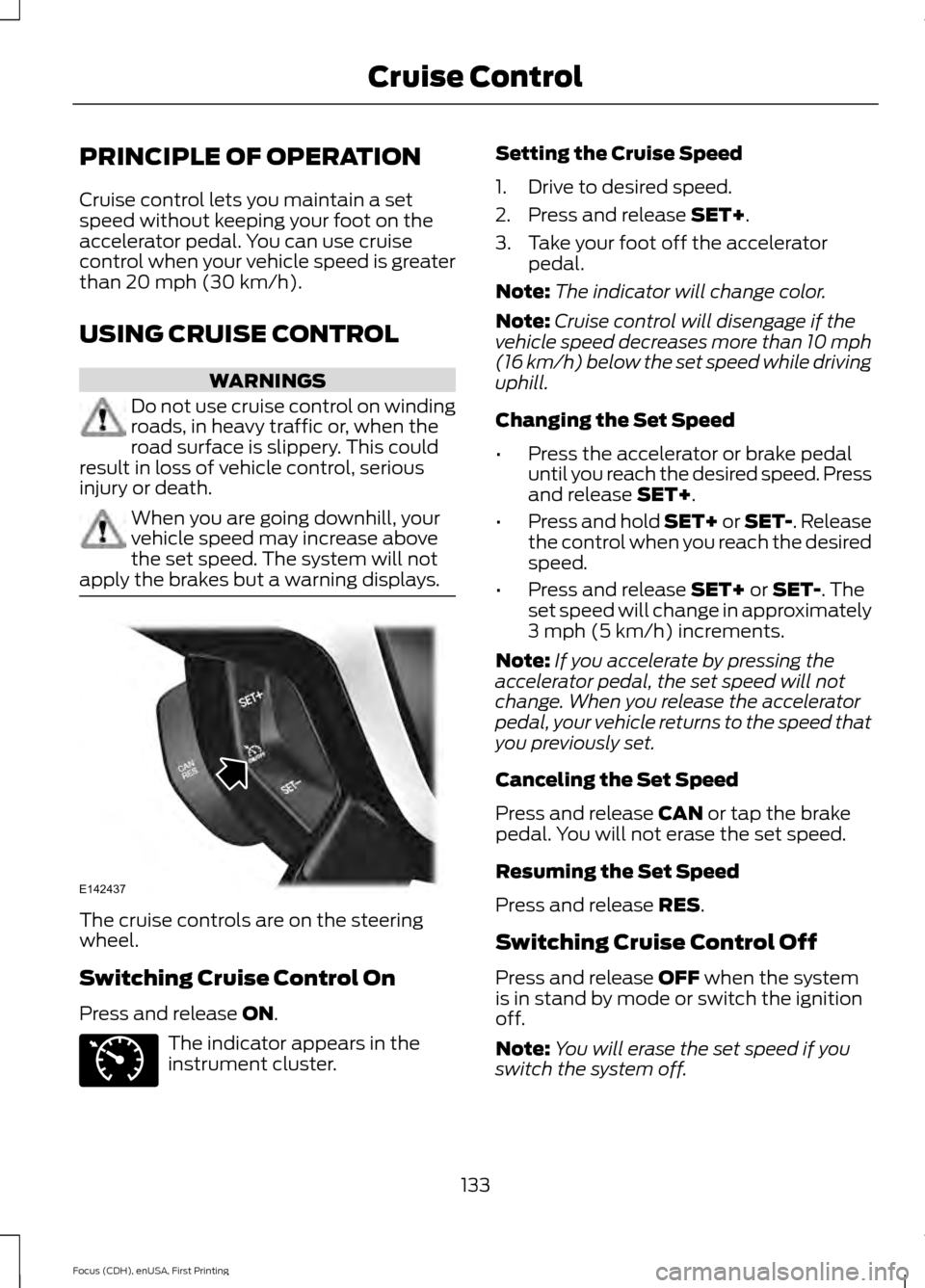
apply the brakes but a warning displays. The cruise controls are on the steering
wheel.
Switching Cruise Control On
Press and release
ON.
The indicator appears in the
instrument cluster. Setting the Cruise Speed
1. Drive to desired speed.
2. Press and release
SET+.
3. Take your foot off the accelerator pedal.
Note: The indicator will change color.
Note: Cruise control will disengage if the
vehicle speed decreases more than 10 mph
(16 km/h) below the set speed while driving
uphill.
Changing the Set Speed
• Press the accelerator or brake pedal
until you reach the desired speed. Press
and release
SET+.
• Press and hold SET+ or SET-. Release
the control when you reach the desired
speed.
• Press and release
SET+ or SET-. The
set speed will change in approximately
3 mph (5 km/h)
increments.
Note: If you accelerate by pressing the
accelerator pedal, the set speed will not
change. When you release the accelerator
pedal, your vehicle returns to the speed that
you previously set.
Canceling the Set Speed
Press and release
CAN or tap the brake
pedal. You will not erase the set speed.
Resuming the Set Speed
Press and release
RES.
Switching Cruise Control Off
Press and release
OFF when the system
is in stand by mode or switch the ignition
off.
Note: You will erase the set speed if you
switch the system off.
133
Focus (CDH), enUSA, First Printing Cruise ControlE142437 E71340
Page 137 of 369
STEERING
Electric Power Steering
WARNING
The electric power steering system
has diagnostic checks that
continuously monitor the system. If
a fault is detected, a message displays in
the information display. Stop your vehicle
as soon as it is safe to do so. Switch the
ignition off. After at least 10 seconds,
switch the ignition on and watch the
information display for a steering system
warning message. If a steering system
warning message returns, have the system
checked by an authorized dealer. Your vehicle has an electric power steering
system. There is no fluid reservoir. No
maintenance is required.
If your vehicle loses electrical power while
you are driving, electric power steering
assistance is lost. The steering system still
operates and you can steer your vehicle
manually. Manually steering your vehicle
requires more effort.
Extreme continuous steering may increase
the effort required for you to steer your
vehicle. This increased effort prevents
overheating and permanent damage to
the steering system. You do not lose the
ability to steer your vehicle manually.
Typical steering and driving maneuvers
allow the system to cool and return to
normal operation.
Steering Tips
If the steering wanders or pulls, check for:
•
Correct tire pressures.
• Uneven tire wear.
• Loose or worn suspension
components. •
Loose or worn steering components.
• Improper vehicle alignment.
Note: A high crown in the road or high
crosswinds may also make the steering
seem to wander or pull.
Adaptive Learning
The electronic power steering system
adaptive learning helps correct road
irregularities and improves overall handling
and steering feel. It communicates with
the brake system to help operate
advanced stability control and accident
avoidance systems. Additionally, whenever
the battery is disconnected or a new
battery installed, you must drive your
vehicle a short distance before the system
relearns the strategy and reactivates all
systems.
134
Focus (CDH), enUSA, First Printing Driving Aids
Page 165 of 369
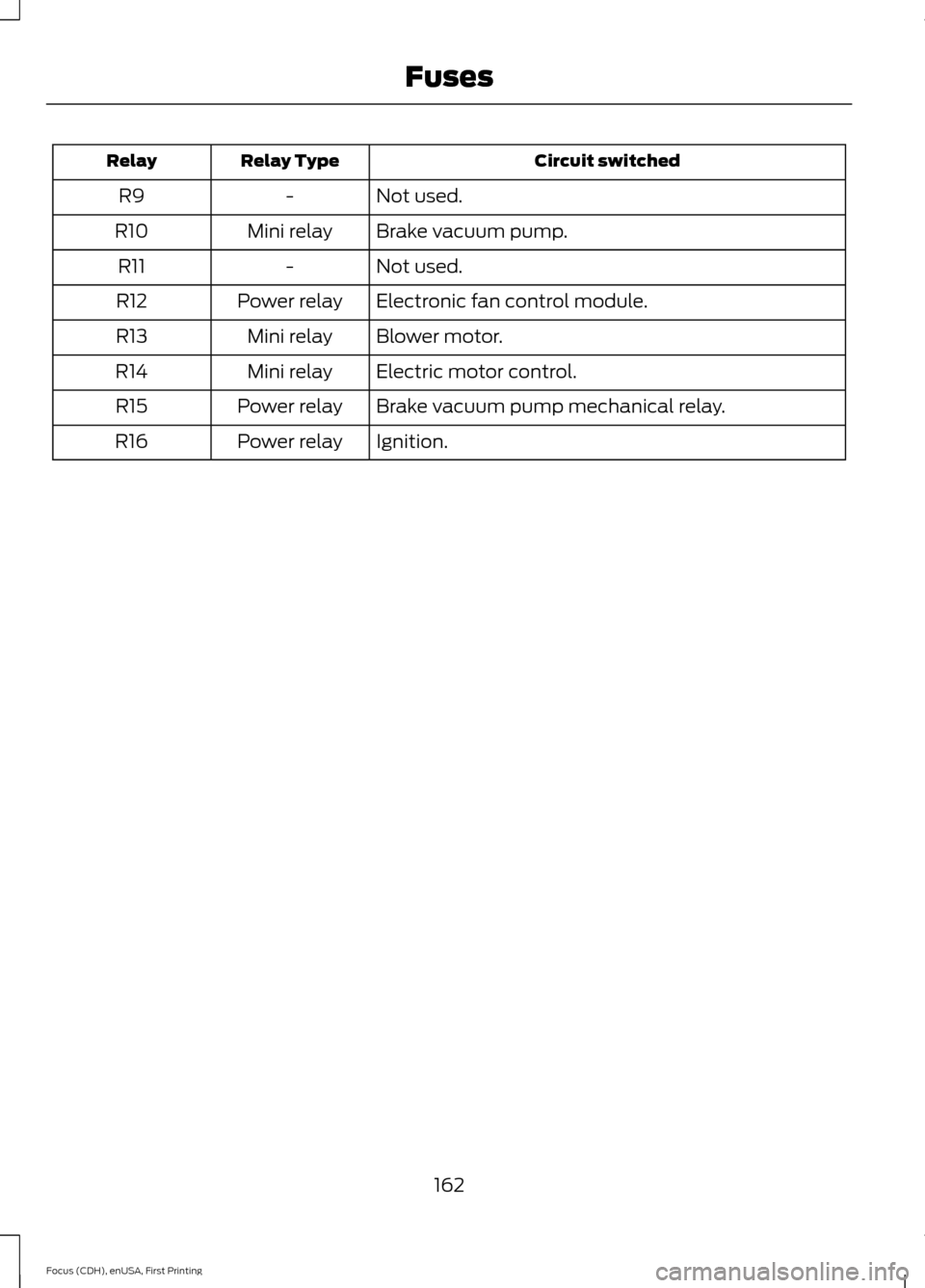
Circuit switched
Relay Type
Relay
Not used.
-
R9
Brake vacuum pump.
Mini relay
R10
Not used.
-
R11
Electronic fan control module.
Power relay
R12
Blower motor.
Mini relay
R13
Electric motor control.
Mini relay
R14
Brake vacuum pump mechanical relay.
Power relay
R15
Ignition.
Power relay
R16
162
Focus (CDH), enUSA, First Printing Fuses
Page 167 of 369
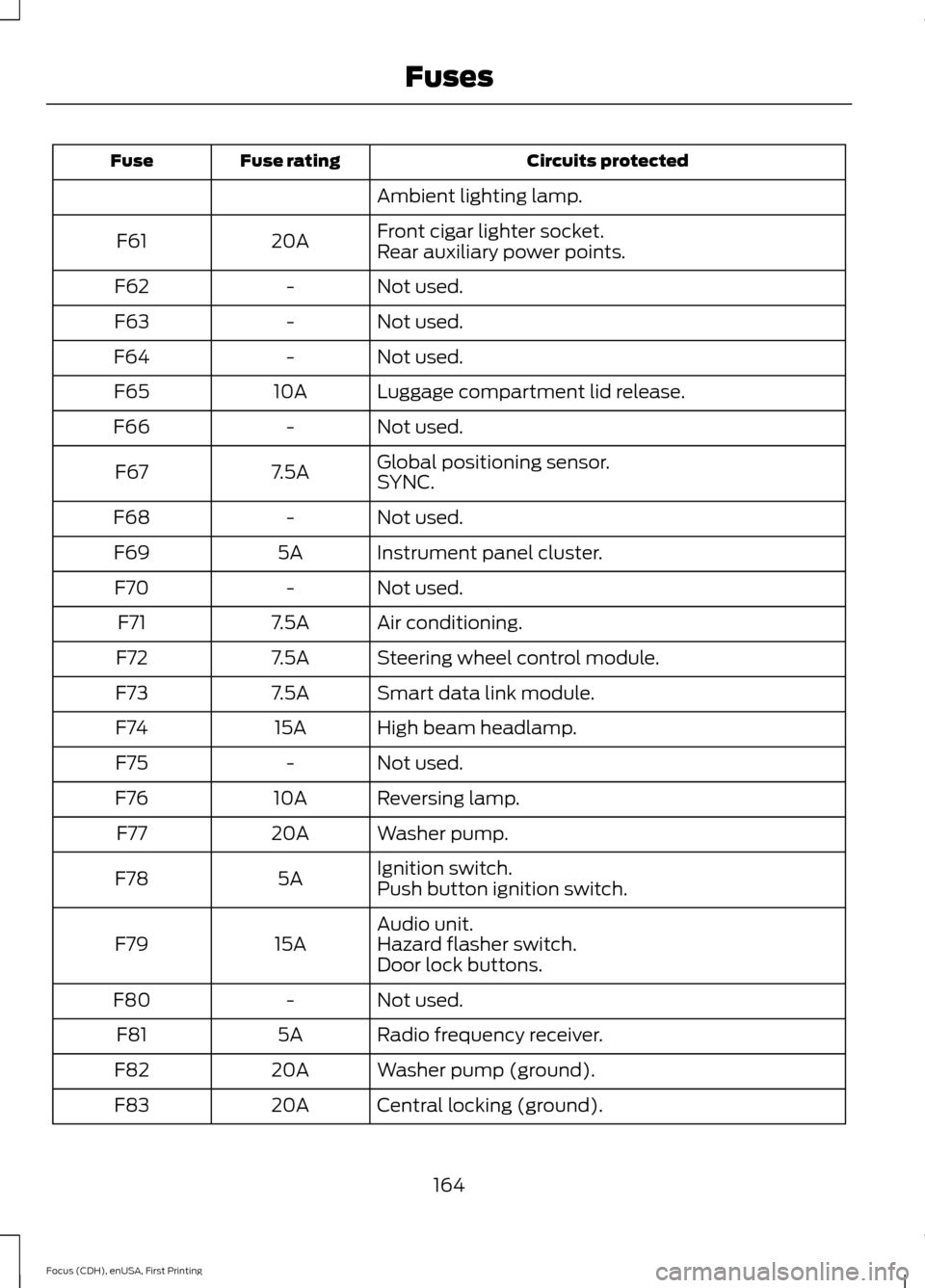
Circuits protected
Fuse rating
Fuse
Ambient lighting lamp.
Front cigar lighter socket.
20A
F61
Rear auxiliary power points.
Not used.
-
F62
Not used.
-
F63
Not used.
-
F64
Luggage compartment lid release.
10A
F65
Not used.
-
F66
Global positioning sensor.
7.5A
F67
SYNC.
Not used.
-
F68
Instrument panel cluster.
5A
F69
Not used.
-
F70
Air conditioning.
7.5A
F71
Steering wheel control module.
7.5A
F72
Smart data link module.
7.5A
F73
High beam headlamp.
15A
F74
Not used.
-
F75
Reversing lamp.
10A
F76
Washer pump.
20A
F77
Ignition switch.
5A
F78
Push button ignition switch.
Audio unit.
15A
F79 Hazard flasher switch.
Door lock buttons.
Not used.
-
F80
Radio frequency receiver.
5A
F81
Washer pump (ground).
20A
F82
Central locking (ground).
20A
F83
164
Focus (CDH), enUSA, First Printing Fuses
Page 169 of 369
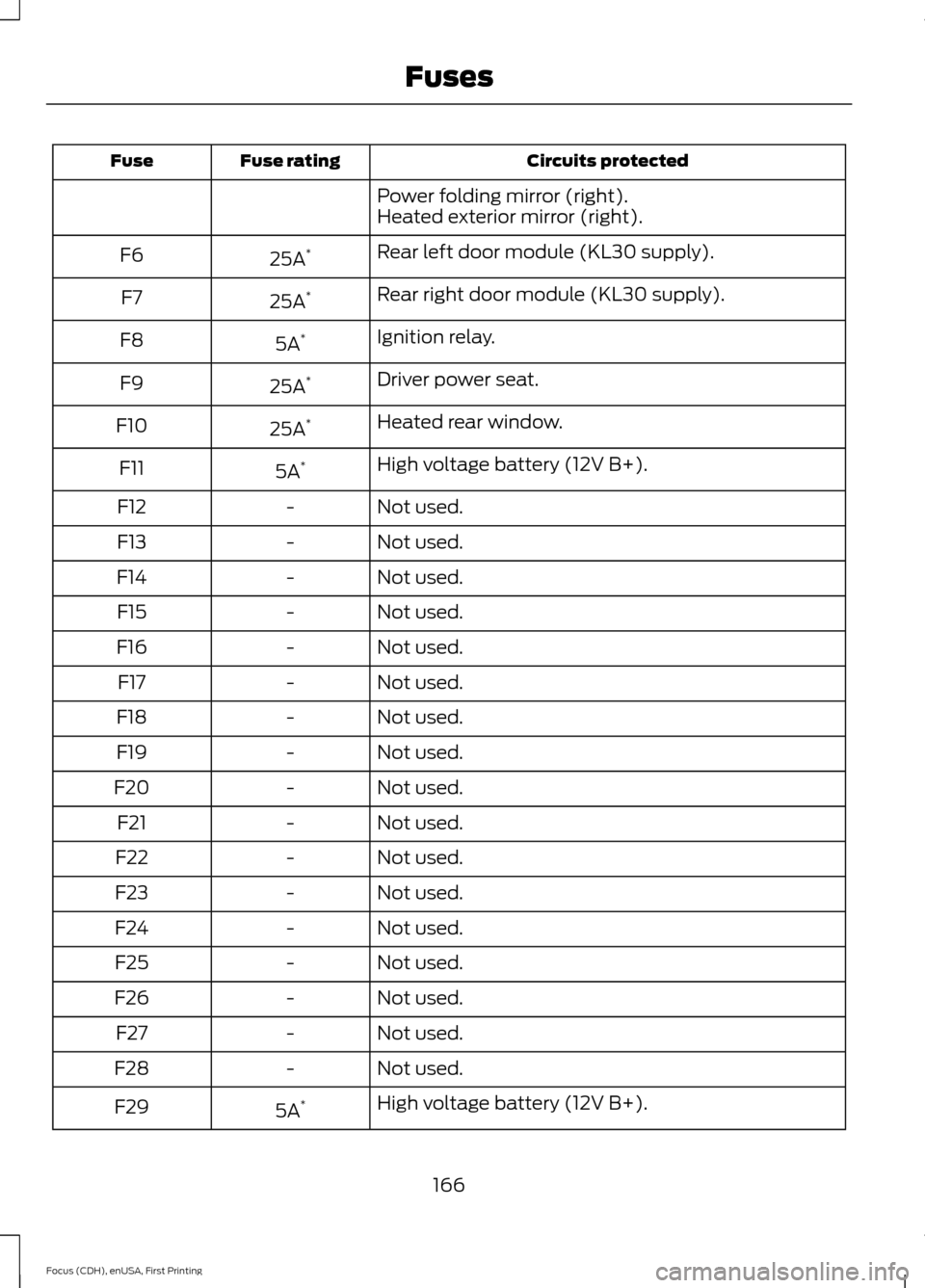
Circuits protected
Fuse rating
Fuse
Power folding mirror (right).
Heated exterior mirror (right).
Rear left door module (KL30 supply).
25A *
F6
Rear right door module (KL30 supply).
25A *
F7
Ignition relay.
5A *
F8
Driver power seat.
25A *
F9
Heated rear window.
25A *
F10
High voltage battery (12V B+).
5A *
F11
Not used.
-
F12
Not used.
-
F13
Not used.
-
F14
Not used.
-
F15
Not used.
-
F16
Not used.
-
F17
Not used.
-
F18
Not used.
-
F19
Not used.
-
F20
Not used.
-
F21
Not used.
-
F22
Not used.
-
F23
Not used.
-
F24
Not used.
-
F25
Not used.
-
F26
Not used.
-
F27
Not used.
-
F28
High voltage battery (12V B+).
5A *
F29
166
Focus (CDH), enUSA, First Printing Fuses
Page 172 of 369
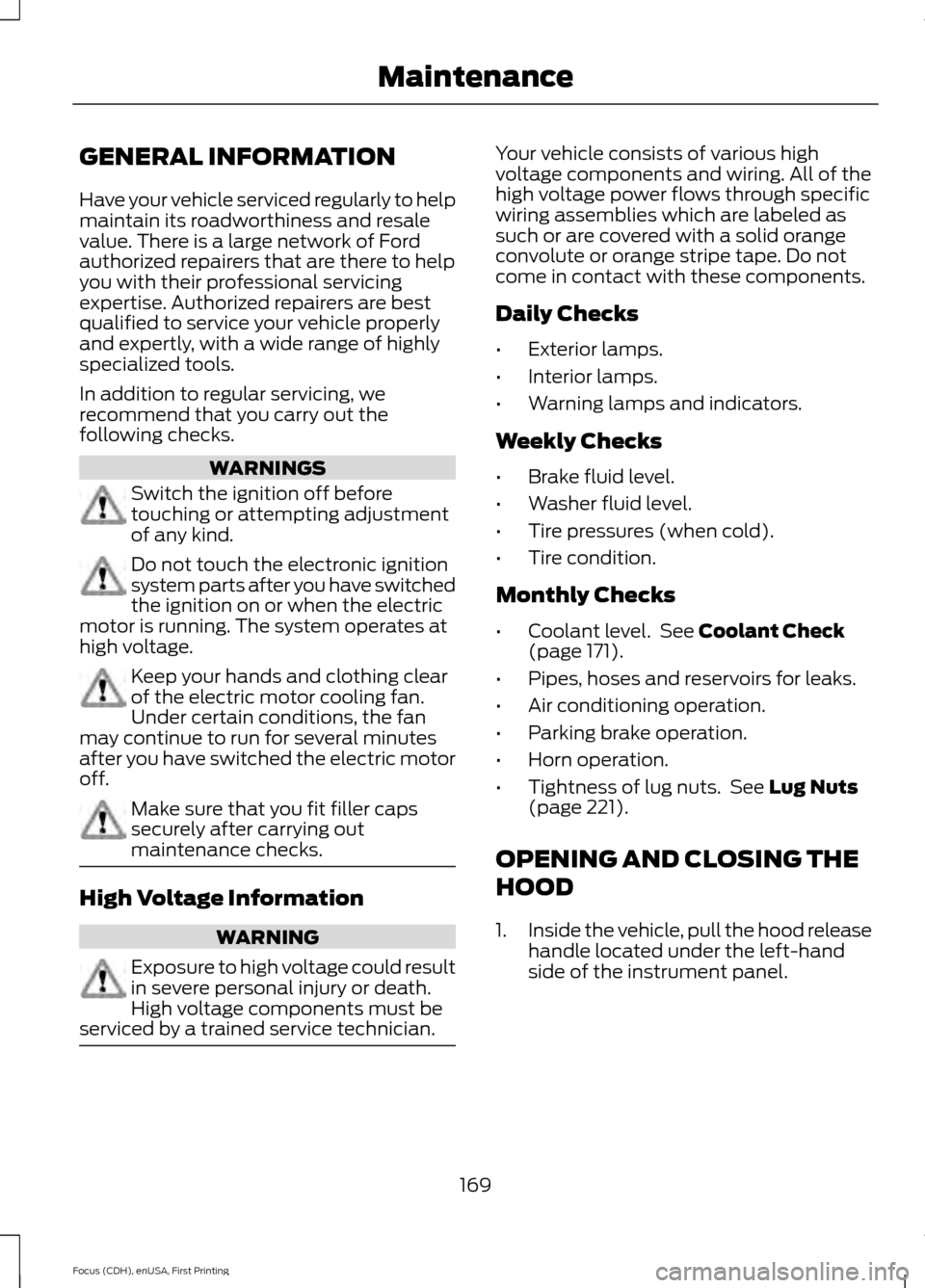
GENERAL INFORMATION
Have your vehicle serviced regularly to help
maintain its roadworthiness and resale
value. There is a large network of Ford
authorized repairers that are there to help
you with their professional servicing
expertise. Authorized repairers are best
qualified to service your vehicle properly
and expertly, with a wide range of highly
specialized tools.
In addition to regular servicing, we
recommend that you carry out the
following checks.
WARNINGS
Switch the ignition off before
touching or attempting adjustment
of any kind.
Do not touch the electronic ignition
system parts after you have switched
the ignition on or when the electric
motor is running. The system operates at
high voltage. Keep your hands and clothing clear
of the electric motor cooling fan.
Under certain conditions, the fan
may continue to run for several minutes
after you have switched the electric motor
off. Make sure that you fit filler caps
securely after carrying out
maintenance checks.
High Voltage Information
WARNING
Exposure to high voltage could result
in severe personal injury or death.
High voltage components must be
serviced by a trained service technician. Your vehicle consists of various high
voltage components and wiring. All of the
high voltage power flows through specific
wiring assemblies which are labeled as
such or are covered with a solid orange
convolute or orange stripe tape. Do not
come in contact with these components.
Daily Checks
•
Exterior lamps.
• Interior lamps.
• Warning lamps and indicators.
Weekly Checks
• Brake fluid level.
• Washer fluid level.
• Tire pressures (when cold).
• Tire condition.
Monthly Checks
• Coolant level. See Coolant Check
(page 171).
• Pipes, hoses and reservoirs for leaks.
• Air conditioning operation.
• Parking brake operation.
• Horn operation.
• Tightness of lug nuts. See
Lug Nuts
(page 221).
OPENING AND CLOSING THE
HOOD
1. Inside the vehicle, pull the hood release
handle located under the left-hand
side of the instrument panel.
169
Focus (CDH), enUSA, First Printing Maintenance
Page 178 of 369
CHECKING THE WIPER
BLADES
Run the tip of your fingers over the edge of
the blade to check for roughness.
Clean the wiper blades with washer fluid
or water applied with a soft sponge or
cloth.
CHANGING THE WIPER
BLADES
Note:
If streaks or smears appear on the
windshield, clean the windshield and the
wiper blades. See Cleaning the Windows
and Wiper Blades (page 184). If that does
not resolve the issue, install new wiper
blades.
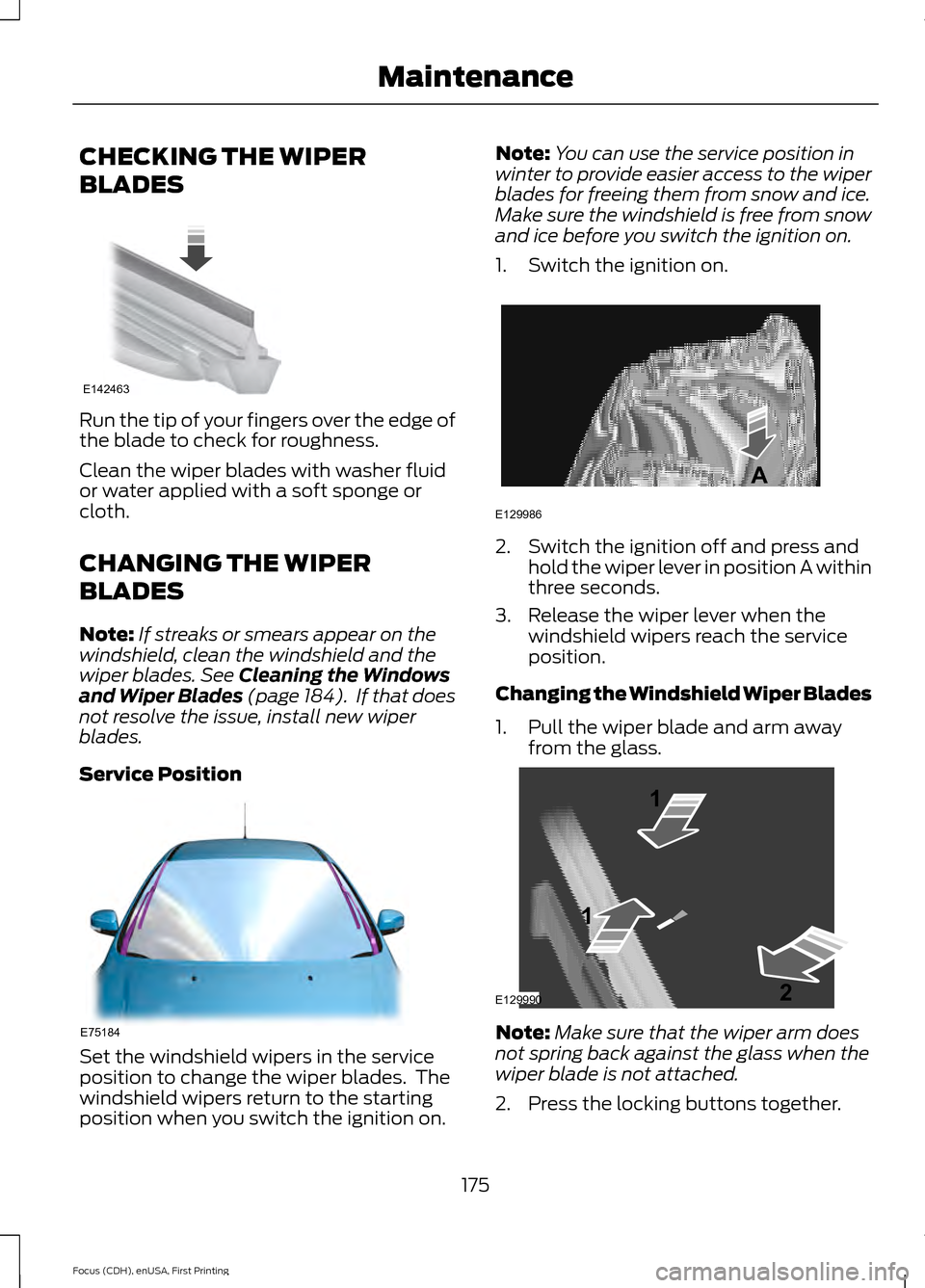
Service Position Set the windshield wipers in the service
position to change the wiper blades. The
windshield wipers return to the starting
position when you switch the ignition on. Note:
You can use the service position in
winter to provide easier access to the wiper
blades for freeing them from snow and ice.
Make sure the windshield is free from snow
and ice before you switch the ignition on.
1. Switch the ignition on. 2. Switch the ignition off and press and
hold the wiper lever in position A within
three seconds.
3. Release the wiper lever when the windshield wipers reach the service
position.
Changing the Windshield Wiper Blades
1. Pull the wiper blade and arm away from the glass. Note:
Make sure that the wiper arm does
not spring back against the glass when the
wiper blade is not attached.
2. Press the locking buttons together.
175
Focus (CDH), enUSA, First Printing MaintenanceE142463 E75184 E129986
A E129990
1
1 2
Page 187 of 369
•
Never wash or rinse any ignition coil,
spark plug wire or spark plug well, or
the area in and around these locations.
• Cover the battery, power distribution
box, and air filter assembly to prevent
water damage when cleaning the
engine.
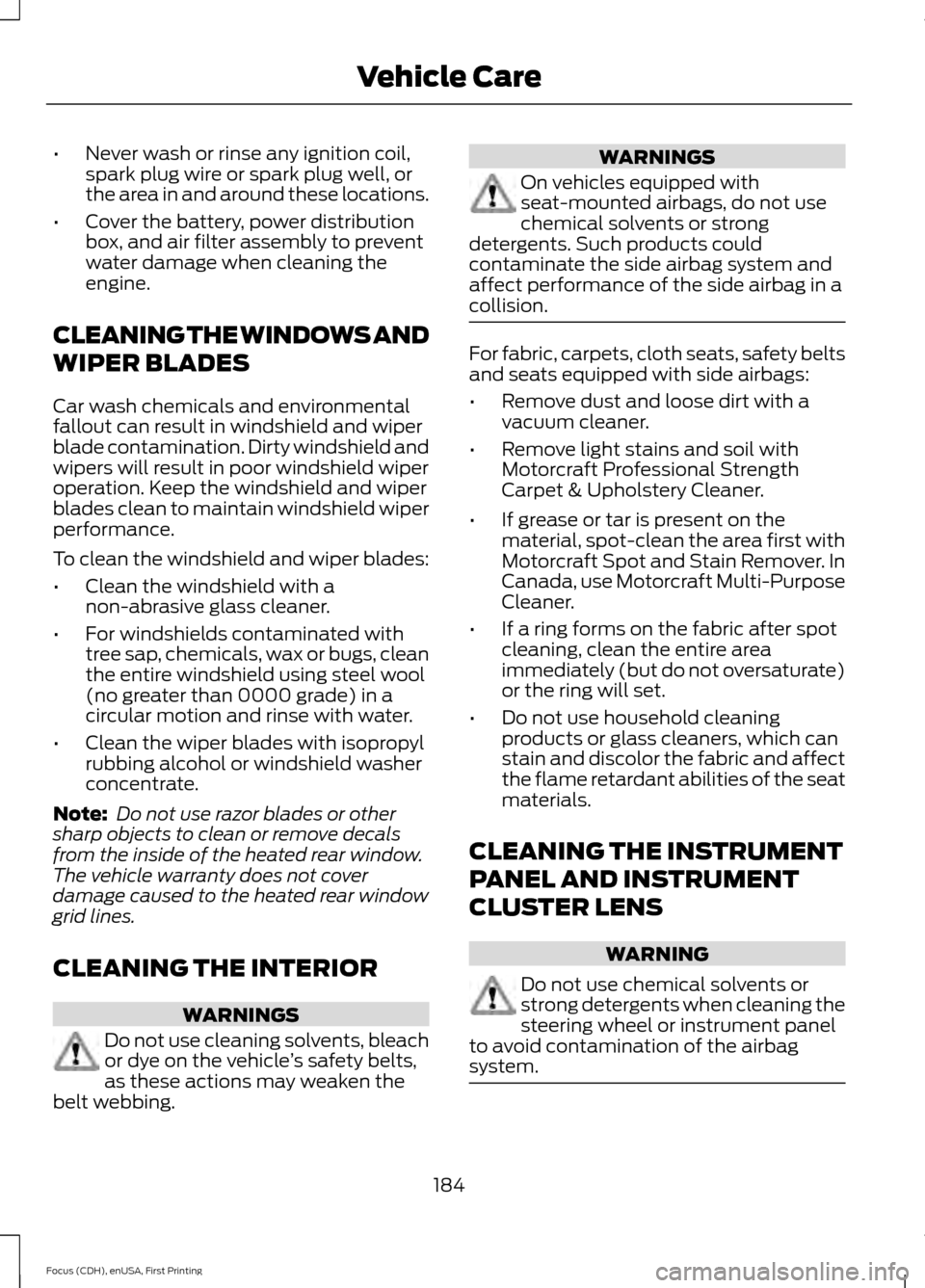
CLEANING THE WINDOWS AND
WIPER BLADES
Car wash chemicals and environmental
fallout can result in windshield and wiper
blade contamination. Dirty windshield and
wipers will result in poor windshield wiper
operation. Keep the windshield and wiper
blades clean to maintain windshield wiper
performance.
To clean the windshield and wiper blades:
• Clean the windshield with a
non-abrasive glass cleaner.
• For windshields contaminated with
tree sap, chemicals, wax or bugs, clean
the entire windshield using steel wool
(no greater than 0000 grade) in a
circular motion and rinse with water.
• Clean the wiper blades with isopropyl
rubbing alcohol or windshield washer
concentrate.
Note: Do not use razor blades or other
sharp objects to clean or remove decals
from the inside of the heated rear window.
The vehicle warranty does not cover
damage caused to the heated rear window
grid lines.
CLEANING THE INTERIOR WARNINGS
Do not use cleaning solvents, bleach
or dye on the vehicle
’s safety belts,
as these actions may weaken the
belt webbing. WARNINGS
On vehicles equipped with
seat-mounted airbags, do not use
chemical solvents or strong
detergents. Such products could
contaminate the side airbag system and
affect performance of the side airbag in a
collision. For fabric, carpets, cloth seats, safety belts
and seats equipped with side airbags:
•
Remove dust and loose dirt with a
vacuum cleaner.
• Remove light stains and soil with
Motorcraft Professional Strength
Carpet & Upholstery Cleaner.
• If grease or tar is present on the
material, spot-clean the area first with
Motorcraft Spot and Stain Remover. In
Canada, use Motorcraft Multi-Purpose
Cleaner.
• If a ring forms on the fabric after spot
cleaning, clean the entire area
immediately (but do not oversaturate)
or the ring will set.
• Do not use household cleaning
products or glass cleaners, which can
stain and discolor the fabric and affect
the flame retardant abilities of the seat
materials.
CLEANING THE INSTRUMENT
PANEL AND INSTRUMENT
CLUSTER LENS WARNING
Do not use chemical solvents or
strong detergents when cleaning the
steering wheel or instrument panel
to avoid contamination of the airbag
system. 184
Focus (CDH), enUSA, First Printing Vehicle Care
Page 235 of 369
This system uses a four-corner strategy to
provide quick access to several vehicle
features and settings. The touchscreen
provides easy interaction with your cell
phone, entertainment, information and
system settings. The corners display active
modes within the menus, for example; your
cell phone's status.
Note:
Some features are not available while
your vehicle is moving.
Note: You can access the entertainment
features for 30 minutes after you switch the
ignition off, and no doors are opened.
Phone
Press to select any of the following: Message
Phone
Quick Dial
Phonebook
History
Messaging
Settings
Navigation
Press to select any of the following: Message
My Home
Favorites
Previous Destinations
Point of Interest
Emergency
Street Address
Intersection Message
City Center
Map
Edit Route
Cancel Route
CLIMATE
Press the corresponding icons to control
the following options:
• Driver Settings
• Recirculated Air
• Auto
• Dual
• Passenger Settings
• A/C
• Defrost
Settings Press to select any of the following:
Message
Clock
Display
Sound
Vehicle
Settings
Help
232
Focus (CDH), enUSA, First Printing MyFord Touch
™E142607
Page 251 of 369
Media Player
To make adjustments using the touchscreen, select:
Action and Description
Message
Press the settings icon.
Settings
Media Player
Then select from the following:
When this feature is on, the system automatically switches
to the media source upon initial connection. This allows you
to listen to music during the indexing process. When this
feature is off, the system does not automatically switch to
the inserted media source.
Autoplay
Select to connect, disconnect, add or delete a device. You
can also set a device as your favorite so that the system
automatically attempts to connect to that device at every
ignition cycle.
Bluetooth Devices
When this feature is on, the system automatically indexes
media on your connected Bluetooth device.
Index Bluetooth Audio
Devices
This allows you to view the version level of the Gracenote
Database.
Gracenote® Database
Info
With this feature on, the Gracenote Database supplies
metadata information for your music files. This overrides
information from your device. This feature defaults to off.
Gracenote® Manage-
ment
With this feature on, the Gracenote Database supplied cover
art for your music files. This overrides any art from your device.
This feature defaults to Media Player.
Cover Art Priority
Navigation 248
Focus (CDH), enUSA, First Printing MyFord Touch
™E142607 E142607