audio FORD FREESTYLE 2006 1.G User Guide
[x] Cancel search | Manufacturer: FORD, Model Year: 2006, Model line: FREESTYLE, Model: FORD FREESTYLE 2006 1.GPages: 288, PDF Size: 2.55 MB
Page 33 of 288
Note:The volume level of the wireless headphones can only be
controlled by the thumbwheel. Neither the remote control nor the rear
seat controls will affect the volume output of the wireless headphones.
When not using the headphones, turn them off to preserve battery life.
The headphones will automatically turn off after five minutes if they have
not received an infrared audio signal from the Family Entertainment
System (FES).
Note:Ensure that the line of sight between the headphone and infrared
transmitter (mounted on the DVD housing) is not obstructed for optimal
performance.
Liquid Crystal Display (LCD) flip-down screen
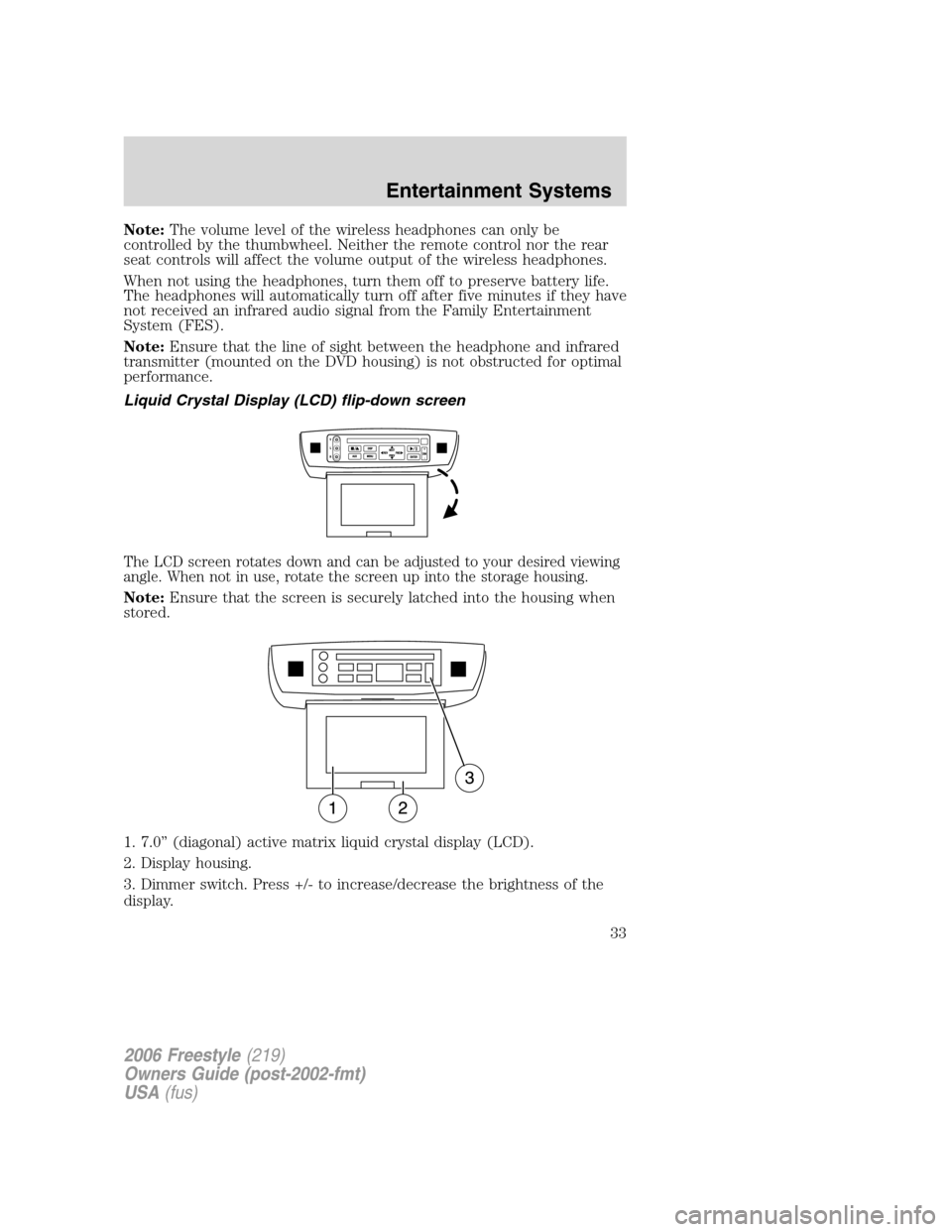
The LCD screen rotates down and can be adjusted to your desired viewing
angle. When not in use, rotate the screen up into the storage housing.
Note:Ensure that the screen is securely latched into the housing when
stored.
1. 7.0” (diagonal) active matrix liquid crystal display (LCD).
2. Display housing.
3. Dimmer switch. Press +/- to increase/decrease the brightness of the
display.
2006 Freestyle(219)
Owners Guide (post-2002-fmt)
USA(fus)
Entertainment Systems
33
Page 34 of 288
Playback and format
•The DVD player of your Family Entertainment DVD System can only
be used in the “playback” mode. (The DVD player does not offer a
record feature.)
•The system plays standard CDs or DVDs, CDR/RW, DVDRs, VCDs and
MP3 media.
Family Entertainment DVD System protection circuits
High temperature sensor circuit
•Excessively high temperatures may cause damage to the DVD player.
•When the temperature of the DVD player becomes too hot, the high
temperature sensor circuit stops machine operation. DVD/CD HOT will
be displayed on the radio display.
•The DVD player will remain disabled until it cools to a normal
operating temperature. The length of time for the system to cool will
vary depending on the climate and operating conditions.
Operating
•Only use the system when the vehicle is started for optimal
performance and to maintain battery life.
•If the Family Entertainment System (FES) is playing and the ignition
is turned OFF, the system will turn off, and suspend playback. When
the ignition is turned on again, playback will begin from the last
selected media source when the play control is pressed.
•To disable the DVD player rear controls, simultaneously press the 3
and 5 memory presets on the radio face. To enable the DVD player
rear controls again, press the 3 and 5 presets simultaneously.
•The DVD player is only capable of reading the bottom side of a disc.
When inserting a single sided disc, the label should be up. For a
multi-sided disc, the desired play side should be down when the disc
is inserted into the player.
•DVDs are formatted by regions. This DVD system can only play region
1 DVDs (DVDs manufactured for U.S. and Canada).
This unit is designed to play commercially pressed 4.75 (12 cm)
audio compact discs and DVDs only. Due to technical
incompatibility, certain recordable and re-recordable compact
discs may not function correctly when used in Ford DVD/CD
players. Irregular shaped discs, discs with a scratch protection
2006 Freestyle(219)
Owners Guide (post-2002-fmt)
USA(fus)
Entertainment Systems
34
Page 35 of 288
film attached, and discs with homemade paper (adhesive) labels
should not be inserted into the player. The label may peel and
cause the disc to become jammed. It is recommended that
homemade discs be identified with permanent felt tip marker
rather than adhesive labels. Ball point pens may damage discs.
Please contact your dealer for further information.
Inserting a CD/DVD
With the ignition ON, inserting a CD/DVD into the DVD player
automatically turns ON the FES and playback should begin immediately.
The counter is automatically reset to 0:00:00 when any disc is inserted
into the FES.
Removing a CD/DVD (while playing)
1. Press the STOP/EJECT control to stop playback if a disc is playing.
2. Press the STOP/EJECT control again to eject the CD/DVD.
If the CD/DVD is not removed within the allotted time, the system will
pull the CD/DVD back into the system for safety purposes.
If the CD/DVD will not eject from the system, press and hold the EJECT
control for approximately 2 seconds. The disc should eject whether the
vehicle ignition is ON or OFF.
Playing a video game/auxiliary device
1. Connect the video line from your video game device to the YELLOW
auxiliary input jack.
2. Connect the left and right audio lines to the WHITE (left) and RED
(right) auxiliary input jacks respectively.
3. Press the MODE control repeatedly until DVD/CD AUX (no disc in
player) or DVD/CD play (disc in player) illuminates in the radio display.
If a disc is in the system, playback should begin. To enable the aux
inputs, press the STOP control or press the AUX control on the DVD
player.
2006 Freestyle(219)
Owners Guide (post-2002-fmt)
USA(fus)
Entertainment Systems
35
Page 36 of 288
On-screen indicators
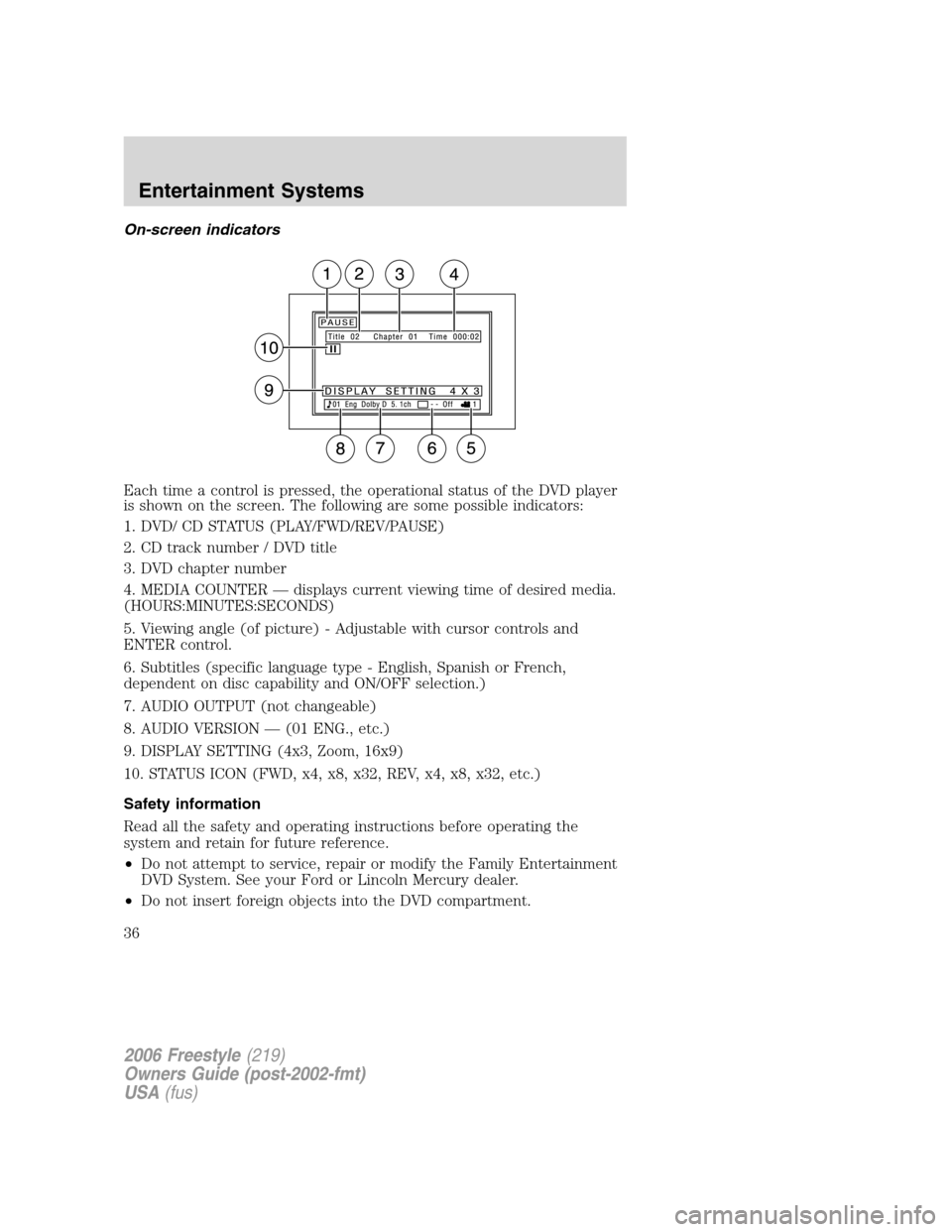
Each time a control is pressed, the operational status of the DVD player
is shown on the screen. The following are some possible indicators:
1. DVD/ CD STATUS (PLAY/FWD/REV/PAUSE)
2. CD track number / DVD title
3. DVD chapter number
4. MEDIA COUNTER — displays current viewing time of desired media.
(HOURS:MINUTES:SECONDS)
5. Viewing angle (of picture) - Adjustable with cursor controls and
ENTER control.
6. Subtitles (specific language type - English, Spanish or French,
dependent on disc capability and ON/OFF selection.)
7. AUDIO OUTPUT (not changeable)
8. AUDIO VERSION — (01 ENG., etc.)
9. DISPLAY SETTING (4x3, Zoom, 16x9)
10. STATUS ICON (FWD, x4, x8, x32, REV, x4, x8, x32, etc.)
Safety information
Read all the safety and operating instructions before operating the
system and retain for future reference.
•Do not attempt to service, repair or modify the Family Entertainment
DVD System. See your Ford or Lincoln Mercury dealer.
•Do not insert foreign objects into the DVD compartment.
2006 Freestyle(219)
Owners Guide (post-2002-fmt)
USA(fus)
Entertainment Systems
36
Page 209 of 288
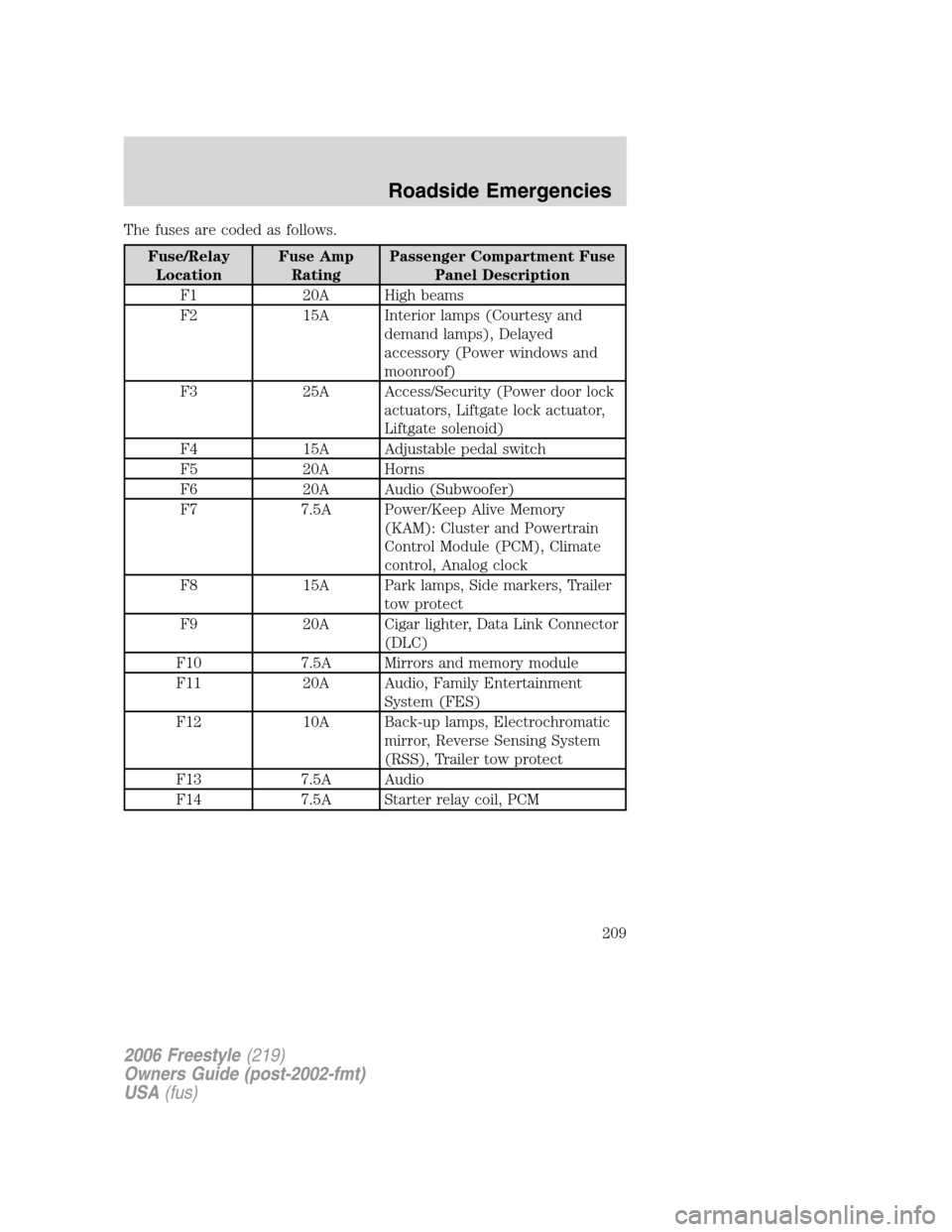
The fuses are coded as follows.
Fuse/Relay
LocationFuse Amp
RatingPassenger Compartment Fuse
Panel Description
F1 20A High beams
F2 15A Interior lamps (Courtesy and
demand lamps), Delayed
accessory (Power windows and
moonroof)
F3 25A Access/Security (Power door lock
actuators, Liftgate lock actuator,
Liftgate solenoid)
F4 15A Adjustable pedal switch
F5 20A Horns
F6 20A Audio (Subwoofer)
F7 7.5A Power/Keep Alive Memory
(KAM): Cluster and Powertrain
Control Module (PCM), Climate
control, Analog clock
F8 15A Park lamps, Side markers, Trailer
tow protect
F9 20A Cigar lighter, Data Link Connector
(DLC)
F10 7.5A Mirrors and memory module
F11 20A Audio, Family Entertainment
System (FES)
F12 10A Back-up lamps, Electrochromatic
mirror, Reverse Sensing System
(RSS), Trailer tow protect
F13 7.5A Audio
F14 7.5A Starter relay coil, PCM
2006 Freestyle(219)
Owners Guide (post-2002-fmt)
USA(fus)
Roadside Emergencies
209
Page 210 of 288
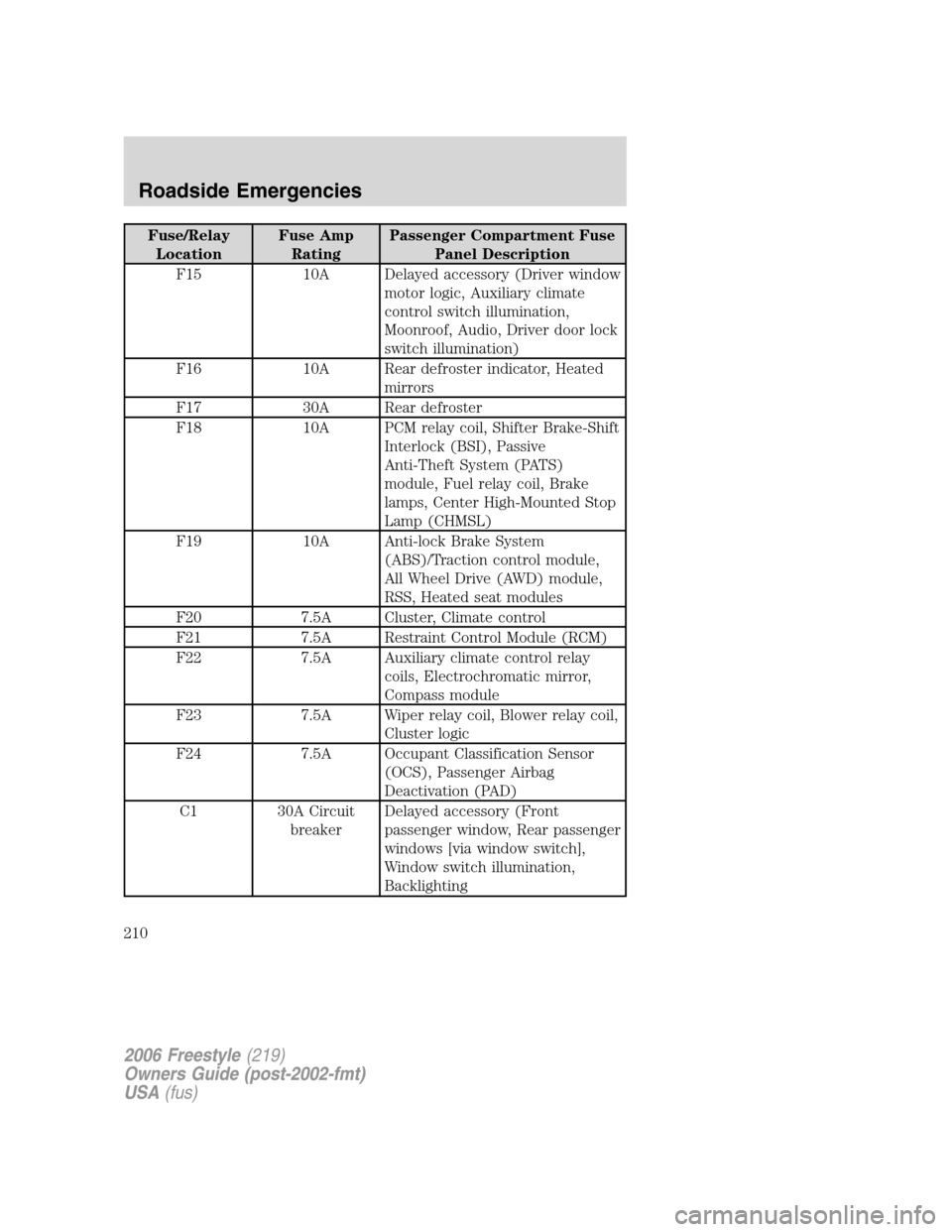
Fuse/Relay
LocationFuse Amp
RatingPassenger Compartment Fuse
Panel Description
F15 10A Delayed accessory (Driver window
motor logic, Auxiliary climate
control switch illumination,
Moonroof, Audio, Driver door lock
switch illumination)
F16 10A Rear defroster indicator, Heated
mirrors
F17 30A Rear defroster
F18 10A PCM relay coil, Shifter Brake-Shift
Interlock (BSI), Passive
Anti-Theft System (PATS)
module, Fuel relay coil, Brake
lamps, Center High-Mounted Stop
Lamp (CHMSL)
F19 10A Anti-lock Brake System
(ABS)/Traction control module,
All Wheel Drive (AWD) module,
RSS, Heated seat modules
F20 7.5A Cluster, Climate control
F21 7.5A Restraint Control Module (RCM)
F22 7.5A Auxiliary climate control relay
coils, Electrochromatic mirror,
Compass module
F23 7.5A Wiper relay coil, Blower relay coil,
Cluster logic
F24 7.5A Occupant Classification Sensor
(OCS), Passenger Airbag
Deactivation (PAD)
C1 30A Circuit
breakerDelayed accessory (Front
passenger window, Rear passenger
windows [via window switch],
Window switch illumination,
Backlighting
2006 Freestyle(219)
Owners Guide (post-2002-fmt)
USA(fus)
Roadside Emergencies
210
Page 281 of 288
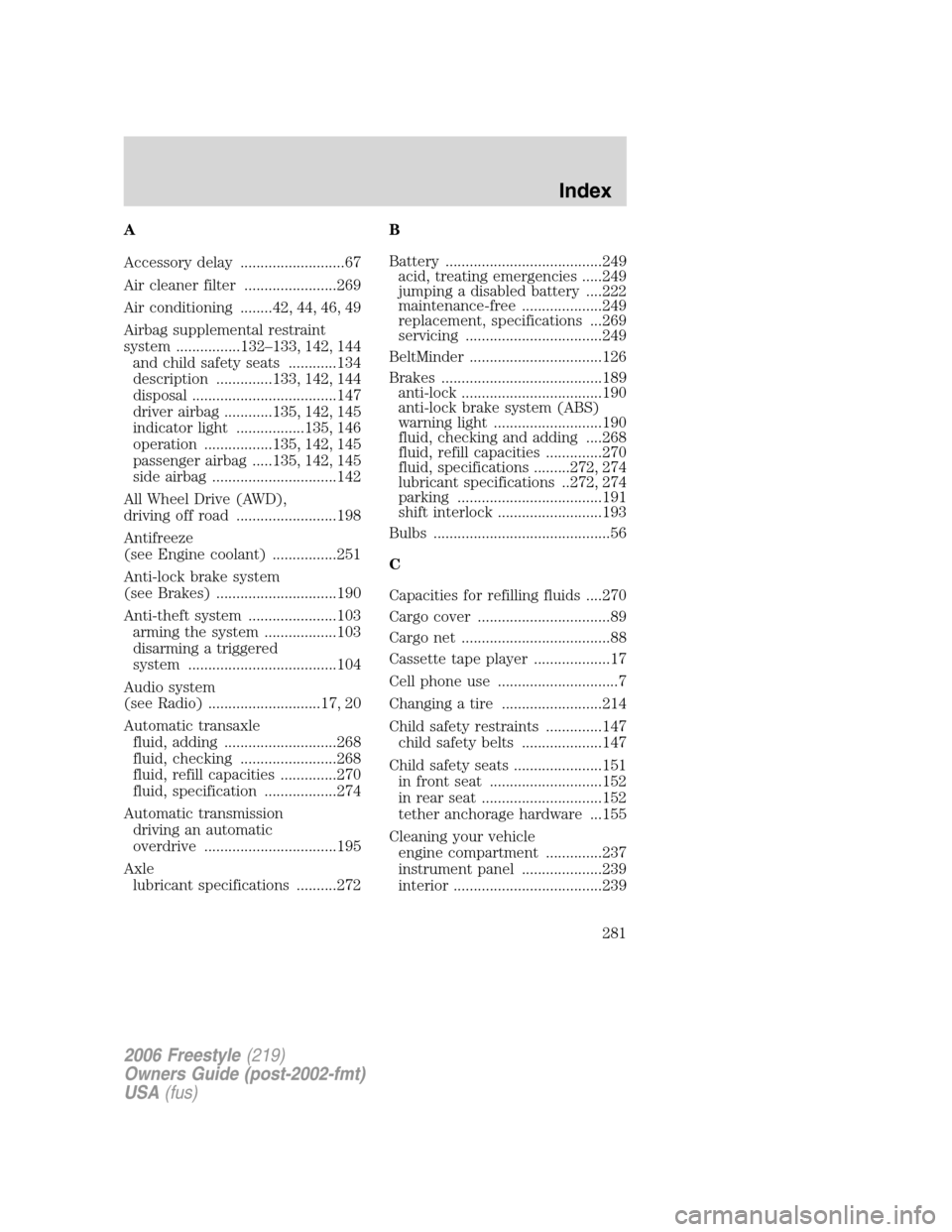
A
Accessory delay ..........................67
Air cleaner filter .......................269
Air conditioning ........42, 44, 46, 49
Airbag supplemental restraint
system ................132–133, 142, 144
and child safety seats ............134
description ..............133, 142, 144
disposal ....................................147
driver airbag ............135, 142, 145
indicator light .................135, 146
operation .................135, 142, 145
passenger airbag .....135, 142, 145
side airbag ...............................142
All Wheel Drive (AWD),
driving off road .........................198
Antifreeze
(see Engine coolant) ................251
Anti-lock brake system
(see Brakes) ..............................190
Anti-theft system ......................103
arming the system ..................103
disarming a triggered
system .....................................104
Audio system
(see Radio) ............................17, 20
Automatic transaxle
fluid, adding ............................268
fluid, checking ........................268
fluid, refill capacities ..............270
fluid, specification ..................274
Automatic transmission
driving an automatic
overdrive .................................195
Axle
lubricant specifications ..........272B
Battery .......................................249
acid, treating emergencies .....249
jumping a disabled battery ....222
maintenance-free ....................249
replacement, specifications ...269
servicing ..................................249
BeltMinder .................................126
Brakes ........................................189
anti-lock ...................................190
anti-lock brake system (ABS)
warning light ...........................190
fluid, checking and adding ....268
fluid, refill capacities ..............270
fluid, specifications .........272, 274
lubricant specifications ..272, 274
parking ....................................191
shift interlock ..........................193
Bulbs ............................................56
C
Capacities for refilling fluids ....270
Cargo cover .................................89
Cargo net .....................................88
Cassette tape player ...................17
Cell phone use ..............................7
Changing a tire .........................214
Child safety restraints ..............147
child safety belts ....................147
Child safety seats ......................151
in front seat ............................152
in rear seat ..............................152
tether anchorage hardware ...155
Cleaning your vehicle
engine compartment ..............237
instrument panel ....................239
interior .....................................239
2006 Freestyle(219)
Owners Guide (post-2002-fmt)
USA(fus)
Index
281