audio FORD FREESTYLE 2006 1.G Owners Manual
[x] Cancel search | Manufacturer: FORD, Model Year: 2006, Model line: FREESTYLE, Model: FORD FREESTYLE 2006 1.GPages: 288, PDF Size: 2.55 MB
Page 17 of 288
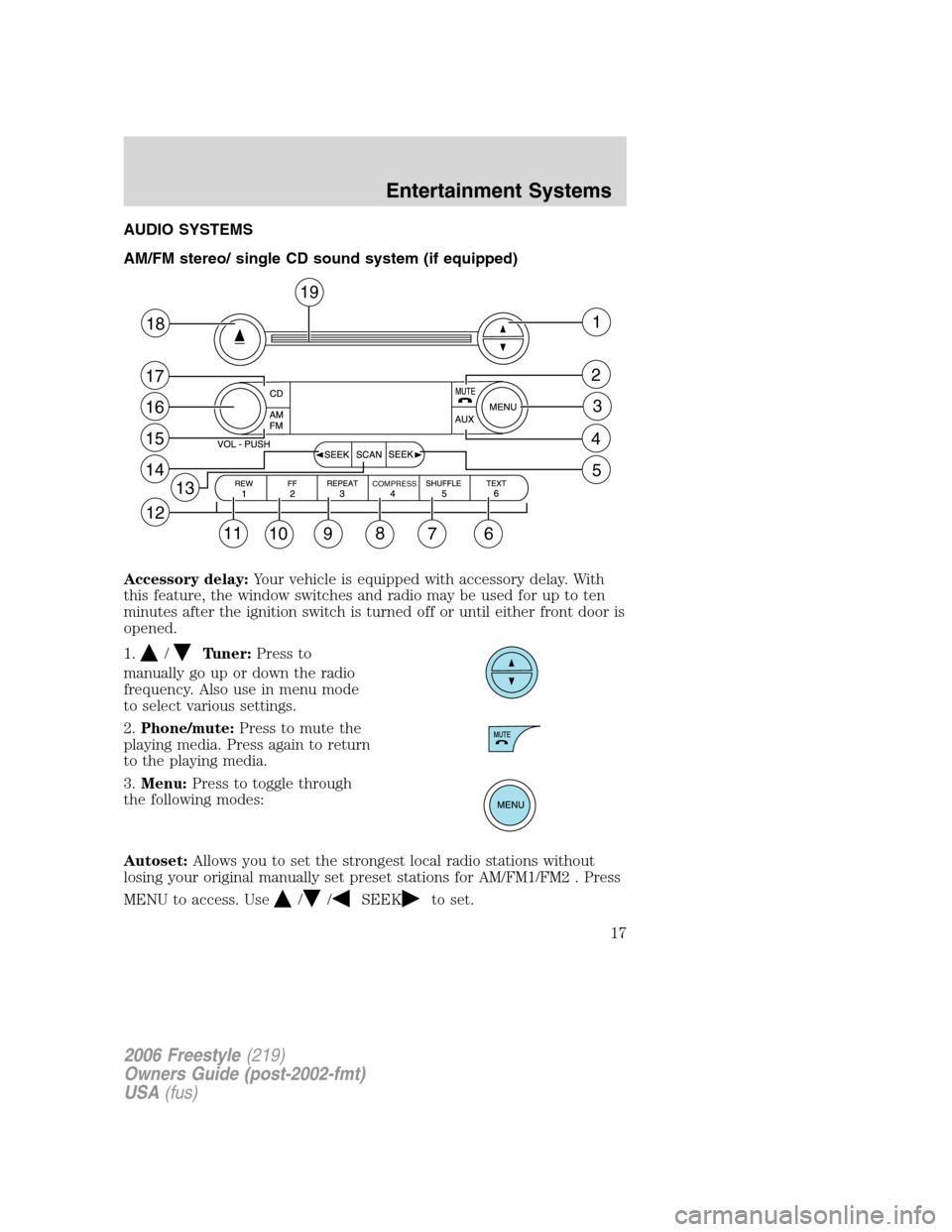
AUDIO SYSTEMS
AM/FM stereo/ single CD sound system (if equipped)
Accessory delay:Your vehicle is equipped with accessory delay. With
this feature, the window switches and radio may be used for up to ten
minutes after the ignition switch is turned off or until either front door is
opened.
1.
/Tuner:Press to
manually go up or down the radio
frequency. Also use in menu mode
to select various settings.
2.Phone/mute:Press to mute the
playing media. Press again to return
to the playing media.
3.Menu:Press to toggle through
the following modes:
Autoset:Allows you to set the strongest local radio stations without
losing your original manually set preset stations for AM/FM1/FM2 . Press
MENU to access. Use
//SEEKto set.
12
11
10 98
7
41
2
3
6
14
15
16
17
18
19
5
13COMPRESS
2006 Freestyle(219)
Owners Guide (post-2002-fmt)
USA(fus)
Entertainment Systems
17
Page 18 of 288
When the six strongest stations are filled, the station stored in preset 1
will begin playing. If there are less than six strong stations, the system
will store the last one in the remaining presets.
Bass:Press to adjust the bass setting. Use
//SEEK.
Treble:Press to adjust the treble setting. Use
//SEEK.
Balance:Press to adjust the audio between the left and right speakers.
Use
//SEEK.
Fade:Press to adjust the audio between the front and rear speakers.
Use
//SEEK.
Speed sensitive volume (if equipped):Radio volume automatically
changes slightly with vehicle speed to compensate for road and wind
noise. Press MENU to access and use
//SEEKto adjust.
The recommended level is 1–3. Level 0 turns the feature off and level 7
is the maximum setting.
Setting the clock:Press MENU until SELECT HOUR or SELECT
MINUTE is displayed. Use
/to manually increase/decrease. Press
MENU again to disengage clock mode.
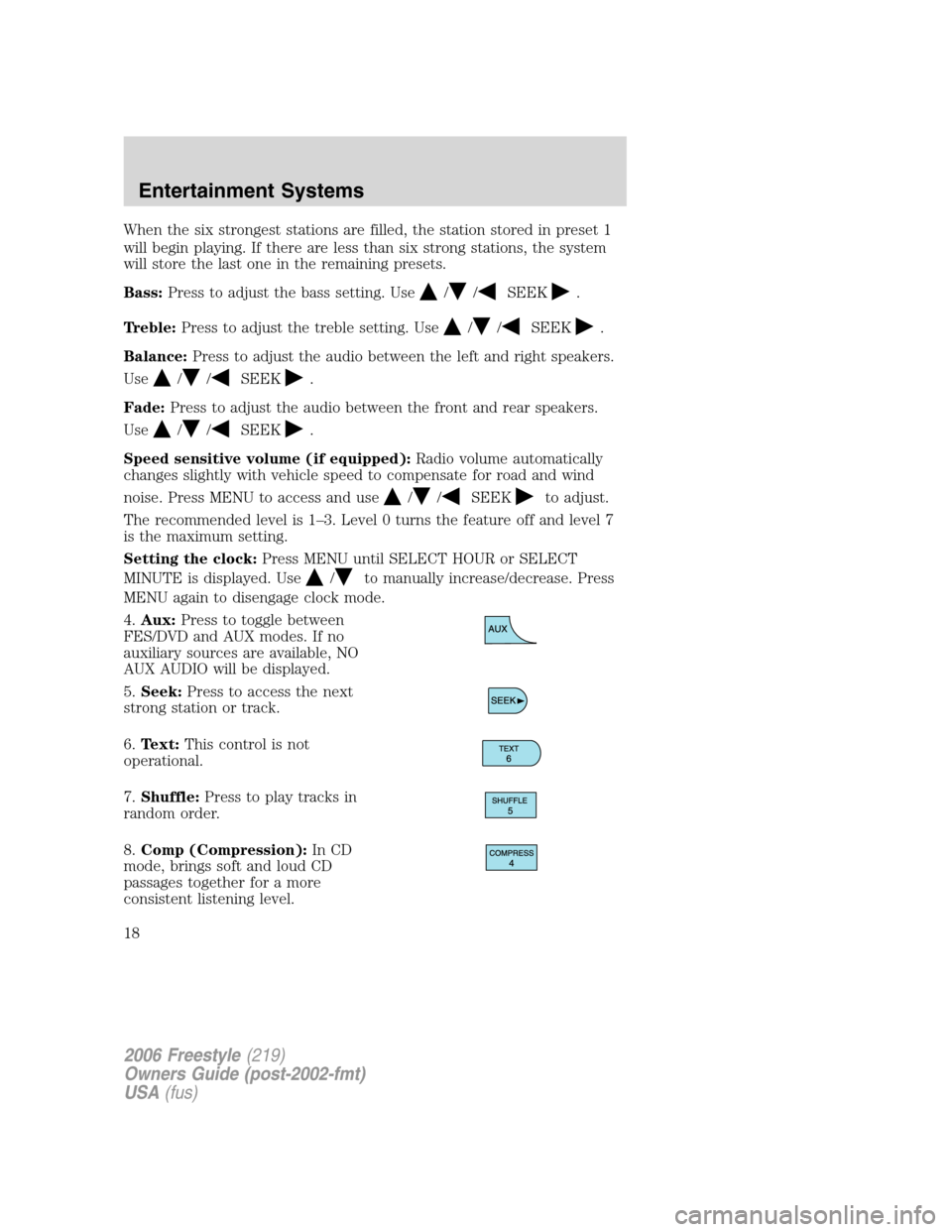
4.Aux:Press to toggle between
FES/DVD and AUX modes. If no
auxiliary sources are available, NO
AUX AUDIO will be displayed.
5.Seek:Press to access the next
strong station or track.
6.Text:This control is not
operational.
7.Shuffle:Press to play tracks in
random order.
8.Comp (Compression):In CD
mode, brings soft and loud CD
passages together for a more
consistent listening level.
2006 Freestyle(219)
Owners Guide (post-2002-fmt)
USA(fus)
Entertainment Systems
18
Page 20 of 288
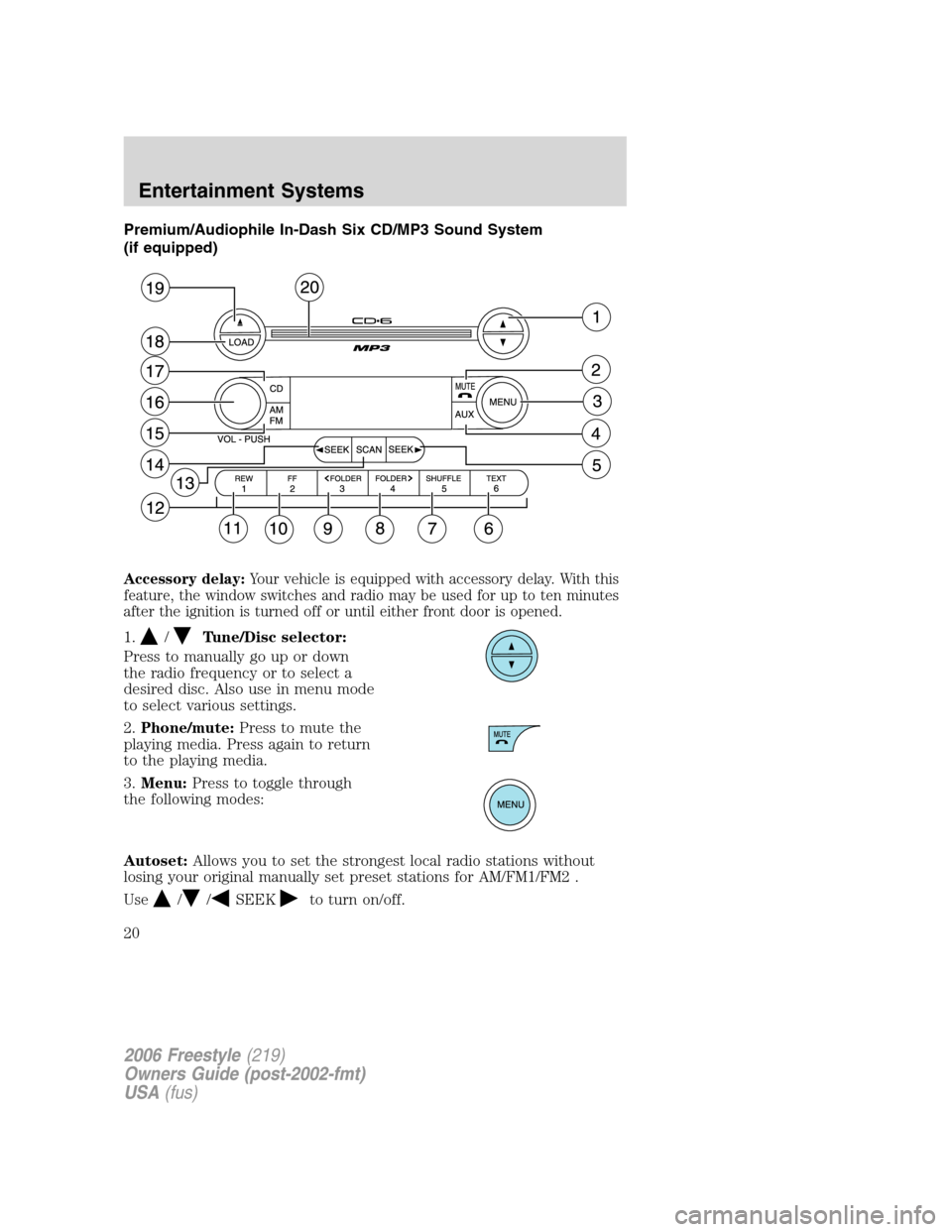
Premium/Audiophile In-Dash Six CD/MP3 Sound System
(if equipped)
Accessory delay:Your vehicle is equipped with accessory delay. With this
feature, the window switches and radio may be used for up to ten minutes
after the ignition is turned off or until either front door is opened.
1./Tune/Disc selector:
Press to manually go up or down
the radio frequency or to select a
desired disc. Also use in menu mode
to select various settings.
2.Phone/mute:Press to mute the
playing media. Press again to return
to the playing media.
3.Menu:Press to toggle through
the following modes:
Autoset:Allows you to set the strongest local radio stations without
losing your original manually set preset stations for AM/FM1/FM2 .
Use
//SEEKto turn on/off.
2006 Freestyle(219)
Owners Guide (post-2002-fmt)
USA(fus)
Entertainment Systems
20
Page 21 of 288
When the six strongest stations are filled, the station stored in preset 1
will begin playing. If there are less than six strong stations, the system
will store the last one in the remaining presets.
Bass:Press to adjust the bass setting. Use
//SEEK.
Treble:Press to adjust the treble setting. Use
//SEEK.
Balance:Press to adjust the audio between the left and right speakers.
Use
//, SEEK.
Fade:Press to adjust the audio between the front and rear speakers.
Use
//, SEEK.
Occupancy mode:(Available on Audiophile radios only):
Use
//SEEKselect and optimize sound for ALL SEATS,
DRIVERS SEAT or REAR SEATS.
Speed sensitive volume:Radio volume automatically changes slightly
with vehicle speed to compensate for road and wind noise.
Use
//SEEKto adjust. Recommended level is 1–3. Level 0
turns the feature off and level 7 is the maximum setting.
Setting the clock:Press until SELECT HOUR or SELECT MINS is
displayed. Press
//SEEKto adjust the hours/minutes.
RDS(Available on Audiophile radios only): Allows you to search
RDS-equipped stations for a certain category of music format: Classic,
Country, Info, Jazz/RB, Religious, Rock, Soft, Top 40. RDS (only available
in FM mode) must be activated to access Find and Show functions.
To activate, press and hold MENU until RDS (ON/OFF) appears in the
display. Press MENU repeatedly to scroll through Find, Show and RDS.
Use
/.SEEKto toggle RDS ON/OFF. When RDS is Off, you
will not be able to access Find and Show functions.
Find:Allows you to search RDS-equipped stations for the desired music
category. Use
/to find the desired program type, then use
SEEKor SCAN to begin the search.
Show:Allows you to display the name of the radio station or program
type. Use
//SEEKto show type, name or none.
2006 Freestyle(219)
Owners Guide (post-2002-fmt)
USA(fus)
Entertainment Systems
21
Page 22 of 288
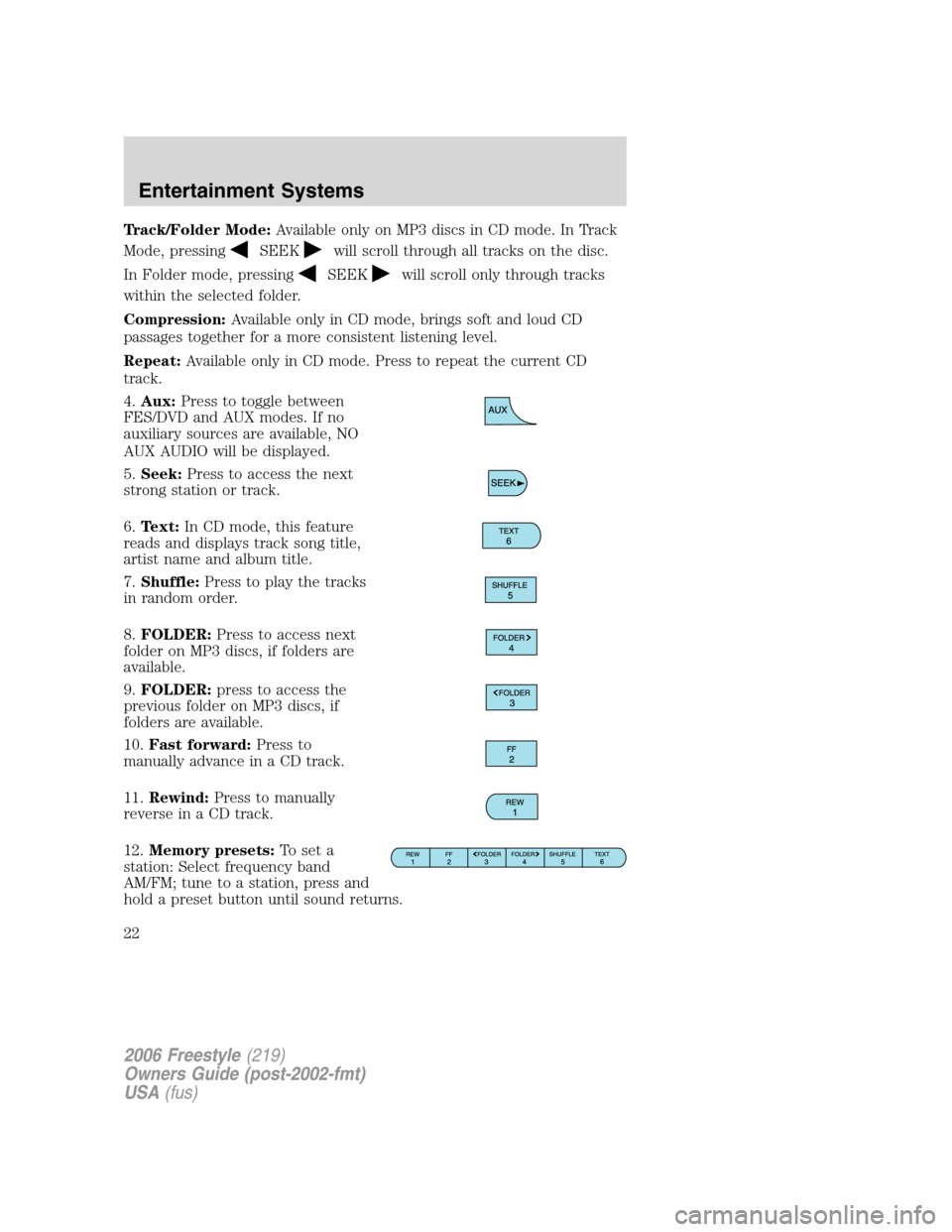
Track/Folder Mode:Available only on MP3 discs in CD mode. In Track
Mode, pressing
SEEKwill scroll through all tracks on the disc.
In Folder mode, pressing
SEEKwill scroll only through tracks
within the selected folder.
Compression:Available only in CD mode, brings soft and loud CD
passages together for a more consistent listening level.
Repeat:Available only in CD mode. Press to repeat the current CD
track.
4.Aux:Press to toggle between
FES/DVD and AUX modes. If no
auxiliary sources are available, NO
AUX AUDIO will be displayed.
5.Seek:Press to access the next
strong station or track.
6.Text:In CD mode, this feature
reads and displays track song title,
artist name and album title.
7.Shuffle:Press to play the tracks
in random order.
8.FOLDER:Press to access next
folder on MP3 discs, if folders are
available.
9.FOLDER:press to access the
previous folder on MP3 discs, if
folders are available.
10.Fast forward:Press to
manually advance in a CD track.
11.Rewind:Press to manually
reverse in a CD track.
12.Memory presets:To set a
station: Select frequency band
AM/FM; tune to a station, press and
hold a preset button until sound returns.
2006 Freestyle(219)
Owners Guide (post-2002-fmt)
USA(fus)
Entertainment Systems
22
Page 23 of 288
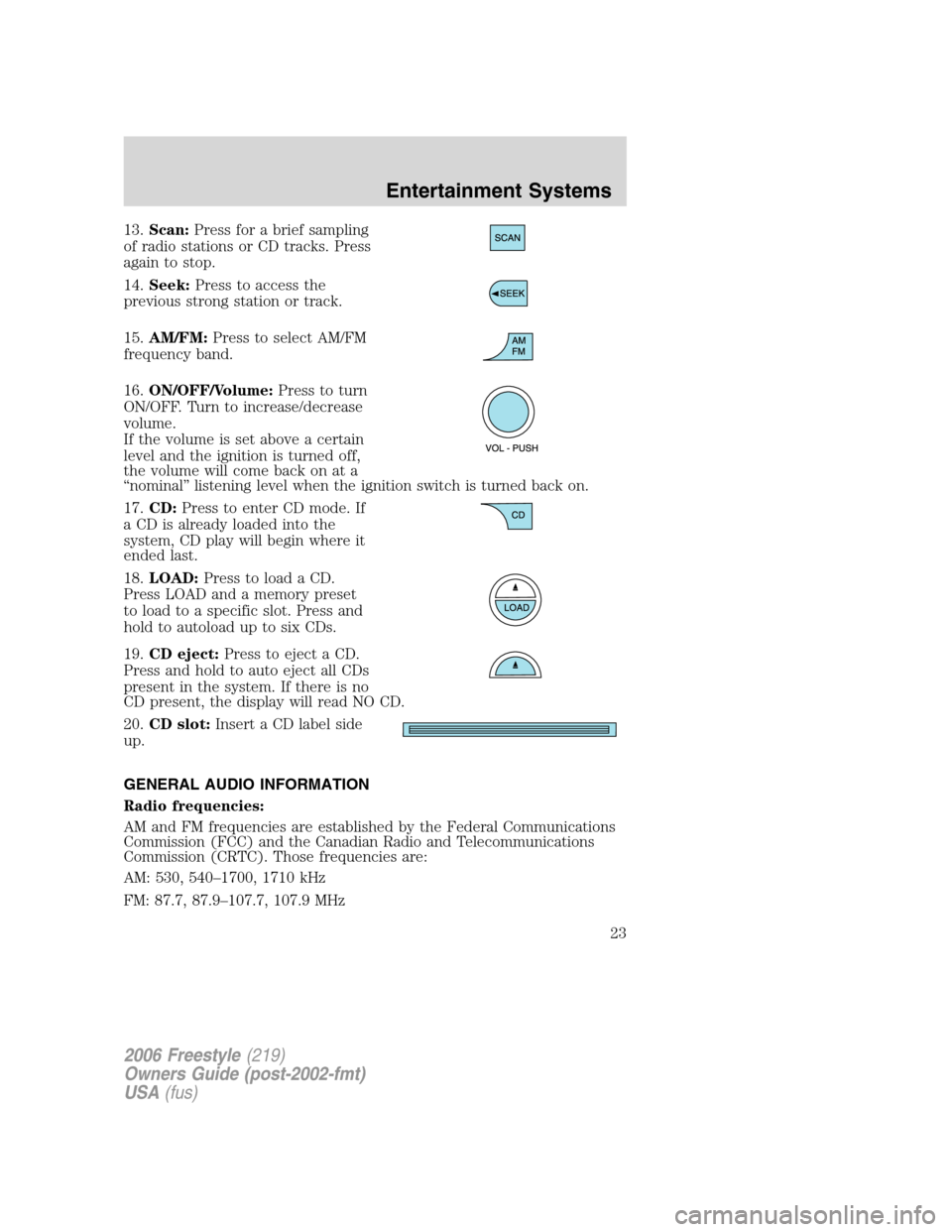
13.Scan:Press for a brief sampling
of radio stations or CD tracks. Press
again to stop.
14.Seek:Press to access the
previous strong station or track.
15.AM/FM:Press to select AM/FM
frequency band.
16.ON/OFF/Volume:Press to turn
ON/OFF. Turn to increase/decrease
volume.
If the volume is set above a certain
level and the ignition is turned off,
the volume will come back on at a
“nominal” listening level when the ignition switch is turned back on.
17.CD:Press to enter CD mode. If
a CD is already loaded into the
system, CD play will begin where it
ended last.
18.LOAD:Press to load a CD.
Press LOAD and a memory preset
to load to a specific slot. Press and
hold to autoload up to six CDs.
19.CD eject:Press to eject a CD.
Press and hold to auto eject all CDs
present in the system. If there is no
CD present, the display will read NO CD.
20.CD slot:Insert a CD label side
up.
GENERAL AUDIO INFORMATION
Radio frequencies:
AM and FM frequencies are established by the Federal Communications
Commission (FCC) and the Canadian Radio and Telecommunications
Commission (CRTC). Those frequencies are:
AM: 530, 540–1700, 1710 kHz
FM: 87.7, 87.9–107.7, 107.9 MHz
2006 Freestyle(219)
Owners Guide (post-2002-fmt)
USA(fus)
Entertainment Systems
23
Page 24 of 288
Radio reception factors:
There are three factors that can affect radio reception:
•Distance/strength: The further you travel from an FM station, the
weaker the signal and the weaker the reception.
•Terrain: Hills, mountains, tall buildings, power lines, electric fences,
traffic lights and thunderstorms can interfere with your reception.
•Station overload: When you pass a broadcast tower, a stronger signal
may overtake a weaker one and play while the weak station frequency
is displayed.
CD/CD player care
Do:
•Handle discs by their edges only. Never touch the playing surface.
•Inspect discs before playing. Clean only with an approved CD cleaner
and wipe from the center out.
Don’t:
•Expose discs to direct sunlight or heat sources for extended periods
of time.
•Clean using a circular motion.
CD units are designed to play commercially pressed 4.75 in (12 cm)
audio compact discs only. Due to technical incompatibility, certain
recordable and re-recordable compact discs may not function
correctly when used in Ford CD players. Irregular shaped CDs, CDs
with a scratch protection film attached, and CDs with homemade
paper (adhesive) labels should not be inserted into the CD player.
The label may peel and cause the CD to become jammed. It is
recommended that homemade CDs be identified with permanent
felt tip marker rather than adhesive labels. Ballpoint pens may
damage CDs. Please contact your authorized dealer for further
information.
Audio system warranty and service
Refer to theWarranty Guidefor audio system warranty information. If
service is necessary, see your dealer or qualified technician.
Navigation system (if equipped)
Your vehicle may be equipped with a Navigation System. Refer to the
Navigation supplementfor further information.
2006 Freestyle(219)
Owners Guide (post-2002-fmt)
USA(fus)
Entertainment Systems
24
Page 27 of 288
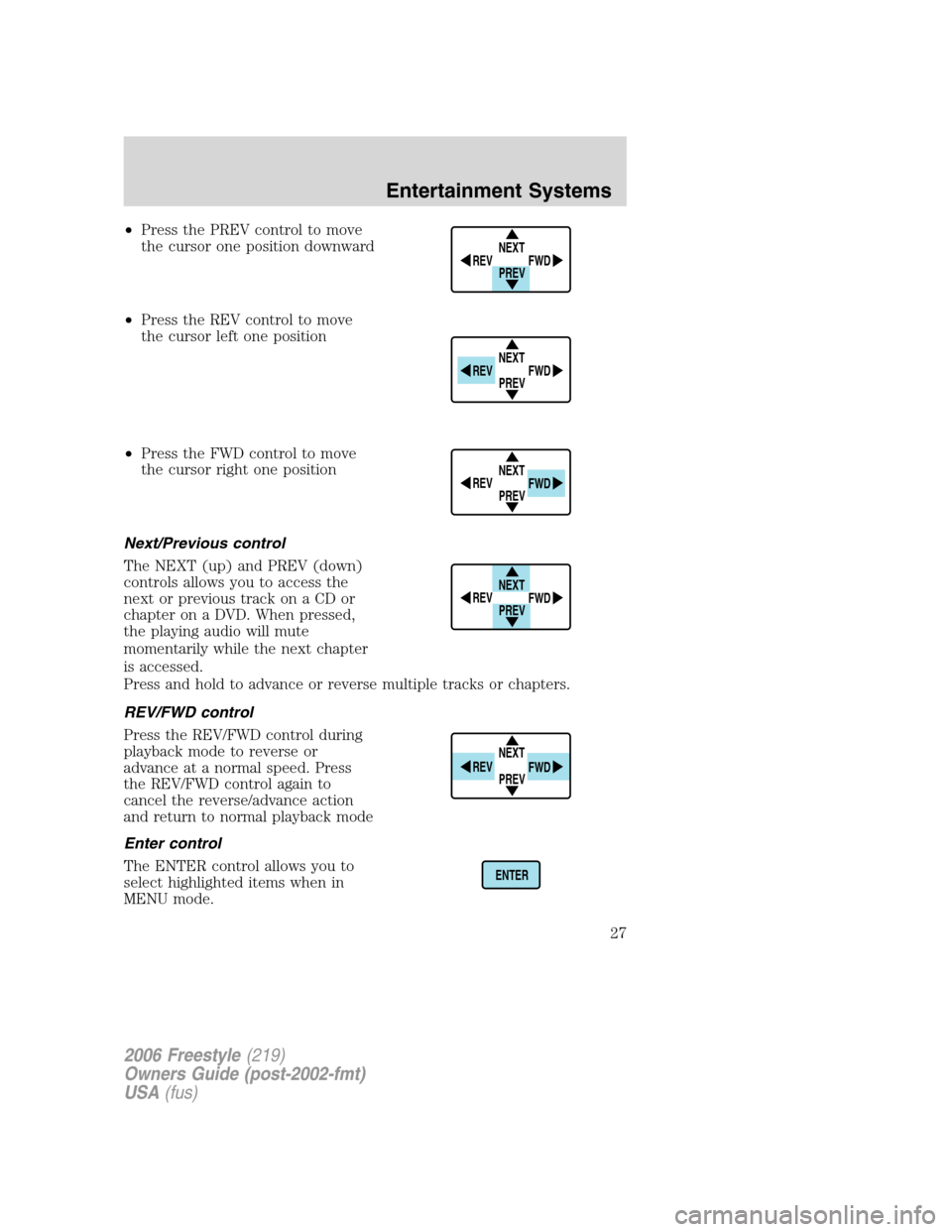
•Press the PREV control to move
the cursor one position downward
•Press the REV control to move
the cursor left one position
•Press the FWD control to move
the cursor right one position
Next/Previous control
The NEXT (up) and PREV (down)
controls allows you to access the
next or previous track on a CD or
chapter on a DVD. When pressed,
the playing audio will mute
momentarily while the next chapter
is accessed.
Press and hold to advance or reverse multiple tracks or chapters.
REV/FWD control
Press the REV/FWD control during
playback mode to reverse or
advance at a normal speed. Press
the REV/FWD control again to
cancel the reverse/advance action
and return to normal playback mode
Enter control
The ENTER control allows you to
select highlighted items when in
MENU mode.
NEXT
PREV REV
FWD
NEXT
PREV REV
FWD
NEXT
PREV REV
FWD
NEXT
PREV REV
FWD
NEXT
PREV REV
FWD
ENTER
2006 Freestyle(219)
Owners Guide (post-2002-fmt)
USA(fus)
Entertainment Systems
27
Page 29 of 288
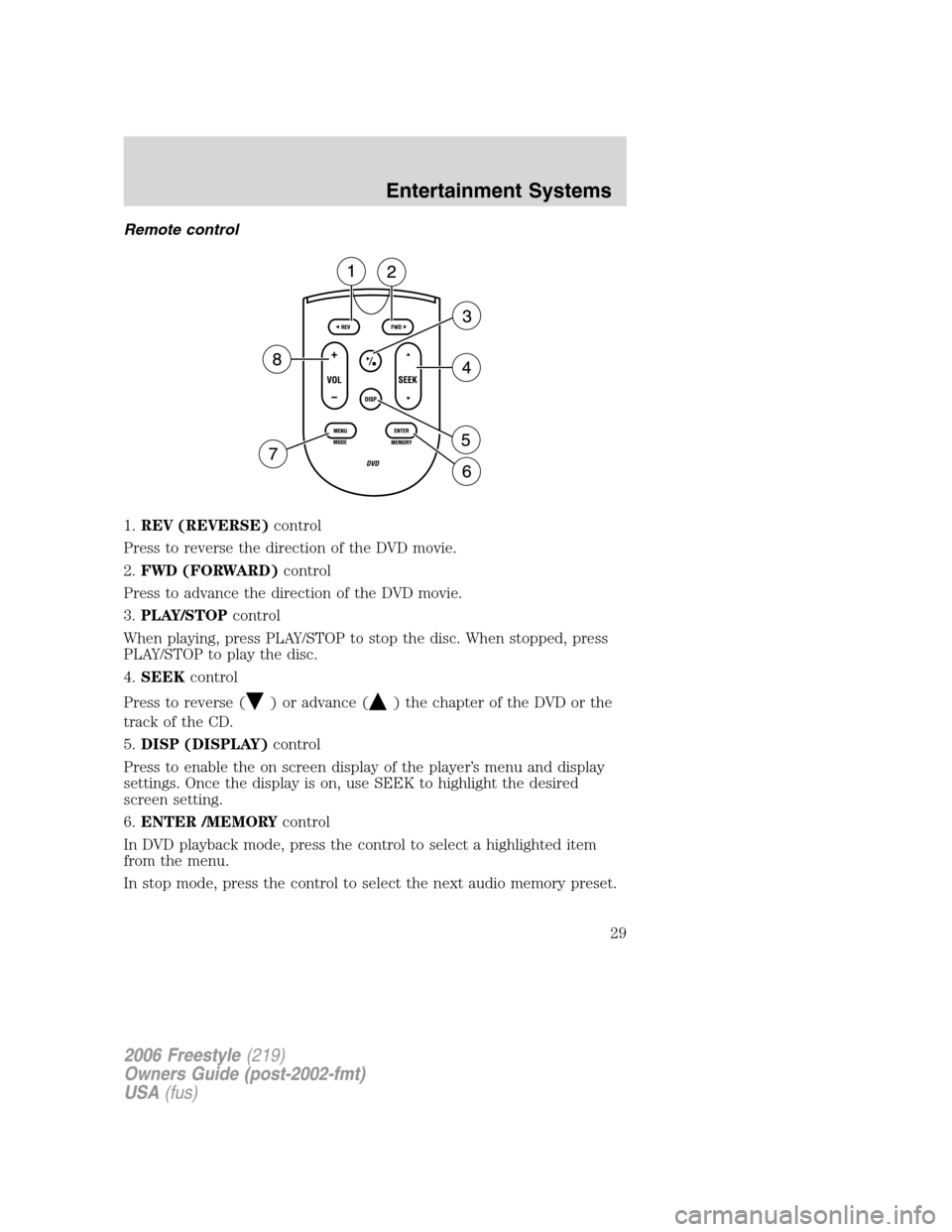
Remote control
1.REV (REVERSE)control
Press to reverse the direction of the DVD movie.
2.FWD (FORWARD)control
Press to advance the direction of the DVD movie.
3.PLAY/STOPcontrol
When playing, press PLAY/STOP to stop the disc. When stopped, press
PLAY/STOP to play the disc.
4.SEEKcontrol
Press to reverse (
) or advance () the chapter of the DVD or the
track of the CD.
5.DISP (DISPLAY)control
Press to enable the on screen display of the player’s menu and display
settings. Once the display is on, use SEEK to highlight the desired
screen setting.
6.ENTER /MEMORYcontrol
In DVD playback mode, press the control to select a highlighted item
from the menu.
In stop mode, press the control to select the next audio memory preset.
2006 Freestyle(219)
Owners Guide (post-2002-fmt)
USA(fus)
Entertainment Systems
29
Page 31 of 288
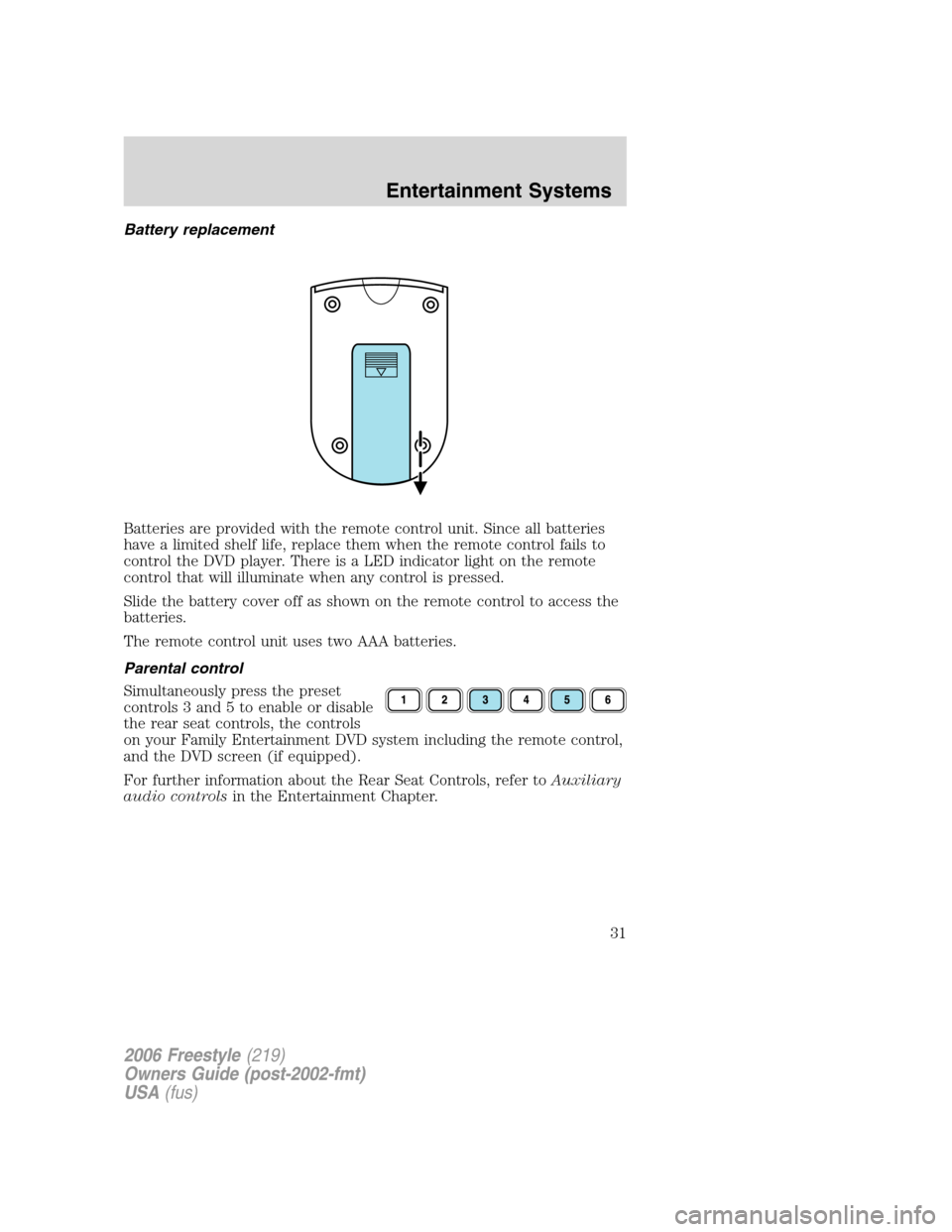
Battery replacement
Batteries are provided with the remote control unit. Since all batteries
have a limited shelf life, replace them when the remote control fails to
control the DVD player. There is a LED indicator light on the remote
control that will illuminate when any control is pressed.
Slide the battery cover off as shown on the remote control to access the
batteries.
The remote control unit uses two AAA batteries.
Parental control
Simultaneously press the preset
controls 3 and 5 to enable or disable
the rear seat controls, the controls
on your Family Entertainment DVD system including the remote control,
and the DVD screen (if equipped).
For further information about the Rear Seat Controls, refer toAuxiliary
audio controlsin the Entertainment Chapter.
2006 Freestyle(219)
Owners Guide (post-2002-fmt)
USA(fus)
Entertainment Systems
31