trailer FORD FUSION 2018 Owner's Manual
[x] Cancel search | Manufacturer: FORD, Model Year: 2018, Model line: FUSION, Model: FORD FUSION 2018Pages: 539, PDF Size: 6.42 MB
Page 270 of 539
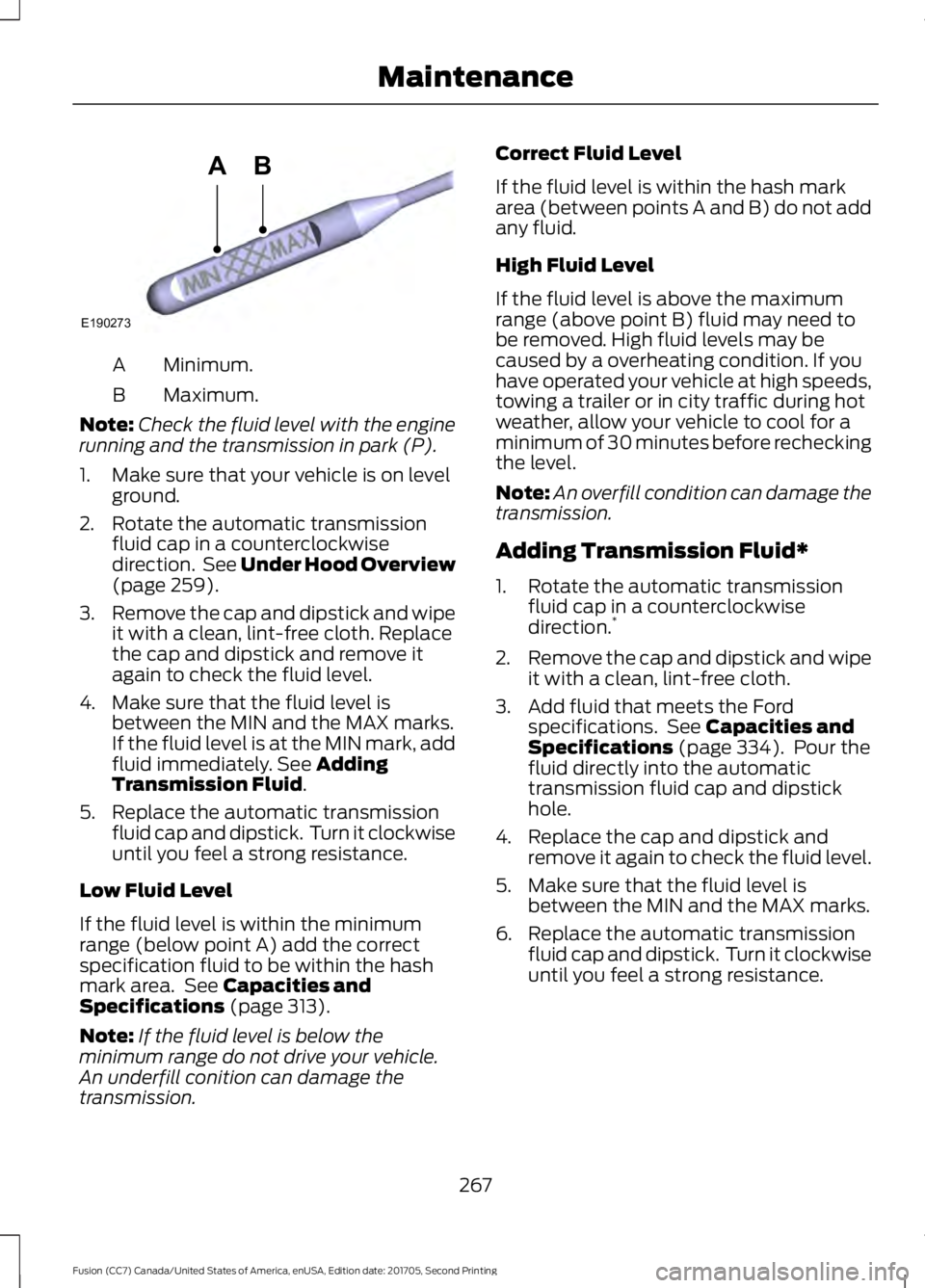
Minimum.
A
Maximum.
B
Note: Check the fluid level with the engine
running and the transmission in park (P).
1. Make sure that your vehicle is on level ground.
2. Rotate the automatic transmission fluid cap in a counterclockwise
direction. See Under Hood Overview
(page 259).
3. Remove the cap and dipstick and wipe
it with a clean, lint-free cloth. Replace
the cap and dipstick and remove it
again to check the fluid level.
4. Make sure that the fluid level is between the MIN and the MAX marks.
If the fluid level is at the MIN mark, add
fluid immediately. See
Adding
Transmission Fluid.
5. Replace the automatic transmission fluid cap and dipstick. Turn it clockwise
until you feel a strong resistance.
Low Fluid Level
If the fluid level is within the minimum
range (below point A) add the correct
specification fluid to be within the hash
mark area. See
Capacities and
Specifications (page 313).
Note: If the fluid level is below the
minimum range do not drive your vehicle.
An underfill conition can damage the
transmission. Correct Fluid Level
If the fluid level is within the hash mark
area (between points A and B) do not add
any fluid.
High Fluid Level
If the fluid level is above the maximum
range (above point B) fluid may need to
be removed. High fluid levels may be
caused by a overheating condition. If you
have operated your vehicle at high speeds,
towing a trailer or in city traffic during hot
weather, allow your vehicle to cool for a
minimum of 30 minutes before rechecking
the level.
Note:
An overfill condition can damage the
transmission.
Adding Transmission Fluid*
1. Rotate the automatic transmission fluid cap in a counterclockwise
direction. *
2. Remove the cap and dipstick and wipe
it with a clean, lint-free cloth.
3. Add fluid that meets the Ford specifications. See
Capacities and
Specifications (page 334). Pour the
fluid directly into the automatic
transmission fluid cap and dipstick
hole.
4. Replace the cap and dipstick and remove it again to check the fluid level.
5. Make sure that the fluid level is between the MIN and the MAX marks.
6. Replace the automatic transmission fluid cap and dipstick. Turn it clockwise
until you feel a strong resistance.
267
Fusion (CC7) Canada/United States of America, enUSA, Edition date: 201705, Second Printing MaintenanceE190273
AB
Page 308 of 539
Important Use of Spare Wheel
A dissimilar spare wheel and tire assembly
is defined as a spare wheel and tire
assembly that is different in brand, size or
appearance from the road tires and wheels
and can be one of three types:
1. T-type mini-spare.
*
2. Full-size dissimilar spare with label on wheel. **
3. Full-size dissimilar spare without label
on wheel.
* This spare tire begins with the letter T for
tire size and may have Temporary Use Only
molded in the sidewall.
** This spare tire has a label on the wheel
that states: THIS WHEEL AND TIRE
ASSEMBLY FOR TEMPORARY USE ONLY.
Driving with a T-type Mini-spare or Full-
size Dissimilar Spare With Label on Wheel
Do not:
• Exceed 50 mph (80 km/h).
• Load the vehicle beyond maximum
vehicle load rating listed on the Safety
Compliance Label.
• Tow a trailer.
• Use snow chains on the end of the
vehicle with the dissimilar spare tire.
• Use more than one dissimilar spare tire
at a time.
• Use commercial car washing
equipment.
• Try to repair the dissimilar spare tire.
Use of the above dissimilar spare wheel at
any one wheel location can lead to
impairment of the following:
• Handling, stability and braking
performance.
• Comfort and noise.
• Ground clearance and parking at curbs.
• Winter weather driving capability. •
Wet weather driving capability.
• All-wheel driving capability (if
applicable).
Driving With a Full-size Dissimilar Spare
Wheel and Tire Assembly
Do not:
• Exceed
70 mph (113 km/h).
• Use more than one dissimilar spare
wheel and tire assembly at a time.
• Use commercial car washing
equipment.
• Use snow chains on the end of the
vehicle with the dissimilar spare wheel
and tire assembly.
Use of the above dissimilar spare wheel at
any one wheel location can lead to
impairment of the following:
• Handling, stability and braking
performance.
• Comfort and noise.
• Ground clearance and parking at curbs.
• Winter weather driving capability.
• Wet weather driving capability.
• All-wheel driving capability.
Give additional caution to the following
when driving with the full-size dissimilar
spare wheel and tire assembly:
• Towing a trailer.
• Driving vehicles equipped with a
camper body.
• Driving vehicles with a load on the
cargo rack.
Drive cautiously when using a full-size
dissimilar spare wheel and tire assembly
and seek service as soon as possible.
305
Fusion (CC7) Canada/United States of America, enUSA, Edition date: 201705, Second Printing Wheels and Tires
Page 484 of 539
SPECIAL OPERATING
CONDITIONS SCHEDULED
MAINTENANCE
If you operate your vehicle primarily in any
of the following conditions, you need to
perform extra maintenance as indicated.
If you operate your vehicle
occasionally
under any of these conditions, it is not
necessary to perform the extra
maintenance. For specific
recommendations, see your dealership
service advisor or technician. Perform the services shown in the
following tables when specified or within
3,000 mi (4,800 km)
of the message
appearing in the information display
prompting you to change your oil.
• Example 1: The message comes on at
28,751 mi (46,270 km)
. Perform the
30,000 mi (48,000 km) automatic
transmission fluid replacement.
• Example 2
: The message has not
come on, but the odometer reads
30,000 mi (48,000 km) (for example,
the Intelligent Oil-Life Monitor was
reset at
25,000 mi (40,000 km)).
Perform the engine air filter
replacement. Towing a Trailer or Using a Car-top Carrier
Change engine oil and filter as indicated by the information
display and perform services listed in the Normal Sched-
uled Maintenance chart.
As required
Inspect rear axle and U-joints (All-Wheel Drive only).
Inspect frequently, service
as required
Change automatic transmission fluid.
Every
30,000 mi
(48,000 km)
Replace spark plugs.
Every
60,000 mi
(96,000 km) Extensive Idling or Low-speed Driving for Long Distances, as in Heavy Commercial Use
(Such as Delivery, Taxi, Patrol Car or Livery)
Change engine oil and filter as indicated by the information
display and perform services listed in the Normal Sched-
uled Maintenance chart.
As required
Replace cabin air filter.
Inspect frequently, service
as required
Replace engine air filter.
Change automatic transmission fluid.
Every
30,000 mi
(48,000 km)
Replace spark plugs.
Every
60,000 mi
(96,000 km)
481
Fusion (CC7) Canada/United States of America, enUSA, Edition date: 201705, Second Printing Scheduled Maintenance
Page 531 of 539
Driver and Passenger Airbags....................42
Children and Airbags........................................... 43
Proper Driver and Front Passenger Seating Adjustment........................................................ 42
Driver and Passenger Knee Airbags........46
Driving Aids....................................................204
Driving Hints...................................................229
Driving Through Water...............................229
DRL See: Daytime Running Lamps......................... 78
E
Economical Driving.....................................229
Electric Parking Brake..................................176
Applying the Electric Parking brake.............176
Battery With No Charge................................... 178
Parking On a Hill (Vehicles With a Manual Transmission) ................................................. 176
Releasing the Electric Parking Brake............177
Electromagnetic Compatibility..............493
Emission Law
..................................................161
Noise Emissions Warranty, Prohibited
Tampering Acts and Maintenance..........162
Tampering With a Noise Control System................................................................ 161
End User License Agreement
.................495
VEHICLE SOFTWARE END USER LICENSE
AGREEMENT (EULA) ................................ 495
Engine Block Heater....................................150 Using the Engine Block Heater....................... 151
Engine Coolant Check
...............................262
Adding Coolant................................................... 263
Engine Coolant Temperature Management.................................................. 265
Fail-Safe Cooling............................................... 264
Recycled Coolant.............................................. 264
Severe Climates................................................. 264
Engine Emission Control
.............................161
Engine Immobilizer See: Passive Anti-Theft System.................... 68
Engine Oil Check.........................................260 Adding Engine Oil............................................... 261
Engine Oil Dipstick - 1.5L EcoBoost™................................................260
Engine Oil Dipstick - 2.0L EcoBoost™/ 2.5L/2.7L EcoBoost™
.............................260 Engine Specifications - 1.5L
EcoBoost™..................................................313
Drivebelt Routing................................................ 313
Engine Specifications - 2.0L EcoBoost™..................................................313
Drivebelt Routing................................................ 314
Engine Specifications - 2.5L
.....................314
Drivebelt Routing................................................ 314
Engine Specifications - 2.7L EcoBoost™..................................................315
Drivebelt Routing................................................ 315
Entertainment...............................................413 AM/FM Radio....................................................... 415
Apps........................................................................\
423
Bluetooth Stereo or USB................................ 422
CD (If equipped)................................................. 421
HD Radio ™ Information (If
Available)......................................................... 418
SiriusXM® Satellite Radio (If Activated)......................................................... 415
Sources................................................................... 414
Supported Media Players, Formats and Metadata Information................................. 423
USB Port................................................................ 423
Environment
......................................................15
EPB See: Electric Parking Brake.............................. 176
Essential Towing Checks
..........................225
Before Towing a Trailer.................................... 226
Hitches................................................................... 225
Launching or Retrieving a Boat or Personal Watercraft (PWC)........................................ 226
Safety Chains...................................................... 225
Trailer Brakes....................................................... 225
Trailer Lamps....................................................... 225
When Towing a Trailer..................................... 226
Event Data Recording See: Data Recording.............................................. 9
Export Unique Options..................................13
Exterior Mirrors
................................................84
Auto-Dimming Feature...................................... 85
Blind Spot Monitor.............................................. 86
Fold-Away Exterior Mirrors............................... 85
Heated Exterior Mirrors...................................... 85
Integrated Blind Spot Mirrors.......................... 85
Memory Mirrors..................................................... 85
Power Exterior Mirrors........................................ 84
Puddle Lamps ...................................................... 85
528
Fusion (CC7) Canada/United States of America, enUSA, Edition date: 201705, Second Printing Index
Page 533 of 539
Hints on Driving With Anti-Lock
Brakes.............................................................175
Home Screen................................................405
Hood Lock See: Opening and Closing the Hood..........255
I
In California (U.S. Only)............................238
Information Display Control
.......................73
Information Displays....................................96 General Information........................................... 96
Information Messages
................................105
Active Park............................................................ 105
Adaptive Cruise Control.................................. 106
AdvanceTrac®..................................................... 106
Airbag...................................................................... 107
Alarm....................................................................... 107
All-Wheel Drive................................................... 109
Automatic Engine Shutdown........................ 109
Auto Start-Stop................................................... 107
Battery and Charging System......................... 110
Blind Spot Information and Cross Traffic Alert System..................................................... 110
Doors and Locks.................................................... 111
Driver Alert............................................................... 111
Fuel........................................................................\
..... 111
Hill Start Assist...................................................... 111
Keys and Intelligent Access............................. 112
Lane Keeping System......................................... 113
Maintenance.......................................................... 113
MyKey....................................................................... 114
Park Aid................................................................... 115
Park Brake............................................................... 115
Power Steering..................................................... 116
Pre-Collision Assist............................................. 116
Remote Start......................................................... 116
Seats........................................................................\
. 117
Starting System ................................................... 117
Tire Pressure Monitoring System................... 117
Traction Control................................................... 118
Transmission......................................................... 118
Installing Child Restraints............................19 Child Seats............................................................... 19
Using Lap and Shoulder Belts......................... 20
Using Lower Anchors and Tethers for CHildren (LATCH)........................................... 24
Using Tether Straps............................................. 26Instrument Cluster
........................................89
Instrument Lighting Dimmer......................77 Vehicles With Front Fog Lamps...................... 78
Vehicles Without Front Fog Lamps...............78
Instrument Panel Overview........................16
Interior Lamps
.................................................80
Front Interior Lamps........................................... 80
Rear Interior Lamps.............................................. 81
Interior Luggage Compartment Release...........................................................66
Interior Mirror
...................................................86
Automatic Dimming Mirror.............................. 86
Manual Dimming Mirror..................................... 86
Introduction.........................................................7
J
Jump Starting the Vehicle........................233 Connecting the Jumper Cables.................... 233
Jump Starting...................................................... 234
Preparing Your Vehicle..................................... 233
Removing the Jumper Cables....................... 234
K
Keyless Entry
...................................................64
SECURICODE™ Keyless Entry
Keypad................................................................ 64
Keyless Starting
.............................................147
Ignition Modes...................................................... 147
Keys and Remote Controls........................50
L
Lane Keeping System
................................205
Switching the System On and Off..............206
Lighting Control
..............................................76
Headlamp Flasher................................................ 77
Headlamp High Beam........................................ 76
Lighting...............................................................76 General Information............................................ 76
Load Carrying.................................................218
Load Limit........................................................218 Special Loading Instructions for Owners of
Pick-up Trucks and Utility-type
Vehicles............................................................. 222
Vehicle Loading - with and without a Trailer.................................................................. 218
530
Fusion (CC7) Canada/United States of America, enUSA, Edition date: 201705, Second Printing Index
Page 537 of 539
The Better Business Bureau (BBB) Auto
Line Program (U.S. Only).......................239
Tire Care..........................................................284
Glossary of Tire Terminology........................ 286
Information About Uniform Tire Quality Grading............................................................. 284
Information Contained on the Tire Sidewall............................................................ 287
Temperature A B C............................................ 285
Traction AA A B C.............................................. 285
Treadwear............................................................ 285
Tire Pressure Monitoring System..........300 Changing Tires With a Tire Pressure
Monitoring System........................................ 301
Understanding Your Tire Pressure Monitoring System ....................................... 301
Tires See: Wheels and Tires..................................... 284
Towing a Trailer.............................................223 Load Placement................................................. 223
Towing Points................................................236 Installing the Recovery Hook........................ 236
Recovery Hook Location................................. 236
Towing the Vehicle on Four Wheels...........................................................227
Emergency Towing............................................. 227
Recreational Towing.......................................... 227
Vehicles Equipped with 1.5L, 2.0L, and 2.5L Engines.............................................................. 227
Vehicles Equipped with a 2.7L Engine........227
Towing..............................................................223
Traction Control............................................180 Principle of Operation...................................... 180
Transmission Code Designation.............321
Transmission..................................................165
Transporting the Vehicle
...........................235
Type Approvals..............................................521
RF Certification Logos for Tire Pressure
Monitoring Sensor(s)................................... 521
U
Under Hood Overview - 1.5L EcoBoost™.................................................256
Under Hood Overview - 2.0L EcoBoost™..................................................257
Under Hood Overview - 2.5L
...................258 Under Hood Overview - 2.7L
EcoBoost™.................................................259
Unique Driving Characteristics
................152
Universal Garage Door Opener...............139
HomeLink Wireless Control System............139
USB Port
.........................................................354
Using Adaptive Cruise Control.................197 Automatic Cancellation................................. 200
Blocked Sensor................................................... 202
Canceling the Set Speed............................... 200
Changing the Set Speed................................ 200
Detection Issues................................................. 201
Following a Vehicle............................................ 198
Following a Vehicle to a Complete Stop.................................................................... 199
Hilly Condition Usage...................................... 200
Overriding the Set Speed............................... 200
Park Brake Application................................... 200
Resuming the Set Speed............................... 200
Setting the Adaptive Cruise Speed.............198
Setting the Adaptive Cruise Speed When Your Vehicle is Stationary.......................... 198
Setting the Gap Distance................................ 199
Switching Adaptive Cruise Control Off...................................................................... 200
Switching Adaptive Cruise Control On........................................................................\
197
Switching to Normal Cruise Control...........203
System Not Available...................................... 202
Using All-Wheel Drive.................................170 Driving In Special Conditions With
All-Wheel Drive (AWD)............................... 170
Using Cruise Control...................................196 Switching Cruise Control Off......................... 196
Switching Cruise Control On.......................... 196
Using MyKey With Remote Start Systems..........................................................59
Using Snow Chains.....................................299
Using Stability Control................................182
Using Summer Tires
...................................299
Using SYNC™ With Your Media Player.............................................................376
Accessing Your USB Song Library...............380
Bluetooth Devices and System Settings............................................................ 382
Connecting Your Digital Media Player to the USB Port........................................................... 376
Media Menu Features....................................... 379
534
Fusion (CC7) Canada/United States of America, enUSA, Edition date: 201705, Second Printing Index