audio FORD FUSION (AMERICAS) 2014 2.G Owner's Guide
[x] Cancel search | Manufacturer: FORD, Model Year: 2014, Model line: FUSION (AMERICAS), Model: FORD FUSION (AMERICAS) 2014 2.GPages: 458, PDF Size: 27.89 MB
Page 345 of 458
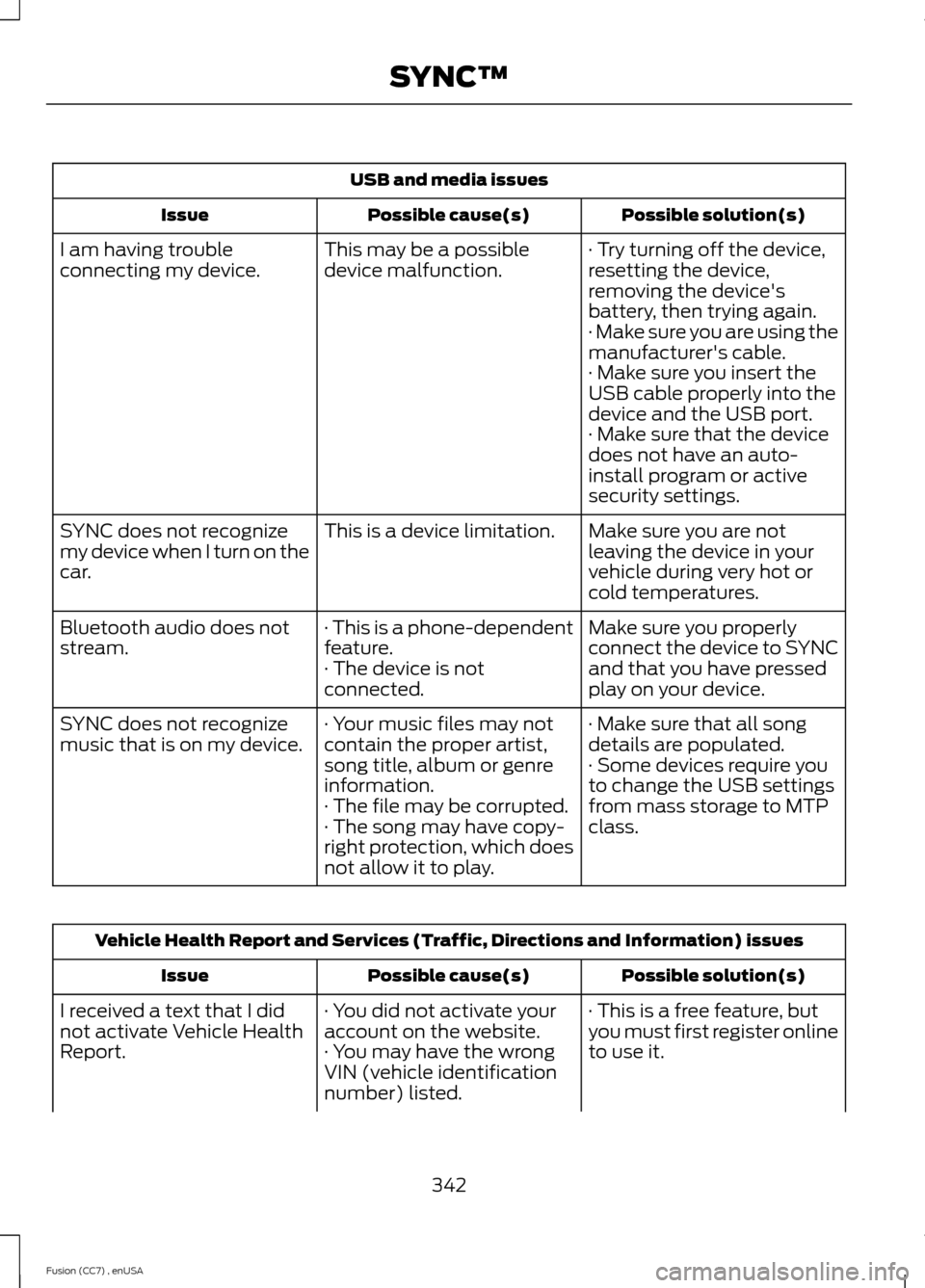
USB and media issues
Possible solution(s)Possible cause(s)Issue
· Try turning off the device,resetting the device,removing the device'sbattery, then trying again.
This may be a possibledevice malfunction.I am having troubleconnecting my device.
· Make sure you are using themanufacturer's cable.· Make sure you insert theUSB cable properly into thedevice and the USB port.· Make sure that the devicedoes not have an auto-install program or activesecurity settings.
Make sure you are notleaving the device in yourvehicle during very hot orcold temperatures.
This is a device limitation.SYNC does not recognizemy device when I turn on thecar.
Make sure you properlyconnect the device to SYNCand that you have pressedplay on your device.
· This is a phone-dependentfeature.· The device is notconnected.
Bluetooth audio does notstream.
· Make sure that all songdetails are populated.· Your music files may notcontain the proper artist,song title, album or genreinformation.
SYNC does not recognizemusic that is on my device.· Some devices require youto change the USB settingsfrom mass storage to MTPclass.· The file may be corrupted.· The song may have copy-right protection, which doesnot allow it to play.
Vehicle Health Report and Services (Traffic, Directions and Information) issues
Possible solution(s)Possible cause(s)Issue
· This is a free feature, butyou must first register onlineto use it.
· You did not activate youraccount on the website.· You may have the wrongVIN (vehicle identificationnumber) listed.
I received a text that I didnot activate Vehicle HealthReport.
342Fusion (CC7) , enUSASYNC™
Page 350 of 458
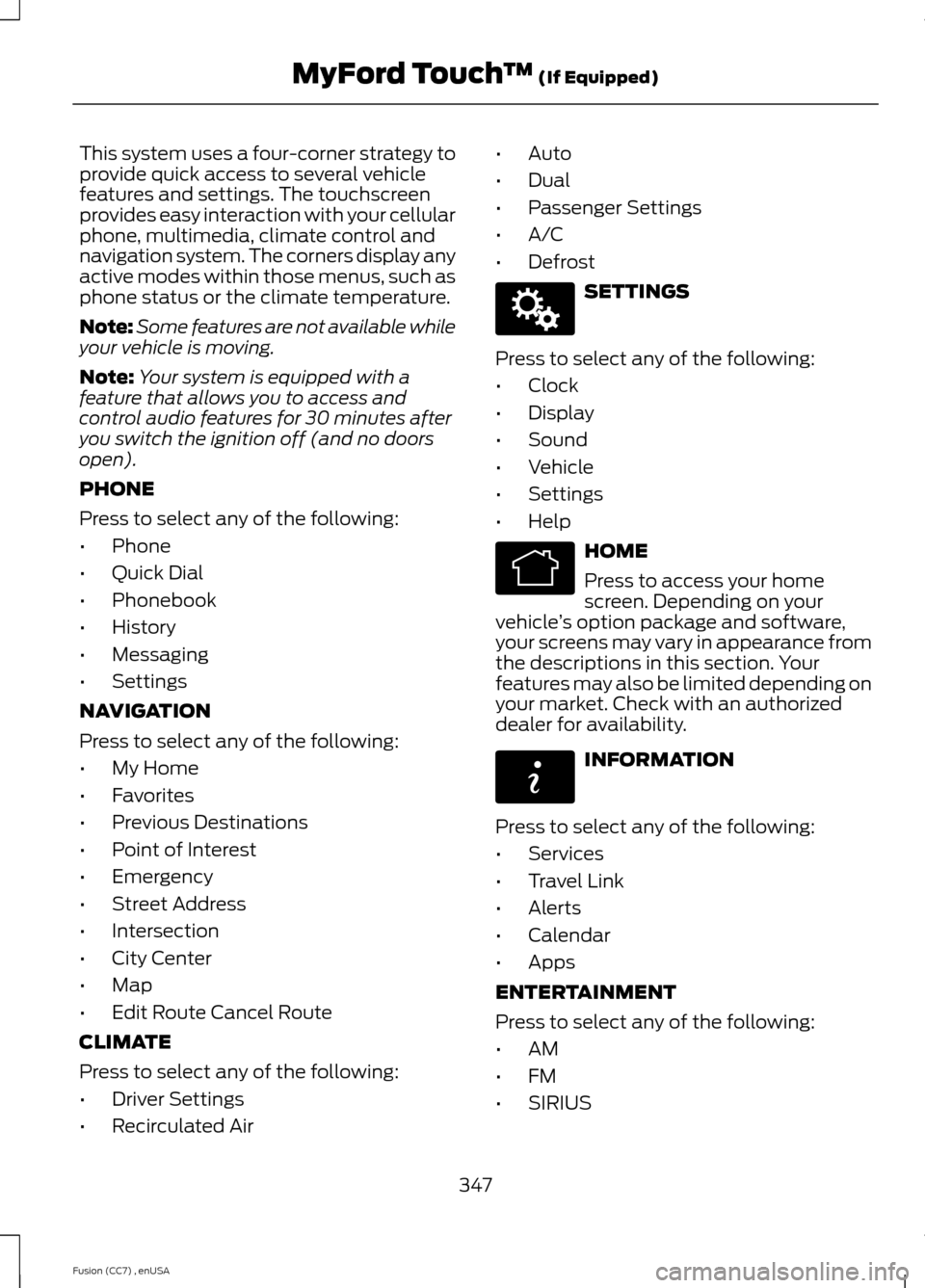
This system uses a four-corner strategy toprovide quick access to several vehiclefeatures and settings. The touchscreenprovides easy interaction with your cellularphone, multimedia, climate control andnavigation system. The corners display anyactive modes within those menus, such asphone status or the climate temperature.
Note:Some features are not available whileyour vehicle is moving.
Note:Your system is equipped with afeature that allows you to access andcontrol audio features for 30 minutes afteryou switch the ignition off (and no doorsopen).
PHONE
Press to select any of the following:
•Phone
•Quick Dial
•Phonebook
•History
•Messaging
•Settings
NAVIGATION
Press to select any of the following:
•My Home
•Favorites
•Previous Destinations
•Point of Interest
•Emergency
•Street Address
•Intersection
•City Center
•Map
•Edit Route Cancel Route
CLIMATE
Press to select any of the following:
•Driver Settings
•Recirculated Air
•Auto
•Dual
•Passenger Settings
•A/C
•Defrost
SETTINGS
Press to select any of the following:
•Clock
•Display
•Sound
•Vehicle
•Settings
•Help
HOME
Press to access your homescreen. Depending on yourvehicle’s option package and software,your screens may vary in appearance fromthe descriptions in this section. Yourfeatures may also be limited depending onyour market. Check with an authorizeddealer for availability.
INFORMATION
Press to select any of the following:
•Services
•Travel Link
•Alerts
•Calendar
•Apps
ENTERTAINMENT
Press to select any of the following:
•AM
•FM
•SIRIUS
347Fusion (CC7) , enUSAMyFord Touch™ (If Equipped)E142607 E142613 E142608
Page 354 of 458
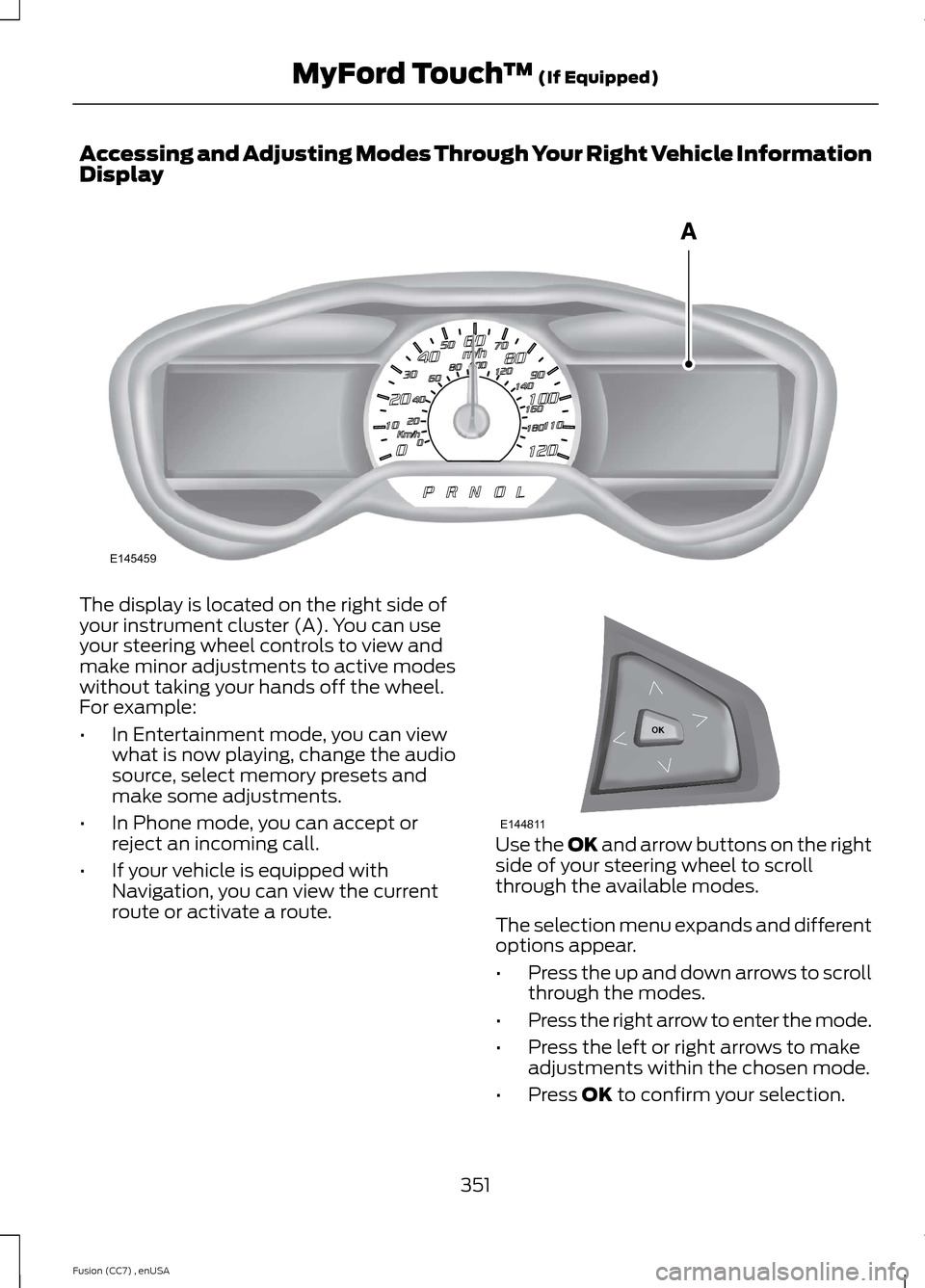
Accessing and Adjusting Modes Through Your Right Vehicle InformationDisplay
The display is located on the right side ofyour instrument cluster (A). You can useyour steering wheel controls to view andmake minor adjustments to active modeswithout taking your hands off the wheel.For example:
•In Entertainment mode, you can viewwhat is now playing, change the audiosource, select memory presets andmake some adjustments.
•In Phone mode, you can accept orreject an incoming call.
•If your vehicle is equipped withNavigation, you can view the currentroute or activate a route.
Use the OK and arrow buttons on the rightside of your steering wheel to scrollthrough the available modes.
The selection menu expands and differentoptions appear.
•Press the up and down arrows to scrollthrough the modes.
•Press the right arrow to enter the mode.
•Press the left or right arrows to makeadjustments within the chosen mode.
•Press OK to confirm your selection.
351Fusion (CC7) , enUSAMyFord Touch™ (If Equipped)E145459 E144811
Page 356 of 458
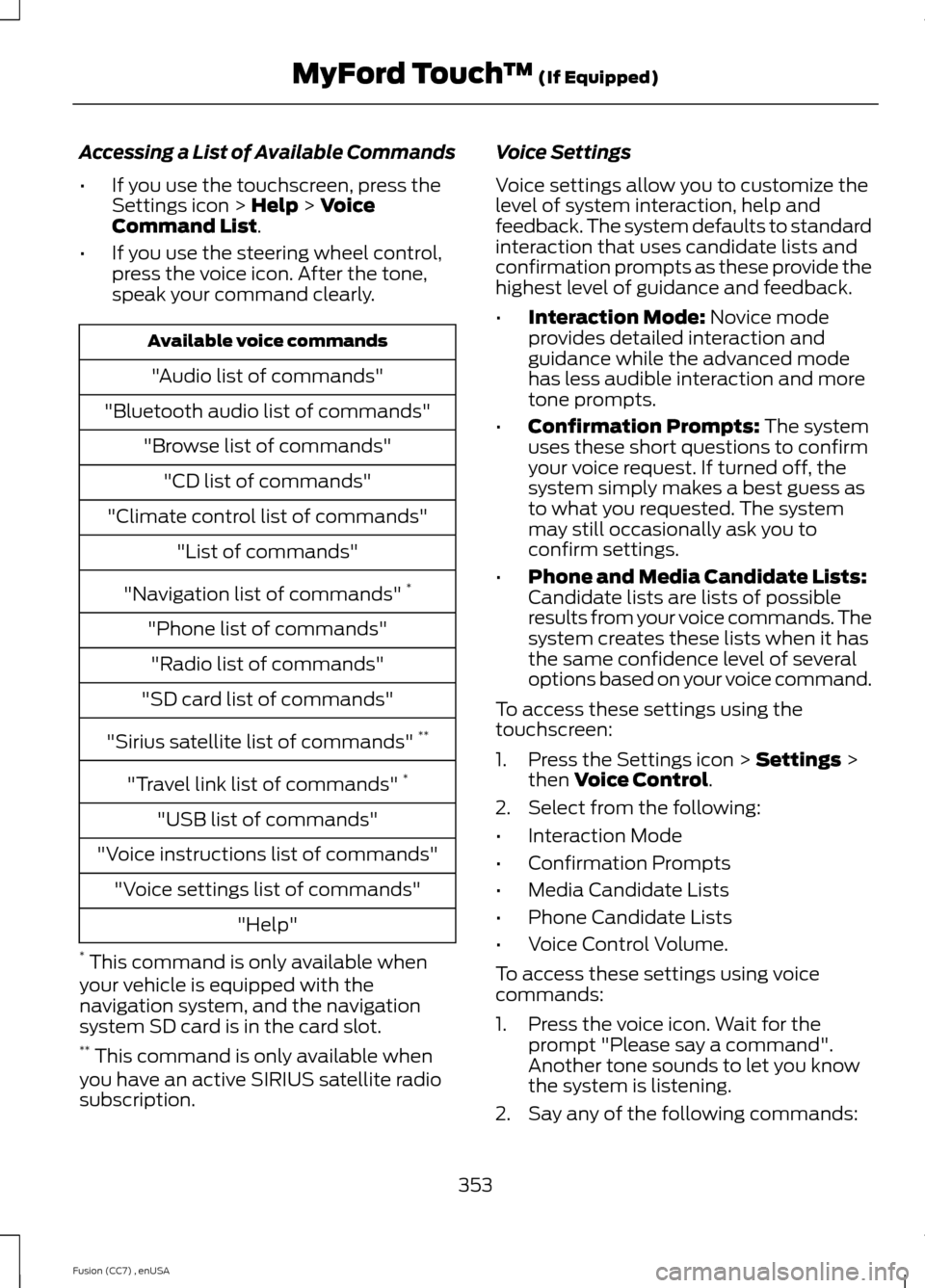
Accessing a List of Available Commands
•If you use the touchscreen, press theSettings icon > Help > VoiceCommand List.
•If you use the steering wheel control,press the voice icon. After the tone,speak your command clearly.
Available voice commands
"Audio list of commands"
"Bluetooth audio list of commands"
"Browse list of commands"
"CD list of commands"
"Climate control list of commands"
"List of commands"
"Navigation list of commands" *
"Phone list of commands"
"Radio list of commands"
"SD card list of commands"
"Sirius satellite list of commands" **
"Travel link list of commands" *
"USB list of commands"
"Voice instructions list of commands"
"Voice settings list of commands"
"Help"
* This command is only available whenyour vehicle is equipped with thenavigation system, and the navigationsystem SD card is in the card slot.** This command is only available whenyou have an active SIRIUS satellite radiosubscription.
Voice Settings
Voice settings allow you to customize thelevel of system interaction, help andfeedback. The system defaults to standardinteraction that uses candidate lists andconfirmation prompts as these provide thehighest level of guidance and feedback.
•Interaction Mode: Novice modeprovides detailed interaction andguidance while the advanced modehas less audible interaction and moretone prompts.
•Confirmation Prompts: The systemuses these short questions to confirmyour voice request. If turned off, thesystem simply makes a best guess asto what you requested. The systemmay still occasionally ask you toconfirm settings.
•Phone and Media Candidate Lists:Candidate lists are lists of possibleresults from your voice commands. Thesystem creates these lists when it hasthe same confidence level of severaloptions based on your voice command.
To access these settings using thetouchscreen:
1.Press the Settings icon > Settings >then Voice Control.
2.Select from the following:
•Interaction Mode
•Confirmation Prompts
•Media Candidate Lists
•Phone Candidate Lists
•Voice Control Volume.
To access these settings using voicecommands:
1.Press the voice icon. Wait for theprompt "Please say a command".Another tone sounds to let you knowthe system is listening.
2.Say any of the following commands:
353Fusion (CC7) , enUSAMyFord Touch™ (If Equipped)
Page 360 of 458
Press the Settings icon >Vehicle > Rear View Camera,then select from the followingsettings:
•Rear Camera Delay
•Visual Park Aid Alert
•Guidelines.
You can find more information on the rearview camera in another chapter. See RearView Camera (page 175).
Enable Valet Mode
Valet mode allows you to lock the system.No information is accessible until thesystem is unlocked with the correct PIN.
1.Press the Settings icon > Vehicle >Enable Valet Mode.
2.When prompted, enter a four-digit PIN.
After you press Continue, the system locksuntil you enter the PIN again.
Note:If the system locks, and you need toreset the PIN, enter 3681 and the systemunlocks.
Settings
Access and adjust system settings, voicefeatures, as well as phone, navigation andwireless settings.
System
Press the Settings icon >Settings > System, then selectfrom the following:
System
Select to have the touchscreen display in English, Spanishor French.Language
Select to display units in kilometers or miles.Distance
Select to display units in Celsius or Fahrenheit.Temperature
Adjust the volume of voice prompts from the system.System Prompt Volume
Select to have the system beep to confirm choices madethrough the touchscreen.Touch Screen Button Beep
Select to have the system beep to confirm button choicesmade through the climate or audio system.Touch Panel Button Beep
Have the touchscreen keyboard display in QWERTY orABC format.Keyboard Layout
Install any downloaded applications or view the currentsoftware licenses.Install Applications
Select to restore factory defaults. This erases all personalsettings and personal data.Master Reset
357Fusion (CC7) , enUSAMyFord Touch™ (If Equipped)E142607 E142607 E142607
Page 361 of 458
Voice ControlPress the Settings icon >Settings > Voice Control, thenselect from the following:
Voice control
Standard interaction mode provides more detailed inter-action and guidance. Advanced mode has less audibleinteraction and more tone prompts.
Interaction Mode
Have the system ask you short questions if it has not
clearly heard or understood your request.*Confirmation Prompts
Candidate lists are possible results from your voicecommands. The system simply makes a best guess atyour request with these turned off.
Media Candidate Lists
Candidate lists are possible results from your voicecommands. The system simply makes a best guess atyour request with these turned off.
Phone Candidate Lists
This allows you to adjust the system’s voice volume level.Voice Control Volume
* Even with confirmation prompts turned off, the system may occasionally ask you toconfirm settings
Media Player
Press the Settings icon >Settings > Media Player, thenselect from the following:
Media player
When this feature is on, the system automatically switchesto the media source upon initial connection. This allowsyou to listen to music during the indexing process. Whenthis feature is off, the system does not automaticallyswitch to the inserted media source.
Autoplay
Select to connect, disconnect, add or delete a device. Youcan also set a device as your favorite so that the systemautomatically attempts to connect to that device at everyignition cycle.
Bluetooth Devices
When this feature is on, the system automatically indexesmedia on your connected Bluetooth device.Index Bluetooth AudioDevices
358Fusion (CC7) , enUSAMyFord Touch™ (If Equipped)E142607 E142607
Page 367 of 458
To access Help using the voice commands,press the voice button, then, after the tone,say "Help". The system provides allowablevoice commands for the current mode.
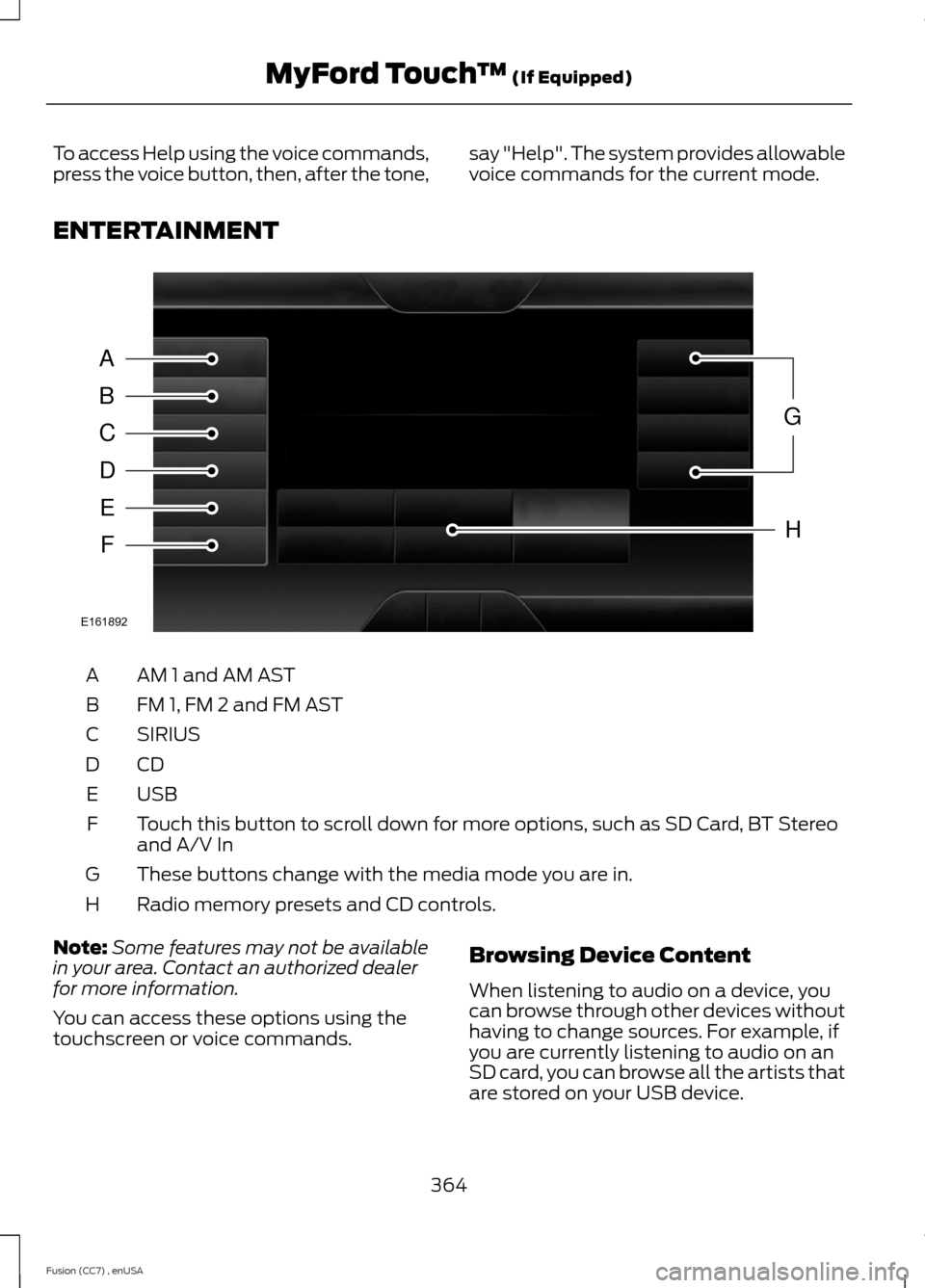
ENTERTAINMENT
AM 1 and AM ASTA
FM 1, FM 2 and FM ASTB
SIRIUSC
CDD
USBE
Touch this button to scroll down for more options, such as SD Card, BT Stereoand A/V InF
These buttons change with the media mode you are in.G
Radio memory presets and CD controls.H
Note:Some features may not be availablein your area. Contact an authorized dealerfor more information.
You can access these options using thetouchscreen or voice commands.
Browsing Device Content
When listening to audio on a device, youcan browse through other devices withouthaving to change sources. For example, ifyou are currently listening to audio on anSD card, you can browse all the artists thatare stored on your USB device.
364Fusion (CC7) , enUSAMyFord Touch™ (If Equipped)ABCDEFGHE161892
Page 368 of 458
Press the voice icon on thesteering wheel. When prompted,you can say:
"BROWSE" within devices
"Browse"*
"Browse
"Browse
"Browse SD card"
"Browse Sirius channel guide"**
"Browse USB"
"Help"
* If you only say, "Browse", you can thensay any commands in the following chart.**This command is only usable if you havean active subscription to SIRIUS satelliteradio.
"BROWSE"
"
"
"SD card"**
"Sirius Channel Guide"*
"USB"**
"Help"
* This command is only usable if you havean active subscription to SIRIUS satelliteradio.** For more commands in SD card or USBmode, see the "SD Card and USB Port"section of this chapter.
Your voice system allows you to changeaudio sources with a simple voicecommand. For example, if you are listeningto music on a USB device, then want toswitch to a satellite radio channel, simplypress the voice button on the steeringwheel controls and say the name of theSIRIUS station (such as, "the Highway").The following voice commands areavailable at the top level of the voicesession no matter which current audiosource you are listening to (such as a USBdevice or SIRIUS satellite radio).
Note:This is only available when yourMyFord Touch system language is set toNorth American English.
Sample commands
"<87.9-107.9>"
"<530-1710>"
"
"AM <530-1710>"
"FM <87.9-107.9>"
"Play [album]
"Play [artist]
"Play [genre]
"Play [playlist]
"Play [song]
"Play
"Play
365Fusion (CC7) , enUSAMyFord Touch™ (If Equipped)E142599
Page 370 of 458
Direct Tune
Touch this button to manually enter thedesired station number. Touch Enter whenyou are done.
HD Radio™ Information (If Available)
Note:HD Radio broadcasts are notavailable in all markets.
HD Radio technology is the digitalevolution of analog AM/FM radio. Yoursystem has a special receiver that allowsit to receive digital broadcasts (whereavailable) in addition to the analogbroadcasts, it already receives. Digitalbroadcasts provide a better sound qualitythan analog broadcasts with free,crystal-clear audio and no static ordistortion. For more information, and aguide to available stations andprogramming, please visitwww.hdradio.com.
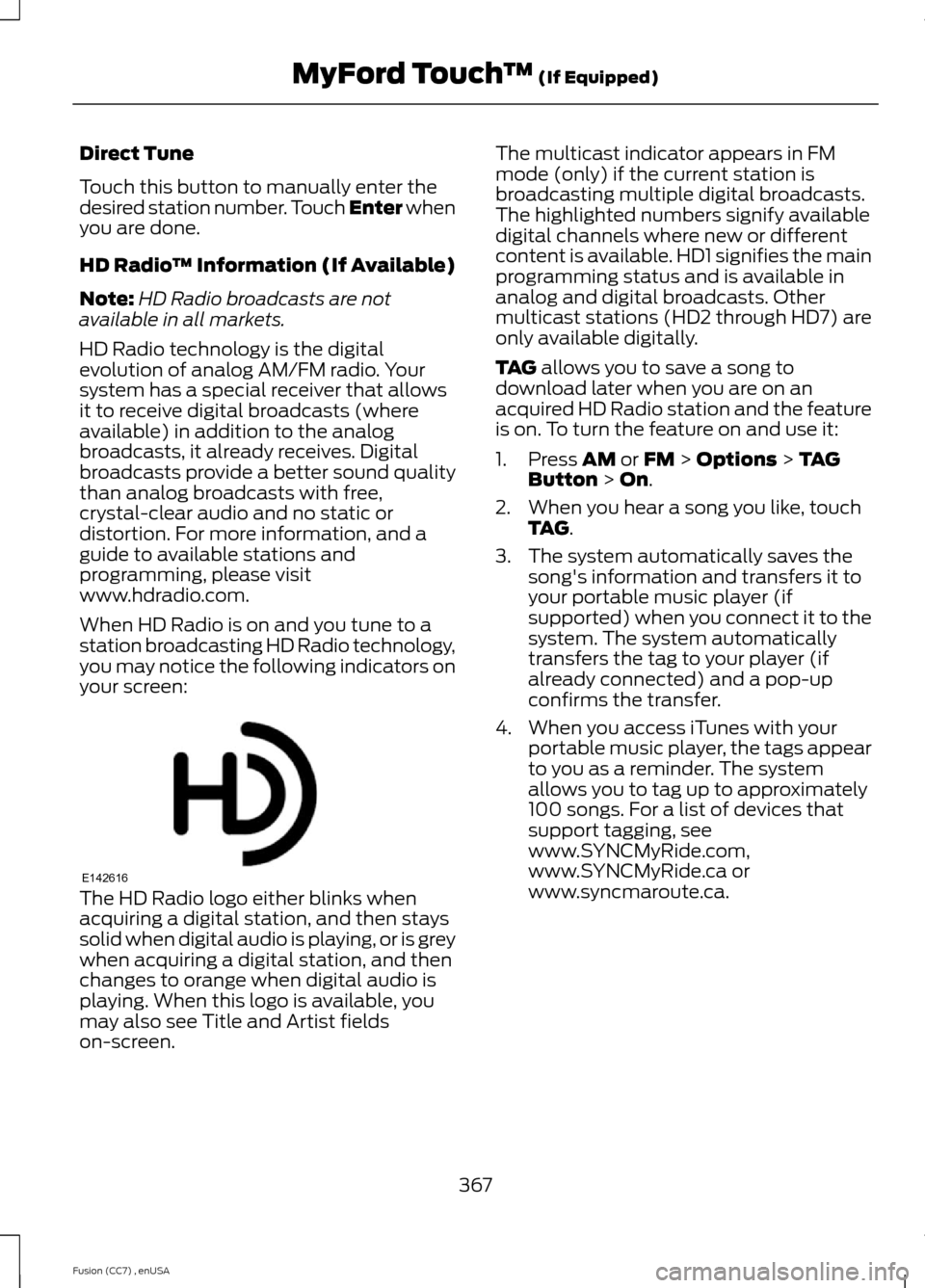
When HD Radio is on and you tune to astation broadcasting HD Radio technology,you may notice the following indicators onyour screen:
The HD Radio logo either blinks whenacquiring a digital station, and then stayssolid when digital audio is playing, or is greywhen acquiring a digital station, and thenchanges to orange when digital audio isplaying. When this logo is available, youmay also see Title and Artist fieldson-screen.
The multicast indicator appears in FMmode (only) if the current station isbroadcasting multiple digital broadcasts.The highlighted numbers signify availabledigital channels where new or differentcontent is available. HD1 signifies the mainprogramming status and is available inanalog and digital broadcasts. Othermulticast stations (HD2 through HD7) areonly available digitally.
TAG allows you to save a song todownload later when you are on anacquired HD Radio station and the featureis on. To turn the feature on and use it:
1.Press AM or FM > Options > TAGButton > On.
2.When you hear a song you like, touchTAG.
3.The system automatically saves thesong's information and transfers it toyour portable music player (ifsupported) when you connect it to thesystem. The system automaticallytransfers the tag to your player (ifalready connected) and a pop-upconfirms the transfer.
4.When you access iTunes with yourportable music player, the tags appearto you as a reminder. The systemallows you to tag up to approximately100 songs. For a list of devices thatsupport tagging, seewww.SYNCMyRide.com,www.SYNCMyRide.ca orwww.syncmaroute.ca.
367Fusion (CC7) , enUSAMyFord Touch™ (If Equipped)E142616
Page 371 of 458
When HD Radio broadcasts are active, youcan access the following functions:
•Scan allows you to hear a briefsampling of all available stations. Thisfeature still works when HD Radioreception is on, although it does notscan for HD2-HD7 channels. You maysee the HD logo appear if the stationhas a digital broadcast.
•Memory presets allow you to save anactive channel as a memory preset.Touch and hold a memory preset slotuntil the sound returns. There is a briefmute while the radio saves the station.Sound returns when finished. Whenswitching to an HD2 or HD3 memorypreset, the sound mutes before thedigital audio plays, because the systemhas to reacquire the digital signal.
Note:As with any saved radio station, youcannot access the saved station if yourvehicle is outside the station’s receptionarea.
HD Radio Reception and Station Troubleshooting
Potential reception issues
If you are listening to a multicast station and you are onthe fringe of the reception area, the station may mute dueto weak signal strength.
Reception area
If you are listening to HD1, the system switches back tothe analog broadcast until the digital broadcast is availableagain. However, if you are listening to any of the possibleHD2-HD7 multicast channels, the station mutes and staysmuted unless it is able to connect to the digital signalagain.
When the system first receives a station (aside from HD2-HD7 multicast stations), it first plays the station in theanalog version. Once the receiver verifies the station is anHD Radio station, it shifts to the digital version. Dependingon the station quality, you may hear a slight sound changewhen the station changes from analog to digital. Blendingis the shift from analog to digital sound or digital back toanalog sound.
Station blending
In order to provide the best possibleexperience, use the contact form to reportany station issues found while listening toa station broadcasting with HD Radiotechnology. Independent entities own andoperate each station. These stations areresponsible for ensuring all audio streamsand data fields are accurate.
368Fusion (CC7) , enUSAMyFord Touch™ (If Equipped)