audio FORD FUSION (AMERICAS) 2014 2.G Owner's Manual
[x] Cancel search | Manufacturer: FORD, Model Year: 2014, Model line: FUSION (AMERICAS), Model: FORD FUSION (AMERICAS) 2014 2.GPages: 458, PDF Size: 27.89 MB
Page 309 of 458
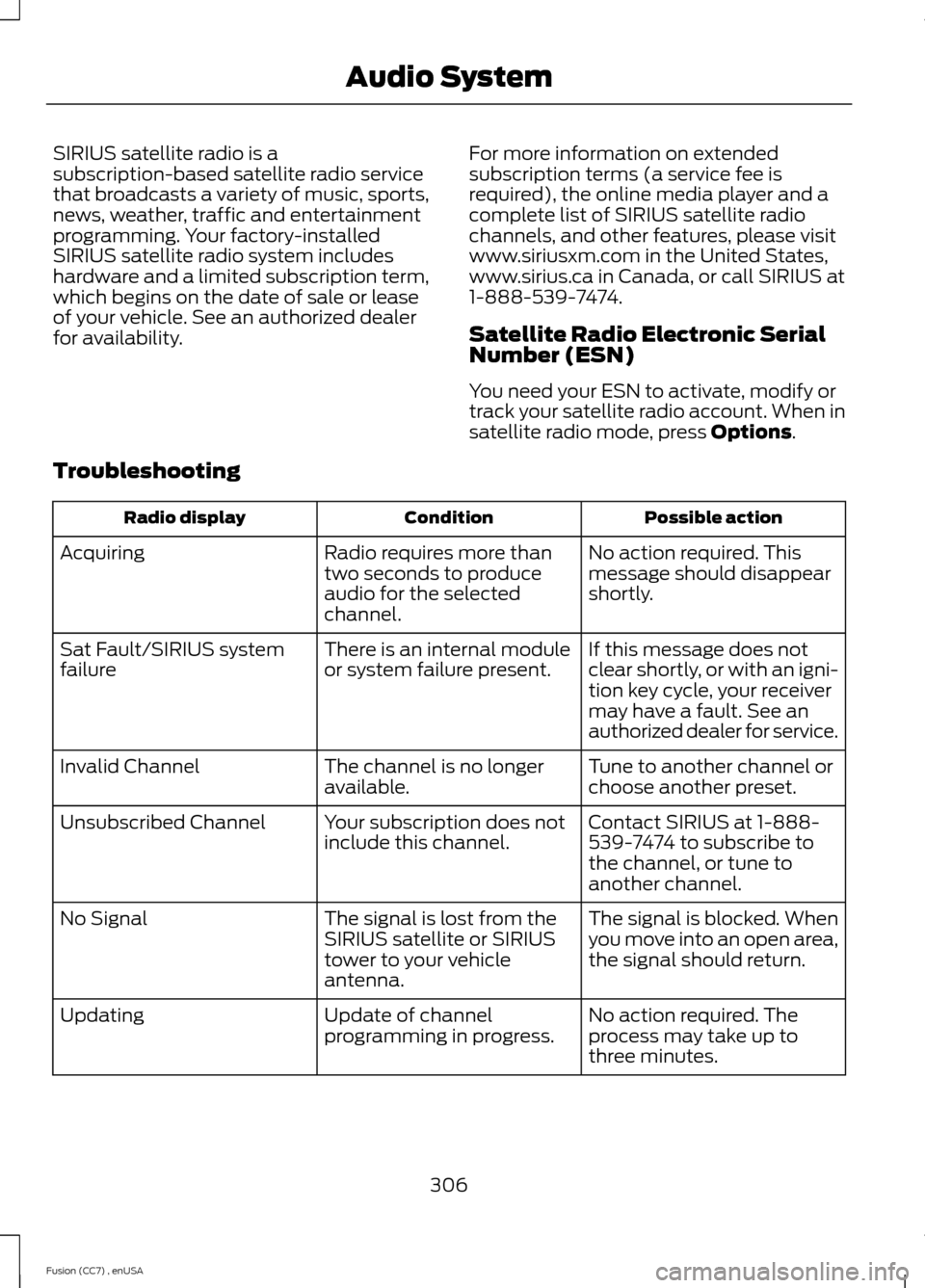
SIRIUS satellite radio is asubscription-based satellite radio servicethat broadcasts a variety of music, sports,news, weather, traffic and entertainmentprogramming. Your factory-installedSIRIUS satellite radio system includeshardware and a limited subscription term,which begins on the date of sale or leaseof your vehicle. See an authorized dealerfor availability.
For more information on extendedsubscription terms (a service fee isrequired), the online media player and acomplete list of SIRIUS satellite radiochannels, and other features, please visitwww.siriusxm.com in the United States,www.sirius.ca in Canada, or call SIRIUS at1-888-539-7474.
Satellite Radio Electronic SerialNumber (ESN)
You need your ESN to activate, modify ortrack your satellite radio account. When insatellite radio mode, press Options.
Troubleshooting
Possible actionConditionRadio display
No action required. Thismessage should disappearshortly.
Radio requires more thantwo seconds to produceaudio for the selectedchannel.
Acquiring
If this message does notclear shortly, or with an igni-tion key cycle, your receivermay have a fault. See anauthorized dealer for service.
There is an internal moduleor system failure present.Sat Fault/SIRIUS systemfailure
Tune to another channel orchoose another preset.The channel is no longeravailable.Invalid Channel
Contact SIRIUS at 1-888-539-7474 to subscribe tothe channel, or tune toanother channel.
Your subscription does notinclude this channel.Unsubscribed Channel
The signal is blocked. Whenyou move into an open area,the signal should return.
The signal is lost from theSIRIUS satellite or SIRIUStower to your vehicleantenna.
No Signal
No action required. Theprocess may take up tothree minutes.
Update of channelprogramming in progress.Updating
306Fusion (CC7) , enUSAAudio System
Page 310 of 458
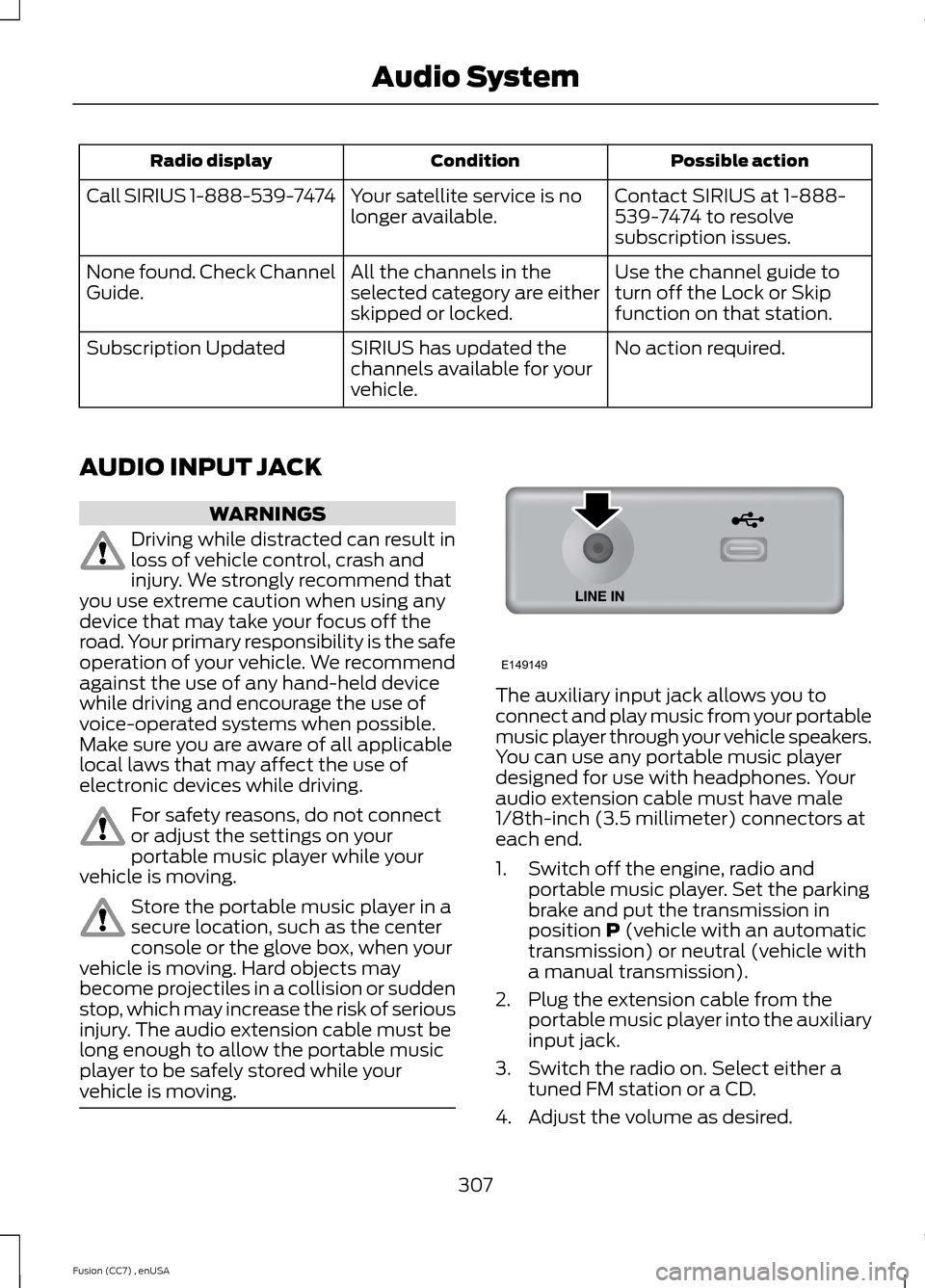
Possible actionConditionRadio display
Contact SIRIUS at 1-888-539-7474 to resolvesubscription issues.
Your satellite service is nolonger available.Call SIRIUS 1-888-539-7474
Use the channel guide toturn off the Lock or Skipfunction on that station.
All the channels in theselected category are eitherskipped or locked.
None found. Check ChannelGuide.
No action required.SIRIUS has updated thechannels available for yourvehicle.
Subscription Updated
AUDIO INPUT JACK
WARNINGS
Driving while distracted can result inloss of vehicle control, crash andinjury. We strongly recommend thatyou use extreme caution when using anydevice that may take your focus off theroad. Your primary responsibility is the safeoperation of your vehicle. We recommendagainst the use of any hand-held devicewhile driving and encourage the use ofvoice-operated systems when possible.Make sure you are aware of all applicablelocal laws that may affect the use ofelectronic devices while driving.
For safety reasons, do not connector adjust the settings on yourportable music player while yourvehicle is moving.
Store the portable music player in asecure location, such as the centerconsole or the glove box, when yourvehicle is moving. Hard objects maybecome projectiles in a collision or suddenstop, which may increase the risk of seriousinjury. The audio extension cable must belong enough to allow the portable musicplayer to be safely stored while yourvehicle is moving.
The auxiliary input jack allows you toconnect and play music from your portablemusic player through your vehicle speakers.You can use any portable music playerdesigned for use with headphones. Youraudio extension cable must have male1/8th-inch (3.5 millimeter) connectors ateach end.
1.Switch off the engine, radio andportable music player. Set the parkingbrake and put the transmission inposition P (vehicle with an automatictransmission) or neutral (vehicle witha manual transmission).
2.Plug the extension cable from theportable music player into the auxiliaryinput jack.
3.Switch the radio on. Select either atuned FM station or a CD.
4.Adjust the volume as desired.
307Fusion (CC7) , enUSAAudio SystemE149149
Page 311 of 458
5.Switch your portable music player onand adjust its volume to half itsmaximum level.
6.Press AUX until LINE or LINE INappears in the display. You should hearmusic from your device even if it is low.
7.Adjust the volume on your portablemusic player until it reaches the volumelevel of the FM station or CD. Do thisby switching back and forth betweenthe AUX and FM or CD controls.
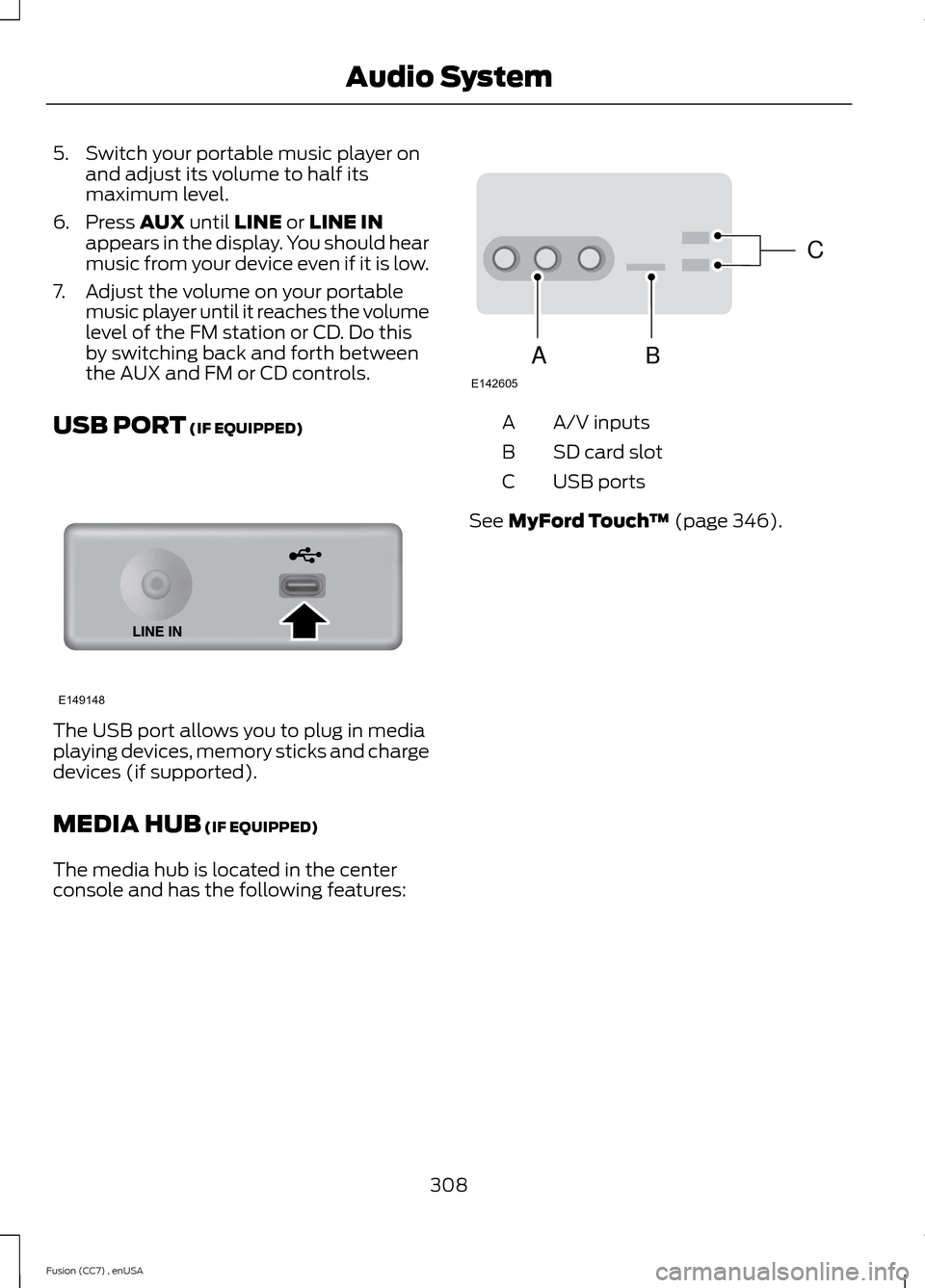
USB PORT (IF EQUIPPED)
The USB port allows you to plug in mediaplaying devices, memory sticks and chargedevices (if supported).
MEDIA HUB (IF EQUIPPED)
The media hub is located in the centerconsole and has the following features:
A/V inputsA
SD card slotB
USB portsC
See MyFord Touch™ (page 346).
308Fusion (CC7) , enUSAAudio SystemE149148 CBAE142605
Page 314 of 458
System data cannot be accessed withoutspecial equipment and access to thevehicle's SYNC module. Ford MotorCompany and Ford of Canada will notaccess the system data for any purposeother than as described absent consent, acourt order, or where required by lawenforcement, other governmentauthorities, or other third parties actingwith lawful authority. Other parties mayseek to access the informationindependently of Ford Motor Company andFord of Canada. For further privacyinformation, see the sections on 911 Assist,Vehicle Health Report, and Traffic,Directions and Information.
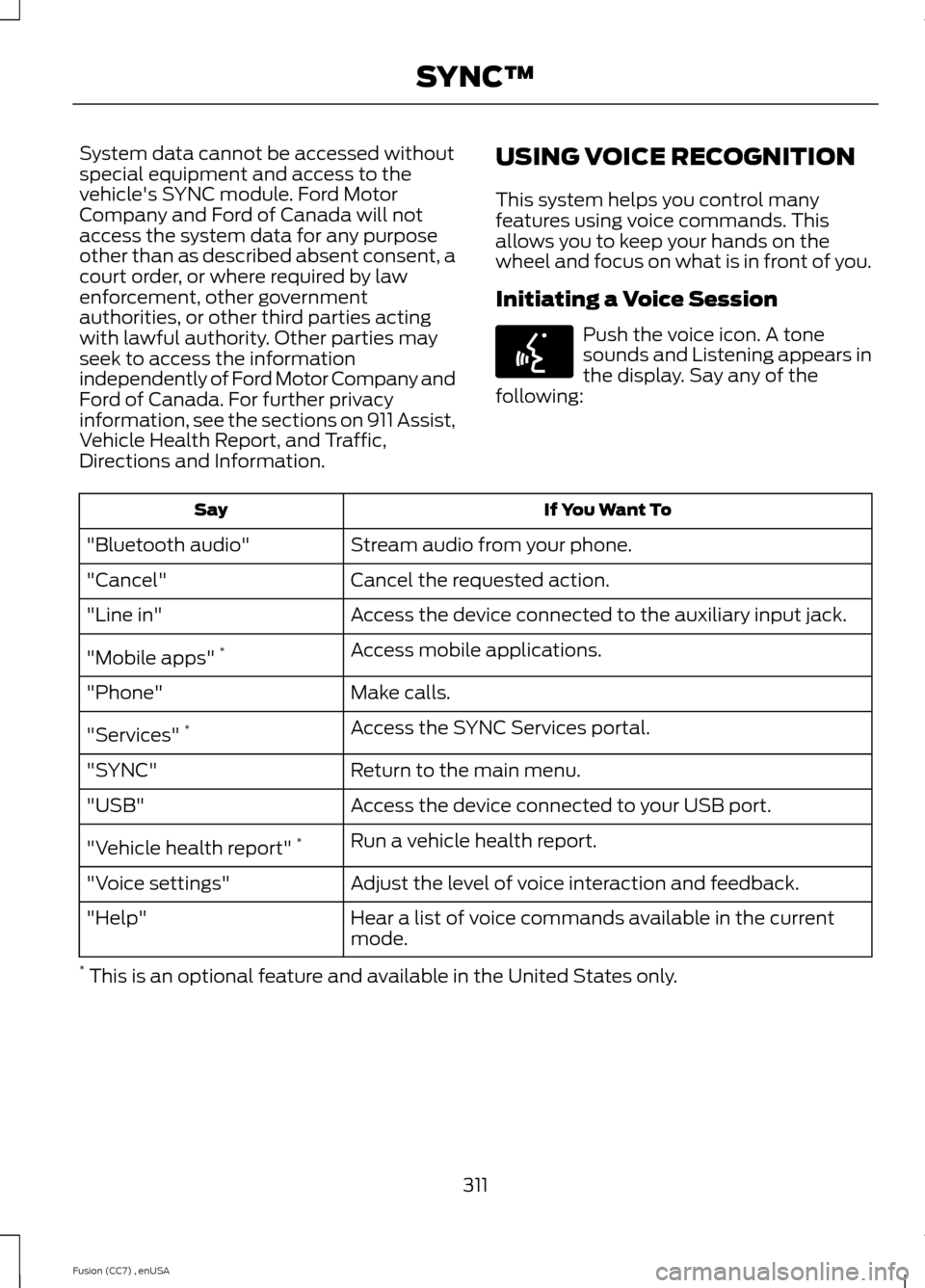
USING VOICE RECOGNITION
This system helps you control manyfeatures using voice commands. Thisallows you to keep your hands on thewheel and focus on what is in front of you.
Initiating a Voice Session
Push the voice icon. A tonesounds and Listening appears inthe display. Say any of thefollowing:
If You Want ToSay
Stream audio from your phone."Bluetooth audio"
Cancel the requested action."Cancel"
Access the device connected to the auxiliary input jack."Line in"
Access mobile applications."Mobile apps" *
Make calls."Phone"
Access the SYNC Services portal."Services" *
Return to the main menu."SYNC"
Access the device connected to your USB port."USB"
Run a vehicle health report."Vehicle health report" *
Adjust the level of voice interaction and feedback."Voice settings"
Hear a list of voice commands available in the currentmode."Help"
* This is an optional feature and available in the United States only.
311Fusion (CC7) , enUSASYNC™E142599
Page 317 of 458
Pairing a Phone for the First Time
Note:SYNC can support downloading upto approximately 1000 entries perBluetooth-enabled cellular phone.
Note:Make sure to switch on the ignitionand the radio. Put the transmission inposition P (automatic transmission) orneutral with the parking brake applied(manual transmission).
Note:To scroll through the menus, pressthe up and down arrows on your audiosystem.
Wirelessly pairing your phone with SYNCallows you to make and receive hands-freecalls.
1.Press the phone button. When thedisplay indicates there is no phonepaired, press OK.
2.When Find SYNC appears in thedisplay, press OK.
3.Put your phone into Bluetoothdiscovery mode. See your device'smanual if necessary.
4.When prompted on your phone'sdisplay, enter the six-digit PIN providedby SYNC in the radio display. Thedisplay indicates when the pairing issuccessful.
Depending on your phone's capability andyour market, the system may prompt youwith questions, such as setting the currentphone as the primary phone (the phoneSYNC automatically tries to connect withfirst upon vehicle start-up) anddownloading your phonebook.
Pairing Subsequent Phones
Note:Make sure to switch on the ignitionand the radio. Put the transmission inposition P (automatic transmission) orneutral with the parking brake applied(manual transmission).
Note:To scroll through the menus, pressthe up and down arrows on your audiosystem.
1.Press the phone button, and then scrollto System Settings. Press OK.
2.Scroll to Bluetooth Devices. Press OK.
3.Scroll to Add Bluetooth Device. PressOK.
4.When Find SYNC appears in thedisplay, press OK.
5.Put your phone into Bluetoothdiscovery mode. See your phone'smanual if necessary.
6.When prompted on your phone'sdisplay, enter the six-digit PIN providedby SYNC in the radio display. Thedisplay indicates when the pairing issuccessful.
The system then prompts with questions,such as if you would like to set the currentphone as the primary phone (the phoneSYNC automatically tries to connect withfirst upon vehicle start-up) or downloadyour phone book.
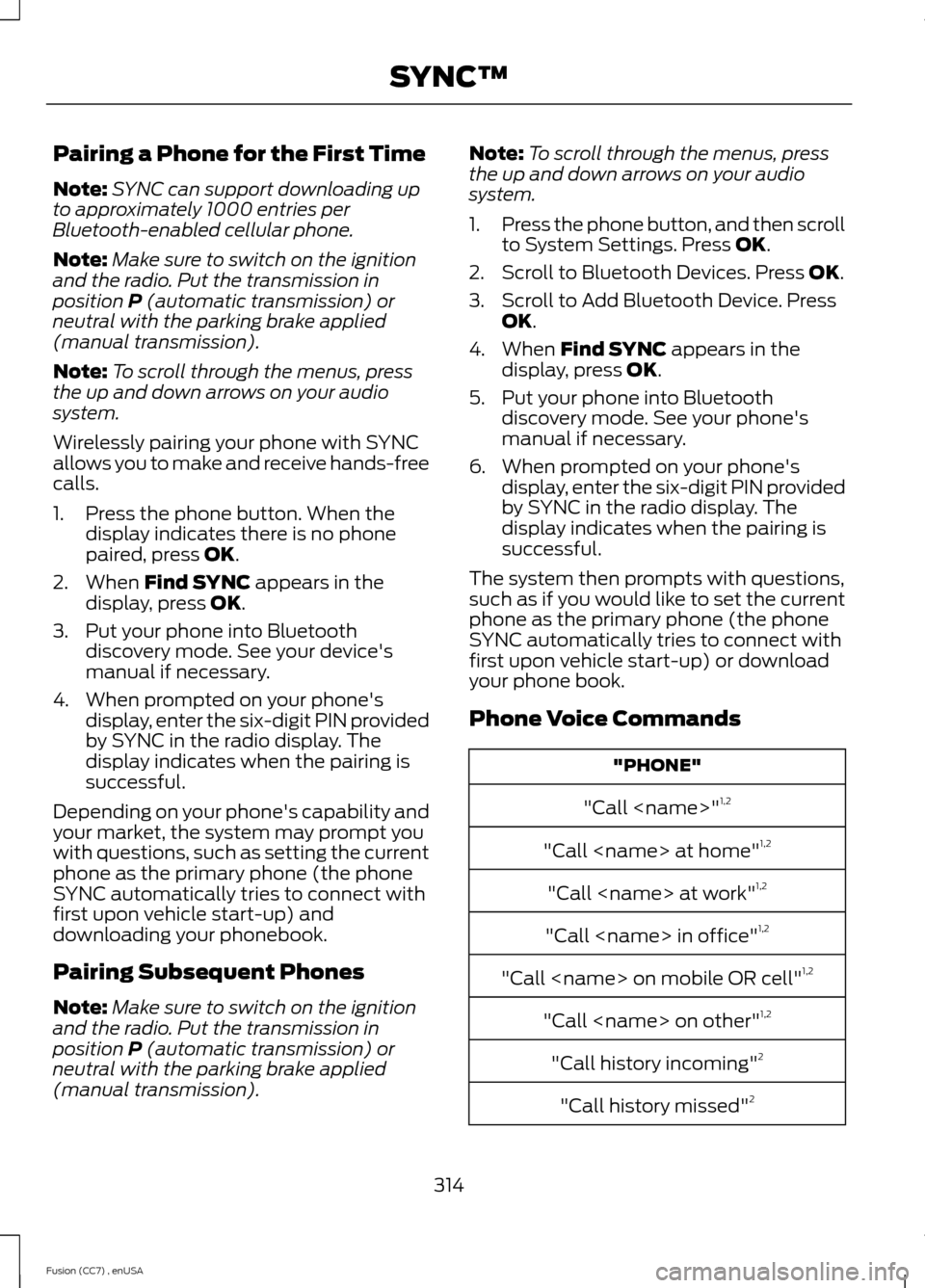
Phone Voice Commands
"PHONE"
"Call
"Call
"Call
"Call
"Call
"Call
"Call history incoming"2
"Call history missed"2
314Fusion (CC7) , enUSASYNC™
Page 334 of 458
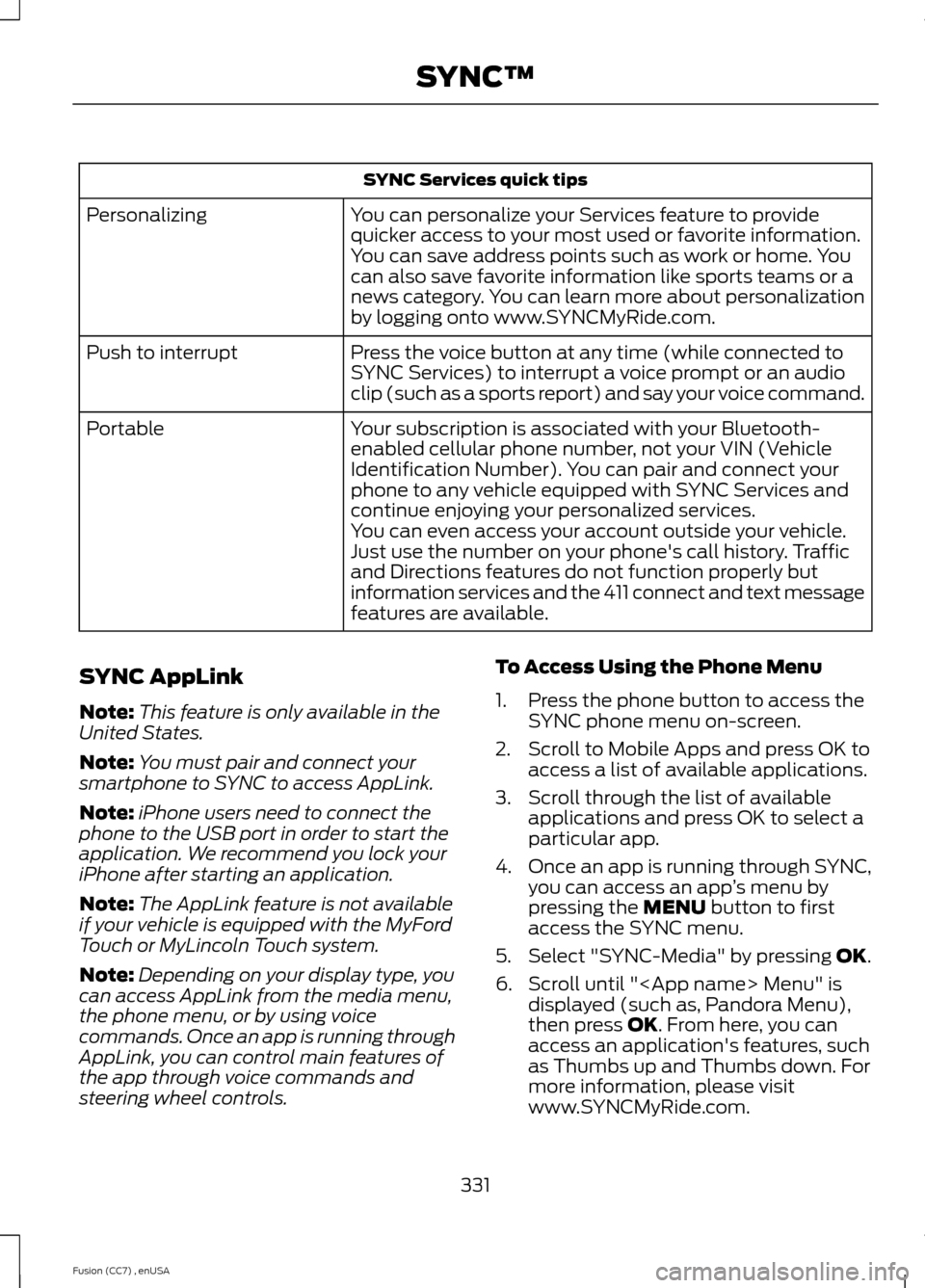
SYNC Services quick tips
You can personalize your Services feature to providequicker access to your most used or favorite information.You can save address points such as work or home. Youcan also save favorite information like sports teams or anews category. You can learn more about personalizationby logging onto www.SYNCMyRide.com.
Personalizing
Press the voice button at any time (while connected toSYNC Services) to interrupt a voice prompt or an audioclip (such as a sports report) and say your voice command.
Push to interrupt
Your subscription is associated with your Bluetooth-enabled cellular phone number, not your VIN (VehicleIdentification Number). You can pair and connect yourphone to any vehicle equipped with SYNC Services andcontinue enjoying your personalized services.
Portable
You can even access your account outside your vehicle.Just use the number on your phone's call history. Trafficand Directions features do not function properly butinformation services and the 411 connect and text messagefeatures are available.
SYNC AppLink
Note:This feature is only available in theUnited States.
Note:You must pair and connect yoursmartphone to SYNC to access AppLink.
Note:iPhone users need to connect thephone to the USB port in order to start theapplication. We recommend you lock youriPhone after starting an application.
Note:The AppLink feature is not availableif your vehicle is equipped with the MyFordTouch or MyLincoln Touch system.
Note:Depending on your display type, youcan access AppLink from the media menu,the phone menu, or by using voicecommands. Once an app is running throughAppLink, you can control main features ofthe app through voice commands andsteering wheel controls.
To Access Using the Phone Menu
1.Press the phone button to access theSYNC phone menu on-screen.
2.Scroll to Mobile Apps and press OK toaccess a list of available applications.
3.Scroll through the list of availableapplications and press OK to select aparticular app.
4.Once an app is running through SYNC,you can access an app’s menu bypressing the MENU button to firstaccess the SYNC menu.
5.Select "SYNC-Media" by pressing OK.
6.Scroll until "
331Fusion (CC7) , enUSASYNC™
Page 335 of 458
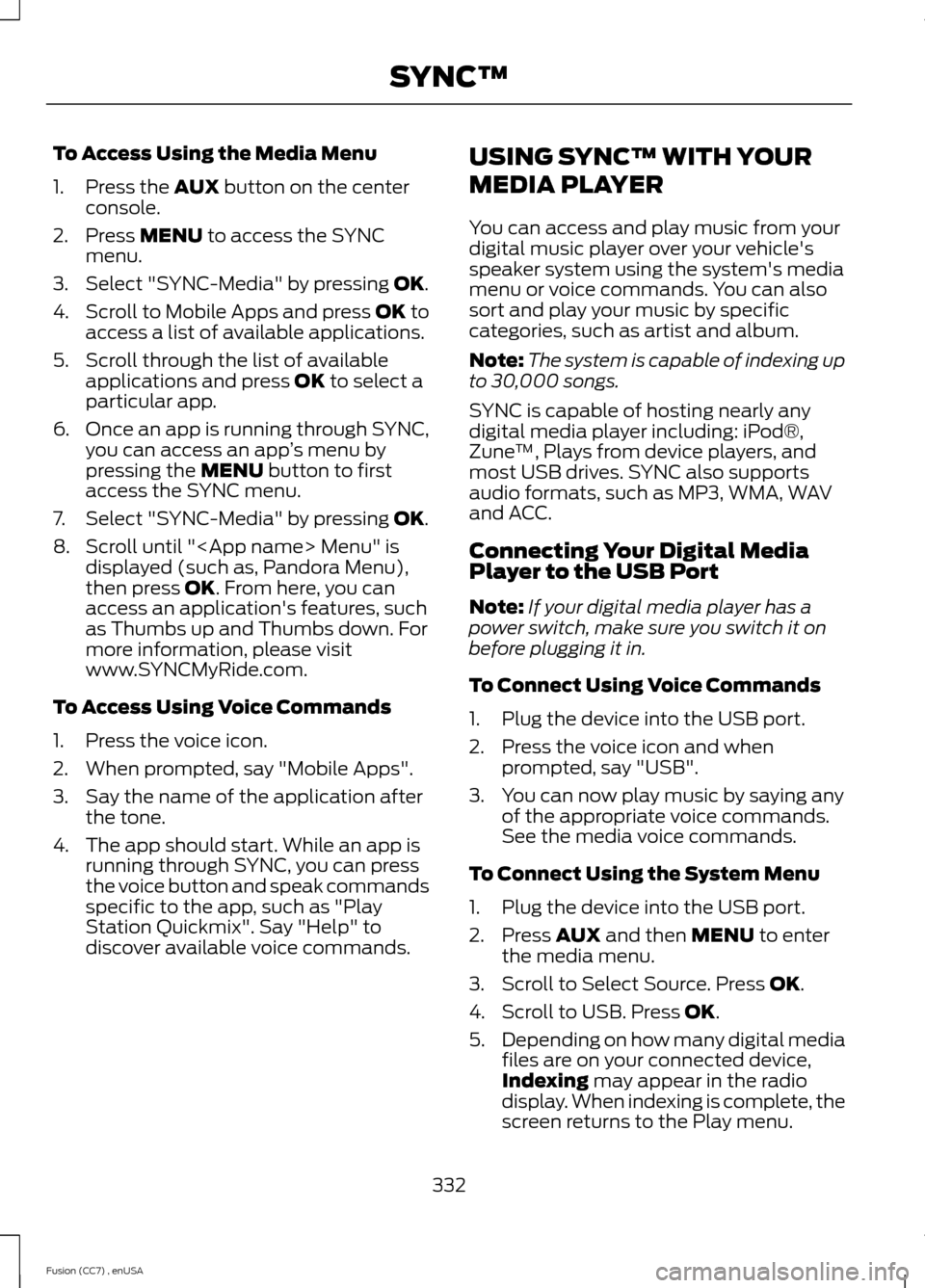
To Access Using the Media Menu
1.Press the AUX button on the centerconsole.
2.Press MENU to access the SYNCmenu.
3.Select "SYNC-Media" by pressing OK.
4.Scroll to Mobile Apps and press OK toaccess a list of available applications.
5.Scroll through the list of availableapplications and press OK to select aparticular app.
6.Once an app is running through SYNC,you can access an app’s menu bypressing the MENU button to firstaccess the SYNC menu.
7.Select "SYNC-Media" by pressing OK.
8.Scroll until "
To Access Using Voice Commands
1.Press the voice icon.
2.When prompted, say "Mobile Apps".
3.Say the name of the application afterthe tone.
4.The app should start. While an app isrunning through SYNC, you can pressthe voice button and speak commandsspecific to the app, such as "PlayStation Quickmix". Say "Help" todiscover available voice commands.
USING SYNC™ WITH YOUR
MEDIA PLAYER
You can access and play music from yourdigital music player over your vehicle'sspeaker system using the system's mediamenu or voice commands. You can alsosort and play your music by specificcategories, such as artist and album.
Note:The system is capable of indexing upto 30,000 songs.
SYNC is capable of hosting nearly anydigital media player including: iPod®,Zune™, Plays from device players, andmost USB drives. SYNC also supportsaudio formats, such as MP3, WMA, WAVand ACC.
Connecting Your Digital MediaPlayer to the USB Port
Note:If your digital media player has apower switch, make sure you switch it onbefore plugging it in.
To Connect Using Voice Commands
1.Plug the device into the USB port.
2.Press the voice icon and whenprompted, say "USB".
3.You can now play music by saying anyof the appropriate voice commands.See the media voice commands.
To Connect Using the System Menu
1.Plug the device into the USB port.
2.Press AUX and then MENU to enterthe media menu.
3.Scroll to Select Source. Press OK.
4.Scroll to USB. Press OK.
5.Depending on how many digital mediafiles are on your connected device,Indexing may appear in the radiodisplay. When indexing is complete, thescreen returns to the Play menu.
332Fusion (CC7) , enUSASYNC™
Page 337 of 458
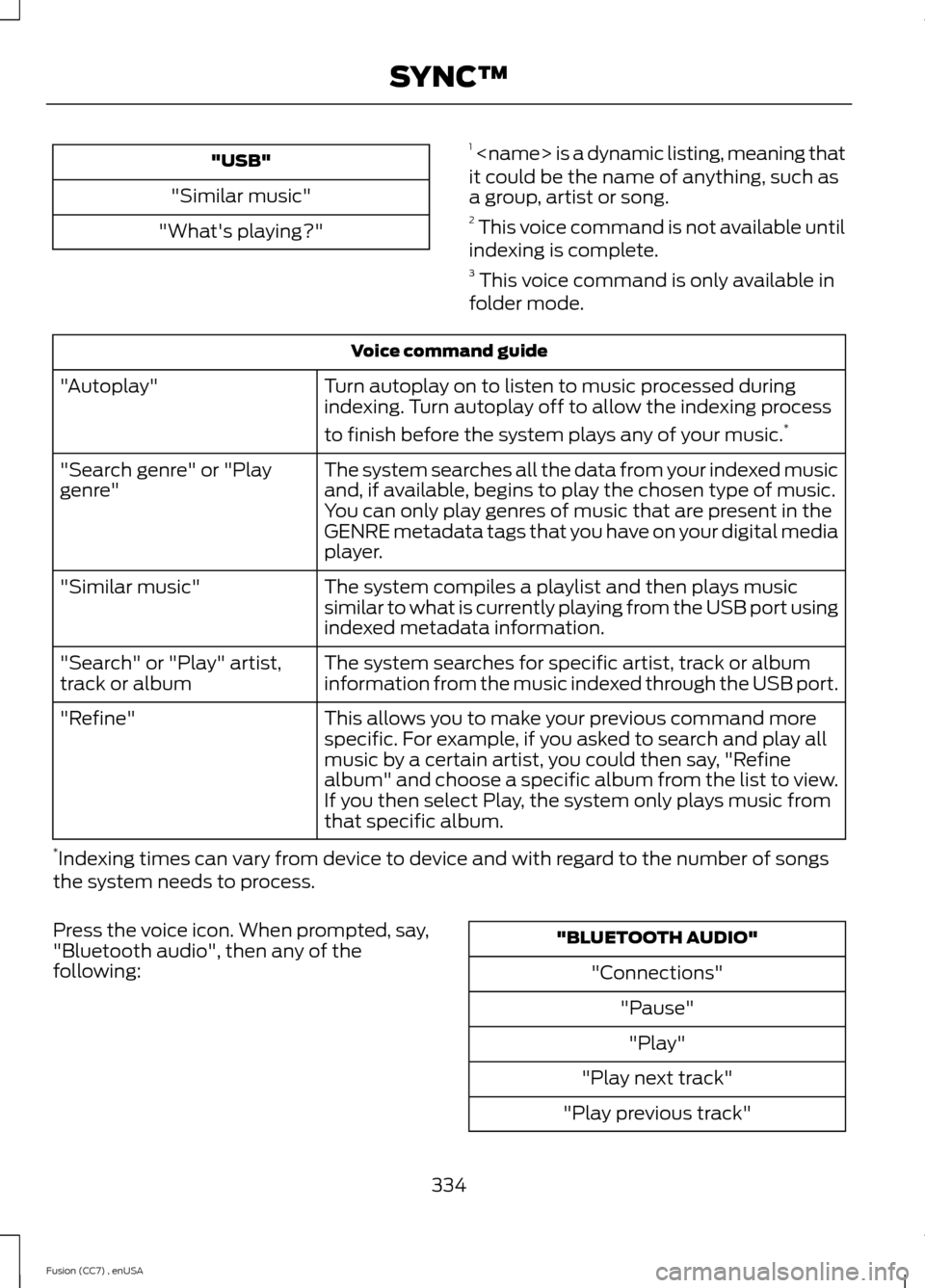
"USB"
"Similar music"
"What's playing?"
1
Voice command guide
Turn autoplay on to listen to music processed duringindexing. Turn autoplay off to allow the indexing process
to finish before the system plays any of your music.*
"Autoplay"
The system searches all the data from your indexed musicand, if available, begins to play the chosen type of music.You can only play genres of music that are present in theGENRE metadata tags that you have on your digital mediaplayer.
"Search genre" or "Playgenre"
The system compiles a playlist and then plays musicsimilar to what is currently playing from the USB port usingindexed metadata information.
"Similar music"
The system searches for specific artist, track or albuminformation from the music indexed through the USB port."Search" or "Play" artist,track or album
This allows you to make your previous command morespecific. For example, if you asked to search and play allmusic by a certain artist, you could then say, "Refinealbum" and choose a specific album from the list to view.If you then select Play, the system only plays music fromthat specific album.
"Refine"
*Indexing times can vary from device to device and with regard to the number of songsthe system needs to process.
Press the voice icon. When prompted, say,"Bluetooth audio", then any of thefollowing:
"BLUETOOTH AUDIO"
"Connections"
"Pause"
"Play"
"Play next track"
"Play previous track"
334Fusion (CC7) , enUSASYNC™
Page 338 of 458
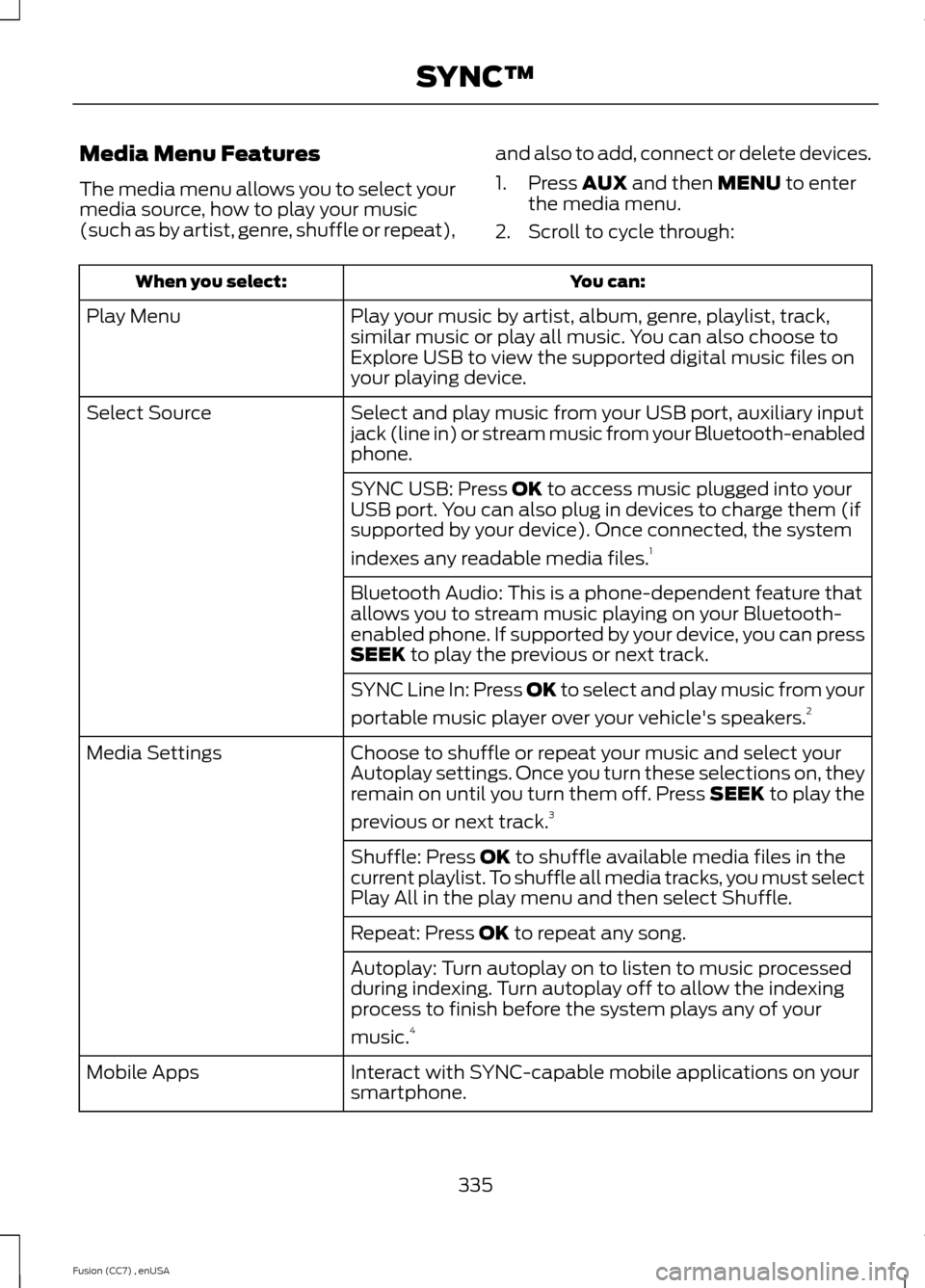
Media Menu Features
The media menu allows you to select yourmedia source, how to play your music(such as by artist, genre, shuffle or repeat),
and also to add, connect or delete devices.
1.Press AUX and then MENU to enterthe media menu.
2.Scroll to cycle through:
You can:When you select:
Play your music by artist, album, genre, playlist, track,similar music or play all music. You can also choose toExplore USB to view the supported digital music files onyour playing device.
Play Menu
Select and play music from your USB port, auxiliary inputjack (line in) or stream music from your Bluetooth-enabledphone.
Select Source
SYNC USB: Press OK to access music plugged into yourUSB port. You can also plug in devices to charge them (ifsupported by your device). Once connected, the system
indexes any readable media files.1
Bluetooth Audio: This is a phone-dependent feature thatallows you to stream music playing on your Bluetooth-enabled phone. If supported by your device, you can pressSEEK to play the previous or next track.
SYNC Line In: Press OK to select and play music from your
portable music player over your vehicle's speakers.2
Choose to shuffle or repeat your music and select yourAutoplay settings. Once you turn these selections on, theyremain on until you turn them off. Press SEEK to play the
previous or next track.3
Media Settings
Shuffle: Press OK to shuffle available media files in thecurrent playlist. To shuffle all media tracks, you must selectPlay All in the play menu and then select Shuffle.
Repeat: Press OK to repeat any song.
Autoplay: Turn autoplay on to listen to music processedduring indexing. Turn autoplay off to allow the indexingprocess to finish before the system plays any of your
music.4
Interact with SYNC-capable mobile applications on yoursmartphone.Mobile Apps
335Fusion (CC7) , enUSASYNC™
Page 343 of 458
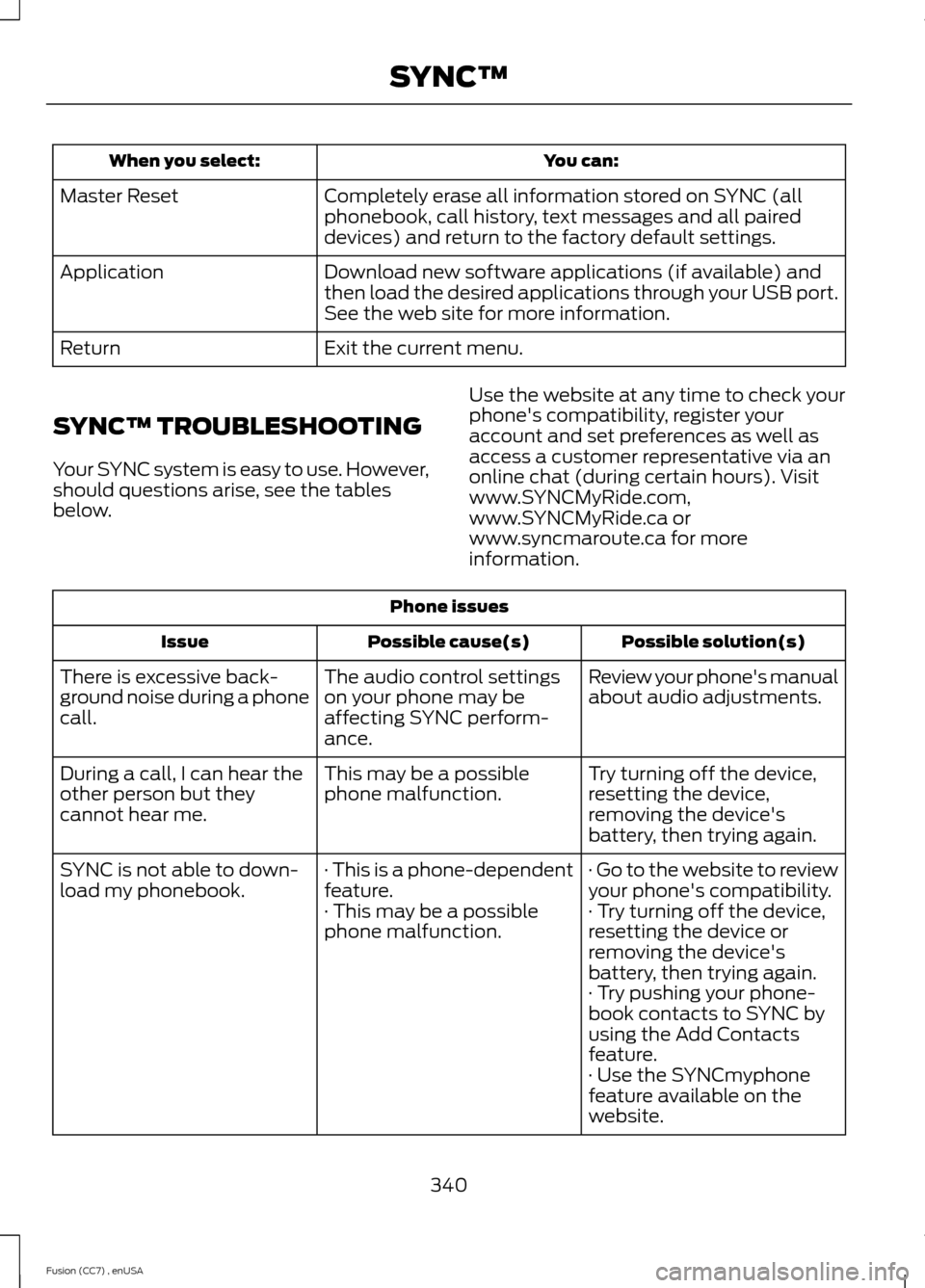
You can:When you select:
Completely erase all information stored on SYNC (allphonebook, call history, text messages and all paireddevices) and return to the factory default settings.
Master Reset
Download new software applications (if available) andthen load the desired applications through your USB port.See the web site for more information.
Application
Exit the current menu.Return
SYNC™ TROUBLESHOOTING
Your SYNC system is easy to use. However,should questions arise, see the tablesbelow.
Use the website at any time to check yourphone's compatibility, register youraccount and set preferences as well asaccess a customer representative via anonline chat (during certain hours). Visitwww.SYNCMyRide.com,www.SYNCMyRide.ca orwww.syncmaroute.ca for moreinformation.
Phone issues
Possible solution(s)Possible cause(s)Issue
Review your phone's manualabout audio adjustments.The audio control settingson your phone may beaffecting SYNC perform-ance.
There is excessive back-ground noise during a phonecall.
Try turning off the device,resetting the device,removing the device'sbattery, then trying again.
This may be a possiblephone malfunction.During a call, I can hear theother person but theycannot hear me.
· Go to the website to reviewyour phone's compatibility.· This is a phone-dependentfeature.SYNC is not able to down-load my phonebook.· Try turning off the device,resetting the device orremoving the device'sbattery, then trying again.
· This may be a possiblephone malfunction.
· Try pushing your phone-book contacts to SYNC byusing the Add Contactsfeature.· Use the SYNCmyphonefeature available on thewebsite.
340Fusion (CC7) , enUSASYNC™