navigation system FORD FUSION (AMERICAS) 2016 2.G User Guide
[x] Cancel search | Manufacturer: FORD, Model Year: 2016, Model line: FUSION (AMERICAS), Model: FORD FUSION (AMERICAS) 2016 2.GPages: 518, PDF Size: 5.72 MB
Page 406 of 518
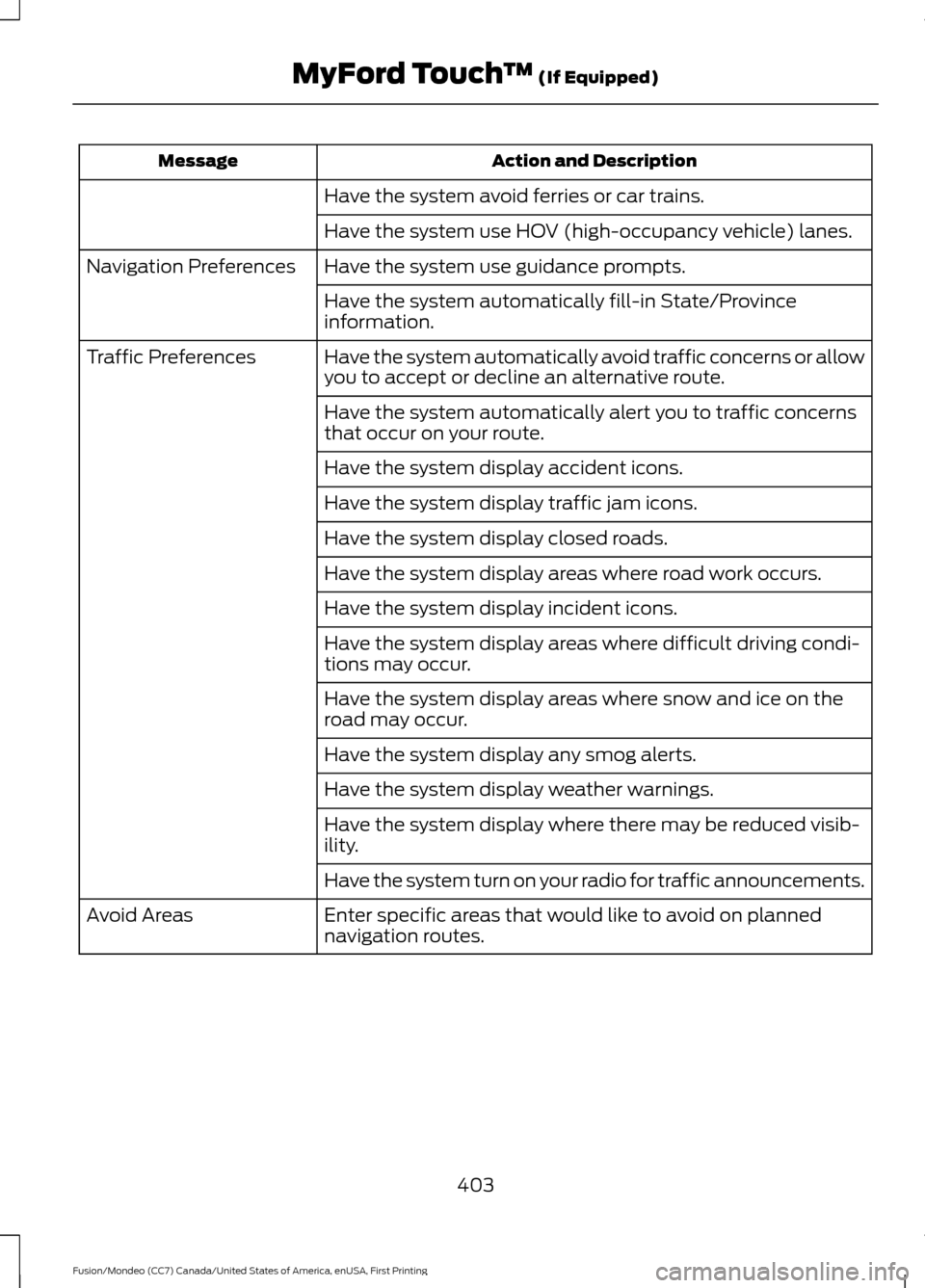
Action and Description
Message
Have the system avoid ferries or car trains.
Have the system use HOV (high-occupancy vehicle) lanes.
Have the system use guidance prompts.
Navigation Preferences
Have the system automatically fill-in State/Province
information.
Have the system automatically avoid traffic concerns or allow
you to accept or decline an alternative route.
Traffic Preferences
Have the system automatically alert you to traffic concerns
that occur on your route.
Have the system display accident icons.
Have the system display traffic jam icons.
Have the system display closed roads.
Have the system display areas where road work occurs.
Have the system display incident icons.
Have the system display areas where difficult driving condi-
tions may occur.
Have the system display areas where snow and ice on the
road may occur.
Have the system display any smog alerts.
Have the system display weather warnings.
Have the system display where there may be reduced visib-
ility.
Have the system turn on your radio for traffic announcements.
Enter specific areas that would like to avoid on planned
navigation routes.
Avoid Areas
403
Fusion/Mondeo (CC7) Canada/United States of America, enUSA, First Printing MyFord Touch
™ (If Equipped)
Page 410 of 518
Help
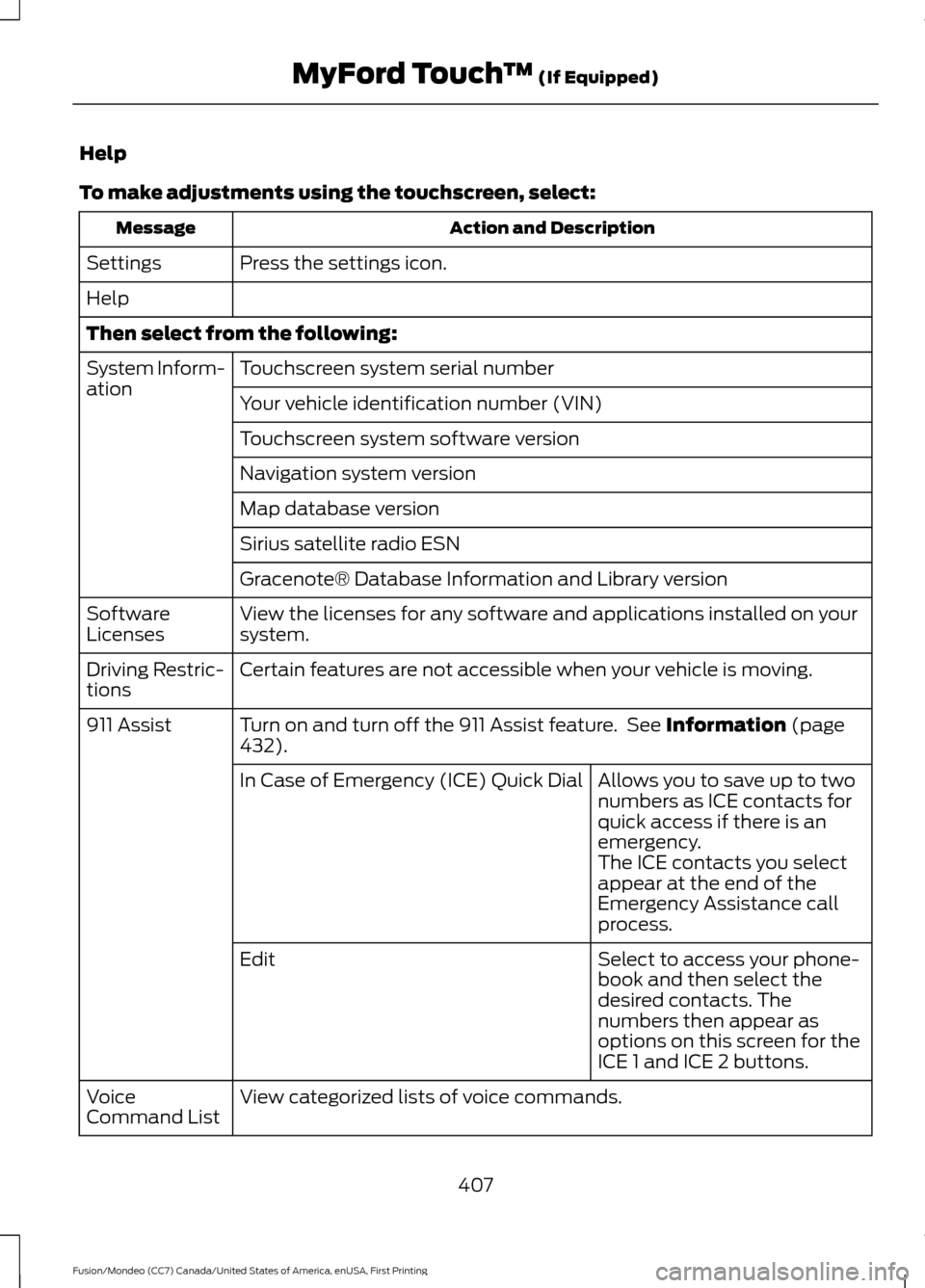
To make adjustments using the touchscreen, select:
Action and Description
Message
Press the settings icon.
Settings
Help
Then select from the following:
Touchscreen system serial number
System Inform-
ation
Your vehicle identification number (VIN)
Touchscreen system software version
Navigation system version
Map database version
Sirius satellite radio ESN
Gracenote® Database Information and Library version
View the licenses for any software and applications installed on your
system.
Software
Licenses
Certain features are not accessible when your vehicle is moving.
Driving Restric-
tions
Turn on and turn off the 911 Assist feature. See Information (page
432).
911 Assist
Allows you to save up to two
numbers as ICE contacts for
quick access if there is an
emergency.
In Case of Emergency (ICE) Quick Dial
The ICE contacts you select
appear at the end of the
Emergency Assistance call
process.
Select to access your phone-
book and then select the
desired contacts. The
numbers then appear as
options on this screen for the
ICE 1 and ICE 2 buttons.
Edit
View categorized lists of voice commands.
Voice
Command List
407
Fusion/Mondeo (CC7) Canada/United States of America, enUSA, First Printing MyFord Touch
™
(If Equipped)
Page 423 of 518
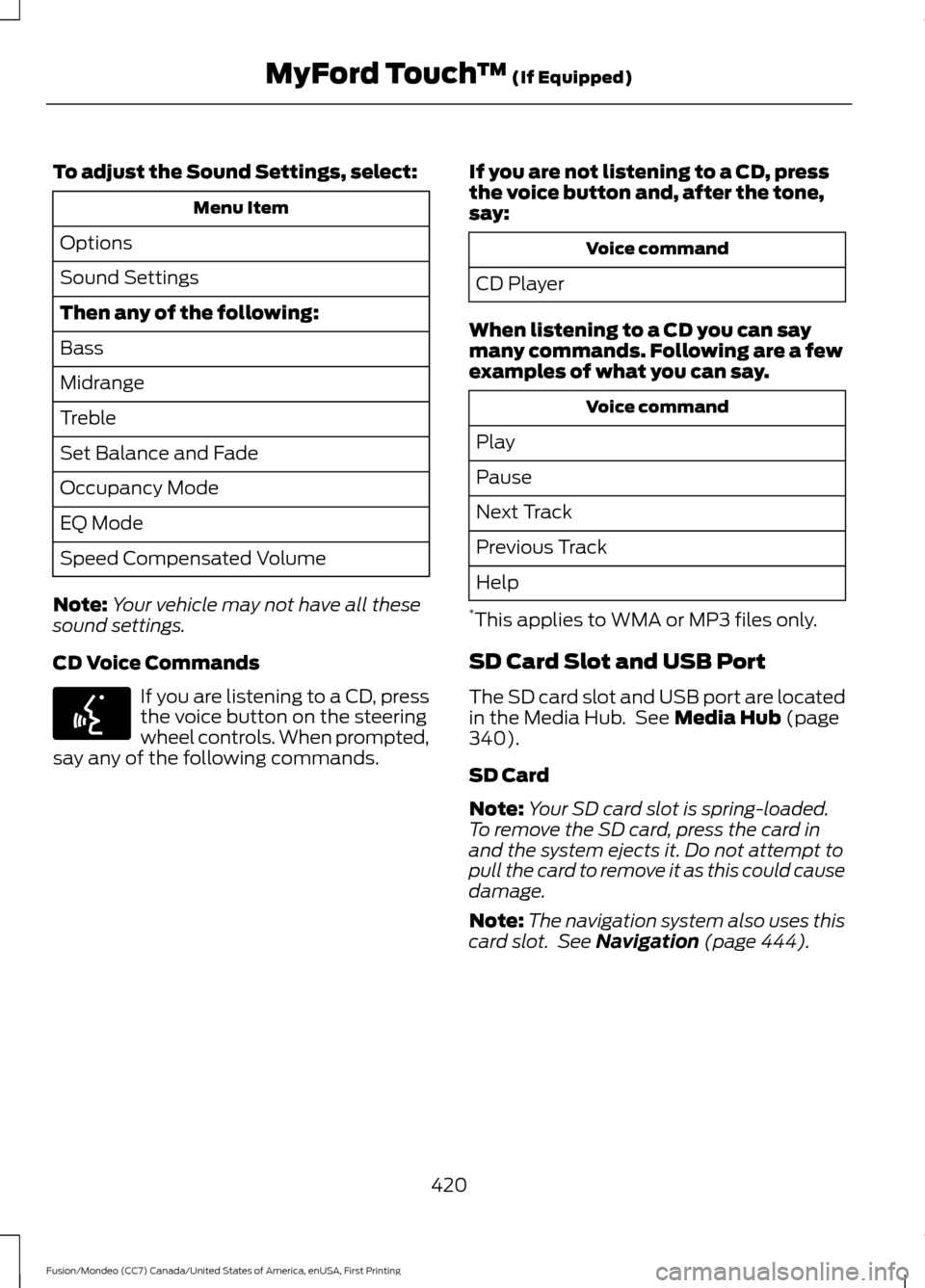
To adjust the Sound Settings, select:
Menu Item
Options
Sound Settings
Then any of the following:
Bass
Midrange
Treble
Set Balance and Fade
Occupancy Mode
EQ Mode
Speed Compensated Volume
Note: Your vehicle may not have all these
sound settings.
CD Voice Commands If you are listening to a CD, press
the voice button on the steering
wheel controls. When prompted,
say any of the following commands. If you are not listening to a CD, press
the voice button and, after the tone,
say: Voice command
CD Player
When listening to a CD you can say
many commands. Following are a few
examples of what you can say. Voice command
Play
Pause
Next Track
Previous Track
Help
* This applies to WMA or MP3 files only.
SD Card Slot and USB Port
The SD card slot and USB port are located
in the Media Hub. See Media Hub (page
340).
SD Card
Note: Your SD card slot is spring-loaded.
To remove the SD card, press the card in
and the system ejects it. Do not attempt to
pull the card to remove it as this could cause
damage.
Note: The navigation system also uses this
card slot. See
Navigation (page 444).
420
Fusion/Mondeo (CC7) Canada/United States of America, enUSA, First Printing MyFord Touch
™
(If Equipped)E142599
Page 435 of 518
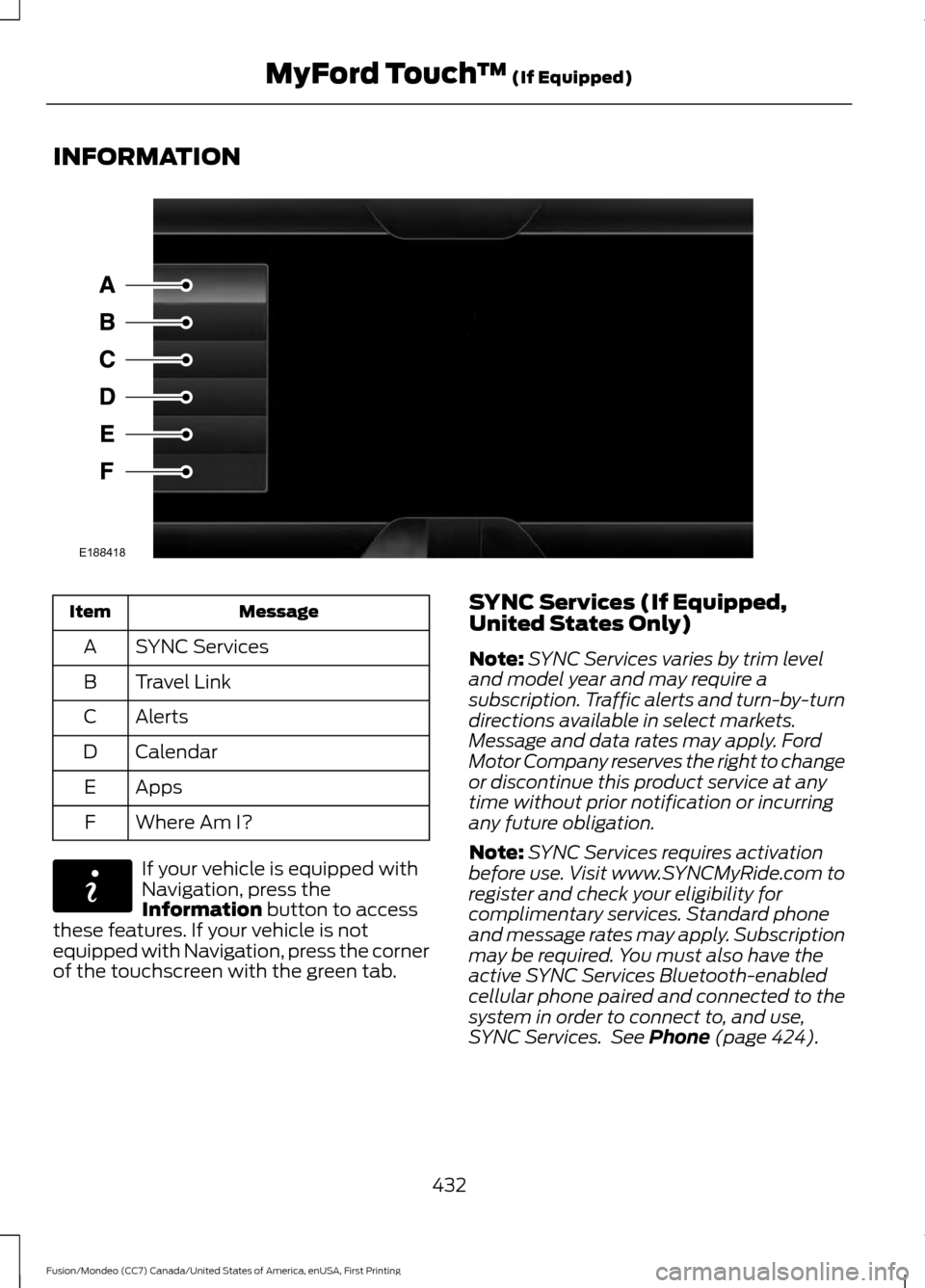
INFORMATION
Message
Item
SYNC Services
A
Travel Link
B
Alerts
C
Calendar
D
Apps
E
Where Am I?
F If your vehicle is equipped with
Navigation, press the
Information button to access
these features. If your vehicle is not
equipped with Navigation, press the corner
of the touchscreen with the green tab. SYNC Services (If Equipped,
United States Only)
Note:
SYNC Services varies by trim level
and model year and may require a
subscription. Traffic alerts and turn-by-turn
directions available in select markets.
Message and data rates may apply. Ford
Motor Company reserves the right to change
or discontinue this product service at any
time without prior notification or incurring
any future obligation.
Note: SYNC Services requires activation
before use. Visit www.SYNCMyRide.com to
register and check your eligibility for
complimentary services. Standard phone
and message rates may apply. Subscription
may be required. You must also have the
active SYNC Services Bluetooth-enabled
cellular phone paired and connected to the
system in order to connect to, and use,
SYNC Services. See
Phone (page 424).
432
Fusion/Mondeo (CC7) Canada/United States of America, enUSA, First Printing MyFord Touch
™
(If Equipped)E188418 E142608
Page 436 of 518
Note:
This feature does not function
properly if you have enabled caller ID
blocking on your cellular phone. Make sure
your cellular phone is not blocking caller ID
before using SYNC Services.
Note: The driver is ultimately responsible
for the safe operation of the vehicle, and
therefore, must evaluate whether it is safe
to follow the suggested directions. Any
navigation features provided are only an aid.
Make your driving decisions based on your
observations of local conditions and existing
traffic regulations. Do not follow the route
suggestions if doing so would result in an
unsafe or illegal maneuver, if you would be
placed in an unsafe situation, or if you would
be directed into an area that you consider
unsafe. Maps used by this system may be
inaccurate because of errors, changes in
roads, traffic conditions or driving
conditions. Note:
When you connect, the service uses
GPS technology and advanced vehicle
sensors to collect your vehicle's current
location, travel direction and speed to help
provide you with the directions, traffic
reports, or business searches you request.
Further, to provide the services you request,
for continuous improvement, the service
may collect and record call details and voice
communications. For more information, see
SYNC Services Terms and Conditions at
www.SYNCMyRide.com. If you do not want
Ford or its service providers to collect your
vehicle travel information or other
information identified in the Terms and
Conditions, do not subscribe or use the
service.
SYNC Services uses advanced vehicle
sensors, integrated GPS technology and
comprehensive map and traffic data, to
give you personalized traffic reports,
precise turn-by-turn directions, business
search, news, sports, weather and more.
For a complete list of services, or to learn
more, please visit www.SYNCMyRide.com.
Connecting to SYNC Services
You can connect to SYNC Services using
voice commands or by selecting a menu
item on the touchscreen.
To use voice commands, press the voice button and say: Action and Description
Voice Command
This initiates an outgoing call to SYNC Services using your
paired and connected Bluetooth-enabled cellular phone.
Once you connect to the service, follow the voice prompts
to request the desired service, for example traffic or
directions.
Services
Once connected to SYNC Services, you can also say the following:
Receive a list of available services from which to choose.
What Can I Say
To return to the Services main menu.
Services
Receive system help.
Help
433
Fusion/Mondeo (CC7) Canada/United States of America, enUSA, First Printing MyFord Touch
™ (If Equipped)
Page 437 of 518
If your vehicle is equipped with Navigation,
press the I (Information) button. If your
vehicle is not equipped with Navigation,
press the green tab on your touchscreen. To use the touchscreen select: Menu Item
Connect to Services
This command initiates an outgoing call
to SYNC Services using your paired and
connected Bluetooth-enabled cellular
phone. Once you connect to the service,
follow the voice prompts to request the
desired service.
Receiving Turn-by-Turn Directions
Press the voice button and say: Action and Description
Voice Command
To receive directions to a location. Once
you select your destination, the system
uploads your current vehicle location,
calculates a route based on current traffic
conditions and sends it back to your vehicle.
After the route download is complete, the
phone call automatically ends. You then
receive audible and visual driving instruc-
tions as you travel toward your destination.
Directions
To find a business or type of business. Once
you select your destination, the system
uploads your current vehicle location,
calculates a route based on current traffic
conditions and sends it back to your vehicle.
After the route download is complete, the
phone call automatically ends. You then
receive audible and visual driving instruc-
tions as you travel toward your destination.
Business Search
To find the closest business or type of
business to your location, within business
search.
Search near me
Provides you with further assistance within
Directions and Business Search. The system
may prompt you to speak with an operator
when it has difficulty matching your voice
request. The live operator can assist you by
searching for businesses by name or by
Operator
434
Fusion/Mondeo (CC7) Canada/United States of America, enUSA, First Printing MyFord Touch
™
(If Equipped)
Page 439 of 518
SYNC Services Voice Commands
If your vehicle is equipped with
Navigation, SYNC Services
downloads your requested
destination to the navigation system. The
navigation system then calculates the
route and provides driving instructions.
See Navigation (page 444).
If your vehicle is not equipped with
Navigation, when a route has been
downloaded (non-navigation systems),
you can press the voice button on the
steering wheel controls and say any of the
following commands to receive directions:
Services Voice command
Cancel Route
Route Status
Route summary
Update Route
Help Sirius Travel Link
(If Equipped) WARNING
Driving while distracted can result in
loss of vehicle control, crash and
injury. We strongly recommend that
you use extreme caution when using any
device that may take your focus off the
road. Your primary responsibility is the safe
operation of your vehicle. We recommend
against the use of any handheld device
while driving and encourage the use of
voice-operated systems when possible.
Make sure you are aware of all applicable
local laws that may affect the use of
electronic devices while driving. Note:
In order to use Sirius Travel Link, your
vehicle must be equipped with navigation
and your navigation SD card must be in the
SD card slot.
Note: A paid subscription is required to
access and use these features. Go to
www.siriusxm.com/travellink for more
information.
Note: Visit www.siriusxm.com/traffic and
click on Coverage map and details for a
complete listing of all traffic areas covered
by Sirius Travel Link.
Note: Neither Sirius nor Ford is responsible
for any errors or inaccuracies in the Sirius
Travel Link services or its use in vehicles.
When you subscribe to Sirius Travel Link,
it can help you locate the best gas prices,
find movie listings, get current traffic alerts,
view the current weather map, get
accurate ski conditions and see scores to
current sports games.
436
Fusion/Mondeo (CC7) Canada/United States of America, enUSA, First Printing MyFord Touch
™
(If Equipped)E142599
Page 441 of 518
This screen displays any system messages
(such as an SD card fault).
Note:
The system alerts you to any
messages by turning the information icon
yellow. After you read or delete the
messages, the icon returns to white.
Calendar If your vehicle is equipped with
Navigation, touch the I
(Information) button to access
these features. If your vehicle is not
equipped with Navigation, touch the corner
of the touchscreen with the green tab.
Press Calendar. You can view the current
calendar by day, week or month.
911 Assist WARNINGS
Unless the 911 Assist setting is set on
before a crash, the system will not
dial for help, which could delay
response time, potentially increasing the
risk of serious injury or death after a crash. Do not wait for 911 Assist to make an
emergency call if you can do it
yourself. Dial emergency services
immediately to avoid delayed response
time, which could increase the risk of
serious injury or death after a crash. If you
do not hear 911 Assist within five seconds
of the crash, the system or phone may be
damaged or non-functional. Always place your phone in a secure
location in your vehicle so it does not
become a projectile or damaged in
a crash. Failure to do so may cause serious
injury to someone or damage the phone,
which could prevent 911 Assist from
working properly. Note:
The SYNC 911 Assist feature must be
set on prior to the incident. Note:
Before setting this feature on, make
sure that you read the 911 Assist Privacy
Notice later in this section for important
information.
Note: If any user turns 911 Assist on or off,
that setting applies for all paired phones. If
911 Assist is turned off, either a voice
message plays or a display message (or
icon) comes on (or both) when your vehicle
is started after a previously paired phone
connects.
Note: Every phone operates differently.
While SYNC 911 Assist works with most
cellular phones, some may have trouble
using this feature.
If a crash deploys an airbag, excluding knee
airbags and rear inflatable safety belts
where fitted or activates the fuel pump
shut-off, your SYNC-equipped vehicle may
be able to contact emergency services by
dialing 911 through a paired and connected
Bluetooth-enabled phone. For more
information about the 911 Assist feature
visit: Website
visit www.SYNCMyRide.com www.SYNCMyRide.cawww.syncmaroute.ca
See
Supplementary Restraints System
(page 38). Important information
regarding airbag deployment is in this
chapter.
See
Roadside Emergencies (page 226).
Important information regarding the fuel
pump shut-off is in this chapter.
Setting 911 Assist On 438
Fusion/Mondeo (CC7) Canada/United States of America, enUSA, First Printing MyFord Touch
™
(If Equipped)E142608 E142608
Page 442 of 518
If your vehicle is equipped with
Navigation, touch the I (Information)
button to access these features. If your
vehicle is not equipped with
Navigation, touch the corner of the
touchscreen with the green tab. Then
select:
Message
Apps
911 Assist
On You can also access 911 Assist by
pressing:
Message
Settings
Phone
911 Assist
Or you can also select:
Help
911 Assist
To make sure that 911 Assist works
properly:
• SYNC must be powered and working
properly at the time of the incident and
throughout feature activation and use.
• The 911 Assist feature must be set on
prior to the incident.
• You must pair and connect a
Bluetooth-enabled and compatible
phone to SYNC. •
A connected Bluetooth-enabled phone
must have the ability to make and
maintain an outgoing call at the time
of the incident.
• A connected Bluetooth-enabled phone
must have adequate network coverage,
battery power and signal strength.
• The vehicle must have battery power
and be located in the United States,
Canada or in a territory in which 911 is
the emergency number.
In the Event of a Crash
Not all crashes deploy an airbag or activate
the fuel pump shut-off (which would
trigger 911 Assist); however, SYNC tries to
contact emergency services if 911 Assist
triggers. If a connected phone sustains
damage or loses connection to SYNC,
SYNC searches for, and tries to connect
to, any available previously paired phone
and tries to make the call to 911.
Before making the call:
• SYNC provides a short window of time
(approximately 10 seconds) to cancel
the call. If you fail to cancel the call,
SYNC attempts to dial 911.
• SYNC says the following, or a similar
message: "SYNC will attempt to call
911, to cancel the call, press Cancel on
your screen or press and hold the
phone button on your steering wheel."
If you do not cancel the call, and SYNC
makes a successful call, a pre-recorded
message plays for the 911 operator, and
then the occupant(s) in your vehicle is able
to talk with the operator. Be prepared to
provide your name, phone number and
location immediately, because not all 911
systems are capable of receiving this
information electronically.
439
Fusion/Mondeo (CC7) Canada/United States of America, enUSA, First Printing MyFord Touch
™ (If Equipped)E142607
Page 447 of 518
Note:
If your vehicle is equipped with a
wood-trimmed steering wheel, it does not
heat between the 10 o'clock and 2 o'clock
positions. Climate Control Voice Commands Press the voice button on the
steering wheel controls. When
prompted, say any of the
following or a similar command: Voice commands
Climate On
Climate Off Adjust the temperature to between 15.0 - 30.0°C or59 - 86°F.
Set temperature
NAVIGATION
Note: The navigation SD card must be in
the SD card slot to operate the navigation
system. If you need a replacement SD card,
see an authorized dealer.
Note: The SD card slot is spring-loaded. To
remove the SD card, just push the card in
and release it. Do not attempt to pull the
card out to remove it; this could cause
damage.
Your navigation system is comprised of
two main features, destination mode and
map mode.
Destination Mode
To set a destination, press the green
corner of your touchscreen, then press: Menu Item
Dest.
Choose any of the following:
My Home
Favorites
Previous Destinations Menu Item
Point of Interest
Emergency
Street Address
Intersection
City Center
Map
Edit Route
Cancel Route
To set your destination, enter the
necessary information into the highlighted
text fields (in any order).
444
Fusion/Mondeo (CC7) Canada/United States of America, enUSA, First Printing MyFord Touch
™ (If Equipped)E142599