ECO mode FORD FUSION ENERGI 2017 Owners Manual
[x] Cancel search | Manufacturer: FORD, Model Year: 2017, Model line: FUSION ENERGI, Model: FORD FUSION ENERGI 2017Pages: 526, PDF Size: 7.89 MB
Page 428 of 526
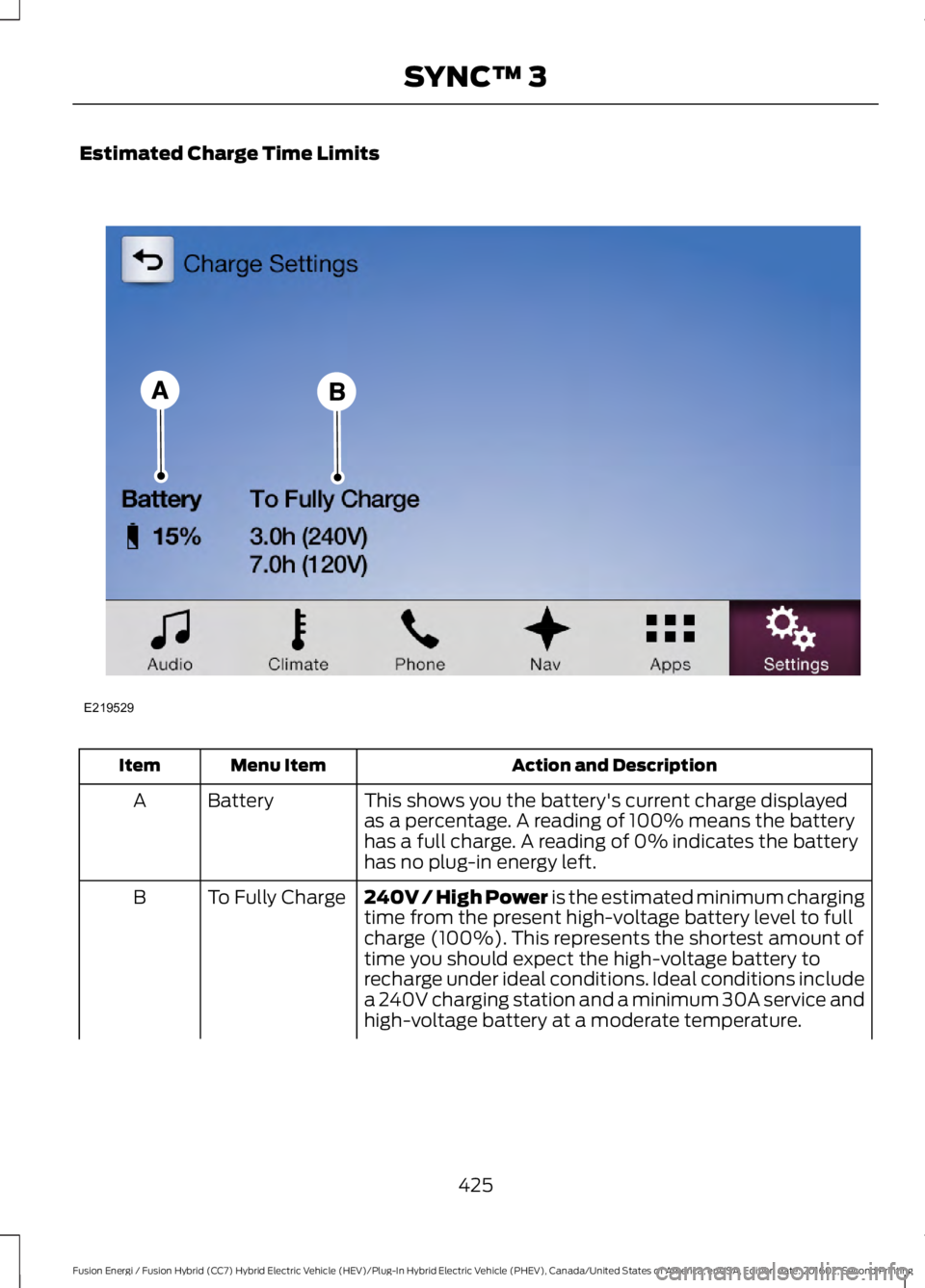
Estimated Charge Time Limits
Action and DescriptionMenu ItemItem
This shows you the battery's current charge displayedas a percentage. A reading of 100% means the batteryhas a full charge. A reading of 0% indicates the batteryhas no plug-in energy left.
BatteryA
240V / High Power is the estimated minimum chargingtime from the present high-voltage battery level to fullcharge (100%). This represents the shortest amount oftime you should expect the high-voltage battery torecharge under ideal conditions. Ideal conditions includea 240V charging station and a minimum 30A service andhigh-voltage battery at a moderate temperature.
To Fully ChargeB
425
Fusion Energi / Fusion Hybrid (CC7) Hybrid Electric Vehicle (HEV)/Plug-In Hybrid Electric Vehicle (PHEV), Canada/United States of America, enUSA, Edition date: 201602, Second Printing
SYNC™ 3E219529
Page 429 of 526
Action and DescriptionMenu ItemItem
Note: Some charging stations use lower voltage (208V),which result in longer charge times.
120V / Low Power is the estimated maximum chargingtime from the present high-voltage battery level to fullcharge (100%). This represents the longest amount oftime you should expect the high-voltage battery torecharge under normal conditions. Normal conditionsinclude a 120V convenience cord and 12A service.Note: Charging may take longer when the AC line voltageis low and may indicate your electrical source is notmeeting certain requirements. See Charging the HighVoltage Battery (page 164).
Note:These charging times are only estimates. It is normal for your actual charge durationto be longer.
GO Time Schedule
You can access the GO Time Schedule byselecting the edit option under MY GOTime on the Charge Setting screen.
Action and DescriptionMenu Item
This turns on the GO Time schedule.On
This turns off the GO Time schedule. This also turns off the cabinconditioning function. Use this mode to prevent using energy forcabin preconditioning when you leave your vehicle plugged in anddo not plan to use it for a while, such as when on vacation.
Off
Note: If you choose to perform Value Charging with the scheduleoff, the vehicle schedules charging to finish at the lowest costwithin 24 hours of plugging the vehicle in.
This displays the GO Time day-of-week and time. The blue high-lighted GO Time is the present GO Time, which the vehicle is usingfor charge scheduling and cabin conditioning. You can scheduletwo GO Time events per day for each day of the week.GO Time 1
426
Fusion Energi / Fusion Hybrid (CC7) Hybrid Electric Vehicle (HEV)/Plug-In Hybrid Electric Vehicle (PHEV), Canada/United States of America, enUSA, Edition date: 201602, Second Printing
SYNC™ 3
Page 431 of 526
Value Charge Profiles
You can access the Value Charge Profile
screen by selecting the edit option in thebottom right hand corner of the ChargeSettings screen.
Action and DescriptionMenu Item
This displays the charging mode and off-peak times for yourDefault Value Charge profile. The system displays off-peak timesfor weekdays; the remaining hours of the day are considered peaktime. The system displays similar off-peak times for weekenddays.
Default
If you want your vehicle to immediatelycharge when you plug it in at this profilelocation.
Charge Now
If you want to take advantage of off-peakelectricity rates. The vehicle optimizes thecharge schedule to be complete by the nextGO Time.
Value Charge
To access your Default Value Charge Profilesettings screen (see Default Value ChargeProfile later in this section).
Edit
Once you create profile names, this section displays the ValueCharge Profile names and current Charge Mode for specific loca-tions. You can set up and edit these profiles using the MyFordMobile internet application. You can program up to nine uniquecharge profiles.
Customer DefinedValue ChargeProfiles
Default Value Charge Profile
You can access your Default Value ChargeProfile by selecting the edit option on theValue Charge Profiles screen.
Action and DescriptionMenu Item
Set the Weekday times and Weekend times by pressing theWeekday and Weekend buttons.Weekday
Weekend
This displays the start and finish of off-peak charge times, whichyou can modify, using the following:Weekday Start
Allows you to switch the hours of your startand finish times.+ and -Weekend Start
428
Fusion Energi / Fusion Hybrid (CC7) Hybrid Electric Vehicle (HEV)/Plug-In Hybrid Electric Vehicle (PHEV), Canada/United States of America, enUSA, Edition date: 201602, Second Printing
SYNC™ 3
Page 432 of 526
Action and DescriptionMenu Item
Allows you to switch the time of your startand finish time. This setting is viewable in12-hour mode.
AMWeekday Finish
PMWeekend Finish
These buttons represent the voltage service that the default profileis using. The system uses this selection to calculate estimatedcharge times.
240V and 120V
Touching this button erases the Default Value Charge preferences.Clear
Touching this button stores your Default Value Charge preferences.If you touch the back arrow button to return to the previous screenwithout saving your settings, the system does not store them andyou need to enter them again.
Save
Note:Make sure you save your settings before returning to the previous screen. If you donot touch Save the system does not store your settings.
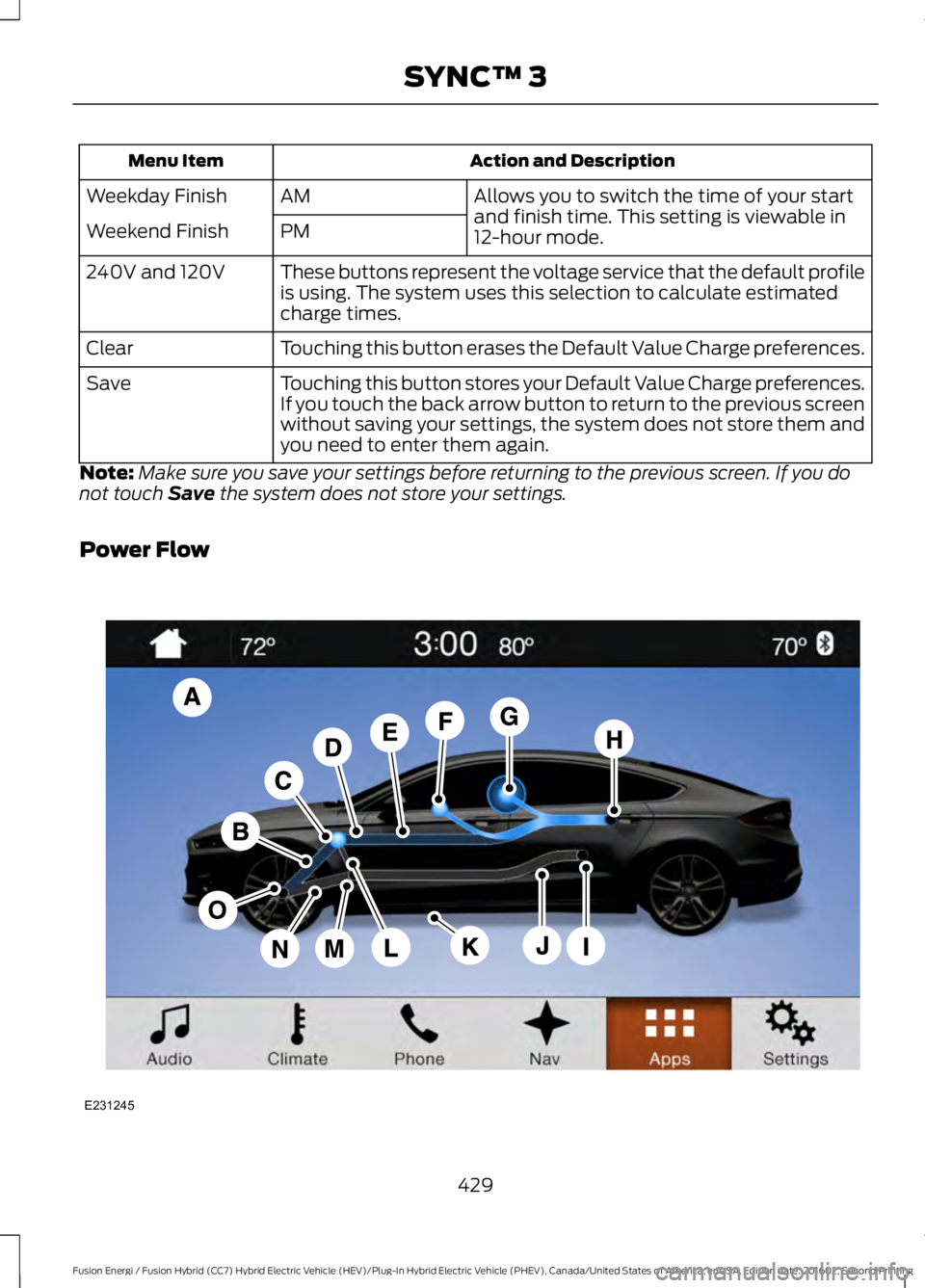
Power Flow
429
Fusion Energi / Fusion Hybrid (CC7) Hybrid Electric Vehicle (HEV)/Plug-In Hybrid Electric Vehicle (PHEV), Canada/United States of America, enUSA, Edition date: 201602, Second Printing
SYNC™ 3E231245
Page 433 of 526
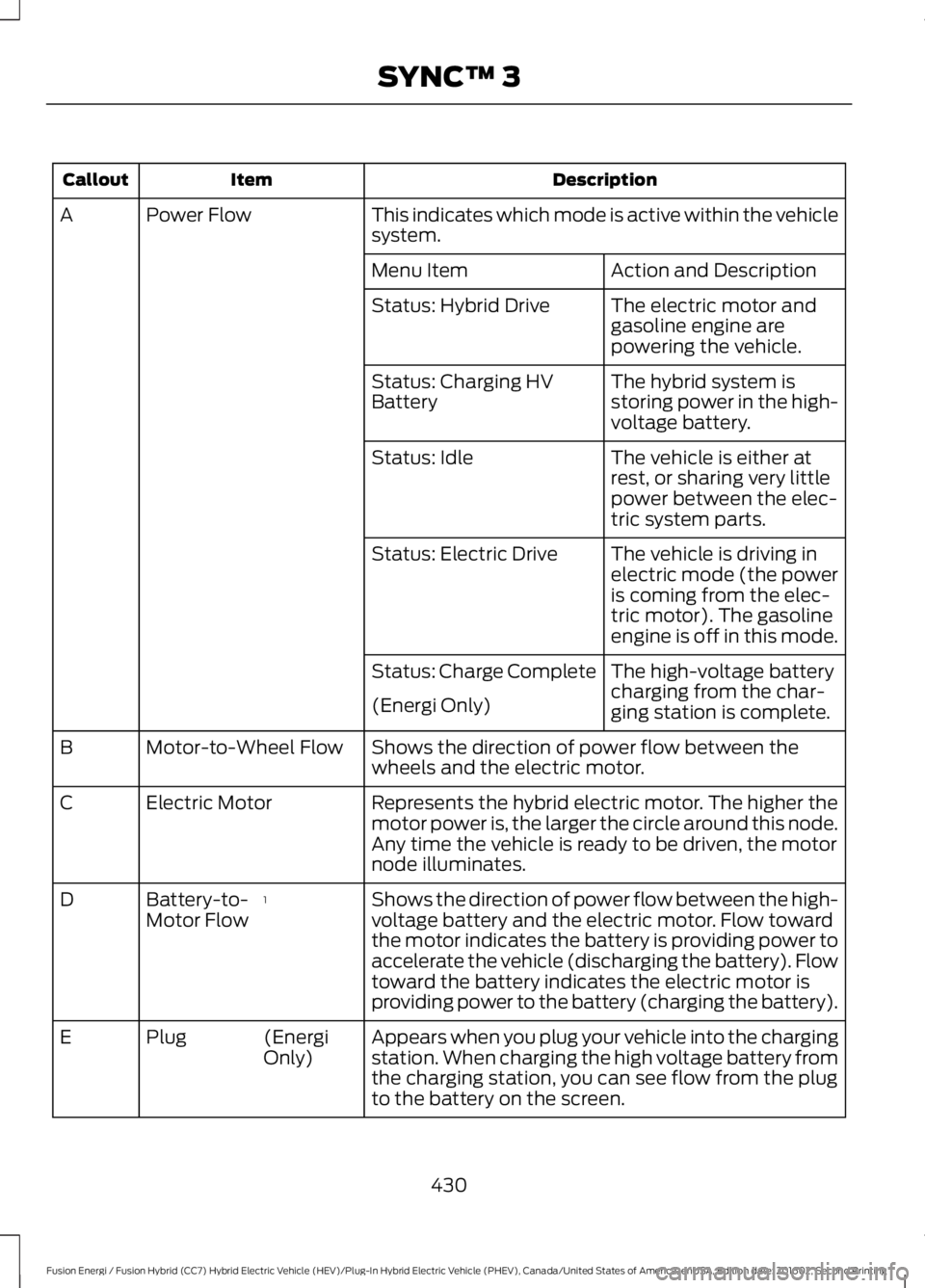
DescriptionItemCallout
This indicates which mode is active within the vehiclesystem.Power FlowA
Action and DescriptionMenu Item
The electric motor andgasoline engine arepowering the vehicle.
Status: Hybrid Drive
The hybrid system isstoring power in the high-voltage battery.
Status: Charging HVBattery
The vehicle is either atrest, or sharing very littlepower between the elec-tric system parts.
Status: Idle
The vehicle is driving inelectric mode (the poweris coming from the elec-tric motor). The gasolineengine is off in this mode.
Status: Electric Drive
The high-voltage batterycharging from the char-ging station is complete.
Status: Charge Complete
(Energi Only)
Shows the direction of power flow between thewheels and the electric motor.Motor-to-Wheel FlowB
Represents the hybrid electric motor. The higher themotor power is, the larger the circle around this node.Any time the vehicle is ready to be driven, the motornode illuminates.
Electric MotorC
Shows the direction of power flow between the high-voltage battery and the electric motor. Flow towardthe motor indicates the battery is providing power toaccelerate the vehicle (discharging the battery). Flowtoward the battery indicates the electric motor isproviding power to the battery (charging the battery).
1Battery-to-Motor FlowD
Appears when you plug your vehicle into the chargingstation. When charging the high voltage battery fromthe charging station, you can see flow from the plugto the battery on the screen.
(EnergiOnly)PlugE
430
Fusion Energi / Fusion Hybrid (CC7) Hybrid Electric Vehicle (HEV)/Plug-In Hybrid Electric Vehicle (PHEV), Canada/United States of America, enUSA, Edition date: 201602, Second Printing
SYNC™ 3
Page 435 of 526
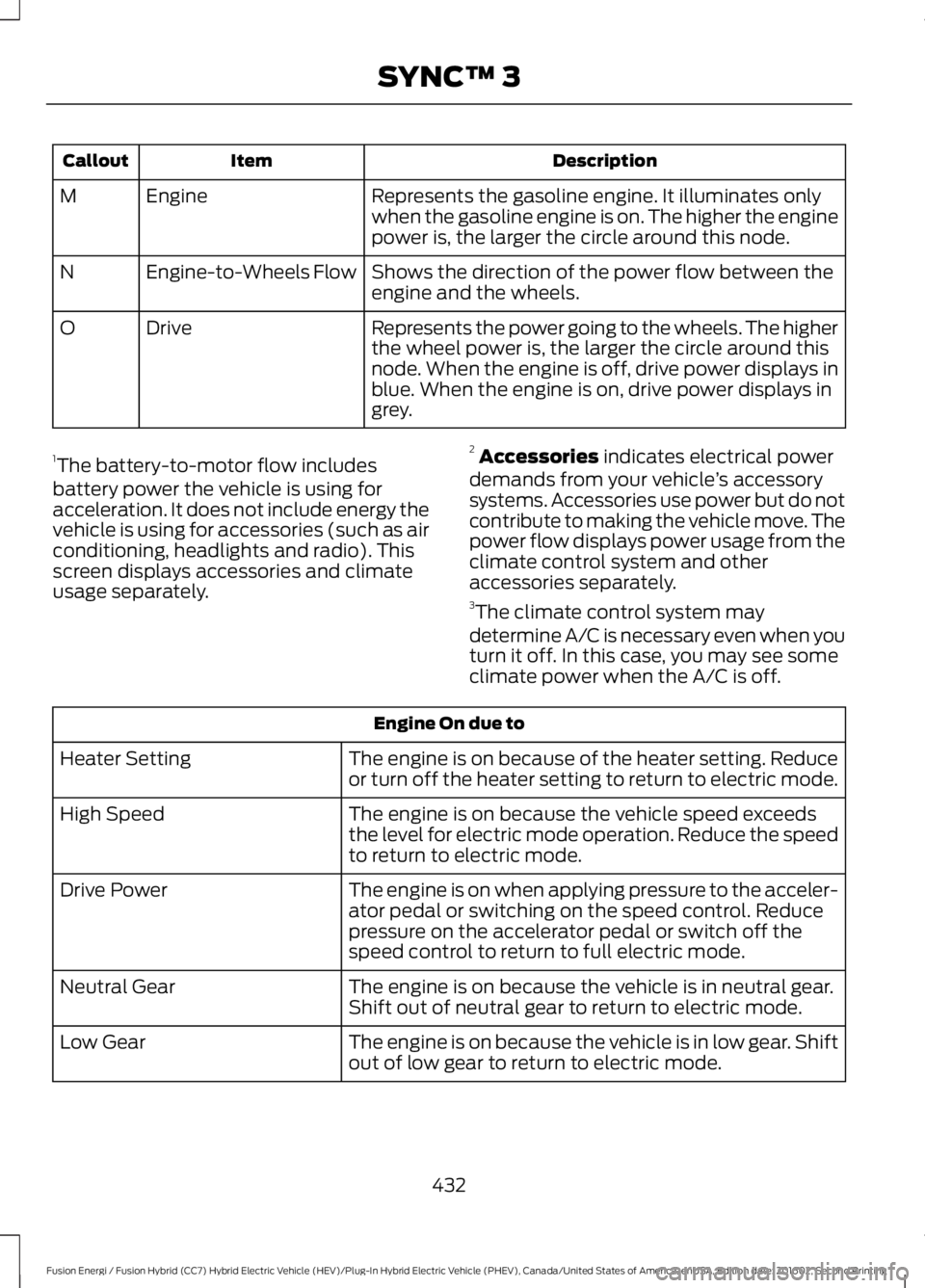
DescriptionItemCallout
Represents the gasoline engine. It illuminates onlywhen the gasoline engine is on. The higher the enginepower is, the larger the circle around this node.
EngineM
Shows the direction of the power flow between theengine and the wheels.Engine-to-Wheels FlowN
Represents the power going to the wheels. The higherthe wheel power is, the larger the circle around thisnode. When the engine is off, drive power displays inblue. When the engine is on, drive power displays ingrey.
DriveO
1The battery-to-motor flow includesbattery power the vehicle is using foracceleration. It does not include energy thevehicle is using for accessories (such as airconditioning, headlights and radio). Thisscreen displays accessories and climateusage separately.
2Accessories indicates electrical powerdemands from your vehicle’s accessorysystems. Accessories use power but do notcontribute to making the vehicle move. Thepower flow displays power usage from theclimate control system and otheraccessories separately.3The climate control system may
determine A/C is necessary even when youturn it off. In this case, you may see someclimate power when the A/C is off.
Engine On due to
The engine is on because of the heater setting. Reduceor turn off the heater setting to return to electric mode.Heater Setting
The engine is on because the vehicle speed exceedsthe level for electric mode operation. Reduce the speedto return to electric mode.
High Speed
The engine is on when applying pressure to the acceler-ator pedal or switching on the speed control. Reducepressure on the accelerator pedal or switch off thespeed control to return to full electric mode.
Drive Power
The engine is on because the vehicle is in neutral gear.Shift out of neutral gear to return to electric mode.Neutral Gear
The engine is on because the vehicle is in low gear. Shiftout of low gear to return to electric mode.Low Gear
432
Fusion Energi / Fusion Hybrid (CC7) Hybrid Electric Vehicle (HEV)/Plug-In Hybrid Electric Vehicle (PHEV), Canada/United States of America, enUSA, Edition date: 201602, Second Printing
SYNC™ 3
Page 436 of 526
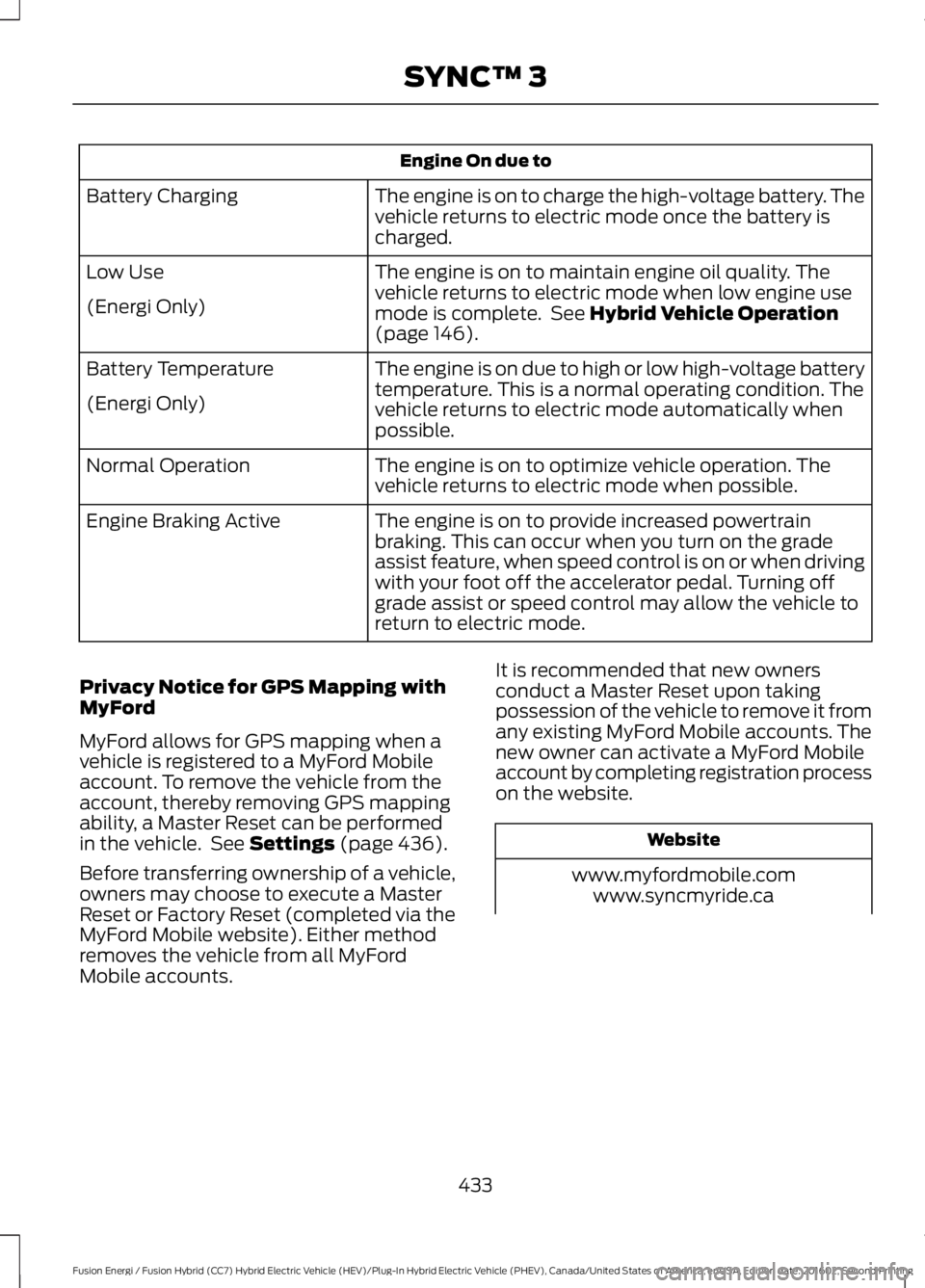
Engine On due to
The engine is on to charge the high-voltage battery. Thevehicle returns to electric mode once the battery ischarged.
Battery Charging
The engine is on to maintain engine oil quality. Thevehicle returns to electric mode when low engine usemode is complete. See Hybrid Vehicle Operation(page 146).
Low Use
(Energi Only)
The engine is on due to high or low high-voltage batterytemperature. This is a normal operating condition. Thevehicle returns to electric mode automatically whenpossible.
Battery Temperature
(Energi Only)
The engine is on to optimize vehicle operation. Thevehicle returns to electric mode when possible.Normal Operation
The engine is on to provide increased powertrainbraking. This can occur when you turn on the gradeassist feature, when speed control is on or when drivingwith your foot off the accelerator pedal. Turning offgrade assist or speed control may allow the vehicle toreturn to electric mode.
Engine Braking Active
Privacy Notice for GPS Mapping withMyFord
MyFord allows for GPS mapping when avehicle is registered to a MyFord Mobileaccount. To remove the vehicle from theaccount, thereby removing GPS mappingability, a Master Reset can be performedin the vehicle. See Settings (page 436).
Before transferring ownership of a vehicle,owners may choose to execute a MasterReset or Factory Reset (completed via theMyFord Mobile website). Either methodremoves the vehicle from all MyFordMobile accounts.
It is recommended that new ownersconduct a Master Reset upon takingpossession of the vehicle to remove it fromany existing MyFord Mobile accounts. Thenew owner can activate a MyFord Mobileaccount by completing registration processon the website.
Website
www.myfordmobile.comwww.syncmyride.ca
433
Fusion Energi / Fusion Hybrid (CC7) Hybrid Electric Vehicle (HEV)/Plug-In Hybrid Electric Vehicle (PHEV), Canada/United States of America, enUSA, Edition date: 201602, Second Printing
SYNC™ 3
Page 440 of 526
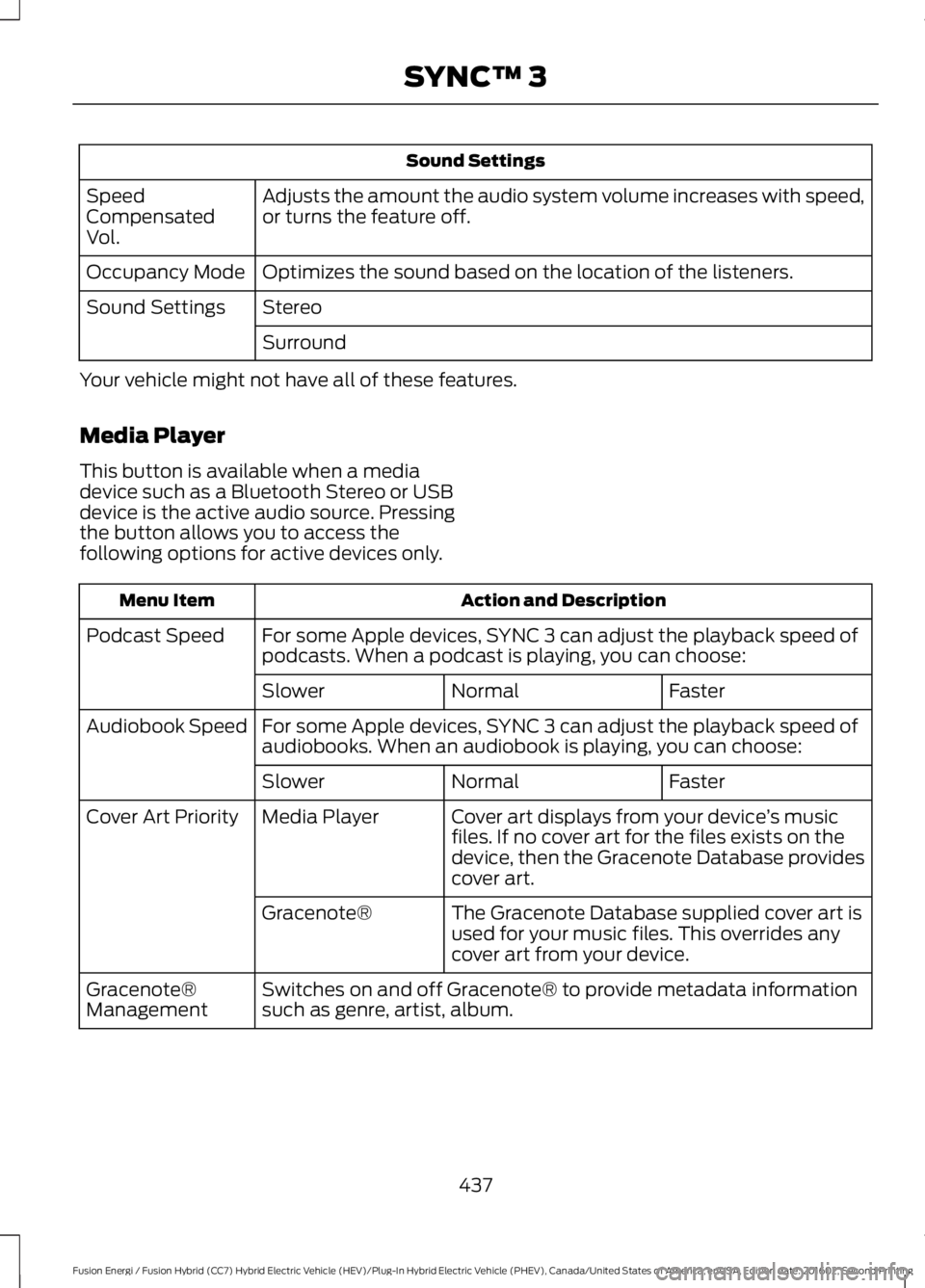
Sound Settings
Adjusts the amount the audio system volume increases with speed,or turns the feature off.SpeedCompensatedVol.
Optimizes the sound based on the location of the listeners.Occupancy Mode
StereoSound Settings
Surround
Your vehicle might not have all of these features.
Media Player
This button is available when a mediadevice such as a Bluetooth Stereo or USBdevice is the active audio source. Pressingthe button allows you to access thefollowing options for active devices only.
Action and DescriptionMenu Item
For some Apple devices, SYNC 3 can adjust the playback speed ofpodcasts. When a podcast is playing, you can choose:Podcast Speed
FasterNormalSlower
For some Apple devices, SYNC 3 can adjust the playback speed ofaudiobooks. When an audiobook is playing, you can choose:Audiobook Speed
FasterNormalSlower
Cover art displays from your device’s musicfiles. If no cover art for the files exists on thedevice, then the Gracenote Database providescover art.
Media PlayerCover Art Priority
The Gracenote Database supplied cover art isused for your music files. This overrides anycover art from your device.
Gracenote®
Switches on and off Gracenote® to provide metadata informationsuch as genre, artist, album.Gracenote®Management
437
Fusion Energi / Fusion Hybrid (CC7) Hybrid Electric Vehicle (HEV)/Plug-In Hybrid Electric Vehicle (PHEV), Canada/United States of America, enUSA, Edition date: 201602, Second Printing
SYNC™ 3
Page 441 of 526
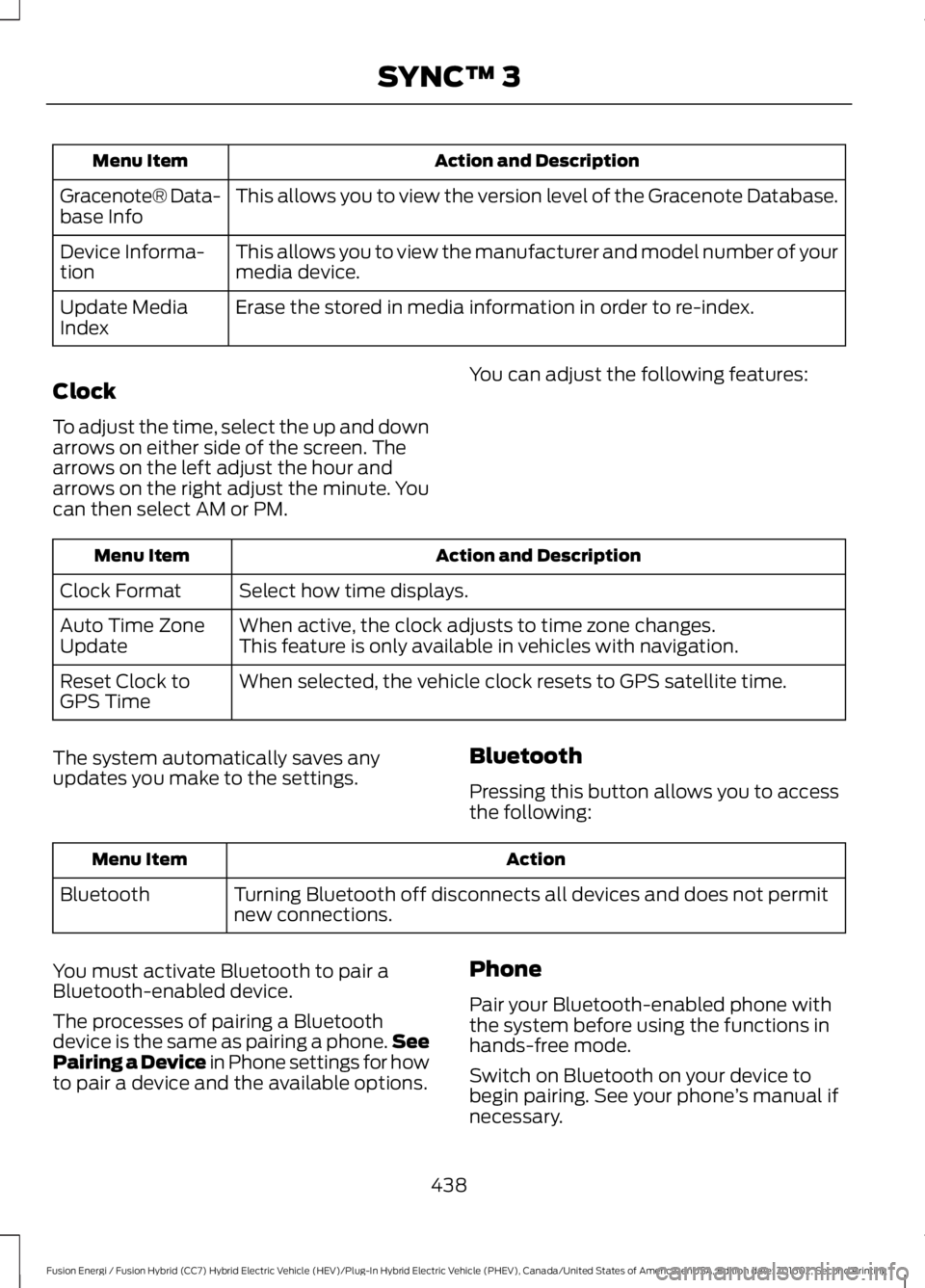
Action and DescriptionMenu Item
This allows you to view the version level of the Gracenote Database.Gracenote® Data-base Info
This allows you to view the manufacturer and model number of yourmedia device.Device Informa-tion
Erase the stored in media information in order to re-index.Update MediaIndex
Clock
To adjust the time, select the up and downarrows on either side of the screen. Thearrows on the left adjust the hour andarrows on the right adjust the minute. Youcan then select AM or PM.
You can adjust the following features:
Action and DescriptionMenu Item
Select how time displays.Clock Format
When active, the clock adjusts to time zone changes.Auto Time ZoneUpdateThis feature is only available in vehicles with navigation.
When selected, the vehicle clock resets to GPS satellite time.Reset Clock toGPS Time
The system automatically saves anyupdates you make to the settings.Bluetooth
Pressing this button allows you to accessthe following:
ActionMenu Item
Turning Bluetooth off disconnects all devices and does not permitnew connections.Bluetooth
You must activate Bluetooth to pair aBluetooth-enabled device.
The processes of pairing a Bluetoothdevice is the same as pairing a phone.SeePairing a Device in Phone settings for howto pair a device and the available options.
Phone
Pair your Bluetooth-enabled phone withthe system before using the functions inhands-free mode.
Switch on Bluetooth on your device tobegin pairing. See your phone’s manual ifnecessary.
438
Fusion Energi / Fusion Hybrid (CC7) Hybrid Electric Vehicle (HEV)/Plug-In Hybrid Electric Vehicle (PHEV), Canada/United States of America, enUSA, Edition date: 201602, Second Printing
SYNC™ 3
Page 442 of 526
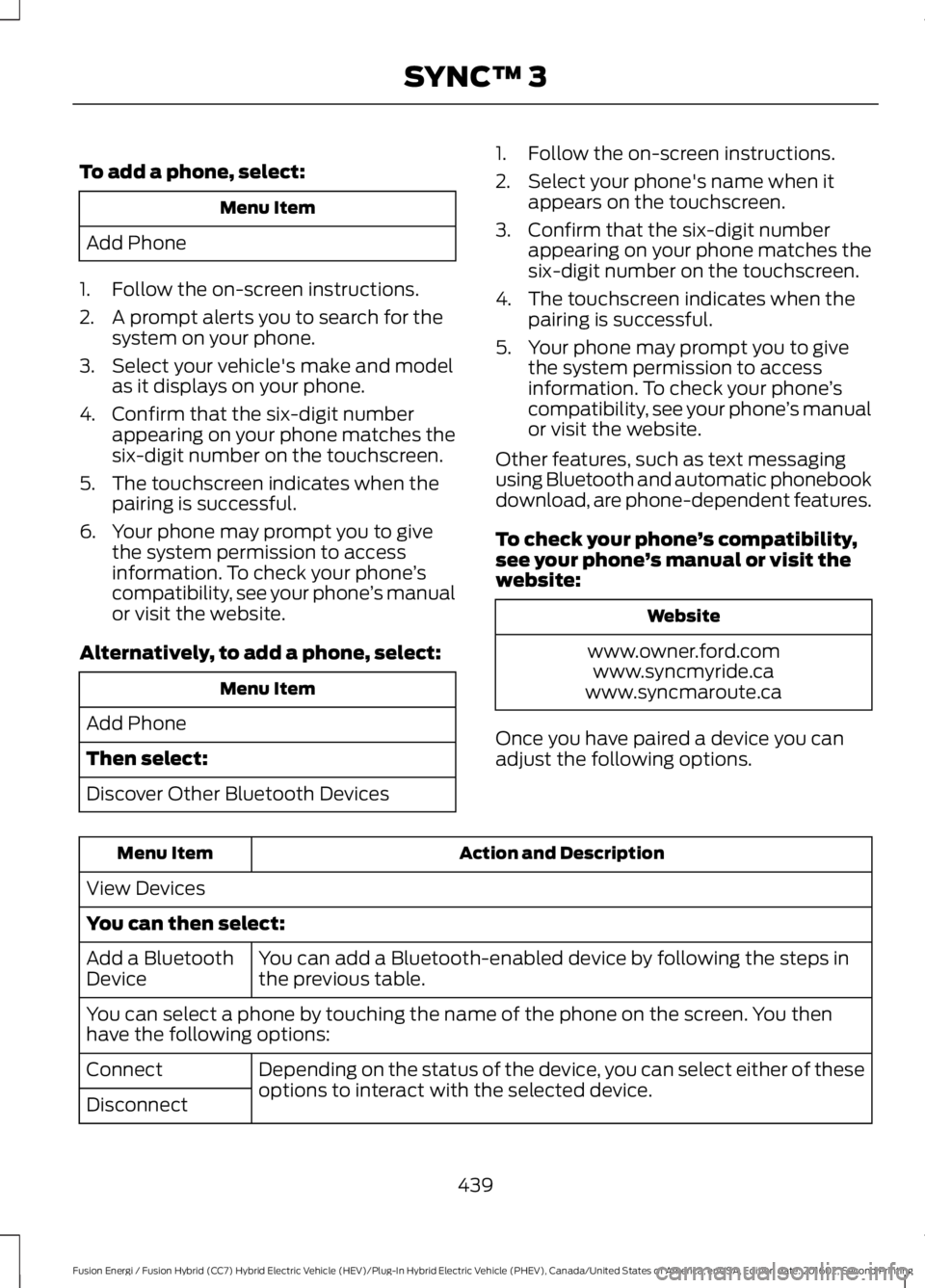
To add a phone, select:
Menu Item
Add Phone
1. Follow the on-screen instructions.
2. A prompt alerts you to search for thesystem on your phone.
3. Select your vehicle's make and modelas it displays on your phone.
4. Confirm that the six-digit numberappearing on your phone matches thesix-digit number on the touchscreen.
5. The touchscreen indicates when thepairing is successful.
6. Your phone may prompt you to givethe system permission to accessinformation. To check your phone’scompatibility, see your phone’s manualor visit the website.
Alternatively, to add a phone, select:
Menu Item
Add Phone
Then select:
Discover Other Bluetooth Devices
1. Follow the on-screen instructions.
2. Select your phone's name when itappears on the touchscreen.
3. Confirm that the six-digit numberappearing on your phone matches thesix-digit number on the touchscreen.
4. The touchscreen indicates when thepairing is successful.
5. Your phone may prompt you to givethe system permission to accessinformation. To check your phone’scompatibility, see your phone’s manualor visit the website.
Other features, such as text messagingusing Bluetooth and automatic phonebookdownload, are phone-dependent features.
To check your phone’s compatibility,see your phone’s manual or visit thewebsite:
Website
www.owner.ford.comwww.syncmyride.cawww.syncmaroute.ca
Once you have paired a device you canadjust the following options.
Action and DescriptionMenu Item
View Devices
You can then select:
You can add a Bluetooth-enabled device by following the steps inthe previous table.Add a BluetoothDevice
You can select a phone by touching the name of the phone on the screen. You thenhave the following options:
Depending on the status of the device, you can select either of theseoptions to interact with the selected device.Connect
Disconnect
439
Fusion Energi / Fusion Hybrid (CC7) Hybrid Electric Vehicle (HEV)/Plug-In Hybrid Electric Vehicle (PHEV), Canada/United States of America, enUSA, Edition date: 201602, Second Printing
SYNC™ 3