ECO mode FORD FUSION ENERGI 2017 Owners Manual
[x] Cancel search | Manufacturer: FORD, Model Year: 2017, Model line: FUSION ENERGI, Model: FORD FUSION ENERGI 2017Pages: 526, PDF Size: 7.89 MB
Page 445 of 526
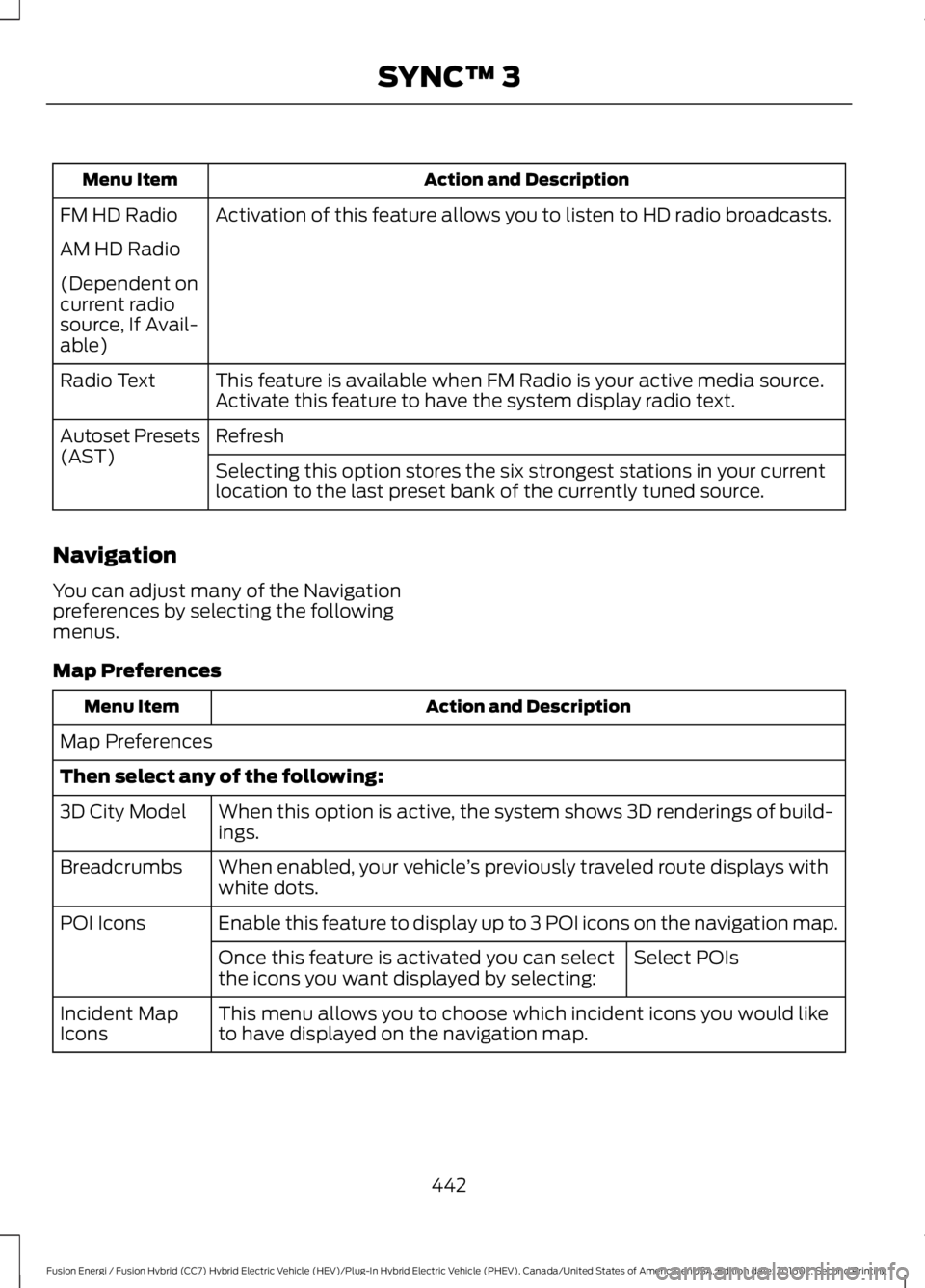
Action and DescriptionMenu Item
Activation of this feature allows you to listen to HD radio broadcasts.FM HD Radio
AM HD Radio
(Dependent oncurrent radiosource, If Avail-able)
This feature is available when FM Radio is your active media source.Activate this feature to have the system display radio text.Radio Text
RefreshAutoset Presets(AST)Selecting this option stores the six strongest stations in your currentlocation to the last preset bank of the currently tuned source.
Navigation
You can adjust many of the Navigationpreferences by selecting the followingmenus.
Map Preferences
Action and DescriptionMenu Item
Map Preferences
Then select any of the following:
When this option is active, the system shows 3D renderings of build-ings.3D City Model
When enabled, your vehicle’s previously traveled route displays withwhite dots.Breadcrumbs
Enable this feature to display up to 3 POI icons on the navigation map.POI Icons
Select POIsOnce this feature is activated you can selectthe icons you want displayed by selecting:
This menu allows you to choose which incident icons you would liketo have displayed on the navigation map.Incident MapIcons
442
Fusion Energi / Fusion Hybrid (CC7) Hybrid Electric Vehicle (HEV)/Plug-In Hybrid Electric Vehicle (PHEV), Canada/United States of America, enUSA, Edition date: 201602, Second Printing
SYNC™ 3
Page 450 of 526
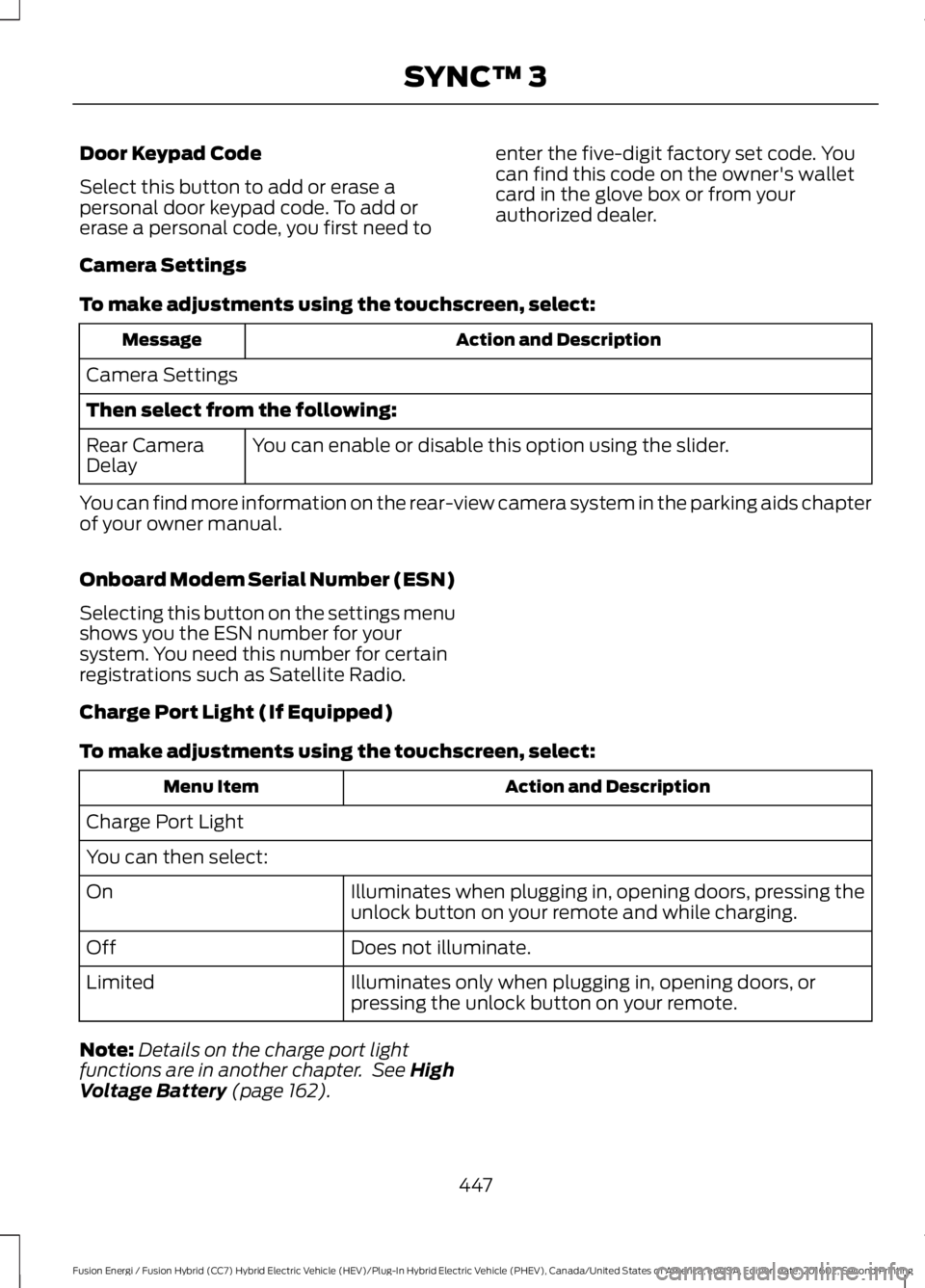
Door Keypad Code
Select this button to add or erase apersonal door keypad code. To add orerase a personal code, you first need to
enter the five-digit factory set code. Youcan find this code on the owner's walletcard in the glove box or from yourauthorized dealer.
Camera Settings
To make adjustments using the touchscreen, select:
Action and DescriptionMessage
Camera Settings
Then select from the following:
You can enable or disable this option using the slider.Rear CameraDelay
You can find more information on the rear-view camera system in the parking aids chapterof your owner manual.
Onboard Modem Serial Number (ESN)
Selecting this button on the settings menushows you the ESN number for yoursystem. You need this number for certainregistrations such as Satellite Radio.
Charge Port Light (If Equipped)
To make adjustments using the touchscreen, select:
Action and DescriptionMenu Item
Charge Port Light
You can then select:
Illuminates when plugging in, opening doors, pressing theunlock button on your remote and while charging.On
Does not illuminate.Off
Illuminates only when plugging in, opening doors, orpressing the unlock button on your remote.Limited
Note:Details on the charge port lightfunctions are in another chapter. See HighVoltage Battery (page 162).
447
Fusion Energi / Fusion Hybrid (CC7) Hybrid Electric Vehicle (HEV)/Plug-In Hybrid Electric Vehicle (PHEV), Canada/United States of America, enUSA, Edition date: 201602, Second Printing
SYNC™ 3
Page 451 of 526
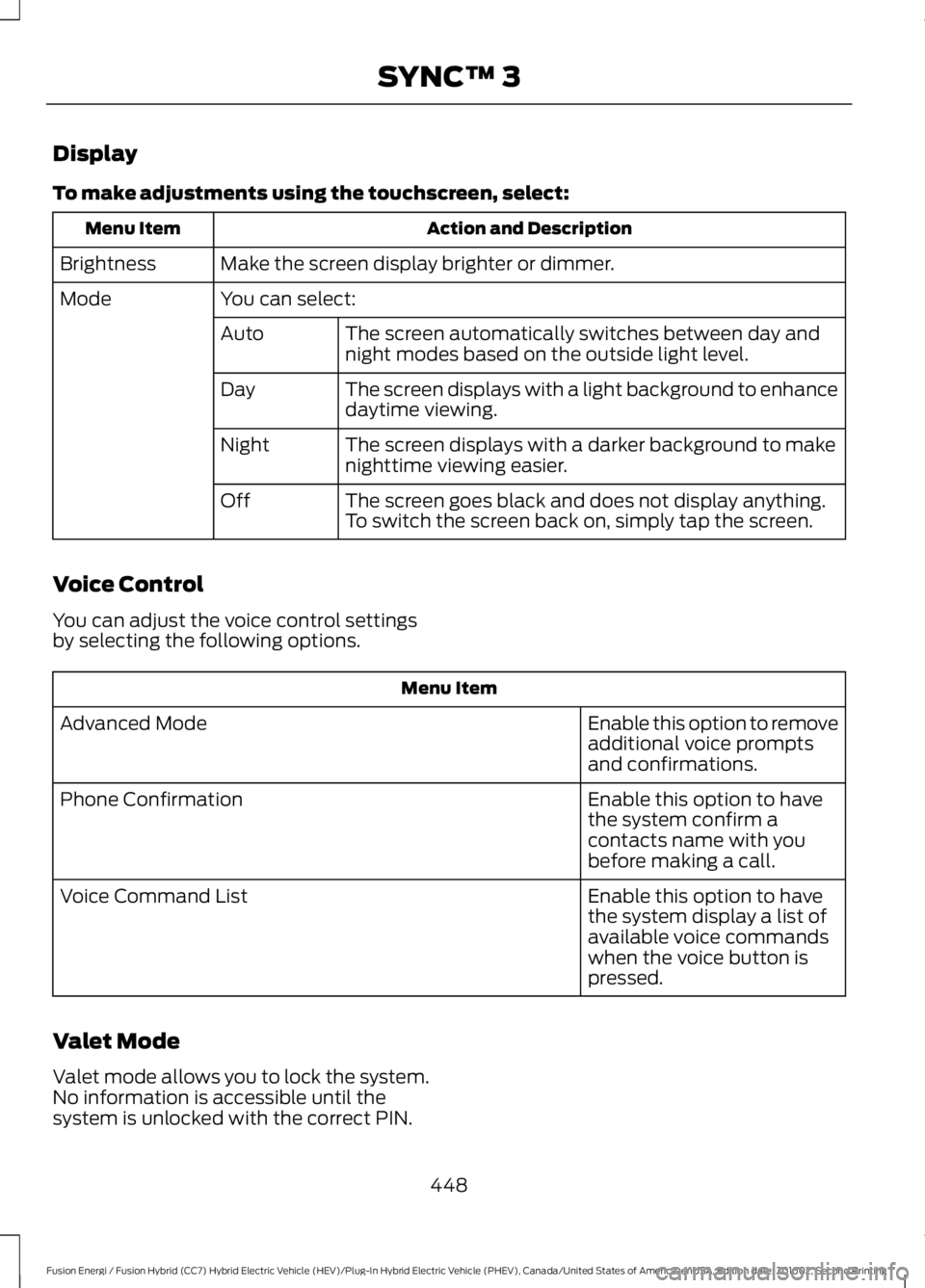
Display
To make adjustments using the touchscreen, select:
Action and DescriptionMenu Item
Make the screen display brighter or dimmer.Brightness
You can select:Mode
The screen automatically switches between day andnight modes based on the outside light level.Auto
The screen displays with a light background to enhancedaytime viewing.Day
The screen displays with a darker background to makenighttime viewing easier.Night
The screen goes black and does not display anything.To switch the screen back on, simply tap the screen.Off
Voice Control
You can adjust the voice control settingsby selecting the following options.
Menu Item
Enable this option to removeadditional voice promptsand confirmations.
Advanced Mode
Enable this option to havethe system confirm acontacts name with youbefore making a call.
Phone Confirmation
Enable this option to havethe system display a list ofavailable voice commandswhen the voice button ispressed.
Voice Command List
Valet Mode
Valet mode allows you to lock the system.No information is accessible until thesystem is unlocked with the correct PIN.
448
Fusion Energi / Fusion Hybrid (CC7) Hybrid Electric Vehicle (HEV)/Plug-In Hybrid Electric Vehicle (PHEV), Canada/United States of America, enUSA, Edition date: 201602, Second Printing
SYNC™ 3
Page 452 of 526
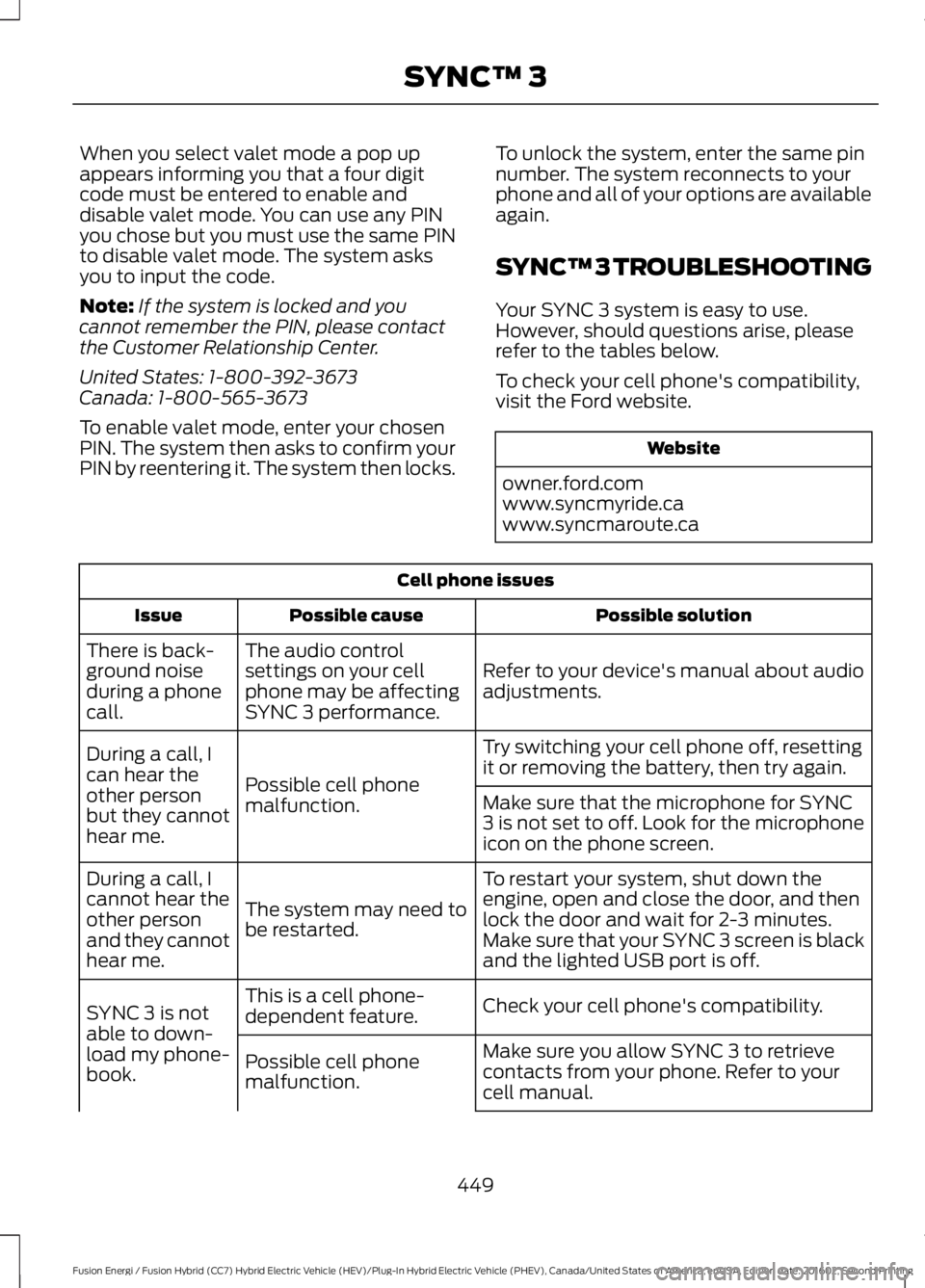
When you select valet mode a pop upappears informing you that a four digitcode must be entered to enable anddisable valet mode. You can use any PINyou chose but you must use the same PINto disable valet mode. The system asksyou to input the code.
Note:If the system is locked and youcannot remember the PIN, please contactthe Customer Relationship Center.
United States: 1-800-392-3673Canada: 1-800-565-3673
To enable valet mode, enter your chosenPIN. The system then asks to confirm yourPIN by reentering it. The system then locks.
To unlock the system, enter the same pinnumber. The system reconnects to yourphone and all of your options are availableagain.
SYNC™ 3 TROUBLESHOOTING
Your SYNC 3 system is easy to use.However, should questions arise, pleaserefer to the tables below.
To check your cell phone's compatibility,visit the Ford website.
Website
owner.ford.comwww.syncmyride.cawww.syncmaroute.ca
Cell phone issues
Possible solutionPossible causeIssue
Refer to your device's manual about audioadjustments.
The audio controlsettings on your cellphone may be affectingSYNC 3 performance.
There is back-ground noiseduring a phonecall.
Try switching your cell phone off, resettingit or removing the battery, then try again.Possible cell phonemalfunction.
During a call, Ican hear theother personbut they cannothear me.
Make sure that the microphone for SYNC3 is not set to off. Look for the microphoneicon on the phone screen.
To restart your system, shut down theengine, open and close the door, and thenlock the door and wait for 2-3 minutes.Make sure that your SYNC 3 screen is blackand the lighted USB port is off.
The system may need tobe restarted.
During a call, Icannot hear theother personand they cannothear me.
Check your cell phone's compatibility.This is a cell phone-dependent feature.SYNC 3 is notable to down-load my phone-book.
Make sure you allow SYNC 3 to retrievecontacts from your phone. Refer to yourcell manual.
Possible cell phonemalfunction.
449
Fusion Energi / Fusion Hybrid (CC7) Hybrid Electric Vehicle (HEV)/Plug-In Hybrid Electric Vehicle (PHEV), Canada/United States of America, enUSA, Edition date: 201602, Second Printing
SYNC™ 3
Page 454 of 526
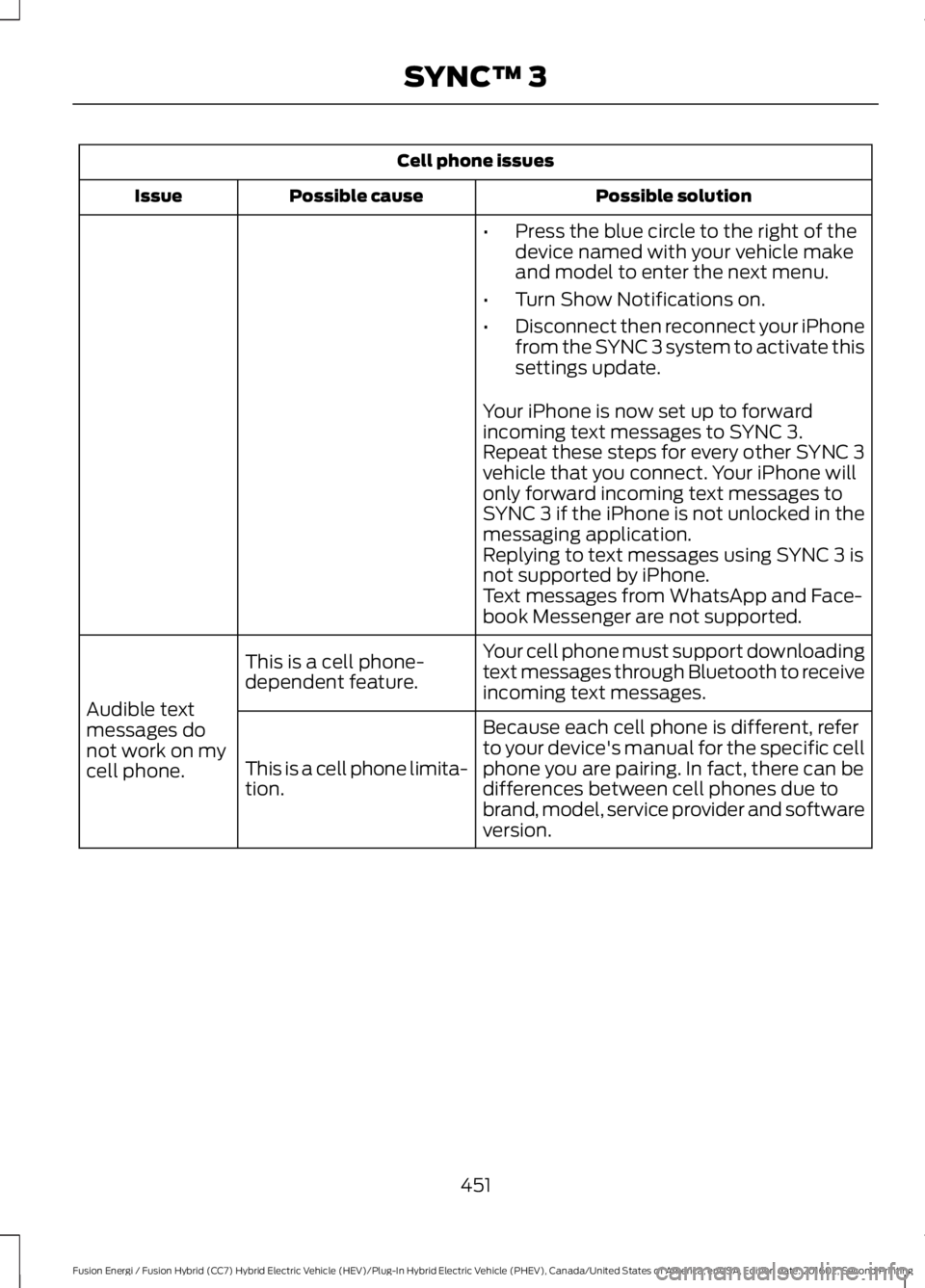
Cell phone issues
Possible solutionPossible causeIssue
•Press the blue circle to the right of thedevice named with your vehicle makeand model to enter the next menu.
•Turn Show Notifications on.
•Disconnect then reconnect your iPhonefrom the SYNC 3 system to activate thissettings update.
Your iPhone is now set up to forwardincoming text messages to SYNC 3.Repeat these steps for every other SYNC 3vehicle that you connect. Your iPhone willonly forward incoming text messages toSYNC 3 if the iPhone is not unlocked in themessaging application.Replying to text messages using SYNC 3 isnot supported by iPhone.Text messages from WhatsApp and Face-book Messenger are not supported.
Your cell phone must support downloadingtext messages through Bluetooth to receiveincoming text messages.
This is a cell phone-dependent feature.
Audible textmessages donot work on mycell phone.
Because each cell phone is different, referto your device's manual for the specific cellphone you are pairing. In fact, there can bedifferences between cell phones due tobrand, model, service provider and softwareversion.
This is a cell phone limita-tion.
451
Fusion Energi / Fusion Hybrid (CC7) Hybrid Electric Vehicle (HEV)/Plug-In Hybrid Electric Vehicle (PHEV), Canada/United States of America, enUSA, Edition date: 201602, Second Printing
SYNC™ 3
Page 474 of 526
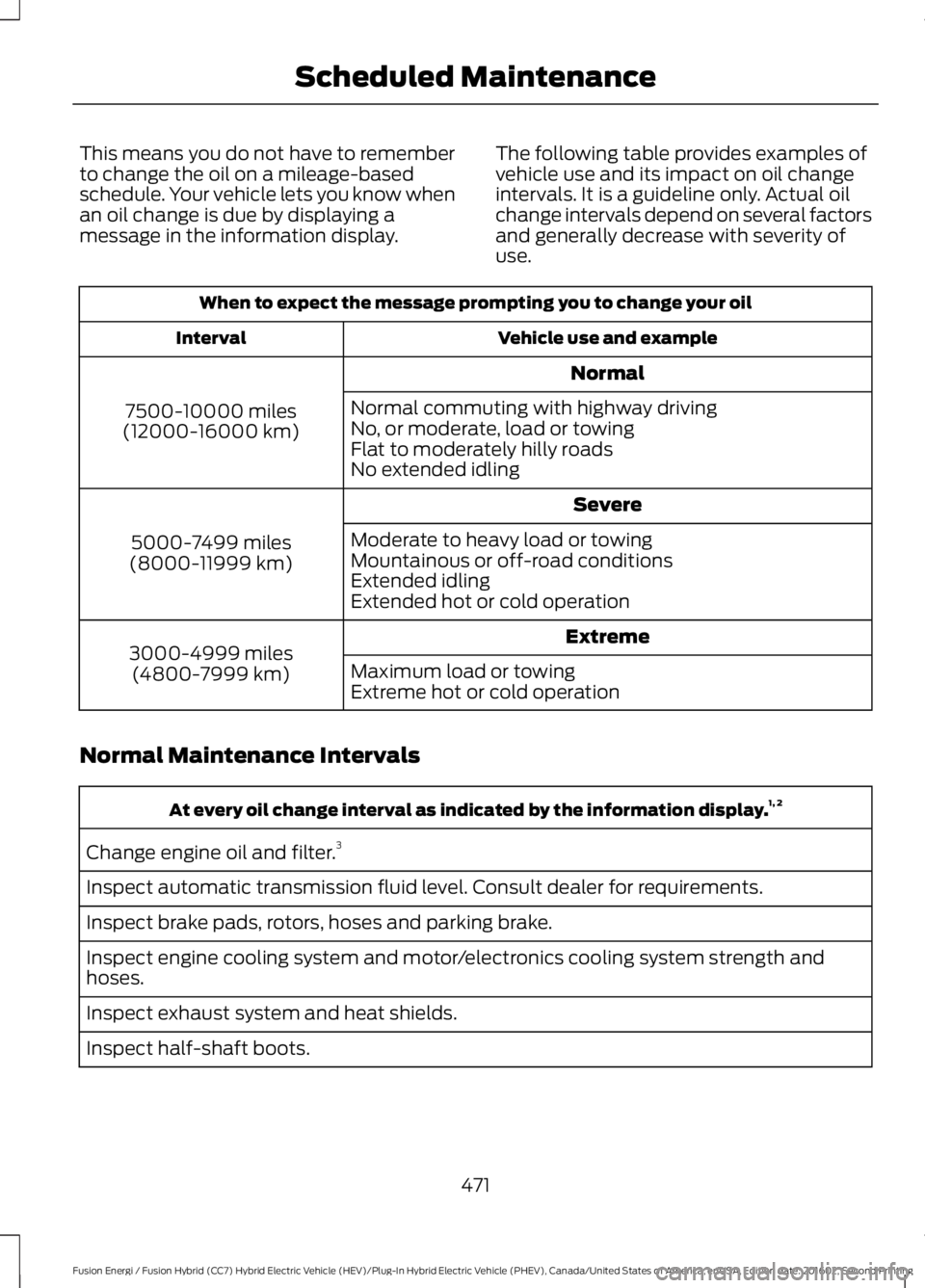
This means you do not have to rememberto change the oil on a mileage-basedschedule. Your vehicle lets you know whenan oil change is due by displaying amessage in the information display.
The following table provides examples ofvehicle use and its impact on oil changeintervals. It is a guideline only. Actual oilchange intervals depend on several factorsand generally decrease with severity ofuse.
When to expect the message prompting you to change your oil
Vehicle use and exampleInterval
Normal
7500-10000 miles(12000-16000 km)
Normal commuting with highway drivingNo, or moderate, load or towingFlat to moderately hilly roadsNo extended idling
Severe
5000-7499 miles(8000-11999 km)
Moderate to heavy load or towingMountainous or off-road conditionsExtended idlingExtended hot or cold operation
Extreme3000-4999 miles(4800-7999 km)Maximum load or towingExtreme hot or cold operation
Normal Maintenance Intervals
At every oil change interval as indicated by the information display.1, 2
Change engine oil and filter.3
Inspect automatic transmission fluid level. Consult dealer for requirements.
Inspect brake pads, rotors, hoses and parking brake.
Inspect engine cooling system and motor/electronics cooling system strength andhoses.
Inspect exhaust system and heat shields.
Inspect half-shaft boots.
471
Fusion Energi / Fusion Hybrid (CC7) Hybrid Electric Vehicle (HEV)/Plug-In Hybrid Electric Vehicle (PHEV), Canada/United States of America, enUSA, Edition date: 201602, Second Printing
Scheduled Maintenance
Page 516 of 526
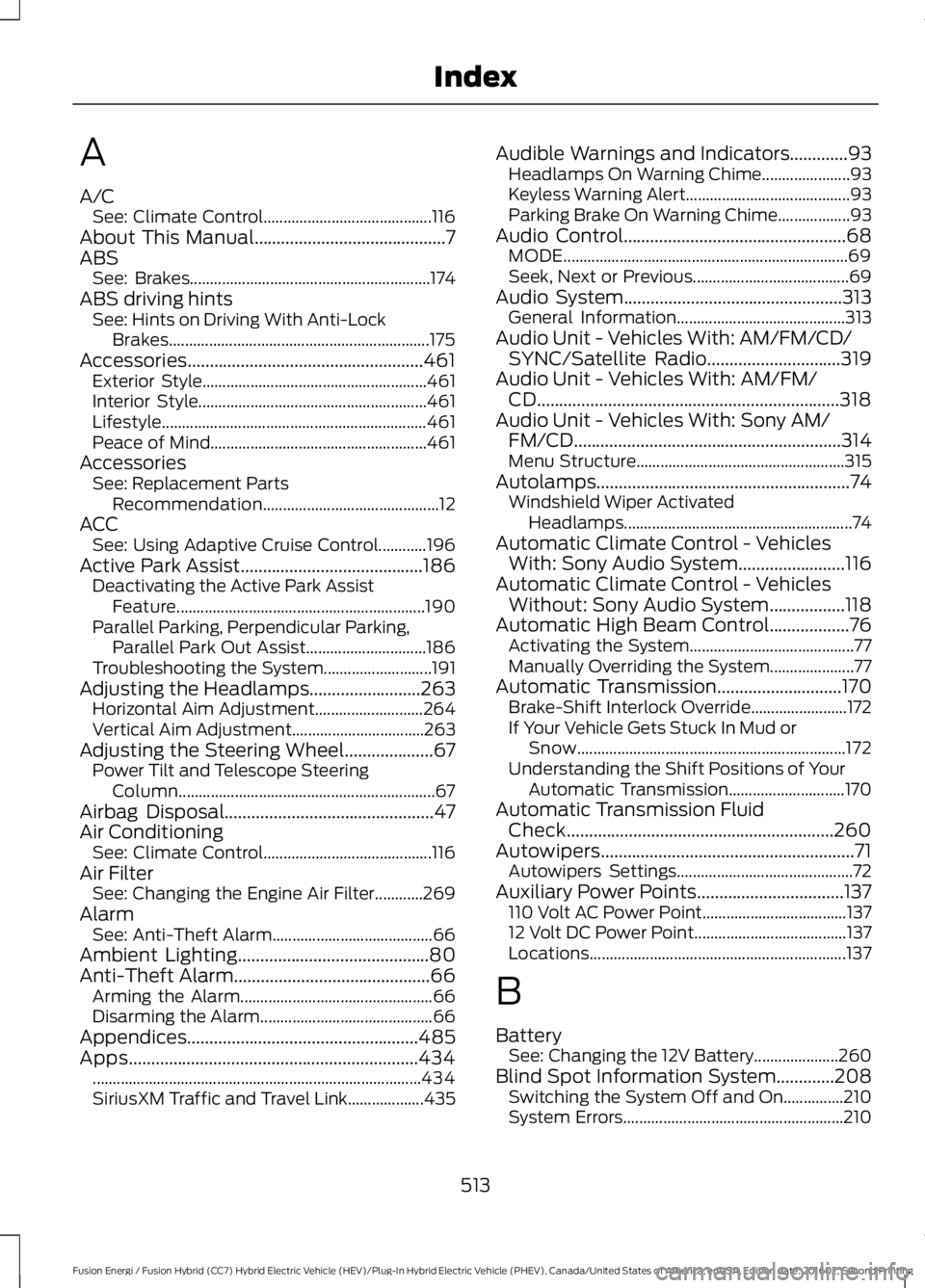
A
A/CSee: Climate Control..........................................116About This Manual...........................................7ABSSee: Brakes............................................................174ABS driving hintsSee: Hints on Driving With Anti-LockBrakes.................................................................175Accessories.....................................................461Exterior Style........................................................461Interior Style.........................................................461Lifestyle..................................................................461Peace of Mind......................................................461AccessoriesSee: Replacement PartsRecommendation............................................12ACCSee: Using Adaptive Cruise Control............196Active Park Assist.........................................186Deactivating the Active Park AssistFeature..............................................................190Parallel Parking, Perpendicular Parking,Parallel Park Out Assist..............................186Troubleshooting the System...........................191Adjusting the Headlamps.........................263Horizontal Aim Adjustment...........................264Vertical Aim Adjustment.................................263Adjusting the Steering Wheel....................67Power Tilt and Telescope SteeringColumn................................................................67Airbag Disposal...............................................47Air ConditioningSee: Climate Control..........................................116Air FilterSee: Changing the Engine Air Filter............269AlarmSee: Anti-Theft Alarm........................................66Ambient Lighting...........................................80Anti-Theft Alarm............................................66Arming the Alarm................................................66Disarming the Alarm...........................................66Appendices....................................................485Apps.................................................................434..................................................................................434SiriusXM Traffic and Travel Link...................435
Audible Warnings and Indicators.............93Headlamps On Warning Chime......................93Keyless Warning Alert.........................................93Parking Brake On Warning Chime..................93Audio Control..................................................68MODE.......................................................................69Seek, Next or Previous.......................................69Audio System.................................................313General Information..........................................313Audio Unit - Vehicles With: AM/FM/CD/SYNC/Satellite Radio..............................319Audio Unit - Vehicles With: AM/FM/CD....................................................................318Audio Unit - Vehicles With: Sony AM/FM/CD............................................................314Menu Structure....................................................315Autolamps.........................................................74Windshield Wiper ActivatedHeadlamps.........................................................74Automatic Climate Control - VehiclesWith: Sony Audio System........................116Automatic Climate Control - VehiclesWithout: Sony Audio System.................118Automatic High Beam Control..................76Activating the System.........................................77Manually Overriding the System.....................77Automatic Transmission............................170Brake-Shift Interlock Override........................172If Your Vehicle Gets Stuck In Mud orSnow...................................................................172Understanding the Shift Positions of YourAutomatic Transmission.............................170Automatic Transmission FluidCheck............................................................260Autowipers.........................................................71Autowipers Settings............................................72Auxiliary Power Points.................................137110 Volt AC Power Point....................................13712 Volt DC Power Point......................................137Locations................................................................137
B
BatterySee: Changing the 12V Battery.....................260Blind Spot Information System.............208Switching the System Off and On...............210System Errors.......................................................210
513
Fusion Energi / Fusion Hybrid (CC7) Hybrid Electric Vehicle (HEV)/Plug-In Hybrid Electric Vehicle (PHEV), Canada/United States of America, enUSA, Edition date: 201602, Second Printing
Index
Page 519 of 526
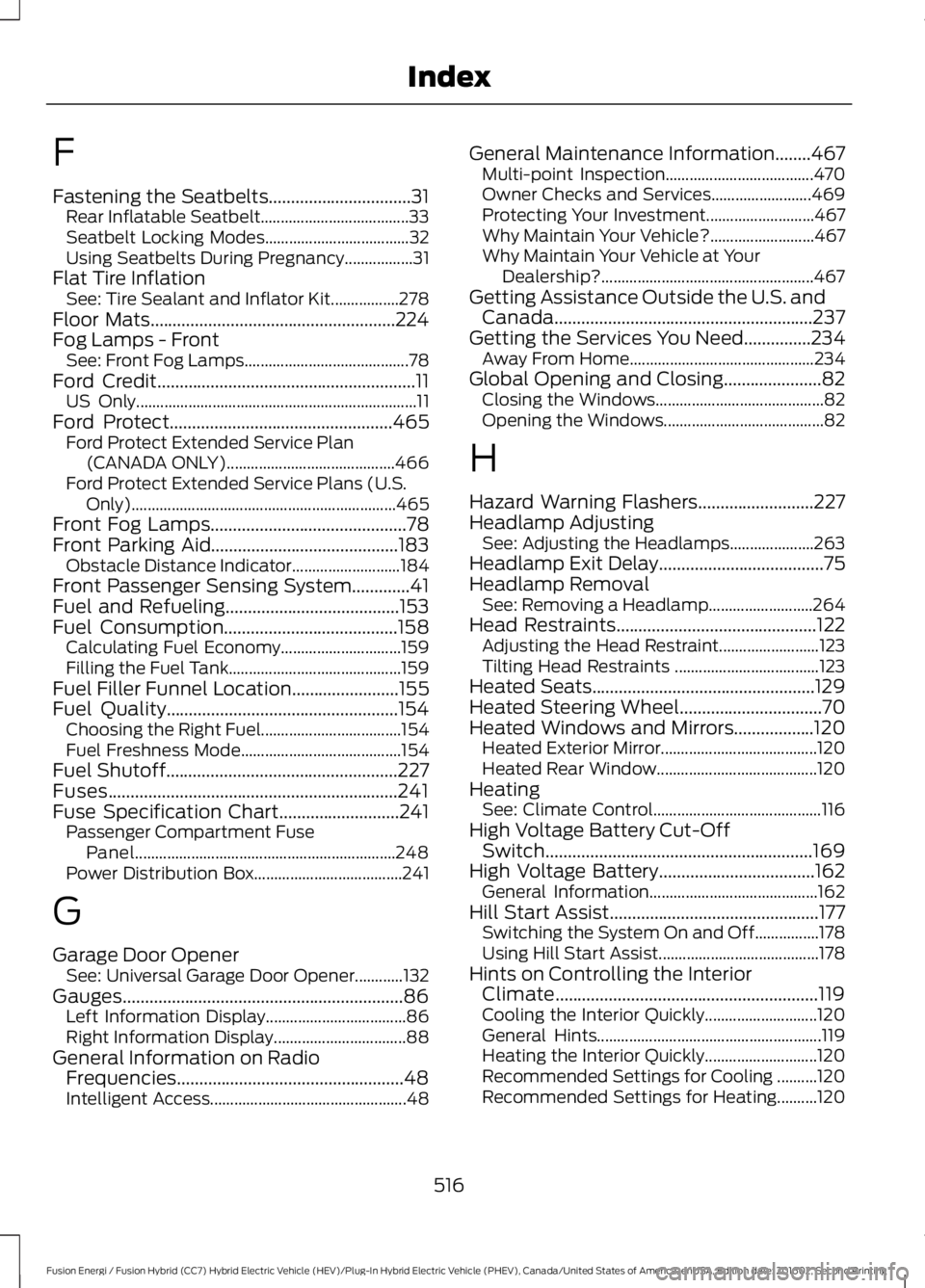
F
Fastening the Seatbelts................................31Rear Inflatable Seatbelt.....................................33Seatbelt Locking Modes....................................32Using Seatbelts During Pregnancy.................31Flat Tire InflationSee: Tire Sealant and Inflator Kit.................278Floor Mats.......................................................224Fog Lamps - FrontSee: Front Fog Lamps.........................................78Ford Credit..........................................................11US Only......................................................................11Ford Protect..................................................465Ford Protect Extended Service Plan(CANADA ONLY)..........................................466Ford Protect Extended Service Plans (U.S.Only)..................................................................465Front Fog Lamps............................................78Front Parking Aid..........................................183Obstacle Distance Indicator...........................184Front Passenger Sensing System.............41Fuel and Refueling.......................................153Fuel Consumption.......................................158Calculating Fuel Economy..............................159Filling the Fuel Tank...........................................159Fuel Filler Funnel Location........................155Fuel Quality....................................................154Choosing the Right Fuel...................................154Fuel Freshness Mode........................................154Fuel Shutoff....................................................227Fuses.................................................................241Fuse Specification Chart...........................241Passenger Compartment FusePanel.................................................................248Power Distribution Box.....................................241
G
Garage Door OpenerSee: Universal Garage Door Opener............132Gauges...............................................................86Left Information Display...................................86Right Information Display.................................88General Information on RadioFrequencies...................................................48Intelligent Access.................................................48
General Maintenance Information........467Multi-point Inspection.....................................470Owner Checks and Services.........................469Protecting Your Investment...........................467Why Maintain Your Vehicle?..........................467Why Maintain Your Vehicle at YourDealership?.....................................................467Getting Assistance Outside the U.S. andCanada..........................................................237Getting the Services You Need...............234Away From Home..............................................234Global Opening and Closing......................82Closing the Windows..........................................82Opening the Windows........................................82
H
Hazard Warning Flashers..........................227Headlamp AdjustingSee: Adjusting the Headlamps.....................263Headlamp Exit Delay.....................................75Headlamp RemovalSee: Removing a Headlamp..........................264Head Restraints.............................................122Adjusting the Head Restraint.........................123Tilting Head Restraints ....................................123Heated Seats..................................................129Heated Steering Wheel................................70Heated Windows and Mirrors..................120Heated Exterior Mirror.......................................120Heated Rear Window........................................120HeatingSee: Climate Control..........................................116High Voltage Battery Cut-OffSwitch............................................................169High Voltage Battery...................................162General Information..........................................162Hill Start Assist...............................................177Switching the System On and Off................178Using Hill Start Assist........................................178Hints on Controlling the InteriorClimate...........................................................119Cooling the Interior Quickly............................120General Hints........................................................119Heating the Interior Quickly............................120Recommended Settings for Cooling ..........120Recommended Settings for Heating..........120
516
Fusion Energi / Fusion Hybrid (CC7) Hybrid Electric Vehicle (HEV)/Plug-In Hybrid Electric Vehicle (PHEV), Canada/United States of America, enUSA, Edition date: 201602, Second Printing
Index
Page 520 of 526
Side Window Defogging in ColdWeather.............................................................120Hints on Driving With Anti-LockBrakes.............................................................175Home Screen.................................................378Hood LockSee: Opening and Closing the Hood..........252Hybrid Vehicle Frequently AskedQuestions......................................................151Hybrid Vehicle Operation..........................146Battery:....................................................................147Braking:...................................................................147Driving:....................................................................146Driving to Optimize Fuel Economy...............147Engine:.....................................................................147Starting:.................................................................146Stopping:...............................................................146Transmission Operation:.................................146
I
In California (U.S. Only).............................235Information Display Control.......................70Information Display Control Features..........70Information Displays....................................94General Information............................................94Information Messages................................103Active Park............................................................103Adaptive Cruise Control...................................104AdvanceTrac™....................................................104Airbag......................................................................105Alarm......................................................................105Automatic Engine Shutdown........................105Battery and Charging System (12volt)....................................................................106Battery and Charging System (HighVoltage)............................................................106Blind Spot Information and Cross TrafficAlert System....................................................107Doors and Locks..................................................107Driver Alert............................................................108Fuel..........................................................................108Hill Start Assist...................................................109Keys and Intelligent Access............................109Lane Keeping System........................................110Maintenance.........................................................110MyKey........................................................................111Park Aid....................................................................112
Park Brake...............................................................112Power Steering.....................................................113Pre-Collision Assist.............................................113Remote Start.........................................................113Seats.........................................................................113Starting System ...................................................114Tire Pressure Monitoring System...................114Traction Control...................................................114Transmission.........................................................115Installing Child Restraints.............................17Child Seats...............................................................17Using Lap and Shoulder Belts..........................18Using Lower Anchors and Tethers forCHildren (LATCH)............................................22Using Tether Straps.............................................24Instrument Cluster........................................86Instrument Lighting Dimmer......................75Vehicles With Front Fog Lamps......................75Vehicles Without Front Fog Lamps...............75Interior Lamps.................................................78Front Interior Lamp..............................................78Rear Interior Lamp..............................................80Interior Luggage CompartmentRelease............................................................63Interior Mirror...................................................84Auto-Dimming Mirror.........................................84Introduction.........................................................7
J
Jump Starting the Vehicle........................228Connecting the Jumper Cables....................228Jump Starting......................................................229Preparing Your Vehicle.....................................228Removing the Jumper Cables.......................229
K
Keyless Entry.....................................................61SECURICODE™ Keyless Entry Keypad.........61Keyless Starting.............................................141Ignition Modes......................................................141Keys and Remote Controls........................48
L
Lane Keeping System................................204Switching the System On and Off..............205
517
Fusion Energi / Fusion Hybrid (CC7) Hybrid Electric Vehicle (HEV)/Plug-In Hybrid Electric Vehicle (PHEV), Canada/United States of America, enUSA, Edition date: 201602, Second Printing
Index
Page 521 of 526
Lighting Control...............................................73Headlamp Flasher................................................74High Beams.............................................................73Lighting...............................................................73General Information............................................73Load Carrying..................................................217Load Limit........................................................217Special Loading Instructions for Owners ofPick-up Trucks and Utility-typeVehicles..............................................................221Vehicle Loading - with and without aTrailer..................................................................217Locking and Unlocking.................................58Activating Intelligent Access............................59Autolock..................................................................60Autounlock..............................................................61Battery Saver..........................................................61Illuminated Entry...................................................61Illuminated Exit......................................................61Power Door Locks................................................58Remote Control....................................................58Smart Unlocks for Intelligent AccessKeys......................................................................60
M
Maintenance..................................................252General Information..........................................252Manual Seats.................................................124Media Hub......................................................326Memory Function.........................................126Easy Entry and Exit Feature............................128Linking a PreSet Position to your RemoteControl or Intelligent Access KeyFob.......................................................................127Saving a PreSet Position..................................127Message CenterSee: Information Displays.................................94MirrorsSee: Heated Windows and Mirrors..............120See: Windows and Mirrors.................................81Mobile Communications Equipment.......13Moonroof..........................................................84Bounce-Back.........................................................85Opening and Closing the Moonroof..............85Venting the Moonroof........................................85Motorcraft Parts..........................................306MyKey Troubleshooting................................57
MyKey™.............................................................54Principle of Operation........................................54
N
Navigation.....................................................404cityseeker...............................................................412Destination Mode..............................................407Map Mode............................................................404Navigation Map Updates.................................413Navigation Menu................................................410SiriusXM Traffic and Travel Link....................413Waypoints..............................................................411Normal Scheduled Maintenance..........470Intelligent Oil-Life Monitor.............................470Normal Maintenance Intervals......................471
O
Oil Change Indicator Reset......................255Oil CheckSee: Engine Oil Check......................................254Opening and Closing the Hood..............252Closing the Hood...............................................253Opening the Hood.............................................252Ordering Additional Owner'sLiterature.....................................................238Obtaining a French Owner’s Manual.........239Overhead Console.......................................140
P
Parking Aids....................................................182Principle of Operation.......................................182Passive Anti-Theft System.........................65SecuriLock®...........................................................65PATSSee: Passive Anti-Theft System.....................65Perchlorate.........................................................11Personal Safety System™..........................38How Does the Personal Safety SystemWork?..................................................................38Phone..............................................................399During a Phone Call..........................................402Making Calls.........................................................401Pairing Your Cell Phone for the FirstTime..................................................................399Phone Menu.......................................................400
518
Fusion Energi / Fusion Hybrid (CC7) Hybrid Electric Vehicle (HEV)/Plug-In Hybrid Electric Vehicle (PHEV), Canada/United States of America, enUSA, Edition date: 201602, Second Printing
Index