engine FORD FUSION ENERGI 2018 User Guide
[x] Cancel search | Manufacturer: FORD, Model Year: 2018, Model line: FUSION ENERGI, Model: FORD FUSION ENERGI 2018Pages: 538, PDF Size: 7.52 MB
Page 76 of 538
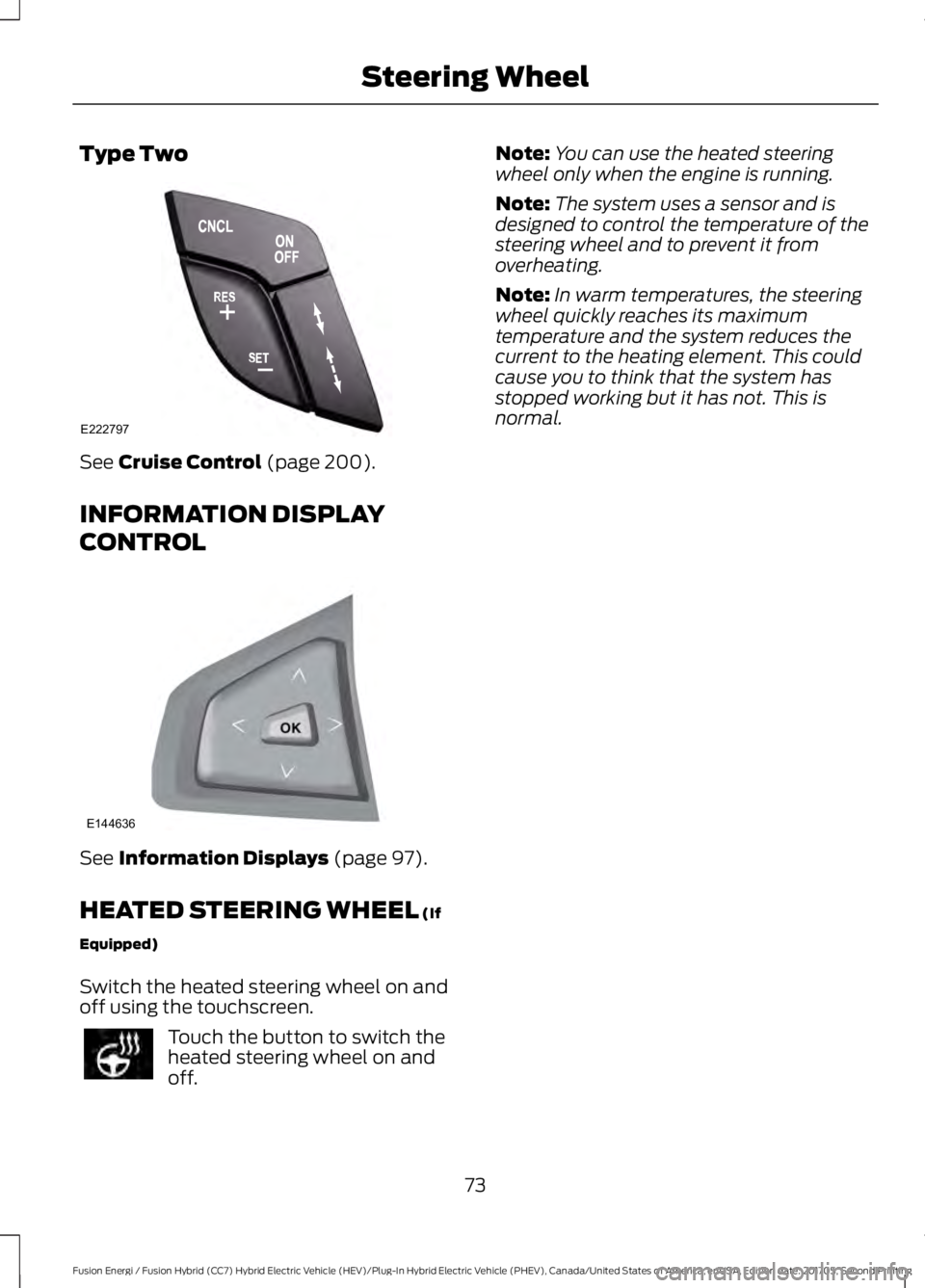
Type Two
See Cruise Control (page 200).
INFORMATION DISPLAY
CONTROL
See Information Displays (page 97).
HEATED STEERING WHEEL (If
Equipped)
Switch the heated steering wheel on andoff using the touchscreen.
Touch the button to switch theheated steering wheel on andoff.
Note:You can use the heated steeringwheel only when the engine is running.
Note:The system uses a sensor and isdesigned to control the temperature of thesteering wheel and to prevent it fromoverheating.
Note:In warm temperatures, the steeringwheel quickly reaches its maximumtemperature and the system reduces thecurrent to the heating element. This couldcause you to think that the system hasstopped working but it has not. This isnormal.
73
Fusion Energi / Fusion Hybrid (CC7) Hybrid Electric Vehicle (HEV)/Plug-In Hybrid Electric Vehicle (PHEV), Canada/United States of America, enUSA, Edition date: 201705, Second Printing
Steering WheelE222797 E144636
Page 86 of 538
POWER WINDOWS
WARNINGS
Do not leave children unattended inyour vehicle and do not let them playwith the power windows. Failure tofollow this instruction could result inpersonal injury.
When closing the power windows,verify they are free of obstruction andmake sure that children and pets arenot in the proximity of the windowopenings.
Note:You may hear a pulsing noise whenjust one of the windows is open. Lower theopposite window slightly to reduce thisnoise.
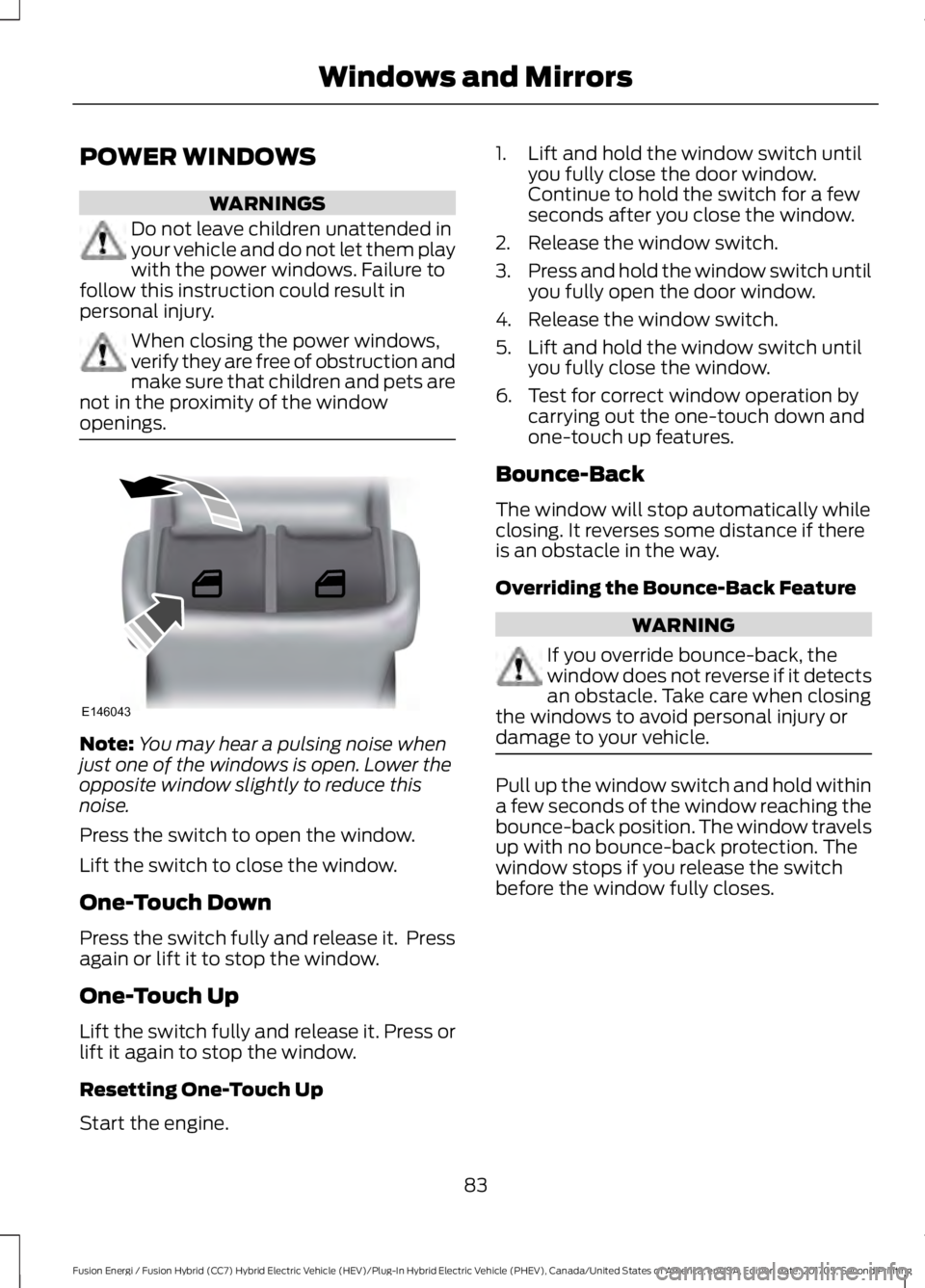
Press the switch to open the window.
Lift the switch to close the window.
One-Touch Down
Press the switch fully and release it. Pressagain or lift it to stop the window.
One-Touch Up
Lift the switch fully and release it. Press orlift it again to stop the window.
Resetting One-Touch Up
Start the engine.
1. Lift and hold the window switch untilyou fully close the door window.Continue to hold the switch for a fewseconds after you close the window.
2. Release the window switch.
3.Press and hold the window switch untilyou fully open the door window.
4. Release the window switch.
5. Lift and hold the window switch untilyou fully close the window.
6. Test for correct window operation bycarrying out the one-touch down andone-touch up features.
Bounce-Back
The window will stop automatically whileclosing. It reverses some distance if thereis an obstacle in the way.
Overriding the Bounce-Back Feature
WARNING
If you override bounce-back, thewindow does not reverse if it detectsan obstacle. Take care when closingthe windows to avoid personal injury ordamage to your vehicle.
Pull up the window switch and hold withina few seconds of the window reaching thebounce-back position. The window travelsup with no bounce-back protection. Thewindow stops if you release the switchbefore the window fully closes.
83
Fusion Energi / Fusion Hybrid (CC7) Hybrid Electric Vehicle (HEV)/Plug-In Hybrid Electric Vehicle (PHEV), Canada/United States of America, enUSA, Edition date: 201705, Second Printing
Windows and MirrorsE146043
Page 94 of 538
Trip Summary:
Trip Summary displays upon shutting offyour vehicle. The information is cumulativeover the last trip. A new trip begins eachtime your start your vehicle (when theReady to Drive message comes on).
•Distance - Displays the total distancetraveled, distance traveled on batterypower only (EV distance) and Regendistance. Regen distance is theestimated range gained from energyrecaptured through regenerativebraking.
•Energy Use - Displays the average fueleconomy. In addition for Energi,displays the total electrical energy usedwhile in Plug-in Power Mode in kilowatthours (kWh).
•Brake Score - The percent displayed isan indication of the regenerativebraking efficiency for the trip.
Note:Corresponding trip efficiency leavesappear on the right information display uponshutting off your Hybrid vehicle. On Energivehicles, the trip efficiency leaves are shownon the right information display when thevehicle operates in Hybrid Mode for theentire trip. For trips with Plug-in Power Modeoperation, an estimate of your EVRange/Full Charge is provided along with alisting of factors and their contributions tothis estimate. See Next Full Charge underRight Information Display in this chapter.
Right Information Display
Entertainment
See General Information (page 370).
Phone
See General Information (page 370).
Navigation or Compass
See General Information (page 370).
Fuel Economy
See General Information (page 97).
Vehicle Range
Vehicle range indicates the estimateddistance your vehicle will travel with theenergy currently onboard. The range isdisplayed at the bottom of the screen withgasoline range shown in white and electricrange (Energi only) shown in blue.
•Gasoline Range: Is the estimateddistance to empty based on the fuelremaining in the tank.
•Electric Range: Is the estimateddistance you can travel in Plug-InPower Mode with the engine off. Thisrange is based on a calculationdetermined by the amount of energystored in the high voltage battery as aresult of charging while plugged in andthe energy being used while driving.
The amount of energy being used whiledriving is affected by:
•Mild or aggressive acceleration orbraking.
•Your vehicle speed.
•Your use of accessories such as climatecontrol.
•The ambient temperature and otherweather conditions.
•City or highway driving.
•Road grades.
Note: It is normal for vehicle rangeestimates to vary due to changes in averageenergy usage. This is why you typically seedifferent range estimates each time you fillup your fuel tank or fully charge your battery.
91
Fusion Energi / Fusion Hybrid (CC7) Hybrid Electric Vehicle (HEV)/Plug-In Hybrid Electric Vehicle (PHEV), Canada/United States of America, enUSA, Edition date: 201705, Second Printing
Instrument Cluster
Page 97 of 538
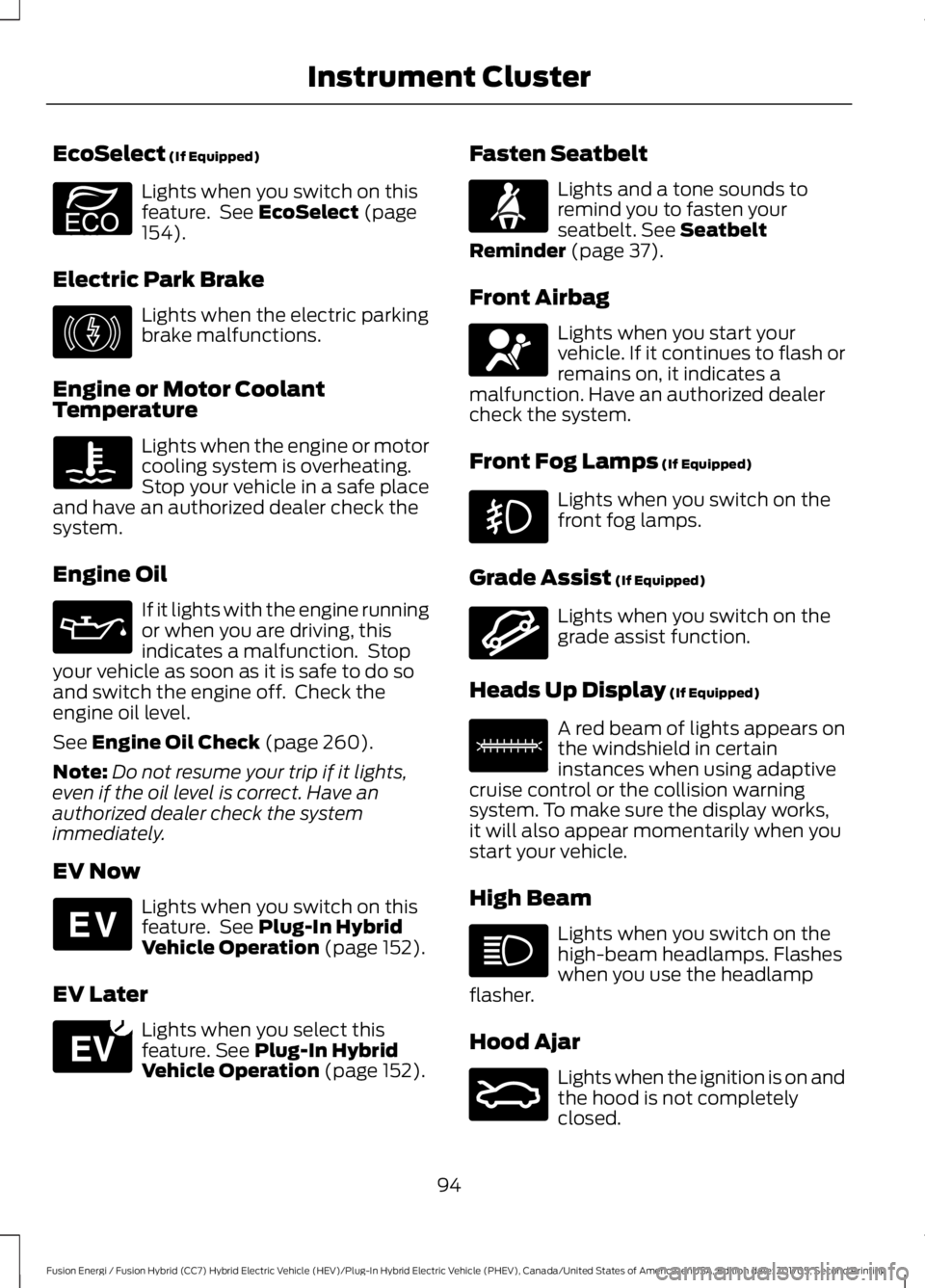
EcoSelect (If Equipped)
Lights when you switch on thisfeature. See EcoSelect (page154).
Electric Park Brake
Lights when the electric parkingbrake malfunctions.
Engine or Motor CoolantTemperature
Lights when the engine or motorcooling system is overheating.Stop your vehicle in a safe placeand have an authorized dealer check thesystem.
Engine Oil
If it lights with the engine runningor when you are driving, thisindicates a malfunction. Stopyour vehicle as soon as it is safe to do soand switch the engine off. Check theengine oil level.
See Engine Oil Check (page 260).
Note:Do not resume your trip if it lights,even if the oil level is correct. Have anauthorized dealer check the systemimmediately.
EV Now
Lights when you switch on thisfeature. See Plug-In HybridVehicle Operation (page 152).
EV Later
Lights when you select thisfeature. See Plug-In HybridVehicle Operation (page 152).
Fasten Seatbelt
Lights and a tone sounds toremind you to fasten yourseatbelt. See SeatbeltReminder (page 37).
Front Airbag
Lights when you start yourvehicle. If it continues to flash orremains on, it indicates amalfunction. Have an authorized dealercheck the system.
Front Fog Lamps (If Equipped)
Lights when you switch on thefront fog lamps.
Grade Assist (If Equipped)
Lights when you switch on thegrade assist function.
Heads Up Display (If Equipped)
A red beam of lights appears onthe windshield in certaininstances when using adaptivecruise control or the collision warningsystem. To make sure the display works,it will also appear momentarily when youstart your vehicle.
High Beam
Lights when you switch on thehigh-beam headlamps. Flasheswhen you use the headlampflasher.
Hood Ajar
Lights when the ignition is on andthe hood is not completelyclosed.
94
Fusion Energi / Fusion Hybrid (CC7) Hybrid Electric Vehicle (HEV)/Plug-In Hybrid Electric Vehicle (PHEV), Canada/United States of America, enUSA, Edition date: 201705, Second Printing
Instrument ClusterE194390 E146190 E144814 E151263 E71880 E67017 E144523 E156133 E159324
Page 98 of 538
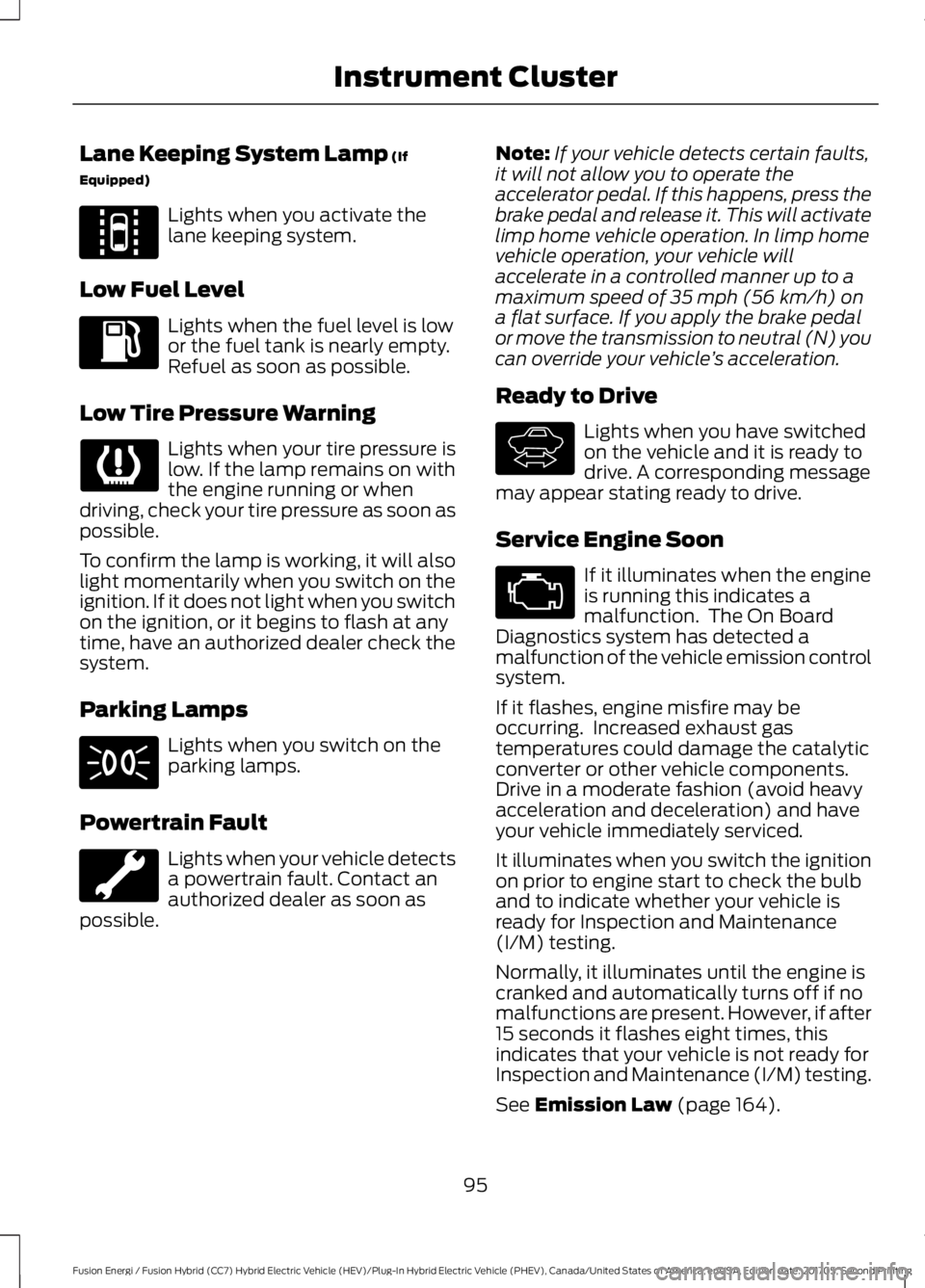
Lane Keeping System Lamp (If
Equipped)
Lights when you activate thelane keeping system.
Low Fuel Level
Lights when the fuel level is lowor the fuel tank is nearly empty.Refuel as soon as possible.
Low Tire Pressure Warning
Lights when your tire pressure islow. If the lamp remains on withthe engine running or whendriving, check your tire pressure as soon aspossible.
To confirm the lamp is working, it will alsolight momentarily when you switch on theignition. If it does not light when you switchon the ignition, or it begins to flash at anytime, have an authorized dealer check thesystem.
Parking Lamps
Lights when you switch on theparking lamps.
Powertrain Fault
Lights when your vehicle detectsa powertrain fault. Contact anauthorized dealer as soon aspossible.
Note:If your vehicle detects certain faults,it will not allow you to operate theaccelerator pedal. If this happens, press thebrake pedal and release it. This will activatelimp home vehicle operation. In limp homevehicle operation, your vehicle willaccelerate in a controlled manner up to amaximum speed of 35 mph (56 km/h) ona flat surface. If you apply the brake pedalor move the transmission to neutral (N) youcan override your vehicle’s acceleration.
Ready to Drive
Lights when you have switchedon the vehicle and it is ready todrive. A corresponding messagemay appear stating ready to drive.
Service Engine Soon
If it illuminates when the engineis running this indicates amalfunction. The On BoardDiagnostics system has detected amalfunction of the vehicle emission controlsystem.
If it flashes, engine misfire may beoccurring. Increased exhaust gastemperatures could damage the catalyticconverter or other vehicle components.Drive in a moderate fashion (avoid heavyacceleration and deceleration) and haveyour vehicle immediately serviced.
It illuminates when you switch the ignitionon prior to engine start to check the bulband to indicate whether your vehicle isready for Inspection and Maintenance(I/M) testing.
Normally, it illuminates until the engine iscranked and automatically turns off if nomalfunctions are present. However, if after15 seconds it flashes eight times, thisindicates that your vehicle is not ready forInspection and Maintenance (I/M) testing.
See Emission Law (page 164).
95
Fusion Energi / Fusion Hybrid (CC7) Hybrid Electric Vehicle (HEV)/Plug-In Hybrid Electric Vehicle (PHEV), Canada/United States of America, enUSA, Edition date: 201705, Second Printing
Instrument ClusterE144813 E144692
Page 101 of 538
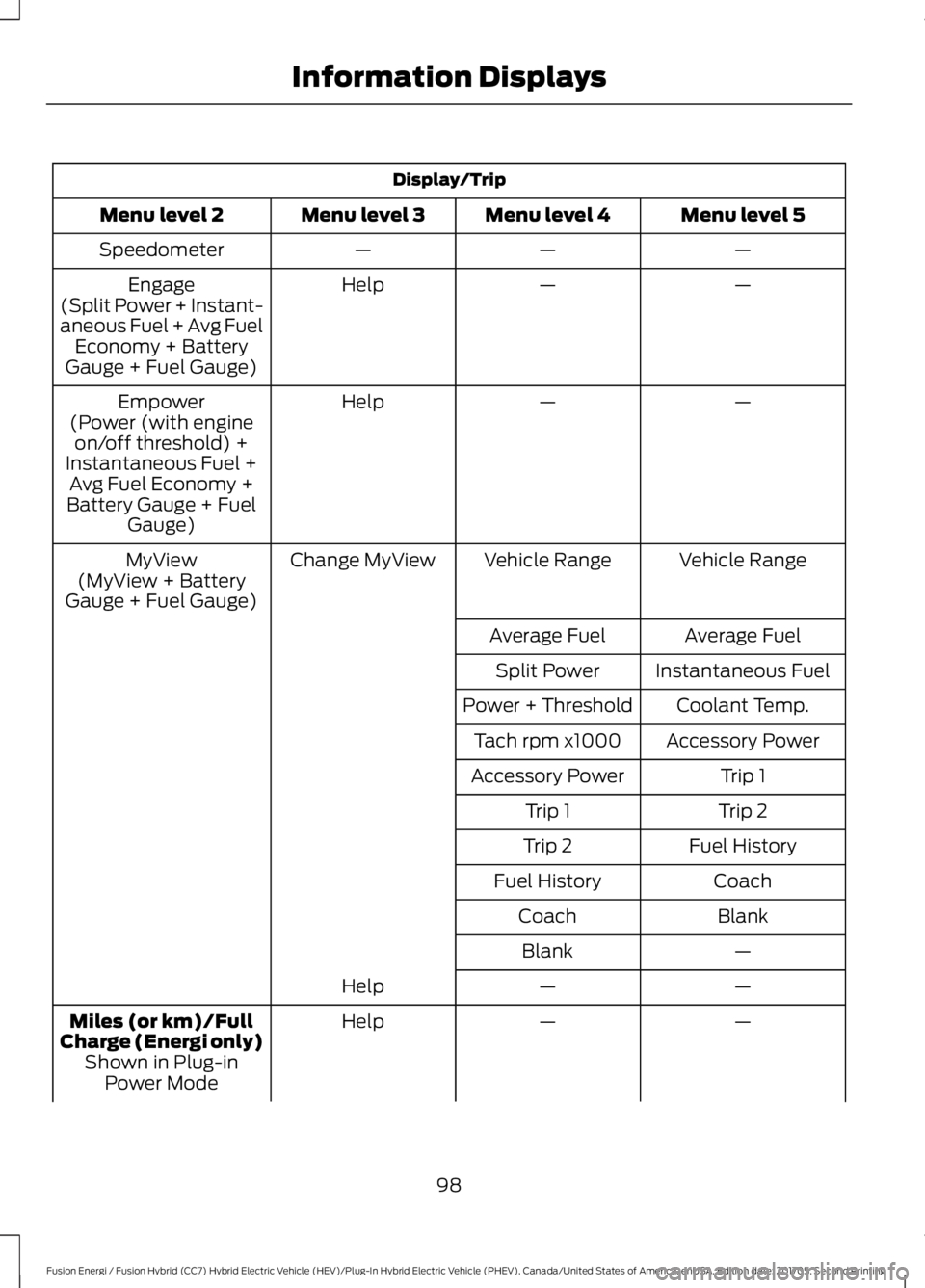
Display/Trip
Menu level 5Menu level 4Menu level 3Menu level 2
———Speedometer
——HelpEngage(Split Power + Instant-aneous Fuel + Avg FuelEconomy + BatteryGauge + Fuel Gauge)
——HelpEmpower(Power (with engineon/off threshold) +Instantaneous Fuel +Avg Fuel Economy +Battery Gauge + FuelGauge)
Vehicle RangeVehicle RangeChange MyViewMyView(MyView + BatteryGauge + Fuel Gauge)
Average FuelAverage Fuel
Instantaneous FuelSplit Power
Coolant Temp.Power + Threshold
Accessory PowerTach rpm x1000
Trip 1Accessory Power
Trip 2Trip 1
Fuel HistoryTrip 2
CoachFuel History
BlankCoach
—Blank
——Help
——HelpMiles (or km)/FullCharge (Energi only)Shown in Plug-inPower Mode
98
Fusion Energi / Fusion Hybrid (CC7) Hybrid Electric Vehicle (HEV)/Plug-In Hybrid Electric Vehicle (PHEV), Canada/United States of America, enUSA, Edition date: 201705, Second Printing
Information Displays
Page 102 of 538
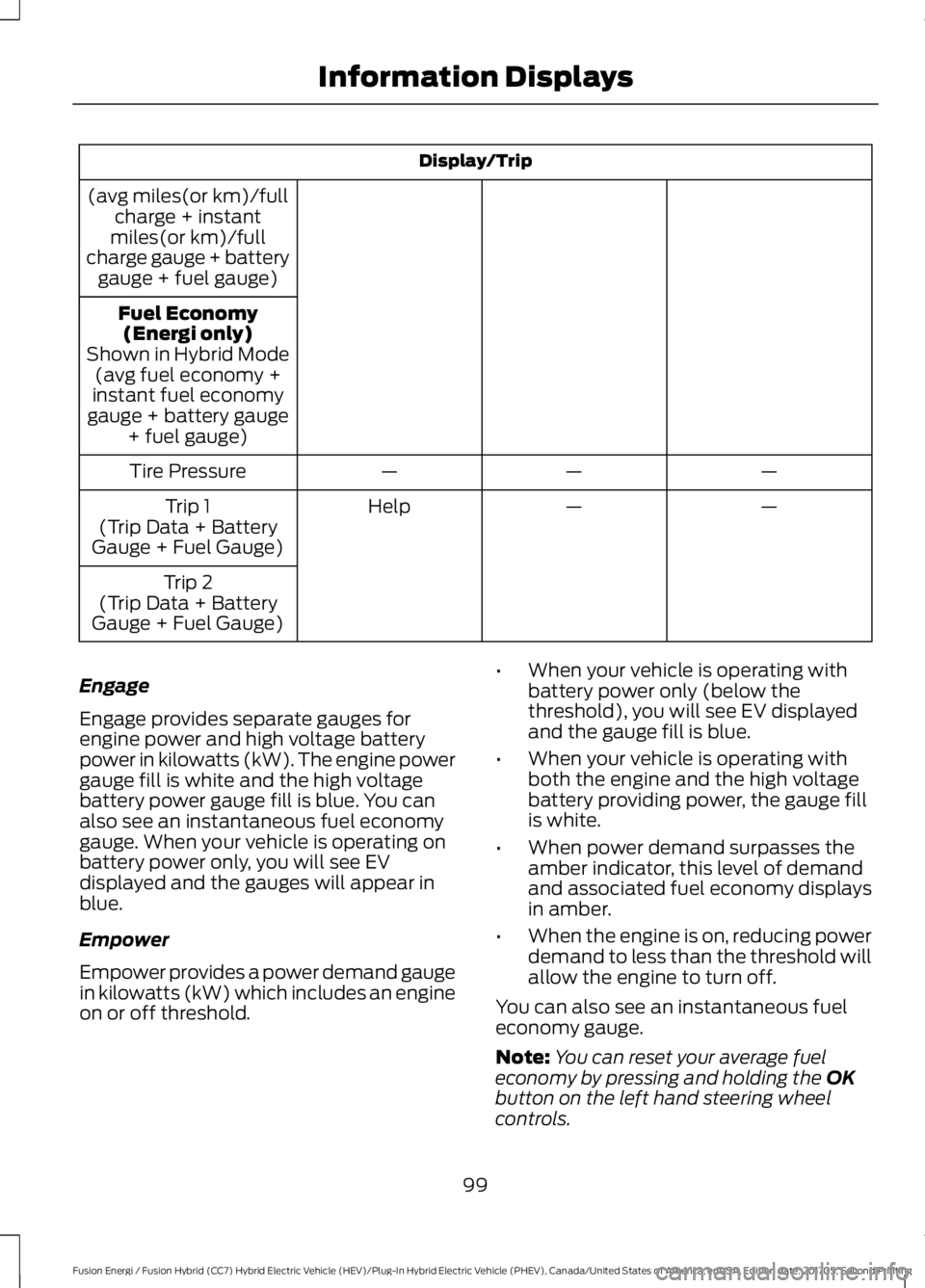
Display/Trip
(avg miles(or km)/fullcharge + instantmiles(or km)/fullcharge gauge + batterygauge + fuel gauge)
Fuel Economy(Energi only)Shown in Hybrid Mode(avg fuel economy +instant fuel economygauge + battery gauge+ fuel gauge)
———Tire Pressure
——HelpTrip 1(Trip Data + BatteryGauge + Fuel Gauge)
Trip 2(Trip Data + BatteryGauge + Fuel Gauge)
Engage
Engage provides separate gauges forengine power and high voltage batterypower in kilowatts (kW). The engine powergauge fill is white and the high voltagebattery power gauge fill is blue. You canalso see an instantaneous fuel economygauge. When your vehicle is operating onbattery power only, you will see EVdisplayed and the gauges will appear inblue.
Empower
Empower provides a power demand gaugein kilowatts (kW) which includes an engineon or off threshold.
•When your vehicle is operating withbattery power only (below thethreshold), you will see EV displayedand the gauge fill is blue.
•When your vehicle is operating withboth the engine and the high voltagebattery providing power, the gauge fillis white.
•When power demand surpasses theamber indicator, this level of demandand associated fuel economy displaysin amber.
•When the engine is on, reducing powerdemand to less than the threshold willallow the engine to turn off.
You can also see an instantaneous fueleconomy gauge.
Note:You can reset your average fueleconomy by pressing and holding the OKbutton on the left hand steering wheelcontrols.
99
Fusion Energi / Fusion Hybrid (CC7) Hybrid Electric Vehicle (HEV)/Plug-In Hybrid Electric Vehicle (PHEV), Canada/United States of America, enUSA, Edition date: 201705, Second Printing
Information Displays
Page 103 of 538
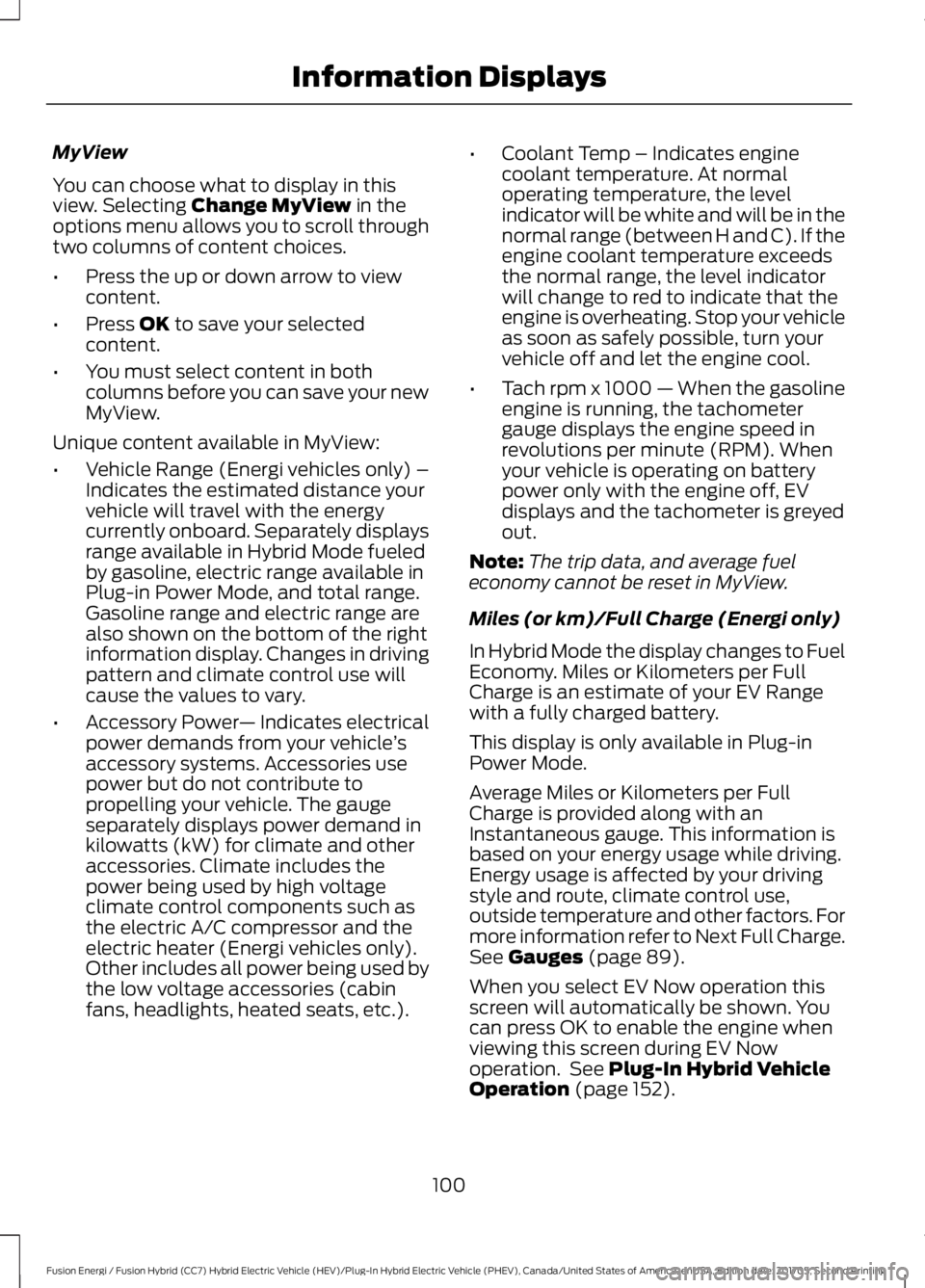
MyView
You can choose what to display in thisview. Selecting Change MyView in theoptions menu allows you to scroll throughtwo columns of content choices.
•Press the up or down arrow to viewcontent.
•Press OK to save your selectedcontent.
•You must select content in bothcolumns before you can save your newMyView.
Unique content available in MyView:
•Vehicle Range (Energi vehicles only) –Indicates the estimated distance yourvehicle will travel with the energycurrently onboard. Separately displaysrange available in Hybrid Mode fueledby gasoline, electric range available inPlug-in Power Mode, and total range.Gasoline range and electric range arealso shown on the bottom of the rightinformation display. Changes in drivingpattern and climate control use willcause the values to vary.
•Accessory Power— Indicates electricalpower demands from your vehicle’saccessory systems. Accessories usepower but do not contribute topropelling your vehicle. The gaugeseparately displays power demand inkilowatts (kW) for climate and otheraccessories. Climate includes thepower being used by high voltageclimate control components such asthe electric A/C compressor and theelectric heater (Energi vehicles only).Other includes all power being used bythe low voltage accessories (cabinfans, headlights, heated seats, etc.).
•Coolant Temp – Indicates enginecoolant temperature. At normaloperating temperature, the levelindicator will be white and will be in thenormal range (between H and C). If theengine coolant temperature exceedsthe normal range, the level indicatorwill change to red to indicate that theengine is overheating. Stop your vehicleas soon as safely possible, turn yourvehicle off and let the engine cool.
•Tach rpm x 1000 — When the gasolineengine is running, the tachometergauge displays the engine speed inrevolutions per minute (RPM). Whenyour vehicle is operating on batterypower only with the engine off, EVdisplays and the tachometer is greyedout.
Note:The trip data, and average fueleconomy cannot be reset in MyView.
Miles (or km)/Full Charge (Energi only)
In Hybrid Mode the display changes to FuelEconomy. Miles or Kilometers per FullCharge is an estimate of your EV Rangewith a fully charged battery.
This display is only available in Plug-inPower Mode.
Average Miles or Kilometers per FullCharge is provided along with anInstantaneous gauge. This information isbased on your energy usage while driving.Energy usage is affected by your drivingstyle and route, climate control use,outside temperature and other factors. Formore information refer to Next Full Charge.See Gauges (page 89).
When you select EV Now operation thisscreen will automatically be shown. Youcan press OK to enable the engine whenviewing this screen during EV Nowoperation. See Plug-In Hybrid VehicleOperation (page 152).
100
Fusion Energi / Fusion Hybrid (CC7) Hybrid Electric Vehicle (HEV)/Plug-In Hybrid Electric Vehicle (PHEV), Canada/United States of America, enUSA, Edition date: 201705, Second Printing
Information Displays
Page 104 of 538
Fuel Economy (Energi only)
This display is only available in HybridMode. In Plug-in Power Mode the displaychanges to Miles (or km)/Full Charge.
An Instant Fuel Economy gauge is providedalong with Avg Fuel Economy. Whileviewing this screen you can reset youraverage fuel economy by pressing andholding the OK button on the left handsteering wheel controls. For moreinformation see Common Displays in thischapter.
Trip 1 & 2
Provides trip odometer, trip average fueleconomy and trip timer.
Distance traveled on battery power onlywith the engine off is shown in blue nextto total trip distance.
For Energi vehicles total plug-in electricityused in kilowatt hours (kWh) is shown inblue next to trip average fuel economy.
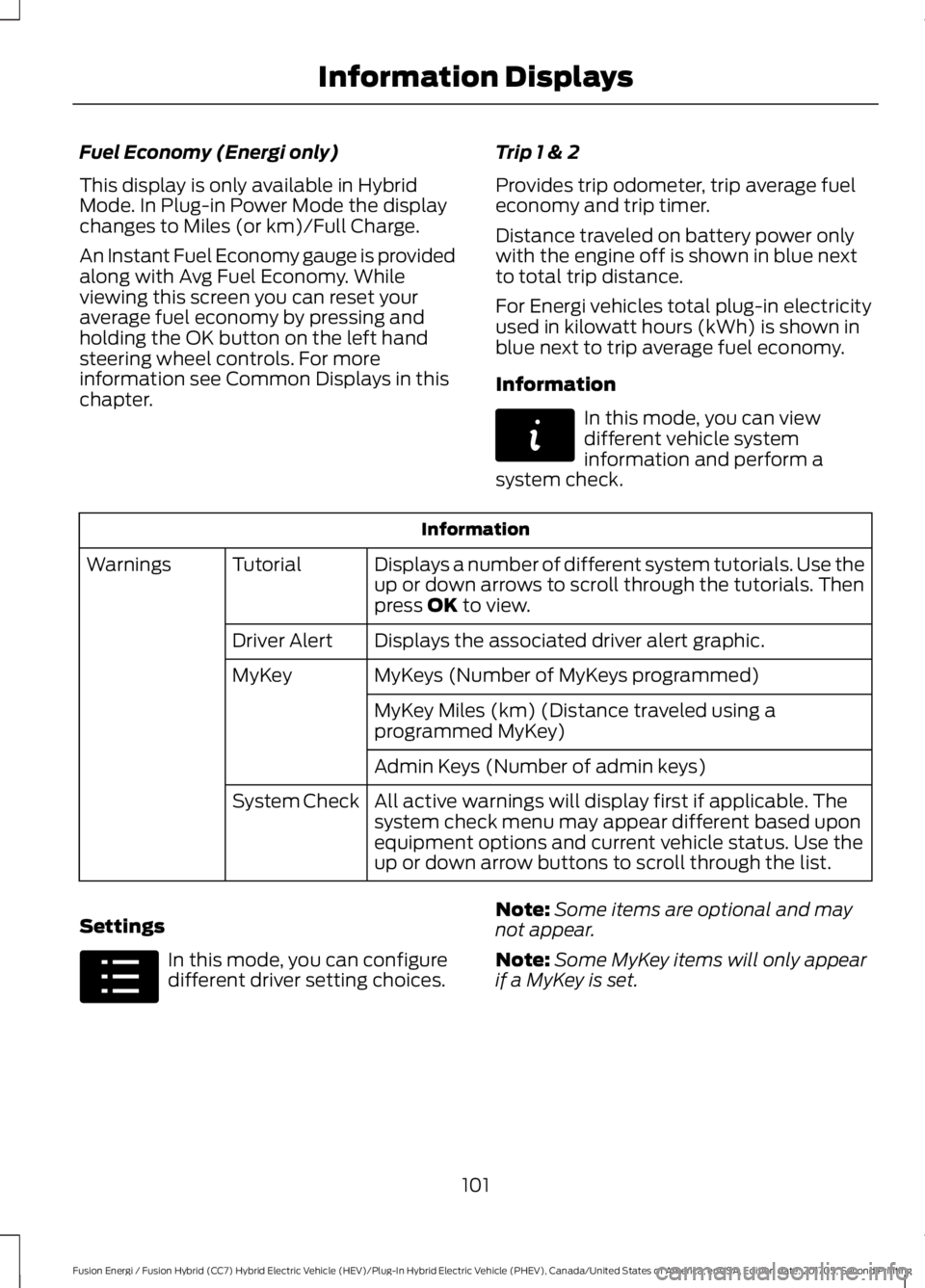
Information
In this mode, you can viewdifferent vehicle systeminformation and perform asystem check.
Information
Displays a number of different system tutorials. Use theup or down arrows to scroll through the tutorials. Thenpress OK to view.
TutorialWarnings
Displays the associated driver alert graphic.Driver Alert
MyKeys (Number of MyKeys programmed)MyKey
MyKey Miles (km) (Distance traveled using aprogrammed MyKey)
Admin Keys (Number of admin keys)
All active warnings will display first if applicable. Thesystem check menu may appear different based uponequipment options and current vehicle status. Use theup or down arrow buttons to scroll through the list.
System Check
Settings
In this mode, you can configuredifferent driver setting choices.
Note:Some items are optional and maynot appear.
Note:Some MyKey items will only appearif a MyKey is set.
101
Fusion Energi / Fusion Hybrid (CC7) Hybrid Electric Vehicle (HEV)/Plug-In Hybrid Electric Vehicle (PHEV), Canada/United States of America, enUSA, Edition date: 201705, Second Printing
Information DisplaysE144642 E100023
Page 105 of 538
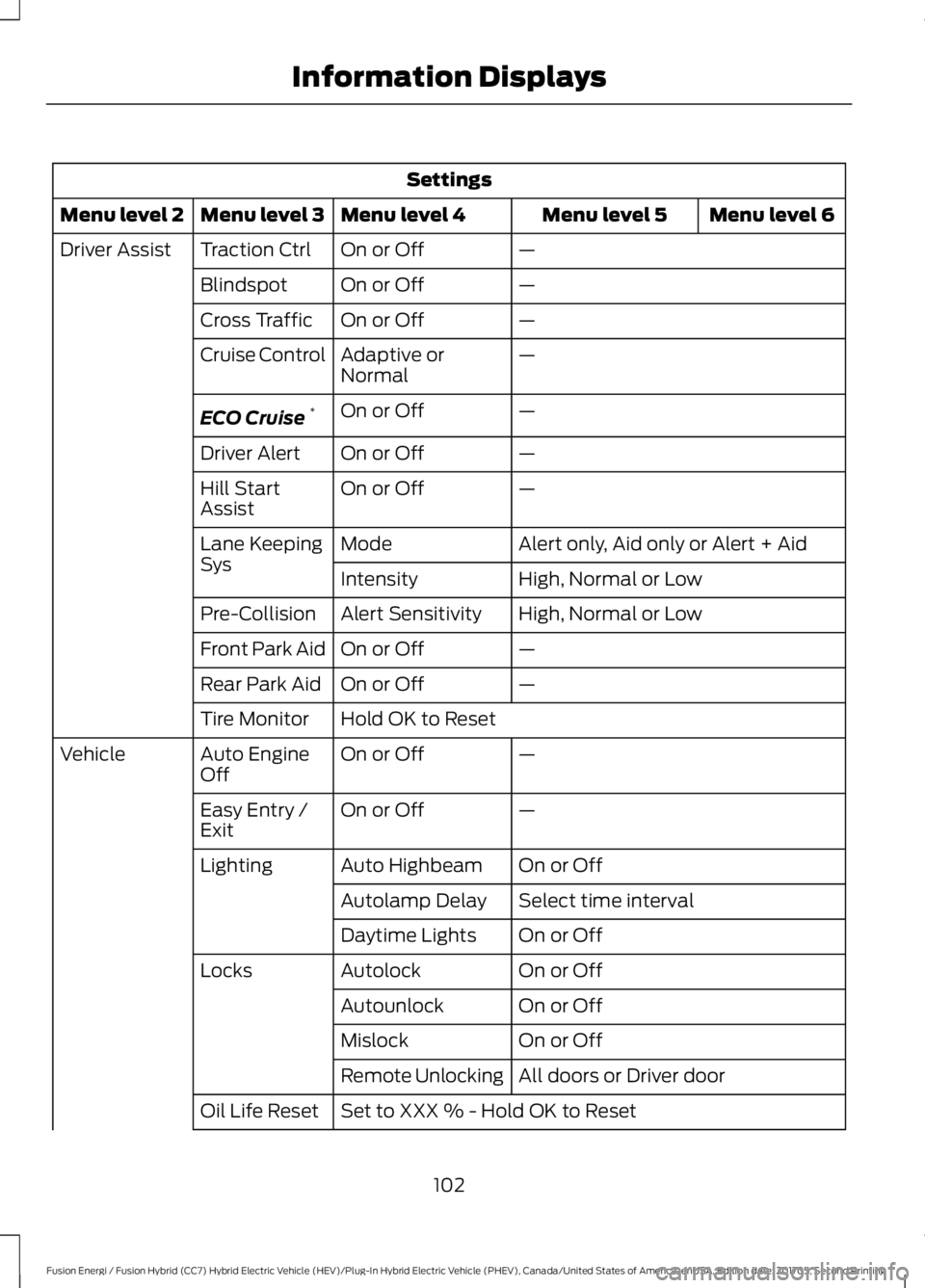
Settings
Menu level 6Menu level 5Menu level 4Menu level 3Menu level 2
—On or OffTraction CtrlDriver Assist
—On or OffBlindspot
—On or OffCross Traffic
—Adaptive orNormalCruise Control
—On or OffECO Cruise*
—On or OffDriver Alert
—On or OffHill StartAssist
Alert only, Aid only or Alert + AidModeLane KeepingSysHigh, Normal or LowIntensity
High, Normal or LowAlert SensitivityPre-Collision
—On or OffFront Park Aid
—On or OffRear Park Aid
Hold OK to ResetTire Monitor
—On or OffAuto EngineOffVehicle
—On or OffEasy Entry /Exit
On or OffAuto HighbeamLighting
Select time intervalAutolamp Delay
On or OffDaytime Lights
On or OffAutolockLocks
On or OffAutounlock
On or OffMislock
All doors or Driver doorRemote Unlocking
Set to XXX % - Hold OK to ResetOil Life Reset
102
Fusion Energi / Fusion Hybrid (CC7) Hybrid Electric Vehicle (HEV)/Plug-In Hybrid Electric Vehicle (PHEV), Canada/United States of America, enUSA, Edition date: 201705, Second Printing
Information Displays