lock FORD FUSION ENERGI 2020 Owner's Guide
[x] Cancel search | Manufacturer: FORD, Model Year: 2020, Model line: FUSION ENERGI, Model: FORD FUSION ENERGI 2020Pages: 486, PDF Size: 6.28 MB
Page 88 of 486
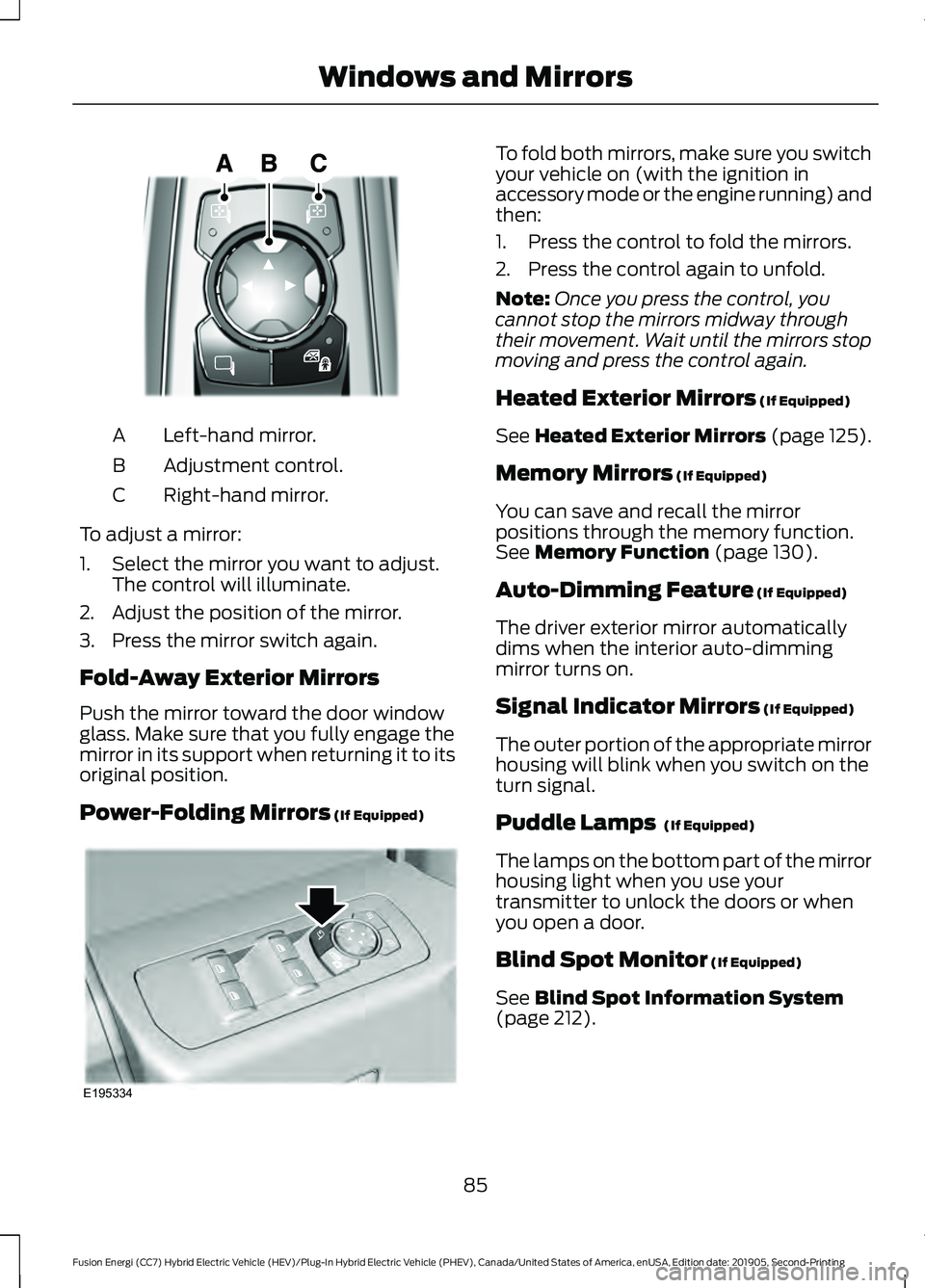
Left-hand mirror.
A
Adjustment control.
B
Right-hand mirror.
C
To adjust a mirror:
1. Select the mirror you want to adjust. The control will illuminate.
2. Adjust the position of the mirror.
3. Press the mirror switch again.
Fold-Away Exterior Mirrors
Push the mirror toward the door window
glass. Make sure that you fully engage the
mirror in its support when returning it to its
original position.
Power-Folding Mirrors (If Equipped) To fold both mirrors, make sure you switch
your vehicle on (with the ignition in
accessory mode or the engine running) and
then:
1. Press the control to fold the mirrors.
2. Press the control again to unfold.
Note:
Once you press the control, you
cannot stop the mirrors midway through
their movement. Wait until the mirrors stop
moving and press the control again.
Heated Exterior Mirrors
(If Equipped)
See
Heated Exterior Mirrors (page 125).
Memory Mirrors
(If Equipped)
You can save and recall the mirror
positions through the memory function.
See
Memory Function (page 130).
Auto-Dimming Feature
(If Equipped)
The driver exterior mirror automatically
dims when the interior auto-dimming
mirror turns on.
Signal Indicator Mirrors
(If Equipped)
The outer portion of the appropriate mirror
housing will blink when you switch on the
turn signal.
Puddle Lamps
(If Equipped)
The lamps on the bottom part of the mirror
housing light when you use your
transmitter to unlock the doors or when
you open a door.
Blind Spot Monitor
(If Equipped)
See
Blind Spot Information System
(page 212).
85
Fusion Energi (CC7) Hybrid Electric Vehicle (HEV)/Plug-In Hybrid Electric Vehicle (PHEV), Canada/United States of America, enUSA, Edition date: 201905, Second-Printing Windows and MirrorsE316600 E195334
Page 89 of 486
INTERIOR MIRROR
WARNING: Do not adjust the
mirrors when your vehicle is moving. This
could result in the loss of control of your
vehicle, serious personal injury or death.
Note: Do not clean the mirror housing or
glass with harsh abrasives, fuel or other
petroleum-based cleaning products.
You can adjust the interior mirror to your
preference. Some mirrors also have a
second pivot point. This lets you move the
mirror hear up or down and from side to
side.
Manual Dimming Mirror
Pull the tab below the mirror toward you
to reduce the effect of bright light from
behind.
Auto-Dimming Mirror
(If Equipped)
Note: Do not block the sensors on the front
and back of the mirror. A rear center
passenger or raised rear center head
restraint may also block light from reaching
the sensor.
The mirror dims to reduce glare when
bright lights are detected from behind your
vehicle. It automatically returns to normal
reflection when you shift the transmission
into reverse (R) to make sure you have a
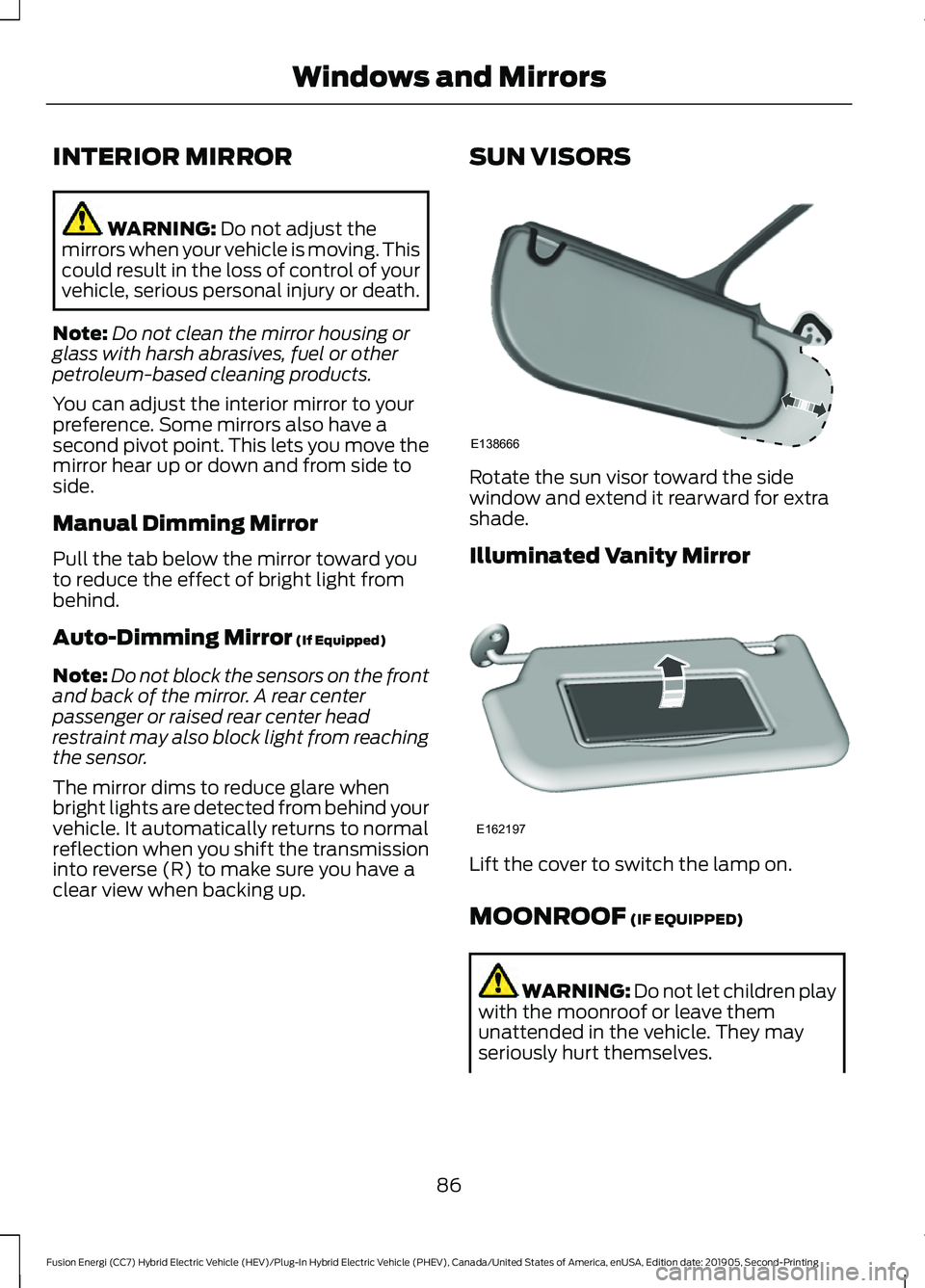
clear view when backing up. SUN VISORS Rotate the sun visor toward the side
window and extend it rearward for extra
shade.
Illuminated Vanity Mirror
Lift the cover to switch the lamp on.
MOONROOF
(IF EQUIPPED)
WARNING:
Do not let children play
with the moonroof or leave them
unattended in the vehicle. They may
seriously hurt themselves.
86
Fusion Energi (CC7) Hybrid Electric Vehicle (HEV)/Plug-In Hybrid Electric Vehicle (PHEV), Canada/United States of America, enUSA, Edition date: 201905, Second-Printing Windows and MirrorsE138666 E162197
Page 95 of 486
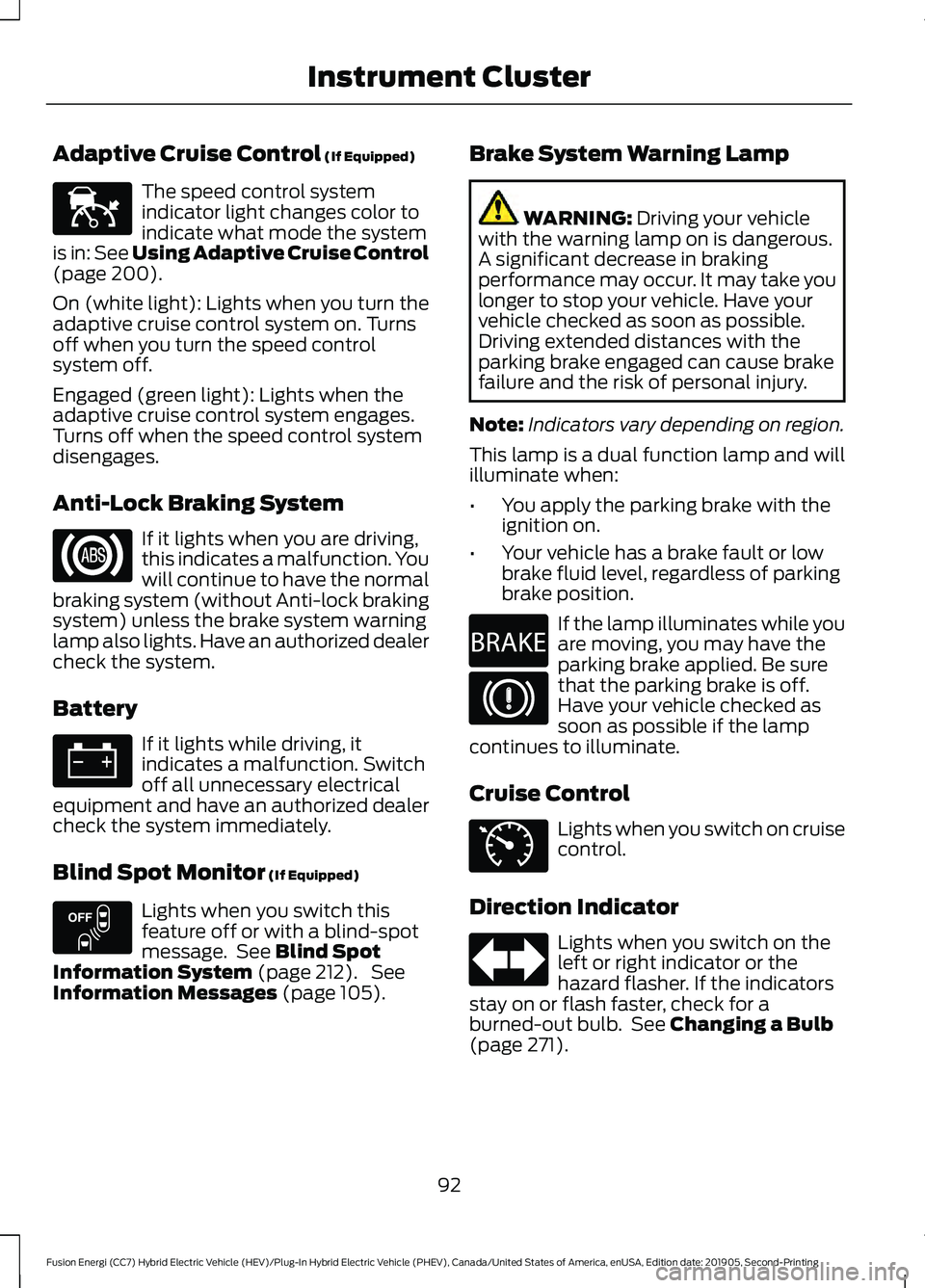
Adaptive Cruise Control (If Equipped)
The speed control system
indicator light changes color to
indicate what mode the system
is in:
See Using Adaptive Cruise Control
(page 200).
On (white light): Lights when you turn the
adaptive cruise control system on. Turns
off when you turn the speed control
system off.
Engaged (green light): Lights when the
adaptive cruise control system engages.
Turns off when the speed control system
disengages.
Anti-Lock Braking System If it lights when you are driving,
this indicates a malfunction. You
will continue to have the normal
braking system (without Anti-lock braking
system) unless the brake system warning
lamp also lights. Have an authorized dealer
check the system.
Battery If it lights while driving, it
indicates a malfunction. Switch
off all unnecessary electrical
equipment and have an authorized dealer
check the system immediately.
Blind Spot Monitor
(If Equipped) Lights when you switch this
feature off or with a blind-spot
message. See
Blind Spot
Information System (page 212). See
Information Messages (page 105). Brake System Warning Lamp WARNING:
Driving your vehicle
with the warning lamp on is dangerous.
A significant decrease in braking
performance may occur. It may take you
longer to stop your vehicle. Have your
vehicle checked as soon as possible.
Driving extended distances with the
parking brake engaged can cause brake
failure and the risk of personal injury.
Note: Indicators vary depending on region.
This lamp is a dual function lamp and will
illuminate when:
• You apply the parking brake with the
ignition on.
• Your vehicle has a brake fault or low
brake fluid level, regardless of parking
brake position. If the lamp illuminates while you
are moving, you may have the
parking brake applied. Be sure
that the parking brake is off.
Have your vehicle checked as
soon as possible if the lamp
continues to illuminate.
Cruise Control Lights when you switch on cruise
control.
Direction Indicator Lights when you switch on the
left or right indicator or the
hazard flasher. If the indicators
stay on or flash faster, check for a
burned-out bulb. See
Changing a Bulb
(page 271).
92
Fusion Energi (CC7) Hybrid Electric Vehicle (HEV)/Plug-In Hybrid Electric Vehicle (PHEV), Canada/United States of America, enUSA, Edition date: 201905, Second-Printing Instrument ClusterE144524 E151262 E270480 E71340
Page 104 of 486
Settings
—
On or Off
ECO Cruise *
—
On or Off
Driver Alert
—
On or Off
Hill Start
Assist
Alert only, Aid only or Alert + Aid
Mode
Lane Keeping
Sys
High, Normal or Low
Intensity
High, Normal or Low
Alert Sensitivity
Pre-Collision
On or Off
Active Braking
—
On or Off
Rear Park Aid
Hold OK to Reset
Tire Monitor
—
On or Off
Auto Engine
Off
Vehicle
—
On or Off
Easy Entry /
Exit
On or Off
Auto Highbeam
Lighting
Select time interval
Autolamp Delay
On or Off
Daytime Lights
On or Off
Autolock
Locks
On or Off
Autounlock
On or Off
Mislock
All doors or Driver door
Remote Unlocking
Set to XXX % - Hold OK to Reset
Oil Life Reset
Auto or Last
Settings
Heater – A/C
Climate Control
Remote Start
Auto Heated or
Off
Steering Wheel
Auto or Off
Front Defrost
Auto or Off
Rear Defrost
Auto or Off
Driver Seat
101
Fusion Energi (CC7) Hybrid Electric Vehicle (HEV)/Plug-In Hybrid Electric Vehicle (PHEV), Canada/United States of America, enUSA, Edition date: 201905, Second-Printing Information Displays
Page 109 of 486
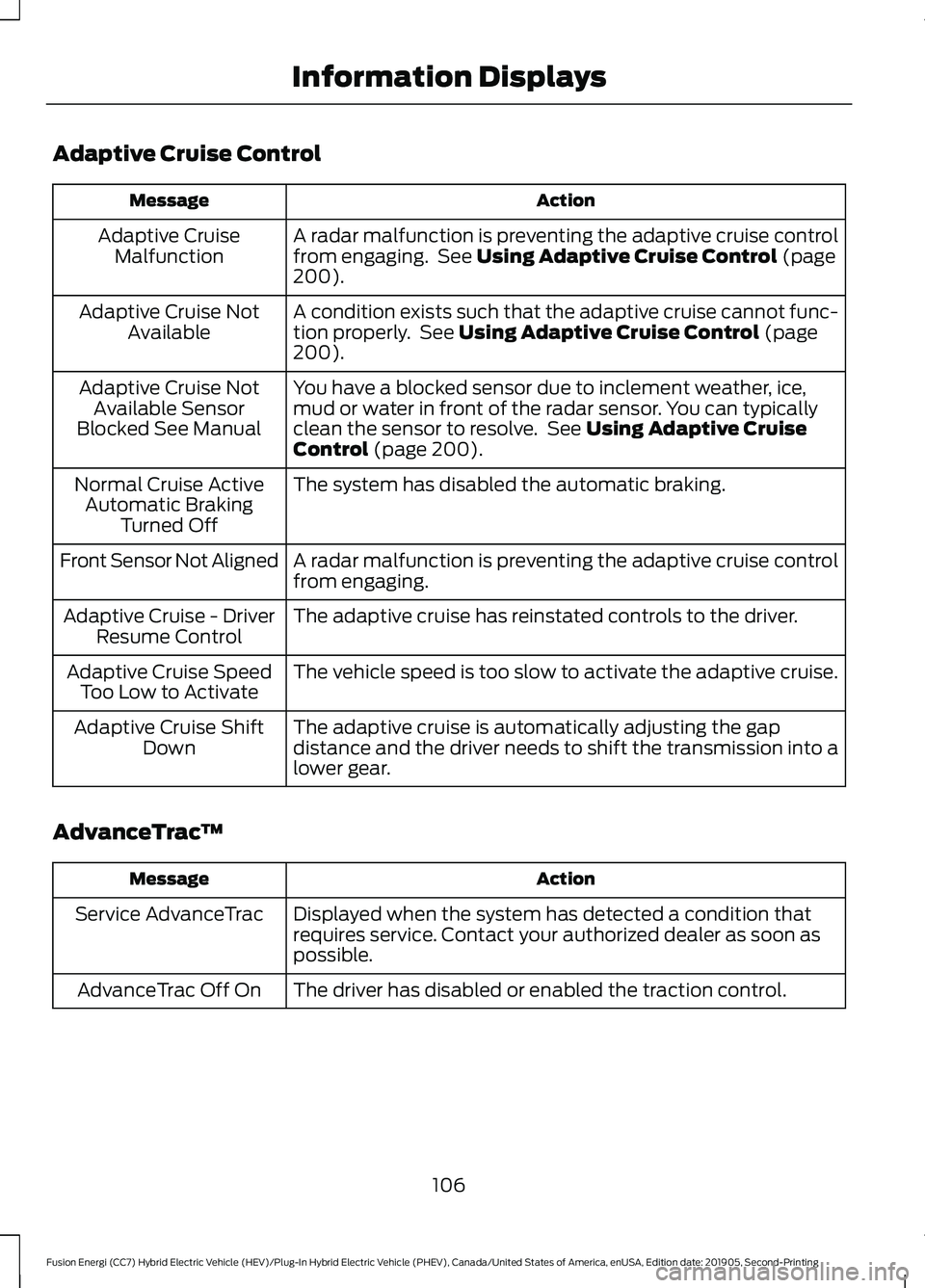
Adaptive Cruise Control
Action
Message
A radar malfunction is preventing the adaptive cruise control
from engaging. See Using Adaptive Cruise Control (page
200).
Adaptive Cruise
Malfunction
A condition exists such that the adaptive cruise cannot func-
tion properly. See
Using Adaptive Cruise Control (page
200).
Adaptive Cruise Not
Available
You have a blocked sensor due to inclement weather, ice,
mud or water in front of the radar sensor. You can typically
clean the sensor to resolve. See
Using Adaptive Cruise
Control (page 200).
Adaptive Cruise Not
Available Sensor
Blocked See Manual
The system has disabled the automatic braking.
Normal Cruise Active
Automatic Braking Turned Off
A radar malfunction is preventing the adaptive cruise control
from engaging.
Front Sensor Not Aligned
The adaptive cruise has reinstated controls to the driver.
Adaptive Cruise - Driver
Resume Control
The vehicle speed is too slow to activate the adaptive cruise.
Adaptive Cruise Speed
Too Low to Activate
The adaptive cruise is automatically adjusting the gap
distance and the driver needs to shift the transmission into a
lower gear.
Adaptive Cruise Shift
Down
AdvanceTrac ™ Action
Message
Displayed when the system has detected a condition that
requires service. Contact your authorized dealer as soon as
possible.
Service AdvanceTrac
The driver has disabled or enabled the traction control.
AdvanceTrac Off On
106
Fusion Energi (CC7) Hybrid Electric Vehicle (HEV)/Plug-In Hybrid Electric Vehicle (PHEV), Canada/United States of America, enUSA, Edition date: 201905, Second-Printing Information Displays
Page 110 of 486
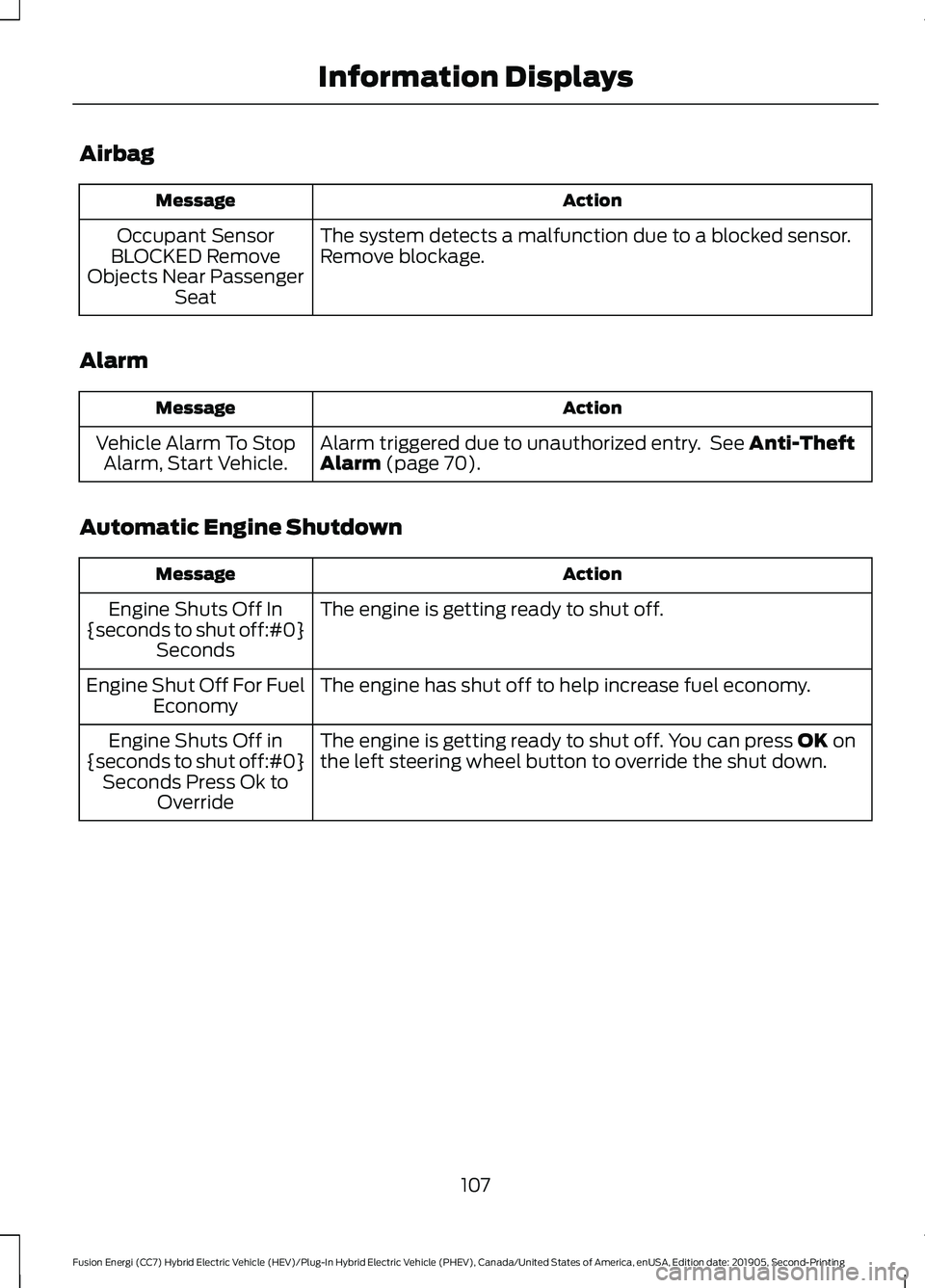
Airbag
Action
Message
The system detects a malfunction due to a blocked sensor.
Remove blockage.
Occupant Sensor
BLOCKED Remove
Objects Near Passenger Seat
Alarm Action
Message
Alarm triggered due to unauthorized entry. See Anti-Theft
Alarm (page 70).
Vehicle Alarm To Stop
Alarm, Start Vehicle.
Automatic Engine Shutdown Action
Message
The engine is getting ready to shut off.
Engine Shuts Off In
{seconds to shut off:#0} Seconds
The engine has shut off to help increase fuel economy.
Engine Shut Off For Fuel
Economy
The engine is getting ready to shut off. You can press
OK on
the left steering wheel button to override the shut down.
Engine Shuts Off in
{seconds to shut off:#0} Seconds Press Ok to Override
107
Fusion Energi (CC7) Hybrid Electric Vehicle (HEV)/Plug-In Hybrid Electric Vehicle (PHEV), Canada/United States of America, enUSA, Edition date: 201905, Second-Printing Information Displays
Page 112 of 486
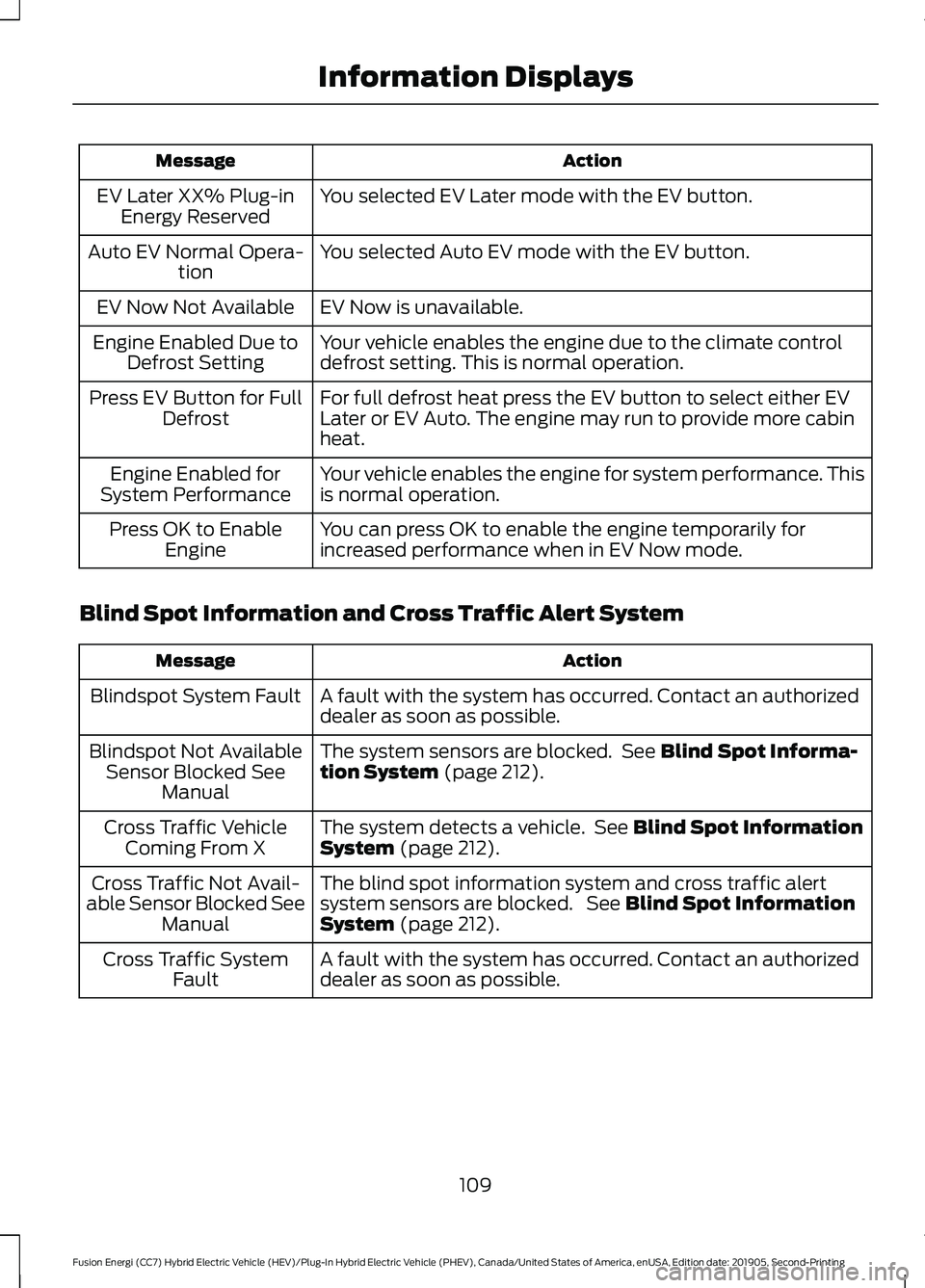
Action
Message
You selected EV Later mode with the EV button.
EV Later XX% Plug-in
Energy Reserved
You selected Auto EV mode with the EV button.
Auto EV Normal Opera-
tion
EV Now is unavailable.
EV Now Not Available
Your vehicle enables the engine due to the climate control
defrost setting. This is normal operation.
Engine Enabled Due to
Defrost Setting
For full defrost heat press the EV button to select either EV
Later or EV Auto. The engine may run to provide more cabin
heat.
Press EV Button for Full
Defrost
Your vehicle enables the engine for system performance. This
is normal operation.
Engine Enabled for
System Performance
You can press OK to enable the engine temporarily for
increased performance when in EV Now mode.
Press OK to Enable
Engine
Blind Spot Information and Cross Traffic Alert System Action
Message
A fault with the system has occurred. Contact an authorized
dealer as soon as possible.
Blindspot System Fault
The system sensors are blocked. See Blind Spot Informa-
tion System (page 212).
Blindspot Not Available
Sensor Blocked See Manual
The system detects a vehicle. See
Blind Spot Information
System (page 212).
Cross Traffic Vehicle
Coming From X
The blind spot information system and cross traffic alert
system sensors are blocked. See
Blind Spot Information
System (page 212).
Cross Traffic Not Avail-
able Sensor Blocked See Manual
A fault with the system has occurred. Contact an authorized
dealer as soon as possible.
Cross Traffic System
Fault
109
Fusion Energi (CC7) Hybrid Electric Vehicle (HEV)/Plug-In Hybrid Electric Vehicle (PHEV), Canada/United States of America, enUSA, Edition date: 201905, Second-Printing Information Displays
Page 113 of 486
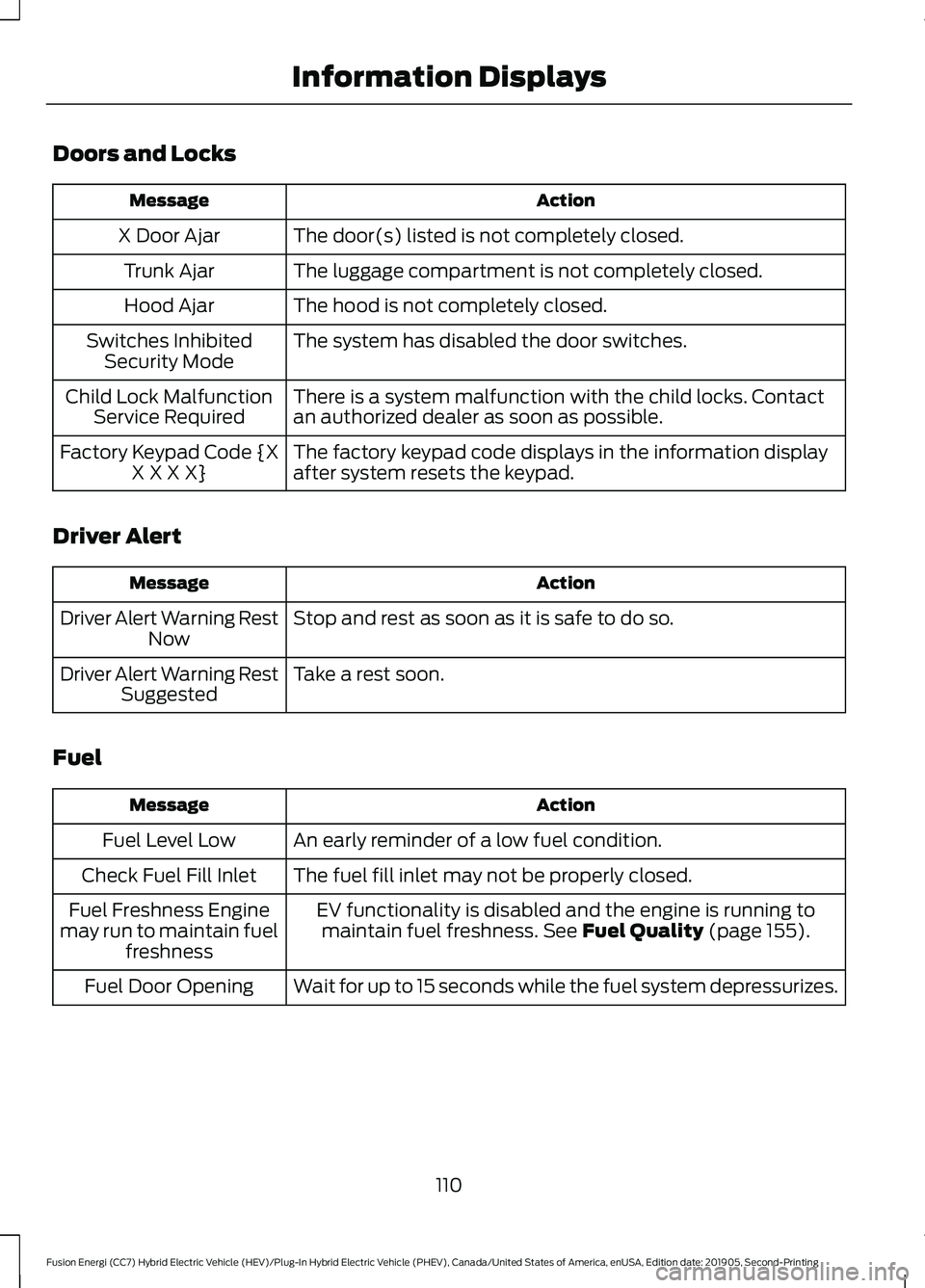
Doors and Locks
Action
Message
The door(s) listed is not completely closed.
X Door Ajar
The luggage compartment is not completely closed.
Trunk Ajar
The hood is not completely closed.
Hood Ajar
The system has disabled the door switches.
Switches Inhibited
Security Mode
There is a system malfunction with the child locks. Contact
an authorized dealer as soon as possible.
Child Lock Malfunction
Service Required
The factory keypad code displays in the information display
after system resets the keypad.
Factory Keypad Code {X
X X X X}
Driver Alert Action
Message
Stop and rest as soon as it is safe to do so.
Driver Alert Warning Rest
Now
Take a rest soon.
Driver Alert Warning Rest
Suggested
Fuel Action
Message
An early reminder of a low fuel condition.
Fuel Level Low
The fuel fill inlet may not be properly closed.
Check Fuel Fill Inlet
EV functionality is disabled and the engine is running tomaintain fuel freshness. See Fuel Quality (page 155).
Fuel Freshness Engine
may run to maintain fuel freshness
Wait for up to 15 seconds while the fuel system depressurizes.
Fuel Door Opening
110
Fusion Energi (CC7) Hybrid Electric Vehicle (HEV)/Plug-In Hybrid Electric Vehicle (PHEV), Canada/United States of America, enUSA, Edition date: 201905, Second-Printing Information Displays
Page 118 of 486
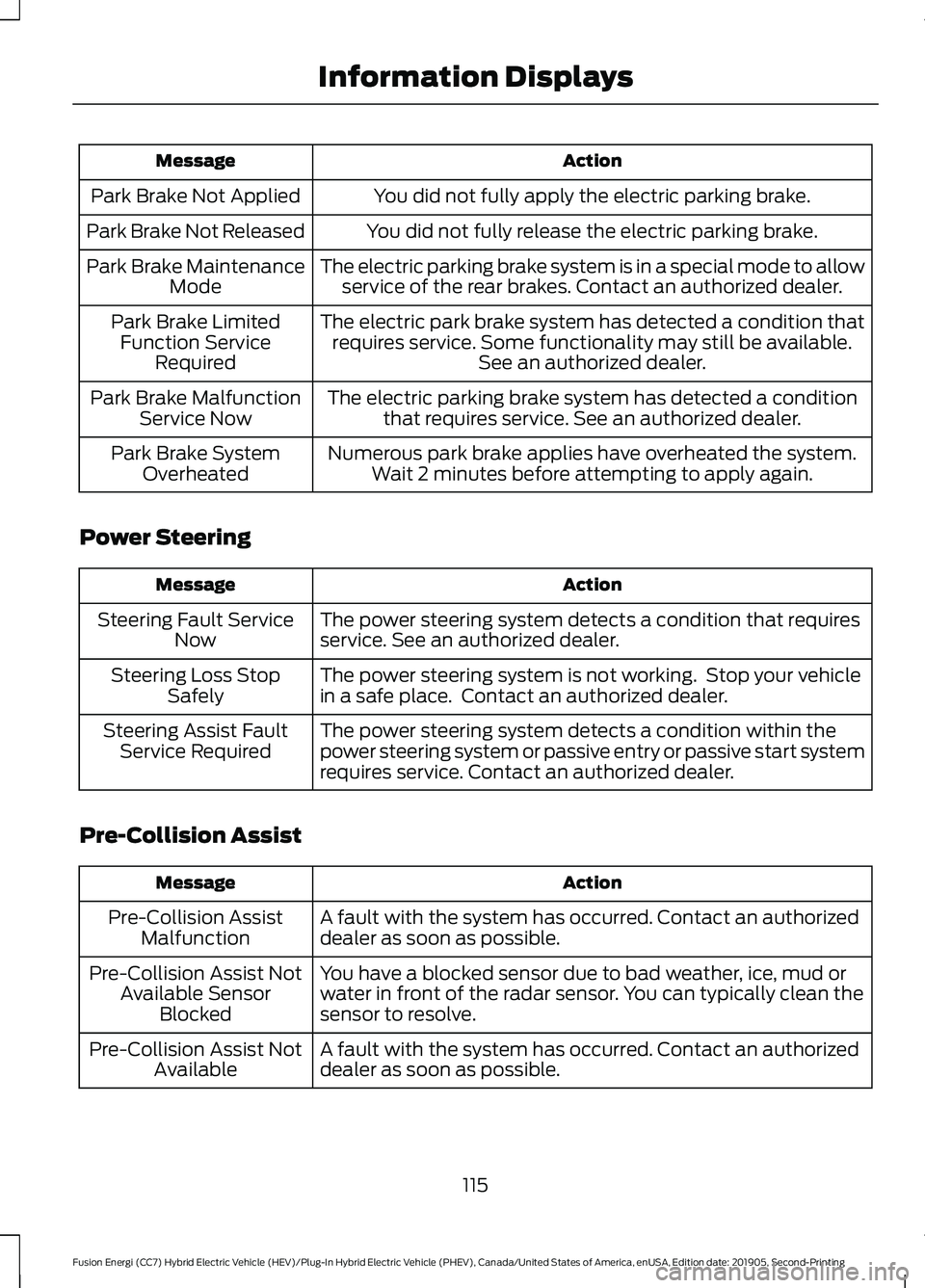
Action
Message
You did not fully apply the electric parking brake.
Park Brake Not Applied
You did not fully release the electric parking brake.
Park Brake Not Released
The electric parking brake system is in a special mode to allowservice of the rear brakes. Contact an authorized dealer.
Park Brake Maintenance
Mode
The electric park brake system has detected a condition thatrequires service. Some functionality may still be available. See an authorized dealer.
Park Brake Limited
Function Service Required
The electric parking brake system has detected a conditionthat requires service. See an authorized dealer.
Park Brake Malfunction
Service Now
Numerous park brake applies have overheated the system.Wait 2 minutes before attempting to apply again.
Park Brake System
Overheated
Power Steering Action
Message
The power steering system detects a condition that requires
service. See an authorized dealer.
Steering Fault Service
Now
The power steering system is not working. Stop your vehicle
in a safe place. Contact an authorized dealer.
Steering Loss Stop
Safely
The power steering system detects a condition within the
power steering system or passive entry or passive start system
requires service. Contact an authorized dealer.
Steering Assist Fault
Service Required
Pre-Collision Assist Action
Message
A fault with the system has occurred. Contact an authorized
dealer as soon as possible.
Pre-Collision Assist
Malfunction
You have a blocked sensor due to bad weather, ice, mud or
water in front of the radar sensor. You can typically clean the
sensor to resolve.
Pre-Collision Assist Not
Available Sensor Blocked
A fault with the system has occurred. Contact an authorized
dealer as soon as possible.
Pre-Collision Assist Not
Available
115
Fusion Energi (CC7) Hybrid Electric Vehicle (HEV)/Plug-In Hybrid Electric Vehicle (PHEV), Canada/United States of America, enUSA, Edition date: 201905, Second-Printing Information Displays
Page 121 of 486
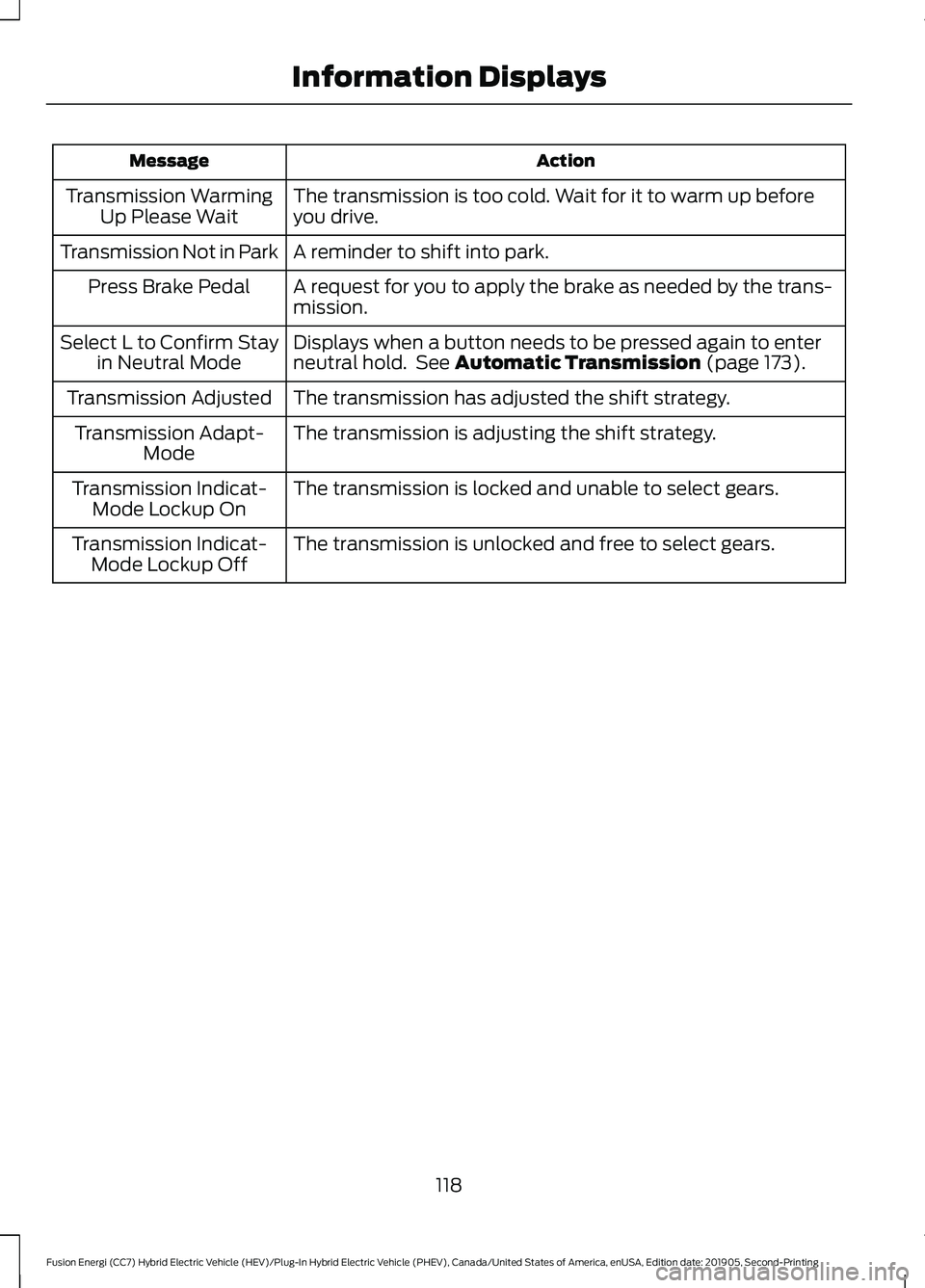
Action
Message
The transmission is too cold. Wait for it to warm up before
you drive.
Transmission Warming
Up Please Wait
A reminder to shift into park.
Transmission Not in Park
A request for you to apply the brake as needed by the trans-
mission.
Press Brake Pedal
Displays when a button needs to be pressed again to enter
neutral hold. See Automatic Transmission (page 173).
Select L to Confirm Stay
in Neutral Mode
The transmission has adjusted the shift strategy.
Transmission Adjusted
The transmission is adjusting the shift strategy.
Transmission Adapt-
Mode
The transmission is locked and unable to select gears.
Transmission Indicat-
Mode Lockup On
The transmission is unlocked and free to select gears.
Transmission Indicat-
Mode Lockup Off
118
Fusion Energi (CC7) Hybrid Electric Vehicle (HEV)/Plug-In Hybrid Electric Vehicle (PHEV), Canada/United States of America, enUSA, Edition date: 201905, Second-Printing Information Displays