phone FORD FUSION ENERGI 2020 Owners Manual
[x] Cancel search | Manufacturer: FORD, Model Year: 2020, Model line: FUSION ENERGI, Model: FORD FUSION ENERGI 2020Pages: 486, PDF Size: 6.28 MB
Page 8 of 486
Cleaning the Exterior
..................................275
Waxing .............................................................
277
Cleaning the Engine ....................................
277
Cleaning the Windows and Wiper Blades ........................................................................\
.
277
Cleaning the Interior ..................................
278
Cleaning the Instrument Panel and Instrument Cluster Lens .......................
278
Cleaning Leather Seats .............................
279
Repairing Minor Paint Damage .............
280
Cleaning the Wheels .................................
280
Vehicle Storage ...........................................
280
Body Styling Kits .........................................
282
Wheels and Tires
General Information ..................................
283
Tire Sealant and Inflator Kit ...................
283
Tire Care .........................................................
289
Using Summer Tires ..................................
304
Using Snow Chains ...................................
304
Tire Pressure Monitoring System .........
305
Technical Specifications .........................
309
Capacities and Specifications
Engine Specifications ................................
310
Motorcraft Parts ............................................
311
Vehicle Identification Number .................
311
Vehicle Certification Label .......................
312
Transmission Code Designation ............
313
Capacities and Specifications ................
314
Bulb Specification Chart ..........................
319
Connected Vehicle
Connected Vehicle Requirements .........
321
Connected Vehicle Limitations ...............
321
Connecting the Vehicle to a Mobile Network .......................................................
321
Connecting the Vehicle to a Wi-Fi Network .......................................................
321Connected Vehicle – Troubleshooting
........................................................................\
322
Wi-Fi Hotspot
Creating a Wi-Fi Hotspot .........................
324
Changing the Wi-Fi Hotspot Name or Password ...................................................
324
Audio System
General Information ..................................
325
Audio Unit - Vehicles With: Touchscreen Display, Vehicles Without: Sony Audio
System ........................................................
325
Audio Unit - Vehicles With: SYNC ........
326
Audio Unit - Vehicles With: Sony Audio System/Touchscreen Display ............
329
Digital Radio .................................................
330
Satellite Radio ..............................................
332
USB Port .........................................................
335
SYNC™
General Information ..................................
336
Using Voice Recognition ...........................
337
Using SYNC™ With Your Phone ...........
339
SYNC™ Applications and Services ......
340
Using SYNC™ With Your Media Player ........................................................................\
343
SYNC™ Troubleshooting ........................
344
SYNC™ 3
General Information ..................................
353
Using Voice Recognition ..........................
355
Entertainment ..............................................
361
Climate .............................................................
371
Phone ..............................................................
373
Navigation ......................................................
375
Electric Vehicle Information ...................
380
Apps ................................................................
400
Settings ..........................................................
403
SYNC™ 3 Troubleshooting ....................
405
5
Fusion Energi (CC7) Hybrid Electric Vehicle (HEV)/Plug-In Hybrid Electric Vehicle (PHEV), Canada/United States of America, enUSA, Edition date: 201905, Second-Printing Table of Contents
Page 15 of 486
Entertainment Data
Data recorded includes, for example:
•
Music, videos or album art.
• Contacts and corresponding address
book entries.
• Navigation destinations.
Services That We Provide
If you use our services, we collect and use
data, for example, account information,
vehicle location and driving characteristics,
that could identify you. We transmit this
data through a dedicated, protected
connection. We only collect and use data
to enable your use of our services to which
you have subscribed, with your consent or
where permitted by law. For additional
information, see the terms and conditions
of the services to which you have
subscribed.
Services That Third Parties
Provide
We recommend that you review the terms
and conditions and data privacy
information for any services to which you
subscribe. We take no responsibility for
services that third parties provide.
Vehicles With a Modem (If Equipped) The modem has a SIM. The
modem was enabled when your
vehicle was built and periodically
sends messages to stay connected to the
cell phone network, receive automatic
software updates and send vehicle-related
information to us, for example, diagnostic
information. These messages could
include information that identifies your
vehicle, the SIM and the electronic serial
number of the modem. Cell phone network service providers could have access to
additional information, for example, cell
phone network tower identification. For
additional information about our privacy
policy, visit
www .For dC onne c t e d . c om or
refer to your local Ford website.
Note: The modem continues to send this
information unless you disable the modem
or stop the modem from sharing vehicle
data by changing the modem settings. See
Connected Vehicle
(page 321).
Note: The service can be unavailable or
interrupted for a number of reasons, for
example, environmental or topographical
conditions and data plan coverage.
Note: To find out if your vehicle has a
modem, visit
www .For dC onne c t e d . c om .
Vehicles With SYNC
Mobile Device Data
If you connect a mobile device to your
vehicle, you can display data from your
device on the touchscreen for example,
music and album art. You can share your
vehicle data with mobile apps on your
device through the system. See
Apps
(page 400).
The mobile apps function operates by your
connected device sending data to us in the
United States. The data is encrypted and
includes the vehicle identification number
of your vehicle, the SYNC module serial
number, odometer, enabled apps, usage
statistics and debugging information. We
retain it only as long as necessary to
provide the service, to troubleshoot, for
continuous improvement and to offer you
products and services that may be of
interest to you according to your
preferences and where allowed by law.
12
Fusion Energi (CC7) Hybrid Electric Vehicle (HEV)/Plug-In Hybrid Electric Vehicle (PHEV), Canada/United States of America, enUSA, Edition date: 201905, Second-Printing Introduction
Page 16 of 486
If you connect a cell phone to the system,
the system creates a profile that links to
that cell phone. The cell phone profile
enables more mobile features and efficient
operation. The profile contains, for
example, data from your phonebook, read
and unread text messages and call history,
including history of calls when your cell
phone was not connected to the system.
If you connect a media device, the system
creates and retains a media device index
of supported media content. The system
also records a short diagnostic log of
approximately 10 minutes of all recent
system activity.
The cell phone profile, media device index
and diagnostic log remain in your vehicle
unless you delete them and are generally
accessible only in your vehicle when you
connect your cell phone or media device.
If you no longer plan to use the system or
your vehicle, we recommend you use the
master reset function to erase the stored
information. See Settings (page 403).
System data cannot be accessed without
special equipment and access to your
vehicle's module.
For additional information about our
privacy policy, refer to your local Ford
website.
Note: To find out if your vehicle has a
connectivity technology, visit
www .For dC onne c t e d . c om .
Vehicles With an Emergency Call
System
When the emergency call system is active,
it may disclose to emergency services that
your vehicle has been in a crash involving
the deployment of an airbag or activation
of the fuel pump shut-off. Certain versions
or updates to the emergency call system
may also be capable of electronically or
verbally disclosing to emergency services
operators your vehicle location or other details about your vehicle or crash to assist
emergency services operators to provide
the most appropriate emergency services.
If you do not want to disclose this
information, do not activate the emergency
call system.
Note:
You cannot deactivate emergency
call systems that are required by law.
PERCHLORATE
Certain components in your vehicle such
as airbag modules, seatbelt pretensioners
and remote control batteries may contain
perchlorate material. Special handling
may apply for service or vehicle end of life
disposal.
For more information visit: Web Address
www.dtsc.ca.gov/hazard- ouswaste/perchlorate
FORD CREDIT
US Only
Ford Credit offers a full range of financing
and lease plans to help you acquire your
vehicle. If you have financed or leased your
vehicle through Ford Credit, thank you for
your business.
For assistance call 1-800-727-7000, or for
more information about Ford Credit and
access to the online Account Manager tool,
visit www.ford.com/finance.
13
Fusion Energi (CC7) Hybrid Electric Vehicle (HEV)/Plug-In Hybrid Electric Vehicle (PHEV), Canada/United States of America, enUSA, Edition date: 201905, Second-Printing Introduction
Page 18 of 486
WARNING: NEVER use a rearward
facing child restraint on a seat protected
by an ACTIVE AIRBAG in front of it,
DEATH or SERIOUS INJURY to the CHILD
can occur.
On Board Diagnostics Data Link
Connector WARNING: Do not connect
wireless plug-in devices to the data link
connector. Unauthorized third parties
could gain access to vehicle data and
impair the performance of safety related
systems. Only allow repair facilities that
follow our service and repair instructions
to connect their equipment to the data
link connector.
Your vehicle has an OBD Data Link
Connector (DLC) that is used in
conjunction with a diagnostic scan tool for
vehicle diagnostics, repairs and
reprogramming services. Installing an
aftermarket device that uses the DLC
during normal driving for purposes such as
remote insurance company monitoring,
transmission of vehicle data to other
devices or entities, or altering the
performance of the vehicle, may cause
interference with or even damage to
vehicle systems. We do not recommend
or endorse the use of aftermarket plug-in
devices unless approved by Ford. The
vehicle Warranty will not cover damage
caused by an aftermarket plug-in device. MOBILE COMMUNICATIONS
EQUIPMENT WARNING:
Driving while
distracted can result in loss of vehicle
control, crash and injury. We strongly
recommend that you use extreme
caution when using any device that may
take your focus off the road. Your
primary responsibility is the safe
operation of your vehicle. We
recommend against the use of any
hand-held device while driving and
encourage the use of voice-operated
systems when possible. Make sure you
are aware of all applicable local laws
that may affect the use of electronic
devices while driving.
Using mobile communications equipment
is becoming increasingly important in the
conduct of business and personal affairs.
However, you must not compromise your
own or others’ safety when using such
equipment. Mobile communications can
enhance personal safety and security when
appropriately used, particularly in
emergency situations. Safety must be
paramount when using mobile
communications equipment to avoid
negating these benefits. Mobile
communication equipment includes, but
is not limited to, cellular phones, pagers,
portable email devices, text messaging
devices and portable two-way radios.
EXPORT UNIQUE OPTIONS
For your particular global region, your
vehicle may be equipped with features and
options that are different from the features
and options that are described in this
Owner ’s Manual. A market unique
supplement may be supplied that
complements this book. By referring to the
15
Fusion Energi (CC7) Hybrid Electric Vehicle (HEV)/Plug-In Hybrid Electric Vehicle (PHEV), Canada/United States of America, enUSA, Edition date: 201905, Second-Printing Introduction
Page 54 of 486
GENERAL INFORMATION ON
RADIO FREQUENCIES
This device complies with Part 15 of the
FCC Rules and with Industry Canada
license-exempt RSS standard(s).
Operation is subject to the following two
conditions: (1) This device may not cause
harmful interference, and (2) This device
must accept any interference received,
including interference that may cause
undesired operation.
WARNING: Changes or
modifications not expressively approved
by the party responsible for compliance
could void the user's authority to operate
the equipment. The term "IC:" before the
radio certification number only signifies
that Industry Canada technical
specifications were met.
The typical operating range for your
transmitter is approximately
33 ft (10 m).
Vehicles with the remote start feature will
have a greater range.
One of the following could cause a
decrease in operating range:
• Weather conditions.
• Nearby radio towers.
• Structures around the vehicle.
• Other vehicles parked next to your
vehicle.
The radio frequency used by your remote
control can also be used by other radio
transmitters, for example amateur radios,
medical equipment, wireless headphones,
wireless remote controls, cell phones,
battery chargers and alarm systems. If the
frequencies are jammed, you will not be
able to use your remote control. You can
lock and unlock the doors with the key.
Note: Make sure to lock your vehicle before
leaving it unattended. Note:
If you are in range, the remote control
will operate if you press any button
unintentionally.
Note: The remote control contains sensitive
electrical components. Exposure to moisture
or impact may cause permanent damage.
Intelligent Access
(If Equipped)
The system uses a radio frequency signal
to communicate with your vehicle and
authorize your vehicle to unlock when one
of the following conditions are met:
• You activate the front exterior door
handle switch.
• You press the luggage compartment
button.
• You press a button on the transmitter.
If excessive radio frequency interference
is present in the area or if the transmitter
battery is low, you may need to
mechanically unlock your door. You can
use the mechanical key blade in your
intelligent access key to open the driver
door in this situation. See
Remote
Control (page 51).
REMOTE CONTROL
Intelligent Access Key
Note: The ready to drive indicator may be
off and you may not be able to shift out of
park (P) unless the intelligent access key is
inside your vehicle.
51
Fusion Energi (CC7) Hybrid Electric Vehicle (HEV)/Plug-In Hybrid Electric Vehicle (PHEV), Canada/United States of America, enUSA, Edition date: 201905, Second-Printing Keys and Remote Controls
Page 66 of 486
Press the button again within three
seconds to confirm that all the doors are
closed. The doors will lock again, the horn
will sound and the direction indicators will
flash if all the doors and the luggage
compartment are closed.
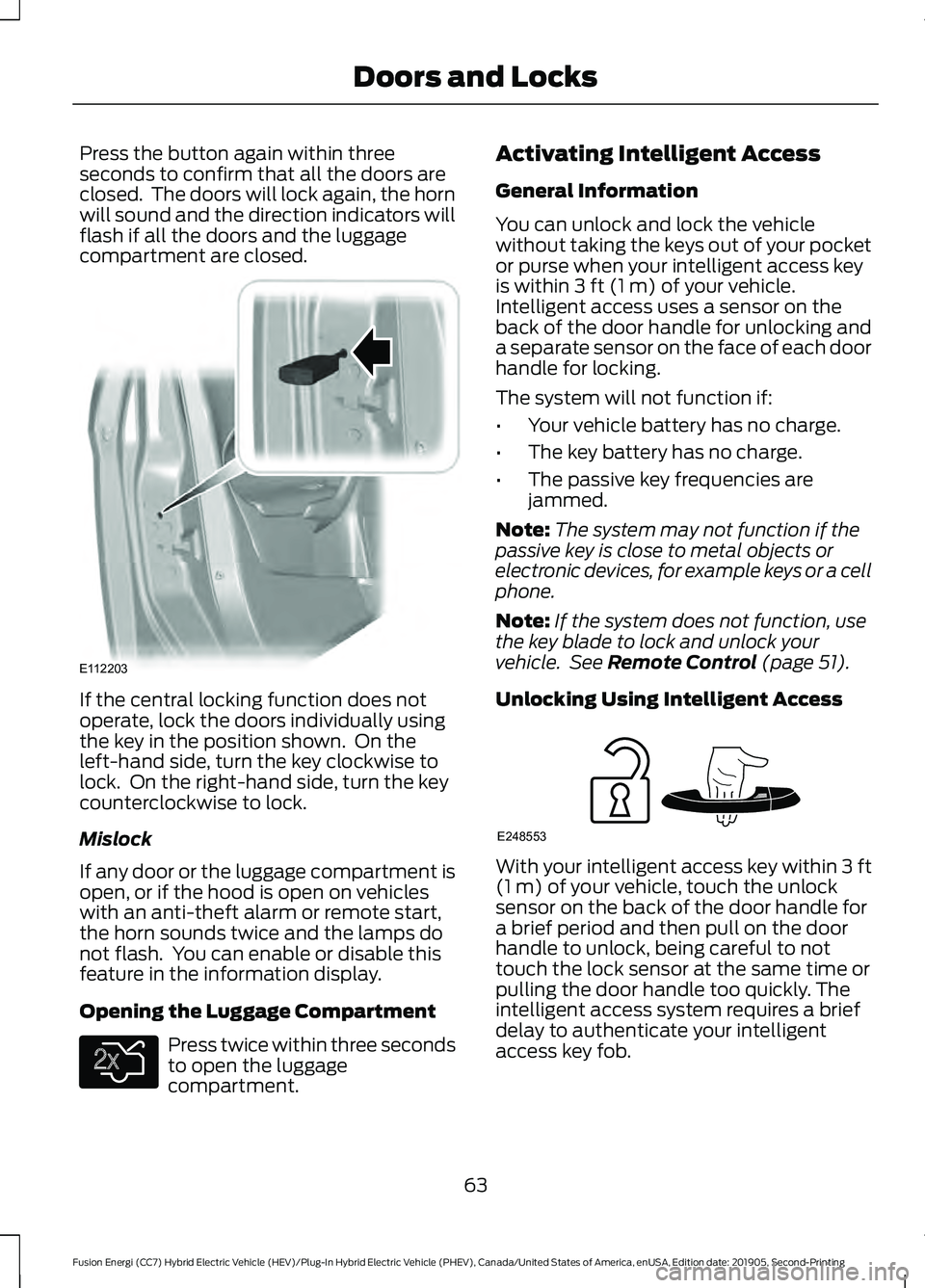
If the central locking function does not
operate, lock the doors individually using
the key in the position shown. On the
left-hand side, turn the key clockwise to
lock. On the right-hand side, turn the key
counterclockwise to lock.
Mislock
If any door or the luggage compartment is
open, or if the hood is open on vehicles
with an anti-theft alarm or remote start,
the horn sounds twice and the lamps do
not flash. You can enable or disable this
feature in the information display.
Opening the Luggage Compartment
Press twice within three seconds
to open the luggage
compartment. Activating Intelligent Access
General Information
You can unlock and lock the vehicle
without taking the keys out of your pocket
or purse when your intelligent access key
is within 3 ft (1 m) of your vehicle.
Intelligent access uses a sensor on the
back of the door handle for unlocking and
a separate sensor on the face of each door
handle for locking.
The system will not function if:
• Your vehicle battery has no charge.
• The key battery has no charge.
• The passive key frequencies are
jammed.
Note: The system may not function if the
passive key is close to metal objects or
electronic devices, for example keys or a cell
phone.
Note: If the system does not function, use
the key blade to lock and unlock your
vehicle. See
Remote Control (page 51).
Unlocking Using Intelligent Access With your intelligent access key within
3 ft
(1 m) of your vehicle, touch the unlock
sensor on the back of the door handle for
a brief period and then pull on the door
handle to unlock, being careful to not
touch the lock sensor at the same time or
pulling the door handle too quickly. The
intelligent access system requires a brief
delay to authenticate your intelligent
access key fob.
63
Fusion Energi (CC7) Hybrid Electric Vehicle (HEV)/Plug-In Hybrid Electric Vehicle (PHEV), Canada/United States of America, enUSA, Edition date: 201905, Second-Printing Doors and LocksE112203 E138630 E248553
Page 74 of 486
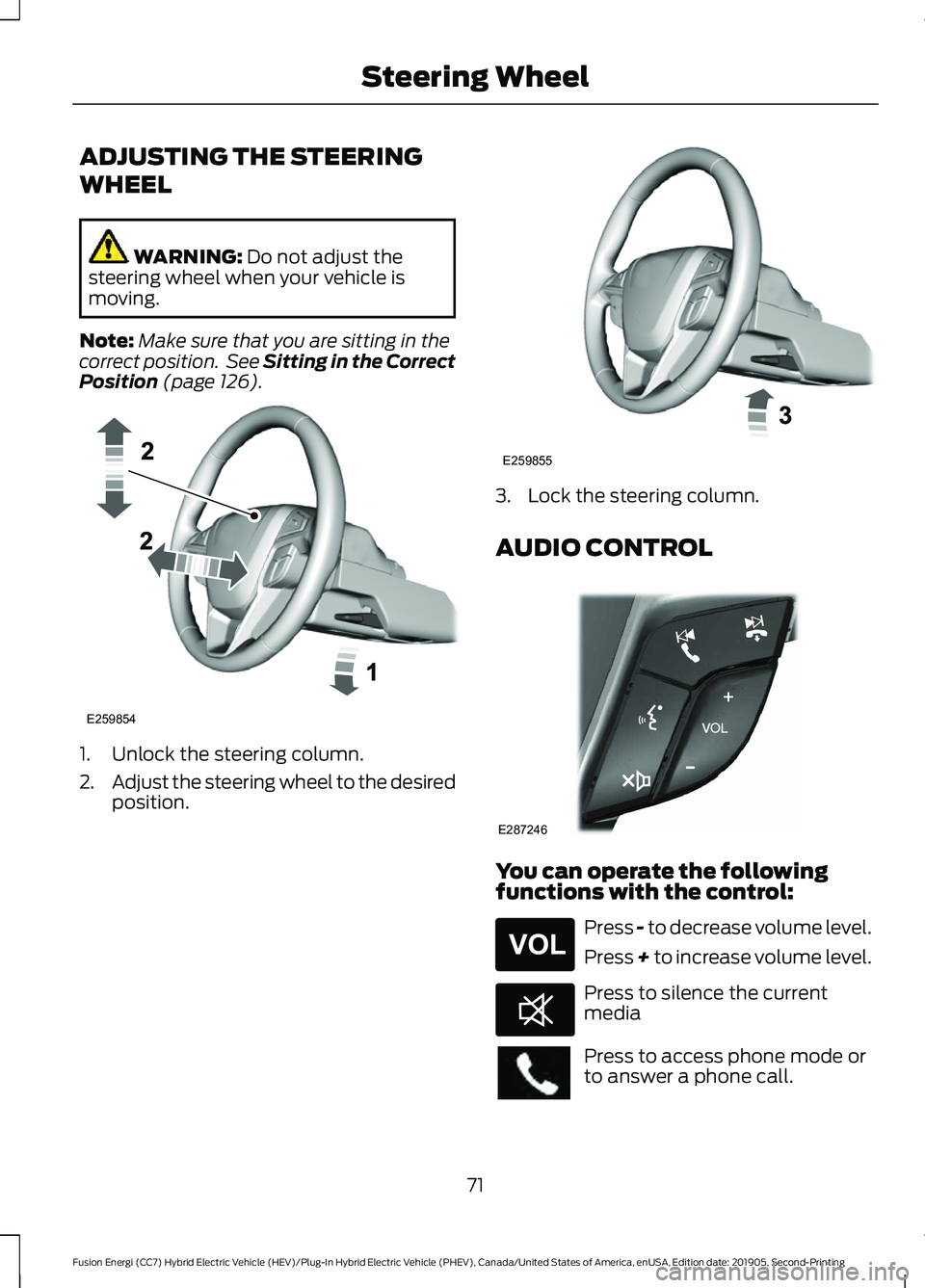
ADJUSTING THE STEERING
WHEEL
WARNING: Do not adjust the
steering wheel when your vehicle is
moving.
Note: Make sure that you are sitting in the
correct position. See Sitting in the Correct
Position
(page 126). 1. Unlock the steering column.
2.
Adjust the steering wheel to the desired
position. 3. Lock the steering column.
AUDIO CONTROL
You can operate the following
functions with the control:
Press - to decrease volume level.
Press + to increase volume level.
Press to silence the current
media
Press to access phone mode or
to answer a phone call.
71
Fusion Energi (CC7) Hybrid Electric Vehicle (HEV)/Plug-In Hybrid Electric Vehicle (PHEV), Canada/United States of America, enUSA, Edition date: 201905, Second-Printing Steering WheelE259854 E259855 E287246 E265304 E268549
Page 75 of 486
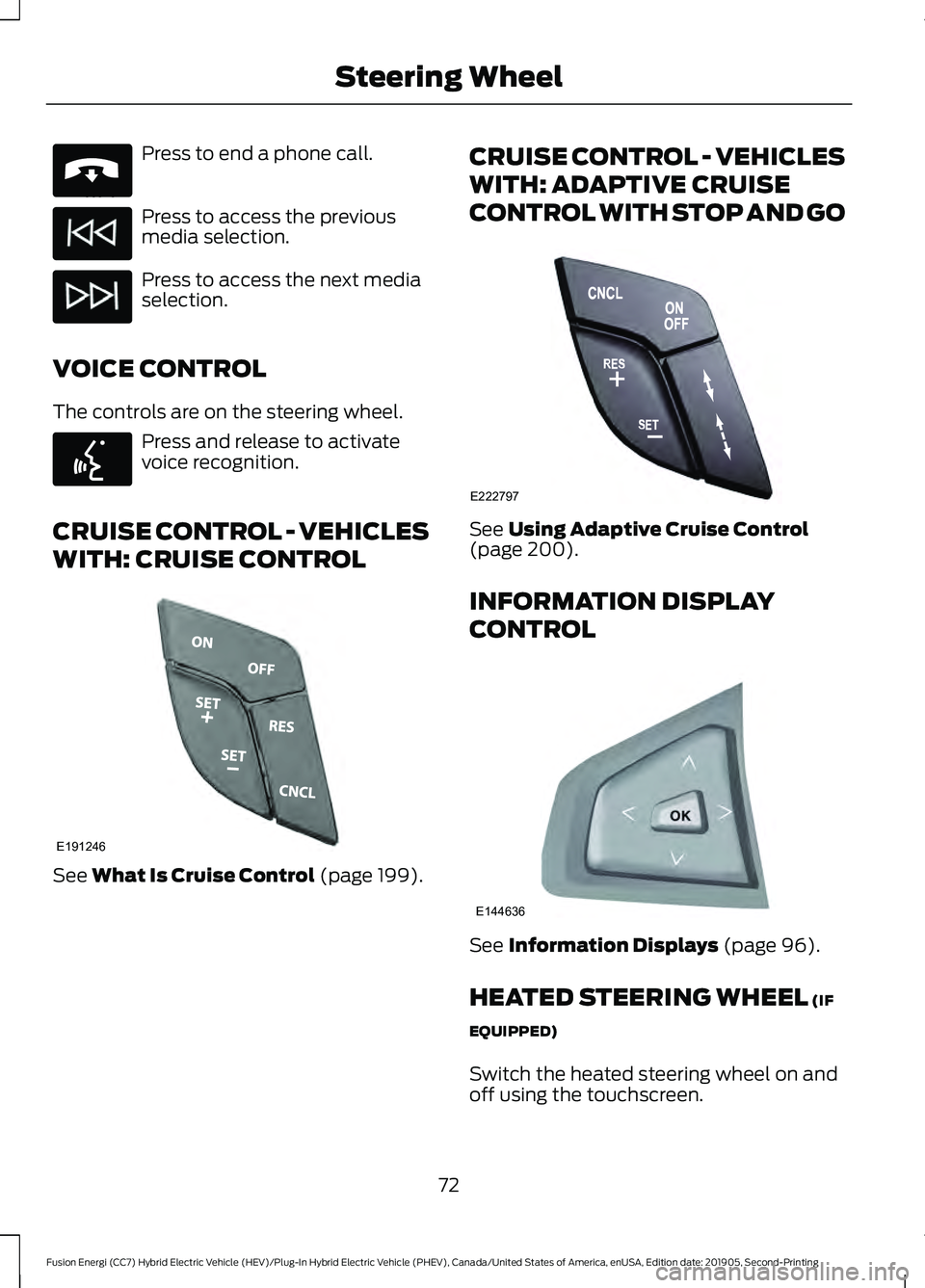
Press to end a phone call.
Press to access the previous
media selection.
Press to access the next media
selection.
VOICE CONTROL
The controls are on the steering wheel. Press and release to activate
voice recognition.
CRUISE CONTROL - VEHICLES
WITH: CRUISE CONTROL See What Is Cruise Control (page 199). CRUISE CONTROL - VEHICLES
WITH: ADAPTIVE CRUISE
CONTROL WITH STOP AND GO
See
Using Adaptive Cruise Control
(page 200).
INFORMATION DISPLAY
CONTROL See
Information Displays (page 96).
HEATED STEERING WHEEL
(IF
EQUIPPED)
Switch the heated steering wheel on and
off using the touchscreen.
72
Fusion Energi (CC7) Hybrid Electric Vehicle (HEV)/Plug-In Hybrid Electric Vehicle (PHEV), Canada/United States of America, enUSA, Edition date: 201905, Second-Printing Steering WheelE265040 E142599 E191246 E222797 E144636
Page 93 of 486
•
Distance - Displays the total distance
traveled, distance traveled on battery
power only (EV distance) and Regen
distance. Regen distance is the
estimated range gained from energy
recaptured through regenerative
braking.
• Energy Use - Displays the average fuel
economy. In addition for Energi,
displays the total electrical energy used
while in Plug-in Power Mode in kilowatt
hours (kWh).
• Brake Score - The percent displayed is
an indication of the regenerative
braking efficiency for the trip.
Note: Corresponding trip efficiency leaves
appear on the right information display upon
shutting off your Hybrid vehicle. On Energi
vehicles, the trip efficiency leaves are shown
on the right information display when the
vehicle operates in Hybrid Mode for the
entire trip. For trips with Plug-in Power Mode
operation, an estimate of your EV
Range/Full Charge is provided along with a
listing of factors and their contributions to
this estimate. See Next Full Charge under
Right Information Display in this chapter.
Right Information Display
Entertainment
See General Information (page 353).
Phone
See
General Information (page 353).
Navigation or Compass
See
General Information (page 353).
Fuel Economy
See
General Information (page 96). Vehicle Range
Vehicle range indicates the estimated
distance your vehicle will travel with the
energy currently onboard. The range is
displayed at the bottom of the screen with
gasoline range shown in white and electric
range (Energi only) shown in blue.
•
Gasoline Range: Is the estimated
distance to empty based on the fuel
remaining in the tank.
• Electric Range: Is the estimated
distance you can travel in Plug-In
Power Mode with the engine off. This
range is based on a calculation
determined by the amount of energy
stored in the high voltage battery as a
result of charging while plugged in and
the energy being used while driving.
The amount of energy being used while
driving is affected by:
• Mild or aggressive acceleration or
braking.
• Your vehicle speed.
• Your use of accessories such as climate
control.
• The ambient temperature and other
weather conditions.
• City or highway driving.
• Road grades.
Note: It is normal for vehicle range
estimates to vary due to changes in average
energy usage. This is why you typically see
different range estimates each time you fill
up your fuel tank or fully charge your battery.
90
Fusion Energi (CC7) Hybrid Electric Vehicle (HEV)/Plug-In Hybrid Electric Vehicle (PHEV), Canada/United States of America, enUSA, Edition date: 201905, Second-Printing Instrument Cluster
Page 106 of 486
Settings
On or Off
Regen Display
Hold OK to Reset
Driving History
* Energi only.
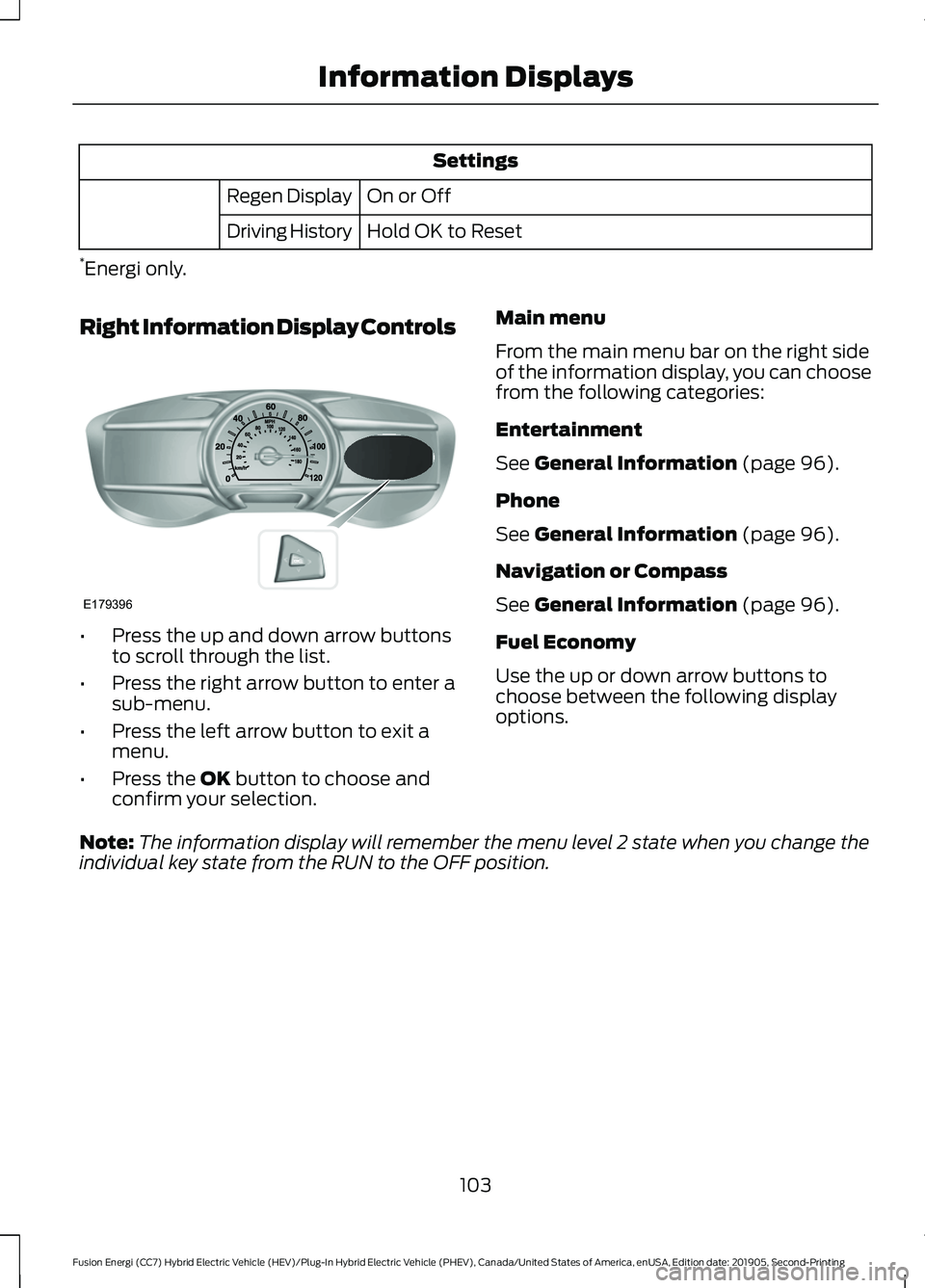
Right Information Display Controls •
Press the up and down arrow buttons
to scroll through the list.
• Press the right arrow button to enter a
sub-menu.
• Press the left arrow button to exit a
menu.
• Press the OK button to choose and
confirm your selection. Main menu
From the main menu bar on the right side
of the information display, you can choose
from the following categories:
Entertainment
See
General Information (page 96).
Phone
See
General Information (page 96).
Navigation or Compass
See
General Information (page 96).
Fuel Economy
Use the up or down arrow buttons to
choose between the following display
options.
Note: The information display will remember the menu level 2 state when you change the
individual key state from the RUN to the OFF position.
103
Fusion Energi (CC7) Hybrid Electric Vehicle (HEV)/Plug-In Hybrid Electric Vehicle (PHEV), Canada/United States of America, enUSA, Edition date: 201905, Second-Printing Information DisplaysE179396