tow FORD FUSION HYBRID 2014 Owner's Manual
[x] Cancel search | Manufacturer: FORD, Model Year: 2014, Model line: FUSION HYBRID, Model: FORD FUSION HYBRID 2014Pages: 473, PDF Size: 5.93 MB
Page 138 of 473
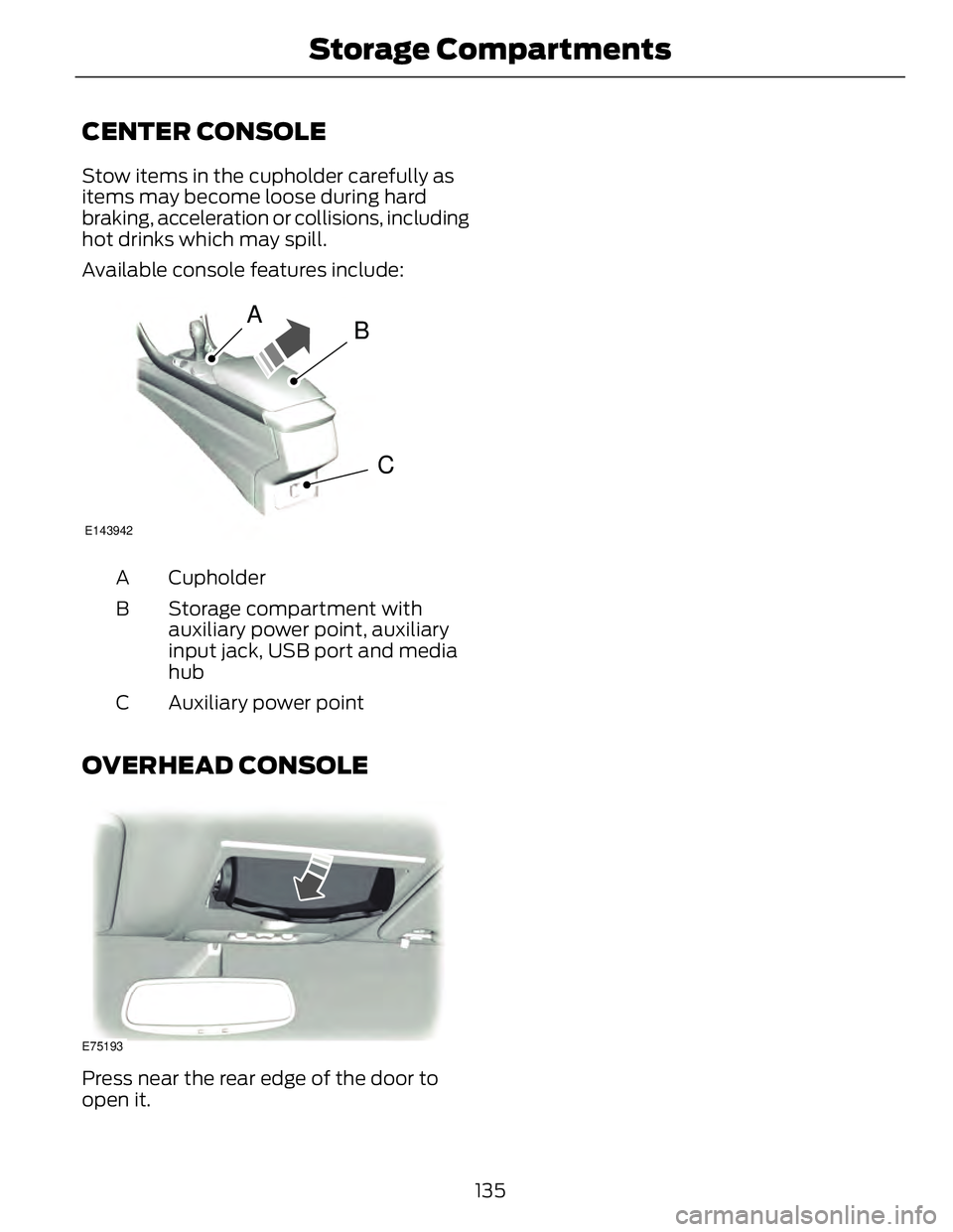
CENTER CONSOLE Stow items in the cupholder carefully as
items may become loose during hard
braking, acceleration or collisions, including
hot drinks which may spill.
Available console features include:
A
B
CE143942
CupholderA
Storage compartment with
auxiliary power point, auxiliary
input jack, USB port and media
hubB
Auxiliary power pointC
OVERHEAD CONSOLE
E75193
Press near the rear edge of the door to
open it.
135Storage C ompartments
Page 150 of 473
AnswerQuestion
Your vehicle's engine and transmission are
designed to deliver the power you need at
the most efficient engine speed. This may
be higher than expected during heavy
accelerations, and may fluctuate during
steady state driving. These are character-
istics of the Atkinson engine cycle and the
transmission technology that help
maximize your hybrid's fuel economy.Why does my engine rev up so high some-
times when I accelerate?
The fan noise comes from a fan located
outside the high voltage battery. This fan
turns on when the battery requires cooling
air. The fan speed, and associated noise
level, will change according to the amount
of cooling required to maintain good
performance. Maintaining the battery
temperature at optimal conditions also
prolongs the useful life of the battery and
helps to achieve better fuel economy.What is the fan noise I hear from the rear
of my hybrid?
Change the engine oil every 10000 miles
(16000 km) or once per year under normal
operating conditions.What is the engine oil change service
interval?
Your hybrid vehicle can use E15 (15%
ethanol, 85% gasoline) fuel, but you may
notice slightly reduced fuel economy
because ethanol contains less energy per
gallon than gasoline. Your hybrid vehicle is
not designed to use E85 (85% ethanol).Can I put E15 or E85 in my vehicle, and how
will it affect my fuel economy?
The high voltage battery system is designed
to last the life of the vehicle and requires
no maintenance.How long will my high voltage battery last?
Does it need maintenance?
There are no provisions for charging the
high voltage battery from a power supply
external to the vehicle. (For Fusion Energi
vehicles, the vehicle can be plugged into a
110-volt outlet with charge cord provided.)Can you charge the battery with a plug into
an A/C outlet?
Yes. Your hybrid vehicle can be flat towed
without modification. See Towing (page
213).Can I tow the hybrid behind my motor home
with all four wheels down?
147Unique Driving Characteristics
Page 164 of 473
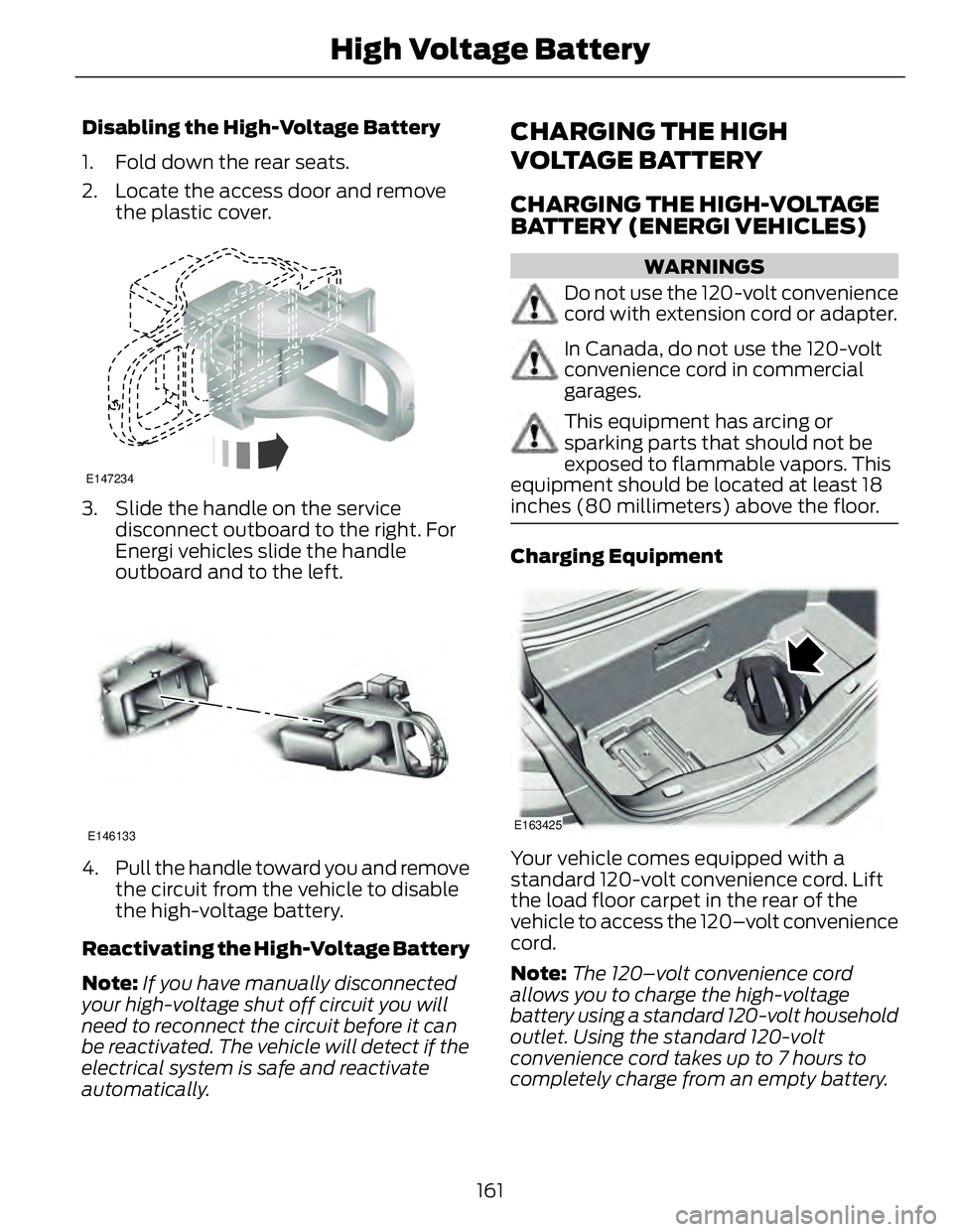
Disabling the High-Voltage Battery
1. Fold down the rear seats.
2. Locate the access door and remove
the plastic cover. E147234
3. Slide the handle on the service
disconnect outboard to the right. For
Energi vehicles slide the handle
outboard and to the left.
E146133
4. Pull the handle toward you and remove
the circuit from the vehicle to disable
the high-voltage battery.
Reactivating the High-Voltage Battery
Note: If you have manually disconnected
your high-voltage shut off circuit you will
need to reconnect the circuit before it can
be reactivated. The vehicle will detect if the
electrical system is safe and reactivate
automatically. CHARGING THE HIGH
VOLTAGE BATTERY CHARGING THE HIGH-VOLTAGE
BATTERY (ENERGI VEHICLES) WARNINGS
Do not use the 120-volt convenience
cord with extension cord or adapter.
In Canada, do not use the 120-volt
convenience cord in commercial
garages.
This equipment has arcing or
sparking parts that should not be
exposed to flammable vapors. This
equipment should be located at least 18
inches (80 millimeters) above the floor.
Charging Equipment
E163425
Your vehicle comes equipped with a
standard 120-volt convenience cord. Lift
the load floor carpet in the rear of the
vehicle to access the 120–volt convenience
cord.
Note: The 120–volt convenience cord
allows you to charge the high-voltage
battery using a standard 120-volt household
outlet. Using the standard 120-volt
convenience cord takes up to 7 hours to
completely charge from an empty battery.
161High Voltage Battery
Page 172 of 473
GENERAL INFORMATION Note: Occasional brake noise is normal. If
a metal-to-metal, continuous grinding or
continuous squeal sound is present, the
brake linings may be worn-out. Have the
system checked by an authorized dealer. If
the vehicle has continuous vibration or
shudder in the steering wheel while braking,
have it checked by an authorized dealer.
Note: Brake dust may accumulate on the
wheels, even under normal driving
conditions. Some dust is inevitable as the
brakes wear and does not contribute to
brake noise. See Cleaning the Alloy
Wheels (page 264).E144522
See Warning Lamps and
Indicators (page 81).
Wet brakes result in reduced braking
efficiency. Gently press the brake pedal a
few times when driving from a car wash or
standing water to dry the brakes.
Brake Over Accelerator In the event the accelerator pedal
becomes stuck or entrapped, apply steady
and firm pressure to the brake pedal to
slow the vehicle and reduce engine power.
If you experience this condition, apply the
brakes and bring your vehicle to a safe
stop. Move the transmission selector lever
to position P, switch the engine off and
apply the parking brake. Inspect the
accelerator pedal for any interference. If
none are found and the condition persists,
have your vehicle towed to the nearest
authorized dealer. Brake Assist Brake assist detects when you brake
heavily by measuring the rate at which you
press the brake pedal. It provides
maximum braking efficiency as long as you
press the pedal. Brake assist can reduce
stopping distances in critical situations.
Anti-lock Brake System This system helps you maintain steering
control during emergency stops by keeping
the brakes from locking.
This lamp momentarily
illuminates when you turn the
ignition on. If the light does not
illuminate during start up, remains on or
flashes, the anti-lock braking system may
be disabled. Have the system checked by
an authorized dealer. E144522
If the system is disabled, normal
braking is still effective. If the
brake warning lamp illuminates
when you release the parking brake, have
your system checked by an authorized
dealer.
Regenerative Braking System This feature is used to simulate the engine
braking of an internal combustion engine
and assist the standard brake system while
recovering some of the energy of motion
and storing it in the battery to improve fuel
economy. The standard brake system is
designed to fully stop the car if
regenerative braking is not available.
During regenerative braking, the motor is
spun as a generator to create electrical
current. This recharges the battery and
slows the vehicle. In effect, once the
accelerator pedal is released, the motor
changes from an energy user to an energy
producer.
169Brakes
Page 180 of 473
E130178
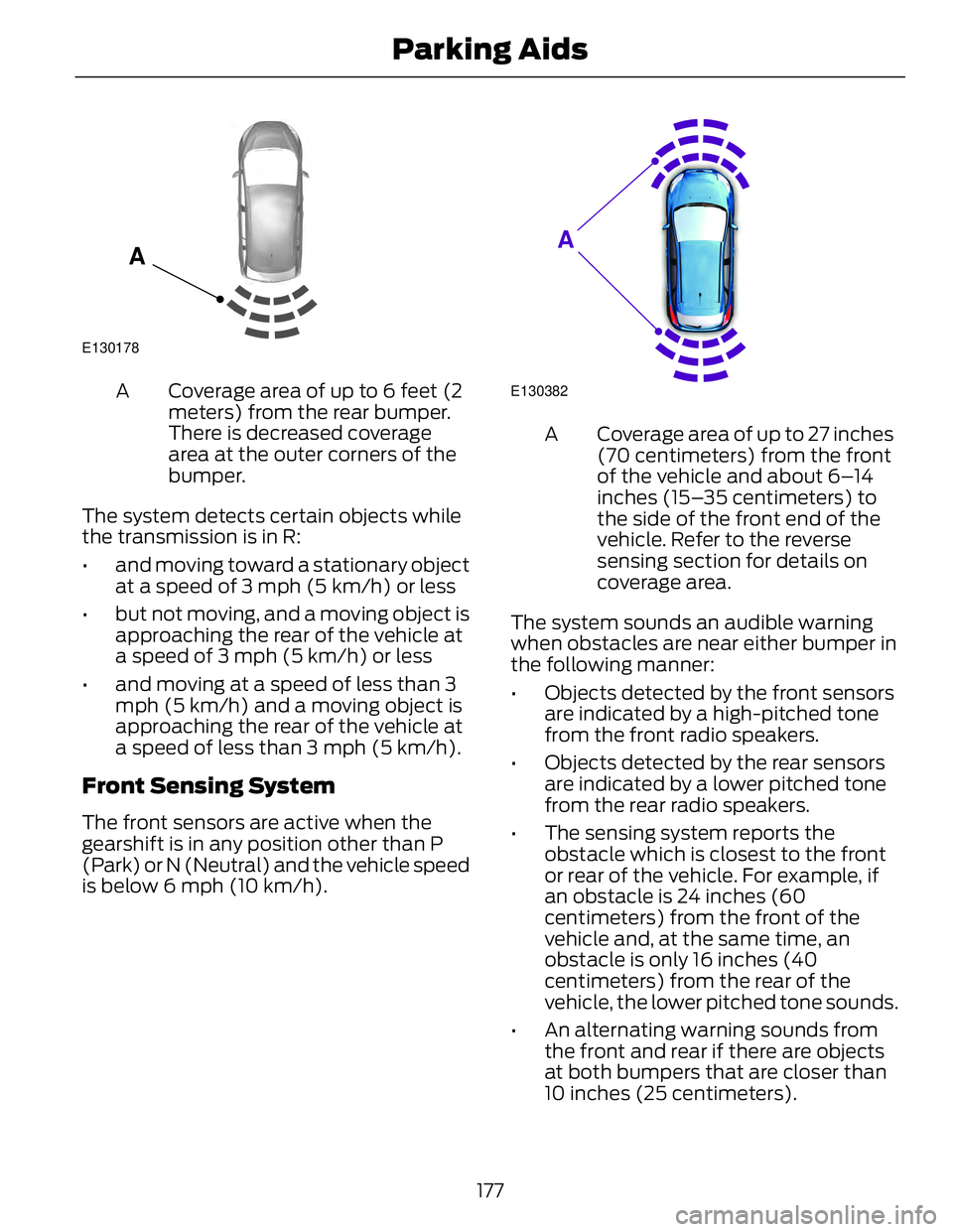
A Coverage area of up to 6 feet (2
meters) from the rear bumper.
There is decreased coverage
area at the outer corners of the
bumper.A
The system detects certain objects while
the transmission is in R:
• and moving toward a stationary object
at a speed of 3 mph (5 km/h) or less
• but not moving, and a moving object is
approaching the rear of the vehicle at
a speed of 3 mph (5 km/h) or less
• and moving at a speed of less than 3
mph (5 km/h) and a moving object is
approaching the rear of the vehicle at
a speed of less than 3 mph (5 km/h).
Front Sensing System The front sensors are active when the
gearshift is in any position other than P
(Park) or N (Neutral) and the vehicle speed
is below 6 mph (10 km/h). E130382
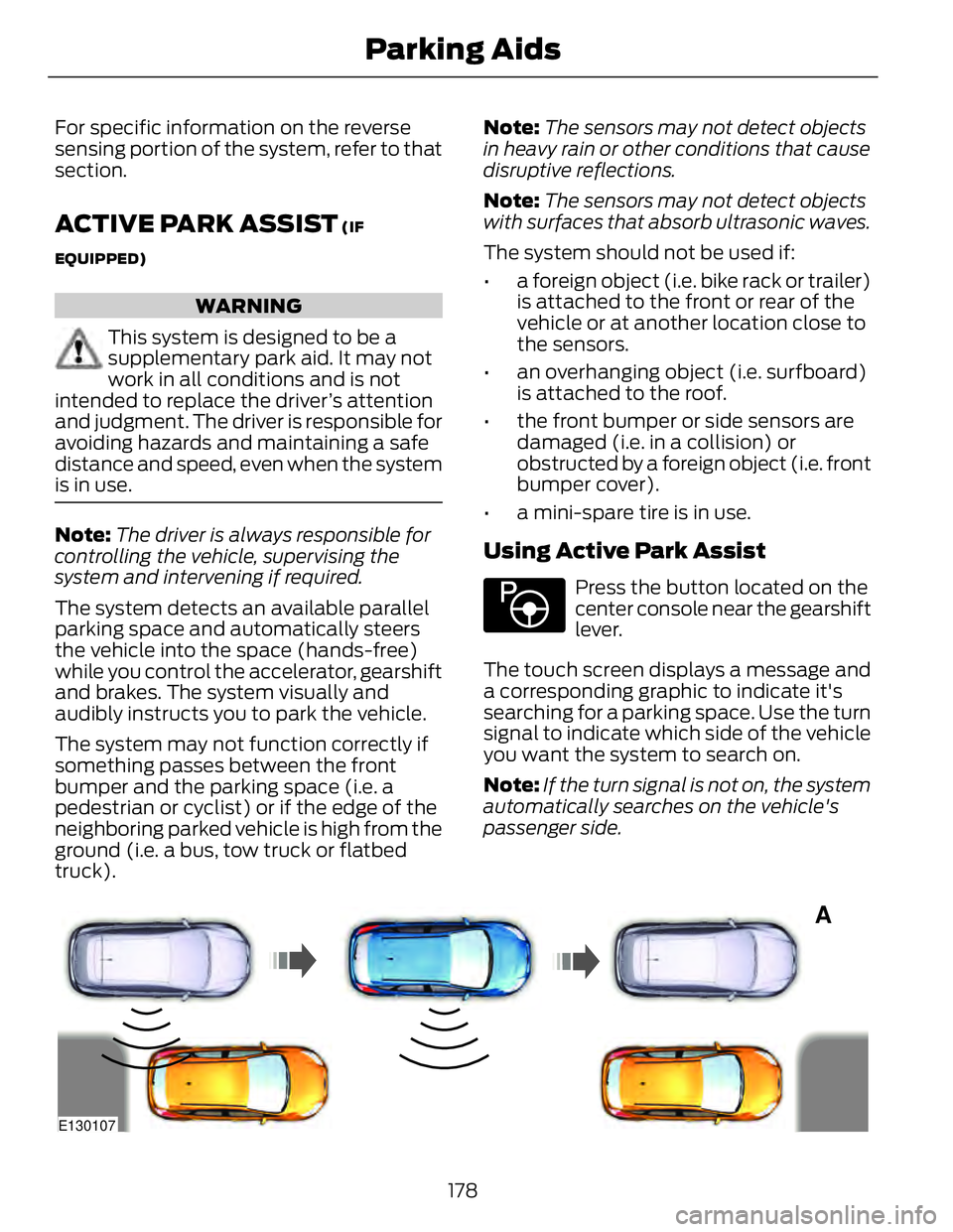
A Coverage area of up to 27 inches
(70 centimeters) from the front
of the vehicle and about 6–14
inches (15–35 centimeters) to
the side of the front end of the
vehicle. Refer to the reverse
sensing section for details on
coverage area.A
The system sounds an audible warning
when obstacles are near either bumper in
the following manner:
• Objects detected by the front sensors
are indicated by a high-pitched tone
from the front radio speakers.
• Objects detected by the rear sensors
are indicated by a lower pitched tone
from the rear radio speakers.
• The sensing system reports the
obstacle which is closest to the front
or rear of the vehicle. For example, if
an obstacle is 24 inches (60
centimeters) from the front of the
vehicle and, at the same time, an
obstacle is only 16 inches (40
centimeters) from the rear of the
vehicle, the lower pitched tone sounds.
• An alternating warning sounds from
the front and rear if there are objects
at both bumpers that are closer than
10 inches (25 centimeters).
177Parking Aids
Page 181 of 473
For specific information on the reverse
sensing portion of the system, refer to that
section.
ACTIVE PARK ASSIST (IF
EQUIPPED)
WARNING
This system is designed to be a
supplementary park aid. It may not
work in all conditions and is not
intended to replace the driver’s attention
and judgment. The driver is responsible for
avoiding hazards and maintaining a safe
distance and speed, even when the system
is in use.
Note: The driver is always responsible for
controlling the vehicle, supervising the
system and intervening if required.
The system detects an available parallel
parking space and automatically steers
the vehicle into the space (hands-free)
while you control the accelerator, gearshift
and brakes. The system visually and
audibly instructs you to park the vehicle.
The system may not function correctly if
something passes between the front
bumper and the parking space (i.e. a
pedestrian or cyclist) or if the edge of the
neighboring parked vehicle is high from the
ground (i.e. a bus, tow truck or flatbed
truck). Note: The sensors may not detect objects
in heavy rain or other conditions that cause
disruptive reflections.
Note: The sensors may not detect objects
with surfaces that absorb ultrasonic waves.
The system should not be used if:
• a foreign object (i.e. bike rack or trailer)
is attached to the front or rear of the
vehicle or at another location close to
the sensors.
• an overhanging object (i.e. surfboard)
is attached to the roof.
• the front bumper or side sensors are
damaged (i.e. in a collision) or
obstructed by a foreign object (i.e. front
bumper cover).
• a mini-spare tire is in use.
Using Active Park Assist E146186
Press the button located on the
center console near the gearshift
lever.
The touch screen displays a message and
a corresponding graphic to indicate it's
searching for a parking space. Use the turn
signal to indicate which side of the vehicle
you want the system to search on.
Note: If the turn signal is not on, the system
automatically searches on the vehicle's
passenger side.
A
E130107
178Parking Aids
Page 185 of 473
E142435
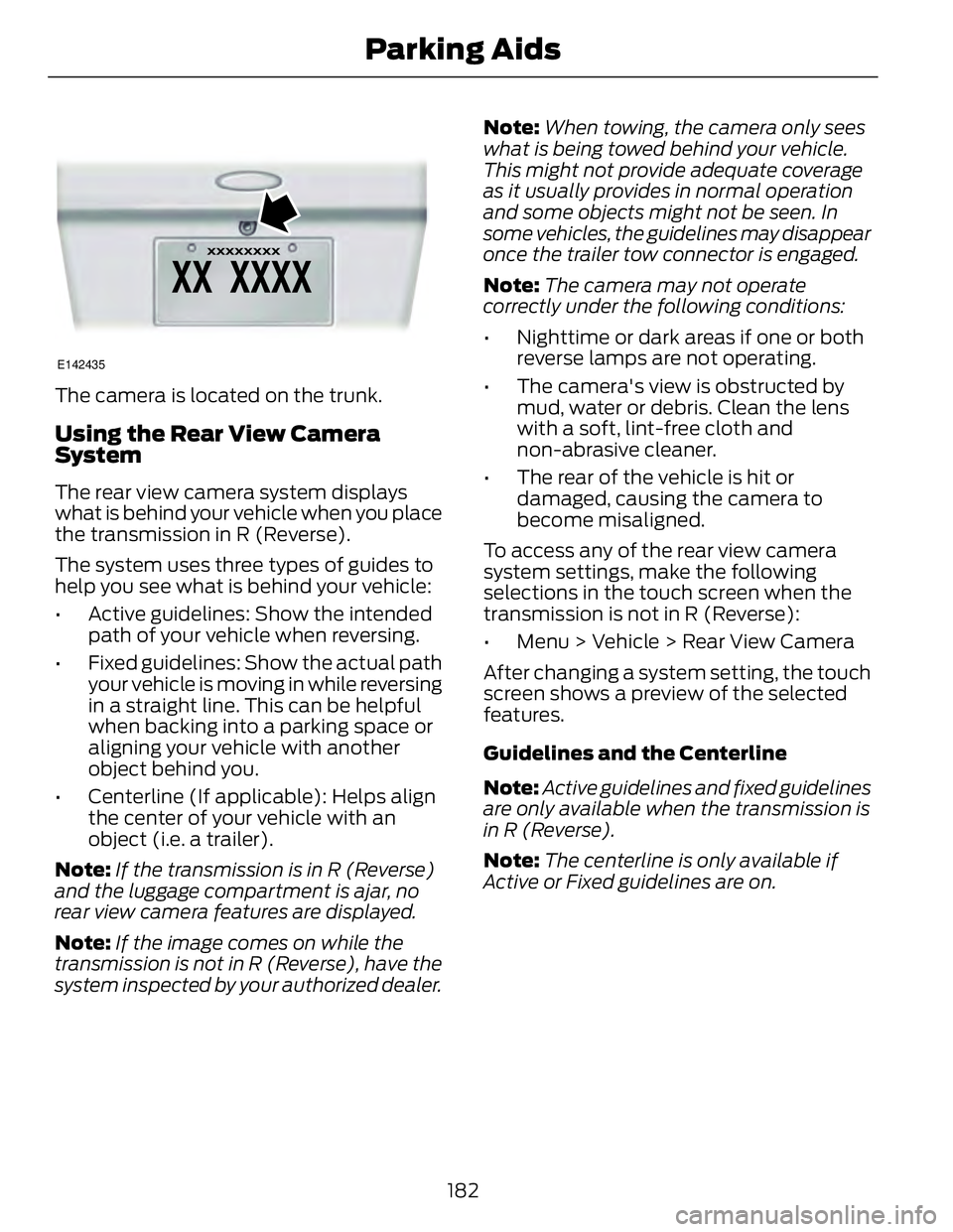
The camera is located on the trunk.
Using the Rear View Camera
System The rear view camera system displays
what is behind your vehicle when you place
the transmission in R (Reverse).
The system uses three types of guides to
help you see what is behind your vehicle:
• Active guidelines: Show the intended
path of your vehicle when reversing.
• Fixed guidelines: Show the actual path
your vehicle is moving in while reversing
in a straight line. This can be helpful
when backing into a parking space or
aligning your vehicle with another
object behind you.
• Centerline (If applicable): Helps align
the center of your vehicle with an
object (i.e. a trailer).
Note: If the transmission is in R (Reverse)
and the luggage compartment is ajar, no
rear view camera features are displayed.
Note: If the image comes on while the
transmission is not in R (Reverse), have the
system inspected by your authorized dealer. Note: When towing, the camera only sees
what is being towed behind your vehicle.
This might not provide adequate coverage
as it usually provides in normal operation
and some objects might not be seen. In
some vehicles, the guidelines may disappear
once the trailer tow connector is engaged.
Note: The camera may not operate
correctly under the following conditions:
• Nighttime or dark areas if one or both
reverse lamps are not operating.
• The camera's view is obstructed by
mud, water or debris. Clean the lens
with a soft, lint-free cloth and
non-abrasive cleaner.
• The rear of the vehicle is hit or
damaged, causing the camera to
become misaligned.
To access any of the rear view camera
system settings, make the following
selections in the touch screen when the
transmission is not in R (Reverse):
• Menu > Vehicle > Rear View Camera
After changing a system setting, the touch
screen shows a preview of the selected
features.
Guidelines and the Centerline
Note: Active guidelines and fixed guidelines
are only available when the transmission is
in R (Reverse).
Note: The centerline is only available if
Active or Fixed guidelines are on.
182Parking Aids
Page 186 of 473
A B C D
F EE142436
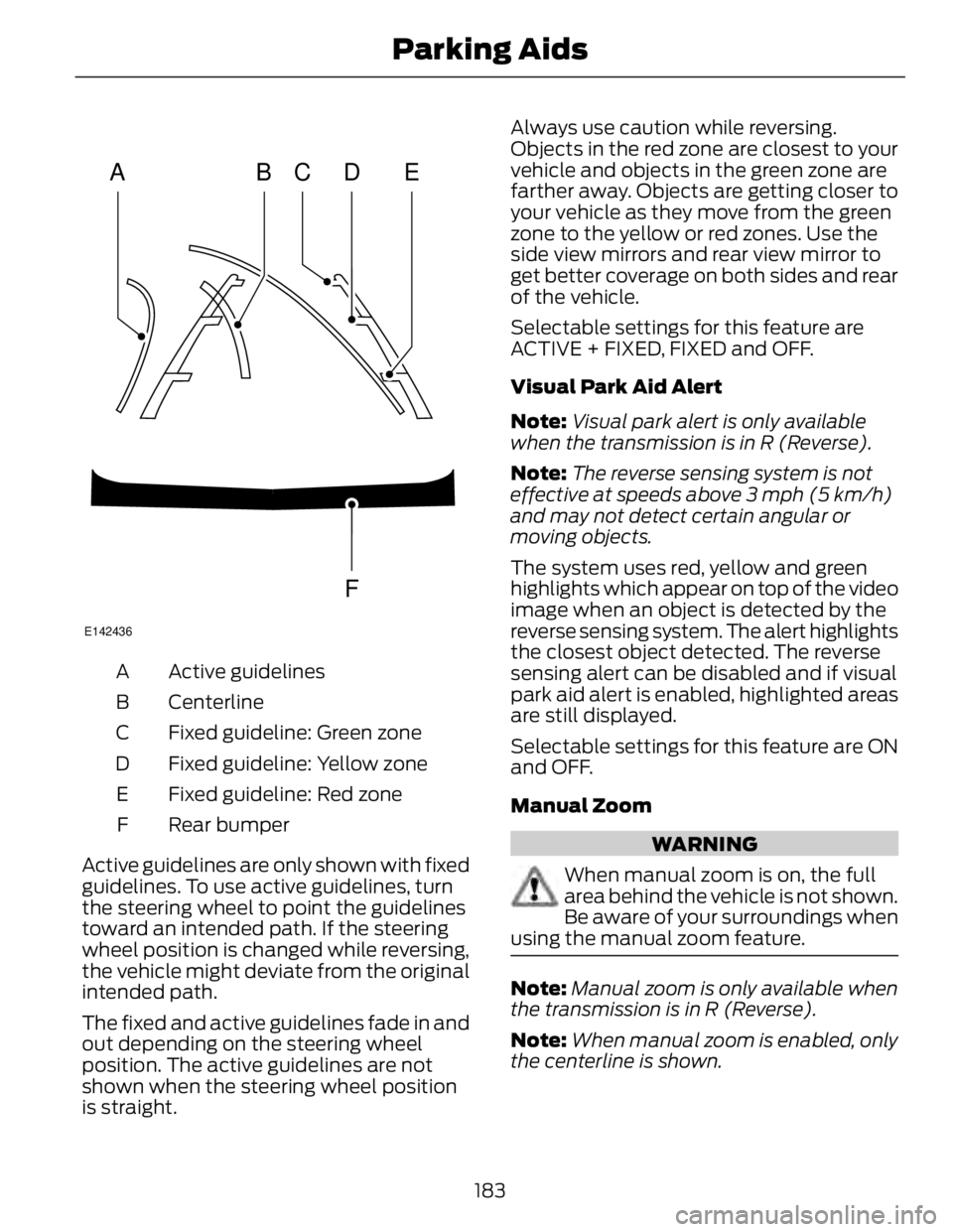
Active guidelinesA
CenterlineB
Fixed guideline: Green zoneC
Fixed guideline: Yellow zoneD
Fixed guideline: Red zoneE
Rear bumperF
Active guidelines are only shown with fixed
guidelines. To use active guidelines, turn
the steering wheel to point the guidelines
toward an intended path. If the steering
wheel position is changed while reversing,
the vehicle might deviate from the original
intended path.
The fixed and active guidelines fade in and
out depending on the steering wheel
position. The active guidelines are not
shown when the steering wheel position
is straight. Always use caution while reversing.
Objects in the red zone are closest to your
vehicle and objects in the green zone are
farther away. Objects are getting closer to
your vehicle as they move from the green
zone to the yellow or red zones. Use the
side view mirrors and rear view mirror to
get better coverage on both sides and rear
of the vehicle.
Selectable settings for this feature are
ACTIVE + FIXED, FIXED and OFF.
Visual Park Aid Alert
Note: Visual park alert is only available
when the transmission is in R (Reverse).
Note: The reverse sensing system is not
effective at speeds above 3 mph (5 km/h)
and may not detect certain angular or
moving objects.
The system uses red, yellow and green
highlights which appear on top of the video
image when an object is detected by the
reverse sensing system. The alert highlights
the closest object detected. The reverse
sensing alert can be disabled and if visual
park aid alert is enabled, highlighted areas
are still displayed.
Selectable settings for this feature are ON
and OFF.
Manual Zoom
WARNING
When manual zoom is on, the full
area behind the vehicle is not shown.
Be aware of your surroundings when
using the manual zoom feature.
Note: Manual zoom is only available when
the transmission is in R (Reverse).
Note: When manual zoom is enabled, only
the centerline is shown.
183Parking Aids
Page 193 of 473
E71621
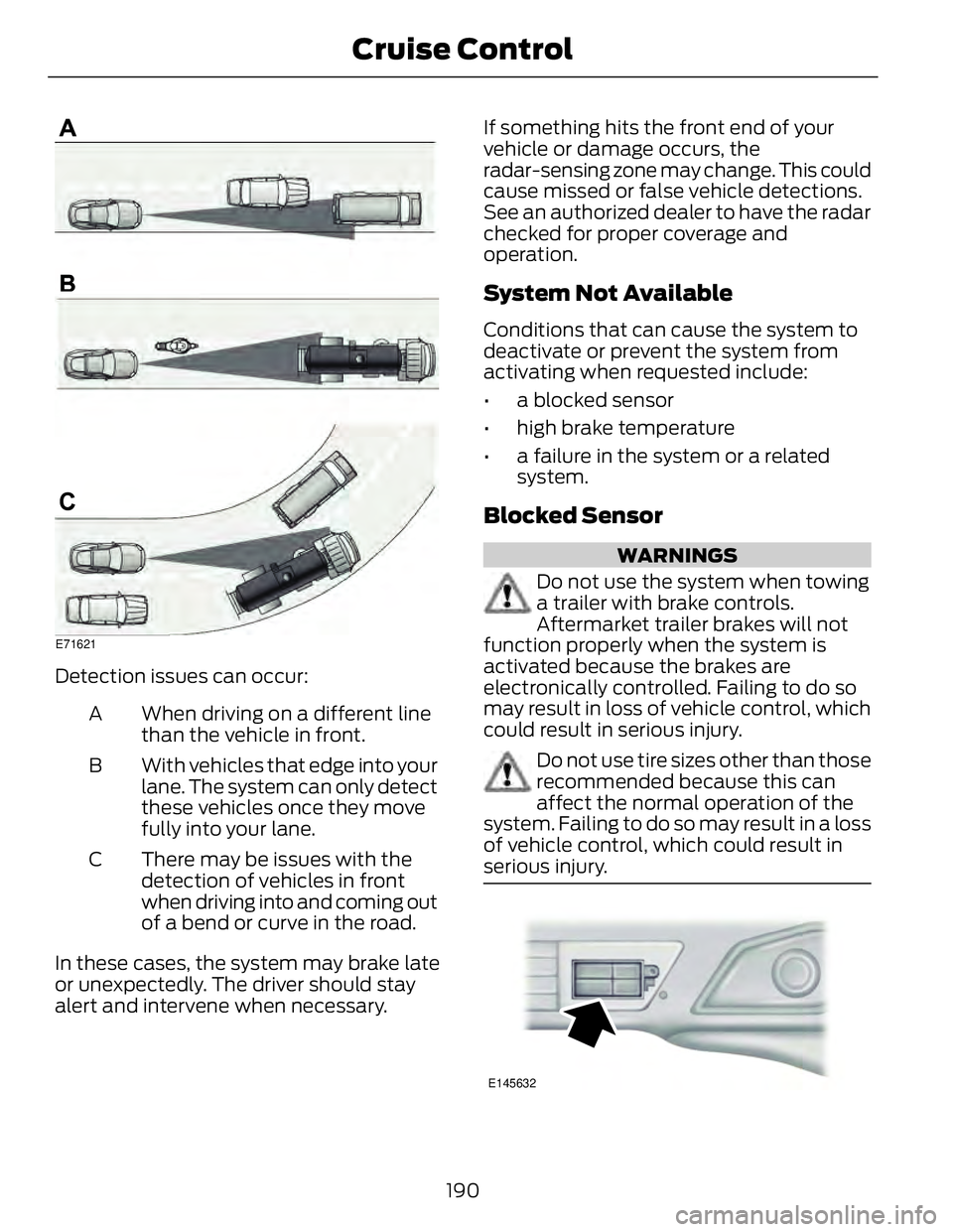
Detection issues can occur:
When driving on a different line
than the vehicle in front.A
With vehicles that edge into your
lane. The system can only detect
these vehicles once they move
fully into your lane.B
There may be issues with the
detection of vehicles in front
when driving into and coming out
of a bend or curve in the road.C
In these cases, the system may brake late
or unexpectedly. The driver should stay
alert and intervene when necessary. If something hits the front end of your
vehicle or damage occurs, the
radar-sensing zone may change. This could
cause missed or false vehicle detections.
See an authorized dealer to have the radar
checked for proper coverage and
operation.
System Not Available Conditions that can cause the system to
deactivate or prevent the system from
activating when requested include:
• a blocked sensor
• high brake temperature
• a failure in the system or a related
system.
Blocked Sensor WARNINGS
Do not use the system when towing
a trailer with brake controls.
Aftermarket trailer brakes will not
function properly when the system is
activated because the brakes are
electronically controlled. Failing to do so
may result in loss of vehicle control, which
could result in serious injury.
Do not use tire sizes other than those
recommended because this can
affect the normal operation of the
system. Failing to do so may result in a loss
of vehicle control, which could result in
serious injury.
E145632
190Cruise Control
Page 196 of 473
E131359
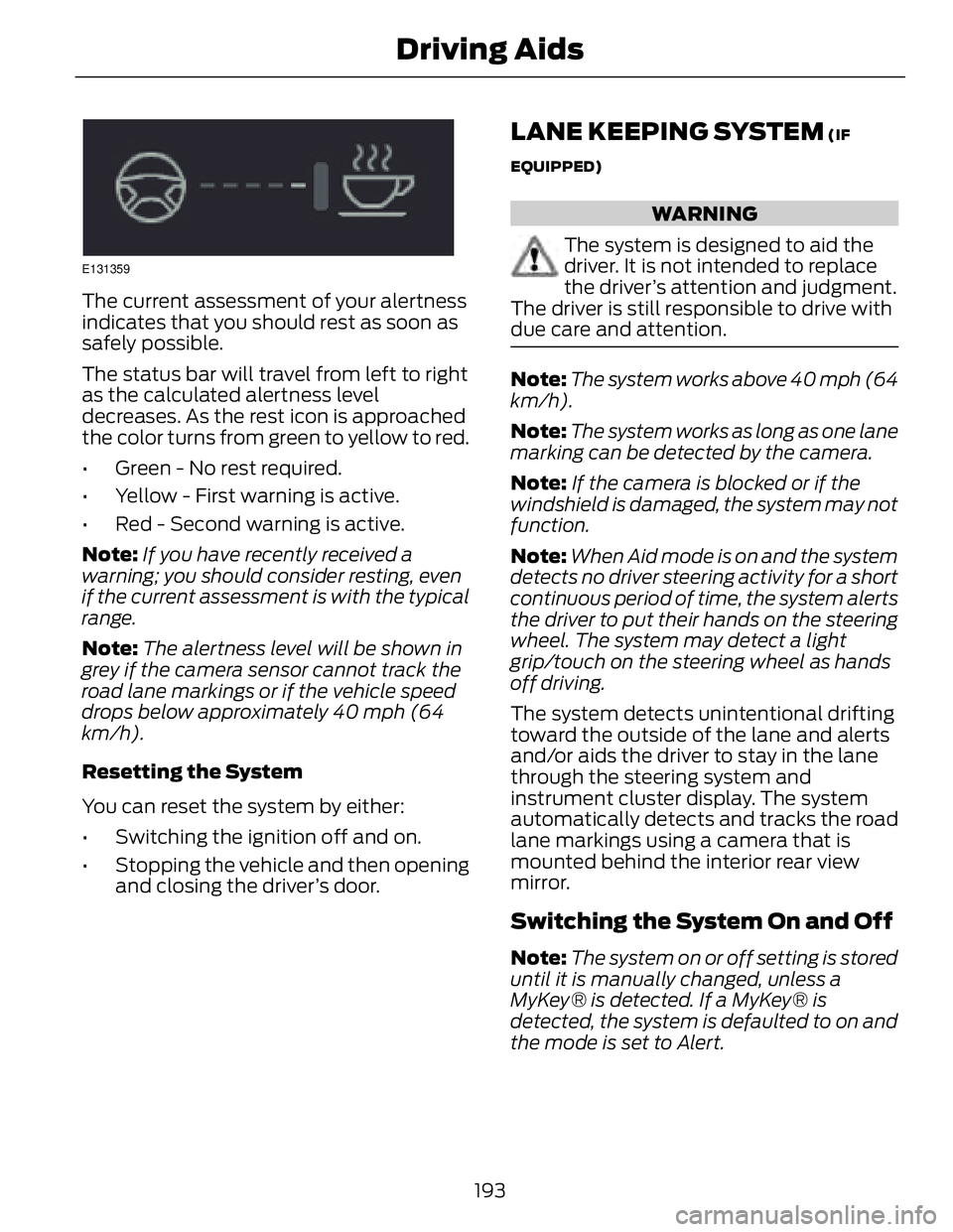
The current assessment of your alertness
indicates that you should rest as soon as
safely possible.
The status bar will travel from left to right
as the calculated alertness level
decreases. As the rest icon is approached
the color turns from green to yellow to red.
• Green - No rest required.
• Yellow - First warning is active.
• Red - Second warning is active.
Note: If you have recently received a
warning; you should consider resting, even
if the current assessment is with the typical
range.
Note: The alertness level will be shown in
grey if the camera sensor cannot track the
road lane markings or if the vehicle speed
drops below approximately 40 mph (64
km/h).
Resetting the System
You can reset the system by either:
• Switching the ignition off and on.
• Stopping the vehicle and then opening
and closing the driver’s door. LANE KEEPING SYSTEM (IF
EQUIPPED)
WARNING
The system is designed to aid the
driver. It is not intended to replace
the driver’s attention and judgment.
The driver is still responsible to drive with
due care and attention.
Note: The system works above 40 mph (64
km/h).
Note: The system works as long as one lane
marking can be detected by the camera.
Note: If the camera is blocked or if the
windshield is damaged, the system may not
function.
Note: When Aid mode is on and the system
detects no driver steering activity for a short
continuous period of time, the system alerts
the driver to put their hands on the steering
wheel. The system may detect a light
grip/touch on the steering wheel as hands
off driving.
The system detects unintentional drifting
toward the outside of the lane and alerts
and/or aids the driver to stay in the lane
through the steering system and
instrument cluster display. The system
automatically detects and tracks the road
lane markings using a camera that is
mounted behind the interior rear view
mirror.
Switching the System On and Off
Note: The system on or off setting is stored
until it is manually changed, unless a
MyKey® is detected. If a MyKey® is
detected, the system is defaulted to on and
the mode is set to Alert.
193Driving Aids