lock FORD FUSION HYBRID 2014 Manual Online
[x] Cancel search | Manufacturer: FORD, Model Year: 2014, Model line: FUSION HYBRID, Model: FORD FUSION HYBRID 2014Pages: 473, PDF Size: 5.93 MB
Page 259 of 473
Examples of unacceptable moisture
(usually caused by a lamp water leak) are:
• Water puddle inside the lamp.
• Large water droplets, drip marks or
streaks present on the interior of the
lens.
Take your vehicle to an authorized dealer
for service if any of the above conditions
of unacceptable moisture are present.
Replacing the Headlamp Bulbs WARNING
Handle a halogen headlamp bulb
carefully and keep out of children’s
reach. Grasp the bulb by only its
plastic base and do not touch the glass.
The oil from your hand could cause the
bulb to break the next time the headlamps
are operated.
Note: If the bulb is accidentally touched, it
should be cleaned with rubbing alcohol
before being used.
A
B
CDE159753
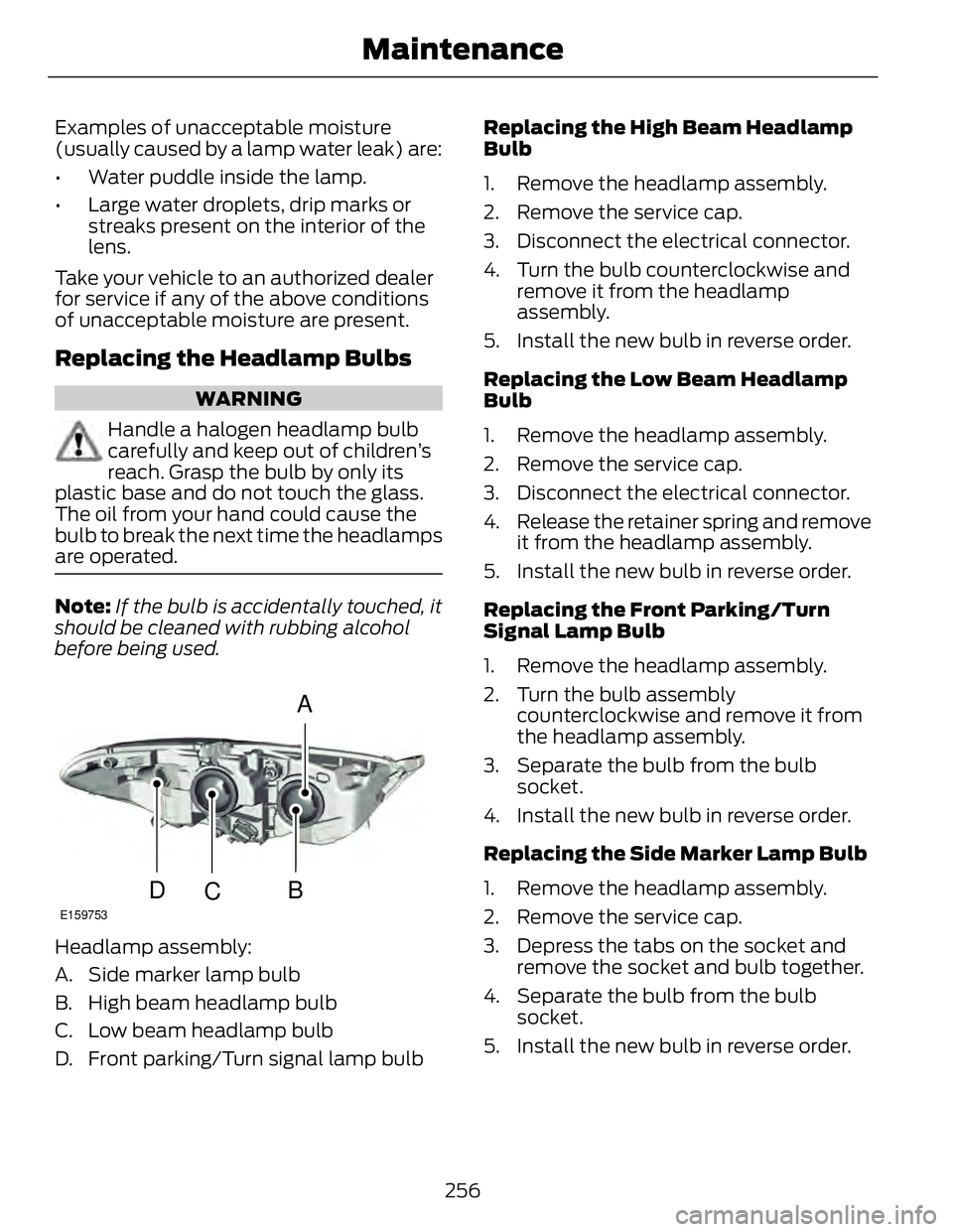
Headlamp assembly:
A. Side marker lamp bulb
B. High beam headlamp bulb
C. Low beam headlamp bulb
D. Front parking/Turn signal lamp bulb Replacing the High Beam Headlamp
Bulb
1. Remove the headlamp assembly.
2. Remove the service cap.
3. Disconnect the electrical connector.
4. Turn the bulb counterclockwise and
remove it from the headlamp
assembly.
5. Install the new bulb in reverse order.
Replacing the Low Beam Headlamp
Bulb
1. Remove the headlamp assembly.
2. Remove the service cap.
3. Disconnect the electrical connector.
4. Release the retainer spring and remove
it from the headlamp assembly.
5. Install the new bulb in reverse order.
Replacing the Front Parking/Turn
Signal Lamp Bulb
1. Remove the headlamp assembly.
2. Turn the bulb assembly
counterclockwise and remove it from
the headlamp assembly.
3. Separate the bulb from the bulb
socket.
4. Install the new bulb in reverse order.
Replacing the Side Marker Lamp Bulb
1. Remove the headlamp assembly.
2. Remove the service cap.
3. Depress the tabs on the socket and
remove the socket and bulb together.
4. Separate the bulb from the bulb
socket.
5. Install the new bulb in reverse order.
256Maintenance
Page 260 of 473
Replacing the Tail, Brake, High-
Mount Brake Lamp, and Turn
Signal Lamp Bulbs These lamps are designed with LED light
sources. For replacement, see your
authorized dealer.
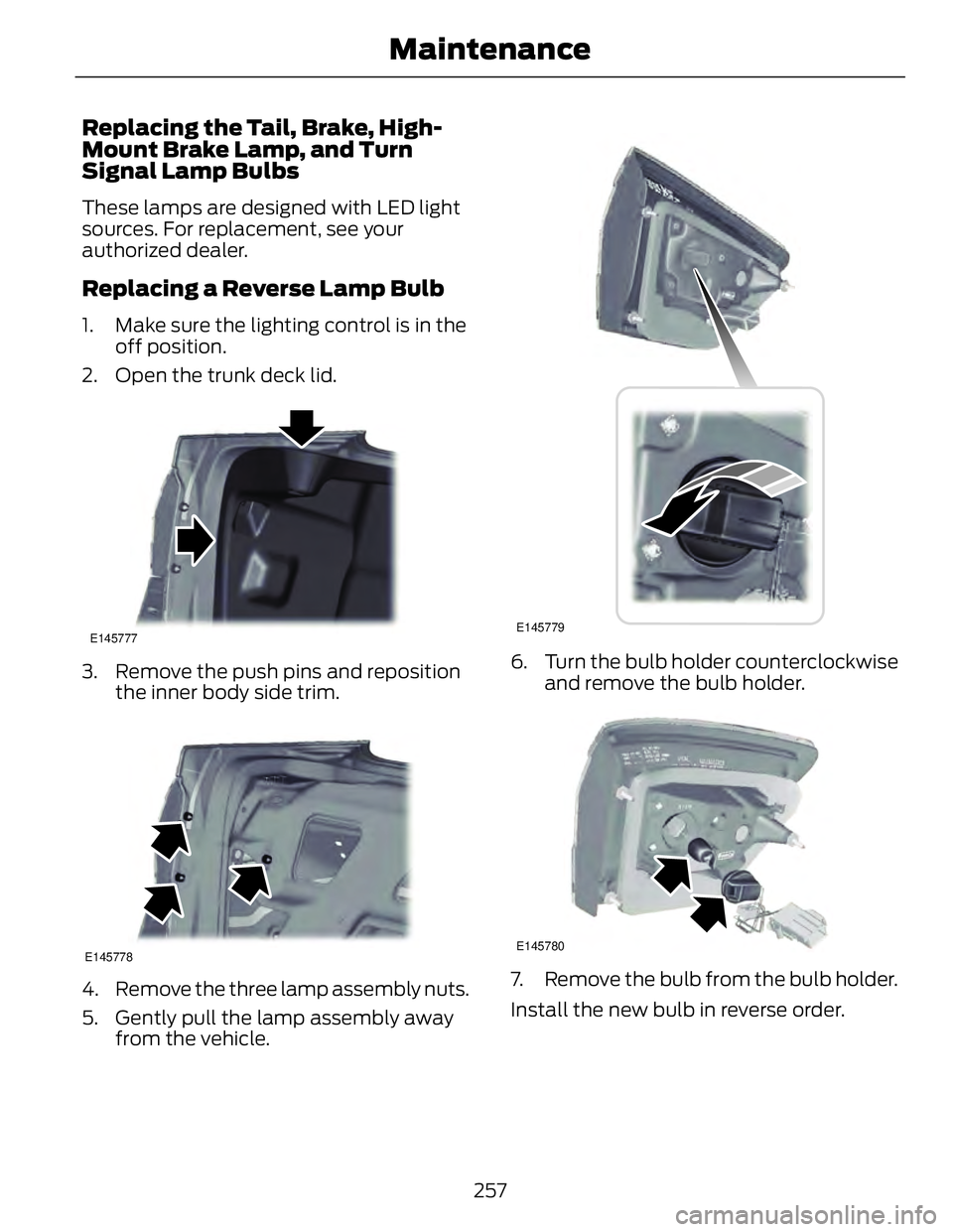
Replacing a Reverse Lamp Bulb 1. Make sure the lighting control is in the
off position.
2. Open the trunk deck lid. E145777
3. Remove the push pins and reposition
the inner body side trim.
E145778
4. Remove the three lamp assembly nuts.
5. Gently pull the lamp assembly away
from the vehicle. E145779
6. Turn the bulb holder counterclockwise
and remove the bulb holder.
E145780
7. Remove the bulb from the bulb holder.
Install the new bulb in reverse order.
257Maintenance
Page 265 of 473
CLEANING THE ENGINE Engines are more efficient when they are
clean because grease and dirt buildup keep
the engine warmer than normal.
When washing:
• Take care when using a power washer
to clean the engine. The high-pressure
fluid could penetrate the sealed parts
and cause damage.
• Do not spray a hot engine with cold
water to avoid cracking the engine
block or other engine components.
• Spray Motorcraft® Engine Shampoo
and Degreaser on all parts that require
cleaning and pressure rinse clean. In
Canada, use Motorcraft® Engine
Shampoo.
• Never wash or rinse the engine while it
is hot or running; water in the running
engine may cause internal damage.
• Never wash or rinse any ignition coil,
spark plug wire or spark plug well, or
the area in and around these locations.
• Cover the battery, power distribution
box, and air filter assembly to prevent
water damage when cleaning the
engine.
CLEANING THE WINDOWS AND
WIPER BLADES Clean your windows and wiper blades
regularly. If the wipers do not wipe
properly, substances on the vehicle’s glass
or the wiper blades may cause squeaking
or chatter noise from the blades, and
streaking and smearing of the windshield. To clean these items, follow these tips:
• You can clean the windows with a
non-abrasive cleaner such as
Motorcraft Ultra-Clear Spray Glass
Cleaner.
• You can clean the wiper blades with
isopropyl rubbing-alcohol or Motorcraft
Premium Windshield Wash
Concentrates in the U.S., or Premium
Quality Windshield Washer Fluid in
Canada. Be sure to replace wiper
blades when they appear worn or do
not function properly.
• Do not use abrasives, as they may
cause scratches.
• Do not use fuel, kerosene, or paint
thinner to clean any parts.
If you cannot remove those streaks after
cleaning with the glass cleaner or if the
wipers chatter and move in a jerky motion,
clean the outer surface of the windshield
and the wiper blades using a sponge or
soft cloth with a neutral detergent or
mild-abrasive cleaning solution. After
cleaning, rinse the windshield and wiper
blades with clean water. The windshield
is clean if beads do not form when you
rinse the windshield with water.
Note: Do not use sharp objects, such as a
razorblade, to clean the inside of the rear
window or to remove decals, as this may
cause damage to the rear window
defroster’s heated grid lines.
CLEANING THE INTERIOR WARNINGS
Do not use cleaning solvents, bleach
or dye on the vehicle’s safety belts,
as these actions may weaken the
belt webbing.
262Vehicle Care
Page 272 of 473
First Stage: Reinflating the Tire
with Sealing Compound and Air WARNINGS
Do not stand directly over the kit
while inflating the tire. If you notice
any unusual bulges or deformations
in the tire's sidewall during inflation, stop
and call roadside assistance.
If the tire doesn't inflate to the
recommended tire pressure within
15 minutes, stop and call roadside
assistance.
Preparation: Park the vehicle in a safe, level
and secure area, away from moving traffic.
Turn the hazard lights on. Apply the parking
brake and turn the engine off. Inspect the
flat tire for visible damage.
Sealant compound contains latex. To
avoid any allergic reactions, use the
non-latex gloves located in the accessory
box on the underside of the kit housing.
Do not remove any foreign object that has
pierced the tire. If a puncture is located in
the tire sidewall, stop and call roadside
assistance.
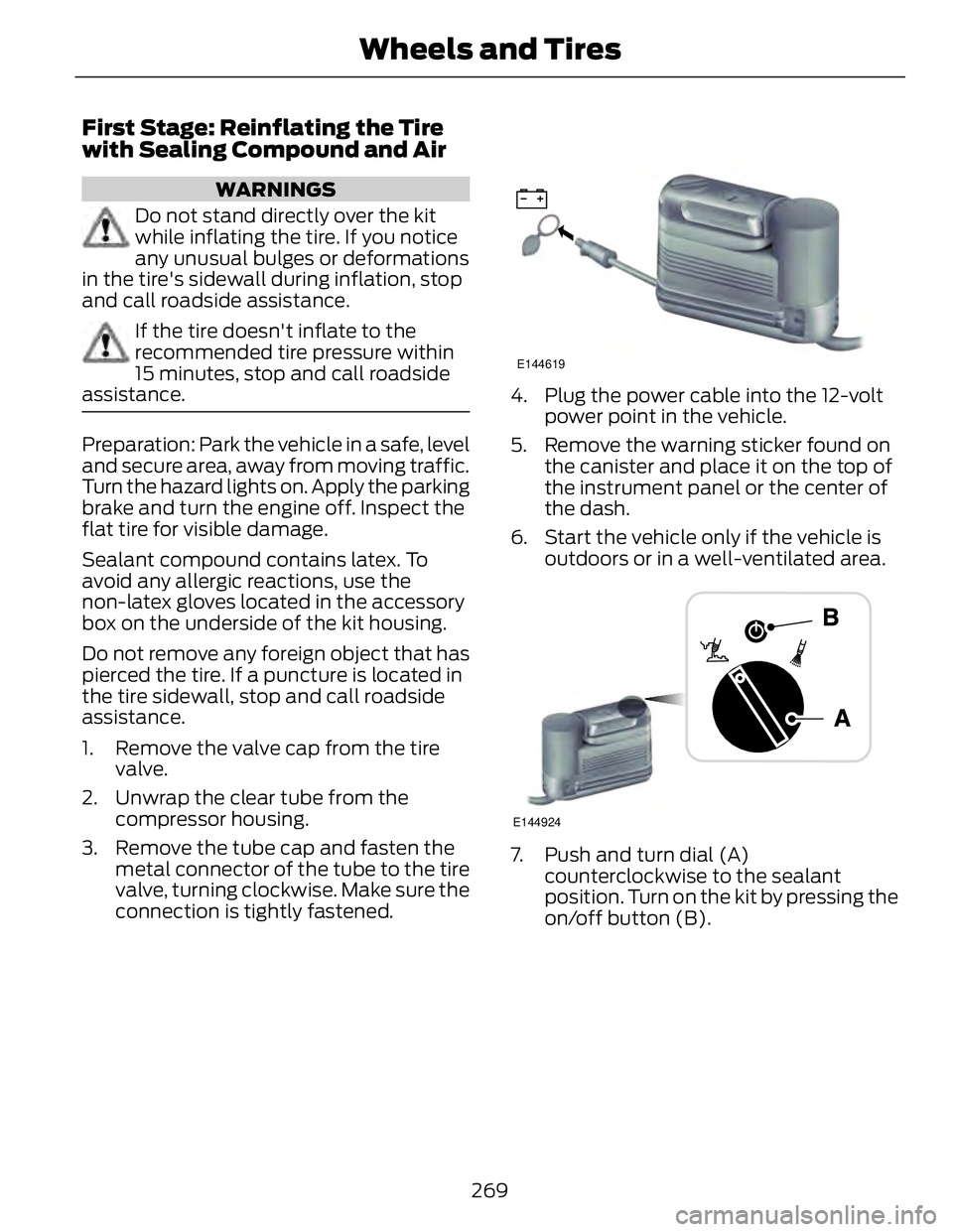
1. Remove the valve cap from the tire
valve.
2. Unwrap the clear tube from the
compressor housing.
3. Remove the tube cap and fasten the
metal connector of the tube to the tire
valve, turning clockwise. Make sure the
connection is tightly fastened. E144619
4. Plug the power cable into the 12-volt
power point in the vehicle.
5. Remove the warning sticker found on
the canister and place it on the top of
the instrument panel or the center of
the dash.
6. Start the vehicle only if the vehicle is
outdoors or in a well-ventilated area.
E144924
7. Push and turn dial (A)
counterclockwise to the sealant
position. Turn on the kit by pressing the
on/off button (B).
269Wheels and Tires
Page 273 of 473
E144621
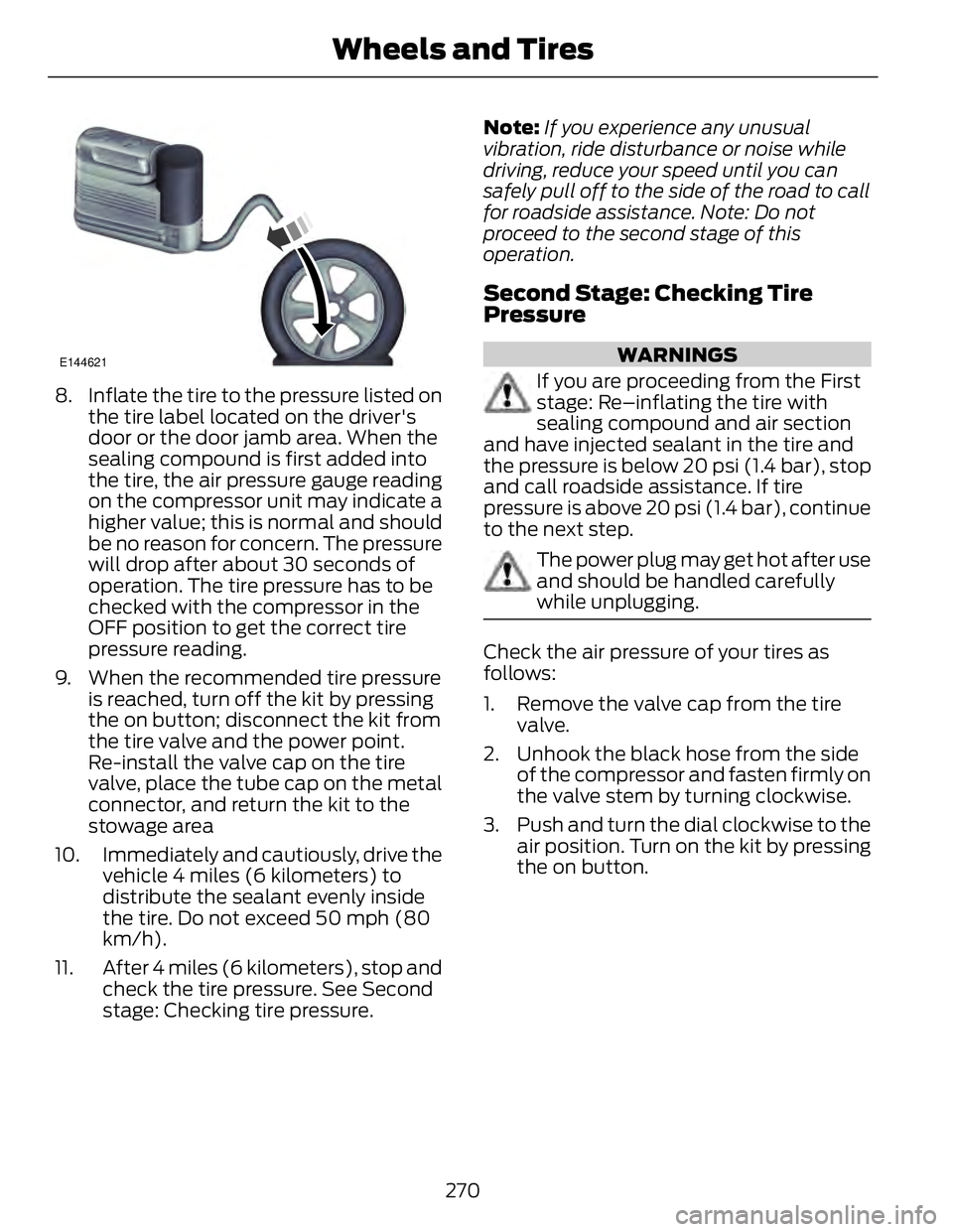
8. Inflate the tire to the pressure listed on
the tire label located on the driver's
door or the door jamb area. When the
sealing compound is first added into
the tire, the air pressure gauge reading
on the compressor unit may indicate a
higher value; this is normal and should
be no reason for concern. The pressure
will drop after about 30 seconds of
operation. The tire pressure has to be
checked with the compressor in the
OFF position to get the correct tire
pressure reading.
9. When the recommended tire pressure
is reached, turn off the kit by pressing
the on button; disconnect the kit from
the tire valve and the power point.
Re-install the valve cap on the tire
valve, place the tube cap on the metal
connector, and return the kit to the
stowage area
10. Immediately and cautiously, drive the
vehicle 4 miles (6 kilometers) to
distribute the sealant evenly inside
the tire. Do not exceed 50 mph (80
km/h).
11. After 4 miles (6 kilometers), stop and
check the tire pressure. See Second
stage: Checking tire pressure. Note: If you experience any unusual
vibration, ride disturbance or noise while
driving, reduce your speed until you can
safely pull off to the side of the road to call
for roadside assistance. Note: Do not
proceed to the second stage of this
operation.
Second Stage: Checking Tire
Pressure WARNINGS
If you are proceeding from the First
stage: Re–inflating the tire with
sealing compound and air section
and have injected sealant in the tire and
the pressure is below 20 psi (1.4 bar), stop
and call roadside assistance. If tire
pressure is above 20 psi (1.4 bar), continue
to the next step.
The power plug may get hot after use
and should be handled carefully
while unplugging.
Check the air pressure of your tires as
follows:
1. Remove the valve cap from the tire
valve.
2. Unhook the black hose from the side
of the compressor and fasten firmly on
the valve stem by turning clockwise.
3. Push and turn the dial clockwise to the
air position. Turn on the kit by pressing
the on button.
270Wheels and Tires
Page 300 of 473
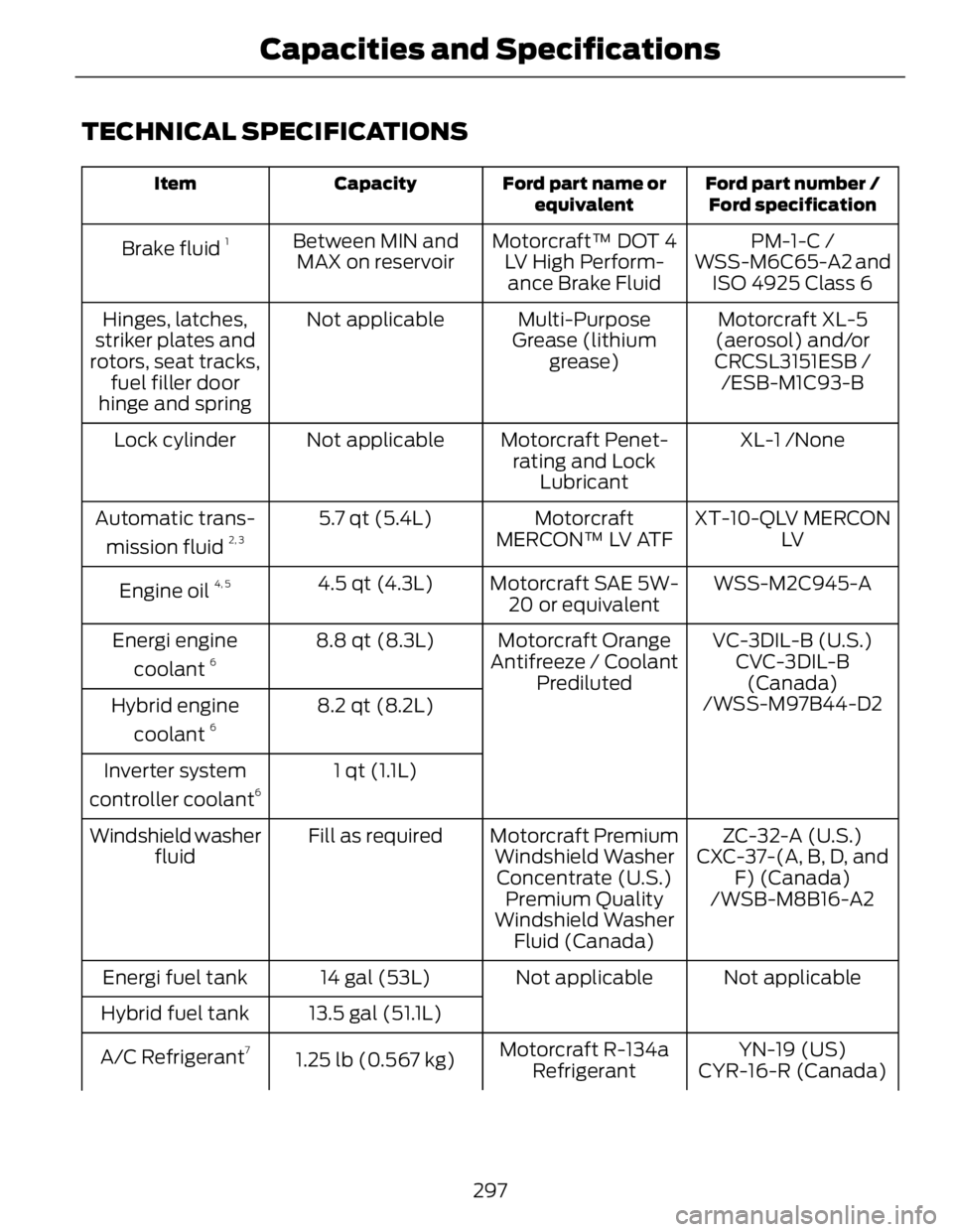
TECHNICAL SPECIFICATIONS Ford part number /
Ford specificationFord part name or
equivalentCapacityItem
PM-1-C /Motorcraft™ DOT 4
LV High Perform-
ance Brake FluidBetween MIN and
MAX on reservoirBrake fluid 1
WSS-M6C65-A2 and
ISO 4925 Class 6
Motorcraft XL-5
(aerosol) and/or
CRCSL3151ESB /Multi-Purpose
Grease (lithium
grease)Not applicableHinges, latches,
striker plates and
rotors, seat tracks,
fuel filler door
hinge and spring /ESB-M1C93-B
XL-1 /NoneMotorcraft Penet-
rating and Lock
LubricantNot applicableLock cylinder
XT-10-QLV MERCON
LVMotorcraft
MERCON™ LV ATF5.7 qt (5.4L)Automatic trans-
mission fluid 2, 3
WSS-M2C945-AMotorcraft SAE 5W-
20 or equivalent4.5 qt (4.3L)
Engine oil 4, 5
VC-3DIL-B (U.S.)Motorcraft Orange
Antifreeze / Coolant
Prediluted8.8 qt (8.3L)Energi engine
coolant 6
CVC-3DIL-B
(Canada)
8.2 qt (8.2L)Hybrid engine
coolant 6
/WSS-M97B44-D2
1 qt (1.1L)Inverter system
controller coolant 6
ZC-32-A (U.S.)Motorcraft Premium
Windshield Washer
Concentrate (U.S.)Fill as requiredWindshield washer
fluid CXC-37-(A, B, D, and
F) (Canada)
Premium Quality
Windshield Washer
Fluid (Canada) /WSB-M8B16-A2
Not applicableNot applicable14 gal (53L)Energi fuel tank
13.5 gal (51.1L)Hybrid fuel tank
YN-19 (US)Motorcraft R-134a
Refrigerant1.25 lb (0.567 kg)A/C Refrigerant 7
CYR-16-R (Canada)
297Capacities and Specifications
Page 304 of 473
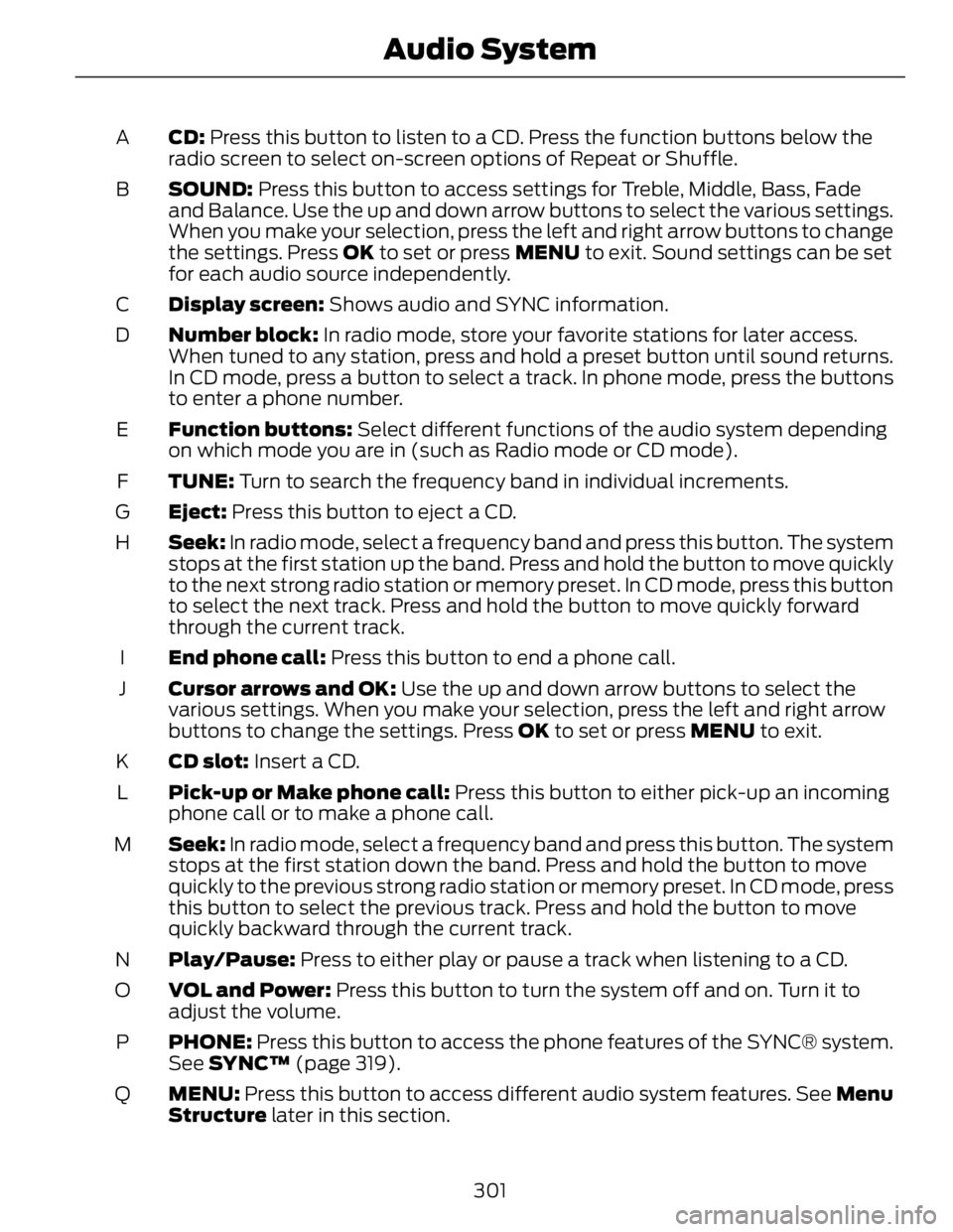
CD: Press this button to listen to a CD. Press the function buttons below the
radio screen to select on-screen options of Repeat or Shuffle.A
SOUND: Press this button to access settings for Treble, Middle, Bass, Fade
and Balance. Use the up and down arrow buttons to select the various settings.
When you make your selection, press the left and right arrow buttons to change
the settings. Press OK to set or press MENU to exit. Sound settings can be set
for each audio source independently.B
Display screen: Shows audio and SYNC information.C
Number block: In radio mode, store your favorite stations for later access.
When tuned to any station, press and hold a preset button until sound returns.
In CD mode, press a button to select a track. In phone mode, press the buttons
to enter a phone number.D
Function buttons: Select different functions of the audio system depending
on which mode you are in (such as Radio mode or CD mode).E
TUNE: Turn to search the frequency band in individual increments.F
Eject: Press this button to eject a CD.G
Seek: In radio mode, select a frequency band and press this button. The system
stops at the first station up the band. Press and hold the button to move quickly
to the next strong radio station or memory preset. In CD mode, press this button
to select the next track. Press and hold the button to move quickly forward
through the current track.H
End phone call: Press this button to end a phone call.I
Cursor arrows and OK: Use the up and down arrow buttons to select the
various settings. When you make your selection, press the left and right arrow
buttons to change the settings. Press OK to set or press MENU to exit.J
CD slot: Insert a CD.K
Pick-up or Make phone call: Press this button to either pick-up an incoming
phone call or to make a phone call.L
Seek: In radio mode, select a frequency band and press this button. The system
stops at the first station down the band. Press and hold the button to move
quickly to the previous strong radio station or memory preset. In CD mode, press
this button to select the previous track. Press and hold the button to move
quickly backward through the current track.M
Play/Pause: Press to either play or pause a track when listening to a CD.N
VOL and Power: Press this button to turn the system off and on. Turn it to
adjust the volume.O
PHONE: Press this button to access the phone features of the SYNC® system.
See SYNC™ (page 319).P
MENU: Press this button to access different audio system features. See Menu
Structure later in this section.Q
301Audio System
Page 305 of 473
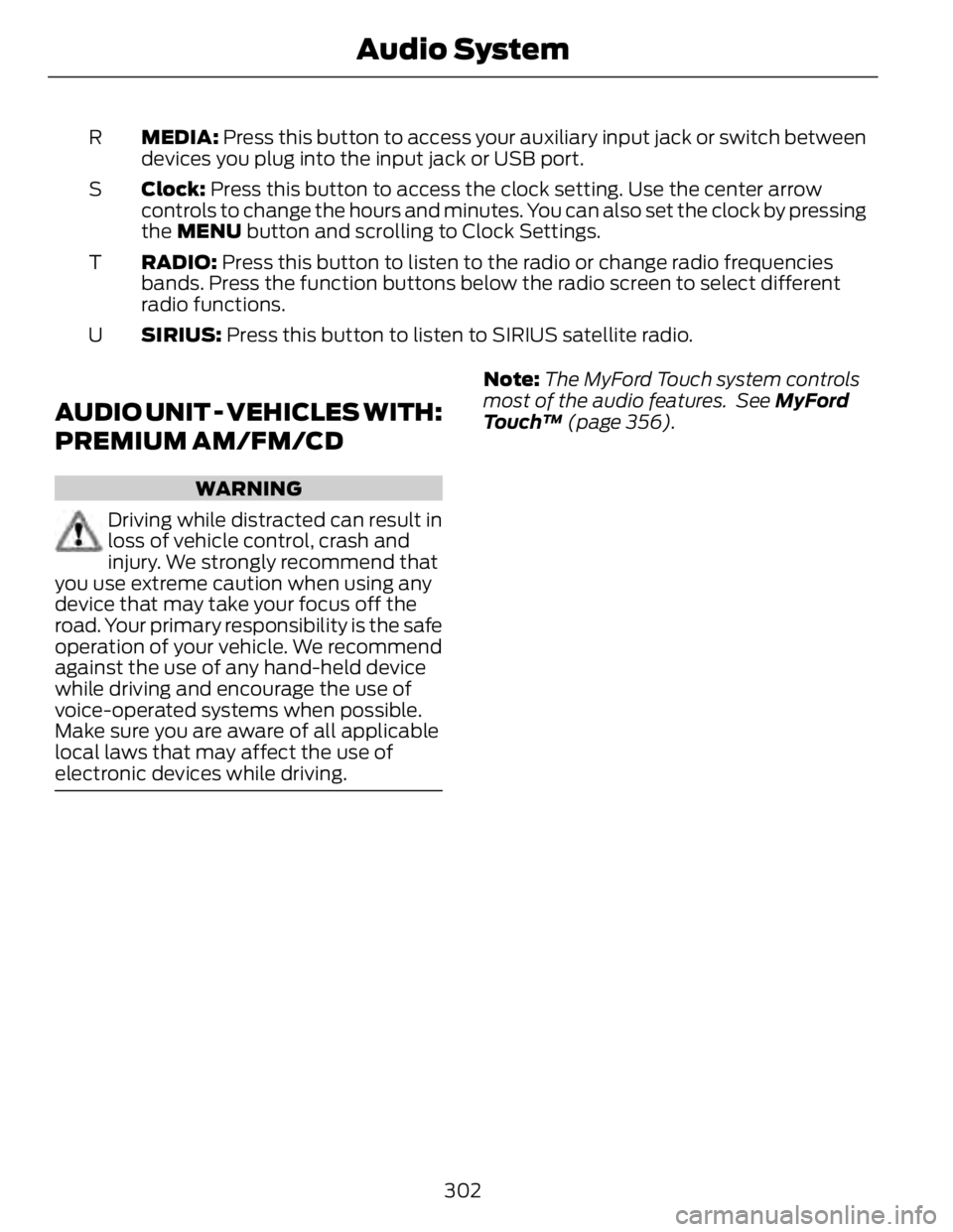
MEDIA: Press this button to access your auxiliary input jack or switch between
devices you plug into the input jack or USB port.R
Clock: Press this button to access the clock setting. Use the center arrow
controls to change the hours and minutes. You can also set the clock by pressing
the MENU button and scrolling to Clock Settings.S
RADIO: Press this button to listen to the radio or change radio frequencies
bands. Press the function buttons below the radio screen to select different
radio functions.T
SIRIUS: Press this button to listen to SIRIUS satellite radio.U
AUDIO UNIT - VEHICLES WITH:
PREMIUM AM/FM/CD WARNING
Driving while distracted can result in
loss of vehicle control, crash and
injury. We strongly recommend that
you use extreme caution when using any
device that may take your focus off the
road. Your primary responsibility is the safe
operation of your vehicle. We recommend
against the use of any hand-held device
while driving and encourage the use of
voice-operated systems when possible.
Make sure you are aware of all applicable
local laws that may affect the use of
electronic devices while driving. Note: The MyFord Touch system controls
most of the audio features. See MyFord
Touch™ (page 356).
302Audio System
Page 309 of 473
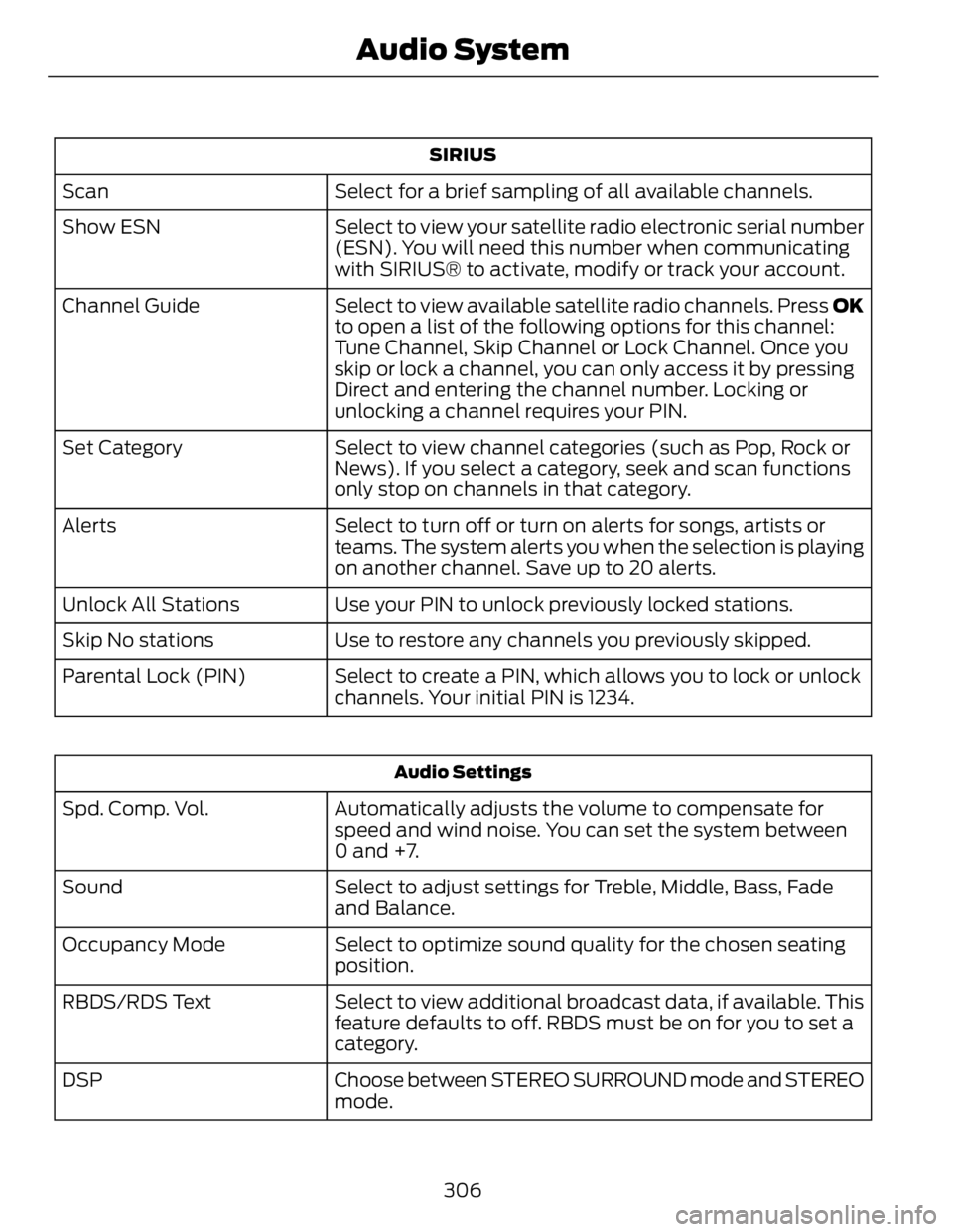
SIRIUS
Select for a brief sampling of all available channels.Scan
Select to view your satellite radio electronic serial number
(ESN). You will need this number when communicating
with SIRIUS® to activate, modify or track your account.Show ESN
Select to view available satellite radio channels. Press OK
to open a list of the following options for this channel:
Tune Channel, Skip Channel or Lock Channel. Once you
skip or lock a channel, you can only access it by pressing
Direct and entering the channel number. Locking or
unlocking a channel requires your PIN.Channel Guide
Select to view channel categories (such as Pop, Rock or
News). If you select a category, seek and scan functions
only stop on channels in that category.Set Category
Select to turn off or turn on alerts for songs, artists or
teams. The system alerts you when the selection is playing
on another channel. Save up to 20 alerts.Alerts
Use your PIN to unlock previously locked stations.Unlock All Stations
Use to restore any channels you previously skipped.Skip No stations
Select to create a PIN, which allows you to lock or unlock
channels. Your initial PIN is 1234.Parental Lock (PIN)
Audio Settings
Automatically adjusts the volume to compensate for
speed and wind noise. You can set the system between
0 and +7.Spd. Comp. Vol.
Select to adjust settings for Treble, Middle, Bass, Fade
and Balance.Sound
Select to optimize sound quality for the chosen seating
position.Occupancy Mode
Select to view additional broadcast data, if available. This
feature defaults to off. RBDS must be on for you to set a
category.RBDS/RDS Text
Choose between STEREO SURROUND mode and STEREO
mode.DSP
306Audio System
Page 310 of 473
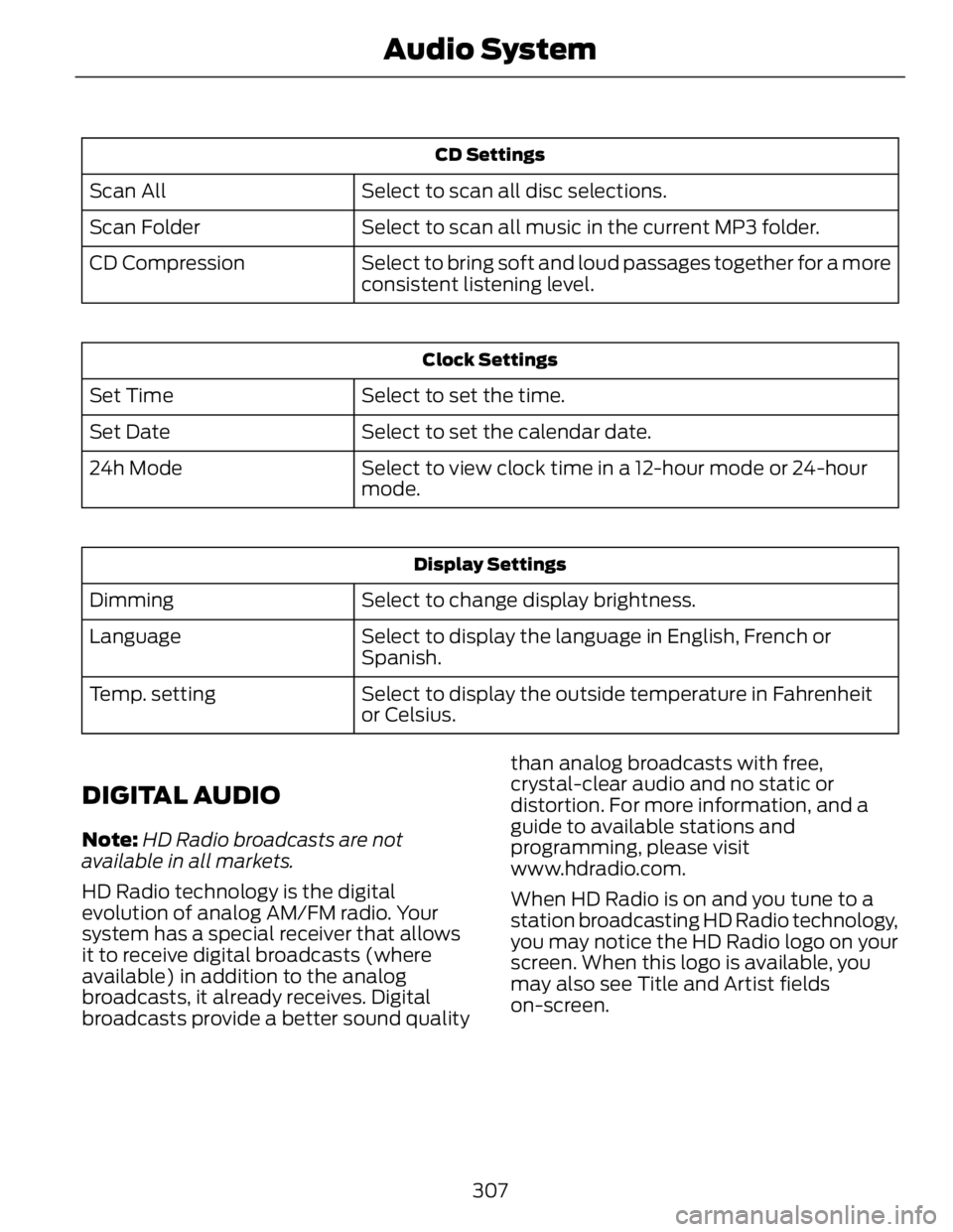
CD Settings
Select to scan all disc selections.Scan All
Select to scan all music in the current MP3 folder.Scan Folder
Select to bring soft and loud passages together for a more
consistent listening level.CD Compression Clock Settings
Select to set the time.Set Time
Select to set the calendar date.Set Date
Select to view clock time in a 12-hour mode or 24-hour
mode.24h Mode
Display Settings
Select to change display brightness.Dimming
Select to display the language in English, French or
Spanish.Language
Select to display the outside temperature in Fahrenheit
or Celsius.Temp. setting
DIGITAL AUDIO Note: HD Radio broadcasts are not
available in all markets.
HD Radio technology is the digital
evolution of analog AM/FM radio. Your
system has a special receiver that allows
it to receive digital broadcasts (where
available) in addition to the analog
broadcasts, it already receives. Digital
broadcasts provide a better sound quality than analog broadcasts with free,
crystal-clear audio and no static or
distortion. For more information, and a
guide to available stations and
programming, please visit
www.hdradio.com.
When HD Radio is on and you tune to a
station broadcasting HD Radio technology,
you may notice the HD Radio logo on your
screen. When this logo is available, you
may also see Title and Artist fields
on-screen.
307Audio System