warning FORD GT 2018 Owner's Manual
[x] Cancel search | Manufacturer: FORD, Model Year: 2018, Model line: GT, Model: FORD GT 2018Pages: 325, PDF Size: 6.61 MB
Page 38 of 325
FRONT PASSENGER SENSING
SYSTEM
WARNINGS
Sitting improperly, out of position or
with the seatback reclined too far
can take weight off the seat cushion
and affect the decision of the passenger
sensing system, resulting in serious injury
or death in the event of a crash. Always sit
upright against your seat back, with your
feet on the floor. Any alteration or modification to the
front passenger seat may affect the
performance of the front passenger
sensing system. This could seriously
increase the risk of injury or death. This system works with sensors that are
part of the front passenger seat and
seatbelt to detect the presence of a
properly-seated occupant and determine
if the front passenger frontal airbag should
be enabled (may inflate) or not.
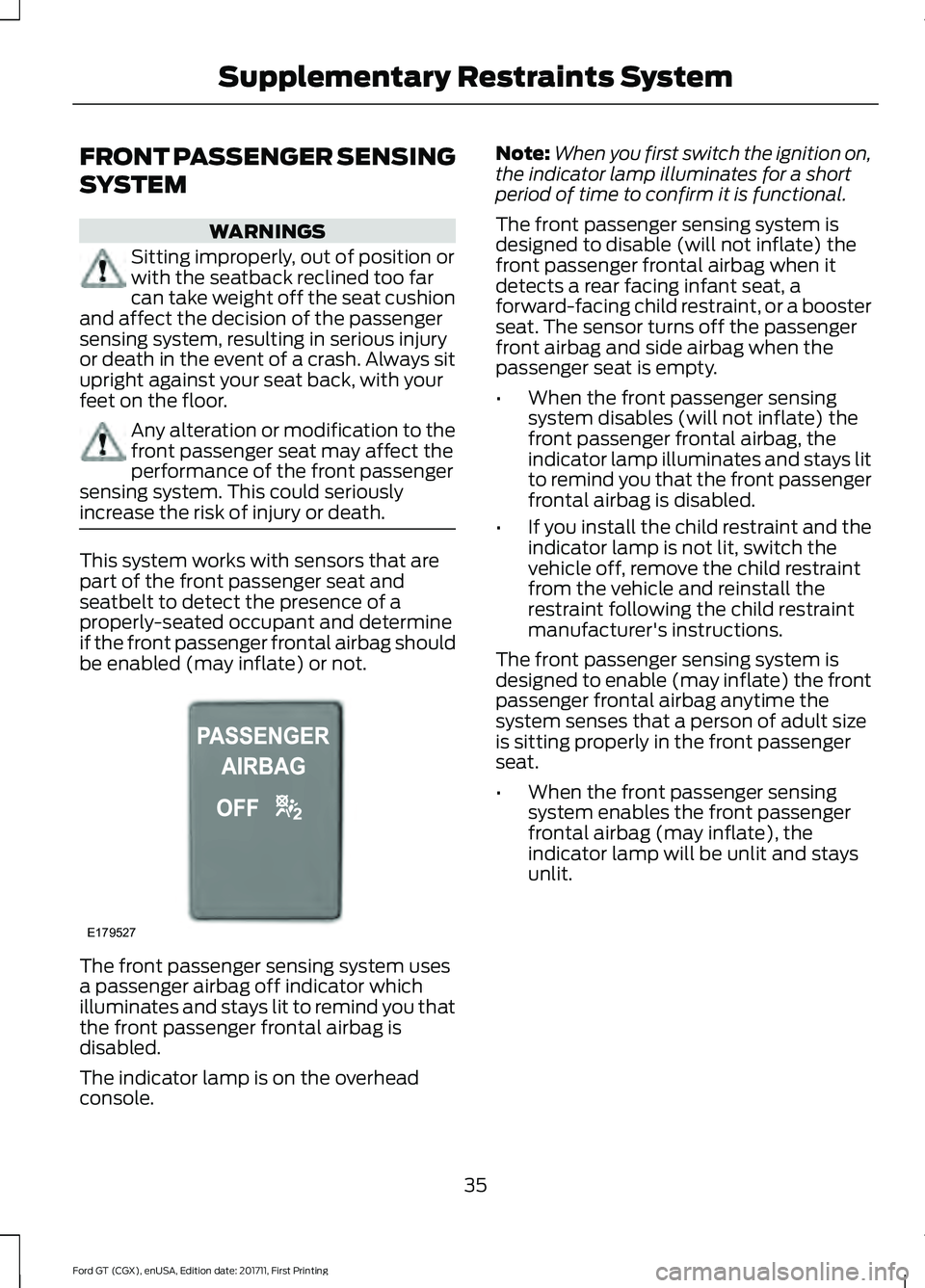
The front passenger sensing system uses
a passenger airbag off indicator which
illuminates and stays lit to remind you that
the front passenger frontal airbag is
disabled.
The indicator lamp is on the overhead
console. Note:
When you first switch the ignition on,
the indicator lamp illuminates for a short
period of time to confirm it is functional.
The front passenger sensing system is
designed to disable (will not inflate) the
front passenger frontal airbag when it
detects a rear facing infant seat, a
forward-facing child restraint, or a booster
seat. The sensor turns off the passenger
front airbag and side airbag when the
passenger seat is empty.
• When the front passenger sensing
system disables (will not inflate) the
front passenger frontal airbag, the
indicator lamp illuminates and stays lit
to remind you that the front passenger
frontal airbag is disabled.
• If you install the child restraint and the
indicator lamp is not lit, switch the
vehicle off, remove the child restraint
from the vehicle and reinstall the
restraint following the child restraint
manufacturer's instructions.
The front passenger sensing system is
designed to enable (may inflate) the front
passenger frontal airbag anytime the
system senses that a person of adult size
is sitting properly in the front passenger
seat.
• When the front passenger sensing
system enables the front passenger
frontal airbag (may inflate), the
indicator lamp will be unlit and stays
unlit.
35
Ford GT (CGX), enUSA, Edition date: 201711, First Printing Supplementary Restraints SystemE179527
Page 40 of 325
•
Wait at least two minutes and verify
that the airbag readiness light is no
longer illuminated.
• If the airbag readiness light remains
illuminated, this may or may not be a
problem due to the front passenger
sensing system.
Do not attempt to repair or service the
system. Take your vehicle immediately to
an authorized dealer.
If it is necessary to modify an advanced
front airbag system to accommodate a
person with disabilities, contact the Ford
GT Concierge.
SIDE AIRBAGS WARNINGS
To reduce risk of injury, do not
obstruct or place objects in the
deployment path of the airbag.
Do not lean your head on the door.
The side airbag could injure you as it
deploys from the B-pillar.
Do not attempt to service, repair, or
modify the airbag supplemental
restraint systems or its fuses on a
vehicle containing air bags as you could be
seriously injured or killed. Contact your
authorized dealer as soon as possible. If the side airbag has deployed, the
airbag will not function again. The
side airbag system (including the
seat) must be inspected as soon as
possible. If the airbag is not replaced, the
unrepaired area will increase the risk of
injury in a crash. The side airbags are near the B-pillar. In
certain sideways crashes, the airbag on the
side affected by the crash will be inflated.
The airbag was designed to inflate
between the door panel and occupant to
further enhance the protection provided
occupants in side impact crashes.
The system consists of the following:
•
An embossed side panel indicating that
side airbags are on your vehicle.
• Side airbags near the B-pillar.
• Front passenger sensing system. ·Crash sensors and monitoring
system with readiness indicator.
See Crash Sensors and Airbag
Indicator (page 38).
Note: The passenger sensing system will
deactivate the passenger side airbag (near
the B-pillar) if it detects an empty,
unbuckled passenger seat.
The design and development of the side
airbag system included recommended
testing procedures that were developed
by a group of automotive safety experts
known as the Side Airbag Technical
Working Group. These recommended
testing procedures help reduce the risk of
injuries related to the deployment of side
airbags.
DRIVER AND PASSENGER
KNEE AIRBAGS WARNING
To reduce risk of injury, do not
obstruct or place objects in the
deployment path of the knee airbag.
37
Ford GT (CGX), enUSA, Edition date: 201711, First Printing Supplementary Restraints SystemE67017
Page 41 of 325
The knee airbags are under or within the
instrument panel. During a crash, the
restraints control module may activate the
driver and passenger knee airbags based
on crash severity and occupant conditions.
Under certain crash and occupant
conditions, the driver and passenger knee
airbag may deploy, but the driver front
airbag may not activate. As with front and
side airbags, it is important to be properly
seated and restrained to reduce the risk of
death or serious injury.
Make sure the knee airbags are
operating properly. See Crash
Sensors and Airbag Indicator
(page
38).
CRASH SENSORS AND
AIRBAG INDICATOR WARNING
Modifying or adding equipment to
the front end of your vehicle
(including hood, bumper system,
frame, front end body structure, tow hooks
and hood pins) may affect the
performance of the airbag system,
increasing the risk of injury. Do not modify
or add equipment to the front end of your
vehicle. Your vehicle has a collection of crash and
occupant sensors which provide
information to the restraints control
module. The restraints control module
deploys (activates) the front seatbelt
pretensioners, driver airbag, passenger
airbag, knee airbag(s) and side airbags.
Based on the type of crash, the restraints
control module deploys the appropriate
safety devices. The restraints control module monitors
the readiness of the safety devices and the
crash and occupant sensors. The readiness
of the safety system is indicated by a
warning indicator light in the instrument
cluster or by a backup tone if the warning
light is not working. Routine maintenance
of the airbag is not required.
A difficulty with the system is indicated by
one or more of the following:
The readiness light does not
illuminate immediately after you
switch the ignition on.
• The readiness light either flashes or
stays lit.
• The system has five tones that repeat
periodically until the problem, the light
or both are repaired.
If you experience any of these events, even
intermittently, have a qualified technician
service the supplemental restraint system
immediately. If it is not serviced, the
system may not function properly in a
crash.
The design of the seatbelt pretensioners
and the front airbag supplemental restraint
system is to activate when the vehicle
sustains frontal deceleration sufficient to
cause the restraints control module to
deploy a safety device.
38
Ford GT (CGX), enUSA, Edition date: 201711, First Printing Supplementary Restraints SystemE67017 E67017
Page 55 of 325
ADJUSTING THE STEERING
WHEEL
WARNING
Do not adjust the steering wheel
when your vehicle is moving.
Note:
Make sure that you are sitting in the
correct position. See Sitting in the Correct
Position (page 86).
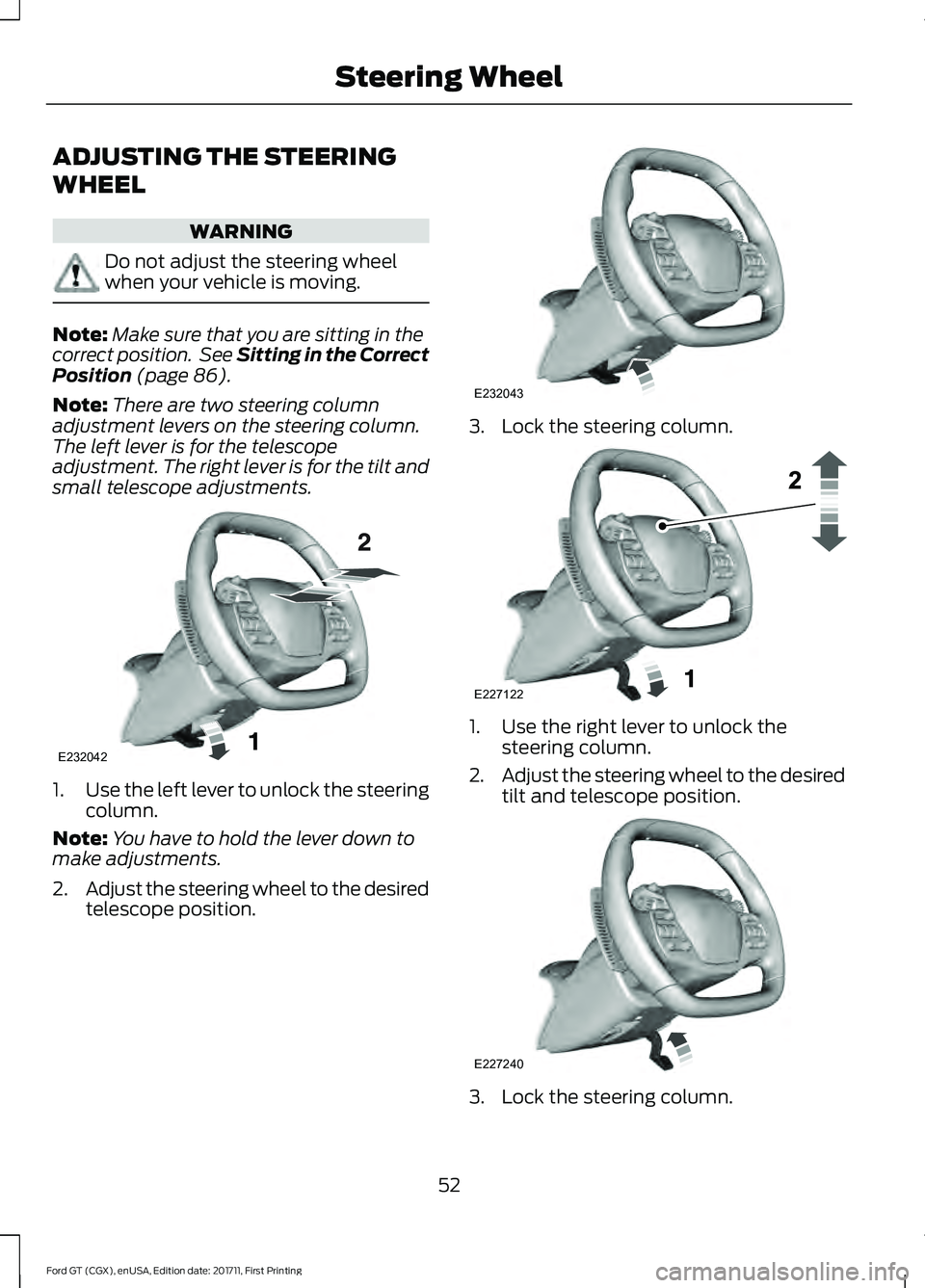
Note: There are two steering column
adjustment levers on the steering column.
The left lever is for the telescope
adjustment. The right lever is for the tilt and
small telescope adjustments. 1.
Use the left lever to unlock the steering
column.
Note: You have to hold the lever down to
make adjustments.
2. Adjust the steering wheel to the desired
telescope position. 3. Lock the steering column.
1. Use the right lever to unlock the
steering column.
2. Adjust the steering wheel to the desired
tilt and telescope position. 3. Lock the steering column.
52
Ford GT (CGX), enUSA, Edition date: 201711, First Printing Steering WheelE232042 E232043 E227122 E227240
Page 59 of 325
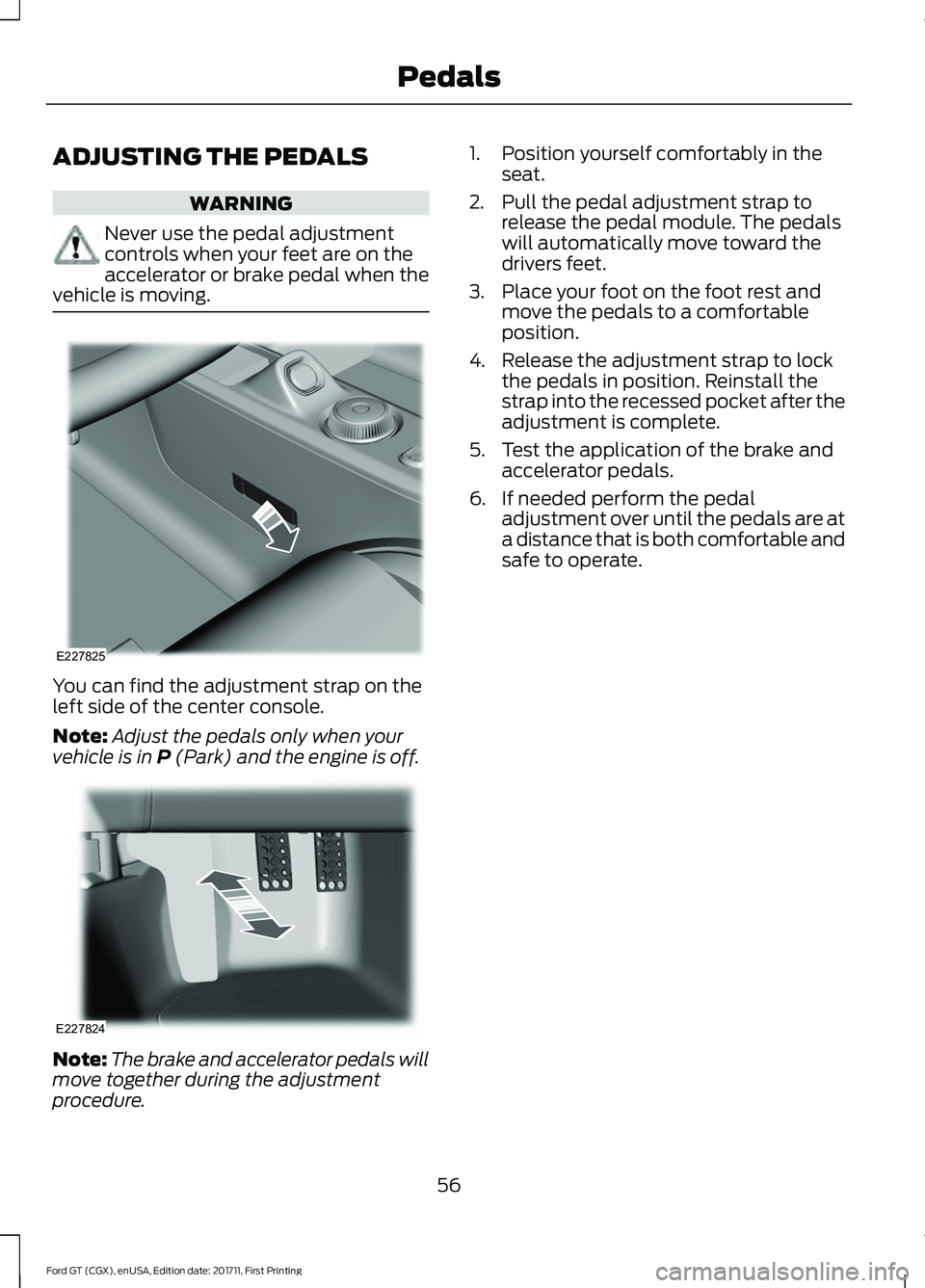
ADJUSTING THE PEDALS
WARNING
Never use the pedal adjustment
controls when your feet are on the
accelerator or brake pedal when the
vehicle is moving. You can find the adjustment strap on the
left side of the center console.
Note:
Adjust the pedals only when your
vehicle is in P (Park) and the engine is off. Note:
The brake and accelerator pedals will
move together during the adjustment
procedure. 1. Position yourself comfortably in the
seat.
2. Pull the pedal adjustment strap to release the pedal module. The pedals
will automatically move toward the
drivers feet.
3. Place your foot on the foot rest and move the pedals to a comfortable
position.
4. Release the adjustment strap to lock the pedals in position. Reinstall the
strap into the recessed pocket after the
adjustment is complete.
5. Test the application of the brake and accelerator pedals.
6. If needed perform the pedal adjustment over until the pedals are at
a distance that is both comfortable and
safe to operate.
56
Ford GT (CGX), enUSA, Edition date: 201711, First Printing PedalsE227825 E227824
Page 62 of 325
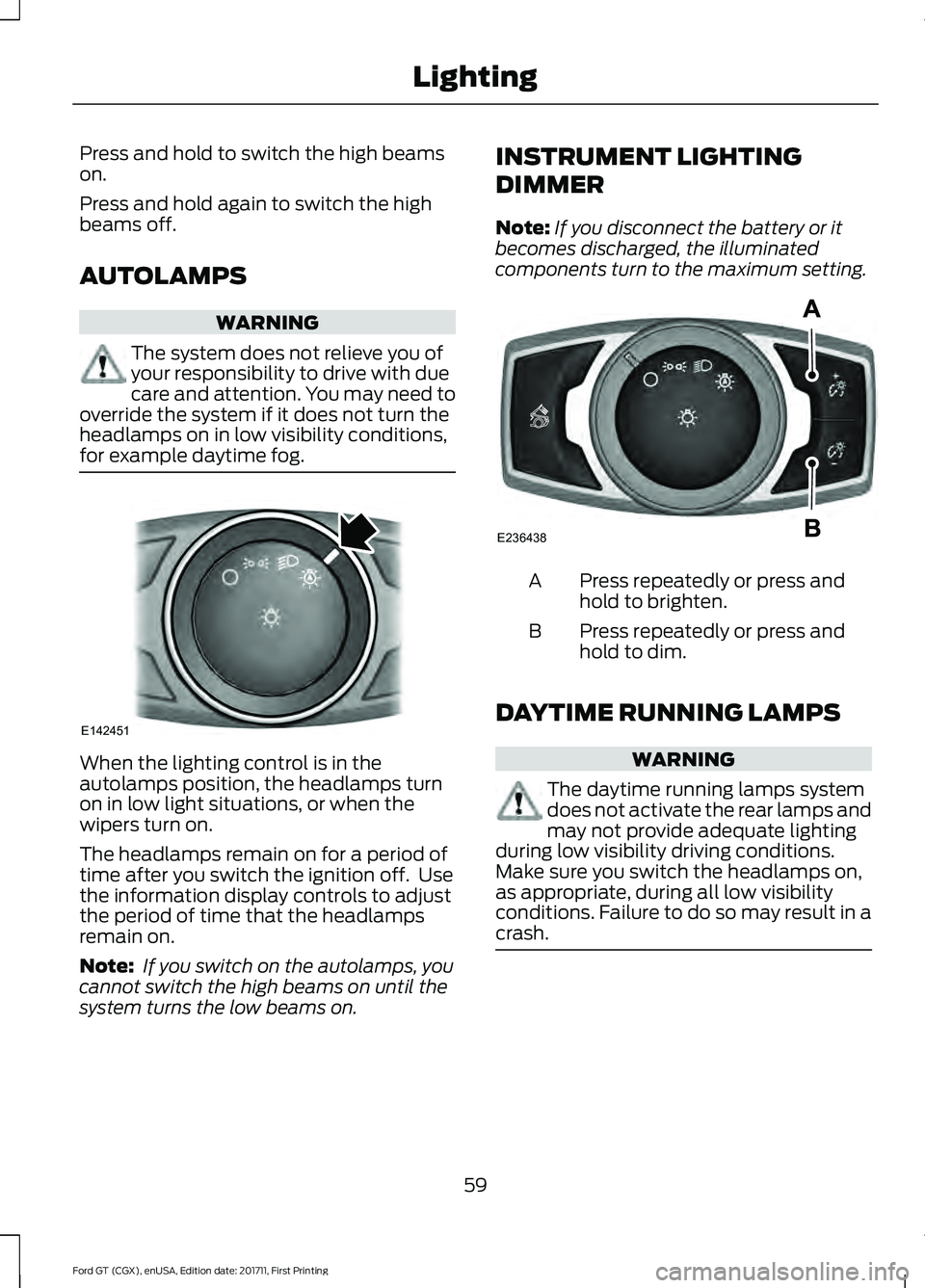
Press and hold to switch the high beams
on.
Press and hold again to switch the high
beams off.
AUTOLAMPS
WARNING
The system does not relieve you of
your responsibility to drive with due
care and attention. You may need to
override the system if it does not turn the
headlamps on in low visibility conditions,
for example daytime fog. When the lighting control is in the
autolamps position, the headlamps turn
on in low light situations, or when the
wipers turn on.
The headlamps remain on for a period of
time after you switch the ignition off. Use
the information display controls to adjust
the period of time that the headlamps
remain on.
Note:
If you switch on the autolamps, you
cannot switch the high beams on until the
system turns the low beams on. INSTRUMENT LIGHTING
DIMMER
Note:
If you disconnect the battery or it
becomes discharged, the illuminated
components turn to the maximum setting. Press repeatedly or press and
hold to brighten.
A
Press repeatedly or press and
hold to dim.
B
DAYTIME RUNNING LAMPS WARNING
The daytime running lamps system
does not activate the rear lamps and
may not provide adequate lighting
during low visibility driving conditions.
Make sure you switch the headlamps on,
as appropriate, during all low visibility
conditions. Failure to do so may result in a
crash. 59
Ford GT (CGX), enUSA, Edition date: 201711, First Printing LightingE142451 E236438
Page 64 of 325
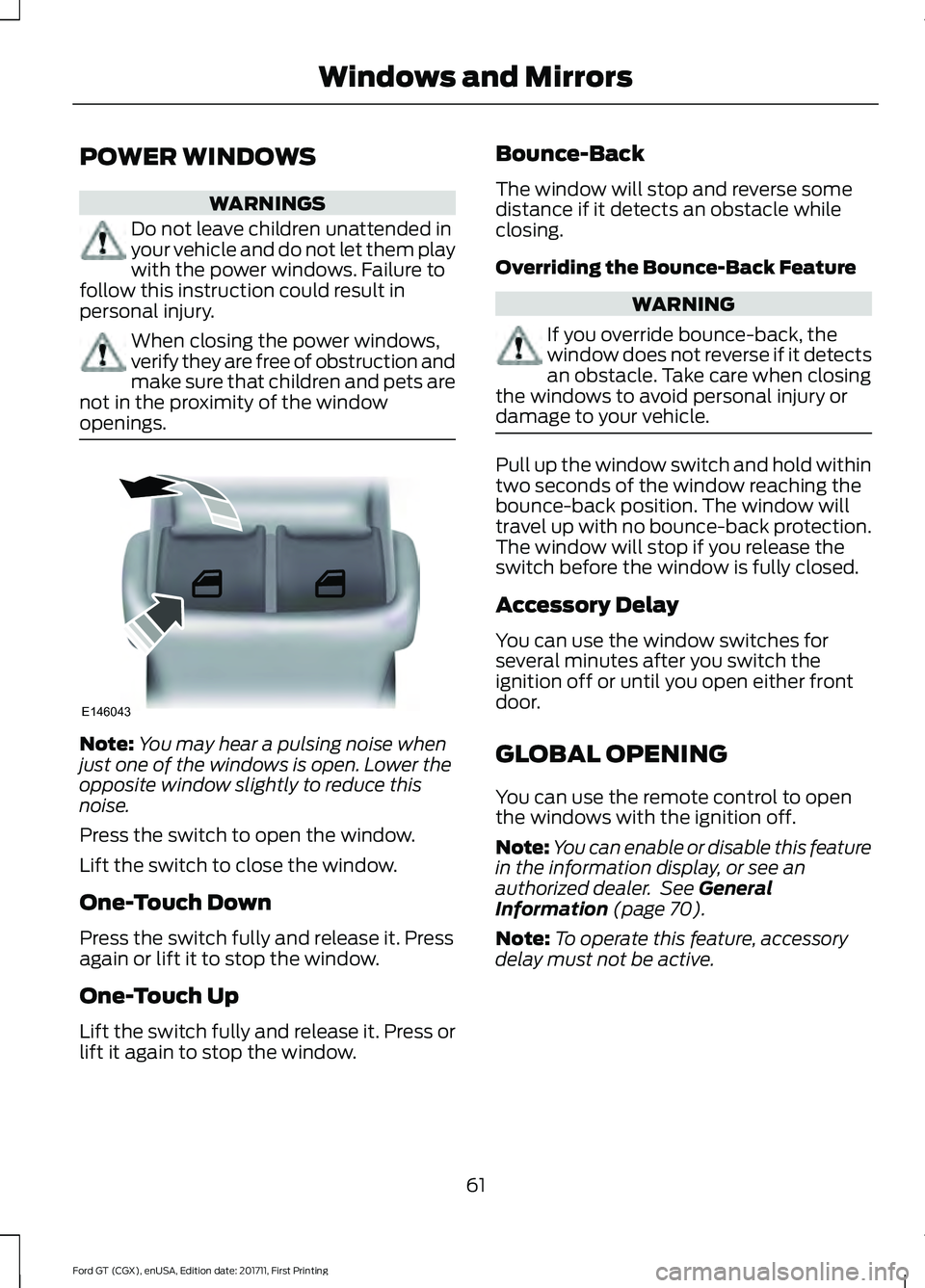
POWER WINDOWS
WARNINGS
Do not leave children unattended in
your vehicle and do not let them play
with the power windows. Failure to
follow this instruction could result in
personal injury. When closing the power windows,
verify they are free of obstruction and
make sure that children and pets are
not in the proximity of the window
openings. Note:
You may hear a pulsing noise when
just one of the windows is open. Lower the
opposite window slightly to reduce this
noise.
Press the switch to open the window.
Lift the switch to close the window.
One-Touch Down
Press the switch fully and release it. Press
again or lift it to stop the window.
One-Touch Up
Lift the switch fully and release it. Press or
lift it again to stop the window. Bounce-Back
The window will stop and reverse some
distance if it detects an obstacle while
closing.
Overriding the Bounce-Back Feature WARNING
If you override bounce-back, the
window does not reverse if it detects
an obstacle. Take care when closing
the windows to avoid personal injury or
damage to your vehicle. Pull up the window switch and hold within
two seconds of the window reaching the
bounce-back position. The window will
travel up with no bounce-back protection.
The window will stop if you release the
switch before the window is fully closed.
Accessory Delay
You can use the window switches for
several minutes after you switch the
ignition off or until you open either front
door.
GLOBAL OPENING
You can use the remote control to open
the windows with the ignition off.
Note:
You can enable or disable this feature
in the information display, or see an
authorized dealer. See General
Information (page 70).
Note: To operate this feature, accessory
delay must not be active.
61
Ford GT (CGX), enUSA, Edition date: 201711, First Printing Windows and MirrorsE146043
Page 65 of 325
Remote Control Front Windows
You can open the windows for a short time
after you unlock your vehicle with the
remote control. After you unlock your
vehicle, press and hold the remote control
unlock button to open the windows.
Release the button once movement starts.
Press the lock or unlock button to stop
movement.
EXTERIOR MIRRORS
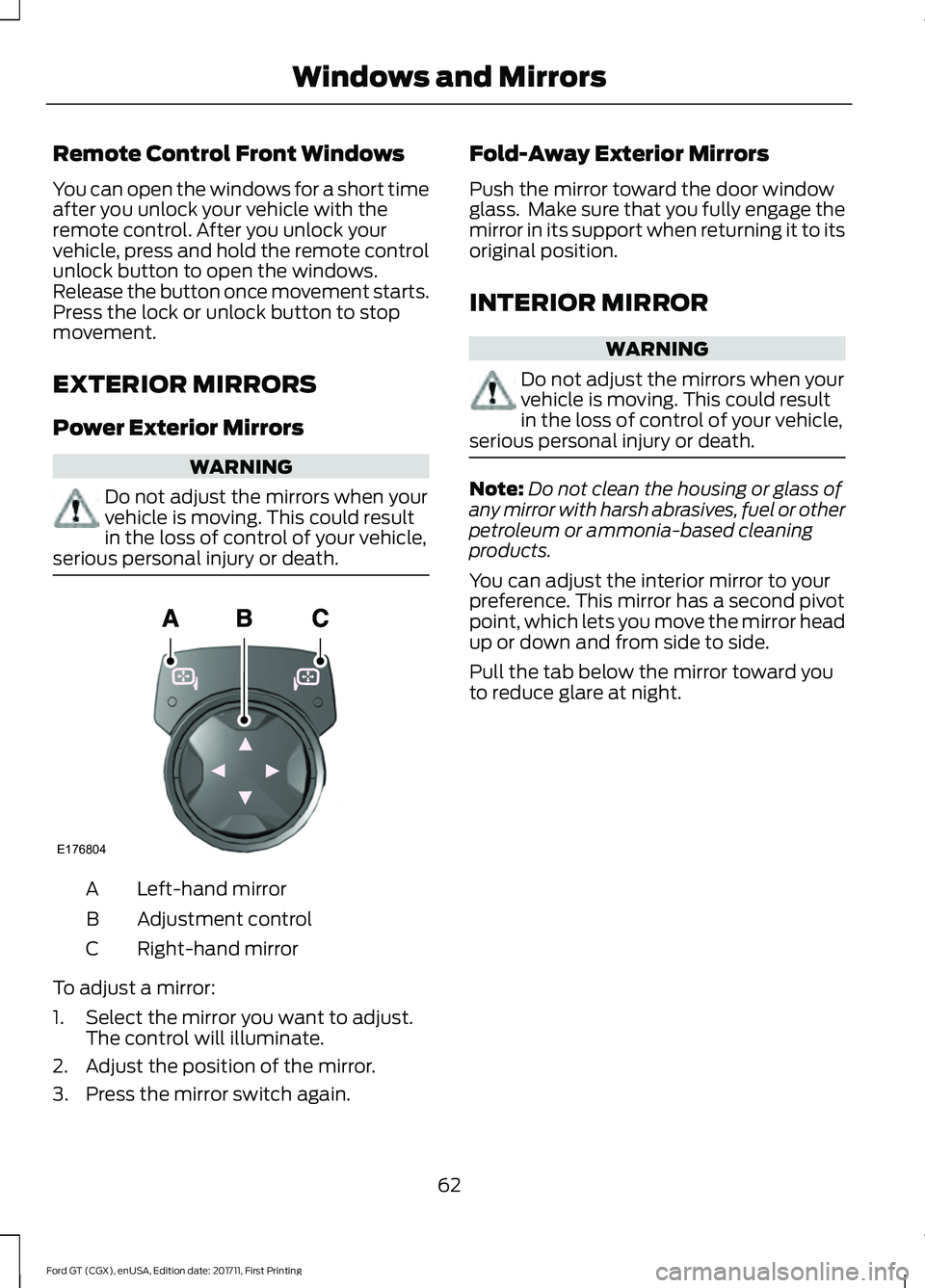
Power Exterior Mirrors
WARNING
Do not adjust the mirrors when your
vehicle is moving. This could result
in the loss of control of your vehicle,
serious personal injury or death. Left-hand mirror
A
Adjustment control
B
Right-hand mirror
C
To adjust a mirror:
1. Select the mirror you want to adjust. The control will illuminate.
2. Adjust the position of the mirror.
3. Press the mirror switch again. Fold-Away Exterior Mirrors
Push the mirror toward the door window
glass. Make sure that you fully engage the
mirror in its support when returning it to its
original position.
INTERIOR MIRROR
WARNING
Do not adjust the mirrors when your
vehicle is moving. This could result
in the loss of control of your vehicle,
serious personal injury or death. Note:
Do not clean the housing or glass of
any mirror with harsh abrasives, fuel or other
petroleum or ammonia-based cleaning
products.
You can adjust the interior mirror to your
preference. This mirror has a second pivot
point, which lets you move the mirror head
up or down and from side to side.
Pull the tab below the mirror toward you
to reduce glare at night.
62
Ford GT (CGX), enUSA, Edition date: 201711, First Printing Windows and MirrorsE176804
Page 67 of 325
Normal and Wet Mode:
•
Gear.
Sport Mode:
• Speedometer.
Track Mode:
• Engine Coolant Temperature.
• Engine Oil Temperature.
• Transmission Temperature.
• Fuel Level.
V-Max Mode:
• Engine Coolant Temperature.
• Engine Oil Temperature.
• Engine Oil Pressure.
• Turbo Boost Pressure.
Trip Computer
The trip computer functions only operate
when the engine is running. See General
Information (page 70).
Fuel Gauge
Note: The fuel gauge may vary slightly
when your vehicle is moving or on a slope.
Switch the ignition on. The fuel gauge will
indicate approximately how much fuel is
left in the fuel tank. The arrow adjacent to
the fuel pump symbol indicates on which
side of your vehicle the fuel filler door is
located. The gauge is divided into four segments
and moves towards the right when you
refuel your vehicle. If the gauge remains in
the far left segment after adding fuel, this
indicates your vehicle needs service soon.
After refueling, some variability in gauge
position is normal:
•
It may take a short time for the gauge
to reach full after leaving the gas
station. This is normal and depends
upon the slope of pavement at the gas
station.
• The fuel amount dispensed into the
tank is a little less or more than the
gauge indicated. This is normal and
depends upon the slope of pavement
at the gas station.
• If the gas station nozzle shuts off
before the tank is full, try a different
gas pump nozzle.
Low Fuel Reminder
A low fuel reminder triggers when the
distance to empty value reaches
50 mi
(80 km) to empty, with additional
warnings at 25 mi (40 km), 10 mi (20 km)
and 0 mi (0 km) to empty if the message
is cleared each time.
In Track Mode, the distance to empty
warnings appear at 10 mi (20 km) and 0 mi
(0 km)
to empty if the message is cleared
each time.
After extended periods of performance
driving, your distance to empty value may
display low even after refueling. Drive your
vehicle under normal operating conditions
to recalibrate the distance to empty.
Variations
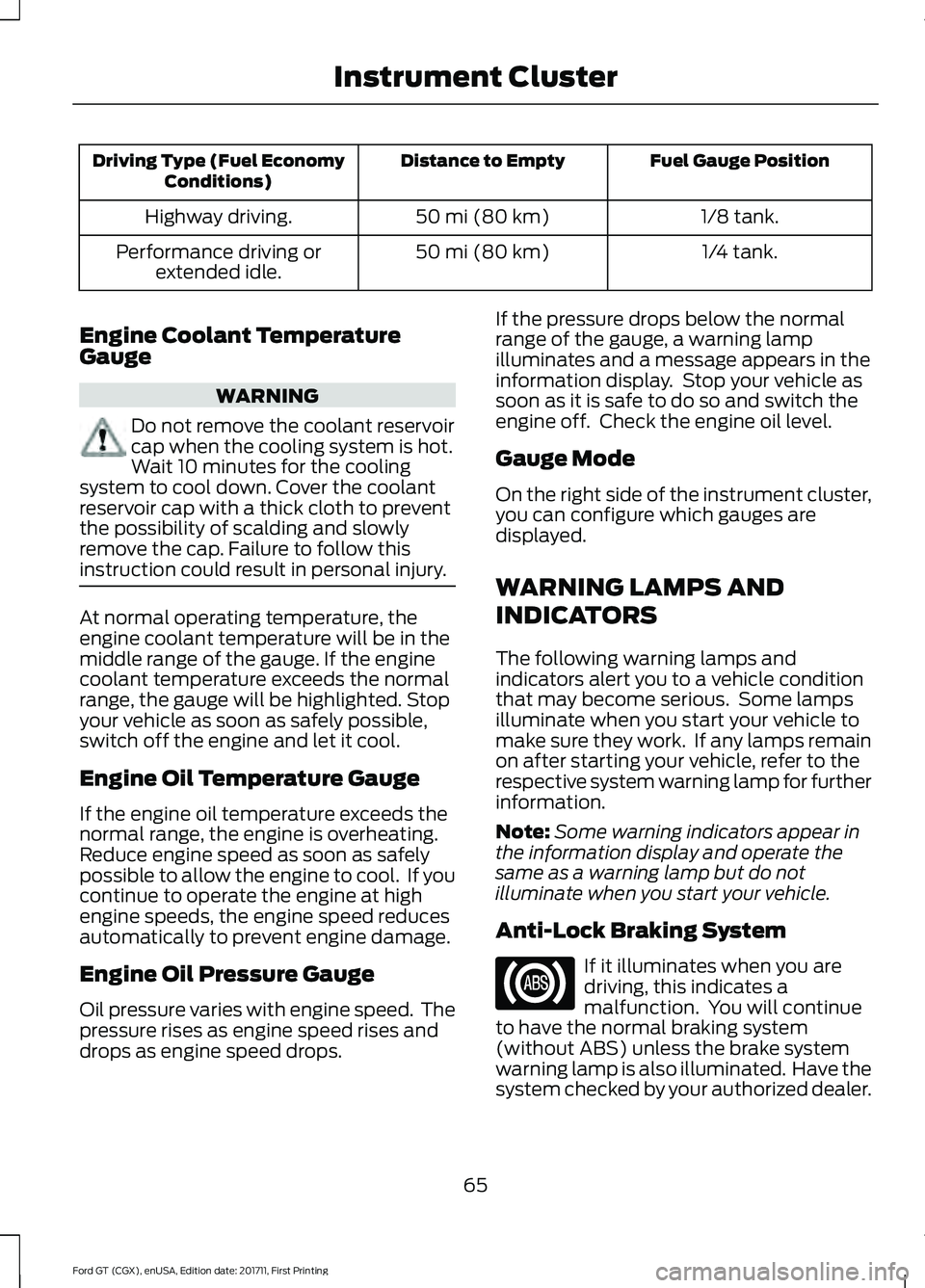
Note: The low fuel warning and distance-to-empty warning can appear at different fuel
gauge positions depending on fuel economy conditions. This variation is normal.
64
Ford GT (CGX), enUSA, Edition date: 201711, First Printing Instrument Cluster
Page 68 of 325
Fuel Gauge Position
Distance to Empty
Driving Type (Fuel Economy
Conditions)
1/8 tank.
50 mi (80 km)
Highway driving.
1/4 tank.
50 mi (80 km)
Performance driving or
extended idle.
Engine Coolant Temperature
Gauge WARNING
Do not remove the coolant reservoir
cap when the cooling system is hot.
Wait 10 minutes for the cooling
system to cool down. Cover the coolant
reservoir cap with a thick cloth to prevent
the possibility of scalding and slowly
remove the cap. Failure to follow this
instruction could result in personal injury. At normal operating temperature, the
engine coolant temperature will be in the
middle range of the gauge. If the engine
coolant temperature exceeds the normal
range, the gauge will be highlighted. Stop
your vehicle as soon as safely possible,
switch off the engine and let it cool.
Engine Oil Temperature Gauge
If the engine oil temperature exceeds the
normal range, the engine is overheating.
Reduce engine speed as soon as safely
possible to allow the engine to cool. If you
continue to operate the engine at high
engine speeds, the engine speed reduces
automatically to prevent engine damage.
Engine Oil Pressure Gauge
Oil pressure varies with engine speed. The
pressure rises as engine speed rises and
drops as engine speed drops. If the pressure drops below the normal
range of the gauge, a warning lamp
illuminates and a message appears in the
information display. Stop your vehicle as
soon as it is safe to do so and switch the
engine off. Check the engine oil level.
Gauge Mode
On the right side of the instrument cluster,
you can configure which gauges are
displayed.
WARNING LAMPS AND
INDICATORS
The following warning lamps and
indicators alert you to a vehicle condition
that may become serious. Some lamps
illuminate when you start your vehicle to
make sure they work. If any lamps remain
on after starting your vehicle, refer to the
respective system warning lamp for further
information.
Note:
Some warning indicators appear in
the information display and operate the
same as a warning lamp but do not
illuminate when you start your vehicle.
Anti-Lock Braking System If it illuminates when you are
driving, this indicates a
malfunction. You will continue
to have the normal braking system
(without ABS) unless the brake system
warning lamp is also illuminated. Have the
system checked by your authorized dealer.
65
Ford GT (CGX), enUSA, Edition date: 201711, First Printing Instrument Cluster