charging FORD GT 2021 Owners Manual
[x] Cancel search | Manufacturer: FORD, Model Year: 2021, Model line: GT, Model: FORD GT 2021Pages: 321, PDF Size: 5.78 MB
Page 80 of 321
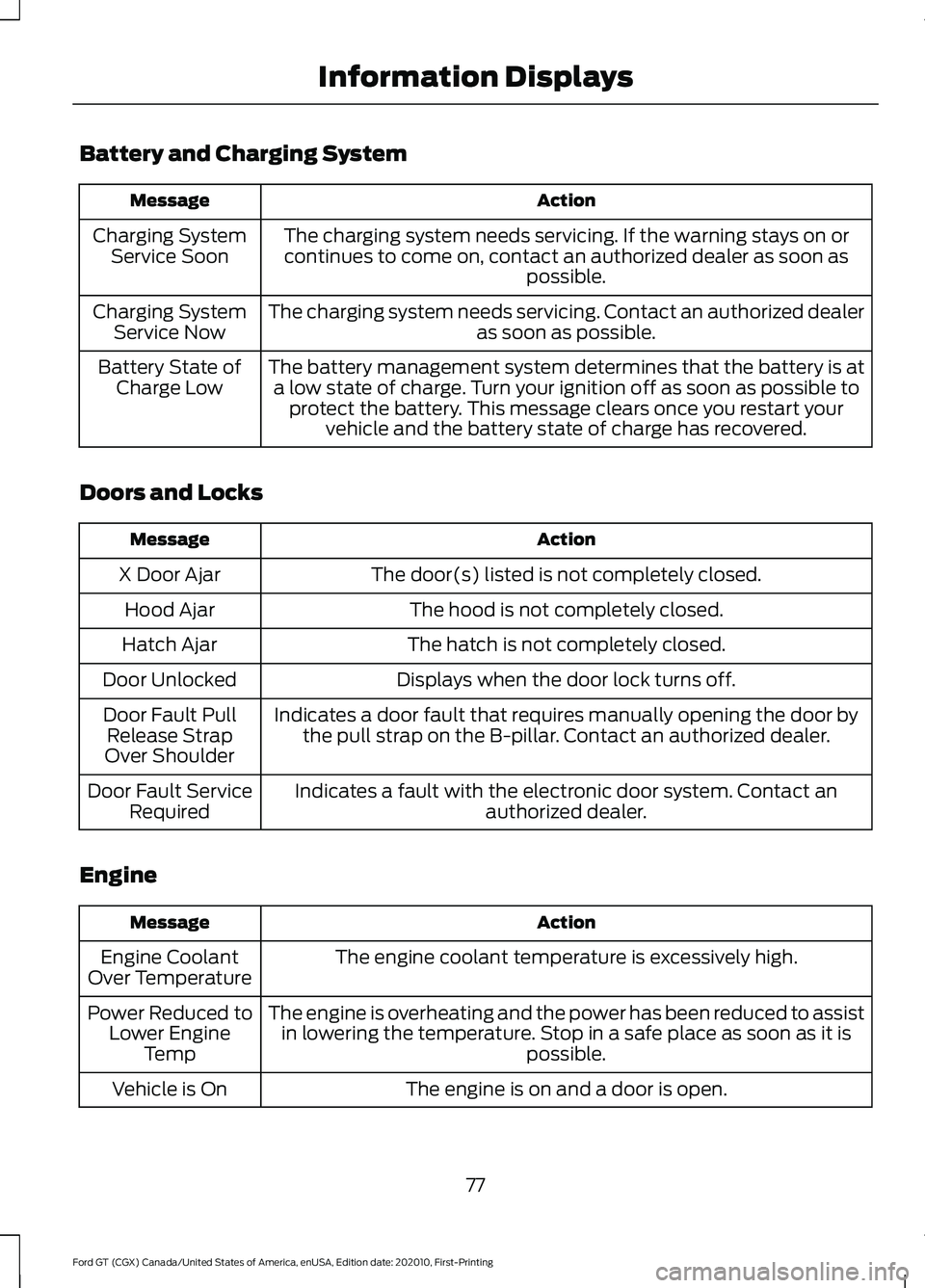
Battery and Charging System
Action
Message
The charging system needs servicing. If the warning stays on orcontinues to come on, contact an authorized dealer as soon as possible.
Charging System
Service Soon
The charging system needs servicing. Contact an authorized dealer as soon as possible.
Charging System
Service Now
The battery management system determines that the battery is ata low state of charge. Turn your ignition off as soon as possible to protect the battery. This message clears once you restart your vehicle and the battery state of charge has recovered.
Battery State of
Charge Low
Doors and Locks Action
Message
The door(s) listed is not completely closed.
X Door Ajar
The hood is not completely closed.
Hood Ajar
The hatch is not completely closed.
Hatch Ajar
Displays when the door lock turns off.
Door Unlocked
Indicates a door fault that requires manually opening the door bythe pull strap on the B-pillar. Contact an authorized dealer.
Door Fault Pull
Release Strap
Over Shoulder
Indicates a fault with the electronic door system. Contact an authorized dealer.
Door Fault Service
Required
Engine Action
Message
The engine coolant temperature is excessively high.
Engine Coolant
Over Temperature
The engine is overheating and the power has been reduced to assistin lowering the temperature. Stop in a safe place as soon as it is possible.
Power Reduced to
Lower Engine Temp
The engine is on and a door is open.
Vehicle is On
77
Ford GT (CGX) Canada/United States of America, enUSA, Edition date: 202010, First-Printing Information Displays
Page 81 of 321
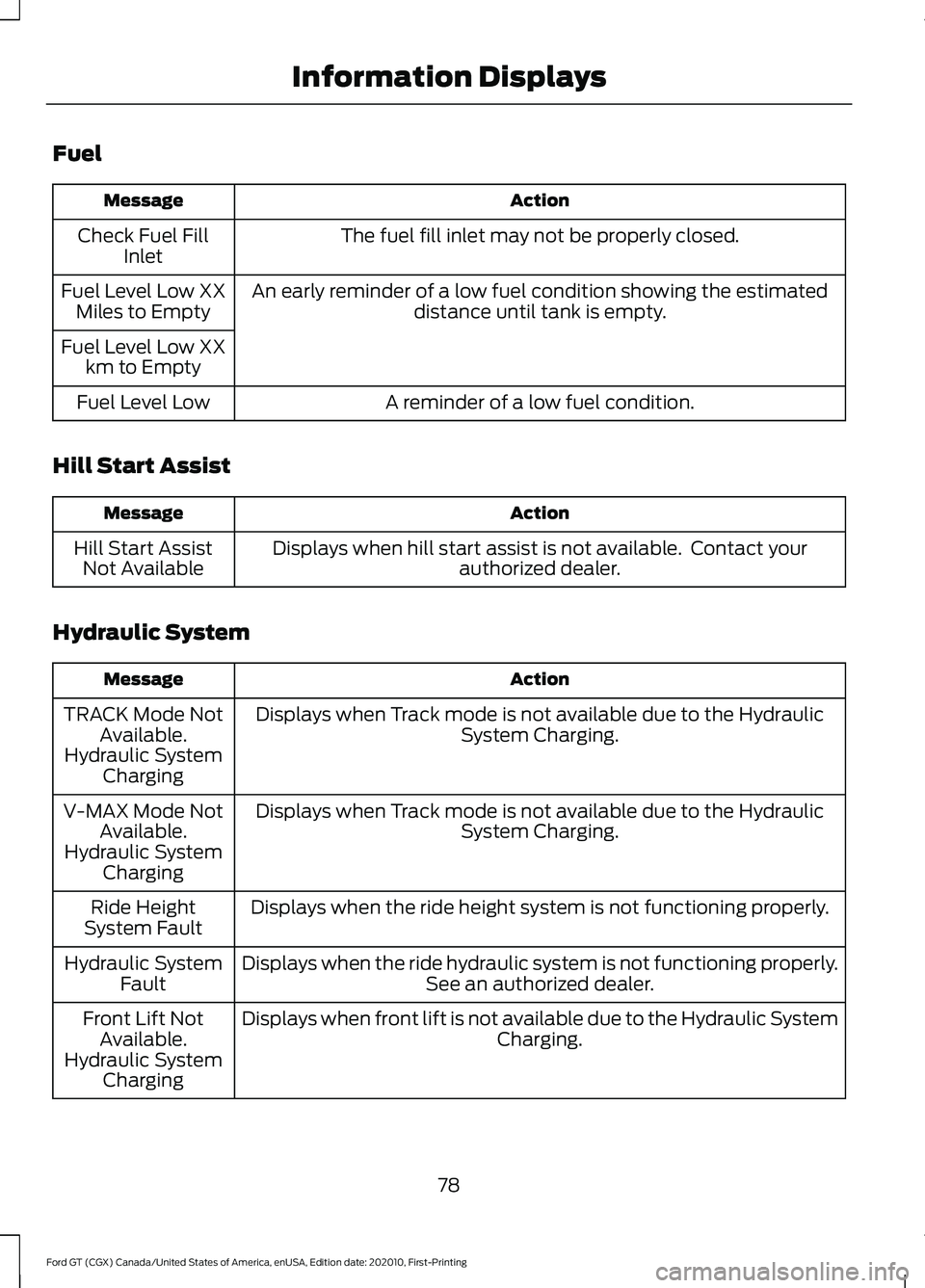
Fuel
Action
Message
The fuel fill inlet may not be properly closed.
Check Fuel Fill
Inlet
An early reminder of a low fuel condition showing the estimated distance until tank is empty.
Fuel Level Low XX
Miles to Empty
Fuel Level Low XX km to Empty
A reminder of a low fuel condition.
Fuel Level Low
Hill Start Assist Action
Message
Displays when hill start assist is not available. Contact your authorized dealer.
Hill Start Assist
Not Available
Hydraulic System Action
Message
Displays when Track mode is not available due to the Hydraulic System Charging.
TRACK Mode Not
Available.
Hydraulic System Charging
Displays when Track mode is not available due to the Hydraulic System Charging.
V-MAX Mode Not
Available.
Hydraulic System Charging
Displays when the ride height system is not functioning properly.
Ride Height
System Fault
Displays when the ride hydraulic system is not functioning properly. See an authorized dealer.
Hydraulic System
Fault
Displays when front lift is not available due to the Hydraulic System Charging.
Front Lift Not
Available.
Hydraulic System Charging
78
Ford GT (CGX) Canada/United States of America, enUSA, Edition date: 202010, First-Printing Information Displays
Page 85 of 321
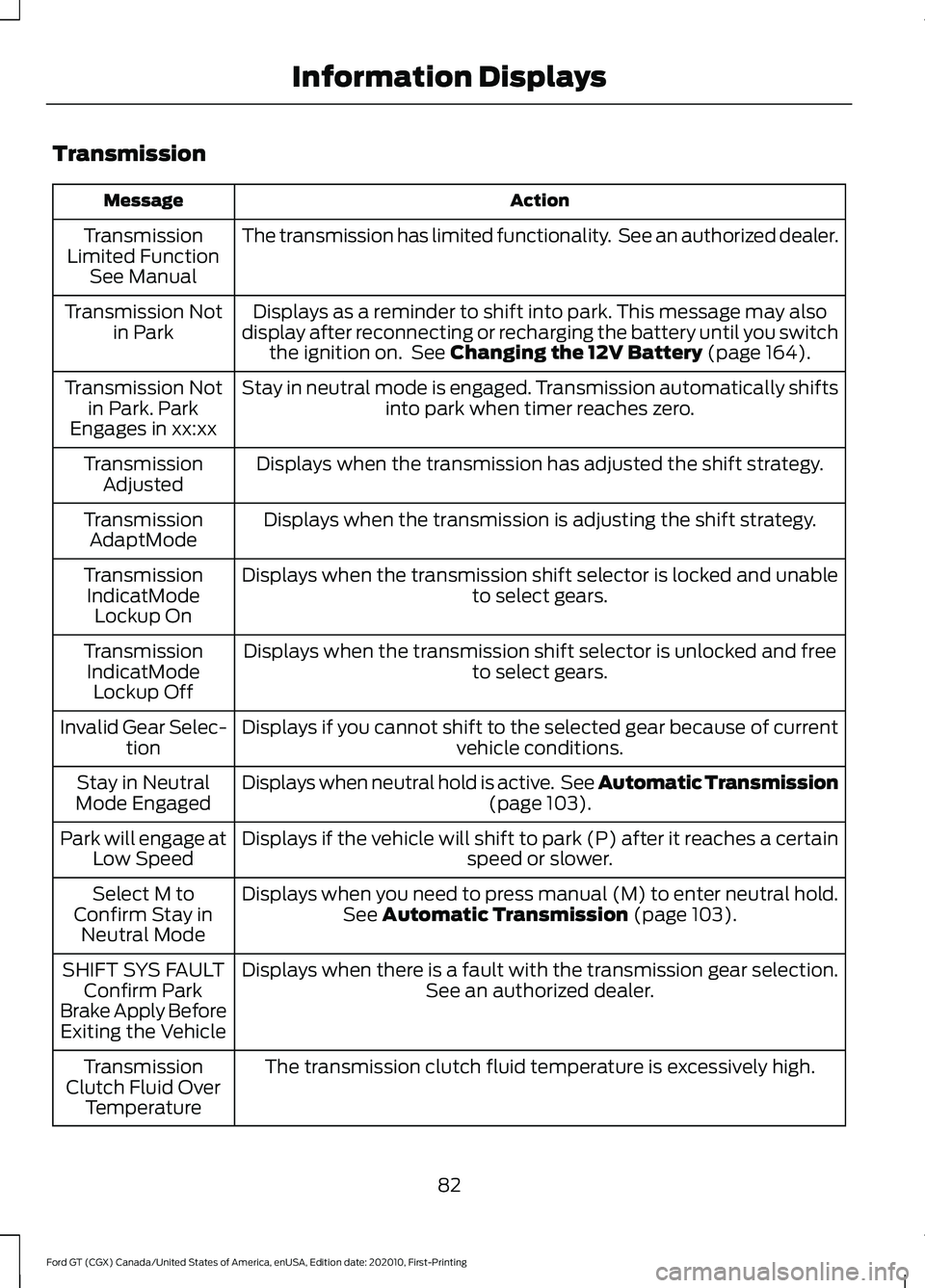
Transmission
Action
Message
The transmission has limited functionality. See an authorized dealer.
Transmission
Limited Function See Manual
Displays as a reminder to shift into park. This message may also
display after reconnecting or recharging the battery until you switch the ignition on. See Changing the 12V Battery (page 164).
Transmission Not
in Park
Stay in neutral mode is engaged. Transmission automatically shifts into park when timer reaches zero.
Transmission Not
in Park. Park
Engages in xx:xx
Displays when the transmission has adjusted the shift strategy.
Transmission
Adjusted
Displays when the transmission is adjusting the shift strategy.
Transmission
AdaptMode
Displays when the transmission shift selector is locked and unable to select gears.
Transmission
IndicatMode Lockup On
Displays when the transmission shift selector is unlocked and free to select gears.
Transmission
IndicatMode Lockup Off
Displays if you cannot shift to the selected gear because of current vehicle conditions.
Invalid Gear Selec-
tion
Displays when neutral hold is active. See Automatic Transmission (page
103).
Stay in Neutral
Mode Engaged
Displays if the vehicle will shift to park (P) after it reaches a certain speed or slower.
Park will engage at
Low Speed
Displays when you need to press manual (M) to enter neutral hold.See
Automatic Transmission (page 103).
Select M to
Confirm Stay in Neutral Mode
Displays when there is a fault with the transmission gear selection. See an authorized dealer.
SHIFT SYS FAULT
Confirm Park
Brake Apply Before Exiting the Vehicle
The transmission clutch fluid temperature is excessively high.
Transmission
Clutch Fluid Over Temperature
82
Ford GT (CGX) Canada/United States of America, enUSA, Edition date: 202010, First-Printing Information Displays
Page 104 of 321
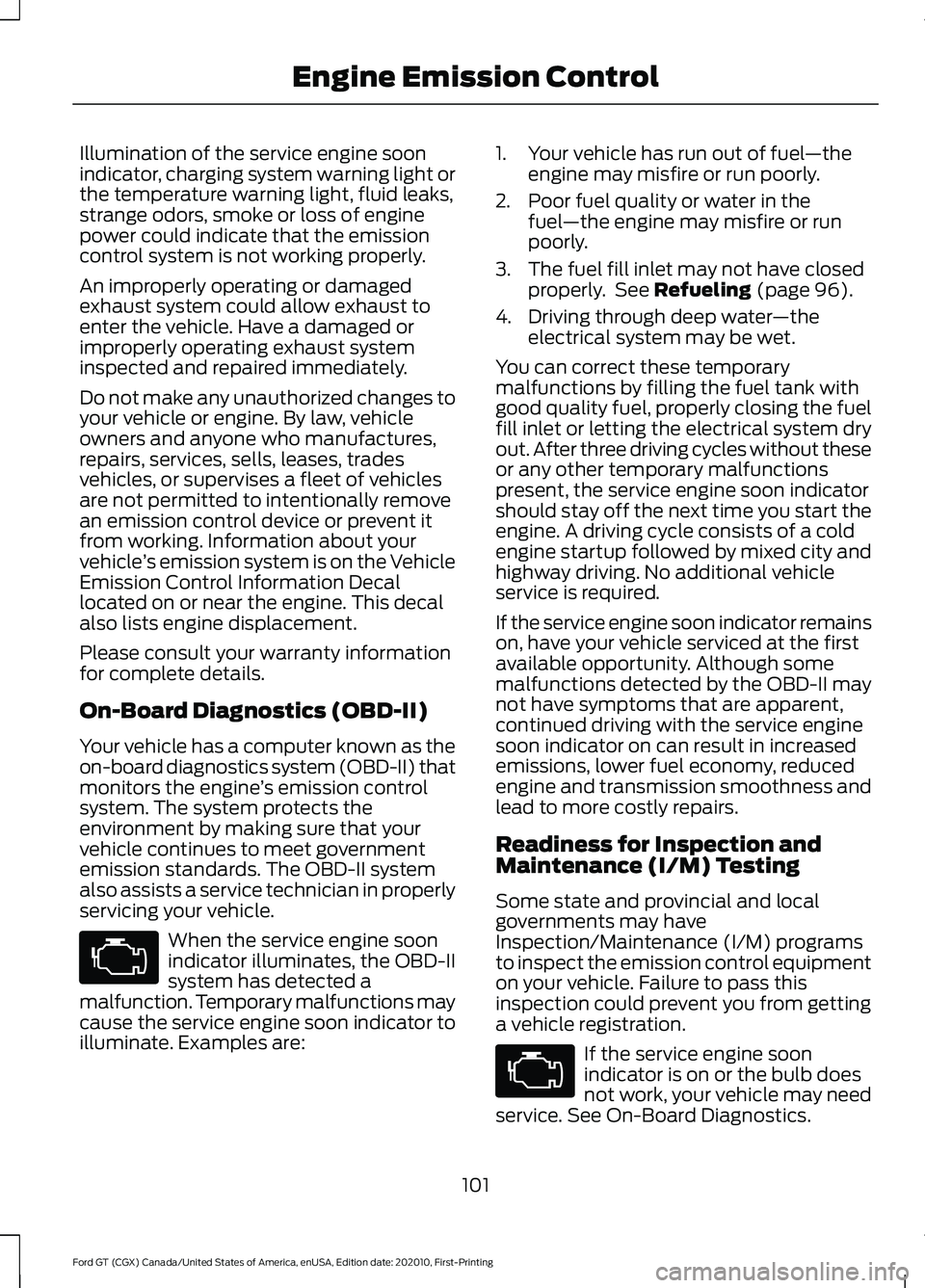
Illumination of the service engine soon
indicator, charging system warning light or
the temperature warning light, fluid leaks,
strange odors, smoke or loss of engine
power could indicate that the emission
control system is not working properly.
An improperly operating or damaged
exhaust system could allow exhaust to
enter the vehicle. Have a damaged or
improperly operating exhaust system
inspected and repaired immediately.
Do not make any unauthorized changes to
your vehicle or engine. By law, vehicle
owners and anyone who manufactures,
repairs, services, sells, leases, trades
vehicles, or supervises a fleet of vehicles
are not permitted to intentionally remove
an emission control device or prevent it
from working. Information about your
vehicle
’s emission system is on the Vehicle
Emission Control Information Decal
located on or near the engine. This decal
also lists engine displacement.
Please consult your warranty information
for complete details.
On-Board Diagnostics (OBD-II)
Your vehicle has a computer known as the
on-board diagnostics system (OBD-II) that
monitors the engine ’s emission control
system. The system protects the
environment by making sure that your
vehicle continues to meet government
emission standards. The OBD-II system
also assists a service technician in properly
servicing your vehicle. When the service engine soon
indicator illuminates, the OBD-II
system has detected a
malfunction. Temporary malfunctions may
cause the service engine soon indicator to
illuminate. Examples are: 1. Your vehicle has run out of fuel
—the
engine may misfire or run poorly.
2. Poor fuel quality or water in the fuel —the engine may misfire or run
poorly.
3. The fuel fill inlet may not have closed properly. See Refueling (page 96).
4. Driving through deep water —the
electrical system may be wet.
You can correct these temporary
malfunctions by filling the fuel tank with
good quality fuel, properly closing the fuel
fill inlet or letting the electrical system dry
out. After three driving cycles without these
or any other temporary malfunctions
present, the service engine soon indicator
should stay off the next time you start the
engine. A driving cycle consists of a cold
engine startup followed by mixed city and
highway driving. No additional vehicle
service is required.
If the service engine soon indicator remains
on, have your vehicle serviced at the first
available opportunity. Although some
malfunctions detected by the OBD-II may
not have symptoms that are apparent,
continued driving with the service engine
soon indicator on can result in increased
emissions, lower fuel economy, reduced
engine and transmission smoothness and
lead to more costly repairs.
Readiness for Inspection and
Maintenance (I/M) Testing
Some state and provincial and local
governments may have
Inspection/Maintenance (I/M) programs
to inspect the emission control equipment
on your vehicle. Failure to pass this
inspection could prevent you from getting
a vehicle registration. If the service engine soon
indicator is on or the bulb does
not work, your vehicle may need
service. See On-Board Diagnostics.
101
Ford GT (CGX) Canada/United States of America, enUSA, Edition date: 202010, First-Printing Engine Emission Control
Page 167 of 321
CHANGING THE 12V BATTERY
WARNING: Battery posts,
terminals and related accessories
contain lead and lead compounds,
chemicals known to the State of
California to cause cancer and
reproductive harm. Wash your hands
after handling
.
The Ford GT uses a lithium Ion battery.
The battery is inside the right front fender.
For battery maintenance or replacement,
contact an authorized dealer.
When a battery replacement is required,
you must use a recommended
replacement battery that matches the
electrical requirements of the vehicle.
Note: If you add electrical accessories or
components to the vehicle, it may adversely
affect the low voltage battery performance
and durability. This may also affect the
performance of other electrical systems in
the vehicle.
Because your vehicle ’s engine is
electronically controlled by a computer,
some control conditions are maintained
by power from the battery. When the
battery is disconnected or a new battery
is installed, the engine must relearn its idle
and fuel trim strategy for optimum
driveability and performance.
To restore the settings, do the following:
1. Apply the parking brake.
2. Shift into park (P) or neutral (N).
3. Switch off all accessories.
4. Press the brake pedal and start your vehicle. 5. Run the engine until it reaches normal
operating temperature. As the engine
is warming up, complete the following:
Reset the clock.
See Audio System
(page 216). Reset the radio station
presets. See Audio System (page 216).
6. Allow the engine to idle for at least one
minute.
7. Drive the vehicle at least 10 mi (16 km)
to completely relearn the idle trim and
fuel trim strategy.
Note: If you do not allow the engine to
relearn the idle and fuel trim strategy, the
idle quality of your vehicle may be adversely
affected until the engine computer
eventually relearns the idle trim and fuel
trim strategy.
Make sure that you dispose of old batteries
in an environmentally friendly way. Seek
advice from your local authority about
recycling old batteries.
Battery Charger and Maintainer
If you plan to have your GT parked or in
storage for more than two weeks without
driving it, connect the Li-Ion compatible
battery charger and maintainer provided.
There are two methods to connect the
charger:
Method 1: Rear Hatch Storage
Compartment Power Point
Your Ford GT has a 12V power point in the
rear hatch storage area that allows you to
conveniently plug in to charge and
maintain your battery.
Note: You can only the use the hatch
storage power point for battery charging.
The one inside the passenger compartment
on the side of the center console will not
work for this purpose.
164
Ford GT (CGX) Canada/United States of America, enUSA, Edition date: 202010, First-Printing Maintenance
Page 317 of 321
Gearbox
See: Transmission.............................................. 103
General Information on Radio Frequencies...................................................45
Intelligent Access................................................. 45
General Maintenance Information........279 Protecting Your Investment........................... 279
Road Course Maintenance............................. 279
Why Maintain Your Vehicle?.......................... 279
Why Maintain Your Vehicle at Your Certified Ford GT Service Dealership?.................... 279
Getting Assistance Outside the U.S. and Canada..........................................................140
Getting the Services You Need................137 Away From Home............................................... 137
Global Opening...............................................65 Remote Control Front Windows.................... 66
H
Hazard Flashers.............................................133
Headlamp Adjusting See: Adjusting the Headlamps..................... 166
Heating See: Climate Control........................................... 83
Hill Start Assist................................................111 Using Hill Start Assist.......................................... 111
Hints on Controlling the Interior Climate...........................................................84
Defogging the Side Windows in Cold Weather.............................................................. 84
Defogging the Windshield in Cold Weather.............................................................. 85
General Hints......................................................... 84
Quickly Cooling the Interior.............................. 84
Quickly Heating the Interior............................. 84
Recommended Settings for Cooling............84
Recommended Settings for Heating...........84
Hints on Driving With Anti-Lock Brakes............................................................109
Home Screen.................................................227
Hood Lock See: Opening and Closing the Hood...........154
Horn....................................................................58
I
In California (U.S. Only).............................138 Information Display Control......................58
Information Displays.....................................73
General Information............................................ 73
Information Messages..................................76 AdvanceTrac ™...................................................... 76
Alarm........................................................................\
. 76
Battery and Charging System.......................... 77
Doors and Locks.................................................... 77
Engine........................................................................\
77
Fuel........................................................................\
.... 78
Hill Start Assist ..................................................... 78
Hydraulic System................................................. 78
Keys and Intelligent Access.............................. 79
Maintenance.......................................................... 79
Park Brake.............................................................. 80
Remote Start.......................................................... 81
Starting System .................................................... 81
Steering System.................................................... 81
Tire Pressure Monitoring System.................... 81
Transmission.......................................................... 82
Installing Child Restraints...........................20 Child Seats.............................................................. 20
Using Lap and Shoulder Belts.......................... 21
Using Tether Straps............................................. 23
Instrument Cluster.........................................67
Instrument Lighting Dimmer.....................63
Instrument Panel
............................................16
Interior Lamps.................................................64
Interior Mirror...................................................66
Introduction........................................................5
J
Jump Starting the Vehicle.........................134 Connecting the Jumper Cables..................... 134
Jump Starting....................................................... 135
Preparing Your Vehicle...................................... 134
Removing the Jumper Cables........................ 135
K
Keyless Starting..............................................89 Ignition Modes...................................................... 89
Keys and Remote Controls.........................45
L
Launch Control
...............................................171
314
Ford GT (CGX) Canada/United States of America, enUSA, Edition date: 202010, First-Printing Index