audio FORD KUGA 2010 1.G User Guide
[x] Cancel search | Manufacturer: FORD, Model Year: 2010, Model line: KUGA, Model: FORD KUGA 2010 1.GPages: 226, PDF Size: 8.07 MB
Page 178 of 226
Select the phone from the active phone
menu.
Turning the ignition and radio or navigation
unit back on again, the last active phone
is picked up by the system.
Note:In some cases the Bluetooth
connection must also be confirmed on the phone.
Bond another Bluetooth phone
Bond a new Bluetooth phone as
described in the requirements for a
Bluetooth connection.
Phones stored in the system are
accessible by using the phone list on the
audio unit.
Note:
A maximum of six devices may be
bonded. If six Bluetooth devices have already been bonded, one of these hasto be debonded in order to bond a newdevice.
BLUETOOTH SETUP
Before you can use your telephone with
your vehicle it must be bonded to the
vehicle telephone system.
Handling of phones
Up to six Bluetooth devices can be
bonded to the vehicle system.
Note:
If there is an ongoing call when the
phone in use is selected as the new active phone, the call is transferred to the vehicleaudio system.
Note:Even if connected to the car
system, your phone can still be used in the usual way.
Requirements for Bluetooth
connection
The following are required before a
Bluetooth phone connection can be
made.
1. The Bluetooth feature must be activated on the phone and on the
audio unit. Make sure the Bluetooth
menu option in the audio unit is set to
ON. For information on phone
settings, refer to your phone user
guide.
2. The private mode must not be activated on the Bluetooth phone.
3. Search for audio device.
4. Select Ford Audio.
5. Enter the code number shown on the vehicle display using the phone
keypad. If no code number is shown
on the display, enter the Bluetooth PIN
number 0000 using the phone
keypad. Now enter the Bluetooth PIN
number shown on the vehicle display.
Note:
A phone call will be disconnected
if the audio unit is switched off. If the ignition key is turned to the off positionthe phone call will remain in progress.
176
Telephone
Page 179 of 226
TELEPHONE CONTROLS
Remote control
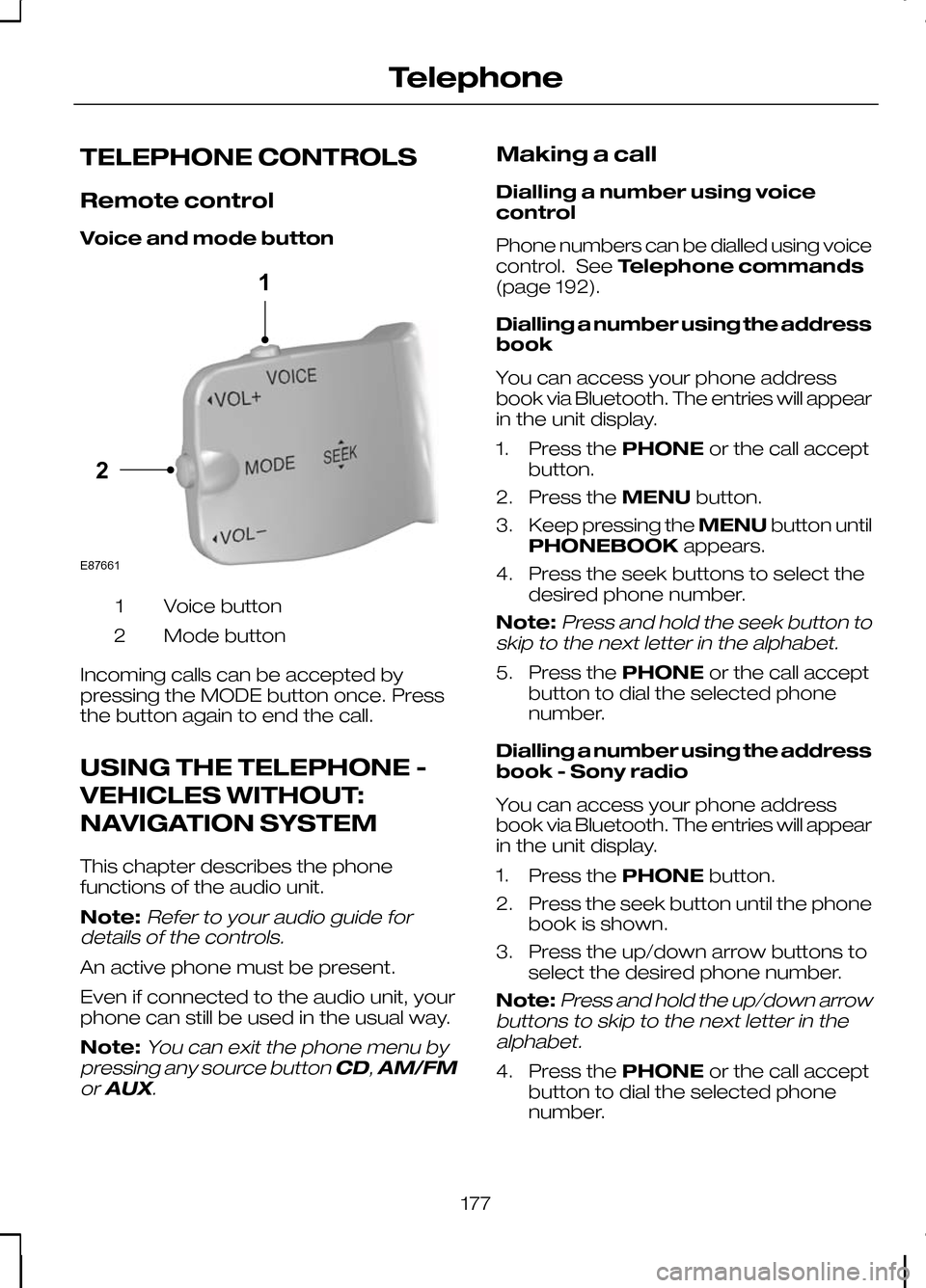
Voice and mode button
Voice button
1
Mode button
2
Incoming calls can be accepted by
pressing the MODE button once. Press
the button again to end the call.
USING THE TELEPHONE -
VEHICLES WITHOUT:
NAVIGATION SYSTEM
This chapter describes the phone
functions of the audio unit.
Note:Refer to your audio guide for
details of the controls.
An active phone must be present.
Even if connected to the audio unit, your
phone can still be used in the usual way.
Note:
You can exit the phone menu by
pressing any source button CD,AM/FM
or AUX.
Making a call
Dialling a number using voice
control
Phone numbers can be dialled using voice
control. See Telephone commands
(page 192).
Dialling a number using the address
book
You can access your phone address
book via Bluetooth. The entries will appear
in the unit display.
1. Press the PHONEor the call accept
button.
2. Press the MENUbutton.
3. Keep pressing the MENUbutton until
PHONEBOOK appears.
4. Press the seek buttons to select the desired phone number.
Note:
Press and hold the seek button to
skip to the next letter in the alphabet.
5. Press the PHONEor the call accept
button to dial the selected phone
number.
Dialling a number using the address
book - Sony radio
You can access your phone address
book via Bluetooth. The entries will appear
in the unit display.
1. Press the PHONEbutton.
2. Press the seek button until the phone book is shown.
3. Press the up/down arrow buttons to select the desired phone number.
Note:
Press and hold the up/down arrow
buttons to skip to the next letter in the alphabet.
4. Press the PHONEor the call accept
button to dial the selected phone
number.
177
Telephone21E87661
Page 180 of 226
Dialling a number using the
telephone keypad
If you have an audio unit with a telephone
keypad (buttons 0-9, * and #):
1. Press the call accept button. Press
the PHONE button if you have a Sony
radio.
2. Dial the number using the telephone keypad on the audio unit.
3. Press the call accept button.
Note:If you enter an incorrect digit whilst
entering a phone number, press the seek left button to erase the last digit. A longpress will erase the complete string ofdigits.
Press and hold 0to enter a +digit.
Ending a call
Calls can be ended by pressing the call
reject button.
Audio units without a telephone keypad
can also end a call by pressing either
PHONE, CD,AM/FM orON/OFF, or
by pressing the MODEbutton on the
remote control
Redialling a number
1. Press the PHONEor the call accept
button.
2. Press the MENUbutton.
3. Select the CALL OUT list or the
CALL IN list. On some audio units,
select the MISSED, INCOMING or
OUTGOING calls list.
Note:
If the active phone does not
provide a call out list, the last outgoing call number/entry can be redialled.
4. Press the seek button on the audio unit.
5. Press the PHONEor the call accept
button to dial the desired phone
number. Redialling a number - Sony radio
1.
Press the PHONEor the call accept
button.
2. Press the seek button until the desired
list is displayed.
Note:
If the active phone does not
provide a call out list, the last outgoing call number/entry can be redialled.
3. Press the up/down buttons to select the desired phone number.
4. Press the PHONEor the call accept
button to dial the phone number.
Redialling the last dialled number -
Sony radio
1. Press the call accept button.
2. Press the call accept button a second time to dial the number.
Receiving an incoming call
Accepting an incoming call
Incoming calls can be accepted by
pressing either the call accept button, the
PHONE button or the MODEbutton on
the remote control.
Rejecting an incoming call
Incoming calls can be rejected by
pressing the call reject button.
Audio units without a telephone keypad
can also reject a call by pressing either
PHONE, CD,AM/FM orON/OFF.
Receiving a second incoming
call
Note:
The second incoming call function
must be activated in your phone.
If there is an incoming call whilst there is
an ongoing call, a beep will be heard and
you will have the option to end the active
call and to accept the incoming call.
178
Telephone
Page 181 of 226
Accepting a second incoming call
Second incoming calls can be accepted
by pressing either the call accept button,
the
PHONE button, or the MODEbutton
on the remote control.
Rejecting a second incoming call
Second incoming calls can be rejected by
pressing the call reject button. Units
without a telephone keypad can also
reject a second incoming call by pressing
the CD button, or the AM/FMbutton.
Muting the microphone
During a call, it is possible to mute the
microphone. Whilst muted, confirmation
will appear in the display.
Audio units with green call accept
button
Press the call accept button. Press the
button once again to turn this function off.
Audio units without green call
accept button
Press the seek up or down button. Press
the button once again to turn this function
off.
Changing the active phone
Note:Phones must be bonded to the
system before they can be made active.
Using the station storage button
Note:
This process is only for audio units
without a telephone keypad.
1. Press the PHONEbutton on the
audio unit.
2. Press the preset number required (using the station preset buttons 1 -
6). Using the audio unit menu
Note:
After bonding a phone to the
system, this becomes the active phone.
1. Press the PHONEor call accept
button.
2. Press the MENUbutton on the audio
unit.
3. Select the ACTIVE PHONE option
on the audio unit.
4. Scroll through the different stored phones by using the seek buttons to
display the bonded phones.
5. Press the MENUbutton to select the
phone which is to be the active phone.
Debonding a bonded phone
A bonded phone can be deleted from the
system at any time, unless a phone call is
in progress.
1. Press the PHONEor call accept
button.
2. Press the MENUbutton on the audio
unit.
3. Select the DEBOND option on the
audio unit.
4. Scroll through the different phones by using the seek buttons and display the
phone to be debonded.
5. Press the MENUbutton to select the
phone which is to be debonded.
Debonding a bonded phone -
Sony radio
A bonded phone can be deleted from the
system at any time, unless a phone call is
in progress.
1. Press the PHONEbutton.
2. Press the up/down arrow buttons until
you reach the DEBONDoption.
179
Telephone
Page 185 of 226
•
automatic climate control:
"TEMPERATURE", "AUTO MODE",
"DEFROSTING/DEMISTING ON" and
"DEFROSTING/DEMISTING OFF"
• radio: "TUNE NAME"
• external device (USB): "TRACK"
• external device (iPod): "TRACK"
• SD card: "TRACK".
Start communicating with the
system
Before you can start talking to the system
you first have to press the VOICEor
MODE button for each operation and
wait until the system answers with a beep.
See Voice control (page 40).
Press the button again to cancel the voice
session. Name tag
The name tag functionality can support
the phone, audio and navigation features
by using the "STORE NAME" function. You
can assign name tags to items such as
favourite radio stations and personal
phone contacts. See
Audio unit
commands (page 183). See Telephone
commands (page 192). See
Navigation system commands
(page 197).
• Store up to 20 name tags per function.
• The average recording time for each
name tag is approximately 2-3
seconds.
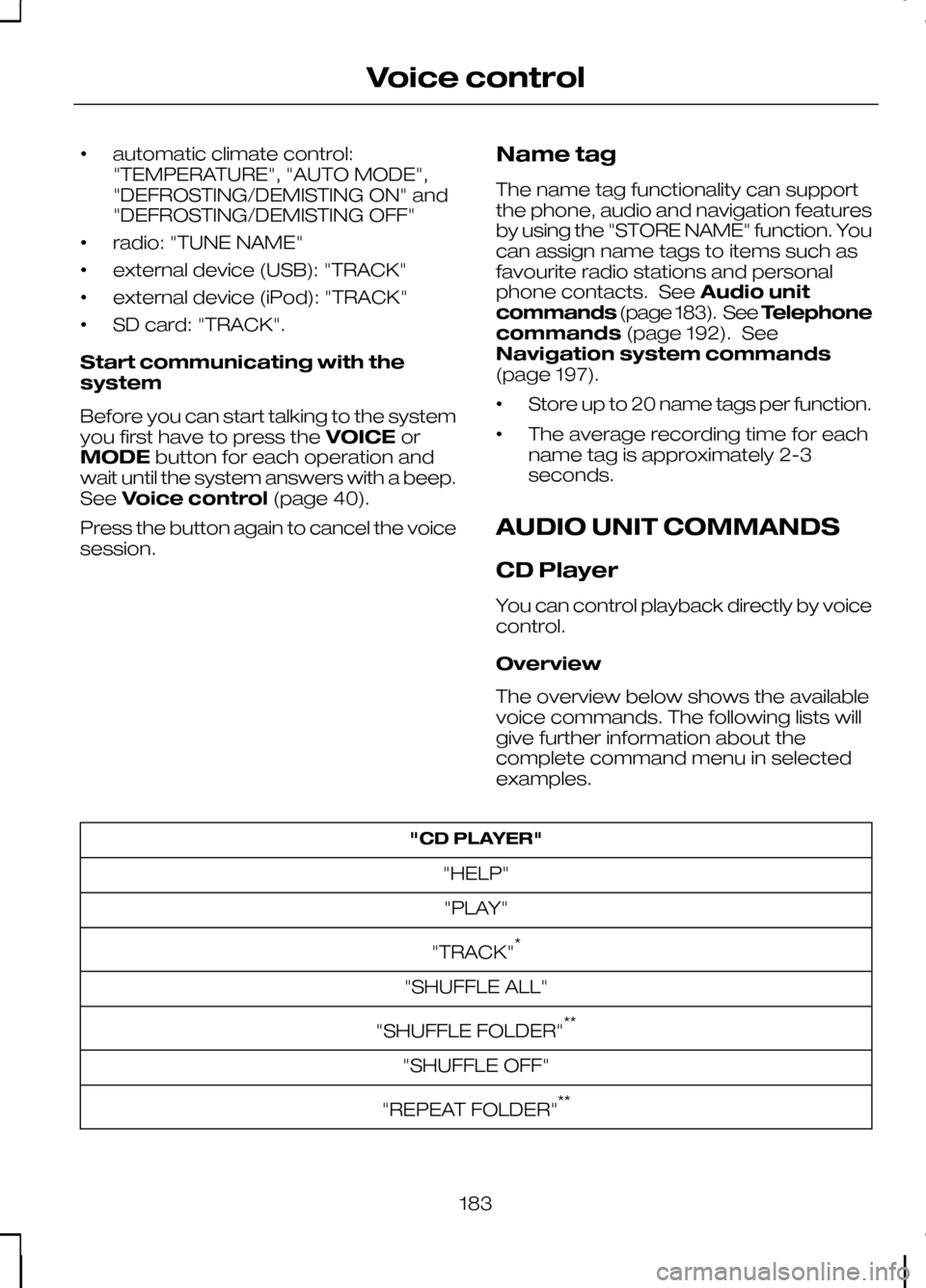
AUDIO UNIT COMMANDS
CD Player
You can control playback directly by voice
control.
Overview
The overview below shows the available
voice commands. The following lists will
give further information about the
complete command menu in selected
examples. "CD PLAYER"
"HELP""PLAY"
"TRACK" *
"SHUFFLE ALL"
"SHUFFLE FOLDER" **
"SHUFFLE OFF"
"REPEAT FOLDER" **
183
Voice control
Page 186 of 226
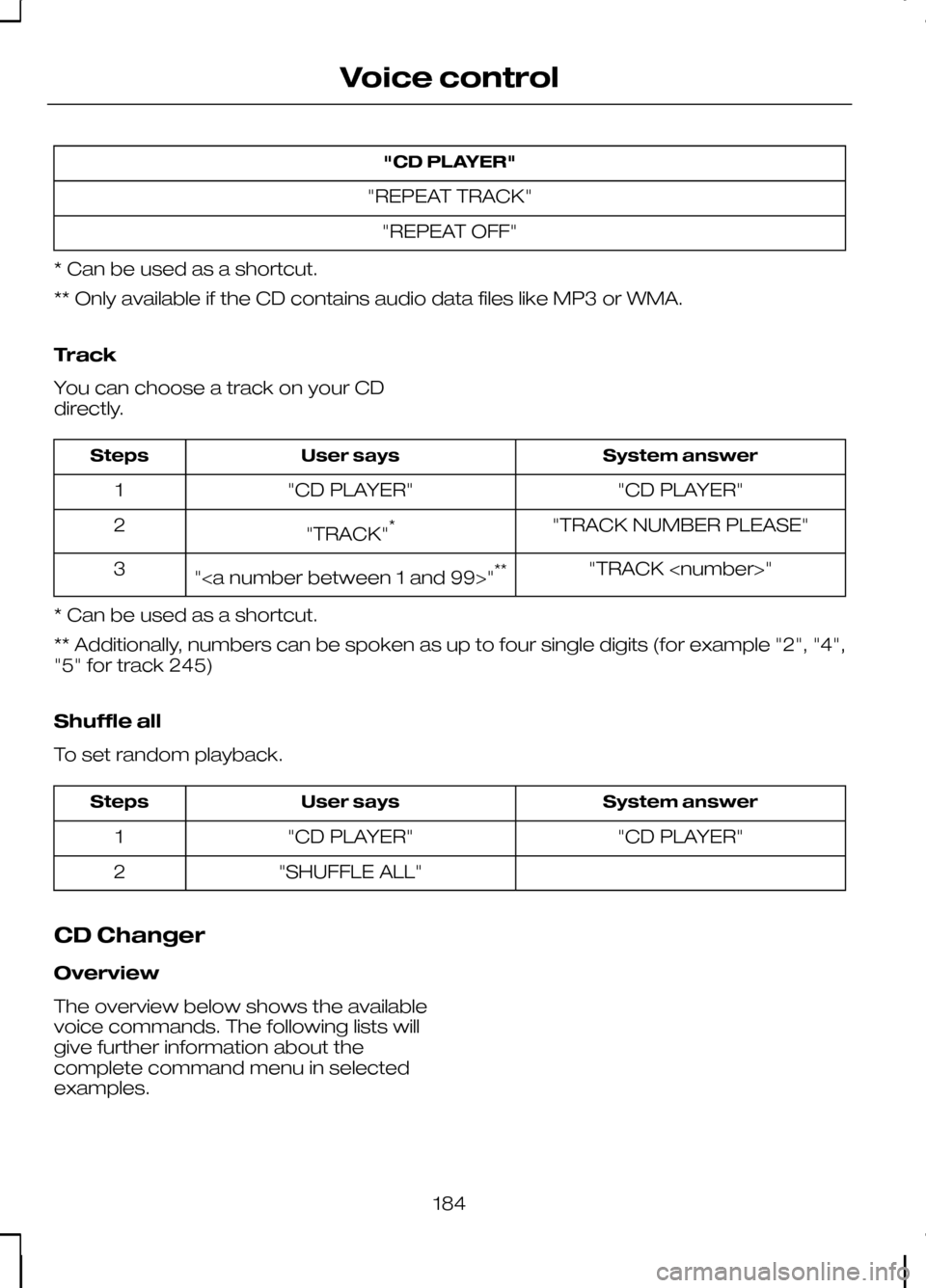
"CD PLAYER"
"REPEAT TRACK" "REPEAT OFF"
* Can be used as a shortcut.
** Only available if the CD contains audio data files like MP3 or WMA.
Track
You can choose a track on your CD
directly. System answer
User says
Steps
"CD PLAYER"
"CD PLAYER"
1
"TRACK NUMBER PLEASE"
"TRACK" *
2
"TRACK
"" **
3
* Can be used as a shortcut.
** Additionally, numbers can be spoken as up to four single digits (for example "2", "4",
"5" for track 245)
Shuffle all
To set random playback. System answer
User says
Steps
"CD PLAYER"
"CD PLAYER"
1
"SHUFFLE ALL"
2
CD Changer
Overview
The overview below shows the available
voice commands. The following lists will
give further information about the
complete command menu in selected
examples.
184
Voice control
Page 187 of 226
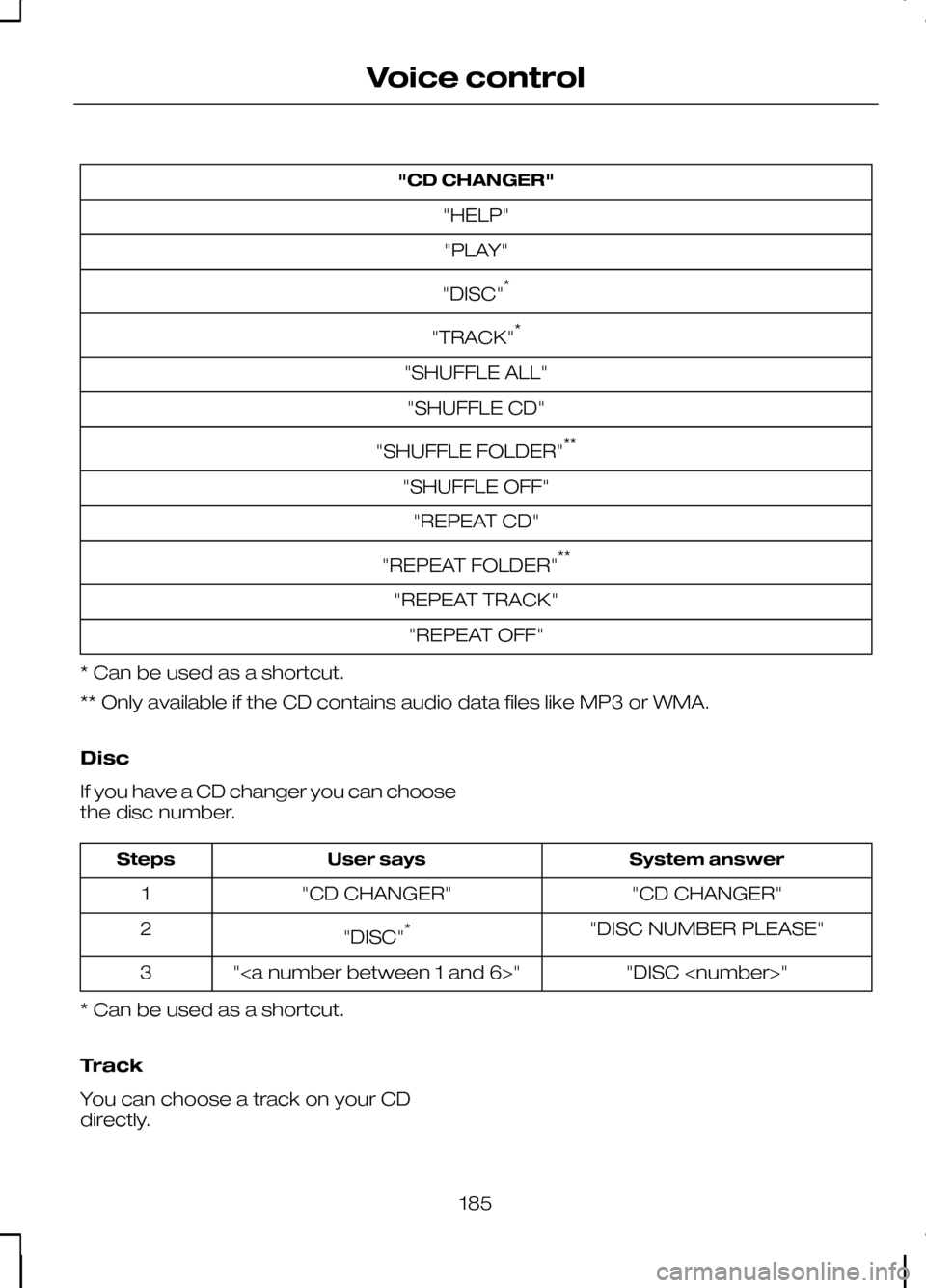
"CD CHANGER"
"HELP""PLAY"
"DISC" *
"TRACK" *
"SHUFFLE ALL" "SHUFFLE CD"
"SHUFFLE FOLDER" **
"SHUFFLE OFF" "REPEAT CD"
"REPEAT FOLDER" **
"REPEAT TRACK" "REPEAT OFF"
* Can be used as a shortcut.
** Only available if the CD contains audio data files like MP3 or WMA.
Disc
If you have a CD changer you can choose
the disc number. System answer
User says
Steps
"CD CHANGER"
"CD CHANGER"
1
"DISC NUMBER PLEASE"
"DISC" *
2
"DISC
""
3
* Can be used as a shortcut.
Track
You can choose a track on your CD
directly.
185
Voice control
Page 191 of 226
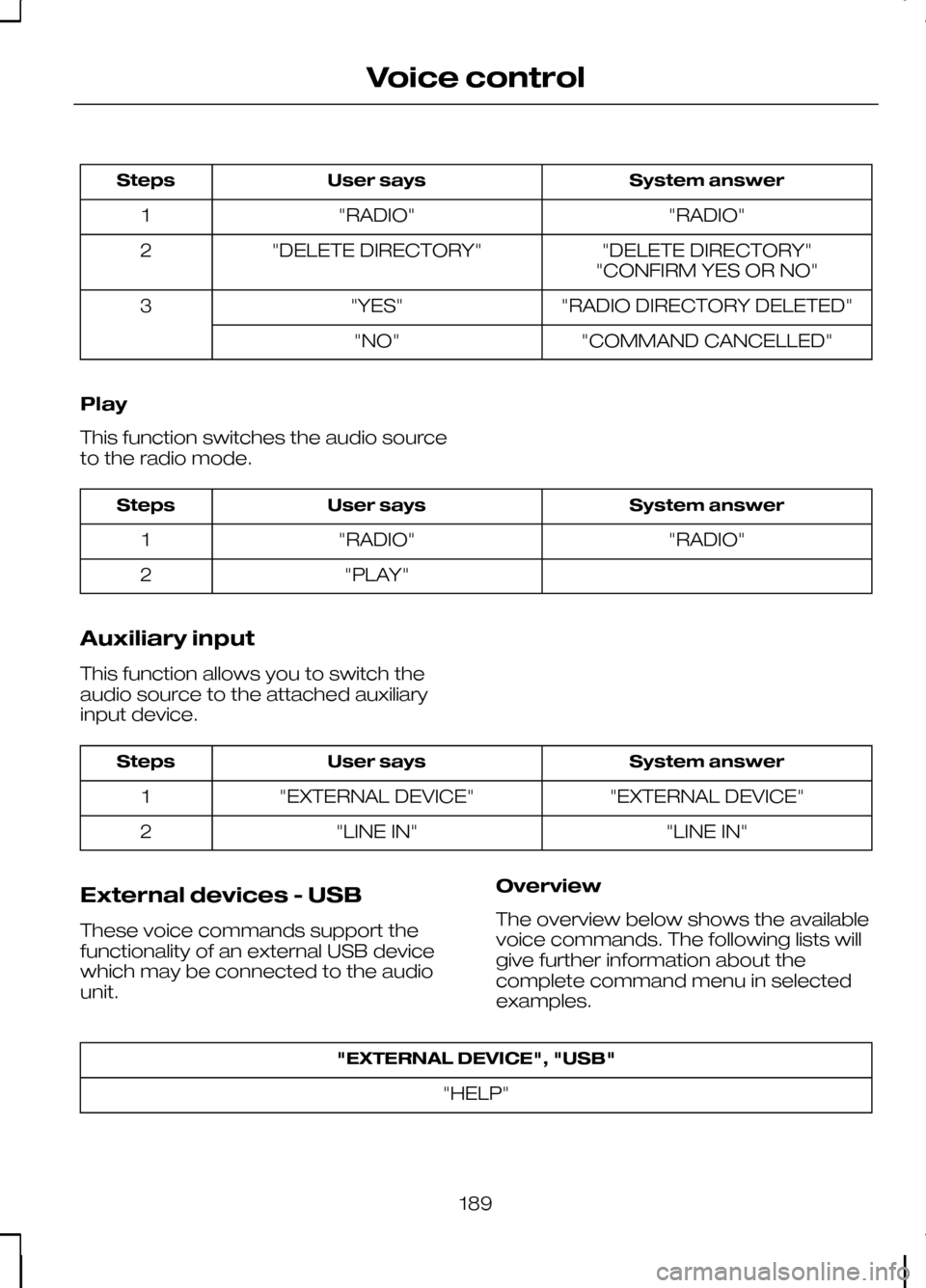
System answer
User says
Steps
"RADIO"
"RADIO"
1
"DELETE DIRECTORY"
"DELETE DIRECTORY"
2
"CONFIRM YES OR NO"
"RADIO DIRECTORY DELETED"
"YES"
3
"COMMAND CANCELLED"
"NO"
Play
This function switches the audio source
to the radio mode. System answer
User says
Steps
"RADIO"
"RADIO"
1
"PLAY"
2
Auxiliary input
This function allows you to switch the
audio source to the attached auxiliary
input device. System answer
User says
Steps
"EXTERNAL DEVICE"
"EXTERNAL DEVICE"
1
"LINE IN"
"LINE IN"
2
External devices - USB
These voice commands support the
functionality of an external USB device
which may be connected to the audio
unit. Overview
The overview below shows the available
voice commands. The following lists will
give further information about the
complete command menu in selected
examples."EXTERNAL DEVICE", "USB"
"HELP"
189
Voice control
Page 192 of 226
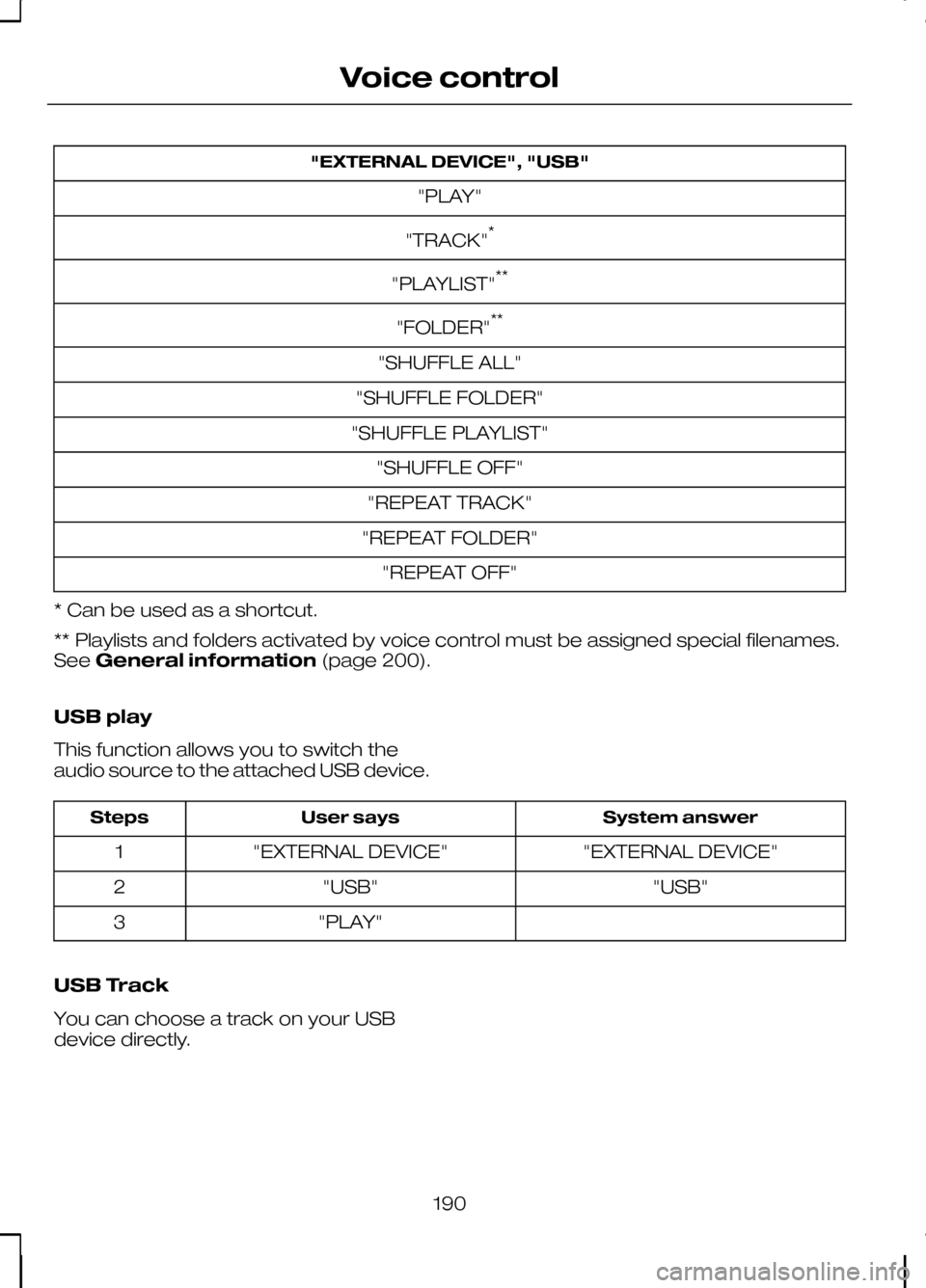
"EXTERNAL DEVICE", "USB"
"PLAY"
"TRACK" *
"PLAYLIST" **
"FOLDER" **
"SHUFFLE ALL"
"SHUFFLE FOLDER"
"SHUFFLE PLAYLIST" "SHUFFLE OFF"
"REPEAT TRACK"
"REPEAT FOLDER" "REPEAT OFF"
* Can be used as a shortcut.
** Playlists and folders activated by voice control must be assigned special filenames.
See General information (page 200).
USB play
This function allows you to switch the
audio source to the attached USB device. System answer
User says
Steps
"EXTERNAL DEVICE"
"EXTERNAL DEVICE"
1
"USB"
"USB"
2
"PLAY"
3
USB Track
You can choose a track on your USB
device directly.
190
Voice control
Page 193 of 226
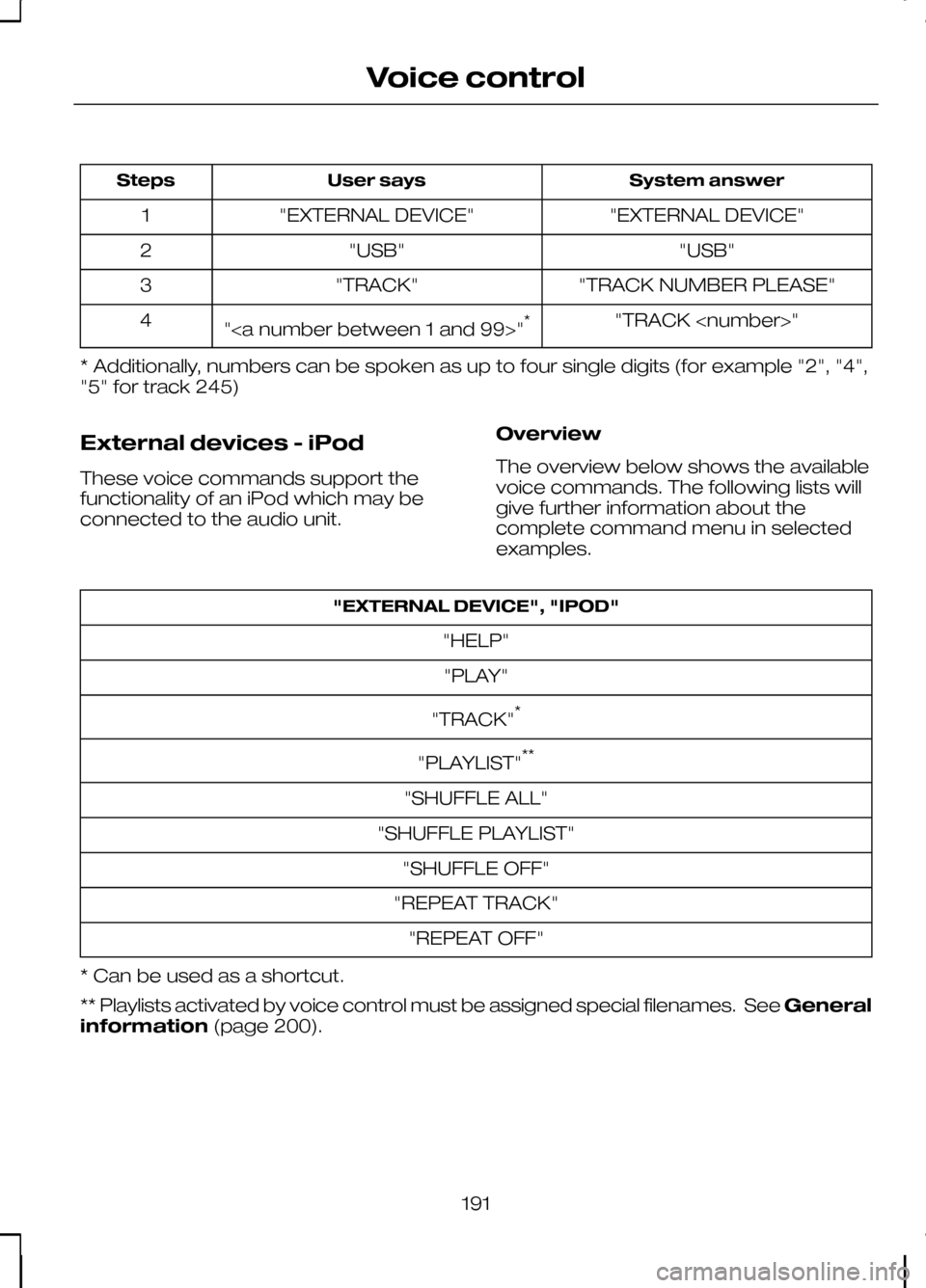
System answer
User says
Steps
"EXTERNAL DEVICE"
"EXTERNAL DEVICE"
1
"USB"
"USB"
2
"TRACK NUMBER PLEASE"
"TRACK"
3
"TRACK
"" *
4
* Additionally, numbers can be spoken as up to four single digits (for example "2", "4",
"5" for track 245)
External devices - iPod
These voice commands support the
functionality of an iPod which may be
connected to the audio unit. Overview
The overview below shows the available
voice commands. The following lists will
give further information about the
complete command menu in selected
examples."EXTERNAL DEVICE", "IPOD"
"HELP""PLAY"
"TRACK" *
"PLAYLIST" **
"SHUFFLE ALL"
"SHUFFLE PLAYLIST" "SHUFFLE OFF"
"REPEAT TRACK" "REPEAT OFF"
* Can be used as a shortcut.
** Playlists activated by voice control must be assigned special filenames. See General
information (page 200).
191
Voice control