light FORD KUGA 2010 1.G Owner's Manual
[x] Cancel search | Manufacturer: FORD, Model Year: 2010, Model line: KUGA, Model: FORD KUGA 2010 1.GPages: 226, PDF Size: 8.07 MB
Page 59 of 226
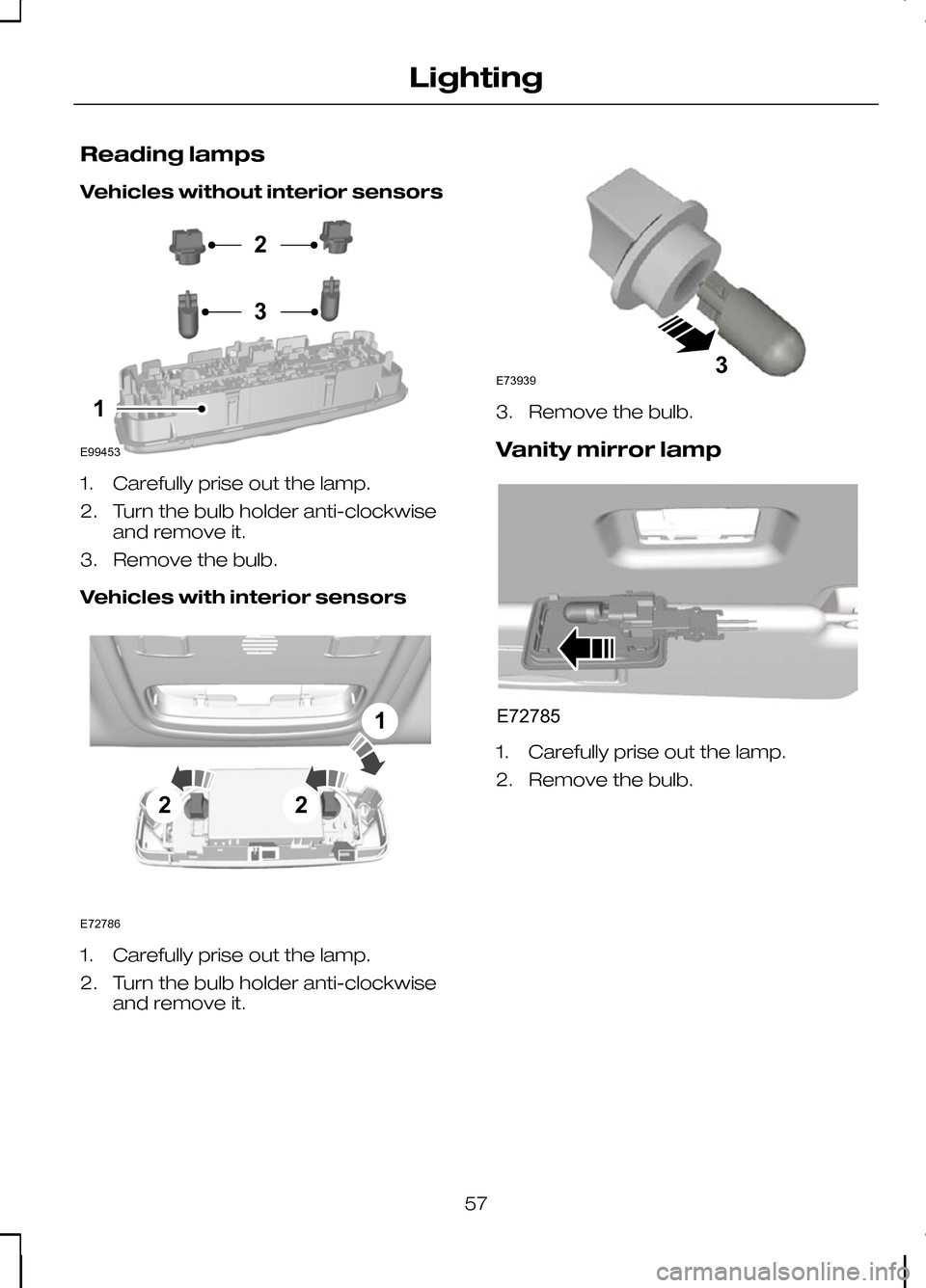
Reading lamps
Vehicles without interior sensors
1. Carefully prise out the lamp.
2. Turn the bulb holder anti-clockwise
and remove it.
3. Remove the bulb.
Vehicles with interior sensors 1. Carefully prise out the lamp.
2. Turn the bulb holder anti-clockwise
and remove it. 3. Remove the bulb.
Vanity mirror lamp
1. Carefully prise out the lamp.
2. Remove the bulb.
57
LightingE99453231 E72786221 E739393 E72785
Page 60 of 226
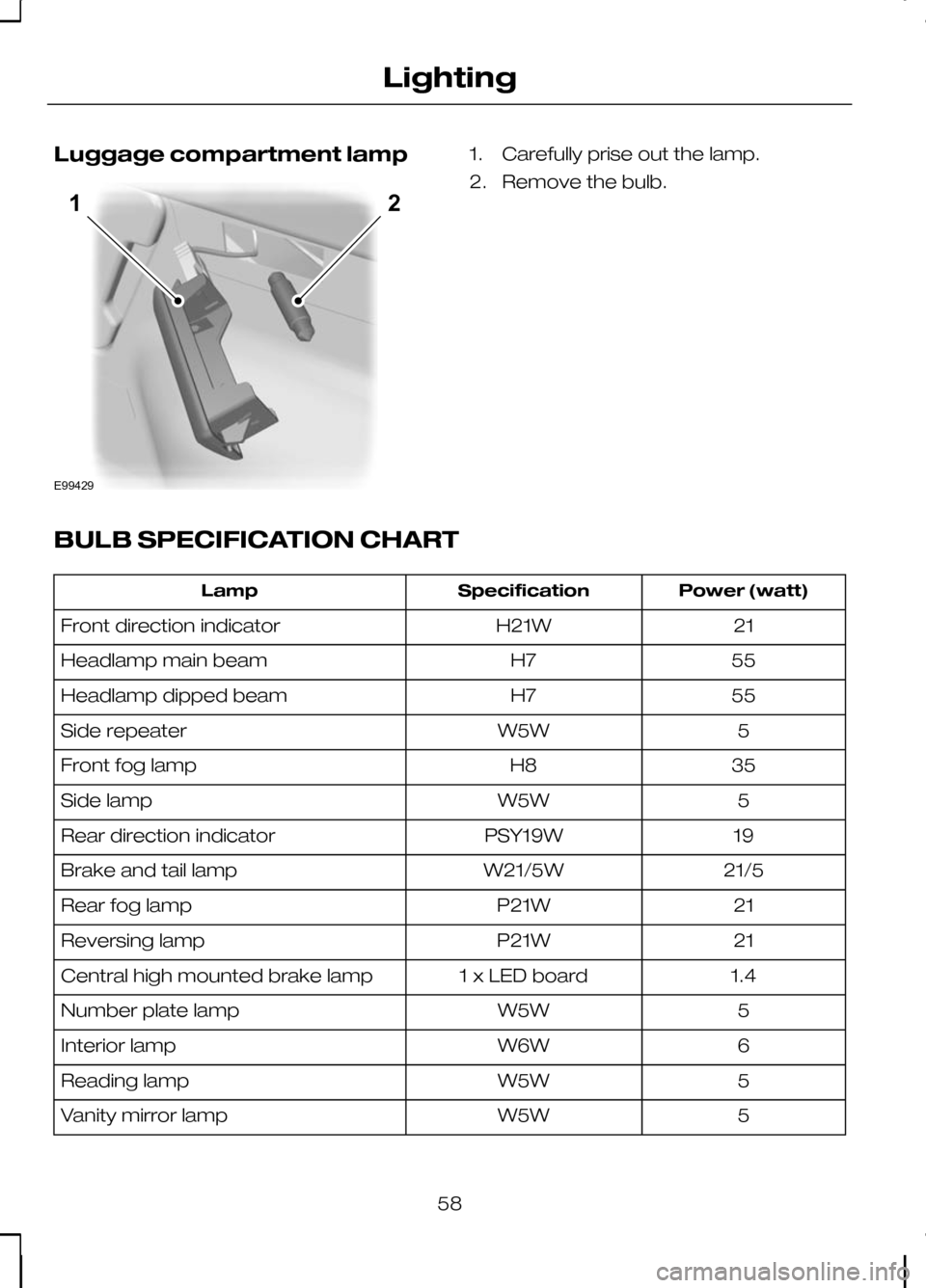
Luggage compartment lamp 1. Carefully prise out the lamp.
2. Remove the bulb.
BULB SPECIFICATION CHART Power (watt)
Specification
Lamp
21
H21W
Front direction indicator
55
H7
Headlamp main beam
55
H7
Headlamp dipped beam
5
W5W
Side repeater
35
H8
Front fog lamp
5
W5W
Side lamp
19
PSY19W
Rear direction indicator
21/5
W21/5W
Brake and tail lamp
21
P21W
Rear fog lamp
21
P21W
Reversing lamp
1.4
1 x LED board
Central high mounted brake lamp
5
W5W
Number plate lamp
6
W6W
Interior lamp
5
W5W
Reading lamp
5
W5W
Vanity mirror lamp
58
LightingE9942912
Page 61 of 226
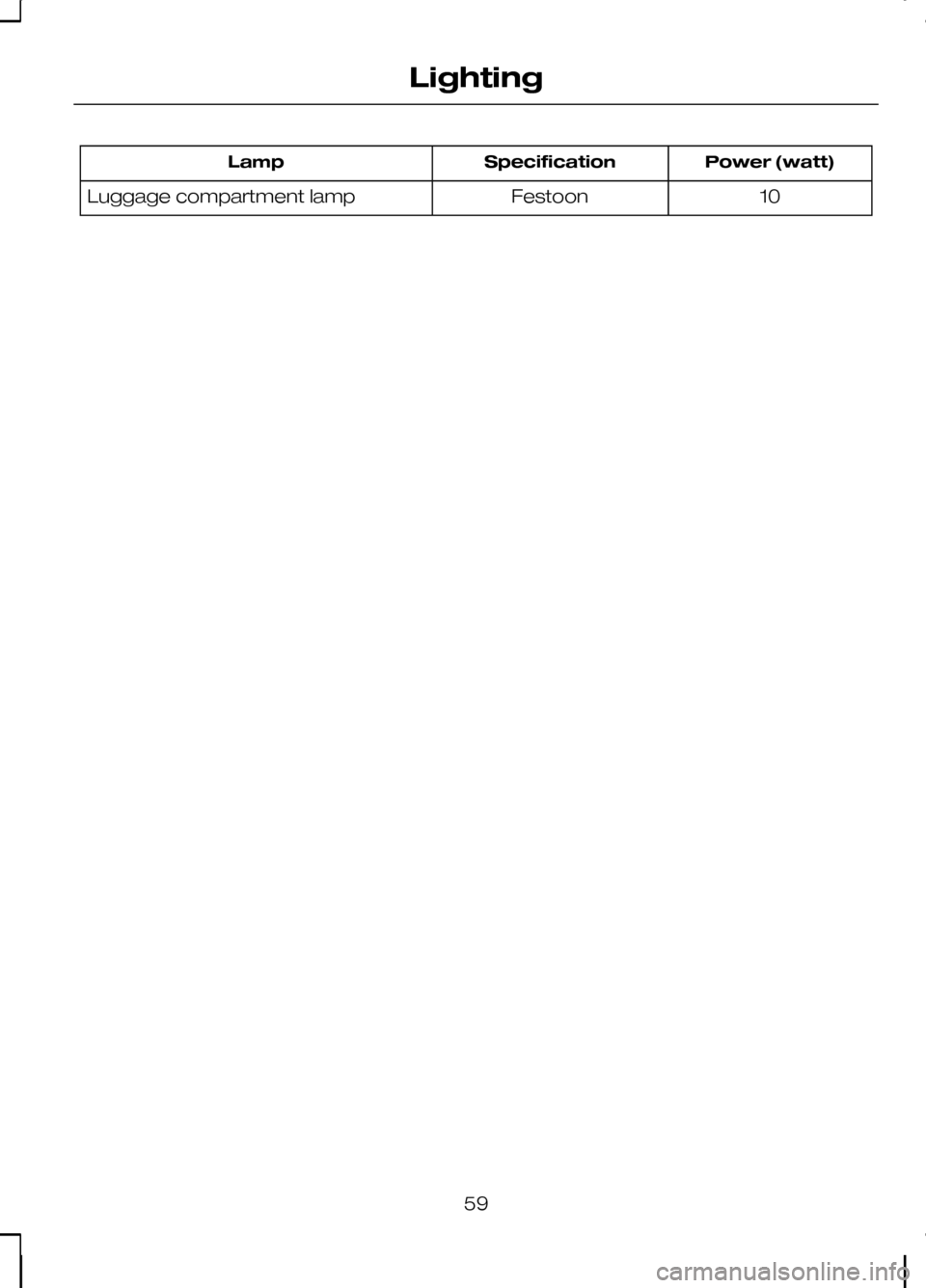
Power (watt)
Specification
Lamp
10
Festoon
Luggage compartment lamp
59
Lighting
Page 62 of 226
ELECTRIC WINDOWS
WARNING
Do not operate the electric windows
unless they are free from
obstruction.
Note:If you operate the switches often
during a short period of time, the system might become inoperable for a certaintime to prevent damage due tooverheating.
Switch on the ignition to operate the
electric windows.
Global opening and closing
You can also operate the electric
windows with the ignition off via the global
opening and closing function. See Locks
(page 29).
Driver's door switches
You can operate all the windows with the
switches on the door trim panel of the
driver’s door. Opening and closing the
windows automatically
Press or lift the switch to the second
action point and release it completely.
Press or lift it again to stop the windows.
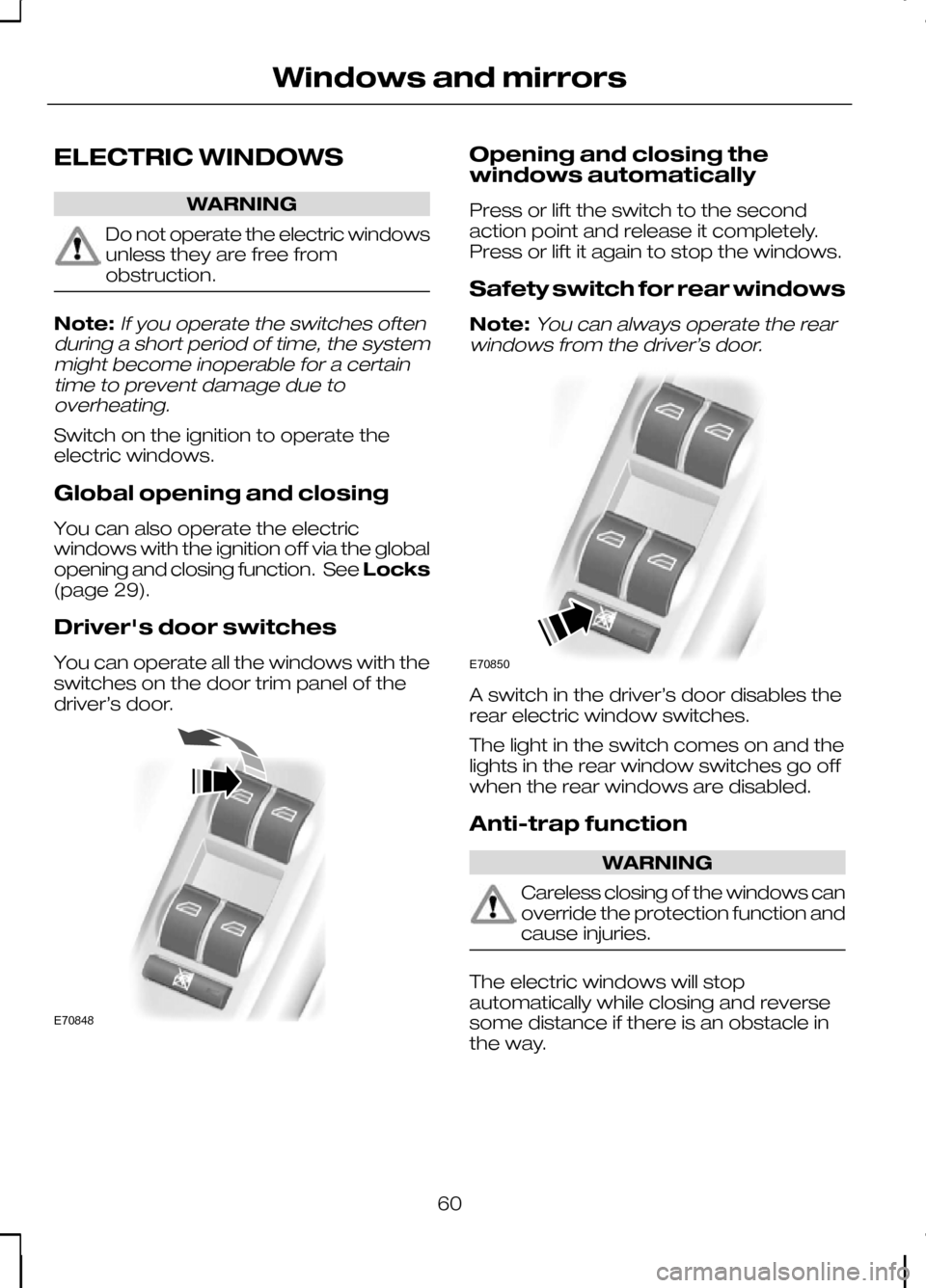
Safety switch for rear windows
Note:
You can always operate the rear
windows from the driver’s door. A switch in the driver’s door disables the
rear electric window switches.
The light in the switch comes on and the
lights in the rear window switches go off
when the rear windows are disabled.
Anti-trap function
WARNING
Careless closing of the windows can
override the protection function and
cause injuries.
The electric windows will stop
automatically while closing and reverse
some distance if there is an obstacle in
the way.
60
Windows and mirrorsE70848 E70850
Page 64 of 226
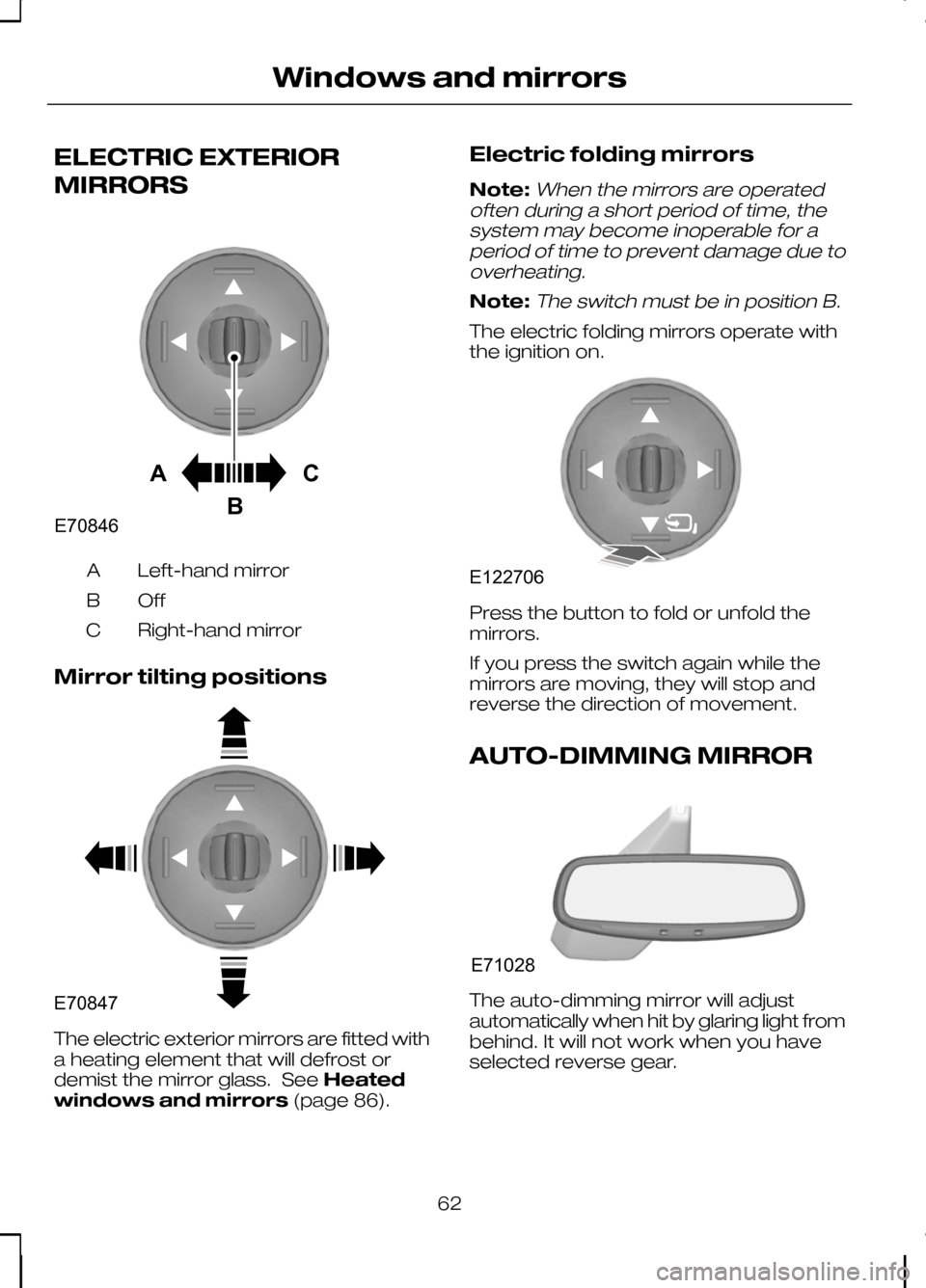
ELECTRIC EXTERIOR
MIRRORS
Left-hand mirror
A
OffB
Right-hand mirror
C
Mirror tilting positions The electric exterior mirrors are fitted with
a heating element that will defrost or
demist the mirror glass. See
Heated
windows and mirrors (page 86).Electric folding mirrors
Note:When the mirrors are operated
often during a short period of time, the system may become inoperable for aperiod of time to prevent damage due tooverheating.
Note:The switch must be in position B.
The electric folding mirrors operate with
the ignition on. Press the button to fold or unfold the
mirrors.
If you press the switch again while the
mirrors are moving, they will stop and
reverse the direction of movement.
AUTO-DIMMING MIRROR
The auto-dimming mirror will adjust
automatically when hit by glaring light from
behind. It will not work when you have
selected reverse gear.
62
Windows and mirrorsACBE70846 E70847 E122706 E71028
Page 69 of 226
Key-in-ignition
Except vehicles with keyless entry
A warning tone will sound when the
driver’s door is opened if:
•
the key is in the ignition.
Vehicles with keyless entry
A warning tone will sound when the
driver’s door is opened if:
• the ignition is still on
• the spare key is in the ignition.
Lights on
A warning chime will sound if the driver’s
door is opened with the exterior lights
switched on and the ignition switched off.
Low fuel
A warning chime will sound at the
following ranges: 80 km (50 miles), 40 km
(25 miles), 20 km (12 miles), 0 km (0
miles).
Seat belt reminder
See Seat belt reminder (page 24).
67
Instruments
Page 70 of 226
GENERAL INFORMATION
WARNING
Do not operate the information
display controls when the vehicle is
moving.
Note:The information display will remain
on for several minutes after you switch off the ignition.
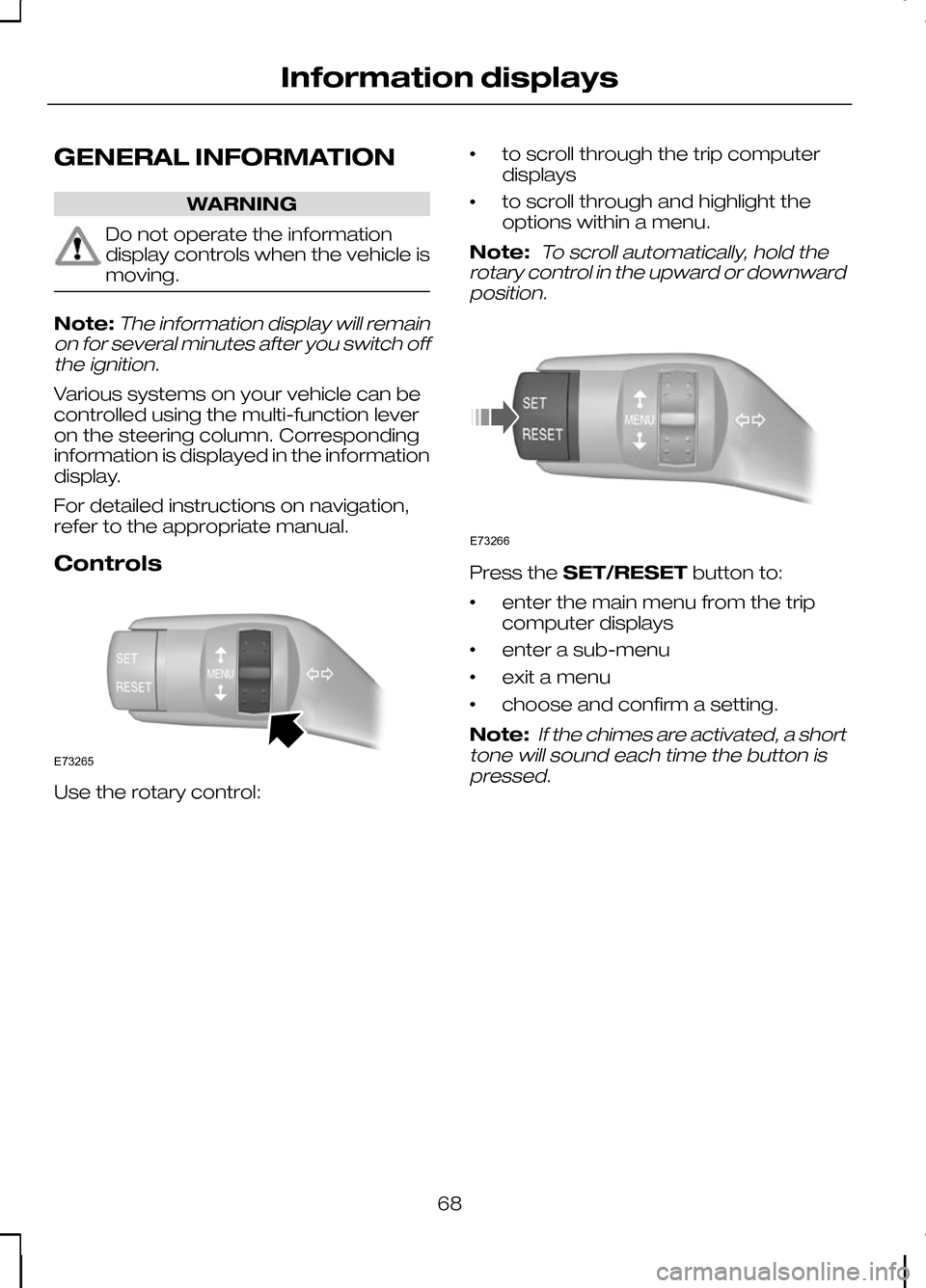
Various systems on your vehicle can be
controlled using the multi-function lever
on the steering column. Corresponding
information is displayed in the information
display.
For detailed instructions on navigation,
refer to the appropriate manual.
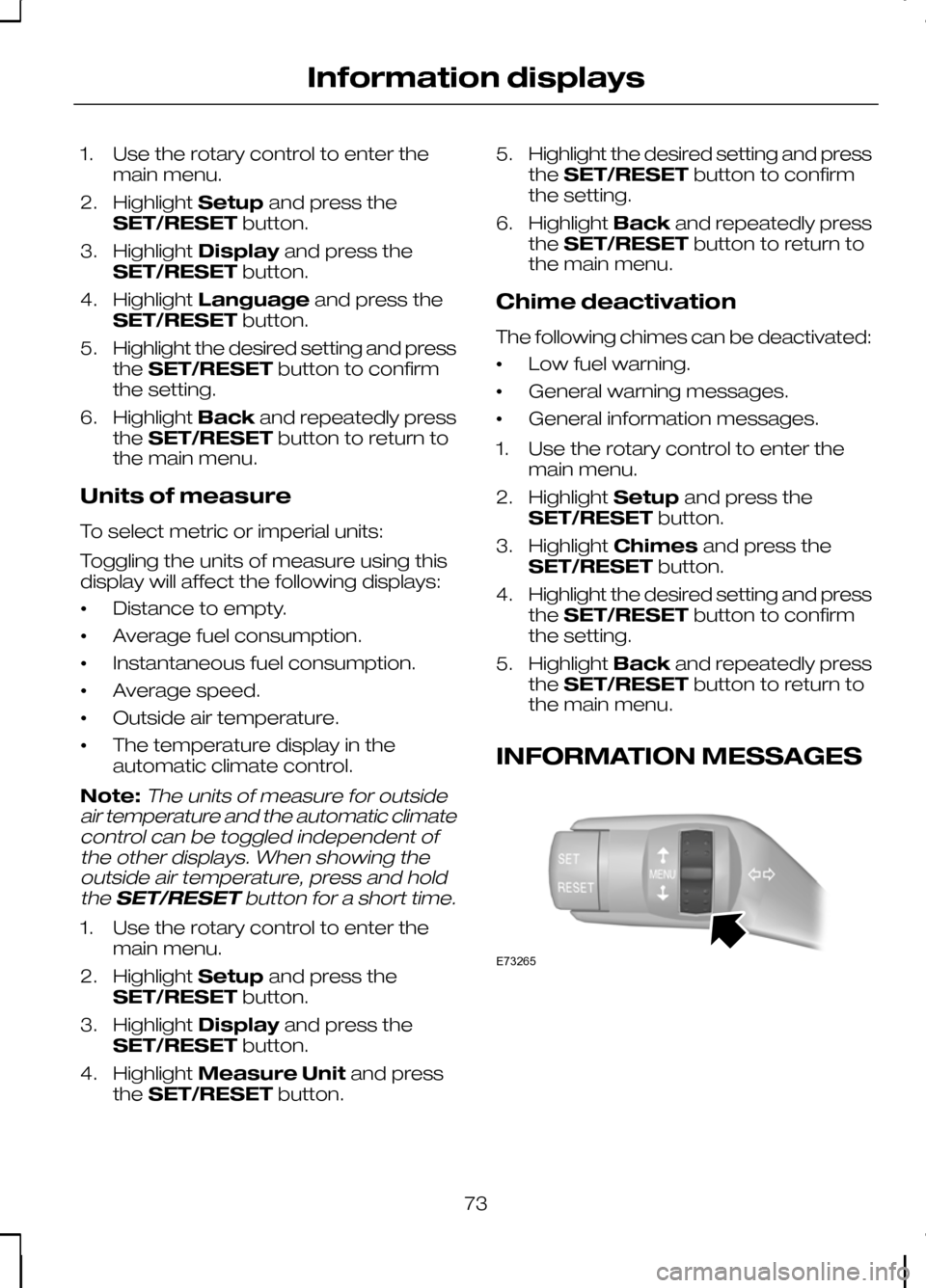
Controls Use the rotary control: •
to scroll through the trip computer
displays
• to scroll through and highlight the
options within a menu.
Note:
To scroll automatically, hold the
rotary control in the upward or downward position. Press the
SET/RESET button to:
• enter the main menu from the trip
computer displays
• enter a sub-menu
• exit a menu
• choose and confirm a setting.
Note:
If the chimes are activated, a short
tone will sound each time the button is pressed.
68
Information displaysE73265 E73266
Page 73 of 226
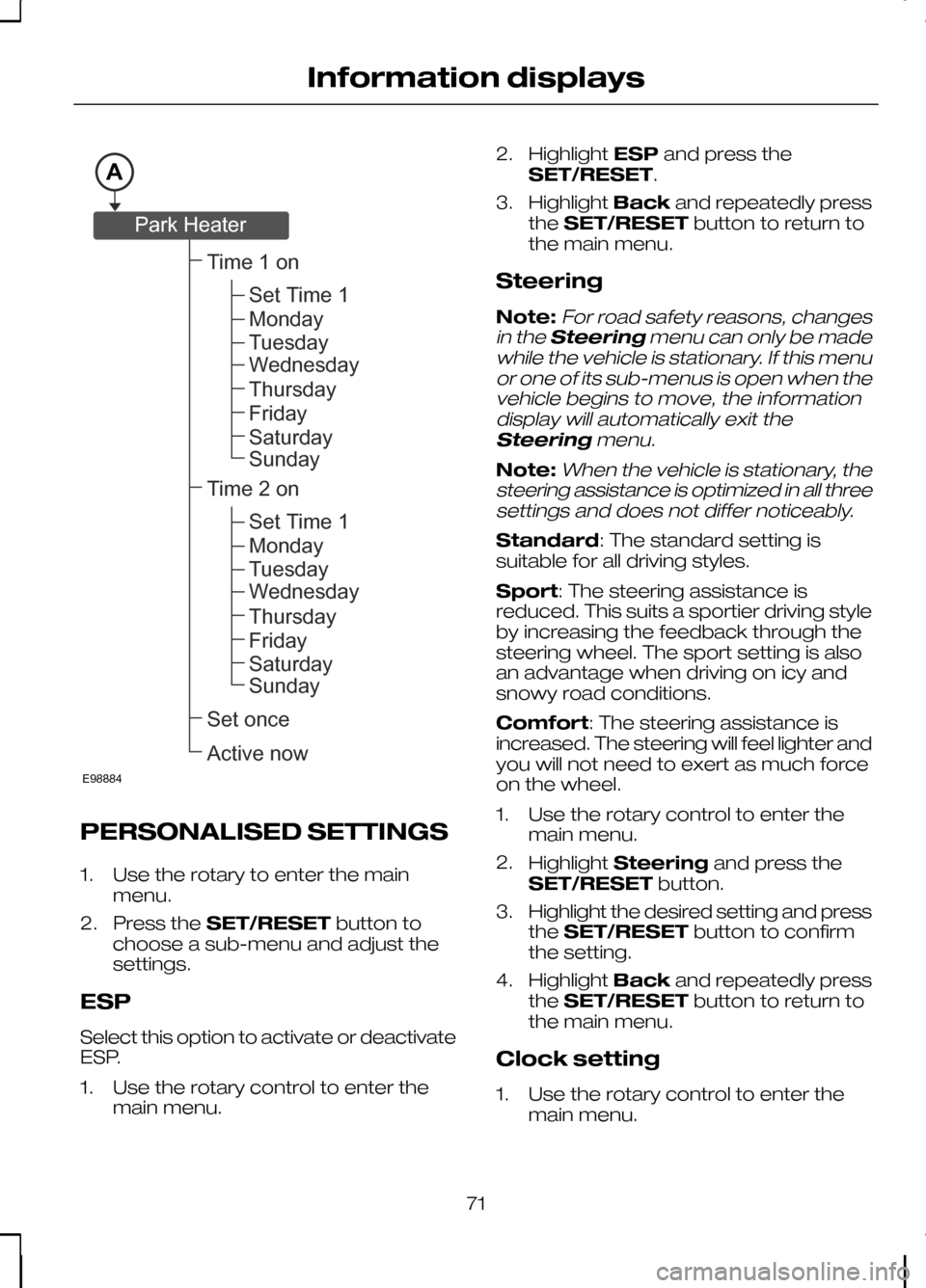
PERSONALISED SETTINGS
1. Use the rotary to enter the main
menu.
2. Press the SET/RESET button to
choose a sub-menu and adjust the
settings.
ESP
Select this option to activate or deactivate
ESP.
1. Use the rotary control to enter the main menu. 2.
Highlight ESPand press the
SET/RESET.
3. Highlight Backand repeatedly press
the SET/RESET button to return to
the main menu.
Steering
Note:For road safety reasons, changes
in the Steering menu can only be made
while the vehicle is stationary. If this menu or one of its sub-menus is open when thevehicle begins to move, the informationdisplay will automatically exit the
Steering menu.
Note:When the vehicle is stationary, the
steering assistance is optimized in all three settings and does not differ noticeably.
Standard: The standard setting is
suitable for all driving styles.
Sport: The steering assistance is
reduced. This suits a sportier driving style
by increasing the feedback through the
steering wheel. The sport setting is also
an advantage when driving on icy and
snowy road conditions.
Comfort: The steering assistance is
increased. The steering will feel lighter and
you will not need to exert as much force
on the wheel.
1. Use the rotary control to enter the main menu.
2. Highlight Steering and press the
SET/RESET button.
3. Highlight the desired setting and press
the SET/RESET button to confirm
the setting.
4. Highlight Backand repeatedly press
the SET/RESET button to return to
the main menu.
Clock setting
1. Use the rotary control to enter the main menu.
71
Information displaysAE98884Time1onSetonceActivenowSetTime1MondayTuesdayWednesdayThursdayFridaySaturdaySundayTime2onSetTime1MondayTuesdayWednesdayThursdayFridaySaturdaySundayParkHeater
Page 74 of 226
2.
Highlight Clockand press the
SET/RESET button.
3. Highlight Set Clock and press the
SET/RESET button. The hours start
to flash.
4. Use the rotary control to adjust the hours to the desired setting.
5. Press the SET/RESET button to
confirm the setting. The minutes start
to flash.
6. Proceed in the same way to set the minutes and the date.
7. Press the SET/RESET button to
confirm the setting.
8. Highlight Backand repeatedly press
the SET/RESET button to return to
the main menu.
Help screen and navigation
information
The help screen appears for a few
seconds when you switch the ignition on.
If the navigation is operating, information
relating to this system is displayed in the
information display.
To select which information is displayed
in the information display:
1. Use the rotary control to enter the main menu.
2. Highlight Setupand press the
SET/RESET button.
3. Highlight Display and press the
SET/RESET button.
4. Highlight Configure and press the
SET/RESET button.
5. Highlight the desired setting and press
the SET/RESET button to confirm
the setting.
6. Highlight Backand repeatedly press
the SET/RESET button to return to
the main menu. Navigation information
You can also choose when the navigation
information is displayed in the information
display. Three options are available:
•
Always off: No navigation
information is displayed in the
information display.
• On guidance: The navigation
information will only appear when the
navigation system provides a
guidance instruction. This function is
only available on certain navigation
systems.
• Always on: Navigation information
will always appear in the information
display when the navigation system is
operating.
To set when navigation information should
be displayed:
1. Use the rotary control to enter the main menu.
2. Highlight Setupand press the
SET/RESET button.
3. Highlight Display and press the
SET/RESET button.
4. Highlight Configure and press the
SET/RESET button.
5. Highlight Nav Info and press the
SET/RESET button.
6. Highlight the desired setting and press
the SET/RESET button to confirm
the setting.
7. Highlight Backand repeatedly press
the SET/RESET button to return to
the main menu.
Language setting
A choice of eleven languages are
available.
English, German, Italian, French, Spanish,
Turkish, Russian, Dutch, Polish, Swedish
and Portuguese.
72
Information displays
Page 75 of 226
1. Use the rotary control to enter the
main menu.
2. Highlight Setupand press the
SET/RESET button.
3. Highlight Display and press the
SET/RESET button.
4. Highlight Language and press the
SET/RESET button.
5. Highlight the desired setting and press
the SET/RESET button to confirm
the setting.
6. Highlight Backand repeatedly press
the SET/RESET button to return to
the main menu.
Units of measure
To select metric or imperial units:
Toggling the units of measure using this
display will affect the following displays:
• Distance to empty.
• Average fuel consumption.
• Instantaneous fuel consumption.
• Average speed.
• Outside air temperature.
• The temperature display in the
automatic climate control.
Note:The units of measure for outside
air temperature and the automatic climate control can be toggled independent ofthe other displays. When showing theoutside air temperature, press and hold
the SET/RESET button for a short time.
1. Use the rotary control to enter the
main menu.
2. Highlight Setupand press the
SET/RESET button.
3. Highlight Display and press the
SET/RESET button.
4. Highlight Measure Unit and press
the SET/RESET button. 5.
Highlight the desired setting and press
the SET/RESET button to confirm
the setting.
6. Highlight Backand repeatedly press
the SET/RESET button to return to
the main menu.
Chime deactivation
The following chimes can be deactivated:
• Low fuel warning.
• General warning messages.
• General information messages.
1. Use the rotary control to enter the main menu.
2. Highlight Setupand press the
SET/RESET button.
3. Highlight Chimes and press the
SET/RESET button.
4. Highlight the desired setting and press
the SET/RESET button to confirm
the setting.
5. Highlight Backand repeatedly press
the SET/RESET button to return to
the main menu.
INFORMATION MESSAGES 73
Information displaysE73265