ECT FORD KUGA 2011 1.G Workshop Manual
[x] Cancel search | Manufacturer: FORD, Model Year: 2011, Model line: KUGA, Model: FORD KUGA 2011 1.GPages: 2057
Page 308 of 2057

Cellular Phone – Overview
Software update - control module for
mobile electronic auxiliary equipment
(variant 1)
There is a USB port near the central electrical
module. Software updates for the control module
for mobile electronic auxiliary equipment can be
carried out here.
Software update - control module for
mobile electronic auxiliary equipment
(variants 2 and 3)
Software updates for the mobile electronic auxiliary
equipment control module can be performed via
the USB port which is integrated into the center
console.
G1055657en
2008.50 Kuga 8/2011 415-01-12
Information and Entertainment System
415-01-12
DESCRIPTION AND OPERATIONTO MODEL INDEX
BACK TO CHAPTER INDEX
FORD KUGA 2011.0MY WORKSHOP REPAIR MANUAL
Page 309 of 2057
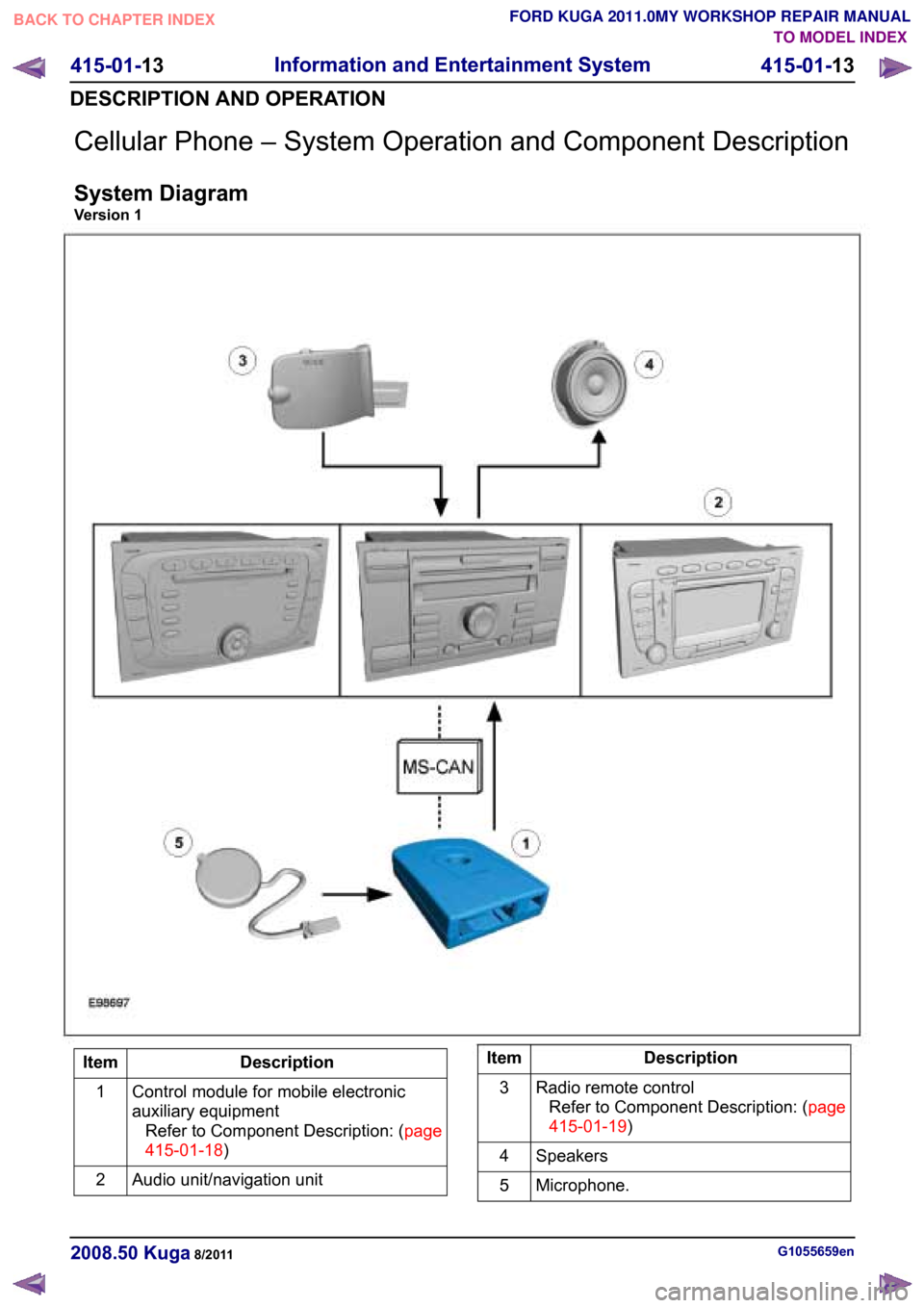
Cellular Phone – System Operation and Component Description
System Diagram
Version 1TO MODEL INDEX
BACK TO CHAPTER INDEX
FORD KUGA 2011.0MY WORKSHOP REPAIR MANUAL
415-01-13
Information and Entertainment System
415-01-13
DESCRIPTION AND OPERATION Description
Item
Control module for mobile electronic
auxiliary equipmentRefertoComponentDescription:(page
415-01-18)
1
Audio unit/navigation unit
2 Description
Item
Radio remote controlRefertoComponentDescription:(page
415-01-19)
3
Speakers
4
Microphone.
5 G1055659en
2008.50 Kuga 8/2011
Page 310 of 2057
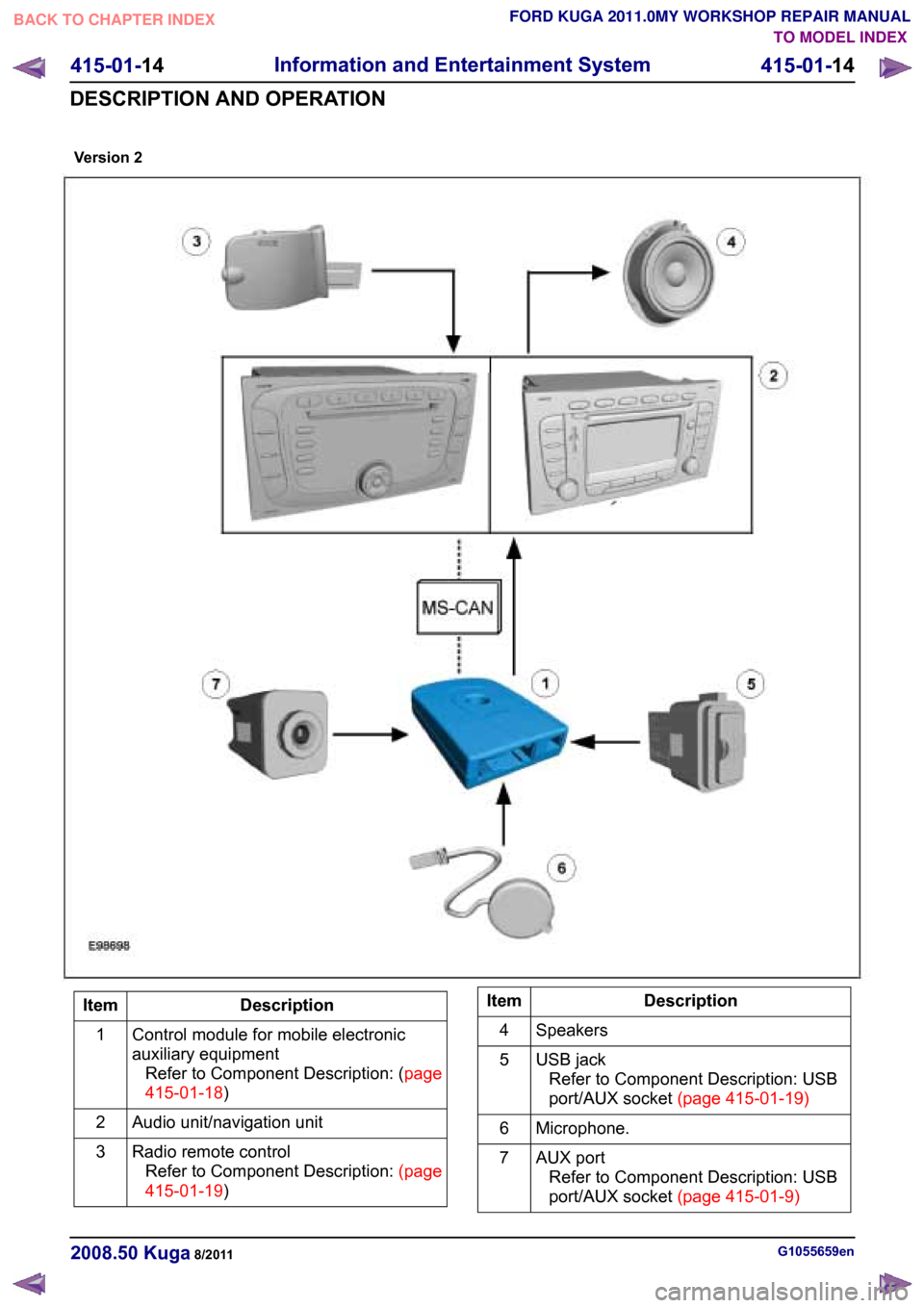
Description
Item
Control module for mobile electronic
auxiliary equipmentRefertoComponentDescription:(page
415-01-18)
1
Audio unit/navigation unit
2
Radio remote controlRefertoComponentDescription:(page
415-01-19)
3 Description
Item
Speakers
4
USB jackRefer to Component Description: USB
port/AUXsocket(page415-01-19)
5
Microphone.
6
AUX portRefer to Component Description: USB
port/AUXsocket(page415-01-9)
7 G1055659en
2008.50 Kuga 8/2011Version 2
TO MODEL INDEX
BACK TO CHAPTER INDEX
FORD KUGA 2011.0MY WORKSHOP REPAIR MANUAL
415-01-14
Information and Entertainment System
415-01-14
DESCRIPTION AND OPERATION
Page 311 of 2057
TO MODEL INDEX
BACK TO CHAPTER INDEX
FORD KUGA 2011.0MY WORKSHOP REPAIR MANUAL
415-01-19
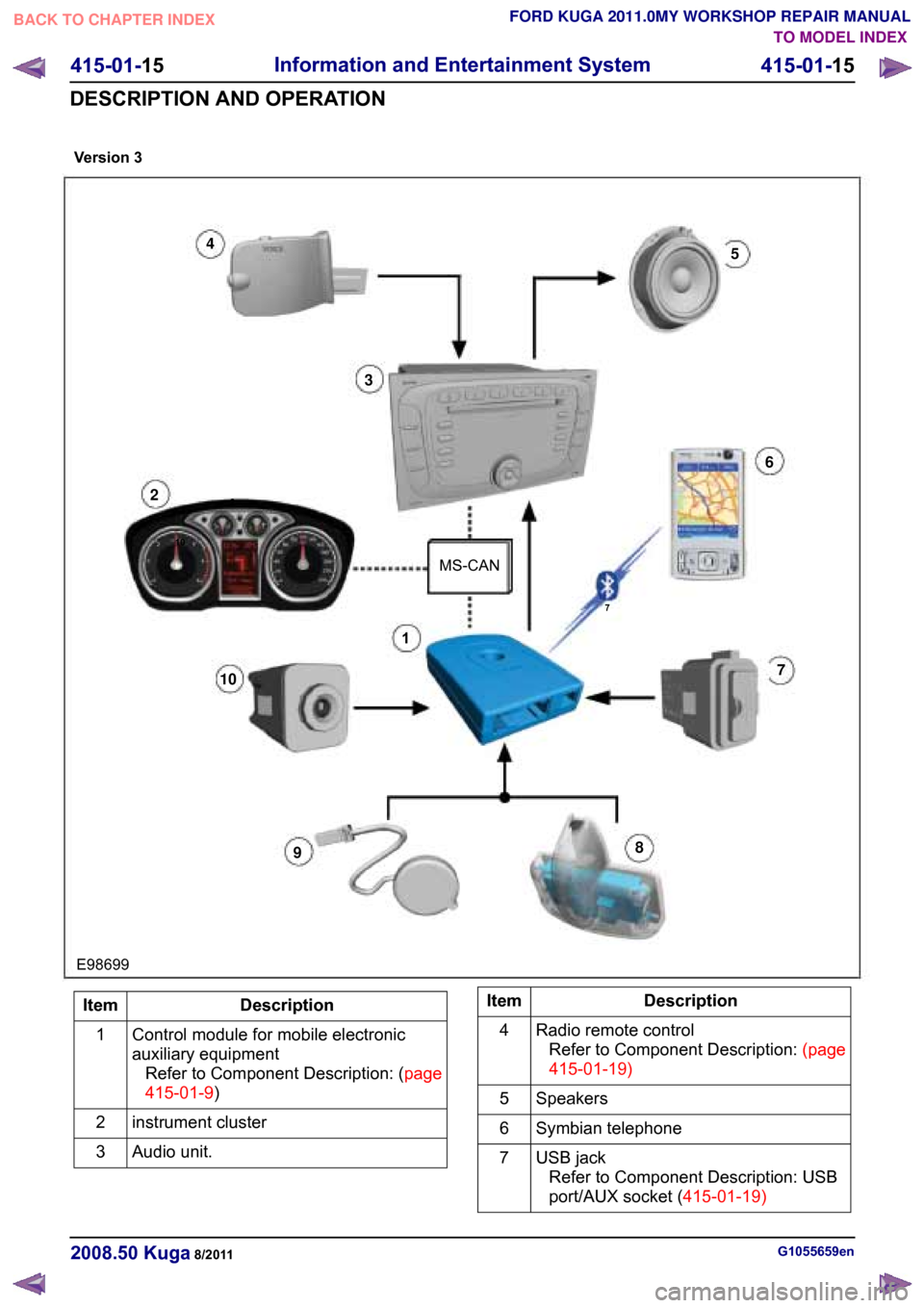
Description
Item
Control module for mobile electronic
auxiliary equipmentRefertoComponentDescription:(page
415-01-9)
1
instrument cluster
2
Audio unit.
3 Description
Item
Radio remote controlRefer to Component Description:(page
)
4
Speakers
5
Symbian telephone
6
USB jackRefer to Component Description: USB
port/AUXsocket(415-01-19)
7 G1055659en
2008.50 Kuga 8/2011Version3 415-01-15
Information and Entertainment System
415-01-15
DESCRIPTION AND OPERATION
E98699
7
1
4
MS-CAN
10
2
5
3
2
6
10 7
9
8
Page 313 of 2057
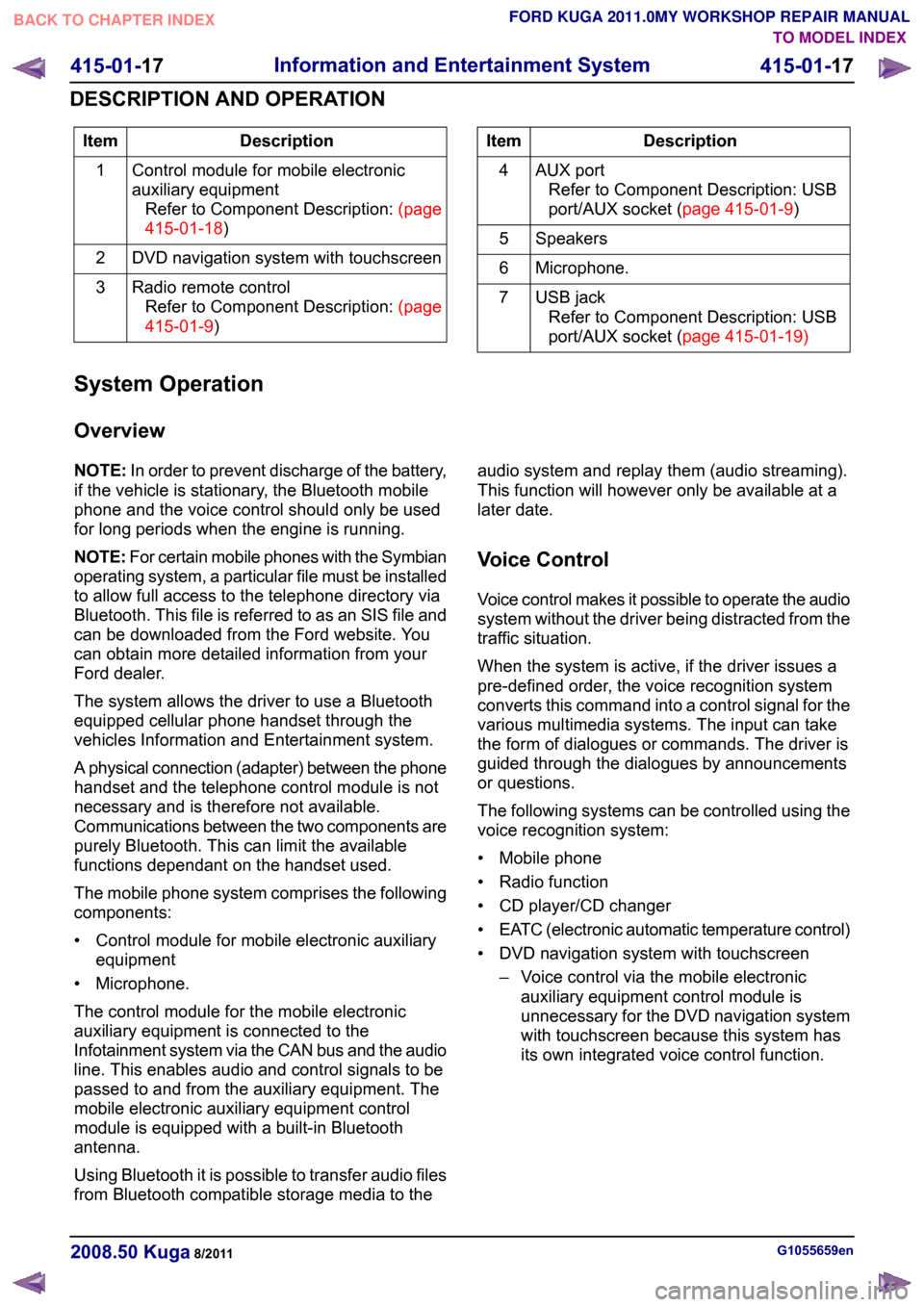
Description
Item
Control module for mobile electronic
auxiliary equipmentRefertoComponentDescription:(page
415-01-18)
1
DVD navigation system with touchscreen
2
Radio remote controlRefertoComponentDescription:(page
415-01-9)
3 Description
Item
AUX portRefer to Component Description: USB
port/AUXsocket(page 415-01-9)
4
Speakers
5
Microphone.
6
USB jackRefer to Component Description: USB
port/AUXsocket(page 415-01-19)
7
System Operation
Overview
NOTE: In order to prevent discharge of the battery,
if the vehicle is stationary, the Bluetooth mobile
phone and the voice control should only be used
for long periods when the engine is running.
NOTE: For certain mobile phones with the Symbian
operating system, a particular file must be installed
to allow full access to the telephone directory via
Bluetooth. This file is referred to as an SIS file and
can be downloaded from the Ford website. You
can obtain more detailed information from your
Ford dealer.
The system allows the driver to use a Bluetooth
equipped cellular phone handset through the
vehicles Information and Entertainment system.
A physical connection (adapter) between the phone
handset and the telephone control module is not
necessary and is therefore not available.
Communications between the two components are
purely Bluetooth. This can limit the available
functions dependant on the handset used.
The mobile phone system comprises the following
components:
• Control module for mobile electronic auxiliary equipment
• Microphone.
The control module for the mobile electronic
auxiliary equipment is connected to the
Infotainment system via the CAN bus and the audio
line. This enables audio and control signals to be
passed to and from the auxiliary equipment. The
mobile electronic auxiliary equipment control
module is equipped with a built-in Bluetooth
antenna.
Using Bluetooth it is possible to transfer audio files
from Bluetooth compatible storage media to the audio system and replay them (audio streaming).
This function will however only be available at a
later date.
Voice Control
Voice control makes it possible to operate the audio
system without the driver being distracted from the
traffic situation.
When the system is active, if the driver issues a
pre-defined order, the voice recognition system
converts this command into a control signal for the
various multimedia systems. The input can take
the form of dialogues or commands. The driver is
guided through the dialogues by announcements
or questions.
The following systems can be controlled using the
voice recognition system:
• Mobile phone
• Radio function
• CD player/CD changer
•
EATC (electronic automatic temperature control)
• DVD navigation system with touchscreen – Voice control via the mobile electronicauxiliary equipment control module is
unnecessary for the DVD navigation system
with touchscreen because this system has
its own integrated voice control function. G1055659en
2008.50 Kuga 8/2011 415-01-17
Information and Entertainment System
415-01-17
DESCRIPTION AND OPERATION
TO MODEL INDEX
BACK TO CHAPTER INDEX
FORD KUGA 2011.0MY WORKSHOP REPAIR MANUAL
Page 315 of 2057
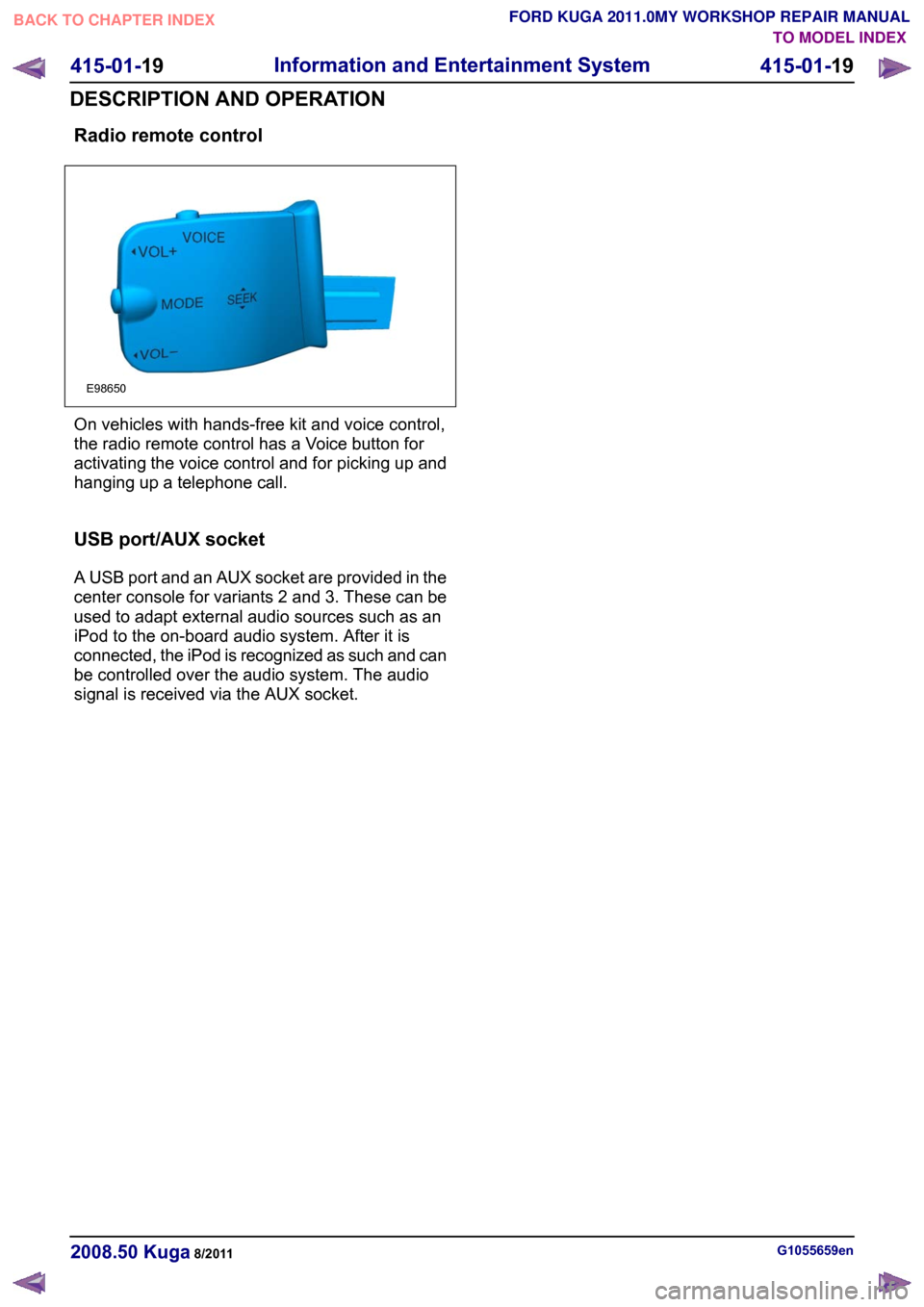
Radio remote control
On vehicles with hands-free kit and voice control,
the radio remote control has a Voice button for
activating the voice control and for picking up and
hanging up a telephone call.
USB port/AUX socket
A USB port and an AUX socket are provided in the
center console for variants 2 and 3. These can be
used to adapt external audio sources such as an
iPod to the on-board audio system. After it is
connected, the iPod is recognized as such and can
be controlled over the audio system. The audio
signal is received via the AUX socket.
G1055659en
2008.50 Kuga 8/2011 415-01-19
Information and Entertainment System
415-01-19
DESCRIPTION AND OPERATIONTO MODEL INDEX
BACK TO CHAPTER INDEX
FORD KUGA 2011.0MY WORKSHOP REPAIR MANUALE98650
Page 316 of 2057
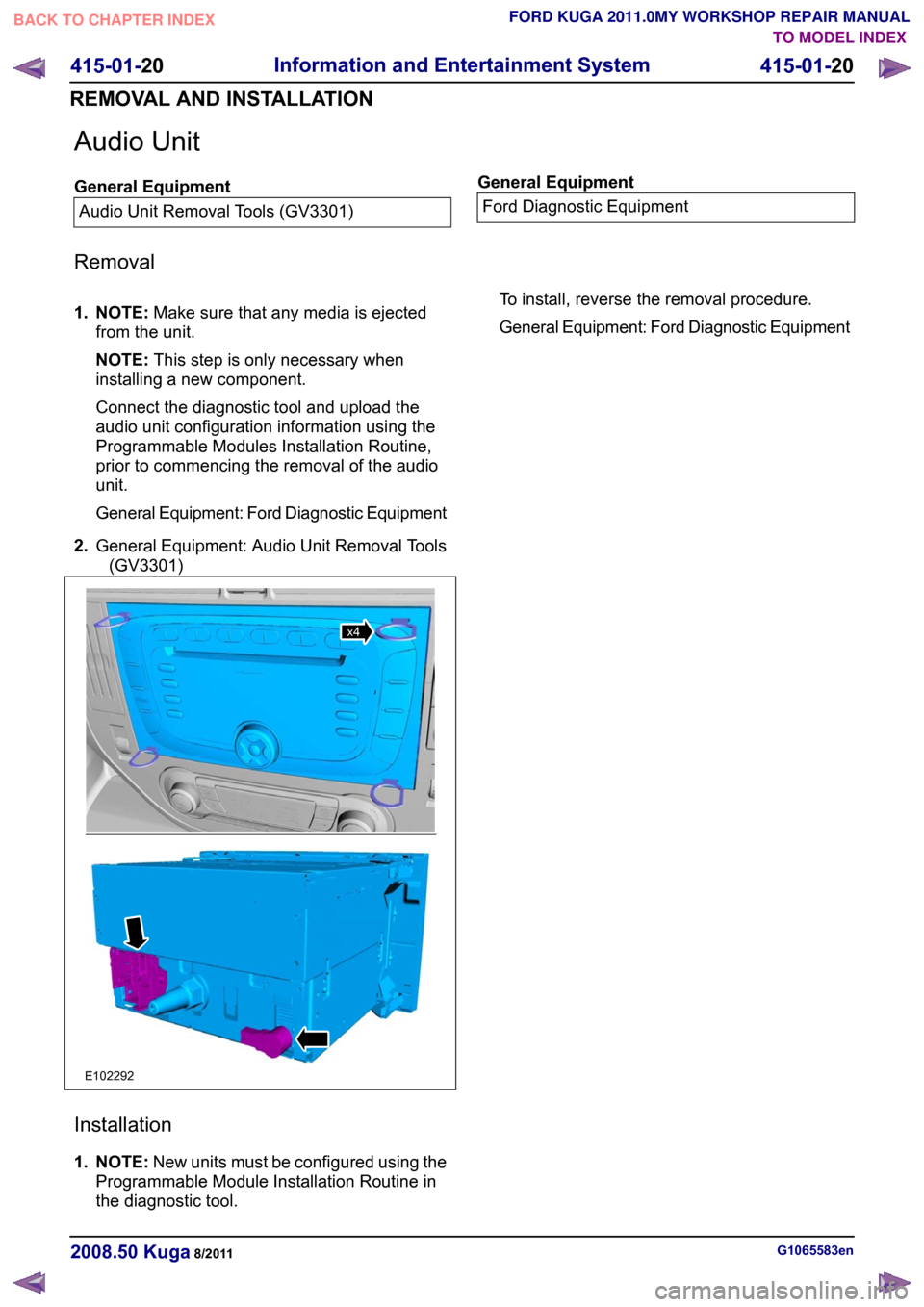
Audio Unit
General Equipment
Audio Unit Removal Tools (GV3301) General Equipment
Ford Diagnostic Equipment
Removal
1. NOTE: Make sure that any media is ejected
from the unit.
NOTE: This step is only necessary when
installing a new component.
Connect the diagnostic tool and upload the
audio unit configuration information using the
Programmable Modules Installation Routine,
prior to commencing the removal of the audio
unit.
General Equipment: Ford Diagnostic Equipment
2. General Equipment: Audio Unit Removal Tools
(GV3301) Installation
1. NOTE:
New units must be configured using the
Programmable Module Installation Routine in
the diagnostic tool. To install, reverse the removal procedure.
General Equipment: Ford Diagnostic Equipment
G1065583en
2008.50 Kuga 8/2011 415-01-20
Information and Entertainment System
415-01-20
REMOVAL AND INSTALLATIONTO MODEL INDEX
BACK TO CHAPTER INDEX
FORD KUGA 2011.0MY WORKSHOP REPAIR MANUALE102292x4
Page 319 of 2057
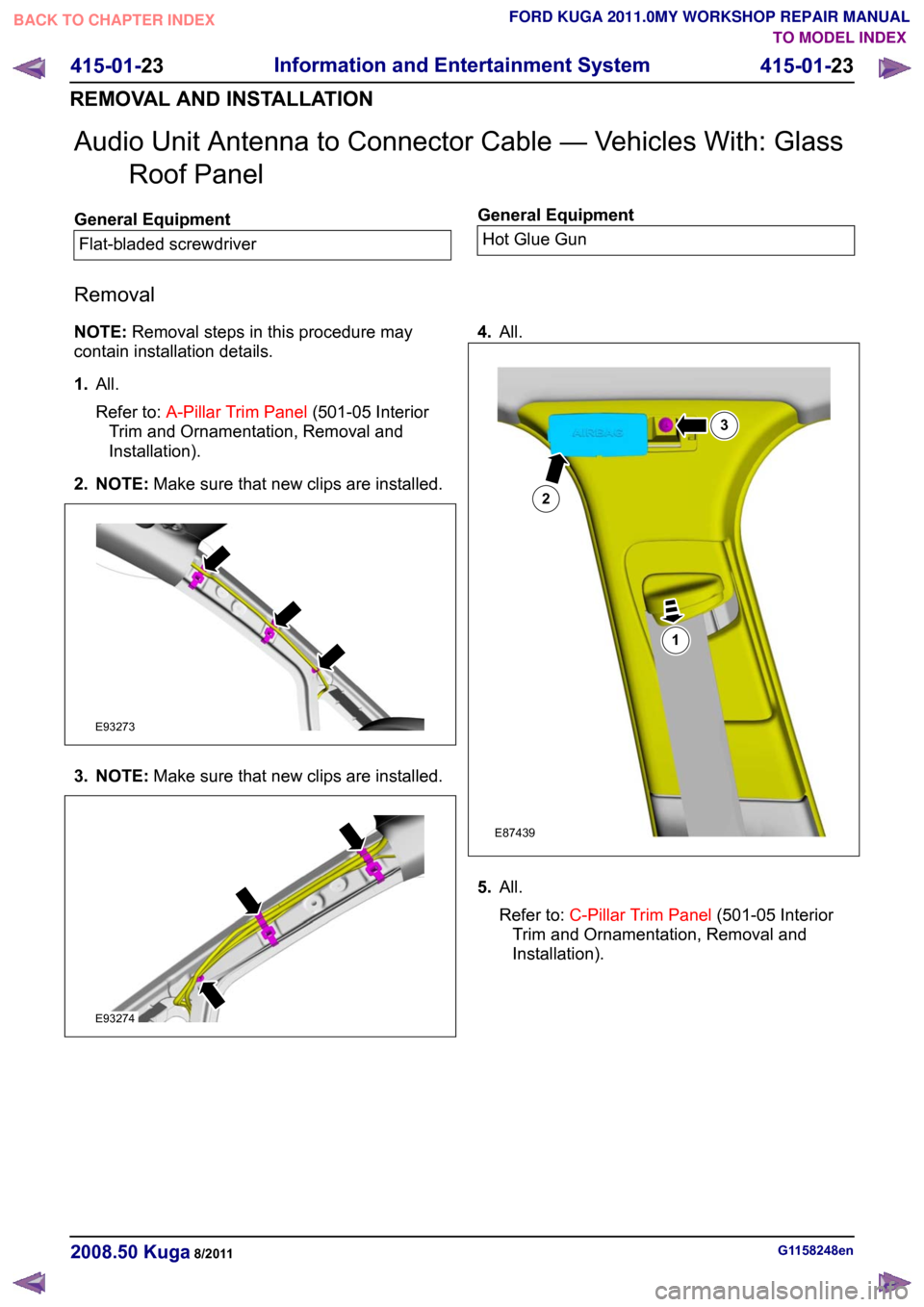
Audio Unit Antenna to Connector Cable — Vehicles With: Glass
Roof Panel General Equipment
Flat-bladed screwdriver General Equipment
Hot Glue Gun
Removal
NOTE: Removal steps in this procedure may
contain installation details.
1. All.
Refer to: A-Pillar Trim Panel (501-05 Interior
Trim and Ornamentation, Removal and
Installation).
2. NOTE: Make sure that new clips are installed.3. NOTE:
Make sure that new clips are installed. 4.
All. 5.
All.
Refer to: C-Pillar Trim Panel (501-05 Interior
Trim and Ornamentation, Removal and
Installation). G1158248en
2008.50 Kuga 8/2011 415-01-23
Information and Entertainment System
415-01-23
REMOVAL AND INSTALLATIONTO MODEL INDEX
BACK TO CHAPTER INDEX
FORD KUGA 2011.0MY WORKSHOP REPAIR MANUALE93273 E93274 123E87439
Page 326 of 2057
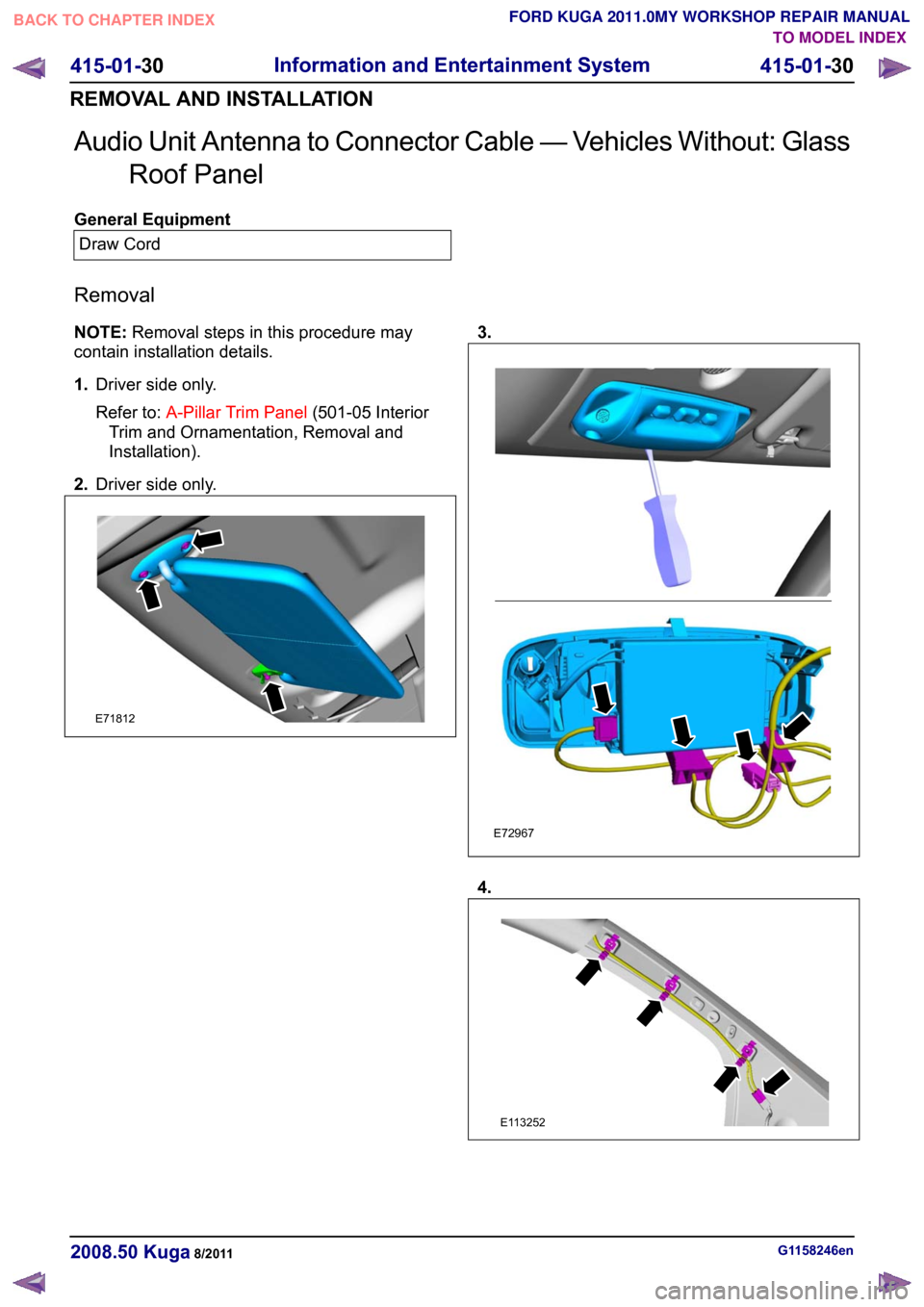
Audio Unit Antenna to Connector Cable — Vehicles Without: Glass
Roof Panel General Equipment
Draw Cord
Removal
NOTE: Removal steps in this procedure may
contain installation details.
1. Driver side only.
Refer to: A-Pillar Trim Panel (501-05 Interior
Trim and Ornamentation, Removal and
Installation).
2. Driver side only. 3.
4.
G1158246en
2008.50 Kuga 8/2011 415-01-30
Information and Entertainment System
415-01-30
REMOVAL AND INSTALLATIONTO MODEL INDEX
BACK TO CHAPTER INDEX
FORD KUGA 2011.0MY WORKSHOP REPAIR MANUALE71812 E72967 E113252
Page 331 of 2057
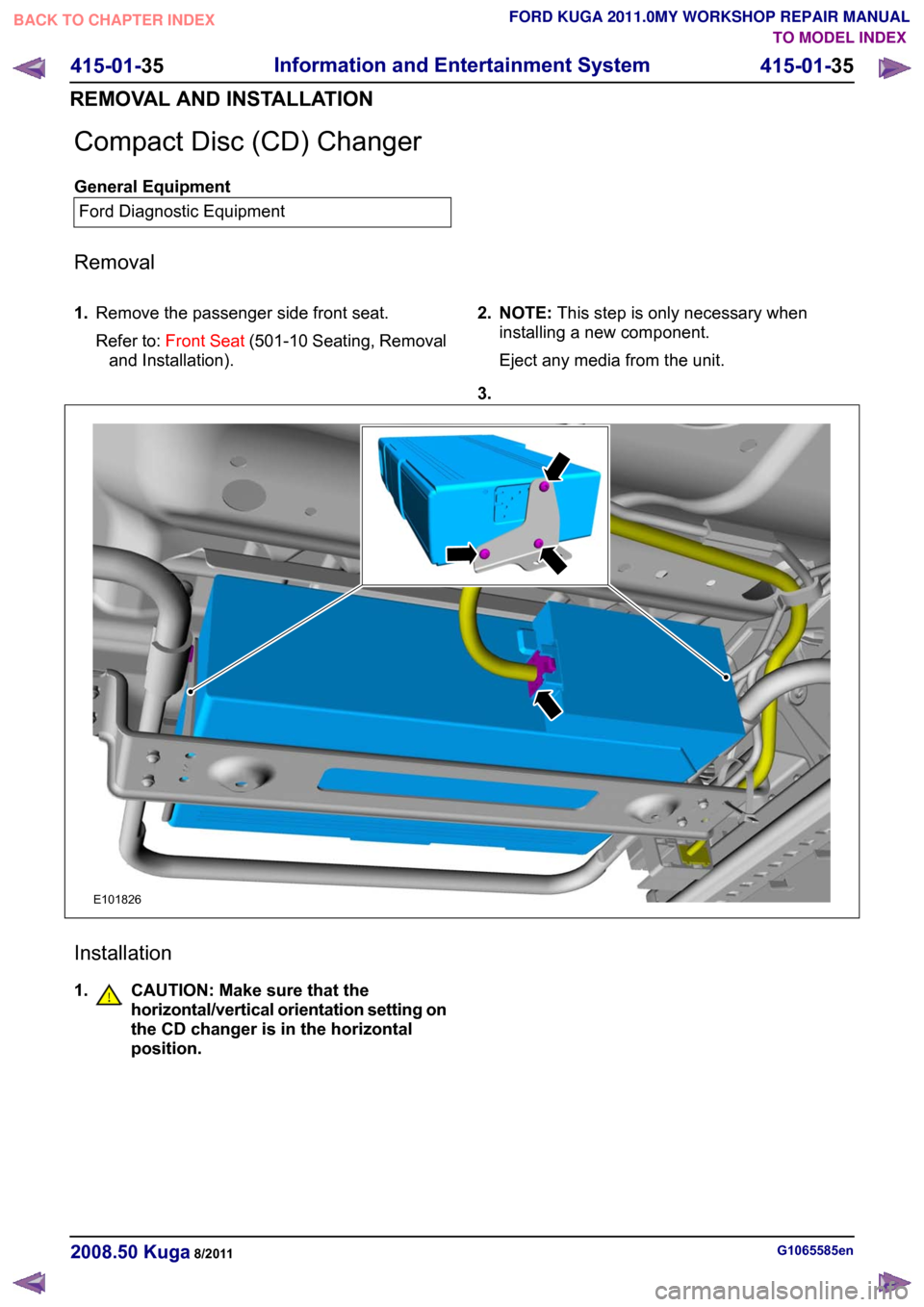
Compact Disc (CD) Changer
General Equipment
Ford Diagnostic Equipment
Removal
1. Remove the passenger side front seat.
Refer to: Front Seat (501-10 Seating, Removal
and Installation). 2. NOTE:
This step is only necessary when
installing a new component.
Eject any media from the unit.
3. Installation
1. CAUTION: Make sure that the
horizontal/vertical orientation setting on the CD changer is in the horizontal
position.
G1065585en
2008.50 Kuga 8/2011 415-01-35
Information and Entertainment System
415-01-35
REMOVAL AND INSTALLATIONTO MODEL INDEX
BACK TO CHAPTER INDEX
FORD KUGA 2011.0MY WORKSHOP REPAIR MANUALE101826