wheel FORD MAVERICK 2022 Owners Manual
[x] Cancel search | Manufacturer: FORD, Model Year: 2022, Model line: MAVERICK, Model: FORD MAVERICK 2022Pages: 533, PDF Size: 9.58 MB
Page 419 of 533
•
Drive Power: The engine is on due to
accelerator pedal pressure or speed
control activation. Reduce pressure on
the accelerator pedal or switch off the
speed control to return to full electric
mode.
• High Speed: The engine is on because
the vehicle speed exceeds the level for
full electric operation. Reduce the
speed to return to electric operation.
• Heater Setting: The engine is on
because of the heater setting. Reduce
or turn off the heater setting to return
to electric operation.
• Neutral Gear: The engine is on because
the vehicle is in Neutral (N). Shift out
of neutral gear to return to electric
operation.
• Engine Cold: The engine is on because
it is cold. The vehicle returns to electric
operation once the engine is sufficiently
warm.
• Battery Charging: The engine is on to
charge the high-voltage battery. The
vehicle returns to electric operation
once the battery is charged.
• Low Gear: The engine is on because
the vehicle is in low gear. Shift out of
low gear to return to electric operation.
• Normal Operation: The engine is on to
optimize vehicle operation. The vehicle
returns to electric operation when
possible.
• Engine Braking Active: The engine is on
to provide increased powertrain
braking. This can occur when you turn
on the grade assist feature, when
speed control is on or when driving with
your foot off the accelerator pedal.
Turning off grade assist or speed
control may allow the vehicle to return
to electric operation. •
Battery Temperature: The engine is on
due to high or low high-voltage battery
temperature. This is a normal operating
condition. The vehicle returns to
electric operation when possible.
• Drive Mode: The engine is on due to the
drive mode selection. Select an
appropriate drive mode for electric only
operation.
APPS
The system allows you interact with select
mobile apps while keeping your eyes on
the road. Voice commands, your steering
wheel buttons, or a quick tap on your
touchscreen give you advanced control of
compatible mobile apps. You can also
stream your favorite music or podcasts,
share your time of arrival with friends, and
keep connected safely.
When you start an app through the system
for the first time, you could be asked to
grant certain permissions. You can review
and change the permissions that you have
granted at any time when your vehicle is
not moving. We recommend that you
check your data plan before using your
apps through the system. Using them
could result in additional charges. We also
recommend that you check the app
provider's terms and conditions and
privacy policy before using their app. Make
sure that you have an active account for
apps that you want to use through the
system. Some apps will work with no
setup. Others require you to configure
some personal settings before you can use
them.
Note: For more information about available
apps, visit catalog.ford.com.
Using Apps on an iOS Device Select the apps option on the
feature bar.
416
2022 Maverick (CFE) Canada/United States of America, enUSA, Edition date: 202106, First-Printing SYNC™ 3 (If Equipped)
Page 423 of 533
SYNC™ 3 TROUBLESHOOTING
Voice Recognition
Possible Cause and Resolution
Symptom
The system does not under-
stand what I am saying. –
You might not be using supported voice commands.
•See Using Voice Recognition (page 391).
• For a complete list of voice commands, refer to our
website.
– You might be speaking too soon.
•Wait for the voice prompt before you speak.
The system does not under-
stand the name of a track or
artist. –
Device limitation. Bluetooth®
does not support voice
commands.
• Connect your device to a USB port.
• If you have an iOS device, press and hold the voice
control button on the steering wheel to use Siri to
play specific tracks.
– You might not be using supported voice commands.
•See
Using Voice Recognition (page 391).
• For a complete list of voice commands, refer to our
website.
– You might not be saying the name exactly as it appears
on your device.
•Say the name of the track or artist exactly as it
appears on your device. Spell out any abbreviations
in the name.
– The name contains special characters, for example *,
- or +.
•Rename the files on your device or use the touch-
screen to select and play the track.
The system does not under-
stand the name of a contact
in the phonebook on my
device and calls the wrong
contact. –
You might not be saying the name exactly as it appears
on your device.
•Say the first and last name of the contact exactly
as it appears on your device. Spell out any abbrevi-
ations in the name.
– The name contains special characters, for example *,
- or +.
•Rename the contact on your device or use the
touchscreen to select and call the contact.
420
2022 Maverick (CFE) Canada/United States of America, enUSA, Edition date: 202106, First-Printing SYNC™ 3
(If Equipped)
Page 425 of 533
Possible Cause and Resolution
Symptom
–Incorrect device settings.
•Make sure that your device does not have an auto-
install program or active security settings.
• Check that your device is not set only to charge.
– Device lock screen enabled.
•Unlock your device before connecting it.
The system does not recog-
nize my device. –
Device limitation.
•Do not leave your device in your vehicle during very
hot or very cold weather conditions.
– Cable connection issue.
•Correctly connect the cable to your device and the
vehicle USB port.
– Incompatible cable.
•Use the cable recommended by the manufacturer
of your device.
The system does not under-
stand the name of a track or
artist. –
Device limitation. Bluetooth® does not support voice
commands.
• Connect your device to a USB port.
• If you have an iOS device, press and hold the voice
control button on the steering wheel to use Siri to
play specific tracks.
I cannot stream audio from
my
Bluetooth® device. –
Incompatible device.
•Check the compatibility of your device on our
website.
– Device not connected.
•Pair your device. See
Phone (page 408).
– Media player not running.
•Start the media player on your device.
The system does not recog-
nize the music on my device. –
Missing or incorrect audio file metadata, for example
artist, song title, album or genre.
•Repair the files on your device.
– Corrupt files.
•Repair the files on your device.
422
2022 Maverick (CFE) Canada/United States of America, enUSA, Edition date: 202106, First-Printing SYNC™ 3
(If Equipped)
Page 443 of 533
When to Expect the OIL CHANGE REQUIRED Message
Vehicle Use and Example
Interval 1
Extreme
3,000–5,000 mi
(5,000–8,000 km) Maximum load or towing
Extreme hot or cold operation
Extended engine idling
1 Hybrid vehicles may achieve longer distances between oil changes, but do not exceed
the one year maximum oil change interval. Remaining oil life can be accessed through
the information display. See Resetting the Engine Oil Change Reminder (page 303).
Normal Maintenance Intervals At Every Oil Change Interval as Indicated by the Information Display
1
Change the engine oil and filter. 2
Rotate the tires, inspect the tires, tire wear and measure the tread depth.
Perform a multi-point inspection, recommended.
Inspect the automatic transmission fluid level, if applicable with dipstick. Consult your
dealer for requirements.
Inspect the brake pads, rotors, drums, brake linings, hoses and the parking brake.
Inspect the engine coolant level/strength and the hoses.
Inspect the exhaust system and heat shields.
Inspect the rear axle and U-joints - all-wheel drive.
Inspect the half-shaft boots.
Inspect the steering linkage, ball joints, suspension, tire-rod ends, driveshaft and the U-
joints.
Inspect the wheels and related components for abnormal noise, wear, looseness or
drag.
1 Do not exceed one year or 10,000 mi (16,000 km) between service intervals.
2 Reset the oil change reminder after engine oil and filter changes. See
Resetting the
Engine Oil Change Reminder (page 303).
440
2022 Maverick (CFE) Canada/United States of America, enUSA, Edition date: 202106, First-Printing Scheduled Maintenance
Page 446 of 533
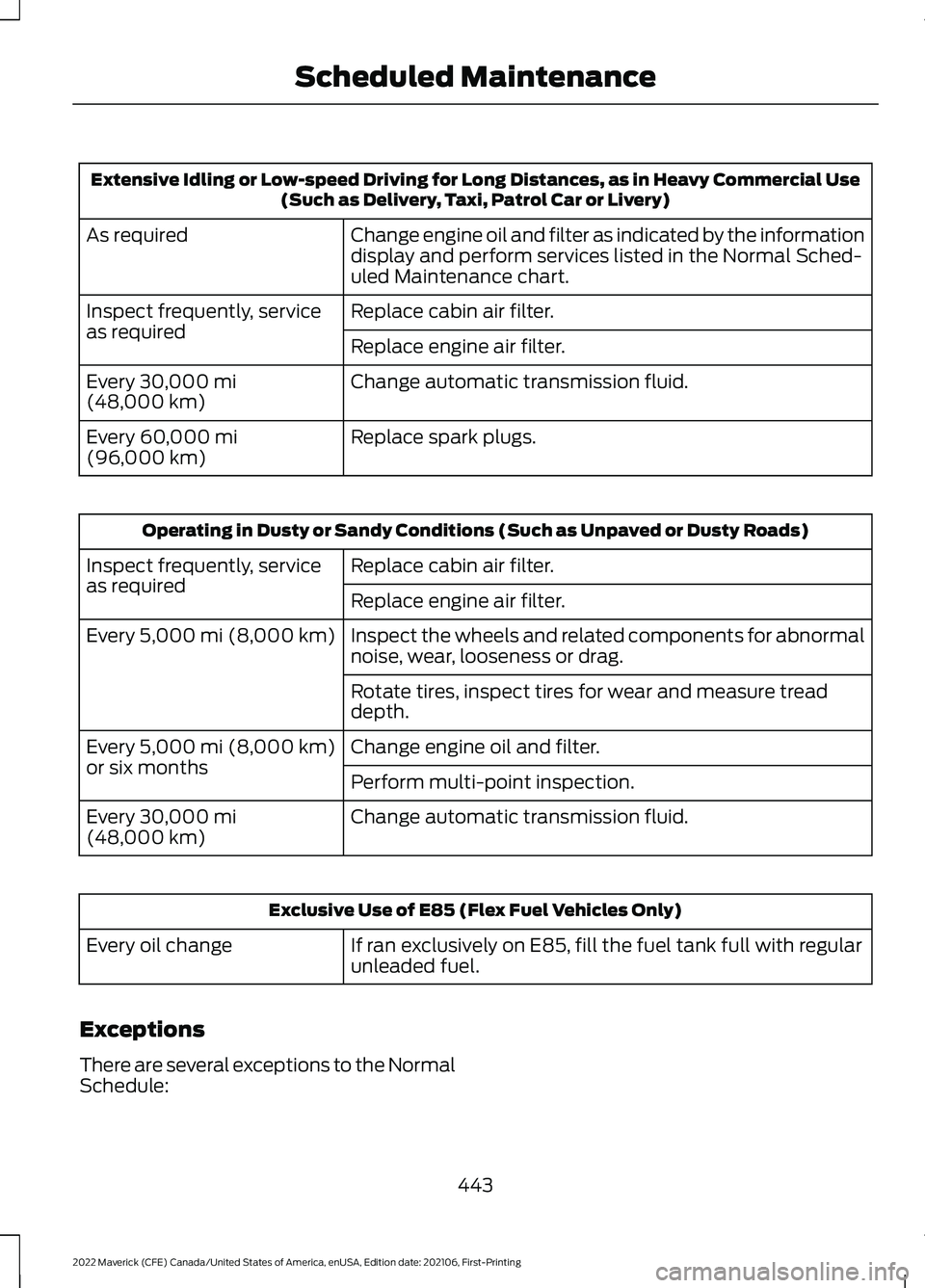
Extensive Idling or Low-speed Driving for Long Distances, as in Heavy Commercial Use
(Such as Delivery, Taxi, Patrol Car or Livery)
Change engine oil and filter as indicated by the information
display and perform services listed in the Normal Sched-
uled Maintenance chart.
As required
Replace cabin air filter.
Inspect frequently, service
as required
Replace engine air filter.
Change automatic transmission fluid.
Every 30,000 mi
(48,000 km)
Replace spark plugs.
Every
60,000 mi
(96,000 km) Operating in Dusty or Sandy Conditions (Such as Unpaved or Dusty Roads)
Replace cabin air filter.
Inspect frequently, service
as required
Replace engine air filter.
Inspect the wheels and related components for abnormal
noise, wear, looseness or drag.
Every
5,000 mi (8,000 km)
Rotate tires, inspect tires for wear and measure tread
depth.
Change engine oil and filter.
Every
5,000 mi (8,000 km)
or six months Perform multi-point inspection.
Change automatic transmission fluid.
Every
30,000 mi
(48,000 km) Exclusive Use of E85 (Flex Fuel Vehicles Only)
If ran exclusively on E85, fill the fuel tank full with regular
unleaded fuel.
Every oil change
Exceptions
There are several exceptions to the Normal
Schedule:
443
2022 Maverick (CFE) Canada/United States of America, enUSA, Edition date: 202106, First-Printing Scheduled Maintenance
Page 448 of 533
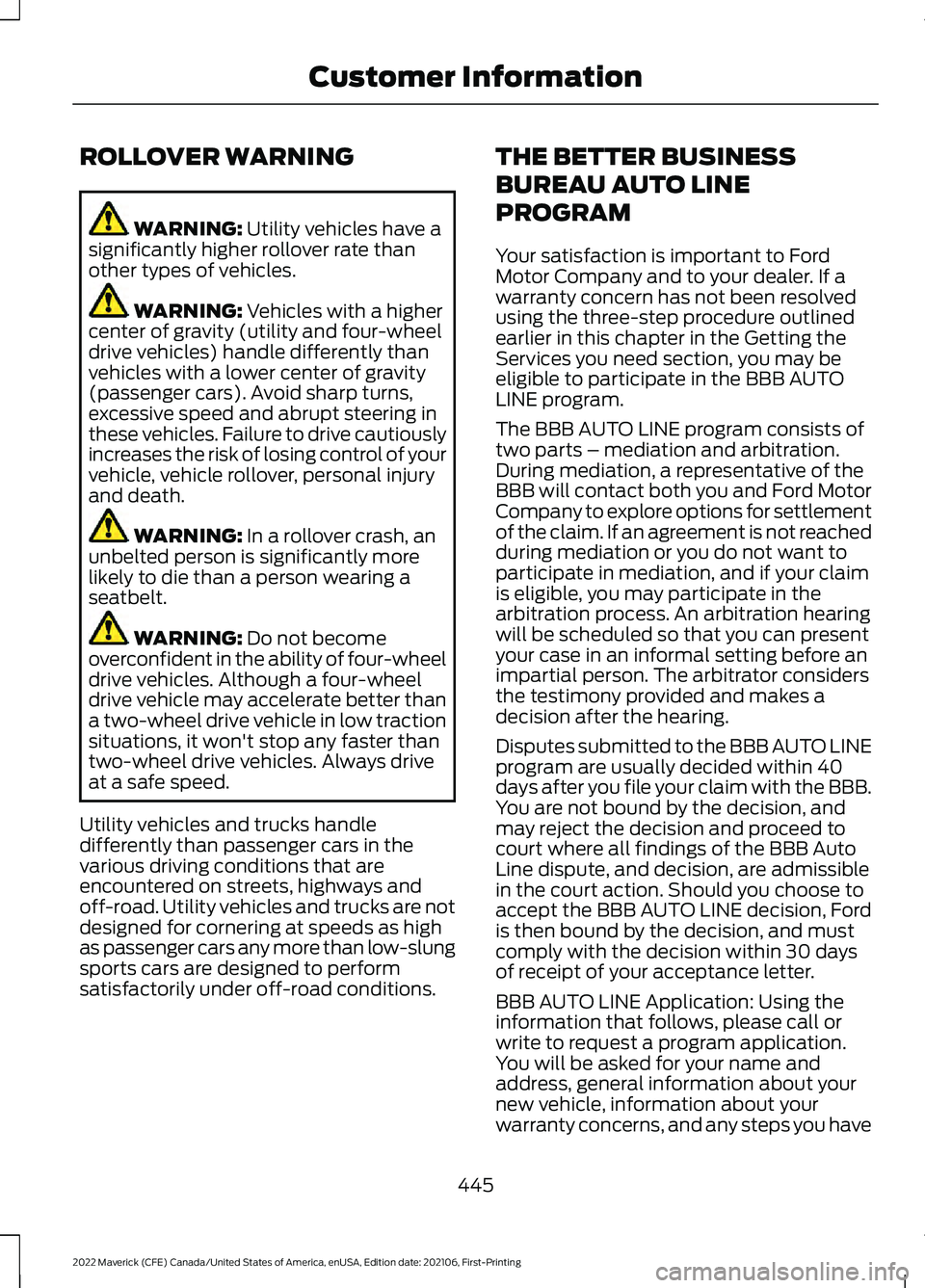
ROLLOVER WARNING
WARNING: Utility vehicles have a
significantly higher rollover rate than
other types of vehicles. WARNING:
Vehicles with a higher
center of gravity (utility and four-wheel
drive vehicles) handle differently than
vehicles with a lower center of gravity
(passenger cars). Avoid sharp turns,
excessive speed and abrupt steering in
these vehicles. Failure to drive cautiously
increases the risk of losing control of your
vehicle, vehicle rollover, personal injury
and death. WARNING:
In a rollover crash, an
unbelted person is significantly more
likely to die than a person wearing a
seatbelt. WARNING:
Do not become
overconfident in the ability of four-wheel
drive vehicles. Although a four-wheel
drive vehicle may accelerate better than
a two-wheel drive vehicle in low traction
situations, it won't stop any faster than
two-wheel drive vehicles. Always drive
at a safe speed.
Utility vehicles and trucks handle
differently than passenger cars in the
various driving conditions that are
encountered on streets, highways and
off-road. Utility vehicles and trucks are not
designed for cornering at speeds as high
as passenger cars any more than low-slung
sports cars are designed to perform
satisfactorily under off-road conditions. THE BETTER BUSINESS
BUREAU AUTO LINE
PROGRAM
Your satisfaction is important to Ford
Motor Company and to your dealer. If a
warranty concern has not been resolved
using the three-step procedure outlined
earlier in this chapter in the Getting the
Services you need section, you may be
eligible to participate in the BBB AUTO
LINE program.
The BBB AUTO LINE program consists of
two parts – mediation and arbitration.
During mediation, a representative of the
BBB will contact both you and Ford Motor
Company to explore options for settlement
of the claim. If an agreement is not reached
during mediation or you do not want to
participate in mediation, and if your claim
is eligible, you may participate in the
arbitration process. An arbitration hearing
will be scheduled so that you can present
your case in an informal setting before an
impartial person. The arbitrator considers
the testimony provided and makes a
decision after the hearing.
Disputes submitted to the BBB AUTO LINE
program are usually decided within 40
days after you file your claim with the BBB.
You are not bound by the decision, and
may reject the decision and proceed to
court where all findings of the BBB Auto
Line dispute, and decision, are admissible
in the court action. Should you choose to
accept the BBB AUTO LINE decision, Ford
is then bound by the decision, and must
comply with the decision within 30 days
of receipt of your acceptance letter.
BBB AUTO LINE Application: Using the
information that follows, please call or
write to request a program application.
You will be asked for your name and
address, general information about your
new vehicle, information about your
warranty concerns, and any steps you have
445
2022 Maverick (CFE) Canada/United States of America, enUSA, Edition date: 202106, First-Printing Customer Information
Page 489 of 533
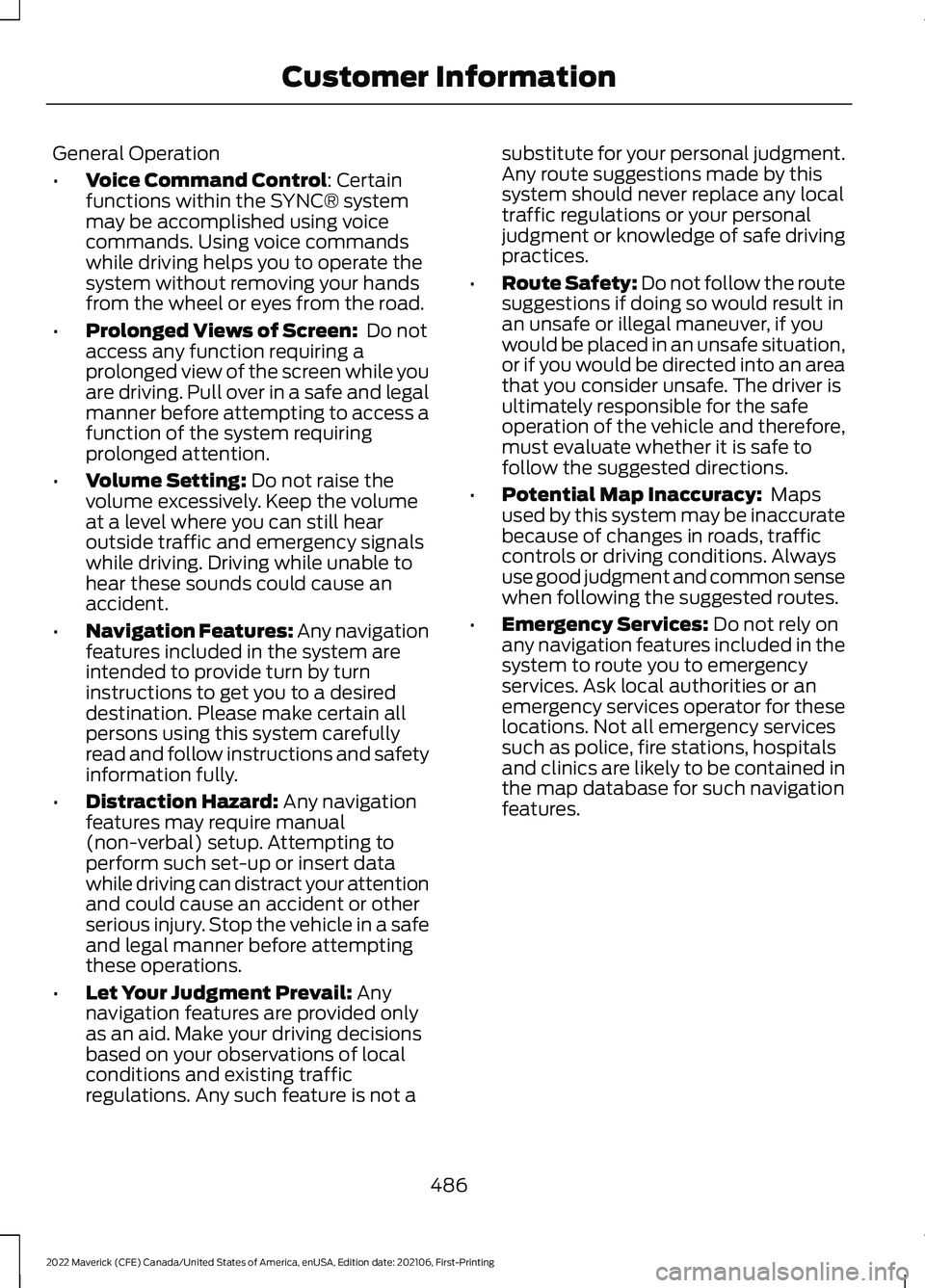
General Operation
•
Voice Command Control: Certain
functions within the SYNC® system
may be accomplished using voice
commands. Using voice commands
while driving helps you to operate the
system without removing your hands
from the wheel or eyes from the road.
• Prolonged Views of Screen:
Do not
access any function requiring a
prolonged view of the screen while you
are driving. Pull over in a safe and legal
manner before attempting to access a
function of the system requiring
prolonged attention.
• Volume Setting:
Do not raise the
volume excessively. Keep the volume
at a level where you can still hear
outside traffic and emergency signals
while driving. Driving while unable to
hear these sounds could cause an
accident.
• Navigation Features:
Any navigation
features included in the system are
intended to provide turn by turn
instructions to get you to a desired
destination. Please make certain all
persons using this system carefully
read and follow instructions and safety
information fully.
• Distraction Hazard:
Any navigation
features may require manual
(non-verbal) setup. Attempting to
perform such set-up or insert data
while driving can distract your attention
and could cause an accident or other
serious injury. Stop the vehicle in a safe
and legal manner before attempting
these operations.
• Let Your Judgment Prevail:
Any
navigation features are provided only
as an aid. Make your driving decisions
based on your observations of local
conditions and existing traffic
regulations. Any such feature is not a substitute for your personal judgment.
Any route suggestions made by this
system should never replace any local
traffic regulations or your personal
judgment or knowledge of safe driving
practices.
• Route Safety: Do not follow the route
suggestions if doing so would result in
an unsafe or illegal maneuver, if you
would be placed in an unsafe situation,
or if you would be directed into an area
that you consider unsafe. The driver is
ultimately responsible for the safe
operation of the vehicle and therefore,
must evaluate whether it is safe to
follow the suggested directions.
• Potential Map Inaccuracy:
Maps
used by this system may be inaccurate
because of changes in roads, traffic
controls or driving conditions. Always
use good judgment and common sense
when following the suggested routes.
• Emergency Services:
Do not rely on
any navigation features included in the
system to route you to emergency
services. Ask local authorities or an
emergency services operator for these
locations. Not all emergency services
such as police, fire stations, hospitals
and clinics are likely to be contained in
the map database for such navigation
features.
486
2022 Maverick (CFE) Canada/United States of America, enUSA, Edition date: 202106, First-Printing Customer Information
Page 516 of 533
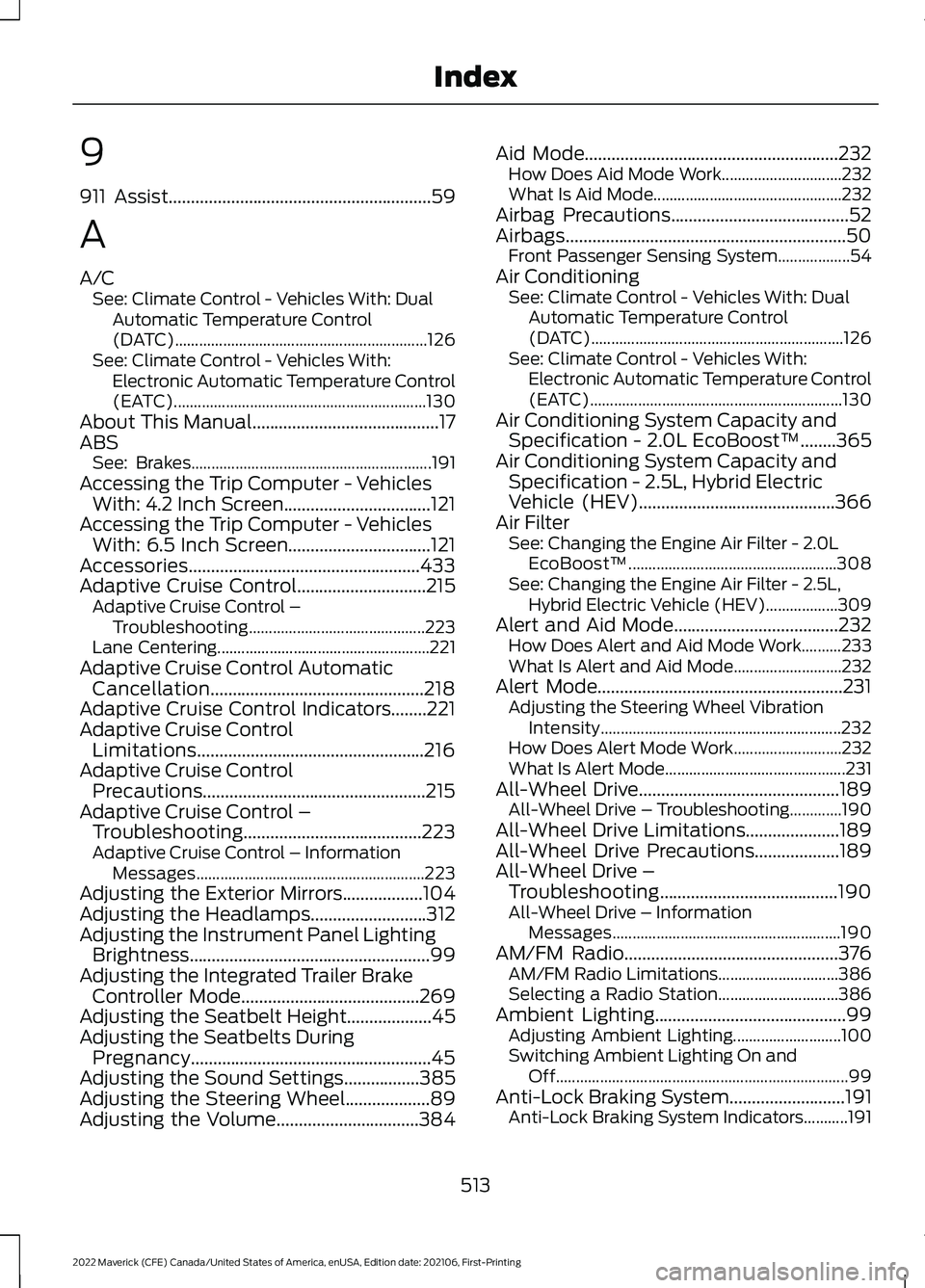
9
911 Assist...........................................................59
A
A/C See: Climate Control - Vehicles With: Dual
Automatic Temperature Control
(DATC)............................................................... 126
See: Climate Control - Vehicles With: Electronic Automatic Temperature Control
(EATC)............................................................... 130
About This Manual..........................................17
ABS See: Brakes............................................................ 191
Accessing the Trip Computer - Vehicles With: 4.2 Inch Screen.................................121
Accessing the Trip Computer - Vehicles With: 6.5 Inch Screen................................121
Accessories....................................................433
Adaptive Cruise Control
.............................215
Adaptive Cruise Control –
Troubleshooting............................................ 223
Lane Centering..................................................... 221
Adaptive Cruise Control Automatic Cancellation................................................218
Adaptive Cruise Control Indicators........221
Adaptive Cruise Control Limitations...................................................216
Adaptive Cruise Control Precautions..................................................215
Adaptive Cruise Control – Troubleshooting........................................223
Adaptive Cruise Control – Information Messages......................................................... 223
Adjusting the Exterior Mirrors..................104
Adjusting the Headlamps..........................312
Adjusting the Instrument Panel Lighting Brightness......................................................99
Adjusting the Integrated Trailer Brake Controller Mode........................................269
Adjusting the Seatbelt Height
...................45
Adjusting the Seatbelts During Pregnancy......................................................45
Adjusting the Sound Settings
.................385
Adjusting the Steering Wheel...................89
Adjusting the Volume................................384 Aid Mode
.........................................................232
How Does Aid Mode Work.............................. 232
What Is Aid Mode............................................... 232
Airbag Precautions
........................................52
Airbags...............................................................50
Front Passenger Sensing System..................54
Air Conditioning See: Climate Control - Vehicles With: Dual
Automatic Temperature Control
(DATC)............................................................... 126
See: Climate Control - Vehicles With: Electronic Automatic Temperature Control
(EATC)............................................................... 130
Air Conditioning System Capacity and Specification - 2.0L EcoBoost™........365
Air Conditioning System Capacity and Specification - 2.5L, Hybrid Electric
Vehicle (HEV)
............................................366
Air Filter See: Changing the Engine Air Filter - 2.0L
EcoBoost™.................................................... 308
See: Changing the Engine Air Filter - 2.5L, Hybrid Electric Vehicle (HEV)..................309
Alert and Aid Mode.....................................232 How Does Alert and Aid Mode Work..........233
What Is Alert and Aid Mode........................... 232
Alert Mode.......................................................231 Adjusting the Steering Wheel Vibration
Intensity............................................................ 232
How Does Alert Mode Work........................... 232
What Is Alert Mode............................................. 231
All-Wheel Drive
.............................................189
All-Wheel Drive – Troubleshooting.............190
All-Wheel Drive Limitations
.....................189
All-Wheel Drive Precautions...................189
All-Wheel Drive – Troubleshooting........................................190
All-Wheel Drive – Information Messages......................................................... 190
AM/FM Radio................................................376 AM/FM Radio Limitations.............................. 386
Selecting a Radio Station.............................. 386
Ambient Lighting
...........................................99
Adjusting Ambient Lighting........................... 100
Switching Ambient Lighting On and Off........................................................................\
. 99
Anti-Lock Braking System..........................191 Anti-Lock Braking System Indicators...........191
513
2022 Maverick (CFE) Canada/United States of America, enUSA, Edition date: 202106, First-Printing Index
Page 518 of 533
Automatic Transmission –
Troubleshooting............................................. 188
Grade Assist - Hybrid Electric Vehicle (HEV)................................................................. 186
Manual Park Release - Gasoline...................186
Temporary Neutral Mode................................ 185
Automatic Transmission Position Indicators......................................................184
Automatic Transmission Positions........183 Drive (D)................................................................ 184
Low (L)................................................................... 184
Neutral (N)........................................................... 184
Park (P).................................................................. 183
Reverse (R)........................................................... 183
Automatic Transmission Precautions..................................................183
Automatic Transmission – Troubleshooting........................................188
Automatic Transmission – Information Messages .......................................................... 188
Auto Mode
.......................................................127
Auto Mode Indicators........................................ 127
Switching Auto Mode On and Off.................127
Switching Dual Mode On and Off................129
Auto-Start-Stop...........................................168 Auto-Start-Stop – Troubleshooting...........169
Auto-Start-Stop Indicators......................168
Auto-Start-Stop Precautions
..................168
Auto-Start-Stop – Troubleshooting.........................................169
Auto-Start-Stop – Frequently Asked Questions.......................................................... 170
Auto-Start-Stop – Information Messages.......................................................... 169
Autounlock........................................................74 Autounlock Requirements................................ 74
Switching Autounlock On and Off.................74
What Is Autounlock............................................. 74
AWD See: All-Wheel Drive......................................... 189
B
Battery See: Changing the 12V Battery...................... 310
Blind Spot Information System..............237 Blind Spot Information System –
Troubleshooting............................................ 239Blind Spot Information System
Indicators.....................................................238
Blind Spot Information System Limitations...................................................237
Blind Spot Information System Precautions
..................................................237
Blind Spot Information System Requirements.............................................237
Blind Spot Information System – Troubleshooting........................................239
Blind S
pot Information System –
Information Messages................................ 239
Body Control Module Fuse Box.............296 Accessing the Body Control Module Fuse
Box..................................................................... 296
Identifying the Fuses in the Body Control Module Fuse Box.......................................... 296
Locating the Body Control Module Fuse Box..................................................................... 296
Body Styling Kit Precautions...................324
Body Styling Kits..........................................324
Bonnet Lock See: Opening and Closing the Hood..........299
Booster Seats
..................................................39
Brake Fluid Specification...........................192
Brake Over Accelerator
................................191
Brake Precautions.........................................191
Brakes................................................................191 Anti-Lock Braking System................................ 191
Brakes – Troubleshooting............................... 193
Brakes – Troubleshooting.........................193 Brakes – Frequently Asked
Questions......................................................... 193
Brakes – Warning Lamps................................ 193
Breaking-In.....................................................273
C
Calculating Payload
....................................255
Calculating the Load Limit.......................255
Canceling the Set Speed...........................214
Capacities and Specifications
................355
Catalytic Converter.......................................181 Catalytic Converter –
Troubleshooting.............................................. 181
Catalytic Converter Precautions..............181
515
2022 Maverick (CFE) Canada/United States of America, enUSA, Edition date: 202106, First-Printing Index
Page 519 of 533
Catalytic Converter –
Troubleshooting..........................................181
C
atalytic Converter – Warning Lamps........181
Changing a Flat Tire...................................346
Changing a Road Wheel...........................346
Changing the 12V Battery..........................310
Changing the Engine Air Filter - 2.0L EcoBoost™................................................308
Changing the Engine Air Filter - 2.5L, Hybrid Electric Vehicle (HEV)
.............309
Changing the Fuel Filter...........................309
Changing the Remote Control Battery - Vehicles With: Push Button Start.........63
Changing the Remote Control Battery - Vehicles Without: Push Button
Start.................................................................62
Changing the Vehicle Wi-Fi Hotspot Name or Password...................................373
Charging a Device........................................148
Charging a Wireless Device.......................152
Checking MyKey System Status..............69
Checking the Brake Fluid...........................192
Checking the Coolant
................................304
Checking the Seatbelts...............................48
Checking the Tire Pressures....................338
Checking the Wiper Blades.......................90
Children and Airbags
.....................................53
Child Restraint Anchor Points....................32 Locating the Child Restraint Lower Anchor
Points................................................................... 32
Locating the Child Restraint Top Tether Anchor Points................................................... 33
What Are the Child Restraint Anchor Points................................................................... 32
Child Restraints
...............................................33
Child Restraint Position Information.............33
Child Restraints Recommendation...............34
Child Safety
.......................................................31
Child Restraint Anchor Points.......................... 32
Child Restraints..................................................... 33
Installing Child Restraints................................. 34
Child Safety Locks..........................................41
Child Safety Precautions
..............................31
Cleaning Products........................................319
Cleaning the Exterior...................................319 Cleaning Camera Lenses and
Sensors.............................................................. 321Cleaning Chrome, Aluminium or Stainless
Steel.................................................................. 320
Cleaning Headlamps and Rear Lamps................................................................ 319
Cleaning Stripes or Graphics..........................321
Cleaning the Engine Compartment............320
Cleaning the Exterior Precautions................319
Cleaning the Underbody.................................. 321
Cleaning Wheels................................................ 320
Cleaning Windows and Wiper Blades............................................................... 320
Cleaning the Interior....................................321 Cleaning Carpets and Floor Mats................322
Cleaning Displays and Screens..................... 322
Cleaning Fabric Seats and Headliners........................................................ 322
Cleaning Leather and Vinyl............................ 322
Cleaning Moonroof Tracks.............................. 323
Cleaning Plastic................................................... 321
Cleaning Seatbelts............................................ 323
Cleaning Storage Compartments...............323
Cleaning the Instrument Panel......................321
Clearing All MyKeys.......................................69
Climate Control.............................................126 Auto Mode............................................................. 127
Climate Control – Troubleshooting.............129
Climate Control – Troubleshooting.........................................129
Clima
te Control – Frequently Asked
Questions......................................................... 129
Cold Weather Precautions
........................273
Configuring the Trip Computer - Vehicles With: 4.2 Inch Screen.................................121
Connected Vehicle
......................................369
Connecting the Vehicle to a Mobile
Network............................................................ 369
Connected Vehicle Data
..............................24
Connected Vehicle Limitations..............369
Connected Vehicle Requirements........369
Connected Vehicle – Troubleshooting - Vehicles With: Modem
............................370
Connected Vehicle – Troubleshooting - Vehicles With: SYNC 3.............................371
Connecting a Bluetooth® Device
...........377
Connecting a Trailer.....................................261
Connecting a Trailer Precautions...........261
516
2022 Maverick (CFE) Canada/United States of America, enUSA, Edition date: 202106, First-Printing Index