ECU FORD MAVERICK 2022 User Guide
[x] Cancel search | Manufacturer: FORD, Model Year: 2022, Model line: MAVERICK, Model: FORD MAVERICK 2022Pages: 533, PDF Size: 9.58 MB
Page 66 of 533
Note:
Do not touch the battery contacts or
the printed circuit board with the
screwdriver.
5. Remove the battery.
6. Install a new battery with the + facing
up.
7. Replace the battery cover. Dispose of old batteries in an
environmentally friendly way.
Seek advice from your local
authority about recycling old batteries.
Note: Do not wipe off any grease on the
battery terminals or on the back surface of
the circuit board.
Note: Replacing the battery does not erase
the programmed key from your vehicle. The
remote control should operate normally.
CHANGING THE REMOTE
CONTROL BATTERY -
VEHICLES WITH: PUSH
BUTTON START WARNING:
Keep batteries away
from children to prevent ingestion.
Failure to follow this instruction could
result in personal injury or death. If
ingested, immediately seek medical
attention. WARNING:
If the battery
compartment does not securely close,
stop using the remote control and
replace it as soon as possible. In the
meantime, keep the remote control away
from children. Failure to follow this
instruction could result in personal injury
or death.
The remote control uses one coin-type
3-volt lithium battery CR2450 or
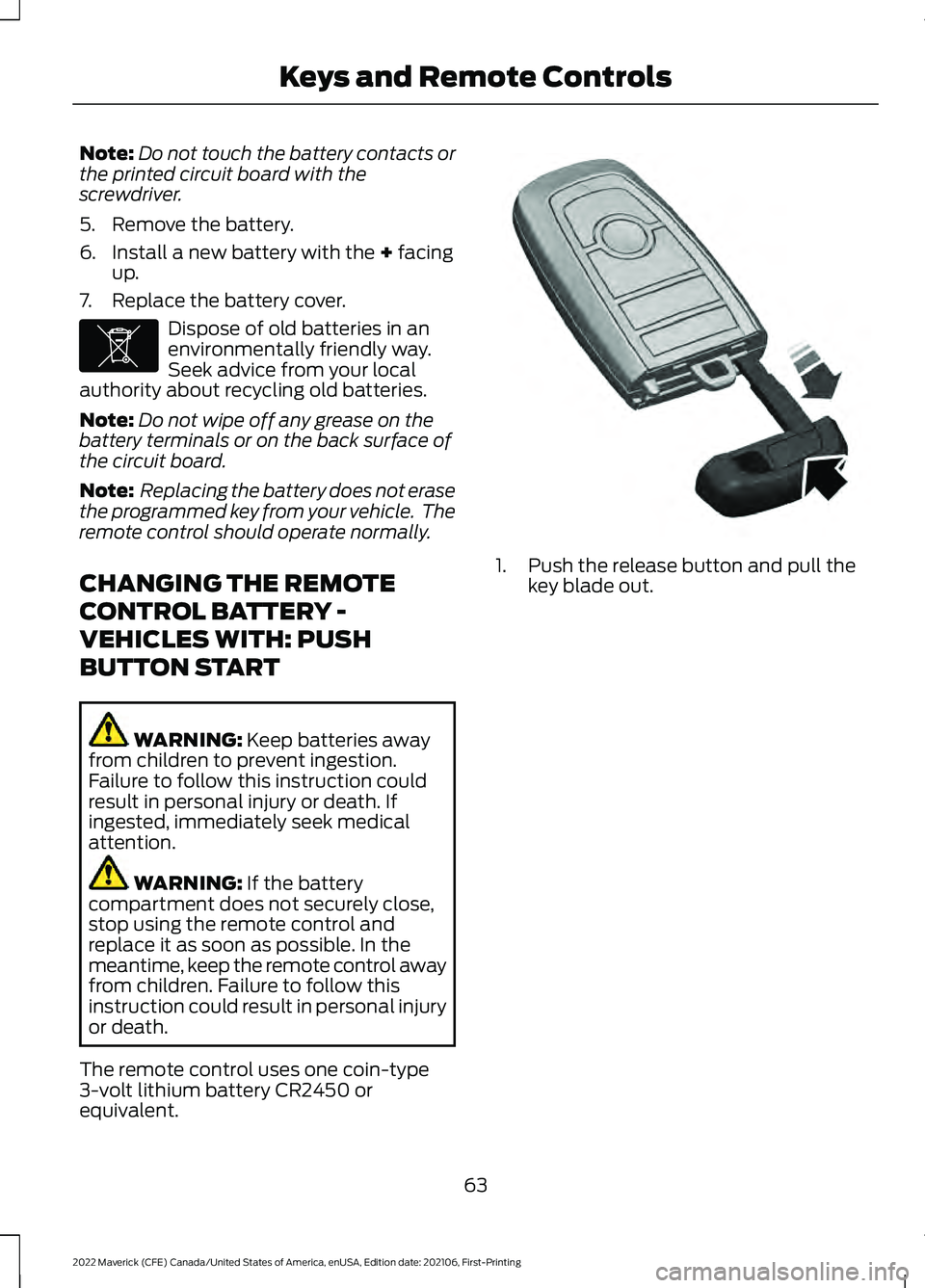
equivalent. 1. Push the release button and pull the
key blade out.
63
2022 Maverick (CFE) Canada/United States of America, enUSA, Edition date: 202106, First-Printing Keys and Remote ControlsE107998 E322866
Page 68 of 533
Note:
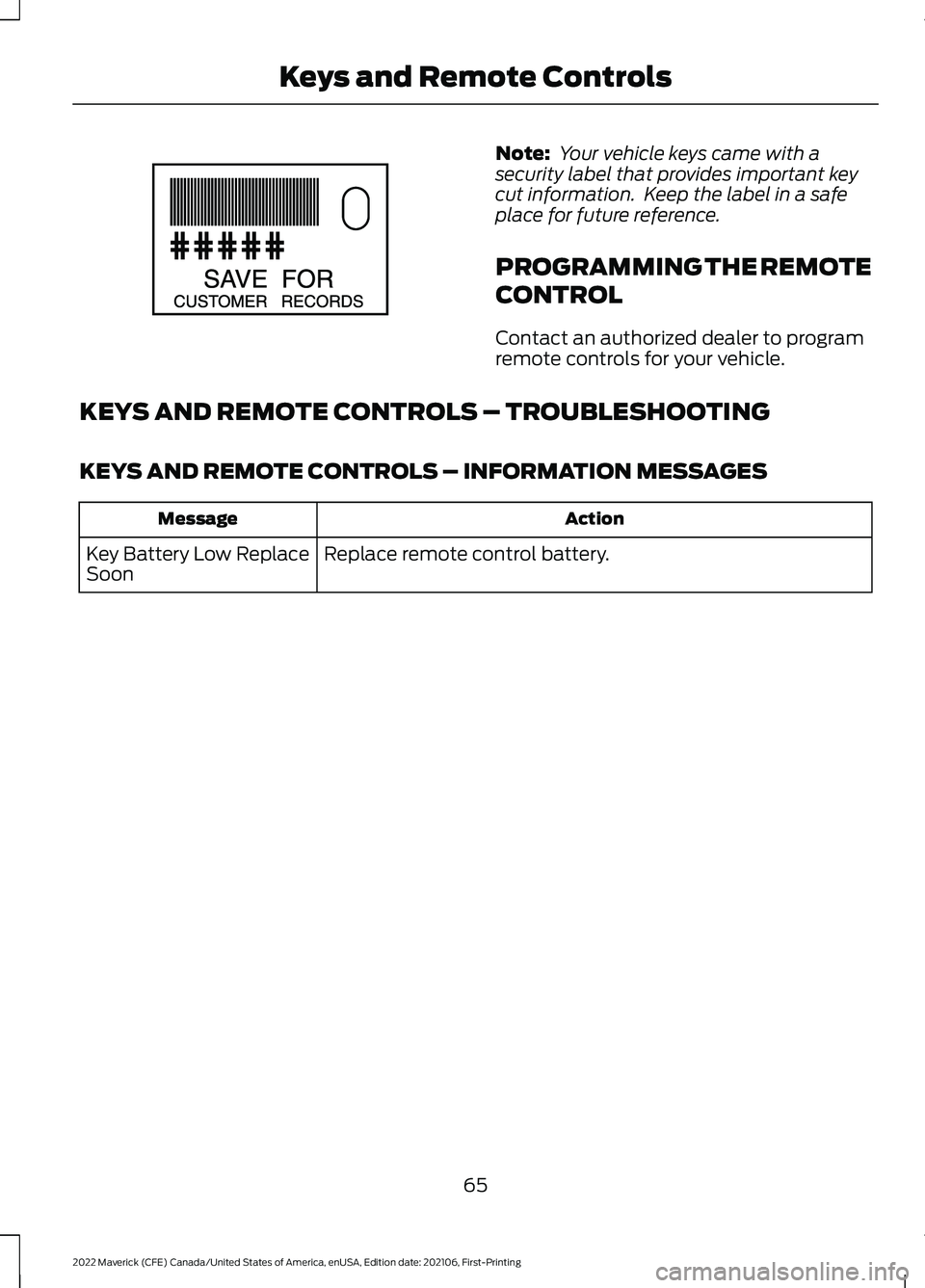
Your vehicle keys came with a
security label that provides important key
cut information. Keep the label in a safe
place for future reference.
PROGRAMMING THE REMOTE
CONTROL
Contact an authorized dealer to program
remote controls for your vehicle.
KEYS AND REMOTE CONTROLS – TROUBLESHOOTING
KEYS AND REMOTE CONTROLS – INFORMATION MESSAGES Action
Message
Replace remote control battery.
Key Battery Low Replace
Soon
65
2022 Maverick (CFE) Canada/United States of America, enUSA, Edition date: 202106, First-Printing Keys and Remote ControlsE151795
Page 85 of 533
TAILGATE PRECAUTIONS
WARNING: It is extremely
dangerous to ride in a cargo area, inside
or outside of a vehicle. In a crash, people
riding in these areas are more likely to be
seriously injured or killed. Do not allow
people to ride in any area of your vehicle
that is not equipped with seats and
seatbelts. Make sure everyone in your
vehicle is in a seat and properly using a
seatbelt. Failure to follow this warning
could result in serious personal injury or
death.
OPENING THE TAILGATE
OPENING THE TAILGATE FROM
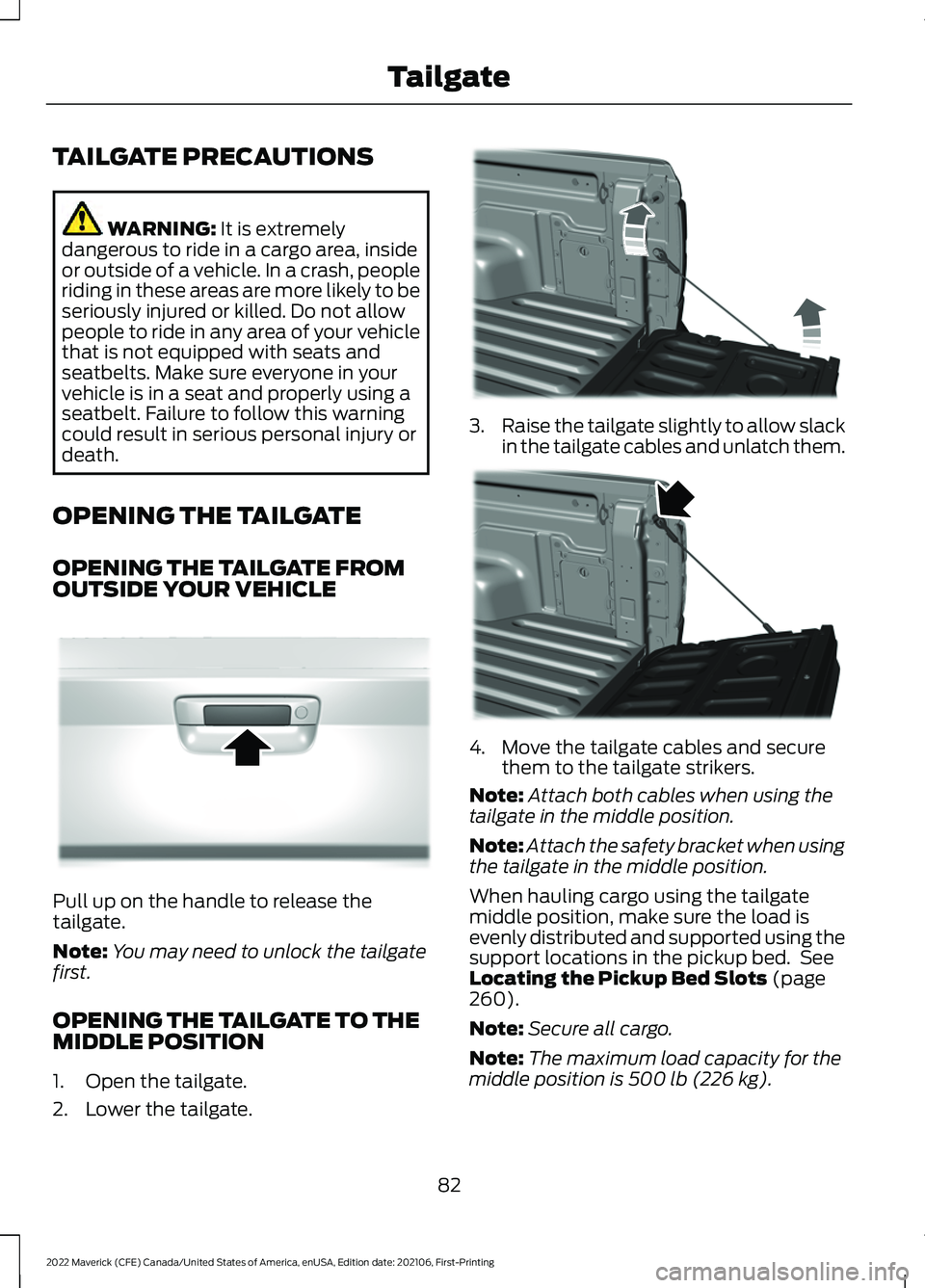
OUTSIDE YOUR VEHICLE Pull up on the handle to release the
tailgate.
Note:
You may need to unlock the tailgate
first.
OPENING THE TAILGATE TO THE
MIDDLE POSITION
1. Open the tailgate.
2. Lower the tailgate. 3.
Raise the tailgate slightly to allow slack
in the tailgate cables and unlatch them. 4. Move the tailgate cables and secure
them to the tailgate strikers.
Note: Attach both cables when using the
tailgate in the middle position.
Note: Attach the safety bracket when using
the tailgate in the middle position.
When hauling cargo using the tailgate
middle position, make sure the load is
evenly distributed and supported using the
support locations in the pickup bed. See
Locating the Pickup Bed Slots
(page
260).
Note: Secure all cargo.
Note: The maximum load capacity for the
middle position is
500 lb (226 kg).
82
2022 Maverick (CFE) Canada/United States of America, enUSA, Edition date: 202106, First-Printing TailgateE348034 E351595 E351596
Page 86 of 533
LOCKING AND UNLOCKING
THE TAILGATE
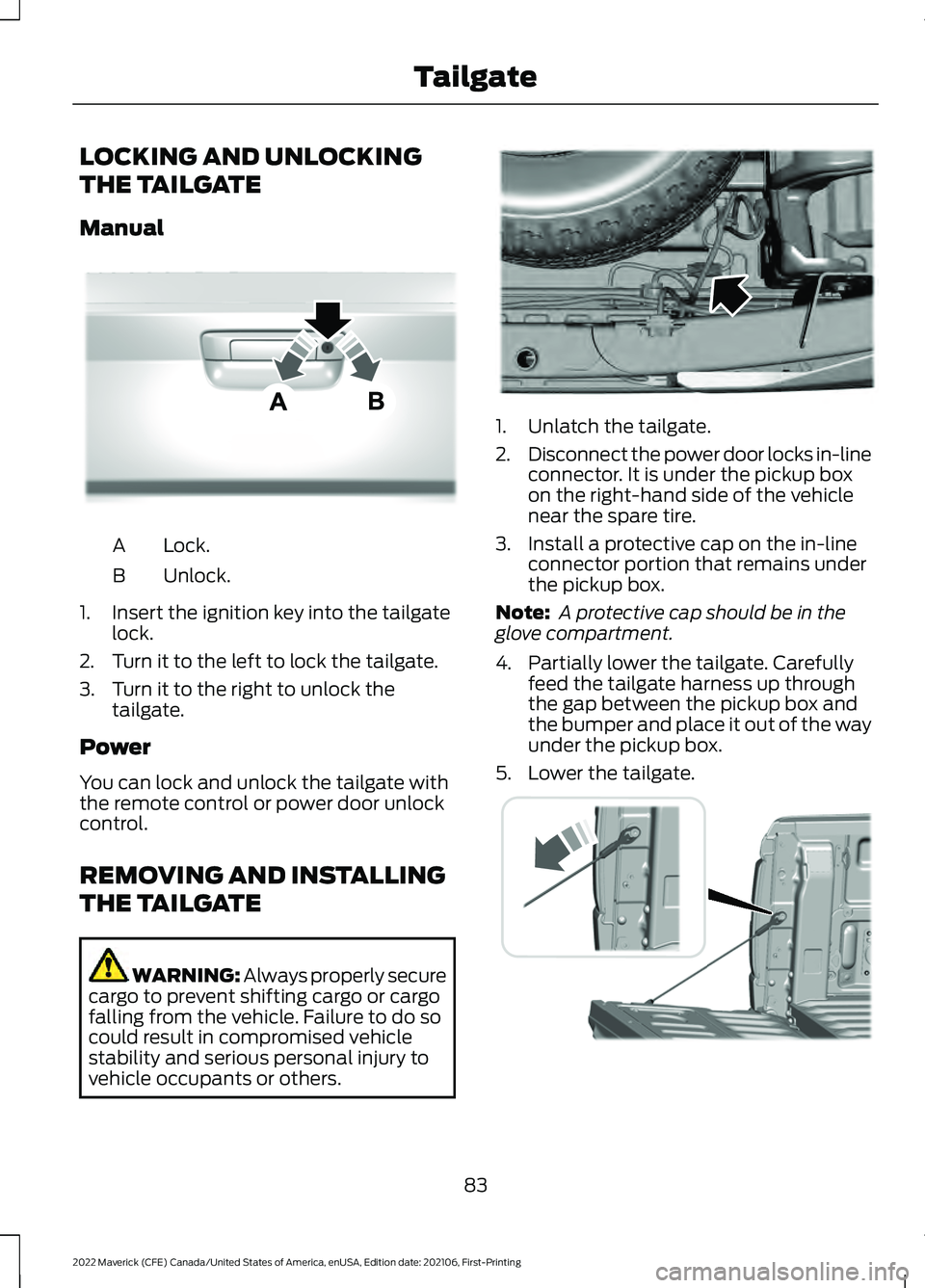
Manual
Lock.
A
Unlock.
B
1. Insert the ignition key into the tailgate lock.
2. Turn it to the left to lock the tailgate.
3. Turn it to the right to unlock the tailgate.
Power
You can lock and unlock the tailgate with
the remote control or power door unlock
control.
REMOVING AND INSTALLING
THE TAILGATE WARNING: Always properly secure
cargo to prevent shifting cargo or cargo
falling from the vehicle. Failure to do so
could result in compromised vehicle
stability and serious personal injury to
vehicle occupants or others. 1. Unlatch the tailgate.
2.
Disconnect the power door locks in-line
connector. It is under the pickup box
on the right-hand side of the vehicle
near the spare tire.
3. Install a protective cap on the in-line connector portion that remains under
the pickup box.
Note: A protective cap should be in the
glove compartment.
4. Partially lower the tailgate. Carefully feed the tailgate harness up through
the gap between the pickup box and
the bumper and place it out of the way
under the pickup box.
5. Lower the tailgate. 83
2022 Maverick (CFE) Canada/United States of America, enUSA, Edition date: 202106, First-Printing TailgateE348035 E189556 E355264
Page 88 of 533
PASSIVE ANTI-THEFT
SYSTEM
WHAT IS THE PASSIVE ANTI-
THEFT SYSTEM
The passive anti-theft system prevents
someone from starting the vehicle with an
incorrectly coded key.
Note:
Do not leave a duplicate coded key
in your vehicle. Always take the keys and
lock all the doors when leaving your vehicle.
HOW DOES THE PASSIVE ANTI-
THEFT SYSTEM WORK
The passive anti-theft system arms when
you switch the ignition off.
It disarms when the ignition is switched on
with a correctly coded key.
Note: The system is not compatible with
non-Ford aftermarket remote start systems.
Note: Do not leave a duplicate coded key
in your vehicle. Always take the keys and
lock all doors when leaving your vehicle.
ANTI-THEFT ALARM SYSTEM
(IF EQUIPPED)
WHAT IS THE ANTI-THEFT ALARM
SYSTEM
The Anti-Theft Alarm System warns you
of an unauthorized entry to your vehicle. HOW DOES THE ANTI-THEFT
ALARM SYSTEM WORK
When armed, the anti-theft alarm is
triggered in any of the following ways:
•
If someone opens a door, the liftgate
or the hood without a correctly coded
key or remote control.
• If you turn the power on without a
correctly coded key.
• If the interior sensors detect movement
inside your vehicle.
• If the inclination sensors detect an
attempt to raise your vehicle.
• If someone disconnects the vehicle
battery or the battery backup alarm.
If the anti-theft alarm is triggered, the
alarm horn sounds for 30 seconds and the
direction indicators flash for 5 minutes.
Any further attempts to carry out one of
the above sounds the alarm again.
WHAT IS THE PERIMETER ALARM
The perimeter alarm is designed to detect
unauthorized access to your vehicle.
WHAT ARE THE INTERIOR
SENSORS
The interior sensors are designed to detect
any movement inside your vehicle.
The interior sensors are in the overhead
console.
Note: Do not cover the interior sensors.
WHAT ARE THE INCLINATION
SENSORS
The inclination sensor is designed to detect
an attempt to raise your vehicle, for
example to remove a wheel or to tow it
away.
85
2022 Maverick (CFE) Canada/United States of America, enUSA, Edition date: 202106, First-Printing Security
Page 89 of 533
WHAT IS THE BATTERY BACKUP
ALARM
The battery backup alarm is an additional
alarm system that has its own battery and
horn. It is designed to detect if the vehicle
battery or the battery backup alarm is
disconnected.
ARMING THE ANTI-THEFT ALARM
SYSTEM
The alarm is ready to arm when your
vehicle is switched off.
Lock your vehicle with your remote control
to arm the alarm.
DISARMING THE ANTI-THEFT
ALARM SYSTEM
Disarm the alarm by performing any of the
following actions:
•
Unlock the doors or luggage
compartment with the remote control.
• Switch your vehicle on or start your
vehicle.
ANTI-THEFT ALARM SYSTEM
SETTINGS
WHAT ARE THE ALARM SECURITY
LEVELS
You can select two levels of alarm security,
all sensors and perimeter sensing.
All Sensors
All sensors is the standard setting.
In all sensors, all equipped sensors are on
when you arm the alarm. Note:
Do not arm the alarm with all sensors
if passengers, animals or other moving
objects are inside your vehicle.
Perimeter Sensing
In perimeter sensing, the interior sensors
are off when you arm the alarm.
All the other equipped sensors activate
when you arm the alarm in this mode.
SETTING THE ALARM SECURITY
LEVEL
To select a different security level, use the
instrument cluster display:
1. Select Settings.
2. Select
Vehicle.
3. Select
Alarm.
4. Select a setting.
WHAT IS ASK ON EXIT
You can choose which level of security you
require after you switch the ignition off.
Note: If you do not choose a setting, the
system defaults to all sensors.
SWITCHING ASK ON EXIT ON AND
OFF
To switch the system on or off, use the
instrument cluster display:
1. Select
Settings.
2. Select
Vehicle.
3. Select
Alarm.
4. Switch
Ask on exit on or off.
86
2022 Maverick (CFE) Canada/United States of America, enUSA, Edition date: 202106, First-Printing Security
Page 90 of 533
SECURITY – TROUBLESHOOTING
SECURITY – INFORMATION MESSAGES
Action
Message
The system has not detected a correctly coded key.
No Key Detected
The system has malfunctioned. Have your vehicle checked
as soon as possible.
Starting System Fault
Displays when the alarm has been triggered due to unauthor-
ized entry.
Vehicle Alarm To Stop
Alarm, Start Vehicle.
Alarm Announcement
87
2022 Maverick (CFE) Canada/United States of America, enUSA, Edition date: 202106, First-Printing Security
Page 91 of 533
SECURITY – FREQUENTLY ASKED
QUESTIONS
What should I do if there is any
potential alarm problem with my
vehicle?
Take all remote controls to an
authorized dealer if there is any
potential alarm problem with your
vehicle.
What should I do if the vehicle is unable
to start with a correctly coded key? Have your vehicle checked as soon as
possible.
88
2022 Maverick (CFE) Canada/United States of America, enUSA, Edition date: 202106, First-Printing Security
Page 126 of 533
WHAT IS REMOTE START
The system allows you to remotely start
your vehicle and to adjust the interior
temperature according to the settings that
you chose.
REMOTE START
PRECAUTIONS
WARNING: Do not start the engine
in a closed garage or in other enclosed
areas. Exhaust fumes are toxic. Always
open the garage door before you start
the engine. Failure to follow this
instruction could result in personal injury
or death.
REMOTE START LIMITATIONS
Remote start does not work under the
following conditions:
• The alarm horn is sounding.
• The hood is open.
• The transmission is not in park (P).
• The ignition is on.
• The battery voltage is below the
minimum operating voltage.
Note: Do not use remote start if your fuel
level is low.
Note: You can use remote start with
FordPass. See Connecting the Vehicle to
a Wi-Fi Network (page 369).
ENABLING REMOTE START
1. Using the information display controls on the steering wheel, select Settings.
2. Select
Vehicle Settings.
3. Select
Remote Start. 4. Switch
System on.
Note: To use remote start, make sure that
the modem is enabled. See
Enabling and
Disabling the Modem (page 369).
REMOTELY STARTING AND
STOPPING THE VEHICLE
Remotely Starting the Vehicle Press the button on the remote
control.
Within three seconds, press the
button twice on the remote
control.
Note: You can also use the FordPass App
to start the vehicle.
Note: The turn signals flash twice.
Note: The parking lamps turn on when the
vehicle is running.
Note: The horn sounds if the system fails
to start.
Note: All other vehicle systems remain off
when you have remotely started the vehicle.
Note: The vehicle remains secured when
you have remotely started the vehicle. A
valid key must be inside your vehicle to
switch the ignition on and drive your vehicle.
Remotely Stopping the Vehicle Within three seconds, press the
button twice on the remote
control.
EXTENDING THE REMOTE
START DURATION
To extend the remote start duration during
remote start, do the following:
123
2022 Maverick (CFE) Canada/United States of America, enUSA, Edition date: 202106, First-Printing Remote Start
(If Equipped)E138623 E138625 E138625
Page 147 of 533
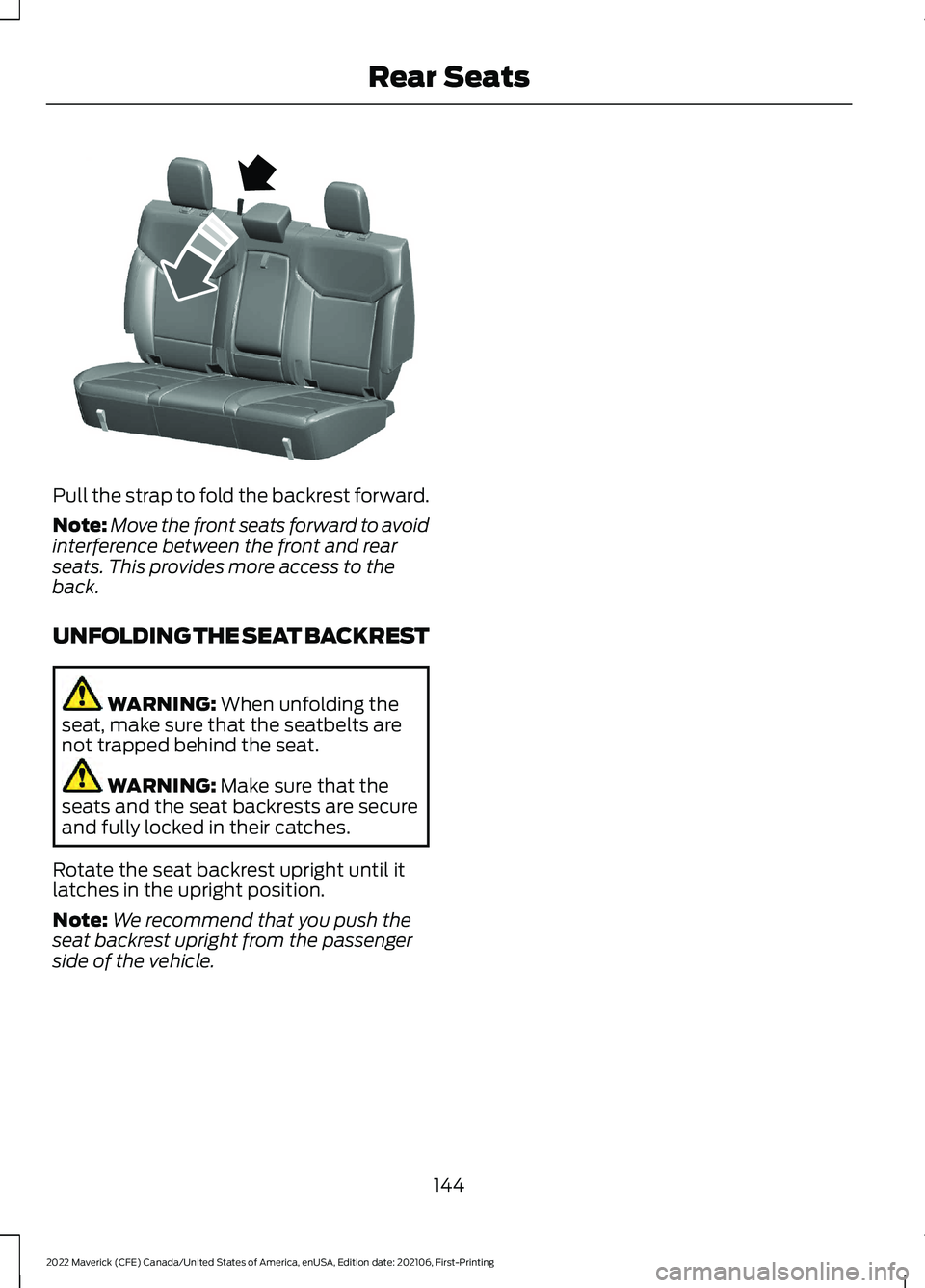
Pull the strap to fold the backrest forward.
Note:
Move the front seats forward to avoid
interference between the front and rear
seats. This provides more access to the
back.
UNFOLDING THE SEAT BACKREST WARNING: When unfolding the
seat, make sure that the seatbelts are
not trapped behind the seat. WARNING:
Make sure that the
seats and the seat backrests are secure
and fully locked in their catches.
Rotate the seat backrest upright until it
latches in the upright position.
Note: We recommend that you push the
seat backrest upright from the passenger
side of the vehicle.
144
2022 Maverick (CFE) Canada/United States of America, enUSA, Edition date: 202106, First-Printing Rear SeatsE350495