information display FORD MAVERICK 2022 User Guide
[x] Cancel search | Manufacturer: FORD, Model Year: 2022, Model line: MAVERICK, Model: FORD MAVERICK 2022Pages: 533, PDF Size: 9.58 MB
Page 77 of 533
Press the button to lock all
doors.
INDIVIDUALLY UNLOCKING AND
LOCKING THE DOORS USING THE
LOCKING BUTTON
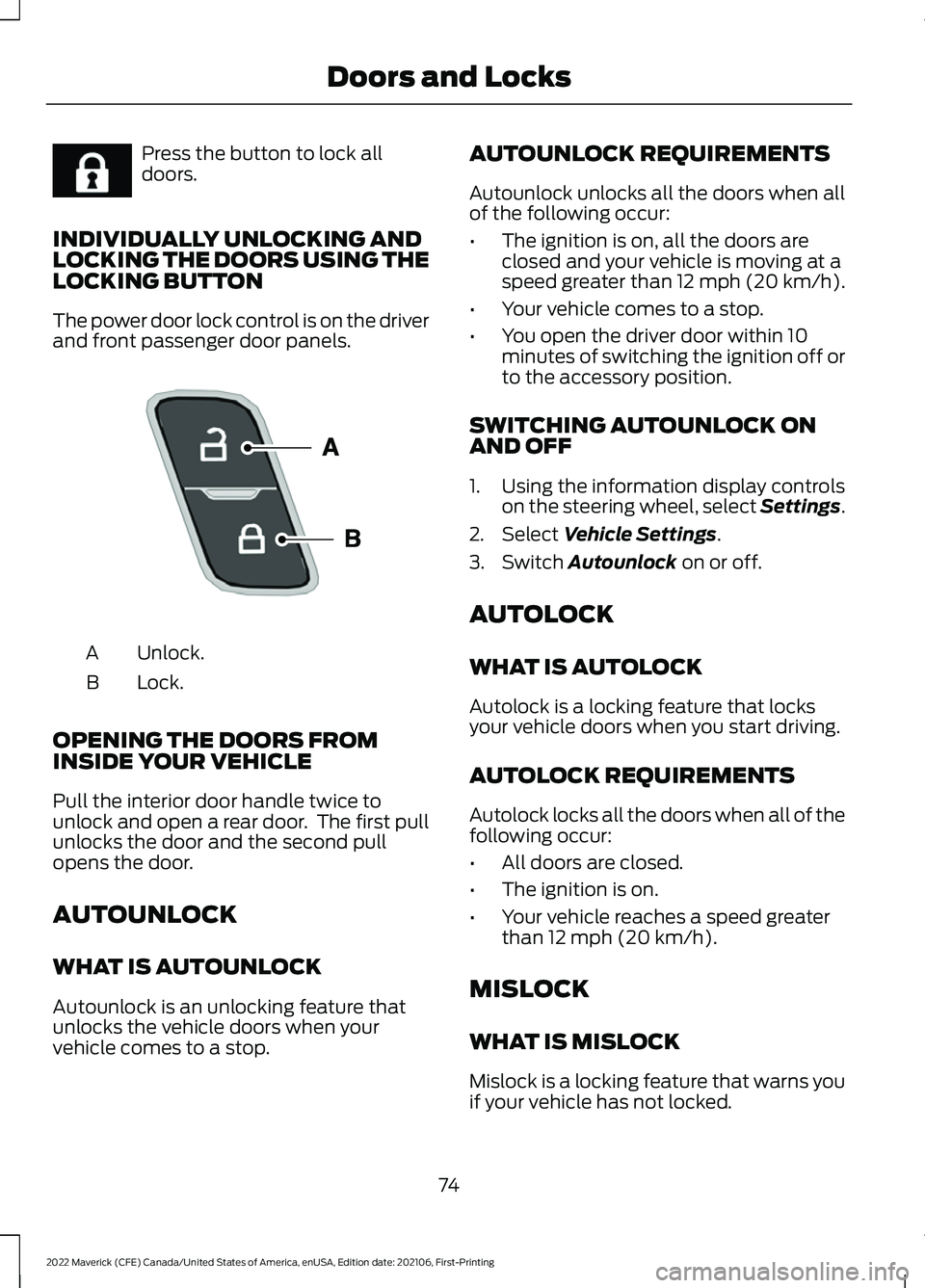
The power door lock control is on the driver
and front passenger door panels. Unlock.
A
Lock.
B
OPENING THE DOORS FROM
INSIDE YOUR VEHICLE
Pull the interior door handle twice to
unlock and open a rear door. The first pull
unlocks the door and the second pull
opens the door.
AUTOUNLOCK
WHAT IS AUTOUNLOCK
Autounlock is an unlocking feature that
unlocks the vehicle doors when your
vehicle comes to a stop. AUTOUNLOCK REQUIREMENTS
Autounlock unlocks all the doors when all
of the following occur:
•
The ignition is on, all the doors are
closed and your vehicle is moving at a
speed greater than 12 mph (20 km/h).
• Your vehicle comes to a stop.
• You open the driver door within 10
minutes of switching the ignition off or
to the accessory position.
SWITCHING AUTOUNLOCK ON
AND OFF
1. Using the information display controls on the steering wheel, select Settings.
2. Select Vehicle Settings.
3. Switch
Autounlock on or off.
AUTOLOCK
WHAT IS AUTOLOCK
Autolock is a locking feature that locks
your vehicle doors when you start driving.
AUTOLOCK REQUIREMENTS
Autolock locks all the doors when all of the
following occur:
• All doors are closed.
• The ignition is on.
• Your vehicle reaches a speed greater
than
12 mph (20 km/h).
MISLOCK
WHAT IS MISLOCK
Mislock is a locking feature that warns you
if your vehicle has not locked.
74
2022 Maverick (CFE) Canada/United States of America, enUSA, Edition date: 202106, First-Printing Doors and LocksE267111 E196954
Page 78 of 533
MISLOCK LIMITATIONS
When you press the lock button once, the
direction indicators do not flash if:
•
Any door or the liftgate is open.
• The hood is open.
When you press the lock button twice
within three seconds, the horn sounds if:
• Any door or the liftgate is open.
• The hood is open.
If you switch mislock off, the horn does not
sound if you press the lock button on the
remote control when a door is open.
SWITCHING MISLOCK ON AND
OFF
1. Using the information display controls on the steering wheel, select Settings.
2. Select Vehicle Settings. 3. Switch
Mislock Chirp on or off.
DOORS AND LOCKS AUDIBLE
WARNINGS
Door Ajar Audible Warning
Sounds when a door is not fully closed and
your vehicle is moving.
DOORS AND LOCKS –
TROUBLESHOOTING
DOORS AND LOCKS – WARNING
LAMPS
Door Ajar Warning Lamp It illuminates when you switch
the ignition on and remains on if
any door or the hood is open.
DOORS AND LOCKS – INFORMATION MESSAGES Action
Message
Displays if a door is open. Fully close the door.
Driver Door Ajar
Passenger Door Ajar
Rear Left Door Ajar
Rear Right Door Ajar
75
2022 Maverick (CFE) Canada/United States of America, enUSA, Edition date: 202106, First-Printing Doors and LocksE249859
Page 80 of 533
KEYLESS ENTRY LIMITATIONS
Make sure your remote control is within 3 ft
(1 m) from the front door handles and the
tailgate.
The system could not function if:
• The remote control remains stationary
for about a minute.
• The vehicle battery has no charge.
• The remote control battery has no
charge.
• There is interference causing issues
with the remote control frequencies.
• The remote control is too close to
metal objects or electronic devices, for
example keys or a cell phone.
KEYLESS ENTRY SETTINGS
Switching Keyless Entry On and
Off
1. Switch the ignition on using an original
key that has not been created as a
MyKey.
2. Using the information display controls on the steering wheel, select Settings.
3. Select
Vehicle Settings.
4. Select
Locks.
Reprogramming the Unlocking
Function
You can enable two-stage unlocking
function allowing you to unlock only the
driver door when you touch the unlock
sensor.
Press and hold both the lock and unlock
buttons on the remote control for four
seconds to disable or enable two-stage
unlocking. If you program the unlocking function so
that only the driver door unlocks, you can
unlock all of the other doors from inside
your vehicle using the power door lock
control. You can unlock individual doors
by pulling the interior door handles on
those doors.
USING KEYLESS ENTRY
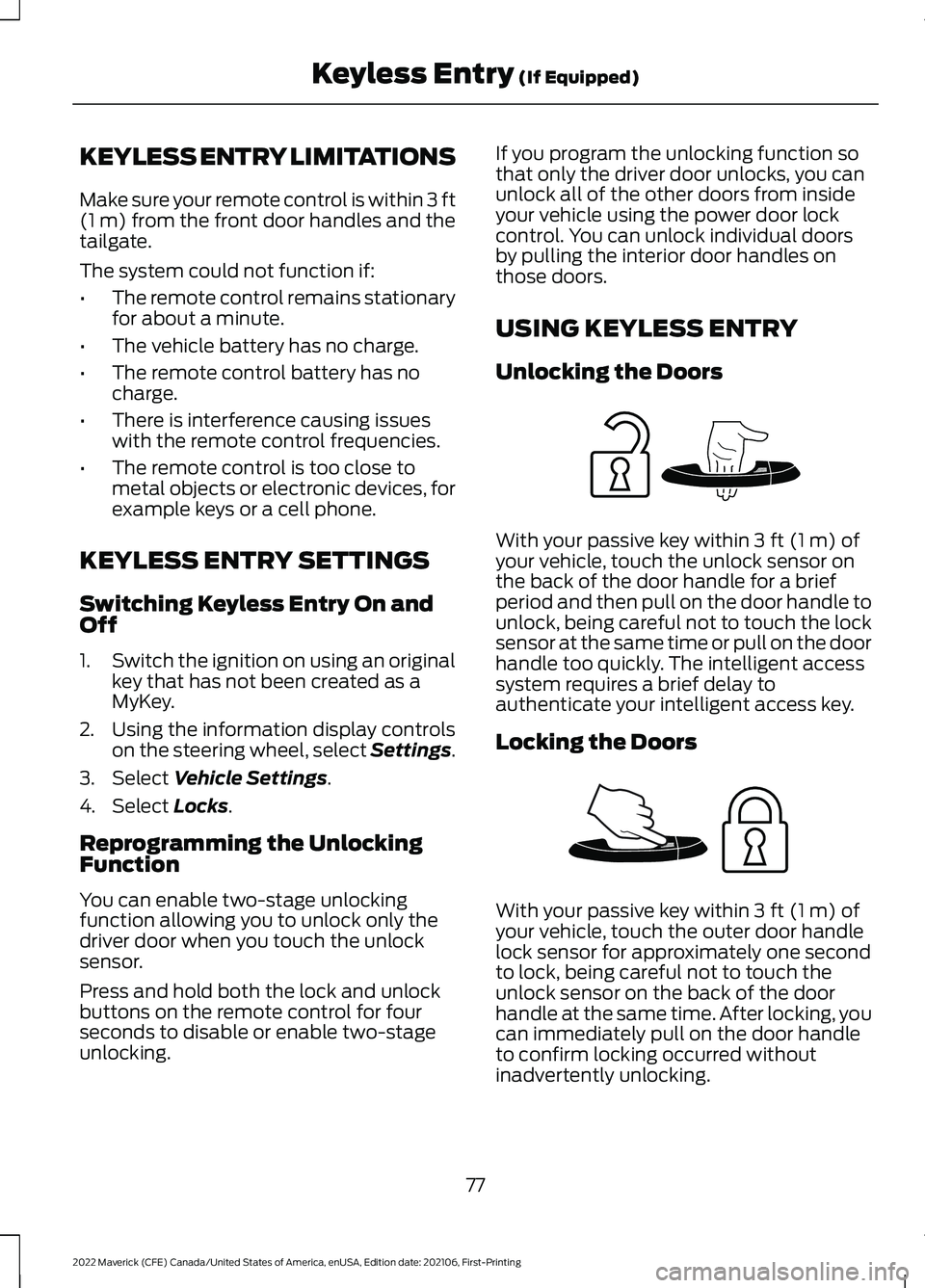
Unlocking the Doors
With your passive key within
3 ft (1 m) of
your vehicle, touch the unlock sensor on
the back of the door handle for a brief
period and then pull on the door handle to
unlock, being careful not to touch the lock
sensor at the same time or pull on the door
handle too quickly. The intelligent access
system requires a brief delay to
authenticate your intelligent access key.
Locking the Doors With your passive key within
3 ft (1 m) of
your vehicle, touch the outer door handle
lock sensor for approximately one second
to lock, being careful not to touch the
unlock sensor on the back of the door
handle at the same time. After locking, you
can immediately pull on the door handle
to confirm locking occurred without
inadvertently unlocking.
77
2022 Maverick (CFE) Canada/United States of America, enUSA, Edition date: 202106, First-Printing Keyless Entry
(If Equipped)E248553 E248554
Page 90 of 533
SECURITY – TROUBLESHOOTING
SECURITY – INFORMATION MESSAGES
Action
Message
The system has not detected a correctly coded key.
No Key Detected
The system has malfunctioned. Have your vehicle checked
as soon as possible.
Starting System Fault
Displays when the alarm has been triggered due to unauthor-
ized entry.
Vehicle Alarm To Stop
Alarm, Start Vehicle.
Alarm Announcement
87
2022 Maverick (CFE) Canada/United States of America, enUSA, Edition date: 202106, First-Printing Security
Page 112 of 533
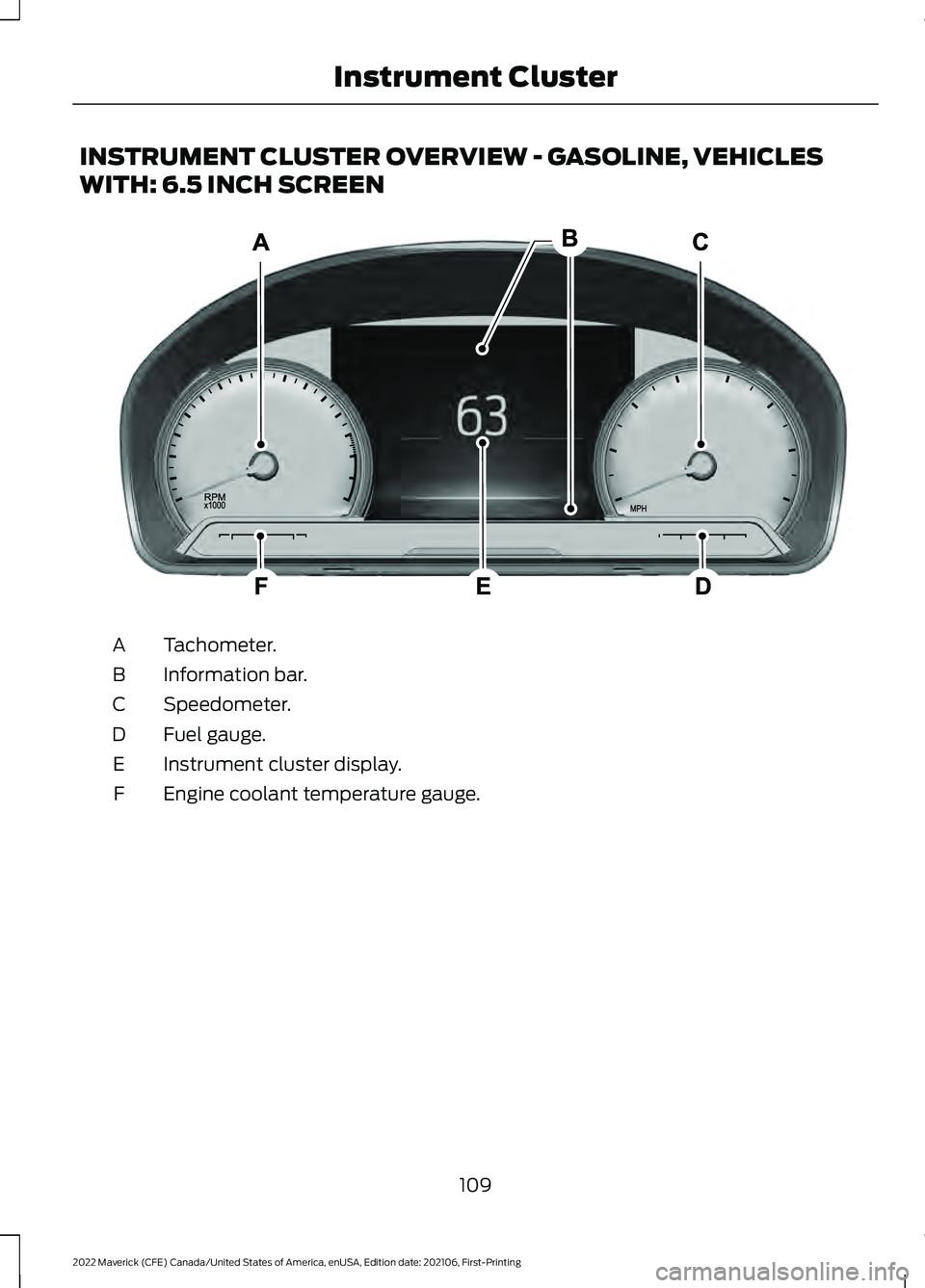
INSTRUMENT CLUSTER OVERVIEW - GASOLINE, VEHICLES
WITH: 6.5 INCH SCREEN
Tachometer.
A
Information bar.
B
Speedometer.
C
Fuel gauge.
D
Instrument cluster display.
E
Engine coolant temperature gauge.
F
109
2022 Maverick (CFE) Canada/United States of America, enUSA, Edition date: 202106, First-Printing Instrument ClusterE282067
Page 114 of 533
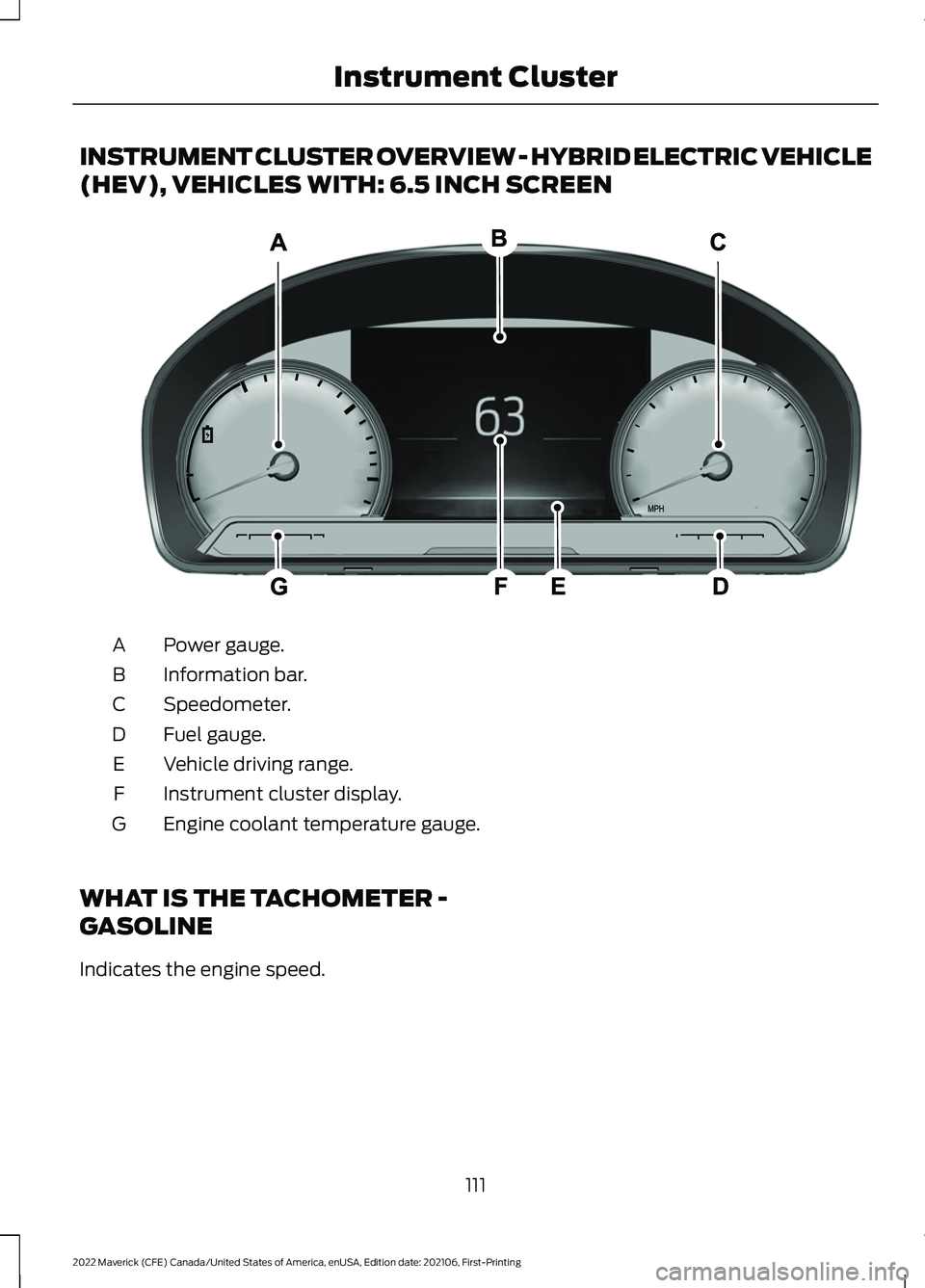
INSTRUMENT CLUSTER OVERVIEW - HYBRID ELECTRIC VEHICLE
(HEV), VEHICLES WITH: 6.5 INCH SCREEN
Power gauge.
A
Information bar.
B
Speedometer.
C
Fuel gauge.
D
Vehicle driving range.
E
Instrument cluster display.
F
Engine coolant temperature gauge.
G
WHAT IS THE TACHOMETER -
GASOLINE
Indicates the engine speed.
111
2022 Maverick (CFE) Canada/United States of America, enUSA, Edition date: 202106, First-Printing Instrument ClusterE354647
Page 115 of 533
WHAT IS THE POWER GAUGE
- HYBRID ELECTRIC VEHICLE
(HEV)
The power gauge displays power to the
wheels when accelerating or maintaining
speed. When slowing down by lifting your
foot off the accelerator pedal or pressing
the brake, the gauge displays the power
captured by the regenerative braking
system and returned to the high voltage
battery.
WHAT IS THE SPEEDOMETER
Indicates the vehicle speed.
FUEL GAUGE
WHAT IS THE FUEL GAUGE
Indicates approximately how much fuel is
in the fuel tank.
FUEL GAUGE LIMITATIONS
The fuel gauge may not provide an
accurate reading when your vehicle is on
an incline.
LOCATING THE FUEL FILLER
DOOR
The arrow adjacent to the fuel pump
symbol indicates on which side of your
vehicle the fuel filler door is located.
WHAT IS THE LOW FUEL
REMINDER
A low fuel level reminder displays and
sounds when the distance to empty
reaches 75 mi (120 km) to empty for
MyKey, and at 50 mi (80 km), 25 mi
(40 km), 12 mi (20 km) and 0 mi (0 km)
for all vehicle keys.
Note: The low fuel reminder can appear at
different fuel gauge positions depending on
fuel economy conditions. This variation is
normal.
WHAT IS DISTANCE TO EMPTY -
GASOLINE, HYBRID ELECTRIC
VEHICLE (HEV)
Indicates the approximate distance your
vehicle can travel on the fuel remaining in
the tank. Changes in driving pattern can
cause the value to not only decrease but
also increase or stay constant for periods
of time.
WHAT IS THE ENGINE
COOLANT TEMPERATURE
GAUGE
Indicates the engine coolant temperature.
WHAT IS THE INFORMATION
BAR
The information bar displays information
related to the ambient air temperature,
odometer, compass, indicators and
warning lamps.
112
2022 Maverick (CFE) Canada/United States of America, enUSA, Edition date: 202106, First-Printing Instrument Cluster
Page 116 of 533
WHAT ARE THE INSTRUMENT
CLUSTER WARNING LAMPS
Warning lamps alert you to a vehicle
condition that could become serious.
Some lamps illuminate when you start
your vehicle to make sure they work. If any
lamps remain on after starting your vehicle,
refer to the respective system warning
lamp for further information.
INSTRUMENT CLUSTER
WARNING LAMPS
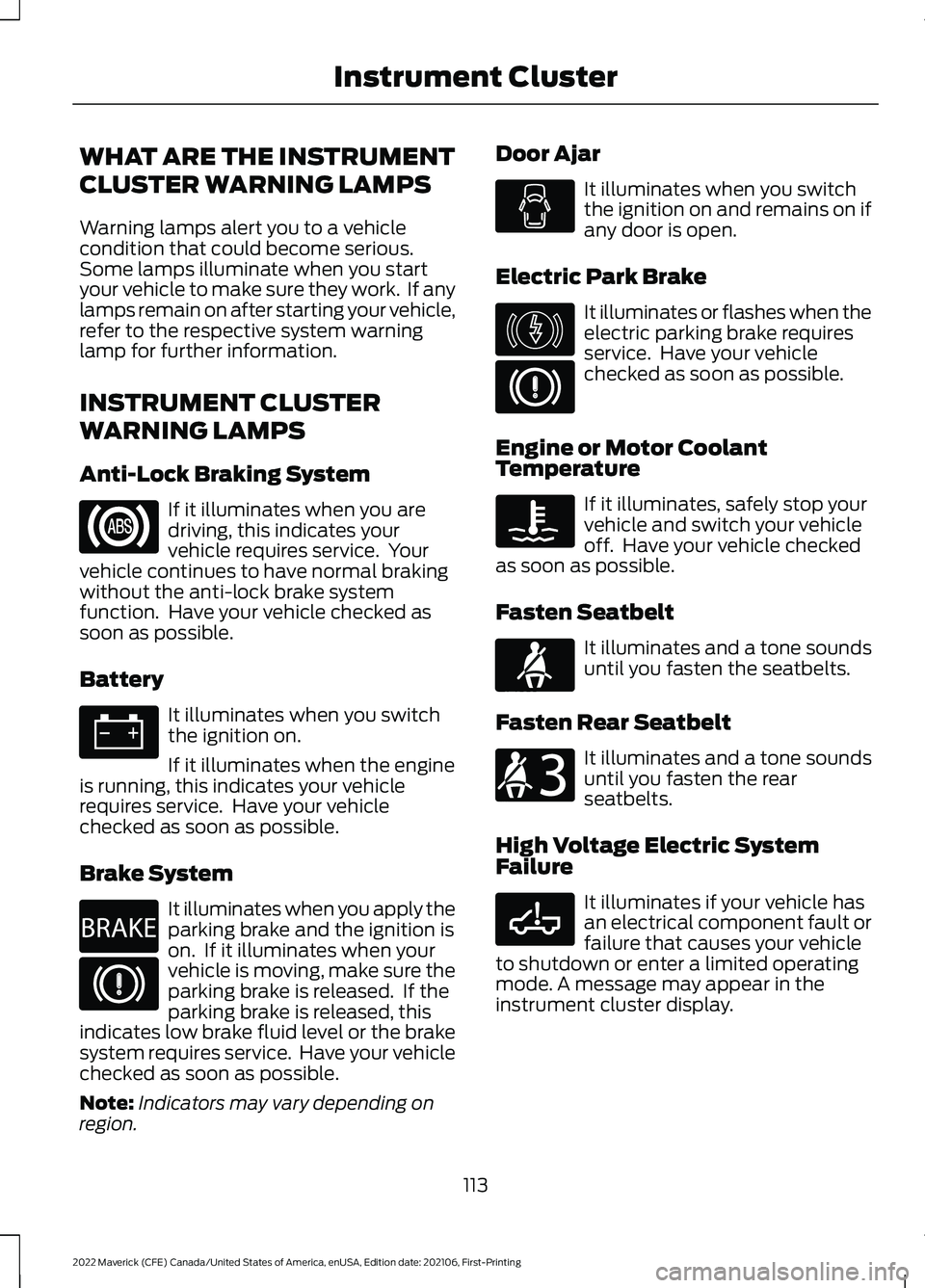
Anti-Lock Braking System
If it illuminates when you are
driving, this indicates your
vehicle requires service. Your
vehicle continues to have normal braking
without the anti-lock brake system
function. Have your vehicle checked as
soon as possible.
Battery It illuminates when you switch
the ignition on.
If it illuminates when the engine
is running, this indicates your vehicle
requires service. Have your vehicle
checked as soon as possible.
Brake System It illuminates when you apply the
parking brake and the ignition is
on. If it illuminates when your
vehicle is moving, make sure the
parking brake is released. If the
parking brake is released, this
indicates low brake fluid level or the brake
system requires service. Have your vehicle
checked as soon as possible.
Note: Indicators may vary depending on
region. Door Ajar It illuminates when you switch
the ignition on and remains on if
any door is open.
Electric Park Brake It illuminates or flashes when the
electric parking brake requires
service. Have your vehicle
checked as soon as possible.
Engine or Motor Coolant
Temperature If it illuminates, safely stop your
vehicle and switch your vehicle
off. Have your vehicle checked
as soon as possible.
Fasten Seatbelt It illuminates and a tone sounds
until you fasten the seatbelts.
Fasten Rear Seatbelt It illuminates and a tone sounds
until you fasten the rear
seatbelts.
High Voltage Electric System
Failure It illuminates if your vehicle has
an electrical component fault or
failure that causes your vehicle
to shutdown or enter a limited operating
mode. A message may appear in the
instrument cluster display.
113
2022 Maverick (CFE) Canada/United States of America, enUSA, Edition date: 202106, First-Printing Instrument Cluster E270480 E146190 E71880 E206718 E332963
Page 120 of 533
INSTRUMENT CLUSTER
DISPLAY MAIN MENU -
VEHICLES WITH: 6.5 INCH
SCREEN
Menu Item
Select Screens Audio
Phone
Settings
Display Setup
CUSTOMIZING THE
INSTRUMENT CLUSTER
DISPLAY - VEHICLES WITH: 4.2
INCH SCREEN
1. Using the information display controls on the steering wheel, select MyView.
2. Press the menu button.
3. Select a screen.
4. Press the
OK button.
CUSTOMIZING THE
INSTRUMENT CLUSTER
DISPLAY - VEHICLES WITH: 6.5
INCH SCREEN
Adding Screens Using Select
Screens
You can select various screens to show on
the instrument cluster display.
1. Select
Select Screens.
2. Use the controls on the steering wheel
to highlight a screen to add.
3. Press the
OK button. Note:
The amount of screens you can add
is limited. If the selected screen does not
appear, you must deselect items from the
menu. Select Screens
Calm screen
Fuel economy Trip 1
Trip 2
This trip
EV Coach
Tire pressure
Intelligent AWD Off-Road
Trailer light check Seatbelts
Auto StartStop Now playing
Note: Some options may appear slightly
different or not at all if items are optional.
Configuring Gauges
You can select which values your
speedometer shows in the instrument
cluster display.
1. Select
Display Setup.
2. Select a speed unit to display.
117
2022 Maverick (CFE) Canada/United States of America, enUSA, Edition date: 202106, First-Printing Instrument Cluster Display
Page 123 of 533
WHAT IS BRAKE COACH -
HYBRID ELECTRIC VEHICLE
(HEV)
The brake coach appears after your vehicle
has come to a stop. It coaches you to brake
in a manner that maximizes the amount
of energy returned through the
regenerative braking system.
The percent displayed is an indication of
the regenerative braking efficiency with
100% representing the maximum amount
of energy recovered. You can switch brake
coach on or off in the settings menu. See
Instrument Cluster Display Main Menu
(page 117).
WHAT IS THE TRIP SUMMARY
- HYBRID ELECTRIC VEHICLE
(HEV)
The trip summary displays upon shutting
off your vehicle. The values are cumulative
since you last started your vehicle.
The information shown is the same as the
This Trip screen. See
Trip Data (page 121).
120
2022 Maverick (CFE) Canada/United States of America, enUSA, Edition date: 202106, First-Printing Instrument Cluster Display