information display FORD MAVERICK 2022 Workshop Manual
[x] Cancel search | Manufacturer: FORD, Model Year: 2022, Model line: MAVERICK, Model: FORD MAVERICK 2022Pages: 533, PDF Size: 9.58 MB
Page 251 of 533
After you turn the steering wheel in an
attempt to avoid a crash with the road
user, the system applies additional steering
torque to help you steer around the road
user. After you pass the road user, the
system applies steering torque when you
turn the steering wheel to steer back into
the lane. The system deactivates after you
fully pass the road user.
Note:
Road users are defined as another
stationary vehicle in the same lane or a
vehicle traveling in the same lane in the
same direction as you. See Pre-Collision
Assist Precautions (page 243).
EVASIVE STEERING ASSIST
LIMITATIONS
Evasive steering assist only activates when
all the following occur:
• Automatic emergency braking and
evasive steering assist are on.
• The system detects a road user ahead
and starts to apply the brakes.
• You significantly turn the steering
wheel to steer around a road user. Note:
Evasive steering assist does not
automatically steer around a road user. If
you do not turn the steering wheel, evasive
steering assist does not activate.
Note: Evasive steering assist does not
activate if the distance to the road user
ahead is too small and the system cannot
avoid a crash.
Note: Evasive steering does not activate
with cyclists or pedestrians.
SWITCHING EVASIVE STEERING
ASSIST ON AND OFF
To switch the system on or off, use the
instrument cluster display:
1. Select
Settings.
2. Select
Driver Assistance.
3. Select
Pre-Collision Assist.
4. Switch
Evasive steering on or off.
Note: If you switch automatic emergency
braking off, evasive steering assist turns off.
Note: Automatic emergency braking and
evasive steering assist turn on every time
you switch the ignition on.
PRE-COLLISION ASSIST – TROUBLESHOOTING
PRE-COLLISION ASSIST – INFORMATION MESSAGES Action
Message
You have a blocked sensor due to bad
weather, ice, mud or water in front of the radar sensor. You can typically clean the sensor to resolve.
Pre-Collision Assist Not Available Sensor
Blocked
A fault with the system has occurred. Haveyour vehicle checked as soon as possible.
Pre-Collision Assist Not Available
248
2022 Maverick (CFE) Canada/United States of America, enUSA, Edition date: 202106, First-Printing Pre-Collision Assist
Page 254 of 533
SWITCHING DRIVER ALERT ON
AND OFF
To switch the system on or off, use the
instrument cluster display:
1. Select Settings.
2. Select
Driver Assistance.
3. Switch
Driver Alert on or off.
Note: The system remains on or off
depending on how it was last set.
Resetting Driver Alert
You can reset the system by either:
• Switching the ignition off and on.
• Stopping the vehicle and then opening
and closing the driver door. DRIVER ALERT INDICATORS
System Warnings
The warning system has two stages:
1.
A temporary warning is issued to advise
you to take a rest. This message only
appears for a short time.
2. If you do not rest and the system continues to detect that your driving
deteriorates, it issues a further warning.
This remains in the instrument cluster
display until you cancel it.
Note: The system does not warn you if the
vehicle speed falls below approximately
40 mph (65 km/h)
.
DRIVER ALERT – TROUBLESHOOTING
DRIVER ALERT – INFORMATION MESSAGES Action
Message
Stop and rest as soon as it is safe to do so.
Driver Alert Warning Rest Now
Take a rest soon.
Driver Alert Warning Rest Suggested
251
2022 Maverick (CFE) Canada/United States of America, enUSA, Edition date: 202106, First-Printing Driver Alert
Page 271 of 533
WHAT IS THE INTEGRATED
TRAILER BRAKE CONTROLLER
The trailer brake controller assists in
smooth and effective trailer braking based
on the towing vehicle
’s brake pressure.
INTEGRATED TRAILER BRAKE
CONTROLLER PRECAUTIONS WARNING: Use the integrated
trailer brake controller to properly adjust
the trailer brakes and check all
connections before towing a trailer.
Failure to follow this instruction could
result in the loss of control of your
vehicle, personal injury or death.
• Only use the manual control lever for
proper adjustment of the gain during
trailer setup. Misuse, such as
application during trailer sway, could
cause instability of trailer or tow
vehicle.
• Avoid towing in adverse weather
conditions. The trailer brake controller
does not provide anti-lock control of
the trailer wheels. Trailer wheels can
lock up on slippery surfaces, resulting
in reduced stability of trailer and tow
vehicle.
• The trailer brake controller is only a
factory-installed or dealer-installed
item. Ford is not responsible for
warranty or performance of the
controller due to misuse or customer
installation.
Note: Do not attempt removal of the trailer
brake controller without consulting the
Workshop Manual. Damage to the unit may
result. USING THE INTEGRATED
TRAILER BRAKE CONTROLLER
1.
Make sure the trailer brakes are in good
working condition, functioning normally
and properly adjusted. See your trailer
dealer if necessary.
Note: An authorized dealer can diagnose
the trailer brake controller to determine
exactly which trailer fault has occurred. Your
vehicle warranty does not cover issues with
your trailer.
2. Hook up the trailer and make the electrical connections according to the
trailer manufacturer's instructions.
Note: Select default mode if the trailer has
surge brakes, or no brakes at all. The system
has no effect on the braking performance
of the trailer in either of these cases.
Note: If a trailer is connected by a four-pin
connector, the trailer braking function will
not be supported.
3. When you plug in a trailer with electric or electric-over-hydraulic brakes, a
message confirming connection
appears in the information display.
4. Use the gain adjustment to find the desired starting point. A gain setting of
6.0 is a good starting point for heavier
loads.
Note: Use the following steps to adjust the
gain setting whenever road, weather and
trailer, or vehicle loading conditions, change
from when you initially set the gain.
5. In a traffic-free environment, tow the trailer on a dry, level surface and
squeeze the manual control lever
completely.
268
2022 Maverick (CFE) Canada/United States of America, enUSA, Edition date: 202106, First-Printing Integrated Trailer Brake Controller
(If Equipped)
Page 273 of 533
Selecting the Trailer Brake Type
Use the instrument cluster display controls
on the steering wheel to select the correct
setting for your trailer.
Note:
Select Default
Electric/Surge/None if the trailer has
electric, surge or no brakes. Selecting the Trailer Brake Effort
Select the correct setting for your trailer.
Note:
Select a different setting if your
trailer's brakes require more initial voltage,
or you prefer more aggressive trailer braking.
INTEGRATED TRAILER BRAKE CONTROLLER –
TROUBLESHOOTING
INTEGRATED TRAILER BRAKE CONTROLLER – INFORMATION
MESSAGES Details
Message
The system detects the trailer wiring
connection is disconnected, during a given ignition cycle.
Trailer Disconnected
The system detects an electrical fault inthe trailer brake circuit. If this message
appears without a trailer attached, see your authorized dealer. If a trailer is attached, inspect and repair the trailer wiring.
Trailer Wiring Fault
Displays the current gain setting for thetrailer brake.
Trailer Brake Gain: {trailer gain value:#0.0}
Displays the current gain setting for the
trailer brake when you do not have a trailer connected.
Trailer Brake Gain: {trailer gain value:#0.0}
No Trailer
270
2022 Maverick (CFE) Canada/United States of America, enUSA, Edition date: 202106, First-Printing Integrated Trailer Brake Controller
(If Equipped)
Page 275 of 533
HOW DOES TRAILER SWAY
CONTROL WORK
The system applies the brakes to the
individual wheels and reduces engine
torque to aid vehicle stability.
If the trailer begins to sway, the stability
control lamp flashes and the message
Trailer Sway Reduce Speed appears in
the information display.
Stop your vehicle as soon as it is safe to
do so. Check the vertical weight on the
tow ball and trailer load distribution.
TRAILER SWAY CONTROL
PRECAUTIONS WARNING: Turning off trailer sway
control increases the risk of loss of
vehicle control, serious injury or death.
Ford does not recommend disabling this
feature except in situations where speed
reduction may be detrimental (such as
hill climbing), the driver has significant
trailer towing experience, and can control
trailer sway and maintain safe operation.
Note: This feature only activates when
significant trailer sway occurs.
Note: This feature does not prevent trailer
sway, but reduces it once it begins.
Note: This feature cannot stop all trailers
from swaying.
Note: In some cases, if vehicle speed is too
high, the system may activate multiple
times, gradually reducing vehicle speed. SWITCHING TRAILER SWAY
CONTROL ON AND OFF
1. Using the instrument cluster display
controls on the steering wheel, select
Settings
.
2. Switch
Trailer Sway Control on or off.
The system turns on each time you start
your vehicle.
272
2022 Maverick (CFE) Canada/United States of America, enUSA, Edition date: 202106, First-Printing Trailer Sway Control
Page 290 of 533
TOWING YOUR VEHICLE
PRECAUTIONS
Use the following guidelines when towing
your vehicle. Failure to follow this
instruction could result in vehicle damage
not covered by the vehicle warranty.
Note:
Make sure you properly secure your
vehicle to the tow vehicle.
Note: If you are unsure of the vehicle ’s
configuration, contact an authorized dealer.
RECREATIONALLY TOWING
YOUR VEHICLE - GASOLINE,
FWD
You cannot recreational tow your vehicle
with all wheels on the ground because
vehicle or transmission damage could
occur. Place the front wheels on a
two-wheel tow dolly. If you are using a tow
dolly, follow the instructions specified by
the equipment provider.
Note: Release the parking brake before
towing your vehicle. See Manually
Releasing the Electric Parking Brake
(page
194).
RECREATIONALLY TOWING
YOUR VEHICLE - GASOLINE,
AWD
You cannot recreational tow your vehicle
with all wheels on the ground because
vehicle or transmission damage could
occur. You must recreational tow your
vehicle with all four wheels off the ground,
such as when using a car-hauling trailer.
Otherwise, you cannot recreational tow
your vehicle. RECREATIONALLY TOWING
YOUR VEHICLE - HYBRID
ELECTRIC VEHICLE (HEV)
Follow these guidelines if you have a need
for recreational towing. An example of
recreational towing is towing your vehicle
behind a motorhome. These guidelines
ensure that you do not damage the
transmission.
Note:
Put your climate control system in
recirculated air mode to prevent exhaust
fumes from entering your vehicle. See
Climate Control
(page 126).
You can tow your vehicle with all four
wheels on the ground under the following
conditions:
• You switch
Neutral Tow on.
• Your vehicle is facing forward for
towing in a forward direction.
• You release the parking brake.
• You do not exceed 70 mph (113 km/h).
Switching
Neutral Tow On
1. Switch your vehicle on in accessory mode.
2. Press the menu button on the steering
wheel to enter the information display
main menu.
3. Select
Settings.
4. Select
Neutral Tow.
5. Follow the instructions on the information display.
6. Fully press the brake pedal.
7. Shift into neutral (N).
8. Switch the ignition off.
Note: Switching neutral tow on requires
battery power.
Note: If the parking brake is applied, a
message appears in the information display.
287
2022 Maverick (CFE) Canada/United States of America, enUSA, Edition date: 202106, First-Printing Towing Your Vehicle
Page 291 of 533
Note:
If your vehicle has an ignition key, you
cannot remove the key from the ignition
when the transmission is in neutral (N) and
your vehicle is off.
Note: Start the engine and allow it to run
for a few minutes at the beginning of each
day, and every six hours or fewer. With the
engine running and your foot on the brake,
shift into drive (D) and then into reverse (R)
before shifting back into neutral (N). Before
continuing to tow, switch neutral tow on.
EMERGENCY TOWING -
GASOLINE
If your vehicle becomes inoperable without
access to wheel dollies or a vehicle
transport trailer, it can be flat-towed with
all wheels on the ground, regardless of the
powertrain and transmission configuration,
under the following conditions:
• Your vehicle is facing forward for
towing in a forward direction.
• Use the manual park release
procedure. See Using Manual Park
Release (page 186). Failure to do so
may result in damage to the
transmission.
• Maximum speed is 35 mph (56 km/h).
• Maximum distance is
50 mi (80 km). EMERGENCY TOWING -
HYBRID ELECTRIC VEHICLE
(HEV)
If your vehicle becomes inoperable without
access to wheel dollies or a vehicle
transport trailer, it can be flat-towed with
all wheels on the ground, regardless of the
powertrain and transmission configuration,
under the following conditions:
•
Your vehicle is facing forward for
towing in a forward direction.
• You switch
Neutral Tow on.
• You release the parking brake.
• Maximum speed is 35 mph (55 km/h).
• Maximum distance is
50 mi (80 km).
Switching
Neutral Tow On
1. Switch your vehicle on in accessory mode.
2. Press the menu button on the steering
wheel to enter the instrument cluster
display main menu.
3. Select
Settings.
4. Select
Neutral Tow.
5. Follow the instructions on the information display.
6. Fully press the brake pedal.
7. Shift into neutral (N).
8. Switch the ignition off.
Note: Failure to follow these instructions
could result in damage to the transmission.
Note: Switching neutral tow on requires
battery power.
Note: Put your climate control system in
recirculated air mode to prevent exhaust
fumes from entering your vehicle. See
Climate Control
(page 126).
288
2022 Maverick (CFE) Canada/United States of America, enUSA, Edition date: 202106, First-Printing Towing Your Vehicle
Page 292 of 533
Switching Neutral Tow Off
1. Switch your vehicle on in accessory mode. 2. Fully press the brake pedal.
3. Shift into park (P).
TOWING YOUR VEHICLE – TROUBLESHOOTING - HYBRID
ELECTRIC VEHICLE (HEV)
TOWING YOUR VEHICLE – INFORMATION MESSAGES Description
Message
Reminder to switch off the ignition when in neutral tow.
Neutral Tow Engaged
Turn Ignition Off for Towing
Displays when neutral tow is active and you want to exit neutral tow.
Neutral tow engaged
Depress Brake and Select Park to Exit Neutral Tow
Reminder to remove park brake when in neutral tow.
Neutral Tow Remove
Park Brake for Towing
Displays when the neutral tow is off.
Neutral Tow Disengaged
Displays when neutral tow is on.
Neutral Tow Enabled
Leave Transmission in Neutral
289
2022 Maverick (CFE) Canada/United States of America, enUSA, Edition date: 202106, First-Printing Towing Your Vehicle
Page 306 of 533
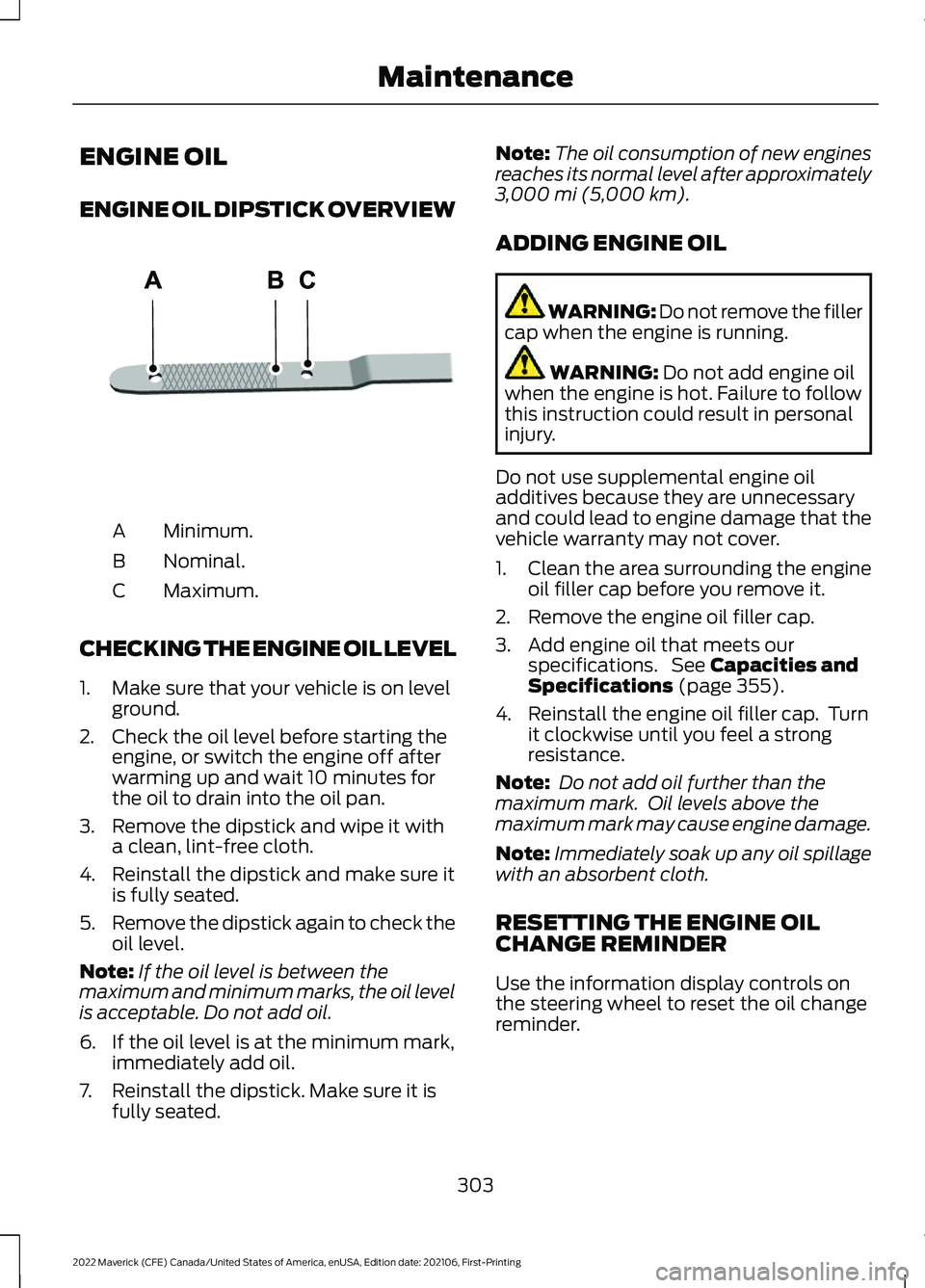
ENGINE OIL
ENGINE OIL DIPSTICK OVERVIEW
Minimum.
A
Nominal.
B
Maximum.
C
CHECKING THE ENGINE OIL LEVEL
1. Make sure that your vehicle is on level ground.
2. Check the oil level before starting the engine, or switch the engine off after
warming up and wait 10 minutes for
the oil to drain into the oil pan.
3. Remove the dipstick and wipe it with a clean, lint-free cloth.
4. Reinstall the dipstick and make sure it is fully seated.
5. Remove the dipstick again to check the
oil level.
Note: If the oil level is between the
maximum and minimum marks, the oil level
is acceptable. Do not add oil.
6. If the oil level is at the minimum mark, immediately add oil.
7. Reinstall the dipstick. Make sure it is fully seated. Note:
The oil consumption of new engines
reaches its normal level after approximately
3,000 mi (5,000 km).
ADDING ENGINE OIL WARNING: Do not remove the filler
cap when the engine is running. WARNING:
Do not add engine oil
when the engine is hot. Failure to follow
this instruction could result in personal
injury.
Do not use supplemental engine oil
additives because they are unnecessary
and could lead to engine damage that the
vehicle warranty may not cover.
1. Clean the area surrounding the engine oil filler cap before you remove it.
2. Remove the engine oil filler cap.
3. Add engine oil that meets our specifications. See
Capacities and
Specifications (page 355).
4. Reinstall the engine oil filler cap. Turn it clockwise until you feel a strong
resistance.
Note: Do not add oil further than the
maximum mark. Oil levels above the
maximum mark may cause engine damage.
Note: Immediately soak up any oil spillage
with an absorbent cloth.
RESETTING THE ENGINE OIL
CHANGE REMINDER
Use the information display controls on
the steering wheel to reset the oil change
reminder.
303
2022 Maverick (CFE) Canada/United States of America, enUSA, Edition date: 202106, First-Printing MaintenanceE250320
Page 307 of 533
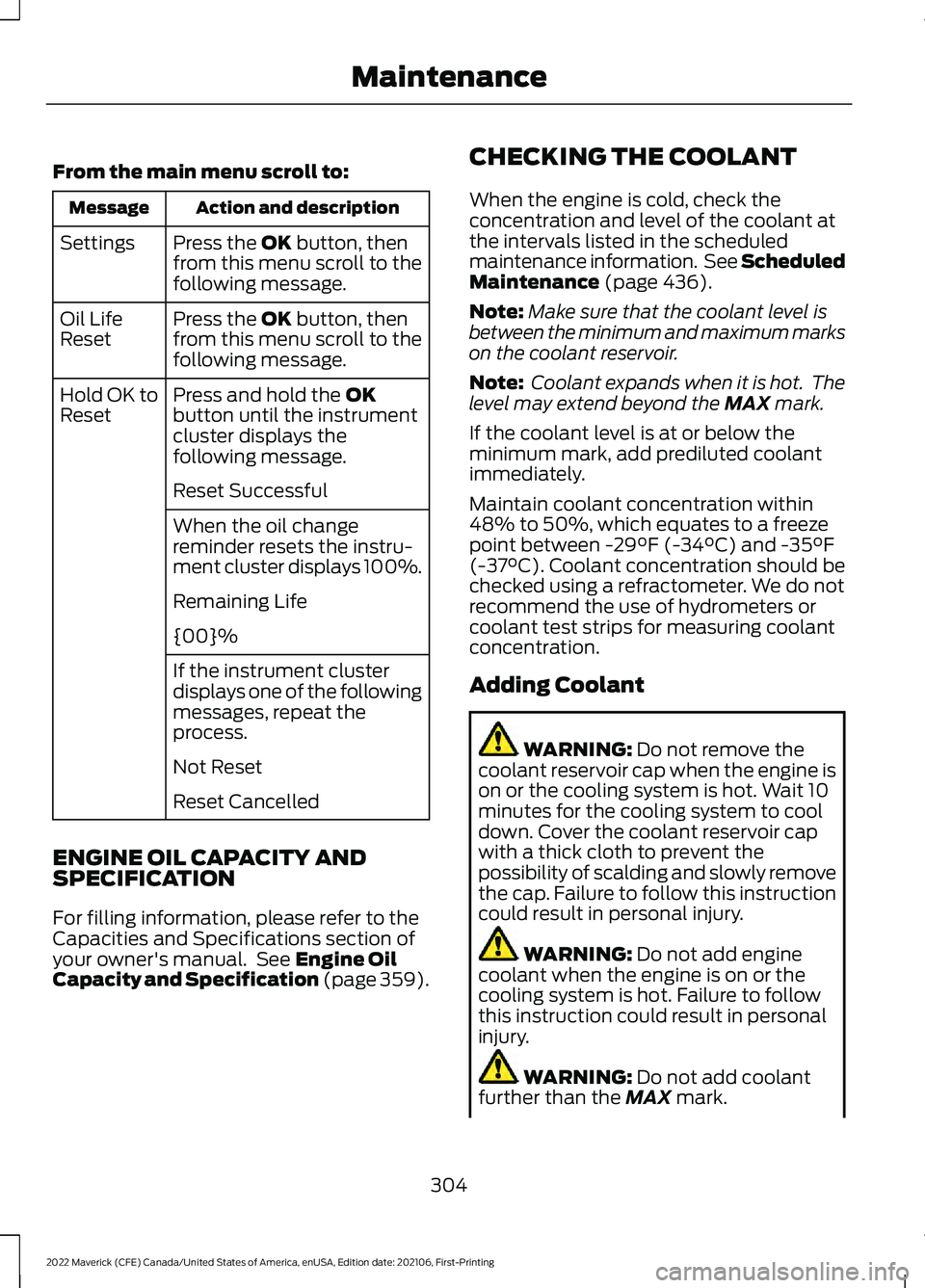
From the main menu scroll to:
Action and description
Message
Press the OK button, then
from this menu scroll to the
following message.
Settings
Press the
OK button, then
from this menu scroll to the
following message.
Oil Life
Reset
Press and hold the
OK
button until the instrument
cluster displays the
following message.
Hold OK to
Reset
Reset Successful
When the oil change
reminder resets the instru-
ment cluster displays 100%.
Remaining Life
{00}%
If the instrument cluster
displays one of the following
messages, repeat the
process.
Not Reset
Reset Cancelled
ENGINE OIL CAPACITY AND
SPECIFICATION
For filling information, please refer to the
Capacities and Specifications section of
your owner's manual. See
Engine Oil
Capacity and Specification (page 359). CHECKING THE COOLANT
When the engine is cold, check the
concentration and level of the coolant at
the intervals listed in the scheduled
maintenance information. See Scheduled
Maintenance
(page 436).
Note: Make sure that the coolant level is
between the minimum and maximum marks
on the coolant reservoir.
Note: Coolant expands when it is hot. The
level may extend beyond the
MAX mark.
If the coolant level is at or below the
minimum mark, add prediluted coolant
immediately.
Maintain coolant concentration within
48% to 50%, which equates to a freeze
point between
-29°F (-34°C) and -35°F
(-37°C). Coolant concentration should be
checked using a refractometer. We do not
recommend the use of hydrometers or
coolant test strips for measuring coolant
concentration.
Adding Coolant WARNING:
Do not remove the
coolant reservoir cap when the engine is
on or the cooling system is hot. Wait 10
minutes for the cooling system to cool
down. Cover the coolant reservoir cap
with a thick cloth to prevent the
possibility of scalding and slowly remove
the cap. Failure to follow this instruction
could result in personal injury. WARNING:
Do not add engine
coolant when the engine is on or the
cooling system is hot. Failure to follow
this instruction could result in personal
injury. WARNING:
Do not add coolant
further than the MAX mark.
304
2022 Maverick (CFE) Canada/United States of America, enUSA, Edition date: 202106, First-Printing Maintenance