instrument panel FORD MAVERICK 2022 User Guide
[x] Cancel search | Manufacturer: FORD, Model Year: 2022, Model line: MAVERICK, Model: FORD MAVERICK 2022Pages: 533, PDF Size: 9.58 MB
Page 135 of 533
AUTO MODE INDICATORS
The indicators are on the Auto Mode
button. Description
Auto Mode Indicator
Status
The blower motor speed is reduced. Use this setting to
minimize the amount of noise from the blower motor. This
setting increases the time taken to cool the interior.
One indicator illumin-
ated.
The blower motor speed is moderate.
Two indicators illumin-
ated.
The blower motor speed is increased. Use this setting to
reduce the time taken to cool the interior. This setting
increases the amount of noise from the blower motor.
Three indicators illumin-
ated.
CLIMATE CONTROL –
TROUBLESHOOTING
CLIMATE CONTROL –
FREQUENTLY ASKED QUESTIONS
Why is the volume of air to the rear
passenger compartment limited ? Objects may obstruct the air direction
to the rear passenger compartment.
Make sure objects have not been
placed under the front seats.
Why is the volume of air from the air
vents reduced? The air intake area at the base of the
windshield could be obstructed. Make
sure the air intake area is free from any
snow, ice or leaves.
What are the recommended settings
for heating the interior? Auto mode on and instrument panel
and side air vents fully open. How can I quickly heat the interior?
Select the highest blower motor
speed, highest temperature and direct
the air to the footwell air vents.
What are the recommended settings
for cooling the interior? Auto mode on.
How can I quickly cool the interior? Switch maximum cooling on, switch
recirculated air on and drive with the
windows open until you feel cold air
through the air vents.
How can I reduce the humidity build-up
inside my vehicle? Do not drive with the system off or
with recirculated air on.
How can I defog the side windows? Switch maximum defrost on.
How can I defog or clear the windshield
of thin ice? Switch maximum defrost on.
132
2022 Maverick (CFE) Canada/United States of America, enUSA, Edition date: 202106, First-Printing Climate Control - Vehicles With: Electronic Automatic Temperature Control (EATC)
Page 136 of 533
Why do I feel air from the footwell air
vents regardless of the air
distribution?
This is normal operation. You may feel
a small amount of air from the
footwell air vents regardless of the air
distribution.
What happens if I switch auto mode on
when the outside temperature and
in-vehicle temperature is high? The system temporarily selects
recirculated air to maximize cooling.
What happens if I switch auto mode on
when the outside temperature is low
and the engine is cold? Air is directed to the windshield and
the outer instrument panel air vents.
133
2022 Maverick (CFE) Canada/United States of America, enUSA, Edition date: 202106, First-Printing Climate Control - Vehicles With: Electronic Automatic Temperature Control (EATC)
Page 150 of 533
LOCATING THE USB PORTS
Data Transfer USB Ports
The USB Ports could be in the following
locations:
•
On the lower instrument panel.
• Inside the media bin.
• Inside the center console.
Note: These USB ports can also charge
devices.
Note: Not all USB ports in your vehicle have
data transfer capabilities.
Note: We recommend using only USB-IF
certified cables and adapters. Non-certified
cables and adapters may not work.
Charge Only USB Ports The USB ports could be in the following
locations:
•
On the lower instrument panel.
• On the upper instrument panel.
• Inside the media bin.
• Inside the center console.
• On the rear of the center console.
• In the cargo area. PLAYING MEDIA USING THE
USB PORT WARNING: Driving while distracted
can result in loss of vehicle control, crash
and injury. We strongly recommend that
you use extreme caution when using any
device that may take your focus off the
road. Your primary responsibility is the
safe operation of your vehicle. We
recommend against the use of any
hand-held device while driving and
encourage the use of voice-operated
systems when possible. Make sure you
are aware of all applicable local laws
that may affect the use of electronic
devices while driving.
Connect your device to the USB port. Press the audio button on the
feature bar.
Select Sources. Select the USB option.
Press the button to play a track.
Press the button again to pause
the track.
Press the button to skip to the
next track.
Press and hold the button to fast
forward through the track. Press the button once to return
to the beginning of a track.
Repeatedly press the button to
return to previous tracks.
Press and hold the button to fast rewind.
147
2022 Maverick (CFE) Canada/United States of America, enUSA, Edition date: 202106, First-Printing USB Ports E100027
Page 152 of 533
WHAT IS THE POWER OUTLET
The power outlet can power devices that
use a household plug.
POWER OUTLET
PRECAUTIONS
WARNING: Do not keep electrical
devices plugged in the power point
whenever the device is not in use. Do not
use any extension cord with the 110 volt
AC power point, since it will defeat the
safety protection design. Doing so may
cause the power point to overload due
to powering multiple devices that can
reach beyond the 400 watt load limit
and could result in fire or serious injury. WARNING:
Do not keep electrical
devices plugged in the power point
whenever the device is not in use. Power
points power up during remote start.
POWER OUTLET LIMITATIONS
Devices may exceed the power rating
shown the device label when plugged in.
Unplug the device and switch the ignition
on and off to reset the system.
You should not use the power outlet for
these types of electric devices:
• Cathode ray tube type televisions.
• Motor loads, for example vacuum
cleaners, electric saws and other
electric power tools, or
compressor-driven refrigerators. •
Measuring devices which process
precise data, for example medical
equipment or measuring equipment.
• Other appliances requiring an
extremely stable power supply, for
example microcomputer-controlled
electric blankets or touch sensor
lamps.
LOCATING THE POWER
OUTLET
The power outlet could be on the
instrument panel, the rear of the center
console or in the pickup bed.
POWER OUTLET INDICATORS
The power outlet indicator illuminates to
let you know the status of the system. Description
Indicator Status
When the indicatorlight is on, the
outlet is providing power.
On
When the indicatorlight is off, there is no power to the outlet.
Off
When the indicator
light is flashing, the outlet is in a fault mode.
Flashing
Fault mode
The power outlet temporarily turns off
power if the device exceeds the watt limit.
1. Unplug your device.
2. Switch your vehicle off to let the system cool and reset the fault mode.
149
2022 Maverick (CFE) Canada/United States of America, enUSA, Edition date: 202106, First-Printing Power Outlet - Vehicles With: 110V Power Outlet
Page 154 of 533
WHAT IS THE POWER OUTLET
The power outlet can power devices using
a 12 V outlet adapter.
POWER OUTLET
PRECAUTIONS
When you switch the vehicle on, you can
use the socket to power
12 V appliances
with a maximum current rating of 15 A. Do
not use the power point over the vehicle
capacity of
12 V DC 180 W or a fuse could
blow. Do not plug in any device that
supplies power to the vehicle through the
power points. This could result in damage
to vehicle systems. Do not hang any
accessory from the accessory plug. Always
keep the power point caps closed when
not in use. Do not insert objects other than
an accessory plug into the power point.
To prevent the battery from running out of
charge:
• Do not use the power point longer than
necessary when the vehicle is off.
• Do not leave devices plugged in
overnight or when you park your vehicle
for extended periods.
LOCATING THE POWER
OUTLET
Power outlets may be in the following
locations:
• On the lower instrument panel.
• Inside the center console.
• On the front of the center console.
• On the rear of the center console.
• On the passenger side floor panel.
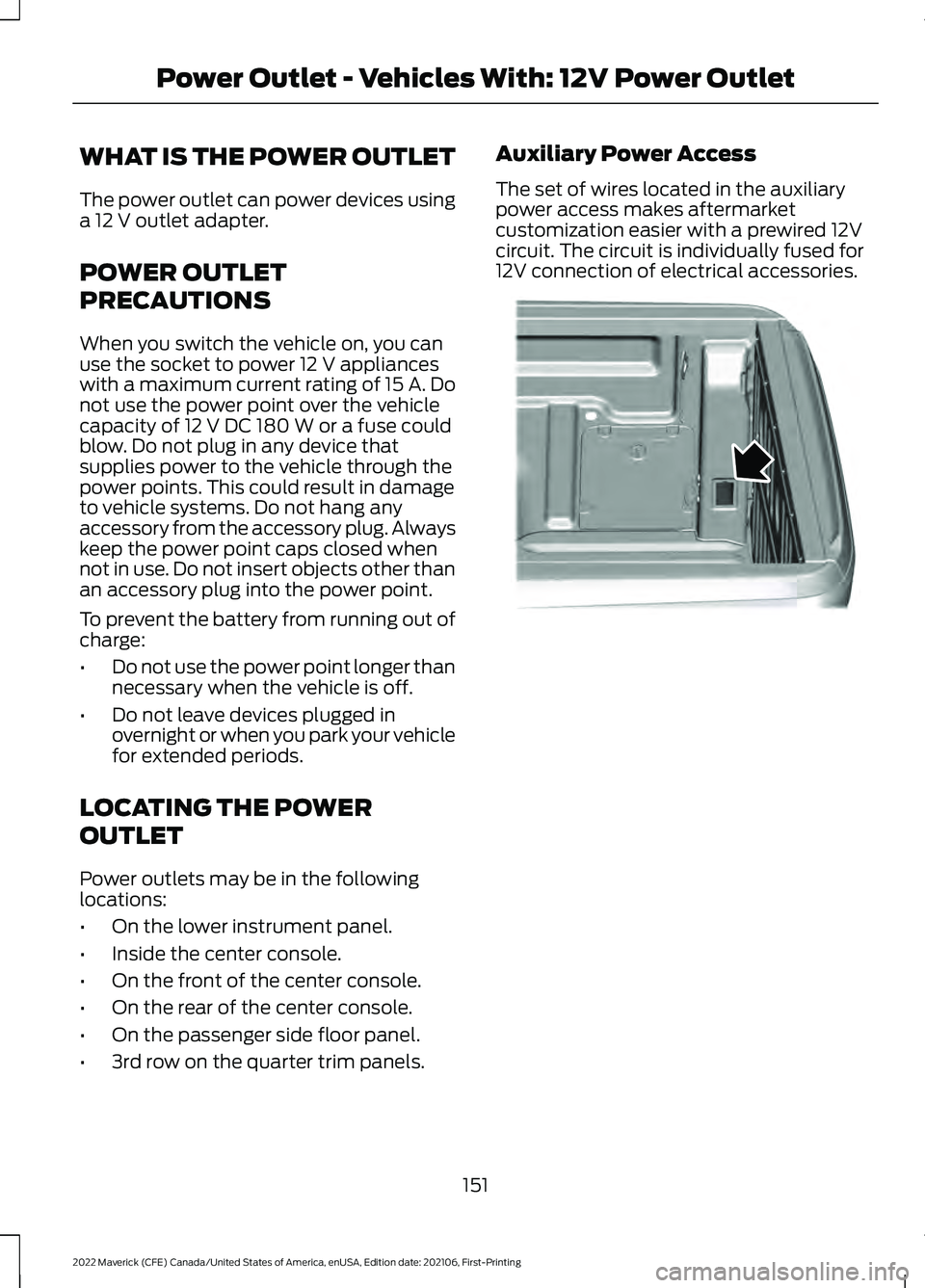
• 3rd row on the quarter trim panels. Auxiliary Power Access
The set of wires located in the auxiliary
power access makes aftermarket
customization easier with a prewired 12V
circuit. The circuit is individually fused for
12V connection of electrical accessories.
151
2022 Maverick (CFE) Canada/United States of America, enUSA, Edition date: 202106, First-Printing Power Outlet - Vehicles With: 12V Power OutletE357738
Page 155 of 533
WHAT IS THE WIRELESS
ACCESSORY CHARGER
The wireless accessory charger allows you
to charge one compatible Qi wireless
charging device on the charging area.
WIRELESS ACCESSORY
CHARGER PRECAUTIONS
WARNING: Wireless charging
devices can affect the operation of
implanted medical devices, including
cardiac pacemakers. If you have any
implanted medical devices, we
recommend that you consult with your
physician.
Tests on this equipment show that it
complies with part 18 of the FCC Rules.
• This equipment generates, uses and
can radiate radio frequency energy and
may cause harmful interference to
radio communications. There is no
guarantee that the interference will not
occur in a particular installation. If this
equipment does cause harmful
interference to radio or television
reception, please consult the dealer.
• This product is not end-user
serviceable. WARNING:
Changes or
modifications not expressively approved
by the party responsible for compliance
could void the user's authority to operate
the equipment. The term "IC:" before the
radio certification number only signifies
that Industry Canada technical
specifications were met. This device complies with Industry Canada
licence-exempt RSS standard(s).
Operation is subject to:
•
This device may not cause interference.
• This device must accept any
interference, including interference that
may cause undesired operation of the
device.
Keep the charging area clean and remove
foreign objects prior to charging a device.
Do not place items with a magnetic strip
or radio-frequency identification chip, for
example passports, parking tickets,
transportation passes or credit cards, near
the charging area when charging a device.
Damage may occur to the magnetic strip
or radio-frequency identification chip.
Do not place metal objects, for example
remote controls, coins and candy
wrappers, on or near the charging area
when charging a device. Metal objects may
heat up and degrade the charging
performance, in addition to causing
interruptions in charging.
Note: During charging, the device and the
charger could heat up, this is normal. If the
battery gets hotter than usual, the device
may stop charging.
LOCATING THE WIRELESS
ACCESSORY CHARGER The charging area is on the
center console or in the media
bin below the instrument panel.
CHARGING A WIRELESS
DEVICE
Place the device on the center of the
charging surface with the charging side
down. The charging stops after your device
reaches a full charge.
152
2022 Maverick (CFE) Canada/United States of America, enUSA, Edition date: 202106, First-Printing Wireless Accessory Charger
(If Equipped)E297549
Page 179 of 533
REFUELING YOUR VEHICLE -
HYBRID ELECTRIC VEHICLE (HEV)
WARNING: When refueling always
shut the engine off and never allow
sparks or open flames near the fuel tank
filler valve. Never smoke or use a cell
phone while refueling. Fuel vapor is
extremely hazardous under certain
conditions. Avoid inhaling excess fumes. WARNING: The fuel system may
be under pressure. If you hear a hissing
sound near the fuel filler inlet, do not
refuel until the sound stops. Otherwise,
fuel may spray out, which could cause
serious personal injury. WARNING:
Do not pry open the
fuel tank filler valve. This could damage
the fuel system. Failure to follow this
instruction could result in fire, personal
injury or death. WARNING: Do not remove the fuel
pump nozzle from its fully inserted
position when refueling. WARNING:
Stop refueling when
the fuel pump nozzle automatically
shuts off for the first time. Failure to
follow this will fill the expansion space
in the fuel tank and could lead to fuel
overflowing. WARNING:
Do not overfill the fuel
tank. The pressure in an overfilled tank
may cause leakage and lead to fuel spray
and fire. WARNING:
Wait at least five
seconds before removing the fuel pump
nozzle to allow any residual fuel to drain
into the fuel tank. WARNING: Read and follow all the
instructions on the pump island.
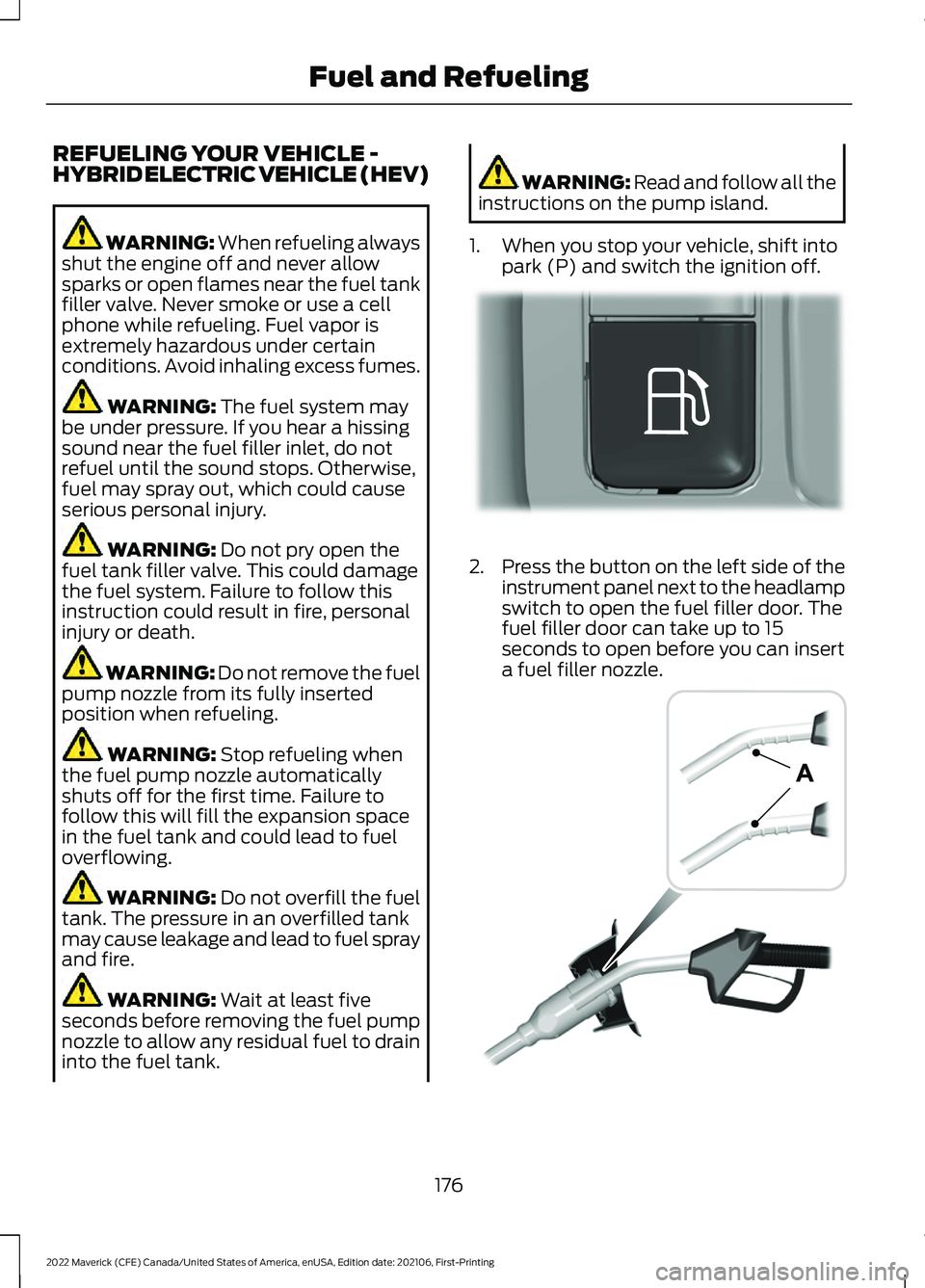
1. When you stop your vehicle, shift into park (P) and switch the ignition off. 2.
Press the button on the left side of the
instrument panel next to the headlamp
switch to open the fuel filler door. The
fuel filler door can take up to 15
seconds to open before you can insert
a fuel filler nozzle. 176
2022 Maverick (CFE) Canada/United States of America, enUSA, Edition date: 202106, First-Printing Fuel and RefuelingE293006 E139202
Page 180 of 533
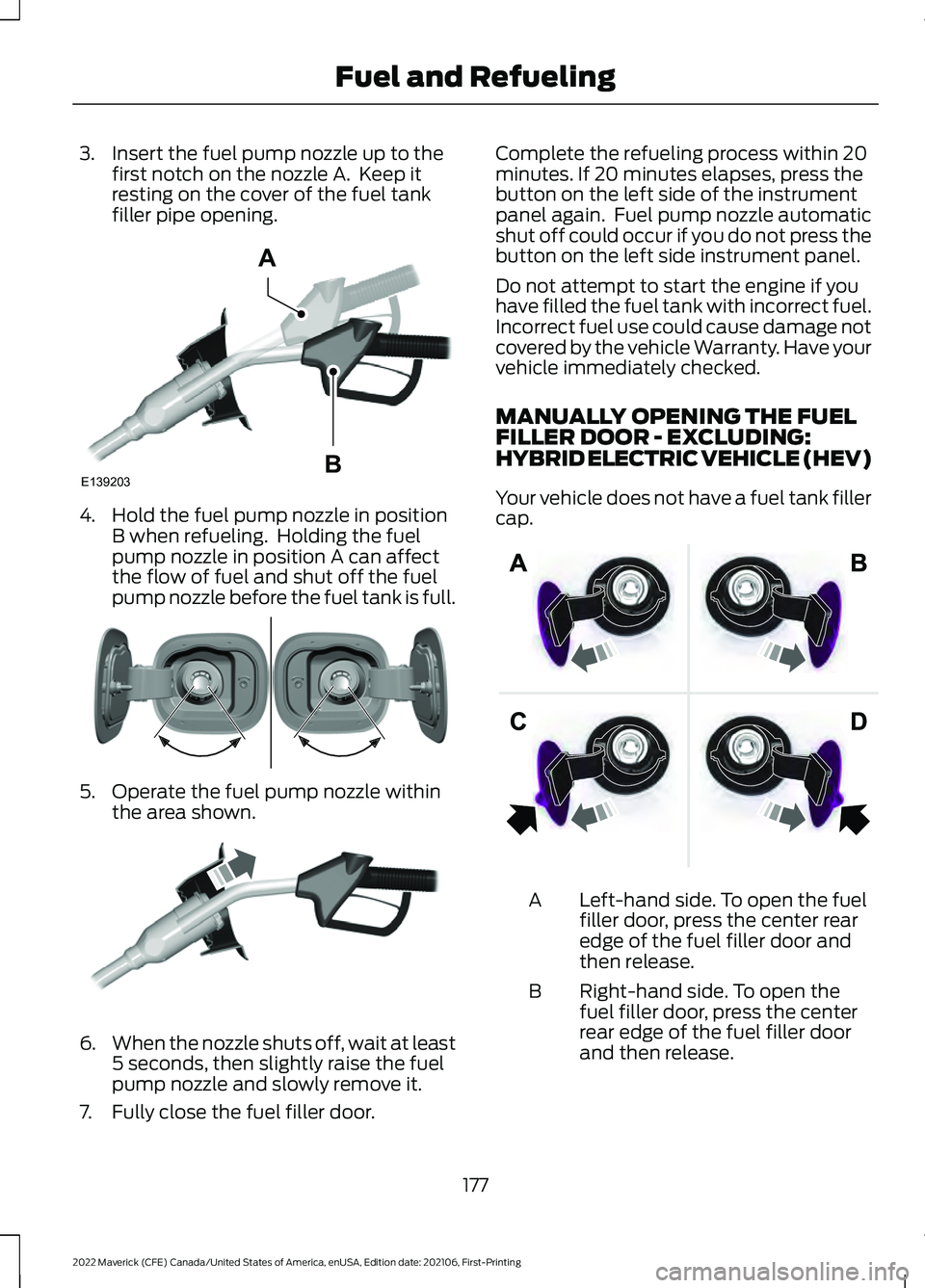
3. Insert the fuel pump nozzle up to the
first notch on the nozzle A. Keep it
resting on the cover of the fuel tank
filler pipe opening. 4. Hold the fuel pump nozzle in position
B when refueling. Holding the fuel
pump nozzle in position A can affect
the flow of fuel and shut off the fuel
pump nozzle before the fuel tank is full. 5. Operate the fuel pump nozzle within
the area shown. 6.
When the nozzle shuts off, wait at least
5 seconds, then slightly raise the fuel
pump nozzle and slowly remove it.
7. Fully close the fuel filler door. Complete the refueling process within 20
minutes. If 20 minutes elapses, press the
button on the left side of the instrument
panel again. Fuel pump nozzle automatic
shut off could occur if you do not press the
button on the left side instrument panel.
Do not attempt to start the engine if you
have filled the fuel tank with incorrect fuel.
Incorrect fuel use could cause damage not
covered by the vehicle Warranty. Have your
vehicle immediately checked.
MANUALLY OPENING THE FUEL
FILLER DOOR - EXCLUDING:
HYBRID ELECTRIC VEHICLE (HEV)
Your vehicle does not have a fuel tank filler
cap.
Left-hand side. To open the fuel
filler door, press the center rear
edge of the fuel filler door and
then release.
A
Right-hand side. To open the
fuel filler door, press the center
rear edge of the fuel filler door
and then release.
B
177
2022 Maverick (CFE) Canada/United States of America, enUSA, Edition date: 202106, First-Printing Fuel and RefuelingE139203
A
B E337454 E119081 E206911
Page 190 of 533
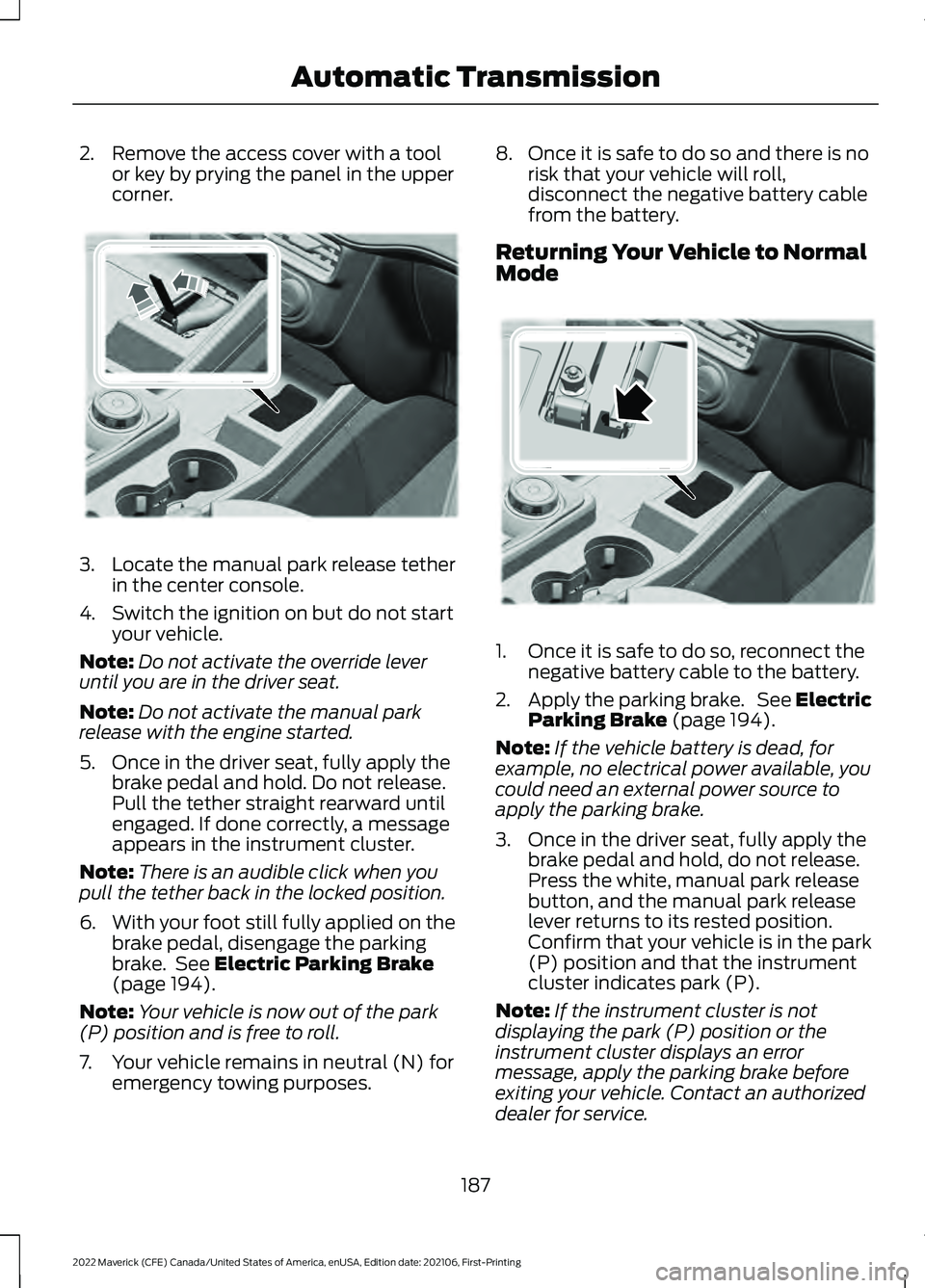
2. Remove the access cover with a tool
or key by prying the panel in the upper
corner. 3.
Locate the manual park release tether
in the center console.
4. Switch the ignition on but do not start your vehicle.
Note: Do not activate the override lever
until you are in the driver seat.
Note: Do not activate the manual park
release with the engine started.
5. Once in the driver seat, fully apply the brake pedal and hold. Do not release.
Pull the tether straight rearward until
engaged. If done correctly, a message
appears in the instrument cluster.
Note: There is an audible click when you
pull the tether back in the locked position.
6. With your foot still fully applied on the
brake pedal, disengage the parking
brake. See Electric Parking Brake
(page 194).
Note: Your vehicle is now out of the park
(P) position and is free to roll.
7. Your vehicle remains in neutral (N) for emergency towing purposes. 8. Once it is safe to do so and there is no
risk that your vehicle will roll,
disconnect the negative battery cable
from the battery.
Returning Your Vehicle to Normal
Mode 1. Once it is safe to do so, reconnect the
negative battery cable to the battery.
2. Apply the parking brake. See Electric
Parking Brake
(page 194).
Note: If the vehicle battery is dead, for
example, no electrical power available, you
could need an external power source to
apply the parking brake.
3. Once in the driver seat, fully apply the brake pedal and hold, do not release.
Press the white, manual park release
button, and the manual park release
lever returns to its rested position.
Confirm that your vehicle is in the park
(P) position and that the instrument
cluster indicates park (P).
Note: If the instrument cluster is not
displaying the park (P) position or the
instrument cluster displays an error
message, apply the parking brake before
exiting your vehicle. Contact an authorized
dealer for service.
187
2022 Maverick (CFE) Canada/United States of America, enUSA, Edition date: 202106, First-Printing Automatic TransmissionE356795 E356796
Page 244 of 533
3. Switch Cross Traffic Alert on or off.
Note: The system switches on every time
you switch the ignition on. To permanently
switch the system off, contact an authorized
dealer.
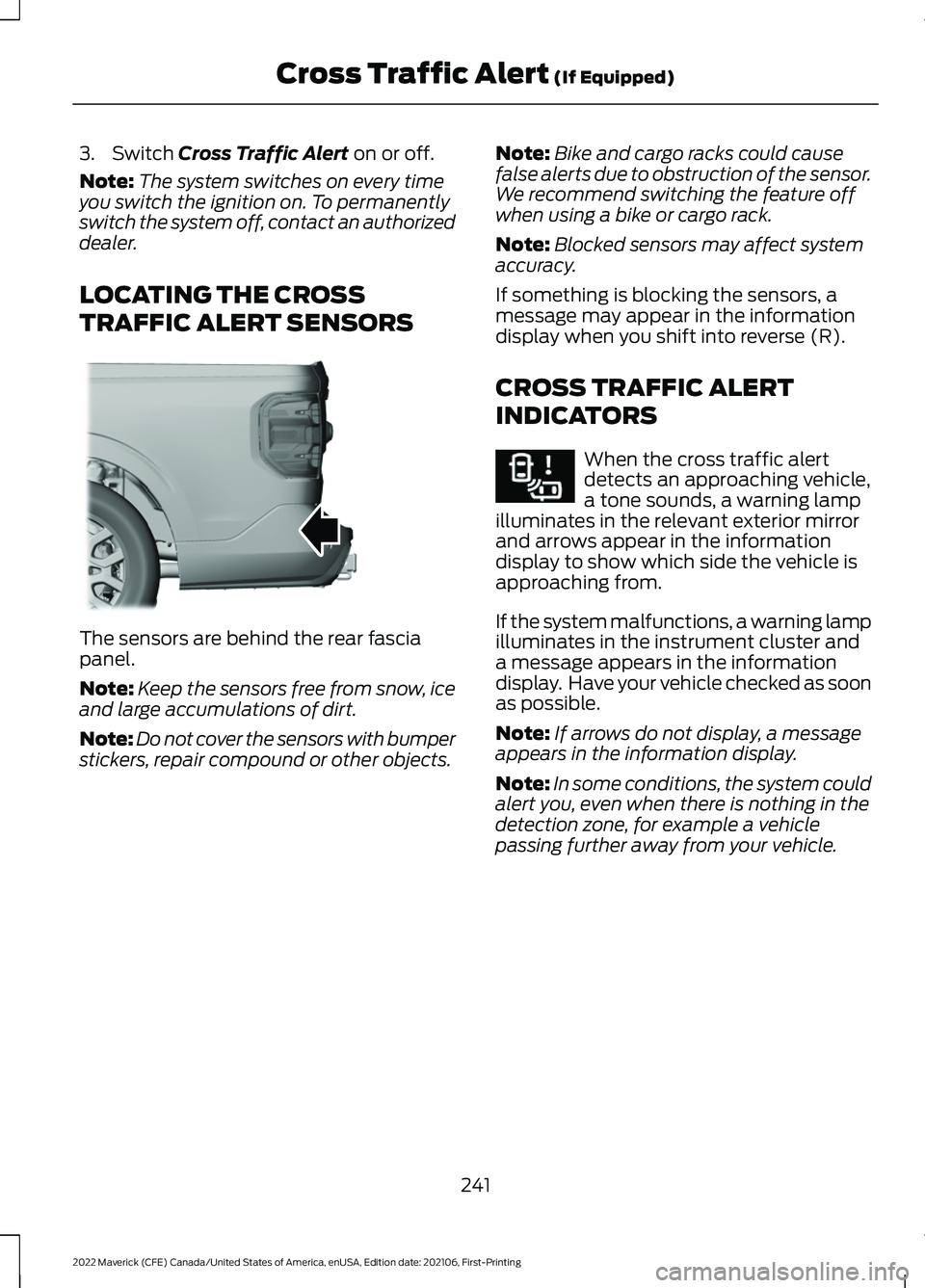
LOCATING THE CROSS
TRAFFIC ALERT SENSORS The sensors are behind the rear fascia
panel.
Note:
Keep the sensors free from snow, ice
and large accumulations of dirt.
Note: Do not cover the sensors with bumper
stickers, repair compound or other objects. Note:
Bike and cargo racks could cause
false alerts due to obstruction of the sensor.
We recommend switching the feature off
when using a bike or cargo rack.
Note: Blocked sensors may affect system
accuracy.
If something is blocking the sensors, a
message may appear in the information
display when you shift into reverse (R).
CROSS TRAFFIC ALERT
INDICATORS When the cross traffic alert
detects an approaching vehicle,
a tone sounds, a warning lamp
illuminates in the relevant exterior mirror
and arrows appear in the information
display to show which side the vehicle is
approaching from.
If the system malfunctions, a warning lamp
illuminates in the instrument cluster and
a message appears in the information
display. Have your vehicle checked as soon
as possible.
Note: If arrows do not display, a message
appears in the information display.
Note: In some conditions, the system could
alert you, even when there is nothing in the
detection zone, for example a vehicle
passing further away from your vehicle.
241
2022 Maverick (CFE) Canada/United States of America, enUSA, Edition date: 202106, First-Printing Cross Traffic Alert
(If Equipped)E354512 E268294