instrument panel FORD MAVERICK 2022 Owner's Manual
[x] Cancel search | Manufacturer: FORD, Model Year: 2022, Model line: MAVERICK, Model: FORD MAVERICK 2022Pages: 533, PDF Size: 9.58 MB
Page 283 of 533
1. Exit the vehicle immediately.
2. Advise emergency assistance that an
electric or hybrid-electric vehicle is
involved.
3. As with any vehicle fire, do not inhale smoke, vapors or gas from the vehicle,
as they may be hazardous.
Post-Incident
1. Do not store a severely damaged vehicle with a lithium-ion battery inside
a structure or within 49 ft (15 m) of any
structure or vehicle.
2. Make sure that passenger and luggage
compartments remain ventilated.
3. Call emergency assistance if you observe leaking fluids, sparks, smoke
or flames, or hear gurgling or bubbling
from the high-voltage battery.
SWITCHING THE HAZARD
FLASHERS ON AND OFF The hazard flasher button is on
the instrument panel. Press the
button to switch the hazard
flashers on if your vehicle is creating a
safety hazard for other road users.
When you switch the hazard flashers on,
all front and rear direction indicators flash.
Note: The hazard flashers operate when
the ignition is in any position, or if the key is
not in the ignition. The battery loses charge
and could have insufficient power to restart
your vehicle.
Press the button again to switch them off. JUMP STARTING THE VEHICLE
JUMP STARTING PRECAUTIONS WARNING: Batteries normally
produce explosive gases which can
cause personal injury. Therefore, do not
allow flames, sparks or lighted
substances to come near the battery.
When working near the battery, always
shield your face and protect your eyes.
Always provide correct ventilation. WARNING:
Keep batteries out of
reach of children. Batteries contain
sulfuric acid. Avoid contact with skin,
eyes or clothing. Shield your eyes when
working near the battery to protect
against possible splashing of acid
solution. In case of acid contact with skin
or eyes, flush immediately with water for
a minimum of 15 minutes and get prompt
medical attention. If acid is swallowed,
call a physician immediately. WARNING:
Use only adequately
sized cables with insulated clamps. WARNING:
Make sure that the
cables are clear of any moving parts and
fuel delivery system parts. WARNING: Connect batteries with
only the same nominal voltage. WARNING: If the engine is running
while the hood is open, stay clear of
moving engine components. Failure to
follow this warning could result in serious
personal injury or death.
Do not attempt to push-start an automatic
transmission vehicle. This could cause
transmission damage.
280
2022 Maverick (CFE) Canada/United States of America, enUSA, Edition date: 202106, First-Printing Crash and Breakdown Information
Page 323 of 533
Do not wipe lamps when they are dry.
CLEANING WINDOWS AND WIPER
BLADES
To clean the windshield and wiper blades:
•
Clean the windshield with a
non-abrasive glass cleaner.
Note: When cleaning the interior of the
windshield, avoid getting any glass cleaner
on the instrument panel or door panels.
Wipe any glass cleaner off these surfaces
immediately.
• Clean the wiper blades with washer
fluid or water applied with a soft
sponge or cloth.
Note: Do not use razor blades or other
sharp objects to clean or remove decals
from the inside of the heated rear window.
This can cause damage not covered by the
vehicle Warranty.
CLEANING CHROME, ALUMINIUM
OR STAINLESS STEEL
We recommend that you only use a car
shampoo, a soft cloth and water on
bumpers and other chrome, aluminium or
stainless steel parts.
Note: For additional information and
assistance, we recommend that you contact
an authorized dealer.
Note: Rinse the area well after cleaning.
Note: Do not use abrasive materials, for
example steel wool or plastic pads, as they
can scratch these surfaces.
Note: Do not use chrome cleaner, metal
cleaner or polish on wheels or wheel covers. CLEANING WHEELS
Only use a recommended wheel and tire
cleaner to clean the wheels weekly. For
additional information and assistance, we
recommend that you contact an
authorized dealer.
1. Use a sponge to remove heavy
deposits of dirt and brake dust.
2. Rinse well after cleaning.
Note: Do not apply a cleaning chemical to
warm or hot wheel rims and covers.
If you intend on parking your vehicle for an
extended period after cleaning the wheels
with a wheel cleaner, drive your vehicle for
a few minutes before parking your vehicle.
This reduces the risk of corrosion of the
brake discs, brake pads and linings.
Do not clean the wheels when they are hot.
Note: Some car washes could damage
wheel rims and covers.
Note: Using non-recommended cleaners,
harsh cleaning products, chrome wheel
cleaners or abrasive materials could
damage wheel rims and covers.
CLEANING THE ENGINE
COMPARTMENT
Use a vacuum cleaner to remove debris
from the screen area below windshield.
Note: If you are not familiar with the parts
around the engine do not wash the engine
compartment. Avoid frequent engine
washes.
When washing the engine compartment:
• Never wash or rinse the engine while it
is hot or running.
• Never wash or rinse any ignition coil,
spark plug wire or spark plug well.
• Cover the battery, power distribution
box, and air filter assembly to prevent
water damage.
320
2022 Maverick (CFE) Canada/United States of America, enUSA, Edition date: 202106, First-Printing Vehicle Care
Page 324 of 533
Note:
If your vehicle has an engine cover
remove the cover before application of
shampoo and degreaser.
• Spray an approved engine shampoo
and degreaser on all parts that require
cleaning and rinse with water.
CLEANING STRIPES OR
GRAPHICS
It is recommended to wash your vehicle by
hand however, pressure washing may be
used under the following conditions:
• Use a spray with a 40° wide spray
angle pattern.
• Keep the nozzle at a
12 in (305 mm)
distance and 90° angle to your
vehicle's surface.
• Do not use water pressure higher than
2,000 psi (14,000 kPa)
.
• Do not use water hotter than
179°F
(82°C).
Note: Holding the pressure washer nozzle
at an angle to the vehicle's surface may
damage graphics and cause the edges to
peel away from the vehicle's surface.
CLEANING CAMERA LENSES AND
SENSORS
We recommend that you only use
lukewarm or cold water and a soft cloth
to clean the camera lens and sensors.
Note: Do not pressure wash camera lens
and sensors.
CLEANING THE UNDERBODY
Flush the complete underside of your
vehicle frequently. Keep body and door
drain holes free from packed dirt. Rear suspension components may require
regular cleaning with a power washer or a
thorough rinse with a strong stream of
water if the vehicle is operated in dusty or
muddy environments. Rear leaf springs or
other suspension components may emit
squeaking or popping noises while
operating the vehicle if particles, such as
dirt, rocks, or other debris, are present in
the components.
CLEANING THE INTERIOR
CLEANING THE INSTRUMENT
PANEL
WARNING:
Do not use chemical
solvents or strong detergents when
cleaning the steering wheel or
instrument panel to avoid contamination
of the airbag system.
We recommend that you only clean the
instrument panel and cluster lens with a
damp soft cloth. Dry the area with a clean,
soft cloth.
For additional information and assistance,
we recommend that you contact an
authorized dealer.
Note: Avoid cleaners or polishes that
increase the gloss of the upper portion of
the instrument panel. The dull finish in this
area helps protect you from undesirable
windshield reflection.
CLEANING PLASTIC
We recommend that you only use a mild
soap and water solution on a soft cloth.
Dry the area with a clean, soft cloth.
321
2022 Maverick (CFE) Canada/United States of America, enUSA, Edition date: 202106, First-Printing Vehicle Care
Page 371 of 533
VEHICLE IDENTIFICATION
NUMBER
LOCATING THE VEHICLE
IDENTIFICATION NUMBER
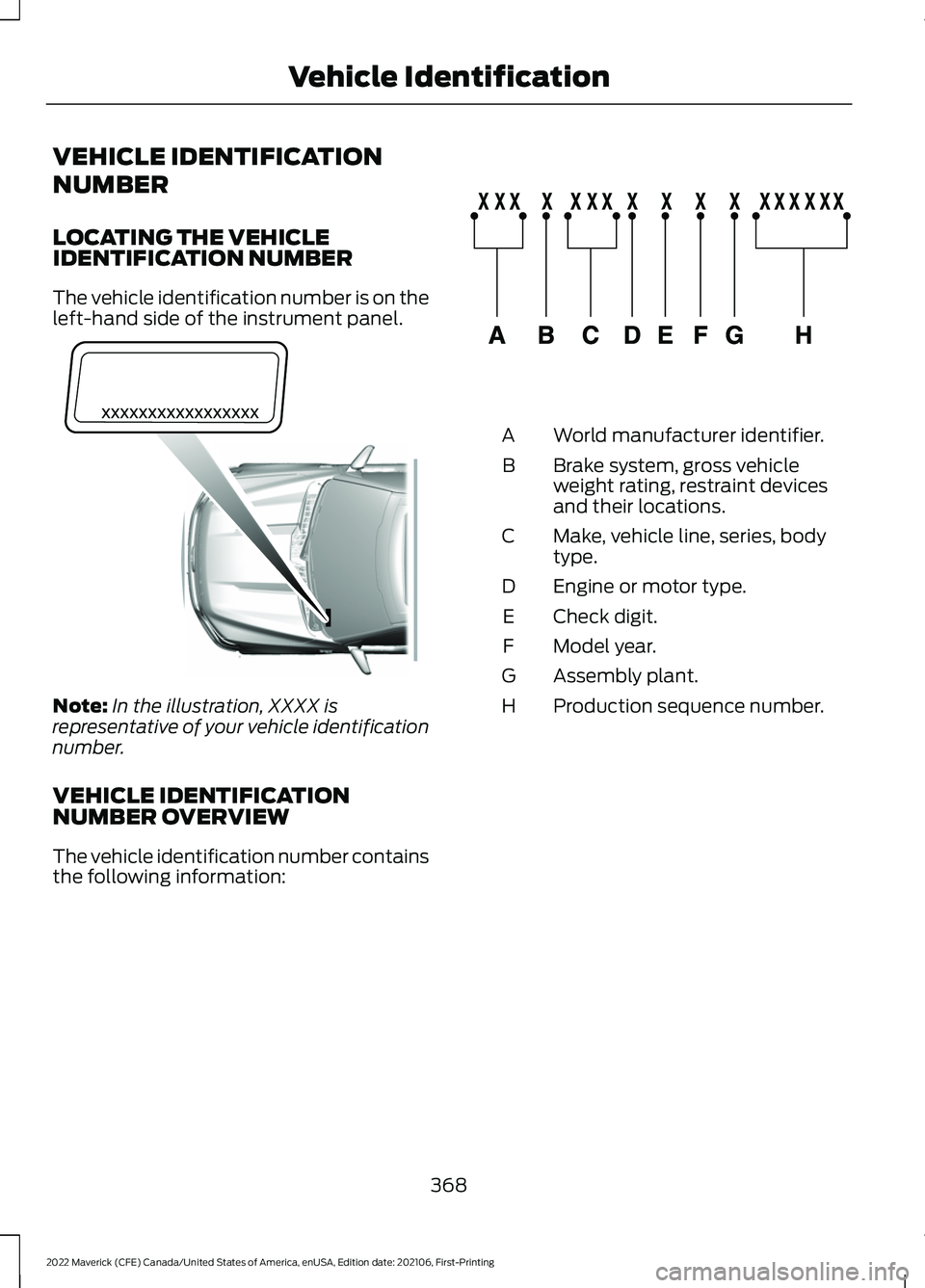
The vehicle identification number is on the
left-hand side of the instrument panel.
Note:
In the illustration, XXXX is
representative of your vehicle identification
number.
VEHICLE IDENTIFICATION
NUMBER OVERVIEW
The vehicle identification number contains
the following information: World manufacturer identifier.
A
Brake system, gross vehicle
weight rating, restraint devices
and their locations.
B
Make, vehicle line, series, body
type.
C
Engine or motor type.
D
Check digit.
E
Model year.
F
Assembly plant.
G
Production sequence number.
H
368
2022 Maverick (CFE) Canada/United States of America, enUSA, Edition date: 202106, First-Printing Vehicle IdentificationE311767 E142477
Page 410 of 533
Function
Button
Playlists
Artist
Albums
Songs
Genres
Podcasts
Audio books
Composers
This button allows you to choose a specific
letter to view within the category you are
browsing.
A-Z Jump
If available, this allows you to browse the
folders and files on your USB device.
Explore Device
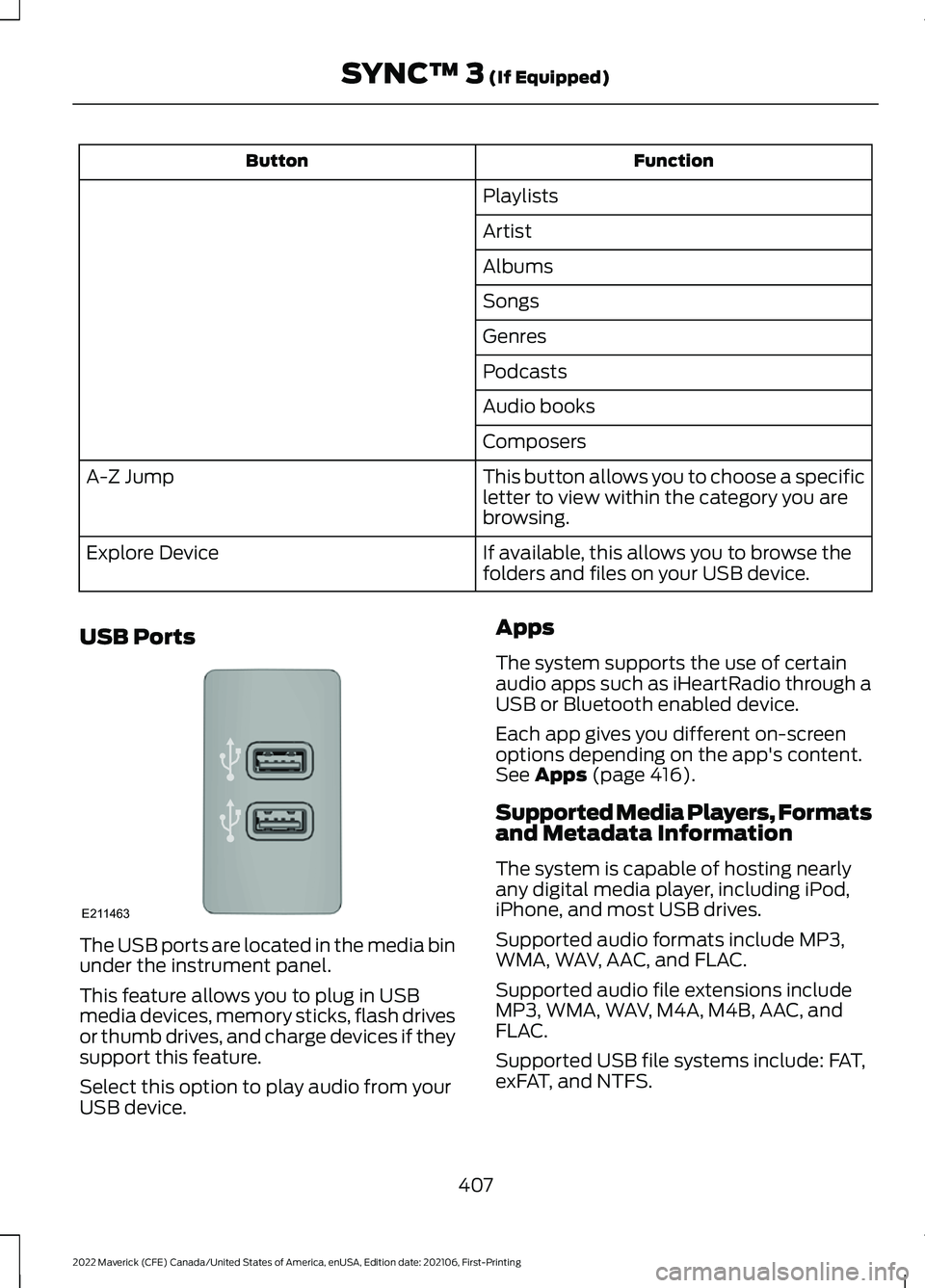
USB Ports The USB ports are located in the media bin
under the instrument panel.
This feature allows you to plug in USB
media devices, memory sticks, flash drives
or thumb drives, and charge devices if they
support this feature.
Select this option to play audio from your
USB device. Apps
The system supports the use of certain
audio apps such as iHeartRadio through a
USB or Bluetooth enabled device.
Each app gives you different on-screen
options depending on the app's content.
See Apps (page 416).
Supported Media Players, Formats
and Metadata Information
The system is capable of hosting nearly
any digital media player, including iPod,
iPhone, and most USB drives.
Supported audio formats include MP3,
WMA, WAV, AAC, and FLAC.
Supported audio file extensions include
MP3, WMA, WAV, M4A, M4B, AAC, and
FLAC.
Supported USB file systems include: FAT,
exFAT, and NTFS.
407
2022 Maverick (CFE) Canada/United States of America, enUSA, Edition date: 202106, First-Printing SYNC™ 3
(If Equipped)E211463
Page 516 of 533
9
911 Assist...........................................................59
A
A/C See: Climate Control - Vehicles With: Dual
Automatic Temperature Control
(DATC)............................................................... 126
See: Climate Control - Vehicles With: Electronic Automatic Temperature Control
(EATC)............................................................... 130
About This Manual..........................................17
ABS See: Brakes............................................................ 191
Accessing the Trip Computer - Vehicles With: 4.2 Inch Screen.................................121
Accessing the Trip Computer - Vehicles With: 6.5 Inch Screen................................121
Accessories....................................................433
Adaptive Cruise Control
.............................215
Adaptive Cruise Control –
Troubleshooting............................................ 223
Lane Centering..................................................... 221
Adaptive Cruise Control Automatic Cancellation................................................218
Adaptive Cruise Control Indicators........221
Adaptive Cruise Control Limitations...................................................216
Adaptive Cruise Control Precautions..................................................215
Adaptive Cruise Control – Troubleshooting........................................223
Adaptive Cruise Control – Information Messages......................................................... 223
Adjusting the Exterior Mirrors..................104
Adjusting the Headlamps..........................312
Adjusting the Instrument Panel Lighting Brightness......................................................99
Adjusting the Integrated Trailer Brake Controller Mode........................................269
Adjusting the Seatbelt Height
...................45
Adjusting the Seatbelts During Pregnancy......................................................45
Adjusting the Sound Settings
.................385
Adjusting the Steering Wheel...................89
Adjusting the Volume................................384 Aid Mode
.........................................................232
How Does Aid Mode Work.............................. 232
What Is Aid Mode............................................... 232
Airbag Precautions
........................................52
Airbags...............................................................50
Front Passenger Sensing System..................54
Air Conditioning See: Climate Control - Vehicles With: Dual
Automatic Temperature Control
(DATC)............................................................... 126
See: Climate Control - Vehicles With: Electronic Automatic Temperature Control
(EATC)............................................................... 130
Air Conditioning System Capacity and Specification - 2.0L EcoBoost™........365
Air Conditioning System Capacity and Specification - 2.5L, Hybrid Electric
Vehicle (HEV)
............................................366
Air Filter See: Changing the Engine Air Filter - 2.0L
EcoBoost™.................................................... 308
See: Changing the Engine Air Filter - 2.5L, Hybrid Electric Vehicle (HEV)..................309
Alert and Aid Mode.....................................232 How Does Alert and Aid Mode Work..........233
What Is Alert and Aid Mode........................... 232
Alert Mode.......................................................231 Adjusting the Steering Wheel Vibration
Intensity............................................................ 232
How Does Alert Mode Work........................... 232
What Is Alert Mode............................................. 231
All-Wheel Drive
.............................................189
All-Wheel Drive – Troubleshooting.............190
All-Wheel Drive Limitations
.....................189
All-Wheel Drive Precautions...................189
All-Wheel Drive – Troubleshooting........................................190
All-Wheel Drive – Information Messages......................................................... 190
AM/FM Radio................................................376 AM/FM Radio Limitations.............................. 386
Selecting a Radio Station.............................. 386
Ambient Lighting
...........................................99
Adjusting Ambient Lighting........................... 100
Switching Ambient Lighting On and Off........................................................................\
. 99
Anti-Lock Braking System..........................191 Anti-Lock Braking System Indicators...........191
513
2022 Maverick (CFE) Canada/United States of America, enUSA, Edition date: 202106, First-Printing Index
Page 519 of 533
Catalytic Converter –
Troubleshooting..........................................181
C
atalytic Converter – Warning Lamps........181
Changing a Flat Tire...................................346
Changing a Road Wheel...........................346
Changing the 12V Battery..........................310
Changing the Engine Air Filter - 2.0L EcoBoost™................................................308
Changing the Engine Air Filter - 2.5L, Hybrid Electric Vehicle (HEV)
.............309
Changing the Fuel Filter...........................309
Changing the Remote Control Battery - Vehicles With: Push Button Start.........63
Changing the Remote Control Battery - Vehicles Without: Push Button
Start.................................................................62
Changing the Vehicle Wi-Fi Hotspot Name or Password...................................373
Charging a Device........................................148
Charging a Wireless Device.......................152
Checking MyKey System Status..............69
Checking the Brake Fluid...........................192
Checking the Coolant
................................304
Checking the Seatbelts...............................48
Checking the Tire Pressures....................338
Checking the Wiper Blades.......................90
Children and Airbags
.....................................53
Child Restraint Anchor Points....................32 Locating the Child Restraint Lower Anchor
Points................................................................... 32
Locating the Child Restraint Top Tether Anchor Points................................................... 33
What Are the Child Restraint Anchor Points................................................................... 32
Child Restraints
...............................................33
Child Restraint Position Information.............33
Child Restraints Recommendation...............34
Child Safety
.......................................................31
Child Restraint Anchor Points.......................... 32
Child Restraints..................................................... 33
Installing Child Restraints................................. 34
Child Safety Locks..........................................41
Child Safety Precautions
..............................31
Cleaning Products........................................319
Cleaning the Exterior...................................319 Cleaning Camera Lenses and
Sensors.............................................................. 321Cleaning Chrome, Aluminium or Stainless
Steel.................................................................. 320
Cleaning Headlamps and Rear Lamps................................................................ 319
Cleaning Stripes or Graphics..........................321
Cleaning the Engine Compartment............320
Cleaning the Exterior Precautions................319
Cleaning the Underbody.................................. 321
Cleaning Wheels................................................ 320
Cleaning Windows and Wiper Blades............................................................... 320
Cleaning the Interior....................................321 Cleaning Carpets and Floor Mats................322
Cleaning Displays and Screens..................... 322
Cleaning Fabric Seats and Headliners........................................................ 322
Cleaning Leather and Vinyl............................ 322
Cleaning Moonroof Tracks.............................. 323
Cleaning Plastic................................................... 321
Cleaning Seatbelts............................................ 323
Cleaning Storage Compartments...............323
Cleaning the Instrument Panel......................321
Clearing All MyKeys.......................................69
Climate Control.............................................126 Auto Mode............................................................. 127
Climate Control – Troubleshooting.............129
Climate Control – Troubleshooting.........................................129
Clima
te Control – Frequently Asked
Questions......................................................... 129
Cold Weather Precautions
........................273
Configuring the Trip Computer - Vehicles With: 4.2 Inch Screen.................................121
Connected Vehicle
......................................369
Connecting the Vehicle to a Mobile
Network............................................................ 369
Connected Vehicle Data
..............................24
Connected Vehicle Limitations..............369
Connected Vehicle Requirements........369
Connected Vehicle – Troubleshooting - Vehicles With: Modem
............................370
Connected Vehicle – Troubleshooting - Vehicles With: SYNC 3.............................371
Connecting a Bluetooth® Device
...........377
Connecting a Trailer.....................................261
Connecting a Trailer Precautions...........261
516
2022 Maverick (CFE) Canada/United States of America, enUSA, Edition date: 202106, First-Printing Index
Page 524 of 533
Hybrid Electric Vehicle
Information..................................................166
Hybrid Electric Vehicle Information – Troubleshooting............................................. 167
Hybrid Electric Vehicle Information – Troubleshooting.........................................167
Hybrid El
ectric Vehicle Information –
Frequently Asked Questions......................167
Hybrid Electric Vehicle Information – Information Messages................................. 167
Hybrid Electric Vehicle Information – Warning Lamps............................................... 167
I
Identifying Fuse Types
..............................298
Identifying the Climate Control Unit..................................................................126
Ignition Switch
...............................................156
Inflating the Tires.........................................338
Information on the Tire Sidewall...........328
Inspecting the Tire for Damage..............339
Inspecting the Tire for Wear....................339
Inspecting the Wheel Valve Stems...........................................................340
Installing Child Restraints...........................34 Combining the Seatbelt and Lower Anchors
for Attaching Child Restraints.................... 38
Installing a Child Restraint in a Center Seat....................................................................... 37
Using Lower Anchors and Tethers for Children............................................................... 36
Using Seatbelts..................................................... 34
Using Tether Straps............................................. 38
Instrument Cluster Display........................116 Personalized Settings........................................ 118
Instrument Cluster Display Main Menu - Vehicles With: 4.2 Inch Screen..............116
Instrument Cluster Display Main Menu - Vehicles With: 6.5 Inch Screen...............117
Instrument Cluster Indicators...................114
Instrument Cluster......................................108 Fuel Gauge.............................................................. 112
Instrument Cluster Overview - Gasoline, Vehicles With: 4.2 Inch Screen.............108
Instrument Cluster Overview - Gasoline, Vehicles With: 6.5 Inch Screen.............109 Instrument Cluster Overview - Hybrid
Electric Vehicle (HEV), Vehicles With:
4.2 Inch Screen............................................110
Instrument Cluster Overview - Hybrid Electric Vehicle (HEV), Vehicles With:
6.5 Inch Screen
.............................................111
Instrument Cluster Warning Lamps.......113
Instrument Panel............................................27
Integrated Trailer Brake Controller
.......268
Integrated Trailer Brake Controller –
Troubleshooting............................................ 270
Integrated Trailer Brake Controller Precautions................................................268
Integrated Trailer Brake Controller – Troubleshooting........................................270
Integrated Trailer Brake Controller – Frequently Asked Questions......................271
Integrated Trailer Brake Controller – Information Messages................................ 270
Interior Air Quality........................................134
Interior Bulbs
..................................................318
Interior Bulb Specification Chart..................318
Interior Lamp Function
................................99
Switching the Interior Lamp Function On
and Off................................................................ 99
What Is the Interior Lamp Function..............99
Interior Lighting
..............................................99
Ambient Lighting................................................. 99
Interior Lamp Function...................................... 99
Interior Lighting – Troubleshooting.............100
Interior Lighting – Troubleshooting
........................................100
Interior Lighting – Frequently Asked
Questions......................................................... 100
Interior Mirror..................................................103
Interior Mirror Precautions........................103
Introduction.......................................................17
J
Jump Starting the Vehicle........................280 Jump Starting Precautions............................ 280
Jump Starting the Vehicle............................... 281
Preparing the Vehicle........................................ 281
521
2022 Maverick (CFE) Canada/United States of America, enUSA, Edition date: 202106, First-Printing Index