power steering FORD MAVERICK 2022 Owner's Manual
[x] Cancel search | Manufacturer: FORD, Model Year: 2022, Model line: MAVERICK, Model: FORD MAVERICK 2022Pages: 533, PDF Size: 9.58 MB
Page 296 of 533
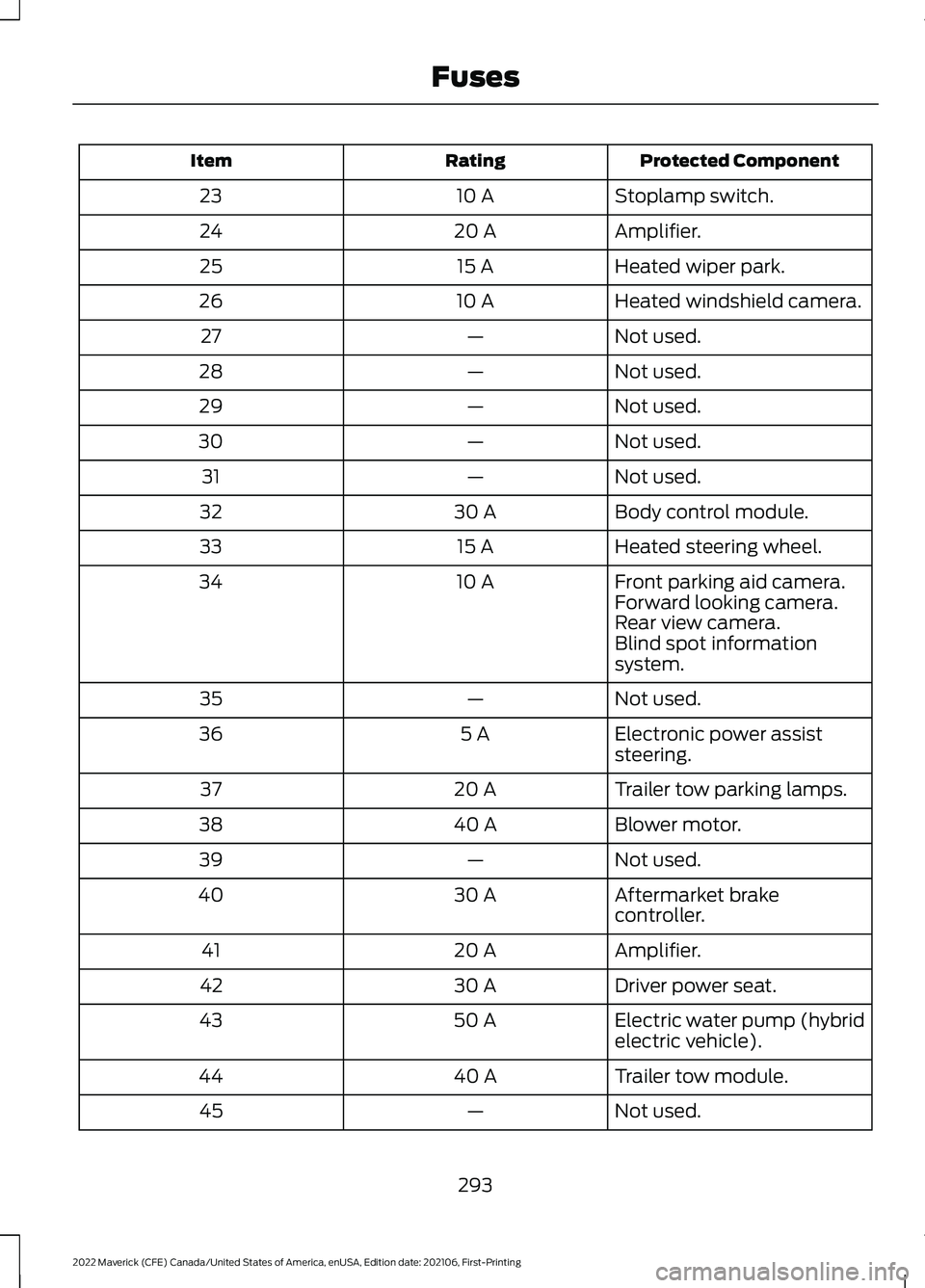
Protected Component
Rating
Item
Stoplamp switch.
10 A
23
Amplifier.
20 A
24
Heated wiper park.
15 A
25
Heated windshield camera.
10 A
26
Not used.
—
27
Not used.
—
28
Not used.
—
29
Not used.
—
30
Not used.
—
31
Body control module.
30 A
32
Heated steering wheel.
15 A
33
Front parking aid camera.
10 A
34
Forward looking camera.
Rear view camera.
Blind spot information
system.
Not used.
—
35
Electronic power assist
steering.
5 A
36
Trailer tow parking lamps.
20 A
37
Blower motor.
40 A
38
Not used.
—
39
Aftermarket brake
controller.
30 A
40
Amplifier.
20 A
41
Driver power seat.
30 A
42
Electric water pump (hybrid
electric vehicle).
50 A
43
Trailer tow module.
40 A
44
Not used.
—
45
293
2022 Maverick (CFE) Canada/United States of America, enUSA, Edition date: 202106, First-Printing Fuses
Page 301 of 533
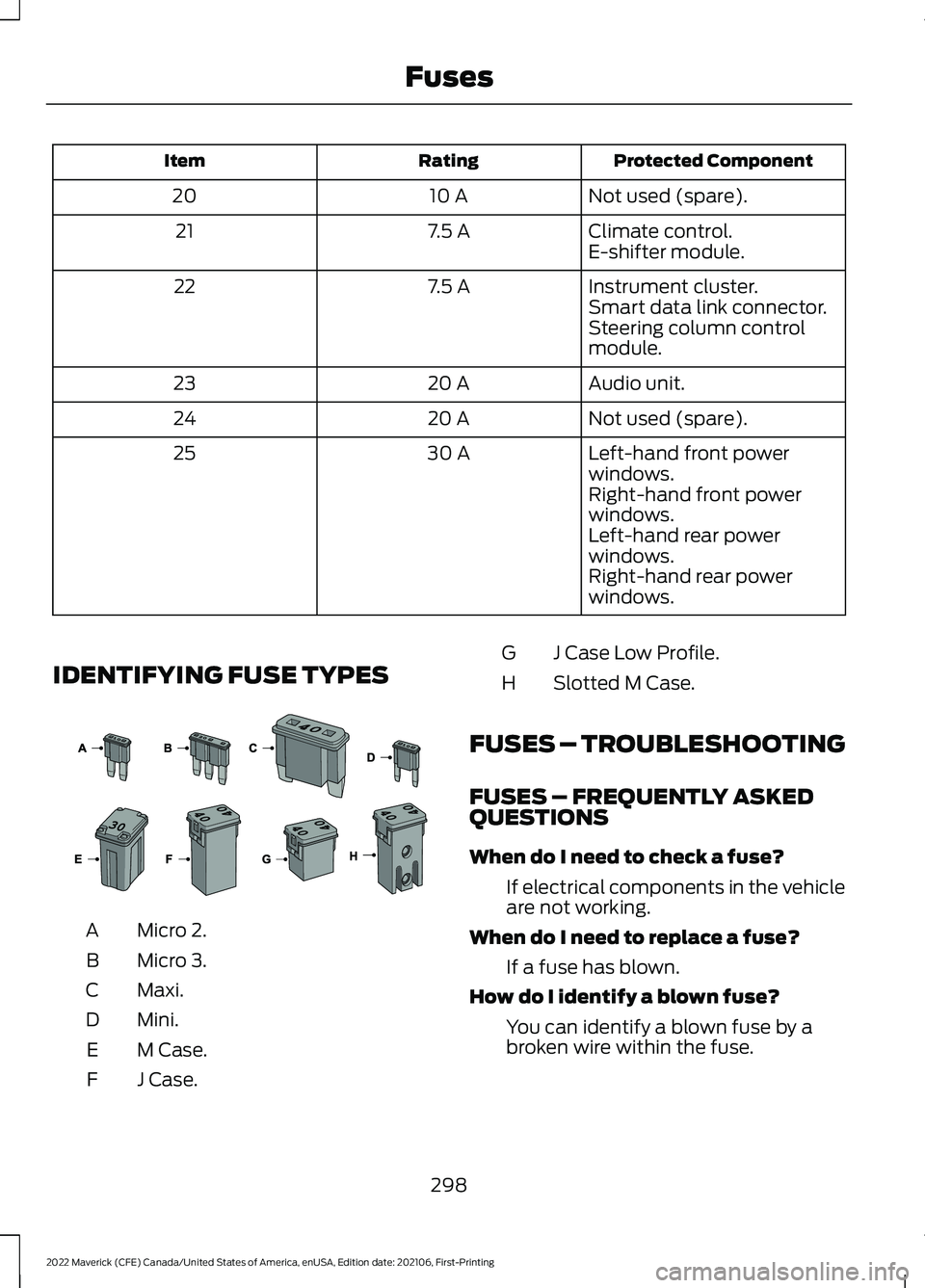
Protected Component
Rating
Item
Not used (spare).
10 A
20
Climate control.
7.5 A
21
E-shifter module.
Instrument cluster.
7.5 A
22
Smart data link connector.
Steering column control
module.
Audio unit.
20 A
23
Not used (spare).
20 A
24
Left-hand front power
windows.
30 A
25
Right-hand front power
windows.
Left-hand rear power
windows.
Right-hand rear power
windows.
IDENTIFYING FUSE TYPES Micro 2.
A
Micro 3.
B
Maxi.
C
Mini.
D
M Case.
E
J Case.
F J Case Low Profile.
G
Slotted M Case.
H
FUSES – TROUBLESHOOTING
FUSES – FREQUENTLY ASKED
QUESTIONS
When do I need to check a fuse? If electrical components in the vehicle
are not working.
When do I need to replace a fuse? If a fuse has blown.
How do I identify a blown fuse? You can identify a blown fuse by a
broken wire within the fuse.
298
2022 Maverick (CFE) Canada/United States of America, enUSA, Edition date: 202106, First-Printing Fuses E267379
Page 309 of 533
If you drive in extremely hot climates, you
may need to decrease the coolant
concentration to 40%.
Note:
A coolant concentration of 40%
provides improved overheat protection.
Coolant concentrations below 40%
decrease the overheat and corrosion
protection characteristics of the coolant and
could cause engine damage.
Coolant Change
Change the coolant at specific mileage
intervals. Refer to the scheduled
maintenance information. See Normal
Scheduled Maintenance (page 439).
Note: Dispose of used coolant in the
appropriate manner.
Follow your community's regulations and
standards for recycling and disposing of
automotive fluids.
Fail-Safe Cooling
Fail-safe cooling allows you to temporarily
drive your vehicle before any incremental
component damage occurs. The fail-safe
distance depends on ambient
temperature, vehicle load and terrain.
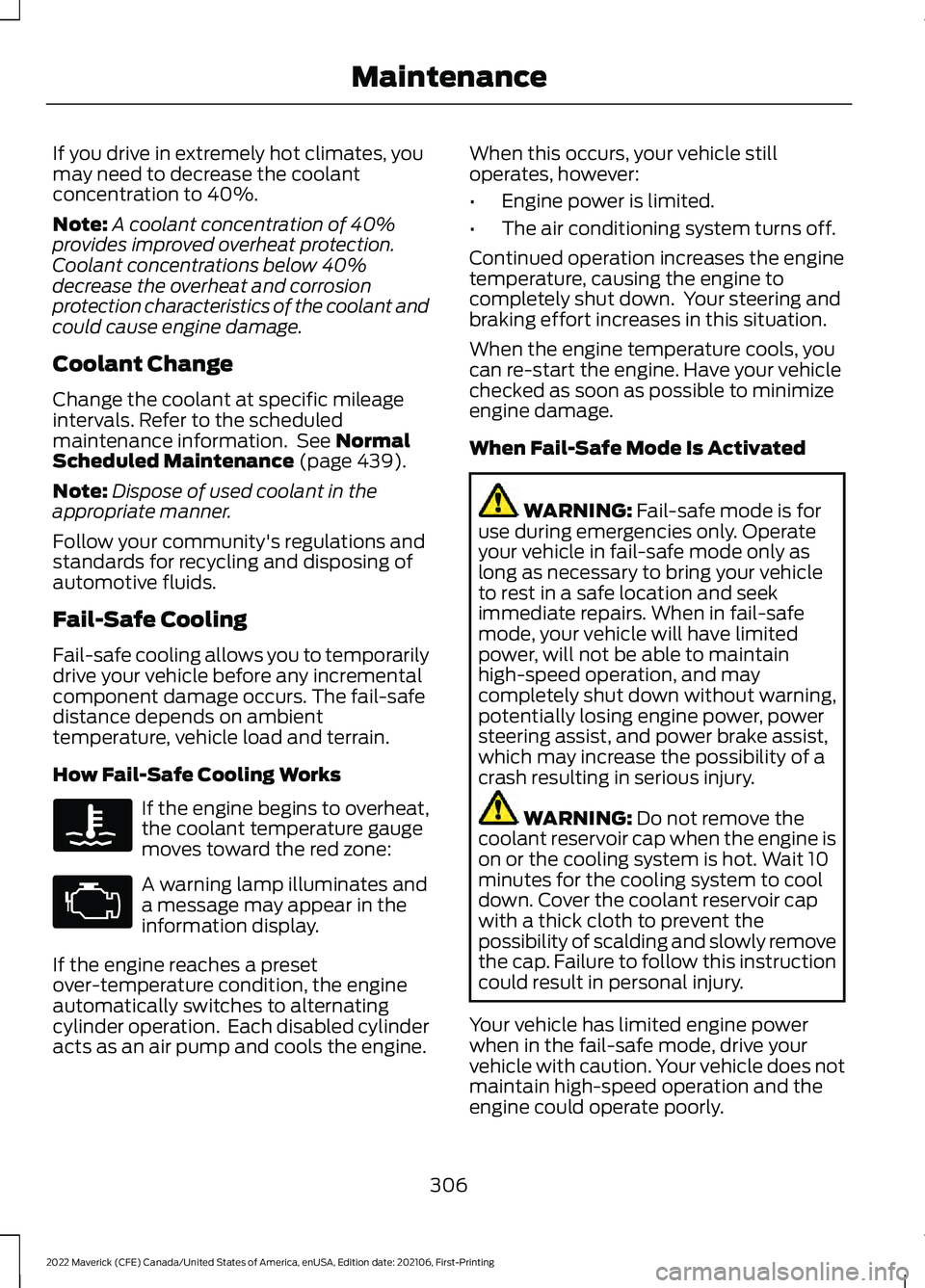
How Fail-Safe Cooling Works If the engine begins to overheat,
the coolant temperature gauge
moves toward the red zone:
A warning lamp illuminates and
a message may appear in the
information display.
If the engine reaches a preset
over-temperature condition, the engine
automatically switches to alternating
cylinder operation. Each disabled cylinder
acts as an air pump and cools the engine. When this occurs, your vehicle still
operates, however:
•
Engine power is limited.
• The air conditioning system turns off.
Continued operation increases the engine
temperature, causing the engine to
completely shut down. Your steering and
braking effort increases in this situation.
When the engine temperature cools, you
can re-start the engine. Have your vehicle
checked as soon as possible to minimize
engine damage.
When Fail-Safe Mode Is Activated WARNING:
Fail-safe mode is for
use during emergencies only. Operate
your vehicle in fail-safe mode only as
long as necessary to bring your vehicle
to rest in a safe location and seek
immediate repairs. When in fail-safe
mode, your vehicle will have limited
power, will not be able to maintain
high-speed operation, and may
completely shut down without warning,
potentially losing engine power, power
steering assist, and power brake assist,
which may increase the possibility of a
crash resulting in serious injury. WARNING:
Do not remove the
coolant reservoir cap when the engine is
on or the cooling system is hot. Wait 10
minutes for the cooling system to cool
down. Cover the coolant reservoir cap
with a thick cloth to prevent the
possibility of scalding and slowly remove
the cap. Failure to follow this instruction
could result in personal injury.
Your vehicle has limited engine power
when in the fail-safe mode, drive your
vehicle with caution. Your vehicle does not
maintain high-speed operation and the
engine could operate poorly.
306
2022 Maverick (CFE) Canada/United States of America, enUSA, Edition date: 202106, First-Printing Maintenance
Page 324 of 533
Note:
If your vehicle has an engine cover
remove the cover before application of
shampoo and degreaser.
• Spray an approved engine shampoo
and degreaser on all parts that require
cleaning and rinse with water.
CLEANING STRIPES OR
GRAPHICS
It is recommended to wash your vehicle by
hand however, pressure washing may be
used under the following conditions:
• Use a spray with a 40° wide spray
angle pattern.
• Keep the nozzle at a
12 in (305 mm)
distance and 90° angle to your
vehicle's surface.
• Do not use water pressure higher than
2,000 psi (14,000 kPa)
.
• Do not use water hotter than
179°F
(82°C).
Note: Holding the pressure washer nozzle
at an angle to the vehicle's surface may
damage graphics and cause the edges to
peel away from the vehicle's surface.
CLEANING CAMERA LENSES AND
SENSORS
We recommend that you only use
lukewarm or cold water and a soft cloth
to clean the camera lens and sensors.
Note: Do not pressure wash camera lens
and sensors.
CLEANING THE UNDERBODY
Flush the complete underside of your
vehicle frequently. Keep body and door
drain holes free from packed dirt. Rear suspension components may require
regular cleaning with a power washer or a
thorough rinse with a strong stream of
water if the vehicle is operated in dusty or
muddy environments. Rear leaf springs or
other suspension components may emit
squeaking or popping noises while
operating the vehicle if particles, such as
dirt, rocks, or other debris, are present in
the components.
CLEANING THE INTERIOR
CLEANING THE INSTRUMENT
PANEL
WARNING:
Do not use chemical
solvents or strong detergents when
cleaning the steering wheel or
instrument panel to avoid contamination
of the airbag system.
We recommend that you only clean the
instrument panel and cluster lens with a
damp soft cloth. Dry the area with a clean,
soft cloth.
For additional information and assistance,
we recommend that you contact an
authorized dealer.
Note: Avoid cleaners or polishes that
increase the gloss of the upper portion of
the instrument panel. The dull finish in this
area helps protect you from undesirable
windshield reflection.
CLEANING PLASTIC
We recommend that you only use a mild
soap and water solution on a soft cloth.
Dry the area with a clean, soft cloth.
321
2022 Maverick (CFE) Canada/United States of America, enUSA, Edition date: 202106, First-Printing Vehicle Care
Page 340 of 533
WARNING: Wheels and tires must
be the same size, load index and speed
rating as those originally fitted on the
vehicle. Use of any other tire or wheel
can affect the safety and performance
of your vehicle. Additionally, the use of
non-recommended tires and wheels can
cause steering, suspension, axle, transfer
case or power transfer unit failure.
Follow the recommended tire inflation
pressures found on the Safety
Compliance Certification label, or the
Tire Label on the B-Pillar or the edge of
the driver door. Failure to follow this
instruction could result in loss of vehicle
control, vehicle rollover, or personal injury
or death.
The tires on your vehicle could have
all-weather treads to provide traction in
rain and snow. In some climates you will
need to use snow tires and chains on your
vehicle in emergency situations or if
required by law.
Note: The suspension insulation and
bumpers will help prevent vehicle damage.
Do not remove these components from your
vehicle when using snow tires and chains.
Note: Driving too fast for road conditions
creates the possibility of loss of vehicle
control. Driving at very high speeds for
extended periods of time may result in
damage to vehicle components.
Follow these guidelines when using snow
tires and chains:
• Chains may damage aluminum wheels.
• Use ultra low profile cables, 10 mm or
less in dimension as measured on the
sidewall of your tire, only with
225/65R17, or 225/60R18 all season
tires.
• Do not use snow chains or cables with
235/65R17. •
Not all S-class snow chains or cables
meet these restrictions. Chains of this
size restriction will include a tensioning
device.
• Purchase chains or cables from a
manufacturer that clearly labels body
to tire dimension restrictions. The snow
chains or cables must be mounted in
pairs on the rear tires only.
• When driving with snow chains do not
exceed
30 mph (50 km/h) or the
maximum speed recommended by the
chain manufacturer, whichever is less.
• Install cables securely, verifying that
the cables do not touch any wiring or
brake lines.
• Drive cautiously. If you hear the cables
rub or bang against the vehicle, stop
and retighten them. If this does not
work, remove the cables to prevent
vehicle damage.
• Remove the tire chains when they are
no longer needed. Do not use tire
chains on dry roads.
If you have any questions regarding snow
chains or cables, please contact your
authorized dealer.
337
2022 Maverick (CFE) Canada/United States of America, enUSA, Edition date: 202106, First-Printing Wheel and Tire Information
Page 419 of 533
•
Drive Power: The engine is on due to
accelerator pedal pressure or speed
control activation. Reduce pressure on
the accelerator pedal or switch off the
speed control to return to full electric
mode.
• High Speed: The engine is on because
the vehicle speed exceeds the level for
full electric operation. Reduce the
speed to return to electric operation.
• Heater Setting: The engine is on
because of the heater setting. Reduce
or turn off the heater setting to return
to electric operation.
• Neutral Gear: The engine is on because
the vehicle is in Neutral (N). Shift out
of neutral gear to return to electric
operation.
• Engine Cold: The engine is on because
it is cold. The vehicle returns to electric
operation once the engine is sufficiently
warm.
• Battery Charging: The engine is on to
charge the high-voltage battery. The
vehicle returns to electric operation
once the battery is charged.
• Low Gear: The engine is on because
the vehicle is in low gear. Shift out of
low gear to return to electric operation.
• Normal Operation: The engine is on to
optimize vehicle operation. The vehicle
returns to electric operation when
possible.
• Engine Braking Active: The engine is on
to provide increased powertrain
braking. This can occur when you turn
on the grade assist feature, when
speed control is on or when driving with
your foot off the accelerator pedal.
Turning off grade assist or speed
control may allow the vehicle to return
to electric operation. •
Battery Temperature: The engine is on
due to high or low high-voltage battery
temperature. This is a normal operating
condition. The vehicle returns to
electric operation when possible.
• Drive Mode: The engine is on due to the
drive mode selection. Select an
appropriate drive mode for electric only
operation.
APPS
The system allows you interact with select
mobile apps while keeping your eyes on
the road. Voice commands, your steering
wheel buttons, or a quick tap on your
touchscreen give you advanced control of
compatible mobile apps. You can also
stream your favorite music or podcasts,
share your time of arrival with friends, and
keep connected safely.
When you start an app through the system
for the first time, you could be asked to
grant certain permissions. You can review
and change the permissions that you have
granted at any time when your vehicle is
not moving. We recommend that you
check your data plan before using your
apps through the system. Using them
could result in additional charges. We also
recommend that you check the app
provider's terms and conditions and
privacy policy before using their app. Make
sure that you have an active account for
apps that you want to use through the
system. Some apps will work with no
setup. Others require you to configure
some personal settings before you can use
them.
Note: For more information about available
apps, visit catalog.ford.com.
Using Apps on an iOS Device Select the apps option on the
feature bar.
416
2022 Maverick (CFE) Canada/United States of America, enUSA, Edition date: 202106, First-Printing SYNC™ 3 (If Equipped)
Page 521 of 533
Drive Mode Control –
Troubleshooting.........................................227
Drive Mode Control – Frequently Asked Questions......................................................... 229
Drive Mode Control – Information Messages......................................................... 228
Drive Mode Control – Warning Lamps................................................................ 227
Drive Modes...................................................226 Eco........................................................................\
... 226
Mud/Ruts.............................................................. 226
Normal.................................................................... 227
Sand........................................................................\
227
Slippery.................................................................. 227
Sport........................................................................\
227
Tow/Haul............................................................... 227
Driver Alert.....................................................250 Driver Alert – Troubleshooting....................... 251
Driver Alert Indicators..................................251
Driver Alert Limitations.............................250
Driver Alert Precautions............................250
Driver Alert – Troubleshooting
.................251
Driver Alert – Information Messages...........251
Driving Economically
..................................273
Driving Hints...................................................273
Driving in Special Conditions......................... 274
Driving in Special Conditions...................274 Driving In Sand.................................................... 275
Driving on Hilly or Sloping Terrain................274
Driving Through Mud and Water..................274
Emergency Maneuvers..................................... 274
Driving on Snow and Ice............................273
Driving Through Shallow Water..............275
E
Electric Parking Brake Audible Warning.........................................................195
Electric Parking Brake.................................194 Electric Parking Brake –
Troubleshooting............................................. 195
Electric Parking Brake – Troubleshooting.........................................195
Electric Parking Brake – Information Messages.......................................................... 196
Electric Parking Brake – Warning Lamps................................................................ 195Electric Power Steering
.............................205
Electric Power Steering Precautions..........205
How Does Electric Power Steering
Work.................................................................. 205
Electric Vehicle Information
.....................415
Electromagnetic Compatibility.............509
Emergency Call Limitations.......................59
Emergency Call Requirements.................59
Emergency Call System Data....................25
Emergency Towing - Gasoline................288
Emergency Towing - Hybrid Electric Vehicle (HEV)
............................................288
Emission Law................................................507
Enabling Remote Start...............................123
End User License Agreement
.................482
Engine Block Heater....................................159
Engine Block Heater Precautions.................159
How Does the Engine Block Heater
Work................................................................... 160
Using the Engine Block Heater..................... 160
Engine Oil Capacity and Specification - 2.0L EcoBoost™.......................................359
Engine Oil Capacity and Specification - 2.5L, Hybrid Electric Vehicle
(HEV)............................................................360
Engine Oil
.......................................................303
Adding Engine Oil.............................................. 303
Checking the Engine Oil Level...................... 303
Engine Oil Capacity and Specification.................................................. 304
Engine Oil Dipstick Overview........................ 303
Resetting the Engine Oil Change Reminder......................................................... 303
Engine Specifications - 2.0L EcoBoost™.................................................355
Engine Specifications - 2.5L, Hybrid Electric Vehicle (HEV)............................356
Entertainment..............................................398
Evasive Steering Assist
..............................247
Evasive Steering Assist Limitations............248
Switching Evasive Steering Assist On and
Off...................................................................... 248
What Is Evasive Steering Assist.................... 247
EV Coach - Hybrid Electric Vehicle (HEV)..............................................................119
Event Data
.........................................................23
Extending the Remote Start Duration.........................................................123
518
2022 Maverick (CFE) Canada/United States of America, enUSA, Edition date: 202106, First-Printing Index
Page 527 of 533
What Is the Passive Anti-Theft
System................................................................ 85
Perchlorate....................................................480
Personalized Settings..................................118
Changing the Instrument Cluster Display
Language........................................................... 118
Changing the Measure Unit............................. 118
Changing the Temperature Unit.................... 118
Changing the Tire Pressure Unit.................... 118
Personal Safety System Components
.................................................49
Personal Safety System ™..........................49
Phone..............................................................408
Pickup Bed Anchor Points.......................258 Locating the Pickup Bed Anchor
Points................................................................ 258
Pickup Bed Anchor Point Load Capacities........................................................ 259
Pickup Bed Anchor Point Precautions..................................................... 258
Pickup Bed
.....................................................258
Pickup Bed Anchor Points.............................. 258
Pickup Bed Slots............................................... 260
Tailgate Anchor Points.................................... 260
Pickup Bed Precautions............................258
Pickup Bed Slots.........................................260 Locating the Pickup Bed Slots..................... 260
Pickup Bed Storage.....................................154 Locating the Pickup Bed Storage.................154
Opening the Pickup Bed Storage.................154
Playing Media From a USB Device........379
Playing Media Using the USB Port.........147
Playing or Pausing the Audio Source...........................................................384
Post-Crash Alert System
..........................283
How Does the Post-Crash Alert System
Work.................................................................. 284
Post-Crash Alert System Limitations...................................................... 284
Switching the Post-Crash Alert System Off...................................................................... 284
What Is the Post-Crash Alert System.............................................................. 283
Power Outlet Indicators.............................149
Power Outlet Limitations
..........................149
Power Outlet..................................................149
Power Outlet Precautions.........................149 Power Seats
...................................................138
Adjusting the Head Restraint......................... 138
Adjusting the Lumbar Support..................... 140
Adjusting the Seat Backrest........................... 140
Adjusting the Seat Height............................... 140
Head Restraint Components......................... 138
Installing the Head Restraint......................... 139
Moving the Seat Backward and Forward............................................................. 139
Removing the Head Restraint........................ 139
Pre-Collision Assist Limitations
.............244
Pre-Collision Assist Precautions............243
Pre-Collision Assist.....................................243
Automatic Emergency Braking..................... 247
Distance Alert...................................................... 247
Distance Indication........................................... 245
Evasive Steering Assist.................................... 247
Pre-Collision Assist – Troubleshooting............................................ 248
Pre-Collision Assist – Troubleshooting........................................248
Pre-Collision Assist – Frequently Asked Questions........................................................ 249
Pre-Collision Assist – Information Messages......................................................... 248
Preparing Your Vehicle for Storage.........................................................325
Programming a MyKey
................................68
Programming the Remote Control..........65
Properly Adjusting the Driver and Front Passenger Seats..........................................53
Puncture See: Changing a Flat Tire................................ 346
Push Button Ignition Switch.....................157
R
Radio Frequency Certification Labels...........................................................448
Blind Spot Information System Sensors............................................................ 448
Body Control Module....................................... 454
Cruise Control Module..................................... 457
Keys and Remote Controls............................. 461
Radio Transceiver Module............................. 466
SYNC...................................................................... 467
Telematics Control Unit.................................... 471
524
2022 Maverick (CFE) Canada/United States of America, enUSA, Edition date: 202106, First-Printing Index
Page 529 of 533
Filling a Portable Fuel Container...................
173
S
Satellite Radio..............................................388
Locating the Satellite Radio Identification
Number............................................................ 388
Satellite Radio Limitations............................ 388
What Is Satellite Radio................................... 388
Scheduled Maintenance
..........................436
Seatbelt Extensions......................................48
Seatbelt Precautions....................................42
Seatbelt Reminder........................................46 How Does the Seatbelt Reminder
Work..................................................................... 46
Seatbelt Reminder Audible Warnings..........47
Seatbelt Reminder Indicators......................... 46
Switching the Seatbelt Reminder On and Off........................................................................\
.. 47
Seatbelts...........................................................42 Automatic Locking Mode.................................. 44
Seatbelt Reminder.............................................. 46
Sensitive Locking Mode..................................... 44
Security..............................................................85 Anti-Theft Alarm System................................. 85
Anti-Theft Alarm System Settings...............86
Passive Anti-Theft System............................... 85
Security – Troubleshooting.............................. 87
Security – Troubleshooting........................87 Security – Frequently Asked
Questions........................................................... 88
Security – Information Messages..................87
Selecting a Drive Mode..............................226
Selecting the Audio Source.....................384
Sensitive Locking Mode...............................44 How Does Sensitive Locking Mode
Work..................................................................... 44
What is Sensitive Locking Mode.................... 44
Service Data
.....................................................23
Setting a Memory Preset..........................384
Settings Data...................................................24
Settings............................................................418
Setting the Adaptive Cruise Control Gap..................................................................219
Setting the Adaptive Cruise Control Speed.............................................................218
Setting the Blower Motor Speed.............127
Setting the Clock and Date.....................385 Setting the Cruise Control Speed...........213
Setting the Hill Descent Speed
..............203
Setting the Temperature............................127
Shifting Your Vehicle Into Gear...............184
Sitting in the Correct Position..................135
Sounding the Panic Alarm...........................61
Special Notices.................................................17
Special Operating Conditions Scheduled Maintenance..............................................442
Speed Control See: Cruise Control............................................. 213
Stability Control Indicator........................202
Stability Control
............................................201
Stability Control – Troubleshooting...........202
Stability Control – Troubleshooting........................................202
Stability Control – Warning Lamps............202
Starter Switch See: Ignition Switch........................................... 156
Starting and Stopping the Engine – Precautions..................................................156
Starting and Stopping the Engine
.........156
Automatic Engine Stop..................................... 161
Engine Block Heater.......................................... 159
Starting and Stopping the Engine – Troubleshooting............................................. 162
Starting the Engine............................................. 157
Stopping the Engine......................................... 160
Starting and Stopping the Engine – Troubleshooting.........................................162
Starting and Stopping the Engine – Frequently Asked Questions.....................164
Starting and Stopping the Engine – Information Messages................................. 163
Starting and Stopping the Engine – Warning Lamps.............................................. 162
Starting the Engine
.......................................157
Restarting the Engine After Stopping
it........................................................................\
... 159
Starting a Gasoline Engine.............................. 157
Starting a Hybrid Electric Vehicle System............................................................... 158
Steering...........................................................205 Electric Power Steering................................... 205
Steering – Troubleshooting........................... 206
Steering – Troubleshooting....................206 Steering – Information Messages...............206
Steering Wheel
...............................................26
526
2022 Maverick (CFE) Canada/United States of America, enUSA, Edition date: 202106, First-Printing Index